@naarang/ccc 2.2.0-beta.4 → 3.0.0-beta.1
This diff represents the content of publicly available package versions that have been released to one of the supported registries. The information contained in this diff is provided for informational purposes only and reflects changes between package versions as they appear in their respective public registries.
- package/README.md +261 -261
- package/bin/ccc.cjs +82 -82
- package/dist/index.js +110 -100
- package/dist/scripts/build-binaries.ts +539 -533
- package/dist/scripts/build-dist.ts +36 -36
- package/dist/scripts/install.ps1 +208 -208
- package/dist/scripts/postinstall.cjs +84 -84
- package/package.json +88 -86
- package/scripts/build-binaries.ts +539 -533
- package/scripts/build-dist.ts +36 -36
- package/scripts/install.ps1 +208 -208
- package/scripts/postinstall.cjs +84 -84
package/README.md
CHANGED
|
@@ -1,262 +1,262 @@
|
|
|
1
|
-
# CCC - A Complete Mobile IDE for Coding Agents like Claude Code
|
|
2
|
-
|
|
3
|
-
**Control Claude Code and other coding agents from your mobile device**
|
|
4
|
-
|
|
5
|
-
CCC is a complete mobile IDE and more that creates a bridge between [Claude Code](https://claude.com/product/claude-code) and your mobile device, allowing you to chat with Claude and execute code operations remotely through the CCC mobile app.
|
|
6
|
-
|
|
7
|
-
[](https://www.npmjs.com/package/@naarang/ccc)
|
|
8
|
-
|
|
9
|
-
|
|
10
|
-
|
|
11
|
-
<p align="center">
|
|
12
|
-
<img src="https://firebasestorage.googleapis.com/v0/b/cc-chat-ui.firebasestorage.app/o/v2%2Fnpm_readme%2FWhatsApp%20Image%202026-01-16%20at%2010.55.20%20PM%20(2).jpeg?alt=media&token=9f71a100-c9ed-4e4e-ae60-f04b86c2b3e7" width="150" style="margin-right: 8px;" />
|
|
13
|
-
<img src="https://firebasestorage.googleapis.com/v0/b/cc-chat-ui.firebasestorage.app/o/v2%2Fnpm_readme%2FWhatsApp%20Image%202026-01-16%20at%2010.55.20%20PM%20(1).jpeg?alt=media&token=6fbb3693-17e1-439e-92f0-f634f79ad51f" width="150" style="margin-right: 8px;" />
|
|
14
|
-
<img src="https://firebasestorage.googleapis.com/v0/b/cc-chat-ui.firebasestorage.app/o/v2%2Fnpm_readme%2FWhatsApp%20Image%202026-01-16%20at%2010.55.20%20PM.jpeg?alt=media&token=3c74c222-7ea5-4e2c-961a-66bcc476a6d7" width="150" style="margin-right: 8px;" />
|
|
15
|
-
<img src="https://firebasestorage.googleapis.com/v0/b/cc-chat-ui.firebasestorage.app/o/v2%2Fnpm_readme%2FWhatsApp%20Image%202026-01-16%20at%2010.55.19%20PM%20(1).jpeg?alt=media&token=e4faec8b-4ad4-400e-9af8-2d0187157f97" width="150" style="margin-right: 8px;" />
|
|
16
|
-
<img src="https://firebasestorage.googleapis.com/v0/b/cc-chat-ui.firebasestorage.app/o/v2%2Fnpm_readme%2FWhatsApp%20Image%202026-01-16%20at%2010.55.19%20PM.jpeg?alt=media&token=b87ce7ad-dc6e-42d4-a6ac-2d1787f206bd" width="150" style="margin-right: 8px;" />
|
|
17
|
-
</p>
|
|
18
|
-
</p>
|
|
19
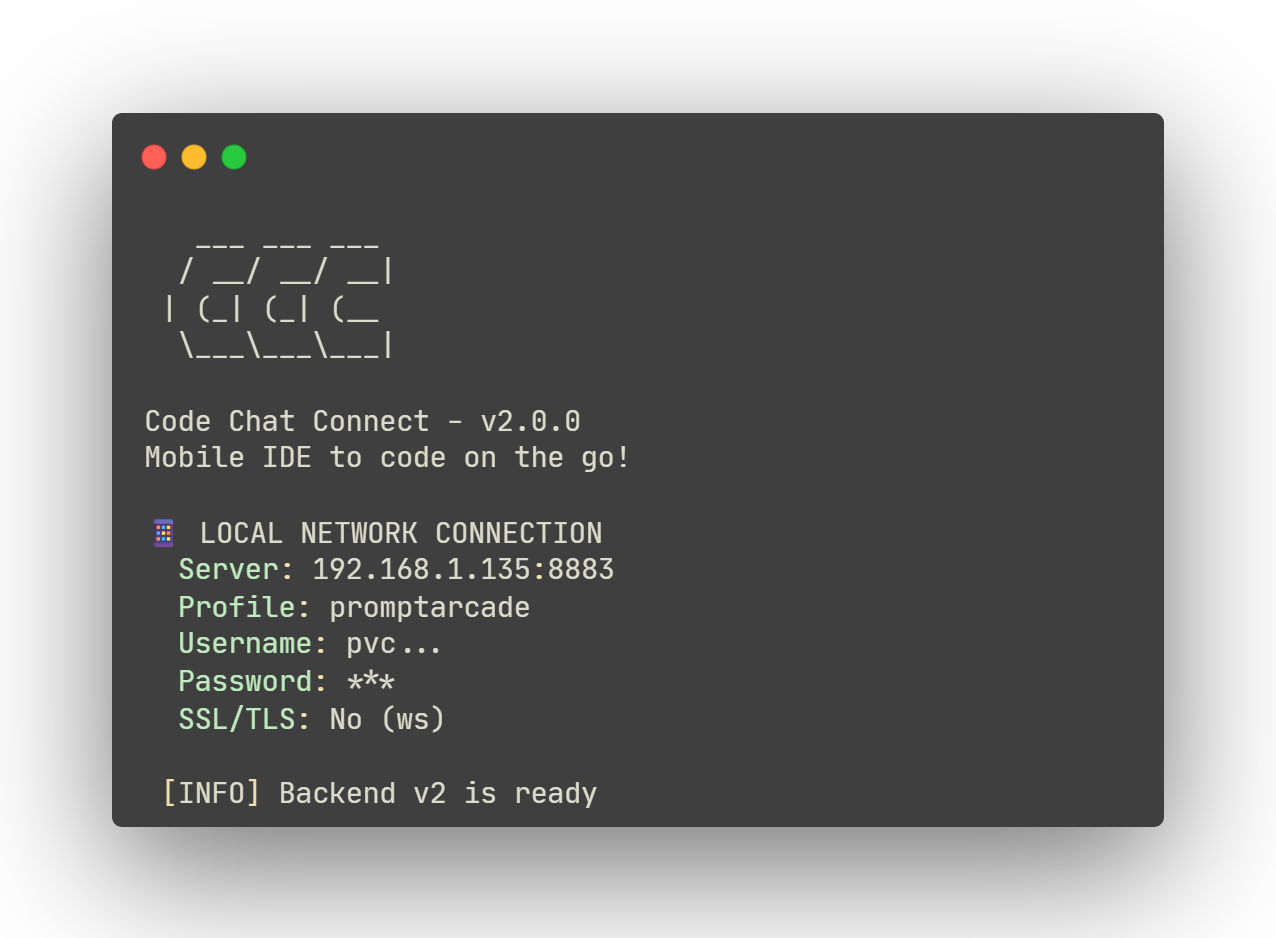
|
-
|
|
20
|
-
<p align="center">
|
|
21
|
-
<a href="https://play.google.com/store/apps/details?id=com.naarang.ccc">
|
|
22
|
-
<img src="https://firebasestorage.googleapis.com/v0/b/cc-chat-ui.firebasestorage.app/o/GetItOnGooglePlay_Badge_Web_color_English.png?alt=media&token=d2f34558-ce96-4882-9225-8ded76f759ba" alt="Get it on Google Play" height="80">
|
|
23
|
-
</a>
|
|
24
|
-
<br/>
|
|
25
|
-
<a href="https://play.google.com/apps/testing/com.naarang.ccc">
|
|
26
|
-
<sub>Join Android Beta Testing</sub>
|
|
27
|
-
</a>
|
|
28
|
-
</p>
|
|
29
|
-
|
|
30
|
-
<p align="center">
|
|
31
|
-
<a href="https://apps.apple.com/in/app/ccc-ui-for-coding-agents/id6753870766">
|
|
32
|
-
<img src="https://developer.apple.com/assets/elements/badges/download-on-the-app-store.svg" alt="Download on the App Store" height="80">
|
|
33
|
-
</a>
|
|
34
|
-
<br/>
|
|
35
|
-
<a href="https://testflight.apple.com/join/bEVNMrNH">
|
|
36
|
-
<sub>Join iOS Beta Testing (TestFlight)</sub>
|
|
37
|
-
</a>
|
|
38
|
-
</p>
|
|
39
|
-
|
|
40
|
-
<p align="center">
|
|
41
|
-
<a href="https://discord.gg/9EjE8t4YCF">
|
|
42
|
-
<img src="https://img.shields.io/badge/Discord-Join%20Server-5865F2?style=for-the-badge&logo=discord&logoColor=white" alt="Join our Discord">
|
|
43
|
-
</a>
|
|
44
|
-
</p>
|
|
45
|
-
|
|
46
|
-
<p align="center">
|
|
47
|
-
<a href="https://getc3.app">
|
|
48
|
-
<img src="https://img.shields.io/badge/Website-getc3.app-green?style=for-the-badge" alt="Visit Website">
|
|
49
|
-
</a>
|
|
50
|
-
|
|
51
|
-
<a href="https://getc3.app/docs">
|
|
52
|
-
<img src="https://img.shields.io/badge/Docs-Documentation-blue?style=for-the-badge" alt="Documentation">
|
|
53
|
-
</a>
|
|
54
|
-
</p>
|
|
55
|
-
|
|
56
|
-
## Features
|
|
57
|
-
|
|
58
|
-
- **Mobile Control** - Chat with Claude from your phone or tablet
|
|
59
|
-
- **Real-time Sync** - See Claude's responses instantly on your device
|
|
60
|
-
- **Smart Permission System** - Fine-grained control over code modifications
|
|
61
|
-
- **Web Terminal Access** - Full terminal access with auto-generated secure credentials
|
|
62
|
-
- **Checkpoints & Rewind** - Rewind Claude's changes to any checkpoint
|
|
63
|
-
- **Git Integration** - View diffs, commit, push, and create PRs from mobile
|
|
64
|
-
- **File Explorer & Editor** - Browse and edit project files with syntax highlighting
|
|
65
|
-
- **Session Resume** - Resume sessions and seamlessly switch between devices
|
|
66
|
-
- **Context Window Monitor** - Track token usage and context breakdown
|
|
67
|
-
- **Model Switcher** - Switch between Claude models during conversations
|
|
68
|
-
- **Push Notifications** - Get notified when Claude needs attention
|
|
69
|
-
- **Remote Access** - Optional ngrok integration for access from anywhere
|
|
70
|
-
- **Auto-Update System** - Automatic version checks and updates
|
|
71
|
-
|
|
72
|
-
## Requirements
|
|
73
|
-
|
|
74
|
-
**Bun runtime is required.** This package will not work with Node.js.
|
|
75
|
-
|
|
76
|
-
Install Bun:
|
|
77
|
-
```bash
|
|
78
|
-
# Windows (PowerShell)
|
|
79
|
-
powershell -c "irm bun.sh/install.ps1|iex"
|
|
80
|
-
|
|
81
|
-
# macOS / Linux
|
|
82
|
-
curl -fsSL https://bun.sh/install | bash
|
|
83
|
-
```
|
|
84
|
-
|
|
85
|
-
Learn more at [bun.sh](https://bun.sh)
|
|
86
|
-
|
|
87
|
-
## Installation
|
|
88
|
-
|
|
89
|
-
### Option 1: npm Install (Recommended)
|
|
90
|
-
|
|
91
|
-
```bash
|
|
92
|
-
npm install -g @naarang/ccc
|
|
93
|
-
```
|
|
94
|
-
|
|
95
|
-
Then run:
|
|
96
|
-
```bash
|
|
97
|
-
ccc
|
|
98
|
-
```
|
|
99
|
-
|
|
100
|
-
### Option 2: Standalone Binary (Beta)
|
|
101
|
-
|
|
102
|
-
For users who prefer not to install npm/Bun, standalone binaries are available:
|
|
103
|
-
|
|
104
|
-
**macOS / Linux:**
|
|
105
|
-
```bash
|
|
106
|
-
curl -fsSL https://getc3.app/install.sh | bash
|
|
107
|
-
```
|
|
108
|
-
|
|
109
|
-
**Windows (PowerShell as Administrator):**
|
|
110
|
-
```powershell
|
|
111
|
-
irm https://getc3.app/install.ps1 | iex
|
|
112
|
-
```
|
|
113
|
-
|
|
114
|
-
The binary will be installed to `~/.ccc/bin` and added to your PATH.
|
|
115
|
-
|
|
116
|
-
## Quick Start
|
|
117
|
-
|
|
118
|
-
### 1. Start the Backend Server
|
|
119
|
-
|
|
120
|
-
```bash
|
|
121
|
-
ccc
|
|
122
|
-
```
|
|
123
|
-
|
|
124
|
-
The server will start and display a QR code for easy mobile setup.
|
|
125
|
-
|
|
126
|
-
### 2. Configure the Mobile App
|
|
127
|
-
|
|
128
|
-
Download the CCC mobile app and scan the QR code, or manually add the server:
|
|
129
|
-
|
|
130
|
-
**For Local Network:**
|
|
131
|
-
```
|
|
132
|
-
Server URL: 192.168.x.xxx:8883
|
|
133
|
-
```
|
|
134
|
-
|
|
135
|
-
**For Remote Access:**
|
|
136
|
-
```bash
|
|
137
|
-
ccc --ngrok-token YOUR_TOKEN --username admin --password yourpassword
|
|
138
|
-
```
|
|
139
|
-
|
|
140
|
-
### 3. Start Chatting
|
|
141
|
-
|
|
142
|
-
Open the app, create a project pointing to your local directory, and start chatting with Claude!
|
|
143
|
-
|
|
144
|
-
## CLI Options
|
|
145
|
-
|
|
146
|
-
```bash
|
|
147
|
-
ccc [options]
|
|
148
|
-
|
|
149
|
-
Options:
|
|
150
|
-
-d, --debug Enable debug logging
|
|
151
|
-
--mqtt-port <port> Internal broker port (default: 8884)
|
|
152
|
-
--router-port <port> Main server port - app connects here (default: 8883)
|
|
153
|
-
--terminal-port <port> Terminal server port (default: 3001)
|
|
154
|
-
-u, --username <user> Authentication username (required for ngrok)
|
|
155
|
-
-p, --password <pass> Authentication password (required for ngrok)
|
|
156
|
-
-t, --ngrok-token <token> ngrok auth token for remote access
|
|
157
|
-
--ngrok-domain <domain> ngrok static domain (paid plan)
|
|
158
|
-
--no-auto-update Disable automatic updates
|
|
159
|
-
-v, --version Show version number
|
|
160
|
-
-h, --help Show help message
|
|
161
|
-
```
|
|
162
|
-
|
|
163
|
-
### Examples
|
|
164
|
-
|
|
165
|
-
```bash
|
|
166
|
-
# Basic usage (local network)
|
|
167
|
-
ccc
|
|
168
|
-
|
|
169
|
-
# With authentication
|
|
170
|
-
ccc -u admin -p secret
|
|
171
|
-
|
|
172
|
-
# With ngrok for remote access
|
|
173
|
-
ccc --ngrok-token YOUR_TOKEN -u admin -p secret
|
|
174
|
-
|
|
175
|
-
# Debug mode with custom ports
|
|
176
|
-
ccc --debug --router-port 9000
|
|
177
|
-
```
|
|
178
|
-
|
|
179
|
-
## Permission Modes
|
|
180
|
-
|
|
181
|
-
CCC offers four permission modes to balance convenience and security:
|
|
182
|
-
|
|
183
|
-
| Mode | Description | Use Case |
|
|
184
|
-
|------|-------------|----------|
|
|
185
|
-
| **Default** | Prompts for approval on first use | Balanced security |
|
|
186
|
-
| **Accept Edits** | Auto-approves file modifications | Active development |
|
|
187
|
-
| **Plan Mode** | Analysis only, no code changes | Code review |
|
|
188
|
-
| **Bypass All** | Skips all prompts (use with caution!) | Controlled environments |
|
|
189
|
-
|
|
190
|
-
## Terminal Access
|
|
191
|
-
|
|
192
|
-
CCC includes a built-in terminal accessible from the mobile app:
|
|
193
|
-
|
|
194
|
-
- Full terminal emulation with color support
|
|
195
|
-
- Auto-generated secure credentials
|
|
196
|
-
- Project-aware (opens in your project directory)
|
|
197
|
-
- Multiple concurrent sessions (max 5)
|
|
198
|
-
- Automatic resize on orientation change
|
|
199
|
-
|
|
200
|
-
## Security
|
|
201
|
-
|
|
202
|
-
- Terminal credentials are auto-generated and never logged
|
|
203
|
-
- Authentication required for remote access (ngrok)
|
|
204
|
-
- All internal services bind to localhost only
|
|
205
|
-
- Rate limiting on failed authentication attempts
|
|
206
|
-
|
|
207
|
-
## System Requirements
|
|
208
|
-
|
|
209
|
-
- **Bun**: v1.0.0 or higher
|
|
210
|
-
- **Claude Code**: Latest version ([Download](https://claude.com/product/claude-code))
|
|
211
|
-
- **Claude Subscription**: Active Pro / Max account or API KEY
|
|
212
|
-
- **Operating Systems**: Linux, macOS, Windows
|
|
213
|
-
|
|
214
|
-
## Troubleshooting
|
|
215
|
-
|
|
216
|
-
### Server Won't Start
|
|
217
|
-
|
|
218
|
-
```bash
|
|
219
|
-
# Check if ports are in use
|
|
220
|
-
lsof -i :8883
|
|
221
|
-
lsof -i :8884
|
|
222
|
-
|
|
223
|
-
# Use different ports
|
|
224
|
-
ccc --router-port 9000 --mqtt-port 9001
|
|
225
|
-
```
|
|
226
|
-
|
|
227
|
-
### Connection Issues
|
|
228
|
-
|
|
229
|
-
1. Ensure you're on the same WiFi network (for local connections)
|
|
230
|
-
2. Check firewall allows port 8883
|
|
231
|
-
3. Use correct format: `hostname:8883` (no `http://`)
|
|
232
|
-
4. Enable debug mode: `ccc --debug`
|
|
233
|
-
|
|
234
|
-
### Claude Not Responding
|
|
235
|
-
|
|
236
|
-
1. Verify Claude Code is installed: `claude --version`
|
|
237
|
-
2. Check authentication: `claude auth status`
|
|
238
|
-
3. Verify project path exists and is accessible
|
|
239
|
-
|
|
240
|
-
## Support & Community
|
|
241
|
-
|
|
242
|
-
- **Documentation**: [getc3.app/docs](https://getc3.app/docs)
|
|
243
|
-
- **Discord**: [Join our community](https://discord.gg/9EjE8t4YCF)
|
|
244
|
-
- **Email**: cccuiapp@gmail.com
|
|
245
|
-
|
|
246
|
-
## Support the Project
|
|
247
|
-
|
|
248
|
-
If you find CCC useful, consider supporting its development:
|
|
249
|
-
|
|
250
|
-
<p align="center">
|
|
251
|
-
<a href="https://getc3.app/support">
|
|
252
|
-
<img src="https://img.shields.io/badge/Support-CCC-blue?style=for-the-badge" alt="Support CCC">
|
|
253
|
-
</a>
|
|
254
|
-
</p>
|
|
255
|
-
|
|
256
|
-
---
|
|
257
|
-
|
|
258
|
-
**Made with ❤️ by naarang**
|
|
259
|
-
|
|
260
|
-
> **Note**: This tool requires an active Claude subscription and Claude Code to function properly. This project is not affiliated with, endorsed by, or sponsored in any form by Anthropic, Claude or Claude Code.
|
|
261
|
-
Claude & Claude Code are/may be a trademark and product of Anthropic, PBC.
|
|
1
|
+
# CCC - A Complete Mobile IDE for Coding Agents like Claude Code
|
|
2
|
+
|
|
3
|
+
**Control Claude Code and other coding agents from your mobile device**
|
|
4
|
+
|
|
5
|
+
CCC is a complete mobile IDE and more that creates a bridge between [Claude Code](https://claude.com/product/claude-code) and your mobile device, allowing you to chat with Claude and execute code operations remotely through the CCC mobile app.
|
|
6
|
+
|
|
7
|
+
[](https://www.npmjs.com/package/@naarang/ccc)
|
|
8
|
+
|
|
9
|
+

|
|
10
|
+
|
|
11
|
+
<p align="center">
|
|
12
|
+
<img src="https://firebasestorage.googleapis.com/v0/b/cc-chat-ui.firebasestorage.app/o/v2%2Fnpm_readme%2FWhatsApp%20Image%202026-01-16%20at%2010.55.20%20PM%20(2).jpeg?alt=media&token=9f71a100-c9ed-4e4e-ae60-f04b86c2b3e7" width="150" style="margin-right: 8px;" />
|
|
13
|
+
<img src="https://firebasestorage.googleapis.com/v0/b/cc-chat-ui.firebasestorage.app/o/v2%2Fnpm_readme%2FWhatsApp%20Image%202026-01-16%20at%2010.55.20%20PM%20(1).jpeg?alt=media&token=6fbb3693-17e1-439e-92f0-f634f79ad51f" width="150" style="margin-right: 8px;" />
|
|
14
|
+
<img src="https://firebasestorage.googleapis.com/v0/b/cc-chat-ui.firebasestorage.app/o/v2%2Fnpm_readme%2FWhatsApp%20Image%202026-01-16%20at%2010.55.20%20PM.jpeg?alt=media&token=3c74c222-7ea5-4e2c-961a-66bcc476a6d7" width="150" style="margin-right: 8px;" />
|
|
15
|
+
<img src="https://firebasestorage.googleapis.com/v0/b/cc-chat-ui.firebasestorage.app/o/v2%2Fnpm_readme%2FWhatsApp%20Image%202026-01-16%20at%2010.55.19%20PM%20(1).jpeg?alt=media&token=e4faec8b-4ad4-400e-9af8-2d0187157f97" width="150" style="margin-right: 8px;" />
|
|
16
|
+
<img src="https://firebasestorage.googleapis.com/v0/b/cc-chat-ui.firebasestorage.app/o/v2%2Fnpm_readme%2FWhatsApp%20Image%202026-01-16%20at%2010.55.19%20PM.jpeg?alt=media&token=b87ce7ad-dc6e-42d4-a6ac-2d1787f206bd" width="150" style="margin-right: 8px;" />
|
|
17
|
+
</p>
|
|
18
|
+
</p>
|
|
19
|
+
|
|
20
|
+
<p align="center">
|
|
21
|
+
<a href="https://play.google.com/store/apps/details?id=com.naarang.ccc">
|
|
22
|
+
<img src="https://firebasestorage.googleapis.com/v0/b/cc-chat-ui.firebasestorage.app/o/GetItOnGooglePlay_Badge_Web_color_English.png?alt=media&token=d2f34558-ce96-4882-9225-8ded76f759ba" alt="Get it on Google Play" height="80">
|
|
23
|
+
</a>
|
|
24
|
+
<br/>
|
|
25
|
+
<a href="https://play.google.com/apps/testing/com.naarang.ccc">
|
|
26
|
+
<sub>Join Android Beta Testing</sub>
|
|
27
|
+
</a>
|
|
28
|
+
</p>
|
|
29
|
+
|
|
30
|
+
<p align="center">
|
|
31
|
+
<a href="https://apps.apple.com/in/app/ccc-ui-for-coding-agents/id6753870766">
|
|
32
|
+
<img src="https://developer.apple.com/assets/elements/badges/download-on-the-app-store.svg" alt="Download on the App Store" height="80">
|
|
33
|
+
</a>
|
|
34
|
+
<br/>
|
|
35
|
+
<a href="https://testflight.apple.com/join/bEVNMrNH">
|
|
36
|
+
<sub>Join iOS Beta Testing (TestFlight)</sub>
|
|
37
|
+
</a>
|
|
38
|
+
</p>
|
|
39
|
+
|
|
40
|
+
<p align="center">
|
|
41
|
+
<a href="https://discord.gg/9EjE8t4YCF">
|
|
42
|
+
<img src="https://img.shields.io/badge/Discord-Join%20Server-5865F2?style=for-the-badge&logo=discord&logoColor=white" alt="Join our Discord">
|
|
43
|
+
</a>
|
|
44
|
+
</p>
|
|
45
|
+
|
|
46
|
+
<p align="center">
|
|
47
|
+
<a href="https://getc3.app">
|
|
48
|
+
<img src="https://img.shields.io/badge/Website-getc3.app-green?style=for-the-badge" alt="Visit Website">
|
|
49
|
+
</a>
|
|
50
|
+
|
|
51
|
+
<a href="https://getc3.app/docs">
|
|
52
|
+
<img src="https://img.shields.io/badge/Docs-Documentation-blue?style=for-the-badge" alt="Documentation">
|
|
53
|
+
</a>
|
|
54
|
+
</p>
|
|
55
|
+
|
|
56
|
+
## Features
|
|
57
|
+
|
|
58
|
+
- **Mobile Control** - Chat with Claude from your phone or tablet
|
|
59
|
+
- **Real-time Sync** - See Claude's responses instantly on your device
|
|
60
|
+
- **Smart Permission System** - Fine-grained control over code modifications
|
|
61
|
+
- **Web Terminal Access** - Full terminal access with auto-generated secure credentials
|
|
62
|
+
- **Checkpoints & Rewind** - Rewind Claude's changes to any checkpoint
|
|
63
|
+
- **Git Integration** - View diffs, commit, push, and create PRs from mobile
|
|
64
|
+
- **File Explorer & Editor** - Browse and edit project files with syntax highlighting
|
|
65
|
+
- **Session Resume** - Resume sessions and seamlessly switch between devices
|
|
66
|
+
- **Context Window Monitor** - Track token usage and context breakdown
|
|
67
|
+
- **Model Switcher** - Switch between Claude models during conversations
|
|
68
|
+
- **Push Notifications** - Get notified when Claude needs attention
|
|
69
|
+
- **Remote Access** - Optional ngrok integration for access from anywhere
|
|
70
|
+
- **Auto-Update System** - Automatic version checks and updates
|
|
71
|
+
|
|
72
|
+
## Requirements
|
|
73
|
+
|
|
74
|
+
**Bun runtime is required.** This package will not work with Node.js.
|
|
75
|
+
|
|
76
|
+
Install Bun:
|
|
77
|
+
```bash
|
|
78
|
+
# Windows (PowerShell)
|
|
79
|
+
powershell -c "irm bun.sh/install.ps1|iex"
|
|
80
|
+
|
|
81
|
+
# macOS / Linux
|
|
82
|
+
curl -fsSL https://bun.sh/install | bash
|
|
83
|
+
```
|
|
84
|
+
|
|
85
|
+
Learn more at [bun.sh](https://bun.sh)
|
|
86
|
+
|
|
87
|
+
## Installation
|
|
88
|
+
|
|
89
|
+
### Option 1: npm Install (Recommended)
|
|
90
|
+
|
|
91
|
+
```bash
|
|
92
|
+
npm install -g @naarang/ccc
|
|
93
|
+
```
|
|
94
|
+
|
|
95
|
+
Then run:
|
|
96
|
+
```bash
|
|
97
|
+
ccc
|
|
98
|
+
```
|
|
99
|
+
|
|
100
|
+
### Option 2: Standalone Binary (Beta)
|
|
101
|
+
|
|
102
|
+
For users who prefer not to install npm/Bun, standalone binaries are available:
|
|
103
|
+
|
|
104
|
+
**macOS / Linux:**
|
|
105
|
+
```bash
|
|
106
|
+
curl -fsSL https://getc3.app/install.sh | bash
|
|
107
|
+
```
|
|
108
|
+
|
|
109
|
+
**Windows (PowerShell as Administrator):**
|
|
110
|
+
```powershell
|
|
111
|
+
irm https://getc3.app/install.ps1 | iex
|
|
112
|
+
```
|
|
113
|
+
|
|
114
|
+
The binary will be installed to `~/.ccc/bin` and added to your PATH.
|
|
115
|
+
|
|
116
|
+
## Quick Start
|
|
117
|
+
|
|
118
|
+
### 1. Start the Backend Server
|
|
119
|
+
|
|
120
|
+
```bash
|
|
121
|
+
ccc
|
|
122
|
+
```
|
|
123
|
+
|
|
124
|
+
The server will start and display a QR code for easy mobile setup.
|
|
125
|
+
|
|
126
|
+
### 2. Configure the Mobile App
|
|
127
|
+
|
|
128
|
+
Download the CCC mobile app and scan the QR code, or manually add the server:
|
|
129
|
+
|
|
130
|
+
**For Local Network:**
|
|
131
|
+
```
|
|
132
|
+
Server URL: 192.168.x.xxx:8883
|
|
133
|
+
```
|
|
134
|
+
|
|
135
|
+
**For Remote Access:**
|
|
136
|
+
```bash
|
|
137
|
+
ccc --ngrok-token YOUR_TOKEN --username admin --password yourpassword
|
|
138
|
+
```
|
|
139
|
+
|
|
140
|
+
### 3. Start Chatting
|
|
141
|
+
|
|
142
|
+
Open the app, create a project pointing to your local directory, and start chatting with Claude!
|
|
143
|
+
|
|
144
|
+
## CLI Options
|
|
145
|
+
|
|
146
|
+
```bash
|
|
147
|
+
ccc [options]
|
|
148
|
+
|
|
149
|
+
Options:
|
|
150
|
+
-d, --debug Enable debug logging
|
|
151
|
+
--mqtt-port <port> Internal broker port (default: 8884)
|
|
152
|
+
--router-port <port> Main server port - app connects here (default: 8883)
|
|
153
|
+
--terminal-port <port> Terminal server port (default: 3001)
|
|
154
|
+
-u, --username <user> Authentication username (required for ngrok)
|
|
155
|
+
-p, --password <pass> Authentication password (required for ngrok)
|
|
156
|
+
-t, --ngrok-token <token> ngrok auth token for remote access
|
|
157
|
+
--ngrok-domain <domain> ngrok static domain (paid plan)
|
|
158
|
+
--no-auto-update Disable automatic updates
|
|
159
|
+
-v, --version Show version number
|
|
160
|
+
-h, --help Show help message
|
|
161
|
+
```
|
|
162
|
+
|
|
163
|
+
### Examples
|
|
164
|
+
|
|
165
|
+
```bash
|
|
166
|
+
# Basic usage (local network)
|
|
167
|
+
ccc
|
|
168
|
+
|
|
169
|
+
# With authentication
|
|
170
|
+
ccc -u admin -p secret
|
|
171
|
+
|
|
172
|
+
# With ngrok for remote access
|
|
173
|
+
ccc --ngrok-token YOUR_TOKEN -u admin -p secret
|
|
174
|
+
|
|
175
|
+
# Debug mode with custom ports
|
|
176
|
+
ccc --debug --router-port 9000
|
|
177
|
+
```
|
|
178
|
+
|
|
179
|
+
## Permission Modes
|
|
180
|
+
|
|
181
|
+
CCC offers four permission modes to balance convenience and security:
|
|
182
|
+
|
|
183
|
+
| Mode | Description | Use Case |
|
|
184
|
+
|------|-------------|----------|
|
|
185
|
+
| **Default** | Prompts for approval on first use | Balanced security |
|
|
186
|
+
| **Accept Edits** | Auto-approves file modifications | Active development |
|
|
187
|
+
| **Plan Mode** | Analysis only, no code changes | Code review |
|
|
188
|
+
| **Bypass All** | Skips all prompts (use with caution!) | Controlled environments |
|
|
189
|
+
|
|
190
|
+
## Terminal Access
|
|
191
|
+
|
|
192
|
+
CCC includes a built-in terminal accessible from the mobile app:
|
|
193
|
+
|
|
194
|
+
- Full terminal emulation with color support
|
|
195
|
+
- Auto-generated secure credentials
|
|
196
|
+
- Project-aware (opens in your project directory)
|
|
197
|
+
- Multiple concurrent sessions (max 5)
|
|
198
|
+
- Automatic resize on orientation change
|
|
199
|
+
|
|
200
|
+
## Security
|
|
201
|
+
|
|
202
|
+
- Terminal credentials are auto-generated and never logged
|
|
203
|
+
- Authentication required for remote access (ngrok)
|
|
204
|
+
- All internal services bind to localhost only
|
|
205
|
+
- Rate limiting on failed authentication attempts
|
|
206
|
+
|
|
207
|
+
## System Requirements
|
|
208
|
+
|
|
209
|
+
- **Bun**: v1.0.0 or higher
|
|
210
|
+
- **Claude Code**: Latest version ([Download](https://claude.com/product/claude-code))
|
|
211
|
+
- **Claude Subscription**: Active Pro / Max account or API KEY
|
|
212
|
+
- **Operating Systems**: Linux, macOS, Windows
|
|
213
|
+
|
|
214
|
+
## Troubleshooting
|
|
215
|
+
|
|
216
|
+
### Server Won't Start
|
|
217
|
+
|
|
218
|
+
```bash
|
|
219
|
+
# Check if ports are in use
|
|
220
|
+
lsof -i :8883
|
|
221
|
+
lsof -i :8884
|
|
222
|
+
|
|
223
|
+
# Use different ports
|
|
224
|
+
ccc --router-port 9000 --mqtt-port 9001
|
|
225
|
+
```
|
|
226
|
+
|
|
227
|
+
### Connection Issues
|
|
228
|
+
|
|
229
|
+
1. Ensure you're on the same WiFi network (for local connections)
|
|
230
|
+
2. Check firewall allows port 8883
|
|
231
|
+
3. Use correct format: `hostname:8883` (no `http://`)
|
|
232
|
+
4. Enable debug mode: `ccc --debug`
|
|
233
|
+
|
|
234
|
+
### Claude Not Responding
|
|
235
|
+
|
|
236
|
+
1. Verify Claude Code is installed: `claude --version`
|
|
237
|
+
2. Check authentication: `claude auth status`
|
|
238
|
+
3. Verify project path exists and is accessible
|
|
239
|
+
|
|
240
|
+
## Support & Community
|
|
241
|
+
|
|
242
|
+
- **Documentation**: [getc3.app/docs](https://getc3.app/docs)
|
|
243
|
+
- **Discord**: [Join our community](https://discord.gg/9EjE8t4YCF)
|
|
244
|
+
- **Email**: cccuiapp@gmail.com
|
|
245
|
+
|
|
246
|
+
## Support the Project
|
|
247
|
+
|
|
248
|
+
If you find CCC useful, consider supporting its development:
|
|
249
|
+
|
|
250
|
+
<p align="center">
|
|
251
|
+
<a href="https://getc3.app/support">
|
|
252
|
+
<img src="https://img.shields.io/badge/Support-CCC-blue?style=for-the-badge" alt="Support CCC">
|
|
253
|
+
</a>
|
|
254
|
+
</p>
|
|
255
|
+
|
|
256
|
+
---
|
|
257
|
+
|
|
258
|
+
**Made with ❤️ by naarang**
|
|
259
|
+
|
|
260
|
+
> **Note**: This tool requires an active Claude subscription and Claude Code to function properly. This project is not affiliated with, endorsed by, or sponsored in any form by Anthropic, Claude or Claude Code.
|
|
261
|
+
Claude & Claude Code are/may be a trademark and product of Anthropic, PBC.
|
|
262
262
|
This is an independent project built to use Claude Code in a convenient way.
|