@muze-nl/simplystore 0.1.2 → 0.1.5
This diff represents the content of publicly available package versions that have been released to one of the supported registries. The information contained in this diff is provided for informational purposes only and reflects changes between package versions as they appear in their respective public registries.
- package/.parcel-cache/07206d1728063d8c.txt +1604 -0
- package/.parcel-cache/423b2927e907f0d0 +0 -0
- package/.parcel-cache/ce1c7c93e1d158dd +0 -0
- package/.parcel-cache/d43c1a783b32ded4 +0 -0
- package/.parcel-cache/d9c636a9a4b84c2a +0 -0
- package/.parcel-cache/data.mdb +0 -0
- package/.parcel-cache/lock.mdb +0 -0
- package/README.md +86 -34
- package/curriculum-contexts.txt +11 -0
- package/curriculum-examenprogramma.jsontag +89012 -0
- package/default.jsontag +18 -0
- package/package.json +1 -1
- package/package.json~ +2 -2
- package/simplystore-talk.md +45 -0
- package/src/DEADJOE +3 -0
- package/src/editor.mjs~ +7 -0
- package/src/main.mjs~ +301 -0
- package/src/server.js +278 -0
- package/src/server.mjs +238 -274
- package/src/test.jsontag +8 -0
- package/src/test.mjs +20 -0
- package/src/testrefs.mjs +59 -0
- package/test.jsontag +301 -0
- package/test2.jsontag +17 -0
- package/tojsontag.mjs +55 -0
- package/www/codemirror/keymap/vim.js +3 -3
- package/www/editor.bundle.js +87694 -0
- package/www/index.html~ +136 -0
- package/www/test.html +30 -0
- package/.gitignore~ +0 -1
|
Binary file
|
|
Binary file
|
|
Binary file
|
|
Binary file
|
|
Binary file
|
|
Binary file
|
package/README.md
CHANGED
|
@@ -4,54 +4,112 @@ SimplyStore is an attempt to create a radically simpler backend storage server.
|
|
|
4
4
|
|
|
5
5
|
[JSONTag](https://github.com/poef/jsontag) is an enhancement over JSON that allows you to tag JSON data with metadata using HTML-like tags.
|
|
6
6
|
Javascript queries are run in a [VM2](https://www.npmjs.com/package/vm2) sandbox.
|
|
7
|
+
You can query data using the [array-where-select](https://www.npmjs.com/package/array-where-select) extension.
|
|
7
8
|
|
|
9
|
+
## Table of Contents
|
|
8
10
|
|
|
9
|
-
|
|
11
|
+
- [Background](#background)
|
|
12
|
+
- [Install](#install)
|
|
13
|
+
- [Usage](#usage)
|
|
14
|
+
- [Example Query](#examples)
|
|
15
|
+
- [Goals](#goals)
|
|
16
|
+
- [Roadmap](#roadmap)
|
|
17
|
+
- [License](#license)
|
|
10
18
|
|
|
11
|
-
|
|
19
|
+
<a name="background"></a>
|
|
20
|
+
## Background
|
|
21
|
+
|
|
22
|
+
<a name="install"></a>
|
|
23
|
+
## Install
|
|
24
|
+
|
|
25
|
+
SimplyStore is a Node library. You can install it in your application like this:
|
|
12
26
|
|
|
13
27
|
```shell
|
|
14
|
-
|
|
28
|
+
npm install @muze-nl/simplystore
|
|
15
29
|
```
|
|
16
30
|
|
|
17
|
-
|
|
31
|
+
<a name="usage"></a>
|
|
32
|
+
## Usage
|
|
18
33
|
|
|
19
|
-
|
|
20
|
-
|
|
21
|
-
|
|
34
|
+
Import the server in your main file like this:
|
|
35
|
+
|
|
36
|
+
```javascript
|
|
37
|
+
import simplystore from '@muze-nl/simplystore'
|
|
22
38
|
```
|
|
23
39
|
|
|
24
|
-
|
|
40
|
+
Then configure and start the server, like this:
|
|
41
|
+
|
|
42
|
+
```javascript
|
|
43
|
+
simplystore.run({
|
|
44
|
+
datafile: process.cwd().'data.json'
|
|
45
|
+
})
|
|
46
|
+
````
|
|
47
|
+
|
|
48
|
+
Other options are:
|
|
49
|
+
|
|
50
|
+
- port: The port number to use, defaults to 3000
|
|
51
|
+
- dataspace: an object or array with all the data that SimplyStore will serve. Optional, replaces the datafile.
|
|
52
|
+
|
|
53
|
+
If you start your server:
|
|
25
54
|
|
|
26
55
|
```shell
|
|
27
|
-
|
|
56
|
+
node myApp.js
|
|
28
57
|
```
|
|
29
58
|
|
|
30
|
-
|
|
59
|
+
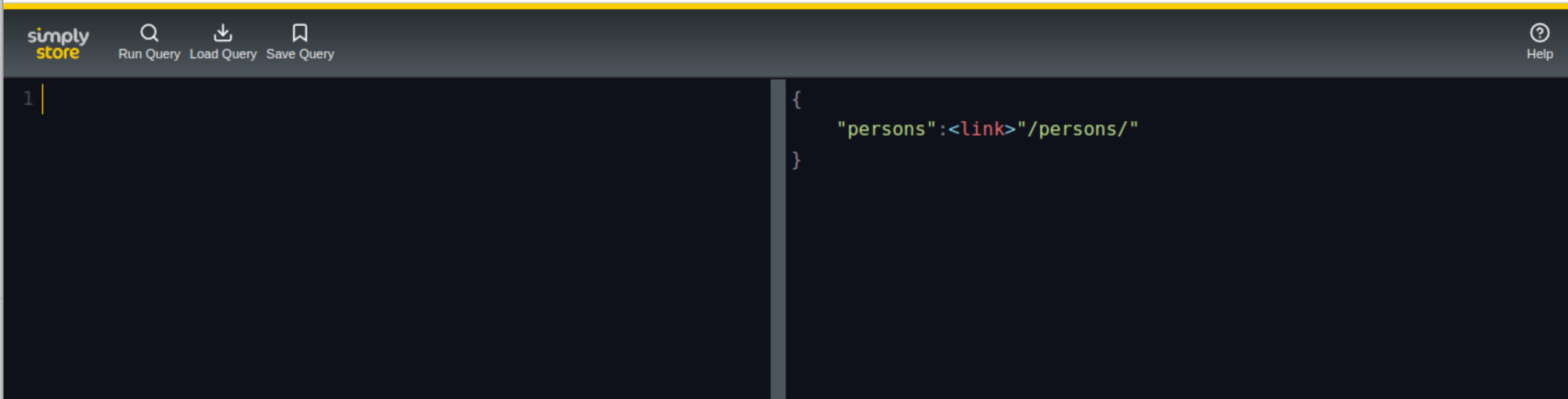
You should be able to go http://localhost:3000/query/ and see something like this:
|
|
31
60
|
|
|
32
|
-
|
|
61
|
+
|
|
62
|
+
|
|
63
|
+
<a name="examples"></a>
|
|
64
|
+
## Example query
|
|
65
|
+
|
|
66
|
+
Given a dataset like this (jsontag):
|
|
33
67
|
|
|
34
68
|
```
|
|
35
69
|
{
|
|
36
|
-
"persons"
|
|
70
|
+
"persons": [
|
|
71
|
+
<object id="john" class="Person">{
|
|
72
|
+
"name": "John",
|
|
73
|
+
"lastName": "Doe",
|
|
74
|
+
"dob": <date>"1972-09-20",
|
|
75
|
+
"foaf": [
|
|
76
|
+
<link>"jane"
|
|
77
|
+
]
|
|
78
|
+
},
|
|
79
|
+
<object id="jane" class="Person">{
|
|
80
|
+
"name": "Jane",
|
|
81
|
+
"lastName": "Doe",
|
|
82
|
+
"dob": <date>"1986-01-01",
|
|
83
|
+
"foaf": [
|
|
84
|
+
<link>"john"
|
|
85
|
+
]
|
|
86
|
+
}
|
|
87
|
+
]
|
|
37
88
|
}
|
|
38
89
|
```
|
|
39
90
|
|
|
40
|
-
|
|
91
|
+
You can post to the /query/ endpoint with javascript queries like these:
|
|
41
92
|
|
|
42
93
|
```
|
|
43
|
-
|
|
44
|
-
|
|
45
|
-
|
|
46
|
-
|
|
47
|
-
|
|
48
|
-
|
|
49
|
-
|
|
50
|
-
|
|
94
|
+
data.persons
|
|
95
|
+
.where({
|
|
96
|
+
name: 'John'
|
|
97
|
+
})
|
|
98
|
+
.select({
|
|
99
|
+
name: _,
|
|
100
|
+
foaf: {
|
|
101
|
+
name: _
|
|
51
102
|
}
|
|
52
|
-
|
|
103
|
+
})
|
|
53
104
|
```
|
|
54
105
|
|
|
106
|
+
See the [array-where-select](https://www.npmjs.com/package/array-where-select) package for more information about the query possibilities.
|
|
107
|
+
|
|
108
|
+
Remember: it is just javascript, so you can also use filter(), map() and reduce() on arrays. You can use all the default javascript API's, like Math, Array, Object, etc. You can not use any webbrowser API's, and you can't access any NodeJS API's. You do not have network access in your query.
|
|
109
|
+
|
|
110
|
+
Most important: queries cannot change the dataset, it is immutable.
|
|
111
|
+
|
|
112
|
+
<a name="goals"></a>
|
|
55
113
|
## Goals of this project
|
|
56
114
|
|
|
57
115
|
SimplyStore is an attemp to see if we can create a more defined and usable REST like service, out of the box. One where all you need to do is change the data and add some access rights and get a self-describing, browseable, working API.
|
|
@@ -64,7 +122,7 @@ The SimplyStore design is predicated on the following realisations:
|
|
|
64
122
|
4. There is no clear onramp from JSON to Linked Data.
|
|
65
123
|
5. Linked Data is very good for data / information exchange, but very costly for data manipulation and querying.
|
|
66
124
|
|
|
67
|
-
So the scope for
|
|
125
|
+
So the scope for SimplyStore is:
|
|
68
126
|
|
|
69
127
|
- datasets that will fit comfortably in memory, for now I've set a test goal of about 1GB of data.
|
|
70
128
|
- usecases that are mostly-read, with sparse updates.
|
|
@@ -73,9 +131,9 @@ So the scope for jsontag-rest-server is:
|
|
|
73
131
|
|
|
74
132
|
In addition, SimplyStore is meant to be a real-world testcase for JSONTag.
|
|
75
133
|
|
|
134
|
+
<a name="roadmap"></a>
|
|
76
135
|
## Roadmap
|
|
77
136
|
|
|
78
|
-
- [v] immutable dataset
|
|
79
137
|
- allow changes to dataset by creating a new root
|
|
80
138
|
- command handling with crud commands and command log
|
|
81
139
|
- backup current dataset to JSONTag file
|
|
@@ -83,17 +141,11 @@ In addition, SimplyStore is meant to be a real-world testcase for JSONTag.
|
|
|
83
141
|
|
|
84
142
|
- improved web client with type-specific views and form elements
|
|
85
143
|
|
|
86
|
-
- Datalog query support
|
|
87
|
-
- [v] compile triple store from jsontag data
|
|
88
|
-
- [v] add query method
|
|
89
|
-
- [v] extend datalog query to allow for custom match functions
|
|
90
|
-
- [v] run /query post body in VM2 sandbox
|
|
91
|
-
- [v] immutable dataset in query vm
|
|
92
|
-
- add indexing and other optimizations
|
|
93
|
-
- add standard library of matching functions
|
|
94
|
-
- allow vanilla javascript array map/reduce/filter approach
|
|
95
|
-
|
|
96
144
|
- add support for metadata on each JSON pointer path (or better: each object)
|
|
97
145
|
- allow custom templates, instead of the default index.html
|
|
98
146
|
- add support for access control, based on webid / openid connect
|
|
99
147
|
|
|
148
|
+
<a name="license"></a>
|
|
149
|
+
## License
|
|
150
|
+
|
|
151
|
+
[MIT](LICENSE) © Muze.nl
|
|
@@ -0,0 +1,11 @@
|
|
|
1
|
+
curriculum-basis
|
|
2
|
+
curriculum-doelgroepteksten
|
|
3
|
+
curriculum-erk
|
|
4
|
+
curriculum-examenprogramma
|
|
5
|
+
curriculum-examenprogramma-bg
|
|
6
|
+
curriculum-inhoudslijnen
|
|
7
|
+
curriculum-kerndoelen
|
|
8
|
+
curriculum-leerdoelenkaarten
|
|
9
|
+
curriculum-syllabus
|
|
10
|
+
curriculum-referentiekader
|
|
11
|
+
curriculum-niveauhierarchie
|