@monabbous/slidebox 1.2.0 → 1.3.0
This diff represents the content of publicly available package versions that have been released to one of the supported registries. The information contained in this diff is provided for informational purposes only and reflects changes between package versions as they appear in their respective public registries.
- package/README.md +340 -158
- package/dist/css/group.css +121 -0
- package/dist/css/slidebox.css +2 -0
- package/experimental/range.css +99 -0
- package/experimental/range.d.mts +14 -0
- package/experimental/range.mjs +213 -0
- package/less/experimental.less +119 -0
- package/less/slidebox.less +139 -0
- package/package.json +2 -1
- package/scss/_experimental.scss +109 -0
- package/scss/_mixins.scss +129 -0
- package/scss/group.scss +2 -0
- package/tailwind/experimental-rules.json +125 -0
- package/tailwind/group-rules.json +152 -0
- package/tailwind/index.cjs +8 -6
- package/tailwind/rules.json +2 -0
package/README.md
CHANGED
|
@@ -1,10 +1,84 @@
|
|
|
1
1
|
# Slidebox
|
|
2
2
|
|
|
3
|
-
|
|
3
|
+
## Native inputs. Just CSS.
|
|
4
4
|
|
|
5
|
-
|
|
5
|
+
Elastic checkboxes and grouped radios. Still real inputs: labels, keyboard controls, forms, and disabled states work as usual.
|
|
6
6
|
|
|
7
|
-
[
|
|
7
|
+
[](https://www.npmjs.com/package/@monabbous/slidebox)
|
|
8
|
+
[](https://www.npmjs.com/package/@monabbous/slidebox)
|
|
9
|
+
[](#tailwind)
|
|
10
|
+

|
|
11
|
+
|
|
12
|
+
<p align="center">
|
|
13
|
+
<img src="https://raw.githubusercontent.com/monabbous/slidebox/main/assets/slidebox-demo.webp" width="520" alt="A Material-style native checkbox stretching and springing between checked and unchecked, using CSS">
|
|
14
|
+
</p>
|
|
15
|
+
|
|
16
|
+
The header demo is CSS-only: width `2.5`, spacing `−.27`, deform `.2`, and a `350ms` elastic easing. The thumb changes shape through margins, not scaling.
|
|
17
|
+
|
|
18
|
+
[Try the playground](https://htmlpreview.github.io/?https://github.com/monabbous/slidebox/blob/main/index.html) · [npm](https://www.npmjs.com/package/@monabbous/slidebox) · [Source](https://github.com/monabbous/slidebox)
|
|
19
|
+
|
|
20
|
+
Switches and radio groups need no JavaScript. The range slider is **experimental**; its optional motion and progress fill use JavaScript. Checkbox dragging is also optional and experimental.
|
|
21
|
+
|
|
22
|
+
## Contents
|
|
23
|
+
|
|
24
|
+
- [Demos](#demos)
|
|
25
|
+
- [Checkboxes](#checkbox-demos)
|
|
26
|
+
- [Radio group](#radio-group-demo)
|
|
27
|
+
- [Range](#range-demos-experimental)
|
|
28
|
+
- [Install](#install)
|
|
29
|
+
- [Vanilla HTML and CSS](#vanilla-html-and-css)
|
|
30
|
+
- [Checkbox presets](#checkbox-presets)
|
|
31
|
+
- [Grouped radio buttons](#grouped-radio-buttons)
|
|
32
|
+
- [Sass / SCSS](#sass--scss)
|
|
33
|
+
- [Less](#less)
|
|
34
|
+
- [Tailwind](#tailwind)
|
|
35
|
+
- [Defaults and controls](#defaults-and-controls)
|
|
36
|
+
- [Experimental checkbox dragging](#experimental-checkbox-dragging)
|
|
37
|
+
- [Experimental range slider](#experimental-range-slider)
|
|
38
|
+
- [Accessibility and browser support](#accessibility-and-browser-support)
|
|
39
|
+
- [Development](#development)
|
|
40
|
+
|
|
41
|
+
## Demos
|
|
42
|
+
|
|
43
|
+
Click any preview to open the playground. These are crops of the actual recording, not rendered mockups.
|
|
44
|
+
|
|
45
|
+
### Checkbox demos
|
|
46
|
+
|
|
47
|
+
| Preset | nabous.dev | Browser colors | Width | Spacing | Deform |
|
|
48
|
+
| --- | --- | --- | --- | --- | --- |
|
|
49
|
+
| Default | [](https://htmlpreview.github.io/?https://github.com/monabbous/slidebox/blob/main/index.html) | [](https://htmlpreview.github.io/?https://github.com/monabbous/slidebox/blob/main/index.html) | 2 | .33 | .1 |
|
|
50
|
+
| Material UI | [](https://htmlpreview.github.io/?https://github.com/monabbous/slidebox/blob/main/index.html) | [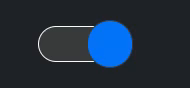](https://htmlpreview.github.io/?https://github.com/monabbous/slidebox/blob/main/index.html) | 2.5 | −.33 | .1 |
|
|
51
|
+
| Old iOS | [](https://htmlpreview.github.io/?https://github.com/monabbous/slidebox/blob/main/index.html) | [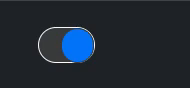](https://htmlpreview.github.io/?https://github.com/monabbous/slidebox/blob/main/index.html) | 1.6 | .03 | 0 |
|
|
52
|
+
|
|
53
|
+
These are geometry presets, not framework integrations or exact replicas. The browser-color Material UI and Old iOS previews are stills; those two weren't toggled in the recording.
|
|
54
|
+
|
|
55
|
+
**Material UI geometry, elastic easing:**
|
|
56
|
+
|
|
57
|
+
[](https://htmlpreview.github.io/?https://github.com/monabbous/slidebox/blob/main/index.html)
|
|
58
|
+
|
|
59
|
+
The header shows the larger custom variant. [Copy either configuration](#checkbox-presets).
|
|
60
|
+
|
|
61
|
+
### Radio group demo
|
|
62
|
+
|
|
63
|
+
[](https://htmlpreview.github.io/?https://github.com/monabbous/slidebox/blob/main/index.html)
|
|
64
|
+
|
|
65
|
+
Week → Day → Week → Month. Pressing the active choice does nothing; selecting before or after it stretches the highlight in that direction. CSS only. [Radio group setup](#grouped-radio-buttons).
|
|
66
|
+
|
|
67
|
+
### Range demos (experimental)
|
|
68
|
+
|
|
69
|
+
**Native range, no JS enhancements** — an unfilled still reference:
|
|
70
|
+
|
|
71
|
+
[](https://htmlpreview.github.io/?https://github.com/monabbous/slidebox/blob/main/index.html)
|
|
72
|
+
|
|
73
|
+
**Clicking to a value — motion and fill enabled (JS):**
|
|
74
|
+
|
|
75
|
+
[](https://htmlpreview.github.io/?https://github.com/monabbous/slidebox/blob/main/index.html)
|
|
76
|
+
|
|
77
|
+
**Dragging — motion and fill enabled (JS):**
|
|
78
|
+
|
|
79
|
+
[](https://htmlpreview.github.io/?https://github.com/monabbous/slidebox/blob/main/index.html)
|
|
80
|
+
|
|
81
|
+
The native control still owns its value. The helpers only add motion and fill. [Range setup and options](#experimental-range-slider).
|
|
8
82
|
|
|
9
83
|
## Install
|
|
10
84
|
|
|
@@ -12,265 +86,364 @@ An elastic CSS switch built on a native checkbox. No JavaScript, extra elements,
|
|
|
12
86
|
npm install @monabbous/slidebox
|
|
13
87
|
```
|
|
14
88
|
|
|
15
|
-
|
|
89
|
+
Pick one styling route: CSS, Sass, Less, or Tailwind. The mixins and plugin already include the component rules; don't import the plain CSS as well.
|
|
16
90
|
|
|
17
|
-
##
|
|
91
|
+
## Vanilla HTML and CSS
|
|
18
92
|
|
|
19
|
-
|
|
20
|
-
|
|
21
|
-
```js
|
|
22
|
-
import "@monabbous/slidebox/dist/css/slidebox.css";
|
|
23
|
-
```
|
|
24
|
-
|
|
25
|
-
Add the class to a checkbox and give it an accessible label:
|
|
93
|
+
No bundler required:
|
|
26
94
|
|
|
27
95
|
```html
|
|
96
|
+
<link rel="stylesheet" href="https://cdn.jsdelivr.net/npm/@monabbous/slidebox/dist/css/slidebox.css">
|
|
97
|
+
|
|
28
98
|
<label>
|
|
29
|
-
<input class="slidebox" type="checkbox"
|
|
99
|
+
<input class="slidebox" type="checkbox" name="notifications">
|
|
30
100
|
Enable notifications
|
|
31
101
|
</label>
|
|
32
102
|
```
|
|
33
103
|
|
|
34
|
-
|
|
104
|
+
Pin the CDN URL to a package version in production. You can also copy `dist/css/slidebox.css` from the installed package and serve it yourself.
|
|
35
105
|
|
|
36
|
-
|
|
106
|
+
With a bundler, import the same stylesheet:
|
|
37
107
|
|
|
38
|
-
|
|
108
|
+
```js
|
|
109
|
+
import "@monabbous/slidebox/dist/css/slidebox.css";
|
|
110
|
+
```
|
|
111
|
+
|
|
112
|
+
Use normal checkbox attributes: `checked`, `disabled`, `required`, `name`, and `value`. Add `role="switch"` if you want switch semantics instead of checkbox semantics. Always provide a label.
|
|
113
|
+
|
|
114
|
+
Set defaults on a parent and override individual inputs:
|
|
39
115
|
|
|
40
116
|
```css
|
|
41
117
|
:root {
|
|
42
118
|
color-scheme: light dark;
|
|
43
|
-
--slidebox-size:
|
|
44
|
-
--slidebox-on: #7c3aed;
|
|
119
|
+
--slidebox-size: 28px;
|
|
45
120
|
--slidebox-duration: 250ms;
|
|
46
121
|
}
|
|
47
122
|
|
|
48
123
|
.settings {
|
|
49
|
-
--slidebox-
|
|
124
|
+
--slidebox-on: #00b2b2;
|
|
50
125
|
}
|
|
51
126
|
|
|
52
|
-
.
|
|
127
|
+
.compact-switch {
|
|
53
128
|
--slidebox-size: 18px;
|
|
54
|
-
--slidebox-spacing: 0.25;
|
|
55
129
|
}
|
|
56
130
|
```
|
|
57
131
|
|
|
58
|
-
|
|
132
|
+
The package uses system colors by default. The recordings show the playground's **nabous.dev** glass skin alongside browser colors; that skin and its pointer lighting aren't applied to your app automatically.
|
|
133
|
+
|
|
134
|
+
## Checkbox presets
|
|
135
|
+
|
|
136
|
+
The [demo gallery](#checkbox-demos) shows each preset in **nabous.dev** and **browser colors**.
|
|
137
|
+
|
|
138
|
+
| Preset | Width | Spacing | Deform |
|
|
139
|
+
| --- | --- | --- | --- |
|
|
140
|
+
| Default | 2 | .33 | .1 |
|
|
141
|
+
| Material UI | 2.5 | −.33 | .1 |
|
|
142
|
+
| Old iOS | 1.6 | .03 | 0 |
|
|
143
|
+
|
|
144
|
+
```css
|
|
145
|
+
.material-switch {
|
|
146
|
+
--slidebox-width: 2.5;
|
|
147
|
+
--slidebox-spacing: -.33;
|
|
148
|
+
--slidebox-deform: .1;
|
|
149
|
+
}
|
|
150
|
+
|
|
151
|
+
.ios-switch {
|
|
152
|
+
--slidebox-width: 1.6;
|
|
153
|
+
--slidebox-spacing: .03;
|
|
154
|
+
--slidebox-deform: 0;
|
|
155
|
+
}
|
|
156
|
+
```
|
|
157
|
+
|
|
158
|
+
Add these classes alongside `slidebox`.
|
|
59
159
|
|
|
60
|
-
|
|
160
|
+
### The elastic Material-style version
|
|
61
161
|
|
|
62
|
-
|
|
162
|
+
For the larger, slower version in the header, use this sampled `easeInOutElastic` curve:
|
|
63
163
|
|
|
64
|
-
|
|
65
|
-
|
|
66
|
-
|
|
67
|
-
|
|
68
|
-
|
|
69
|
-
|
|
70
|
-
|
|
71
|
-
|
|
72
|
-
|
|
73
|
-
|
|
74
|
-
| `off` | `FieldText` | Unchecked thumb color. |
|
|
75
|
-
| `on` | System accent, when supported | Checked thumb color; falls back to `light-dark(#0b75ff, SelectedItem)`. |
|
|
164
|
+
```css
|
|
165
|
+
:root {
|
|
166
|
+
--ease-in-out-elastic: linear(
|
|
167
|
+
0, .0005, .001, .0011, .0003, -.0014, -.0037, -.0052,
|
|
168
|
+
-.0039, .0019, .012, .0221, .0239, .0077, -.0313, -.0831,
|
|
169
|
+
-.1175, -.0884, .0434, .2708, .5, .7292, .9566, 1.0884,
|
|
170
|
+
1.1175, 1.0831, 1.0313, .9923, .9761, .9779, .988, .9981,
|
|
171
|
+
1.0039, 1.0052, 1.0037, 1.0014, .9997, .9989, .999, .9995, 1
|
|
172
|
+
);
|
|
173
|
+
}
|
|
76
174
|
|
|
77
|
-
|
|
175
|
+
.material-elastic {
|
|
176
|
+
--slidebox-width: 2.5;
|
|
177
|
+
--slidebox-spacing: -.27;
|
|
178
|
+
--slidebox-deform: .2;
|
|
179
|
+
--slidebox-duration: 350ms;
|
|
180
|
+
--slidebox-easing: var(--ease-in-out-elastic);
|
|
181
|
+
}
|
|
182
|
+
```
|
|
183
|
+
|
|
184
|
+
```html
|
|
185
|
+
<label><input class="slidebox material-elastic" type="checkbox"> Enable sound</label>
|
|
186
|
+
```
|
|
187
|
+
|
|
188
|
+
The small preview above keeps the fixed Material UI preset (`−.33` spacing, `.1` deform, `200ms`); the header uses the custom values shown in the snippet. Both use CSS easing, not a JavaScript spring.
|
|
189
|
+
|
|
190
|
+
## Grouped radio buttons
|
|
191
|
+
|
|
192
|
+
Import the group stylesheet separately:
|
|
193
|
+
|
|
194
|
+
```html
|
|
195
|
+
<link rel="stylesheet" href="https://cdn.jsdelivr.net/npm/@monabbous/slidebox/dist/css/group.css">
|
|
196
|
+
|
|
197
|
+
<fieldset>
|
|
198
|
+
<legend>Calendar view</legend>
|
|
199
|
+
<div class="slidebox-group">
|
|
200
|
+
<label><input type="radio" name="view" value="day"><span>Day</span></label>
|
|
201
|
+
<label><input type="radio" name="view" value="week" checked><span>Week</span></label>
|
|
202
|
+
<label><input type="radio" name="view" value="month"><span>Month</span></label>
|
|
203
|
+
</div>
|
|
204
|
+
</fieldset>
|
|
205
|
+
```
|
|
78
206
|
|
|
79
|
-
|
|
207
|
+
Bundler import: `@monabbous/slidebox/dist/css/group.css`.
|
|
80
208
|
|
|
81
|
-
|
|
209
|
+
Keep the structure **group → label → input followed by span**. Radios in one group share a `name`; independent groups need different names. A `fieldset` and `legend` provide the group's accessible name.
|
|
210
|
+
|
|
211
|
+
Pressing the active segment doesn't deform it. Press an earlier or later segment and the current highlight stretches toward it. Labels stay put. Arrow keys and form submission remain native, including in RTL layouts.
|
|
212
|
+
|
|
213
|
+
Scoped CSS anchor positioning gives supported browsers a shared sliding highlight. Other modern browsers get a per-segment highlight. Neither version needs JavaScript. Keep labels short: segments share the available width in a single row. This is a radio group, not a tabs widget.
|
|
214
|
+
|
|
215
|
+
## Sass / SCSS
|
|
216
|
+
|
|
217
|
+
Use Dart Sass. Importing the mixin module emits no CSS until you include a mixin:
|
|
82
218
|
|
|
83
219
|
```scss
|
|
84
220
|
@use "@monabbous/slidebox/scss/mixins" as slidebox with (
|
|
85
|
-
$defaults: (
|
|
86
|
-
size: 24px,
|
|
87
|
-
on: #7c3aed,
|
|
88
|
-
duration: 250ms
|
|
89
|
-
)
|
|
221
|
+
$defaults: (on: #00b2b2, duration: 250ms)
|
|
90
222
|
);
|
|
91
223
|
|
|
92
|
-
.
|
|
93
|
-
@include slidebox.slidebox();
|
|
224
|
+
.switch {
|
|
225
|
+
@include slidebox.slidebox((size: 28px));
|
|
94
226
|
}
|
|
95
227
|
|
|
96
|
-
.
|
|
97
|
-
@include slidebox.slidebox((size:
|
|
228
|
+
.material-switch {
|
|
229
|
+
@include slidebox.slidebox((size: 28px, width: 2.5, spacing: -.33));
|
|
98
230
|
}
|
|
99
|
-
```
|
|
100
231
|
|
|
101
|
-
|
|
102
|
-
|
|
232
|
+
.view-picker {
|
|
233
|
+
@include slidebox.group((size: 36px, selected-text: #063c59));
|
|
234
|
+
}
|
|
103
235
|
```
|
|
104
236
|
|
|
105
|
-
|
|
237
|
+
Use your chosen class on the checkbox or group container instead of `slidebox` / `slidebox-group`. `$defaults` applies to both mixins; the map passed to an include overrides it. Configure the module once, before another module loads it.
|
|
238
|
+
|
|
239
|
+
For the ready-made classes, use `@use "@monabbous/slidebox/scss/slidebox";` and/or `@use "@monabbous/slidebox/scss/group";` instead. With the Sass CLI, add `--load-path=node_modules`.
|
|
106
240
|
|
|
107
|
-
|
|
241
|
+
The experimental range has a separate module:
|
|
108
242
|
|
|
109
243
|
```scss
|
|
110
|
-
@use "@monabbous/slidebox/scss/
|
|
244
|
+
@use "@monabbous/slidebox/scss/experimental" as experimental with (
|
|
245
|
+
$defaults: (on: #00b2b2, duration: 250ms)
|
|
246
|
+
);
|
|
247
|
+
|
|
248
|
+
.volume { @include experimental.range((size: 28px, spacing: .33)); }
|
|
111
249
|
```
|
|
112
250
|
|
|
113
|
-
## Less
|
|
251
|
+
## Less
|
|
114
252
|
|
|
115
|
-
Import the
|
|
253
|
+
Import the mixins, then create a wrapper for project defaults:
|
|
116
254
|
|
|
117
255
|
```less
|
|
118
256
|
@import "@monabbous/slidebox/less/slidebox.less";
|
|
119
257
|
|
|
120
|
-
.app-switch(@size:
|
|
121
|
-
.slidebox(@size: @size; @
|
|
258
|
+
.app-switch(@size: 28px; @width: 2; @spacing: .33) {
|
|
259
|
+
.slidebox(@size: @size; @width: @width; @spacing: @spacing; @on: #00b2b2; @duration: 250ms);
|
|
122
260
|
}
|
|
123
261
|
|
|
124
|
-
.
|
|
125
|
-
.
|
|
126
|
-
.
|
|
262
|
+
.switch { .app-switch(); }
|
|
263
|
+
.material-switch { .app-switch(@width: 2.5; @spacing: -.33); }
|
|
264
|
+
.small-switch { .app-switch(@size: 18px); }
|
|
265
|
+
.view-picker { .slidebox-group(@on: #00b2b2; @selected-text: #063c59); }
|
|
127
266
|
```
|
|
128
267
|
|
|
129
|
-
The import emits no CSS on its own. Use semicolons between arguments, especially
|
|
268
|
+
The import emits no CSS on its own. Use semicolons between arguments, especially with timing functions containing commas. With the Less CLI, add `--include-path=node_modules`.
|
|
130
269
|
|
|
131
|
-
|
|
270
|
+
For the experimental range:
|
|
132
271
|
|
|
133
|
-
|
|
272
|
+
```less
|
|
273
|
+
@import "@monabbous/slidebox/less/experimental.less";
|
|
134
274
|
|
|
135
|
-
|
|
275
|
+
.volume { .slidebox-range(@size: 28px; @spacing: .33; @on: #00b2b2); }
|
|
276
|
+
```
|
|
277
|
+
|
|
278
|
+
## Tailwind
|
|
279
|
+
|
|
280
|
+
The plugin is included in this package. Use your existing Tailwind setup; it supports **v3.4 and v4**.
|
|
136
281
|
|
|
137
|
-
|
|
282
|
+
### Tailwind v4
|
|
138
283
|
|
|
139
284
|
```css
|
|
140
285
|
@import "tailwindcss";
|
|
141
286
|
@plugin "@monabbous/slidebox/tailwind/index.cjs" {
|
|
142
|
-
size:
|
|
143
|
-
on: #
|
|
287
|
+
size: 28px;
|
|
288
|
+
on: #00b2b2;
|
|
144
289
|
duration: 250ms;
|
|
145
290
|
}
|
|
146
291
|
```
|
|
147
292
|
|
|
148
|
-
|
|
293
|
+
The options block sets project defaults. Omit it to keep the component defaults.
|
|
149
294
|
|
|
150
|
-
|
|
295
|
+
### Tailwind v3
|
|
151
296
|
|
|
152
297
|
```js
|
|
298
|
+
// tailwind.config.cjs
|
|
153
299
|
module.exports = {
|
|
154
300
|
content: ["./src/**/*.{html,js,ts,jsx,tsx,vue,svelte}"],
|
|
155
301
|
plugins: [
|
|
156
302
|
require("@monabbous/slidebox/tailwind/index.cjs")({
|
|
157
|
-
size: "
|
|
158
|
-
on: "#
|
|
303
|
+
size: "28px",
|
|
304
|
+
on: "#00b2b2",
|
|
159
305
|
duration: "250ms",
|
|
160
306
|
}),
|
|
161
307
|
],
|
|
162
308
|
};
|
|
163
309
|
```
|
|
164
310
|
|
|
165
|
-
###
|
|
166
|
-
|
|
167
|
-
Add `slidebox` for the component, then control it with `slidebox-NAME-[VALUE]` utilities:
|
|
311
|
+
### Classes
|
|
168
312
|
|
|
169
313
|
```html
|
|
170
314
|
<label>
|
|
171
|
-
<input
|
|
172
|
-
type="checkbox"
|
|
173
|
-
|
|
174
|
-
>
|
|
175
|
-
Enable notifications
|
|
315
|
+
<input class="slidebox slidebox-width-[2.5] slidebox-spacing-[-0.33] slidebox-on-teal-500"
|
|
316
|
+
type="checkbox">
|
|
317
|
+
Enable sound
|
|
176
318
|
</label>
|
|
319
|
+
|
|
320
|
+
<fieldset>
|
|
321
|
+
<legend>Calendar view</legend>
|
|
322
|
+
<div class="slidebox-group slidebox-selected-text-slate-950">
|
|
323
|
+
<label><input type="radio" name="view" value="day"><span>Day</span></label>
|
|
324
|
+
<label><input type="radio" name="view" value="week" checked><span>Week</span></label>
|
|
325
|
+
</div>
|
|
326
|
+
</fieldset>
|
|
327
|
+
|
|
328
|
+
<!-- Experimental range -->
|
|
329
|
+
<input class="slidebox-range w-64 slidebox-size-[28px]" type="range" aria-label="Volume">
|
|
177
330
|
```
|
|
178
331
|
|
|
179
|
-
|
|
180
|
-
- `track`, `border`, `off`, and `on` expose your Tailwind color palette, such as `slidebox-on-emerald-500`.
|
|
181
|
-
- `duration` and `easing` also expose Tailwind's transition theme, such as `slidebox-duration-300` and `slidebox-easing-linear`.
|
|
182
|
-
- Variants work normally: `md:slidebox-size-[32px]`, `hover:slidebox-on-emerald-600`, etc.
|
|
183
|
-
- Use `slidebox-size-*` rather than `h-*` to resize: thumb geometry uses the switch's font size.
|
|
184
|
-
- Keep complete class names in source; dynamically assembled class strings may not be detected by Tailwind.
|
|
332
|
+
No extra component stylesheet imports are needed. Classes are generated when used.
|
|
185
333
|
|
|
186
|
-
|
|
334
|
+
- Every control accepts arbitrary values: `slidebox-deform-[0.2]`, `slidebox-duration-[350ms]`, `slidebox-easing-[var(--ease-in-out-elastic)]`.
|
|
335
|
+
- Colors use your palette: `slidebox-on-teal-500`, `slidebox-track-slate-900`, `slidebox-text-white`, `slidebox-selected-text-slate-950`.
|
|
336
|
+
- Duration, easing, and radius also use the corresponding Tailwind themes: `slidebox-duration-300`, `slidebox-easing-linear`, `slidebox-radius-lg`.
|
|
337
|
+
- Variants work normally: `dark:slidebox-on-teal-300`, `md:slidebox-size-[36px]`.
|
|
338
|
+
- Use `slidebox-size-*` to resize a checkbox, not `h-*`. Its geometry follows font size. Ranges use normal width utilities such as `w-64`.
|
|
339
|
+
- Keep complete class names in source so Tailwind can detect them.
|
|
187
340
|
|
|
188
|
-
|
|
189
|
-
theme: {
|
|
190
|
-
extend: {
|
|
191
|
-
slidebox: {
|
|
192
|
-
size: { compact: "18px", comfortable: "28px" },
|
|
193
|
-
width: { wide: "2.5" },
|
|
194
|
-
},
|
|
195
|
-
},
|
|
196
|
-
},
|
|
197
|
-
// Now use slidebox-size-compact or slidebox-width-wide.
|
|
198
|
-
```
|
|
341
|
+
In v3, you can name your own values under `theme.extend.slidebox`, for example `size: { compact: "18px" }` gives you `slidebox-size-compact`.
|
|
199
342
|
|
|
200
|
-
|
|
343
|
+
## Defaults and controls
|
|
201
344
|
|
|
202
|
-
|
|
345
|
+
The same names work as `--slidebox-NAME` custom properties, Sass map keys, Less arguments (`@NAME`), and Tailwind plugin options/utilities.
|
|
203
346
|
|
|
204
|
-
|
|
347
|
+
| Control | Checkbox | Radio group | Experimental range |
|
|
348
|
+
| --- | --- | --- | --- |
|
|
349
|
+
| `size` | `54px` height | `36px` minimum segment height | `24px` track height |
|
|
350
|
+
| `width` | `2`, a width/height ratio greater than 1 | Use normal CSS width | Use normal CSS width |
|
|
351
|
+
| `spacing` | `.33`; negative values let the thumb protrude | `.12` padding/gap ratio | `.33` thumb/fill inset; negative values enlarge the thumb |
|
|
352
|
+
| `deform` | `.1` press deformation / delay ratio | `.06` directional press stretch | `.1` maximum travel lag / delay ratio; optional JS only |
|
|
353
|
+
| `duration` | `200ms` | `200ms` | `200ms` |
|
|
354
|
+
| `easing` | `ease-in-out` | `ease-in-out` | `ease-in-out` |
|
|
355
|
+
| `track` | `Field` | `Field` | `Field` |
|
|
356
|
+
| `border` | `ButtonBorder` | `ButtonBorder` | `ButtonBorder` |
|
|
357
|
+
| `off` | `FieldText` unchecked thumb | Unselected text fallback | Not used |
|
|
358
|
+
| `on` | Checked thumb color | Selected highlight color | Thumb and optional fill color |
|
|
359
|
+
| `text` | Not used | Unselected text; falls back to `off` / `FieldText` | Not used |
|
|
360
|
+
| `selected-text` | Not used | `HighlightText` | Not used |
|
|
361
|
+
| `radius` | Not used; pill shape | `100vw` | `100vw` |
|
|
205
362
|
|
|
206
|
-
|
|
363
|
+
`on` uses `AccentColor` where supported, otherwise `light-dark(#0b75ff, SelectedItem)`. Set `color-scheme: light dark` to follow the user's theme, or choose `light` / `dark` explicitly. When setting a custom radio highlight, set a contrasting `selected-text` too.
|
|
207
364
|
|
|
208
|
-
|
|
209
|
-
|
|
210
|
-
|
|
211
|
-
|
|
212
|
-
|
|
213
|
-
|
|
365
|
+
Keep spacing below `1`. Negative checkbox/range spacing is intentional; negative padding is clamped to zero for the native range. `deform: 0` removes deformation.
|
|
366
|
+
|
|
367
|
+
Inherited properties make good site defaults. A mixin/plugin default assigned directly to a control takes priority over inheritance; override that control with a selector or utility when needed.
|
|
368
|
+
|
|
369
|
+
## Experimental checkbox dragging
|
|
370
|
+
|
|
371
|
+
The CSS checkbox already handles clicks and keyboard input. This optional module lets its thumb follow a mouse, touch, or pen drag:
|
|
214
372
|
|
|
215
373
|
```js
|
|
216
|
-
import "@monabbous/slidebox/dist/css/slidebox.css"; // Omit for Sass, Less, or Tailwind.
|
|
217
374
|
import { enhanceSlidebox } from "@monabbous/slidebox/experimental/drag.mjs";
|
|
218
375
|
|
|
376
|
+
// Run after the input is mounted and styled with Slidebox.
|
|
219
377
|
const input = document.querySelector("#notifications");
|
|
220
378
|
const disableDragging = enhanceSlidebox(input, { threshold: 5 });
|
|
221
379
|
|
|
222
|
-
//
|
|
380
|
+
// On unmount, or when disabling the feature:
|
|
223
381
|
// disableDragging();
|
|
224
382
|
```
|
|
225
383
|
|
|
226
|
-
|
|
384
|
+
`threshold` is horizontal movement in CSS pixels before a drag starts; it defaults to `5`. Release at or beyond the midpoint to check the input. A changed state emits one bubbling `input` event, then one bubbling `change` event. The following pointer click is suppressed so it doesn't toggle twice.
|
|
227
385
|
|
|
228
|
-
|
|
386
|
+
Taps, label clicks, Space-key activation, disabled states, and form resets remain native. Vertical touch scrolling and pinch zoom stay available. Pointer cancellation abandons the gesture; RTL reverses its direction. `deform` and `duration` control the stretch; reduced motion disables it.
|
|
229
387
|
|
|
230
|
-
|
|
231
|
-
- The thumb follows the pointer; its trailing edge stretches and relaxes using `--slidebox-deform` and `--slidebox-duration`. Set `--slidebox-deform: 0` to disable stretching. Reduced-motion preferences also disable drag stretching.
|
|
232
|
-
- Releasing at or beyond the midpoint checks the input; releasing before it unchecks it. A changed state emits one bubbling `input` event followed by one bubbling `change` event. Drag movement alone does not emit either event.
|
|
233
|
-
- Normal clicks, label clicks, Space-key activation, form values, and form resets remain native. A completed drag suppresses its following click to prevent a second toggle. No synthetic `click` is emitted for a drag.
|
|
234
|
-
- RTL reverses the gesture direction. Disabled inputs, including those inside a disabled fieldset, cannot be dragged.
|
|
235
|
-
- Vertical touch gestures remain available for scrolling, and pinch zoom remains enabled. Cancellation or lost pointer capture abandons the gesture without committing it.
|
|
236
|
-
- Call the returned cleanup function to stop dragging and restore temporary styles. Cleanup can be called repeatedly. Disabling it during a drag cancels that drag.
|
|
237
|
-
- Repeated calls for the same input return its existing cleanup function. To change `threshold`, clean up and initialize again.
|
|
388
|
+
Calling the initializer again returns the existing cleanup function. Clean up before changing options or removing the input. Types are included, and importing the module is safe during server rendering; initialization needs a mounted checkbox and Pointer Events/pointer capture.
|
|
238
389
|
|
|
239
|
-
|
|
390
|
+
For controlled framework inputs, synchronize state from the native `input`/`change` events and detach those listeners on cleanup. Test that binding rather than assuming the framework's synthetic events behave identically.
|
|
240
391
|
|
|
241
|
-
|
|
242
|
-
import { useEffect, useRef, useState } from "react";
|
|
243
|
-
import { enhanceSlidebox } from "@monabbous/slidebox/experimental/drag.mjs";
|
|
392
|
+
## Experimental range slider
|
|
244
393
|
|
|
245
|
-
|
|
246
|
-
|
|
247
|
-
|
|
248
|
-
|
|
249
|
-
|
|
250
|
-
|
|
251
|
-
|
|
252
|
-
|
|
253
|
-
|
|
254
|
-
|
|
255
|
-
|
|
256
|
-
|
|
257
|
-
|
|
258
|
-
|
|
259
|
-
|
|
260
|
-
|
|
261
|
-
|
|
262
|
-
|
|
263
|
-
|
|
264
|
-
|
|
265
|
-
|
|
266
|
-
|
|
267
|
-
|
|
268
|
-
|
|
394
|
+
The unfilled native range works without JavaScript:
|
|
395
|
+
|
|
396
|
+
```html
|
|
397
|
+
<link rel="stylesheet" href="https://cdn.jsdelivr.net/npm/@monabbous/slidebox/experimental/range.css">
|
|
398
|
+
|
|
399
|
+
<label for="volume">Volume</label>
|
|
400
|
+
<input id="volume" class="slidebox-range" type="range"
|
|
401
|
+
name="volume" min="0" max="100" step="5" value="40">
|
|
402
|
+
```
|
|
403
|
+
|
|
404
|
+
Bundler import: `@monabbous/slidebox/experimental/range.css`. Sass, Less, and Tailwind equivalents are shown above.
|
|
405
|
+
|
|
406
|
+
Use normal `min`, `max`, `step`, `value`, and `disabled` attributes. Listen to `input` for live values or `change` for committed changes. Set the overall length with CSS width; `size` controls height. Thumb spacing applies at both endpoints.
|
|
407
|
+
|
|
408
|
+
### Optional motion and progress fill
|
|
409
|
+
|
|
410
|
+
The [range demos](#range-demos-experimental) show **both JavaScript options enabled**:
|
|
411
|
+
|
|
412
|
+
```js
|
|
413
|
+
import {
|
|
414
|
+
enhanceSlideboxRange,
|
|
415
|
+
enhanceSlideboxRangeFill,
|
|
416
|
+
} from "@monabbous/slidebox/experimental/range.mjs";
|
|
417
|
+
|
|
418
|
+
const input = document.querySelector("#volume");
|
|
419
|
+
const disableMotion = enhanceSlideboxRange(input);
|
|
420
|
+
const disableFill = enhanceSlideboxRangeFill(input);
|
|
421
|
+
|
|
422
|
+
// On unmount:
|
|
423
|
+
// disableMotion();
|
|
424
|
+
// disableFill();
|
|
269
425
|
```
|
|
270
426
|
|
|
271
|
-
|
|
427
|
+
Use either helper alone or both together. Neither changes the native value or emits synthetic events.
|
|
272
428
|
|
|
273
|
-
|
|
429
|
+
**Motion:** the leading edge reaches the native destination; the tail follows after a delay. Reversing direction swaps the trailing edge. A temporary, non-interactive visual layer supplies the margin-based deformation without resizing the native hit box. It is removed after settling or cleanup. `deform` limits the lag and sets its initial delay (`duration × deform`); `duration` controls settling. Keyboard changes also animate. Reduced motion, forced colors, `deform: 0`, or `duration: 0ms` disables this effect.
|
|
430
|
+
|
|
431
|
+
**Fill:** a rounded, opaque progress bar follows the value, matching the thumb's height and inset. Progress is clamped to 0–100%, fill height is capped, and painting is clipped inside the track. RTL reverses it. It updates on `input`, `change`, and native form reset. After setting a value programmatically, dispatch an `input` event if you want the fill to update.
|
|
432
|
+
|
|
433
|
+
The helpers include TypeScript types. Repeated initialization returns the existing cleanup function. Use matching CSS and JS from the same package version, initialize after mounting, and clean up before removing the control. This is still experimental: horizontal sliders only, with more browser/device testing needed, particularly for transformed or zoomed containers and unusual stacking contexts.
|
|
434
|
+
|
|
435
|
+
In the playground, the range has its own section below the switch/radio controls. **Directional range motion (JS)** and **Fill progress (JS)** are independent and off by default. Reset turns both off.
|
|
436
|
+
|
|
437
|
+
## Accessibility and browser support
|
|
438
|
+
|
|
439
|
+
- Keep real labels. Use `fieldset` / `legend` for related radios.
|
|
440
|
+
- Native focus, keyboard interaction, validation, and form values stay in place. Don't remove focus outlines without replacing them.
|
|
441
|
+
- `prefers-reduced-motion` shortens CSS transitions and disables JS stretching. Forced-colors mode restores system colors and visible selection outlines.
|
|
442
|
+
- CSS uses logical margins for RTL. The optional helpers follow the same direction.
|
|
443
|
+
- Shared radio highlight motion needs scoped CSS anchor positioning; selection still works without it.
|
|
444
|
+
- Use a current browser with CSS custom properties, CSS math, logical properties, and `light-dark()` support. Native range styling and checkbox pseudo-elements can differ between engines.
|
|
445
|
+
|
|
446
|
+
The automated browser checks run in Chromium. Firefox/WebKit range rules are included, but those browsers and real touch devices still need testing. No claim that every control looks identical in every browser.
|
|
274
447
|
|
|
275
448
|
## Development
|
|
276
449
|
|
|
@@ -278,20 +451,29 @@ Try it in the playground under **03 / Experimental → Enable pointer dragging**
|
|
|
278
451
|
npm ci
|
|
279
452
|
npm run build
|
|
280
453
|
npm test
|
|
454
|
+
npx playwright install chromium
|
|
455
|
+
npm run test:browser
|
|
281
456
|
npm pack --dry-run
|
|
282
457
|
```
|
|
283
458
|
|
|
284
|
-
|
|
459
|
+
Serve the playground with `python3 -m http.server 8080`, then open `http://localhost:8080`.
|
|
285
460
|
|
|
286
|
-
|
|
461
|
+
The build extracts the switch from `style.css` and reads group/range rules from `components/`. It generates the package CSS, mixins, and Tailwind rules. Edit those sources, not the generated files.
|
|
462
|
+
|
|
463
|
+
The playground glass treatment follows [nabous.dev's current glass utilities](https://github.com/monabbous/nabous.dev/blob/master/src/styles/glassmorphism.css): bottom accent light, shared pointer glow, and masked borders. It stays out of the core package styles.
|
|
464
|
+
|
|
465
|
+
### Demo recordings
|
|
466
|
+
|
|
467
|
+
All demos are cropped from the same recording, with **lossless WebP encoding and original 60 fps timing**. No scaling, slowing down, or generated in-between frames. Static references are marked in [`assets/demos.json`](assets/demos.json), alongside exact crop rectangles, timestamps, and recorded settings.
|
|
468
|
+
|
|
469
|
+
With FFmpeg installed, rebuild them from the original file:
|
|
287
470
|
|
|
288
471
|
```sh
|
|
289
|
-
|
|
290
|
-
|
|
472
|
+
node scripts/build-demos.mjs /path/to/screenrecording-2026-10-31_05-12-41.mp4
|
|
473
|
+
# Or rebuild one clip:
|
|
474
|
+
node scripts/build-demos.mjs /path/to/screenrecording-2026-10-31_05-12-41.mp4 slidebox-demo.webp
|
|
291
475
|
```
|
|
292
476
|
|
|
293
|
-
|
|
294
|
-
|
|
295
|
-
Releases use the manual [Publish to npm](.github/workflows/publish-npm.yml) workflow on `main`, with npm trusted publishing through the `production` environment. Choose a version bump for a new release, or enable `publish_existing_version` to retry the current version without a bump or new tag.
|
|
477
|
+
Releases use the manual [Publish to npm](.github/workflows/publish-npm.yml) workflow on `main`, with trusted publishing through `production`. Choose a version bump for a new release; use `publish_existing_version` only to retry a failed publish of the current version.
|
|
296
478
|
|
|
297
|
-
The original
|
|
479
|
+
The original library is preserved in [`legacy/`](legacy/).
|