@modern-js/module-tools-docs 2.54.1 → 2.54.3
This diff represents the content of publicly available package versions that have been released to one of the supported registries. The information contained in this diff is provided for informational purposes only and reflects changes between package versions as they appear in their respective public registries.
- package/CHANGELOG.md +10 -0
- package/docs/en/guide/basic/command-preview.md +0 -1
- package/docs/en/guide/faq/index.md +0 -1
- package/docs/en/index.md +2 -2
- package/docs/zh/guide/basic/command-preview.md +0 -1
- package/docs/zh/guide/faq/index.md +0 -1
- package/docs/zh/index.md +2 -2
- package/package.json +2 -2
- package/docs/en/api/config/testing.md +0 -58
- package/docs/en/components/faq-test.mdx +0 -1
- package/docs/en/guide/faq/test.mdx +0 -11
- package/docs/zh/api/config/testing.md +0 -58
- package/docs/zh/components/faq-test.mdx +0 -1
- package/docs/zh/guide/faq/test.mdx +0 -11
package/CHANGELOG.md
CHANGED
package/docs/en/index.md
CHANGED
|
@@ -29,8 +29,8 @@ features:
|
|
|
29
29
|
- title: 'Storybook: The community popular UI development tool'
|
|
30
30
|
details: Integrated with Storybook, you can use it to debug UI.
|
|
31
31
|
icon: 📦
|
|
32
|
-
- title: '
|
|
33
|
-
details:
|
|
32
|
+
- title: 'Lint: Code Formatting'
|
|
33
|
+
details: Built-in ESLint rules for rich scenarios.
|
|
34
34
|
icon: 📐
|
|
35
35
|
---
|
|
36
36
|
# index
|
package/docs/zh/index.md
CHANGED
package/package.json
CHANGED
|
@@ -9,14 +9,14 @@
|
|
|
9
9
|
"directory": "packages/document/module-doc"
|
|
10
10
|
},
|
|
11
11
|
"license": "MIT",
|
|
12
|
-
"version": "2.54.
|
|
12
|
+
"version": "2.54.3",
|
|
13
13
|
"main": "index.js",
|
|
14
14
|
"devDependencies": {
|
|
15
15
|
"react": "^18.2.0",
|
|
16
16
|
"react-dom": "^18.2.0",
|
|
17
17
|
"rspress": "1.18.2",
|
|
18
18
|
"@rspress/shared": "1.18.2",
|
|
19
|
-
"@modern-js/doc-plugin-auto-sidebar": "2.54.
|
|
19
|
+
"@modern-js/doc-plugin-auto-sidebar": "2.54.3"
|
|
20
20
|
},
|
|
21
21
|
"scripts": {
|
|
22
22
|
"dev": "rspress dev",
|
|
@@ -1,58 +0,0 @@
|
|
|
1
|
-
---
|
|
2
|
-
sidebar_position: 5
|
|
3
|
-
---
|
|
4
|
-
|
|
5
|
-
# testing
|
|
6
|
-
|
|
7
|
-
This chapter describes the test-related configuration
|
|
8
|
-
|
|
9
|
-
:::tip
|
|
10
|
-
You need to enable the unit testing feature with `pnpm run new` first.
|
|
11
|
-
:::
|
|
12
|
-
|
|
13
|
-
## jest
|
|
14
|
-
|
|
15
|
-
- Type: `object | Function`
|
|
16
|
-
- Default: `{}`
|
|
17
|
-
|
|
18
|
-
The configuration corresponding to [Jest](https://jestjs.io/docs/configuration), when of type `object`, can be configured with all the underlying configurations supported by Jest .
|
|
19
|
-
|
|
20
|
-
```js title="modern.config.ts"
|
|
21
|
-
import { defineConfig } from '@modern-js/module-tools';
|
|
22
|
-
|
|
23
|
-
export default defineConfig({
|
|
24
|
-
testing: {
|
|
25
|
-
jest: {
|
|
26
|
-
testTimeout: 10000,
|
|
27
|
-
},
|
|
28
|
-
},
|
|
29
|
-
});
|
|
30
|
-
```
|
|
31
|
-
|
|
32
|
-
When the value is of type `Function`, the default configuration is passed as the first parameter and a new Jest configuration object needs to be returned.
|
|
33
|
-
|
|
34
|
-
```js title="modern.config.ts"
|
|
35
|
-
import { defineConfig } from '@modern-js/module-tools';
|
|
36
|
-
|
|
37
|
-
export default defineConfig({
|
|
38
|
-
testing: {
|
|
39
|
-
jest: options => {
|
|
40
|
-
return {
|
|
41
|
-
... . options,
|
|
42
|
-
testTimeout: 10000
|
|
43
|
-
}
|
|
44
|
-
}
|
|
45
|
-
}
|
|
46
|
-
});
|
|
47
|
-
```
|
|
48
|
-
|
|
49
|
-
## transformer
|
|
50
|
-
|
|
51
|
-
- Type: `'babel-jest' | 'ts-jest'`
|
|
52
|
-
- Default: `'babel-jest'`
|
|
53
|
-
|
|
54
|
-
Configure the compilation tool for the source code when executing tests: [babel-jest](https://www.npmjs.com/package/babel-jest) or [ts-jest](https://github.com/kulshekhar/ts-jest). The default is `babel-jest`.
|
|
55
|
-
|
|
56
|
-
:::info
|
|
57
|
-
`babel-jest` can also compile TS files without type errors, so use `ts-jest` if you need to check the TS type when running tests.
|
|
58
|
-
:::
|
|
@@ -1 +0,0 @@
|
|
|
1
|
-
|
|
@@ -1,11 +0,0 @@
|
|
|
1
|
-
# Test FAQ
|
|
2
|
-
|
|
3
|
-
import TestFAQ from '@site-docs-en/components/faq-test';
|
|
4
|
-
|
|
5
|
-
<TestFAQ />
|
|
6
|
-
|
|
7
|
-
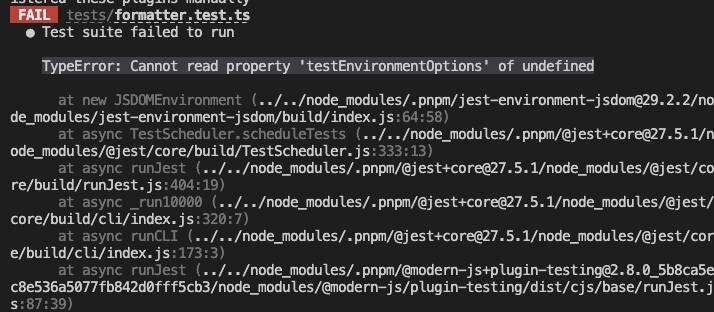
### Execute `test` command with an error `TypeError: Cannot read property 'testEnvironmentOptions' of undefined`
|
|
8
|
-
|
|
9
|
-
|
|
10
|
-
|
|
11
|
-
You can check whether other projects in Monorepo have `jest-environment-jsdom` dependencies and unify them with the overrides provided by Monorepo.
|
|
@@ -1,58 +0,0 @@
|
|
|
1
|
-
---
|
|
2
|
-
sidebar_position: 5
|
|
3
|
-
---
|
|
4
|
-
|
|
5
|
-
# testing
|
|
6
|
-
|
|
7
|
-
本章描述了测试相关的配置。
|
|
8
|
-
|
|
9
|
-
:::tip
|
|
10
|
-
需要先通过 `pnpm run new` 启用 单元测试 功能。
|
|
11
|
-
:::
|
|
12
|
-
|
|
13
|
-
## jest
|
|
14
|
-
|
|
15
|
-
- 类型: `object | Function`
|
|
16
|
-
- 默认值:`{}`
|
|
17
|
-
|
|
18
|
-
对应 [Jest](https://jestjs.io/docs/configuration) 的配置,当为 `object` 类型时,可以配置 Jest 所支持的所有底层配置 。
|
|
19
|
-
|
|
20
|
-
```js title="modern.config.ts"
|
|
21
|
-
import { defineConfig } from '@modern-js/module-tools';
|
|
22
|
-
|
|
23
|
-
export default defineConfig({
|
|
24
|
-
testing: {
|
|
25
|
-
jest: {
|
|
26
|
-
testTimeout: 10000,
|
|
27
|
-
},
|
|
28
|
-
},
|
|
29
|
-
});
|
|
30
|
-
```
|
|
31
|
-
|
|
32
|
-
值为 `Function` 类型时,默认配置作为第一个参数传入,需要返回新的 Jest 配置对象。
|
|
33
|
-
|
|
34
|
-
```js title="modern.config.ts"
|
|
35
|
-
import { defineConfig } from '@modern-js/module-tools';
|
|
36
|
-
|
|
37
|
-
export default defineConfig({
|
|
38
|
-
testing: {
|
|
39
|
-
jest: options => {
|
|
40
|
-
return {
|
|
41
|
-
...options,
|
|
42
|
-
testTimeout: 10000,
|
|
43
|
-
};
|
|
44
|
-
},
|
|
45
|
-
},
|
|
46
|
-
});
|
|
47
|
-
```
|
|
48
|
-
|
|
49
|
-
## transformer
|
|
50
|
-
|
|
51
|
-
- 类型:`'babel-jest' | 'ts-jest'`
|
|
52
|
-
- 默认值:`'babel-jest'`
|
|
53
|
-
|
|
54
|
-
配置执行测试的时候对于源码的编译工具: [babel-jest](https://www.npmjs.com/package/babel-jest) 或 [ts-jest](https://github.com/kulshekhar/ts-jest)。默认使用 `babel-jest`。
|
|
55
|
-
|
|
56
|
-
:::info
|
|
57
|
-
`babel-jest` 也可以编译 TS 文件,但不会类型报错,如果你需要跑测试的时候对 TS 类型进行校验,那么请使用 `ts-jest`。
|
|
58
|
-
:::
|
|
@@ -1 +0,0 @@
|
|
|
1
|
-
|
|
@@ -1,11 +0,0 @@
|
|
|
1
|
-
# 测试相关问题
|
|
2
|
-
|
|
3
|
-
import TestFAQ from '@site-docs/components/faq-test';
|
|
4
|
-
|
|
5
|
-
<TestFAQ />
|
|
6
|
-
|
|
7
|
-
## 执行 `test` 命令报错 `TypeError: Cannot read property 'testEnvironmentOptions' of undefined`
|
|
8
|
-
|
|
9
|
-

|
|
10
|
-
|
|
11
|
-
问题原因多是存在多个版本的 `jest-environment-jsdom` 依赖,可以检查 Monorepo 中其他项目是否有 `jest-environment-jsdom` 依赖,并通过 Monorepo 提供的 overrides 能力统一依赖版本。
|