@modern-js/module-tools-docs 2.25.1 → 2.25.2
This diff represents the content of publicly available package versions that have been released to one of the supported registries. The information contained in this diff is provided for informational purposes only and reflects changes between package versions as they appear in their respective public registries.
- package/CHANGELOG.md +9 -0
- package/docs/en/api/config/build-config.md +9 -9
- package/docs/en/api/config/build-preset.mdx +4 -4
- package/docs/en/components/faq-build-exception.mdx +1 -0
- package/docs/en/components/faq-build-other.mdx +0 -0
- package/docs/en/components/faq-build-product.mdx +0 -0
- package/docs/en/components/faq-storybook.mdx +0 -0
- package/docs/en/components/faq-test.mdx +1 -0
- package/docs/en/guide/advance/asset.mdx +2 -2
- package/docs/en/guide/advance/build-umd.mdx +9 -9
- package/docs/en/guide/advance/copy.md +1 -1
- package/docs/en/guide/advance/external-dependency.mdx +2 -2
- package/docs/en/guide/advance/in-depth-about-build.md +11 -11
- package/docs/en/guide/advance/in-depth-about-dev-command.md +1 -1
- package/docs/en/guide/basic/before-getting-started.md +1 -1
- package/docs/en/guide/basic/command-preview.md +5 -5
- package/docs/en/guide/basic/modify-output-product.md +18 -18
- package/docs/en/guide/basic/using-storybook.mdx +1 -1
- package/docs/en/guide/best-practices/components.mdx +10 -10
- package/docs/en/guide/faq/_category_.json +4 -0
- package/docs/en/guide/faq/build.mdx +247 -0
- package/docs/en/guide/faq/index.md +7 -0
- package/docs/en/guide/faq/storybook.mdx +102 -0
- package/docs/en/guide/faq/test.mdx +11 -0
- package/docs/en/guide/intro/welcome.md +2 -2
- package/docs/en/plugins/guide/getting-started.mdx +1 -1
- package/docs/en/plugins/guide/plugin-object.mdx +2 -2
- package/docs/en/plugins/guide/setup-function.mdx +1 -1
- package/docs/zh/components/faq-build-exception.mdx +1 -0
- package/docs/zh/components/faq-build-other.mdx +0 -0
- package/docs/zh/components/faq-build-product.mdx +0 -0
- package/docs/zh/components/faq-storybook.mdx +0 -0
- package/docs/zh/components/faq-test.mdx +1 -0
- package/docs/zh/guide/faq/_category_.json +4 -0
- package/docs/zh/guide/faq/build.mdx +247 -0
- package/docs/zh/guide/faq/index.md +7 -0
- package/docs/zh/guide/faq/storybook.mdx +101 -0
- package/docs/zh/guide/faq/test.mdx +11 -0
- package/modern.config.ts +7 -0
- package/package.json +3 -3
|
@@ -0,0 +1,247 @@
|
|
|
1
|
+
# Build FAQ
|
|
2
|
+
|
|
3
|
+
## Product FAQ
|
|
4
|
+
|
|
5
|
+
import BuildProductFAQ from '@site-docs-en/components/faq-build-product';
|
|
6
|
+
|
|
7
|
+
<BuildProductFAQ/>
|
|
8
|
+
|
|
9
|
+
### Initialization of Class Fields
|
|
10
|
+
|
|
11
|
+
TypeSript provides the `useDefineForClassFields` configuration to control the conversion handling for `public class fields`.
|
|
12
|
+
|
|
13
|
+
If we have a piece of code:
|
|
14
|
+
|
|
15
|
+
``` ts
|
|
16
|
+
class C {
|
|
17
|
+
foo = 100;
|
|
18
|
+
bar: string;
|
|
19
|
+
}
|
|
20
|
+
```
|
|
21
|
+
|
|
22
|
+
When `useDefineForClassFields` is `false`, then the compiled code will look like:
|
|
23
|
+
|
|
24
|
+
``` ts
|
|
25
|
+
class C {
|
|
26
|
+
constructor() {
|
|
27
|
+
this.foo = 100;
|
|
28
|
+
}
|
|
29
|
+
}
|
|
30
|
+
```
|
|
31
|
+
|
|
32
|
+
When `useDefineForClassFields` is `true`, then the compiled code will look like:
|
|
33
|
+
|
|
34
|
+
``` ts
|
|
35
|
+
class C {
|
|
36
|
+
constructor() {
|
|
37
|
+
Object.defineProperty(this, "foo", {
|
|
38
|
+
enumerable: true,
|
|
39
|
+
configurable: true,
|
|
40
|
+
writable: true,
|
|
41
|
+
value: 100,
|
|
42
|
+
});
|
|
43
|
+
Object.defineProperty(this, "bar", {
|
|
44
|
+
enumerable: true,
|
|
45
|
+
configurable: true,
|
|
46
|
+
writable: true,
|
|
47
|
+
value: void 0,
|
|
48
|
+
});
|
|
49
|
+
}
|
|
50
|
+
}
|
|
51
|
+
```
|
|
52
|
+
|
|
53
|
+
Also the default value of this configuration will change depending on the [`target`](https://www.typescriptlang.org/tsconfig#target) configuration of tsconfig.json: When `target` is ES2022 or higher, then `useDefineForClassFields` is configured to `true` by default, otherwise it defaults to `false`.
|
|
54
|
+
|
|
55
|
+
For more information on this configuration of TypeScript, you can refer to the following link:
|
|
56
|
+
|
|
57
|
+
- [The useDefineForClassFields Flag and The declare Property Modifier](https://www.typescriptlang.org/docs/handbook/release-notes/typescript-3-7.html#the-usedefineforclassfields-flag-and-the-declare-property-modifier)
|
|
58
|
+
|
|
59
|
+
The Modern.js Module will currently process according to the following logic:
|
|
60
|
+
|
|
61
|
+
1. The first decision to enable this feature inside Modern.js Module is based on the `useDefineForClassFields` configuration in tsconfig.json of the current project. Currently, only the contents of the tsconfig.json file under the current project path will be read, and the final tsconfig configuration based on the [`extends`](https://www.typescriptlang.org/tsconfig#extends) configuration is not supported at this time.
|
|
62
|
+
2. If the `useDefineForClassFields` configuration of tsconfig.json is not detected, the default value is determined based on the `target` configuration of tsconfig.json. If `target` is greater than `ES2022` (including `EsNext`), then `useDefineForClassFields` defaults to `true`, otherwise it is `false`.
|
|
63
|
+
3. If the `target` of tsconfig.json is not detected, it is processed according to the value of `useDefineForClassFields` as `true`.
|
|
64
|
+
|
|
65
|
+
### babel-plugin-lodash treats the introduced lodash as `undefined`
|
|
66
|
+
|
|
67
|
+
This problem occurs when using something like the following:
|
|
68
|
+
|
|
69
|
+
``` ts
|
|
70
|
+
import * as Lodash from 'lodash';
|
|
71
|
+
|
|
72
|
+
export const libs = {
|
|
73
|
+
_: Lodash,
|
|
74
|
+
}
|
|
75
|
+
```
|
|
76
|
+
|
|
77
|
+
Current related issues on the `babel-plugin-lodash` Github:
|
|
78
|
+
|
|
79
|
+
- [#235](https://github.com/lodash/babel-plugin-lodash/issues/235)
|
|
80
|
+
|
|
81
|
+
The solution to this problem is to remove `babel-plugin-lodash`, since the plugin is not needed for on-demand referencing at this point and using it would have side effects.
|
|
82
|
+
|
|
83
|
+
A similar situation occurs with `babel-plugin-import`. If there is code like the following:
|
|
84
|
+
|
|
85
|
+
``` ts
|
|
86
|
+
import * as Comps from 'components';
|
|
87
|
+
|
|
88
|
+
export const libs = {
|
|
89
|
+
comps: Comps,
|
|
90
|
+
};
|
|
91
|
+
```
|
|
92
|
+
|
|
93
|
+
In this case `babel-plugin-import` may also cause `Comps` to become `undefined`. So you need to remove the corresponding `babel-plugin-import` as well.
|
|
94
|
+
|
|
95
|
+
## Exceptions FAQ
|
|
96
|
+
|
|
97
|
+
import BuildExceptionFAQ from '@site-docs-en/components/faq-build-exception';
|
|
98
|
+
|
|
99
|
+
<BuildExceptionFAQ />
|
|
100
|
+
|
|
101
|
+
### Dynamic require of "react" is not supported
|
|
102
|
+
|
|
103
|
+
#### Problem Description
|
|
104
|
+
|
|
105
|
+
When the product format in the product configuration of the build is ES modules.
|
|
106
|
+
|
|
107
|
+
``` ts
|
|
108
|
+
export default defineConfig({
|
|
109
|
+
buildConfig: {
|
|
110
|
+
format: 'esm',
|
|
111
|
+
},
|
|
112
|
+
});
|
|
113
|
+
```
|
|
114
|
+
|
|
115
|
+
If you import a cjs product from a third-party npm package, the resulting product may not work properly under webpack.
|
|
116
|
+
|
|
117
|
+

|
|
118
|
+
|
|
119
|
+
#### Solution
|
|
120
|
+
|
|
121
|
+
1. **First you need to find which third-party package is causing the problem**. For example, if the error message points to the `react` package, then look for a third-party package that has code like `require('react')` in it. For example [`react-draggable`](https://www.npmjs.com/package/react-draggable), which only contains `cjs` products, then the problem is localized to the `react-draggable` package.
|
|
122
|
+
2. Then we need to exclude this package with the following configuration, i.e. **not package problematic third-party packages**.
|
|
123
|
+
|
|
124
|
+
``` ts
|
|
125
|
+
export default defineConfig({
|
|
126
|
+
buildConfig: {
|
|
127
|
+
externals: ['react-draggable'],
|
|
128
|
+
}
|
|
129
|
+
});
|
|
130
|
+
```
|
|
131
|
+
|
|
132
|
+
#### Reference Links
|
|
133
|
+
|
|
134
|
+
- [When using esbuild with external react I get Dynamic require of "react" is not supported](https://stackoverflow.com/questions/68423950/when-using-esbuild-with-external-react-i-get-dynamic-require-of-react-is-not-s)
|
|
135
|
+
|
|
136
|
+
### During compilation, an error was reported in the less file of a component library:`'Operation on an invalid type'`
|
|
137
|
+
|
|
138
|
+
This is probably because the component library depends on Less version v3, while Modern.js Module defaults to v4. v3 and v4 have a Break Change in the `math` configuration, check this [link](https://stackoverflow.com/questions/73298187/less-error-operation-on-an-invalid-type-in-antd-dependency) for details.
|
|
139
|
+
|
|
140
|
+
Therefore, if a component library like this is used in the source code:
|
|
141
|
+
|
|
142
|
+
`buildPreset` is used in the build configuration, make the following changes:
|
|
143
|
+
|
|
144
|
+
``` js
|
|
145
|
+
module.exports = {
|
|
146
|
+
buildPreset({ extendPreset }) {
|
|
147
|
+
return extendPreset('your-build-preset', {
|
|
148
|
+
style: {
|
|
149
|
+
less: {
|
|
150
|
+
lessOptions: {
|
|
151
|
+
math: 'always',
|
|
152
|
+
},
|
|
153
|
+
},
|
|
154
|
+
},
|
|
155
|
+
});
|
|
156
|
+
},
|
|
157
|
+
}
|
|
158
|
+
```
|
|
159
|
+
|
|
160
|
+
Or, if a custom `buildConfig` is used, modify it as follows:
|
|
161
|
+
|
|
162
|
+
``` js
|
|
163
|
+
module.exports = {
|
|
164
|
+
buildConfig: {
|
|
165
|
+
style: {
|
|
166
|
+
less: {
|
|
167
|
+
lessOptions: {
|
|
168
|
+
math: 'always',
|
|
169
|
+
},
|
|
170
|
+
},
|
|
171
|
+
},
|
|
172
|
+
}
|
|
173
|
+
};
|
|
174
|
+
```
|
|
175
|
+
|
|
176
|
+
If you are using a component like this in Storybook, you will need to modify the debugging configuration of Storybook:
|
|
177
|
+
|
|
178
|
+
```js
|
|
179
|
+
module.exports = {
|
|
180
|
+
dev: {
|
|
181
|
+
storybook: {
|
|
182
|
+
webpackChain(chain, { CHAIN_ID }) {
|
|
183
|
+
chain.module
|
|
184
|
+
.rule(CHAIN_ID.RULE.LESS)
|
|
185
|
+
.use(CHAIN_ID.USE.LESS)
|
|
186
|
+
.tap(options => {
|
|
187
|
+
options.lessOptions = {
|
|
188
|
+
...options.lessOptions,
|
|
189
|
+
math: 'always',
|
|
190
|
+
};
|
|
191
|
+
return options;
|
|
192
|
+
});
|
|
193
|
+
},
|
|
194
|
+
},
|
|
195
|
+
},
|
|
196
|
+
}
|
|
197
|
+
```
|
|
198
|
+
|
|
199
|
+
### Bundle DTS failed
|
|
200
|
+
|
|
201
|
+
Normally, the type file output with `tsc` is loose. Modern.js Module not only supports outputting loose type file products, but also supports packing type files, which allows you to package these loose type files and third-party dependent type files into one file.
|
|
202
|
+
|
|
203
|
+
However, there is a risk in packaging the type files of third-party dependencies, **because there are cases where the type files of third-party dependencies cannot be packaged**.
|
|
204
|
+
|
|
205
|
+
So when you encounter a `Bundle DTS failed` error message during the Modern.js Module build, you can observe that the error message comes from a third-party dependency. Try setting [`dts.respectExternal`](/api/config/build-config.html#dtsrespectexternal) to `false` to disable the behavior of packing type files of third-party dependencies.
|
|
206
|
+
|
|
207
|
+
### Error reported for `defineConfig` function type: `If there is no reference to "..." then the inferred type of "default" cannot be named`
|
|
208
|
+
|
|
209
|
+
Check if the [`include`](https://www.typescriptlang.org/tsconfig#include) configuration exists in the project's tsconfig.json file, and if not, try adding the following:
|
|
210
|
+
|
|
211
|
+
```json
|
|
212
|
+
{
|
|
213
|
+
"include": ["src"]
|
|
214
|
+
}
|
|
215
|
+
```
|
|
216
|
+
|
|
217
|
+
## Other FAQ
|
|
218
|
+
|
|
219
|
+
import BuildOtherFAQ from '@site-docs-en/components/faq-build-other';
|
|
220
|
+
|
|
221
|
+
<BuildOtherFAQ />
|
|
222
|
+
|
|
223
|
+
### Add additional compilation feature
|
|
224
|
+
|
|
225
|
+
The Modern.js Module is based on the esbuild implementation, so if you have special needs or want to add additional compilation capabilities, you can do so by implementing the esbuild plugin.
|
|
226
|
+
|
|
227
|
+
The Modern.js Module provides [`esbuildOptions`](/api/config/build-config.html#esbuildoptions) configuration to allow modification of Modern.js's internal esbuild configuration, so that custom esbuild plugins can be added via this configuration:
|
|
228
|
+
|
|
229
|
+
``` js
|
|
230
|
+
export default defineConfig({
|
|
231
|
+
buildConfig: {
|
|
232
|
+
esbuildOptions: options => {
|
|
233
|
+
options.plugins = [
|
|
234
|
+
...options.plugins,
|
|
235
|
+
yourEsbuildPlugin,
|
|
236
|
+
];
|
|
237
|
+
return option;
|
|
238
|
+
},
|
|
239
|
+
},
|
|
240
|
+
});
|
|
241
|
+
```
|
|
242
|
+
|
|
243
|
+
### Support for generating TypeScript declaration files for CSS Modules
|
|
244
|
+
|
|
245
|
+
- First Solution: [typed-css-modules](https://github.com/Quramy/typed-css-modules)
|
|
246
|
+
- Second Solution: [postcss-modules-dts](https://www.npmjs.com/package/@guanghechen/postcss-modules-dts)
|
|
247
|
+
|
|
@@ -0,0 +1,102 @@
|
|
|
1
|
+
# Storybook FAQ
|
|
2
|
+
|
|
3
|
+
import BuildStorybookFAQ from '@site-docs-en/components/faq-storybook';
|
|
4
|
+
|
|
5
|
+
<BuildStorybookFAQ />
|
|
6
|
+
|
|
7
|
+
## Storybook v7 Support
|
|
8
|
+
|
|
9
|
+
Storybook v7 does not support it yet. Rspack builds are currently planned to be supported in Storybook v7, so progress will be slower.
|
|
10
|
+
|
|
11
|
+
Related Issue: [#3376](https://github.com/web-infra-dev/modern.js/issues/3376).
|
|
12
|
+
|
|
13
|
+
## Using Storybook Addon or other configurations does not work
|
|
14
|
+
|
|
15
|
+
Modern.js Module is currently using Storybook version v6, if you are using Addon version v7 you may not be able to get the addon to work.
|
|
16
|
+
|
|
17
|
+
In addition to the Addon, other configurations may also have differences. For example, if you modify the `preview.js` configuration file, Storybook v6 is written differently than v7:
|
|
18
|
+
|
|
19
|
+
- v6:[Document](https://storybook.js.org/docs/6.5/react/writing-stories/decorators#global-decorators)
|
|
20
|
+
- v7:[Document](https://storybook.js.org/docs/react/writing-stories/decorators#global-decorators)
|
|
21
|
+
|
|
22
|
+
## Cannot find module 'react-dom/package.json
|
|
23
|
+
|
|
24
|
+
When debug Storybook, the following problem occurs:
|
|
25
|
+
|
|
26
|
+
```bash
|
|
27
|
+
ERR! Error: Cannot find module 'react-dom/package.json'
|
|
28
|
+
```
|
|
29
|
+
|
|
30
|
+
You can install the react-dom dependency in the project.
|
|
31
|
+
|
|
32
|
+
``` json
|
|
33
|
+
{
|
|
34
|
+
"devDependencies": {
|
|
35
|
+
"react-dom": "^17"
|
|
36
|
+
}
|
|
37
|
+
}
|
|
38
|
+
```
|
|
39
|
+
|
|
40
|
+
## Unable to locate the specific error message
|
|
41
|
+
|
|
42
|
+
Solutions:
|
|
43
|
+
|
|
44
|
+
1. Find `@storybook/core-server/dist/cjs/dev-server.js`
|
|
45
|
+
2. Find this code: `var _await$Promise$all = await Promise.all([preview, manager,`.
|
|
46
|
+
3. Modify it:
|
|
47
|
+
|
|
48
|
+
``` js
|
|
49
|
+
var _await$Promise$all = await Promise.all([
|
|
50
|
+
preview.catch(e => console.info(e)),
|
|
51
|
+
manager // TODO #13083 Restore this when compiling the preview is fast enough
|
|
52
|
+
// .then((result) => {
|
|
53
|
+
// if (!options.ci && !options.smokeTest) openInBrowser(address);
|
|
54
|
+
// return result;
|
|
55
|
+
// })
|
|
56
|
+
.catch(previewBuilder.bail)]),
|
|
57
|
+
_await$Promise$all2 = _slicedToArray(_await$Promise$all, 2),
|
|
58
|
+
previewResult = _await$Promise$all2[0],
|
|
59
|
+
managerResult = _await$Promise$all2[1]; // TODO #13083 Remove this when compiling the preview is fast enough
|
|
60
|
+
```
|
|
61
|
+
|
|
62
|
+
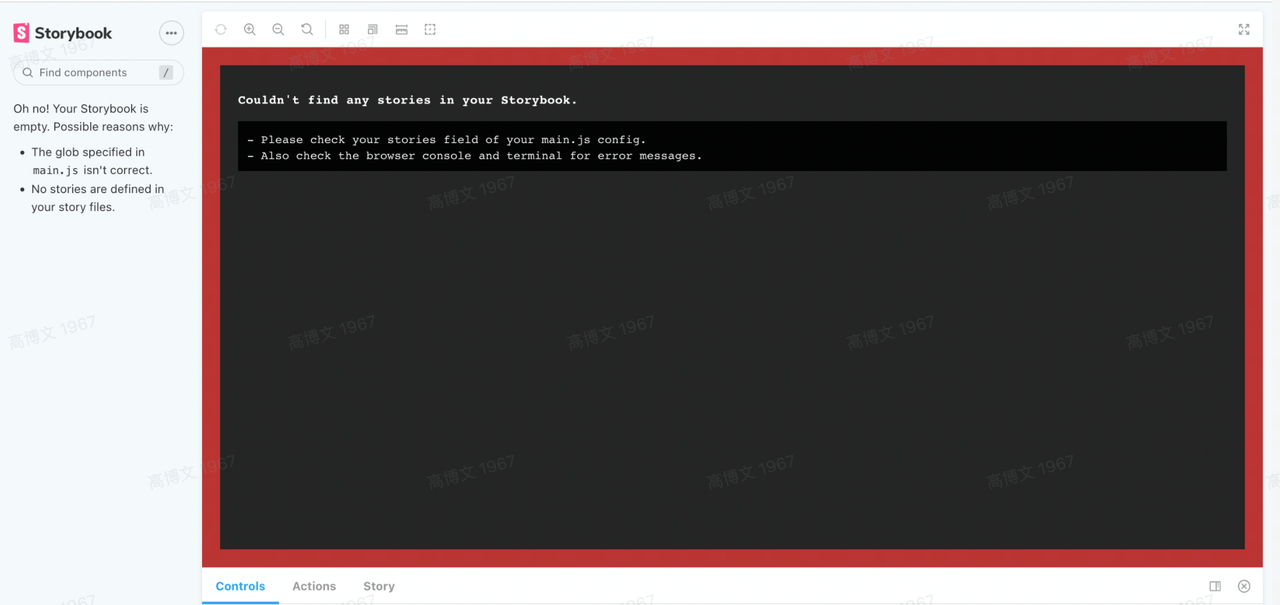
## Can`t find any stories is your Storybook
|
|
63
|
+
|
|
64
|
+
|
|
65
|
+
|
|
66
|
+
When you get a problem like this, you can first open the browser console and there should be some error messages. You can use the error messages to deduce if there is a problem in the code you are writing that is causing Storybook to not work properly.
|
|
67
|
+
|
|
68
|
+
## Storybook Adds Proxy Functionality
|
|
69
|
+
|
|
70
|
+
Storybook does not provide a solution for this, but there is one in the Storybook Issue. In the Modern.js Module, you can:
|
|
71
|
+
|
|
72
|
+
1. Add the `config/storybook/middleware.js` file and initialize the following:
|
|
73
|
+
|
|
74
|
+
``` js
|
|
75
|
+
/* eslint-disable filenames/match-exported */
|
|
76
|
+
module.exports = function expressMiddleware(router) {
|
|
77
|
+
// router is express router
|
|
78
|
+
// import { Router } from 'express'
|
|
79
|
+
// router = new Router();
|
|
80
|
+
};
|
|
81
|
+
```
|
|
82
|
+
|
|
83
|
+
2. add `http-proxy-middleware` dependency
|
|
84
|
+
3. Add proxy routing-related configuration
|
|
85
|
+
|
|
86
|
+
``` js
|
|
87
|
+
/* eslint-disable filenames/match-exported */
|
|
88
|
+
const { createProxyMiddleware } = require("http-proxy-middleware");
|
|
89
|
+
|
|
90
|
+
module.exports = function expressMiddleware (router) {
|
|
91
|
+
router.use('/api', createProxyMiddleware({
|
|
92
|
+
target: "http://localhost:8000",
|
|
93
|
+
changeOrigin: true
|
|
94
|
+
}))
|
|
95
|
+
}
|
|
96
|
+
```
|
|
97
|
+
|
|
98
|
+
Link:https://github.com/storybookjs/storybook/issues/11551
|
|
99
|
+
|
|
100
|
+
## Modify the directory where the Story file exists
|
|
101
|
+
|
|
102
|
+
The directory where Story files are stored cannot be modified at the moment, only the `*.stories.(t|j)s(x)` and `*.stories.md(x)` files in the `your-project/stories` directory are recognized as Story files.
|
|
@@ -0,0 +1,11 @@
|
|
|
1
|
+
# Test FAQ
|
|
2
|
+
|
|
3
|
+
import TestFAQ from '@site-docs-en/components/faq-test';
|
|
4
|
+
|
|
5
|
+
<TestFAQ />
|
|
6
|
+
|
|
7
|
+
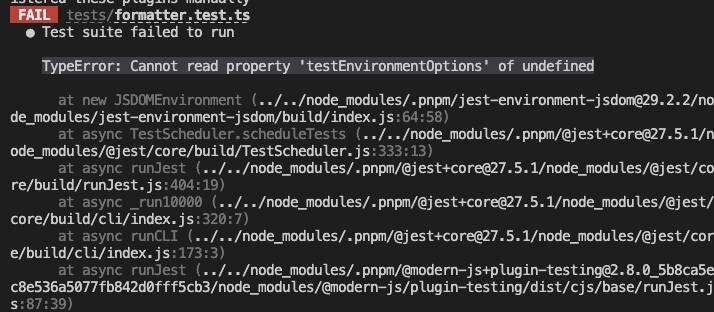
### Execute `test` command with an error `TypeError: Cannot read property 'testEnvironmentOptions' of undefined`
|
|
8
|
+
|
|
9
|
+
|
|
10
|
+
|
|
11
|
+
You can check whether other projects in Monorepo have `jest-environment-jsdom` dependencies and unify them with the overrides provided by Monorepo.
|
|
@@ -6,7 +6,7 @@ sidebar_position: 1
|
|
|
6
6
|
|
|
7
7
|
Module Tools is a modules engineering solution for Modern.js, as well as a core dependency. It allows developers to build, debug, and publish module type project more easily. A module type project can mostly be thought of as an npm package type project, which may be a component, component library or tool library project.
|
|
8
8
|
|
|
9
|
-
If you are planning to develop a project of the npm package type, then you came to the right place! Modern.js provides a professional
|
|
9
|
+
If you are planning to develop a project of the npm package type, then you came to the right place! Modern.js provides a professional Module Tools. It gives you:
|
|
10
10
|
|
|
11
11
|
- **Simple project initialization**: simply execute the `npx @modern-js/create project-dir` command, followed by a few interactive questions, to create a complete module type project. The created project also supports the choice of two package managers, [**pnpm**](https://pnpm.io/) and [**Yarn**](https://classic.yarnpkg.com/).
|
|
12
12
|
- **Code formatting**: In a module project, you can execute `modern lint` to format the code. The initialized module project includes the [ESLint](https://eslint.org/docs/latest/user-guide/core-concepts#what-is-eslint) ruleset for Modern.js for most scenarios.
|
|
@@ -14,5 +14,5 @@ If you are planning to develop a project of the npm package type, then you came
|
|
|
14
14
|
- **Storybook debugging tools**: Module Tools provides [Storybook](https://storybook.js.org/) debugging tools for debugging module projects. After installing the Storybook plugin for Module Tools, you can start it with the `modern dev storybook` command. You can use Storybook not only for debugging components, but also for other types of modules.
|
|
15
15
|
- **Testing capabilities with Jest**: When you need to test a module, you can use the `modern test` command of Module Tools, which not only integrates with [Jest](https://jestjs.io/), but also provides an API for configuring [Jest](https://jestjs.io/docs/configuration).
|
|
16
16
|
- **Versioning based on Changesets**: When you need to record changes to a project, you can use the `modern change` command to generate a Markdown file containing the changes; when you need to upgrade a project, you can use the `modern bump` command to analyze and upgrade the version through the Markdown file; when you need to release a project, you can use the `modern release` command to release the project; Module Tools implements these commands based on [Changesets](https://github.com/changesets/changesets).
|
|
17
|
-
- **Extensible
|
|
17
|
+
- **Extensible plugin mechanism**: Want to integrate additional debugging tools for your project? Or maybe you want to do some extra processing during the build process, Module Tools provides a plugin mechanism and plugin hooks that cover both the `dev` command and the `build` command process. You can use them to extend the capabilities of your project.
|
|
18
18
|
- **Lots more!** Module Tools will continue to optimize its build and debug features in the future. If there are important issues to be solved in module project building, or if a mainstream module project debugging tool or pattern emerges, then they will probably be supported by Module Tools.
|
|
@@ -80,5 +80,5 @@ With the above example, we learned the following things.
|
|
|
80
80
|
|
|
81
81
|
In addition to the above, we also need to understand.
|
|
82
82
|
|
|
83
|
-
- [plugin objects, type definitions and recommended configuration
|
|
83
|
+
- [plugin objects, type definitions and recommended configuration options](/en/plugins/guide/plugin-object)
|
|
84
84
|
- [setup functions, `api` object parameters, lifecycle hooks](/en/plugins/guide/setup-function)
|
|
@@ -64,9 +64,9 @@ const myPlugin: CliPlugin<ModuleTools> = {
|
|
|
64
64
|
};
|
|
65
65
|
```
|
|
66
66
|
|
|
67
|
-
## Plugin configuration
|
|
67
|
+
## Plugin configuration options
|
|
68
68
|
|
|
69
|
-
**It is recommended to write the plugin as a function**, so that the plugin can receive configuration
|
|
69
|
+
**It is recommended to write the plugin as a function**, so that the plugin can receive configuration options via function entry.
|
|
70
70
|
|
|
71
71
|
```ts
|
|
72
72
|
import type { CliPlugin, ModuleTools } from '@modern-js/module-tools';
|
|
@@ -4,7 +4,7 @@ sidebar_position: 3
|
|
|
4
4
|
|
|
5
5
|
# Setup function
|
|
6
6
|
|
|
7
|
-
In the ["Plugin object"](/plugins/guide/plugin-object) section we know that the
|
|
7
|
+
In the ["Plugin object"](/plugins/guide/plugin-object) section we know that the plugin object contains a `setup` function that not only contains an `api` object parameter, but also returns a Hooks object.
|
|
8
8
|
|
|
9
9
|
## Plugin API objects
|
|
10
10
|
|
|
@@ -0,0 +1 @@
|
|
|
1
|
+
|
|
File without changes
|
|
File without changes
|
|
File without changes
|
|
@@ -0,0 +1 @@
|
|
|
1
|
+
|
|
@@ -0,0 +1,247 @@
|
|
|
1
|
+
# 构建相关问题
|
|
2
|
+
|
|
3
|
+
## 产物问题
|
|
4
|
+
|
|
5
|
+
import BuildProductFAQ from '@site-docs/components/faq-build-product';
|
|
6
|
+
|
|
7
|
+
<BuildProductFAQ/>
|
|
8
|
+
|
|
9
|
+
### Class Fields 的初始化处理
|
|
10
|
+
|
|
11
|
+
TypeSript 提供了 `useDefineForClassFields` 配置用于控制对于 `public class fields` 的转换处理。
|
|
12
|
+
|
|
13
|
+
如果有一段代码:
|
|
14
|
+
|
|
15
|
+
``` ts
|
|
16
|
+
class C {
|
|
17
|
+
foo = 100;
|
|
18
|
+
bar: string;
|
|
19
|
+
}
|
|
20
|
+
```
|
|
21
|
+
|
|
22
|
+
当 `useDefineForClassFields` 为 `false` 的时候,则编译后的代码会变为:
|
|
23
|
+
|
|
24
|
+
``` ts
|
|
25
|
+
class C {
|
|
26
|
+
constructor() {
|
|
27
|
+
this.foo = 100;
|
|
28
|
+
}
|
|
29
|
+
}
|
|
30
|
+
```
|
|
31
|
+
|
|
32
|
+
当 `useDefineForClassFields` 为 `true` 的时候,则编译后的代码会变为:
|
|
33
|
+
|
|
34
|
+
``` ts
|
|
35
|
+
class C {
|
|
36
|
+
constructor() {
|
|
37
|
+
Object.defineProperty(this, "foo", {
|
|
38
|
+
enumerable: true,
|
|
39
|
+
configurable: true,
|
|
40
|
+
writable: true,
|
|
41
|
+
value: 100,
|
|
42
|
+
});
|
|
43
|
+
Object.defineProperty(this, "bar", {
|
|
44
|
+
enumerable: true,
|
|
45
|
+
configurable: true,
|
|
46
|
+
writable: true,
|
|
47
|
+
value: void 0,
|
|
48
|
+
});
|
|
49
|
+
}
|
|
50
|
+
}
|
|
51
|
+
```
|
|
52
|
+
|
|
53
|
+
同时该配置的默认值会根据 tsconfig.json 的 [`target`](https://www.typescriptlang.org/tsconfig#target) 配置而变化:**当 `target` 是 ES2022 或者更高的时候,则 `useDefineForClassFields` 默认配置为 `true`,否则就是默认为 `false`**。
|
|
54
|
+
|
|
55
|
+
关于 TypeScript 这个配置的更多信息,可以参考下面的链接:
|
|
56
|
+
|
|
57
|
+
- [The useDefineForClassFields Flag and The declare Property Modifier](https://www.typescriptlang.org/docs/handbook/release-notes/typescript-3-7.html#the-usedefineforclassfields-flag-and-the-declare-property-modifier)
|
|
58
|
+
|
|
59
|
+
Modern.js Module 目前会根据下面的逻辑进行处理:
|
|
60
|
+
|
|
61
|
+
1. 首先根据当前项目的 tsconfig.json 的 `useDefineForClassFields` 配置确定在 Modern.js Module 内部如何处理。目前只会读取当前项目路径下的 tsconfig.json 文件的内容,暂时不支持根据 [`extends`](https://www.typescriptlang.org/tsconfig#extends) 配置来获取最终的 tsconfig 配置。
|
|
62
|
+
2. 如果没有检测 tsconfig.json 的 `useDefineForClassFields` 配置,则会根据 tsconfig.json 的 `target` 配置来确定默认值。如果 `target` 大于 `ES2022`(包含 `EsNext`),则`useDefineForClassFields`默认为 `true`,否则为 `false`。
|
|
63
|
+
3. 如果没有检测到 tsconfig.json 的 `target`,则按照 `useDefineForClassFields`的值 为 `true` 进行处理。
|
|
64
|
+
|
|
65
|
+
### babel-plugin-lodash 将引入的 lodash 处理成 `undefined`
|
|
66
|
+
|
|
67
|
+
当使用类似下面的方式的时候,会出现这个问题:
|
|
68
|
+
|
|
69
|
+
``` ts
|
|
70
|
+
import * as Lodash from 'lodash';
|
|
71
|
+
|
|
72
|
+
export const libs = {
|
|
73
|
+
_: Lodash,
|
|
74
|
+
}
|
|
75
|
+
```
|
|
76
|
+
|
|
77
|
+
目前在 `babel-plugin-lodash` Github 上的相关 Issue:
|
|
78
|
+
|
|
79
|
+
- [#235](https://github.com/lodash/babel-plugin-lodash/issues/235)
|
|
80
|
+
|
|
81
|
+
这个问题的解决办法是移除 `babel-plugin-lodash`,因为此时不需要该插件进行按需引用,使用该插件会产生副作用。
|
|
82
|
+
|
|
83
|
+
类似的情况在 `babel-plugin-import` 上也可能会出现。比如有类似如下的代码:
|
|
84
|
+
|
|
85
|
+
``` ts
|
|
86
|
+
import * as Comps from 'components';
|
|
87
|
+
|
|
88
|
+
export const libs = {
|
|
89
|
+
comps: Comps,
|
|
90
|
+
};
|
|
91
|
+
```
|
|
92
|
+
|
|
93
|
+
此时 `babel-plugin-import` 也可能会导致 `Comps` 变为 `undefined`。因此也需要移除对应的 `babel-plugin-import`。
|
|
94
|
+
|
|
95
|
+
## 异常类问题
|
|
96
|
+
|
|
97
|
+
import BuildExceptionFAQ from '@site-docs/components/faq-build-exception';
|
|
98
|
+
|
|
99
|
+
<BuildExceptionFAQ />
|
|
100
|
+
|
|
101
|
+
### Dynamic require of "react" is not supported
|
|
102
|
+
|
|
103
|
+
#### 问题描述
|
|
104
|
+
|
|
105
|
+
当构建的产物配置中产物格式为 ES modules 的时候:
|
|
106
|
+
|
|
107
|
+
``` ts
|
|
108
|
+
export default defineConfig({
|
|
109
|
+
buildConfig: {
|
|
110
|
+
format: 'esm',
|
|
111
|
+
},
|
|
112
|
+
});
|
|
113
|
+
```
|
|
114
|
+
|
|
115
|
+
如果导入了的第三方 npm 包的 cjs 产物,那么生成的产物可能会在 webpack 下有可能无法正常运行。
|
|
116
|
+
|
|
117
|
+

|
|
118
|
+
|
|
119
|
+
#### 解决办法
|
|
120
|
+
|
|
121
|
+
1. **首先需要找到是哪个第三方包引起的问题**。例如报错信息中指向了 `react` 这个包,那么就要寻找在哪个第三方包里存在 `require('react')` 这样的代码。比如 [`react-draggable`](https://www.npmjs.com/package/react-draggable) ,这个包仅包含 `cjs` 产物,那么问题定位到 `react-draggable` 这个包。
|
|
122
|
+
2. 然后我们需要将这个包通过下面的配置进行排除,即**不打包存在问题的第三方包**。
|
|
123
|
+
|
|
124
|
+
``` ts
|
|
125
|
+
export default defineConfig({
|
|
126
|
+
buildConfig: {
|
|
127
|
+
externals: ['react-draggable'],
|
|
128
|
+
}
|
|
129
|
+
});
|
|
130
|
+
```
|
|
131
|
+
|
|
132
|
+
#### 参考链接
|
|
133
|
+
|
|
134
|
+
- [When using esbuild with external react I get Dynamic require of "react" is not supported](https://stackoverflow.com/questions/68423950/when-using-esbuild-with-external-react-i-get-dynamic-require-of-react-is-not-s)
|
|
135
|
+
|
|
136
|
+
|
|
137
|
+
### 编译过程中,因为某个组件库的 less 文件报错:`'Operation on an invalid type'`
|
|
138
|
+
|
|
139
|
+
可能是因为该组件库依赖的 Less 版本是 v3,而 Modern.js Module 默认是 v4。v3 与 v4 在 `math` 配置上存在有 Break Change,可以查看这个[链接](https://stackoverflow.com/questions/73298187/less-error-operation-on-an-invalid-type-in-antd-dependency) 了解详情。
|
|
140
|
+
|
|
141
|
+
因此,如果是在源码中使用了类似这样的组件库:
|
|
142
|
+
|
|
143
|
+
在构建配置中使用了 `buildPreset` 的情况下,按照下面进行修改:
|
|
144
|
+
|
|
145
|
+
``` js
|
|
146
|
+
module.exports = {
|
|
147
|
+
buildPreset({ extendPreset }) {
|
|
148
|
+
return extendPreset('your-build-preset', {
|
|
149
|
+
style: {
|
|
150
|
+
less: {
|
|
151
|
+
lessOptions: {
|
|
152
|
+
math: 'always',
|
|
153
|
+
},
|
|
154
|
+
},
|
|
155
|
+
},
|
|
156
|
+
});
|
|
157
|
+
},
|
|
158
|
+
}
|
|
159
|
+
```
|
|
160
|
+
|
|
161
|
+
或者使用了自定义的 `buildConfig` 的情况下,按照下面进行修改:
|
|
162
|
+
|
|
163
|
+
``` js
|
|
164
|
+
module.exports = {
|
|
165
|
+
buildConfig: {
|
|
166
|
+
style: {
|
|
167
|
+
less: {
|
|
168
|
+
lessOptions: {
|
|
169
|
+
math: 'always',
|
|
170
|
+
},
|
|
171
|
+
},
|
|
172
|
+
},
|
|
173
|
+
}
|
|
174
|
+
};
|
|
175
|
+
```
|
|
176
|
+
|
|
177
|
+
如果是在 Storybook 中使用了类似这样的组件,则需要修改 Storybook 的调试配置:
|
|
178
|
+
|
|
179
|
+
```js
|
|
180
|
+
module.exports = {
|
|
181
|
+
dev: {
|
|
182
|
+
storybook: {
|
|
183
|
+
webpackChain(chain, { CHAIN_ID }) {
|
|
184
|
+
chain.module
|
|
185
|
+
.rule(CHAIN_ID.RULE.LESS)
|
|
186
|
+
.use(CHAIN_ID.USE.LESS)
|
|
187
|
+
.tap(options => {
|
|
188
|
+
options.lessOptions = {
|
|
189
|
+
...options.lessOptions,
|
|
190
|
+
math: 'always',
|
|
191
|
+
};
|
|
192
|
+
return options;
|
|
193
|
+
});
|
|
194
|
+
},
|
|
195
|
+
},
|
|
196
|
+
},
|
|
197
|
+
}
|
|
198
|
+
```
|
|
199
|
+
|
|
200
|
+
### Bundle DTS failed
|
|
201
|
+
|
|
202
|
+
正常情况下,使用 `tsc` Modern.js Module 不仅支持输出松散的类型文件产物,同时也支持打包类型文件,可以将这些松散的类型文件以及第三方依赖的类型文件打包成一个文件。
|
|
203
|
+
|
|
204
|
+
不过,打包第三方依赖的类型文件是存在风险的,**因为存在第三方依赖的类型文件无法打包的情况**。
|
|
205
|
+
|
|
206
|
+
因此当遇到 Modern.js Module 构建过程中出现 `Bundle DTS failed` 的错误信息标题的时候,可以观察报错信息是来自某个第三方依赖。尝试设置 [`dts.respectExternal`](/api/config/build-config.html#dtsrespectexternal) 为 `false` 来关闭打包第三方依赖的类型文件的行为。
|
|
207
|
+
|
|
208
|
+
### `defineConfig` 函数类型报错:`如果没有引用 "...",则无法命名 "default" 的推断类型`
|
|
209
|
+
|
|
210
|
+
检查项目的 tsconfig.json 文件中是否存在 [`include`](https://www.typescriptlang.org/tsconfig#include) 配置,如果没有,则尝试增加下面的内容:
|
|
211
|
+
|
|
212
|
+
```json
|
|
213
|
+
{
|
|
214
|
+
"include": ["src"]
|
|
215
|
+
}
|
|
216
|
+
```
|
|
217
|
+
|
|
218
|
+
## 其他
|
|
219
|
+
|
|
220
|
+
import BuildOtherFAQ from '@site-docs/components/faq-build-other';
|
|
221
|
+
|
|
222
|
+
<BuildOtherFAQ />
|
|
223
|
+
|
|
224
|
+
### 增加额外的编译能力
|
|
225
|
+
|
|
226
|
+
Modern.js Module 基于 esbuild 实现,因此如果有特殊需求或者想要增加额外的编译能力,可以通过实现 esbuild 插件来解决。
|
|
227
|
+
|
|
228
|
+
Modern.js Module 提供了 [`esbuildOptions`](/api/config/build-config.html#esbuildoptions) 配置允许修改 Modern.js Module 内部的 esbuild 配置,因此可以通过该配置来增加自定义的 esbuild 插件:
|
|
229
|
+
|
|
230
|
+
``` js
|
|
231
|
+
export default defineConfig({
|
|
232
|
+
buildConfig: {
|
|
233
|
+
esbuildOptions: options => {
|
|
234
|
+
options.plugins = [
|
|
235
|
+
...options.plugins,
|
|
236
|
+
yourEsbuildPlugin,
|
|
237
|
+
];
|
|
238
|
+
return option;
|
|
239
|
+
},
|
|
240
|
+
},
|
|
241
|
+
});
|
|
242
|
+
```
|
|
243
|
+
|
|
244
|
+
### 支持生成 CSS Modules 的 TypeScript 声明文件
|
|
245
|
+
|
|
246
|
+
- 方案一:[typed-css-modules](https://github.com/Quramy/typed-css-modules)
|
|
247
|
+
- 方案二:[postcss-modules-dts](https://www.npmjs.com/package/@guanghechen/postcss-modules-dts)
|