@modern-js/module-tools-docs 2.0.0-beta.4 → 2.0.2
This diff represents the content of publicly available package versions that have been released to one of the supported registries. The information contained in this diff is provided for informational purposes only and reflects changes between package versions as they appear in their respective public registries.
- package/.eslintrc.js +13 -0
- package/doc_build/html/main/index.html +16 -0
- package/doc_build/route.json +10 -0
- package/doc_build/static/css/main.css +3370 -0
- package/doc_build/static/css/main.css.map +1 -0
- package/doc_build/static/css/vendors-node_modules_pnpm_remix-run_router_1_2_0_node_modules_remix-run_router_dist_router_js-9d5e9c.css +85 -0
- package/doc_build/static/css/vendors-node_modules_pnpm_remix-run_router_1_2_0_node_modules_remix-run_router_dist_router_js-9d5e9c.css.map +1 -0
- package/doc_build/static/js/async/api_.js +56 -0
- package/doc_build/static/js/async/api_.js.map +1 -0
- package/doc_build/static/js/async/api_config_build-config.js +11309 -0
- package/doc_build/static/js/async/api_config_build-config.js.map +1 -0
- package/doc_build/static/js/async/api_config_build-preset.js +7849 -0
- package/doc_build/static/js/async/api_config_build-preset.js.map +1 -0
- package/doc_build/static/js/async/api_config_design-system.js +48708 -0
- package/doc_build/static/js/async/api_config_design-system.js.map +1 -0
- package/doc_build/static/js/async/api_config_plugins.js +1492 -0
- package/doc_build/static/js/async/api_config_plugins.js.map +1 -0
- package/doc_build/static/js/async/api_config_testing.js +2130 -0
- package/doc_build/static/js/async/api_config_testing.js.map +1 -0
- package/doc_build/static/js/async/api_plugin-api_plugin-hooks.js +14394 -0
- package/doc_build/static/js/async/api_plugin-api_plugin-hooks.js.map +1 -0
- package/doc_build/static/js/async/en_.js +85 -0
- package/doc_build/static/js/async/en_.js.map +1 -0
- package/doc_build/static/js/async/en_api_.js +55 -0
- package/doc_build/static/js/async/en_api_.js.map +1 -0
- package/doc_build/static/js/async/en_api_config_build-config.js +8363 -0
- package/doc_build/static/js/async/en_api_config_build-config.js.map +1 -0
- package/doc_build/static/js/async/en_api_config_build-preset.js +7845 -0
- package/doc_build/static/js/async/en_api_config_build-preset.js.map +1 -0
- package/doc_build/static/js/async/en_api_config_design-system.js +16345 -0
- package/doc_build/static/js/async/en_api_config_design-system.js.map +1 -0
- package/doc_build/static/js/async/en_api_config_plugins.js +1492 -0
- package/doc_build/static/js/async/en_api_config_plugins.js.map +1 -0
- package/doc_build/static/js/async/en_api_config_testing.js +2137 -0
- package/doc_build/static/js/async/en_api_config_testing.js.map +1 -0
- package/doc_build/static/js/async/en_api_plugin-api_plugin-hooks.js +14362 -0
- package/doc_build/static/js/async/en_api_plugin-api_plugin-hooks.js.map +1 -0
- package/doc_build/static/js/async/en_guide_advance_asset.js +3997 -0
- package/doc_build/static/js/async/en_guide_advance_asset.js.map +1 -0
- package/doc_build/static/js/async/en_guide_advance_build-umd.js +9861 -0
- package/doc_build/static/js/async/en_guide_advance_build-umd.js.map +1 -0
- package/doc_build/static/js/async/en_guide_advance_copy.js +6539 -0
- package/doc_build/static/js/async/en_guide_advance_copy.js.map +1 -0
- package/doc_build/static/js/async/en_guide_advance_external-dependency.js +3810 -0
- package/doc_build/static/js/async/en_guide_advance_external-dependency.js.map +1 -0
- package/doc_build/static/js/async/en_guide_advance_in-depth-about-build.js +5046 -0
- package/doc_build/static/js/async/en_guide_advance_in-depth-about-build.js.map +1 -0
- package/doc_build/static/js/async/en_guide_advance_in-depth-about-dev-command.js +150 -0
- package/doc_build/static/js/async/en_guide_advance_in-depth-about-dev-command.js.map +1 -0
- package/doc_build/static/js/async/en_guide_advance_theme-config.js +2484 -0
- package/doc_build/static/js/async/en_guide_advance_theme-config.js.map +1 -0
- package/doc_build/static/js/async/en_guide_basic_before-getting-started.js +3671 -0
- package/doc_build/static/js/async/en_guide_basic_before-getting-started.js.map +1 -0
- package/doc_build/static/js/async/en_guide_basic_command-preview.js +3961 -0
- package/doc_build/static/js/async/en_guide_basic_command-preview.js.map +1 -0
- package/doc_build/static/js/async/en_guide_basic_modify-output-product.js +2970 -0
- package/doc_build/static/js/async/en_guide_basic_modify-output-product.js.map +1 -0
- package/doc_build/static/js/async/en_guide_basic_publish-your-project.js +2182 -0
- package/doc_build/static/js/async/en_guide_basic_publish-your-project.js.map +1 -0
- package/doc_build/static/js/async/en_guide_basic_test-your-project.js +3892 -0
- package/doc_build/static/js/async/en_guide_basic_test-your-project.js.map +1 -0
- package/doc_build/static/js/async/en_guide_basic_use-micro-generator.js +168 -0
- package/doc_build/static/js/async/en_guide_basic_use-micro-generator.js.map +1 -0
- package/doc_build/static/js/async/en_guide_basic_using-storybook.js +4762 -0
- package/doc_build/static/js/async/en_guide_basic_using-storybook.js.map +1 -0
- package/doc_build/static/js/async/en_guide_best-practices_components.js +21388 -0
- package/doc_build/static/js/async/en_guide_best-practices_components.js.map +1 -0
- package/doc_build/static/js/async/en_guide_intro_getting-started.js +1906 -0
- package/doc_build/static/js/async/en_guide_intro_getting-started.js.map +1 -0
- package/doc_build/static/js/async/en_guide_intro_welcome.js +148 -0
- package/doc_build/static/js/async/en_guide_intro_welcome.js.map +1 -0
- package/doc_build/static/js/async/en_guide_intro_why-module-engineering-solution.js +92 -0
- package/doc_build/static/js/async/en_guide_intro_why-module-engineering-solution.js.map +1 -0
- package/doc_build/static/js/async/en_plugins_guide_getting-started.js +2560 -0
- package/doc_build/static/js/async/en_plugins_guide_getting-started.js.map +1 -0
- package/doc_build/static/js/async/en_plugins_guide_plugin-object.js +4177 -0
- package/doc_build/static/js/async/en_plugins_guide_plugin-object.js.map +1 -0
- package/doc_build/static/js/async/en_plugins_guide_setup-function.js +3819 -0
- package/doc_build/static/js/async/en_plugins_guide_setup-function.js.map +1 -0
- package/doc_build/static/js/async/en_plugins_official-list_overview.js +70 -0
- package/doc_build/static/js/async/en_plugins_official-list_overview.js.map +1 -0
- package/doc_build/static/js/async/guide_advance_asset.js +3997 -0
- package/doc_build/static/js/async/guide_advance_asset.js.map +1 -0
- package/doc_build/static/js/async/guide_advance_build-umd.js +9863 -0
- package/doc_build/static/js/async/guide_advance_build-umd.js.map +1 -0
- package/doc_build/static/js/async/guide_advance_copy.js +6539 -0
- package/doc_build/static/js/async/guide_advance_copy.js.map +1 -0
- package/doc_build/static/js/async/guide_advance_external-dependency.js +3812 -0
- package/doc_build/static/js/async/guide_advance_external-dependency.js.map +1 -0
- package/doc_build/static/js/async/guide_advance_in-depth-about-build.js +5046 -0
- package/doc_build/static/js/async/guide_advance_in-depth-about-build.js.map +1 -0
- package/doc_build/static/js/async/guide_advance_in-depth-about-dev-command.js +152 -0
- package/doc_build/static/js/async/guide_advance_in-depth-about-dev-command.js.map +1 -0
- package/doc_build/static/js/async/guide_advance_theme-config.js +2475 -0
- package/doc_build/static/js/async/guide_advance_theme-config.js.map +1 -0
- package/doc_build/static/js/async/guide_basic_before-getting-started.js +3662 -0
- package/doc_build/static/js/async/guide_basic_before-getting-started.js.map +1 -0
- package/doc_build/static/js/async/guide_basic_command-preview.js +3793 -0
- package/doc_build/static/js/async/guide_basic_command-preview.js.map +1 -0
- package/doc_build/static/js/async/guide_basic_modify-output-product.js +2949 -0
- package/doc_build/static/js/async/guide_basic_modify-output-product.js.map +1 -0
- package/doc_build/static/js/async/guide_basic_publish-your-project.js +2243 -0
- package/doc_build/static/js/async/guide_basic_publish-your-project.js.map +1 -0
- package/doc_build/static/js/async/guide_basic_test-your-project.js +3892 -0
- package/doc_build/static/js/async/guide_basic_test-your-project.js.map +1 -0
- package/doc_build/static/js/async/guide_basic_use-micro-generator.js +172 -0
- package/doc_build/static/js/async/guide_basic_use-micro-generator.js.map +1 -0
- package/doc_build/static/js/async/guide_basic_using-storybook.js +4762 -0
- package/doc_build/static/js/async/guide_basic_using-storybook.js.map +1 -0
- package/doc_build/static/js/async/guide_best-practices_components.js +21088 -0
- package/doc_build/static/js/async/guide_best-practices_components.js.map +1 -0
- package/doc_build/static/js/async/guide_intro_getting-started.js +1782 -0
- package/doc_build/static/js/async/guide_intro_getting-started.js.map +1 -0
- package/doc_build/static/js/async/guide_intro_welcome.js +148 -0
- package/doc_build/static/js/async/guide_intro_welcome.js.map +1 -0
- package/doc_build/static/js/async/guide_intro_why-module-engineering-solution.js +92 -0
- package/doc_build/static/js/async/guide_intro_why-module-engineering-solution.js.map +1 -0
- package/doc_build/static/js/async/index.js +85 -0
- package/doc_build/static/js/async/index.js.map +1 -0
- package/doc_build/static/js/async/packages_cli_doc-core_src_theme-default_components_Search_logic_search_ts.js +447 -0
- package/doc_build/static/js/async/packages_cli_doc-core_src_theme-default_components_Search_logic_search_ts.js.map +1 -0
- package/doc_build/static/js/async/plugins_guide_getting-started.js +2608 -0
- package/doc_build/static/js/async/plugins_guide_getting-started.js.map +1 -0
- package/doc_build/static/js/async/plugins_guide_plugin-object.js +4173 -0
- package/doc_build/static/js/async/plugins_guide_plugin-object.js.map +1 -0
- package/doc_build/static/js/async/plugins_guide_setup-function.js +3819 -0
- package/doc_build/static/js/async/plugins_guide_setup-function.js.map +1 -0
- package/doc_build/static/js/async/plugins_official-list_overview.js +70 -0
- package/doc_build/static/js/async/plugins_official-list_overview.js.map +1 -0
- package/doc_build/static/js/async/vendors-node_modules_pnpm_code-hike_mdx_0_7_4_react_18_2_0_node_modules_code-hike_mdx_dist_co-06dd41.js +6656 -0
- package/doc_build/static/js/async/vendors-node_modules_pnpm_code-hike_mdx_0_7_4_react_18_2_0_node_modules_code-hike_mdx_dist_co-06dd41.js.map +1 -0
- package/doc_build/static/js/async/vendors-node_modules_pnpm_flexsearch_0_6_32_node_modules_flexsearch_dist_flexsearch_min_js.js +54 -0
- package/doc_build/static/js/async/vendors-node_modules_pnpm_flexsearch_0_6_32_node_modules_flexsearch_dist_flexsearch_min_js.js.map +1 -0
- package/doc_build/static/js/builder-runtime.js +1375 -0
- package/doc_build/static/js/builder-runtime.js.map +1 -0
- package/doc_build/static/js/lib-lodash.js +4907 -0
- package/doc_build/static/js/lib-lodash.js.map +1 -0
- package/doc_build/static/js/lib-polyfill.js +24769 -0
- package/doc_build/static/js/lib-polyfill.js.map +1 -0
- package/doc_build/static/js/lib-react.js +39510 -0
- package/doc_build/static/js/lib-react.js.map +1 -0
- package/doc_build/static/js/main.js +9237 -0
- package/doc_build/static/js/main.js.map +1 -0
- package/doc_build/static/js/vendors-node_modules_pnpm_remix-run_router_1_2_0_node_modules_remix-run_router_dist_router_js-9d5e9c.js +8532 -0
- package/doc_build/static/js/vendors-node_modules_pnpm_remix-run_router_1_2_0_node_modules_remix-run_router_dist_router_js-9d5e9c.js.map +1 -0
- package/docs/en/api/config/_category_.json +4 -0
- package/docs/en/api/{build-config.md → config/build-config.md} +201 -108
- package/docs/en/api/{build-preset.md → config/build-preset.md} +65 -46
- package/docs/{zh/api → en/api/config}/design-system.md +130 -127
- package/docs/en/api/config/plugins.md +18 -0
- package/docs/en/api/{test.md → config/testing.md} +21 -12
- package/docs/en/api/index.md +3 -1
- package/docs/en/api/plugin-api/_category_.json +4 -0
- package/docs/en/api/plugin-api/plugin-hooks.md +501 -0
- package/docs/en/guide/advance/_category_.json +4 -0
- package/docs/en/guide/advance/asset.mdx +48 -31
- package/docs/en/guide/advance/build-umd.mdx +91 -83
- package/docs/en/guide/advance/copy.md +33 -30
- package/docs/en/guide/advance/external-dependency.mdx +27 -23
- package/docs/en/guide/advance/in-depth-about-build.md +61 -55
- package/docs/en/guide/advance/in-depth-about-dev-command.md +7 -4
- package/docs/en/guide/advance/theme-config.mdx +80 -0
- package/docs/en/guide/basic/_category_.json +4 -0
- package/docs/en/guide/basic/before-getting-started.md +29 -24
- package/docs/en/guide/basic/command-preview.md +20 -16
- package/docs/en/guide/basic/modify-output-product.md +45 -37
- package/docs/en/guide/basic/publish-your-project.md +21 -19
- package/docs/en/guide/basic/test-your-project.mdx +23 -18
- package/docs/en/guide/basic/use-micro-generator.md +15 -8
- package/docs/en/guide/basic/using-storybook.mdx +29 -26
- package/docs/en/guide/best-practices/_category_.json +4 -0
- package/docs/en/guide/best-practices/components.mdx +789 -0
- package/docs/en/guide/intro/_category_.json +4 -0
- package/docs/en/guide/intro/getting-started.md +11 -6
- package/docs/en/guide/intro/welcome.md +4 -0
- package/docs/en/guide/intro/why-module-engineering-solution.md +5 -1
- package/docs/en/index.md +15 -20
- package/docs/en/plugins/guide/_category_.json +4 -0
- package/docs/en/plugins/guide/getting-started.mdx +84 -0
- package/docs/en/plugins/guide/plugin-object.mdx +85 -0
- package/docs/en/plugins/guide/setup-function.mdx +117 -0
- package/docs/en/plugins/official-list/_category_.json +4 -0
- package/docs/en/plugins/official-list/overview.md +6 -0
- package/docs/zh/api/config/_category_.json +4 -0
- package/docs/zh/api/config/build-config.md +669 -0
- package/docs/zh/api/{build-preset.md → config/build-preset.md} +49 -36
- package/docs/zh/api/config/design-system.md +1166 -0
- package/docs/zh/api/config/plugins.md +18 -0
- package/docs/zh/api/{testing.md → config/testing.md} +18 -13
- package/docs/zh/api/index.md +5 -1
- package/docs/zh/api/plugin-api/_category_.json +4 -0
- package/docs/zh/api/plugin-api/plugin-hooks.md +501 -0
- package/docs/zh/guide/advance/_category_.json +4 -0
- package/docs/zh/guide/advance/asset.mdx +48 -31
- package/docs/zh/guide/advance/build-umd.mdx +91 -74
- package/docs/zh/guide/advance/copy.md +33 -30
- package/docs/zh/guide/advance/external-dependency.mdx +28 -24
- package/docs/zh/guide/advance/in-depth-about-build.md +60 -55
- package/docs/zh/guide/advance/in-depth-about-dev-command.md +7 -4
- package/docs/zh/guide/advance/theme-config.mdx +78 -0
- package/docs/zh/guide/basic/_category_.json +4 -0
- package/docs/zh/guide/basic/before-getting-started.md +28 -23
- package/docs/zh/guide/basic/command-preview.md +19 -15
- package/docs/zh/guide/basic/modify-output-product.md +45 -38
- package/docs/zh/guide/basic/publish-your-project.md +22 -17
- package/docs/zh/guide/basic/test-your-project.mdx +24 -18
- package/docs/zh/guide/basic/use-micro-generator.md +12 -9
- package/docs/zh/guide/basic/using-storybook.mdx +29 -24
- package/docs/zh/guide/best-practices/_category_.json +4 -0
- package/docs/zh/guide/best-practices/components.mdx +793 -0
- package/docs/zh/guide/intro/_category_.json +4 -0
- package/docs/zh/guide/intro/getting-started.md +12 -6
- package/docs/zh/guide/intro/welcome.md +4 -0
- package/docs/zh/guide/intro/why-module-engineering-solution.md +5 -1
- package/docs/zh/index.md +3 -2
- package/docs/zh/plugins/guide/_category_.json +4 -0
- package/docs/zh/plugins/guide/getting-started.mdx +84 -0
- package/docs/zh/plugins/guide/plugin-object.mdx +85 -0
- package/docs/zh/plugins/guide/setup-function.mdx +117 -0
- package/docs/zh/plugins/official-list/_category_.json +4 -0
- package/docs/zh/plugins/official-list/overview.md +5 -0
- package/modern.config.ts +119 -0
- package/package.json +8 -6
- package/{docs/.island/styles → theme}/index.css +0 -1
- package/theme/index.ts +4 -0
- package/tsconfig.json +7 -0
- package/docs/.island/config.ts +0 -245
- package/docs/.island/dist/404.html +0 -41
- package/docs/.island/dist/assets/before-getting-started.1b82b538.js +0 -87
- package/docs/.island/dist/assets/before-getting-started.582a31cc.js +0 -87
- package/docs/.island/dist/assets/build-config.72eb0918.js +0 -804
- package/docs/.island/dist/assets/build-config.d8bb1658.js +0 -809
- package/docs/.island/dist/assets/build-preset.96805d7d.js +0 -256
- package/docs/.island/dist/assets/build-preset.c20dcd40.js +0 -256
- package/docs/.island/dist/assets/build-your-ui.7f349247.js +0 -2
- package/docs/.island/dist/assets/build-your-ui.a8361604.js +0 -2
- package/docs/.island/dist/assets/command-preview.2d45fc82.js +0 -264
- package/docs/.island/dist/assets/command-preview.dc51b953.js +0 -264
- package/docs/.island/dist/assets/components.esm.03560353.js +0 -9
- package/docs/.island/dist/assets/design-system.86694ff5.js +0 -1254
- package/docs/.island/dist/assets/design-system.c4745cce.js +0 -639
- package/docs/.island/dist/assets/dev.1d326a37.js +0 -37
- package/docs/.island/dist/assets/dev.1fd06000.js +0 -37
- package/docs/.island/dist/assets/down.f35427d3.svg +0 -1
- package/docs/.island/dist/assets/extension.12299fd6.js +0 -2
- package/docs/.island/dist/assets/extension.96dc63a4.js +0 -2
- package/docs/.island/dist/assets/getting-started.40e9218d.js +0 -117
- package/docs/.island/dist/assets/getting-started.b1ed3f10.js +0 -114
- package/docs/.island/dist/assets/github.3bf8ccee.svg +0 -1
- package/docs/.island/dist/assets/index.2b2347ea.js +0 -33
- package/docs/.island/dist/assets/index.6cef6f5f.js +0 -4
- package/docs/.island/dist/assets/index.cb118238.js +0 -36
- package/docs/.island/dist/assets/index.ccb6ce27.js +0 -4
- package/docs/.island/dist/assets/island_inject.11a12ecc.js +0 -1
- package/docs/.island/dist/assets/island_inject.b13deaee.js +0 -1
- package/docs/.island/dist/assets/loading.8c9bb911.svg +0 -1
- package/docs/.island/dist/assets/modify-output-product.7f6bff35.js +0 -100
- package/docs/.island/dist/assets/modify-output-product.b91eff1f.js +0 -100
- package/docs/.island/dist/assets/moon.6b705924.svg +0 -3
- package/docs/.island/dist/assets/plugin.895932d8.js +0 -42
- package/docs/.island/dist/assets/plugin.d2fbc531.js +0 -42
- package/docs/.island/dist/assets/publish-your-project.21b8309f.js +0 -164
- package/docs/.island/dist/assets/publish-your-project.8d398b17.js +0 -166
- package/docs/.island/dist/assets/right.89674cd7.svg +0 -1
- package/docs/.island/dist/assets/search.0aea6901.svg +0 -1
- package/docs/.island/dist/assets/search.1c85d17c.js +0 -3
- package/docs/.island/dist/assets/search.484eca11.js +0 -222
- package/docs/.island/dist/assets/search.54fca8d0.js +0 -3
- package/docs/.island/dist/assets/style.09015a4b.css +0 -1
- package/docs/.island/dist/assets/style.2e5f7bc2.css +0 -1970
- package/docs/.island/dist/assets/sun.841dac10.svg +0 -11
- package/docs/.island/dist/assets/test-your-project.18bd4582.js +0 -190
- package/docs/.island/dist/assets/test-your-project.f53bebf7.js +0 -190
- package/docs/.island/dist/assets/test.0da1f99f.js +0 -67
- package/docs/.island/dist/assets/test.0e81f002.js +0 -66
- package/docs/.island/dist/assets/translator.b1077c44.svg +0 -1
- package/docs/.island/dist/assets/use-micro-generator.7d9e4016.js +0 -60
- package/docs/.island/dist/assets/use-micro-generator.db5520c1.js +0 -60
- package/docs/.island/dist/assets/using-storybook.57ea6b77.js +0 -260
- package/docs/.island/dist/assets/using-storybook.a2212f2e.js +0 -260
- package/docs/.island/dist/assets/welcome.0449a9c8.js +0 -13
- package/docs/.island/dist/assets/welcome.a8448931.js +0 -13
- package/docs/.island/dist/assets/why-module-engineering-solution.6ae8c0e3.js +0 -26
- package/docs/.island/dist/assets/why-module-engineering-solution.c9a45cbd.js +0 -26
- package/docs/.island/dist/chunk-COLCRJ2V.js +0 -1
- package/docs/.island/dist/chunk-K5FMOYDC.js +0 -10
- package/docs/.island/dist/chunk-WE42KMYS.js +0 -26
- package/docs/.island/dist/client-entry.js +0 -3
- package/docs/.island/dist/en/api/build-config.html +0 -344
- package/docs/.island/dist/en/api/build-preset.html +0 -82
- package/docs/.island/dist/en/api/design-system.html +0 -155
- package/docs/.island/dist/en/api/dev.html +0 -45
- package/docs/.island/dist/en/api/index.html +0 -41
- package/docs/.island/dist/en/api/plugin.html +0 -48
- package/docs/.island/dist/en/api/test.html +0 -58
- package/docs/.island/dist/en/guide/before-getting-started.html +0 -127
- package/docs/.island/dist/en/guide/build-your-ui.html +0 -41
- package/docs/.island/dist/en/guide/command-preview.html +0 -100
- package/docs/.island/dist/en/guide/extension.html +0 -41
- package/docs/.island/dist/en/guide/getting-started.html +0 -76
- package/docs/.island/dist/en/guide/modify-output-product.html +0 -140
- package/docs/.island/dist/en/guide/publish-your-project.html +0 -91
- package/docs/.island/dist/en/guide/test-your-project.html +0 -72
- package/docs/.island/dist/en/guide/use-micro-generator.html +0 -65
- package/docs/.island/dist/en/guide/using-storybook.html +0 -113
- package/docs/.island/dist/en/guide/welcome.html +0 -53
- package/docs/.island/dist/en/guide/why-module-engineering-solution.html +0 -49
- package/docs/.island/dist/en/index.html +0 -42
- package/docs/.island/dist/react-dom.js +0 -1
- package/docs/.island/dist/react-dom_client.js +0 -1
- package/docs/.island/dist/react.js +0 -1
- package/docs/.island/dist/react_jsx-runtime.js +0 -10
- package/docs/.island/dist/ssr-manifest.json +0 -57
- package/docs/.island/dist/test-result.png +0 -0
- package/docs/.island/dist/why-module-solution.png +0 -0
- package/docs/.island/dist/zh/api/build-config.html +0 -347
- package/docs/.island/dist/zh/api/build-preset.html +0 -82
- package/docs/.island/dist/zh/api/design-system.html +0 -149
- package/docs/.island/dist/zh/api/dev.html +0 -46
- package/docs/.island/dist/zh/api/index.html +0 -41
- package/docs/.island/dist/zh/api/plugin.html +0 -48
- package/docs/.island/dist/zh/api/test.html +0 -59
- package/docs/.island/dist/zh/guide/before-getting-started.html +0 -127
- package/docs/.island/dist/zh/guide/build-your-ui.html +0 -41
- package/docs/.island/dist/zh/guide/command-preview.html +0 -100
- package/docs/.island/dist/zh/guide/extension.html +0 -41
- package/docs/.island/dist/zh/guide/getting-started.html +0 -79
- package/docs/.island/dist/zh/guide/modify-output-product.html +0 -140
- package/docs/.island/dist/zh/guide/publish-your-project.html +0 -92
- package/docs/.island/dist/zh/guide/test-your-project.html +0 -72
- package/docs/.island/dist/zh/guide/use-micro-generator.html +0 -65
- package/docs/.island/dist/zh/guide/using-storybook.html +0 -114
- package/docs/.island/dist/zh/guide/welcome.html +0 -53
- package/docs/.island/dist/zh/guide/why-module-engineering-solution.html +0 -49
- package/docs/.island/dist/zh/index.html +0 -42
- package/docs/.island/index.html +0 -39
- package/docs/en/api/design-system.md +0 -524
- package/docs/en/api/dev.md +0 -32
- package/docs/en/api/plugin.md +0 -34
- package/docs/zh/api/build-config.md +0 -570
- package/docs/zh/api/dev.md +0 -33
- package/docs/zh/api/plugins.md +0 -108
|
@@ -1,10 +1,16 @@
|
|
|
1
|
+
---
|
|
2
|
+
sidebar_position: 3
|
|
3
|
+
---
|
|
4
|
+
|
|
5
|
+
# modify-output-product
|
|
6
|
+
|
|
1
7
|
## Modify output product
|
|
2
8
|
|
|
3
9
|
## Default output products
|
|
4
10
|
|
|
5
11
|
When the `modern build` command is used in an initialized project, the products are generated according to the default configuration supported by Module Tools. The default supported configurations are as follows.
|
|
6
12
|
|
|
7
|
-
```
|
|
13
|
+
```typescript
|
|
8
14
|
import { defineConfig } from '@modern-js/module-tools';
|
|
9
15
|
|
|
10
16
|
export default defineConfig({
|
|
@@ -20,8 +26,9 @@ export default defineConfig({
|
|
|
20
26
|
- The output root directory is the `dist` directory under the project, and the output directory for type files is `dist/types`.
|
|
21
27
|
|
|
22
28
|
:::tip
|
|
29
|
+
|
|
23
30
|
1. By "code syntax support up to ES6", we mean that the syntax supported by the product code will not exceed `ES6`. If the source code uses syntax above `ES6` (e.g. `ES2017`), it will be converted.
|
|
24
|
-
:::
|
|
31
|
+
:::
|
|
25
32
|
|
|
26
33
|
You may have the following questions when you see this:
|
|
27
34
|
|
|
@@ -38,7 +45,7 @@ Then the next step is to first explain `buildPreset`.
|
|
|
38
45
|
|
|
39
46
|
The value of a **build preset can be in the form of a string**, so a build preset of this form is called a preset string.
|
|
40
47
|
|
|
41
|
-
The module engineering solution provides generic build preset strings and corresponding variants, depending on the generic scenario in which the npm package is used. All currently supported preset strings can be viewed via the [BuildPreset API](/en/api/build-config). The relationship between **generic preset strings and variants** is explained here.
|
|
48
|
+
The module engineering solution provides generic build preset strings and corresponding variants, depending on the generic scenario in which the npm package is used. All currently supported preset strings can be viewed via the [BuildPreset API](/en/api/config/build-config). The relationship between **generic preset strings and variants** is explained here.
|
|
42
49
|
|
|
43
50
|
Among the generic preset strings, `"npm-library"` can be used in the scenario of developing npm packages of the library type, which is suitable for most common module type projects. When `"npm-library"` is set, the output product of the project will have the following characteristics:
|
|
44
51
|
|
|
@@ -56,7 +63,7 @@ For example, if the output product is based on the preset string `"npm-library"`
|
|
|
56
63
|
|
|
57
64
|
For example, if the same effect as the preset string `"npm-library-es2017"` is achieved using the preset function form, it can be done as follows:
|
|
58
65
|
|
|
59
|
-
```
|
|
66
|
+
```typescript
|
|
60
67
|
import { defineConfig } from "@modern-js/module-tools";
|
|
61
68
|
|
|
62
69
|
export default defineConfig({
|
|
@@ -69,7 +76,8 @@ export default defineConfig({
|
|
|
69
76
|
```
|
|
70
77
|
|
|
71
78
|
In the above code implementation, `preset.NPM_LIBRARY` corresponds to the preset string `"npm-library"`, which represents the `"npm-library"` equivalent of a multi-group build-related configuration. We traverse the `NPM_LIBRARY` array, which contains multiple `buildConfig` objects, with the `map` method. We make a shallow copy of the original `buildConfig` object and modify the shallow copy to get `buildConfig.target`, specifying it as `es2017`.
|
|
72
|
-
|
|
79
|
+
|
|
80
|
+
> The specific value of `preset.NPM_LIBRARY` can be viewed via the [BuildPreset API](/en/api/config/build-config). The `preset` object contains not only `NPM_LIBRARY`, but also other similar constants.
|
|
73
81
|
|
|
74
82
|
So what is the `buildConfig` object here? And what are the previously mentioned build product features based on?
|
|
75
83
|
|
|
@@ -77,55 +85,55 @@ We explain it next.
|
|
|
77
85
|
|
|
78
86
|
## Build configuration (object)
|
|
79
87
|
|
|
80
|
-
**`buildConfig` is a configuration object that describes how to compile and generate build products**. What was mentioned at the beginning about "
|
|
88
|
+
**`buildConfig` is a configuration object that describes how to compile and generate build products**. What was mentioned at the beginning about "_features of build products_" are actually properties supported by `buildConfig`. The currently supported properties cover the needs of most module type projects when building products. `buildConfig` not only contains some of the properties that products have, but also some of the features needed to build products. The following is a brief list from a classification point of view:
|
|
81
89
|
|
|
82
90
|
**The basic attributes of a build product include:**
|
|
83
91
|
|
|
84
|
-
- Whether the product is packaged or not: the corresponding API is [`buildConfig.buildType`](/en/api/build-config#buildtype).
|
|
85
|
-
- Product support for syntax: the corresponding API is [`buildConfig.target`](/en/api/build-config#target).
|
|
86
|
-
- Output format: The corresponding API is [`buildConfig.format`](/en/api/build-config#format).
|
|
87
|
-
- How to handle the output type file: the corresponding API is [`buildConfig.dts`](/en/api/build-config#dts).
|
|
88
|
-
- How the sourceMap of the product is handled: the corresponding API is [`buildConfig.sourceMap`](/en/api/build-config#sourcemap).
|
|
89
|
-
- The input (or source file) corresponding to the output: the corresponding API is [`buildConfig.input`](/en/api/build-config#input).
|
|
90
|
-
- The directory of the output of the product: the corresponding API is [`buildConfig.
|
|
91
|
-
- The source directory of the build: the corresponding API is [`buildConfig.sourceDir`](/en/api/build-config#sourcedir).
|
|
92
|
+
- Whether the product is packaged or not: the corresponding API is [`buildConfig.buildType`](/en/api/config/build-config#buildtype).
|
|
93
|
+
- Product support for syntax: the corresponding API is [`buildConfig.target`](/en/api/config/build-config#target).
|
|
94
|
+
- Output format: The corresponding API is [`buildConfig.format`](/en/api/config/build-config#format).
|
|
95
|
+
- How to handle the output type file: the corresponding API is [`buildConfig.dts`](/en/api/config/build-config#dts).
|
|
96
|
+
- How the sourceMap of the product is handled: the corresponding API is [`buildConfig.sourceMap`](/en/api/config/build-config#sourcemap).
|
|
97
|
+
- The input (or source file) corresponding to the output: the corresponding API is [`buildConfig.input`](/en/api/config/build-config#input).
|
|
98
|
+
- The directory of the output of the product: the corresponding API is [`buildConfig.outDir`](/en/api/config/build-config#outDir).
|
|
99
|
+
- The source directory of the build: the corresponding API is [`buildConfig.sourceDir`](/en/api/config/build-config#sourcedir).
|
|
92
100
|
|
|
93
101
|
**Common functions needed to build products include:**
|
|
94
102
|
|
|
95
|
-
- Alias: The corresponding API is [`buildConfig.alias`](/en/api/build-config#alias).
|
|
96
|
-
- Static resource handling: The corresponding API is [`buildConfig.asset`](/en/api/build-config#asset).
|
|
103
|
+
- Alias: The corresponding API is [`buildConfig.alias`](/en/api/config/build-config#alias).
|
|
104
|
+
- Static resource handling: The corresponding API is [`buildConfig.asset`](/en/api/config/build-config#asset).
|
|
97
105
|
- Third-party dependency handling: The corresponding APIs are
|
|
98
|
-
|
|
99
|
-
|
|
100
|
-
- Copy: The corresponding API is [`buildConfig.copy`](/en/api/build-config#copy).
|
|
101
|
-
- Global variable substitution: the corresponding API is [`buildConfig.define`](/en/api/build-config#define).
|
|
102
|
-
- Specify [JSX](https://reactjs.org/blog/2020/09/22/introducing-the-new-jsx-transform.html) compilation method, the corresponding API is [`buildConfig.jsx`](/en/api/build-config#jsx).
|
|
106
|
+
- [`buildConfig.autoExternal`](/en/api/config/build-config#autoexternal).
|
|
107
|
+
- [`buildConfig.externals`](/en/api/config/build-config#externals).
|
|
108
|
+
- Copy: The corresponding API is [`buildConfig.copy`](/en/api/config/build-config#copy).
|
|
109
|
+
- Global variable substitution: the corresponding API is [`buildConfig.define`](/en/api/config/build-config#define).
|
|
110
|
+
- Specify [JSX](https://reactjs.org/blog/2020/09/22/introducing-the-new-jsx-transform.html) compilation method, the corresponding API is [`buildConfig.jsx`](/en/api/config/build-config#jsx).
|
|
103
111
|
|
|
104
112
|
**Some advanced properties or less frequently used functions:**
|
|
105
113
|
|
|
106
|
-
- Product code compression: The corresponding API is [`buildConfig.minify`](/en/api/build-config#minify).
|
|
107
|
-
- Code splitting: [`buildConfig.splitting`](/en/api/build-config#splitting)
|
|
108
|
-
- Specify whether the build product is for the NodeJS environment or the browser environment: the corresponding API is [`buildConfig.platform`](/en/api/build-config#platform).
|
|
114
|
+
- Product code compression: The corresponding API is [`buildConfig.minify`](/en/api/config/build-config#minify).
|
|
115
|
+
- Code splitting: [`buildConfig.splitting`](/en/api/config/build-config#splitting)
|
|
116
|
+
- Specify whether the build product is for the NodeJS environment or the browser environment: the corresponding API is [`buildConfig.platform`](/en/api/config/build-config#platform).
|
|
109
117
|
- umd product-related.
|
|
110
|
-
|
|
111
|
-
|
|
118
|
+
- Specifies the global variables imported externally to the umd product: the corresponding API is [`buildConfig.umdGlobals`](/en/api/config/build-config#umdglobals).
|
|
119
|
+
- Specify the module name of the umd product: the corresponding API is [`buildConfig.umdModuleName`](/en/api/config/build-config#umdmodulename).
|
|
112
120
|
|
|
113
121
|
In addition to the above categories, frequently asked questions and best practices about these APIs can be found at the following links.
|
|
114
122
|
|
|
115
|
-
|
|
116
|
-
|
|
117
|
-
|
|
118
|
-
|
|
119
|
-
|
|
120
|
-
|
|
121
|
-
|
|
122
|
-
|
|
123
|
+
- [What are `bundle` and `bundleless`?](/en/guide/advance/in-depth-about-build#bundle-and-bundleless)
|
|
124
|
+
- [The relationship between `input` and `sourceDir`](/en/guide/advance/in-depth-about-build#relationship-between-input-and-sourcedir)
|
|
125
|
+
- [The multiple ways of generating type files in products](/en/guide/advance/in-depth-about-build#declaration-type-files)
|
|
126
|
+
- [The use of `buildConfig.define` for different scenarios.](/en/guide/advance/in-depth-about-build#buildconfigdefine-usage-for-different-scenarios)
|
|
127
|
+
- [How to handle third-party dependencies?](/en/guide/advance/external-dependency)
|
|
128
|
+
- [How to use copy?](/en/guide/advance/copy)
|
|
129
|
+
- [How to build umd products?](/en/guide/advance/build-umd)
|
|
130
|
+
- [The capabilities currently supported by static resources.](/en/guide/advance/asset)
|
|
123
131
|
|
|
124
132
|
## When to use `buildConfig`
|
|
125
133
|
|
|
126
134
|
`buildConfig` is one of the ways used to modify the product, **and only `buildConfig` will take effect when configured in conjunction with `buildPreset`**. So if configured as follows.
|
|
127
135
|
|
|
128
|
-
```
|
|
136
|
+
```typescript
|
|
129
137
|
import { defineConfig } from '@modern-js/module-tools';
|
|
130
138
|
|
|
131
139
|
export default defineConfig({
|
|
@@ -136,10 +144,10 @@ export default defineConfig({
|
|
|
136
144
|
|
|
137
145
|
Then at this point you will see the following prompt.
|
|
138
146
|
|
|
139
|
-
```
|
|
147
|
+
```bash
|
|
140
148
|
Since both 'buildConfig' and 'buildPreset' are present, only the 'buildConfig' configuration will take effect
|
|
141
149
|
```
|
|
142
150
|
|
|
143
151
|
The set or sets of build-related configurations represented by `buildPreset` are composed of `buildConfig`, **which can be used to customize output products** when the current project needs cannot be met using `buildPreset`.
|
|
144
152
|
|
|
145
|
-
The process of using `buildConfig` is the process of thinking about "
|
|
153
|
+
The process of using `buildConfig` is the process of thinking about "_what kind of build product to get_".
|
|
@@ -1,26 +1,30 @@
|
|
|
1
|
+
---
|
|
2
|
+
sidebar_position: 7
|
|
3
|
+
---
|
|
4
|
+
|
|
1
5
|
# Versioning and Publishing
|
|
2
6
|
|
|
3
7
|
An npm-type module project release process consists of two phases.
|
|
4
8
|
|
|
5
|
-
|
|
6
|
-
|
|
9
|
+
- The first phase is during development, where the developer needs to provide a change file to record changes that need to be released.
|
|
10
|
+
- The second phase is during release, where Module Tools can collect all the change files to update the version, update the release log, and release new packages to the [npm Registry](https://www.npmjs.com/).
|
|
7
11
|
|
|
8
12
|
## Tracking changes
|
|
9
13
|
|
|
10
14
|
**Changes need to be logged when they happen to the project**. Changes that occur in a project are typically.
|
|
11
15
|
|
|
12
|
-
|
|
13
|
-
|
|
14
|
-
|
|
15
|
-
|
|
16
|
+
- New features
|
|
17
|
+
- Fixes to issues
|
|
18
|
+
- Configuration file changes
|
|
19
|
+
- ...
|
|
16
20
|
|
|
17
21
|
Once these changes have been made, the current changes need to be documented with the following command.
|
|
18
22
|
|
|
19
|
-
|
|
23
|
+
- [`modern change`](/guide/basic/command-preview#modern-change)
|
|
20
24
|
|
|
21
25
|
Executing the `modern change` command asks the developer several questions and generates a change log based on the developer's answers. The changelog file contains the type of change and its description, and is committed to the git repository.
|
|
22
26
|
|
|
23
|
-
```
|
|
27
|
+
```bash
|
|
24
28
|
$ npx modern change
|
|
25
29
|
🦋 What kind of change is this for module-example? (current version is 0.1.0) - patch
|
|
26
30
|
🦋 Please enter a summary for this change (this will be in the changelogs). Submit empty line to open external editor
|
|
@@ -37,7 +41,7 @@ $ npx modern change
|
|
|
37
41
|
|
|
38
42
|
When executed successfully, the resulting Markdown file containing the change log is saved in the project's `.changeset` directory. The contents will look like the following.
|
|
39
43
|
|
|
40
|
-
```
|
|
44
|
+
```markdown .changeset/brave-dryers-agree.md
|
|
41
45
|
---
|
|
42
46
|
"``module-example'': patch
|
|
43
47
|
---
|
|
@@ -49,14 +53,15 @@ publish test
|
|
|
49
53
|
|
|
50
54
|
When the project version needs to be updated, execute the following command.
|
|
51
55
|
|
|
52
|
-
|
|
56
|
+
- [`modern bump`](/guide/basic/command-preview#modern-bump)
|
|
53
57
|
|
|
54
58
|
Executing `modern bump` will modify the version number in `package.json` based on the contents of the Markdown file in the `.changeset/` directory where the changes were recorded, and generate the `CHANGELOG.md` file. **These Markdown files are also deleted when the version update is complete, so they are "consumed "**.
|
|
55
59
|
|
|
56
|
-
```
|
|
60
|
+
```markdown CHANGELOG.md
|
|
57
61
|
# module
|
|
58
62
|
|
|
59
63
|
## 0.1.1
|
|
64
|
+
|
|
60
65
|
### Patch Changes
|
|
61
66
|
|
|
62
67
|
- publish test
|
|
@@ -66,13 +71,13 @@ Executing `modern bump` will modify the version number in `package.json` based o
|
|
|
66
71
|
|
|
67
72
|
To publish a project, you can execute the following command.
|
|
68
73
|
|
|
69
|
-
|
|
74
|
+
- [`modern publish`](/guide/basic/command-preview#modern-release)
|
|
70
75
|
|
|
71
76
|
The `modern release` command publishes the project to the npm Registry.
|
|
72
77
|
|
|
73
78
|
The release is the `latest` version, which is also the official version. If you want to change the `dist-tag`, you can specify it with the `modern release --tag` command. For example.
|
|
74
79
|
|
|
75
|
-
```
|
|
80
|
+
```bash
|
|
76
81
|
modern release --tag beta
|
|
77
82
|
```
|
|
78
83
|
|
|
@@ -84,11 +89,11 @@ However, if you want to change the version number of the current project to a pr
|
|
|
84
89
|
|
|
85
90
|
When a pre-release is needed before the official release, the following command is executed.
|
|
86
91
|
|
|
87
|
-
|
|
92
|
+
- [`modern pre`](/guide/basic/command-preview#modern-pre)
|
|
88
93
|
|
|
89
94
|
First `modern pre enter <tag>` to enter pre-release mode, `<tag>` can be the same as the `tag` specified with the `modern release --tag` command when releasing the project.
|
|
90
95
|
|
|
91
|
-
|
|
96
|
+
````bash
|
|
92
97
|
$ npx modern pre enter next
|
|
93
98
|
🦋 success Entered pre mode with tag next
|
|
94
99
|
🦋 info Run `changeset version` to version packages with prerelease versions
|
|
@@ -105,11 +110,8 @@ $ npx modern bump
|
|
|
105
110
|
🦋 warn You can then run `changeset version` again to do a normal release
|
|
106
111
|
🦋 warn ----------------------------------------------------------------------
|
|
107
112
|
🦋 All files have been updated. review them and commit at your leisure
|
|
108
|
-
|
|
113
|
+
````
|
|
109
114
|
|
|
110
115
|
Then you can see that the updated version number in `package.json` will look like this: `0.1.2-next.0`.
|
|
111
116
|
|
|
112
117
|
Finally, **if you don't need to do a pre-release anymore, be sure to run the `modern pre exit` command** to exit the pre-release state and to release the official version when you run the `modern bump` command again.
|
|
113
|
-
|
|
114
|
-
|
|
115
|
-
Translated with www.DeepL.com/Translator (free version)
|
|
@@ -1,3 +1,7 @@
|
|
|
1
|
+
---
|
|
2
|
+
sidebar_position: 6
|
|
3
|
+
---
|
|
4
|
+
|
|
1
5
|
# Testing Projects
|
|
2
6
|
|
|
3
7
|
This chapter will describe how to test modules.
|
|
@@ -6,20 +10,19 @@ This chapter will describe how to test modules.
|
|
|
6
10
|
|
|
7
11
|
To use the testing functionality of the project, you need to make sure that the project contains the following dependencies:
|
|
8
12
|
|
|
9
|
-
|
|
13
|
+
- `"@modern-js/plugin-testing"`
|
|
10
14
|
|
|
11
15
|
In the module engineering scheme, the following conventions are in place for test cases, or files for writing tests:
|
|
12
16
|
|
|
13
|
-
|
|
14
|
-
|
|
15
|
-
|
|
16
|
-
|
|
17
|
+
- The `tests` directory in the project directory is the directory for test cases and test files, **no support for changing the directory for running test cases**.
|
|
18
|
+
- Files with the suffix `.test.[tj]sx?` are automatically recognized as test files by default.
|
|
19
|
+
- Other `. [tj]sx?` suffixes are recognized as normal files that can be used as test `utils` files or for other purposes.
|
|
17
20
|
|
|
18
21
|
## Run the tests
|
|
19
22
|
|
|
20
23
|
Once the dependencies are prepared and we know where to write the test cases, we can execute the tests with the following command:
|
|
21
24
|
|
|
22
|
-
```
|
|
25
|
+
```bash
|
|
23
26
|
modern test
|
|
24
27
|
|
|
25
28
|
// Update snapshot
|
|
@@ -28,13 +31,13 @@ modern test --updateSnapshot
|
|
|
28
31
|
|
|
29
32
|
After execution, you will see the results of the test:
|
|
30
33
|
|
|
31
|
-

|
|
34
|
+
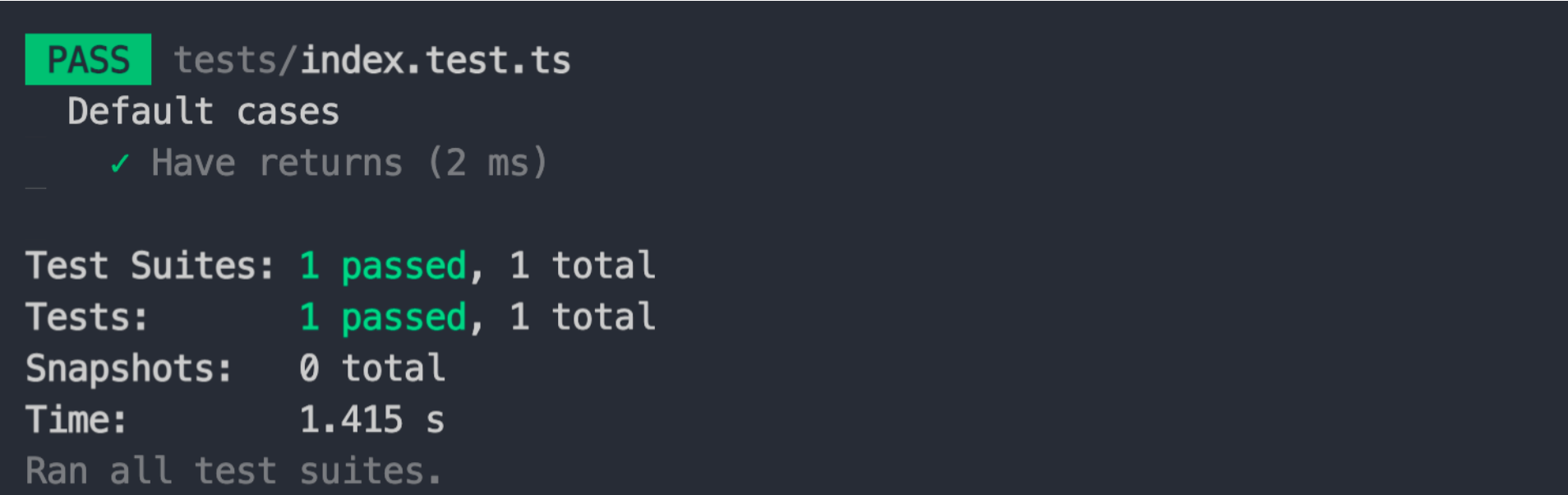
|
|
32
35
|
|
|
33
36
|
## Usage Configuration
|
|
34
37
|
|
|
35
38
|
The Module Engineering Program provides the following configurations for testing.
|
|
36
39
|
|
|
37
|
-
|
|
40
|
+
- [`testing`](/api/config/testing)
|
|
38
41
|
|
|
39
42
|
You can add it in `modern.config.(j|t)s`.
|
|
40
43
|
|
|
@@ -46,7 +49,7 @@ For common modules, we can use the test function as follows:
|
|
|
46
49
|
|
|
47
50
|
<CH.Spotlight>
|
|
48
51
|
|
|
49
|
-
```
|
|
52
|
+
```typescript ./src/index.ts
|
|
50
53
|
export default function () {
|
|
51
54
|
return 'hello world';
|
|
52
55
|
}
|
|
@@ -56,7 +59,7 @@ export default function () {
|
|
|
56
59
|
|
|
57
60
|
First is the code of the module.
|
|
58
61
|
|
|
59
|
-
```
|
|
62
|
+
```typescript ./src/index.ts
|
|
60
63
|
export default function () {
|
|
61
64
|
return 'hello world';
|
|
62
65
|
}
|
|
@@ -68,7 +71,7 @@ Then in the test file, we can do this.
|
|
|
68
71
|
|
|
69
72
|
Where `@` points to the source directory, defined in `tests/tsconfig.json` in the initialization project.
|
|
70
73
|
|
|
71
|
-
```
|
|
74
|
+
```typescript ./tests/index.test.ts
|
|
72
75
|
import main from '@/index';
|
|
73
76
|
|
|
74
77
|
describe('default cases', () => {
|
|
@@ -84,7 +87,7 @@ describe('default cases', () => {
|
|
|
84
87
|
|
|
85
88
|
Finally we can execute `modern test`.
|
|
86
89
|
|
|
87
|
-
```
|
|
90
|
+
```bash
|
|
88
91
|
pnpm test
|
|
89
92
|
## or
|
|
90
93
|
yarn test
|
|
@@ -96,15 +99,17 @@ npm run test
|
|
|
96
99
|
|
|
97
100
|
### Components
|
|
98
101
|
|
|
99
|
-
|
|
102
|
+
{/* 链接待补充 */}
|
|
103
|
+
|
|
104
|
+
For components, Modern.js's Runtime API provides functionality for testing UI components, which is provided by `@modern-js/runtime/testing`.
|
|
100
105
|
|
|
101
106
|
:::tip
|
|
102
|
-
If you need to use the Runtime API, then you can turn it on via [microgenerator](/
|
|
107
|
+
If you need to use the Runtime API, then you can turn it on via [microgenerator](/guide/basic/command-preview).
|
|
103
108
|
:::
|
|
104
109
|
|
|
105
110
|
<CH.Spotlight>
|
|
106
111
|
|
|
107
|
-
```
|
|
112
|
+
```tsx ./src/index.tsx
|
|
108
113
|
export const default () {
|
|
109
114
|
return (
|
|
110
115
|
<div>This is a UI Component</div>
|
|
@@ -116,7 +121,7 @@ export const default () {
|
|
|
116
121
|
|
|
117
122
|
First is the code of the component.
|
|
118
123
|
|
|
119
|
-
```
|
|
124
|
+
```tsx ./src/index.tsx
|
|
120
125
|
export const default () {
|
|
121
126
|
return (
|
|
122
127
|
<div>This is a UI Component</div>
|
|
@@ -130,7 +135,7 @@ Then in the test file, we can do this.
|
|
|
130
135
|
|
|
131
136
|
Where `@` points to the source directory, defined in `tests/tsconfig.json` in the initialization project.
|
|
132
137
|
|
|
133
|
-
```
|
|
138
|
+
```tsx ./tests/index.test.tsx
|
|
134
139
|
import { render, screen } from '@modern-js/runtime/testing';
|
|
135
140
|
|
|
136
141
|
import Component from '@/index';
|
|
@@ -147,7 +152,7 @@ describe('default cases', () => {
|
|
|
147
152
|
|
|
148
153
|
Finally we can execute `modern test`.
|
|
149
154
|
|
|
150
|
-
```
|
|
155
|
+
```bash
|
|
151
156
|
pnpm test
|
|
152
157
|
## or
|
|
153
158
|
yarn test
|
|
@@ -1,14 +1,18 @@
|
|
|
1
|
+
---
|
|
2
|
+
sidebar_position: 4
|
|
3
|
+
---
|
|
4
|
+
|
|
1
5
|
# Using the Microgenerator
|
|
2
6
|
|
|
3
7
|
The Module Engineering solution provides the Microgenerator tool, which allows for the current project to.
|
|
4
8
|
|
|
5
|
-
|
|
6
|
-
|
|
7
|
-
|
|
9
|
+
- add new directories and files
|
|
10
|
+
- Modify the contents of the `package.json` file
|
|
11
|
+
- Execute commands
|
|
8
12
|
|
|
9
13
|
Thus with these capabilities, **Microgenerator can enable additional feature functionality for the project**.
|
|
10
14
|
|
|
11
|
-
The microgenerator can be started via [`modern new`](/
|
|
15
|
+
The microgenerator can be started via [`modern new`](/guide/basic/command-preview). The current Microgenerator features supported by the Module Engineering program are:
|
|
12
16
|
|
|
13
17
|
## Storybook
|
|
14
18
|
|
|
@@ -16,8 +20,8 @@ The **Storybook feature** can be enabled when we want to debug a component or a
|
|
|
16
20
|
|
|
17
21
|
For more information on how to start Storybook and how to use it, check out the following link.
|
|
18
22
|
|
|
19
|
-
|
|
20
|
-
|
|
23
|
+
- [`modern dev`](/en/guide/basic/command-preview#modern-dev)
|
|
24
|
+
- [`using Storybook`](/en/guide/basic/using-storybook)
|
|
21
25
|
|
|
22
26
|
## Tailwind CSS support
|
|
23
27
|
|
|
@@ -25,11 +29,14 @@ This can be enabled when we want to add [Tailwind CSS](https://v2.tailwindcss.co
|
|
|
25
29
|
|
|
26
30
|
For more information on how to use Tailwind CSS in your module projects, check out.
|
|
27
31
|
|
|
28
|
-
|
|
32
|
+
<!-- 链接待补充 -->
|
|
29
33
|
|
|
34
|
+
- Using Tailwind CSS
|
|
30
35
|
|
|
31
36
|
## Modern.js Runtime API
|
|
32
37
|
|
|
33
|
-
|
|
38
|
+
<!-- 链接待补充 -->
|
|
39
|
+
|
|
40
|
+
**Modern.js provides Runtime API capabilities that can only be used in the Modern.js application project environment**. If you need to develop a component for use in a Modern.js application environment, then you can turn on this feature and the microgenerator will add the `"@modern-js/runtime"` dependency.
|
|
34
41
|
|
|
35
42
|
Also, the Storybook debugging tool will determine if the project needs to use the Runtime API by checking the project's dependencies and providing the same Runtime API runtime environment as the Modern.js application project.
|
|
@@ -1,17 +1,21 @@
|
|
|
1
|
+
---
|
|
2
|
+
sidebar_position: 5
|
|
3
|
+
---
|
|
4
|
+
|
|
1
5
|
# Using Storybook
|
|
2
6
|
|
|
3
7
|
First of all, if you haven't read the following, take a few minutes to understand it first.
|
|
4
8
|
|
|
5
|
-
|
|
6
|
-
|
|
9
|
+
- [use micro-generator to enable Storybook debugging](/en/guide/basic/use-micro-generator#storybook-debug)
|
|
10
|
+
- [`modern dev`](/en/guide/basic/command-preview#modern-dev)
|
|
7
11
|
|
|
8
12
|
[Storybook](https://storybook.js.org/) is a tool dedicated to component debugging, providing around component development.
|
|
9
13
|
|
|
10
|
-
|
|
11
|
-
|
|
12
|
-
|
|
13
|
-
|
|
14
|
-
|
|
14
|
+
- Develop UIs that are more durable
|
|
15
|
+
- Test UIs with less effort and no flakes
|
|
16
|
+
- Document UI for your team to reuse
|
|
17
|
+
- Share how the UI actually works
|
|
18
|
+
- Automate UI workflows
|
|
15
19
|
|
|
16
20
|
So it is a complex and powerful tool.
|
|
17
21
|
|
|
@@ -21,8 +25,8 @@ The modular engineering solution is integrated with Storybook, so you can pretty
|
|
|
21
25
|
|
|
22
26
|
Component code needs to be introduced during debugging code, and currently component code can be introduced in two ways:
|
|
23
27
|
|
|
24
|
-
|
|
25
|
-
|
|
28
|
+
- Referencing the component product
|
|
29
|
+
- Referencing component source code
|
|
26
30
|
|
|
27
31
|
We recommend the first way of "**referencing component product**". Because it is almost close to the real usage scenario, not only can we debug the component functionality, but also verify the correctness of the build product.
|
|
28
32
|
|
|
@@ -36,9 +40,9 @@ If the TypeScript project `foo` exists.
|
|
|
36
40
|
|
|
37
41
|
```json package.json
|
|
38
42
|
{
|
|
39
|
-
|
|
40
|
-
|
|
41
|
-
|
|
43
|
+
"name": "foo",
|
|
44
|
+
"main": "./dist/index.js",
|
|
45
|
+
"types": "./dist/types/index.d.ts"
|
|
42
46
|
}
|
|
43
47
|
```
|
|
44
48
|
|
|
@@ -49,9 +53,9 @@ values are real paths.
|
|
|
49
53
|
|
|
50
54
|
```json package.json
|
|
51
55
|
{
|
|
52
|
-
|
|
53
|
-
|
|
54
|
-
|
|
56
|
+
"name": "foo",
|
|
57
|
+
"main": "./dist/index.js",
|
|
58
|
+
"types": "./dist/types/index.d.ts"
|
|
55
59
|
}
|
|
56
60
|
```
|
|
57
61
|
|
|
@@ -65,7 +69,6 @@ export const content = 'hello world';
|
|
|
65
69
|
|
|
66
70
|
---
|
|
67
71
|
|
|
68
|
-
|
|
69
72
|
Make sure that the `paths` configuration pointing to the project root is set in `stories/tsconfig.json`.
|
|
70
73
|
The `key` of `paths` is the same as the project name.
|
|
71
74
|
|
|
@@ -105,7 +108,7 @@ If, during development, you encounter a situation where the type definition is n
|
|
|
105
108
|
|
|
106
109
|
For `pnpm` projects, `package.json` can be modified as follows.
|
|
107
110
|
|
|
108
|
-
```
|
|
111
|
+
```ts focus=4:7
|
|
109
112
|
{
|
|
110
113
|
"name": "foo",
|
|
111
114
|
"main": "./dist/index.js",
|
|
@@ -115,17 +118,16 @@ For `pnpm` projects, `package.json` can be modified as follows.
|
|
|
115
118
|
}
|
|
116
119
|
}
|
|
117
120
|
```
|
|
121
|
+
|
|
118
122
|
> For the use of pnpm's `publishConfig`, you can read the following [link](https://pnpm.io/package_json#publishconfig).
|
|
119
123
|
|
|
120
124
|
For npm and Yarn projects, the values of `types` of `package.json` can only be changed manually in **development phase** and **release phase**.
|
|
121
125
|
|
|
122
|
-
|
|
123
126
|
So why is it possible to reference the product directly?
|
|
124
127
|
|
|
125
128
|
1. the `modern build` command is executed automatically before the `modern dev storybook` command, ensuring the existence of the project build product.
|
|
126
129
|
2. The project name is added as an alias inside Storybook to ensure that the path to the project's product can be parsed **according to `package.json`**.
|
|
127
130
|
|
|
128
|
-
|
|
129
131
|
### Referencing component source code
|
|
130
132
|
|
|
131
133
|
Referencing component source code can be done by means of relative paths to:
|
|
@@ -146,7 +148,6 @@ So why is the source code approach not recommended?
|
|
|
146
148
|
|
|
147
149
|
Not only is it impossible to verify that the component product is correct using the component source code, **but also some of the configurations supported by the module project for building the product cannot be fully translated into Storybook internal configuration**. If some of the configurations cannot be converted to each other, there will be unintended results during Storybook debugging.
|
|
148
150
|
|
|
149
|
-
|
|
150
151
|
## Configure Storybook
|
|
151
152
|
|
|
152
153
|
### Configuration file
|
|
@@ -155,12 +156,12 @@ Storybook is officially configured for projects through a folder called `.storyb
|
|
|
155
156
|
|
|
156
157
|
For more information on how to use the various Storybook configuration files, see the following links:
|
|
157
158
|
|
|
158
|
-
|
|
159
|
+
- [Configure Storybook](https://storybook.js.org/docs/react/configure/overview)
|
|
159
160
|
|
|
160
161
|
**But there are some limitations to Storybooking in a module project**:
|
|
161
162
|
|
|
162
|
-
|
|
163
|
-
|
|
163
|
+
- It is currently not possible to change the location of the Story file, i.e., you cannot change the `stories` configuration in the `main.js` file.
|
|
164
|
+
- Currently you cannot modify Webpack and Babel related configuration, i.e. you cannot modify `webpackFinal` and `babel` configuration in the `main.js` file.
|
|
164
165
|
|
|
165
166
|
In the future we will consider whether these configurations can be allowed to be modified, but for now we are limiting their use to reduce unpredictable issues.
|
|
166
167
|
|
|
@@ -170,18 +171,20 @@ In addition to the configuration file, the module engineering solution also prov
|
|
|
170
171
|
|
|
171
172
|
The webpack configuration of Storybook can be modified via this configuration.
|
|
172
173
|
|
|
173
|
-
|
|
174
|
+
{/* 链接待补充 */}
|
|
175
|
+
|
|
176
|
+
- `dev.storybook.webpack`
|
|
174
177
|
|
|
175
178
|
### Building Storybook Products
|
|
176
179
|
|
|
177
180
|
In addition to Storybook debugging of components or common modules, you can also perform Storybook build tasks with the following commands.
|
|
178
181
|
|
|
179
|
-
```
|
|
182
|
+
```bash
|
|
180
183
|
modern build --platform storybook
|
|
181
184
|
```
|
|
182
185
|
|
|
183
186
|
For the `modern build --platform` command you can see.
|
|
184
187
|
|
|
185
|
-
|
|
188
|
+
- [`modern build`](/en/guide/basic/command-preview#modern-build)
|
|
186
189
|
|
|
187
190
|
After the build is complete, you can see the build product files in the `dist/storybook-static` directory.
|