@modern-js/module-tools-docs 2.0.0-beta.4 → 2.0.1
This diff represents the content of publicly available package versions that have been released to one of the supported registries. The information contained in this diff is provided for informational purposes only and reflects changes between package versions as they appear in their respective public registries.
- package/.eslintrc.js +13 -0
- package/docs/en/api/config/_category_.json +4 -0
- package/docs/en/api/{build-config.md → config/build-config.md} +198 -105
- package/docs/en/api/{build-preset.md → config/build-preset.md} +65 -46
- package/docs/{zh/api → en/api/config}/design-system.md +130 -127
- package/docs/en/api/config/plugins.md +18 -0
- package/docs/en/api/{test.md → config/testing.md} +21 -12
- package/docs/en/api/index.md +3 -1
- package/docs/en/api/plugin-api/_category_.json +4 -0
- package/docs/en/api/plugin-api/plugin-hooks.md +501 -0
- package/docs/en/guide/advance/_category_.json +4 -0
- package/docs/en/guide/advance/asset.mdx +47 -30
- package/docs/en/guide/advance/build-umd.mdx +88 -80
- package/docs/en/guide/advance/copy.md +31 -28
- package/docs/en/guide/advance/external-dependency.mdx +27 -23
- package/docs/en/guide/advance/in-depth-about-build.md +56 -50
- package/docs/en/guide/advance/in-depth-about-dev-command.md +7 -4
- package/docs/en/guide/advance/theme-config.mdx +80 -0
- package/docs/en/guide/basic/_category_.json +4 -0
- package/docs/en/guide/basic/before-getting-started.md +28 -23
- package/docs/en/guide/basic/command-preview.md +18 -14
- package/docs/en/guide/basic/modify-output-product.md +27 -20
- package/docs/en/guide/basic/publish-your-project.md +21 -19
- package/docs/en/guide/basic/test-your-project.mdx +19 -16
- package/docs/en/guide/basic/use-micro-generator.md +10 -7
- package/docs/en/guide/basic/using-storybook.mdx +27 -26
- package/docs/en/guide/best-practices/_category_.json +4 -0
- package/docs/en/guide/best-practices/components.mdx +783 -0
- package/docs/en/guide/intro/_category_.json +4 -0
- package/docs/en/guide/intro/getting-started.md +9 -4
- package/docs/en/guide/intro/welcome.md +4 -0
- package/docs/en/guide/intro/why-module-engineering-solution.md +5 -1
- package/docs/en/index.md +3 -5
- package/docs/en/plugins/guide/_category_.json +4 -0
- package/docs/en/plugins/guide/getting-started.mdx +84 -0
- package/docs/en/plugins/guide/plugin-object.mdx +85 -0
- package/docs/en/plugins/guide/setup-function.mdx +117 -0
- package/docs/en/plugins/official-list/_category_.json +4 -0
- package/docs/en/plugins/official-list/overview.md +6 -0
- package/docs/zh/api/config/_category_.json +4 -0
- package/docs/zh/api/config/build-config.md +658 -0
- package/docs/zh/api/{build-preset.md → config/build-preset.md} +49 -36
- package/docs/zh/api/config/design-system.md +1166 -0
- package/docs/zh/api/config/plugins.md +18 -0
- package/docs/zh/api/{testing.md → config/testing.md} +18 -13
- package/docs/zh/api/index.md +4 -1
- package/docs/zh/api/plugin-api/_category_.json +4 -0
- package/docs/zh/api/plugin-api/plugin-hooks.md +500 -0
- package/docs/zh/guide/advance/_category_.json +4 -0
- package/docs/zh/guide/advance/asset.mdx +47 -30
- package/docs/zh/guide/advance/build-umd.mdx +88 -71
- package/docs/zh/guide/advance/copy.md +31 -28
- package/docs/zh/guide/advance/external-dependency.mdx +27 -23
- package/docs/zh/guide/advance/in-depth-about-build.md +55 -50
- package/docs/zh/guide/advance/in-depth-about-dev-command.md +7 -4
- package/docs/zh/guide/advance/theme-config.mdx +78 -0
- package/docs/zh/guide/basic/_category_.json +4 -0
- package/docs/zh/guide/basic/before-getting-started.md +27 -22
- package/docs/zh/guide/basic/command-preview.md +17 -13
- package/docs/zh/guide/basic/modify-output-product.md +28 -21
- package/docs/zh/guide/basic/publish-your-project.md +22 -17
- package/docs/zh/guide/basic/test-your-project.mdx +20 -16
- package/docs/zh/guide/basic/use-micro-generator.md +10 -7
- package/docs/zh/guide/basic/using-storybook.mdx +27 -24
- package/docs/zh/guide/best-practices/_category_.json +4 -0
- package/docs/zh/guide/best-practices/components.mdx +793 -0
- package/docs/zh/guide/intro/_category_.json +4 -0
- package/docs/zh/guide/intro/getting-started.md +10 -4
- package/docs/zh/guide/intro/welcome.md +4 -0
- package/docs/zh/guide/intro/why-module-engineering-solution.md +5 -1
- package/docs/zh/index.md +3 -2
- package/docs/zh/plugins/guide/_category_.json +4 -0
- package/docs/zh/plugins/guide/getting-started.mdx +84 -0
- package/docs/zh/plugins/guide/plugin-object.mdx +85 -0
- package/docs/zh/plugins/guide/setup-function.mdx +117 -0
- package/docs/zh/plugins/official-list/_category_.json +4 -0
- package/docs/zh/plugins/official-list/overview.md +5 -0
- package/modern.config.ts +118 -0
- package/package.json +8 -6
- package/{docs/.island/styles → theme}/index.css +0 -1
- package/theme/index.ts +4 -0
- package/tsconfig.json +7 -0
- package/docs/.island/config.ts +0 -245
- package/docs/.island/dist/404.html +0 -41
- package/docs/.island/dist/assets/before-getting-started.1b82b538.js +0 -87
- package/docs/.island/dist/assets/before-getting-started.582a31cc.js +0 -87
- package/docs/.island/dist/assets/build-config.72eb0918.js +0 -804
- package/docs/.island/dist/assets/build-config.d8bb1658.js +0 -809
- package/docs/.island/dist/assets/build-preset.96805d7d.js +0 -256
- package/docs/.island/dist/assets/build-preset.c20dcd40.js +0 -256
- package/docs/.island/dist/assets/build-your-ui.7f349247.js +0 -2
- package/docs/.island/dist/assets/build-your-ui.a8361604.js +0 -2
- package/docs/.island/dist/assets/command-preview.2d45fc82.js +0 -264
- package/docs/.island/dist/assets/command-preview.dc51b953.js +0 -264
- package/docs/.island/dist/assets/components.esm.03560353.js +0 -9
- package/docs/.island/dist/assets/design-system.86694ff5.js +0 -1254
- package/docs/.island/dist/assets/design-system.c4745cce.js +0 -639
- package/docs/.island/dist/assets/dev.1d326a37.js +0 -37
- package/docs/.island/dist/assets/dev.1fd06000.js +0 -37
- package/docs/.island/dist/assets/down.f35427d3.svg +0 -1
- package/docs/.island/dist/assets/extension.12299fd6.js +0 -2
- package/docs/.island/dist/assets/extension.96dc63a4.js +0 -2
- package/docs/.island/dist/assets/getting-started.40e9218d.js +0 -117
- package/docs/.island/dist/assets/getting-started.b1ed3f10.js +0 -114
- package/docs/.island/dist/assets/github.3bf8ccee.svg +0 -1
- package/docs/.island/dist/assets/index.2b2347ea.js +0 -33
- package/docs/.island/dist/assets/index.6cef6f5f.js +0 -4
- package/docs/.island/dist/assets/index.cb118238.js +0 -36
- package/docs/.island/dist/assets/index.ccb6ce27.js +0 -4
- package/docs/.island/dist/assets/island_inject.11a12ecc.js +0 -1
- package/docs/.island/dist/assets/island_inject.b13deaee.js +0 -1
- package/docs/.island/dist/assets/loading.8c9bb911.svg +0 -1
- package/docs/.island/dist/assets/modify-output-product.7f6bff35.js +0 -100
- package/docs/.island/dist/assets/modify-output-product.b91eff1f.js +0 -100
- package/docs/.island/dist/assets/moon.6b705924.svg +0 -3
- package/docs/.island/dist/assets/plugin.895932d8.js +0 -42
- package/docs/.island/dist/assets/plugin.d2fbc531.js +0 -42
- package/docs/.island/dist/assets/publish-your-project.21b8309f.js +0 -164
- package/docs/.island/dist/assets/publish-your-project.8d398b17.js +0 -166
- package/docs/.island/dist/assets/right.89674cd7.svg +0 -1
- package/docs/.island/dist/assets/search.0aea6901.svg +0 -1
- package/docs/.island/dist/assets/search.1c85d17c.js +0 -3
- package/docs/.island/dist/assets/search.484eca11.js +0 -222
- package/docs/.island/dist/assets/search.54fca8d0.js +0 -3
- package/docs/.island/dist/assets/style.09015a4b.css +0 -1
- package/docs/.island/dist/assets/style.2e5f7bc2.css +0 -1970
- package/docs/.island/dist/assets/sun.841dac10.svg +0 -11
- package/docs/.island/dist/assets/test-your-project.18bd4582.js +0 -190
- package/docs/.island/dist/assets/test-your-project.f53bebf7.js +0 -190
- package/docs/.island/dist/assets/test.0da1f99f.js +0 -67
- package/docs/.island/dist/assets/test.0e81f002.js +0 -66
- package/docs/.island/dist/assets/translator.b1077c44.svg +0 -1
- package/docs/.island/dist/assets/use-micro-generator.7d9e4016.js +0 -60
- package/docs/.island/dist/assets/use-micro-generator.db5520c1.js +0 -60
- package/docs/.island/dist/assets/using-storybook.57ea6b77.js +0 -260
- package/docs/.island/dist/assets/using-storybook.a2212f2e.js +0 -260
- package/docs/.island/dist/assets/welcome.0449a9c8.js +0 -13
- package/docs/.island/dist/assets/welcome.a8448931.js +0 -13
- package/docs/.island/dist/assets/why-module-engineering-solution.6ae8c0e3.js +0 -26
- package/docs/.island/dist/assets/why-module-engineering-solution.c9a45cbd.js +0 -26
- package/docs/.island/dist/chunk-COLCRJ2V.js +0 -1
- package/docs/.island/dist/chunk-K5FMOYDC.js +0 -10
- package/docs/.island/dist/chunk-WE42KMYS.js +0 -26
- package/docs/.island/dist/client-entry.js +0 -3
- package/docs/.island/dist/en/api/build-config.html +0 -344
- package/docs/.island/dist/en/api/build-preset.html +0 -82
- package/docs/.island/dist/en/api/design-system.html +0 -155
- package/docs/.island/dist/en/api/dev.html +0 -45
- package/docs/.island/dist/en/api/index.html +0 -41
- package/docs/.island/dist/en/api/plugin.html +0 -48
- package/docs/.island/dist/en/api/test.html +0 -58
- package/docs/.island/dist/en/guide/before-getting-started.html +0 -127
- package/docs/.island/dist/en/guide/build-your-ui.html +0 -41
- package/docs/.island/dist/en/guide/command-preview.html +0 -100
- package/docs/.island/dist/en/guide/extension.html +0 -41
- package/docs/.island/dist/en/guide/getting-started.html +0 -76
- package/docs/.island/dist/en/guide/modify-output-product.html +0 -140
- package/docs/.island/dist/en/guide/publish-your-project.html +0 -91
- package/docs/.island/dist/en/guide/test-your-project.html +0 -72
- package/docs/.island/dist/en/guide/use-micro-generator.html +0 -65
- package/docs/.island/dist/en/guide/using-storybook.html +0 -113
- package/docs/.island/dist/en/guide/welcome.html +0 -53
- package/docs/.island/dist/en/guide/why-module-engineering-solution.html +0 -49
- package/docs/.island/dist/en/index.html +0 -42
- package/docs/.island/dist/react-dom.js +0 -1
- package/docs/.island/dist/react-dom_client.js +0 -1
- package/docs/.island/dist/react.js +0 -1
- package/docs/.island/dist/react_jsx-runtime.js +0 -10
- package/docs/.island/dist/ssr-manifest.json +0 -57
- package/docs/.island/dist/test-result.png +0 -0
- package/docs/.island/dist/why-module-solution.png +0 -0
- package/docs/.island/dist/zh/api/build-config.html +0 -347
- package/docs/.island/dist/zh/api/build-preset.html +0 -82
- package/docs/.island/dist/zh/api/design-system.html +0 -149
- package/docs/.island/dist/zh/api/dev.html +0 -46
- package/docs/.island/dist/zh/api/index.html +0 -41
- package/docs/.island/dist/zh/api/plugin.html +0 -48
- package/docs/.island/dist/zh/api/test.html +0 -59
- package/docs/.island/dist/zh/guide/before-getting-started.html +0 -127
- package/docs/.island/dist/zh/guide/build-your-ui.html +0 -41
- package/docs/.island/dist/zh/guide/command-preview.html +0 -100
- package/docs/.island/dist/zh/guide/extension.html +0 -41
- package/docs/.island/dist/zh/guide/getting-started.html +0 -79
- package/docs/.island/dist/zh/guide/modify-output-product.html +0 -140
- package/docs/.island/dist/zh/guide/publish-your-project.html +0 -92
- package/docs/.island/dist/zh/guide/test-your-project.html +0 -72
- package/docs/.island/dist/zh/guide/use-micro-generator.html +0 -65
- package/docs/.island/dist/zh/guide/using-storybook.html +0 -114
- package/docs/.island/dist/zh/guide/welcome.html +0 -53
- package/docs/.island/dist/zh/guide/why-module-engineering-solution.html +0 -49
- package/docs/.island/dist/zh/index.html +0 -42
- package/docs/.island/index.html +0 -39
- package/docs/en/api/design-system.md +0 -524
- package/docs/en/api/dev.md +0 -32
- package/docs/en/api/plugin.md +0 -34
- package/docs/zh/api/build-config.md +0 -570
- package/docs/zh/api/dev.md +0 -33
- package/docs/zh/api/plugins.md +0 -108
|
@@ -1,10 +1,14 @@
|
|
|
1
|
+
---
|
|
2
|
+
sidebar_position: 2
|
|
3
|
+
---
|
|
4
|
+
|
|
1
5
|
# 命令预览
|
|
2
6
|
|
|
3
7
|
模块工程项目可以使用的命令:
|
|
4
8
|
|
|
5
9
|
## `modern build`
|
|
6
10
|
|
|
7
|
-
```
|
|
11
|
+
```bash
|
|
8
12
|
Usage: modern build [options]
|
|
9
13
|
|
|
10
14
|
构建模块命令
|
|
@@ -34,7 +38,7 @@ Options:
|
|
|
34
38
|
|
|
35
39
|
## `modern new`
|
|
36
40
|
|
|
37
|
-
```
|
|
41
|
+
```bash
|
|
38
42
|
Usage: modern new [options]
|
|
39
43
|
|
|
40
44
|
模块化工程方案中执行生成器
|
|
@@ -59,7 +63,7 @@ Options:
|
|
|
59
63
|
|
|
60
64
|
## `modern dev`
|
|
61
65
|
|
|
62
|
-
```
|
|
66
|
+
```bash
|
|
63
67
|
Usage: modern dev [options]
|
|
64
68
|
|
|
65
69
|
本地开发命令
|
|
@@ -71,24 +75,24 @@ Commands:
|
|
|
71
75
|
[dev-tools-subCommand]
|
|
72
76
|
```
|
|
73
77
|
|
|
74
|
-
模块工程解决方案提供了使用调试工具的能力,可以通过 `modern dev` 命令来启动。不过要注意的是,默认情况下是没有提供调试相关的插件,因此此时执行 `modern dev` 会提示:
|
|
78
|
+
模块工程解决方案提供了使用调试工具的能力,可以通过 `modern dev` 命令来启动。不过要注意的是,默认情况下是没有提供调试相关的插件,因此此时执行 `modern dev` 会提示: _"No dev tools found available"_。
|
|
75
79
|
|
|
76
80
|
目前官方支持的调试工具有 [Storybook](https://storybook.js.org/),因此在你执行 `modern new` 命令开启它后,就可以执行 `modern dev` 或者 `modern dev storybook` 执行它。
|
|
77
81
|
|
|
78
82
|
## `modern test`
|
|
79
83
|
|
|
80
|
-
```
|
|
84
|
+
```bash
|
|
81
85
|
Usage: modern test [options]
|
|
82
86
|
|
|
83
87
|
Options:
|
|
84
88
|
-h, --help display help for command
|
|
85
89
|
```
|
|
86
|
-
`modern test` 命令会自动将 `src/tests/*.test.(js|ts|jsx|tsx)` 文件当做测试用例运行。
|
|
87
90
|
|
|
91
|
+
`modern test` 命令会自动将 `src/tests/*.test.(js|ts|jsx|tsx)` 文件当做测试用例运行。
|
|
88
92
|
|
|
89
93
|
## `modern lint`
|
|
90
94
|
|
|
91
|
-
```
|
|
95
|
+
```bash
|
|
92
96
|
Usage: modern lint [options] [...files]
|
|
93
97
|
|
|
94
98
|
lint and fix source files
|
|
@@ -104,7 +108,7 @@ Options:
|
|
|
104
108
|
|
|
105
109
|
## `modern change`
|
|
106
110
|
|
|
107
|
-
```
|
|
111
|
+
```bash
|
|
108
112
|
Usage: modern change [options]
|
|
109
113
|
|
|
110
114
|
创建变更集
|
|
@@ -119,7 +123,7 @@ Options:
|
|
|
119
123
|
|
|
120
124
|
## `modern pre`
|
|
121
125
|
|
|
122
|
-
```
|
|
126
|
+
```bash
|
|
123
127
|
Usage: modern pre [options] <enter|exit> [tag]
|
|
124
128
|
|
|
125
129
|
进入和退出预发布模式
|
|
@@ -132,7 +136,7 @@ Options:
|
|
|
132
136
|
|
|
133
137
|
## `modern bump`
|
|
134
138
|
|
|
135
|
-
```
|
|
139
|
+
```bash
|
|
136
140
|
Usage: modern bump [options]
|
|
137
141
|
|
|
138
142
|
使用变更集自动更新发布版本和变更日志
|
|
@@ -148,7 +152,7 @@ Options:
|
|
|
148
152
|
|
|
149
153
|
## `modern release`
|
|
150
154
|
|
|
151
|
-
```
|
|
155
|
+
```bash
|
|
152
156
|
Usage: modern release [options]
|
|
153
157
|
|
|
154
158
|
发布 npm 包
|
|
@@ -166,7 +170,7 @@ Options:
|
|
|
166
170
|
|
|
167
171
|
## `modern gen-release-note`
|
|
168
172
|
|
|
169
|
-
```
|
|
173
|
+
```bash
|
|
170
174
|
Usage: modern gen-release-note [options]
|
|
171
175
|
|
|
172
176
|
根据当前仓库 changeset 信息生成 Release Note
|
|
@@ -185,7 +189,7 @@ Options:
|
|
|
185
189
|
|
|
186
190
|
## `modern upgrade`
|
|
187
191
|
|
|
188
|
-
```
|
|
192
|
+
```bash
|
|
189
193
|
Usage: modern upgrade [options]
|
|
190
194
|
|
|
191
195
|
升级 Modern.js 到最新版本
|
|
@@ -1,10 +1,14 @@
|
|
|
1
|
+
---
|
|
2
|
+
sidebar_position: 3
|
|
3
|
+
---
|
|
4
|
+
|
|
1
5
|
# 修改输出产物
|
|
2
6
|
|
|
3
7
|
## 默认输出产物
|
|
4
8
|
|
|
5
9
|
当在初始化的项目里使用 `modern build` 命令的时候,会根据 Module Tools 默认支持的配置生成相应的产物。默认支持的配置具体如下:
|
|
6
10
|
|
|
7
|
-
```
|
|
11
|
+
```typescript
|
|
8
12
|
import { defineConfig } from '@modern-js/module-tools';
|
|
9
13
|
|
|
10
14
|
export default defineConfig({
|
|
@@ -20,8 +24,9 @@ export default defineConfig({
|
|
|
20
24
|
- 产物输出根目录为项目下的 `dist` 目录,类型文件输出的目录为 `dist/types`。
|
|
21
25
|
|
|
22
26
|
:::tip
|
|
27
|
+
|
|
23
28
|
1. 所谓“代码语法支持到 ES6”的意思是指:产物代码所支持的语法不会超过 `ES6`。如果源码中使用语法是 `ES6` 以上的语法(例如 `ES2017`),则会被进行转换。
|
|
24
|
-
:::
|
|
29
|
+
:::
|
|
25
30
|
|
|
26
31
|
看到这里你可能会有以下疑问:
|
|
27
32
|
|
|
@@ -56,8 +61,8 @@ export default defineConfig({
|
|
|
56
61
|
|
|
57
62
|
例如,如果使用预设函数的形式达到预设字符串 `"npm-library-es2017"` 同样的效果,可以按照如下的方式:
|
|
58
63
|
|
|
59
|
-
```
|
|
60
|
-
import { defineConfig } from
|
|
64
|
+
```typescript
|
|
65
|
+
import { defineConfig } from '@modern-js/module-tools';
|
|
61
66
|
|
|
62
67
|
export default defineConfig({
|
|
63
68
|
buildPreset({ preset }) {
|
|
@@ -69,6 +74,7 @@ export default defineConfig({
|
|
|
69
74
|
```
|
|
70
75
|
|
|
71
76
|
在上面的代码实现中,`preset.NPM_LIBRARY` 与预设字符串 `"npm-library"` 是相对应的,它代表着 `"npm-library"` 等价的多组构建相关的配置。我们通过 `map` 方法遍历了 `NPM_LIBRARY` 这个数组,在这个数组中包含了多个 `buildConfig` 对象。我们将原本的 `buildConfig` 对象进行了浅拷贝并修改了浅拷贝后得到 `buildConfig.target`,将它指定为 `es2017`。
|
|
77
|
+
|
|
72
78
|
> 关于 `preset.NPM_LIBRARY` 具体对应的值,可以通过 [BuildPreset API](/zh/api/build-config) 查看。在 `preset` 对象下不仅包含了 `NPM_LIBRARY`,还包含了其他类似的常量。
|
|
73
79
|
|
|
74
80
|
那么这里的 `buildConfig` 对象是什么呢?之前提到的构建产物特点又是根据什么呢?
|
|
@@ -77,7 +83,7 @@ export default defineConfig({
|
|
|
77
83
|
|
|
78
84
|
## 构建配置(对象)
|
|
79
85
|
|
|
80
|
-
**`buildConfig`
|
|
86
|
+
**`buildConfig` 是一个用来描述如何编译、生成构建产物的配置对象**。在最开始提到的关于“_构建产物的特点_”,其实都是 `buildConfig` 所支持的属性。目前所支持的属性覆盖了大部分模块类型项目在构建产物时的需求,`buildConfig` 不仅包含一些产物所具备的属性,也包含了构建产物所需要的一些特性功能。接下来从分类的角度简单罗列一下:
|
|
81
87
|
|
|
82
88
|
**构建产物的基本属性包括:**
|
|
83
89
|
|
|
@@ -87,7 +93,7 @@ export default defineConfig({
|
|
|
87
93
|
- 产物类型文件如何处理,对应的 API 是 [`buildConfig.dts`](/zh/api/build-config#dts)。
|
|
88
94
|
- 产物的 sourceMap 如何处理:对应的 API 是 [`buildConfig.sourceMap`](/zh/api/build-config#sourcemap)。
|
|
89
95
|
- 产物对应的输入(或者是源文件):对应的 API 是 [`buildConfig.input`](/zh/api/build-config#input)。
|
|
90
|
-
- 产物输出的目录:对应的 API 是 [`buildConfig.
|
|
96
|
+
- 产物输出的目录:对应的 API 是 [`buildConfig.outDir`](/zh/api/build-config#outDir)。
|
|
91
97
|
- 构建的源码目录:对应的 API 是 [`buildConfig.sourceDir`](/zh/api/build-config#sourcedir)。
|
|
92
98
|
|
|
93
99
|
**构建产物所需的常用功能包括:**
|
|
@@ -95,8 +101,8 @@ export default defineConfig({
|
|
|
95
101
|
- 别名:对应的 API 是 [`buildConfig.alias`](/zh/api/build-config#alias)。
|
|
96
102
|
- 静态资源处理:对应的 API 是 [`buildConfig.asset`](/zh/api/build-config#asset)。
|
|
97
103
|
- 第三方依赖处理:对应的 API 有:
|
|
98
|
-
|
|
99
|
-
|
|
104
|
+
- [`buildConfig.autoExternal`](/zh/api/build-config#autoexternal)。
|
|
105
|
+
- [`buildConfig.externals`](/zh/api/build-config#externals)。
|
|
100
106
|
- 拷贝:对应的 API 是 [`buildConfig.copy`](/zh/api/build-config#copy)。
|
|
101
107
|
- 全局变量替换:对应的 API 是 [`buildConfig.define`](/zh/api/build-config#define)。
|
|
102
108
|
- 指定 [JSX](https://reactjs.org/blog/2020/09/22/introducing-the-new-jsx-transform.html) 编译方式,对应的 API 是 [`buildConfig.jsx`](/zh/api/build-config#jsx)。
|
|
@@ -107,24 +113,25 @@ export default defineConfig({
|
|
|
107
113
|
- 代码分割:[`buildConfig.spitting`](/zh/api/build-config#splitting)
|
|
108
114
|
- 指定构建产物用于 NodeJS 环境还是浏览器环境:对应的 API 是 [`buildConfig.platform`](/zh/api/build-config#platform)。
|
|
109
115
|
- umd 产物相关:
|
|
110
|
-
|
|
111
|
-
|
|
116
|
+
- 指定 umd 产物外部导入的全局变量:对应的 API 是 [`buildConfig.umdGlobals`](/zh/api/build-config#umdglobals)。
|
|
117
|
+
- 指定 umd 产物的模块名:对应的 API 是 [`buildConfig.umdModuleName`](/zh/api/build-config#umdmodulename)。
|
|
112
118
|
|
|
113
119
|
除了以上分类以外,关于这些 API 的常见问题和最佳实践可以通过下面的链接来了解,敬请期待。
|
|
114
|
-
|
|
115
|
-
|
|
116
|
-
|
|
117
|
-
|
|
118
|
-
|
|
119
|
-
|
|
120
|
-
|
|
121
|
-
|
|
120
|
+
|
|
121
|
+
- [什么是 `bundle` 和 `bundleless`?](/zh/guide/advance/in-depth-about-build#bundle-和-bundleless)
|
|
122
|
+
- [`input` 与 `sourceDir` 的关系](/zh/guide/advance/in-depth-about-build#input-与-sourcedir-的关系)。
|
|
123
|
+
- [产物中类型文件的多种生成方式](/zh/guide/advance/in-depth-about-build#类型文件)。
|
|
124
|
+
- [`buildConfig.define` 不同场景的使用方式。](/zh/guide/advance/in-depth-about-build#buildconfigdefine-不同场景的使用方式)
|
|
125
|
+
- [如何处理第三方依赖?](/zh/guide/advance/external-dependency)
|
|
126
|
+
- [如何使用拷贝?](/zh/guide/advance/copy)
|
|
127
|
+
- [如何构建 umd 产物?](/zh/guide/advance/build-umd#设置项目的全局变量名称)
|
|
128
|
+
- [静态资源目前所支持的能力。](/zh/guide/advance/asset)
|
|
122
129
|
|
|
123
130
|
## 什么时候使用 `buildConfig`
|
|
124
131
|
|
|
125
132
|
`buildConfig` 是用于修改产物的方式之一,**当与 `buildPreset` 配置同时存在的时候,只有 `buildConfig` 才会生效**。因此如果按照如下方式配置:
|
|
126
133
|
|
|
127
|
-
```
|
|
134
|
+
```typescript
|
|
128
135
|
import { defineConfig } from '@modern-js/module-tools';
|
|
129
136
|
|
|
130
137
|
export default defineConfig({
|
|
@@ -135,10 +142,10 @@ export default defineConfig({
|
|
|
135
142
|
|
|
136
143
|
那么此时就会看到如下提示:
|
|
137
144
|
|
|
138
|
-
```
|
|
145
|
+
```bash
|
|
139
146
|
因为同时出现 'buildConfig' 和 'buildPreset' 配置,因此仅 'buildConfig' 配置生效
|
|
140
147
|
```
|
|
141
148
|
|
|
142
149
|
`buildPreset` 代表的一组或者多组构建相关的配置都是由 `buildConfig` 组成,**当使用 `buildPreset` 无法满足当前项目需求的时候,就可以使用 `buildConfig` 来自定义输出产物**。
|
|
143
150
|
|
|
144
|
-
在使用 `buildConfig`
|
|
151
|
+
在使用 `buildConfig` 的过程,就是对“_获得怎样的构建产物_”的思考过程。
|
|
@@ -1,26 +1,30 @@
|
|
|
1
|
+
---
|
|
2
|
+
sidebar_position: 7
|
|
3
|
+
---
|
|
4
|
+
|
|
1
5
|
# 版本管理与发布
|
|
2
6
|
|
|
3
7
|
一个 npm 类型的模块项目发布流程包含了两个阶段:
|
|
4
8
|
|
|
5
|
-
|
|
6
|
-
|
|
9
|
+
- 第一阶段是在开发期间,开发者需要提供一个变更文件来记录需要发布的变动;
|
|
10
|
+
- 第二阶段是在发布期间,Module Tools 可以收集所有的变更文件来更新版本、更新发布日志,并发布新的包到 [npm Registry](https://www.npmjs.com/) 上。
|
|
7
11
|
|
|
8
12
|
## 跟踪变更
|
|
9
13
|
|
|
10
14
|
**当项目发生变化的时候需要将变化的内容记录下来**。项目发生的变化一般是指:
|
|
11
15
|
|
|
12
|
-
|
|
13
|
-
|
|
14
|
-
|
|
15
|
-
|
|
16
|
+
- 新功能
|
|
17
|
+
- 修复问题
|
|
18
|
+
- 配置文件修改
|
|
19
|
+
- ...
|
|
16
20
|
|
|
17
21
|
当这些变化一旦完成后,需要通过以下命令来对当前的变化进行记录:
|
|
18
22
|
|
|
19
|
-
|
|
23
|
+
- [`modern change`](/zh/guide/command-preview#modern-change)
|
|
20
24
|
|
|
21
25
|
执行 `modern change` 命令后会向开发者提出几个问题,并根据开发者的回答生成变更记录。变更记录文件包含了版本变化的类型和其描述,该文件会被提交到 git 仓库中。
|
|
22
26
|
|
|
23
|
-
```
|
|
27
|
+
```bash
|
|
24
28
|
$ npx modern change
|
|
25
29
|
🦋 What kind of change is this for module-example? (current version is 0.1.0) · patch
|
|
26
30
|
🦋 Please enter a summary for this change (this will be in the changelogs). Submit empty line to open external editor
|
|
@@ -37,9 +41,9 @@ $ npx modern change
|
|
|
37
41
|
|
|
38
42
|
当执行成功后,生成的包含变更记录的 Markdown 文件会保存在项目的 `.changeset` 目录下面。其内容类似下面这样:
|
|
39
43
|
|
|
40
|
-
```
|
|
44
|
+
```markdown .changeset/brave-dryers-agree.md
|
|
41
45
|
---
|
|
42
|
-
|
|
46
|
+
'module-example': patch
|
|
43
47
|
---
|
|
44
48
|
|
|
45
49
|
publish test
|
|
@@ -49,14 +53,15 @@ publish test
|
|
|
49
53
|
|
|
50
54
|
当需要更新项目版本的时候,执行以下命令:
|
|
51
55
|
|
|
52
|
-
|
|
56
|
+
- [`modern bump`](/zh/guide/command-preview#modern-bump)
|
|
53
57
|
|
|
54
58
|
执行 `modern bump` 将会基于 `.changeset/` 目录下记录了变更的 Markdown 文件内容来修改 `package.json` 中的版本号,同时生成 `CHANGELOG.md` 文件。**而当版本更新完成后,这些记录变更的 Markdown 文件也会被删除,也可说这些 Markdown 文件被“消耗”掉了**。
|
|
55
59
|
|
|
56
|
-
```
|
|
60
|
+
```markdown CHANGELOG.md
|
|
57
61
|
# module
|
|
58
62
|
|
|
59
63
|
## 0.1.1
|
|
64
|
+
|
|
60
65
|
### Patch Changes
|
|
61
66
|
|
|
62
67
|
- publish test
|
|
@@ -66,13 +71,13 @@ publish test
|
|
|
66
71
|
|
|
67
72
|
发布项目可以执行以下命令:
|
|
68
73
|
|
|
69
|
-
|
|
74
|
+
- [`modern publish`](/zh/guide/command-preview#modern-release)
|
|
70
75
|
|
|
71
76
|
`modern release` 命令可以将项目发布到 npm Registry。
|
|
72
77
|
|
|
73
78
|
此时发布的是 `latest` 版本,也可以说是正式版本。如果想要修改 `dist-tag`,可以通过 `modern release --tag` 命令来指定。例如:
|
|
74
79
|
|
|
75
|
-
```
|
|
80
|
+
```bash
|
|
76
81
|
modern release --tag beta
|
|
77
82
|
```
|
|
78
83
|
|
|
@@ -84,11 +89,11 @@ modern release --tag beta
|
|
|
84
89
|
|
|
85
90
|
当需要在正式发布之前进行预发布,则需要执行以下命令:
|
|
86
91
|
|
|
87
|
-
|
|
92
|
+
- [`modern pre`](/zh/guide/command-preview#modern-pre)
|
|
88
93
|
|
|
89
94
|
首先 `modern pre enter <tag>` 进入预发布模式,`<tag>` 可以与发布项目的时候使用 `modern release --tag` 命令指定的 `tag` 一致。
|
|
90
95
|
|
|
91
|
-
```
|
|
96
|
+
```bash
|
|
92
97
|
$ npx modern pre enter next
|
|
93
98
|
🦋 success Entered pre mode with tag next
|
|
94
99
|
🦋 info Run `changeset version` to version packages with prerelease versions
|
|
@@ -97,7 +102,7 @@ $ npx modern pre enter next
|
|
|
97
102
|
|
|
98
103
|
接着可以使用 `modern bump` 命令更新具体的版本号,**此时不会真正的“消耗”记录变更的 Markdown 文件**:
|
|
99
104
|
|
|
100
|
-
```
|
|
105
|
+
```bash
|
|
101
106
|
$ npx modern bump
|
|
102
107
|
🦋 warn ===============================IMPORTANT!===============================
|
|
103
108
|
🦋 warn You are in prerelease mode
|
|
@@ -1,3 +1,7 @@
|
|
|
1
|
+
---
|
|
2
|
+
sidebar_position: 6
|
|
3
|
+
---
|
|
4
|
+
|
|
1
5
|
# 测试项目
|
|
2
6
|
|
|
3
7
|
本章将要介绍如何测试可复用模块。
|
|
@@ -6,20 +10,19 @@
|
|
|
6
10
|
|
|
7
11
|
想要使用项目的测试功能,需要确保项目中包含以下依赖:
|
|
8
12
|
|
|
9
|
-
|
|
13
|
+
- `"@modern-js/plugin-testing"`
|
|
10
14
|
|
|
11
15
|
在模块工程方案中,对于测试用例或者说编写测试的文件有如下约定:
|
|
12
16
|
|
|
13
|
-
|
|
14
|
-
|
|
15
|
-
|
|
16
|
-
|
|
17
|
+
- 项目目录下的 `tests` 目录为测试用例和测试文件的目录,**不支持更改运行测试用例的目录**。
|
|
18
|
+
- 默认会自动将后缀为 `.test.[tj]sx?` 的文件识别为测试文件。
|
|
19
|
+
- 其他的 `.[tj]sx?` 后缀的文件被识别为普通的文件,可以用于测试的 `utils` 文件或者其他用途。
|
|
17
20
|
|
|
18
21
|
## 运行测试
|
|
19
22
|
|
|
20
23
|
当准备好了依赖以及了解了测试用例在哪里编写后,我们可以通过以下命令来执行测试:
|
|
21
24
|
|
|
22
|
-
```
|
|
25
|
+
```bash
|
|
23
26
|
modern test
|
|
24
27
|
|
|
25
28
|
// 更新 snapshot
|
|
@@ -28,13 +31,14 @@ modern test --updateSnapshot
|
|
|
28
31
|
|
|
29
32
|
执行之后,会看到测试的结果:
|
|
30
33
|
|
|
31
|
-

|
|
34
|
+
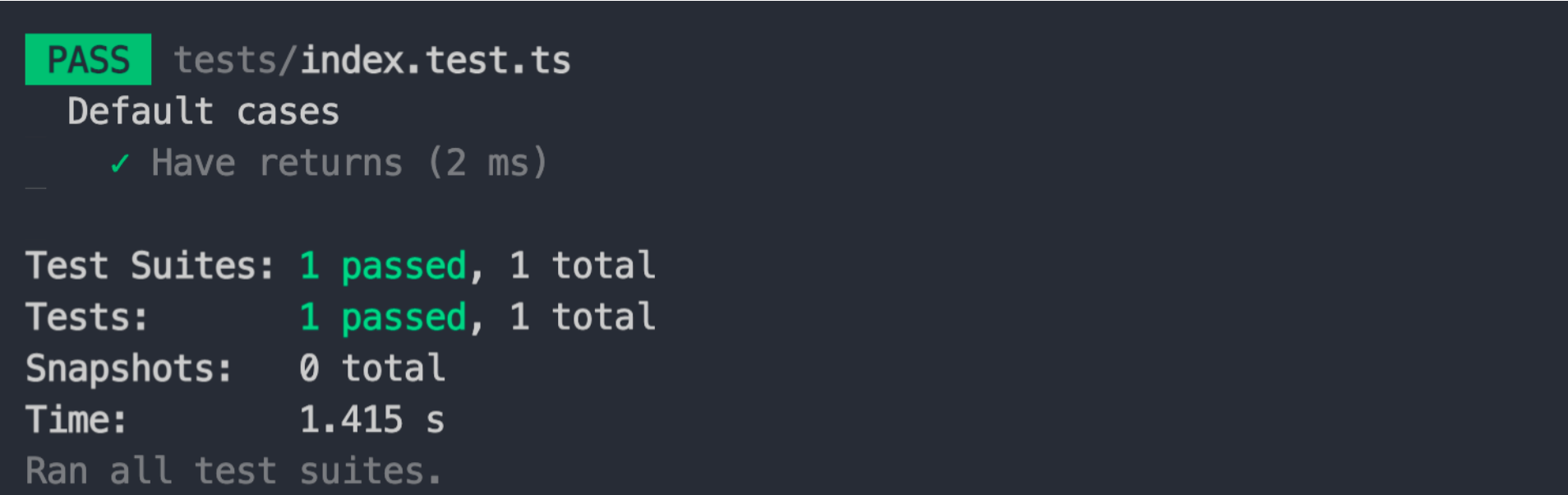
|
|
32
35
|
|
|
33
36
|
## 使用配置
|
|
34
37
|
|
|
38
|
+
/obj/eden-cn/uhbfnupenuhf/test-result.png
|
|
35
39
|
模块工程方案对测试提供了以下配置:
|
|
36
40
|
|
|
37
|
-
|
|
41
|
+
- [`testing`](/zh/api/config-test)
|
|
38
42
|
|
|
39
43
|
可以在 `modern.config.(j|t)s` 中增加它。
|
|
40
44
|
|
|
@@ -46,7 +50,7 @@ modern test --updateSnapshot
|
|
|
46
50
|
|
|
47
51
|
<CH.Spotlight>
|
|
48
52
|
|
|
49
|
-
```
|
|
53
|
+
```typescript ./src/index.ts
|
|
50
54
|
export default function () {
|
|
51
55
|
return 'hello world';
|
|
52
56
|
}
|
|
@@ -56,7 +60,7 @@ export default function () {
|
|
|
56
60
|
|
|
57
61
|
首先是模块的代码。
|
|
58
62
|
|
|
59
|
-
```
|
|
63
|
+
```typescript ./src/index.ts
|
|
60
64
|
export default function () {
|
|
61
65
|
return 'hello world';
|
|
62
66
|
}
|
|
@@ -68,7 +72,7 @@ export default function () {
|
|
|
68
72
|
|
|
69
73
|
其中 `@` 指向了源码目录,在初始化项目的 `tests/tsconfig.json` 中定义了。
|
|
70
74
|
|
|
71
|
-
```
|
|
75
|
+
```typescript ./tests/index.test.ts
|
|
72
76
|
import main from '@/index';
|
|
73
77
|
|
|
74
78
|
describe('默认值 cases', () => {
|
|
@@ -84,7 +88,7 @@ describe('默认值 cases', () => {
|
|
|
84
88
|
|
|
85
89
|
最后我们可以执行 `modern test`。
|
|
86
90
|
|
|
87
|
-
```
|
|
91
|
+
```bash
|
|
88
92
|
pnpm test
|
|
89
93
|
## or
|
|
90
94
|
yarn test
|
|
@@ -104,7 +108,7 @@ npm run test
|
|
|
104
108
|
|
|
105
109
|
<CH.Spotlight>
|
|
106
110
|
|
|
107
|
-
```
|
|
111
|
+
```tsx ./src/index.tsx
|
|
108
112
|
export const default () {
|
|
109
113
|
return (
|
|
110
114
|
<div>This is a UI Component</div>
|
|
@@ -116,7 +120,7 @@ export const default () {
|
|
|
116
120
|
|
|
117
121
|
首先是组件的代码。
|
|
118
122
|
|
|
119
|
-
```
|
|
123
|
+
```tsx ./src/index.tsx
|
|
120
124
|
export const default () {
|
|
121
125
|
return (
|
|
122
126
|
<div>This is a UI Component</div>
|
|
@@ -130,7 +134,7 @@ export const default () {
|
|
|
130
134
|
|
|
131
135
|
其中 `@` 指向了源码目录,在初始化项目的 `tests/tsconfig.json` 中定义了。
|
|
132
136
|
|
|
133
|
-
```
|
|
137
|
+
```tsx ./tests/index.test.tsx
|
|
134
138
|
import { render, screen } from '@modern-js/runtime/testing';
|
|
135
139
|
|
|
136
140
|
import Component from '@/index';
|
|
@@ -147,7 +151,7 @@ describe('默认值 cases', () => {
|
|
|
147
151
|
|
|
148
152
|
最后我们可以执行 `modern test`。
|
|
149
153
|
|
|
150
|
-
```
|
|
154
|
+
```bash
|
|
151
155
|
pnpm test
|
|
152
156
|
## or
|
|
153
157
|
yarn test
|
|
@@ -1,10 +1,14 @@
|
|
|
1
|
+
---
|
|
2
|
+
sidebar_position: 4
|
|
3
|
+
---
|
|
4
|
+
|
|
1
5
|
# 使用微生成器
|
|
2
6
|
|
|
3
7
|
模块工程解决方案提供了微生成器工具,它可以为当前项目:
|
|
4
8
|
|
|
5
|
-
|
|
6
|
-
|
|
7
|
-
|
|
9
|
+
- 新增目录和文件
|
|
10
|
+
- 修改 `package.json` 文件内容
|
|
11
|
+
- 执行命令
|
|
8
12
|
|
|
9
13
|
因此通过这些能力,**微生成器可以为项目开启额外的特性功能**。
|
|
10
14
|
|
|
@@ -16,8 +20,8 @@
|
|
|
16
20
|
|
|
17
21
|
关于如何启动 Storybook 以及如何使用 Storybook,可以查看下面的链接:
|
|
18
22
|
|
|
19
|
-
|
|
20
|
-
|
|
23
|
+
- [`modern dev`](/zh/guide/command-preview#modern-dev)
|
|
24
|
+
- [使用 Storybook](/zh/guide/using-storybook)
|
|
21
25
|
|
|
22
26
|
## Tailwind CSS 支持
|
|
23
27
|
|
|
@@ -25,8 +29,7 @@
|
|
|
25
29
|
|
|
26
30
|
关于如何在模块工程里使用 Tailwind CSS,可以查看:
|
|
27
31
|
|
|
28
|
-
|
|
29
|
-
|
|
32
|
+
- [使用 Tailwind CSS](xxx)
|
|
30
33
|
|
|
31
34
|
## 启动 Modern.js Runtime API
|
|
32
35
|
|
|
@@ -1,17 +1,21 @@
|
|
|
1
|
+
---
|
|
2
|
+
sidebar_position: 5
|
|
3
|
+
---
|
|
4
|
+
|
|
1
5
|
# 使用 Storybook
|
|
2
6
|
|
|
3
7
|
首先如果没有看过以下内容的话,可以先花几分钟先了解一下:
|
|
4
8
|
|
|
5
|
-
|
|
6
|
-
|
|
9
|
+
- [使用微生成器开启 Storybook 调试](/zh/guide/use-micro-generator#storybook-调试)
|
|
10
|
+
- [`modern dev`](/zh/guide/command-preview#modern-dev)
|
|
7
11
|
|
|
8
12
|
[Storybook](https://storybook.js.org/) 是一个专门用于组件调试的工具,围绕着组件开发提供了:
|
|
9
13
|
|
|
10
|
-
|
|
11
|
-
|
|
12
|
-
|
|
13
|
-
|
|
14
|
-
|
|
14
|
+
- 丰富多样的调试能力
|
|
15
|
+
- 可与一些测试工具结合使用
|
|
16
|
+
- 可重复使用的文档内容
|
|
17
|
+
- 可分享能力
|
|
18
|
+
- 工作流程自动化
|
|
15
19
|
|
|
16
20
|
因此它是一个复杂且功能强大的工具。
|
|
17
21
|
|
|
@@ -21,8 +25,8 @@
|
|
|
21
25
|
|
|
22
26
|
在调试代码过程中需要引入组件代码,目前可以通过两种方式引入组件代码:
|
|
23
27
|
|
|
24
|
-
|
|
25
|
-
|
|
28
|
+
- 引用组件产物
|
|
29
|
+
- 引用组件源码
|
|
26
30
|
|
|
27
31
|
我们更推荐使用第一种“**引用组件产物**”的方式。因为它几乎接近真实的使用场景,不仅可以对组件功能进行调试,同时也对构建产物的正确性进行了验证。
|
|
28
32
|
|
|
@@ -36,9 +40,9 @@
|
|
|
36
40
|
|
|
37
41
|
```json package.json
|
|
38
42
|
{
|
|
39
|
-
|
|
40
|
-
|
|
41
|
-
|
|
43
|
+
"name": "foo",
|
|
44
|
+
"main": "./dist/index.js",
|
|
45
|
+
"types": "./dist/types/index.d.ts"
|
|
42
46
|
}
|
|
43
47
|
```
|
|
44
48
|
|
|
@@ -49,9 +53,9 @@
|
|
|
49
53
|
|
|
50
54
|
```json package.json
|
|
51
55
|
{
|
|
52
|
-
|
|
53
|
-
|
|
54
|
-
|
|
56
|
+
"name": "foo",
|
|
57
|
+
"main": "./dist/index.js",
|
|
58
|
+
"types": "./dist/types/index.d.ts"
|
|
55
59
|
}
|
|
56
60
|
```
|
|
57
61
|
|
|
@@ -104,7 +108,7 @@ export default {
|
|
|
104
108
|
|
|
105
109
|
对于 `pnpm` 的项目,可以按照下面的内容对 `package.json` 进行修改:
|
|
106
110
|
|
|
107
|
-
```
|
|
111
|
+
```ts focus=4:7
|
|
108
112
|
{
|
|
109
113
|
"name": "foo",
|
|
110
114
|
"main": "./dist/index.js",
|
|
@@ -114,17 +118,16 @@ export default {
|
|
|
114
118
|
}
|
|
115
119
|
}
|
|
116
120
|
```
|
|
121
|
+
|
|
117
122
|
> 关于 pnpm 的 `publishConfig` 的使用,可以阅读下面这个[链接](https://pnpm.io/package_json#publishconfig)。
|
|
118
123
|
|
|
119
124
|
而对于 npm 和 Yarn 的项目,则只能通过手动的方式在**开发阶段**和**发布阶段**对 `package.json` 的 `types` 的值进行修改。
|
|
120
125
|
|
|
121
|
-
|
|
122
126
|
那么为什么可以直接引用产物呢?
|
|
123
127
|
|
|
124
128
|
1. 在执行 `modern dev storybook` 命令之前,会自动执行 `modern build` 命令,保证项目构建产物的存在。
|
|
125
129
|
2. 在 Storybook 内部增加了以项目名称作为别名的处理,保证能够**根据 `package.json` 解析出项目的产物路径**。
|
|
126
130
|
|
|
127
|
-
|
|
128
131
|
### 引用组件源码
|
|
129
132
|
|
|
130
133
|
引用组件的源码可以通过相对路径的方式:
|
|
@@ -154,12 +157,12 @@ Storybook 官方通过一个名为 `.storybook` 的文件夹来进行项目配
|
|
|
154
157
|
|
|
155
158
|
关于 Storybook 各种配置文件的使用方式,可以查看下面的链接:
|
|
156
159
|
|
|
157
|
-
|
|
160
|
+
- [Configure Storybook](https://storybook.js.org/docs/react/configure/overview)
|
|
158
161
|
|
|
159
162
|
**不过在模块项目里进行 Storybook 存在一些限制**:
|
|
160
163
|
|
|
161
|
-
|
|
162
|
-
|
|
164
|
+
- 目前不能修改 Story 文件存放的位置,即无法在 `main.js` 文件里修改 `stories` 配置。
|
|
165
|
+
- 目前不能修改 Webpack 和 Babel 相关的配置,即无法在 `main.js` 文件里修改 `webpackFinal` 和 `babel` 配置。
|
|
163
166
|
|
|
164
167
|
在未来我们会考虑这些配置是否可以允许修改,不过目前为了减少不可预知的问题暂时限制使用这些配置。
|
|
165
168
|
|
|
@@ -169,18 +172,18 @@ Storybook 官方通过一个名为 `.storybook` 的文件夹来进行项目配
|
|
|
169
172
|
|
|
170
173
|
目前可以通过该配置对 Storybook 的 webpack 配置进行修改。
|
|
171
174
|
|
|
172
|
-
|
|
175
|
+
- [`dev.storybook.webpack`](xxx)
|
|
173
176
|
|
|
174
177
|
### 构建 Storybook 产物
|
|
175
178
|
|
|
176
179
|
除了可以对组件或者普通的模块进行 Storybook 调试,还可以通过下面的命令来执行 Storybook 的构建任务。
|
|
177
180
|
|
|
178
|
-
```
|
|
181
|
+
```bash
|
|
179
182
|
modern build --platform storybook
|
|
180
183
|
```
|
|
181
184
|
|
|
182
185
|
关于 `modern build --platform` 命令可以查看:
|
|
183
186
|
|
|
184
|
-
|
|
187
|
+
- [`modern build`](/zh/guide/command-preview#modern-build)
|
|
185
188
|
|
|
186
189
|
构建完成后,可以在 `dist/storybook-static` 目录看到构建产物文件。
|