@modern-js/main-doc 3.1.5 → 3.2.1
This diff represents the content of publicly available package versions that have been released to one of the supported registries. The information contained in this diff is provided for informational purposes only and reflects changes between package versions as they appear in their respective public registries.
- package/docs/en/community/contributing-guide.mdx +1 -1
- package/docs/en/components/international/init-options-desc.mdx +1 -1
- package/docs/en/components/international/install-command.mdx +4 -17
- package/docs/en/components/international/instance-code.mdx +4 -14
- package/docs/en/components/international/introduce.mdx +4 -1
- package/docs/en/configure/app/server/tsconfig-path.mdx +63 -0
- package/docs/en/configure/app/source/enable-async-pre-entry.mdx +30 -0
- package/docs/en/configure/app/tools/dev-server.mdx +0 -4
- package/docs/en/guides/advanced-features/international/_meta.json +0 -1
- package/docs/en/guides/advanced-features/international/advanced.mdx +48 -109
- package/docs/en/guides/advanced-features/international/api.mdx +125 -290
- package/docs/en/guides/advanced-features/international/best-practices.mdx +203 -48
- package/docs/en/guides/advanced-features/international/configuration.mdx +108 -315
- package/docs/en/guides/advanced-features/international/locale-detection.mdx +62 -208
- package/docs/en/guides/advanced-features/international/quick-start.mdx +41 -55
- package/docs/en/guides/advanced-features/international/resource-loading.mdx +63 -322
- package/docs/en/guides/advanced-features/international/routing.mdx +60 -138
- package/docs/en/guides/advanced-features/international.mdx +19 -27
- package/docs/en/guides/basic-features/alias.mdx +1 -1
- package/docs/en/guides/basic-features/html.mdx +2 -2
- package/docs/en/guides/basic-features/static-assets.mdx +1 -2
- package/docs/en/guides/basic-features/testing/_meta.json +1 -1
- package/docs/en/guides/concept/entries.mdx +2 -2
- package/docs/en/guides/get-started/tech-stack.mdx +6 -0
- package/docs/zh/community/contributing-guide.mdx +1 -1
- package/docs/zh/components/international/init-options-desc.mdx +1 -1
- package/docs/zh/components/international/install-command.mdx +4 -16
- package/docs/zh/components/international/instance-code.mdx +4 -14
- package/docs/zh/components/international/introduce.mdx +5 -2
- package/docs/zh/configure/app/server/tsconfig-path.mdx +63 -0
- package/docs/zh/configure/app/source/enable-async-pre-entry.mdx +77 -0
- package/docs/zh/configure/app/tools/dev-server.mdx +0 -4
- package/docs/zh/guides/advanced-features/bff/function.mdx +2 -2
- package/docs/zh/guides/advanced-features/international/_meta.json +0 -1
- package/docs/zh/guides/advanced-features/international/advanced.mdx +48 -109
- package/docs/zh/guides/advanced-features/international/api.mdx +126 -292
- package/docs/zh/guides/advanced-features/international/best-practices.mdx +204 -49
- package/docs/zh/guides/advanced-features/international/configuration.mdx +105 -318
- package/docs/zh/guides/advanced-features/international/locale-detection.mdx +62 -236
- package/docs/zh/guides/advanced-features/international/quick-start.mdx +40 -54
- package/docs/zh/guides/advanced-features/international/resource-loading.mdx +62 -324
- package/docs/zh/guides/advanced-features/international/routing.mdx +58 -136
- package/docs/zh/guides/advanced-features/international.mdx +19 -26
- package/docs/zh/guides/basic-features/alias.mdx +1 -1
- package/docs/zh/guides/basic-features/html.mdx +2 -2
- package/docs/zh/guides/basic-features/static-assets.mdx +1 -2
- package/docs/zh/guides/basic-features/testing/_meta.json +1 -1
- package/docs/zh/guides/concept/entries.mdx +2 -2
- package/docs/zh/guides/get-started/tech-stack.mdx +6 -0
- package/package.json +4 -4
- package/docs/en/components/rspackPrecautions.mdx +0 -6
- package/docs/en/guides/advanced-features/international/basic.mdx +0 -417
- package/docs/en/guides/basic-features/testing/cypress.mdx +0 -95
- package/docs/en/guides/basic-features/testing/jest.mdx +0 -148
- package/docs/en/guides/basic-features/testing/vitest.mdx +0 -100
- package/docs/zh/components/rspackPrecautions.mdx +0 -6
- package/docs/zh/guides/advanced-features/international/basic.mdx +0 -416
- package/docs/zh/guides/basic-features/testing/cypress.mdx +0 -95
- package/docs/zh/guides/basic-features/testing/jest.mdx +0 -148
- package/docs/zh/guides/basic-features/testing/vitest.mdx +0 -100
|
@@ -1,417 +0,0 @@
|
|
|
1
|
-
---
|
|
2
|
-
title: Basic Concepts
|
|
3
|
-
---
|
|
4
|
-
|
|
5
|
-
# Basic Concepts
|
|
6
|
-
|
|
7
|
-
Before integrating internationalization capabilities into your project, you need to understand internationalization-related concepts. Understanding core concepts can help you quickly establish a stable translation system and better solve various problems during use.
|
|
8
|
-
|
|
9
|
-
## Core Concepts
|
|
10
|
-
|
|
11
|
-
### i18n
|
|
12
|
-
|
|
13
|
-
`i18n` is the abbreviation for Internationalization, which refers to making applications run well in different languages, regions, and cultures. It requires considering factors such as multilingual resources, numbers/dates/currencies, and cultural differences at the design stage.
|
|
14
|
-
|
|
15
|
-
### i18next
|
|
16
|
-
|
|
17
|
-
i18next is a general-purpose internationalization framework that provides capabilities such as language detection, resource management, interpolation, and pluralization. @modern-js/plugin-i18n is based on i18next by default. Please refer to its [official documentation](https://www.i18next.com/) for complete configuration instructions.
|
|
18
|
-
|
|
19
|
-
### react-i18next
|
|
20
|
-
|
|
21
|
-
react-i18next is a React binding library for i18next, providing Hooks/components such as `useTranslation` and `Trans` to achieve good integration with React lifecycle:
|
|
22
|
-
|
|
23
|
-
```tsx
|
|
24
|
-
import { useTranslation } from 'react-i18next';
|
|
25
|
-
|
|
26
|
-
function App() {
|
|
27
|
-
const { t } = useTranslation();
|
|
28
|
-
return <h1>{t('welcome')}</h1>;
|
|
29
|
-
}
|
|
30
|
-
```
|
|
31
|
-
|
|
32
|
-
### i18n Instance
|
|
33
|
-
|
|
34
|
-
i18next exports a default instance by default, and also supports generating multiple instances through `createInstance`:
|
|
35
|
-
|
|
36
|
-
```ts
|
|
37
|
-
import i18next, { createInstance } from 'i18next';
|
|
38
|
-
|
|
39
|
-
i18next.init({
|
|
40
|
-
/* ... */
|
|
41
|
-
});
|
|
42
|
-
|
|
43
|
-
const custom = createInstance();
|
|
44
|
-
await custom.init({
|
|
45
|
-
/* Independent configuration */
|
|
46
|
-
});
|
|
47
|
-
```
|
|
48
|
-
|
|
49
|
-
The instance is responsible for translation resources, current language, language switching, and other functions. You can also pass a custom instance in Modern.js's `runtime`.
|
|
50
|
-
|
|
51
|
-
### Initialization (init)
|
|
52
|
-
|
|
53
|
-
i18next completes initialization through `init`. Common core options:
|
|
54
|
-
|
|
55
|
-
- `lng`: Initial language
|
|
56
|
-
- `ns` / `defaultNS`: Namespace list and default namespace
|
|
57
|
-
- `supportedLngs`: Allowed language set
|
|
58
|
-
- `fallbackLng`: Fallback language when resources are missing (can be an array or mapping)
|
|
59
|
-
- `interpolation`: Interpolation settings, usually configured with `escapeValue: false` in React environments
|
|
60
|
-
|
|
61
|
-
```ts
|
|
62
|
-
i18next.init({
|
|
63
|
-
lng: 'zh',
|
|
64
|
-
ns: ['translation', 'common'],
|
|
65
|
-
defaultNS: 'translation',
|
|
66
|
-
supportedLngs: ['zh', 'en'],
|
|
67
|
-
fallbackLng: ['en'],
|
|
68
|
-
interpolation: { escapeValue: false },
|
|
69
|
-
});
|
|
70
|
-
```
|
|
71
|
-
|
|
72
|
-
### `t` Function
|
|
73
|
-
|
|
74
|
-
`t` is the core API for obtaining translations. It can be used directly from the instance or obtained through react-i18next Hook:
|
|
75
|
-
|
|
76
|
-
```ts
|
|
77
|
-
i18next.t('welcome');
|
|
78
|
-
```
|
|
79
|
-
|
|
80
|
-
```tsx
|
|
81
|
-
const { t } = useTranslation();
|
|
82
|
-
t('welcome', { name: 'Modern.js', count: 3 });
|
|
83
|
-
```
|
|
84
|
-
|
|
85
|
-
`t` supports advanced features such as interpolation, pluralization, and context, which will be explained in detail later.
|
|
86
|
-
|
|
87
|
-
import PlatformSupport from '@site-docs/components/international/platform-support';
|
|
88
|
-
|
|
89
|
-
<PlatformSupport />
|
|
90
|
-
|
|
91
|
-
## Language Code
|
|
92
|
-
|
|
93
|
-
Language codes are used to identify the current interface language, following the ISO 639-1 standard (`en`, `zh`, etc.), and can also carry region information (`en-US`, `zh-CN`).
|
|
94
|
-
|
|
95
|
-
- **Supported Language List**: Declared through plugin configuration, so you can know what products need to be generated at compile time.
|
|
96
|
-
- **Default Language**: Used when user language cannot be detected or resources are missing.
|
|
97
|
-
- **Fallback Language Chain**: Chains like `en-US → en → zh` determine the search order when translations are missing.
|
|
98
|
-
|
|
99
|
-
```ts
|
|
100
|
-
// modern.config.ts
|
|
101
|
-
import { defineConfig } from '@modern-js/app-tools';
|
|
102
|
-
import { i18nPlugin } from '@modern-js/plugin-i18n';
|
|
103
|
-
|
|
104
|
-
export default defineConfig({
|
|
105
|
-
plugins: [
|
|
106
|
-
i18nPlugin({
|
|
107
|
-
localeDetection: {
|
|
108
|
-
languages: ['zh', 'en', 'ja'],
|
|
109
|
-
fallbackLanguage: ['zh', 'en'], // Supports fallback chain
|
|
110
|
-
},
|
|
111
|
-
}),
|
|
112
|
-
],
|
|
113
|
-
});
|
|
114
|
-
```
|
|
115
|
-
|
|
116
|
-
💡 It is recommended to maintain `supportedLanguages` and `fallbackLanguage` in sync to avoid situations where users switch to unconfigured languages.
|
|
117
|
-
|
|
118
|
-
## Namespace
|
|
119
|
-
|
|
120
|
-
Namespaces are used to split translation files by business modules, facilitating code splitting and on-demand loading. The default namespace `translation` is used when not specified.
|
|
121
|
-
|
|
122
|
-
```ts
|
|
123
|
-
// src/modern.runtime.ts
|
|
124
|
-
import { defineRuntimeConfig } from '@modern-js/runtime';
|
|
125
|
-
|
|
126
|
-
export default defineRuntimeConfig({
|
|
127
|
-
i18n: {
|
|
128
|
-
initOptions: {
|
|
129
|
-
ns: ['translation', 'common', 'dashboard'],
|
|
130
|
-
defaultNS: 'translation',
|
|
131
|
-
},
|
|
132
|
-
},
|
|
133
|
-
});
|
|
134
|
-
```
|
|
135
|
-
|
|
136
|
-
Using different namespaces in components:
|
|
137
|
-
|
|
138
|
-
```tsx
|
|
139
|
-
import { useTranslation } from 'react-i18next';
|
|
140
|
-
|
|
141
|
-
export function DashboardHeader() {
|
|
142
|
-
const { t } = useTranslation(['dashboard', 'common']);
|
|
143
|
-
return (
|
|
144
|
-
<header>
|
|
145
|
-
<h1>{t('dashboard:title')}</h1>
|
|
146
|
-
<button>{t('common:button.refresh')}</button>
|
|
147
|
-
</header>
|
|
148
|
-
);
|
|
149
|
-
}
|
|
150
|
-
```
|
|
151
|
-
|
|
152
|
-
Namespaces can also be combined with dynamic loading to request large amounts of text on demand.
|
|
153
|
-
|
|
154
|
-
## Resource File Structure
|
|
155
|
-
|
|
156
|
-
Recommended resource file directory:
|
|
157
|
-
|
|
158
|
-
```
|
|
159
|
-
locales/
|
|
160
|
-
├── en/
|
|
161
|
-
│ ├── translation.json
|
|
162
|
-
│ ├── common.json
|
|
163
|
-
│ └── dashboard.json
|
|
164
|
-
└── zh/
|
|
165
|
-
├── translation.json
|
|
166
|
-
├── common.json
|
|
167
|
-
└── dashboard.json
|
|
168
|
-
```
|
|
169
|
-
|
|
170
|
-
- **File Naming**: `locales/<language>/<namespace>.json`
|
|
171
|
-
- **Format**: Standard JSON, key-value pairs or nested objects
|
|
172
|
-
- **Organization**: Nested objects are used to represent UI hierarchy, such as buttons, dialogs, etc.
|
|
173
|
-
|
|
174
|
-
```json
|
|
175
|
-
{
|
|
176
|
-
"header": {
|
|
177
|
-
"title": "Welcome",
|
|
178
|
-
"actions": {
|
|
179
|
-
"save": "Save",
|
|
180
|
-
"cancel": "Cancel"
|
|
181
|
-
}
|
|
182
|
-
}
|
|
183
|
-
}
|
|
184
|
-
```
|
|
185
|
-
|
|
186
|
-
You can also directly inject resources through the `resources` option during initialization, or call `addResourceBundle` at runtime:
|
|
187
|
-
|
|
188
|
-
```ts
|
|
189
|
-
i18next.init({
|
|
190
|
-
resources: {
|
|
191
|
-
en: {
|
|
192
|
-
common: {
|
|
193
|
-
welcome: 'Welcome',
|
|
194
|
-
},
|
|
195
|
-
},
|
|
196
|
-
zh: {
|
|
197
|
-
common: {
|
|
198
|
-
welcome: '欢迎',
|
|
199
|
-
},
|
|
200
|
-
},
|
|
201
|
-
},
|
|
202
|
-
});
|
|
203
|
-
|
|
204
|
-
i18next.addResourceBundle('en', 'home', { title: 'Home' });
|
|
205
|
-
```
|
|
206
|
-
|
|
207
|
-
## Translation Key
|
|
208
|
-
|
|
209
|
-
Translation keys are paths to access translations, usually using dots to represent hierarchy: `common.button.submit`.
|
|
210
|
-
|
|
211
|
-
Naming convention recommendations:
|
|
212
|
-
|
|
213
|
-
- Use semantic words, avoid abbreviations
|
|
214
|
-
- Divide prefixes by module (`dashboard.table.*`)
|
|
215
|
-
- Can use `:` to specify namespace (`common:button.submit`)
|
|
216
|
-
- Avoid using complete Chinese text directly as keys
|
|
217
|
-
|
|
218
|
-
```tsx
|
|
219
|
-
const { t } = useTranslation();
|
|
220
|
-
|
|
221
|
-
button.textContent = t('common.button.submit', {
|
|
222
|
-
defaultValue: 'Submit',
|
|
223
|
-
});
|
|
224
|
-
```
|
|
225
|
-
|
|
226
|
-
## Interpolation and Variables
|
|
227
|
-
|
|
228
|
-
Interpolation allows dynamic injection of variables into translation text.
|
|
229
|
-
|
|
230
|
-
**Resource File**:
|
|
231
|
-
|
|
232
|
-
```json
|
|
233
|
-
{
|
|
234
|
-
"welcome": "Welcome, {{name}}!",
|
|
235
|
-
"invite": "{{name}} invites you to join {{project}}",
|
|
236
|
-
"formattedValue": "Current price: {{value, currency}}"
|
|
237
|
-
}
|
|
238
|
-
```
|
|
239
|
-
|
|
240
|
-
**Usage**:
|
|
241
|
-
|
|
242
|
-
```tsx
|
|
243
|
-
const { t } = useTranslation();
|
|
244
|
-
|
|
245
|
-
return (
|
|
246
|
-
<>
|
|
247
|
-
<p>{t('welcome', { name: 'John' })}</p>
|
|
248
|
-
<p>{t('invite', { name: 'Alice', project: 'Modern.js' })}</p>
|
|
249
|
-
</>
|
|
250
|
-
);
|
|
251
|
-
```
|
|
252
|
-
|
|
253
|
-
### Nested Interpolation
|
|
254
|
-
|
|
255
|
-
You can directly pass objects or multi-level variables:
|
|
256
|
-
|
|
257
|
-
```json
|
|
258
|
-
{
|
|
259
|
-
"greeting": "Hello, {{user.name}}, you have {{user.notifications}} new messages"
|
|
260
|
-
}
|
|
261
|
-
```
|
|
262
|
-
|
|
263
|
-
```tsx
|
|
264
|
-
t('greeting', {
|
|
265
|
-
user: { name: 'Jay', notifications: 3 },
|
|
266
|
-
});
|
|
267
|
-
```
|
|
268
|
-
|
|
269
|
-
### Formatted Interpolation
|
|
270
|
-
|
|
271
|
-
Format numbers, dates, etc. through the `interpolation.format` function:
|
|
272
|
-
|
|
273
|
-
```ts
|
|
274
|
-
export default defineRuntimeConfig({
|
|
275
|
-
i18n: {
|
|
276
|
-
initOptions: {
|
|
277
|
-
interpolation: {
|
|
278
|
-
format(value, format, lng) {
|
|
279
|
-
if (format === 'currency') {
|
|
280
|
-
return new Intl.NumberFormat(lng, {
|
|
281
|
-
style: 'currency',
|
|
282
|
-
currency: lng === 'zh' ? 'CNY' : 'USD',
|
|
283
|
-
}).format(Number(value));
|
|
284
|
-
}
|
|
285
|
-
if (value instanceof Date) {
|
|
286
|
-
return new Intl.DateTimeFormat(lng, { dateStyle: 'medium' }).format(
|
|
287
|
-
value,
|
|
288
|
-
);
|
|
289
|
-
}
|
|
290
|
-
return value;
|
|
291
|
-
},
|
|
292
|
-
},
|
|
293
|
-
},
|
|
294
|
-
},
|
|
295
|
-
});
|
|
296
|
-
```
|
|
297
|
-
|
|
298
|
-
```tsx
|
|
299
|
-
t('formattedValue', { value: 99.5, format: 'currency' });
|
|
300
|
-
```
|
|
301
|
-
|
|
302
|
-
### Escaping Interpolation
|
|
303
|
-
|
|
304
|
-
`react-i18next` escapes interpolation values by default to prevent XSS. If you need to render safe HTML, you need to explicitly enable `interpolation.escapeValue = false` and ensure the data is trustworthy.
|
|
305
|
-
|
|
306
|
-
## Pluralization
|
|
307
|
-
|
|
308
|
-
Pluralization automatically selects the appropriate word form based on the language, depending on the `count` parameter.
|
|
309
|
-
|
|
310
|
-
```json
|
|
311
|
-
{
|
|
312
|
-
"item": "1 item",
|
|
313
|
-
"item_plural": "{{count}} items",
|
|
314
|
-
"item_0": "no items"
|
|
315
|
-
}
|
|
316
|
-
```
|
|
317
|
-
|
|
318
|
-
```tsx
|
|
319
|
-
t('item', { count: 0 }); // no items
|
|
320
|
-
t('item', { count: 1 }); // 1 item
|
|
321
|
-
t('item', { count: 5 }); // 5 items
|
|
322
|
-
```
|
|
323
|
-
|
|
324
|
-
Different languages have different pluralization rules, for example:
|
|
325
|
-
|
|
326
|
-
- **English**: Singular, plural
|
|
327
|
-
- **Russian**: Multiple forms such as one, few, many
|
|
328
|
-
- **Chinese**: Usually only a single form, can use `_0` key to override special text
|
|
329
|
-
|
|
330
|
-
💡 If you need to customize pluralization rules, you can extend through `i18next.services.pluralResolver`. See advanced usage for details.
|
|
331
|
-
|
|
332
|
-
## Nested Translation Structure
|
|
333
|
-
|
|
334
|
-
Nested structures can intuitively reflect UI hierarchy.
|
|
335
|
-
|
|
336
|
-
```json
|
|
337
|
-
{
|
|
338
|
-
"common": {
|
|
339
|
-
"button": {
|
|
340
|
-
"submit": "Submit",
|
|
341
|
-
"cancel": "Cancel"
|
|
342
|
-
}
|
|
343
|
-
}
|
|
344
|
-
}
|
|
345
|
-
```
|
|
346
|
-
|
|
347
|
-
Use dots to access in code:
|
|
348
|
-
|
|
349
|
-
```tsx
|
|
350
|
-
const { t } = useTranslation();
|
|
351
|
-
t('common.button.submit');
|
|
352
|
-
```
|
|
353
|
-
|
|
354
|
-
Advantages of nested structures:
|
|
355
|
-
|
|
356
|
-
- Avoid lengthy key names
|
|
357
|
-
- Easy to view module text as a whole in JSON
|
|
358
|
-
- Can be combined with `keyPrefix` to simplify calls: `useTranslation('common', { keyPrefix: 'button' })`
|
|
359
|
-
|
|
360
|
-
## Fallback Language
|
|
361
|
-
|
|
362
|
-
When the current language is missing a key, it will continue searching according to the fallback language chain.
|
|
363
|
-
|
|
364
|
-
```ts
|
|
365
|
-
export default defineRuntimeConfig({
|
|
366
|
-
i18n: {
|
|
367
|
-
initOptions: {
|
|
368
|
-
lng: 'zh-CN',
|
|
369
|
-
fallbackLng: {
|
|
370
|
-
'zh-CN': ['zh', 'en'],
|
|
371
|
-
default: ['en'],
|
|
372
|
-
},
|
|
373
|
-
},
|
|
374
|
-
},
|
|
375
|
-
});
|
|
376
|
-
```
|
|
377
|
-
|
|
378
|
-
:::tip
|
|
379
|
-
You can fallback from regional languages (such as `zh-CN`) to general languages (`zh`), and finally to the default language (`en`), ensuring that all keys have available text.
|
|
380
|
-
:::
|
|
381
|
-
|
|
382
|
-
## Language Detection
|
|
383
|
-
|
|
384
|
-
i18next automatically identifies user language through language detection plugins. Modern.js plugin has built-in browser and server support.
|
|
385
|
-
|
|
386
|
-
```ts
|
|
387
|
-
import LanguageDetector from 'i18next-browser-languagedetector';
|
|
388
|
-
import i18next from 'i18next';
|
|
389
|
-
|
|
390
|
-
i18next.use(LanguageDetector).init({
|
|
391
|
-
supportedLngs: ['zh', 'en', 'ja'],
|
|
392
|
-
detection: {
|
|
393
|
-
order: ['path', 'cookie', 'localStorage', 'navigator'],
|
|
394
|
-
lookupCookie: 'i18next',
|
|
395
|
-
lookupLocalStorage: 'i18nextLng',
|
|
396
|
-
},
|
|
397
|
-
});
|
|
398
|
-
```
|
|
399
|
-
|
|
400
|
-
In Modern.js, you can directly enable built-in detection in the plugin configuration:
|
|
401
|
-
|
|
402
|
-
```ts
|
|
403
|
-
i18nPlugin({
|
|
404
|
-
localeDetection: {
|
|
405
|
-
i18nextDetector: true,
|
|
406
|
-
languages: ['zh', 'en'],
|
|
407
|
-
detection: {
|
|
408
|
-
order: ['path', 'cookie', 'header'],
|
|
409
|
-
},
|
|
410
|
-
},
|
|
411
|
-
});
|
|
412
|
-
```
|
|
413
|
-
|
|
414
|
-
:::warning
|
|
415
|
-
After enabling detection, there is no need to explicitly set `lng` in `init`. If you manually call `changeLanguage()` without passing a language, it will also automatically infer based on the detection configuration.
|
|
416
|
-
:::
|
|
417
|
-
|
|
@@ -1,95 +0,0 @@
|
|
|
1
|
-
# Cypress
|
|
2
|
-
|
|
3
|
-
Cypress is a framework for E2E testing and component testing.
|
|
4
|
-
|
|
5
|
-
To use Cypress in Modern.js, you need to install the dependencies first. You can run the following commands:
|
|
6
|
-
|
|
7
|
-
import { PackageManagerTabs } from '@theme';
|
|
8
|
-
|
|
9
|
-
<PackageManagerTabs command={{ npm: "npm install -D cypress", yarn: "yarn add -D cypress", pnpm: "pnpm install -D cypress" }} />
|
|
10
|
-
|
|
11
|
-
Next, create a `cypress.config.ts` file and add the following content:
|
|
12
|
-
|
|
13
|
-
```ts
|
|
14
|
-
import { defineConfig } from 'cypress'
|
|
15
|
-
|
|
16
|
-
export default defineConfig({
|
|
17
|
-
e2e: {
|
|
18
|
-
setupNodeEvents(on, config) {},
|
|
19
|
-
},
|
|
20
|
-
})
|
|
21
|
-
```
|
|
22
|
-
|
|
23
|
-
## Writing Test Cases
|
|
24
|
-
|
|
25
|
-
Now, use Cypress to write an E2E test case by first creating two Modern.js pages.
|
|
26
|
-
|
|
27
|
-
```tsx title="routes/page.tsx"
|
|
28
|
-
import { Link } from '@modern-js/runtime/router';
|
|
29
|
-
|
|
30
|
-
const Index = () => (
|
|
31
|
-
<div>
|
|
32
|
-
<h1>Home</h1>
|
|
33
|
-
<Link to="/about">About</Link>
|
|
34
|
-
</div>
|
|
35
|
-
);
|
|
36
|
-
|
|
37
|
-
export default Index;
|
|
38
|
-
```
|
|
39
|
-
|
|
40
|
-
```tsx title="routes/about/page.tsx"
|
|
41
|
-
import { Link } from '@modern-js/runtime/router';
|
|
42
|
-
|
|
43
|
-
const Index = () => (
|
|
44
|
-
<div>
|
|
45
|
-
<h1>About</h1>
|
|
46
|
-
<Link to="/">Home</Link>
|
|
47
|
-
</div>
|
|
48
|
-
);
|
|
49
|
-
|
|
50
|
-
export default Index;
|
|
51
|
-
```
|
|
52
|
-
|
|
53
|
-
Next, create the test case file:
|
|
54
|
-
|
|
55
|
-
```ts title="cypress/e2e/app.cy.ts"
|
|
56
|
-
describe('Navigation', () => {
|
|
57
|
-
it('should navigate to the about page', () => {
|
|
58
|
-
// Start from the index page
|
|
59
|
-
cy.visit('http://localhost:8080/')
|
|
60
|
-
|
|
61
|
-
// Find a link with an href attribute containing "about" and click it
|
|
62
|
-
cy.get('a[href*="about"]').click()
|
|
63
|
-
|
|
64
|
-
// The new url should include "/about"
|
|
65
|
-
cy.url().should('include', '/about')
|
|
66
|
-
|
|
67
|
-
// The new page should contain an h1 with "About"
|
|
68
|
-
cy.get('h1').contains('About')
|
|
69
|
-
})
|
|
70
|
-
})
|
|
71
|
-
```
|
|
72
|
-
|
|
73
|
-
The test file may lack type definitions for the API. You can refer to the [Cypress - Typescript](https://docs.cypress.io/guides/tooling/typescript-support#Configure-tsconfigjson) documentation to resolve this.
|
|
74
|
-
|
|
75
|
-
You can add the command to your `package.json`:
|
|
76
|
-
|
|
77
|
-
```json title="package.json"
|
|
78
|
-
{
|
|
79
|
-
"scripts": {
|
|
80
|
-
"test": "cypress open"
|
|
81
|
-
}
|
|
82
|
-
}
|
|
83
|
-
```
|
|
84
|
-
|
|
85
|
-
## Run Test Cases
|
|
86
|
-
|
|
87
|
-
Execute the above `test` command to run the test cases:
|
|
88
|
-
|
|
89
|
-
```bash
|
|
90
|
-
DevTools listening on ws://127.0.0.1:55203/devtools/browser/xxxxx
|
|
91
|
-
```
|
|
92
|
-
|
|
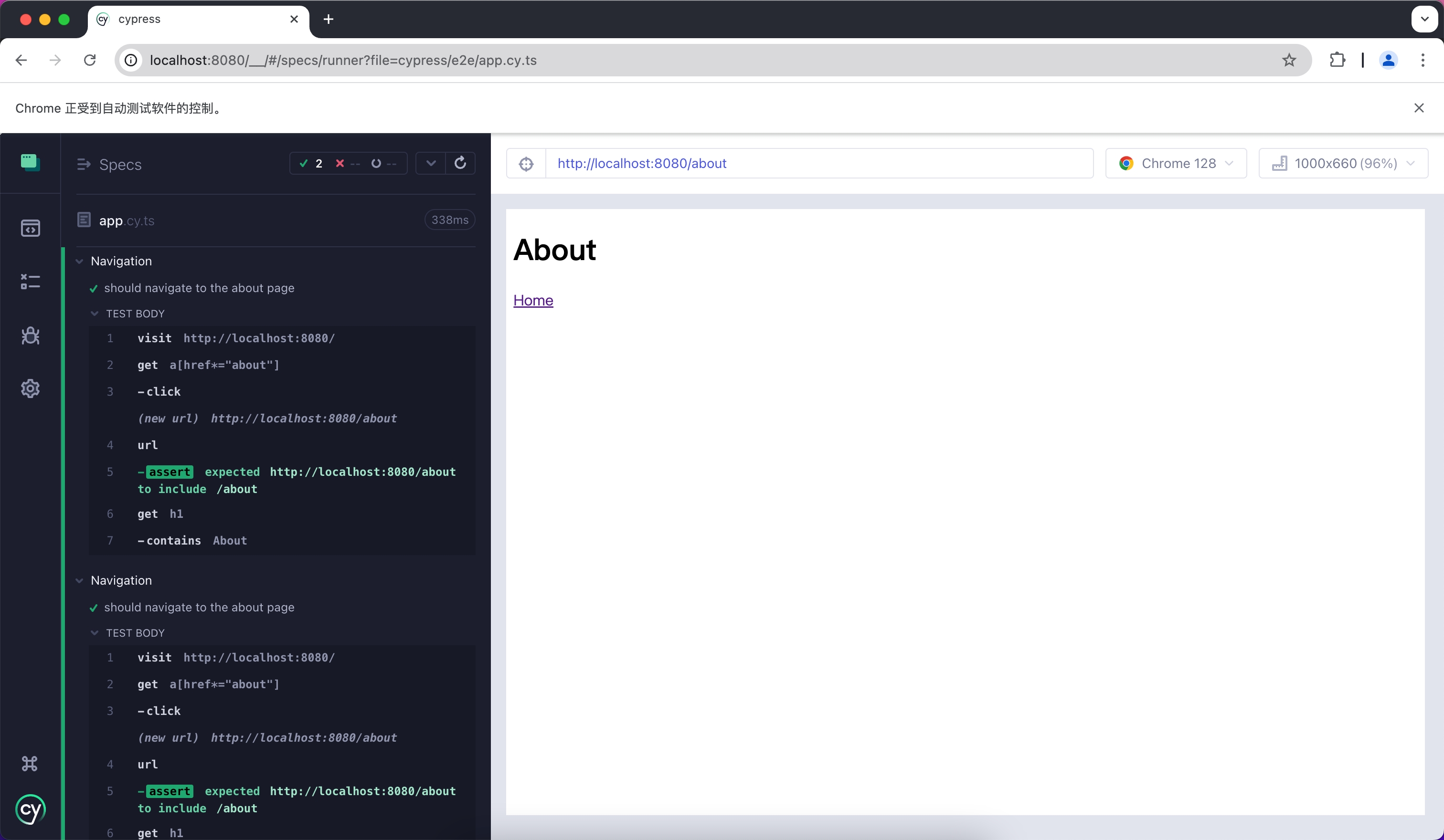
93
|
-
Cypress will open a headless browser. Following the prompts, you can find the corresponding test files and automatically run the E2E tests:
|
|
94
|
-
|
|
95
|
-
|
|
@@ -1,148 +0,0 @@
|
|
|
1
|
-
# Jest
|
|
2
|
-
|
|
3
|
-
Jest is a JavaScript testing framework that is primarily used with React Testing Library for unit testing and Snapshot testing.
|
|
4
|
-
|
|
5
|
-
To use Jest in Modern.js, you need to install the dependencies first. You can run the following commands:
|
|
6
|
-
|
|
7
|
-
import { PackageManagerTabs } from '@theme';
|
|
8
|
-
|
|
9
|
-
<PackageManagerTabs command={{
|
|
10
|
-
npm: "npm install -D jest jest-environment-jsdom @testing-library/react @testing-library/dom @testing-library/jest-dom",
|
|
11
|
-
yarn: "yarn add -D jest jest-environment-jsdom @testing-library/react @testing-library/dom @testing-library/jest-dom",
|
|
12
|
-
pnpm: "pnpm install -D jest jest-environment-jsdom @testing-library/react @testing-library/dom @testing-library/jest-dom"
|
|
13
|
-
}} />
|
|
14
|
-
|
|
15
|
-
Next, you can run the following commands to automatically initialize Jest in your project and generate a basic `jest.config.ts` configuration:
|
|
16
|
-
|
|
17
|
-
<PackageManagerTabs command={{
|
|
18
|
-
npm: "npm init jest@latest",
|
|
19
|
-
yarn: "yarn create jest@latest",
|
|
20
|
-
pnpm: "pnpm create jest@latest"
|
|
21
|
-
}} />
|
|
22
|
-
|
|
23
|
-
## Configuration File
|
|
24
|
-
|
|
25
|
-
:::note
|
|
26
|
-
This section will use `.ts` files for Jest testing.
|
|
27
|
-
:::
|
|
28
|
-
|
|
29
|
-
Compared to other testing frameworks, Jest requires more configuration at the build level, such as handling JSX and ESM syntax. Therefore, you need to install some additional dependencies:
|
|
30
|
-
|
|
31
|
-
<PackageManagerTabs command={{
|
|
32
|
-
npm: "npm install -D babel-jest @babel/core @babel/preset-env @babel/preset-react @babel/preset-typescript",
|
|
33
|
-
yarn: "yarn add -D babel-jest @babel/core @babel/preset-env @babel/preset-react @babel/preset-typescript",
|
|
34
|
-
pnpm: "pnpm install -D babel-jest @babel/core @babel/preset-env @babel/preset-react @babel/preset-typescript"
|
|
35
|
-
}} />
|
|
36
|
-
|
|
37
|
-
### Configure Jest
|
|
38
|
-
|
|
39
|
-
You need to further configure the `jest.config.ts` file to allow Jest to correctly compile and run test cases. Here is a basic configuration:
|
|
40
|
-
|
|
41
|
-
```ts title="jest.config.ts"
|
|
42
|
-
import type { Config } from 'jest';
|
|
43
|
-
|
|
44
|
-
const config: Config = {
|
|
45
|
-
coverageProvider: 'babel',
|
|
46
|
-
setupFilesAfterEnv: ['<rootDir>/jest.setup.ts'],
|
|
47
|
-
testEnvironment: 'jsdom',
|
|
48
|
-
transform: {
|
|
49
|
-
'^.+\\.(js|jsx|ts|tsx)$': 'babel-jest',
|
|
50
|
-
},
|
|
51
|
-
transformIgnorePatterns: [],
|
|
52
|
-
};
|
|
53
|
-
|
|
54
|
-
export default config;
|
|
55
|
-
```
|
|
56
|
-
|
|
57
|
-
In the configuration, the `transformIgnorePatterns` is set to an empty array, meaning that all files will be compiled. If you want to speed up the test run, you can configure it as needed.
|
|
58
|
-
|
|
59
|
-
The `setupFilesAfterEnv` will be executed at startup. In `jest.setup.ts`, you can import `@testing-library/jest-dom`, which includes a set of convenient custom matchers, such as `.toBeInTheDocument()`, to make writing tests easier:
|
|
60
|
-
|
|
61
|
-
```ts title="jest.setup.ts"
|
|
62
|
-
import '@testing-library/jest-dom';
|
|
63
|
-
```
|
|
64
|
-
|
|
65
|
-
### Configure Babel
|
|
66
|
-
|
|
67
|
-
You need to configure Babel to allow Jest to automatically compile JSX and other syntax. Here is a basic configuration:
|
|
68
|
-
|
|
69
|
-
```js title="babel.config.js"
|
|
70
|
-
module.exports = {
|
|
71
|
-
presets: [
|
|
72
|
-
['@babel/preset-env', { targets: { node: 'current' } }],
|
|
73
|
-
['@babel/preset-react', { runtime: 'automatic' }],
|
|
74
|
-
'@babel/preset-typescript',
|
|
75
|
-
],
|
|
76
|
-
};
|
|
77
|
-
```
|
|
78
|
-
|
|
79
|
-
## Writing Test Cases
|
|
80
|
-
|
|
81
|
-
Now, you can start writing tests. First, add a `test` command in `package.json`:
|
|
82
|
-
|
|
83
|
-
```json title="package.json"
|
|
84
|
-
{
|
|
85
|
-
"scripts": {
|
|
86
|
-
"test": "jest"
|
|
87
|
-
}
|
|
88
|
-
}
|
|
89
|
-
```
|
|
90
|
-
|
|
91
|
-
Create a simple page for testing:
|
|
92
|
-
|
|
93
|
-
```tsx title="routes/page.tsx"
|
|
94
|
-
import { Link } from '@modern-js/runtime/router';
|
|
95
|
-
|
|
96
|
-
const Index = () => (
|
|
97
|
-
<div>
|
|
98
|
-
<h1>Home</h1>
|
|
99
|
-
<Link to="/about">About</Link>
|
|
100
|
-
</div>
|
|
101
|
-
);
|
|
102
|
-
|
|
103
|
-
export default Index;
|
|
104
|
-
```
|
|
105
|
-
|
|
106
|
-
Add a test case to check if the page has the expected text:
|
|
107
|
-
|
|
108
|
-
```tsx title="__tests__/page.test.tsx"
|
|
109
|
-
import '@testing-library/jest-dom';
|
|
110
|
-
import { render, screen } from '@testing-library/react';
|
|
111
|
-
import { BrowserRouter as Router } from '@modern-js/runtime/router';
|
|
112
|
-
import Page from '../routes/page';
|
|
113
|
-
|
|
114
|
-
describe('Page', () => {
|
|
115
|
-
it('renders a heading', () => {
|
|
116
|
-
render(
|
|
117
|
-
<Router>
|
|
118
|
-
<Page />
|
|
119
|
-
</Router>,
|
|
120
|
-
);
|
|
121
|
-
|
|
122
|
-
const heading = screen.getByRole('heading', { level: 1 });
|
|
123
|
-
|
|
124
|
-
expect(heading).toBeInTheDocument();
|
|
125
|
-
});
|
|
126
|
-
});
|
|
127
|
-
```
|
|
128
|
-
|
|
129
|
-
In the above test case, we imported the `<Router>` component from `@modern-js/runtime/router` because React Router requires the corresponding context when rendering some route-related components.
|
|
130
|
-
|
|
131
|
-
:::note
|
|
132
|
-
When running directly in the Modern.js application, the `<Router>` component will be automatically injected.
|
|
133
|
-
:::
|
|
134
|
-
|
|
135
|
-
## Run Test Cases
|
|
136
|
-
|
|
137
|
-
Execute the above `test` command to run the test cases:
|
|
138
|
-
|
|
139
|
-
```bash
|
|
140
|
-
PASS src/__tests__/page.test.tsx
|
|
141
|
-
Page
|
|
142
|
-
✓ renders a heading (31 ms)
|
|
143
|
-
|
|
144
|
-
Test Suites: 1 passed, 1 total
|
|
145
|
-
Tests: 1 passed, 1 total
|
|
146
|
-
Snapshots: 0 total
|
|
147
|
-
Time: 0.959 s, estimated 1 s
|
|
148
|
-
```
|