@modern-js/main-doc 3.0.0-alpha.1 → 3.0.0-alpha.2
This diff represents the content of publicly available package versions that have been released to one of the supported registries. The information contained in this diff is provided for informational purposes only and reflects changes between package versions as they appear in their respective public registries.
- package/docs/en/apis/app/runtime/router/router.mdx +1 -1
- package/docs/en/apis/app/runtime/ssr/renderStreaming.mdx +5 -3
- package/docs/en/apis/app/runtime/ssr/renderString.mdx +4 -2
- package/docs/en/apis/app/runtime/ssr/requestHandler.mdx +2 -1
- package/docs/en/components/output-distpath-warning.mdx +0 -0
- package/docs/en/configure/_meta.json +2 -1
- package/docs/en/configure/app/output/dist-path.mdx +5 -0
- package/docs/en/configure/app/runtime/router.mdx +9 -9
- package/docs/en/configure/app/split-chunks.mdx +17 -0
- package/docs/en/guides/advanced-features/_meta.json +0 -1
- package/docs/en/guides/advanced-features/build-performance.mdx +0 -4
- package/docs/en/guides/advanced-features/page-performance/optimize-bundle.mdx +0 -15
- package/docs/en/guides/advanced-features/page-performance/react-compiler.mdx +13 -10
- package/docs/en/guides/basic-features/render/streaming-ssr.mdx +21 -4
- package/docs/en/guides/troubleshooting/builder.mdx +1 -68
- package/docs/en/plugin/cli-plugins/api.mdx +4 -9
- package/docs/zh/apis/app/hooks/config/upload.mdx +1 -1
- package/docs/zh/apis/app/hooks/src/app.mdx +2 -2
- package/docs/zh/apis/app/hooks/src/routes.mdx +1 -1
- package/docs/zh/apis/app/runtime/router/router.mdx +1 -1
- package/docs/zh/apis/app/runtime/ssr/renderStreaming.mdx +5 -3
- package/docs/zh/apis/app/runtime/ssr/renderString.mdx +4 -2
- package/docs/zh/apis/app/runtime/ssr/requestHandler.mdx +2 -1
- package/docs/zh/components/enable-bff-caution.mdx +1 -1
- package/docs/zh/components/output-distpath-warning.mdx +0 -0
- package/docs/zh/configure/_meta.json +2 -1
- package/docs/zh/configure/app/output/dist-path.mdx +4 -0
- package/docs/zh/configure/app/runtime/router.mdx +6 -6
- package/docs/zh/configure/app/split-chunks.mdx +17 -0
- package/docs/zh/guides/advanced-features/page-performance/optimize-bundle.mdx +0 -15
- package/docs/zh/guides/advanced-features/page-performance/react-compiler.mdx +12 -9
- package/docs/zh/guides/basic-features/render/streaming-ssr.mdx +22 -3
- package/docs/zh/guides/troubleshooting/builder.mdx +1 -68
- package/docs/zh/guides/upgrade/tailwindcss.mdx +17 -14
- package/docs/zh/plugin/cli-plugins/api.mdx +4 -9
- package/docs/zh/plugin/introduction.mdx +1 -1
- package/package.json +6 -6
- package/src/components/Footer/index.tsx +1 -1
- package/src/components/RsbuildLink/index.tsx +1 -1
- package/docs/en/components/esbuild.mdx +0 -3
- package/docs/en/guides/advanced-features/rspack-start.mdx +0 -137
- package/docs/zh/components/esbuild.mdx +0 -3
|
@@ -64,7 +64,7 @@ interface Location extends Path {
|
|
|
64
64
|
The `useLocation` hook returns the current [location](https://reactrouter.com/web/api/location) object. A new location object would be returned whenever the current location changes.
|
|
65
65
|
|
|
66
66
|
```ts
|
|
67
|
-
import { useLocation } from
|
|
67
|
+
import { useLocation } from '@modern-js/runtime/router';
|
|
68
68
|
|
|
69
69
|
function usePageViews() {
|
|
70
70
|
let location = useLocation();
|
|
@@ -4,7 +4,7 @@ title: renderStreaming
|
|
|
4
4
|
|
|
5
5
|
# renderStreaming
|
|
6
6
|
|
|
7
|
-
Used for React v18+ Streaming SSR to render readable streams, used in conjunction with `createRequestHandler`.
|
|
7
|
+
Used for `React v18` + `Streaming SSR` to render readable streams, used in conjunction with `createRequestHandler`.
|
|
8
8
|
|
|
9
9
|
## Usage
|
|
10
10
|
|
|
@@ -12,9 +12,10 @@ Used for React v18+ Streaming SSR to render readable streams, used in conjunctio
|
|
|
12
12
|
import {
|
|
13
13
|
renderStreaming,
|
|
14
14
|
createRequestHandler,
|
|
15
|
+
type HandleRequest,
|
|
15
16
|
} from '@modern-js/runtime/ssr/server';
|
|
16
17
|
|
|
17
|
-
const handleRequest = async (request, ServerRoot, options) => {
|
|
18
|
+
const handleRequest: HandleRequest = async (request, ServerRoot, options) => {
|
|
18
19
|
const stream = await renderStreaming(request, <ServerRoot />, options);
|
|
19
20
|
|
|
20
21
|
return new Response(stream, {
|
|
@@ -43,9 +44,10 @@ export type RenderStreaming = (
|
|
|
43
44
|
import {
|
|
44
45
|
renderStreaming,
|
|
45
46
|
createRequestHandler,
|
|
47
|
+
type HandleRequest,
|
|
46
48
|
} from '@modern-js/runtime/ssr/server';
|
|
47
49
|
|
|
48
|
-
const handleRequest = async (request, ServerRoot, options) => {
|
|
50
|
+
const handleRequest: HandleRequest = async (request, ServerRoot, options) => {
|
|
49
51
|
// do something before render
|
|
50
52
|
const stream = await renderStreaming(request, <ServerRoot />, options);
|
|
51
53
|
|
|
@@ -12,9 +12,10 @@ Used for React String SSR to render strings, used in conjunction with `createReq
|
|
|
12
12
|
import {
|
|
13
13
|
renderString,
|
|
14
14
|
createRequestHandler,
|
|
15
|
+
type HandleRequest,
|
|
15
16
|
} from '@modern-js/runtime/ssr/server';
|
|
16
17
|
|
|
17
|
-
const handleRequest = async (request, ServerRoot, options) => {
|
|
18
|
+
const handleRequest: HandleRequest = async (request, ServerRoot, options) => {
|
|
18
19
|
const body = await renderString(request, <ServerRoot />, options);
|
|
19
20
|
|
|
20
21
|
return new Response(body, {
|
|
@@ -43,9 +44,10 @@ export type RenderString = (
|
|
|
43
44
|
import {
|
|
44
45
|
renderString,
|
|
45
46
|
createRequestHandler,
|
|
47
|
+
type HandleRequest,
|
|
46
48
|
} from '@modern-js/runtime/ssr/server';
|
|
47
49
|
|
|
48
|
-
const handleRequest = async (request, ServerRoot, options) => {
|
|
50
|
+
const handleRequest: HandleRequest = async (request, ServerRoot, options) => {
|
|
49
51
|
// do something before render
|
|
50
52
|
const body = await renderString(request, <ServerRoot />, options);
|
|
51
53
|
|
|
@@ -12,9 +12,10 @@ Used to customize the Server-Side Rendering entry to return the `requestHandler`
|
|
|
12
12
|
import {
|
|
13
13
|
renderString,
|
|
14
14
|
createRequestHandler,
|
|
15
|
+
type HandleRequest,
|
|
15
16
|
} from '@modern-js/runtime/ssr/server';
|
|
16
17
|
|
|
17
|
-
const handleRequest = async (request, ServerRoot, options) => {
|
|
18
|
+
const handleRequest: HandleRequest = async (request, ServerRoot, options) => {
|
|
18
19
|
const body = await renderString(request, <ServerRoot />, options);
|
|
19
20
|
|
|
20
21
|
return new Response(body, {
|
|
File without changes
|
|
@@ -4,26 +4,26 @@ title: router
|
|
|
4
4
|
|
|
5
5
|
# router
|
|
6
6
|
|
|
7
|
-
- **Type:** `
|
|
8
|
-
- **Default:** `
|
|
7
|
+
- **Type:** `Object`
|
|
8
|
+
- **Default:** `{}`
|
|
9
9
|
|
|
10
|
-
This
|
|
11
|
-
|
|
12
|
-
If you wish to use [controlled routing](/guides/concept/entries.html#自控式路由), please remove this value or set it to `false`.
|
|
10
|
+
This configuration item is used to configure client-side routing, supporting the use of [conventional routing](/guides/concept/entries.html#convention-routing) provided by Modern.js for routing management.
|
|
13
11
|
|
|
14
12
|
:::note
|
|
15
|
-
|
|
13
|
+
The `router` configuration item **only takes effect when using conventional routing entries** (i.e., when there is a `routes/` directory in the entry). For controlled routing entries or custom entries, this configuration will not take effect.
|
|
14
|
+
|
|
15
|
+
In multi-entry applications, you can configure different routing behaviors for different entries using the function form of `defineRuntimeConfig`. For more details, see [Runtime Configuration Introduction](/configure/app/runtime/0-intro#multi-entry-configuration).
|
|
16
16
|
:::
|
|
17
17
|
|
|
18
18
|
## basename
|
|
19
19
|
|
|
20
20
|
- **Type:** `string`
|
|
21
|
-
- **Default:**
|
|
21
|
+
- **Default:** `/`
|
|
22
22
|
|
|
23
|
-
|
|
23
|
+
Sets the `basename` for client-side routing, typically used when the application needs to be deployed under a non-root path of the domain.
|
|
24
24
|
|
|
25
25
|
:::tip
|
|
26
|
-
|
|
26
|
+
It is recommended to use [`server.baseUrl`](/configure/app/server/base-url) for configuration.
|
|
27
27
|
:::
|
|
28
28
|
|
|
29
29
|
## supportHtml5History
|
|
@@ -0,0 +1,17 @@
|
|
|
1
|
+
# splitChunks
|
|
2
|
+
|
|
3
|
+
- **Type:**
|
|
4
|
+
|
|
5
|
+
```ts
|
|
6
|
+
type SplitChunksConfig =
|
|
7
|
+
| (Rspack.OptimizationSplitChunksOptions & {
|
|
8
|
+
preset?: SplitChunksPreset;
|
|
9
|
+
})
|
|
10
|
+
| false;
|
|
11
|
+
```
|
|
12
|
+
|
|
13
|
+
`splitChunks` is used to configure Rsbuild's chunk splitting strategy.
|
|
14
|
+
|
|
15
|
+
import RsbuildConfig from '@site-docs-en/components/rsbuild-config-tooltip';
|
|
16
|
+
|
|
17
|
+
<RsbuildConfig configName="splitChunks" />
|
|
@@ -16,10 +16,6 @@ The strategies in [Bundle Size Optimization](/guides/advanced-features/page-perf
|
|
|
16
16
|
|
|
17
17
|
The following are some general optimization strategies, which can speed up the development build and production build, and some of them also optimize the bundle size.
|
|
18
18
|
|
|
19
|
-
### Using Rspack (recommended)
|
|
20
|
-
|
|
21
|
-
If you are not using Rspack yet, you can switch to Rspack build mode to improve the build speed by 5~10 times, see [Using Rspack](/guides/advanced-features/rspack-start.html) for more information.
|
|
22
|
-
|
|
23
19
|
### Upgrade Node.js version
|
|
24
20
|
|
|
25
21
|
In general, updating Node.js to the latest [LTS release](https://github.com/nodejs/release#release-schedule) will help improve build performance.
|
|
@@ -99,18 +99,3 @@ See details in [plugin-image-compress](https://github.com/rspack-contrib/rsbuild
|
|
|
99
99
|
A great chunk splitting strategy is very important to improve the loading performance of the application. It can make full use of the browser's caching mechanism to reduce the number of requests and improve the loading speed of the application.
|
|
100
100
|
|
|
101
101
|
A variety of [chunk splitting strategies](https://rsbuild.rs/guide/optimization/split-chunk) are built into Modern.js, which can meet the needs of most applications. You can also customize the chunk splitting config according to your own business scenarios.
|
|
102
|
-
|
|
103
|
-
For example, split the `axios` library under node_modules into `axios.js`:
|
|
104
|
-
|
|
105
|
-
```js
|
|
106
|
-
export default {
|
|
107
|
-
performance: {
|
|
108
|
-
chunkSplit: {
|
|
109
|
-
strategy: 'split-by-experience',
|
|
110
|
-
forceSplitting: {
|
|
111
|
-
axios: /node_modules\/axios/,
|
|
112
|
-
},
|
|
113
|
-
},
|
|
114
|
-
},
|
|
115
|
-
};
|
|
116
|
-
```
|
|
@@ -30,20 +30,23 @@ npm install babel-plugin-react-compiler
|
|
|
30
30
|
|
|
31
31
|
```ts title="modern.config.ts"
|
|
32
32
|
import { appTools, defineConfig } from '@modern-js/app-tools';
|
|
33
|
+
import { pluginBabel } from '@rsbuild/plugin-babel';
|
|
33
34
|
|
|
34
35
|
export default defineConfig({
|
|
35
|
-
|
|
36
|
-
|
|
37
|
-
addPlugins
|
|
38
|
-
[
|
|
39
|
-
|
|
36
|
+
builderPlugins: [
|
|
37
|
+
pluginBabel({
|
|
38
|
+
babelLoaderOptions: (config, { addPlugins }) => {
|
|
39
|
+
addPlugins([
|
|
40
|
+
[
|
|
41
|
+
'babel-plugin-react-compiler',
|
|
40
42
|
{
|
|
41
|
-
target: '18', //
|
|
43
|
+
target: '18', // 或 '17',根据你使用的 React 版本
|
|
42
44
|
},
|
|
43
|
-
|
|
44
|
-
|
|
45
|
-
|
|
46
|
-
|
|
45
|
+
],
|
|
46
|
+
]);
|
|
47
|
+
},
|
|
48
|
+
});
|
|
49
|
+
];
|
|
47
50
|
plugins: [appTools()],
|
|
48
51
|
});
|
|
49
52
|
```
|
|
@@ -229,13 +229,30 @@ function ErrorElement() {
|
|
|
229
229
|
}
|
|
230
230
|
```
|
|
231
231
|
|
|
232
|
-
##
|
|
232
|
+
## Controlling When to Wait for Full HTML
|
|
233
233
|
|
|
234
|
-
Streaming
|
|
234
|
+
Streaming improves perceived speed, but in some cases (SEO crawlers, A/B buckets, compliance pages) you may want to wait for all content before sending the response.
|
|
235
235
|
|
|
236
|
-
|
|
236
|
+
Modern.js decides the streaming mode with this priority:
|
|
237
237
|
|
|
238
|
-
|
|
238
|
+
1. Request header `x-should-stream-all` (set per-request in middleware).
|
|
239
|
+
2. Env `MODERN_JS_STREAM_TO_STRING` (forces full HTML).
|
|
240
|
+
3. [isbot](https://www.npmjs.com/package/isbot) check on `user-agent` (bots get full HTML).
|
|
241
|
+
4. Default: stream shell first.
|
|
242
|
+
|
|
243
|
+
Set the header in your middleware to choose the behavior dynamically:
|
|
244
|
+
|
|
245
|
+
```ts title="middleware example"
|
|
246
|
+
export const middleware = async (ctx, next) => {
|
|
247
|
+
const ua = ctx.req.header('user-agent') || '';
|
|
248
|
+
const shouldWaitAll = /Lighthouse|Googlebot/i.test(ua) || ctx.req.path === '/marketing';
|
|
249
|
+
|
|
250
|
+
// Write a boolean string: true -> onAllReady, false -> onShellReady
|
|
251
|
+
ctx.req.headers.set('x-should-stream-all', String(shouldWaitAll));
|
|
252
|
+
|
|
253
|
+
await next();
|
|
254
|
+
};
|
|
255
|
+
```
|
|
239
256
|
|
|
240
257
|
import StreamSSRPerformance from '@site-docs-en/components/stream-ssr-performance';
|
|
241
258
|
|
|
@@ -56,19 +56,7 @@ Under normal circumstances, Modern.js will not use Babel to compile CommonJS mod
|
|
|
56
56
|
There are two workarounds for this problem:
|
|
57
57
|
|
|
58
58
|
1. Avoid adding CommonJS modules to Babel compilation.
|
|
59
|
-
2. Set Babel's `sourceType` configuration
|
|
60
|
-
|
|
61
|
-
```js
|
|
62
|
-
export default {
|
|
63
|
-
tools: {
|
|
64
|
-
babel(config) {
|
|
65
|
-
config.sourceType = 'unambiguous';
|
|
66
|
-
},
|
|
67
|
-
},
|
|
68
|
-
};
|
|
69
|
-
```
|
|
70
|
-
|
|
71
|
-
Setting `sourceType` to `unambiguous` may have some other effects, please refer to [Babel official documentation](https://babeljs.io/docs/en/options#sourcetype).
|
|
59
|
+
2. Set Babel's `sourceType` configuration to `unambiguous`.
|
|
72
60
|
|
|
73
61
|
---
|
|
74
62
|
|
|
@@ -93,63 +81,8 @@ When the compilation progress bar is stuck, but there is no Error log on the ter
|
|
|
93
81
|
If this problem occurs after you modify the Babel config, it is recommended to check for the following incorrect usages:
|
|
94
82
|
|
|
95
83
|
1. You have configured a plugin or preset that does not exist, maybe the name is misspelled, or it is not installed correctly.
|
|
96
|
-
|
|
97
|
-
```ts
|
|
98
|
-
// wrong example
|
|
99
|
-
export default {
|
|
100
|
-
tools: {
|
|
101
|
-
babel(config, { addPlugins }) {
|
|
102
|
-
// The plugin has the wrong name or is not installed
|
|
103
|
-
addPlugins('babel-plugin-not-exists');
|
|
104
|
-
},
|
|
105
|
-
},
|
|
106
|
-
};
|
|
107
|
-
```
|
|
108
|
-
|
|
109
84
|
2. Whether multiple babel-plugin-imports are configured, but the name of each babel-plugin-import is not declared in the third item of the array.
|
|
110
85
|
|
|
111
|
-
```ts
|
|
112
|
-
// wrong example
|
|
113
|
-
export default {
|
|
114
|
-
tools: {
|
|
115
|
-
babel(config, { addPlugins }) {
|
|
116
|
-
addPlugins([
|
|
117
|
-
[
|
|
118
|
-
'babel-plugin-import',
|
|
119
|
-
{ libraryName: 'antd', libraryDirectory: 'es' },
|
|
120
|
-
],
|
|
121
|
-
[
|
|
122
|
-
'babel-plugin-import',
|
|
123
|
-
{ libraryName: 'antd-mobile', libraryDirectory: 'es' },
|
|
124
|
-
],
|
|
125
|
-
]);
|
|
126
|
-
},
|
|
127
|
-
},
|
|
128
|
-
};
|
|
129
|
-
```
|
|
130
|
-
|
|
131
|
-
```ts
|
|
132
|
-
// correct example
|
|
133
|
-
export default {
|
|
134
|
-
tools: {
|
|
135
|
-
babel(config, { addPlugins }) {
|
|
136
|
-
addPlugins([
|
|
137
|
-
[
|
|
138
|
-
'babel-plugin-import',
|
|
139
|
-
{ libraryName: 'antd', libraryDirectory: 'es' },
|
|
140
|
-
'antd',
|
|
141
|
-
],
|
|
142
|
-
[
|
|
143
|
-
'babel-plugin-import',
|
|
144
|
-
{ libraryName: 'antd-mobile', libraryDirectory: 'es' },
|
|
145
|
-
'antd-mobile',
|
|
146
|
-
],
|
|
147
|
-
]);
|
|
148
|
-
},
|
|
149
|
-
},
|
|
150
|
-
};
|
|
151
|
-
```
|
|
152
|
-
|
|
153
86
|
---
|
|
154
87
|
|
|
155
88
|
### Compilation error after referencing a type from lodash
|
|
@@ -47,7 +47,7 @@ Gets the context information of the Modern.js application.
|
|
|
47
47
|
| `isProd` | `boolean` | Whether it is in production mode | - |
|
|
48
48
|
| `appDirectory` | `string` | The absolute path to the project root directory | - |
|
|
49
49
|
| `srcDirectory` | `string` | The absolute path to the project source code directory | - |
|
|
50
|
-
| `distDirectory` | `string` | The absolute path to the project output directory |
|
|
50
|
+
| `distDirectory` | `string` | The absolute path to the project output directory | In `onPrepare` (and later) |
|
|
51
51
|
| `sharedDirectory` | `string` | The absolute path to the shared modules directory | - |
|
|
52
52
|
| `nodeModulesDirectory` | `string` | The absolute path to the `node_modules` directory | - |
|
|
53
53
|
| `ip` | `string` | The IPv4 address of the current machine | - |
|
|
@@ -106,18 +106,13 @@ api.onPrepare(() => {
|
|
|
106
106
|
Gets the final configuration after internal processing by Modern.js and modifications by plugins (normalized configuration).
|
|
107
107
|
|
|
108
108
|
- **Returns:** The normalized configuration object.
|
|
109
|
-
- **When Available:** Must be used
|
|
109
|
+
- **When Available:** Must be used in `onPrepare` (and later hooks, such as `onBeforeBuild`).
|
|
110
110
|
- **Example:**
|
|
111
111
|
|
|
112
112
|
```typescript
|
|
113
|
-
api.
|
|
114
|
-
// ... Modify the configuration ...
|
|
115
|
-
return resolvedConfig;
|
|
116
|
-
});
|
|
117
|
-
|
|
118
|
-
api.onBeforeBuild(() => {
|
|
113
|
+
api.onPrepare(() => {
|
|
119
114
|
const finalConfig = api.getNormalizedConfig();
|
|
120
|
-
console.log('Final
|
|
115
|
+
console.log('Final configuration:', finalConfig);
|
|
121
116
|
});
|
|
122
117
|
```
|
|
123
118
|
|
|
@@ -36,7 +36,7 @@ export default () => {
|
|
|
36
36
|
};
|
|
37
37
|
```
|
|
38
38
|
|
|
39
|
-
另外,不论是在[自定义 HTML](/guides/basic-features/html) 中,或是在 [`config/public/`](/apis/app/hooks/config/public) 下的任意 HTML 文件中,都可以直接使用 HTML 标签引用 `config/upload/` 目录下的资源:
|
|
39
|
+
另外,不论是在 [自定义 HTML](/guides/basic-features/html) 中,或是在 [`config/public/`](/apis/app/hooks/config/public) 下的任意 HTML 文件中,都可以直接使用 HTML 标签引用 `config/upload/` 目录下的资源:
|
|
40
40
|
|
|
41
41
|
```html
|
|
42
42
|
<script src="/upload/index.js"></script>
|
|
@@ -5,7 +5,7 @@ sidebar_position: 1
|
|
|
5
5
|
|
|
6
6
|
# App.[tj]sx
|
|
7
7
|
|
|
8
|
-
应用使用[自控路由](/guides/concept/entries.html#自控式路由)时的入口标识符。
|
|
8
|
+
应用使用 [自控路由](/guides/concept/entries.html#自控式路由) 时的入口标识符。
|
|
9
9
|
|
|
10
10
|
`App.[tj]sx` 并不是实际的应用入口,Modern.js 会自动生成真正的构建打包的入口文件, 内容大致如下:
|
|
11
11
|
|
|
@@ -28,7 +28,7 @@ const ModernRoot = createRoot();
|
|
|
28
28
|
render(<ModernRoot />, 'root');
|
|
29
29
|
```
|
|
30
30
|
|
|
31
|
-
`createRoot` 执行时,会去获取注册的
|
|
31
|
+
`createRoot` 执行时,会去获取注册的 Global App,生成真实的 React 组件。
|
|
32
32
|
|
|
33
33
|
:::note
|
|
34
34
|
在多入口的场景下,每个入口都可以拥有独立的 `App.[jt]sx`,详见[入口](/guides/concept/entries)。
|
|
@@ -63,7 +63,7 @@ interface Location extends Path {
|
|
|
63
63
|
`useLocation` 返回当前 url 对应的 [location](https://reactrouter.com/web/api/location) 对象。每当路由更新的时候,都会拿到一个新的 `location` 对象。
|
|
64
64
|
|
|
65
65
|
```ts
|
|
66
|
-
import { useLocation } from
|
|
66
|
+
import { useLocation } from '@modern-js/runtime/router';
|
|
67
67
|
|
|
68
68
|
function usePageViews() {
|
|
69
69
|
let location = useLocation();
|
|
@@ -4,7 +4,7 @@ title: renderStreaming
|
|
|
4
4
|
|
|
5
5
|
# renderStreaming
|
|
6
6
|
|
|
7
|
-
用于 React v18+ Streaming SSR 渲染出可读流, 配合 `createRequestHandler` 使用
|
|
7
|
+
用于 `React v18` + `Streaming SSR` 渲染出可读流, 配合 `createRequestHandler` 使用
|
|
8
8
|
|
|
9
9
|
## 使用
|
|
10
10
|
|
|
@@ -12,9 +12,10 @@ title: renderStreaming
|
|
|
12
12
|
import {
|
|
13
13
|
renderStreaming,
|
|
14
14
|
createRequestHandler,
|
|
15
|
+
type HandleRequest,
|
|
15
16
|
} from '@modern-js/runtime/ssr/server';
|
|
16
17
|
|
|
17
|
-
const handleRequest = async (request, ServerRoot, options) => {
|
|
18
|
+
const handleRequest: HandleRequest = async (request, ServerRoot, options) => {
|
|
18
19
|
const stream = await renderStreaming(request, <ServerRoot />, options);
|
|
19
20
|
|
|
20
21
|
return new Response(stream, {
|
|
@@ -43,9 +44,10 @@ export type RenderStreaming = (
|
|
|
43
44
|
import {
|
|
44
45
|
renderStreaming,
|
|
45
46
|
createRequestHandler,
|
|
47
|
+
type HandleRequest,
|
|
46
48
|
} from '@modern-js/runtime/ssr/server';
|
|
47
49
|
|
|
48
|
-
const handleRequest = async (request, ServerRoot, options) => {
|
|
50
|
+
const handleRequest: HandleRequest = async (request, ServerRoot, options) => {
|
|
49
51
|
// do something before render
|
|
50
52
|
const stream = await renderStreaming(request, <ServerRoot />, options);
|
|
51
53
|
|
|
@@ -12,9 +12,10 @@ title: renderString
|
|
|
12
12
|
import {
|
|
13
13
|
renderString,
|
|
14
14
|
createRequestHandler,
|
|
15
|
+
type HandleRequest,
|
|
15
16
|
} from '@modern-js/runtime/ssr/server';
|
|
16
17
|
|
|
17
|
-
const handleRequest = async (request, ServerRoot, options) => {
|
|
18
|
+
const handleRequest: HandleRequest = async (request, ServerRoot, options) => {
|
|
18
19
|
const body = await renderString(request, <ServerRoot />, options);
|
|
19
20
|
|
|
20
21
|
return new Response(body, {
|
|
@@ -43,9 +44,10 @@ export type RenderString = (
|
|
|
43
44
|
import {
|
|
44
45
|
renderString,
|
|
45
46
|
createRequestHandler,
|
|
47
|
+
type HandleRequest,
|
|
46
48
|
} from '@modern-js/runtime/ssr/server';
|
|
47
49
|
|
|
48
|
-
const handleRequest = async (request, ServerRoot, options) => {
|
|
50
|
+
const handleRequest: HandleRequest = async (request, ServerRoot, options) => {
|
|
49
51
|
// do something before render
|
|
50
52
|
const body = await renderString(request, <ServerRoot />, options);
|
|
51
53
|
|
|
@@ -12,9 +12,10 @@ title: createRequestHandler
|
|
|
12
12
|
import {
|
|
13
13
|
renderString,
|
|
14
14
|
createRequestHandler,
|
|
15
|
+
type HandleRequest,
|
|
15
16
|
} from '@modern-js/runtime/ssr/server';
|
|
16
17
|
|
|
17
|
-
const handleRequest = async (request, ServerRoot, options) => {
|
|
18
|
+
const handleRequest: HandleRequest = async (request, ServerRoot, options) => {
|
|
18
19
|
const body = await renderString(request, <ServerRoot />, options);
|
|
19
20
|
|
|
20
21
|
return new Response(body, {
|
|
File without changes
|
|
@@ -4,15 +4,15 @@ title: router
|
|
|
4
4
|
|
|
5
5
|
# router
|
|
6
6
|
|
|
7
|
-
- **类型:** `
|
|
8
|
-
- **默认值:** `
|
|
7
|
+
- **类型:** `Object`
|
|
8
|
+
- **默认值:** `{}`
|
|
9
9
|
|
|
10
|
-
|
|
11
|
-
|
|
12
|
-
如果希望使用[自控式路由](/guides/concept/entries.html#自控式路由),请移除该值,或将该值设置为 `false`。
|
|
10
|
+
该配置项用于配置客户端路由,支持使用 Modern.js 默认提供的[约定式路由](/guides/concept/entries.html#约定式路由)进行路由管理。
|
|
13
11
|
|
|
14
12
|
:::note
|
|
15
|
-
`router`
|
|
13
|
+
`router` 配置项**仅在使用约定式路由入口时生效**(即入口中存在 `routes/` 目录)。对于自控式路由入口或自定义入口,该配置不会生效。
|
|
14
|
+
|
|
15
|
+
在多入口应用中,可以通过 `defineRuntimeConfig` 的函数形式为不同入口配置不同的路由行为,详见[运行时配置介绍](/configure/app/runtime/0-intro#多入口配置)。
|
|
16
16
|
:::
|
|
17
17
|
|
|
18
18
|
## basename
|
|
@@ -0,0 +1,17 @@
|
|
|
1
|
+
# splitChunks
|
|
2
|
+
|
|
3
|
+
- **类型:**
|
|
4
|
+
|
|
5
|
+
```ts
|
|
6
|
+
type SplitChunksConfig =
|
|
7
|
+
| (Rspack.OptimizationSplitChunksOptions & {
|
|
8
|
+
preset?: SplitChunksPreset;
|
|
9
|
+
})
|
|
10
|
+
| false;
|
|
11
|
+
```
|
|
12
|
+
|
|
13
|
+
`splitChunks` 用于配置 Rsbuild 的 chunk 拆分策略。
|
|
14
|
+
|
|
15
|
+
import RsbuildConfig from '@site-docs/components/rsbuild-config-tooltip';
|
|
16
|
+
|
|
17
|
+
<RsbuildConfig configName="splitChunks" />
|
|
@@ -99,18 +99,3 @@ export default {
|
|
|
99
99
|
良好的拆包策略对于提升应用的加载性能是十分重要的,可以充分利用浏览器的缓存机制,减少请求数量,加快页面加载速度。
|
|
100
100
|
|
|
101
101
|
在 Modern.js 中内置了[多种拆包策略](https://rsbuild.rs/zh/guide/optimization/split-chunk),可以满足大部分应用的需求,你也可以根据自己的业务场景,自定义拆包配置。
|
|
102
|
-
|
|
103
|
-
比如将 node_modules 下的 `axios` 库拆分到 `axios.js` 中:
|
|
104
|
-
|
|
105
|
-
```js
|
|
106
|
-
export default {
|
|
107
|
-
performance: {
|
|
108
|
-
chunkSplit: {
|
|
109
|
-
strategy: 'split-by-experience',
|
|
110
|
-
forceSplitting: {
|
|
111
|
-
axios: /node_modules\/axios/,
|
|
112
|
-
},
|
|
113
|
-
},
|
|
114
|
-
},
|
|
115
|
-
};
|
|
116
|
-
```
|
|
@@ -30,20 +30,23 @@ npm install babel-plugin-react-compiler
|
|
|
30
30
|
|
|
31
31
|
```ts title="modern.config.ts"
|
|
32
32
|
import { appTools, defineConfig } from '@modern-js/app-tools';
|
|
33
|
+
import { pluginBabel } from '@rsbuild/plugin-babel';
|
|
33
34
|
|
|
34
35
|
export default defineConfig({
|
|
35
|
-
|
|
36
|
-
|
|
37
|
-
addPlugins
|
|
38
|
-
[
|
|
39
|
-
|
|
36
|
+
builderPlugins: [
|
|
37
|
+
pluginBabel({
|
|
38
|
+
babelLoaderOptions: (config, { addPlugins }) => {
|
|
39
|
+
addPlugins([
|
|
40
|
+
[
|
|
41
|
+
'babel-plugin-react-compiler',
|
|
40
42
|
{
|
|
41
43
|
target: '18', // 或 '17',根据你使用的 React 版本
|
|
42
44
|
},
|
|
43
|
-
|
|
44
|
-
|
|
45
|
-
|
|
46
|
-
|
|
45
|
+
],
|
|
46
|
+
]);
|
|
47
|
+
},
|
|
48
|
+
});
|
|
49
|
+
];
|
|
47
50
|
plugins: [appTools()],
|
|
48
51
|
});
|
|
49
52
|
```
|
|
@@ -235,14 +235,33 @@ function ErrorElement() {
|
|
|
235
235
|
}
|
|
236
236
|
```
|
|
237
237
|
|
|
238
|
-
##
|
|
238
|
+
## 控制是否等待全部内容再输出
|
|
239
239
|
|
|
240
|
-
|
|
240
|
+
流式传输可以提高用户体验,因为当页面内容可用时,用户可以及时感知到它们。但在部分场景下(例如 SEO 爬虫、特定 AB 实验或合规页面)希望等所有内容完成后再一次性输出。
|
|
241
241
|
|
|
242
|
-
|
|
242
|
+
Modern.js 默认行为的判定优先级为:
|
|
243
243
|
|
|
244
244
|
Modern.js 使用 [isbot](https://www.npmjs.com/package/isbot) 对请求的 `user-agent`,以判断请求是否来自爬虫。
|
|
245
245
|
|
|
246
|
+
1. 请求头 `x-should-stream-all`(中间件可写)。
|
|
247
|
+
2. 环境变量 `MODERN_JS_STREAM_TO_STRING`(强制全量)。
|
|
248
|
+
3. [isbot](https://www.npmjs.com/package/isbot) 检测 `user-agent`(爬虫全量)。
|
|
249
|
+
4. 默认流式(先 shell 后内容)。
|
|
250
|
+
|
|
251
|
+
你可以在自定义中间件里按请求动态写入标记,控制是否等待全部内容:
|
|
252
|
+
|
|
253
|
+
```ts title="middleware 示例"
|
|
254
|
+
export const middleware = async (ctx, next) => {
|
|
255
|
+
const ua = ctx.req.header('user-agent') || '';
|
|
256
|
+
const shouldWaitAll =
|
|
257
|
+
/Lighthouse|Googlebot/i.test(ua) || ctx.req.path === '/marketing';
|
|
258
|
+
|
|
259
|
+
// 写入布尔值字符串,true 表示使用 onAllReady,false 表示使用 onShellReady
|
|
260
|
+
ctx.req.headers.set('x-should-stream-all', String(shouldWaitAll));
|
|
261
|
+
|
|
262
|
+
await next();
|
|
263
|
+
};
|
|
264
|
+
```
|
|
246
265
|
|
|
247
266
|
import StreamSSRPerformance from '@site-docs/components/stream-ssr-performance';
|
|
248
267
|
|
|
@@ -54,19 +54,7 @@ Inspect config succeed, open following files to view the content:
|
|
|
54
54
|
该问题有两种解决方法:
|
|
55
55
|
|
|
56
56
|
1. 避免将 CommonJS 模块加入到 Babel 编译中。
|
|
57
|
-
2. 将 Babel 的 `sourceType` 配置项设置为 `unambiguous
|
|
58
|
-
|
|
59
|
-
```js
|
|
60
|
-
export default {
|
|
61
|
-
tools: {
|
|
62
|
-
babel(config) {
|
|
63
|
-
config.sourceType = 'unambiguous';
|
|
64
|
-
},
|
|
65
|
-
},
|
|
66
|
-
};
|
|
67
|
-
```
|
|
68
|
-
|
|
69
|
-
将 `sourceType` 设置为 `unambiguous` 可能会产生一些其他影响,请参考 [Babel 官方文档](https://babeljs.io/docs/en/options#sourcetype)。
|
|
57
|
+
2. 将 Babel 的 `sourceType` 配置项设置为 `unambiguous`。将 `sourceType` 设置为 `unambiguous` 可能会产生一些其他影响,请参考 [Babel 官方文档](https://babeljs.io/docs/en/options#sourcetype)。
|
|
70
58
|
|
|
71
59
|
---
|
|
72
60
|
|
|
@@ -91,63 +79,8 @@ Error: ES Modules may not assign module.exports or exports.*, Use ESM export syn
|
|
|
91
79
|
如果你修改 Babel 配置后出现此问题,建议检查是否有以下错误用法:
|
|
92
80
|
|
|
93
81
|
1. 配置了一个不存在的 plugin 或 preset,可能是名称拼写错误,或是未正确安装。
|
|
94
|
-
|
|
95
|
-
```ts
|
|
96
|
-
// 错误示例
|
|
97
|
-
export default {
|
|
98
|
-
tools: {
|
|
99
|
-
babel(config, { addPlugins }) {
|
|
100
|
-
// 该插件名称错误,或者未安装
|
|
101
|
-
addPlugins('babel-plugin-not-exists');
|
|
102
|
-
},
|
|
103
|
-
},
|
|
104
|
-
};
|
|
105
|
-
```
|
|
106
|
-
|
|
107
82
|
2. 是否配置了多个 babel-plugin-import,但是没有在数组的第三项声明每一个 babel-plugin-import 的名称。
|
|
108
83
|
|
|
109
|
-
```ts
|
|
110
|
-
// 错误示例
|
|
111
|
-
export default {
|
|
112
|
-
tools: {
|
|
113
|
-
babel(config, { addPlugins }) {
|
|
114
|
-
addPlugins([
|
|
115
|
-
[
|
|
116
|
-
'babel-plugin-import',
|
|
117
|
-
{ libraryName: 'antd', libraryDirectory: 'es' },
|
|
118
|
-
],
|
|
119
|
-
[
|
|
120
|
-
'babel-plugin-import',
|
|
121
|
-
{ libraryName: 'antd-mobile', libraryDirectory: 'es' },
|
|
122
|
-
],
|
|
123
|
-
]);
|
|
124
|
-
},
|
|
125
|
-
},
|
|
126
|
-
};
|
|
127
|
-
```
|
|
128
|
-
|
|
129
|
-
```ts
|
|
130
|
-
// 正确示例
|
|
131
|
-
export default {
|
|
132
|
-
tools: {
|
|
133
|
-
babel(config, { addPlugins }) {
|
|
134
|
-
addPlugins([
|
|
135
|
-
[
|
|
136
|
-
'babel-plugin-import',
|
|
137
|
-
{ libraryName: 'antd', libraryDirectory: 'es' },
|
|
138
|
-
'antd',
|
|
139
|
-
],
|
|
140
|
-
[
|
|
141
|
-
'babel-plugin-import',
|
|
142
|
-
{ libraryName: 'antd-mobile', libraryDirectory: 'es' },
|
|
143
|
-
'antd-mobile',
|
|
144
|
-
],
|
|
145
|
-
]);
|
|
146
|
-
},
|
|
147
|
-
},
|
|
148
|
-
};
|
|
149
|
-
```
|
|
150
|
-
|
|
151
84
|
---
|
|
152
85
|
|
|
153
86
|
### 从 lodash 中引用类型后出现编译报错?
|
|
@@ -100,23 +100,26 @@ export default {
|
|
|
100
100
|
2. 在 `modern.config.ts` 中配置 `babel-plugin-macros` 插件:
|
|
101
101
|
|
|
102
102
|
```ts title="modern.config.ts"
|
|
103
|
+
import { pluginBabel } from '@rsbuild/plugin-babel';
|
|
104
|
+
|
|
103
105
|
export default defineConfig({
|
|
104
|
-
|
|
105
|
-
|
|
106
|
-
|
|
107
|
-
|
|
108
|
-
|
|
109
|
-
|
|
110
|
-
|
|
111
|
-
|
|
112
|
-
|
|
113
|
-
|
|
106
|
+
builderPlugins: [
|
|
107
|
+
pluginBabel({
|
|
108
|
+
babelLoaderOptions: {
|
|
109
|
+
plugins: [
|
|
110
|
+
[
|
|
111
|
+
'babel-plugin-macros',
|
|
112
|
+
{
|
|
113
|
+
twin: {
|
|
114
|
+
preset: 'styled-components',
|
|
115
|
+
config: './tailwind.config.js',
|
|
116
|
+
},
|
|
114
117
|
},
|
|
115
|
-
|
|
118
|
+
],
|
|
116
119
|
],
|
|
117
|
-
|
|
118
|
-
},
|
|
119
|
-
|
|
120
|
+
},
|
|
121
|
+
}),
|
|
122
|
+
],
|
|
120
123
|
});
|
|
121
124
|
```
|
|
122
125
|
|
|
@@ -47,7 +47,7 @@ export default myCliPlugin;
|
|
|
47
47
|
| `isProd` | `boolean` | 是否为生产模式 | - |
|
|
48
48
|
| `appDirectory` | `string` | 项目根目录的绝对路径 | - |
|
|
49
49
|
| `srcDirectory` | `string` | 项目源码目录的绝对路径 | - |
|
|
50
|
-
| `distDirectory` | `string` | 项目产物输出目录的绝对路径 | `
|
|
50
|
+
| `distDirectory` | `string` | 项目产物输出目录的绝对路径 | `onPrepare`(及之后) |
|
|
51
51
|
| `sharedDirectory` | `string` | 公共模块目录的绝对路径 | - |
|
|
52
52
|
| `nodeModulesDirectory` | `string` | `node_modules` 目录的绝对路径 | - |
|
|
53
53
|
| `ip` | `string` | 当前机器的 IPv4 地址 | - |
|
|
@@ -102,18 +102,13 @@ api.onPrepare(() => {
|
|
|
102
102
|
获取经过 Modern.js 内部处理和插件修改后的最终配置(归一化配置)。
|
|
103
103
|
|
|
104
104
|
- **返回值:** 归一化后的配置对象。
|
|
105
|
-
- **何时可用:** 必须在 `
|
|
105
|
+
- **何时可用:** 必须在 `onPrepare`(及之后的 hook,例如 `onBeforeBuild`)中使用。
|
|
106
106
|
- **示例:**
|
|
107
107
|
|
|
108
108
|
```typescript
|
|
109
|
-
api.
|
|
110
|
-
// ... 修改配置 ...
|
|
111
|
-
return resolvedConfig;
|
|
112
|
-
});
|
|
113
|
-
|
|
114
|
-
api.onBeforeBuild(() => {
|
|
109
|
+
api.onPrepare(() => {
|
|
115
110
|
const finalConfig = api.getNormalizedConfig();
|
|
116
|
-
console.log('
|
|
111
|
+
console.log('最终配置:', finalConfig);
|
|
117
112
|
});
|
|
118
113
|
```
|
|
119
114
|
|
|
@@ -46,7 +46,7 @@ CLI 插件用于在应用执行 `modern` 命令时提供额外功能,例如添
|
|
|
46
46
|
CLI 插件可通过 `modern.config.ts` 中的 `plugins` 字段进行配置。
|
|
47
47
|
|
|
48
48
|
```ts title="modern.config.ts"
|
|
49
|
-
//
|
|
49
|
+
// bff 的示例
|
|
50
50
|
import { appTools, defineConfig } from '@modern-js/app-tools';
|
|
51
51
|
import { bffPlugin } from '@modern-js/plugin-bff';
|
|
52
52
|
|
package/package.json
CHANGED
|
@@ -15,20 +15,21 @@
|
|
|
15
15
|
"modern",
|
|
16
16
|
"modern.js"
|
|
17
17
|
],
|
|
18
|
-
"version": "3.0.0-alpha.
|
|
18
|
+
"version": "3.0.0-alpha.2",
|
|
19
19
|
"publishConfig": {
|
|
20
20
|
"registry": "https://registry.npmjs.org/",
|
|
21
21
|
"access": "public"
|
|
22
22
|
},
|
|
23
23
|
"dependencies": {
|
|
24
24
|
"mermaid": "^11.12.2",
|
|
25
|
-
"@modern-js/sandpack-react": "3.0.0-alpha.
|
|
25
|
+
"@modern-js/sandpack-react": "3.0.0-alpha.2"
|
|
26
26
|
},
|
|
27
27
|
"devDependencies": {
|
|
28
|
-
"@rsbuild/plugin-sass": "1.
|
|
29
|
-
"@
|
|
30
|
-
"@rspress/shared": "2.0.0-rc.0",
|
|
28
|
+
"@rsbuild/plugin-sass": "1.5.0",
|
|
29
|
+
"@rspress/core": "2.0.0-rc.0",
|
|
31
30
|
"@rspress/plugin-llms": "2.0.0-rc.0",
|
|
31
|
+
"@rspress/shared": "2.0.0-rc.0",
|
|
32
|
+
"@shikijs/transformers": "^3.21.0",
|
|
32
33
|
"@types/fs-extra": "9.0.13",
|
|
33
34
|
"@types/node": "^20",
|
|
34
35
|
"classnames": "^2.5.1",
|
|
@@ -36,7 +37,6 @@
|
|
|
36
37
|
"fs-extra": "^10.1.0",
|
|
37
38
|
"react": "^19.2.3",
|
|
38
39
|
"react-dom": "^19.2.3",
|
|
39
|
-
"@rspress/core": "2.0.0-rc.0",
|
|
40
40
|
"ts-node": "^10.9.2",
|
|
41
41
|
"typescript": "^5"
|
|
42
42
|
},
|
|
@@ -3,7 +3,7 @@ import React from 'react';
|
|
|
3
3
|
|
|
4
4
|
const RsbuildLink = ({ configName }: { configName: string }) => {
|
|
5
5
|
const lang = useLang();
|
|
6
|
-
const href = `https://rsbuild.rs/${lang === 'zh' ? 'zh/' : ''}config/${configName
|
|
6
|
+
const href = `https://v2.rsbuild.rs/${lang === 'zh' ? 'zh/' : ''}config/${configName
|
|
7
7
|
.split('.')
|
|
8
8
|
.join('/')
|
|
9
9
|
.replace(/([a-z])([A-Z])/g, '$1-$2')
|
|
@@ -1,3 +0,0 @@
|
|
|
1
|
-
[esbuild](https://esbuild.github.io/) is a front-end build tool based on Golang. It has the functions of bundling, compiling and minimizing JavaScript code. Compared with traditional tools, the performance is significantly improved. When minimizing code, esbuild has dozens of times better performance.
|
|
2
|
-
|
|
3
|
-
Modern.js provides esbuild plugin that allow you to use esbuild instead of babel-loader, ts-loader for transformation and minification process. When you enable esbuild in a large project, **it can greatly reduce the time required for code compilation and compression, while effectively avoiding OOM (heap out of memory) problems**.
|
|
@@ -1,137 +0,0 @@
|
|
|
1
|
-
---
|
|
2
|
-
sidebar_position: 1
|
|
3
|
-
---
|
|
4
|
-
|
|
5
|
-
# Using Rspack
|
|
6
|
-
|
|
7
|
-
import Rspack from '@site-docs-en/components/rspackTip.mdx';
|
|
8
|
-
|
|
9
|
-
<Rspack />
|
|
10
|
-
|
|
11
|
-
**Modern.js provides out-of-the-box Rspack support**, so you can switch between the stable webpack and the faster Rspack.
|
|
12
|
-
|
|
13
|
-
This document will show you how to enable Rspack build mode in Modern.js.
|
|
14
|
-
|
|
15
|
-
## Initializing an Rspack project
|
|
16
|
-
|
|
17
|
-
The Modern.js new project has enabled Rspack by default. Just execute [Initialize Project](/guides/get-started/quick-start.html#initialize) to create an Rspack project:
|
|
18
|
-
|
|
19
|
-
import InitRspackApp from '@site-docs-en/components/init-rspack-app';
|
|
20
|
-
|
|
21
|
-
<InitRspackApp />
|
|
22
|
-
|
|
23
|
-
After the project is created, you can experience the project by running `pnpm run dev`. For more project information, please refer to [Quick Start](/guides/get-started/quick-start.html).
|
|
24
|
-
|
|
25
|
-
import RspackPrecautions from '@site-docs-en/components/rspackPrecautions.mdx';
|
|
26
|
-
|
|
27
|
-
<RspackPrecautions />
|
|
28
|
-
|
|
29
|
-
## Migrating configuration
|
|
30
|
-
|
|
31
|
-
In Modern.js, the [tools.rspack](/configure/app/tools/rspack) and [tools.bundlerChain](/configure/app/tools/bundler-chain) configurations take effect in Rspack mode. If you were previously using webpack mode, after turning on the Rspack build, you can modify it to [tools.rspack](/configure/app/tools/rspack) and [tools.bundlerChain](/configure/app/tools/bundler-chain).
|
|
32
|
-
|
|
33
|
-
```diff
|
|
34
|
-
export default {
|
|
35
|
-
tools: {
|
|
36
|
-
- webpack: (config, { env }) => {
|
|
37
|
-
+ rspack: (config, { env }) => {
|
|
38
|
-
if (env === 'development') {
|
|
39
|
-
config.devtool = 'cheap-module-eval-source-map';
|
|
40
|
-
}
|
|
41
|
-
return config;
|
|
42
|
-
},
|
|
43
|
-
- webpackChain: (chain, { env }) => {
|
|
44
|
-
+ bundlerChain: (chain, { env }) => {
|
|
45
|
-
if (env === 'development') {
|
|
46
|
-
chain.devtool('cheap-module-eval-source-map');
|
|
47
|
-
}
|
|
48
|
-
},
|
|
49
|
-
},
|
|
50
|
-
};
|
|
51
|
-
```
|
|
52
|
-
|
|
53
|
-
## Modify transpile configuration
|
|
54
|
-
|
|
55
|
-
Modern.js uses Rspack [builtin:swc-loader](https://rspack.rs/guide/features/builtin-swc-loader) for code translation in Rspack mode.
|
|
56
|
-
|
|
57
|
-
Modern.js has provided a more convenient configuration for the common configuration of `builtin:swc-loader`, such as: configuring the component library to import it on demand through [source.transformImport](/configure/app/source/transform-import).
|
|
58
|
-
|
|
59
|
-
If you have custom configuration requirements for `builtin:swc-loader`, you can set the options of builtin:swc-loader through [tools.swc](/configure/app/tools/swc):
|
|
60
|
-
|
|
61
|
-
```ts
|
|
62
|
-
import { defineConfig } from '@modern-js/app-tools';
|
|
63
|
-
|
|
64
|
-
export default defineConfig({
|
|
65
|
-
tools: {
|
|
66
|
-
swc: {
|
|
67
|
-
jsc: {
|
|
68
|
-
externalHelpers: false,
|
|
69
|
-
},
|
|
70
|
-
},
|
|
71
|
-
},
|
|
72
|
-
});
|
|
73
|
-
```
|
|
74
|
-
|
|
75
|
-
:::tip
|
|
76
|
-
When Rspack build is enabled, `babel-loader` is not enabled by default. If you need to add some babel plugins, you can configure it through [babel plugin](https://rsbuild.rs/plugins/list/plugin-babel#babel-plugin). This will generate additional compilation overhead and slow down the Rspack build speed to a certain extent.
|
|
77
|
-
:::
|
|
78
|
-
|
|
79
|
-
## The relationship between Rspack and Modern.js versions
|
|
80
|
-
|
|
81
|
-
Usually, the latest version of Rspack will be integrated into Modern.js. You can update the Modern.js-related dependencies and built-in Rspack to the latest version by using `npx modern upgrade` in your project.
|
|
82
|
-
|
|
83
|
-
However, Modern.js uses a locked version dependency method (non-automatic upgrade) for Rspack. Due to differences in release cycles, the version of Rspack integrated into Modern.js may be behind the latest version of Rspack.
|
|
84
|
-
|
|
85
|
-
When Rspack is enabled for building through dev / build, the current version of Rspack used in the framework will be printed automatically when [debugging mode](https://rsbuild.rs/guide/debug/debug-mode) is turned on:
|
|
86
|
-
|
|
87
|
-
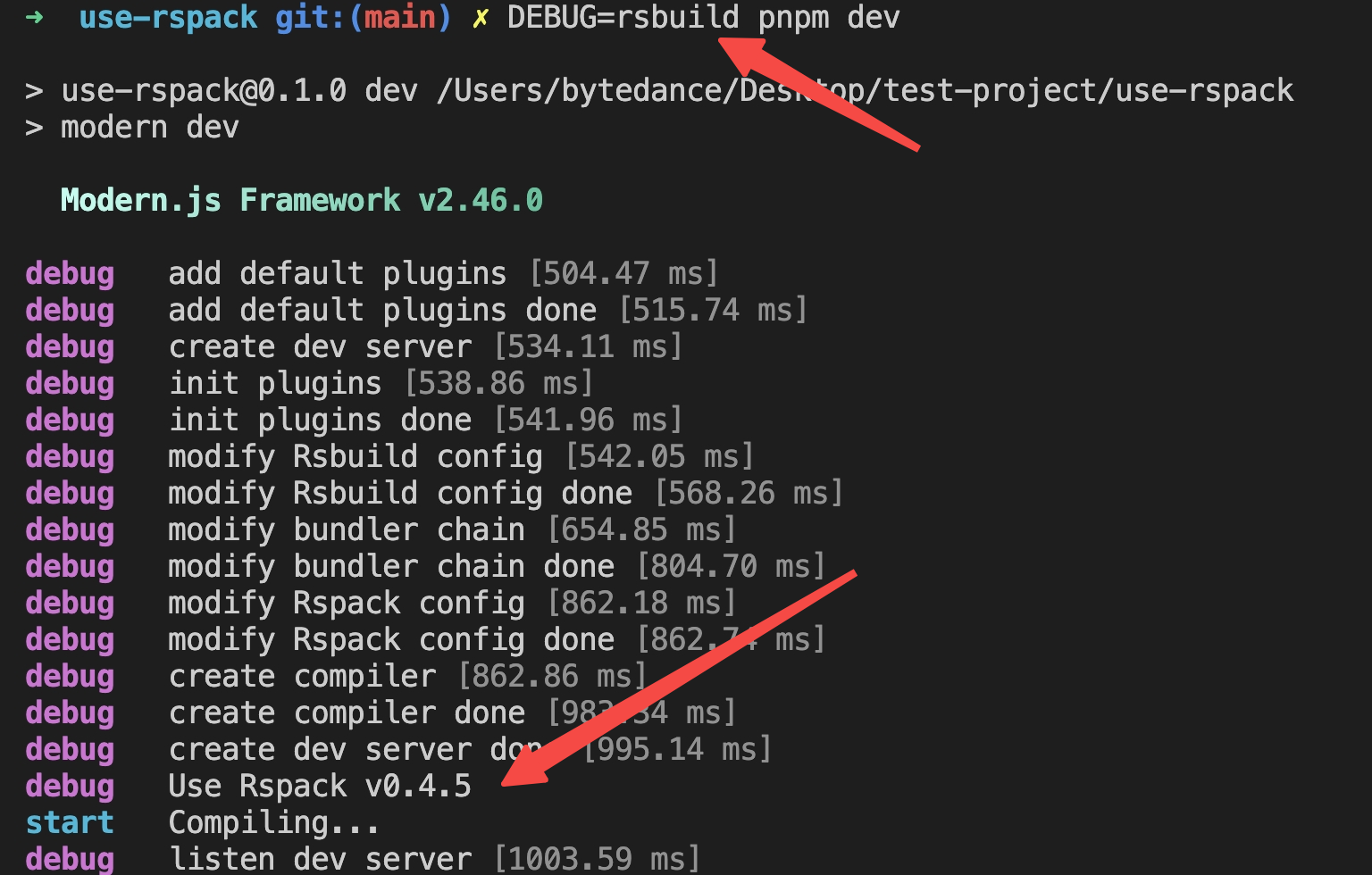
|
|
88
|
-
|
|
89
|
-
### Override the Built-in Rspack Version
|
|
90
|
-
|
|
91
|
-
You can override Rspack to a specific version using the capbilities provided by package managers such as pnpm, yarn, npm.
|
|
92
|
-
|
|
93
|
-
For example, if you are using pnpm, you can override the Rspack version with `overrides`. Assume that the version of Rspack needs to be specified as 0.7.5:
|
|
94
|
-
|
|
95
|
-
```json title=package.json
|
|
96
|
-
{
|
|
97
|
-
"pnpm": {
|
|
98
|
-
"overrides": {
|
|
99
|
-
"@rspack/binding": "0.7.5",
|
|
100
|
-
"@rspack/core": "0.7.5",
|
|
101
|
-
"@rspack/plugin-react-refresh": "0.7.5"
|
|
102
|
-
}
|
|
103
|
-
}
|
|
104
|
-
}
|
|
105
|
-
```
|
|
106
|
-
|
|
107
|
-
If you need to use the nightly/canary version of Rspack, the package name of the nightly/canary version of Rspack will be released after adding the `-canary` suffix, and needs to be modified to:
|
|
108
|
-
|
|
109
|
-
```json title=package.json
|
|
110
|
-
{
|
|
111
|
-
"pnpm": {
|
|
112
|
-
"overrides": {
|
|
113
|
-
"@rspack/binding": "npm:@rspack/binding-canary@nightly",
|
|
114
|
-
"@rspack/core": "npm:@rspack/core-canary@nightly",
|
|
115
|
-
"@rspack/plugin-react-refresh": "npm:@rspack/plugin-react-refresh-canary@nightly"
|
|
116
|
-
},
|
|
117
|
-
"peerDependencyRules": {
|
|
118
|
-
"allowAny": ["@rspack/*"]
|
|
119
|
-
}
|
|
120
|
-
}
|
|
121
|
-
}
|
|
122
|
-
```
|
|
123
|
-
|
|
124
|
-
Rspack provides [install-rspack](https://github.com/rspack-contrib/install-rspack) tooling to quickly override versions:
|
|
125
|
-
|
|
126
|
-
```sh
|
|
127
|
-
npx install-rspack --version nightly # nightly npm tag
|
|
128
|
-
npx install-rspack --version 0.7.5-canary-d614005-20240625082730 # A specific canary version
|
|
129
|
-
```
|
|
130
|
-
|
|
131
|
-
:::tip What is Rspack Nightly Version
|
|
132
|
-
The Rspack nightly build fully replicates the full release build for catching errors early.
|
|
133
|
-
Usually it is available and any errors that arise will fixed promptly.
|
|
134
|
-
However, if there are any break changes that require modern.js to modify the code, we recommend to wait for the next version of modern.js.
|
|
135
|
-
:::
|
|
136
|
-
|
|
137
|
-
More examples of using package managers, please refer to: [Lock nested dependency](/guides/get-started/upgrade.html#lock-nested-dependency).
|
|
@@ -1,3 +0,0 @@
|
|
|
1
|
-
[esbuild](https://esbuild.github.io/) 是一款基于 Golang 开发的前端构建工具,具有打包、编译和压缩 JavaScript 代码的功能,相比传统的打包编译工具,esbuild 在性能上有显著提升。在代码压缩方面,esbuild 在性能上有数十倍的提升。
|
|
2
|
-
|
|
3
|
-
Modern.js 提供了 esbuild 插件,让你能使用 esbuild 代替 babel-loader、ts-loader 等库进行代码编译和压缩。在大型工程中启用 esbuild 后,**可以大幅度减少代码编译和压缩所需的时间,同时有效避免 OOM (heap out of memory) 问题**。
|