@modern-js/main-doc 2.58.2 → 2.59.0
This diff represents the content of publicly available package versions that have been released to one of the supported registries. The information contained in this diff is provided for informational purposes only and reflects changes between package versions as they appear in their respective public registries.
- package/docs/en/apis/app/runtime/core/use-loader.mdx +1 -1
- package/docs/en/community/blog/_meta.json +1 -6
- package/docs/en/components/deploy.mdx +1 -1
- package/docs/en/components/init-app.mdx +0 -1
- package/docs/en/components/init-rspack-app.mdx +0 -1
- package/docs/en/components/ssr-monitor.mdx +3 -0
- package/docs/en/configure/_meta.json +1 -1
- package/docs/en/configure/app/output/ssg.mdx +52 -141
- package/docs/en/configure/app/tools/swc.mdx +1 -1
- package/docs/en/configure/app/tools/tailwindcss.mdx +1 -1
- package/docs/en/guides/advanced-features/_meta.json +0 -8
- package/docs/en/guides/advanced-features/bff/_meta.json +1 -6
- package/docs/en/guides/advanced-features/rsbuild-plugin.mdx +2 -2
- package/docs/en/guides/advanced-features/rspack-start.mdx +7 -22
- package/docs/en/guides/basic-features/_meta.json +31 -9
- package/docs/en/guides/basic-features/css/_meta.json +1 -0
- package/docs/en/guides/basic-features/css/css-in-js.mdx +34 -0
- package/docs/en/guides/basic-features/{css-modules.mdx → css/css-modules.mdx} +0 -4
- package/docs/en/guides/basic-features/css/css.mdx +25 -0
- package/docs/en/guides/basic-features/{css.mdx → css/tailwindcss.mdx} +5 -66
- package/docs/en/guides/basic-features/data/_meta.json +1 -4
- package/docs/en/guides/basic-features/data/data-fetch.mdx +134 -235
- package/docs/en/guides/basic-features/data/data-write.mdx +66 -77
- package/docs/en/guides/basic-features/debug/_meta.json +1 -0
- package/docs/en/guides/basic-features/debug/rsdoctor.mdx +57 -0
- package/docs/en/guides/{advanced-features → basic-features/debug}/using-storybook.mdx +2 -0
- package/docs/en/guides/basic-features/render/_meta.json +1 -0
- package/docs/en/guides/basic-features/render/ssg.mdx +208 -0
- package/docs/en/guides/{advanced-features/ssr/cache.mdx → basic-features/render/ssr-cache.mdx} +38 -50
- package/docs/en/guides/basic-features/render/ssr.mdx +301 -0
- package/docs/en/guides/basic-features/render/streaming-ssr.mdx +230 -0
- package/docs/en/guides/basic-features/routes.mdx +275 -263
- package/docs/en/guides/basic-features/static-assets/_meta.json +1 -0
- package/docs/en/guides/basic-features/static-assets.mdx +1 -1
- package/docs/en/guides/basic-features/testing/_meta.json +1 -0
- package/docs/en/guides/basic-features/testing/cypress.mdx +95 -0
- package/docs/en/guides/basic-features/testing/jest.mdx +148 -0
- package/docs/en/guides/basic-features/testing/playwright.mdx +111 -0
- package/docs/en/guides/basic-features/testing/vitest.mdx +100 -0
- package/docs/en/guides/concept/_meta.json +1 -4
- package/docs/en/guides/concept/entries.mdx +78 -47
- package/docs/en/guides/get-started/_meta.json +1 -7
- package/docs/en/guides/get-started/introduction.mdx +1 -1
- package/docs/en/guides/get-started/quick-start.mdx +1 -2
- package/docs/en/guides/get-started/tech-stack.mdx +4 -6
- package/docs/en/guides/get-started/upgrade.mdx +16 -2
- package/docs/en/guides/topic-detail/framework-plugin/_meta.json +1 -1
- package/docs/en/guides/topic-detail/generator/_meta.json +1 -1
- package/docs/en/guides/topic-detail/generator/create/_meta.json +1 -5
- package/docs/en/guides/topic-detail/generator/create/config.mdx +0 -10
- package/docs/en/guides/topic-detail/generator/create/use.mdx +0 -1
- package/docs/en/guides/topic-detail/generator/new/_meta.json +1 -5
- package/docs/en/guides/topic-detail/generator/plugin/_meta.json +1 -1
- package/docs/en/guides/troubleshooting/_meta.json +1 -6
- package/docs/en/tutorials/first-app/c03-css.mdx +1 -1
- package/docs/zh/apis/app/runtime/core/use-loader.mdx +1 -1
- package/docs/zh/community/blog/_meta.json +1 -6
- package/docs/zh/components/deploy.mdx +1 -1
- package/docs/zh/components/init-app.mdx +0 -1
- package/docs/zh/components/init-rspack-app.mdx +0 -1
- package/docs/zh/components/ssr-monitor.mdx +3 -0
- package/docs/zh/configure/_meta.json +1 -1
- package/docs/zh/configure/app/output/ssg.mdx +49 -139
- package/docs/zh/configure/app/tools/swc.mdx +1 -1
- package/docs/zh/configure/app/tools/tailwindcss.mdx +1 -1
- package/docs/zh/guides/advanced-features/_meta.json +0 -8
- package/docs/zh/guides/advanced-features/bff/_meta.json +1 -6
- package/docs/zh/guides/advanced-features/rsbuild-plugin.mdx +2 -2
- package/docs/zh/guides/advanced-features/rspack-start.mdx +8 -24
- package/docs/zh/guides/basic-features/_meta.json +31 -9
- package/docs/zh/guides/basic-features/css/_meta.json +1 -0
- package/docs/zh/guides/basic-features/css/css-in-js.mdx +34 -0
- package/docs/zh/guides/basic-features/css/css.mdx +25 -0
- package/docs/zh/guides/basic-features/{css.mdx → css/tailwindcss.mdx} +3 -64
- package/docs/zh/guides/basic-features/data/_meta.json +1 -4
- package/docs/zh/guides/basic-features/data/data-fetch.mdx +98 -214
- package/docs/zh/guides/basic-features/data/data-write.mdx +54 -55
- package/docs/zh/guides/basic-features/debug/_meta.json +1 -0
- package/docs/zh/guides/basic-features/debug/rsdoctor.mdx +57 -0
- package/docs/zh/guides/{advanced-features → basic-features/debug}/using-storybook.mdx +1 -1
- package/docs/zh/guides/basic-features/render/_meta.json +1 -0
- package/docs/zh/guides/basic-features/render/ssg.mdx +210 -0
- package/docs/zh/guides/{advanced-features/ssr/cache.mdx → basic-features/render/ssr-cache.mdx} +16 -26
- package/docs/zh/guides/basic-features/render/ssr.mdx +309 -0
- package/docs/zh/guides/{advanced-features/ssr/stream.mdx → basic-features/render/streaming-ssr.mdx} +22 -37
- package/docs/zh/guides/basic-features/routes.mdx +252 -237
- package/docs/zh/guides/basic-features/static-assets/_meta.json +1 -0
- package/docs/zh/guides/basic-features/static-assets.mdx +2 -6
- package/docs/zh/guides/basic-features/testing/_meta.json +1 -0
- package/docs/zh/guides/basic-features/testing/cypress.mdx +95 -0
- package/docs/zh/guides/basic-features/testing/jest.mdx +148 -0
- package/docs/zh/guides/basic-features/testing/playwright.mdx +112 -0
- package/docs/zh/guides/basic-features/testing/vitest.mdx +100 -0
- package/docs/zh/guides/concept/_meta.json +1 -4
- package/docs/zh/guides/concept/entries.mdx +80 -58
- package/docs/zh/guides/get-started/_meta.json +1 -7
- package/docs/zh/guides/get-started/introduction.mdx +2 -2
- package/docs/zh/guides/get-started/quick-start.mdx +1 -2
- package/docs/zh/guides/get-started/tech-stack.mdx +8 -10
- package/docs/zh/guides/get-started/upgrade.mdx +15 -1
- package/docs/zh/guides/topic-detail/framework-plugin/_meta.json +1 -1
- package/docs/zh/guides/topic-detail/generator/_meta.json +1 -1
- package/docs/zh/guides/topic-detail/generator/create/_meta.json +1 -5
- package/docs/zh/guides/topic-detail/generator/create/config.mdx +0 -10
- package/docs/zh/guides/topic-detail/generator/create/use.mdx +0 -1
- package/docs/zh/guides/topic-detail/generator/new/_meta.json +1 -5
- package/docs/zh/guides/topic-detail/generator/plugin/_meta.json +1 -1
- package/docs/zh/guides/troubleshooting/_meta.json +1 -6
- package/docs/zh/tutorials/first-app/c03-css.mdx +1 -1
- package/i18n.json +16 -4
- package/package.json +6 -6
- package/rspress.config.ts +1 -1
- package/src/components/ContentCard/index.tsx +1 -1
- package/src/components/Sandpack/index.tsx +1 -1
- package/src/components/ShowcaseList/index.tsx +1 -1
- package/src/i18n/index.ts +1 -1
- package/src/pages/index.tsx +2 -2
- package/docs/en/apis/app/hooks/config/storybook.mdx +0 -37
- package/docs/en/guides/advanced-features/ssg.mdx +0 -116
- package/docs/en/guides/advanced-features/ssr/_meta.json +0 -5
- package/docs/en/guides/advanced-features/ssr/index.mdx +0 -23
- package/docs/en/guides/advanced-features/ssr/stream.mdx +0 -248
- package/docs/en/guides/advanced-features/ssr/usage.mdx +0 -341
- package/docs/en/guides/advanced-features/ssr.mdx +0 -555
- package/docs/zh/apis/app/hooks/config/storybook.mdx +0 -38
- package/docs/zh/guides/advanced-features/ssg.mdx +0 -116
- package/docs/zh/guides/advanced-features/ssr/_meta.json +0 -5
- package/docs/zh/guides/advanced-features/ssr/index.mdx +0 -23
- package/docs/zh/guides/advanced-features/ssr/usage.mdx +0 -329
- /package/docs/en/guides/basic-features/{mock.mdx → debug/mock.mdx} +0 -0
- /package/docs/en/guides/basic-features/{proxy.mdx → debug/proxy.mdx} +0 -0
- /package/docs/en/guides/basic-features/{json-files.mdx → static-assets/json-files.mdx} +0 -0
- /package/docs/en/guides/basic-features/{svg-assets.mdx → static-assets/svg-assets.mdx} +0 -0
- /package/docs/en/guides/basic-features/{wasm-assets.mdx → static-assets/wasm-assets.mdx} +0 -0
- /package/docs/zh/guides/basic-features/{css-modules.mdx → css/css-modules.mdx} +0 -0
- /package/docs/zh/guides/basic-features/{mock.mdx → debug/mock.mdx} +0 -0
- /package/docs/zh/guides/basic-features/{proxy.mdx → debug/proxy.mdx} +0 -0
- /package/docs/zh/guides/basic-features/{json-files.mdx → static-assets/json-files.mdx} +0 -0
- /package/docs/zh/guides/basic-features/{svg-assets.mdx → static-assets/svg-assets.mdx} +0 -0
- /package/docs/zh/guides/basic-features/{wasm-assets.mdx → static-assets/wasm-assets.mdx} +0 -0
|
@@ -0,0 +1 @@
|
|
|
1
|
+
["json-files", "svg-assets", "wasm-assets"]
|
|
@@ -21,7 +21,7 @@ The following are the formats supported by Modern.js by default:
|
|
|
21
21
|
If you need to import assets in other formats, please refer to [Extend Asset Types](#extend-asset-types).
|
|
22
22
|
|
|
23
23
|
:::tip SVG images
|
|
24
|
-
SVG image is a special case. Modern.js support convert SVG to React components, so SVG is processed separately. For details, see [Import SVG Assets](/guides/basic-features/svg-assets.html).
|
|
24
|
+
SVG image is a special case. Modern.js support convert SVG to React components, so SVG is processed separately. For details, see [Import SVG Assets](/guides/basic-features/static-assets/svg-assets.html).
|
|
25
25
|
:::
|
|
26
26
|
|
|
27
27
|
## Import Assets in JS file
|
|
@@ -0,0 +1 @@
|
|
|
1
|
+
["playwright", "vitest", "jest", "cypress"]
|
|
@@ -0,0 +1,95 @@
|
|
|
1
|
+
# Cypress
|
|
2
|
+
|
|
3
|
+
Cypress is a framework for E2E testing and component testing.
|
|
4
|
+
|
|
5
|
+
To use Cypress in Modern.js, you need to install the dependencies first. You can run the following commands:
|
|
6
|
+
|
|
7
|
+
import { PackageManagerTabs } from '@theme';
|
|
8
|
+
|
|
9
|
+
<PackageManagerTabs command={{ npm: "npm install -D cypress", yarn: "yarn add -D cypress", pnpm: "pnpm install -D cypress" }} />
|
|
10
|
+
|
|
11
|
+
Next, create a `cypress.config.ts` file and add the following content:
|
|
12
|
+
|
|
13
|
+
```ts
|
|
14
|
+
import { defineConfig } from 'cypress'
|
|
15
|
+
|
|
16
|
+
export default defineConfig({
|
|
17
|
+
e2e: {
|
|
18
|
+
setupNodeEvents(on, config) {},
|
|
19
|
+
},
|
|
20
|
+
})
|
|
21
|
+
```
|
|
22
|
+
|
|
23
|
+
## Writing Test Cases
|
|
24
|
+
|
|
25
|
+
Now, use Cypress to write an E2E test case by first creating two Modern.js pages.
|
|
26
|
+
|
|
27
|
+
```tsx title="routes/page.tsx"
|
|
28
|
+
import { Link } from '@modern-js/runtime/router';
|
|
29
|
+
|
|
30
|
+
const Index = () => (
|
|
31
|
+
<div>
|
|
32
|
+
<h1>Home</h1>
|
|
33
|
+
<Link to="/about">About</Link>
|
|
34
|
+
</div>
|
|
35
|
+
);
|
|
36
|
+
|
|
37
|
+
export default Index;
|
|
38
|
+
```
|
|
39
|
+
|
|
40
|
+
```tsx title="routes/about/page.tsx"
|
|
41
|
+
import { Link } from '@modern-js/runtime/router';
|
|
42
|
+
|
|
43
|
+
const Index = () => (
|
|
44
|
+
<div>
|
|
45
|
+
<h1>About</h1>
|
|
46
|
+
<Link to="/">Home</Link>
|
|
47
|
+
</div>
|
|
48
|
+
);
|
|
49
|
+
|
|
50
|
+
export default Index;
|
|
51
|
+
```
|
|
52
|
+
|
|
53
|
+
Next, create the test case file:
|
|
54
|
+
|
|
55
|
+
```ts title="cypress/e2e/app.cy.ts"
|
|
56
|
+
describe('Navigation', () => {
|
|
57
|
+
it('should navigate to the about page', () => {
|
|
58
|
+
// Start from the index page
|
|
59
|
+
cy.visit('http://localhost:8080/')
|
|
60
|
+
|
|
61
|
+
// Find a link with an href attribute containing "about" and click it
|
|
62
|
+
cy.get('a[href*="about"]').click()
|
|
63
|
+
|
|
64
|
+
// The new url should include "/about"
|
|
65
|
+
cy.url().should('include', '/about')
|
|
66
|
+
|
|
67
|
+
// The new page should contain an h1 with "About"
|
|
68
|
+
cy.get('h1').contains('About')
|
|
69
|
+
})
|
|
70
|
+
})
|
|
71
|
+
```
|
|
72
|
+
|
|
73
|
+
The test file may lack type definitions for the API. You can refer to the [Cypress - Typescript](https://docs.cypress.io/guides/tooling/typescript-support#Configure-tsconfigjson) documentation to resolve this.
|
|
74
|
+
|
|
75
|
+
You can add the command to your `package.json`:
|
|
76
|
+
|
|
77
|
+
```json title="package.json"
|
|
78
|
+
{
|
|
79
|
+
"scripts": {
|
|
80
|
+
"test": "cypress open"
|
|
81
|
+
}
|
|
82
|
+
}
|
|
83
|
+
```
|
|
84
|
+
|
|
85
|
+
## Run Test Cases
|
|
86
|
+
|
|
87
|
+
Execute the above `test` command to run the test cases:
|
|
88
|
+
|
|
89
|
+
```bash
|
|
90
|
+
DevTools listening on ws://127.0.0.1:55203/devtools/browser/xxxxx
|
|
91
|
+
```
|
|
92
|
+
|
|
93
|
+
Cypress will open a headless browser. Following the prompts, you can find the corresponding test files and automatically run the E2E tests:
|
|
94
|
+
|
|
95
|
+
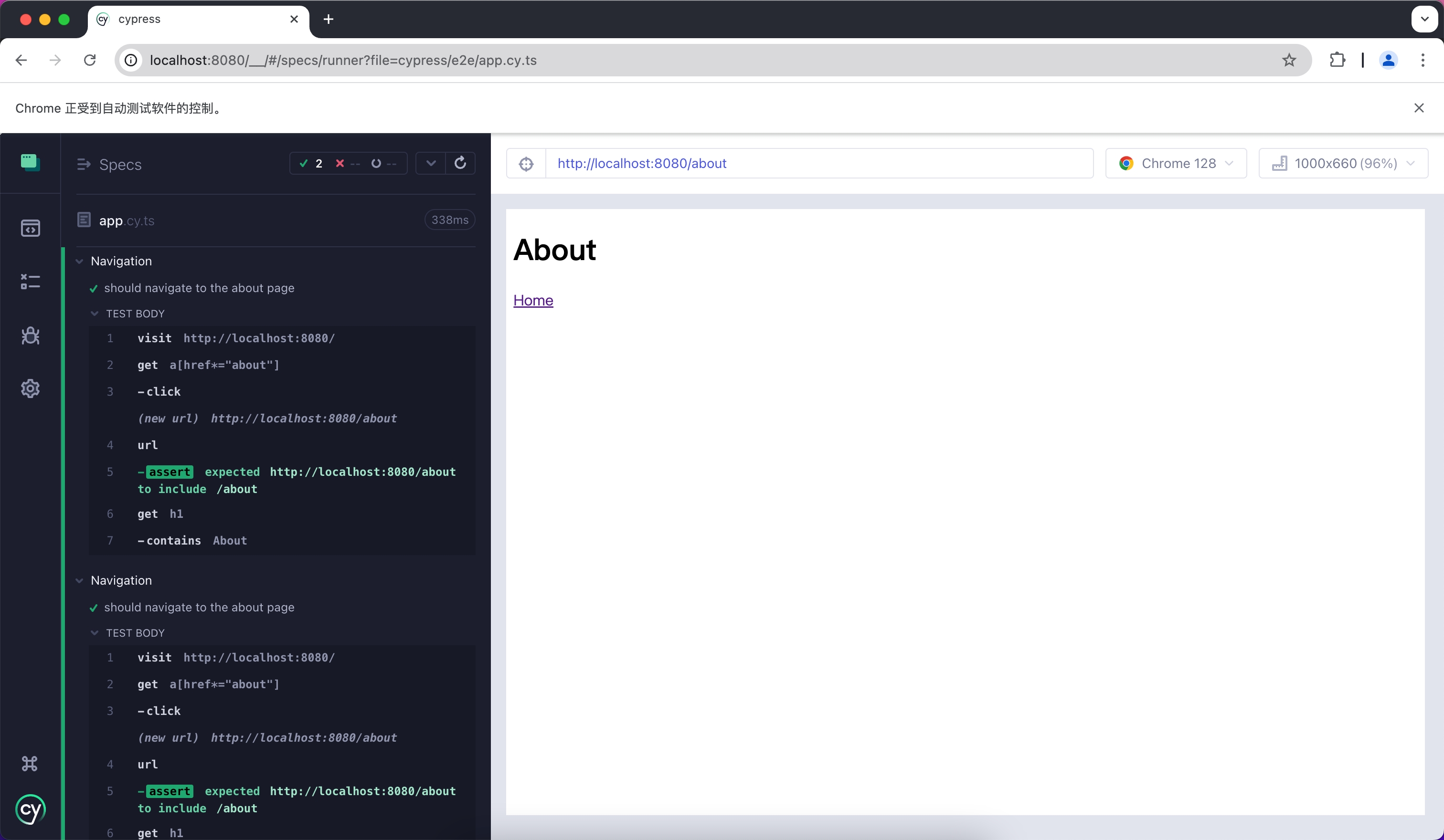
|
|
@@ -0,0 +1,148 @@
|
|
|
1
|
+
# Jest
|
|
2
|
+
|
|
3
|
+
Jest is a JavaScript testing framework that is primarily used with React Testing Library for unit testing and Snapshot testing.
|
|
4
|
+
|
|
5
|
+
To use Jest in Modern.js, you need to install the dependencies first. You can run the following commands:
|
|
6
|
+
|
|
7
|
+
import { PackageManagerTabs } from '@theme';
|
|
8
|
+
|
|
9
|
+
<PackageManagerTabs command={{
|
|
10
|
+
npm: "npm install -D jest jest-environment-jsdom @testing-library/react @testing-library/dom @testing-library/jest-dom",
|
|
11
|
+
yarn: "yarn add -D jest jest-environment-jsdom @testing-library/react @testing-library/dom @testing-library/jest-dom",
|
|
12
|
+
pnpm: "pnpm install -D jest jest-environment-jsdom @testing-library/react @testing-library/dom @testing-library/jest-dom"
|
|
13
|
+
}} />
|
|
14
|
+
|
|
15
|
+
Next, you can run the following commands to automatically initialize Jest in your project and generate a basic `jest.config.[jt]s` configuration:
|
|
16
|
+
|
|
17
|
+
<PackageManagerTabs command={{
|
|
18
|
+
npm: "npm init jest@latest",
|
|
19
|
+
yarn: "yarn create jest@latest",
|
|
20
|
+
pnpm: "pnpm create jest@latest"
|
|
21
|
+
}} />
|
|
22
|
+
|
|
23
|
+
## Configuration File
|
|
24
|
+
|
|
25
|
+
:::note
|
|
26
|
+
This section will use `.ts` files for Jest testing.
|
|
27
|
+
:::
|
|
28
|
+
|
|
29
|
+
Compared to other testing frameworks, Jest requires more configuration at the build level, such as handling JSX and ESM syntax. Therefore, you need to install some additional dependencies:
|
|
30
|
+
|
|
31
|
+
<PackageManagerTabs command={{
|
|
32
|
+
npm: "npm install -D babel-jest @babel/core @babel/preset-env @babel/preset-react @babel/preset-typescript",
|
|
33
|
+
yarn: "yarn add -D babel-jest @babel/core @babel/preset-env @babel/preset-react @babel/preset-typescript",
|
|
34
|
+
pnpm: "pnpm install -D babel-jest @babel/core @babel/preset-env @babel/preset-react @babel/preset-typescript"
|
|
35
|
+
}} />
|
|
36
|
+
|
|
37
|
+
### Configure Jest
|
|
38
|
+
|
|
39
|
+
You need to further configure the `jest.config.ts` file to allow Jest to correctly compile and run test cases. Here is a basic configuration:
|
|
40
|
+
|
|
41
|
+
```ts title="jest.config.ts"
|
|
42
|
+
import type { Config } from 'jest';
|
|
43
|
+
|
|
44
|
+
const config: Config = {
|
|
45
|
+
coverageProvider: 'babel',
|
|
46
|
+
setupFilesAfterEnv: ['<rootDir>/jest.setup.ts'],
|
|
47
|
+
testEnvironment: 'jsdom',
|
|
48
|
+
transform: {
|
|
49
|
+
'^.+\\.(js|jsx|ts|tsx)$': 'babel-jest',
|
|
50
|
+
},
|
|
51
|
+
transformIgnorePatterns: [],
|
|
52
|
+
};
|
|
53
|
+
|
|
54
|
+
export default config;
|
|
55
|
+
```
|
|
56
|
+
|
|
57
|
+
In the configuration, the `transformIgnorePatterns` is set to an empty array, meaning that all files will be compiled. If you want to speed up the test run, you can configure it as needed.
|
|
58
|
+
|
|
59
|
+
The `setupFilesAfterEnv` will be executed at startup. In `jest.setup.ts`, you can import `@testing-library/jest-dom`, which includes a set of convenient custom matchers, such as `.toBeInTheDocument()`, to make writing tests easier:
|
|
60
|
+
|
|
61
|
+
```ts title="jest.setup.ts"
|
|
62
|
+
import '@testing-library/jest-dom';
|
|
63
|
+
```
|
|
64
|
+
|
|
65
|
+
### Configure Babel
|
|
66
|
+
|
|
67
|
+
You need to configure Babel to allow Jest to automatically compile JSX and other syntax. Here is a basic configuration:
|
|
68
|
+
|
|
69
|
+
```js title="babel.config.js"
|
|
70
|
+
module.exports = {
|
|
71
|
+
presets: [
|
|
72
|
+
['@babel/preset-env', { targets: { node: 'current' } }],
|
|
73
|
+
['@babel/preset-react', { runtime: 'automatic' }],
|
|
74
|
+
'@babel/preset-typescript',
|
|
75
|
+
],
|
|
76
|
+
};
|
|
77
|
+
```
|
|
78
|
+
|
|
79
|
+
## Writing Test Cases
|
|
80
|
+
|
|
81
|
+
Now, you can start writing tests. First, add a `test` command in `package.json`:
|
|
82
|
+
|
|
83
|
+
```json title="package.json"
|
|
84
|
+
{
|
|
85
|
+
"scripts": {
|
|
86
|
+
"test": "jest"
|
|
87
|
+
}
|
|
88
|
+
}
|
|
89
|
+
```
|
|
90
|
+
|
|
91
|
+
Create a simple page for testing:
|
|
92
|
+
|
|
93
|
+
```tsx title="routes/page.tsx"
|
|
94
|
+
import { Link } from '@modern-js/runtime/router';
|
|
95
|
+
|
|
96
|
+
const Index = () => (
|
|
97
|
+
<div>
|
|
98
|
+
<h1>Home</h1>
|
|
99
|
+
<Link to="/about">About</Link>
|
|
100
|
+
</div>
|
|
101
|
+
);
|
|
102
|
+
|
|
103
|
+
export default Index;
|
|
104
|
+
```
|
|
105
|
+
|
|
106
|
+
Add a test case to check if the page has the expected text:
|
|
107
|
+
|
|
108
|
+
```tsx title="__tests__/page.test.tsx"
|
|
109
|
+
import '@testing-library/jest-dom';
|
|
110
|
+
import { render, screen } from '@testing-library/react';
|
|
111
|
+
import { BrowserRouter as Router } from '@modern-js/runtime/router';
|
|
112
|
+
import Page from '../routes/page';
|
|
113
|
+
|
|
114
|
+
describe('Page', () => {
|
|
115
|
+
it('renders a heading', () => {
|
|
116
|
+
render(
|
|
117
|
+
<Router>
|
|
118
|
+
<Page />
|
|
119
|
+
</Router>,
|
|
120
|
+
);
|
|
121
|
+
|
|
122
|
+
const heading = screen.getByRole('heading', { level: 1 });
|
|
123
|
+
|
|
124
|
+
expect(heading).toBeInTheDocument();
|
|
125
|
+
});
|
|
126
|
+
});
|
|
127
|
+
```
|
|
128
|
+
|
|
129
|
+
In the above test case, we imported the `<Router>` component from `@modern-js/runtime/router` because React Router requires the corresponding context when rendering some route-related components.
|
|
130
|
+
|
|
131
|
+
:::note
|
|
132
|
+
When running directly in the Modern.js application, the `<Router>` component will be automatically injected.
|
|
133
|
+
:::
|
|
134
|
+
|
|
135
|
+
## Run Test Cases
|
|
136
|
+
|
|
137
|
+
Execute the above `test` command to run the test cases:
|
|
138
|
+
|
|
139
|
+
```bash
|
|
140
|
+
PASS src/__tests__/page.test.tsx
|
|
141
|
+
Page
|
|
142
|
+
✓ renders a heading (31 ms)
|
|
143
|
+
|
|
144
|
+
Test Suites: 1 passed, 1 total
|
|
145
|
+
Tests: 1 passed, 1 total
|
|
146
|
+
Snapshots: 0 total
|
|
147
|
+
Time: 0.959 s, estimated 1 s
|
|
148
|
+
```
|
|
@@ -0,0 +1,111 @@
|
|
|
1
|
+
# Playwright
|
|
2
|
+
|
|
3
|
+
Playwright is a testing framework that allows you to run tests automatically in Chromium, Firefox, and WebKit environments using a single API. You can use it to **write E2E tests**.
|
|
4
|
+
|
|
5
|
+
To use Playwright in Modern.js, you need to install the dependencies first. You can run the following commands:
|
|
6
|
+
|
|
7
|
+
import { PackageManagerTabs } from '@theme';
|
|
8
|
+
|
|
9
|
+
<PackageManagerTabs command={{ npm: "npm init playwright", yarn: "yarn create playwright", pnpm: "pnpm create playwright" }} />
|
|
10
|
+
|
|
11
|
+
The above commands will automatically install Playwright dependencies and help you install and configure it in your project through a series of prompts, including adding a `playwright.config.ts` file.
|
|
12
|
+
|
|
13
|
+
:::info
|
|
14
|
+
Refer to the official Playwright documentation at [Install Playwright](https://playwright.dev/docs/intro#installation) for a more detailed guide.
|
|
15
|
+
:::
|
|
16
|
+
|
|
17
|
+
After creating with the default configuration, you can see the following files in your project:
|
|
18
|
+
|
|
19
|
+
```ts title="tests/example.spec.ts"
|
|
20
|
+
import { test, expect } from '@playwright/test';
|
|
21
|
+
|
|
22
|
+
test('has title', async ({ page }) => {
|
|
23
|
+
await page.goto('https://playwright.dev/');
|
|
24
|
+
|
|
25
|
+
// Expect a title "to contain" a substring.
|
|
26
|
+
await expect(page).toHaveTitle(/Playwright/);
|
|
27
|
+
});
|
|
28
|
+
|
|
29
|
+
test('get started link', async ({ page }) => {
|
|
30
|
+
await page.goto('https://playwright.dev/');
|
|
31
|
+
|
|
32
|
+
// Click the get started link.
|
|
33
|
+
await page.getByRole('link', { name: 'Get started' }).click();
|
|
34
|
+
|
|
35
|
+
// Expects page to have a heading with the name of Installation.
|
|
36
|
+
await expect(
|
|
37
|
+
page.getByRole('heading', { name: 'Installation' }),
|
|
38
|
+
).toBeVisible();
|
|
39
|
+
});
|
|
40
|
+
```
|
|
41
|
+
|
|
42
|
+
This is the default test file. Now create some new pages and test them.
|
|
43
|
+
|
|
44
|
+
## Create E2E Tests
|
|
45
|
+
|
|
46
|
+
First, create two Modern.js pages.
|
|
47
|
+
|
|
48
|
+
```tsx title="routes/page.tsx"
|
|
49
|
+
import { Link } from '@modern-js/runtime/router';
|
|
50
|
+
|
|
51
|
+
const Index = () => (
|
|
52
|
+
<div>
|
|
53
|
+
<h1>Home</h1>
|
|
54
|
+
<Link to="/about">About</Link>
|
|
55
|
+
</div>
|
|
56
|
+
);
|
|
57
|
+
|
|
58
|
+
export default Index;
|
|
59
|
+
```
|
|
60
|
+
|
|
61
|
+
```tsx title="routes/about/page.tsx"
|
|
62
|
+
import { Link } from '@modern-js/runtime/router';
|
|
63
|
+
|
|
64
|
+
const Index = () => (
|
|
65
|
+
<div>
|
|
66
|
+
<h1>About</h1>
|
|
67
|
+
<Link to="/">Home</Link>
|
|
68
|
+
</div>
|
|
69
|
+
);
|
|
70
|
+
|
|
71
|
+
export default Index;
|
|
72
|
+
```
|
|
73
|
+
|
|
74
|
+
Next, add test cases to ensure the links on your pages work properly.
|
|
75
|
+
|
|
76
|
+
```ts title="tests/example.spec.ts"
|
|
77
|
+
import { test, expect } from '@playwright/test'
|
|
78
|
+
|
|
79
|
+
test('should navigate to the about page', async ({ page }) => {
|
|
80
|
+
// Start from the index page (the baseURL is set via the webServer in the playwright.config.ts)
|
|
81
|
+
await page.goto('http://localhost:8080/')
|
|
82
|
+
// Find an element with the text 'About' and click on it
|
|
83
|
+
await page.click('text=About')
|
|
84
|
+
// The new URL should be "/about" (baseURL is used there)
|
|
85
|
+
await expect(page).toHaveURL('http://localhost:8080/about')
|
|
86
|
+
// The new page should contain an h1 with "About"
|
|
87
|
+
await expect(page.locator('h1')).toContainText('About')
|
|
88
|
+
})
|
|
89
|
+
```
|
|
90
|
+
|
|
91
|
+
## Run Test Cases
|
|
92
|
+
|
|
93
|
+
Playwright requires your Modern.js server to be running. We recommend running your test cases under production builds; you can run `pnpm run build` and `pnpm run serve` to simulate the production environment locally.
|
|
94
|
+
|
|
95
|
+
```bash
|
|
96
|
+
info Starting production server...
|
|
97
|
+
|
|
98
|
+
> Local: http://localhost:8080/
|
|
99
|
+
> Network: http://10.94.59.30:8080/
|
|
100
|
+
```
|
|
101
|
+
|
|
102
|
+
After the project is successfully built and running, you can run Playwright cases in another terminal by executing `npx playwright test`:
|
|
103
|
+
|
|
104
|
+
```bash
|
|
105
|
+
Running 3 tests using 3 workers
|
|
106
|
+
3 passed (2.0s)
|
|
107
|
+
|
|
108
|
+
To open last HTML report run:
|
|
109
|
+
|
|
110
|
+
npx playwright show-report
|
|
111
|
+
```
|
|
@@ -0,0 +1,100 @@
|
|
|
1
|
+
# Vitest
|
|
2
|
+
|
|
3
|
+
Vitest is a testing framework driven by Vite, which can be used for unit testing in combination with React Testing Library.
|
|
4
|
+
|
|
5
|
+
To use Vitest in Modern.js, you need to install the dependencies first. You can run the following commands:
|
|
6
|
+
|
|
7
|
+
import { PackageManagerTabs } from '@theme';
|
|
8
|
+
|
|
9
|
+
<PackageManagerTabs command={{
|
|
10
|
+
npm: "npm install -D vitest @vitejs/plugin-react jsdom @testing-library/react @testing-library/dom",
|
|
11
|
+
yarn: "yarn add -D vitest @vitejs/plugin-react jsdom @testing-library/react @testing-library/dom",
|
|
12
|
+
pnpm: "pnpm install -D vitest @vitejs/plugin-react jsdom @testing-library/react @testing-library/dom",
|
|
13
|
+
bun: "bun add -D vitest @vitejs/plugin-react jsdom @testing-library/react @testing-library/dom"
|
|
14
|
+
}} />
|
|
15
|
+
|
|
16
|
+
Next, you need to create a Vitest configuration file `vitest.config.ts` with the following content:
|
|
17
|
+
|
|
18
|
+
```ts title="vitest.config.ts"
|
|
19
|
+
import { defineConfig } from 'vitest/config'
|
|
20
|
+
import react from '@vitejs/plugin-react'
|
|
21
|
+
|
|
22
|
+
export default defineConfig({
|
|
23
|
+
plugins: [react()],
|
|
24
|
+
test: {
|
|
25
|
+
environment: 'jsdom',
|
|
26
|
+
},
|
|
27
|
+
})
|
|
28
|
+
```
|
|
29
|
+
|
|
30
|
+
For more information about Vitest configuration, you can refer to the [Vitest configuration documentation](https://vitest.dev/config/#configuration).
|
|
31
|
+
|
|
32
|
+
You can optionally add the `vitest` command to `package.json`:
|
|
33
|
+
|
|
34
|
+
```json title="package.json"
|
|
35
|
+
{
|
|
36
|
+
"scripts": {
|
|
37
|
+
"test": "vitest"
|
|
38
|
+
}
|
|
39
|
+
}
|
|
40
|
+
```
|
|
41
|
+
|
|
42
|
+
After running this command, Vitest will automatically watch your file changes and rerun the test cases.
|
|
43
|
+
|
|
44
|
+
## Create Unit Tests
|
|
45
|
+
|
|
46
|
+
First, create a simple page for testing:
|
|
47
|
+
|
|
48
|
+
```tsx title="routes/page.tsx"
|
|
49
|
+
import { Link } from '@modern-js/runtime/router';
|
|
50
|
+
|
|
51
|
+
const Index = () => (
|
|
52
|
+
<div>
|
|
53
|
+
<h1>Home</h1>
|
|
54
|
+
<Link to="/about">About</Link>
|
|
55
|
+
</div>
|
|
56
|
+
);
|
|
57
|
+
|
|
58
|
+
export default Index;
|
|
59
|
+
```
|
|
60
|
+
|
|
61
|
+
Add a test case to check if the page has the expected text:
|
|
62
|
+
|
|
63
|
+
```tsx title="__tests__/page.test.tsx"
|
|
64
|
+
import { expect, test } from 'vitest';
|
|
65
|
+
import { render, screen } from '@testing-library/react';
|
|
66
|
+
import { BrowserRouter as Router } from '@modern-js/runtime/router';
|
|
67
|
+
import Page from '../routes/page';
|
|
68
|
+
|
|
69
|
+
test('Page', () => {
|
|
70
|
+
render(
|
|
71
|
+
<Router>
|
|
72
|
+
<Page />
|
|
73
|
+
</Router>,
|
|
74
|
+
);
|
|
75
|
+
expect(screen.getByRole('heading', { level: 1, name: 'Home' })).toBeDefined();
|
|
76
|
+
});
|
|
77
|
+
```
|
|
78
|
+
|
|
79
|
+
In the above test case, we imported the `<Router>` component from `@modern-js/runtime/router` because React Router requires the corresponding context when rendering some route-related components.
|
|
80
|
+
|
|
81
|
+
:::note
|
|
82
|
+
When running directly in the Modern.js application, the `<Router>` component will be automatically injected.
|
|
83
|
+
:::
|
|
84
|
+
|
|
85
|
+
## Run Test Cases
|
|
86
|
+
|
|
87
|
+
Execute the above `test` command to run the test cases:
|
|
88
|
+
|
|
89
|
+
```bash
|
|
90
|
+
✓ src/__tests__/page.test.tsx (1)
|
|
91
|
+
✓ Page
|
|
92
|
+
|
|
93
|
+
Test Files 1 passed (1)
|
|
94
|
+
Tests 1 passed (1)
|
|
95
|
+
Start at 15:37:12
|
|
96
|
+
Duration 999ms (transform 119ms, setup 0ms, collect 365ms, tests 33ms, environment 421ms, prepare 44ms)
|
|
97
|
+
|
|
98
|
+
|
|
99
|
+
PASS Waiting for file changes...
|
|
100
|
+
```
|