@modern-js/main-doc 2.0.0-beta.4 → 2.0.0-beta.6
This diff represents the content of publicly available package versions that have been released to one of the supported registries. The information contained in this diff is provided for informational purposes only and reflects changes between package versions as they appear in their respective public registries.
- package/.turbo/turbo-build.log +1 -1
- package/en/docusaurus-plugin-content-docs/current/apis/app/commands/dev.md +8 -3
- package/en/docusaurus-plugin-content-docs/current/apis/app/commands/inspect.md +33 -8
- package/en/docusaurus-plugin-content-docs/current/apis/app/commands/serve.md +32 -0
- package/en/docusaurus-plugin-content-docs/current/apis/app/hooks/src/server.md +31 -0
- package/en/docusaurus-plugin-content-docs/current/apis/app/runtime/core/bootstrap.md +4 -3
- package/en/docusaurus-plugin-content-docs/current/apis/app/runtime/core/create-app.md +2 -3
- package/en/docusaurus-plugin-content-docs/current/apis/app/runtime/core/use-module-apps.md +1 -1
- package/en/docusaurus-plugin-content-docs/current/components/init-app.md +1 -1
- package/en/docusaurus-plugin-content-docs/current/configure/app/builder-plugins.md +70 -0
- package/en/docusaurus-plugin-content-docs/current/configure/app/dev/with-master-app.md +0 -1
- package/en/docusaurus-plugin-content-docs/current/configure/app/plugins.md +11 -5
- package/en/docusaurus-plugin-content-docs/current/configure/app/source/disable-entry-dirs.md +38 -0
- package/en/docusaurus-plugin-content-docs/current/configure/app/source/entries.md +66 -2
- package/en/docusaurus-plugin-content-docs/current/configure/app/tools/esbuild.md +1 -1
- package/en/docusaurus-plugin-content-docs/current/guides/concept/entries.md +1 -1
- package/en/docusaurus-plugin-content-docs/current/guides/get-started/quick-start.md +3 -3
- package/en/docusaurus-plugin-content-docs/current/guides/topic-detail/framework-plugin/_category_.json +4 -0
- package/en/docusaurus-plugin-content-docs/current/guides/{concept → topic-detail/framework-plugin}/lifecycle.md +0 -0
- package/package.json +3 -3
- package/zh/apis/app/commands/dev.md +9 -4
- package/zh/apis/app/commands/inspect.md +34 -9
- package/zh/apis/app/commands/{start.md → serve.md} +3 -3
- package/zh/apis/app/hooks/src/index_.md +1 -1
- package/zh/apis/app/hooks/src/server.md +31 -0
- package/zh/apis/app/runtime/core/bootstrap.md +3 -4
- package/zh/apis/app/runtime/core/create-app.md +1 -18
- package/zh/apis/app/runtime/core/use-module-apps.md +64 -33
- package/zh/apis/app/runtime/web-server/hook.md +1 -1
- package/zh/apis/app/runtime/web-server/middleware.md +1 -0
- package/zh/components/default-mwa-generate.md +5 -0
- package/zh/components/deploy.md +1 -0
- package/zh/components/enable-micro-frontend.md +13 -0
- package/zh/components/init-app.md +2 -2
- package/zh/components/micro-runtime-config.md +18 -0
- package/zh/components/prerequisites.md +2 -2
- package/zh/components/release-note.md +1 -0
- package/zh/configure/app/builder-plugins.md +72 -0
- package/zh/configure/app/deploy/_category_.json +4 -0
- package/zh/configure/app/deploy/microFrontend.md +64 -0
- package/zh/configure/app/dev/with-master-app.md +0 -2
- package/zh/configure/app/plugins.md +10 -4
- package/zh/configure/app/runtime/master-app.md +33 -36
- package/zh/configure/app/source/disable-entry-dirs.md +37 -0
- package/zh/configure/app/source/entries-dir.md +0 -3
- package/zh/configure/app/source/entries.md +66 -3
- package/zh/guides/advanced-features/compatibility.md +12 -1
- package/zh/guides/advanced-features/eslint.md +21 -21
- package/zh/guides/advanced-features/ssg.md +14 -3
- package/zh/guides/advanced-features/ssr.md +1 -1
- package/zh/guides/advanced-features/testing.md +11 -0
- package/zh/guides/advanced-features/web-server.md +12 -1
- package/zh/guides/basic-features/css/tailwindcss.md +11 -0
- package/zh/guides/basic-features/data-fetch.md +398 -5
- package/zh/guides/basic-features/routes.md +35 -3
- package/zh/guides/concept/entries.md +104 -14
- package/zh/guides/get-started/quick-start.md +8 -5
- package/zh/guides/get-started/upgrade.md +3 -1
- package/zh/guides/{concept → topic-detail/framework-plugin}/lifecycle.md +0 -0
- package/zh/guides/topic-detail/micro-frontend/c01-introduction.md +29 -0
- package/zh/guides/topic-detail/micro-frontend/c02-development.md +191 -0
- package/zh/guides/topic-detail/micro-frontend/c03-main-app.md +246 -0
- package/zh/guides/topic-detail/micro-frontend/c04-communicate.md +54 -0
- package/zh/guides/topic-detail/micro-frontend/{mixed-stack.md → c05-mixed-stack.md} +3 -3
- package/zh/guides/topic-detail/monorepo/create-sub-project.md +2 -2
- package/zh/tutorials/first-app/c01-start.md +9 -4
- package/zh/tutorials/first-app/c03-css.md +19 -0
- package/zh/tutorials/first-app/c04-routes.md +4 -4
- package/zh/tutorials/first-app/c05-loader.md +3 -3
- package/zh/tutorials/first-app/c06-model.md +19 -19
- package/zh/tutorials/first-app/c07-container.md +38 -23
- package/zh/tutorials/first-app/c08-entries.md +4 -1
- package/en/docusaurus-plugin-content-docs/current/apis/app/commands/start.md +0 -32
- package/zh/guides/advanced-features/custom-app.md +0 -70
- package/zh/guides/topic-detail/micro-frontend/communicate.md +0 -39
- package/zh/guides/topic-detail/micro-frontend/debugging.md +0 -168
- package/zh/guides/topic-detail/micro-frontend/introduction.md +0 -13
- package/zh/guides/topic-detail/micro-frontend/route-mode.md +0 -110
|
@@ -32,7 +32,7 @@ const computed = {
|
|
|
32
32
|
};
|
|
33
33
|
```
|
|
34
34
|
|
|
35
|
-
computed 类型字段的定义方式是函数,但使用时可以像普通字段一样通过 state 访问。
|
|
35
|
+
`computed` 类型字段的定义方式是函数,但使用时可以像普通字段一样通过 state 访问。
|
|
36
36
|
|
|
37
37
|
:::info
|
|
38
38
|
Modern.js 集成了 [Immer](https://immerjs.github.io/immer/),能够像操作 JS 中常规的可变数据一样,去写这种状态转移的逻辑。
|
|
@@ -90,7 +90,7 @@ touch src/models/contacts.ts
|
|
|
90
90
|
添加 `src/models/contacts.ts` 的内容:
|
|
91
91
|
|
|
92
92
|
```tsx
|
|
93
|
-
import { model } from
|
|
93
|
+
import { model } from '@modern-js/runtime/model';
|
|
94
94
|
|
|
95
95
|
type State = {
|
|
96
96
|
items: {
|
|
@@ -103,18 +103,18 @@ type State = {
|
|
|
103
103
|
error: null | Error;
|
|
104
104
|
};
|
|
105
105
|
|
|
106
|
-
export default model<State>(
|
|
106
|
+
export default model<State>('contacts').define({
|
|
107
107
|
state: {
|
|
108
108
|
items: [],
|
|
109
109
|
pending: false,
|
|
110
110
|
error: null,
|
|
111
111
|
},
|
|
112
112
|
computed: {
|
|
113
|
-
archived: ({ items }: State) => items.filter(
|
|
113
|
+
archived: ({ items }: State) => items.filter(item => item.archived),
|
|
114
114
|
},
|
|
115
115
|
actions: {
|
|
116
116
|
archive(draft, payload) {
|
|
117
|
-
const target = draft.items.find(
|
|
117
|
+
const target = draft.items.find(item => item.email === payload)!;
|
|
118
118
|
if (target) {
|
|
119
119
|
target.archived = true;
|
|
120
120
|
}
|
|
@@ -132,7 +132,7 @@ export default model<State>("contacts").define({
|
|
|
132
132
|
首先修改 `src/components/Item/index.tsx`,添加 **Archive 按钮**的 UI 和交互,内容如下:
|
|
133
133
|
|
|
134
134
|
```tsx
|
|
135
|
-
import Avatar from
|
|
135
|
+
import Avatar from '../Avatar';
|
|
136
136
|
|
|
137
137
|
type InfoProps = {
|
|
138
138
|
avatar: string;
|
|
@@ -163,11 +163,11 @@ const Item = ({
|
|
|
163
163
|
onClick={onArchive}
|
|
164
164
|
className={`text-white font-bold py-2 px-4 rounded-full ${
|
|
165
165
|
archived
|
|
166
|
-
?
|
|
167
|
-
:
|
|
166
|
+
? 'bg-gray-400 cursor-default'
|
|
167
|
+
: 'bg-blue-500 hover:bg-blue-700'
|
|
168
168
|
}`}
|
|
169
169
|
>
|
|
170
|
-
{archived ?
|
|
170
|
+
{archived ? 'Archived' : 'Archive'}
|
|
171
171
|
</button>
|
|
172
172
|
</div>
|
|
173
173
|
</div>
|
|
@@ -180,13 +180,13 @@ export default Item;
|
|
|
180
180
|
接下来,我们修改 `src/routes/page.tsx`,为 `<Item>` 组件传递更多参数:
|
|
181
181
|
|
|
182
182
|
```tsx
|
|
183
|
-
import { Helmet } from
|
|
184
|
-
import { useModel } from
|
|
185
|
-
import { useLoaderData } from
|
|
186
|
-
import { List } from
|
|
187
|
-
import { name, internet } from
|
|
188
|
-
import Item from
|
|
189
|
-
import contacts from
|
|
183
|
+
import { Helmet } from '@modern-js/runtime/head';
|
|
184
|
+
import { useModel } from '@modern-js/runtime/model';
|
|
185
|
+
import { useLoaderData } from '@modern-js/runtime/router';
|
|
186
|
+
import { List } from 'antd';
|
|
187
|
+
import { name, internet } from 'faker';
|
|
188
|
+
import Item from '../components/Item';
|
|
189
|
+
import contacts from '../models/contacts';
|
|
190
190
|
|
|
191
191
|
type LoaderData = {
|
|
192
192
|
code: number;
|
|
@@ -216,9 +216,9 @@ export const loader = async (): Promise<LoaderData> => {
|
|
|
216
216
|
|
|
217
217
|
function Index() {
|
|
218
218
|
const { data } = useLoaderData() as LoaderData;
|
|
219
|
-
const [{ items }, { archive,
|
|
219
|
+
const [{ items }, { archive, setItems }] = useModel(contacts);
|
|
220
220
|
if (items.length === 0) {
|
|
221
|
-
|
|
221
|
+
setItems(data);
|
|
222
222
|
}
|
|
223
223
|
|
|
224
224
|
return (
|
|
@@ -228,7 +228,7 @@ function Index() {
|
|
|
228
228
|
</Helmet>
|
|
229
229
|
<List
|
|
230
230
|
dataSource={items}
|
|
231
|
-
renderItem={
|
|
231
|
+
renderItem={info => (
|
|
232
232
|
<Item
|
|
233
233
|
key={info.name}
|
|
234
234
|
info={info}
|
|
@@ -16,9 +16,21 @@ import TabItem from '@theme/TabItem';
|
|
|
16
16
|
Modern.js 支持在 `layout.tsx` 通过 Data Loader 获取数据,我们先数据获取这部分代码移动到 `src/routes/layout.tsx` 中:
|
|
17
17
|
|
|
18
18
|
```tsx
|
|
19
|
-
import { name, internet } from
|
|
20
|
-
import {
|
|
21
|
-
|
|
19
|
+
import { name, internet } from 'faker';
|
|
20
|
+
import {
|
|
21
|
+
Outlet,
|
|
22
|
+
useLoaderData,
|
|
23
|
+
useLocation,
|
|
24
|
+
useNavigate,
|
|
25
|
+
} from '@modern-js/runtime/router';
|
|
26
|
+
import { useState } from 'react';
|
|
27
|
+
import { Radio, RadioChangeEvent } from 'antd';
|
|
28
|
+
import { useModel } from '@modern-js/runtime/model';
|
|
29
|
+
import contacts from '../models/contacts';
|
|
30
|
+
import 'tailwindcss/base.css';
|
|
31
|
+
import 'tailwindcss/components.css';
|
|
32
|
+
import 'tailwindcss/utilities.css';
|
|
33
|
+
import '../styles/utils.css';
|
|
22
34
|
|
|
23
35
|
type LoaderData = {
|
|
24
36
|
code: number;
|
|
@@ -36,7 +48,6 @@ export const loader = async (): Promise<LoaderData> => {
|
|
|
36
48
|
name: firstName,
|
|
37
49
|
avatar: `https://avatars.dicebear.com/api/identicon/${firstName}.svg`,
|
|
38
50
|
email: internet.email(),
|
|
39
|
-
archived: false,
|
|
40
51
|
};
|
|
41
52
|
});
|
|
42
53
|
|
|
@@ -48,9 +59,9 @@ export const loader = async (): Promise<LoaderData> => {
|
|
|
48
59
|
|
|
49
60
|
export default function Layout() {
|
|
50
61
|
const { data } = useLoaderData() as LoaderData;
|
|
51
|
-
const [{ items }, {
|
|
62
|
+
const [{ items }, { setItems }] = useModel(contacts);
|
|
52
63
|
if (items.length === 0) {
|
|
53
|
-
|
|
64
|
+
setItems(data);
|
|
54
65
|
}
|
|
55
66
|
|
|
56
67
|
const navigate = useNavigate();
|
|
@@ -61,11 +72,11 @@ export default function Layout() {
|
|
|
61
72
|
在 `src/routes/page.tsx` 中,直接使用 Model,获取数据:
|
|
62
73
|
|
|
63
74
|
```tsx
|
|
64
|
-
import { Helmet } from
|
|
65
|
-
import { useModel } from
|
|
66
|
-
import { List } from
|
|
67
|
-
import Item from
|
|
68
|
-
import contacts from
|
|
75
|
+
import { Helmet } from '@modern-js/runtime/head';
|
|
76
|
+
import { useModel } from '@modern-js/runtime/model';
|
|
77
|
+
import { List } from 'antd';
|
|
78
|
+
import Item from '../components/Item';
|
|
79
|
+
import contacts from '../models/contacts';
|
|
69
80
|
|
|
70
81
|
function Index() {
|
|
71
82
|
const [{ items }, { archive }] = useModel(contacts);
|
|
@@ -77,7 +88,7 @@ function Index() {
|
|
|
77
88
|
</Helmet>
|
|
78
89
|
<List
|
|
79
90
|
dataSource={items}
|
|
80
|
-
renderItem={
|
|
91
|
+
renderItem={info => (
|
|
81
92
|
<Item
|
|
82
93
|
key={info.name}
|
|
83
94
|
info={info}
|
|
@@ -97,11 +108,11 @@ export default Index;
|
|
|
97
108
|
同样在 `archived/page.tsx` 中,删除原本的 `mockData` 逻辑,使用 Model 中 computed 的 `archived` 值作为数据源:
|
|
98
109
|
|
|
99
110
|
```tsx
|
|
100
|
-
import { Helmet } from
|
|
101
|
-
import { useModel } from
|
|
102
|
-
import { List } from
|
|
103
|
-
import Item from
|
|
104
|
-
import contacts from
|
|
111
|
+
import { Helmet } from '@modern-js/runtime/head';
|
|
112
|
+
import { useModel } from '@modern-js/runtime/model';
|
|
113
|
+
import { List } from 'antd';
|
|
114
|
+
import Item from '../../components/Item';
|
|
115
|
+
import contacts from '../../models/contacts';
|
|
105
116
|
|
|
106
117
|
function Index() {
|
|
107
118
|
const [{ archived }, { archive }] = useModel(contacts);
|
|
@@ -113,7 +124,7 @@ function Index() {
|
|
|
113
124
|
</Helmet>
|
|
114
125
|
<List
|
|
115
126
|
dataSource={archived}
|
|
116
|
-
renderItem={
|
|
127
|
+
renderItem={info => (
|
|
117
128
|
<Item
|
|
118
129
|
key={info.name}
|
|
119
130
|
info={info}
|
|
@@ -172,14 +183,18 @@ import { Helmet } from "@modern-js/runtime/head";
|
|
|
172
183
|
import { useModel } from "@modern-js/runtime/model";
|
|
173
184
|
import { List } from "antd";
|
|
174
185
|
import Item from "../components/Item";
|
|
175
|
-
import
|
|
186
|
+
import { Helmet } from '@modern-js/runtime/head';
|
|
187
|
+
import { useModel } from '@modern-js/runtime/model';
|
|
188
|
+
import { List } from 'antd';
|
|
189
|
+
import Item from '../components/Item';
|
|
190
|
+
import contacts from '../models/contacts';
|
|
176
191
|
|
|
177
192
|
function Contacts({
|
|
178
193
|
title,
|
|
179
194
|
source,
|
|
180
195
|
}: {
|
|
181
196
|
title: string;
|
|
182
|
-
source:
|
|
197
|
+
source: 'items' | 'archived';
|
|
183
198
|
}) {
|
|
184
199
|
const [state, { archive }] = useModel(contacts);
|
|
185
200
|
|
|
@@ -190,7 +205,7 @@ function Contacts({
|
|
|
190
205
|
</Helmet>
|
|
191
206
|
<List
|
|
192
207
|
dataSource={state[source]}
|
|
193
|
-
renderItem={
|
|
208
|
+
renderItem={info => (
|
|
194
209
|
<Item
|
|
195
210
|
key={info.name}
|
|
196
211
|
info={info}
|
|
@@ -210,7 +225,7 @@ export default Contacts;
|
|
|
210
225
|
修改 `src/routes/page.tsx` 和 `src/routes/archives/page.tsx` 的代码:
|
|
211
226
|
|
|
212
227
|
```tsx title="src/routes/page.tsx"
|
|
213
|
-
import Contacts from
|
|
228
|
+
import Contacts from '../containers/Contacts';
|
|
214
229
|
|
|
215
230
|
function Index() {
|
|
216
231
|
return <Contacts title="All" source="items" />;
|
|
@@ -220,7 +235,7 @@ export default Index;
|
|
|
220
235
|
```
|
|
221
236
|
|
|
222
237
|
```tsx title="src/routes/archives/page.tsx"
|
|
223
|
-
import Contacts from
|
|
238
|
+
import Contacts from '../../containers/Contacts';
|
|
224
239
|
|
|
225
240
|
function Index() {
|
|
226
241
|
return <Contacts title="Archives" source="archived" />;
|
|
@@ -95,8 +95,10 @@ mv src/myapp src/contacts
|
|
|
95
95
|
现在,修改 `modern.config.ts` 里面添加内容:
|
|
96
96
|
|
|
97
97
|
```typescript
|
|
98
|
-
import { defineConfig } from '@modern-js/app-tools';
|
|
98
|
+
import AppToolsPlugin, { defineConfig } from '@modern-js/app-tools';
|
|
99
|
+
import TailwindCSSPlugin from '@modern-js/plugin-tailwindcss';
|
|
99
100
|
|
|
101
|
+
// https://modernjs.dev/docs/apis/app/config
|
|
100
102
|
export default defineConfig({
|
|
101
103
|
runtime: {
|
|
102
104
|
router: true,
|
|
@@ -108,6 +110,7 @@ export default defineConfig({
|
|
|
108
110
|
'landing-page': false,
|
|
109
111
|
},
|
|
110
112
|
},
|
|
113
|
+
plugins: [AppToolsPlugin(), TailwindCSSPlugin()],
|
|
111
114
|
});
|
|
112
115
|
```
|
|
113
116
|
|
|
@@ -1,32 +0,0 @@
|
|
|
1
|
-
---
|
|
2
|
-
sidebar_position: 6
|
|
3
|
-
---
|
|
4
|
-
|
|
5
|
-
```bash
|
|
6
|
-
Usage: modern start [options]
|
|
7
|
-
|
|
8
|
-
start server
|
|
9
|
-
|
|
10
|
-
Options:
|
|
11
|
-
-c --config <config> configuration file path, which can be a relative path or an absolute path
|
|
12
|
-
-h, --help show command help
|
|
13
|
-
--api-only only start API service
|
|
14
|
-
```
|
|
15
|
-
|
|
16
|
-
Usually use the `modern start` command to enable project start in the production environment, and you need to execute the [`build'](/docs/apis/app/commands/build) command in advance to build the product.
|
|
17
|
-
|
|
18
|
-
By default, the project will start in `localhost:8080`, you can modify the Server port number with `server.port`:
|
|
19
|
-
|
|
20
|
-
```js
|
|
21
|
-
export default defineConfig({
|
|
22
|
-
server: {
|
|
23
|
-
port: 8081,
|
|
24
|
-
}
|
|
25
|
-
})
|
|
26
|
-
```
|
|
27
|
-
|
|
28
|
-
import CommandTip from '@site-docs-en/components/command-tip.md'
|
|
29
|
-
|
|
30
|
-
<CommandTip />
|
|
31
|
-
|
|
32
|
-
|
|
@@ -1,70 +0,0 @@
|
|
|
1
|
-
---
|
|
2
|
-
title: 自定义 App
|
|
3
|
-
sidebar_position: 7
|
|
4
|
-
---
|
|
5
|
-
|
|
6
|
-
在[入口](/docs/guides/concept/entries)概念中提到, Modern.js 提供了三种文件约定来标记入口。
|
|
7
|
-
|
|
8
|
-
通常情况下,`routes/` 与 `App.[jt]sx` 两种模式已经能够满足需求。当开发者需要在根组件挂载前做些操作,或者完全接管 Webpack 入口时,可以在入口目录下放置 `index.[jt]sx` 文件,我们称为**自定义 App**。
|
|
9
|
-
|
|
10
|
-
## 添加自定义行为
|
|
11
|
-
|
|
12
|
-
当 `index` 文件默认导出**函数**是,Modern.js 还是会根据 `runtime` 的设置情况生成 `createApp` 包裹后的代码。在渲染过程中,将 `createApp` 包裹后的组件作为参数传递给 `index` 文件导出的函数,这样开发者可以自定义将组件挂载到 DOM 节点上,或在挂载前添加自定义行为。例如:
|
|
13
|
-
|
|
14
|
-
```js title=src/index.jsx
|
|
15
|
-
import ReactDOM from 'react-dom/client'
|
|
16
|
-
import { bootstrap } from '@modern-js/runtime';
|
|
17
|
-
|
|
18
|
-
|
|
19
|
-
export default (App: React.ComponentType) => {
|
|
20
|
-
// do something before bootstrap...
|
|
21
|
-
bootstrap(App, 'root', undefined, ReactDOM);
|
|
22
|
-
};
|
|
23
|
-
```
|
|
24
|
-
|
|
25
|
-
:::warning
|
|
26
|
-
由于 bootstrap 函数需要兼容 React17 和 React18 的用法,调用 bootstrap 函数时需要手动传入 ReactDOM 参数。
|
|
27
|
-
:::
|
|
28
|
-
|
|
29
|
-
Modern.js 生成的文件内容如下:
|
|
30
|
-
|
|
31
|
-
```js
|
|
32
|
-
import React from 'react';
|
|
33
|
-
import ReactDOM from 'react-dom/client';
|
|
34
|
-
import customBootstrap from '@_edenx_src/index.tsx';
|
|
35
|
-
import App from '@_edenx_src/App';
|
|
36
|
-
import { router, state } from '@edenx/runtime/plugins';
|
|
37
|
-
|
|
38
|
-
const IS_BROWSER = typeof window !== 'undefined' && window.name !== 'nodejs';
|
|
39
|
-
const MOUNT_ID = 'root';
|
|
40
|
-
|
|
41
|
-
let AppWrapper = null;
|
|
42
|
-
|
|
43
|
-
function render() {
|
|
44
|
-
AppWrapper = createApp({
|
|
45
|
-
// runtime 的插件参数...
|
|
46
|
-
})(App)
|
|
47
|
-
if (IS_BROWSER) {
|
|
48
|
-
customBootstrap(AppWrapper);
|
|
49
|
-
}
|
|
50
|
-
return AppWrapper
|
|
51
|
-
}
|
|
52
|
-
|
|
53
|
-
AppWrapper = render();
|
|
54
|
-
|
|
55
|
-
export default AppWrapper;;
|
|
56
|
-
```
|
|
57
|
-
|
|
58
|
-
## 完全接管 Webpack 入口
|
|
59
|
-
|
|
60
|
-
当 `index.[jt]sx` 文件没有导出函数时,这时候该文件就是真正的 Webpack 入口文件。这里和 [Create React App](https://github.com/facebook/create-react-app) 类似,需要自己将组件挂载到 DOM 节点、添加热更新代码等。例如:
|
|
61
|
-
|
|
62
|
-
```js title=src/index.jsx
|
|
63
|
-
import React from 'react';
|
|
64
|
-
import ReactDOM from 'react-dom';
|
|
65
|
-
import App from './App';
|
|
66
|
-
|
|
67
|
-
ReactDOM.render(<App />, document.getElementById('root'));
|
|
68
|
-
```
|
|
69
|
-
|
|
70
|
-
Modern.js **不推荐**使用这种方式,这种方式丧失了框架的一些能力,如 **`modern.config.js` 文件中的 `runtime` 配置将不会再生效**。
|
|
@@ -1,39 +0,0 @@
|
|
|
1
|
-
---
|
|
2
|
-
sidebar_position: 3
|
|
3
|
-
title: 主子应用通信
|
|
4
|
-
---
|
|
5
|
-
|
|
6
|
-
## props 通信
|
|
7
|
-
|
|
8
|
-
Modern.js 中,会将子应用包裹成一个 React 组件,直接通过给 React 组件传递 `props` 即可实现主应用和子应用通信的目的。
|
|
9
|
-
|
|
10
|
-
```tsx title=主应用:App.tsx
|
|
11
|
-
function App() {
|
|
12
|
-
const { Dashboard } = useModuleApps();
|
|
13
|
-
const [count, setCount] = useState(0);
|
|
14
|
-
|
|
15
|
-
return <div>
|
|
16
|
-
<Dashboard count={count} />
|
|
17
|
-
<button onClick={() => setCount(count + 1)}>add</button>
|
|
18
|
-
</div>;
|
|
19
|
-
}
|
|
20
|
-
```
|
|
21
|
-
|
|
22
|
-
```tsx title=子应用:App.tsx
|
|
23
|
-
function App(props) {
|
|
24
|
-
console.log(props);
|
|
25
|
-
|
|
26
|
-
return ...
|
|
27
|
-
}
|
|
28
|
-
```
|
|
29
|
-
|
|
30
|
-
子应用将会打印 `{count: 0}`。
|
|
31
|
-
|
|
32
|
-
当主应用点击 `add` 按钮,`count` 状态更新的时候,子应用也会响应到最新的 `props` 数据,并重新渲染。
|
|
33
|
-
|
|
34
|
-
## 使用 Model 通信
|
|
35
|
-
|
|
36
|
-
|
|
37
|
-
:::tip 提示
|
|
38
|
-
近期上线,敬请期待。
|
|
39
|
-
:::
|
|
@@ -1,168 +0,0 @@
|
|
|
1
|
-
---
|
|
2
|
-
sidebar_position: 2
|
|
3
|
-
title: 子应用调试
|
|
4
|
-
---
|
|
5
|
-
|
|
6
|
-
根据研发的不同阶段,我们将子应用调试分为如下两种方式:
|
|
7
|
-
|
|
8
|
-
1. 使用本地主应用调试。
|
|
9
|
-
2. 使用线上主应用调试。
|
|
10
|
-
|
|
11
|
-
## 使用本地主应用调试
|
|
12
|
-
|
|
13
|
-
项目初期,主应用未部署,可以使用本地分别启动主应用、子应用的方式进行调试。
|
|
14
|
-
|
|
15
|
-
### 主应用
|
|
16
|
-
|
|
17
|
-
#### 配置
|
|
18
|
-
|
|
19
|
-
```typescript title="modern.config.ts"
|
|
20
|
-
export default defineConfig({
|
|
21
|
-
runtime: {
|
|
22
|
-
router: true,
|
|
23
|
-
masterApp: {
|
|
24
|
-
manifest: {
|
|
25
|
-
modules: [
|
|
26
|
-
{
|
|
27
|
-
name: 'Dashboard',
|
|
28
|
-
entry: 'http://localhost:8081',
|
|
29
|
-
},
|
|
30
|
-
],
|
|
31
|
-
},
|
|
32
|
-
},
|
|
33
|
-
},
|
|
34
|
-
});
|
|
35
|
-
```
|
|
36
|
-
|
|
37
|
-
假设本地的子应用的名字为 `DashBoard` 且启动服务的地址为 `http://localhost:8081`。配置 `runtime.masterApp.modules` 字段指定子应用的相关信息。
|
|
38
|
-
|
|
39
|
-
#### 加载子应用
|
|
40
|
-
|
|
41
|
-
使用 [useModuleApps](/docs/apis/app/runtime/core/use-module-apps) API 获取子应用组件,并加载子应用。
|
|
42
|
-
|
|
43
|
-
```tsx title=App.tsx
|
|
44
|
-
import { useModuleApps } from '@modern-js/plugin-garfish';
|
|
45
|
-
|
|
46
|
-
function App() {
|
|
47
|
-
const { Dashboard } = useModuleApps();
|
|
48
|
-
|
|
49
|
-
return (
|
|
50
|
-
<div>
|
|
51
|
-
Master APP
|
|
52
|
-
<Route path="/dashboard">
|
|
53
|
-
<Dashboard />
|
|
54
|
-
</Route>
|
|
55
|
-
</div>
|
|
56
|
-
);
|
|
57
|
-
}
|
|
58
|
-
```
|
|
59
|
-
|
|
60
|
-
### 子应用
|
|
61
|
-
|
|
62
|
-
#### 配置
|
|
63
|
-
|
|
64
|
-
```typescript title="modern.config.ts"
|
|
65
|
-
export default defineConfig({
|
|
66
|
-
deploy: {
|
|
67
|
-
microFrontend: true,
|
|
68
|
-
},
|
|
69
|
-
});
|
|
70
|
-
```
|
|
71
|
-
|
|
72
|
-
当 `deploy.microFrontend` 字段配置为 true 的时候,Modern.js 将认为当前应用是一个微前端子应用,并将其编译为符合 Garfish 子应用规范的产物。
|
|
73
|
-
|
|
74
|
-
#### 子应用代码
|
|
75
|
-
|
|
76
|
-
子应用在代码层面和应用工程是完全一致的。
|
|
77
|
-
|
|
78
|
-
```tsx title=src/App.tsx
|
|
79
|
-
function App() {
|
|
80
|
-
return <div>dashboard</div>;
|
|
81
|
-
}
|
|
82
|
-
```
|
|
83
|
-
|
|
84
|
-
:::info 注
|
|
85
|
-
目前不支持在子应用中使用 BFF 功能。
|
|
86
|
-
:::
|
|
87
|
-
|
|
88
|
-
然后分别启动主应用和子应用(执行 `pnpm dev`),主应用访问 `8080` 端口,子应用访问 `8081` 端口。浏览器打开 `http://localhost:8080/dashboard` 就能看到加载了 `Dashboard` 子应用的效果了。
|
|
89
|
-
|
|
90
|
-
## 使用线上主应用调试
|
|
91
|
-
|
|
92
|
-
当主应用项目部署之后,Modern.js 提供了用线上主应用调试本地子应用的方式。
|
|
93
|
-
|
|
94
|
-
:::info 注
|
|
95
|
-
本小节所用线上地址均是虚构,只为演示方便。
|
|
96
|
-
:::
|
|
97
|
-
|
|
98
|
-
### 主应用
|
|
99
|
-
|
|
100
|
-
#### 配置
|
|
101
|
-
|
|
102
|
-
```typescript title="modern.config.ts"
|
|
103
|
-
export default defineConfig({
|
|
104
|
-
server: {
|
|
105
|
-
enableMicroFrontendDebug: true,
|
|
106
|
-
},
|
|
107
|
-
runtime: {
|
|
108
|
-
router: true,
|
|
109
|
-
masterApp: {
|
|
110
|
-
manifest: {
|
|
111
|
-
modules: [
|
|
112
|
-
{
|
|
113
|
-
name: 'Dashboard',
|
|
114
|
-
entry: 'http://modern-js.dev/dashboard',
|
|
115
|
-
},
|
|
116
|
-
],
|
|
117
|
-
},
|
|
118
|
-
},
|
|
119
|
-
},
|
|
120
|
-
});
|
|
121
|
-
```
|
|
122
|
-
|
|
123
|
-
:::info 注
|
|
124
|
-
`enableMicroFrontendDebug` 会在线上开启 微前端 Debug 模式,如担心安全隐患,可只在线上测试环境开启,线上正式环境关掉该配置。
|
|
125
|
-
:::
|
|
126
|
-
|
|
127
|
-
### 子应用
|
|
128
|
-
|
|
129
|
-
#### 配置
|
|
130
|
-
|
|
131
|
-
```typescript title="modern.config.ts"
|
|
132
|
-
export default defineConfig({
|
|
133
|
-
deploy: {
|
|
134
|
-
microFrontend: true,
|
|
135
|
-
},
|
|
136
|
-
});
|
|
137
|
-
```
|
|
138
|
-
|
|
139
|
-
本地启动子应用,其端口为 `8080`。
|
|
140
|
-
|
|
141
|
-
### Query 模式调试
|
|
142
|
-
|
|
143
|
-
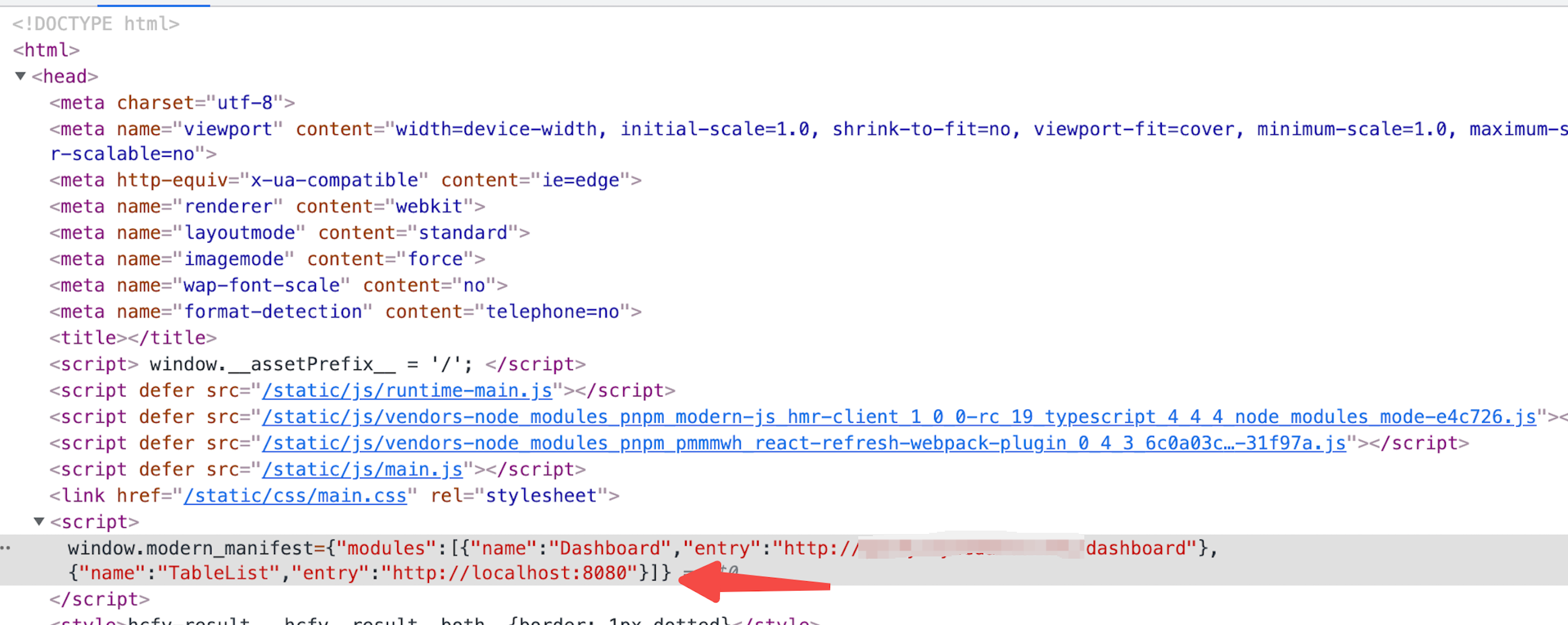
访问主应用地址 `http://master.example.com/` 并在 URL 后加上 Query `?__debug__micro-frontend-debug-name=TableList&__debug__micro-frontend-debug-entry=http://localhost:8080`。
|
|
144
|
-
|
|
145
|
-
此时访问主应用后,服务端注入的子应用模块信息将被替换为我们 Query 里的信息。即 `TableList` 子应用 `entry` 为 `http://localhost:8080`。线上主应用切换到 `/tablelist` 路由后将会加载本地的子应用。
|
|
146
|
-
|
|
147
|
-
|
|
148
|
-
|
|
149
|
-
### Header 模式调试(推荐)
|
|
150
|
-
|
|
151
|
-
Query 调试时,当路透跳转的时候,Query 参数会丢失,reload 页面后,服务端返回的子应用信息里将不会注入本地的子应用信息。可以使用 Header 模式来调试,获取更稳定的调试开发体验。
|
|
152
|
-
|
|
153
|
-
#### 环境要求
|
|
154
|
-
|
|
155
|
-
[ModHeader](https://modheader.com/install) 是用于 Mock 浏览器请求/返回 Header 的浏览器插件。使用 ModHeader 支持的浏览器(Chrome、Firefox、Opera、Edge),并安装 ModHeader 插件。
|
|
156
|
-
|
|
157
|
-
#### 配置 Header
|
|
158
|
-
|
|
159
|
-
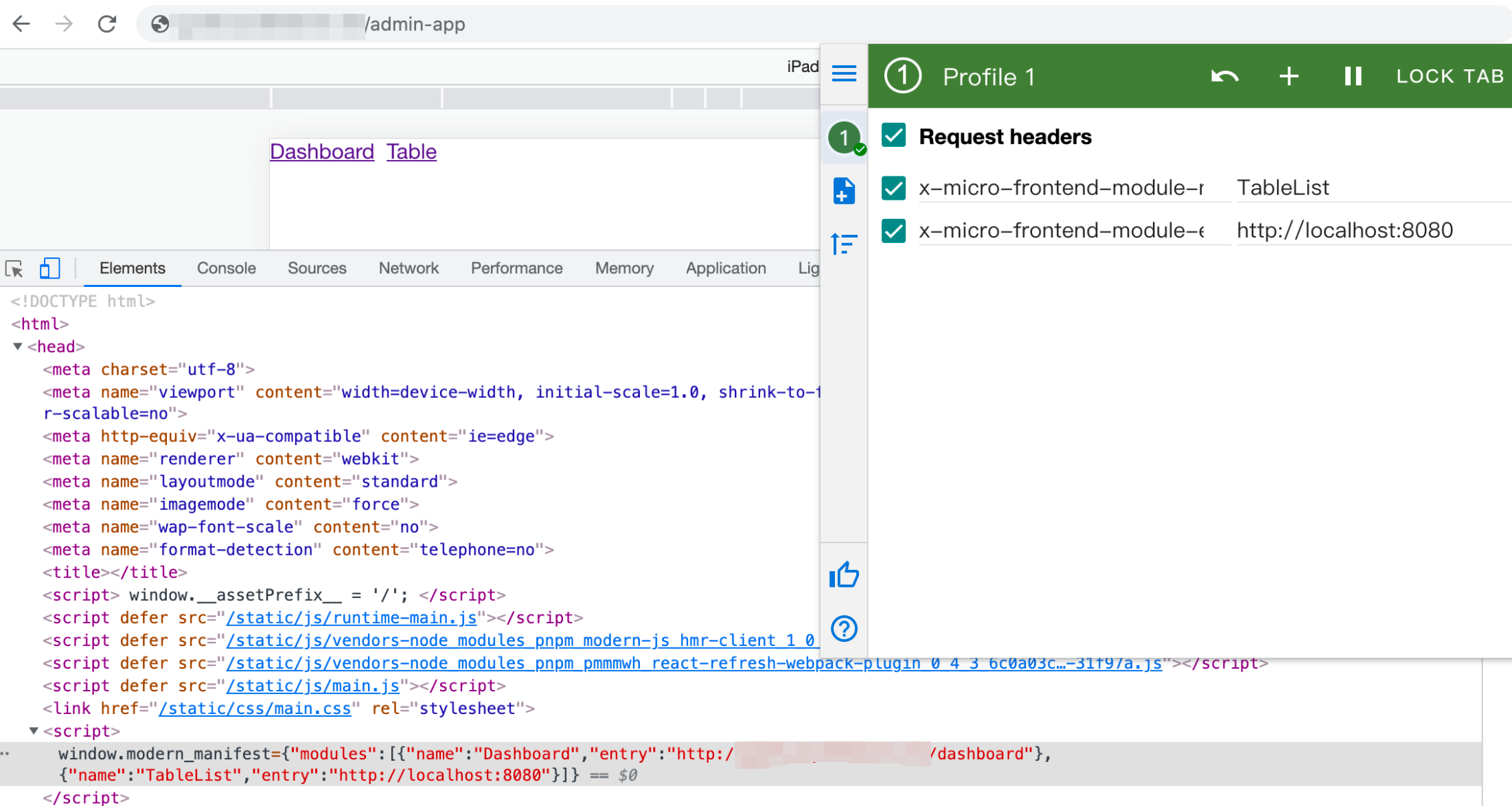
配置如下 Header:
|
|
160
|
-
|
|
161
|
-
- `x-micro-frontend-module-name TableList`
|
|
162
|
-
- `x-micro-frontend-module-entry http://localhost:8080`
|
|
163
|
-
|
|
164
|
-
访问主应用地址如下所示
|
|
165
|
-
|
|
166
|
-
|
|
167
|
-
|
|
168
|
-
可以看到此时服务端返回的 `TableList` 子应用信息是 Header 里面指定的本地域名 `http://localhost:8080`
|
|
@@ -1,13 +0,0 @@
|
|
|
1
|
-
---
|
|
2
|
-
sidebar_position: 1
|
|
3
|
-
title: 微前端介绍
|
|
4
|
-
---
|
|
5
|
-
|
|
6
|
-
随着前端生态的繁重以及 Web 应用日益复杂化,给大型项目研发流程、跨团队协作等带来不小的挑战。微前端从架构层面出发将多个独立交付的前端应用组成整体,这些前端应用能够「独立开发」、「独立测试」、「独立部署」,但是最终在用户看来仍然是内聚的单个产品。
|
|
7
|
-
|
|
8
|
-
[Garfish](https://garfish.top/guide/) 是业界成熟的微前端解决方案,Modern.js 中开箱即用的支持了 [Garfish](https://garfish.top/guide/)。
|
|
9
|
-
|
|
10
|
-
在微前端研发模式中,应用会被分成 **主应用**、和 **子应用**。
|
|
11
|
-
|
|
12
|
-
- 主应用:微前端项目的基座工程,所有子应用都会由它来加载。
|
|
13
|
-
- 子应用:独立开发、独立部署的应用,最终会被主应用加载。
|