@modelcontextprotocol/inspector 0.13.0 → 0.14.1
This diff represents the content of publicly available package versions that have been released to one of the supported registries. The information contained in this diff is provided for informational purposes only and reflects changes between package versions as they appear in their respective public registries.
- package/README.md +66 -0
- package/client/bin/start.js +3 -1
- package/client/dist/assets/{OAuthCallback-DxvBcBuO.js → OAuthCallback-D7GXYYW8.js} +1 -1
- package/client/dist/assets/{OAuthDebugCallback-cWniOlCj.js → OAuthDebugCallback-25cy6Vcm.js} +14 -2
- package/client/dist/assets/{index-CIxCnj5w.css → index-C1MLjTGf.css} +111 -5
- package/client/dist/assets/{index-Dhd4mhZ2.js → index-TghXC4TH.js} +8210 -7608
- package/client/dist/index.html +2 -2
- package/package.json +6 -5
- package/server/build/index.js +205 -76
- package/server/build/mcpProxy.js +16 -1
package/README.md
CHANGED
|
@@ -4,12 +4,31 @@ The MCP inspector is a developer tool for testing and debugging MCP servers.
|
|
|
4
4
|
|
|
5
5
|
|
|
6
6
|
|
|
7
|
+
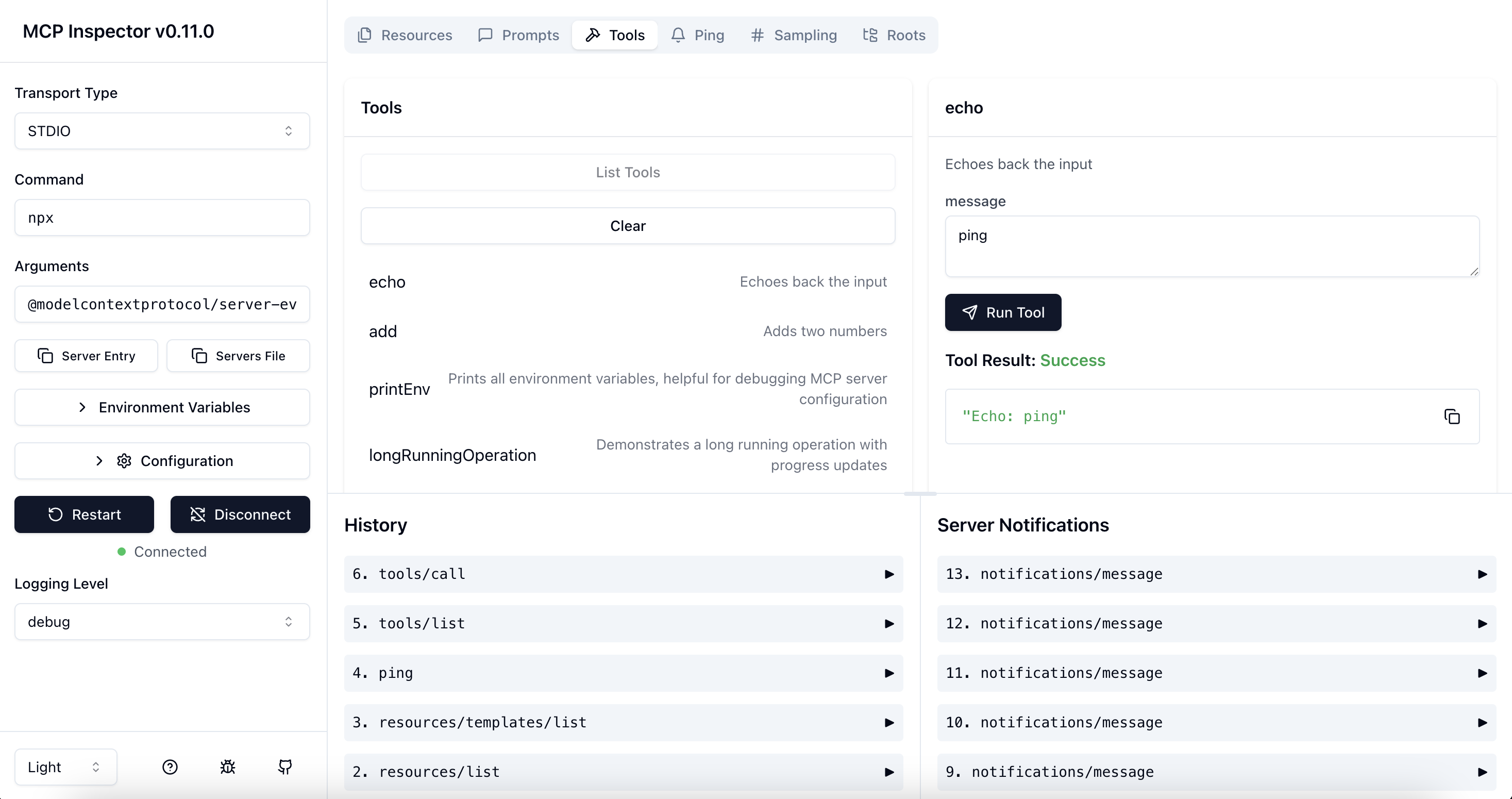
## Architecture Overview
|
|
8
|
+
|
|
9
|
+
The MCP Inspector consists of two main components that work together:
|
|
10
|
+
|
|
11
|
+
- **MCP Inspector Client (MCPI)**: A React-based web UI that provides an interactive interface for testing and debugging MCP servers
|
|
12
|
+
- **MCP Proxy (MCPP)**: A Node.js server that acts as a protocol bridge, connecting the web UI to MCP servers via various transport methods (stdio, SSE, streamable-http)
|
|
13
|
+
|
|
14
|
+
Note that the proxy is not a network proxy for intercepting traffic. Instead, it functions as both an MCP client (connecting to your MCP server) and an HTTP server (serving the web UI), enabling browser-based interaction with MCP servers that use different transport protocols.
|
|
15
|
+
|
|
7
16
|
## Running the Inspector
|
|
8
17
|
|
|
9
18
|
### Requirements
|
|
10
19
|
|
|
11
20
|
- Node.js: ^22.7.5
|
|
12
21
|
|
|
22
|
+
### Quick Start (UI mode)
|
|
23
|
+
|
|
24
|
+
To get up and running right away with the UI, just execute the following:
|
|
25
|
+
|
|
26
|
+
```bash
|
|
27
|
+
npx @modelcontextprotocol/inspector
|
|
28
|
+
```
|
|
29
|
+
|
|
30
|
+
The server will start up and the UI will be accessible at `http://localhost:6274`.
|
|
31
|
+
|
|
13
32
|
### From an MCP server repository
|
|
14
33
|
|
|
15
34
|
To inspect an MCP server implementation, there's no need to clone this repo. Instead, use `npx`. For example, if your server is built at `build/index.js`:
|
|
@@ -118,6 +137,53 @@ The inspector supports bearer token authentication for SSE connections. Enter yo
|
|
|
118
137
|
|
|
119
138
|
The MCP Inspector includes a proxy server that can run and communicate with local MCP processes. The proxy server should not be exposed to untrusted networks as it has permissions to spawn local processes and can connect to any specified MCP server.
|
|
120
139
|
|
|
140
|
+
#### Authentication
|
|
141
|
+
|
|
142
|
+
The MCP Inspector proxy server requires authentication by default. When starting the server, a random session token is generated and printed to the console:
|
|
143
|
+
|
|
144
|
+
```
|
|
145
|
+
🔑 Session token: 3a1c267fad21f7150b7d624c160b7f09b0b8c4f623c7107bbf13378f051538d4
|
|
146
|
+
|
|
147
|
+
🔗 Open inspector with token pre-filled:
|
|
148
|
+
http://localhost:6274/?MCP_PROXY_AUTH_TOKEN=3a1c267fad21f7150b7d624c160b7f09b0b8c4f623c7107bbf13378f051538d4
|
|
149
|
+
```
|
|
150
|
+
|
|
151
|
+
This token must be included as a Bearer token in the Authorization header for all requests to the server. When authentication is enabled, auto-open is disabled by default to ensure you use the secure URL.
|
|
152
|
+
|
|
153
|
+
**Recommended: Use the pre-filled URL** - Click or copy the link shown in the console to open the inspector with the token already configured.
|
|
154
|
+
|
|
155
|
+
**Alternative: Manual configuration** - If you already have the inspector open:
|
|
156
|
+
|
|
157
|
+
1. Click the "Configuration" button in the sidebar
|
|
158
|
+
2. Find "Proxy Session Token" and enter the token displayed in the proxy console
|
|
159
|
+
3. Click "Save" to apply the configuration
|
|
160
|
+
|
|
161
|
+
The token will be saved in your browser's local storage for future use.
|
|
162
|
+
|
|
163
|
+
If you need to disable authentication (NOT RECOMMENDED), you can set the `DANGEROUSLY_OMIT_AUTH` environment variable:
|
|
164
|
+
|
|
165
|
+
```bash
|
|
166
|
+
DANGEROUSLY_OMIT_AUTH=true npm start
|
|
167
|
+
```
|
|
168
|
+
|
|
169
|
+
#### Local-only Binding
|
|
170
|
+
|
|
171
|
+
By default, the MCP Inspector proxy server binds only to `127.0.0.1` (localhost) to prevent network access. This ensures the server is not accessible from other devices on the network. If you need to bind to all interfaces for development purposes, you can override this with the `HOST` environment variable:
|
|
172
|
+
|
|
173
|
+
```bash
|
|
174
|
+
HOST=0.0.0.0 npm start
|
|
175
|
+
```
|
|
176
|
+
|
|
177
|
+
**Warning:** Only bind to all interfaces in trusted network environments, as this exposes the proxy server's ability to execute local processes.
|
|
178
|
+
|
|
179
|
+
#### DNS Rebinding Protection
|
|
180
|
+
|
|
181
|
+
To prevent DNS rebinding attacks, the MCP Inspector validates the `Origin` header on incoming requests. By default, only requests from the client origin are allowed (respects `CLIENT_PORT` if set, defaulting to port 6274). You can configure additional allowed origins by setting the `ALLOWED_ORIGINS` environment variable (comma-separated list):
|
|
182
|
+
|
|
183
|
+
```bash
|
|
184
|
+
ALLOWED_ORIGINS=http://localhost:6274,http://127.0.0.1:6274,http://localhost:8000 npm start
|
|
185
|
+
```
|
|
186
|
+
|
|
121
187
|
### Configuration
|
|
122
188
|
|
|
123
189
|
The MCP Inspector supports the following configuration settings. To change them, click on the `Configuration` button in the MCP Inspector UI:
|
package/client/bin/start.js
CHANGED
|
@@ -100,7 +100,9 @@ async function main() {
|
|
|
100
100
|
|
|
101
101
|
if (serverOk) {
|
|
102
102
|
try {
|
|
103
|
-
|
|
103
|
+
// Only auto-open when auth is disabled
|
|
104
|
+
const authDisabled = !!process.env.DANGEROUSLY_OMIT_AUTH;
|
|
105
|
+
if (process.env.MCP_AUTO_OPEN_ENABLED !== "false" && authDisabled) {
|
|
104
106
|
open(`http://127.0.0.1:${CLIENT_PORT}`);
|
|
105
107
|
}
|
|
106
108
|
await spawnPromise("node", [inspectorClientPath], {
|
|
@@ -1,4 +1,4 @@
|
|
|
1
|
-
import { u as useToast, r as reactExports, j as jsxRuntimeExports, S as SESSION_KEYS, I as InspectorOAuthClientProvider, a as auth } from "./index-
|
|
1
|
+
import { u as useToast, r as reactExports, j as jsxRuntimeExports, S as SESSION_KEYS, I as InspectorOAuthClientProvider, a as auth } from "./index-TghXC4TH.js";
|
|
2
2
|
import { p as parseOAuthCallbackParams, g as generateOAuthErrorDescription } from "./oauthUtils-DTcoXpSP.js";
|
|
3
3
|
const OAuthCallback = ({ onConnect }) => {
|
|
4
4
|
const { toast } = useToast();
|
package/client/dist/assets/{OAuthDebugCallback-cWniOlCj.js → OAuthDebugCallback-25cy6Vcm.js}
RENAMED
|
@@ -1,4 +1,4 @@
|
|
|
1
|
-
import { r as reactExports, S as SESSION_KEYS, j as jsxRuntimeExports } from "./index-
|
|
1
|
+
import { r as reactExports, S as SESSION_KEYS, j as jsxRuntimeExports } from "./index-TghXC4TH.js";
|
|
2
2
|
import { p as parseOAuthCallbackParams, g as generateOAuthErrorDescription } from "./oauthUtils-DTcoXpSP.js";
|
|
3
3
|
const OAuthDebugCallback = ({ onConnect }) => {
|
|
4
4
|
reactExports.useEffect(() => {
|
|
@@ -15,6 +15,18 @@ const OAuthDebugCallback = ({ onConnect }) => {
|
|
|
15
15
|
return;
|
|
16
16
|
}
|
|
17
17
|
const serverUrl = sessionStorage.getItem(SESSION_KEYS.SERVER_URL);
|
|
18
|
+
const storedState = sessionStorage.getItem(
|
|
19
|
+
SESSION_KEYS.AUTH_DEBUGGER_STATE
|
|
20
|
+
);
|
|
21
|
+
let restoredState = null;
|
|
22
|
+
if (storedState) {
|
|
23
|
+
try {
|
|
24
|
+
restoredState = JSON.parse(storedState);
|
|
25
|
+
sessionStorage.removeItem(SESSION_KEYS.AUTH_DEBUGGER_STATE);
|
|
26
|
+
} catch (e) {
|
|
27
|
+
console.error("Failed to parse stored auth state:", e);
|
|
28
|
+
}
|
|
29
|
+
}
|
|
18
30
|
if (!serverUrl) {
|
|
19
31
|
return;
|
|
20
32
|
}
|
|
@@ -22,7 +34,7 @@ const OAuthDebugCallback = ({ onConnect }) => {
|
|
|
22
34
|
onConnect({ errorMsg: "Missing authorization code" });
|
|
23
35
|
return;
|
|
24
36
|
}
|
|
25
|
-
onConnect({ authorizationCode: params.code });
|
|
37
|
+
onConnect({ authorizationCode: params.code, restoredState });
|
|
26
38
|
};
|
|
27
39
|
handleCallback().finally(() => {
|
|
28
40
|
if (sessionStorage.getItem(SESSION_KEYS.SERVER_URL)) {
|
|
@@ -725,8 +725,8 @@ video {
|
|
|
725
725
|
--accent-foreground: 210 40% 98%;
|
|
726
726
|
--destructive: 0 62.8% 30.6%;
|
|
727
727
|
--destructive-foreground: 210 40% 98%;
|
|
728
|
-
--border: 217.2
|
|
729
|
-
--input: 217.2
|
|
728
|
+
--border: 217.2 24% 24%;
|
|
729
|
+
--input: 217.2 24% 24%;
|
|
730
730
|
--ring: 212.7 26.8% 83.9%;
|
|
731
731
|
--chart-1: 220 70% 50%;
|
|
732
732
|
--chart-2: 160 60% 45%;
|
|
@@ -908,6 +908,9 @@ video {
|
|
|
908
908
|
.h-2 {
|
|
909
909
|
height: 0.5rem;
|
|
910
910
|
}
|
|
911
|
+
.h-3 {
|
|
912
|
+
height: 0.75rem;
|
|
913
|
+
}
|
|
911
914
|
.h-3\.5 {
|
|
912
915
|
height: 0.875rem;
|
|
913
916
|
}
|
|
@@ -917,6 +920,9 @@ video {
|
|
|
917
920
|
.h-5 {
|
|
918
921
|
height: 1.25rem;
|
|
919
922
|
}
|
|
923
|
+
.h-6 {
|
|
924
|
+
height: 1.5rem;
|
|
925
|
+
}
|
|
920
926
|
.h-8 {
|
|
921
927
|
height: 2rem;
|
|
922
928
|
}
|
|
@@ -950,6 +956,9 @@ video {
|
|
|
950
956
|
.max-h-\[300px\] {
|
|
951
957
|
max-height: 300px;
|
|
952
958
|
}
|
|
959
|
+
.max-h-\[8rem\] {
|
|
960
|
+
max-height: 8rem;
|
|
961
|
+
}
|
|
953
962
|
.max-h-screen {
|
|
954
963
|
max-height: 100vh;
|
|
955
964
|
}
|
|
@@ -962,6 +971,9 @@ video {
|
|
|
962
971
|
.w-2\/5 {
|
|
963
972
|
width: 40%;
|
|
964
973
|
}
|
|
974
|
+
.w-3 {
|
|
975
|
+
width: 0.75rem;
|
|
976
|
+
}
|
|
965
977
|
.w-3\.5 {
|
|
966
978
|
width: 0.875rem;
|
|
967
979
|
}
|
|
@@ -977,9 +989,6 @@ video {
|
|
|
977
989
|
.w-8 {
|
|
978
990
|
width: 2rem;
|
|
979
991
|
}
|
|
980
|
-
.w-80 {
|
|
981
|
-
width: 20rem;
|
|
982
|
-
}
|
|
983
992
|
.w-9 {
|
|
984
993
|
width: 2.25rem;
|
|
985
994
|
}
|
|
@@ -1182,6 +1191,10 @@ video {
|
|
|
1182
1191
|
--tw-border-opacity: 1;
|
|
1183
1192
|
border-color: rgb(191 219 254 / var(--tw-border-opacity, 1));
|
|
1184
1193
|
}
|
|
1194
|
+
.border-blue-300 {
|
|
1195
|
+
--tw-border-opacity: 1;
|
|
1196
|
+
border-color: rgb(147 197 253 / var(--tw-border-opacity, 1));
|
|
1197
|
+
}
|
|
1185
1198
|
.border-border {
|
|
1186
1199
|
border-color: hsl(var(--border));
|
|
1187
1200
|
}
|
|
@@ -1226,6 +1239,10 @@ video {
|
|
|
1226
1239
|
.bg-black\/80 {
|
|
1227
1240
|
background-color: rgb(0 0 0 / 0.8);
|
|
1228
1241
|
}
|
|
1242
|
+
.bg-blue-100 {
|
|
1243
|
+
--tw-bg-opacity: 1;
|
|
1244
|
+
background-color: rgb(219 234 254 / var(--tw-bg-opacity, 1));
|
|
1245
|
+
}
|
|
1229
1246
|
.bg-blue-50 {
|
|
1230
1247
|
--tw-bg-opacity: 1;
|
|
1231
1248
|
background-color: rgb(239 246 255 / var(--tw-bg-opacity, 1));
|
|
@@ -1251,6 +1268,10 @@ video {
|
|
|
1251
1268
|
--tw-bg-opacity: 1;
|
|
1252
1269
|
background-color: rgb(17 24 39 / var(--tw-bg-opacity, 1));
|
|
1253
1270
|
}
|
|
1271
|
+
.bg-green-100 {
|
|
1272
|
+
--tw-bg-opacity: 1;
|
|
1273
|
+
background-color: rgb(220 252 231 / var(--tw-bg-opacity, 1));
|
|
1274
|
+
}
|
|
1254
1275
|
.bg-green-50 {
|
|
1255
1276
|
--tw-bg-opacity: 1;
|
|
1256
1277
|
background-color: rgb(240 253 244 / var(--tw-bg-opacity, 1));
|
|
@@ -1268,6 +1289,10 @@ video {
|
|
|
1268
1289
|
.bg-primary {
|
|
1269
1290
|
background-color: hsl(var(--primary));
|
|
1270
1291
|
}
|
|
1292
|
+
.bg-red-100 {
|
|
1293
|
+
--tw-bg-opacity: 1;
|
|
1294
|
+
background-color: rgb(254 226 226 / var(--tw-bg-opacity, 1));
|
|
1295
|
+
}
|
|
1271
1296
|
.bg-red-50 {
|
|
1272
1297
|
--tw-bg-opacity: 1;
|
|
1273
1298
|
background-color: rgb(254 242 242 / var(--tw-bg-opacity, 1));
|
|
@@ -1282,6 +1307,10 @@ video {
|
|
|
1282
1307
|
.bg-transparent {
|
|
1283
1308
|
background-color: transparent;
|
|
1284
1309
|
}
|
|
1310
|
+
.bg-yellow-100 {
|
|
1311
|
+
--tw-bg-opacity: 1;
|
|
1312
|
+
background-color: rgb(254 249 195 / var(--tw-bg-opacity, 1));
|
|
1313
|
+
}
|
|
1285
1314
|
.p-0 {
|
|
1286
1315
|
padding: 0px;
|
|
1287
1316
|
}
|
|
@@ -1320,6 +1349,10 @@ video {
|
|
|
1320
1349
|
padding-left: 2rem;
|
|
1321
1350
|
padding-right: 2rem;
|
|
1322
1351
|
}
|
|
1352
|
+
.py-0 {
|
|
1353
|
+
padding-top: 0px;
|
|
1354
|
+
padding-bottom: 0px;
|
|
1355
|
+
}
|
|
1323
1356
|
.py-1 {
|
|
1324
1357
|
padding-top: 0.25rem;
|
|
1325
1358
|
padding-bottom: 0.25rem;
|
|
@@ -1417,6 +1450,10 @@ video {
|
|
|
1417
1450
|
--tw-text-opacity: 1;
|
|
1418
1451
|
color: rgb(29 78 216 / var(--tw-text-opacity, 1));
|
|
1419
1452
|
}
|
|
1453
|
+
.text-blue-800 {
|
|
1454
|
+
--tw-text-opacity: 1;
|
|
1455
|
+
color: rgb(30 64 175 / var(--tw-text-opacity, 1));
|
|
1456
|
+
}
|
|
1420
1457
|
.text-current {
|
|
1421
1458
|
color: currentColor;
|
|
1422
1459
|
}
|
|
@@ -1468,6 +1505,10 @@ video {
|
|
|
1468
1505
|
--tw-text-opacity: 1;
|
|
1469
1506
|
color: rgb(21 128 61 / var(--tw-text-opacity, 1));
|
|
1470
1507
|
}
|
|
1508
|
+
.text-green-800 {
|
|
1509
|
+
--tw-text-opacity: 1;
|
|
1510
|
+
color: rgb(22 101 52 / var(--tw-text-opacity, 1));
|
|
1511
|
+
}
|
|
1471
1512
|
.text-muted-foreground {
|
|
1472
1513
|
color: hsl(var(--muted-foreground));
|
|
1473
1514
|
}
|
|
@@ -1496,6 +1537,10 @@ video {
|
|
|
1496
1537
|
--tw-text-opacity: 1;
|
|
1497
1538
|
color: rgb(185 28 28 / var(--tw-text-opacity, 1));
|
|
1498
1539
|
}
|
|
1540
|
+
.text-red-800 {
|
|
1541
|
+
--tw-text-opacity: 1;
|
|
1542
|
+
color: rgb(153 27 27 / var(--tw-text-opacity, 1));
|
|
1543
|
+
}
|
|
1499
1544
|
.text-secondary-foreground {
|
|
1500
1545
|
color: hsl(var(--secondary-foreground));
|
|
1501
1546
|
}
|
|
@@ -1503,6 +1548,10 @@ video {
|
|
|
1503
1548
|
--tw-text-opacity: 1;
|
|
1504
1549
|
color: rgb(255 255 255 / var(--tw-text-opacity, 1));
|
|
1505
1550
|
}
|
|
1551
|
+
.text-yellow-800 {
|
|
1552
|
+
--tw-text-opacity: 1;
|
|
1553
|
+
color: rgb(133 77 14 / var(--tw-text-opacity, 1));
|
|
1554
|
+
}
|
|
1506
1555
|
.underline-offset-4 {
|
|
1507
1556
|
text-underline-offset: 4px;
|
|
1508
1557
|
}
|
|
@@ -2086,6 +2135,10 @@ h1 {
|
|
|
2086
2135
|
--tw-enter-translate-y: -100%;
|
|
2087
2136
|
}
|
|
2088
2137
|
|
|
2138
|
+
.dark\:border-border:is(.dark *) {
|
|
2139
|
+
border-color: hsl(var(--border));
|
|
2140
|
+
}
|
|
2141
|
+
|
|
2089
2142
|
.dark\:border-destructive:is(.dark *) {
|
|
2090
2143
|
border-color: hsl(var(--destructive));
|
|
2091
2144
|
}
|
|
@@ -2095,11 +2148,41 @@ h1 {
|
|
|
2095
2148
|
border-color: rgb(31 41 55 / var(--tw-border-opacity, 1));
|
|
2096
2149
|
}
|
|
2097
2150
|
|
|
2151
|
+
.dark\:bg-blue-900:is(.dark *) {
|
|
2152
|
+
--tw-bg-opacity: 1;
|
|
2153
|
+
background-color: rgb(30 58 138 / var(--tw-bg-opacity, 1));
|
|
2154
|
+
}
|
|
2155
|
+
|
|
2098
2156
|
.dark\:bg-gray-800:is(.dark *) {
|
|
2099
2157
|
--tw-bg-opacity: 1;
|
|
2100
2158
|
background-color: rgb(31 41 55 / var(--tw-bg-opacity, 1));
|
|
2101
2159
|
}
|
|
2102
2160
|
|
|
2161
|
+
.dark\:bg-gray-900:is(.dark *) {
|
|
2162
|
+
--tw-bg-opacity: 1;
|
|
2163
|
+
background-color: rgb(17 24 39 / var(--tw-bg-opacity, 1));
|
|
2164
|
+
}
|
|
2165
|
+
|
|
2166
|
+
.dark\:bg-green-900:is(.dark *) {
|
|
2167
|
+
--tw-bg-opacity: 1;
|
|
2168
|
+
background-color: rgb(20 83 45 / var(--tw-bg-opacity, 1));
|
|
2169
|
+
}
|
|
2170
|
+
|
|
2171
|
+
.dark\:bg-red-900:is(.dark *) {
|
|
2172
|
+
--tw-bg-opacity: 1;
|
|
2173
|
+
background-color: rgb(127 29 29 / var(--tw-bg-opacity, 1));
|
|
2174
|
+
}
|
|
2175
|
+
|
|
2176
|
+
.dark\:bg-yellow-900:is(.dark *) {
|
|
2177
|
+
--tw-bg-opacity: 1;
|
|
2178
|
+
background-color: rgb(113 63 18 / var(--tw-bg-opacity, 1));
|
|
2179
|
+
}
|
|
2180
|
+
|
|
2181
|
+
.dark\:text-blue-200:is(.dark *) {
|
|
2182
|
+
--tw-text-opacity: 1;
|
|
2183
|
+
color: rgb(191 219 254 / var(--tw-text-opacity, 1));
|
|
2184
|
+
}
|
|
2185
|
+
|
|
2103
2186
|
.dark\:text-gray-100:is(.dark *) {
|
|
2104
2187
|
--tw-text-opacity: 1;
|
|
2105
2188
|
color: rgb(243 244 246 / var(--tw-text-opacity, 1));
|
|
@@ -2115,16 +2198,31 @@ h1 {
|
|
|
2115
2198
|
color: rgb(156 163 175 / var(--tw-text-opacity, 1));
|
|
2116
2199
|
}
|
|
2117
2200
|
|
|
2201
|
+
.dark\:text-green-200:is(.dark *) {
|
|
2202
|
+
--tw-text-opacity: 1;
|
|
2203
|
+
color: rgb(187 247 208 / var(--tw-text-opacity, 1));
|
|
2204
|
+
}
|
|
2205
|
+
|
|
2118
2206
|
.dark\:text-green-700:is(.dark *) {
|
|
2119
2207
|
--tw-text-opacity: 1;
|
|
2120
2208
|
color: rgb(21 128 61 / var(--tw-text-opacity, 1));
|
|
2121
2209
|
}
|
|
2122
2210
|
|
|
2211
|
+
.dark\:text-red-200:is(.dark *) {
|
|
2212
|
+
--tw-text-opacity: 1;
|
|
2213
|
+
color: rgb(254 202 202 / var(--tw-text-opacity, 1));
|
|
2214
|
+
}
|
|
2215
|
+
|
|
2123
2216
|
.dark\:text-white:is(.dark *) {
|
|
2124
2217
|
--tw-text-opacity: 1;
|
|
2125
2218
|
color: rgb(255 255 255 / var(--tw-text-opacity, 1));
|
|
2126
2219
|
}
|
|
2127
2220
|
|
|
2221
|
+
.dark\:text-yellow-200:is(.dark *) {
|
|
2222
|
+
--tw-text-opacity: 1;
|
|
2223
|
+
color: rgb(254 240 138 / var(--tw-text-opacity, 1));
|
|
2224
|
+
}
|
|
2225
|
+
|
|
2128
2226
|
.dark\:hover\:bg-gray-700:hover:is(.dark *) {
|
|
2129
2227
|
--tw-bg-opacity: 1;
|
|
2130
2228
|
background-color: rgb(55 65 81 / var(--tw-bg-opacity, 1));
|
|
@@ -2134,6 +2232,14 @@ h1 {
|
|
|
2134
2232
|
background-color: rgb(31 41 55 / 0.2);
|
|
2135
2233
|
}
|
|
2136
2234
|
|
|
2235
|
+
.dark\:hover\:bg-input\/40:hover:is(.dark *) {
|
|
2236
|
+
background-color: hsl(var(--input) / 0.4);
|
|
2237
|
+
}
|
|
2238
|
+
|
|
2239
|
+
.dark\:hover\:bg-secondary:hover:is(.dark *) {
|
|
2240
|
+
background-color: hsl(var(--secondary));
|
|
2241
|
+
}
|
|
2242
|
+
|
|
2137
2243
|
.group:hover .dark\:group-hover\:text-gray-100:is(.dark *) {
|
|
2138
2244
|
--tw-text-opacity: 1;
|
|
2139
2245
|
color: rgb(243 244 246 / var(--tw-text-opacity, 1));
|