@modelcontextprotocol/inspector 0.12.0 → 0.14.0
This diff represents the content of publicly available package versions that have been released to one of the supported registries. The information contained in this diff is provided for informational purposes only and reflects changes between package versions as they appear in their respective public registries.
- package/README.md +112 -6
- package/client/bin/start.js +4 -0
- package/client/dist/assets/{OAuthCallback-FfoeB75N.js → OAuthCallback-CJlw2xLt.js} +2 -30
- package/client/dist/assets/OAuthDebugCallback-0U3Rpr19.js +57 -0
- package/client/dist/assets/{index-D5WIP3OH.css → index-1IEtev7A.css} +222 -5
- package/client/dist/assets/{index-CHwMp9hp.js → index-CfNcvwpX.js} +9776 -2457
- package/client/dist/assets/oauthUtils-DTcoXpSP.js +33 -0
- package/client/dist/index.html +2 -2
- package/package.json +7 -5
- package/server/build/index.js +74 -35
- package/server/build/mcpProxy.js +16 -1
package/README.md
CHANGED
|
@@ -4,12 +4,31 @@ The MCP inspector is a developer tool for testing and debugging MCP servers.
|
|
|
4
4
|
|
|
5
5
|
|
|
6
6
|
|
|
7
|
+
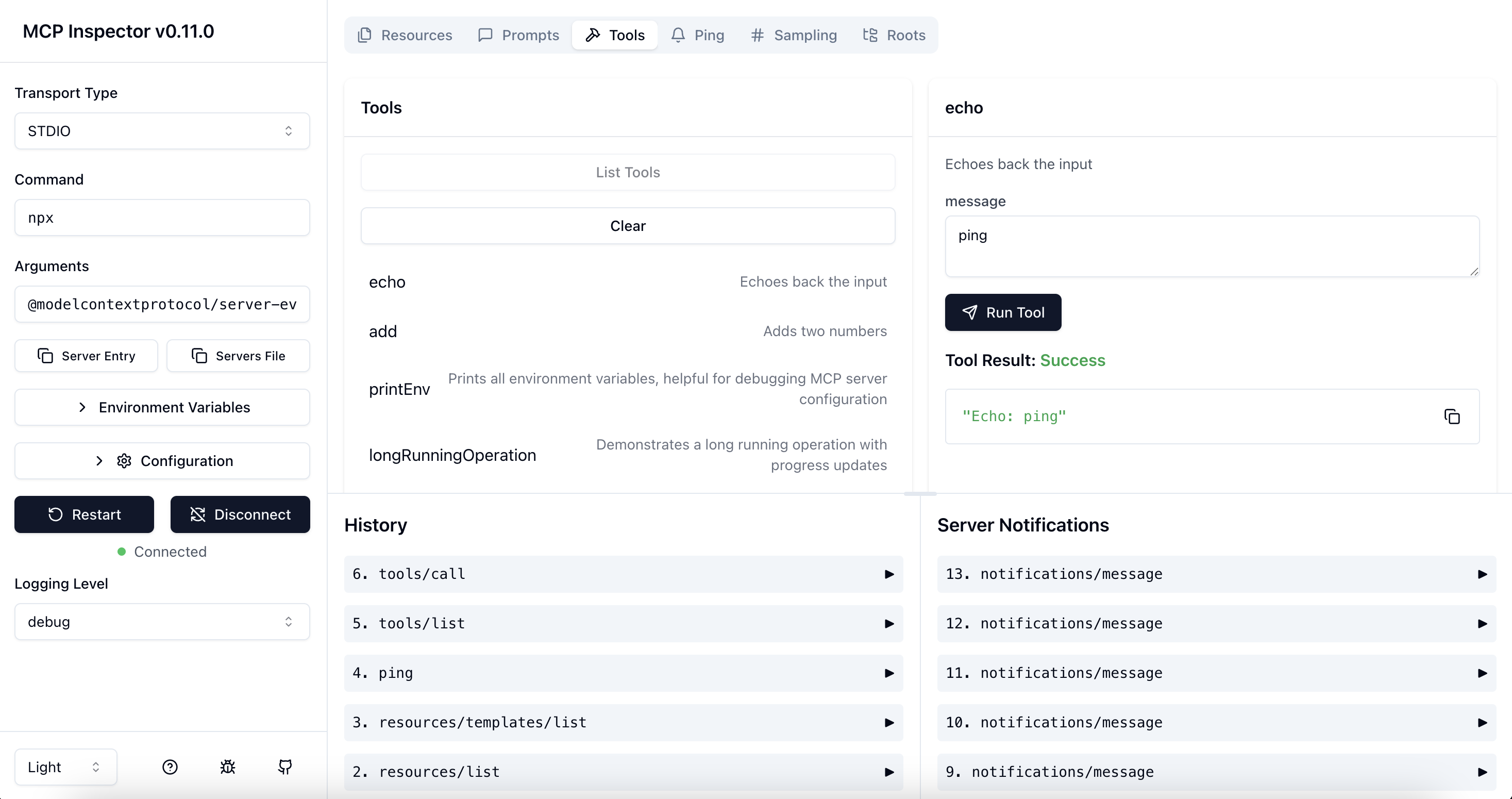
## Architecture Overview
|
|
8
|
+
|
|
9
|
+
The MCP Inspector consists of two main components that work together:
|
|
10
|
+
|
|
11
|
+
- **MCP Inspector Client (MCPI)**: A React-based web UI that provides an interactive interface for testing and debugging MCP servers
|
|
12
|
+
- **MCP Proxy (MCPP)**: A Node.js server that acts as a protocol bridge, connecting the web UI to MCP servers via various transport methods (stdio, SSE, streamable-http)
|
|
13
|
+
|
|
14
|
+
Note that the proxy is not a network proxy for intercepting traffic. Instead, it functions as both an MCP client (connecting to your MCP server) and an HTTP server (serving the web UI), enabling browser-based interaction with MCP servers that use different transport protocols.
|
|
15
|
+
|
|
7
16
|
## Running the Inspector
|
|
8
17
|
|
|
9
18
|
### Requirements
|
|
10
19
|
|
|
11
20
|
- Node.js: ^22.7.5
|
|
12
21
|
|
|
22
|
+
### Quick Start (UI mode)
|
|
23
|
+
|
|
24
|
+
To get up and running right away with the UI, just execute the following:
|
|
25
|
+
|
|
26
|
+
```bash
|
|
27
|
+
npx @modelcontextprotocol/inspector
|
|
28
|
+
```
|
|
29
|
+
|
|
30
|
+
The server will start up and the UI will be accessible at `http://localhost:6274`.
|
|
31
|
+
|
|
13
32
|
### From an MCP server repository
|
|
14
33
|
|
|
15
34
|
To inspect an MCP server implementation, there's no need to clone this repo. Instead, use `npx`. For example, if your server is built at `build/index.js`:
|
|
@@ -42,6 +61,74 @@ CLIENT_PORT=8080 SERVER_PORT=9000 npx @modelcontextprotocol/inspector node build
|
|
|
42
61
|
|
|
43
62
|
For more details on ways to use the inspector, see the [Inspector section of the MCP docs site](https://modelcontextprotocol.io/docs/tools/inspector). For help with debugging, see the [Debugging guide](https://modelcontextprotocol.io/docs/tools/debugging).
|
|
44
63
|
|
|
64
|
+
### Servers File Export
|
|
65
|
+
|
|
66
|
+
The MCP Inspector provides convenient buttons to export server launch configurations for use in clients such as Cursor, Claude Code, or the Inspector's CLI. The file is usually called `mcp.json`.
|
|
67
|
+
|
|
68
|
+
- **Server Entry** - Copies a single server configuration entry to your clipboard. This can be added to your `mcp.json` file inside the `mcpServers` object with your preferred server name.
|
|
69
|
+
|
|
70
|
+
**STDIO transport example:**
|
|
71
|
+
|
|
72
|
+
```json
|
|
73
|
+
{
|
|
74
|
+
"command": "node",
|
|
75
|
+
"args": ["build/index.js", "--debug"],
|
|
76
|
+
"env": {
|
|
77
|
+
"API_KEY": "your-api-key",
|
|
78
|
+
"DEBUG": "true"
|
|
79
|
+
}
|
|
80
|
+
}
|
|
81
|
+
```
|
|
82
|
+
|
|
83
|
+
**SSE transport example:**
|
|
84
|
+
|
|
85
|
+
```json
|
|
86
|
+
{
|
|
87
|
+
"type": "sse",
|
|
88
|
+
"url": "http://localhost:3000/events",
|
|
89
|
+
"note": "For SSE connections, add this URL directly in Client"
|
|
90
|
+
}
|
|
91
|
+
```
|
|
92
|
+
|
|
93
|
+
- **Servers File** - Copies a complete MCP configuration file structure to your clipboard, with your current server configuration added as `default-server`. This can be saved directly as `mcp.json`.
|
|
94
|
+
|
|
95
|
+
**STDIO transport example:**
|
|
96
|
+
|
|
97
|
+
```json
|
|
98
|
+
{
|
|
99
|
+
"mcpServers": {
|
|
100
|
+
"default-server": {
|
|
101
|
+
"command": "node",
|
|
102
|
+
"args": ["build/index.js", "--debug"],
|
|
103
|
+
"env": {
|
|
104
|
+
"API_KEY": "your-api-key",
|
|
105
|
+
"DEBUG": "true"
|
|
106
|
+
}
|
|
107
|
+
}
|
|
108
|
+
}
|
|
109
|
+
}
|
|
110
|
+
```
|
|
111
|
+
|
|
112
|
+
**SSE transport example:**
|
|
113
|
+
|
|
114
|
+
```json
|
|
115
|
+
{
|
|
116
|
+
"mcpServers": {
|
|
117
|
+
"default-server": {
|
|
118
|
+
"type": "sse",
|
|
119
|
+
"url": "http://localhost:3000/events",
|
|
120
|
+
"note": "For SSE connections, add this URL directly in Client"
|
|
121
|
+
}
|
|
122
|
+
}
|
|
123
|
+
}
|
|
124
|
+
```
|
|
125
|
+
|
|
126
|
+
These buttons appear in the Inspector UI after you've configured your server settings, making it easy to save and reuse your configurations.
|
|
127
|
+
|
|
128
|
+
For SSE transport connections, the Inspector provides similar functionality for both buttons. The "Server Entry" button copies the SSE URL configuration that can be added to your existing configuration file, while the "Servers File" button creates a complete configuration file containing the SSE URL for direct use in clients.
|
|
129
|
+
|
|
130
|
+
You can paste the Server Entry into your existing `mcp.json` file under your chosen server name, or use the complete Servers File payload to create a new configuration file.
|
|
131
|
+
|
|
45
132
|
### Authentication
|
|
46
133
|
|
|
47
134
|
The inspector supports bearer token authentication for SSE connections. Enter your token in the UI when connecting to an MCP server, and it will be sent in the Authorization header. You can override the header name using the input field in the sidebar.
|
|
@@ -54,12 +141,13 @@ The MCP Inspector includes a proxy server that can run and communicate with loca
|
|
|
54
141
|
|
|
55
142
|
The MCP Inspector supports the following configuration settings. To change them, click on the `Configuration` button in the MCP Inspector UI:
|
|
56
143
|
|
|
57
|
-
| Setting | Description
|
|
58
|
-
| --------------------------------------- |
|
|
59
|
-
| `MCP_SERVER_REQUEST_TIMEOUT` | Timeout for requests to the MCP server (ms)
|
|
60
|
-
| `MCP_REQUEST_TIMEOUT_RESET_ON_PROGRESS` | Reset timeout on progress notifications
|
|
61
|
-
| `MCP_REQUEST_MAX_TOTAL_TIMEOUT` | Maximum total timeout for requests sent to the MCP server (ms) (Use with progress notifications)
|
|
62
|
-
| `MCP_PROXY_FULL_ADDRESS` | Set this if you are running the MCP Inspector Proxy on a non-default address. Example: http://10.1.1.22:5577
|
|
144
|
+
| Setting | Description | Default |
|
|
145
|
+
| --------------------------------------- | ------------------------------------------------------------------------------------------------------------- | ------- |
|
|
146
|
+
| `MCP_SERVER_REQUEST_TIMEOUT` | Timeout for requests to the MCP server (ms) | 10000 |
|
|
147
|
+
| `MCP_REQUEST_TIMEOUT_RESET_ON_PROGRESS` | Reset timeout on progress notifications | true |
|
|
148
|
+
| `MCP_REQUEST_MAX_TOTAL_TIMEOUT` | Maximum total timeout for requests sent to the MCP server (ms) (Use with progress notifications) | 60000 |
|
|
149
|
+
| `MCP_PROXY_FULL_ADDRESS` | Set this if you are running the MCP Inspector Proxy on a non-default address. Example: http://10.1.1.22:5577 | "" |
|
|
150
|
+
| `MCP_AUTO_OPEN_ENABLED` | Enable automatic browser opening when inspector starts. Only as environment var, not configurable in browser. | true |
|
|
63
151
|
|
|
64
152
|
These settings can be adjusted in real-time through the UI and will persist across sessions.
|
|
65
153
|
|
|
@@ -93,6 +181,24 @@ Example server configuration file:
|
|
|
93
181
|
}
|
|
94
182
|
```
|
|
95
183
|
|
|
184
|
+
> **Tip:** You can easily generate this configuration format using the **Server Entry** and **Servers File** buttons in the Inspector UI, as described in the Servers File Export section above.
|
|
185
|
+
|
|
186
|
+
You can also set the initial `transport` type, `serverUrl`, `serverCommand`, and `serverArgs` via query params, for example:
|
|
187
|
+
|
|
188
|
+
```
|
|
189
|
+
http://localhost:6274/?transport=sse&serverUrl=http://localhost:8787/sse
|
|
190
|
+
http://localhost:6274/?transport=streamable-http&serverUrl=http://localhost:8787/mcp
|
|
191
|
+
http://localhost:6274/?transport=stdio&serverCommand=npx&serverArgs=arg1%20arg2
|
|
192
|
+
```
|
|
193
|
+
|
|
194
|
+
You can also set initial config settings via query params, for example:
|
|
195
|
+
|
|
196
|
+
```
|
|
197
|
+
http://localhost:6274/?MCP_SERVER_REQUEST_TIMEOUT=10000&MCP_REQUEST_TIMEOUT_RESET_ON_PROGRESS=false&MCP_PROXY_FULL_ADDRESS=http://10.1.1.22:5577
|
|
198
|
+
```
|
|
199
|
+
|
|
200
|
+
Note that if both the query param and the corresponding localStorage item are set, the query param will take precedence.
|
|
201
|
+
|
|
96
202
|
### From this repository
|
|
97
203
|
|
|
98
204
|
If you're working on the inspector itself:
|
package/client/bin/start.js
CHANGED
|
@@ -1,5 +1,6 @@
|
|
|
1
1
|
#!/usr/bin/env node
|
|
2
2
|
|
|
3
|
+
import open from "open";
|
|
3
4
|
import { resolve, dirname } from "path";
|
|
4
5
|
import { spawnPromise } from "spawn-rx";
|
|
5
6
|
import { fileURLToPath } from "url";
|
|
@@ -99,6 +100,9 @@ async function main() {
|
|
|
99
100
|
|
|
100
101
|
if (serverOk) {
|
|
101
102
|
try {
|
|
103
|
+
if (process.env.MCP_AUTO_OPEN_ENABLED !== "false") {
|
|
104
|
+
open(`http://127.0.0.1:${CLIENT_PORT}`);
|
|
105
|
+
}
|
|
102
106
|
await spawnPromise("node", [inspectorClientPath], {
|
|
103
107
|
env: { ...process.env, PORT: CLIENT_PORT },
|
|
104
108
|
signal: abort.signal,
|
|
@@ -1,33 +1,5 @@
|
|
|
1
|
-
import { u as useToast, r as reactExports, j as jsxRuntimeExports, S as SESSION_KEYS, I as InspectorOAuthClientProvider, a as auth } from "./index-
|
|
2
|
-
|
|
3
|
-
const params = new URLSearchParams(location);
|
|
4
|
-
const code = params.get("code");
|
|
5
|
-
if (code) {
|
|
6
|
-
return { successful: true, code };
|
|
7
|
-
}
|
|
8
|
-
const error = params.get("error");
|
|
9
|
-
const error_description = params.get("error_description");
|
|
10
|
-
const error_uri = params.get("error_uri");
|
|
11
|
-
if (error) {
|
|
12
|
-
return { successful: false, error, error_description, error_uri };
|
|
13
|
-
}
|
|
14
|
-
return {
|
|
15
|
-
successful: false,
|
|
16
|
-
error: "invalid_request",
|
|
17
|
-
error_description: "Missing code or error in response",
|
|
18
|
-
error_uri: null
|
|
19
|
-
};
|
|
20
|
-
};
|
|
21
|
-
const generateOAuthErrorDescription = (params) => {
|
|
22
|
-
const error = params.error;
|
|
23
|
-
const errorDescription = params.error_description;
|
|
24
|
-
const errorUri = params.error_uri;
|
|
25
|
-
return [
|
|
26
|
-
`Error: ${error}.`,
|
|
27
|
-
errorDescription ? `Details: ${errorDescription}.` : "",
|
|
28
|
-
errorUri ? `More info: ${errorUri}.` : ""
|
|
29
|
-
].filter(Boolean).join("\n");
|
|
30
|
-
};
|
|
1
|
+
import { u as useToast, r as reactExports, j as jsxRuntimeExports, S as SESSION_KEYS, I as InspectorOAuthClientProvider, a as auth } from "./index-CfNcvwpX.js";
|
|
2
|
+
import { p as parseOAuthCallbackParams, g as generateOAuthErrorDescription } from "./oauthUtils-DTcoXpSP.js";
|
|
31
3
|
const OAuthCallback = ({ onConnect }) => {
|
|
32
4
|
const { toast } = useToast();
|
|
33
5
|
const hasProcessedRef = reactExports.useRef(false);
|
|
@@ -0,0 +1,57 @@
|
|
|
1
|
+
import { r as reactExports, S as SESSION_KEYS, j as jsxRuntimeExports } from "./index-CfNcvwpX.js";
|
|
2
|
+
import { p as parseOAuthCallbackParams, g as generateOAuthErrorDescription } from "./oauthUtils-DTcoXpSP.js";
|
|
3
|
+
const OAuthDebugCallback = ({ onConnect }) => {
|
|
4
|
+
reactExports.useEffect(() => {
|
|
5
|
+
let isProcessed = false;
|
|
6
|
+
const handleCallback = async () => {
|
|
7
|
+
if (isProcessed) {
|
|
8
|
+
return;
|
|
9
|
+
}
|
|
10
|
+
isProcessed = true;
|
|
11
|
+
const params = parseOAuthCallbackParams(window.location.search);
|
|
12
|
+
if (!params.successful) {
|
|
13
|
+
const errorMsg = generateOAuthErrorDescription(params);
|
|
14
|
+
onConnect({ errorMsg });
|
|
15
|
+
return;
|
|
16
|
+
}
|
|
17
|
+
const serverUrl = sessionStorage.getItem(SESSION_KEYS.SERVER_URL);
|
|
18
|
+
const storedState = sessionStorage.getItem(
|
|
19
|
+
SESSION_KEYS.AUTH_DEBUGGER_STATE
|
|
20
|
+
);
|
|
21
|
+
let restoredState = null;
|
|
22
|
+
if (storedState) {
|
|
23
|
+
try {
|
|
24
|
+
restoredState = JSON.parse(storedState);
|
|
25
|
+
sessionStorage.removeItem(SESSION_KEYS.AUTH_DEBUGGER_STATE);
|
|
26
|
+
} catch (e) {
|
|
27
|
+
console.error("Failed to parse stored auth state:", e);
|
|
28
|
+
}
|
|
29
|
+
}
|
|
30
|
+
if (!serverUrl) {
|
|
31
|
+
return;
|
|
32
|
+
}
|
|
33
|
+
if (!params.code) {
|
|
34
|
+
onConnect({ errorMsg: "Missing authorization code" });
|
|
35
|
+
return;
|
|
36
|
+
}
|
|
37
|
+
onConnect({ authorizationCode: params.code, restoredState });
|
|
38
|
+
};
|
|
39
|
+
handleCallback().finally(() => {
|
|
40
|
+
if (sessionStorage.getItem(SESSION_KEYS.SERVER_URL)) {
|
|
41
|
+
window.history.replaceState({}, document.title, "/");
|
|
42
|
+
}
|
|
43
|
+
});
|
|
44
|
+
return () => {
|
|
45
|
+
isProcessed = true;
|
|
46
|
+
};
|
|
47
|
+
}, [onConnect]);
|
|
48
|
+
const callbackParams = parseOAuthCallbackParams(window.location.search);
|
|
49
|
+
return /* @__PURE__ */ jsxRuntimeExports.jsx("div", { className: "flex items-center justify-center h-screen", children: /* @__PURE__ */ jsxRuntimeExports.jsxs("div", { className: "mt-4 p-4 bg-secondary rounded-md max-w-md", children: [
|
|
50
|
+
/* @__PURE__ */ jsxRuntimeExports.jsx("p", { className: "mb-2 text-sm", children: "Please copy this authorization code and return to the Auth Debugger:" }),
|
|
51
|
+
/* @__PURE__ */ jsxRuntimeExports.jsx("code", { className: "block p-2 bg-muted rounded-sm overflow-x-auto text-xs", children: callbackParams.successful && "code" in callbackParams ? callbackParams.code : `No code found: ${callbackParams.error}, ${callbackParams.error_description}` }),
|
|
52
|
+
/* @__PURE__ */ jsxRuntimeExports.jsx("p", { className: "mt-4 text-xs text-muted-foreground", children: "Close this tab and paste the code in the OAuth flow to complete authentication." })
|
|
53
|
+
] }) });
|
|
54
|
+
};
|
|
55
|
+
export {
|
|
56
|
+
OAuthDebugCallback as default
|
|
57
|
+
};
|