@minhspark/codex-mcp-bridge 1.15.2 → 1.16.1
This diff represents the content of publicly available package versions that have been released to one of the supported registries. The information contained in this diff is provided for informational purposes only and reflects changes between package versions as they appear in their respective public registries.
- package/CHANGELOG.md +20 -0
- package/README.md +212 -565
- package/package.json +3 -1
- package/scripts/collect-repo-analytics.mjs +163 -0
- package/scripts/install-native-relay.mjs +1 -1
- package/scripts/publish-repo-analytics.mjs +208 -0
- package/scripts/refresh-hosted-analytics.mjs +33 -0
- package/scripts/render-repo-analytics.mjs +50 -0
- package/scripts/usage-summary.sql +19 -0
- package/src/claude-bridge-launcher.mjs +2 -1
- package/src/claude-bridge.mjs +194 -19
- package/src/claude-desktop-context.mjs +19 -13
- package/src/claude-session-creation.mjs +216 -0
- package/src/claude-session-router.mjs +16 -0
- package/src/codex-bridge-launcher.mjs +2 -1
- package/src/codex-native-response.mjs +333 -0
- package/src/hardened-root-policy.mjs +95 -0
- package/src/index.mjs +17 -5
- package/src/native-relay-companion.mjs +268 -18
- package/src/native-relay.mjs +3 -0
- package/src/peer-protocol.mjs +111 -11
- package/src/platform.mjs +18 -0
- package/src/reply-forwarder.mjs +10 -3
- package/src/security-policy.mjs +4 -0
- package/src/telemetry-config.mjs +2 -0
- package/src/telemetry.mjs +149 -0
- package/src/thread-delivery.mjs +89 -11
- package/src/turn.mjs +35 -3
- package/src/windows-pipe-acl.mjs +27 -0
- package/src/windows-pipe-acl.ps1 +85 -0
package/README.md
CHANGED
|
@@ -2,701 +2,348 @@
|
|
|
2
2
|
|
|
3
3
|
[](https://www.npmjs.com/package/@minhspark/codex-mcp-bridge)
|
|
4
4
|
[](https://github.com/buidangminh23/codex-mcp-bridge/actions/workflows/ci.yml)
|
|
5
|
-
[](https://nodejs.org)
|
|
6
5
|
[](LICENSE)
|
|
7
|
-
[](https://m8ven.ai/mcp/buidangminh23-codex-mcp-bridge-1ke8t1)
|
|
8
6
|
|
|
9
|
-
|
|
7
|
+
Send prompts and replies between **Claude and Codex**, keeping each conversation in its own app. Supports Windows, macOS, and Linux; native Desktop integration supports Windows and macOS.
|
|
10
8
|
|
|
11
|
-
|
|
9
|
+
[](https://buidangminh23.github.io/codex-mcp-bridge/desktop-demo.mp4)
|
|
12
10
|
|
|
13
|
-
|
|
11
|
+
## Project statistics
|
|
14
12
|
|
|
15
|
-
|
|
13
|
+
**[Open live dashboard — refreshes every 30 seconds](https://buidangminh23.github.io/codex-mcp-bridge/)**
|
|
16
14
|
|
|
17
|
-
|
|
18
|
-
codex-native-relay-install --desktop-tasks
|
|
19
|
-
```
|
|
20
|
-
|
|
21
|
-
Reload the native companion and the Claude MCP client after upgrading. The installer stores the opt-in in the existing `~/.codex/native-relay.json`; `CODEX_BRIDGE_DESKTOP_TASKS=1` also enables it, and an explicit `0` overrides the shared setting. Desktop mode uses **Codex Desktop permissions**, while the bridge's workspace and thread authorization checks still apply. Existing installations keep their app-server permission settings unless they opt in.
|
|
22
|
-
|
|
23
|
-
Call `delegate_to_codex` with `cwd`, `prompt`, and optionally `name`. The bridge resolves the real directory, selects the saved local project with that exact path, starts in its existing checkout, and opens the task immediately while it runs. `openInApp: false` suppresses page navigation; project assignment still happens. It never creates projects or selects a parent directory, remote namesake, or a new worktree. Missing or ambiguous project matches return an error before creation; choose an existing project's directory or continue a task already in the requested workspace.
|
|
24
|
-
|
|
25
|
-
`start_codex_thread` requires `prompt` in Desktop mode and returns after acceptance. Use `delegate_to_codex` to also wait for the reply. `send_to_codex_thread` continues the existing Desktop task without attaching another writer; its cwd cannot be changed. On timeout, the task continues. Inspect it in Desktop and use its Stop button to interrupt it. Quota failures and approval/input requests remain visible; delivery does not bypass them. An uncertain creation or send is never automatically repeated through another backend.
|
|
26
|
-
|
|
27
|
-
Desktop calls share a maximum 40-second budget across creation, opening, queueing, and observation, so a slow task returns its confirmed ID before the caller's usual 60-second timeout. The task keeps running in Desktop. If creation itself cannot be confirmed, the bridge reports uncertainty and blocks another creation instead of inventing an ID.
|
|
28
|
-
|
|
29
|
-
Creation receipts persist in `$CODEX_HOME/bridge-task-receipts` (default `~/.codex/bridge-task-receipts`). The same canonical workspace and explicit title reuse the existing task, including after completion or a bridge restart; an edited brief is not resent. Use `send_to_codex_thread` to continue it, or a distinct title for separate work. Without an explicit title, the key uses the exact prompt hash. Receipts store hashes rather than prompt text and never grant thread permissions: `owned` policy still requires authorization after restart. Pending or uncertain receipts and abandoned creation locks fail closed without automatic expiry; inspect the actual task before repairing them.
|
|
30
|
-
|
|
31
|
-
Reusing a receipt also verifies that the saved project still has the same identity and exact directory, then checks the task's current project membership in Desktop's recent/pinned listing. A moved task or deleted/repointed project is rejected before sending or creating anything. A task omitted from that listing keeps its known ID and reports `project assignment: unverified`; stored receipt metadata is not presented as current membership. If a checkout has moved, edit the existing project's folder in Desktop, then inspect the existing task's workspace. Do not add another project or append the obsolete directory merely to satisfy a match.
|
|
32
|
-
|
|
33
|
-
The updated companion exposes a separate `-desktop-tasks` endpoint so a previous companion holding the legacy reply socket need not be killed during an upgrade. `codex_bridge_status` verifies the native connection through Desktop's local project list; `native_relay_status` reports both endpoints. Reconnect the companion after upgrading so it accepts the current native operations.
|
|
34
|
-
|
|
35
|
-
On Windows, the companion supports both legacy inline app-server configuration and current Codex Desktop plugin startup. When no native pipe is inherited, discovery checks the companion's Desktop process ancestry and the named pipe's server process, then uses a read-only project-list probe to distinguish app tools from browser-only pipes. A running companion alone does not establish readiness: verify that `native_relay_status` reports its account relay listening and that `codex_bridge_status` can read Desktop projects.
|
|
36
|
-
|
|
37
|
-
Desktop mode never contacts, starts, or falls back to an external app-server, including during status checks and thread discovery. The Claude Desktop installer records `CODEX_BRIDGE_AUTOSTART=0` in this mode. If Desktop or its companion is unavailable, the bridge reports the failure and leaves existing tasks in Desktop. `stop_codex_app_server` is a no-op in Desktop mode; stop an obsolete external service through its own launcher after confirming it has no active work.
|
|
38
|
-
|
|
39
|
-
`list_codex_threads` filters Desktop's recent/pinned task snapshot by authorization, workspace/title, and result limit. The snapshot can omit agent-created tasks visible in the sidebar and does not cover the complete archive. Absence from this list does not mean creation failed: read the returned task ID directly. Desktop does not expose the external server's `loadedOnly` state; requesting it returns an explanation without contacting that server.
|
|
15
|
+
[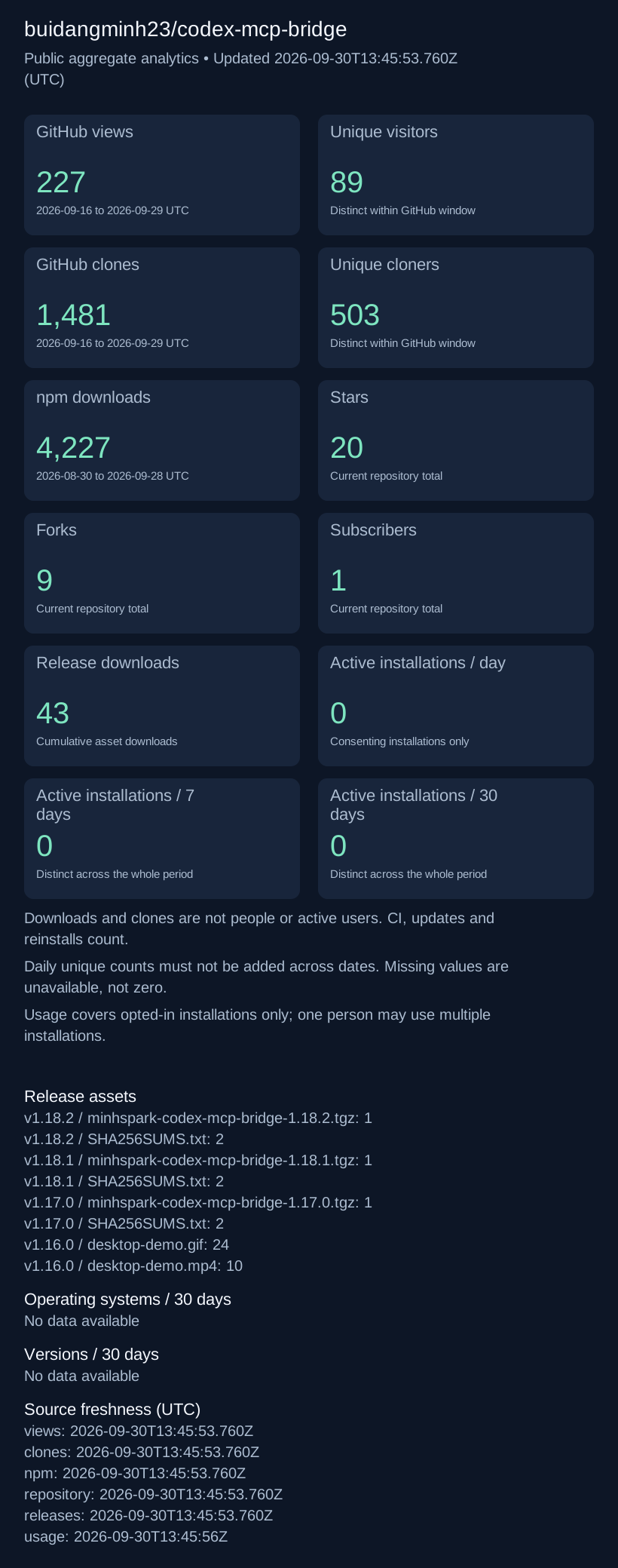](https://github.com/buidangminh23/codex-mcp-bridge/tree/analytics)
|
|
40
16
|
|
|
41
|
-
|
|
17
|
+
[Full statistics and daily history](https://github.com/buidangminh23/codex-mcp-bridge/tree/analytics) · [Public aggregate JSON](https://raw.githubusercontent.com/buidangminh23/codex-mcp-bridge/analytics/data.json) · [How these metrics work](#repository-analytics)
|
|
42
18
|
|
|
43
|
-
|
|
19
|
+
## Installation
|
|
44
20
|
|
|
45
|
-
|
|
21
|
+
[Windows](#windows-powershell) · [macOS](#macos-terminal) · [Linux / WSL](#linux--wsl-bash) · [Claude Code registration](#register-claude-code) · [Verify](#verify-the-installation) · [Troubleshooting](#troubleshooting)
|
|
46
22
|
|
|
47
|
-
|
|
23
|
+
Choose the mode for the conversations you want to connect:
|
|
48
24
|
|
|
49
|
-
|
|
50
|
-
|
|
51
|
-
|
|
52
|
-
|
|
53
|
-
Two MCP servers, one living inside each agent:
|
|
54
|
-
|
|
55
|
-
```
|
|
56
|
-
┌──────────────── codex-mcp-bridge (runs inside Claude) ──────────────┐
|
|
57
|
-
Claude Desktop ──────┤ stdio WebSocket ├──> separate codex app-server
|
|
58
|
-
└────────────────────────────────────────────────────────────────────┘
|
|
59
|
-
|
|
60
|
-
┌──────────────── claude-bridge (runs inside Codex) ──────────────────┐
|
|
61
|
-
Codex ───────────────┤ stdio unix socket / named pipe for the Claude session ├──> Claude Code session ──> message shows in Claude Desktop
|
|
62
|
-
└────────────────────────────────────────────────────────────────────┘
|
|
63
|
-
|
|
64
|
-
Codex TUI ──codex --remote ws://127.0.0.1:8791──> same app-server, same live thread
|
|
65
|
-
|
|
66
|
-
┌── codex-native-relay (launched by Codex Desktop, Windows/macOS) ────┐
|
|
67
|
-
both bridges ───────┤ named pipe / unix socket native tools ├──> visible project tasks in Codex Desktop
|
|
68
|
-
└────────────────────────────────────────────────────────────────────┘
|
|
69
|
-
```
|
|
25
|
+
| Platform | Mode | Required clients |
|
|
26
|
+
|---|---|---|
|
|
27
|
+
| Windows / macOS | Native Desktop tasks | Signed-in Codex Desktop and a Claude **Code** session in Claude Desktop |
|
|
28
|
+
| Linux / WSL | CLI / app-server | Signed-in Codex CLI and a running Claude Code CLI session |
|
|
70
29
|
|
|
71
|
-
|
|
72
|
-
- Every client pointed at the same URL shares **one app-server**, so `thread/resume` with a `threadId` rejoins the running thread instead of opening a new session.
|
|
73
|
-
- The bridge keeps exactly one WebSocket, calls `initialize` once, and routes notifications by `threadId`, so parallel threads never bleed into each other.
|
|
74
|
-
- In app-server mode, `delegate_to_codex` starts the thread at the supplied `cwd`, names it, sends the prompt, and unsubscribes that thread after a terminal turn. It opens `codex://threads/<id>` only after unload is confirmed; other threads on the shared app-server keep running. Desktop mode instead creates and assigns the task through the app immediately.
|
|
75
|
-
- The **native relay** (Windows/macOS, optional) is the third line: a thread the human is watching in Codex Desktop belongs to the app, and a second app-server cannot write to it. Instead of taking the thread away, `claude-bridge` hands the message to a companion the app itself launched, and the app delivers it. See [Codex Desktop native relay](#codex-desktop-native-relay).
|
|
30
|
+
The bridge requires **Node.js 22+**; Node 24 LTS is a suitable starting point. If Node is already managed by a version manager, use that installation. Install the bridge under the same OS user as the clients. A global npm install does not require cloning this repository.
|
|
76
31
|
|
|
77
|
-
|
|
32
|
+
For Desktop mode, install [Codex Desktop](https://developers.openai.com/codex/app) and [Claude Desktop](https://claude.com/download), sign in, and save the intended local project in Codex Desktop. Open that same directory in Claude Desktop's Code tab. A normal Claude chat is not a Code session.
|
|
78
33
|
|
|
79
|
-
|
|
80
|
-
|---|---|
|
|
81
|
-
| Node.js 22 or newer | the bridge uses the built-in `WebSocket` and `node --test` |
|
|
82
|
-
| [Codex CLI](https://developers.openai.com/codex) (`codex`), logged in | the bridge drives its app-server |
|
|
83
|
-
| An MCP client that launches stdio servers | Claude Desktop, Claude Code, or Codex itself |
|
|
34
|
+
### Windows (PowerShell)
|
|
84
35
|
|
|
85
|
-
Install
|
|
86
|
-
|
|
87
|
-
```bash
|
|
88
|
-
# macOS
|
|
89
|
-
brew install node
|
|
90
|
-
npm install -g @openai/codex
|
|
91
|
-
codex login
|
|
92
|
-
```
|
|
36
|
+
Install Node and a native Codex executable with WinGet:
|
|
93
37
|
|
|
94
38
|
```powershell
|
|
95
|
-
|
|
96
|
-
winget install
|
|
97
|
-
npm install -g @openai/codex
|
|
98
|
-
codex login
|
|
39
|
+
winget install --id OpenJS.NodeJS.LTS --exact
|
|
40
|
+
winget install --id OpenAI.Codex --exact
|
|
99
41
|
```
|
|
100
42
|
|
|
101
|
-
|
|
102
|
-
# Linux
|
|
103
|
-
curl -fsSL https://fnm.vercel.app/install | bash && exec $SHELL
|
|
104
|
-
fnm install 22 && fnm use 22
|
|
105
|
-
npm install -g @openai/codex
|
|
106
|
-
codex login
|
|
107
|
-
```
|
|
108
|
-
|
|
109
|
-
Verify before going further — both commands must print a version:
|
|
43
|
+
Open a **new PowerShell window** so it receives the updated PATH, then run:
|
|
110
44
|
|
|
111
|
-
```
|
|
112
|
-
node --version
|
|
45
|
+
```powershell
|
|
46
|
+
node --version
|
|
47
|
+
npm.cmd --version
|
|
48
|
+
codex.exe --version
|
|
49
|
+
codex.exe login
|
|
50
|
+
npm.cmd install -g @minhspark/codex-mcp-bridge@latest
|
|
51
|
+
$env:CODEX_EXE = (Get-Command codex.exe).Source
|
|
52
|
+
codex-native-relay-install.cmd --desktop-tasks
|
|
53
|
+
codex-mcp-bridge-install.cmd --desktop-tasks
|
|
54
|
+
$env:CODEX_BRIDGE_DESKTOP_TASKS = "1"
|
|
55
|
+
claude-mcp-bridge-install.cmd
|
|
113
56
|
```
|
|
114
57
|
|
|
115
|
-
|
|
116
|
-
|
|
117
|
-
### 1. Get the bridge
|
|
118
|
-
|
|
119
|
-
Two ways in. Pick by what you intend to do with it.
|
|
58
|
+
The `.cmd` suffix selects npm's Windows launchers without changing PowerShell's execution policy. `CODEX_EXE` must point to the real `codex.exe`, not an npm `.ps1` shim. If WinGet is unavailable, install [App Installer](https://learn.microsoft.com/en-us/windows/package-manager/winget/) or use the vendors' installers.
|
|
120
59
|
|
|
121
|
-
|
|
60
|
+
Continue with [Claude Code registration](#register-claude-code), then [verification](#verify-the-installation).
|
|
122
61
|
|
|
123
|
-
|
|
124
|
-
npm install -g @minhspark/codex-mcp-bridge
|
|
125
|
-
```
|
|
62
|
+
### macOS (Terminal)
|
|
126
63
|
|
|
127
|
-
|
|
64
|
+
With [Homebrew](https://brew.sh/) installed:
|
|
128
65
|
|
|
129
66
|
```bash
|
|
130
|
-
|
|
131
|
-
|
|
132
|
-
|
|
133
|
-
|
|
134
|
-
|
|
135
|
-
|
|
136
|
-
|
|
137
|
-
|
|
138
|
-
|
|
139
|
-
|
|
140
|
-
|
|
141
|
-
#### Upgrading an install you already have
|
|
142
|
-
|
|
143
|
-
Install the new files with `npm install -g @minhspark/codex-mcp-bridge@latest`. To migrate an existing direct-entry installation, run `codex-mcp-bridge-install` for Claude Desktop, `claude-mcp-bridge-install` for Codex, and `codex-native-relay-install --no-bootstrap` if the native companion is installed. Update Claude Code's separate registration as shown below. Reconnect each MCP server once in its existing task so it loads the supervisor. No replacement task or full app exit is required when the client exposes MCP reconnect/reload. A process launched before this upgrade cannot acquire the supervisor merely because files changed on disk.
|
|
144
|
-
|
|
145
|
-
After this one-time migration, the stable supervisor keeps the client's MCP stdio connection open while it starts each worker from an immutable source snapshot. The installers prepare this snapshot before changing the registration, avoiding a slow first copy during MCP initialization. Compatible installed-source changes become candidates after the tree stabilizes. A candidate must initialize successfully before it can replace an idle worker. Active calls, pending deliveries, late replies, and relay work defer the switch; an update never silently resends a prompt. A failed candidate leaves the existing worker and its delivery state available.
|
|
146
|
-
|
|
147
|
-
Snapshot verification reuses previously calculated dependency hashes when file identity, size, modification time, and change time still match. Changed files are read and hashed again; directory inventories still detect additions and deletions. Missing or invalid hash metadata falls back to reading file contents. This reduces repeated disk reads during simultaneous MCP startup, especially just after Windows boots. Supervisor stderr logs show when runtime preparation starts and how long it takes.
|
|
148
|
-
|
|
149
|
-
Call `codex_bridge_status`, `claude_bridge_status`, or `native_relay_status` from the actual app task to inspect `autoReload`, the loaded version, and any pending update or blocker. Reading an old message receipt still refers to the worker that accepted that message. Pending or uncertain messages can keep an update deferred until they are resolved; a new process or an unknown message ID is never evidence that a send failed. If the supervisor protocol itself changes incompatibly, reconnect that MCP server once again.
|
|
150
|
-
|
|
151
|
-
Auto-reload watches the **installed source at the configured path**. It does not poll npm, download a release, run `git pull`, or upgrade Claude/Codex themselves. Keep the normal package update mechanism to install new versions. Changes to environment variables or access settings supplied by the MCP client require a client MCP reload to pass the new configuration to the supervisor. Subsequent account switches remain detectable per call without this configuration reload.
|
|
152
|
-
|
|
153
|
-
The installers preserve existing environment and access settings; explicit supported environment variables override their stored values. Claude's `--reset` explicitly returns to defaults. Codex entries with custom access, timeout, or transport settings are left intact with the exact command and arguments to update in place. `CLAUDE_DESKTOP_USER_DATA` pins only the data directory, never an account identity. Re-running an installer is unnecessary for later compatible source updates. The global install path remains stable across package versions.
|
|
154
|
-
|
|
155
|
-
To migrate a legacy Claude registration to native Desktop task delivery, run `codex-mcp-bridge-install --desktop-tasks` (from a checkout: `node scripts/install-claude-desktop.mjs --desktop-tasks`). This explicit flag overrides a stored or inherited `CODEX_BRIDGE_DESKTOP_TASKS=0` and disables external app-server autostart while preserving access settings. Without the flag or an explicit routing setting, the installer leaves routing automatic so a later native relay installation can enable Desktop tasks. Existing explicit `0` settings remain unchanged until the flag or an environment override is supplied.
|
|
156
|
-
|
|
157
|
-
Reconnect `codex-bridge` in the existing Claude task after changing its registration; source auto-reload cannot replace environment variables inherited by a running MCP process. If the task has a separate Claude Code MCP registration, update that registration too. Verify `codex_bridge_status` from the actual sending task reports Desktop tasks enabled, the native relay available, and a current runtime. Keep the destination open in Codex Desktop. An earlier unconfirmed send must be inspected before sending again.
|
|
158
|
-
|
|
159
|
-
#### Show the final npm installation result
|
|
160
|
-
|
|
161
|
-
Enable the optional shell integration once after installing the package:
|
|
162
|
-
|
|
163
|
-
```sh
|
|
164
|
-
codex-npm-footer-install --shell zsh
|
|
67
|
+
brew install node@24
|
|
68
|
+
export PATH="$(brew --prefix node@24)/bin:$PATH"
|
|
69
|
+
node --version
|
|
70
|
+
npm --version
|
|
71
|
+
npm install -g @openai/codex@latest @minhspark/codex-mcp-bridge@latest
|
|
72
|
+
codex --version
|
|
73
|
+
codex login
|
|
74
|
+
codex-native-relay-install --desktop-tasks
|
|
75
|
+
codex-mcp-bridge-install --desktop-tasks
|
|
76
|
+
CODEX_BRIDGE_DESKTOP_TASKS=1 claude-mcp-bridge-install
|
|
165
77
|
```
|
|
166
78
|
|
|
167
|
-
|
|
168
|
-
|
|
169
|
-
The integration leaves the command unchanged:
|
|
79
|
+
Add the same Node PATH line to `~/.zshrc` if this is your Node installation; use `~/.bashrc` for Bash. If Homebrew is not installed, the [Node.js installer](https://nodejs.org/en/download) is another option; skip the two Homebrew lines after installing it.
|
|
170
80
|
|
|
171
|
-
|
|
172
|
-
npm install -g @minhspark/codex-mcp-bridge@latest
|
|
173
|
-
```
|
|
81
|
+
Keep the bootstrap enabled on a first relay install: it creates the executor required by native delivery. `--no-bootstrap` is for an already configured executor. On macOS, the relay installer selects the runtime bundled with Codex Desktop for native app authentication.
|
|
174
82
|
|
|
175
|
-
|
|
176
|
-
| --- | --- |
|
|
177
|
-
| No previous installation | `Successfully installed: @minhspark/codex-mcp-bridge v<version>` |
|
|
178
|
-
| Version changed | `Successfully updated: @minhspark/codex-mcp-bridge v<before> -> v<after>` |
|
|
179
|
-
| Same version after reinstalling | `Already up to date: @minhspark/codex-mcp-bridge v<version>` |
|
|
180
|
-
| npm failed | `Failed to install: ... (exit code <code>). See npm error above.` |
|
|
181
|
-
| Dry run | `Dry run completed: ... (no changes applied).` |
|
|
182
|
-
| Mode or installed metadata cannot be verified | A warning instead of a success claim |
|
|
83
|
+
Continue with [Claude Code registration](#register-claude-code), then [verification](#verify-the-installation).
|
|
183
84
|
|
|
184
|
-
|
|
85
|
+
### Linux / WSL (Bash)
|
|
185
86
|
|
|
186
|
-
|
|
87
|
+
Use a Linux terminal with `curl`, `unzip`, and Bash available. This example uses [fnm](https://github.com/Schniz/fnm#installation) to install Node without system-wide npm permissions:
|
|
187
88
|
|
|
188
89
|
```bash
|
|
189
|
-
|
|
190
|
-
cd codex-mcp-bridge
|
|
191
|
-
npm install
|
|
90
|
+
curl -fsSL https://fnm.vercel.app/install | bash
|
|
192
91
|
```
|
|
193
92
|
|
|
194
|
-
|
|
195
|
-
|
|
196
|
-
Confirm the tree is healthy before wiring it into anything:
|
|
93
|
+
Open a new Bash terminal so fnm's shell setup loads, then run:
|
|
197
94
|
|
|
198
95
|
```bash
|
|
199
|
-
|
|
96
|
+
eval "$(fnm env --use-on-cd --shell bash)"
|
|
97
|
+
fnm install 24
|
|
98
|
+
fnm default 24
|
|
99
|
+
fnm use 24
|
|
100
|
+
node --version
|
|
101
|
+
npm --version
|
|
102
|
+
npm install -g @openai/codex@latest @minhspark/codex-mcp-bridge@latest
|
|
103
|
+
codex login
|
|
104
|
+
curl -fsSL https://claude.ai/install.sh | bash
|
|
105
|
+
export PATH="$HOME/.local/bin:$PATH"
|
|
106
|
+
claude --version
|
|
107
|
+
CODEX_BRIDGE_DESKTOP_TASKS=0 claude-mcp-bridge-install
|
|
200
108
|
```
|
|
201
109
|
|
|
202
|
-
|
|
110
|
+
Start `claude` once and complete sign-in, then exit back to the shell. Register the forward bridge below, then reopen Claude or reconnect its MCP server:
|
|
203
111
|
|
|
204
112
|
```bash
|
|
205
|
-
|
|
113
|
+
bridge_root="$(npm root -g)/@minhspark/codex-mcp-bridge"
|
|
114
|
+
claude mcp add --scope user codex-bridge \
|
|
115
|
+
-e CODEX_BIN="$(command -v codex)" \
|
|
116
|
+
-e CODEX_BRIDGE_DESKTOP_TASKS=0 \
|
|
117
|
+
-e CODEX_BRIDGE_AUTOSTART=1 \
|
|
118
|
+
-e CODEX_BRIDGE_THREAD_POLICY=roots \
|
|
119
|
+
-e CODEX_BRIDGE_ALLOWED_ROOTS="$HOME" \
|
|
120
|
+
-- "$(command -v node)" "$bridge_root/src/mcp-supervisor.mjs" index.mjs
|
|
206
121
|
```
|
|
207
122
|
|
|
208
|
-
|
|
123
|
+
Use an existing writable project under your home directory, or replace `$HOME` in the allowed roots with the intended project directories. Keep both CLI clients running under the same Linux user. The bridge starts its local app-server on demand; no native relay installer is needed. This mode does not provide native Desktop project assignment. WSL and Windows have separate paths and client registrations; use the Windows instructions to connect Windows Desktop tasks.
|
|
209
124
|
|
|
210
|
-
|
|
211
|
-
|---|---|
|
|
212
|
-
| macOS | `~/Library/Application Support/Claude/claude_desktop_config.json` |
|
|
213
|
-
| Windows | `%APPDATA%\Claude\claude_desktop_config.json` |
|
|
214
|
-
| Linux | `${XDG_CONFIG_HOME:-~/.config}/Claude/claude_desktop_config.json` |
|
|
125
|
+
### Register Claude Code
|
|
215
126
|
|
|
216
|
-
|
|
127
|
+
**Claude Desktop configuration and Claude Code's MCP registry are separate.** If the sending Code session does not have `codex-bridge`, register it below. These are first-registration commands; if `claude mcp get codex-bridge` already returns an entry, preserve its custom environment and access settings when updating it.
|
|
217
128
|
|
|
218
|
-
|
|
219
|
-
# macOS and Linux separate entries with ":", Windows with ";"
|
|
220
|
-
CODEX_BRIDGE_ALLOWED_ROOTS="/path/to/project-a:/path/to/project-b" codex-mcp-bridge-install
|
|
221
|
-
```
|
|
129
|
+
Install the Claude Code CLI if `claude --version` is unavailable. The [official setup guide](https://code.claude.com/docs/en/setup) provides these native installers:
|
|
222
130
|
|
|
223
|
-
|
|
131
|
+
**Windows PowerShell:**
|
|
224
132
|
|
|
225
|
-
```
|
|
226
|
-
|
|
133
|
+
```powershell
|
|
134
|
+
irm https://claude.ai/install.ps1 | iex
|
|
227
135
|
```
|
|
228
136
|
|
|
229
|
-
|
|
230
|
-
|
|
231
|
-
Pass defaults through the environment if you want them written into the entry:
|
|
137
|
+
**macOS / Linux:**
|
|
232
138
|
|
|
233
139
|
```bash
|
|
234
|
-
|
|
140
|
+
curl -fsSL https://claude.ai/install.sh | bash
|
|
235
141
|
```
|
|
236
142
|
|
|
237
|
-
|
|
238
|
-
|
|
239
|
-
```json
|
|
240
|
-
{
|
|
241
|
-
"mcpServers": {
|
|
242
|
-
"codex-bridge": {
|
|
243
|
-
"command": "/Users/<user>/.local/node/v24.18.0/bin/node",
|
|
244
|
-
"args": ["/Users/<user>/code/codex-mcp-bridge/src/mcp-supervisor.mjs", "index.mjs"],
|
|
245
|
-
"env": {
|
|
246
|
-
"CODEX_BIN": "/Users/<user>/.local/bin/codex",
|
|
247
|
-
"CODEX_APP_SERVER_URL": "ws://127.0.0.1:8791"
|
|
248
|
-
}
|
|
249
|
-
}
|
|
250
|
-
}
|
|
251
|
-
}
|
|
252
|
-
```
|
|
253
|
-
|
|
254
|
-
Reconnect `codex-bridge` once in the existing Claude task, then verify `codex_bridge_status` reports auto-reload enabled. To write the same entry by hand, use absolute paths for `command` and the supervisor script; its second argument is the worker filename.
|
|
255
|
-
|
|
256
|
-
### 3. Claude → Codex, into Claude Code (CLI)
|
|
257
|
-
|
|
258
|
-
Claude Code keeps its own MCP registry, so it needs its own registration. Run this from the repo root:
|
|
259
|
-
|
|
260
|
-
```bash
|
|
261
|
-
claude mcp add codex-bridge --scope user -e CODEX_BIN="$(command -v codex)" -- "$(command -v node)" "$PWD/src/mcp-supervisor.mjs" index.mjs
|
|
262
|
-
```
|
|
143
|
+
Open a new terminal after installation. Linux users who completed the preceding section are already registered. For **Windows Desktop mode**:
|
|
263
144
|
|
|
264
145
|
```powershell
|
|
265
|
-
|
|
266
|
-
|
|
146
|
+
$bridgeRoot = Join-Path ((npm.cmd root -g).Trim()) '@minhspark/codex-mcp-bridge'
|
|
147
|
+
$nodeBin = (Get-Command node.exe).Source
|
|
148
|
+
$codexBin = (Get-Command codex.exe).Source
|
|
149
|
+
claude mcp add --scope user codex-bridge `
|
|
150
|
+
-e "CODEX_BIN=$codexBin" `
|
|
151
|
+
-e CODEX_BRIDGE_DESKTOP_TASKS=1 `
|
|
152
|
+
-e CODEX_BRIDGE_AUTOSTART=0 `
|
|
153
|
+
-e CODEX_BRIDGE_THREAD_POLICY=roots `
|
|
154
|
+
-e "CODEX_BRIDGE_ALLOWED_ROOTS=$env:USERPROFILE" `
|
|
155
|
+
-- $nodeBin (Join-Path $bridgeRoot 'src/mcp-supervisor.mjs') index.mjs
|
|
267
156
|
```
|
|
268
157
|
|
|
269
|
-
|
|
158
|
+
For **macOS Desktop mode**:
|
|
270
159
|
|
|
271
160
|
```bash
|
|
272
|
-
|
|
273
|
-
claude mcp
|
|
274
|
-
|
|
161
|
+
bridge_root="$(npm root -g)/@minhspark/codex-mcp-bridge"
|
|
162
|
+
claude mcp add --scope user codex-bridge \
|
|
163
|
+
-e CODEX_BIN="$(command -v codex)" \
|
|
164
|
+
-e CODEX_BRIDGE_DESKTOP_TASKS=1 \
|
|
165
|
+
-e CODEX_BRIDGE_AUTOSTART=0 \
|
|
166
|
+
-e CODEX_BRIDGE_THREAD_POLICY=roots \
|
|
167
|
+
-e CODEX_BRIDGE_ALLOWED_ROOTS="$HOME" \
|
|
168
|
+
-- "$(command -v node)" "$bridge_root/src/mcp-supervisor.mjs" index.mjs
|
|
275
169
|
```
|
|
276
170
|
|
|
277
|
-
|
|
171
|
+
These examples allow projects under the current user's home. For projects elsewhere, supply their actual absolute directories, separated by `;` on Windows or `:` on macOS/Linux. `--scope user` makes the registration available across projects; it does not override the allowed roots.
|
|
278
172
|
|
|
279
|
-
###
|
|
173
|
+
### Verify the installation
|
|
280
174
|
|
|
281
|
-
|
|
282
|
-
node scripts/install-codex-mcp.mjs
|
|
283
|
-
```
|
|
284
|
-
|
|
285
|
-
The installer updates the named entry through `codex mcp add`, preserves existing environment settings, pins the configured Desktop policy, and disables external autostart in Desktop mode. It refuses to reset custom access, timeout, or transport settings. It never infers the sender permission class from the recipient. The basic registration by hand is:
|
|
175
|
+
Check registration from a terminal; on Windows use `codex.exe` if `codex` resolves to a blocked PowerShell shim:
|
|
286
176
|
|
|
287
177
|
```bash
|
|
288
|
-
|
|
289
|
-
|
|
290
|
-
|
|
291
|
-
|
|
292
|
-
|
|
293
|
-
```bash
|
|
294
|
-
codex mcp list
|
|
178
|
+
node --version
|
|
179
|
+
codex --version
|
|
180
|
+
claude --version
|
|
181
|
+
claude mcp get codex-bridge
|
|
295
182
|
codex mcp get claude-bridge
|
|
296
|
-
node scripts/install-codex-mcp.mjs --remove
|
|
297
183
|
```
|
|
298
184
|
|
|
299
|
-
|
|
185
|
+
For Windows/macOS Desktop mode, also run `codex mcp get codex-native-relay`. Reconnect the affected MCP servers in the **existing** client tasks; Claude Code exposes them through `/mcp`. If a client has no reconnect control, restart that client after its active work finishes.
|
|
300
186
|
|
|
301
|
-
|
|
187
|
+
Ask the active tasks to run these **MCP tools**, not shell commands:
|
|
302
188
|
|
|
303
|
-
|
|
304
|
-
|
|
305
|
-
|
|
306
|
-
|
|
307
|
-
|
|
308
|
-
node scripts/install-native-relay.mjs
|
|
309
|
-
```
|
|
189
|
+
| Where | Tool | Expected result |
|
|
190
|
+
|---|---|---|
|
|
191
|
+
| Claude Code | `codex_bridge_status` | Current runtime; native relay and saved projects available in Desktop mode, or a working app-server in CLI mode |
|
|
192
|
+
| Codex | `claude_bridge_status` | Current runtime and the intended Claude session policy |
|
|
193
|
+
| Codex Desktop only | `native_relay_status` | Account relay listening and native tools available |
|
|
310
194
|
|
|
311
|
-
|
|
195
|
+
The registered supervisor should report auto-reload enabled. Next, list the intended destination with `list_codex_threads` or `list_claude_sessions`, then send a short message and verify its reply. A package version or a running process alone does not establish successful delivery.
|
|
312
196
|
|
|
313
|
-
|
|
314
|
-
codex mcp get codex-native-relay
|
|
315
|
-
node scripts/install-native-relay.mjs --no-bootstrap # register only; supply CODEX_RELAY_ID yourself
|
|
316
|
-
node scripts/install-native-relay.mjs --remove # unregister, and remove the relay config and thread id
|
|
317
|
-
```
|
|
197
|
+
## Use
|
|
318
198
|
|
|
319
|
-
|
|
199
|
+
| Direction | Tools |
|
|
200
|
+
|---|---|
|
|
201
|
+
| Claude → Codex | `list_codex_threads`, then `send_to_codex_thread` |
|
|
202
|
+
| Codex → Claude | `list_claude_sessions`, then `send_to_claude_session` |
|
|
203
|
+
| Create a Codex task | `delegate_to_codex` with `cwd` and `prompt` |
|
|
320
204
|
|
|
321
|
-
|
|
205
|
+
Example requests:
|
|
322
206
|
|
|
323
|
-
|
|
324
|
-
|
|
325
|
-
> The LaunchAgent makes sense on a machine **without** the desktop app (headless box, CLI/TUI only). With the app running, drop it and let the bridge spawn an app-server on demand — contention then lasts only while you are actually delegating work, not 24/7.
|
|
207
|
+
- **In Claude:** “Send this review request to my existing Codex task in this project and wait for its reply.”
|
|
208
|
+
- **In Codex:** “Send this result to my Claude Desktop Code session in this project and confirm its reply.”
|
|
326
209
|
|
|
327
|
-
|
|
328
|
-
node scripts/install-launch-agent.mjs
|
|
329
|
-
```
|
|
210
|
+
Use the exact project directory and destination task. If several Claude sessions match, specify the task ID. A `reply_received` receipt confirms a reply; a timeout does not mean the task stopped, so inspect it before retrying.
|
|
330
211
|
|
|
331
|
-
|
|
212
|
+
## Important behavior
|
|
332
213
|
|
|
333
|
-
|
|
334
|
-
|
|
335
|
-
|
|
336
|
-
|
|
337
|
-
```
|
|
214
|
+
- Desktop mode uses the native relay and the apps' permissions; it does not fall back to an external app-server.
|
|
215
|
+
- Account switches are checked before delivery. Missing identity or incompatible permissions block sending.
|
|
216
|
+
- Access settings are preserved on reinstall. Review allowed workspaces before enabling the bridge.
|
|
217
|
+
- CLI/app-server setup, all tools, and advanced settings are in the [reference](https://github.com/buidangminh23/codex-mcp-bridge/blob/main/REFERENCE.md).
|
|
338
218
|
|
|
339
|
-
|
|
219
|
+
## Update
|
|
340
220
|
|
|
341
221
|
```bash
|
|
342
|
-
npm
|
|
343
|
-
npm run check:claude # lists the live Claude Code sessions Codex can reach
|
|
222
|
+
npm install -g @minhspark/codex-mcp-bridge@latest
|
|
344
223
|
```
|
|
345
224
|
|
|
346
|
-
|
|
225
|
+
Supervisor-based installs reload compatible updates when idle. Older installs or changed MCP settings need a one-time reconnect; see [upgrade instructions](https://github.com/buidangminh23/codex-mcp-bridge/blob/main/REFERENCE.md#upgrading-an-install-you-already-have).
|
|
347
226
|
|
|
348
|
-
|
|
227
|
+
On Windows, use `npm.cmd` if PowerShell blocks `npm.ps1`. Upgrade the Codex CLI with the same manager used to install it: `winget upgrade --id OpenAI.Codex --exact` for the Windows path above, or `npm install -g @openai/codex@latest` for the macOS/Linux path. Updating the bridge does not update the clients.
|
|
349
228
|
|
|
350
|
-
|
|
351
|
-
claude mcp remove codex-bridge --scope user
|
|
352
|
-
node scripts/install-codex-mcp.mjs --remove
|
|
353
|
-
node scripts/install-native-relay.mjs --remove
|
|
354
|
-
node scripts/install-launch-agent.mjs --uninstall
|
|
355
|
-
```
|
|
229
|
+
If Node moved or a registration still points at an old installation, rerun the corresponding platform registration steps and reconnect its MCP server. Preserve existing access settings. Use `--no-bootstrap` only when refreshing a relay that already has an executor.
|
|
356
230
|
|
|
357
|
-
|
|
231
|
+
## Troubleshooting
|
|
358
232
|
|
|
359
|
-
|
|
233
|
+
### Download or installation failed
|
|
360
234
|
|
|
361
|
-
|
|
|
235
|
+
| Error / symptom | What to check and how to fix it |
|
|
362
236
|
|---|---|
|
|
363
|
-
|
|
|
364
|
-
|
|
|
365
|
-
|
|
366
|
-
|
|
367
|
-
|
|
368
|
-
|
|
369
|
-
|
|
370
|
-
|
|
|
371
|
-
|---|---|---|
|
|
372
|
-
| `delegate_to_codex` | Creates a named Codex thread at the requested project `cwd`, sends Claude's prompt, returns the reply, releases the bridge writer lock, and opens the exact session in Codex Desktop when enabled. | destructive |
|
|
373
|
-
| `send_to_codex_thread` | Sends a prompt as a user turn into `threadId`, waits for `turn/completed`, returns Codex's reply plus an activity trail (commands run, files changed). | destructive |
|
|
374
|
-
| `list_codex_threads` | Lists threads (id, title, cwd, last update, status) so you can pick the **exact** `threadId`. Desktop mode uses recent/pinned authorized local tasks; app-server mode supports `loadedOnly: true`. Windows and macOS rows carry a `codex://threads/<id>` deep link. | read-only |
|
|
375
|
-
| `start_codex_thread` | Opens a new Codex thread at a permitted `cwd`, optionally names it, and returns its `threadId`; the bridge applies its configured safe sandbox and approval policy. | writes |
|
|
376
|
-
| `read_codex_thread` | Reads the recent conversation without sending anything. | read-only |
|
|
377
|
-
| `interrupt_codex_turn` | Stops a turn that is still running. | destructive |
|
|
378
|
-
| `open_codex_thread` | **Windows or macOS**: brings a thread to the front in the Codex desktop app via `codex://threads/<id>` so a human can watch it work. Pass `background: true` to open without stealing focus. | writes |
|
|
379
|
-
| `stop_codex_app_server` | Stops the shared app-server once a hand-off is done, so it stops competing with Codex Desktop for the `~/.codex` state. The bridge starts a new one when it next needs it. | destructive |
|
|
380
|
-
| `codex_bridge_status` | Reports the environment: platform, resolved `codex` binary, whether the app-server endpoint is live, plus the macOS integrations (LaunchAgent, desktop app), and **warns when two app-servers are running**. Start here when something misbehaves. | read-only |
|
|
381
|
-
|
|
382
|
-
`delegate_to_codex` accepts `cwd`, `prompt`, an optional `name`, `timeoutSec` (default 240), `model`, `effort`, `openInApp`, and `releaseAfterTurn`. `send_to_codex_thread` accepts the same hand-off controls plus an existing `threadId`. On Windows, the installer defaults `openInApp` and `releaseAfterTurn` to `1`; explicit tool arguments override them. A timeout does **not** cancel the turn: the bridge returns what it collected plus the `turnId`; keep reading with `read_codex_thread` or stop it with `interrupt_codex_turn`.
|
|
383
|
-
|
|
384
|
-
`releaseAfterTurn` uses `thread/unsubscribe`, never an automatic process stop. The server may keep a thread loaded during its idle grace period or while another client subscribes. The bridge reports that state and defers Desktop opening rather than claiming the writer lock is released. Older servers without `thread/unsubscribe` return an explicit release failure. `stop_codex_app_server` remains a separate, destructive operation that affects every client on that endpoint.
|
|
385
|
-
|
|
386
|
-
Concurrent sends to the same Codex thread are serialized; different threads can run in parallel. After a timeout or disconnect, the bridge checks unresolved turn state before allowing another turn. `loadedOnly` resolves the server's thread IDs and searches subsequent pages before applying workspace and title filters.
|
|
387
|
-
|
|
388
|
-
For the normal Claude → Codex workflow, Claude should call `delegate_to_codex` with the exact project directory in `cwd`. The response always includes the Codex `threadId`, visible session `name`, exact `cwd`, rollout path, and the desktop deep link or the reason it could not be opened. The bridge sets the protocol-supported `thread/name/set` before the first turn, so the session is not an unnamed entry in Recents.
|
|
389
|
-
|
|
390
|
-
Thread operations are checked before the bridge attaches, and `CODEX_BRIDGE_THREAD_POLICY` decides what counts as permission:
|
|
391
|
-
|
|
392
|
-
| Policy | A thread is reachable when | Use it when |
|
|
393
|
-
|---|---|---|
|
|
394
|
-
| `owned` *(runtime default)* | the bridge created it with `start_codex_thread`, or its exact ID is listed in `CODEX_BRIDGE_ALLOWED_THREADS` | the bridge drives only threads it opens itself |
|
|
395
|
-
| `roots` *(v1.11.2 installer default)* | it is working inside a directory allowed by `CODEX_BRIDGE_ALLOWED_ROOTS` | you open threads in the Codex app or VS Code and want Claude to talk to them |
|
|
396
|
-
|
|
397
|
-
Under `owned`, a thread a human opened is **unreachable rather than merely restricted**: Codex assigns its ID at the moment it opens, so the ID cannot have been allowlisted beforehand, and the bridge-owned set lives in memory and empties whenever the MCP server restarts. If every live thread answers `NOT AUTHORIZED`, that is the cause — switch to `roots`.
|
|
398
|
-
|
|
399
|
-
`roots` does not remove a gate; it moves it from the ID to the workspace, which is the containment every tool already applies to the `cwd` it is handed. The bridge resolves a thread's workspace with a read **before** attaching, so a thread outside every root is refused without ever taking its writer lock. `CODEX_BRIDGE_ALLOWED_ROOTS=*` means every usable workspace. Otherwise set it to absolute project directories, separated by `:` (`;` on Windows). A root as broad as `/` or `C:\` has the same all-directories meaning, but `*` is portable across operating systems and machines.
|
|
400
|
-
|
|
401
|
-
## Tools — `claude-bridge` (runs inside Codex)
|
|
402
|
-
|
|
403
|
-
| Tool | What it does | Hints |
|
|
404
|
-
|---|---|---|
|
|
405
|
-
| `list_claude_sessions` | Lists Claude Code sessions running on this machine (name, pid, sessionId, cwd, entrypoint). | read-only |
|
|
406
|
-
| `send_to_claude_session` | Sends to a Claude inbox and waits for a correlated reply. Receipt statuses distinguish `reply_received`, `sent_unconfirmed`, `reply_timeout`, and receiver policy outcomes such as `held` or `refused`. `waitSec: 0` sends without waiting for confirmation. Prefer an exact `sessionId` because session names can change. | destructive |
|
|
407
|
-
| `read_claude_delivery` | Inspects the latest recipient receipt or correlated reply by original message ID without resending or clearing the inbox. Receipts belong to this MCP process; an unknown ID after reconnect never proves non-delivery. | read-only |
|
|
408
|
-
| `read_claude_inbox` | Reads and consumes the oldest requested page of messages, including late replies, preserving unread messages. Includes reply forwarding status. | destructive |
|
|
409
|
-
| `read_claude_transcript` | Reads a Claude session's recent conversation without sending anything. | read-only |
|
|
410
|
-
| `bind_codex_thread` | Sets the peer label and legacy reply destination. Desktop replies always return to their verified original sending task; binding neither authorizes nor redirects them. An empty string disables legacy forwarding. | writes |
|
|
411
|
-
| `claude_bridge_status` | Reports the peer endpoint, how many Claude sessions are live, the relay thread and the inbox depth. | writes |
|
|
412
|
-
|
|
413
|
-
Every tool declares MCP annotation hints (`readOnlyHint`, `destructiveHint`, `idempotentHint`, `openWorldHint`), because a client decides whether a call needs a human in the loop from those hints and a missing one reads as "unknown". Two are worth naming: `read_claude_inbox` empties the inbox as it reads it, so it is **not** read-only despite the name, and `claude_bridge_status` registers the peer endpoint on first call, so it writes too.
|
|
414
|
-
|
|
415
|
-
Desktop task mode (`CODEX_BRIDGE_DESKTOP_TASKS=1` or the shared setting written by `codex-native-relay-install --desktop-tasks`) applies in both directions. `list_claude_sessions` only offers sessions advertised by Claude Desktop (`entrypoint: claude-desktop`), and sending refuses CLI or unknown entrypoints before connecting. Targets must match a unique exact session ID, PID, or name; partial names are not accepted. Open or reconnect an existing Code session in Claude Desktop at the intended project when none is available. Do not launch a replacement CLI session: CLI and Desktop have separate conversation histories. Legacy mode still supports CLI sessions.
|
|
416
|
-
|
|
417
|
-
`claude_bridge_status` reports the destination policy, eligible session count, and excluded non-Desktop count. Send receipts include the destination's `entrypoint`, `cwd`, and `sessionId`. A correlated reply confirms receipt in that session; it does not independently prove that its conversation is visible in the Desktop UI. Desktop sends require `expectedCwd`, an absolute independently verified project directory. The bridge resolves both paths and refuses a missing, nonexistent, parent, or different directory before sending; it rechecks the destination after queueing. Reconnect the bridge's MCP connection after upgrading to load the enforcement code.
|
|
418
|
-
|
|
419
|
-
Desktop session discovery includes the native task title and task ID, matched through the current Claude Desktop account's local session metadata. Use `list_claude_sessions({expectedCwd})` for the intended project; an empty result is not permission to substitute a different project. Explicit targets require `expectedTaskId` from the intended task, alongside `target` and `expectedCwd`. With `target: "auto"`, `expectedTaskId` is optional only when exactly one task matches the current account and project. The bridge verifies the exact CLI session ID, unique native task ID, canonical cwd, archive state, optional bridge ID, and live process start identity. It repeats these checks at dispatch. Missing, stale, ambiguous, or unreadable metadata blocks the send rather than guessing from a generated name such as `pcc4sh-19`. Each matched Desktop row also reports the task's permission mode from that metadata and its Claude parity class (`bypass` for `bypassPermissions`; `prompting` for `default`, `acceptEdits`, `auto`, and `dontAsk`; no class for `plan` or an unknown value).
|
|
420
|
-
|
|
421
|
-
A `held` receipt confirms only that the recipient has withheld a message. It does not prove an approval button is available in Claude Desktop. Inspect that exact task before directing the user to approve; when the UI offers no approval route, preserve the receipt and report the boundary. A preflight failure is distinct: it returns `sent: false` and no message ID, so nothing was submitted to the recipient.
|
|
422
|
-
|
|
423
|
-
Sends to the same Claude session run in order. An outstanding message blocks all further sends to that session, including `waitSec: 0`; changing wait time must not bypass a held or uncertain delivery. Use `read_claude_delivery` with the original message ID to observe `held`, `expired`, `refused`, or a late reply. A transport error after writing began also retains pending ownership. Different destination sessions remain independent. A process restart loses in-memory receipts: retain the original ID and inspect the existing recipient conversation before any resend; never treat an unknown ID as permission to retry.
|
|
424
|
-
|
|
425
|
-
Both bridge status tools report the loaded source fingerprint and process identity. Supervised workers read immutable snapshots while the supervisor observes updates in the configured installation. An update waits for safe idle before activation; inspect `autoReload` for pending work or a failed candidate. Direct-entry workers retain the stale-source guard and require reconnect after source changes. Desktop-routing configuration changes still block new sends until the correct configuration is loaded, while Claude inbox/receipt reads remain available.
|
|
426
|
-
|
|
427
|
-
Claude's [inbound permission controls](https://code.claude.com/docs/en/cross-session-messaging#control-inbound-messages) remain authoritative, and their default rule is symmetric: when no `crossSessionInbound` value applies, a message is delivered only when the sender's attested class matches the recipient's. A recipient that bypasses permission prompts holds every sender that does not attest `bypass`; a recipient that prompts (default, `acceptEdits`, `auto`, `dontAsk`) holds every sender that attests `bypass`. The bridge attests the sender's true class from the verified Codex turn and never adjusts it to suit a recipient. Claude Desktop does not declare the `peer_inbound_approval` dialog kind to Claude Code, so a message held by a Desktop-hosted session has no approval button there; Claude Code keeps it until `dialogExpiry` (five minutes by default) and then reports it as expired. A `held` receipt in Desktop mode therefore means the two tasks run in different permission classes, not that the sender was misread. Report that to the user: only they can run the recipient task in the matching class or set `crossSessionInbound` to `accept` in that session's own settings. Because that outcome is predictable, `send_to_claude_session` first reads the recipient session's effective `crossSessionInbound` from the same files Claude Desktop loads (managed settings, then the user's `~/.claude/settings.json`, with the recipient project's `.claude/settings.json` and `settings.local.json` able only to tighten it) and refuses at preflight with `CLAUDE_RECIPIENT_INBOUND_POLICY` when that value is `refuse` or `hold`, since nothing could reach Claude or be approved. An explicit `accept` sends without a class check, because Claude delivers regardless of class. Otherwise the parity default applies: the recipient task's permission mode from Claude Desktop metadata is compared with the verified sender class and a mismatch is refused with `CLAUDE_RECIPIENT_CLASS_MISMATCH`, naming both classes and the user-only remedies on either side; both checks repeat immediately before writing. A task whose mode is unknown is sent as before and Claude decides. Flags passed at launch such as `--settings` are invisible to the bridge, so put the value in a settings file. `list_claude_sessions` shows an explicit inbound value with its source, and receipts carry `senderApprovalPolicy`, `recipientPermissionMode`, `recipientPermissionClass`, and `recipientInboundPolicy`; a held receipt repeats both classes. Do not change `CLAUDE_BRIDGE_PERMISSION_MODE`, fabricate a sender class, or edit recipient settings on the user's behalf. Legacy CLI configuration must truthfully represent every session using that MCP entry; Desktop sends derive their class from the verified calling turn. If the Desktop UI does not expose the pending approval, keep the original receipt rather than creating a CLI session.
|
|
428
|
-
|
|
429
|
-
Claude Desktop disables the CLI-native `SendMessage` tool. For Desktop targets, the bridge requests an ordinary answer in the destination conversation and reads only a completed assistant turn descended from the transcript entry that records the injected message. Unrelated human prompts and sidechains are excluded. Late answers remain available through the inbox while the bridge process is running. This does not change Desktop tool permissions or the receiver's inbound policy. Claude Code records the injected message in one of two shapes: an idle recipient starts a new turn with a user entry whose uuid is the message id, while a busy recipient absorbs the message into its running turn as a `queued_command` attachment whose `source_uuid` (Claude Code 2.1.260 and later) or `origin.msg_id` (earlier builds such as 2.1.229 and 2.1.237, where `source_uuid` is unrelated) is the message id, and that turn's closing text is the reply. Both shapes are recognised; before 1.13.7 only the idle one was, so a reply to an absorbed message was visible in the app yet reported as `reply_timeout` with the message still pending. A reply taken from an absorbed turn is that turn's closing text, which may not address the message, so the receipt marks it `replyAbsorbed: true`, the tool result says so, and the text forwarded to Codex carries the same note.
|
|
237
|
+
| `node`, `npm`, or a bridge command is not found | Open a new terminal. Check `node --version` and `npm --version`. On Windows run `Get-Command node.exe` and `npm.cmd prefix -g`; the global prefix must be on PATH. On macOS/Linux run `command -v node` and `npm prefix -g`; its `bin` directory must be on PATH. Reload your Node version manager's shell setup if used. |
|
|
238
|
+
| `EBADENGINE`, missing `WebSocket`, or Node older than 22 | Switch to Node 24 with the installer/version manager above, reinstall the bridge under that Node, then refresh MCP registrations that reference an old executable. |
|
|
239
|
+
| PowerShell says `npm.ps1` or an installer script cannot be loaded | Use `npm.cmd` and the bridge installer's `.cmd` command shown above. For Codex use `codex.exe`; keep machine execution policies unchanged. |
|
|
240
|
+
| `EACCES` on macOS/Linux | Use a user-owned Node version manager, then reinstall globally under that Node. See npm's [permission error guide](https://docs.npmjs.com/resolving-eacces-permissions-errors-when-installing-packages-globally/). |
|
|
241
|
+
| `EPERM`, `EBUSY`, or a file is in use on Windows | Let active work finish, close the process named in the error if it owns the package files, and retry the same npm command. Check the reported path's permissions or security-software event if it persists. |
|
|
242
|
+
| `E404` for the bridge | Check the exact package name `@minhspark/codex-mcp-bridge`. Run the registry checks below; a private mirror may not contain the package. |
|
|
243
|
+
| `ETIMEDOUT`, `ECONNRESET`, DNS, proxy, or certificate errors | Run the registry checks below. Correct the configured proxy or use the CA certificate supplied by the network administrator. Keep TLS verification enabled. |
|
|
244
|
+
| Claude installer returns HTML, `403`, or a curl error | Use the alternatives and error-specific fixes in [Claude Code installation troubleshooting](https://code.claude.com/docs/en/troubleshooting). |
|
|
430
245
|
|
|
431
|
-
|
|
246
|
+
Run these registry and cache diagnostics; in PowerShell replace `npm` with `npm.cmd`:
|
|
432
247
|
|
|
433
|
-
|
|
434
|
-
|
|
435
|
-
|
|
436
|
-
|
|
437
|
-
|
|
438
|
-
|
|
439
|
-
### How each side sees the other
|
|
440
|
-
|
|
441
|
-
- **Claude sees Codex:** `claude-bridge` registers a peer under `~/.claude/sessions/`. CLI sessions can use their permitted peer messaging tools to reply; Desktop replies use the correlated transcript path described above. The default name is `codex-<pid>`; `bind_codex_thread` renames it to `codex-<first 8 chars of threadId>`.
|
|
442
|
-
- **Codex sees Claude:** `list_claude_sessions` reads that same registry, and `read_claude_transcript` shows what a Claude session is working on.
|
|
443
|
-
- **Visible in chat:** messages accepted by Claude appear in the target conversation. Correlated Desktop replies return to their verified sending task; legacy replies use the bound Codex task. A `held` receipt means the receiver has not released the message to Claude yet.
|
|
444
|
-
|
|
445
|
-
### Peer protocol
|
|
446
|
-
|
|
447
|
-
Claude Code advertises local inboxes in `~/.claude/sessions/<pid>.json`. The bridge uses a Unix socket on macOS/Linux and `\\.\pipe\LOCAL\cc-msg-<32 hex characters>` on Windows. Frames are **NDJSON**, one message per line. A Windows connection starts with an authentication line using the destination's peer key; it never uses the separate child-process token:
|
|
448
|
-
|
|
449
|
-
```json
|
|
450
|
-
{"type":"auth","token":"<destination peer token>"}
|
|
451
|
-
```
|
|
452
|
-
|
|
453
|
-
The message carries an explicit UUID for transcript correlation:
|
|
454
|
-
|
|
455
|
-
```json
|
|
456
|
-
{"msgV":1,"msg_id":"<uuid>","uuid":"<uuid>","type":"user","message":{"role":"user",
|
|
457
|
-
"content":"<cross-session-message from=\"uds:/tmp/cc-socks/<pid>.sock\">\n...\n</cross-session-message>"},
|
|
458
|
-
"priority":"next","from":"uds:/tmp/cc-socks/<pid>.sock"}
|
|
459
|
-
```
|
|
460
|
-
|
|
461
|
-
Peer key names are `<pid>.<sha256(canonical socket)>.key`. Windows pipe names are normalized for hashing, and reply addresses are percent-encoded on the wire. Authentication and control frames are not user replies. `peer_message_status` receipts are matched to the original message ID and destination. A successful socket write alone is not a delivery acknowledgement.
|
|
462
|
-
|
|
463
|
-
See [Claude Code cross-session messaging](https://code.claude.com/docs/en/cross-session-messaging) for authentication and inbound-policy behavior. Wire compatibility was checked against installed Claude Code 2.1.260; peer internals can change between releases.
|
|
464
|
-
|
|
465
|
-
### Ping-pong guard
|
|
466
|
-
|
|
467
|
-
The relay has two hard limits in `src/claude-bridge.mjs`: at most **one forwarding attempt every 5s** and **50 per bridge run**. Replies arriving together are queued in order rather than discarded. Rebinding cannot reset the limit. Every queued reply keeps its original destination task and an inspectable forwarding status: `queued`, `sending`, `forwarded`, `failed`, `unknown`, or `blocked`. Read `read_claude_delivery` for a specific request or `read_claude_inbox` for late replies; status includes queue totals. A confirmed relay acknowledgement marks `forwarded`, while visibility in the Desktop conversation requires a separate UI check.
|
|
468
|
-
|
|
469
|
-
Uncertain delivery is never retried automatically or routed through another backend. Replies blocked by the session limit remain readable with an explicit reason. Source updates defer worker replacement while deliveries or replies remain pending. The supervisor preserves the worker responsible for accepted prompts until it is safe to switch. A direct-entry worker instead blocks new prompts until reconnect after source changes. A manual restart still loses in-memory state: inspect pending messages before restarting; a new process does not prove that an old request failed. Two agents left talking to each other unattended still come to a stop.
|
|
470
|
-
|
|
471
|
-
## Tools — `codex-native-relay` (launched by Codex Desktop, macOS)
|
|
472
|
-
|
|
473
|
-
| Tool | What it does | Hints |
|
|
474
|
-
|---|---|---|
|
|
475
|
-
| `native_relay_status` | Reports the local socket the companion listens on, the executor thread it dispatches through, and the dispatch method in force. | read-only |
|
|
476
|
-
|
|
477
|
-
The companion carries no work of its own. Its job is the socket and the dispatch; everything a human asks for still goes through the two bridges above.
|
|
478
|
-
|
|
479
|
-
## macOS notes
|
|
480
|
-
|
|
481
|
-
### Watch a thread in the Codex desktop app
|
|
482
|
-
|
|
483
|
-
The Codex desktop app on macOS is `/Applications/ChatGPT.app` and registers the `codex://` URL scheme. The bridge uses `codex://threads/<threadId>` to open the exact thread:
|
|
484
|
-
|
|
485
|
-
```
|
|
486
|
-
open_codex_thread { threadId: "01a0…", background: true }
|
|
487
|
-
send_to_codex_thread { threadId: "01a0…", prompt: "…", openInApp: true }
|
|
488
|
-
```
|
|
489
|
-
|
|
490
|
-
This is how a human watches Codex work in real time instead of reading the rollout at `~/.codex/sessions/YYYY/MM/DD/rollout-*.jsonl` after the fact.
|
|
491
|
-
|
|
492
|
-
### Codex Desktop native relay
|
|
493
|
-
|
|
494
|
-
Returning a Claude response requires delivery into a Codex task: the verified sender in Desktop-only mode, or the bound task in legacy mode. Codex takes a per-thread writer lock when the app loads a thread and holds it for as long as the thread is open, so the external app-server path, which has to `thread/resume` before it can send, is refused:
|
|
495
|
-
|
|
496
|
-
```
|
|
497
|
-
thread <id> already has an active writer
|
|
498
|
-
```
|
|
499
|
-
|
|
500
|
-
Closing the thread first is not a fix. It is the opposite of the point: Codex Desktop is meant to stay the permanent owner of the thread and the surface the human is looking at.
|
|
501
|
-
|
|
502
|
-
The native relay removes the second writer rather than fighting it. A companion MCP process, **launched by Codex Desktop's own app-server**, already sits inside the app's context, so it can ask that app-server to deliver the message. Nothing attaches, nothing resumes, no second app-server starts, and the lock never changes hands:
|
|
503
|
-
|
|
504
|
-
```
|
|
505
|
-
Claude
|
|
506
|
-
→ claude-bridge
|
|
507
|
-
→ Windows named pipe / macOS ~/.codex/native-relay.sock (unix socket, mode 0600)
|
|
508
|
-
→ codex-native-relay (launched by Codex Desktop's app-server)
|
|
509
|
-
→ codex_app.send_message_to_thread (over that same connection)
|
|
510
|
-
→ the thread already open in Codex Desktop
|
|
248
|
+
```bash
|
|
249
|
+
npm config get registry
|
|
250
|
+
npm ping
|
|
251
|
+
npm view @minhspark/codex-mcp-bridge version
|
|
252
|
+
npm view @minhspark/codex-mcp-bridge version --registry=https://registry.npmjs.org/
|
|
253
|
+
npm cache verify
|
|
511
254
|
```
|
|
512
255
|
|
|
513
|
-
|
|
256
|
+
If the public registry works but a configured mirror does not, update the mirror configuration or, where permitted, install once from the public registry:
|
|
514
257
|
|
|
515
|
-
```
|
|
516
|
-
|
|
258
|
+
```bash
|
|
259
|
+
npm install -g @minhspark/codex-mcp-bridge@latest --registry=https://registry.npmjs.org/
|
|
517
260
|
```
|
|
518
261
|
|
|
519
|
-
|
|
262
|
+
### Installed, but the bridge does not connect
|
|
520
263
|
|
|
521
|
-
|
|
264
|
+
Start with `codex doctor` for Codex installation problems and `claude doctor` for Claude Code. Then inspect the MCP registrations and the status tools in [verification](#verify-the-installation).
|
|
522
265
|
|
|
523
|
-
|
|
524
|
-
|
|
525
|
-
| Condition | Otherwise |
|
|
266
|
+
| Error / symptom | Fix |
|
|
526
267
|
|---|---|
|
|
527
|
-
|
|
|
528
|
-
|
|
|
529
|
-
|
|
|
530
|
-
|
|
531
|
-
|
|
532
|
-
|
|
533
|
-
|
|
534
|
-
|
|
535
|
-
|
|
536
|
-
|
|
537
|
-
|
|
538
|
-
|
|
539
|
-
|
|
540
|
-
|
|
541
|
-
|
|
542
|
-
|
|
543
|
-
|
|
544
|
-
The native pipe uses a 4-byte UInt32LE payload length followed by UTF-8 JSON-RPC, and delivery requires `response.result.success === true`. `callId` and `turnId` are fresh for each dispatch. The local bridge-to-companion protocol remains NDJSON. Both transports preserve Unicode across arbitrary stream chunk boundaries. This wire format follows [Seb's measured prototype in issue #23](https://github.com/buidangminh23/codex-mcp-bridge/issues/23#issuecomment-5547163688).
|
|
545
|
-
|
|
546
|
-
**Security.** On macOS/Linux the relay socket is mode `0600` inside `~/.codex`; Windows uses the Claude-compatible local named-pipe namespace. Anything able to open the relay can put text into a Codex thread, so the endpoint is feature-detected and the companion accepts exactly one shape, `{ targetThreadId, message }`, caps a frame at 128 KiB, and refuses a destination that is its own executor thread — otherwise a mistaken bind would deliver into the invisible relay thread and report success.
|
|
268
|
+
| `codex binary not found`, `ENOENT`, or Windows `EINVAL` during registration | Locate the actual executable. Set `CODEX_EXE` before rerunning the installer: PowerShell `$env:CODEX_EXE = (Get-Command codex.exe).Source`; macOS/Linux `export CODEX_EXE="$(command -v codex)"`. On Windows, do not point it at `codex.ps1` or `codex.cmd`. |
|
|
269
|
+
| Tools appear in Claude Desktop but not in its Code task | Complete the separate [Claude Code registration](#register-claude-code), then reconnect `/mcp` in that Code session. |
|
|
270
|
+
| Installer refuses an entry with custom access/timeout settings | Keep those settings. Update only the existing entry's `command` and `args` to the values printed by the installer, then reconnect. |
|
|
271
|
+
| Desktop task still reports `app-server` | Rerun `codex-mcp-bridge-install --desktop-tasks`; set `CODEX_BRIDGE_DESKTOP_TASKS=1` in the separate Claude Code registration too. Refresh the reverse registration with the same setting and reconnect the actual sending task. |
|
|
272
|
+
| Relay is installed but unavailable | Open Codex Desktop and reconnect `codex-native-relay`. Check `codex mcp get codex-native-relay` and the in-task `native_relay_status`; a registered entry alone is insufficient. |
|
|
273
|
+
| `RELAY_THREAD_UNCONFIGURED` | Rerun `codex-native-relay-install --desktop-tasks` without `--no-bootstrap` to create the missing executor. |
|
|
274
|
+
| macOS `untrusted-code-signing-identity` or `NATIVE_DELIVERY_UNCONFIRMED` | Inspect the client logs and the installer's `relay runtime:` line. Rerun the relay installer with Codex Desktop installed; if runtime detection fails, set `CODEX_NATIVE_RELAY_NODE` to the actual app-bundled runtime. Relaunch the companion after active work finishes. Inspect any original delivery before retrying. |
|
|
275
|
+
| Linux says native relay unavailable | Use the Linux CLI setup with `CODEX_BRIDGE_DESKTOP_TASKS=0` on both registrations. Native Desktop relay support is Windows/macOS only. |
|
|
276
|
+
| No Claude sessions or no matching saved project | Keep the intended Code session open under the same OS user. In Desktop mode, use a Claude Desktop Code session and an existing saved Codex project with the exact local path. Check both clients are signed in. |
|
|
277
|
+
| `NOT AUTHORIZED` / workspace refused | Inspect `CODEX_BRIDGE_ALLOWED_ROOTS` and `CODEX_BRIDGE_THREAD_POLICY`. Add the intended writable project path to the relevant registration and reconnect; retain unrelated restrictions. |
|
|
278
|
+
| Account identity unavailable / changed | Complete sign-in in the intended clients and recheck their status. Desktop routing requires supported local account identity; API-key or unsupported credential storage is not a substitute. See [account requirements](https://github.com/buidangminh23/codex-mcp-bridge/blob/main/REFERENCE.md#switching-desktop-accounts). |
|
|
279
|
+
| Runtime is stale or update pending | Check the configured installation path and `autoReload` status. Active calls and unresolved deliveries defer a reload. Let them finish; reconnect once for legacy registrations or changed environment variables. |
|
|
280
|
+
| Task is “open in another application” | For Desktop tasks, use the native mode above. For CLI/app-server tasks, let the owning turn finish and release its subscription before opening elsewhere. |
|
|
281
|
+
| CLI mode cannot connect after reboot | Check `codex_bridge_status`, the configured endpoint, and whether autostart is enabled. The CLI setup uses `ws://127.0.0.1:8791`. If manually starting `codex app-server --listen ws://127.0.0.1:8791`, first confirm no server already owns that endpoint. |
|
|
282
|
+
| CLI server says the model needs a newer Codex | Update Codex, then restart the specific old app-server after its active work finishes. Updating files does not replace an already running process. |
|
|
283
|
+
| Send timed out / reply unconfirmed | Read the original task or delivery receipt before retrying. A timeout does not cancel the task, and retrying can send it twice. |
|
|
547
284
|
|
|
548
|
-
|
|
285
|
+
For unresolved failures, [open an issue](https://github.com/buidangminh23/codex-mcp-bridge/issues) with the OS, Node/bridge/client versions, the failing command, and the relevant redacted status/error. Leave out tokens, credentials, and private conversations. More detail is in the [technical reference](https://github.com/buidangminh23/codex-mcp-bridge/blob/main/REFERENCE.md#troubleshooting).
|
|
549
286
|
|
|
550
|
-
|
|
551
|
-
- **The writer-lock limitation applies to the legacy external app-server path.** A second writer receives `thread <id> already has an active writer`; an `idle` task can still be owned by Desktop. Native Desktop delivery supports tasks open in the app. Check `codex_bridge_status` in the actual sending task and migrate a legacy registration with `--desktop-tasks`; do not delete lock files, stop Desktop, or ask for manual copying merely because Desktop owns the task.
|
|
552
|
-
- **New Desktop tasks receive their saved project and title through Desktop's native creation tool.** Legacy bridge-created threads instead use the app-server's `thread/name/set` and an exact `codex://threads/<id>` link. Both paths preserve the requested workspace.
|
|
553
|
-
- A repo living on the NTFS partition of a dual-boot machine (`/Volumes/<label>/...`) is **read-only** under macOS. Keep a separate checkout on an APFS volume to run and edit it.
|
|
554
|
-
- `codex app-server daemon start` uses the `unix://` transport with a control socket at `~/.codex/app-server-control/app-server-control.sock`. The legacy external bridge uses `ws://` instead; Desktop-only delivery uses the native relay.
|
|
287
|
+
## Repository analytics
|
|
555
288
|
|
|
556
|
-
|
|
557
|
-
|
|
558
|
-
**A turn fails with "model requires a newer version of Codex" after upgrading Desktop.** An app-server already listening at `CODEX_APP_SERVER_URL` keeps running its original executable. Resolving a newer `CODEX_EXE` does not replace that process. Check the listening process and its executable version, then restart that server with the current Codex binary when its active work has finished. An isolated server on another local port can verify the upgrade without interrupting shared work.
|
|
559
|
-
|
|
560
|
-
**`readyz` never returns 200 after restarting the app-server.** The log says `failed to initialize sqlite state runtime under ~/.codex`. Cause: an older app-server is still alive and holding the sqlite state of `~/.codex` — only **one** process may hold it. Hard kills (`pkill -9`) or repeated `launchctl kickstart -k` leave zombies that `pkill -f "app-server --listen ws://…"` misses, because the process name is the vendored binary path.
|
|
289
|
+
The live dashboard polls the aggregate API every 30 seconds. Installation counts reflect reports received by the server; this is not a count of currently online processes. Public GitHub/npm sources are refreshed with a short cache, but their own statistics may be delayed. Private GitHub traffic is archived hourly when the owner's scheduled collector is available. The README image is a snapshot and may be cached by GitHub; open the live dashboard for automatic updates. Source timestamps show freshness; missing data is unavailable, not zero. Only aggregate figures are published. Installation IDs stay in the private database.
|
|
561
290
|
|
|
562
|
-
|
|
563
|
-
ps aux | grep "[a]pp-server --listen"
|
|
564
|
-
pkill -9 -f "codex-darwin-arm64/vendor.*app-server"
|
|
565
|
-
launchctl bootstrap gui/$UID ~/Library/LaunchAgents/com.codex-mcp-bridge.app-server.plist
|
|
566
|
-
```
|
|
291
|
+
Repository owners can view [GitHub traffic](https://github.com/buidangminh23/codex-mcp-bridge/graphs/traffic) for recent views and clones. Downloads and clones include updates, reinstalls, and automation; they do not measure active users. GitHub traffic only covers the recent 14-day window, so collect it regularly to keep a longer history.
|
|
567
292
|
|
|
568
|
-
|
|
293
|
+
From a source checkout with Node 22+ and GitHub CLI authenticated as an account with repository traffic access:
|
|
569
294
|
|
|
570
295
|
```bash
|
|
571
|
-
|
|
572
|
-
|
|
296
|
+
gh auth status
|
|
297
|
+
npm run analytics
|
|
573
298
|
```
|
|
574
299
|
|
|
575
|
-
|
|
576
|
-
|
|
577
|
-
**The Codex app says a thread is "open in another application".** The app-server holds a writer lock while the thread is loaded. With `releaseAfterTurn: true`, the bridge unsubscribes after completion; unload can still wait for the server's idle delay or another subscriber. Open the thread after it unloads. Use `stop_codex_app_server` only when all work on that shared server may be stopped. A thread held by a different Codex window must be released there. To keep a thread open in Codex Desktop while Claude messages into it, use the [native relay](#codex-desktop-native-relay), which never takes a second writer lock.
|
|
300
|
+
The collector saves `history.json` and a self-contained `index.html` dashboard privately:
|
|
578
301
|
|
|
579
|
-
|
|
580
|
-
|
|
581
|
-
|
|
582
|
-
|
|
583
|
-
|
|
584
|
-
|
|
585
|
-
**A path from another machine is remapped before it can cause a wrong checkout.** An explicit `CODEX_BRIDGE_PATH_MAP` is checked first. Otherwise the bridge keeps a path that already exists and is writable, and only then tries portable candidates for foreign drive letters, mount points, or UNC shares. If nothing usable exists it fails with the paths it tried instead of opening Codex in a guessed directory.
|
|
586
|
-
|
|
587
|
-
A path counts as coming from elsewhere when it names a drive letter (`D:\project`), a UNC share (`\\server\share\project`), or an attached volume (`/Volumes/<label>/project`, `/mnt/<label>/project`, `/media/<user>/<label>/project`). No particular letter, share, or label is blessed, so any dual-boot or external-disk layout works without configuration. The bridge then looks for that project under `$HOME`, then under **its own parent directory** — a bridge checked out at `~/code/codex-mcp-bridge` makes `~/code` the obvious place to find a sibling project. Override the list with `CODEX_BRIDGE_WORKSPACE_ROOTS`, provide deterministic source/target pairs with `CODEX_BRIDGE_PATH_MAP='{"L:\\project":"C:\\project"}'`, or set `CODEX_BRIDGE_REMAP=0` to switch heuristic rewriting off entirely.
|
|
588
|
-
|
|
589
|
-
Desktop task mode assigns tasks to the existing saved project through Desktop's native API. The separate app-server protocol does not provide that project assignment; a thread's `cwd` alone is not evidence that it appears under the expected Desktop project.
|
|
302
|
+
| Platform | Default directory |
|
|
303
|
+
|---|---|
|
|
304
|
+
| Windows | `%LOCALAPPDATA%\codex-mcp-bridge\analytics` |
|
|
305
|
+
| macOS | `~/Library/Application Support/codex-mcp-bridge/analytics` |
|
|
306
|
+
| Linux | `${XDG_DATA_HOME:-~/.local/share}/codex-mcp-bridge/analytics` |
|
|
590
307
|
|
|
591
|
-
|
|
308
|
+
Open `index.html` in a browser. Back up `history.json` to preserve the archive. Use `npm run analytics -- --output <directory>` to choose another private directory. Each run refreshes overlapping dates without double-counting, records per-source collection times, and preserves earlier successful data if a source fails. Daily unique visitors/cloners cannot be summed to estimate unique people across days. Release asset download counters are also retained in the JSON archive.
|
|
592
309
|
|
|
593
|
-
|
|
310
|
+
Run this command daily through a local scheduler or Codex automation while the machine is available. Scheduling is not installed by the package. A missed interval longer than GitHub's retention window cannot be recovered. For collection errors, check `gh auth status`, repository permissions, network connectivity, and API limits; rerun after correcting the cause. Never commit the private output directory.
|
|
594
311
|
|
|
595
|
-
|
|
312
|
+
To refresh the public dashboard, run `npm run analytics:publish`. It publishes an allowlisted aggregate snapshot to the separate `analytics` data branch and leaves application source unchanged. To include installation metrics, run `scripts/usage-summary.sql` through the owner's Supabase SQL editor or connector, save the returned `summary` object privately as `usage-summary.json`, and pass `--usage <path-to-usage-summary.json>` to the publisher. The summary query returns counts only. Do not supply raw installation rows or service credentials.
|
|
596
313
|
|
|
597
|
-
|
|
314
|
+
### Optional active-install statistics
|
|
598
315
|
|
|
599
|
-
|
|
600
|
-
|---|---|---|
|
|
601
|
-
| `CODEX_APP_SERVER_URL` | `ws://127.0.0.1:8791` | Shared **loopback-only** app-server endpoint. Non-loopback endpoints are rejected because this bridge does not implement remote WebSocket authentication. |
|
|
602
|
-
| `CODEX_BIN` | auto-detected | Path to `codex` used for autostart. |
|
|
603
|
-
| `CODEX_BRIDGE_AUTOSTART` | `1` in app-server mode | `0` = never spawn an external app-server. Always off in Desktop mode, which does not need one. |
|
|
604
|
-
| `CODEX_BRIDGE_THREAD_POLICY` | `owned` in the direct server; installer writes `roots` for new v1.11.2 entries | What authorizes a thread: `owned` (created by this bridge, or listed in `CODEX_BRIDGE_ALLOWED_THREADS`) or `roots` (working inside `CODEX_BRIDGE_ALLOWED_ROOTS`). Existing config values are preserved on upgrade. |
|
|
605
|
-
| `CODEX_BRIDGE_ALLOWED_THREADS` | empty | Exact comma-separated thread IDs permitted for read/send/interrupt/open/list; `*` explicitly permits every thread ID. Under `roots`, the workspace check still runs. |
|
|
606
|
-
| `CODEX_BRIDGE_ALLOWED_ROOTS` | `*` in the v1.11.2 installer | Absolute project directories permitted for `cwd`, separated by `:` (`;` on Windows); `*` means every usable workspace. |
|
|
607
|
-
| `CODEX_BRIDGE_APPROVAL` | `deny` | How to answer approval requests from Codex. `approve` is ignored unless `CODEX_BRIDGE_AUTO_APPROVE_ACK=1` is also set. |
|
|
608
|
-
| `CODEX_BRIDGE_AUTO_APPROVE_ACK` | empty | Explicit acknowledgement required to enable automatic command/file approval; set to `1` only after reviewing the risk. |
|
|
609
|
-
| `CODEX_BRIDGE_APPROVAL_POLICY` | `on-request` | Policy applied to threads created by the bridge. It is no longer caller-controlled. |
|
|
610
|
-
| `CODEX_BRIDGE_SANDBOX` | `workspace-write` | Sandbox applied to threads created by the bridge: `read-only` or `workspace-write`; unrestricted `danger-full-access` is rejected. |
|
|
611
|
-
| `CODEX_BRIDGE_REMAP` | `1` | `0` disables cwd remapping between a shared drive and a local checkout. |
|
|
612
|
-
| `CODEX_BRIDGE_PATH_MAP` | empty | Optional JSON object mapping absolute source paths to absolute target paths; use it when the same project has a known different path on another machine. |
|
|
613
|
-
| `CODEX_BRIDGE_WORKSPACE_ROOTS` | `$HOME` and the bridge's parent directory | Where to look for a project by name, most preferred first, separated by `:` (`;` on Windows). Setting it replaces the derived roots rather than adding to them. |
|
|
614
|
-
| `CODEX_BRIDGE_MODEL` | from `~/.codex/config.toml` | Default model for threads and turns the bridge creates, e.g. `gpt-5.6-luna`. |
|
|
615
|
-
| `CODEX_BRIDGE_EFFORT` | from `~/.codex/config.toml` | Default reasoning effort: `minimal` · `low` · `medium` · `high` · `xhigh` · `ultra`. |
|
|
616
|
-
| `CODEX_BRIDGE_OPEN_IN_APP` | `1` on Windows, `0` elsewhere | Open delegated or sent threads through the `codex://threads/<id>` desktop link. |
|
|
617
|
-
| `CODEX_BRIDGE_RELEASE_AFTER_TURN` | `1` on Windows, `0` elsewhere | Unsubscribe the completed thread without stopping other work; defer Desktop opening until unload is confirmed. |
|
|
618
|
-
| `CODEX_BRIDGE_NATIVE_RELAY` | `auto` | Delivery backend for relayed Claude messages. `auto` uses the Codex Desktop native relay on Windows/macOS when its companion endpoint exists; `0` never does; `1` attempts it on any platform. |
|
|
619
|
-
| `CODEX_RELAY_ID` | from `~/.codex/native-relay.json` | Executor thread for `codex_app.send_message_to_thread`. Not the destination — see [Codex Desktop native relay](#codex-desktop-native-relay). |
|
|
620
|
-
| `CODEX_HOME` | `~/.codex` | Where `native-relay.json` lives; POSIX relay sockets also live here, while Windows uses a named pipe. |
|
|
621
|
-
| `CODEX_NATIVE_RELAY_SOCKET` | Windows named pipe or `$CODEX_HOME/native-relay.sock` on macOS | Override the companion endpoint on both halves of the relay. |
|
|
622
|
-
| `CODEX_NATIVE_RELAY_METHOD` | `tools/call` | The undocumented Codex Desktop JSON-RPC method the companion dispatches through; override only for a verified protocol change. |
|
|
623
|
-
| `CODEX_NATIVE_RELAY_NAME` | `codex-native-relay` | The MCP server name `scripts/install-native-relay.mjs` registers with Codex. |
|
|
624
|
-
| `CODEX_NATIVE_RELAY_NODE` | the runtime Codex Desktop ships on macOS, otherwise `process.execPath` | Node runtime `scripts/install-native-relay.mjs` registers the companion under. Codex Desktop rejects a peer whose code-signing identity is not its own, so the companion has to run under a runtime the app trusts. |
|
|
625
|
-
| `CLAUDE_BRIDGE_PEER_NAME` | `codex-<pid>` | The name Claude shows for this bridge in its agent list. |
|
|
626
|
-
| `CLAUDE_BRIDGE_CWD` | the process cwd | The working directory the peer advertises. |
|
|
627
|
-
| `CLAUDE_DESKTOP_CONFIG` | auto-detected | Override the config path used by `install-claude-desktop.mjs`. |
|
|
628
|
-
| `CODEX_EXE` | auto-detected | Override the `codex` path used by the install scripts. |
|
|
629
|
-
|
|
630
|
-
**About model and effort:** the Codex desktop app **does not read** `model`/`model_reasoning_effort` from `~/.codex/config.toml` — it runs its own. A thread opened through the bridge can therefore be quietly weaker than the same work done in the app. Set `CODEX_BRIDGE_MODEL` and `CODEX_BRIDGE_EFFORT` in the MCP server's `env` so both paths match; `codex_bridge_status` prints what is in effect. Verify by reading Codex's own state rather than trusting that the override applied:
|
|
316
|
+
Usage reporting is **off by default**. Each end user must explicitly enable it:
|
|
631
317
|
|
|
632
318
|
```bash
|
|
633
|
-
|
|
319
|
+
codex-mcp-bridge telemetry enable
|
|
320
|
+
codex-mcp-bridge telemetry status
|
|
321
|
+
codex-mcp-bridge telemetry disable
|
|
634
322
|
```
|
|
635
323
|
|
|
636
|
-
|
|
324
|
+
The equivalent `claude-mcp-bridge telemetry ...` commands share the same local consent. When enabled, the bridge checks at startup and hourly while running, sending at most one successful report per UTC day to the project's Supabase endpoint: a random installation ID, UTC day, bridge version, and operating system. No chat content, paths, account identity, or credentials are included. Network infrastructure may process normal request metadata; the application's statistics table does not store IP addresses. Reporting failures do not interrupt bridge operation. `DO_NOT_TRACK=1` or `CODEX_BRIDGE_TELEMETRY=0` overrides local consent and suppresses reporting.
|
|
637
325
|
|
|
638
|
-
|
|
326
|
+
These counts represent voluntarily reporting installations, not unique people or all users. Disabling stops future reports and removes the local installation ID. Previously submitted records older than 90 days are removed during subsequent ingestion. Source checkouts containing this feature support these commands; older published package versions do not.
|
|
639
327
|
|
|
640
|
-
|
|
328
|
+
The owner can query `public.bridge_usage_daily` in the Supabase SQL editor. Public and authenticated client roles cannot read the table or call its ingestion function. The endpoint validates the project's public publishable key, so counts are approximate and can include fabricated IDs; its 10,000-record daily storage cap does not prevent request spam. Apply the migration under `supabase/migrations` before deploying `bridge-usage` with the supplied function configuration (custom publishable-key validation; legacy JWT verification disabled). The client contains only a public publishable key; service credentials stay in the Edge Function environment.
|
|
641
329
|
|
|
642
|
-
```
|
|
643
|
-
|
|
644
|
-
|
|
645
|
-
|
|
646
|
-
Run the app-server manually (independent of bridge autostart):
|
|
330
|
+
```sql
|
|
331
|
+
SELECT day, count(*) AS reporting_installations
|
|
332
|
+
FROM public.bridge_usage_daily
|
|
333
|
+
GROUP BY day ORDER BY day DESC;
|
|
647
334
|
|
|
648
|
-
|
|
649
|
-
|
|
335
|
+
SELECT count(DISTINCT install_id) AS reporting_installations_last_30_days
|
|
336
|
+
FROM public.bridge_usage_daily
|
|
337
|
+
WHERE day >= (CURRENT_TIMESTAMP AT TIME ZONE 'UTC')::date - 29;
|
|
650
338
|
```
|
|
651
339
|
|
|
652
|
-
##
|
|
340
|
+
## Development
|
|
653
341
|
|
|
654
342
|
```bash
|
|
343
|
+
npm ci
|
|
655
344
|
npm test
|
|
656
345
|
```
|
|
657
346
|
|
|
658
|
-
|
|
659
|
-
|
|
660
|
-
| File | Covers |
|
|
661
|
-
|---|---|
|
|
662
|
-
| `test/mcp-supervisor.test.mjs` | live reload of all three real MCP workers over unchanged client connections, immutable dependencies, rollback, pending deliveries, and no replay after crashes |
|
|
663
|
-
| `test/reload-control.test.mjs` | safe quiescence, retained receipts and account bindings, original task ownership, and forwarding limits |
|
|
664
|
-
| `test/native-relay-companion.test.mjs` | active socket handlers, startup races, listener handoff, and failed activation rollback |
|
|
665
|
-
| `test/tool-contract.test.mjs` | all three servers boot over stdio and every tool declares a title, a description, per-parameter descriptions and complete annotation hints |
|
|
666
|
-
| `test/server-requests.test.mjs` | all 10 app-server requests get a reply in the shape their schema declares — the regression test for "the turn pauses itself" |
|
|
667
|
-
| `test/reconnect.test.mjs` | reconnect after a dropped socket, no leaked pending requests or listeners, an interrupted turn ending promptly, a refused first handshake being retried |
|
|
668
|
-
| `test/app-server-lifecycle.test.mjs` | concurrent initialization, failed sends, per-thread serialization and unsubscribe, and reconciliation of turns after reconnect |
|
|
669
|
-
| `test/bridge-integration.test.mjs` | real MCP children against isolated app-servers: workspace authorization, loaded-thread pagination, diagnostic exit status, and concurrent handoffs |
|
|
670
|
-
| `test/turn.test.mjs` | the turn state machine: buffered notifications, terminal statuses, timeout, disconnect, retryable vs fatal errors, and that a failed `turn/start` cannot kill the process |
|
|
671
|
-
| `test/peer-protocol.test.mjs` | frame round-trips, the session registry, transcript scanning, and a live peer endpoint over a real unix socket |
|
|
672
|
-
| `test/platform.test.mjs` | binary resolution, the PATH handed to child processes, per-OS config paths and cwd remapping |
|
|
673
|
-
| `test/native-relay.test.mjs` | the Codex Desktop relay: executor thread resolution, feature detection, Windows named-pipe and POSIX socket round trips, backend selection and fallback, and the companion answering a real MCP client that plays Codex Desktop |
|
|
674
|
-
| `test/repo-hygiene.test.mjs` | no environment file or build output is ever tracked, versions do not drift, documentation stays in English |
|
|
675
|
-
|
|
676
|
-
GitHub Actions runs the suite on every push and pull request, across Node 22 and 24 on Linux, macOS and Windows (`.github/workflows/ci.yml`). Windows runners limit concurrent test files to two so immutable snapshot copies do not starve the bounded PowerShell process-identity checks. The Codex → Claude direction uses unix sockets on macOS/Linux and named pipes on Windows; the native relay has matching platform-specific coverage.
|
|
677
|
-
|
|
678
|
-
Two checks need a real Codex and are not part of `npm test`:
|
|
679
|
-
|
|
680
|
-
```bash
|
|
681
|
-
npm run check # boots the bridge against a real app-server and lists threads
|
|
682
|
-
npm run smoke # creates a thread, sends two turns, asserts Codex still remembers a codeword from the first
|
|
683
|
-
```
|
|
684
|
-
|
|
685
|
-
`npm run smoke` spends quota — run it when a change touches turn handling, not on every commit.
|
|
686
|
-
|
|
687
|
-
The Codex → Claude direction has its own live check:
|
|
688
|
-
|
|
689
|
-
```bash
|
|
690
|
-
npm run check:claude # list the Claude sessions Codex can see
|
|
691
|
-
CLAUDE_TARGET=<sessionId> CLAUDE_EXPECTED_CWD=/absolute/project CLAUDE_WAIT=150 npm run check:claude # deliver a message and wait for the answer
|
|
692
|
-
```
|
|
693
|
-
|
|
694
|
-
A reply coming back proves both directions work.
|
|
695
|
-
|
|
696
|
-
## Contributing
|
|
697
|
-
|
|
698
|
-
Conventions, the test gate and the tool-annotation contract are in [CONTRIBUTING.md](CONTRIBUTING.md).
|
|
699
|
-
|
|
700
|
-
## License
|
|
347
|
+
On Windows, use `node --test --test-concurrency=2` (also avoids npm versions that reject forwarded flags). CI tests Node 22 and 24 on Linux, macOS, and Windows. Tests use isolated fixtures and do not spend model quota. For the optional telemetry endpoint, also run `deno test --allow-env supabase/functions/bridge-usage/contract-check.ts`.
|
|
701
348
|
|
|
702
|
-
|
|
349
|
+
[Contributing](CONTRIBUTING.md) · [Changelog](CHANGELOG.md) · [MIT license](LICENSE)
|