@mindvalley/design-system 4.0.1 → 4.1.1
This diff represents the content of publicly available package versions that have been released to one of the supported registries. The information contained in this diff is provided for informational purposes only and reflects changes between package versions as they appear in their respective public registries.
- package/CHANGELOG.md +95 -55
- package/README.md +11 -17
- package/dist/tailwind/plugins/tokens/b2b/typography.d.ts +4 -1
- package/dist/tailwind/plugins/tokens/b2b/typography.d.ts.map +1 -1
- package/dist/tailwind/plugins/tokens/b2b/typography.js +25 -25
- package/dist/tailwind/plugins/tokens/mindvalley/typography-gsf.d.ts +15 -0
- package/dist/tailwind/plugins/tokens/mindvalley/typography-gsf.d.ts.map +1 -0
- package/dist/tailwind/plugins/tokens/mindvalley/typography-gsf.js +77 -0
- package/dist/tailwind/plugins/tokens/mindvalley/typography.d.ts.map +1 -1
- package/dist/tailwind/plugins/tokens/mindvalley/typography.js +420 -60
- package/dist/tailwind/plugins/typography-gsf.d.ts +31 -0
- package/dist/tailwind/plugins/typography-gsf.d.ts.map +1 -0
- package/dist/tailwind/plugins/typography-gsf.js +130 -0
- package/docs/README.md +25 -0
- package/docs/agents/code-style.md +84 -0
- package/docs/agents/git-workflow.md +79 -0
- package/docs/agents/testing.md +65 -0
- package/docs/agents/token-system.md +83 -0
- package/docs/{RELEASING.md → releasing.md} +9 -9
- package/docs/token-validation.md +298 -0
- package/docs/typography/README.md +58 -0
- package/docs/typography/migration.md +166 -0
- package/docs/typography/setup.md +366 -0
- package/docs/{USAGE.md → usage.md} +129 -131
- package/package.json +10 -3
- package/docs/CONTRIBUTION.md +0 -262
- package/docs/typography-fonts.md +0 -552
- package/docs/typography-token-pipeline-b2b.md +0 -156
package/docs/CONTRIBUTION.md
DELETED
|
@@ -1,262 +0,0 @@
|
|
|
1
|
-
## 🤝 Contributing [](http://makeapullrequest.com)
|
|
2
|
-
|
|
3
|
-
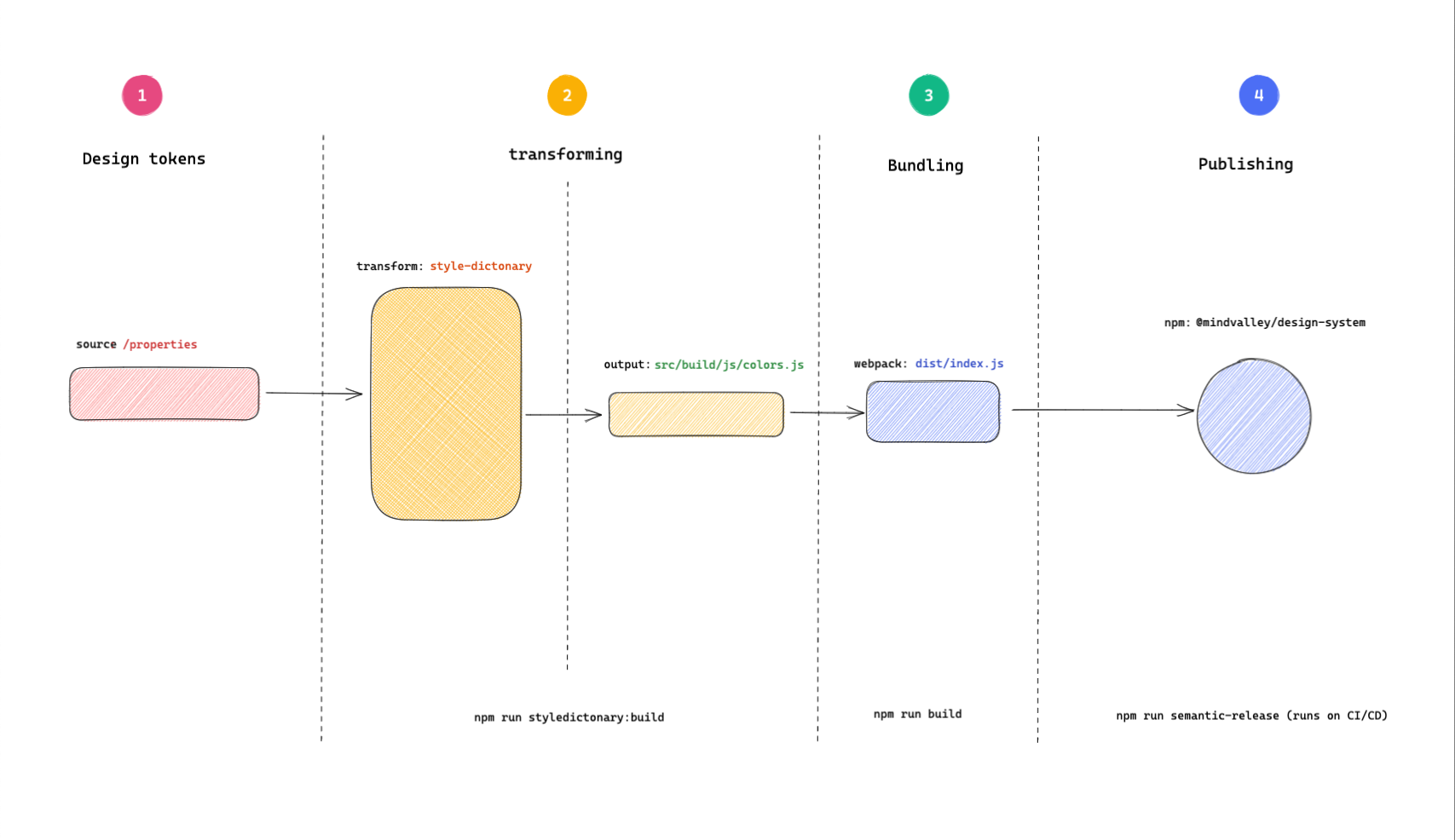
Before you get your hands dirty, let's first understand how the repo works and its structure. We are going to look at:
|
|
4
|
-
|
|
5
|
-
* What happens in the repo and its inputs and outputs: Jump to [Token transformation](#-token-transformation-process)
|
|
6
|
-
* How the repo is structured and its core parts: See [Directory structure](#-directory-structure)
|
|
7
|
-
|
|
8
|
-
#### 🏭 Token transformation process
|
|
9
|
-
|
|
10
|
-
Token transformation on a high level involves the following steps:
|
|
11
|
-
|
|
12
|
-
```mermaid
|
|
13
|
-
sequenceDiagram
|
|
14
|
-
participant Figma
|
|
15
|
-
participant Supernova
|
|
16
|
-
participant Tokens as src/tokens/brands
|
|
17
|
-
participant SD as style-dictionary build
|
|
18
|
-
participant JS as src/build/js & src/tailwind/plugins/tokens
|
|
19
|
-
participant Webpack
|
|
20
|
-
participant Dist as dist
|
|
21
|
-
participant NPM as Publish (NPM)
|
|
22
|
-
|
|
23
|
-
Figma->>Supernova: Designer publishes changes
|
|
24
|
-
Supernova->>Tokens: Supernova raises PR to update tokens
|
|
25
|
-
Tokens->>SD: style-dictionary parses & transforms
|
|
26
|
-
SD->>JS: Outputs JS modules (colors, typography)
|
|
27
|
-
JS->>Webpack: Bundling for distribution
|
|
28
|
-
Webpack->>Dist: Outputs bundled files
|
|
29
|
-
Dist->>NPM: CI publishes package
|
|
30
|
-
```
|
|
31
|
-
|
|
32
|
-
|
|
33
|
-
|
|
34
|
-
**1. The design tokens**
|
|
35
|
-
This is the starting point of the design token transformation process. When there are changes in the Figma design system (such as a color update), an automated workflow powered by Supernova detects these changes and creates a pull request in the repository to update the relevant token files in `src/tokens/brands/{brand}/` (e.g., `src/tokens/brands/mindvalley/colors.json`). This ensures that the tokens in the codebase stay in sync with the design system, reducing manual effort and the risk of inconsistencies.
|
|
36
|
-
|
|
37
|
-
**2. Parsing and transformation**
|
|
38
|
-
Using [style-dictionary](https://styledictionary.com/getting-started/), the design tokens are parsed, merged, and transformed into the desired formats. The main outputs are JavaScript modules for colors and typography, but the output is configurable and can be extended to other formats (CSS, SCSS, etc.) in the future.
|
|
39
|
-
Run:
|
|
40
|
-
|
|
41
|
-
```bash
|
|
42
|
-
npm run build:styledictionary
|
|
43
|
-
```
|
|
44
|
-
|
|
45
|
-
**3. Bundling**
|
|
46
|
-
Bundling is done using [webpack](https://webpack.js.org/concepts) to ensure the resultant files work across browser and server environments. The files from the previous step are bundled and output to the `dist/` directory, which is not checked in for versioning.
|
|
47
|
-
Run:
|
|
48
|
-
|
|
49
|
-
```bash
|
|
50
|
-
npm run build
|
|
51
|
-
```
|
|
52
|
-
|
|
53
|
-
**4. Publishing**
|
|
54
|
-
The last step is releasing and publishing the bundled files. This is automated and runs on CI, ensuring that changes are tested, versioned, and documented. Publishing is handled by [semantic release](https://semantic-release.gitbook.io/semantic-release/).
|
|
55
|
-
See more in the [release guide](RELEASING.md#releasing-🚀).
|
|
56
|
-
|
|
57
|
-
#### 🗂 Directory structure
|
|
58
|
-
|
|
59
|
-
Here is a simplified directory structure highlighting key areas for contributors:
|
|
60
|
-
|
|
61
|
-
```bash
|
|
62
|
-
├── LICENSE
|
|
63
|
-
├── README.md
|
|
64
|
-
├── __tests__
|
|
65
|
-
├── babel.config.js
|
|
66
|
-
├── build.ts
|
|
67
|
-
├── dist/
|
|
68
|
-
│ └── ...
|
|
69
|
-
├── docs/
|
|
70
|
-
│ ├── CONTRIBUTION.md
|
|
71
|
-
│ ├── RELEASING.md
|
|
72
|
-
│ └── USAGE.md
|
|
73
|
-
├── package-lock.json
|
|
74
|
-
├── package.json
|
|
75
|
-
├── src/
|
|
76
|
-
│ ├── assets/
|
|
77
|
-
│ │ ├── brands/
|
|
78
|
-
│ │ │ ├── mindvalley/
|
|
79
|
-
│ │ │ │ └── icons/
|
|
80
|
-
│ │ │ └── b2b/
|
|
81
|
-
│ │ │ └── icons/
|
|
82
|
-
│ │ ├── icons/
|
|
83
|
-
│ │ └── wordmarks/
|
|
84
|
-
│ ├── build/
|
|
85
|
-
│ │ └── js/
|
|
86
|
-
│ ├── helpers/
|
|
87
|
-
│ ├── tailwind/
|
|
88
|
-
│ │ └── plugins/
|
|
89
|
-
│ │ └── tokens/
|
|
90
|
-
│ ├── tokens/
|
|
91
|
-
│ │ └── brands/
|
|
92
|
-
│ │ ├── mindvalley/
|
|
93
|
-
│ │ └── b2b/
|
|
94
|
-
│ └── utilities/
|
|
95
|
-
│ └── svg-import/
|
|
96
|
-
│ ├── .figma_icons.js
|
|
97
|
-
│ └── .figma_wordmarks.js
|
|
98
|
-
├── webpack.config.js
|
|
99
|
-
```
|
|
100
|
-
|
|
101
|
-
#### Test Directory
|
|
102
|
-
|
|
103
|
-
* All tests are under `__tests__/` (not `test/`).
|
|
104
|
-
|
|
105
|
-
* Subfolders include `utilities/`, `src/tailwind/plugins/`, etc.
|
|
106
|
-
|
|
107
|
-
#### Configuration Files
|
|
108
|
-
|
|
109
|
-
* There is **no** root `config.json`.
|
|
110
|
-
|
|
111
|
-
* Main configuration is in `build.ts`, `webpack.config.js`, and scripts in `package.json`.
|
|
112
|
-
|
|
113
|
-
#### Important npm scripts
|
|
114
|
-
|
|
115
|
-
* `build`: Runs both the style-dictionary build and webpack bundle.
|
|
116
|
-
|
|
117
|
-
* `build:styledictionary`: Generates token outputs (see above for output locations).
|
|
118
|
-
* `build:bundle`: Runs webpack for production.
|
|
119
|
-
* `build:figma`: Runs both icon and wordmark export scripts.
|
|
120
|
-
* `build:figma:icons`: Uses `src/utilities/svg-import/.figma_icons.js`.
|
|
121
|
-
* `build:figma:wordmarks`: Uses `src/utilities/svg-import/.figma_wordmarks.js`.
|
|
122
|
-
* `test`: Runs all tests with jest.
|
|
123
|
-
* `commit`: Uses Commitizen CLI for conventional commits.
|
|
124
|
-
|
|
125
|
-
#### ⌨️ Start development
|
|
126
|
-
|
|
127
|
-
To get started with development, start by cloning the mv-design-system repo:
|
|
128
|
-
|
|
129
|
-
```bash
|
|
130
|
-
git clone git@github.com:mindvalley/mv-design-system.git
|
|
131
|
-
```
|
|
132
|
-
|
|
133
|
-
Change your current directory to the folder you just cloned and install the dependencies:
|
|
134
|
-
|
|
135
|
-
```bash
|
|
136
|
-
cd mv-design-system && npm install
|
|
137
|
-
```
|
|
138
|
-
|
|
139
|
-
###### 💡 Note
|
|
140
|
-
|
|
141
|
-
This repo uses `npm` as the package manager.
|
|
142
|
-
|
|
143
|
-
##### Making commits
|
|
144
|
-
|
|
145
|
-
After making changes, stage your changes by issuing the standard `git add <filename>`, or however you stage your files.
|
|
146
|
-
For commits, we leverage the power of conventional commits using [Commitizen](https://github.com/commitizen/cz-cli).
|
|
147
|
-
|
|
148
|
-
**Why use conventional commits?** To enable automation of releases, semantic versioning, and release notes auto-generation.
|
|
149
|
-
|
|
150
|
-
To make a commit, run the command below:
|
|
151
|
-
|
|
152
|
-
```
|
|
153
|
-
npm run commit
|
|
154
|
-
```
|
|
155
|
-
|
|
156
|
-
This will trigger a command line interface and all you have to do is answer the prompted questions which includes a Jira ticket ID number.
|
|
157
|
-
|
|
158
|
-

|
|
159
|
-
|
|
160
|
-
If your branch name has a Jira ticket ID already included, then the prompt automatically extracts it.
|
|
161
|
-
|
|
162
|
-
Though using `npm run commit` is highly recommended for this repo, you can alternatively write your commit without the Commitizen helper by ensuring you follow the conventional commits conventions.
|
|
163
|
-
|
|
164
|
-
```bash
|
|
165
|
-
type(scope): commit-message
|
|
166
|
-
|
|
167
|
-
Jira-Issue-ID
|
|
168
|
-
```
|
|
169
|
-
|
|
170
|
-
The commit type has to be one of:
|
|
171
|
-
|
|
172
|
-
* `feat`: A new feature
|
|
173
|
-
* `fix`: A bug fix
|
|
174
|
-
* `docs`: Documentation only changes
|
|
175
|
-
* `style`: Changes that do not affect the meaning of the code (white-space, formatting, missing semi-colons, etc)
|
|
176
|
-
* `refactor`: A code change that neither fixes a bug nor adds a feature
|
|
177
|
-
* `perf`: A code change that improves performance
|
|
178
|
-
* `test`: Adding missing tests or correcting existing tests
|
|
179
|
-
* `build`: Changes that affect the build system or external dependencies (example scopes: gulp, broccoli, npm)
|
|
180
|
-
* `ci`: Changes to our CI configuration files and scripts (example - scopes: Travis, Circle, BrowserStack, SauceLabs)
|
|
181
|
-
* `chore`: Other changes that don't modify src or test files
|
|
182
|
-
* `revert`: Reverts a previous commit
|
|
183
|
-
|
|
184
|
-
Here is an example commit message:
|
|
185
|
-
|
|
186
|
-
```
|
|
187
|
-
chore(asdf): Add .tool-versions file with current supported node version
|
|
188
|
-
|
|
189
|
-
MVHOME-765
|
|
190
|
-
```
|
|
191
|
-
|
|
192
|
-
Once your commits are done, you can do a normal push to remote.
|
|
193
|
-
|
|
194
|
-
Read more on [commit conventions](https://www.conventionalcommits.org/en/v1.0.0-beta.4/).
|
|
195
|
-
|
|
196
|
-
##### Branch naming
|
|
197
|
-
|
|
198
|
-
Branch names start with the Jira ticket ID eg.
|
|
199
|
-
|
|
200
|
-
`MVHOME-765-branch-description-here`
|
|
201
|
-
|
|
202
|
-
##### Important commands
|
|
203
|
-
|
|
204
|
-
###### Tests
|
|
205
|
-
|
|
206
|
-
To run all the tests:
|
|
207
|
-
|
|
208
|
-
```
|
|
209
|
-
npm run test
|
|
210
|
-
```
|
|
211
|
-
|
|
212
|
-
###### Transform design tokens
|
|
213
|
-
|
|
214
|
-
Whenever there are changes that affect our design tokens, we need to regenerate the build assets using the command below and commit the results:
|
|
215
|
-
|
|
216
|
-
```
|
|
217
|
-
npm run build:styledictionary
|
|
218
|
-
```
|
|
219
|
-
|
|
220
|
-
This is the command that transforms our design tokens to the different desired formats we have defined.
|
|
221
|
-
|
|
222
|
-
###### Bundle assets for release
|
|
223
|
-
|
|
224
|
-
In the release step of the CI pipeline, we bundle the assets into a UMD module with the help of webpack to ensure that our package runs on both the server (Node.js) and the client side (browser).
|
|
225
|
-
|
|
226
|
-
```bash
|
|
227
|
-
npm run build
|
|
228
|
-
```
|
|
229
|
-
|
|
230
|
-
You can test it out on your development environment to see the output.
|
|
231
|
-
|
|
232
|
-
Once your changes are made and merged, they'll need to be published. See how that is done in the [release guide](RELEASING.md#releasing-🚀).
|
|
233
|
-
|
|
234
|
-
## How to update icons and wordmarks
|
|
235
|
-
|
|
236
|
-
Icons and wordmarks are directly fetched from the respective Figma files where they are composed and updated by the designer.
|
|
237
|
-
|
|
238
|
-
To update them, follow the steps below:
|
|
239
|
-
|
|
240
|
-
1. Get your [Figma personal token](https://help.figma.com/hc/en-us/articles/8085703771159-Manage-personal-access-tokens)
|
|
241
|
-
2. Clone the `.env.example` file on your root and rename it to `.env`
|
|
242
|
-
3. Add your Figma token in the file `FIGMA_TOKEN=Y0urF1gM@T0k3n` and save the changes
|
|
243
|
-
4. Then run `npm run build:figma`
|
|
244
|
-
|
|
245
|
-
Running `npm run build:figma` triggers the workflows to fetch, generate sprites and generate documentation for sprites and wordmarks. `npm run build:figma` is an aggregate script that:
|
|
246
|
-
|
|
247
|
-
1. Pulls and processes icons, using the script `npm run build:figma:icons`
|
|
248
|
-
2. Pulls and processes wordmarks, using the script: `npm run build:figma:wordmarks`
|
|
249
|
-
3. Clears the duplicate docs in the src/assets folder: `npm run clean:docs`
|
|
250
|
-
|
|
251
|
-
Step 1 and 2 are run in parallel using the [npm-run-all](https://github.com/mysticatea/npm-run-all/blob/HEAD/docs/npm-run-all.md) package.
|
|
252
|
-
|
|
253
|
-
The outputs go to `/src/assets/icons` for icons and `/src/assets/wordmarks` for wordmarks with additional generated markdown preview files added in `/docs/icons` and `/docs/wordmarks` directories respectively.
|
|
254
|
-
|
|
255
|
-
Here is an image illustrating the process:
|
|
256
|
-
|
|
257
|
-

|
|
258
|
-
|
|
259
|
-
If there is a newly added Figma page, remember to adjust the scripts with the new pages:
|
|
260
|
-
|
|
261
|
-
* [wordmarks](../src/utilities/svg-import/.figma_wordmarks.js)
|
|
262
|
-
* [Icons](../src/utilities/svg-import/.figma_icons.js)
|