@mindvalley/design-system 3.3.3 → 3.4.0
This diff represents the content of publicly available package versions that have been released to one of the supported registries. The information contained in this diff is provided for informational purposes only and reflects changes between package versions as they appear in their respective public registries.
- package/CHANGELOG.md +58 -8
- package/README.md +19 -2
- package/dist/b2b.d.ts +81 -0
- package/dist/b2b.d.ts.map +1 -0
- package/dist/b2b.js +1 -1
- package/dist/b2b.js.map +1 -1
- package/dist/helpers/casing.d.ts +13 -0
- package/dist/helpers/casing.d.ts.map +1 -0
- package/dist/helpers/casing.js +76 -1
- package/dist/helpers/dimens.d.ts +7 -0
- package/dist/helpers/dimens.d.ts.map +1 -0
- package/dist/helpers/dimens.js +7 -1
- package/dist/helpers/regex.d.ts +2 -0
- package/dist/helpers/regex.d.ts.map +1 -0
- package/dist/helpers/regex.js +4 -1
- package/dist/index.d.ts +143 -0
- package/dist/index.d.ts.map +1 -0
- package/dist/index.js +1 -1
- package/dist/index.js.map +1 -1
- package/dist/tailwind/plugins/tokens/b2b/typography.d.ts +12 -0
- package/dist/tailwind/plugins/tokens/b2b/typography.d.ts.map +1 -0
- package/dist/tailwind/plugins/tokens/b2b/typography.js +31 -1
- package/dist/tailwind/plugins/tokens/mindvalley/typography.d.ts +12 -0
- package/dist/tailwind/plugins/tokens/mindvalley/typography.d.ts.map +1 -0
- package/dist/tailwind/plugins/tokens/mindvalley/typography.js +72 -1
- package/dist/tailwind/plugins/typography.d.ts +26 -0
- package/dist/tailwind/plugins/typography.d.ts.map +1 -0
- package/dist/tailwind/plugins/typography.js +98 -1
- package/docs/CONTRIBUTION.md +95 -72
- package/docs/token-validation.md +298 -0
- package/package.json +42 -10
package/docs/CONTRIBUTION.md
CHANGED
|
@@ -7,114 +7,138 @@ Before you get your hands dirty, let's first understand how the repo works and i
|
|
|
7
7
|
|
|
8
8
|
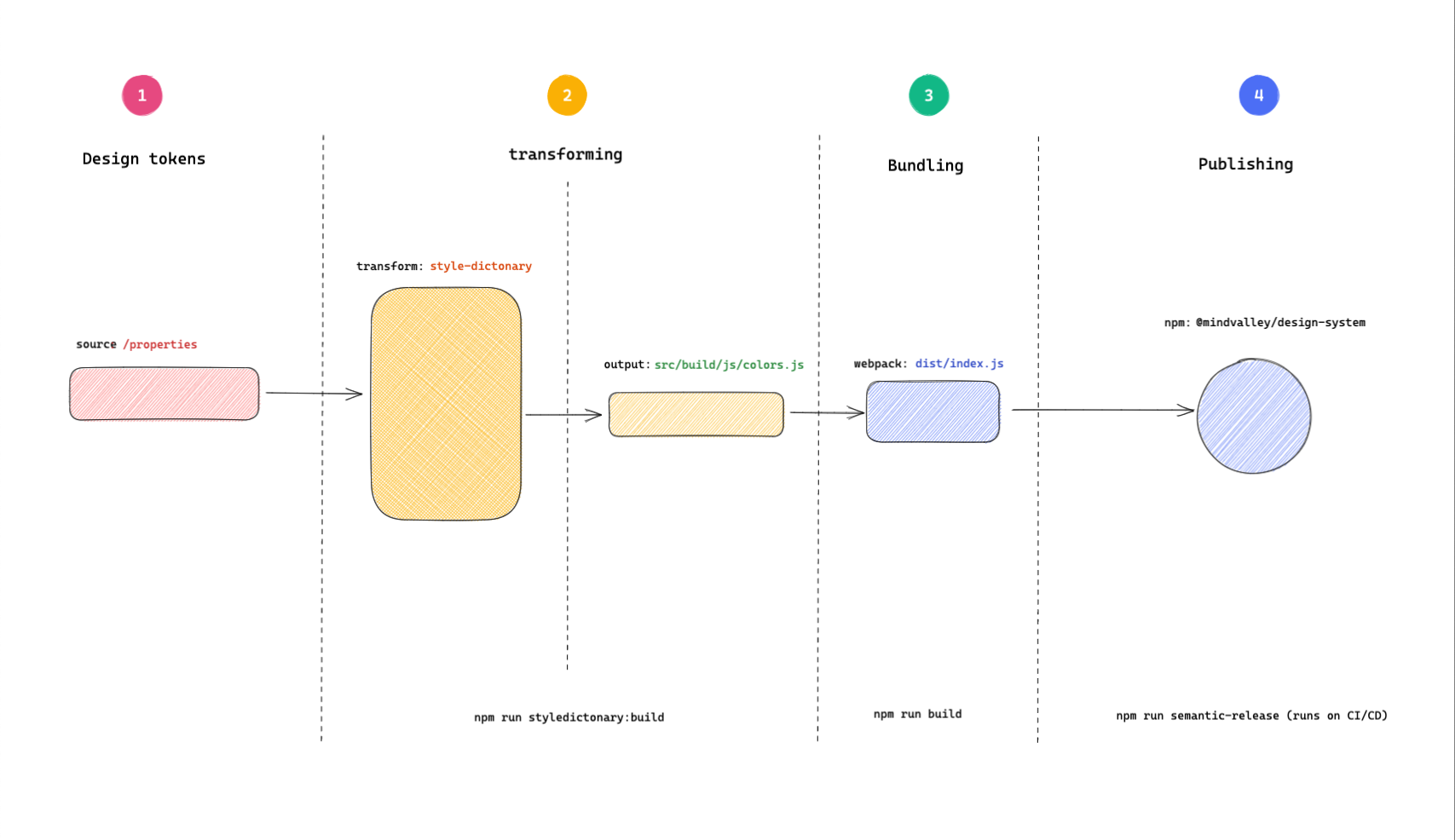
#### 🏭 Token transformation process
|
|
9
9
|
|
|
10
|
-
Token transformation on a high level involves the
|
|
10
|
+
Token transformation on a high level involves the following steps:
|
|
11
|
+
|
|
12
|
+
```mermaid
|
|
13
|
+
sequenceDiagram
|
|
14
|
+
participant Figma
|
|
15
|
+
participant Supernova
|
|
16
|
+
participant Tokens as src/tokens/brands
|
|
17
|
+
participant SD as style-dictionary build
|
|
18
|
+
participant JS as src/build/js & src/tailwind/plugins/tokens
|
|
19
|
+
participant Webpack
|
|
20
|
+
participant Dist as dist
|
|
21
|
+
participant NPM as Publish (NPM)
|
|
22
|
+
|
|
23
|
+
Figma->>Supernova: Designer publishes changes
|
|
24
|
+
Supernova->>Tokens: Supernova raises PR to update tokens
|
|
25
|
+
Tokens->>SD: style-dictionary parses & transforms
|
|
26
|
+
SD->>JS: Outputs JS modules (colors, typography)
|
|
27
|
+
JS->>Webpack: Bundling for distribution
|
|
28
|
+
Webpack->>Dist: Outputs bundled files
|
|
29
|
+
Dist->>NPM: CI publishes package
|
|
30
|
+
```
|
|
11
31
|
|
|
12
32
|
|
|
13
33
|
|
|
14
|
-
|
|
15
|
-
|
|
16
|
-
This is the starting point of the design token transformation process. This step is how the design tokens get into the repo. For example, If there are changes in the Figma design system to the value of a color, then this would be where we would need to update the token. For simplicity, it is just a directory with some design tokens in a JSON file. More details in the [`src/properties`](#srcproperties) directory documentation.
|
|
34
|
+
**1. The design tokens**
|
|
35
|
+
This is the starting point of the design token transformation process. When there are changes in the Figma design system (such as a color update), an automated workflow powered by Supernova detects these changes and creates a pull request in the repository to update the relevant token files in `src/tokens/brands/{brand}/` (e.g., `src/tokens/brands/mindvalley/colors.json`). This ensures that the tokens in the codebase stay in sync with the design system, reducing manual effort and the risk of inconsistencies.
|
|
17
36
|
|
|
18
|
-
|
|
37
|
+
**2. Parsing and transformation**
|
|
38
|
+
Using [style-dictionary](https://styledictionary.com/getting-started/), the design tokens are parsed, merged, and transformed into the desired formats. The main outputs are JavaScript modules for colors and typography, but the output is configurable and can be extended to other formats (CSS, SCSS, etc.) in the future.
|
|
39
|
+
Run:
|
|
19
40
|
|
|
20
|
-
|
|
21
|
-
The output of this step ends up in the [`src/build/`](#srcbuild) directory.
|
|
22
|
-
Parsing and transformation can be triggered by running:
|
|
23
|
-
|
|
24
|
-
```
|
|
41
|
+
```bash
|
|
25
42
|
npm run build:styledictionary
|
|
26
43
|
```
|
|
27
44
|
|
|
28
|
-
|
|
45
|
+
**3. Bundling**
|
|
46
|
+
Bundling is done using [webpack](https://webpack.js.org/concepts) to ensure the resultant files work across browser and server environments. The files from the previous step are bundled and output to the `dist/` directory, which is not checked in for versioning.
|
|
47
|
+
Run:
|
|
29
48
|
|
|
30
|
-
|
|
31
|
-
Bundling can be invoked by running:
|
|
32
|
-
|
|
33
|
-
```
|
|
49
|
+
```bash
|
|
34
50
|
npm run build
|
|
35
51
|
```
|
|
36
52
|
|
|
37
|
-
|
|
38
|
-
|
|
39
|
-
|
|
40
|
-
The end package is published to NPM where it can be installed from.
|
|
53
|
+
**4. Publishing**
|
|
54
|
+
The last step is releasing and publishing the bundled files. This is automated and runs on CI, ensuring that changes are tested, versioned, and documented. Publishing is handled by [semantic release](https://semantic-release.gitbook.io/semantic-release/).
|
|
55
|
+
See more in the [release guide](RELEASING.md#releasing-🚀).
|
|
41
56
|
|
|
42
57
|
#### 🗂 Directory structure
|
|
43
58
|
|
|
44
|
-
|
|
59
|
+
Here is a simplifie directory structure highlighting key areas for contributors:
|
|
45
60
|
|
|
46
|
-
```
|
|
61
|
+
```bash
|
|
47
62
|
├── LICENSE
|
|
48
63
|
├── README.md
|
|
49
64
|
├── __tests__
|
|
50
|
-
│ └── utilities
|
|
51
|
-
│ └── transforms.test.j s
|
|
52
65
|
├── babel.config.js
|
|
53
66
|
├── build.js
|
|
54
|
-
├──
|
|
55
|
-
|
|
56
|
-
|
|
57
|
-
│ └── index.js.map
|
|
58
|
-
├── docs
|
|
67
|
+
├── dist/
|
|
68
|
+
│ └── ...
|
|
69
|
+
├── docs/
|
|
59
70
|
│ ├── CONTRIBUTION.md
|
|
60
71
|
│ ├── RELEASING.md
|
|
61
72
|
│ └── USAGE.md
|
|
62
73
|
├── package-lock.json
|
|
63
74
|
├── package.json
|
|
64
|
-
├── src
|
|
65
|
-
│ ├──
|
|
66
|
-
│ │
|
|
67
|
-
│ │
|
|
68
|
-
│
|
|
69
|
-
│
|
|
70
|
-
│ │ └──
|
|
71
|
-
│
|
|
72
|
-
│
|
|
73
|
-
│
|
|
74
|
-
└──
|
|
75
|
-
|
|
75
|
+
├── src/
|
|
76
|
+
│ ├── assets/
|
|
77
|
+
│ │ ├── brands/
|
|
78
|
+
│ │ │ ├── mindvalley/
|
|
79
|
+
│ │ │ │ └── icons/
|
|
80
|
+
│ │ │ └── b2b/
|
|
81
|
+
│ │ │ └── icons/
|
|
82
|
+
│ │ ├── icons/
|
|
83
|
+
│ │ └── wordmarks/
|
|
84
|
+
│ ├── build/
|
|
85
|
+
│ │ └── js/
|
|
86
|
+
│ ├── helpers/
|
|
87
|
+
│ ├── tailwind/
|
|
88
|
+
│ │ └── plugins/
|
|
89
|
+
│ │ └── tokens/
|
|
90
|
+
│ ├── tokens/
|
|
91
|
+
│ │ └── brands/
|
|
92
|
+
│ │ ├── mindvalley/
|
|
93
|
+
│ │ └── b2b/
|
|
94
|
+
│ └── utilities/
|
|
95
|
+
│ └── svg-import/
|
|
96
|
+
│ ├── .figma_icons.js
|
|
97
|
+
│ └── .figma_wordmarks.js
|
|
98
|
+
├── webpack.config.js
|
|
76
99
|
```
|
|
77
100
|
|
|
78
|
-
|
|
79
|
-
|
|
80
|
-
This is the source of the design tokens. For now, we have the tokens checked in as JSON files.
|
|
81
|
-
The process of updating the payload is manual, implying that when there are changes in the tokens, one must get the updated token from the [figma colors file](https://www.figma.com/file/Gmdp0kAAYsmBgCthFjGkpY/MV-Core?node-id=6437%3A207257) and update the files in this directory.
|
|
101
|
+
#### Test Directory
|
|
82
102
|
|
|
83
|
-
*
|
|
103
|
+
* All tests are under `__tests__/` (not `test/`).
|
|
84
104
|
|
|
85
|
-
|
|
105
|
+
* Subfolders include `utilities/`, `src/tailwind/plugins/`, etc.
|
|
86
106
|
|
|
87
|
-
|
|
107
|
+
#### Configuration Files
|
|
88
108
|
|
|
89
|
-
|
|
109
|
+
* There is **no** root `config.json`.
|
|
90
110
|
|
|
91
|
-
|
|
111
|
+
* Main configuration is in `build.js`, `webpack.config.js`, and scripts in `package.json`.
|
|
92
112
|
|
|
93
|
-
|
|
113
|
+
#### Important npm scripts
|
|
94
114
|
|
|
95
|
-
|
|
115
|
+
* `build`: Runs both the style-dictionary build and webpack bundle.
|
|
96
116
|
|
|
97
|
-
|
|
98
|
-
|
|
99
|
-
|
|
117
|
+
* `build:styledictionary`: Generates token outputs (see above for output locations).
|
|
118
|
+
* `build:bundle`: Runs webpack for production.
|
|
119
|
+
* `build:figma`: Runs both icon and wordmark export scripts.
|
|
120
|
+
* `build:figma:icons`: Uses `src/utilities/svg-import/.figma_icons.js`.
|
|
121
|
+
* `build:figma:wordmarks`: Uses `src/utilities/svg-import/.figma_wordmarks.js`.
|
|
122
|
+
* `test`: Runs all tests with jest.
|
|
123
|
+
* `commit`: Uses Commitizen CLI for conventional commits.
|
|
100
124
|
|
|
101
125
|
#### ⌨️ Start development
|
|
102
126
|
|
|
103
|
-
To get started with development, start by cloning the mv-design-system repo
|
|
127
|
+
To get started with development, start by cloning the mv-design-system repo:
|
|
104
128
|
|
|
105
|
-
```
|
|
129
|
+
```bash
|
|
106
130
|
git clone git@github.com:mindvalley/mv-design-system.git
|
|
107
131
|
```
|
|
108
132
|
|
|
109
|
-
Change your current directory to the folder you just cloned and install the dependencies
|
|
133
|
+
Change your current directory to the folder you just cloned and install the dependencies:
|
|
110
134
|
|
|
111
|
-
```
|
|
135
|
+
```bash
|
|
112
136
|
cd mv-design-system && npm install
|
|
113
137
|
```
|
|
114
138
|
|
|
115
139
|
###### 💡 Note
|
|
116
140
|
|
|
117
|
-
This repo uses `npm` as the package manager
|
|
141
|
+
This repo uses `npm` as the package manager.
|
|
118
142
|
|
|
119
143
|
##### Making commits
|
|
120
144
|
|
|
@@ -135,10 +159,9 @@ This will trigger a command line interface and all you have to do is answer the
|
|
|
135
159
|
|
|
136
160
|
If your branch name has a Jira ticket ID already included, then the prompt automatically extracts it.
|
|
137
161
|
|
|
138
|
-
Though using `npm run commit` is highly recommended for this repo, you can alternatively write your commit without the Commitizen helper by ensuring you
|
|
139
|
-
follow the conventional commits conventions.
|
|
162
|
+
Though using `npm run commit` is highly recommended for this repo, you can alternatively write your commit without the Commitizen helper by ensuring you follow the conventional commits conventions.
|
|
140
163
|
|
|
141
|
-
```
|
|
164
|
+
```bash
|
|
142
165
|
type(scope): commit-message
|
|
143
166
|
|
|
144
167
|
Jira-Issue-ID
|
|
@@ -149,7 +172,7 @@ The commit type has to be one of:
|
|
|
149
172
|
* `feat`: A new feature
|
|
150
173
|
* `fix`: A bug fix
|
|
151
174
|
* `docs`: Documentation only changes
|
|
152
|
-
* `style`: Changes that do not affect the meaning of the code (white-space,
|
|
175
|
+
* `style`: Changes that do not affect the meaning of the code (white-space, formatting, missing semi-colons, etc)
|
|
153
176
|
* `refactor`: A code change that neither fixes a bug nor adds a feature
|
|
154
177
|
* `perf`: A code change that improves performance
|
|
155
178
|
* `test`: Adding missing tests or correcting existing tests
|
|
@@ -194,13 +217,13 @@ Whenever there are changes that affect our design tokens, we need to regenerate
|
|
|
194
217
|
npm run build:styledictionary
|
|
195
218
|
```
|
|
196
219
|
|
|
197
|
-
This is the command that
|
|
220
|
+
This is the command that transforms our design tokens to the different desired formats we have defined.
|
|
198
221
|
|
|
199
|
-
######
|
|
222
|
+
###### Bundle assets for release
|
|
200
223
|
|
|
201
|
-
In the release step of the CI
|
|
224
|
+
In the release step of the CI pipeline, we bundle the assets into a UMD module with the help of webpack to ensure that our package runs on both the server (Node.js) and the client side (browser).
|
|
202
225
|
|
|
203
|
-
```
|
|
226
|
+
```bash
|
|
204
227
|
npm run build
|
|
205
228
|
```
|
|
206
229
|
|
|
@@ -210,13 +233,13 @@ Once your changes are made and merged, they'll need to be published. See how tha
|
|
|
210
233
|
|
|
211
234
|
## How to update icons and wordmarks
|
|
212
235
|
|
|
213
|
-
Icons and wordmarks are directly fetched from the respective
|
|
236
|
+
Icons and wordmarks are directly fetched from the respective Figma files where they are composed and updated by the designer.
|
|
214
237
|
|
|
215
238
|
To update them, follow the steps below:
|
|
216
239
|
|
|
217
|
-
1. Get your [
|
|
240
|
+
1. Get your [Figma personal token](https://help.figma.com/hc/en-us/articles/8085703771159-Manage-personal-access-tokens)
|
|
218
241
|
2. Clone the `.env.example` file on your root and rename it to `.env`
|
|
219
|
-
3. Add your
|
|
242
|
+
3. Add your Figma token in the file `FIGMA_TOKEN=Y0urF1gM@T0k3n` and save the changes
|
|
220
243
|
4. Then run `npm run build:figma`
|
|
221
244
|
|
|
222
245
|
Running `npm run build:figma` triggers the workflows to fetch, generate sprites and generate documentation for sprites and wordmarks. `npm run build:figma` is an aggregate script that:
|
|
@@ -225,7 +248,7 @@ Running `npm run build:figma` triggers the workflows to fetch, generate sprites
|
|
|
225
248
|
2. Pulls and processes wordmarks, using the script: `npm run build:figma:wordmarks`
|
|
226
249
|
3. Clears the duplicate docs in the src/assets folder: `npm run clean:docs`
|
|
227
250
|
|
|
228
|
-
Step 1 and 2 are run in parallel using the [npm-run-all](https://github.com/mysticatea/npm-run-all/blob/HEAD/docs/npm-run-all.md) package
|
|
251
|
+
Step 1 and 2 are run in parallel using the [npm-run-all](https://github.com/mysticatea/npm-run-all/blob/HEAD/docs/npm-run-all.md) package.
|
|
229
252
|
|
|
230
253
|
The outputs go to `/src/assets/icons` for icons and `/src/assets/wordmarks` for wordmarks with additional generated markdown preview files added in `/docs/icons` and `/docs/wordmarks` directories respectively.
|
|
231
254
|
|
|
@@ -233,7 +256,7 @@ Here is an image illustrating the process:
|
|
|
233
256
|
|
|
234
257
|

|
|
235
258
|
|
|
236
|
-
If there is a
|
|
259
|
+
If there is a newly added Figma page, remember to adjust the scripts with the new pages:
|
|
237
260
|
|
|
238
261
|
* [wordmarks](../src/utilities/svg-import/.figma_wordmarks.js)
|
|
239
262
|
* [Icons](../src/utilities/svg-import/.figma_icons.js)
|
|
@@ -0,0 +1,298 @@
|
|
|
1
|
+
# Design Token Validation with Zod
|
|
2
|
+
|
|
3
|
+
This document describes the **internal** token validation system implemented using Zod for runtime validation and TypeScript type inference. These utilities are used during the build process and are not exported to package consumers.
|
|
4
|
+
|
|
5
|
+
## Overview
|
|
6
|
+
|
|
7
|
+
The Mindvalley Design System uses Supernova to manage design tokens. These tokens are automatically pushed to the repository in JSON format. To ensure type safety and catch issues early, we've implemented a validation system using Zod that:
|
|
8
|
+
|
|
9
|
+
- Validates token structure at build time
|
|
10
|
+
- Provides TypeScript types derived from the same schemas
|
|
11
|
+
- Offers clear error messages when tokens don't match expected structure
|
|
12
|
+
- Handles the complex, nested structures that Supernova generates
|
|
13
|
+
|
|
14
|
+
## Architecture
|
|
15
|
+
|
|
16
|
+
### Core Files
|
|
17
|
+
|
|
18
|
+
- `src/types/token-schemas.ts` - Zod schemas defining token structure
|
|
19
|
+
- `src/types/token-validation.ts` - Validation utilities and functions
|
|
20
|
+
- `src/types/index.d.ts` - TypeScript type exports
|
|
21
|
+
|
|
22
|
+
### Token Structure
|
|
23
|
+
|
|
24
|
+
Supernova generates tokens with varying levels of nesting:
|
|
25
|
+
|
|
26
|
+
```json
|
|
27
|
+
{
|
|
28
|
+
"color": {
|
|
29
|
+
"primary": {
|
|
30
|
+
"500": {
|
|
31
|
+
"value": "#ff0000ff",
|
|
32
|
+
"type": "color"
|
|
33
|
+
}
|
|
34
|
+
},
|
|
35
|
+
"black": {
|
|
36
|
+
"value": "#000000ff",
|
|
37
|
+
"type": "color"
|
|
38
|
+
}
|
|
39
|
+
}
|
|
40
|
+
}
|
|
41
|
+
```
|
|
42
|
+
|
|
43
|
+
## For Package Consumers
|
|
44
|
+
|
|
45
|
+
If you're using the `@mindvalley/design-system` npm package, the validation happens at build time and you receive:
|
|
46
|
+
|
|
47
|
+
- Type-safe `ColorTokens` interface for the colors object
|
|
48
|
+
- `TypographyToken` and `TypographySet` types from the Tailwind plugin
|
|
49
|
+
- Pre-validated, transformed tokens ready for use
|
|
50
|
+
|
|
51
|
+
The examples below are for **contributors and maintainers** working on the design system itself.
|
|
52
|
+
|
|
53
|
+
## Usage Guide (Internal Development)
|
|
54
|
+
|
|
55
|
+
### 1. Basic Validation
|
|
56
|
+
|
|
57
|
+
```typescript
|
|
58
|
+
import { validateTokenFile } from './types/token-validation';
|
|
59
|
+
|
|
60
|
+
const result = validateTokenFile('src/tokens/brands/mindvalley/colors.json');
|
|
61
|
+
if (result.success) {
|
|
62
|
+
console.log('Tokens are valid!', result.data);
|
|
63
|
+
} else {
|
|
64
|
+
console.error('Validation failed:', result.errors);
|
|
65
|
+
}
|
|
66
|
+
```
|
|
67
|
+
|
|
68
|
+
### 2. Type-Safe Token Access
|
|
69
|
+
|
|
70
|
+
```typescript
|
|
71
|
+
import { ColorToken } from './types/token-schemas';
|
|
72
|
+
import { validateColorToken } from './types/token-validation';
|
|
73
|
+
|
|
74
|
+
// Runtime validation with automatic type inference
|
|
75
|
+
try {
|
|
76
|
+
const token: ColorToken = validateColorToken(unknownData);
|
|
77
|
+
// TypeScript knows token.value is a hex string
|
|
78
|
+
console.log(token.value);
|
|
79
|
+
} catch (error) {
|
|
80
|
+
console.error('Invalid color token:', error);
|
|
81
|
+
}
|
|
82
|
+
```
|
|
83
|
+
|
|
84
|
+
### 3. Batch Validation
|
|
85
|
+
|
|
86
|
+
```typescript
|
|
87
|
+
import { validateAllTokens, getValidationSummary } from './types/token-validation';
|
|
88
|
+
|
|
89
|
+
// Validate all tokens in the project
|
|
90
|
+
const summary = getValidationSummary('./src/tokens');
|
|
91
|
+
console.log(`Valid: ${summary.valid}, Invalid: ${summary.invalid}`);
|
|
92
|
+
|
|
93
|
+
if (summary.invalid > 0) {
|
|
94
|
+
summary.errors.forEach(error => {
|
|
95
|
+
console.error(`❌ ${error.file}:`, error.errors);
|
|
96
|
+
});
|
|
97
|
+
}
|
|
98
|
+
```
|
|
99
|
+
|
|
100
|
+
### 4. CI/CD Integration
|
|
101
|
+
|
|
102
|
+
Add to your `package.json`:
|
|
103
|
+
|
|
104
|
+
```json
|
|
105
|
+
{
|
|
106
|
+
"scripts": {
|
|
107
|
+
"validate-tokens": "ts-node src/scripts/validate-tokens.ts",
|
|
108
|
+
"prebuild": "npm run validate-tokens"
|
|
109
|
+
}
|
|
110
|
+
}
|
|
111
|
+
```
|
|
112
|
+
|
|
113
|
+
Create `src/scripts/validate-tokens.ts`:
|
|
114
|
+
|
|
115
|
+
```typescript
|
|
116
|
+
import { getValidationSummary } from '../types/token-validation';
|
|
117
|
+
|
|
118
|
+
const summary = getValidationSummary('./src/tokens');
|
|
119
|
+
|
|
120
|
+
if (summary.invalid > 0) {
|
|
121
|
+
console.error('Token validation failed!');
|
|
122
|
+
summary.errors.forEach(error => {
|
|
123
|
+
console.error(`❌ ${error.file}:`, error.errors.join('\n '));
|
|
124
|
+
});
|
|
125
|
+
process.exit(1);
|
|
126
|
+
}
|
|
127
|
+
|
|
128
|
+
console.log('✅ All tokens validated successfully!');
|
|
129
|
+
```
|
|
130
|
+
|
|
131
|
+
### 5. Type Guards
|
|
132
|
+
|
|
133
|
+
```typescript
|
|
134
|
+
import { isColorToken, isTypographyToken } from './types/token-validation';
|
|
135
|
+
|
|
136
|
+
function processToken(token: unknown) {
|
|
137
|
+
if (isColorToken(token)) {
|
|
138
|
+
// TypeScript knows this is a ColorToken
|
|
139
|
+
return createColorVariable(token.value);
|
|
140
|
+
} else if (isTypographyToken(token)) {
|
|
141
|
+
// TypeScript knows this is a TypographyToken
|
|
142
|
+
return createTypographyStyles(token.value);
|
|
143
|
+
}
|
|
144
|
+
}
|
|
145
|
+
```
|
|
146
|
+
|
|
147
|
+
### 6. Error Handling
|
|
148
|
+
|
|
149
|
+
```typescript
|
|
150
|
+
import { safeValidate, ColorFileSchema, formatZodError } from './types/token-validation';
|
|
151
|
+
|
|
152
|
+
function handleSupernovaWebhook(payload: unknown) {
|
|
153
|
+
const result = safeValidate(ColorFileSchema, payload);
|
|
154
|
+
|
|
155
|
+
if (!result.success) {
|
|
156
|
+
const errors = formatZodError(result.errors);
|
|
157
|
+
|
|
158
|
+
// Log structured errors
|
|
159
|
+
console.error('Token validation failed:', {
|
|
160
|
+
errors,
|
|
161
|
+
timestamp: new Date().toISOString(),
|
|
162
|
+
source: 'supernova-webhook'
|
|
163
|
+
});
|
|
164
|
+
|
|
165
|
+
// Alert team
|
|
166
|
+
notifySlack({
|
|
167
|
+
channel: '#design-system',
|
|
168
|
+
message: `Token validation failed: ${errors.join(', ')}`
|
|
169
|
+
});
|
|
170
|
+
|
|
171
|
+
return;
|
|
172
|
+
}
|
|
173
|
+
|
|
174
|
+
// Process valid tokens
|
|
175
|
+
updateTokens(result.data);
|
|
176
|
+
}
|
|
177
|
+
```
|
|
178
|
+
|
|
179
|
+
## Testing
|
|
180
|
+
|
|
181
|
+
### Unit Tests
|
|
182
|
+
|
|
183
|
+
```typescript
|
|
184
|
+
import { ColorTokenSchema } from './types/token-schemas';
|
|
185
|
+
|
|
186
|
+
describe('Color Token Validation', () => {
|
|
187
|
+
it('should accept valid color tokens', () => {
|
|
188
|
+
const validToken = {
|
|
189
|
+
value: '#ff0000ff',
|
|
190
|
+
type: 'color'
|
|
191
|
+
};
|
|
192
|
+
|
|
193
|
+
expect(() => ColorTokenSchema.parse(validToken)).not.toThrow();
|
|
194
|
+
});
|
|
195
|
+
|
|
196
|
+
it('should reject invalid hex values', () => {
|
|
197
|
+
const invalidToken = {
|
|
198
|
+
value: 'not-a-color',
|
|
199
|
+
type: 'color'
|
|
200
|
+
};
|
|
201
|
+
|
|
202
|
+
expect(() => ColorTokenSchema.parse(invalidToken)).toThrow();
|
|
203
|
+
});
|
|
204
|
+
});
|
|
205
|
+
```
|
|
206
|
+
|
|
207
|
+
### Integration Tests
|
|
208
|
+
|
|
209
|
+
```typescript
|
|
210
|
+
import { validateAllTokens } from './types/token-validation';
|
|
211
|
+
|
|
212
|
+
describe('Token File Validation', () => {
|
|
213
|
+
it('should validate all production tokens', () => {
|
|
214
|
+
const results = validateAllTokens('./src/tokens');
|
|
215
|
+
const failures = results.filter(r => !r.success);
|
|
216
|
+
|
|
217
|
+
expect(failures).toHaveLength(0);
|
|
218
|
+
});
|
|
219
|
+
});
|
|
220
|
+
```
|
|
221
|
+
|
|
222
|
+
## Schema Flexibility
|
|
223
|
+
|
|
224
|
+
The schemas are designed to handle Supernova's complex output:
|
|
225
|
+
|
|
226
|
+
- **Nested structures**: Tokens can be nested at varying levels
|
|
227
|
+
- **Optional properties**: Some tokens have optional fields like `comment`
|
|
228
|
+
- **Mixed structures**: Different brands may have slightly different structures
|
|
229
|
+
- **Type variations**: Properties like `textCase` can be strings or objects
|
|
230
|
+
|
|
231
|
+
## Extending the System
|
|
232
|
+
|
|
233
|
+
### Adding New Token Types
|
|
234
|
+
|
|
235
|
+
1. Add the schema in `token-schemas.ts`:
|
|
236
|
+
|
|
237
|
+
```typescript
|
|
238
|
+
export const NewTokenSchema = z.object({
|
|
239
|
+
value: z.string(),
|
|
240
|
+
type: z.literal('newtype'),
|
|
241
|
+
metadata: z.object({
|
|
242
|
+
// Define metadata structure
|
|
243
|
+
}).optional()
|
|
244
|
+
});
|
|
245
|
+
```
|
|
246
|
+
|
|
247
|
+
2. Add to file schema mapping in `token-validation.ts`:
|
|
248
|
+
|
|
249
|
+
```typescript
|
|
250
|
+
const FILE_SCHEMA_MAP = {
|
|
251
|
+
// existing mappings...
|
|
252
|
+
'newtokens.json': NewTokenFileSchema
|
|
253
|
+
};
|
|
254
|
+
```
|
|
255
|
+
|
|
256
|
+
### Custom Validation Rules
|
|
257
|
+
|
|
258
|
+
```typescript
|
|
259
|
+
const CustomColorSchema = ColorTokenSchema.refine(
|
|
260
|
+
(token) => token.value.length === 9, // RGBA with alpha
|
|
261
|
+
{ message: 'Colors must include alpha channel' }
|
|
262
|
+
);
|
|
263
|
+
```
|
|
264
|
+
|
|
265
|
+
## Troubleshooting
|
|
266
|
+
|
|
267
|
+
### Common Issues
|
|
268
|
+
|
|
269
|
+
1. **"Invalid input" errors**: Check if Supernova changed the token structure
|
|
270
|
+
2. **Missing properties**: Some tokens may have optional fields
|
|
271
|
+
3. **Type mismatches**: Use the flexible schemas that accept `z.any()` for complex nested structures
|
|
272
|
+
|
|
273
|
+
### Debugging
|
|
274
|
+
|
|
275
|
+
```typescript
|
|
276
|
+
import { validateTokenFile, getErrorReport } from './types/token-validation';
|
|
277
|
+
|
|
278
|
+
const result = validateTokenFile('path/to/tokens.json');
|
|
279
|
+
if (!result.success) {
|
|
280
|
+
// Get detailed error report
|
|
281
|
+
console.log(getErrorReport(result.errors));
|
|
282
|
+
}
|
|
283
|
+
```
|
|
284
|
+
|
|
285
|
+
## Best Practices
|
|
286
|
+
|
|
287
|
+
1. **Run validation in CI/CD**: Catch issues before they reach production
|
|
288
|
+
2. **Validate after Supernova updates**: Add webhook handlers that validate incoming tokens
|
|
289
|
+
3. **Use type guards**: Leverage TypeScript's type narrowing with `isColorToken()` etc.
|
|
290
|
+
4. **Keep schemas updated**: When Supernova changes output format, update schemas accordingly
|
|
291
|
+
5. **Test with real data**: Always test schemas against actual token files
|
|
292
|
+
|
|
293
|
+
## Future Improvements
|
|
294
|
+
|
|
295
|
+
- Add schema versioning to handle Supernova format changes
|
|
296
|
+
- Create a CLI tool for token validation
|
|
297
|
+
- Add visual regression tests for token changes
|
|
298
|
+
- Implement token transformation pipelines with validation
|
package/package.json
CHANGED
|
@@ -1,6 +1,6 @@
|
|
|
1
1
|
{
|
|
2
2
|
"name": "@mindvalley/design-system",
|
|
3
|
-
"version": "3.
|
|
3
|
+
"version": "3.4.0",
|
|
4
4
|
"description": "Resources, components, design guidelines and tooling for Mindvalley's design system",
|
|
5
5
|
"keywords": [
|
|
6
6
|
"design-system",
|
|
@@ -19,26 +19,43 @@
|
|
|
19
19
|
"license": "MIT",
|
|
20
20
|
"author": "Mindvalley Developers and Designers",
|
|
21
21
|
"main": "dist/index.js",
|
|
22
|
+
"types": "dist/index.d.ts",
|
|
22
23
|
"files": [
|
|
23
24
|
"dist",
|
|
24
25
|
"docs",
|
|
25
26
|
"CHANGELOG.md"
|
|
26
27
|
],
|
|
27
28
|
"exports": {
|
|
28
|
-
".":
|
|
29
|
-
|
|
30
|
-
|
|
29
|
+
".": {
|
|
30
|
+
"types": "./dist/index.d.ts",
|
|
31
|
+
"default": "./dist/index.js"
|
|
32
|
+
},
|
|
33
|
+
"./b2b": {
|
|
34
|
+
"types": "./dist/b2b.d.ts",
|
|
35
|
+
"default": "./dist/b2b.js"
|
|
36
|
+
},
|
|
37
|
+
"./helpers/*": {
|
|
38
|
+
"types": "./dist/helpers/*.d.ts",
|
|
39
|
+
"default": "./dist/helpers/*.js"
|
|
40
|
+
},
|
|
41
|
+
"./tailwind/*": {
|
|
42
|
+
"types": "./dist/tailwind/*.d.ts",
|
|
43
|
+
"default": "./dist/tailwind/*.js"
|
|
44
|
+
},
|
|
45
|
+
"./dist/*": "./dist/*"
|
|
31
46
|
},
|
|
32
47
|
"peerDependencies": {
|
|
33
48
|
"tailwindcss": "^3.4.17"
|
|
34
49
|
},
|
|
35
50
|
"scripts": {
|
|
36
|
-
"
|
|
51
|
+
"validate-tokens": "ts-node src/scripts/validate-tokens.ts",
|
|
52
|
+
"build": "npm run validate-tokens && npm-run-all -n build:styledictionary build:ts build:bundle && rimraf dist/build",
|
|
37
53
|
"build:bundle": "webpack --mode production",
|
|
54
|
+
"build:ts": "tsc -p tsconfig.build.json && resolve-tspaths -p tsconfig.build.json",
|
|
38
55
|
"build:figma": "npm-run-all -n -p build:figma:icons build:figma:wordmarks -s clean:docs build",
|
|
39
|
-
"build:figma:icons": "figma-export use-config ./src/utilities/svg-import/.figma_icons.
|
|
40
|
-
"build:figma:wordmarks": "figma-export use-config ./src/utilities/svg-import/.figma_wordmarks.
|
|
41
|
-
"build:styledictionary": "node ./build.
|
|
56
|
+
"build:figma:icons": "tsx ./node_modules/@figma-export/cli/bin/run use-config ./src/utilities/svg-import/.figma_icons.ts",
|
|
57
|
+
"build:figma:wordmarks": "tsx ./node_modules/@figma-export/cli/bin/run use-config ./src/utilities/svg-import/.figma_wordmarks.ts",
|
|
58
|
+
"build:styledictionary": "ts-node ./build.ts",
|
|
42
59
|
"clean:docs": "rimraf 'src/assets/**/docs' --glob",
|
|
43
60
|
"commit": "cz",
|
|
44
61
|
"commitlint": "commitlint --edit",
|
|
@@ -46,7 +63,9 @@
|
|
|
46
63
|
"release": "semantic-release --debug",
|
|
47
64
|
"test": "jest --verbose",
|
|
48
65
|
"test:watch": "jest --watch",
|
|
49
|
-
"watch": "webpack --mode development --watch"
|
|
66
|
+
"watch": "webpack --mode development --watch",
|
|
67
|
+
"type-check": "tsc --noEmit",
|
|
68
|
+
"build:types": "tsc --emitDeclarationOnly"
|
|
50
69
|
},
|
|
51
70
|
"config": {
|
|
52
71
|
"commitizen": {
|
|
@@ -58,12 +77,19 @@
|
|
|
58
77
|
"devDependencies": {
|
|
59
78
|
"@babel/core": "^7.22.9",
|
|
60
79
|
"@babel/preset-env": "^7.22.9",
|
|
80
|
+
"@babel/preset-typescript": "^7.27.1",
|
|
61
81
|
"@commitlint/cli": "^17.7.1",
|
|
62
82
|
"@commitlint/config-conventional": "^17.7.0",
|
|
63
83
|
"@figma-export/cli": "^5.0.1",
|
|
64
84
|
"@figma-export/output-components-as-svg": "^4.7.0",
|
|
65
85
|
"@figma-export/transform-svg-with-svgo": "^4.7.0",
|
|
86
|
+
"@figma-export/types": "^6.2.2",
|
|
66
87
|
"@semantic-release/changelog": "^6.0.3",
|
|
88
|
+
"@types/jest": "^26.0.24",
|
|
89
|
+
"@types/lodash.kebabcase": "^4.1.9",
|
|
90
|
+
"@types/node": "^24.1.0",
|
|
91
|
+
"@types/tailwindcss": "^3.0.11",
|
|
92
|
+
"@types/tinycolor2": "^1.4.6",
|
|
67
93
|
"babel-jest": "^26.6.3",
|
|
68
94
|
"babel-loader": "^8.2.2",
|
|
69
95
|
"babel-plugin-module-resolver": "^5.0.2",
|
|
@@ -76,6 +102,7 @@
|
|
|
76
102
|
"lodash.kebabcase": "^4.1.1",
|
|
77
103
|
"npm-run-all": "^4.1.5",
|
|
78
104
|
"plugin": "^0.0.15",
|
|
105
|
+
"resolve-tspaths": "^0.8.23",
|
|
79
106
|
"rimraf": "^6.0.1",
|
|
80
107
|
"semantic-release": "^21.0.7",
|
|
81
108
|
"semantic-release-github-pullrequest": "github:njausteve/semantic-release-github-pullrequest",
|
|
@@ -84,8 +111,13 @@
|
|
|
84
111
|
"svg-sprite": "^2.0.2",
|
|
85
112
|
"tailwindcss": "^3.4.17",
|
|
86
113
|
"tinycolor2": "^1.6.0",
|
|
114
|
+
"ts-loader": "^9.5.2",
|
|
115
|
+
"ts-node": "^10.9.2",
|
|
116
|
+
"tsx": "^4.20.3",
|
|
117
|
+
"typescript": "^5.8.3",
|
|
87
118
|
"webpack": "^5.88.2",
|
|
88
|
-
"webpack-cli": "^4.6.0"
|
|
119
|
+
"webpack-cli": "^4.6.0",
|
|
120
|
+
"zod": "^4.0.10"
|
|
89
121
|
},
|
|
90
122
|
"publishConfig": {
|
|
91
123
|
"access": "public",
|