@mindvalley/design-system 2.0.0 → 2.2.0
This diff represents the content of publicly available package versions that have been released to one of the supported registries. The information contained in this diff is provided for informational purposes only and reflects changes between package versions as they appear in their respective public registries.
- package/dist/index.js.map +1 -1
- package/dist/svg/activity-filled.svg +1 -1
- package/dist/svg/airplay-filled.svg +1 -1
- package/dist/svg/airplay-official-audio.svg +1 -1
- package/dist/svg/airplay-official-video.svg +1 -1
- package/dist/svg/alert-triangle-outline.svg +1 -1
- package/dist/svg/align-center-filled.svg +1 -1
- package/dist/svg/align-justify-filled.svg +1 -1
- package/dist/svg/align-left-filled.svg +1 -1
- package/dist/svg/align-right-filled.svg +1 -1
- package/dist/svg/anchor-filled.svg +1 -1
- package/dist/svg/anchor-outline.svg +1 -1
- package/dist/svg/announcement-speaker-filled.svg +1 -1
- package/dist/svg/announcement-speaker-outline.svg +1 -1
- package/dist/svg/aperture-filled.svg +1 -1
- package/dist/svg/aperture-outline.svg +1 -1
- package/dist/svg/archive-filled.svg +1 -1
- package/dist/svg/archive-outline.svg +1 -1
- package/dist/svg/arrow-down-circle-outline.svg +1 -1
- package/dist/svg/arrow-down-filled.svg +1 -1
- package/dist/svg/arrow-down-left-outline.svg +1 -1
- package/dist/svg/arrow-down-outline.svg +1 -1
- package/dist/svg/arrow-down-right-filled.svg +1 -1
- package/dist/svg/arrow-down-right-outline.svg +1 -1
- package/dist/svg/arrow-left-filled.svg +1 -1
- package/dist/svg/arrow-right-filled.svg +1 -1
- package/dist/svg/arrow-up-filled.svg +1 -1
- package/dist/svg/arrow-up-left-filled.svg +1 -1
- package/dist/svg/arrow-up-left-outline.svg +1 -1
- package/dist/svg/arrow-up-right-filled.svg +1 -1
- package/dist/svg/arrow-up-right-outline.svg +1 -1
- package/dist/svg/at-sign-filled.svg +1 -1
- package/dist/svg/at-sign-outline.svg +1 -1
- package/dist/svg/award-outline.svg +1 -1
- package/dist/svg/bar-chart-2-filled.svg +1 -1
- package/dist/svg/bar-chart-filled.svg +1 -1
- package/dist/svg/battery-charging-filled.svg +1 -1
- package/dist/svg/battery-charging-outline.svg +1 -1
- package/dist/svg/bicycle-filled.svg +1 -1
- package/dist/svg/bicycle-outline.svg +1 -1
- package/dist/svg/bluetooth-filled.svg +1 -1
- package/dist/svg/bluetooth-outline.svg +1 -1
- package/dist/svg/body.svg +1 -0
- package/dist/svg/bold-outline.svg +1 -1
- package/dist/svg/book-open-filled.svg +1 -1
- package/dist/svg/book-open-outline.svg +1 -1
- package/dist/svg/book-outline.svg +1 -1
- package/dist/svg/box-filled.svg +1 -1
- package/dist/svg/box-outline.svg +1 -1
- package/dist/svg/briefcase-outline.svg +1 -1
- package/dist/svg/calendar-add-filled.svg +1 -1
- package/dist/svg/calendar-add-outline.svg +1 -1
- package/dist/svg/calendar-outline.svg +1 -1
- package/dist/svg/calendar-tick1-filled.svg +1 -1
- package/dist/svg/calendar-tick1-outline.svg +1 -1
- package/dist/svg/calendar-tick2-outline.svg +1 -1
- package/dist/svg/calendar-x-filled.svg +1 -1
- package/dist/svg/calendar-x-outline.svg +1 -1
- package/dist/svg/camera-off-filled.svg +1 -1
- package/dist/svg/camera-off-outline.svg +1 -1
- package/dist/svg/caption-outline.svg +1 -1
- package/dist/svg/car-filled.svg +1 -1
- package/dist/svg/car-outline.svg +1 -1
- package/dist/svg/career.svg +1 -0
- package/dist/svg/carret-down-filled.svg +1 -1
- package/dist/svg/carret-left-filled.svg +1 -1
- package/dist/svg/carret-right-filled.svg +1 -1
- package/dist/svg/carret-up-filled.svg +1 -1
- package/dist/svg/cast-filled.svg +1 -1
- package/dist/svg/cast-official-filled.svg +1 -1
- package/dist/svg/cast-outline.svg +1 -1
- package/dist/svg/chair-filled.svg +1 -1
- package/dist/svg/check-circle-filled.svg +1 -1
- package/dist/svg/check-filled.svg +1 -1
- package/dist/svg/check-square-filled.svg +1 -1
- package/dist/svg/chevron-down-filled.svg +1 -1
- package/dist/svg/chevron-left-filled.svg +1 -1
- package/dist/svg/chevron-right-filled.svg +1 -1
- package/dist/svg/chevron-up-filled.svg +1 -1
- package/dist/svg/chevrons-down-filled.svg +1 -1
- package/dist/svg/chevrons-left-filled.svg +1 -1
- package/dist/svg/chevrons-right-filled.svg +1 -1
- package/dist/svg/chevrons-up-filled.svg +1 -1
- package/dist/svg/chrome-filled.svg +1 -1
- package/dist/svg/chrome-outline.svg +1 -1
- package/dist/svg/clipboard-filled.svg +1 -1
- package/dist/svg/clipboard-outline.svg +1 -1
- package/dist/svg/cloud-drizzle-filled.svg +1 -1
- package/dist/svg/cloud-filled.svg +1 -1
- package/dist/svg/cloud-lightning-filled.svg +1 -1
- package/dist/svg/cloud-off-filled.svg +1 -1
- package/dist/svg/cloud-off-outline.svg +1 -1
- package/dist/svg/cloud-outline.svg +1 -1
- package/dist/svg/cloud-rain-filled.svg +1 -1
- package/dist/svg/cloud-snow-filled.svg +1 -1
- package/dist/svg/code-filled.svg +1 -1
- package/dist/svg/codepen-filled.svg +1 -1
- package/dist/svg/codepen-outline.svg +1 -1
- package/dist/svg/corner-down-left-filled.svg +1 -1
- package/dist/svg/corner-down-left-outline.svg +1 -1
- package/dist/svg/corner-down-right-filled.svg +1 -1
- package/dist/svg/corner-down-right-outline.svg +1 -1
- package/dist/svg/corner-left-down-filled.svg +1 -1
- package/dist/svg/corner-left-down-outline.svg +1 -1
- package/dist/svg/corner-left-up-filled.svg +1 -1
- package/dist/svg/corner-left-up-outline.svg +1 -1
- package/dist/svg/corner-right-down-filled.svg +1 -1
- package/dist/svg/corner-right-down-outline.svg +1 -1
- package/dist/svg/corner-right-up-filled.svg +1 -1
- package/dist/svg/corner-right-up-outline.svg +1 -1
- package/dist/svg/corner-up-left-filled.svg +1 -1
- package/dist/svg/corner-up-left-outline.svg +1 -1
- package/dist/svg/corner-up-right-filled.svg +1 -1
- package/dist/svg/corner-up-right-outline.svg +1 -1
- package/dist/svg/credit-card-filled.svg +1 -1
- package/dist/svg/credit-card-outline.svg +1 -1
- package/dist/svg/crop-filled.svg +1 -1
- package/dist/svg/crop-outline.svg +1 -1
- package/dist/svg/crosshair-filled.svg +1 -1
- package/dist/svg/crosshair-outline.svg +1 -1
- package/dist/svg/database-filled.svg +1 -1
- package/dist/svg/database-outline.svg +1 -1
- package/dist/svg/delete-outline.svg +1 -1
- package/dist/svg/discussion-filled.svg +1 -1
- package/dist/svg/discussion-outline.svg +1 -1
- package/dist/svg/dollar-sign-filled.svg +1 -1
- package/dist/svg/dollar-sign-outline.svg +1 -1
- package/dist/svg/door-outline.svg +1 -1
- package/dist/svg/download-cloud-filled.svg +1 -1
- package/dist/svg/download-cloud-outline.svg +1 -1
- package/dist/svg/download-filled.svg +1 -1
- package/dist/svg/download-outline.svg +1 -1
- package/dist/svg/droplet-filled.svg +1 -1
- package/dist/svg/droplet-outline.svg +1 -1
- package/dist/svg/dumbbell-filled.svg +1 -1
- package/dist/svg/dumbbell-outline.svg +1 -1
- package/dist/svg/edit-2-filled.svg +1 -1
- package/dist/svg/edit-2-outline.svg +1 -1
- package/dist/svg/edit-3-filled.svg +1 -1
- package/dist/svg/edit-filled.svg +1 -1
- package/dist/svg/edit-outline.svg +1 -1
- package/dist/svg/emotion-outline.svg +1 -1
- package/dist/svg/entrepreneurship.svg +1 -0
- package/dist/svg/external-link-filled.svg +1 -1
- package/dist/svg/external-link-outline.svg +1 -1
- package/dist/svg/eye-filled.svg +1 -1
- package/dist/svg/eye-off-filled.svg +1 -1
- package/dist/svg/eye-off-outline.svg +1 -1
- package/dist/svg/eye-outline.svg +1 -1
- package/dist/svg/feather-filled.svg +1 -1
- package/dist/svg/feather-outline.svg +1 -1
- package/dist/svg/file-filled.svg +1 -1
- package/dist/svg/file-minus-filled.svg +1 -1
- package/dist/svg/file-minus-outline.svg +1 -1
- package/dist/svg/file-outline.svg +1 -1
- package/dist/svg/file-plus-filled.svg +1 -1
- package/dist/svg/file-plus-outline.svg +1 -1
- package/dist/svg/file-text-filled.svg +1 -1
- package/dist/svg/file-text-outline.svg +1 -1
- package/dist/svg/film-filled.svg +1 -1
- package/dist/svg/film-outline.svg +1 -1
- package/dist/svg/flag-filled.svg +1 -1
- package/dist/svg/flag-outline.svg +1 -1
- package/dist/svg/folder-plus-outline.svg +1 -1
- package/dist/svg/food-outline.svg +1 -1
- package/dist/svg/forward-15-filled.svg +1 -1
- package/dist/svg/forward-15-outline.svg +1 -1
- package/dist/svg/forward-30-filled.svg +1 -1
- package/dist/svg/forward-30-outline.svg +1 -1
- package/dist/svg/gift-filled.svg +1 -1
- package/dist/svg/gift-outline.svg +1 -1
- package/dist/svg/git-branch-outline.svg +1 -1
- package/dist/svg/git-commit-outline.svg +1 -1
- package/dist/svg/git-merge-outline.svg +1 -1
- package/dist/svg/git-pull-request-outline.svg +1 -1
- package/dist/svg/github-filled.svg +1 -1
- package/dist/svg/gitlab-filled.svg +1 -1
- package/dist/svg/gitlab-outline.svg +1 -1
- package/dist/svg/globe-filled.svg +1 -1
- package/dist/svg/globe-outline.svg +1 -1
- package/dist/svg/grid-filled.svg +1 -1
- package/dist/svg/grid-outline.svg +1 -1
- package/dist/svg/hard-drive-outline.svg +1 -1
- package/dist/svg/hash-outline.svg +1 -1
- package/dist/svg/headphones-filled.svg +1 -1
- package/dist/svg/heart-filled.svg +1 -1
- package/dist/svg/heart-outline.svg +1 -1
- package/dist/svg/home-filled.svg +1 -1
- package/dist/svg/home-outline.svg +1 -1
- package/dist/svg/ico_category-word_body.svg +1 -1
- package/dist/svg/ico_category-word_body_de.svg +1 -1
- package/dist/svg/ico_category-word_body_es.svg +1 -1
- package/dist/svg/ico_category-word_body_fr.svg +1 -1
- package/dist/svg/ico_category-word_body_it.svg +1 -1
- package/dist/svg/ico_category-word_body_pt.svg +1 -1
- package/dist/svg/ico_category-word_body_ru.svg +1 -1
- package/dist/svg/ico_category-word_career.svg +1 -1
- package/dist/svg/ico_category-word_career_de.svg +1 -1
- package/dist/svg/ico_category-word_career_es.svg +1 -1
- package/dist/svg/ico_category-word_career_fr.svg +1 -1
- package/dist/svg/ico_category-word_career_it.svg +1 -1
- package/dist/svg/ico_category-word_career_pt.svg +1 -1
- package/dist/svg/ico_category-word_career_ru.svg +1 -1
- package/dist/svg/ico_category-word_entrepreneurship.svg +1 -1
- package/dist/svg/ico_category-word_entrepreneurship_de.svg +1 -1
- package/dist/svg/ico_category-word_entrepreneurship_es.svg +1 -1
- package/dist/svg/ico_category-word_entrepreneurship_fr.svg +1 -1
- package/dist/svg/ico_category-word_entrepreneurship_it.svg +1 -1
- package/dist/svg/ico_category-word_entrepreneurship_pt.svg +1 -1
- package/dist/svg/ico_category-word_entrepreneurship_ru.svg +1 -1
- package/dist/svg/ico_category-word_mind.svg +1 -1
- package/dist/svg/ico_category-word_mind_de.svg +1 -1
- package/dist/svg/ico_category-word_mind_es.svg +1 -1
- package/dist/svg/ico_category-word_mind_fr.svg +1 -1
- package/dist/svg/ico_category-word_mind_it.svg +1 -1
- package/dist/svg/ico_category-word_mind_pt.svg +1 -1
- package/dist/svg/ico_category-word_mind_ru.svg +1 -1
- package/dist/svg/ico_category-word_parenting.svg +1 -1
- package/dist/svg/ico_category-word_parenting_de.svg +1 -1
- package/dist/svg/ico_category-word_parenting_es.svg +1 -1
- package/dist/svg/ico_category-word_parenting_fr.svg +1 -1
- package/dist/svg/ico_category-word_parenting_it.svg +1 -1
- package/dist/svg/ico_category-word_parenting_pt.svg +1 -1
- package/dist/svg/ico_category-word_parenting_ru.svg +1 -1
- package/dist/svg/ico_category-word_partners.svg +1 -1
- package/dist/svg/ico_category-word_partners_de.svg +1 -1
- package/dist/svg/ico_category-word_partners_es.svg +1 -1
- package/dist/svg/ico_category-word_partners_fr.svg +1 -1
- package/dist/svg/ico_category-word_partners_it.svg +1 -1
- package/dist/svg/ico_category-word_partners_pt.svg +1 -1
- package/dist/svg/ico_category-word_partners_ru.svg +1 -1
- package/dist/svg/ico_category-word_relationships.svg +1 -1
- package/dist/svg/ico_category-word_relationships_de.svg +1 -1
- package/dist/svg/ico_category-word_relationships_es.svg +1 -1
- package/dist/svg/ico_category-word_relationships_fr.svg +1 -1
- package/dist/svg/ico_category-word_relationships_it.svg +1 -1
- package/dist/svg/ico_category-word_relationships_pt.svg +1 -1
- package/dist/svg/ico_category-word_relationships_ru.svg +1 -1
- package/dist/svg/ico_category-word_soul.svg +1 -1
- package/dist/svg/ico_category-word_soul_de.svg +1 -1
- package/dist/svg/ico_category-word_soul_es.svg +1 -1
- package/dist/svg/ico_category-word_soul_fr.svg +1 -1
- package/dist/svg/ico_category-word_soul_it.svg +1 -1
- package/dist/svg/ico_category-word_soul_pt.svg +1 -1
- package/dist/svg/ico_category-word_soul_ru.svg +1 -1
- package/dist/svg/image-filled.svg +1 -1
- package/dist/svg/image-outline.svg +1 -1
- package/dist/svg/inbox-outline.svg +1 -1
- package/dist/svg/intercom icon-filled.svg +1 -1
- package/dist/svg/italic-filled.svg +1 -1
- package/dist/svg/italic-outline.svg +1 -1
- package/dist/svg/language-filled.svg +1 -1
- package/dist/svg/language-outline.svg +1 -1
- package/dist/svg/layout-filled.svg +1 -1
- package/dist/svg/layout-outline.svg +1 -1
- package/dist/svg/life-buoy-help-filled.svg +1 -1
- package/dist/svg/life-buoy-help-outline.svg +1 -1
- package/dist/svg/link-2-filled.svg +1 -1
- package/dist/svg/link-filled.svg +1 -1
- package/dist/svg/link-outline.svg +1 -1
- package/dist/svg/list-filled.svg +1 -1
- package/dist/svg/live-support-agent-headset-filled.svg +1 -1
- package/dist/svg/live-support-agent-headset-outline.svg +1 -1
- package/dist/svg/loader-filled.svg +1 -1
- package/dist/svg/lock-filled.svg +1 -1
- package/dist/svg/lock-outline.svg +1 -1
- package/dist/svg/log-in-filled.svg +1 -1
- package/dist/svg/log-in-outline.svg +1 -1
- package/dist/svg/log-out-filled.svg +1 -1
- package/dist/svg/log-out-outline.svg +1 -1
- package/dist/svg/mail-filled.svg +1 -1
- package/dist/svg/mail-outline.svg +1 -1
- package/dist/svg/map-filled.svg +1 -1
- package/dist/svg/map-outline.svg +1 -1
- package/dist/svg/map-pin-filled.svg +1 -1
- package/dist/svg/mask-filled.svg +1 -1
- package/dist/svg/mask-outline.svg +1 -1
- package/dist/svg/maximize-2-filled.svg +1 -1
- package/dist/svg/maximize-2-outline.svg +1 -1
- package/dist/svg/maximize-filled.svg +1 -1
- package/dist/svg/meditation-filled.svg +1 -1
- package/dist/svg/meditation-outline.svg +1 -1
- package/dist/svg/menu-filled.svg +1 -1
- package/dist/svg/message-circle-outline.svg +1 -1
- package/dist/svg/mic-filled.svg +1 -1
- package/dist/svg/mic-off-filled.svg +1 -1
- package/dist/svg/mic-off-outline.svg +1 -1
- package/dist/svg/mic-outline.svg +1 -1
- package/dist/svg/mind.svg +1 -0
- package/dist/svg/minimize-2-filled.svg +1 -1
- package/dist/svg/minimize-2-outline.svg +1 -1
- package/dist/svg/minimize-filled.svg +1 -1
- package/dist/svg/minus-filled.svg +1 -1
- package/dist/svg/monitor-filled.svg +1 -1
- package/dist/svg/monitor-outline.svg +1 -1
- package/dist/svg/more-horizontal-filled.svg +1 -1
- package/dist/svg/more-vertical-filled.svg +1 -1
- package/dist/svg/mountain-filled.svg +1 -1
- package/dist/svg/move-filled.svg +1 -1
- package/dist/svg/move-outline.svg +1 -1
- package/dist/svg/music-filled.svg +1 -1
- package/dist/svg/music-outline.svg +1 -1
- package/dist/svg/notification-bell-filled.svg +1 -1
- package/dist/svg/notification-bell-off-filled.svg +1 -1
- package/dist/svg/notification-bell-off-outline.svg +1 -1
- package/dist/svg/notification-bell-outline.svg +1 -1
- package/dist/svg/package-filled.svg +1 -1
- package/dist/svg/package-outline.svg +1 -1
- package/dist/svg/paperclip-filled.svg +1 -1
- package/dist/svg/paperclip-outline.svg +1 -1
- package/dist/svg/parenting-filled.svg +1 -1
- package/dist/svg/parenting-outline.svg +1 -1
- package/dist/svg/parenting.svg +1 -0
- package/dist/svg/partner programs.svg +1 -0
- package/dist/svg/past-filled.svg +1 -1
- package/dist/svg/past-outline.svg +1 -1
- package/dist/svg/past-replay-filled.svg +1 -1
- package/dist/svg/past-replay-outline.svg +1 -1
- package/dist/svg/percent-filled.svg +1 -1
- package/dist/svg/phone-chat-message-sms-filled.svg +1 -1
- package/dist/svg/phone-chat-message-sms-outline.svg +1 -1
- package/dist/svg/phone-incoming-filled.svg +1 -1
- package/dist/svg/phone-incoming-outline.svg +1 -1
- package/dist/svg/phone-missed-filled.svg +1 -1
- package/dist/svg/phone-missed-outline.svg +1 -1
- package/dist/svg/phone-off-filled.svg +1 -1
- package/dist/svg/phone-outline.svg +1 -1
- package/dist/svg/pie-chart-filled.svg +1 -1
- package/dist/svg/pie-chart-outline.svg +1 -1
- package/dist/svg/pin-filled.svg +1 -1
- package/dist/svg/pin-outline.svg +1 -1
- package/dist/svg/pip-outline.svg +1 -1
- package/dist/svg/pip-return-outline.svg +1 -1
- package/dist/svg/plane-departure-filled.svg +1 -1
- package/dist/svg/plane-departure-outline.svg +1 -1
- package/dist/svg/plug-filled.svg +1 -1
- package/dist/svg/plug-outline.svg +1 -1
- package/dist/svg/plus-circle-outline.svg +1 -1
- package/dist/svg/plus-filled.svg +1 -1
- package/dist/svg/plus-outline.svg +1 -1
- package/dist/svg/plus-square-outline.svg +1 -1
- package/dist/svg/post-filled.svg +1 -1
- package/dist/svg/post-outline.svg +1 -1
- package/dist/svg/power-filled.svg +1 -1
- package/dist/svg/printer-outline.svg +1 -1
- package/dist/svg/radio-filled.svg +1 -1
- package/dist/svg/radio-outline.svg +1 -1
- package/dist/svg/read-receipt-filled.svg +1 -1
- package/dist/svg/read-receipt-outline.svg +1 -1
- package/dist/svg/refresh-ccw-filled.svg +1 -1
- package/dist/svg/refresh-ccw-outline.svg +1 -1
- package/dist/svg/refresh-cw-filled.svg +1 -1
- package/dist/svg/refresh-cw-outline.svg +1 -1
- package/dist/svg/relationships.svg +1 -0
- package/dist/svg/repeat-filled.svg +1 -1
- package/dist/svg/repeat-outline.svg +1 -1
- package/dist/svg/rewind-15-filled.svg +1 -1
- package/dist/svg/rewind-15-outline.svg +1 -1
- package/dist/svg/rewind-30-filled.svg +1 -1
- package/dist/svg/rewind-30-outline.svg +1 -1
- package/dist/svg/rotate-ccw-filled.svg +1 -1
- package/dist/svg/rotate-ccw-outline.svg +1 -1
- package/dist/svg/rotate-cw-filled.svg +1 -1
- package/dist/svg/rotate-cw-outline.svg +1 -1
- package/dist/svg/rss-filled.svg +1 -1
- package/dist/svg/run-outline.svg +1 -1
- package/dist/svg/save-outline.svg +1 -1
- package/dist/svg/scissors-filled.svg +1 -1
- package/dist/svg/scissors-outline.svg +1 -1
- package/dist/svg/search-filled.svg +1 -1
- package/dist/svg/search-outline.svg +1 -1
- package/dist/svg/send-filled.svg +1 -1
- package/dist/svg/send-outline.svg +1 -1
- package/dist/svg/settings-filled.svg +1 -1
- package/dist/svg/settings-outline.svg +1 -1
- package/dist/svg/share-2-filled.svg +1 -1
- package/dist/svg/share-2-outline.svg +1 -1
- package/dist/svg/share-filled.svg +1 -1
- package/dist/svg/share-outline.svg +1 -1
- package/dist/svg/shield-off-filled.svg +1 -1
- package/dist/svg/shield-off-outline.svg +1 -1
- package/dist/svg/shield-outline.svg +1 -1
- package/dist/svg/shopping-bag-outline.svg +1 -1
- package/dist/svg/shopping-cart-filled.svg +1 -1
- package/dist/svg/shuffle-filled.svg +1 -1
- package/dist/svg/shuffle-outline.svg +1 -1
- package/dist/svg/sidebar-filled.svg +1 -1
- package/dist/svg/sidebar-outline.svg +1 -1
- package/dist/svg/slack-filled.svg +1 -1
- package/dist/svg/slack-outline.svg +1 -1
- package/dist/svg/slash-filled.svg +1 -1
- package/dist/svg/slash-outline.svg +1 -1
- package/dist/svg/sliders-filled.svg +1 -1
- package/dist/svg/sliders-outline.svg +1 -1
- package/dist/svg/smartphone-outline.svg +1 -1
- package/dist/svg/soul.svg +1 -0
- package/dist/svg/speaker-filled.svg +1 -1
- package/dist/svg/spiritual-filled.svg +1 -0
- package/dist/svg/spiritual-outline.svg +1 -0
- package/dist/svg/square-filled.svg +1 -1
- package/dist/svg/sun-filled.svg +1 -1
- package/dist/svg/sun-outline.svg +1 -1
- package/dist/svg/sunrise-filled.svg +1 -1
- package/dist/svg/sunrise-outline.svg +1 -1
- package/dist/svg/sunset-filled.svg +1 -1
- package/dist/svg/sunset-outline.svg +1 -1
- package/dist/svg/table-filled.svg +1 -1
- package/dist/svg/table-outline.svg +1 -1
- package/dist/svg/tablet-outline.svg +1 -1
- package/dist/svg/target-filled.svg +1 -1
- package/dist/svg/terminal-filled.svg +1 -1
- package/dist/svg/thumbs-down-filled.svg +1 -1
- package/dist/svg/thumbs-down-outline.svg +1 -1
- package/dist/svg/thumbs-up-filled.svg +1 -1
- package/dist/svg/ticket-filled.svg +1 -1
- package/dist/svg/ticket-outline.svg +1 -1
- package/dist/svg/trash-2-filled.svg +1 -1
- package/dist/svg/trash-2-outline.svg +1 -1
- package/dist/svg/trash-filled.svg +1 -1
- package/dist/svg/trash-outline.svg +1 -1
- package/dist/svg/trending-down-filled.svg +1 -1
- package/dist/svg/trending-down-outline.svg +1 -1
- package/dist/svg/trending-up-filled.svg +1 -1
- package/dist/svg/trending-up-outline.svg +1 -1
- package/dist/svg/triangle-filled.svg +1 -1
- package/dist/svg/triangle-outline.svg +1 -1
- package/dist/svg/truck-filled.svg +1 -1
- package/dist/svg/truck-outline.svg +1 -1
- package/dist/svg/tv-filled.svg +1 -1
- package/dist/svg/tv-outline.svg +1 -1
- package/dist/svg/type-filled.svg +1 -1
- package/dist/svg/type-outline.svg +1 -1
- package/dist/svg/umbrella-filled.svg +1 -1
- package/dist/svg/umbrella-outline.svg +1 -1
- package/dist/svg/underline-filled.svg +1 -1
- package/dist/svg/underline-outline.svg +1 -1
- package/dist/svg/unlock-outline.svg +1 -1
- package/dist/svg/upload-cloud-filled.svg +1 -1
- package/dist/svg/upload-cloud-outline.svg +1 -1
- package/dist/svg/upload-filled.svg +1 -1
- package/dist/svg/user-check-filled.svg +1 -1
- package/dist/svg/user-check-outline.svg +1 -1
- package/dist/svg/user-filled.svg +1 -1
- package/dist/svg/user-minus-filled.svg +1 -1
- package/dist/svg/user-plus-filled.svg +1 -1
- package/dist/svg/user-plus-outline.svg +1 -1
- package/dist/svg/user-time-filled.svg +1 -1
- package/dist/svg/user-time-outline.svg +1 -1
- package/dist/svg/user-x-filled.svg +1 -1
- package/dist/svg/user-x-outline.svg +1 -1
- package/dist/svg/users-filled.svg +1 -1
- package/dist/svg/video-filled.svg +1 -1
- package/dist/svg/video-off-filled.svg +1 -1
- package/dist/svg/video-off-outline.svg +1 -1
- package/dist/svg/video-outline.svg +1 -1
- package/dist/svg/voicemail-outline.svg +1 -1
- package/dist/svg/volume-1-filled.svg +1 -1
- package/dist/svg/volume-2-filled.svg +1 -1
- package/dist/svg/volume-2-outline.svg +1 -1
- package/dist/svg/volume-x-filled.svg +1 -1
- package/dist/svg/volume-x-outline.svg +1 -1
- package/dist/svg/water-glass-filled.svg +1 -1
- package/dist/svg/water-glass-outline.svg +1 -1
- package/dist/svg/wifi-filled.svg +1 -1
- package/dist/svg/wifi-off-filled.svg +1 -1
- package/dist/svg/wind-filled.svg +1 -1
- package/dist/svg/wind-outline.svg +1 -1
- package/dist/svg/x-circle-outline.svg +1 -1
- package/dist/svg/x-filled.svg +1 -1
- package/dist/svg/x-outline.svg +1 -1
- package/dist/svg/youtube-filled.svg +1 -1
- package/dist/svg/youtube-outline.svg +1 -1
- package/dist/svg/zap-off-filled.svg +1 -1
- package/dist/svg/zap-off-outline.svg +1 -1
- package/dist/svg/zoom-in-filled.svg +1 -1
- package/dist/svg/zoom-in-outline.svg +1 -1
- package/dist/svg/zoom-out-filled.svg +1 -1
- package/dist/svg/zoom-out-outline.svg +1 -1
- package/dist/svg-sprite/svg-defs.svg +1 -1
- package/dist/tailwind/plugins/typography.js +1 -0
- package/docs/CONTRIBUTION.md +50 -15
- package/docs/USAGE.md +121 -6
- package/docs/getting-class-name.png +0 -0
- package/docs/how to use guide/assets/sprite.symbol.svg +1 -0
- package/docs/how to use guide/index.html +7787 -0
- package/package.json +1 -1
- package/dist/svg/ico-spiritual-filled.svg +0 -1
- package/dist/svg/ico-spiritual-outline.svg +0 -1
- package/dist/svg/icon-body.svg +0 -1
- package/dist/svg/icon-career.svg +0 -1
- package/dist/svg/icon-entrepreneurship.svg +0 -1
- package/dist/svg/icon-mind.svg +0 -1
- package/dist/svg/icon-parenting.svg +0 -1
- package/dist/svg/icon-partner-programs.svg +0 -1
- package/dist/svg/icon-relationships.svg +0 -1
- package/dist/svg/icon-soul.svg +0 -1
|
@@ -0,0 +1 @@
|
|
|
1
|
+
const plugin=require("tailwindcss/plugin"),typographyPlugin=({casing:e="kebabCase",breakingPoint:t="lg"}={})=>function({addComponents:i,theme:n}){const p=n("screens",{}),l={fontFamily:"'Sharp Grotesk Semibold 21', 'Helvetica', 'Arial', 'sans-serif'"},a={fontFamily:"'Sharp Grotesk Medium 20', 'Helvetica', 'Arial', 'sans-serif'"},o={fontFamily:"'Sharp Grotesk Book 19', 'Helvetica', 'Arial', 'sans-serif'"},x={titleBold1:{...l,fontSize:"60px",letterSpacing:"0.25px",lineHeight:"68px",[`@media (min-width: ${p[t]})`]:{fontSize:"72px",lineHeight:"80px"}},titleBold2:{...l,fontSize:"44px",letterSpacing:"0.25px",lineHeight:"52px",[`@media (min-width: ${p[t]})`]:{fontSize:"60px",letterSpacing:"0.25px",lineHeight:"68px"}},titleBold3:{...l,fontSize:"36px",lineHeight:"44px",letterSpacing:"0.25px",[`@media (min-width: ${p[t]})`]:{fontSize:"48px",lineHeight:"56px"}},titleBold4:{...l,fontSize:"32px",letterSpacing:"0.25px",lineHeight:"38px",[`@media (min-width: ${p[t]})`]:{fontSize:"36px",lineHeight:"44px"}},titleBold5:{...l,fontSize:"24px",letterSpacing:"0.25px",lineHeight:"30px",[`@media (min-width: ${p[t]})`]:{fontSize:"28px",lineHeight:"34px"}},titleBold6:{...l,fontSize:"22px",letterSpacing:"0.25px",lineHeight:"26px",[`@media (min-width: ${p[t]})`]:{fontSize:"24px",lineHeight:"30px"}},titleBold7:{...l,fontSize:"20px",letterSpacing:"0.25px",lineHeight:"24px",[`@media (min-width: ${p[t]})`]:{fontSize:"22px",lineHeight:"26px"}},titleBold8:{...l,fontSize:"18px",letterSpacing:"0.25px",lineHeight:"22px",[`@media (min-width: ${p[t]})`]:{fontSize:"20px",lineHeight:"24px"}},titleBold9:{...l,fontSize:"16px",letterSpacing:"0.25px",lineHeight:"20px",[`@media (min-width: ${p[t]})`]:{fontSize:"18px",lineHeight:"22px"}},titleBold10:{...l,fontSize:"14px",letterSpacing:"0.25px",lineHeight:"18px",[`@media (min-width: ${p[t]})`]:{fontSize:"16px",lineHeight:"20px"}},titleBold11:{...l,fontSize:"12px",letterSpacing:"0.25px",lineHeight:"16px",[`@media (min-width: ${p[t]})`]:{fontSize:"14px",lineHeight:"18px"}}},r={title1:{...a,fontSize:"48px",letterSpacing:"0.25px",lineHeight:"56px",[`@media (min-width: ${p[t]})`]:{fontSize:"60px",lineHeight:"68px"}},title2:{...a,fontSize:"36px",letterSpacing:"0.25px",lineHeight:"44px",[`@media (min-width: ${p[t]})`]:{fontSize:"48px",lineHeight:"56px"}},title3:{...a,fontSize:"32px",letterSpacing:"0.25px",lineHeight:"38px",[`@media (min-width: ${p[t]})`]:{fontSize:"36px",lineHeight:"44px"}},title4:{...a,fontSize:"28px",letterSpacing:"0.25px",lineHeight:"34px"},title5:{...a,fontSize:"24px",letterSpacing:"0.25px",lineHeight:"30px"},title6:{...a,fontSize:"20px",letterSpacing:"0.25px",lineHeight:"24px"},title7:{...a,fontSize:"16px",letterSpacing:"0.25px",lineHeight:"20px"},title8:{...a,fontSize:"14px",letterSpacing:"0.25px",lineHeight:"18px"},title9:{...a,fontSize:"12px",letterSpacing:"0.35px",lineHeight:"16px"},title10:{...a,fontSize:"10px",letterSpacing:"0.35px",lineHeight:"14px"}},g={body:{...o,fontSize:"16px",letterSpacing:"0.35px",lineHeight:"24px"},bodyBold:{...l,fontSize:"16px",letterSpacing:"0.25px",lineHeight:"24px"},bodySmall:{...o,fontSize:"14px",letterSpacing:"0.35px",lineHeight:"20px"},bodySmallBold:{...l,fontSize:"14px",letterSpacing:"0.35px",lineHeight:"20px"}},S={caption:{...o,fontSize:"12px",letterSpacing:"0.5px",lineHeight:"16px"},overline:{...a,fontSize:"14px",letterSpacing:"0.5px",lineHeight:"20px",textTransform:"uppercase"},disclaimerText:{...o,fontSize:"12px",letterSpacing:"0.5px",lineHeight:"16px"}};i(convertObjectKeysToCasedClassNames({...x,...g,...r,buttonText:{...a,fontSize:"16px",letterSpacing:"0.25px",lineHeight:"20px"},buttonTextMedium:{...a,fontSize:"14px",letterSpacing:"0.25px",lineHeight:"18px"},buttonTextSmall:{...a,fontSize:"12px",letterSpacing:"0.35px",lineHeight:"16px"},...S},e))};function convertObjectKeysToCasedClassNames(e,t){const i=e=>{let t={};return Object.keys(e).forEach((n=>{["fontSize","letterSpacing","lineHeight"].includes(n)?t[n]=toRem(e[n]):"object"==typeof e[n]?t[n]=i(e[n]):t[n]=e[n]})),t};return mapObj(e,(e=>{switch(t){case"snakeCase":return"."+toSnakeCase(e);case"camelCase":return"."+toCamelCase(e);case"pascalCase":return"."+toPascalCase(e);case"kebabCase":return"."+toKebabCase(e);default:return console.error(`${t} is currently not supported in this function, reverting to default 'kebabCase'. Please raise an issue ticket here[https://github.com/mindvalley/mv-design-system]`),"."+toKebabCase(e)}}),i)}function toRem(e){return e.replace(/px/g,"")/16+"rem"}function mapObj(e,t,i){return Object.entries(e).reduce(((e,[n,p])=>({...e,[t(n)]:i(p)})),{})}const MATCH_WORDS_ONLY_REGEX=/[A-Z]{2,}(?=[A-Z][a-z]+[0-9]*|\b)|[A-Z]?[a-z]+[0-9]*|[A-Z]|[0-9]+/g,MATCH_FIRST_CHAR_ONLY_REGEX=/(?:^\w|[A-Z]|\b\w)/g;function toKebabCase(e=""){return e.replace(/([a-z])([A-Z])/g,"$1-$2").replace(/[\s_]+/g,"-").toLowerCase()}function toSnakeCase(e=""){return e.match(MATCH_WORDS_ONLY_REGEX).map((e=>e.toLowerCase())).join("_")}function toCamelCase(e=""){return e.replace(MATCH_FIRST_CHAR_ONLY_REGEX,(function(e,t){return 0===t?e.toLowerCase():e.toUpperCase()})).replace(/\s+/g,"")}function toPascalCase(e=""){return e.match(MATCH_WORDS_ONLY_REGEX).map((e=>e.charAt(0).toUpperCase()+e.slice(1).toLowerCase())).join("")}module.exports=plugin.withOptions(typographyPlugin);
|
package/docs/CONTRIBUTION.md
CHANGED
|
@@ -1,17 +1,22 @@
|
|
|
1
1
|
## 🤝 Contributing [](http://makeapullrequest.com)
|
|
2
|
+
|
|
2
3
|
Before you get your hands dirty, let's first understand how the repo works and its structure. We are going to look at:
|
|
4
|
+
|
|
3
5
|
* What happens in the repo and its inputs and outputs: Jump to [Token transformation](#-token-transformation-process)
|
|
4
6
|
* How the repo is structured and its core parts: See [Directory structure](#-directory-structure)
|
|
5
7
|
|
|
6
8
|
#### 🏭 Token transformation process
|
|
9
|
+
|
|
7
10
|
Token transformation on a high level involves the four steps illustrated below:
|
|
8
11
|
|
|
9
12
|
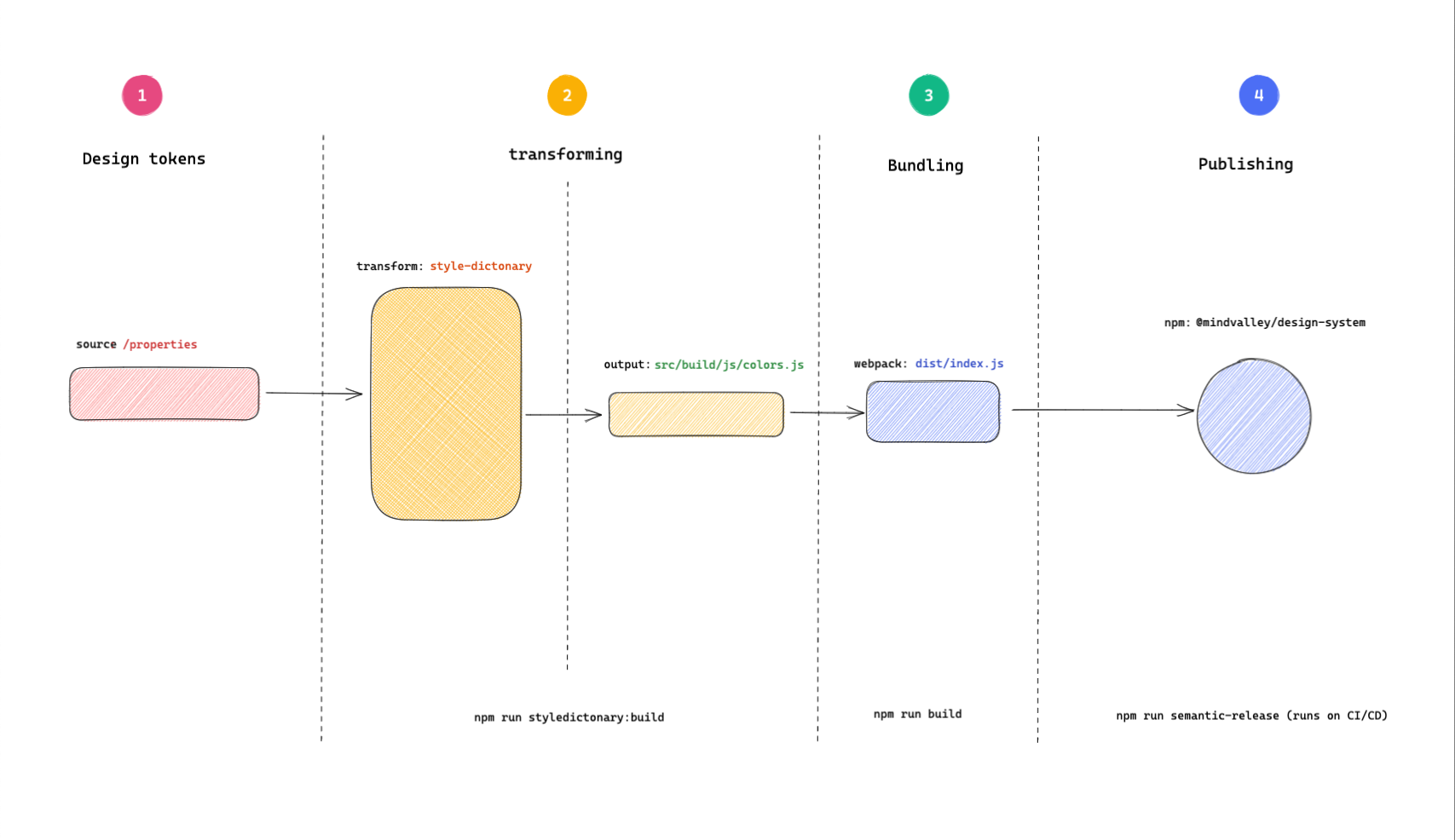
|
|
10
13
|
|
|
11
|
-
##### 1. The design tokens
|
|
14
|
+
##### 1. The design tokens
|
|
15
|
+
|
|
12
16
|
This is the starting point of the design token transformation process. This step is how the design tokens get into the repo. For example, If there are changes in the Figma design system to the value of a color, then this would be where we would need to update the token. For simplicity, it is just a directory with some design tokens in a JSON file. More details in the [`src/properties`](#srcproperties) directory documentation.
|
|
13
17
|
|
|
14
|
-
##### 2. Parsing and transformation
|
|
18
|
+
##### 2. Parsing and transformation
|
|
19
|
+
|
|
15
20
|
Using [style-dictonary](https://amzn.github.io/style-dictionary/#/version_3), the design tokens from (1) above are parsed, merged, and transformed into desired formats. The output is a `.js` file. The output is configurable and can be extented to `.css`, `.scss`, `.less` files etc. in the future. See [all possible output file formats](https://amzn.github.io/style-dictionary/#/formats).
|
|
16
21
|
The output of this step ends up in the [`src/build/`](#srcbuild) directory.
|
|
17
22
|
Parsing and transformation can be triggered by running:
|
|
@@ -20,7 +25,8 @@ Parsing and transformation can be triggered by running:
|
|
|
20
25
|
npm run styledictonary:build
|
|
21
26
|
```
|
|
22
27
|
|
|
23
|
-
##### 3. Bundling
|
|
28
|
+
##### 3. Bundling
|
|
29
|
+
|
|
24
30
|
Bundling is done using [webpack](https://webpack.js.org/concepts) to ensure the resultant files work across browser and server environments. The files from step 2 are bundled and output to the [/dist](#dist) directory.
|
|
25
31
|
Bundling can be invoked by running:
|
|
26
32
|
|
|
@@ -28,11 +34,13 @@ Bundling can be invoked by running:
|
|
|
28
34
|
npm run build
|
|
29
35
|
```
|
|
30
36
|
|
|
31
|
-
##### 4. Publishing
|
|
37
|
+
##### 4. Publishing
|
|
38
|
+
|
|
32
39
|
The last in the process is releasing and publishing the bundled files. This step is automated and runs on CI, ensuring that changes made are tested, versioned, and comprehensively documented. All this is done with the help of [semantic release](https://semantic-release.gitbook.io/semantic-release/). Read more about the [release process](RELEASING.md#releasing-🚀).
|
|
33
40
|
The end package is published to NPM where it can be installed from.
|
|
34
41
|
|
|
35
42
|
#### 🗂 Directory structure
|
|
43
|
+
|
|
36
44
|
Let's look at some important directories.
|
|
37
45
|
|
|
38
46
|
```shell
|
|
@@ -66,36 +74,46 @@ Let's look at some important directories.
|
|
|
66
74
|
└── webpack.config.js
|
|
67
75
|
|
|
68
76
|
```
|
|
77
|
+
|
|
69
78
|
###### src/properties/
|
|
79
|
+
|
|
70
80
|
This is the source of the design tokens. For now, we have the tokens checked in as JSON files.
|
|
71
81
|
The process of updating the payload is manual, implying that when there are changes in the tokens, one must get the updated token from the [figma colors file](https://www.figma.com/file/Gmdp0kAAYsmBgCthFjGkpY/MV-Core?node-id=6437%3A207257) and update the files in this directory.
|
|
72
82
|
|
|
73
83
|
*Yes, it's a manual step for now, automation will follow later.*
|
|
74
84
|
|
|
75
85
|
###### src/build/
|
|
86
|
+
|
|
76
87
|
This is the output of the design token transformation process. **DO NOT** manually edit the contents of this folder as they are the output of running the [bundling step](#3-bundling).
|
|
77
88
|
|
|
78
89
|
###### src/utilities
|
|
90
|
+
|
|
79
91
|
Holds the custom [transformations](https://amzn.github.io/style-dictionary/#/transforms) and [transformation groups](https://amzn.github.io/style-dictionary/#/transform_groups) which in a nutshell, are how we transform the json files in the `src/properties/` directory into the desired output file format in the `src/build/` directory.
|
|
80
92
|
|
|
81
93
|
###### dist
|
|
94
|
+
|
|
82
95
|
It's the output directory of the Webpack build process and is not checked in for versioning.
|
|
83
96
|
|
|
84
97
|
###### test
|
|
98
|
+
|
|
85
99
|
For tests, because code that cannot be tested is flawed. 🤷🏽♂️
|
|
86
100
|
|
|
87
101
|
#### ⌨️ Start development
|
|
102
|
+
|
|
88
103
|
To get started with development, start by cloning the mv-design-system repo.
|
|
104
|
+
|
|
89
105
|
```
|
|
90
106
|
git clone git@github.com:mindvalley/mv-design-system.git
|
|
91
107
|
```
|
|
92
108
|
|
|
93
109
|
Change your current directory to the folder you just cloned and install the dependencies.
|
|
110
|
+
|
|
94
111
|
```
|
|
95
112
|
cd mv-design-system && npm install
|
|
96
113
|
```
|
|
97
114
|
|
|
98
115
|
###### 💡 Note
|
|
116
|
+
|
|
99
117
|
This repo uses `npm` as the package manager
|
|
100
118
|
|
|
101
119
|
##### Making commits
|
|
@@ -106,6 +124,7 @@ For commits, we leverage the power of conventional commits using [Commitizen](ht
|
|
|
106
124
|
**Why use conventional commits?** To enable automation of releases, semantic versioning, and release notes auto-generation.
|
|
107
125
|
|
|
108
126
|
To make a commit, run the command below:
|
|
127
|
+
|
|
109
128
|
```
|
|
110
129
|
npm run commit
|
|
111
130
|
```
|
|
@@ -118,6 +137,7 @@ If your branch name has a Jira ticket ID already included, then the prompt autom
|
|
|
118
137
|
|
|
119
138
|
Though using `npm run commit` is highly recommended for this repo, you can alternatively write your commit without the Commitizen helper by ensuring you
|
|
120
139
|
follow the conventional commits conventions.
|
|
140
|
+
|
|
121
141
|
```
|
|
122
142
|
type(scope): commit-message
|
|
123
143
|
|
|
@@ -125,20 +145,21 @@ follow the conventional commits conventions.
|
|
|
125
145
|
```
|
|
126
146
|
|
|
127
147
|
The commit type has to be one of:
|
|
128
|
-
- `feat`: A new feature
|
|
129
|
-
- `fix`: A bug fix
|
|
130
|
-
- `docs`: Documentation only changes
|
|
131
|
-
- `style`: Changes that do not affect the meaning of the code (white-space, - formatting, missing semi-colons, etc)
|
|
132
|
-
- `refactor`: A code change that neither fixes a bug nor adds a feature
|
|
133
|
-
- `perf`: A code change that improves performance
|
|
134
|
-
- `test`: Adding missing tests or correcting existing tests
|
|
135
|
-
- `build`: Changes that affect the build system or external dependencies (example scopes: gulp, broccoli, npm)
|
|
136
|
-
- `ci`: Changes to our CI configuration files and scripts (example - scopes: Travis, Circle, BrowserStack, SauceLabs)
|
|
137
|
-
- `chore`: Other changes that don't modify src or test files
|
|
138
|
-
- `revert`: Reverts a previous commit
|
|
139
148
|
|
|
149
|
+
* `feat`: A new feature
|
|
150
|
+
* `fix`: A bug fix
|
|
151
|
+
* `docs`: Documentation only changes
|
|
152
|
+
* `style`: Changes that do not affect the meaning of the code (white-space, - formatting, missing semi-colons, etc)
|
|
153
|
+
* `refactor`: A code change that neither fixes a bug nor adds a feature
|
|
154
|
+
* `perf`: A code change that improves performance
|
|
155
|
+
* `test`: Adding missing tests or correcting existing tests
|
|
156
|
+
* `build`: Changes that affect the build system or external dependencies (example scopes: gulp, broccoli, npm)
|
|
157
|
+
* `ci`: Changes to our CI configuration files and scripts (example - scopes: Travis, Circle, BrowserStack, SauceLabs)
|
|
158
|
+
* `chore`: Other changes that don't modify src or test files
|
|
159
|
+
* `revert`: Reverts a previous commit
|
|
140
160
|
|
|
141
161
|
Here is an example commit message:
|
|
162
|
+
|
|
142
163
|
```
|
|
143
164
|
chore(asdf): Add .tool-versions file with current supported node version
|
|
144
165
|
|
|
@@ -148,6 +169,7 @@ MVHOME-765
|
|
|
148
169
|
Once your commits are done, you can do a normal push to remote.
|
|
149
170
|
|
|
150
171
|
Read more on [commit conventions](https://www.conventionalcommits.org/en/v1.0.0-beta.4/).
|
|
172
|
+
|
|
151
173
|
##### Branch naming
|
|
152
174
|
|
|
153
175
|
Branch names start with the Jira ticket ID eg.
|
|
@@ -157,19 +179,25 @@ Branch names start with the Jira ticket ID eg.
|
|
|
157
179
|
##### Important commands
|
|
158
180
|
|
|
159
181
|
###### Tests
|
|
182
|
+
|
|
160
183
|
To run all the tests:
|
|
184
|
+
|
|
161
185
|
```
|
|
162
186
|
npm run test
|
|
163
187
|
```
|
|
188
|
+
|
|
164
189
|
###### Transform design tokens
|
|
190
|
+
|
|
165
191
|
Whenever there are changes that affect our design tokens, we need to regenerate the build assets using the command below and commit the results:
|
|
166
192
|
|
|
167
193
|
```
|
|
168
194
|
npm run styledictonary:build
|
|
169
195
|
```
|
|
196
|
+
|
|
170
197
|
This is the command that tranforms our design tokens to the different desired formats we have defined.
|
|
171
198
|
|
|
172
199
|
######
|
|
200
|
+
|
|
173
201
|
In the release step of the CI pipline, we bundle the assets into a umd module with the help of webpack to ensure that our package runs on both the server(nodejs) and the client side(browser).
|
|
174
202
|
|
|
175
203
|
```
|
|
@@ -179,3 +207,10 @@ npm run build
|
|
|
179
207
|
You can test it out on your development environment to see the output.
|
|
180
208
|
|
|
181
209
|
Once your changes are made and merged, they'll need to be published. See how that is done in the [release guide](RELEASING.md#releasing-🚀).
|
|
210
|
+
|
|
211
|
+
# How to generate icons from figma to code?
|
|
212
|
+
1. Export all the icons from figma file to `Export` folder
|
|
213
|
+
2. Launch terminal in the same folder.
|
|
214
|
+
3. Run `npx svgo -f ./Export -o ./output` to generate compressed icons
|
|
215
|
+
4. Run `npx svg-sprite --symbol --symbol-render-css --symbol-example --dest=sprite/ output/*.svg` to convert exported icons to sprite
|
|
216
|
+
5. Replace all white and black `fill="#fff"` & `fill="#000"` colors with `fill="currentColor"`
|
package/docs/USAGE.md
CHANGED
|
@@ -14,6 +14,10 @@ yarn add @mindvalley/design-system
|
|
|
14
14
|
|
|
15
15
|
## Usage
|
|
16
16
|
|
|
17
|
+
### Figma Design Documentation
|
|
18
|
+
|
|
19
|
+
You can use this [link](https://www.figma.com/file/Gmdp0kAAYsmBgCthFjGkpY/MV-Core?node-id=5593%3A26473) to check out Mindvalley's core design system project. All the colors, icons, and typography, and design tokens follow it as the source of truth.
|
|
20
|
+
|
|
17
21
|
###### *ES module syntax*
|
|
18
22
|
|
|
19
23
|
```
|
|
@@ -24,6 +28,7 @@ yarn add @mindvalley/design-system
|
|
|
24
28
|
|
|
25
29
|
```
|
|
26
30
|
const { colors } = require('@mindvalley/design-system')
|
|
31
|
+
|
|
27
32
|
```
|
|
28
33
|
|
|
29
34
|
#### 🎨 colors
|
|
@@ -51,14 +56,16 @@ If you use TailwindCSS in your project, using the colors is a simple two-step pr
|
|
|
51
56
|
}
|
|
52
57
|
```
|
|
53
58
|
|
|
59
|
+
##### Gradients
|
|
60
|
+
|
|
54
61
|
For gradient you can use the following tailwindCSS gradients:
|
|
55
62
|
|
|
56
|
-
|
|
57
|
-
|
|
58
|
-
|
|
59
|
-
|
|
60
|
-
|
|
61
|
-
|
|
63
|
+
- Purple wave: `from-brand-accent to-purple-600`
|
|
64
|
+
- Orange Wave: `from-orange-500 to-orange-600`
|
|
65
|
+
- Yellow wave: `from-yellow-400 to-yellow-500`
|
|
66
|
+
- Blue Wave: `from-blue-600 to-blue-700`
|
|
67
|
+
- Grey wave (150 - white): `from-cool-grey-150 to-white`
|
|
68
|
+
- Gray wave (600 - 700): `from-cool-gray-600 to-cool-gray-700`
|
|
62
69
|
|
|
63
70
|
Example use:
|
|
64
71
|
`<div class="bg-gradient-to-b from-brand-accent to-purple-600 ..."></div>`
|
|
@@ -94,3 +101,111 @@ If you'd like other custom names, you can make [tailwindcss color customizations
|
|
|
94
101
|
|
|
95
102
|
export default App;
|
|
96
103
|
```
|
|
104
|
+
|
|
105
|
+
#### 🖋️ Typography
|
|
106
|
+
|
|
107
|
+
#### Typography plugin (Tailwindcss)
|
|
108
|
+
|
|
109
|
+
Mindvalley's design eco-system is highly opinionated with most repos utilizing TailwindCSS. This plugin enables developers to use typography class references from Figma and apply it to their code without worrying about all the underlying font sizes, line heights, font families, etc
|
|
110
|
+
|
|
111
|
+
##### How to use it?
|
|
112
|
+
|
|
113
|
+
Let's say that you are trying to codify a button from a Figma design, and you want to apply the exact same typography values(line height, font family, font size, etc.) to your code. Here are the steps you will need to go through to utilize the plugin.
|
|
114
|
+
|
|
115
|
+
1. Install the design system as descibed in the [install section](#using-npm-or-yarn)
|
|
116
|
+
|
|
117
|
+
2. Require and use the tailwind typography plugin in your `tailwind.config.js` file.
|
|
118
|
+
|
|
119
|
+
```js
|
|
120
|
+
module.exports = {
|
|
121
|
+
...
|
|
122
|
+
plugins: [
|
|
123
|
+
require('@mindvalley/design-system/dist/tailwind/plugin/typography');
|
|
124
|
+
],
|
|
125
|
+
...
|
|
126
|
+
}
|
|
127
|
+
|
|
128
|
+
```
|
|
129
|
+
|
|
130
|
+
3. Add font face definition for the font used in the plugin in your CSS.
|
|
131
|
+
|
|
132
|
+
```css
|
|
133
|
+
@font-face {
|
|
134
|
+
font-family: "Sharp Grotesk Semibold 21";
|
|
135
|
+
font-weight: 600;
|
|
136
|
+
font-display: swap;
|
|
137
|
+
/* We load fonts from assets.mindvalley.com cdn but you can choose to host the files yourself */
|
|
138
|
+
src: url("https://assets.mindvalley.com/api/v1/assets/270944f2-bb71-4559-b461-aabb0b351d6b.woff2") format("woff2");
|
|
139
|
+
}
|
|
140
|
+
|
|
141
|
+
@font-face {
|
|
142
|
+
font-family: "Sharp Grotesk Medium 20";
|
|
143
|
+
font-weight: 500;
|
|
144
|
+
font-display: swap;
|
|
145
|
+
src: url("https://assets.mindvalley.com/api/v1/assets/faf3d1e3-d18c-461e-aafa-9e56f9f16ce0.woff2") format("woff2");
|
|
146
|
+
}
|
|
147
|
+
|
|
148
|
+
@font-face {
|
|
149
|
+
font-family: "Sharp Grotesk Book 19";
|
|
150
|
+
font-weight: 400;
|
|
151
|
+
font-display: swap;
|
|
152
|
+
src: url("https://assets.mindvalley.com/api/v1/assets/0982041e-3874-48dc-bba5-a15c6fb960d1.woff2") format("woff2");
|
|
153
|
+
}
|
|
154
|
+
```
|
|
155
|
+
|
|
156
|
+
*Note that*
|
|
157
|
+
|
|
158
|
+
- The typography plugin by default, generates Kebab cased class names, e.g `title-bold-1` If you wish to change the class name casing then you can pass a 'casing' option to the plugin.
|
|
159
|
+
Supported casing options are snakeCase, camelCase and camelCase
|
|
160
|
+
|
|
161
|
+
```js
|
|
162
|
+
module.exports = {
|
|
163
|
+
...
|
|
164
|
+
plugins: [
|
|
165
|
+
require('@mindvalley/design-system/dist/tailwind/plugin/typography')({ casing: "pascalCase" }),
|
|
166
|
+
],
|
|
167
|
+
...
|
|
168
|
+
}
|
|
169
|
+
```
|
|
170
|
+
|
|
171
|
+
- The resultant typography classes generated are responsive for two screen sizes. One desktop size and the other for mobile/tablet screen sizes.
|
|
172
|
+
|
|
173
|
+
The plugin by default utilizes the `lg` breakpoint from the [screen size configuration](https://tailwindcss.com/docs/screens) on tailwind configuration it is used in.
|
|
174
|
+
If you have a different configuration or naming convention for your tailwind breaking points, then its possible to spacify the identifier of the breakpoint to be used.
|
|
175
|
+
|
|
176
|
+
For example, let's say you have a custom tailwind configuration that uses a different naming convention.
|
|
177
|
+
You'll need to make the plugin aware of the breakpoint boundary between the desktop and mobile. To this, you can pass the breakpoint option to the plugin and pass the key of the desired breakpoint as defined in your configuration.
|
|
178
|
+
|
|
179
|
+
```js
|
|
180
|
+
module.exports = {
|
|
181
|
+
...
|
|
182
|
+
theme: {
|
|
183
|
+
screens: {
|
|
184
|
+
'tablet': '640px',
|
|
185
|
+
'laptop': '1024px',
|
|
186
|
+
'desktop': '1280px',
|
|
187
|
+
}
|
|
188
|
+
}
|
|
189
|
+
plugins: [
|
|
190
|
+
/* Passing the identifier of the screen size to use as the breakpoint */
|
|
191
|
+
require('@mindvalley/design-system/dist/tailwind/plugin/typography')({ breakpoint: 'laptop'}),
|
|
192
|
+
],
|
|
193
|
+
...
|
|
194
|
+
}
|
|
195
|
+
```
|
|
196
|
+
|
|
197
|
+
4. Find the name to use by inspecting the selected text on the Figma design file.
|
|
198
|
+
|
|
199
|
+
<img src="getting-class-name.png" width="1000" height="auto">
|
|
200
|
+
|
|
201
|
+
5. Use the class name as follows. Remember to adjust that according to the casing option if you are not using the default.
|
|
202
|
+
|
|
203
|
+
```html
|
|
204
|
+
|
|
205
|
+
<p class="button-text">...</p>
|
|
206
|
+
|
|
207
|
+
<!-- This won't work as the button-text class generated is already responsive -->
|
|
208
|
+
<p class="button-text lg:button-text">...</p>
|
|
209
|
+
```
|
|
210
|
+
|
|
211
|
+
You can find the full list of typography definations here 👉 [Figma typography](https://www.figma.com/file/Gmdp0kAAYsmBgCthFjGkpY/MV-Core?node-id=5593%3A26473&t=3PPGng5xmhzaFyRe-0)
|
|
Binary file
|