@microsoft/teams-app-test-tool 0.2.7 → 0.2.8-alpha.20250430-3c070ff.0
This diff represents the content of publicly available package versions that have been released to one of the supported registries. The information contained in this diff is provided for informational purposes only and reflects changes between package versions as they appear in their respective public registries.
- package/LICENSE +1 -1
- package/README.md +22 -22
- package/dist/client/asset-manifest.json +3 -3
- package/dist/client/index.html +1 -1
- package/dist/client/static/js/main.3661c340.js +2 -0
- package/dist/client/static/js/{main.a00da014.js.LICENSE.txt → main.3661c340.js.LICENSE.txt} +76 -4
- package/dist/client/static/media/index.f6d03137e8c9dd0de04c.cjs +1 -0
- package/dist/index.js +3 -3
- package/dist/index.js.LICENSE.txt +33 -11
- package/package.json +5 -4
- package/dist/client/static/js/main.a00da014.js +0 -2
- package/dist/client/static/media/index.cd351d7c31d0d3fccf96.cjs +0 -1
package/LICENSE
CHANGED
|
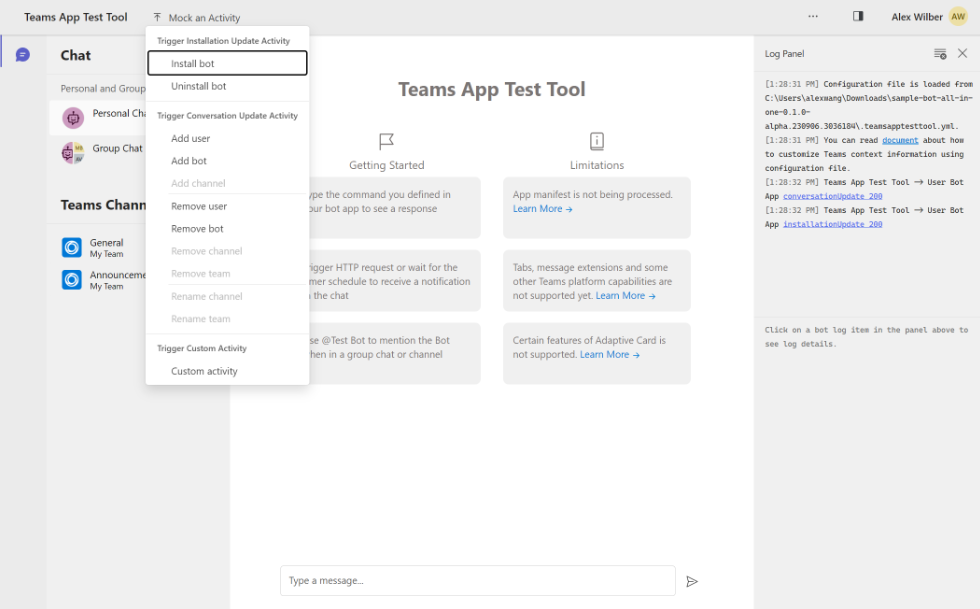
@@ -1,6 +1,6 @@
|
|
|
1
1
|
MICROSOFT PRE-RELEASE SOFTWARE LICENSE TERMS
|
|
2
2
|
|
|
3
|
-
MICROSOFT
|
|
3
|
+
MICROSOFT 365 AGENTS PLAYGROUND IN MICROSOFT 365 AGENTS TOOLKIT FOR VISUAL STUDIO CODE
|
|
4
4
|
|
|
5
5
|
These license terms are an agreement between you and Microsoft Corporation
|
|
6
6
|
(or based on where you live, one of its affiliates). They apply to the pre-release
|
package/README.md
CHANGED
|
@@ -1,56 +1,56 @@
|
|
|
1
|
-
#
|
|
1
|
+
# Microsoft 365 Agents Playground
|
|
2
2
|
|
|
3
|
-
`
|
|
3
|
+
`Microsoft 365 Agents Playground` is a component integrated in [Microsoft 365 Agents Toolkit](https://learn.microsoft.com/microsoftteams/platform/toolkit/teams-toolkit-fundamentals?pivots=visual-studio-code-v5). This component helps developers to debug, test and iterate on the app design of a [agent/bot](https://learn.microsoft.com/microsoftteams/platform/bots/what-are-bots) application in a web-based chat environment that emulates the behavior, look and feel of Microsoft Teams.
|
|
4
4
|
|
|
5
5
|

|
|
6
6
|
|
|
7
|
-
This package is a CLI wrapper for
|
|
7
|
+
This package is a CLI wrapper for Microsoft 365 Agents Playground component that aims for an easier integration between Teams Toolkit and Microsoft 365 Agents Playground.
|
|
8
8
|
|
|
9
9
|
## Features
|
|
10
10
|
|
|
11
|
-
|
|
11
|
+
Microsoft 365 Agents Playground enables developers to:
|
|
12
12
|
|
|
13
|
-
- **Sandbox Environment**: Test and debug their bot application in a sandbox environment that emulates the behavior, look and feel of Microsoft Teams.
|
|
14
|
-
- **Reduce Local Debugging Frictions**: Remove the [prerequisites](https://learn.microsoft.com/microsoftteams/platform/toolkit/tools-prerequisites#accounts-to-build-your-teams-app) to obtain a Microsoft 365 Developer tenant and side-loading permissions before debugging the
|
|
15
|
-
- **Network Security**: No need to set up a tunnel with [Ngrok](https://ngrok.com/) or [Microsoft Dev Tunnel](https://learn.microsoft.com/azure/developer/dev-tunnels/overview) to expose the local
|
|
16
|
-
- **Rapid Inner-Loop Iterations**: Quickly iterate on the app design and bot logic without the need to re-deploy the
|
|
17
|
-
- **Mock Data and Activities**: The
|
|
13
|
+
- **Sandbox Environment**: Test and debug their agent/bot application in a sandbox environment that emulates the behavior, look and feel of Microsoft Teams.
|
|
14
|
+
- **Reduce Local Debugging Frictions**: Remove the [prerequisites](https://learn.microsoft.com/microsoftteams/platform/toolkit/tools-prerequisites#accounts-to-build-your-teams-app) to obtain a Microsoft 365 Developer tenant and side-loading permissions before debugging the applications.
|
|
15
|
+
- **Network Security**: No need to set up a tunnel with [Ngrok](https://ngrok.com/) or [Microsoft Dev Tunnel](https://learn.microsoft.com/azure/developer/dev-tunnels/overview) to expose the local application to the internet.
|
|
16
|
+
- **Rapid Inner-Loop Iterations**: Quickly iterate on the app design and agent/bot logic without the need to re-deploy the application to the cloud.
|
|
17
|
+
- **Mock Data and Activities**: The Microsoft 365 Agents playground makes it easy to accomplish a test for complex scenarios such as `Send a welcome message when a new member joins the channel` by using mock data as well as built-in and custom activity triggers.
|
|
18
18
|
|
|
19
19
|
|
|
20
|
-
- **Reliable and Trustable**: You can trust the
|
|
21
|
-
- **Integration with Existing
|
|
22
|
-
- **Easy Inspections**: You can inspect the interactions between your
|
|
20
|
+
- **Reliable and Trustable**: You can trust the Microsoft 365 Agents playground because the application UX ([Adaptive Cards](https://learn.microsoft.com/microsoftteams/platform/task-modules-and-cards/cards/cards-reference#adaptive-card)) is built on top of the same rendering technology as in Microsoft Teams.
|
|
21
|
+
- **Integration with Existing Applications**: The Microsoft 365 Agents playground can be integrated with existing applications that are built with [Agent SDK](https://learn.microsoft.com/en-us/microsoft-365/agents-sdk/).
|
|
22
|
+
- **Easy Inspections**: You can inspect the interactions between your application and the Microsoft 365 Agents playground as well as the request and response payloads coming in and out of your application.
|
|
23
23
|
|
|
24
24
|
## Limitations
|
|
25
25
|
|
|
26
|
-
- Application manifest is not being processed in the
|
|
27
|
-
- Not all types of
|
|
26
|
+
- Application manifest is not being processed in the Microsoft 365 Agents playground. This means features that enabled only through the manifest will not be available in the Microsoft 365 Agents playground. For example, [The Command Menu](https://learn.microsoft.com/microsoftteams/platform/bots/how-to/create-a-bot-commands-menu?tabs=desktop%2Cdotnet) will not be available in the Microsoft 365 Agents playground.
|
|
27
|
+
- Not all types of application UX ([Cards](https://learn.microsoft.com/microsoftteams/platform/task-modules-and-cards/what-are-cards)) are supported in the Microsoft 365 Agents playground other than Adaptive Cards.
|
|
28
28
|
- Some features used in the Adaptive Card are not supported:
|
|
29
29
|
- [People picker](https://learn.microsoft.com/microsoftteams/platform/task-modules-and-cards/cards/people-picker)
|
|
30
30
|
- [Dynamic type-ahead search](https://learn.microsoft.com/microsoftteams/platform/task-modules-and-cards/cards/dynamic-search)
|
|
31
31
|
- [User mention](https://learn.microsoft.com/microsoftteams/platform/task-modules-and-cards/cards/cards-format?tabs=adaptive-md%2Cdesktop%2Cconnector-html#sample-adaptive-card-with-a-mention)
|
|
32
32
|
- [Image stage view](https://learn.microsoft.com/microsoftteams/platform/task-modules-and-cards/cards/cards-format?tabs=adaptive-md%2Cdesktop%2Cconnector-html#stage-view-for-images-in-adaptive-cards)
|
|
33
33
|
- [Full-width control](https://learn.microsoft.com/microsoftteams/platform/task-modules-and-cards/cards/cards-format?tabs=adaptive-md%2Cdesktop%2Cconnector-html#full-width-adaptive-card)
|
|
34
|
-
- Single Sign-On (SSO) is not supported in the
|
|
34
|
+
- Single Sign-On (SSO) is not supported in the Microsoft 365 Agents playground. This means the [SSO](https://learn.microsoft.com/microsoftteams/platform/bots/how-to/authentication/bot-sso-overview) feature will not be available in the Microsoft 365 Agents playground.
|
|
35
35
|
|
|
36
36
|
## FAQ
|
|
37
37
|
|
|
38
|
-
Q: What should I do when some features I use in my
|
|
38
|
+
Q: What should I do when some features I use in my application but it's not supported in the Microsoft 365 Agents playground?
|
|
39
39
|
|
|
40
|
-
A: You can always use the [Microsoft Teams client](https://teams.microsoft.com/) to test the features that are not supported in the
|
|
40
|
+
A: You can always use the [Microsoft Teams client](https://teams.microsoft.com/) to test the features that are not supported in the Microsoft 365 Agents playground. If you are developing with Teams Toolkit, select the option `Debug (Edge)` or `Debug (Chrome)` to test your application in the Microsoft Teams client.
|
|
41
41
|
|
|
42
|
-
Q: How would I notice if some features are not supported in the
|
|
42
|
+
Q: How would I notice if some features are not supported in the Microsoft 365 Agents playground?
|
|
43
43
|
|
|
44
|
-
A: The
|
|
44
|
+
A: The Microsoft 365 Agents playground will show a warning message in conversation and log panel when it detects some features are not supported.
|
|
45
45
|

|
|
46
46
|
|
|
47
|
-
Q: Should I solely rely on the
|
|
47
|
+
Q: Should I solely rely on the Microsoft 365 Agents playground to test my application?
|
|
48
48
|
|
|
49
|
-
A: No. We always recommend developers to test their
|
|
49
|
+
A: No. We always recommend developers to test their application in the Microsoft Teams client before moving the application to production environment.
|
|
50
50
|
|
|
51
51
|
## Shaping our roadmap
|
|
52
52
|
|
|
53
|
-
Teams platform is evolving rapidly and we are working hard to bring more features to the
|
|
53
|
+
Teams platform is evolving rapidly and we are working hard to bring more features to the Microsoft 365 Agents playground. We would love to prioritize our backlogs based on your feedback and suggestions so we could cover more extensibility surfaces and scenarios. Please feel free to:
|
|
54
54
|
|
|
55
55
|
- [Request a new feature](https://github.com/OfficeDev/TeamsFx/issues/new?assignees=&labels=&template=feature_request.md&title=)
|
|
56
56
|
- [File an issue](https://github.com/OfficeDev/TeamsFx/issues/new?assignees=&labels=&template=bug_report.md&title=)
|
|
@@ -1,13 +1,13 @@
|
|
|
1
1
|
{
|
|
2
2
|
"files": {
|
|
3
3
|
"main.css": "/static/css/main.47cb0fff.css",
|
|
4
|
-
"main.js": "/static/js/main.
|
|
4
|
+
"main.js": "/static/js/main.3661c340.js",
|
|
5
5
|
"static/media/CascadiaCode.woff2": "/static/media/CascadiaCode.61442455812b2cee49c4.woff2",
|
|
6
6
|
"index.html": "/index.html",
|
|
7
|
-
"static/media/index.cjs": "/static/media/index.
|
|
7
|
+
"static/media/index.cjs": "/static/media/index.f6d03137e8c9dd0de04c.cjs"
|
|
8
8
|
},
|
|
9
9
|
"entrypoints": [
|
|
10
10
|
"static/css/main.47cb0fff.css",
|
|
11
|
-
"static/js/main.
|
|
11
|
+
"static/js/main.3661c340.js"
|
|
12
12
|
]
|
|
13
13
|
}
|
package/dist/client/index.html
CHANGED
|
@@ -1 +1 @@
|
|
|
1
|
-
<!doctype html><html lang="en"><head><meta charset="utf-8"/><meta name="viewport" content="width=device-width,initial-scale=1"/><title>
|
|
1
|
+
<!doctype html><html lang="en"><head><meta charset="utf-8"/><meta name="viewport" content="width=device-width,initial-scale=1"/><title>Microsoft 365 Agents Playground</title><script defer="defer" src="/static/js/main.3661c340.js"></script><link href="/static/css/main.47cb0fff.css" rel="stylesheet"></head><body><noscript>You need to enable JavaScript to run this app.</noscript><div id="root"></div></body></html>
|