@microsoft/connected-workbooks 3.2.2-beta → 3.3.1-beta
This diff represents the content of publicly available package versions that have been released to one of the supported registries. The information contained in this diff is provided for informational purposes only and reflects changes between package versions as they appear in their respective public registries.
- package/README.md +372 -132
- package/dist/src/utils/constants.js +11 -2
- package/dist/src/utils/documentUtils.js +18 -4
- package/dist/src/utils/tableUtils.js +74 -29
- package/dist/src/utils/xmlInnerPartsUtils.js +111 -0
- package/dist/src/utils/xmlPartsUtils.js +57 -17
- package/dist/src/workbookTemplate.js +2 -1
- package/dist/tests/arrayUtils.test.js +14 -13
- package/dist/tests/documentUtils.test.js +40 -34
- package/dist/tests/gridUtils.test.js +59 -13
- package/dist/tests/htmlUtils.test.js +16 -15
- package/dist/tests/mashupDocumentParser.test.js +7 -6
- package/dist/tests/mocks/xmlMocks.js +3 -1
- package/dist/tests/tableUtils.test.js +44 -37
- package/dist/tests/workbookQueryTemplate.test.js +89 -17
- package/dist/tests/workbookTableTemplate.test.js +12 -11
- package/dist/tests/xmlInnerPartsUtils.test.js +19 -18
- package/dist/types.d.ts +5 -0
- package/dist/utils/constants.js +11 -2
- package/dist/utils/documentUtils.js +18 -4
- package/dist/utils/tableUtils.js +74 -29
- package/dist/utils/xmlInnerPartsUtils.js +111 -0
- package/dist/utils/xmlPartsUtils.js +57 -17
- package/dist/workbookManager.js +12 -12
- package/dist/workbookTemplate.js +2 -1
- package/package.json +8 -2
package/README.md
CHANGED
|
@@ -1,203 +1,408 @@
|
|
|
1
|
+
<div align="center">
|
|
2
|
+
|
|
1
3
|
# Open In Excel
|
|
4
|
+
|
|
5
|
+
[](https://www.typescriptlang.org/)
|
|
2
6
|
[](https://github.com/microsoft/connected-workbooks/blob/master/LICENSE)
|
|
7
|
+
[](https://www.npmjs.com/package/@microsoft/connected-workbooks)
|
|
8
|
+
[](https://github.com/microsoft/connected-workbooks/actions)
|
|
9
|
+
|
|
10
|
+
**Open your data directly in Excel for the Web with zero installation** - A JavaScript library that converts web tables and data into interactive Excel workbooks with Power Query integration and custom branded templates
|
|
11
|
+
|
|
12
|
+
<div align="center">
|
|
13
|
+
<img src="./assets/template example.gif" alt="Connected Workbooks Demo" >
|
|
14
|
+
</div>
|
|
15
|
+
|
|
16
|
+
|
|
17
|
+
</div>
|
|
18
|
+
|
|
19
|
+
---
|
|
20
|
+
|
|
21
|
+
## ✨ Key Features & Benefits
|
|
22
|
+
|
|
23
|
+
Transform your web applications with enterprise-grade Excel integration that goes far beyond simple CSV exports.
|
|
24
|
+
|
|
25
|
+
### 🎯 **Interactive Excel Workbooks, Not Static Files**
|
|
26
|
+
Convert raw data or HTML tables arrays to Excel tables while preserving data types, ensuring your data maintains its structure and formatting. instead of basic CSV exports that lose all structure and functionality.
|
|
27
|
+
|
|
28
|
+
### 🌐 **Zero-Installation Excel Experience**
|
|
29
|
+
Launch workbooks directly in Excel for the Web through any browser without requiring Excel desktop installation, making your data accessible to any user anywhere. No installation required, works on any device.
|
|
30
|
+
|
|
31
|
+
### 🎨 **Corporate Branding & Custom Dashboards**
|
|
32
|
+
Inject your data into pre-built Excel templates containing your company branding, PivotTables, charts, and business logic while preserving all formatting and calculations. Use your own branded Excel templates with PivotTables and charts to maintain corporate identity and pre-built analytics.
|
|
33
|
+
|
|
34
|
+
### 🔄 **Live Data Connections with Power Query**
|
|
35
|
+
Create workbooks that automatically refresh from your web APIs, databases, or data sources using Microsoft's Power Query technology, eliminating manual data updates. Create workbooks that refresh data on-demand using Power Query for real-time data updates and automated reporting.
|
|
36
|
+
|
|
37
|
+
### ⚙️ **Advanced Configuration**
|
|
38
|
+
Full control over document properties including title and description for professional document management, allowing you to customize metadata and maintain enterprise standards.
|
|
3
39
|
|
|
4
|
-
|
|
5
|
-
1. Fundemental **"Export to Excel"** capabilities for tabular data (landing in a table in Excel).
|
|
6
|
-
2. Advanced capabilities of **"Export a Power Query connected workbook"**:
|
|
7
|
-
- Can refresh your data on open and/or on demand.
|
|
8
|
-
- Allows for initial data population.
|
|
9
|
-
- Supports more advanced scenarios where you provide branded/custom workbooks, and load your data into PivotTables or PivotCharts.
|
|
40
|
+
---
|
|
10
41
|
|
|
11
|
-
|
|
42
|
+
## 🏢 Where is this library used?
|
|
12
43
|
|
|
13
|
-
|
|
44
|
+
Open In Excel powers data export functionality across Microsoft's enterprise platforms:
|
|
14
45
|
|
|
15
|
-
|
|
46
|
+
<div align="center">
|
|
16
47
|
|
|
17
|
-
|<img src="https://github.com/microsoft/connected-workbooks/assets/7674478/b7a0c989-7ba4-4da8-851e-04650d8b600e" alt="
|
|
18
|
-
|
|
19
|
-
|
|
48
|
+
|<img src="https://github.com/microsoft/connected-workbooks/assets/7674478/b7a0c989-7ba4-4da8-851e-04650d8b600e" alt="Azure Data Explorer" width="48"/>|<img src="https://github.com/microsoft/connected-workbooks/assets/7674478/76d22d23-5f2b-465f-992d-f1c71396904c" alt="Log Analytics" width="48"/>|<img src="https://github.com/microsoft/connected-workbooks/assets/7674478/436b4f53-bf25-4c45-aae5-55ee1b1feafc" alt="Datamart" width="48"/>|<img src="https://github.com/microsoft/connected-workbooks/assets/7674478/3965f684-b461-42fe-9c62-e3059c0286eb" alt="Viva Sales" width="48"/>|
|
|
49
|
+
|:---:|:---:|:---:|:---:|
|
|
50
|
+
|**Azure Data Explorer**|**Log Analytics**|**Datamart**|**Viva Sales**|
|
|
20
51
|
|
|
21
|
-
|
|
52
|
+
</div>
|
|
53
|
+
|
|
54
|
+
|
|
55
|
+
|
|
56
|
+
---
|
|
57
|
+
|
|
58
|
+
## 🚀 Quick Start
|
|
59
|
+
|
|
60
|
+
### Installation
|
|
61
|
+
|
|
62
|
+
```bash
|
|
63
|
+
npm install @microsoft/connected-workbooks
|
|
64
|
+
```
|
|
65
|
+
|
|
66
|
+
---
|
|
67
|
+
|
|
68
|
+
## 💡 Usage Examples
|
|
69
|
+
|
|
70
|
+
### 📋 **HTML Table Export**
|
|
71
|
+
|
|
72
|
+
Perfect for quick data exports from existing web tables.
|
|
22
73
|
|
|
23
|
-
### 1. Export a table directly from an Html page:
|
|
24
74
|
```typescript
|
|
25
|
-
import workbookManager from '@microsoft/connected-workbooks';
|
|
75
|
+
import { workbookManager } from '@microsoft/connected-workbooks';
|
|
26
76
|
|
|
27
|
-
|
|
28
|
-
|
|
77
|
+
// One line of code to convert any table
|
|
78
|
+
const blob = await workbookManager.generateTableWorkbookFromHtml(
|
|
79
|
+
document.querySelector('table') as HTMLTableElement
|
|
80
|
+
);
|
|
81
|
+
|
|
82
|
+
// Open in Excel for the Web with editing enabled
|
|
83
|
+
workbookManager.openInExcelWeb(blob, "QuickExport.xlsx", true);
|
|
29
84
|
```
|
|
30
85
|
|
|
31
|
-
###
|
|
86
|
+
### 📊 **Smart Data Formatting**
|
|
87
|
+
|
|
88
|
+
Transform raw data arrays into professionally formatted Excel tables.
|
|
89
|
+
|
|
32
90
|
```typescript
|
|
33
|
-
import workbookManager from '@microsoft/connected-workbooks';
|
|
91
|
+
import { workbookManager } from '@microsoft/connected-workbooks';
|
|
34
92
|
|
|
35
|
-
const
|
|
36
|
-
config: {
|
|
93
|
+
const salesData = {
|
|
94
|
+
config: {
|
|
95
|
+
promoteHeaders: true, // First row becomes headers
|
|
96
|
+
adjustColumnNames: true // Clean up column names
|
|
97
|
+
},
|
|
37
98
|
data: [
|
|
38
|
-
|
|
39
|
-
|
|
40
|
-
|
|
41
|
-
|
|
42
|
-
|
|
43
|
-
["Doohickey D", 50.01, true, "Home", "8/12/2023"]
|
|
99
|
+
["Product", "Revenue", "InStock", "Category", "LastUpdated"],
|
|
100
|
+
["Surface Laptop", 1299.99, true, "Hardware", "2024-10-26"],
|
|
101
|
+
["Office 365", 99.99, true, "Software", "2024-10-26"],
|
|
102
|
+
["Azure Credits", 500.00, false, "Cloud", "2024-10-25"],
|
|
103
|
+
["Teams Premium", 149.99, true, "Software", "2024-10-24"]
|
|
44
104
|
]
|
|
45
105
|
};
|
|
46
|
-
|
|
47
|
-
|
|
106
|
+
|
|
107
|
+
const blob = await workbookManager.generateTableWorkbookFromGrid(salesData);
|
|
108
|
+
workbookManager.openInExcelWeb(blob, "SalesReport.xlsx", true);
|
|
48
109
|
```
|
|
49
|
-
<img width="281" alt="image" src="https://github.com/microsoft/connected-workbooks/assets/7674478/b91e5d69-8444-4a19-a4b0-3fd721e5576f">
|
|
50
110
|
|
|
51
|
-
|
|
111
|
+
<div align="center">
|
|
112
|
+
<img width="450" alt="Smart Formatted Excel Table" src="https://github.com/microsoft/connected-workbooks/assets/7674478/b91e5d69-8444-4a19-a4b0-3fd721e5576f">
|
|
113
|
+
</div>
|
|
114
|
+
|
|
115
|
+
|
|
116
|
+
|
|
117
|
+
### 🎨 **Custom Branded Templates**
|
|
118
|
+
|
|
119
|
+
Transform your data using pre-built Excel templates with your corporate branding.
|
|
120
|
+
|
|
121
|
+
|
|
122
|
+
|
|
123
|
+
**Steps:**
|
|
124
|
+
|
|
125
|
+
1. **Prepare Your Template File**
|
|
126
|
+
|
|
127
|
+
Open Excel and create (or open) your branded file.
|
|
128
|
+
2. **Pick one sheet that will hold your data.**
|
|
129
|
+
|
|
130
|
+
The default "Sheet1"(3)
|
|
131
|
+
3. **Inside that sheet, choose were you want your data to be populated(1) and create a table (Insert → Table).**
|
|
132
|
+
|
|
133
|
+
The default table name is Table1(2)
|
|
134
|
+
The table need to have the same column structure as your incoming data.
|
|
135
|
+
4. **Add any charts, formulas, or formatting that reference this table.**
|
|
136
|
+
|
|
137
|
+
Example: Pie chart using Gross column(4).
|
|
138
|
+
5. **Save the Excel file (e.g., my-template.xlsx).**
|
|
139
|
+
6. **Use the saved file as the template for your incoming data**
|
|
140
|
+
|
|
141
|
+
The library will then populate the designated table with your data. Any functions, figures, or references linked to this table within the Excel template will automatically reflect the newly exported data.
|
|
142
|
+
|
|
143
|
+
<div align="center">
|
|
144
|
+
<img alt="Custom Branded Excel Dashboard" src="./assets/template_before_after.png">
|
|
145
|
+
</div>
|
|
146
|
+
|
|
147
|
+
<div align="center">
|
|
148
|
+
<!-- Template example downloads -->
|
|
149
|
+
<a href="./assets/before.xlsx" download>Download before.xlsx</a> • <a href="./assets/after.xlsx" download>Download after.xlsx</a>
|
|
150
|
+
</div>
|
|
151
|
+
|
|
152
|
+
#### 📁 **Loading Template Files**
|
|
153
|
+
|
|
52
154
|
```typescript
|
|
53
|
-
|
|
54
|
-
|
|
55
|
-
|
|
56
|
-
|
|
57
|
-
|
|
58
|
-
|
|
155
|
+
// Method 1: File upload from user
|
|
156
|
+
const templateInput = document.querySelector('#template-upload') as HTMLInputElement;
|
|
157
|
+
const templateFile = templateInput.files[0];
|
|
158
|
+
|
|
159
|
+
// Method 2: Fetch from your server
|
|
160
|
+
const templateResponse = await fetch('/assets/templates/sales-dashboard.xlsx');
|
|
161
|
+
const templateFile = await templateResponse.blob();
|
|
162
|
+
|
|
163
|
+
// Method 3: Drag and drop
|
|
164
|
+
function handleTemplateDrop(event: DragEvent) {
|
|
165
|
+
const templateFile = event.dataTransfer.files[0];
|
|
166
|
+
// Use templateFile with the library
|
|
167
|
+
}
|
|
168
|
+
```
|
|
169
|
+
|
|
170
|
+
#### 📊 **Generate Branded Workbook**
|
|
171
|
+
|
|
172
|
+
```typescript
|
|
173
|
+
const quarterlyData = {
|
|
174
|
+
config: { promoteHeaders: true, adjustColumnNames: true },
|
|
175
|
+
data: [
|
|
176
|
+
["Region", "Q3_Revenue", "Q4_Revenue", "Growth", "Target_Met"],
|
|
177
|
+
["North America", 2500000, 2750000, "10%", true],
|
|
178
|
+
["Europe", 1800000, 2100000, "17%", true],
|
|
179
|
+
["Asia Pacific", 1200000, 1400000, "17%", true],
|
|
180
|
+
["Latin America", 800000, 950000, "19%", true]
|
|
181
|
+
]
|
|
182
|
+
};
|
|
183
|
+
|
|
184
|
+
// Inject data into your branded template
|
|
185
|
+
const blob = await workbookManager.generateTableWorkbookFromGrid(
|
|
186
|
+
quarterlyData,
|
|
187
|
+
undefined, // Use template's existing data structure
|
|
188
|
+
{
|
|
189
|
+
templateFile: templateFile,
|
|
190
|
+
TempleteSettings: {
|
|
191
|
+
sheetName: "Dashboard", // Target worksheet
|
|
192
|
+
tableName: "QuarterlyData" // Target table name
|
|
59
193
|
}
|
|
60
194
|
}
|
|
61
195
|
);
|
|
62
|
-
|
|
63
|
-
|
|
196
|
+
|
|
197
|
+
// Users get a fully branded report
|
|
198
|
+
workbookManager.openInExcelWeb(blob, "Q4_Executive_Dashboard.xlsx", true);
|
|
64
199
|
```
|
|
65
|
-
|
|
66
200
|
|
|
67
|
-
|
|
201
|
+
<div align="center">
|
|
202
|
+
<img alt="Custom Branded Excel Dashboard" src="./assets/template_example.png">
|
|
203
|
+
</div>
|
|
204
|
+
|
|
205
|
+
> 💡 **Template Requirements**: Include a query named **"Query1"** connected to a **Table**.
|
|
206
|
+
|
|
207
|
+
### 🔄 **Live Data Connections with Power Query**
|
|
208
|
+
|
|
209
|
+
Create workbooks that automatically refresh from your data sources.
|
|
210
|
+
|
|
68
211
|
```typescript
|
|
69
|
-
import workbookManager from '@microsoft/connected-workbooks';
|
|
212
|
+
import { workbookManager } from '@microsoft/connected-workbooks';
|
|
70
213
|
|
|
214
|
+
// Create a workbook that connects to your API
|
|
71
215
|
const blob = await workbookManager.generateSingleQueryWorkbook({
|
|
72
|
-
queryMashup:
|
|
73
|
-
|
|
74
|
-
|
|
75
|
-
|
|
216
|
+
queryMashup: `let
|
|
217
|
+
Source = {1..10}
|
|
218
|
+
in
|
|
219
|
+
Source`,
|
|
76
220
|
refreshOnOpen: true
|
|
77
221
|
});
|
|
78
222
|
|
|
79
|
-
workbookManager.
|
|
223
|
+
workbookManager.openInExcelWeb(blob, "MyData.xlsx", true);
|
|
80
224
|
```
|
|
81
|
-

|
|
82
225
|
|
|
83
|
-
(
|
|
84
|
-
|
|
226
|
+
> 📚 **Learn Power Query**: New to Power Query? Check out the [official documentation](https://docs.microsoft.com/en-us/power-query/) to unlock the full potential of live data connections.
|
|
227
|
+
|
|
228
|
+
<div align="center">
|
|
229
|
+
<img width="120" alt="Live Data Workbook" src="https://github.com/microsoft/connected-workbooks/assets/7674478/57bd986c-6309-4963-8d86-911ccf496c3f">
|
|
230
|
+
</div>
|
|
231
|
+
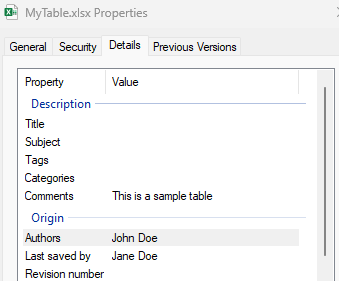
### 📄 **Professional Document Properties**
|
|
85
232
|
|
|
86
|
-
|
|
233
|
+
Add metadata and professional document properties for enterprise use.
|
|
87
234
|
|
|
88
235
|
```typescript
|
|
89
|
-
const blob = await workbookManager.
|
|
90
|
-
|
|
91
|
-
|
|
92
|
-
|
|
93
|
-
|
|
236
|
+
const blob = await workbookManager.generateTableWorkbookFromHtml(
|
|
237
|
+
document.querySelector('table') as HTMLTableElement,
|
|
238
|
+
{
|
|
239
|
+
docProps: {
|
|
240
|
+
createdBy: 'John Doe',
|
|
241
|
+
lastModifiedBy: 'Jane Doe',
|
|
242
|
+
description: 'Sales Report Q4 2024',
|
|
243
|
+
title: 'Quarterly Sales Data'
|
|
244
|
+
}
|
|
245
|
+
}
|
|
246
|
+
);
|
|
247
|
+
|
|
248
|
+
// Download for offline use
|
|
249
|
+
workbookManager.downloadWorkbook(blob, "MyTable.xlsx");
|
|
94
250
|
```
|
|
95
|
-

|
|
96
251
|
|
|
97
|
-
|
|
252
|
+
<div align="center">
|
|
253
|
+
<img width="400" alt="Professional Document Properties" src="https://github.com/microsoft/connected-workbooks/assets/7674478/c267c9eb-6367-419d-832d-5a835c7683f9">
|
|
254
|
+
</div>
|
|
255
|
+
|
|
256
|
+
## 📚 Complete API Reference
|
|
98
257
|
|
|
99
|
-
|
|
258
|
+
### Core Functions
|
|
100
259
|
|
|
260
|
+
#### 🔗 `generateSingleQueryWorkbook()`
|
|
261
|
+
Create Power Query connected workbooks with live data refresh capabilities.
|
|
262
|
+
|
|
263
|
+
```typescript
|
|
264
|
+
async function generateSingleQueryWorkbook(
|
|
265
|
+
query: QueryInfo,
|
|
266
|
+
grid?: Grid,
|
|
267
|
+
fileConfigs?: FileConfigs
|
|
268
|
+
): Promise<Blob>
|
|
269
|
+
```
|
|
101
270
|
|
|
102
|
-
|
|
271
|
+
| Parameter | Type | Required | Description |
|
|
272
|
+
|-----------|------|----------|-------------|
|
|
273
|
+
| `query` | [`QueryInfo`](#queryinfo) | ✅ **Required** | Power Query configuration |
|
|
274
|
+
| `grid` | [`Grid`](#grid) | Optional | Pre-populate with data |
|
|
275
|
+
| `fileConfigs` | [`FileConfigs`](#fileconfigs) | Optional | Customization options |
|
|
103
276
|
|
|
104
|
-
|
|
277
|
+
#### 📋 `generateTableWorkbookFromHtml()`
|
|
278
|
+
Convert HTML tables to Excel workbooks instantly.
|
|
105
279
|
|
|
106
280
|
```typescript
|
|
107
|
-
|
|
108
|
-
|
|
109
|
-
|
|
110
|
-
|
|
111
|
-
setTemplateFile(e!.target!.files!.item(0));
|
|
112
|
-
}}/>
|
|
281
|
+
async function generateTableWorkbookFromHtml(
|
|
282
|
+
htmlTable: HTMLTableElement,
|
|
283
|
+
fileConfigs?: FileConfigs
|
|
284
|
+
): Promise<Blob>
|
|
113
285
|
```
|
|
114
|
-
### API
|
|
115
|
-
The library exposes a workbookManager, which generates a workbook via several APIs:
|
|
116
286
|
|
|
117
|
-
|
|
287
|
+
| Parameter | Type | Required | Description |
|
|
288
|
+
|-----------|------|----------|-------------|
|
|
289
|
+
| `htmlTable` | `HTMLTableElement` | ✅ **Required** | Source HTML table |
|
|
290
|
+
| `fileConfigs` | [`FileConfigs`](#fileconfigs) | Optional | Customization options |
|
|
291
|
+
|
|
292
|
+
#### 📊 `generateTableWorkbookFromGrid()`
|
|
293
|
+
Transform raw data arrays into formatted Excel tables.
|
|
294
|
+
|
|
118
295
|
```typescript
|
|
119
|
-
|
|
296
|
+
async function generateTableWorkbookFromGrid(
|
|
297
|
+
grid: Grid,
|
|
298
|
+
fileConfigs?: FileConfigs
|
|
299
|
+
): Promise<Blob>
|
|
120
300
|
```
|
|
121
|
-
|
|
122
|
-
|Parameter | Type | Required | Description |
|
|
123
|
-
|--- |--- |--- |--- |
|
|
124
|
-
|query | [QueryInfo](#queryinfo) | __required__ | Power Query mashup |
|
|
125
|
-
| grid | [Grid](#grid) | optional | Initial grid data |
|
|
126
|
-
| fileConfigs | [FileConfigs](#fileconfigs) | optional | Custom file configurations |
|
|
127
301
|
|
|
128
|
-
|
|
302
|
+
| Parameter | Type | Required | Description |
|
|
303
|
+
|-----------|------|----------|-------------|
|
|
304
|
+
| `grid` | [`Grid`](#grid) | ✅ **Required** | Data and configuration |
|
|
305
|
+
| `fileConfigs` | [`FileConfigs`](#fileconfigs) | Optional | Customization options |
|
|
306
|
+
|
|
307
|
+
#### 🌐 `openInExcelWeb()`
|
|
308
|
+
Open workbooks directly in Excel for the Web.
|
|
309
|
+
|
|
129
310
|
```typescript
|
|
130
|
-
async function
|
|
311
|
+
async function openInExcelWeb(
|
|
312
|
+
blob: Blob,
|
|
313
|
+
filename?: string,
|
|
314
|
+
allowTyping?: boolean
|
|
315
|
+
): Promise<void>
|
|
131
316
|
```
|
|
132
317
|
|
|
133
|
-
|Parameter
|
|
134
|
-
|
|
135
|
-
|
|
|
136
|
-
|
|
|
318
|
+
| Parameter | Type | Required | Description |
|
|
319
|
+
|-----------|------|----------|-------------|
|
|
320
|
+
| `blob` | `Blob` | ✅ **Required** | Generated workbook |
|
|
321
|
+
| `filename` | `string` | Optional | Custom filename |
|
|
322
|
+
| `allowTyping` | `boolean` | Optional | Enable editing (default: false) |
|
|
323
|
+
|
|
324
|
+
#### 💾 `downloadWorkbook()`
|
|
325
|
+
Trigger browser download of the workbook.
|
|
137
326
|
|
|
138
|
-
#### 3. Generate a table workbook with raw data
|
|
139
327
|
```typescript
|
|
140
|
-
|
|
328
|
+
function downloadWorkbook(file: Blob, filename: string): void
|
|
141
329
|
```
|
|
142
330
|
|
|
143
|
-
|
|
144
|
-
|
|
145
|
-
| grid | [Grid](#grid) | __required__ | Initial data loaded to workbook |
|
|
146
|
-
| fileConfigs | [FileConfigs](#fileconfigs) | optional | Custom file configurations |
|
|
331
|
+
#### 🔗 `getExcelForWebWorkbookUrl()`
|
|
332
|
+
Get the Excel for Web URL without opening (useful for custom integrations).
|
|
147
333
|
|
|
148
|
-
#### 3. Open the created workbook in excel for the web
|
|
149
334
|
```typescript
|
|
150
|
-
async function
|
|
335
|
+
async function getExcelForWebWorkbookUrl(
|
|
336
|
+
file: Blob,
|
|
337
|
+
filename?: string,
|
|
338
|
+
allowTyping?: boolean
|
|
339
|
+
): Promise<string>
|
|
151
340
|
```
|
|
152
341
|
|
|
153
|
-
|
|
342
|
+
---
|
|
154
343
|
|
|
155
|
-
|
|
156
|
-
|--- |--- |--- |--- |
|
|
157
|
-
| blob | [Blob](https://developer.mozilla.org/docs/Web/API/Blob) | __required__ | Initial data loaded to workbook |
|
|
158
|
-
| filename | string | optional | Custom the opened file name |
|
|
159
|
-
| allowTyping | boolean | optional | allow user editing (typing) |
|
|
160
|
-
</br>
|
|
344
|
+
## 🔧 Type Definitions
|
|
161
345
|
|
|
162
|
-
###
|
|
346
|
+
### QueryInfo
|
|
347
|
+
Power Query configuration for connected workbooks.
|
|
163
348
|
|
|
164
|
-
|
|
165
|
-
|
|
166
|
-
|
|
167
|
-
|
|
168
|
-
|
|
169
|
-
|
|
349
|
+
```typescript
|
|
350
|
+
interface QueryInfo {
|
|
351
|
+
queryMashup: string; // Power Query M language code
|
|
352
|
+
refreshOnOpen: boolean; // Auto-refresh when opened
|
|
353
|
+
queryName?: string; // Query identifier (default: "Query1")
|
|
354
|
+
}
|
|
355
|
+
```
|
|
170
356
|
|
|
171
|
-
|
|
172
|
-
|
|
173
|
-
|
|
174
|
-
|
|
175
|
-
|
|
357
|
+
### Grid
|
|
358
|
+
Data structure for tabular information.
|
|
359
|
+
|
|
360
|
+
```typescript
|
|
361
|
+
interface Grid {
|
|
362
|
+
data: (string | number | boolean)[][]; // Raw data rows
|
|
363
|
+
config?: GridConfig; // Processing options
|
|
364
|
+
}
|
|
365
|
+
|
|
366
|
+
interface GridConfig {
|
|
367
|
+
promoteHeaders?: boolean; // Use first row as headers
|
|
368
|
+
adjustColumnNames?: boolean; // Fix duplicate/invalid names
|
|
369
|
+
}
|
|
370
|
+
```
|
|
371
|
+
|
|
372
|
+
### FileConfigs
|
|
373
|
+
Advanced customization options.
|
|
374
|
+
|
|
375
|
+
```typescript
|
|
376
|
+
interface FileConfigs {
|
|
377
|
+
templateFile?: File; // Custom Excel template
|
|
378
|
+
docProps?: DocProps; // Document metadata
|
|
379
|
+
hostName?: string; // Creator application name
|
|
380
|
+
TempleteSettings?: TempleteSettings; // Template-specific settings
|
|
381
|
+
}
|
|
382
|
+
|
|
383
|
+
interface TempleteSettings {
|
|
384
|
+
tableName?: string; // Target table name in template
|
|
385
|
+
sheetName?: string; // Target worksheet name
|
|
386
|
+
}
|
|
387
|
+
```
|
|
176
388
|
|
|
177
|
-
|
|
178
|
-
|
|
179
|
-
|---|---|---|---|
|
|
180
|
-
| promoteHeaders | boolean | optional | Should first row of gridData be used as the header, defaults to false - generating "Column1", "Column2"...
|
|
181
|
-
| adjustColumnNames | boolean | optional | Should column names be adjusted to be valid Excel names (Fix duplicates for example), defaults to true
|
|
389
|
+
### DocProps
|
|
390
|
+
Document metadata and properties.
|
|
182
391
|
|
|
183
|
-
|
|
184
|
-
|
|
185
|
-
|
|
186
|
-
|
|
187
|
-
|
|
188
|
-
|
|
392
|
+
```typescript
|
|
393
|
+
interface DocProps {
|
|
394
|
+
title?: string; // Document title
|
|
395
|
+
subject?: string; // Document subject
|
|
396
|
+
keywords?: string; // Search keywords
|
|
397
|
+
createdBy?: string; // Author name
|
|
398
|
+
description?: string; // Document description
|
|
399
|
+
lastModifiedBy?: string; // Last editor
|
|
400
|
+
category?: string; // Document category
|
|
401
|
+
revision?: string; // Version number
|
|
402
|
+
}
|
|
403
|
+
```
|
|
189
404
|
|
|
190
|
-
|
|
191
|
-
|Parameter | Type | Required
|
|
192
|
-
|---|---|---|
|
|
193
|
-
| title | string | optional
|
|
194
|
-
| subject | string | optional
|
|
195
|
-
| keywords | string | optional
|
|
196
|
-
| createdBy | string | optional
|
|
197
|
-
| description | string | optional
|
|
198
|
-
| lastModifiedBy | string | optional
|
|
199
|
-
| category | string | optional
|
|
200
|
-
| revision | number | optional
|
|
405
|
+
---
|
|
201
406
|
|
|
202
407
|
## Contributing
|
|
203
408
|
|
|
@@ -213,6 +418,35 @@ This project has adopted the [Microsoft Open Source Code of Conduct](https://ope
|
|
|
213
418
|
For more information see the [Code of Conduct FAQ](https://opensource.microsoft.com/codeofconduct/faq/) or
|
|
214
419
|
contact [opencode@microsoft.com](mailto:opencode@microsoft.com) with any additional questions or comments.
|
|
215
420
|
|
|
421
|
+
### Getting Started
|
|
422
|
+
1. Fork the repository
|
|
423
|
+
2. Create a feature branch
|
|
424
|
+
3. Make your changes
|
|
425
|
+
4. Add tests for new functionality
|
|
426
|
+
5. Submit a pull request
|
|
427
|
+
|
|
428
|
+
### Development Setup
|
|
429
|
+
```bash
|
|
430
|
+
git clone https://github.com/microsoft/connected-workbooks.git
|
|
431
|
+
cd connected-workbooks
|
|
432
|
+
npm install
|
|
433
|
+
npm run build
|
|
434
|
+
npm test
|
|
435
|
+
```
|
|
436
|
+
---
|
|
437
|
+
|
|
438
|
+
## 📄 License
|
|
439
|
+
|
|
440
|
+
This project is licensed under the MIT License - see the [LICENSE](LICENSE) file for details.
|
|
441
|
+
|
|
442
|
+
## 🔗 Related Resources
|
|
443
|
+
|
|
444
|
+
- [📖 Power Query Documentation](https://powerquery.microsoft.com/en-us/)
|
|
445
|
+
- [🏢 Excel for Developers](https://docs.microsoft.com/en-us/office/dev/excel/)
|
|
446
|
+
- [🔧 Microsoft Graph Excel APIs](https://docs.microsoft.com/en-us/graph/api/resources/excel)
|
|
447
|
+
|
|
448
|
+
---
|
|
449
|
+
|
|
216
450
|
## Trademarks
|
|
217
451
|
|
|
218
452
|
This project may contain trademarks or logos for projects, products, or services. Authorized use of Microsoft
|
|
@@ -220,3 +454,9 @@ trademarks or logos is subject to and must follow
|
|
|
220
454
|
[Microsoft's Trademark & Brand Guidelines](https://www.microsoft.com/en-us/legal/intellectualproperty/trademarks/usage/general).
|
|
221
455
|
Use of Microsoft trademarks or logos in modified versions of this project must not cause confusion or imply Microsoft sponsorship.
|
|
222
456
|
Any use of third-party trademarks or logos are subject to those third-party's policies.
|
|
457
|
+
|
|
458
|
+
---
|
|
459
|
+
|
|
460
|
+
## Keywords
|
|
461
|
+
|
|
462
|
+
Power Query, Excel, Office, Workbook, Refresh, Table, xlsx, export, CSV, data export, HTML table, web to Excel, JavaScript Excel, TypeScript Excel, Excel template, PivotTable, connected data, live data, data refresh, Excel for Web, browser Excel, spreadsheet, data visualization, Microsoft Office, Office 365, Excel API, workbook generation, table export, grid export, Excel automation, data processing, business intelligence
|