@micro-zoe/micro-app 0.4.3 → 0.5.3
This diff represents the content of publicly available package versions that have been released to one of the supported registries. The information contained in this diff is provided for informational purposes only and reflects changes between package versions as they appear in their respective public registries.
- package/README.md +19 -61
- package/README.zh-cn.md +19 -59
- package/lib/index.d.ts +89 -7
- package/lib/index.esm.js +261 -207
- package/lib/index.esm.js.map +1 -1
- package/lib/index.min.js +1 -1
- package/lib/index.min.js.map +1 -1
- package/lib/index.umd.js +1 -1
- package/lib/index.umd.js.map +1 -1
- package/package.json +19 -19
- package/polyfill/jsx-custom-event.js +3 -5
- package/polyfill/jsx-custom-event.js.map +1 -1
- package/typings/global.d.ts +7 -0
package/README.md
CHANGED
|
@@ -32,20 +32,20 @@ micro-app is a micro front-end framework launched by JD Retail. It renders based
|
|
|
32
32
|
|
|
33
33
|
It is the lowest cost framework for accessing micro front-end, and provides a series of perfect functions such as JS sandbox, style isolation, element isolation, preloading, resource address completion, plugin system, data communication and so on.
|
|
34
34
|
|
|
35
|
-
|
|
35
|
+
micro-app has no restrictions on the front-end framework, and any framework can be used as a base application to embed any type of micro application of the framework.
|
|
36
36
|
|
|
37
|
-
#
|
|
38
|
-
The micro front
|
|
37
|
+
# How to use
|
|
38
|
+
The micro front end is divided into a base application (also called main application) and a micro application.
|
|
39
39
|
|
|
40
|
-
|
|
41
|
-
> The base application takes the vue framework as an example
|
|
40
|
+
Here is a common example: the base application uses the Vue framework, uses history routing, the micro application uses the react framework, and uses hash routing. We list the modifications that need to be made by the base application and the micro application, and introduce the use of micro-app in detail.
|
|
42
41
|
|
|
43
|
-
|
|
42
|
+
## base application
|
|
43
|
+
**1、Install**
|
|
44
44
|
```bash
|
|
45
45
|
yarn add @micro-zoe/micro-app
|
|
46
46
|
```
|
|
47
47
|
|
|
48
|
-
2、import at the entrance
|
|
48
|
+
**2、import at the entrance**
|
|
49
49
|
```js
|
|
50
50
|
// main.js
|
|
51
51
|
import microApp from '@micro-zoe/micro-app'
|
|
@@ -53,63 +53,17 @@ import microApp from '@micro-zoe/micro-app'
|
|
|
53
53
|
microApp.start()
|
|
54
54
|
```
|
|
55
55
|
|
|
56
|
-
3、
|
|
57
|
-
```js
|
|
58
|
-
// router.js
|
|
59
|
-
import Vue from 'vue'
|
|
60
|
-
import VueRouter from 'vue-router' // vue-router@3.x
|
|
61
|
-
import MyPage from './my-page.vue'
|
|
62
|
-
|
|
63
|
-
Vue.use(VueRouter)
|
|
64
|
-
|
|
65
|
-
const routes = [
|
|
66
|
-
{
|
|
67
|
-
// 👇 Non-strict matching, /my-page/xxx will be matched to the MyPage component
|
|
68
|
-
path: '/my-page/*',
|
|
69
|
-
name: 'my-page',
|
|
70
|
-
component: MyPage,
|
|
71
|
-
},
|
|
72
|
-
]
|
|
73
|
-
|
|
74
|
-
export default routes
|
|
75
|
-
```
|
|
76
|
-
|
|
77
|
-
4、Use components in `my-page` pages
|
|
56
|
+
**3、Use components in page**
|
|
78
57
|
```html
|
|
79
58
|
<!-- my-page.vue -->
|
|
80
59
|
<template>
|
|
81
|
-
|
|
82
|
-
|
|
83
|
-
<!-- 👇 name is the application name, globally unique, url is the html address -->
|
|
84
|
-
<micro-app name='app1' url='http://localhost:3000/' baseroute='/my-page'></micro-app>
|
|
85
|
-
</div>
|
|
60
|
+
<!-- 👇 name is the app name, url is the app address -->
|
|
61
|
+
<micro-app name='my-app' url='http://localhost:3000/'></micro-app>
|
|
86
62
|
</template>
|
|
87
63
|
```
|
|
88
64
|
|
|
89
|
-
> Please refer to [Routing Chapter](https://micro-zoe.github.io/micro-app/docs.html#/zh-cn/route) for the relationship between url and micro application routing
|
|
90
|
-
|
|
91
65
|
## micro application
|
|
92
|
-
|
|
93
|
-
|
|
94
|
-
1、Add basename for route(If the base application is history route and the micro application is hash route, it is not necessary to set the baseroute, this step can be skipped)
|
|
95
|
-
|
|
96
|
-
```js
|
|
97
|
-
// router.js
|
|
98
|
-
import { BrowserRouter, Switch, Route } from 'react-router-dom'
|
|
99
|
-
|
|
100
|
-
export default function AppRoute () {
|
|
101
|
-
return (
|
|
102
|
-
// 👇 the micro application can get the baseroute issued by the base application through window.__MICRO_APP_BASE_ROUTE__
|
|
103
|
-
<BrowserRouter basename={window.__MICRO_APP_BASE_ROUTE__ || '/'}>
|
|
104
|
-
<Switch>
|
|
105
|
-
...
|
|
106
|
-
</Switch>
|
|
107
|
-
</BrowserRouter>
|
|
108
|
-
)
|
|
109
|
-
}
|
|
110
|
-
```
|
|
111
|
-
|
|
112
|
-
2、Set cross-domain support in the headers of webpack-dev-server.
|
|
66
|
+
**Set cross-domain support in the headers of webpack-dev-server**
|
|
113
67
|
```js
|
|
114
68
|
devServer: {
|
|
115
69
|
headers: {
|
|
@@ -118,12 +72,10 @@ devServer: {
|
|
|
118
72
|
},
|
|
119
73
|
```
|
|
120
74
|
|
|
121
|
-
|
|
75
|
+
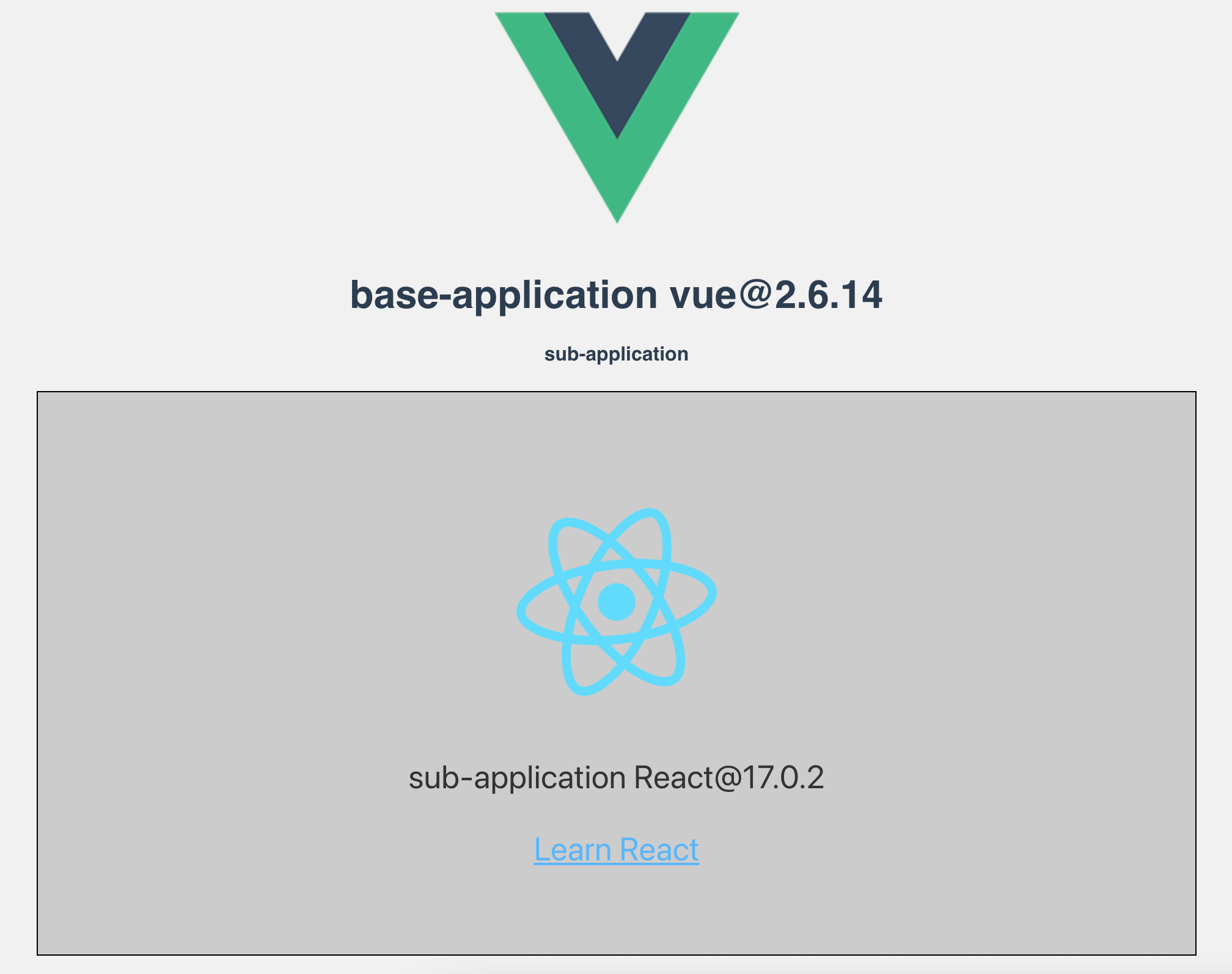
The above micro front-end rendering is completed, and the effect is as follows:
|
|
122
76
|
|
|
123
77
|
|
|
124
78
|
|
|
125
|
-
The above lists the usage of react and Vue framework. They can be combined freely. For example, the base application is react, the micro application is Vue, or the base application is Vue, the micro application is react, or both the base application and the micro application are react and Vue. The micro-app has no restrictions on the front-end framework, and any framework can be used as a base application to embed any type of micro application of the framework.
|
|
126
|
-
|
|
127
79
|
More detailed configuration can be viewed [Documentation](https://micro-zoe.github.io/micro-app/docs.html#/zh-cn/start).
|
|
128
80
|
|
|
129
81
|
# 🤝 Contribution
|
|
@@ -190,7 +142,13 @@ For more commands, see [DEVELP](https://github.com/micro-zoe/micro-app/blob/mast
|
|
|
190
142
|
<details>
|
|
191
143
|
<summary>Does it support vite?</summary>
|
|
192
144
|
|
|
193
|
-
Yes, please see [adapt vite](https://micro-zoe.github.io/micro-app/docs.html#/zh-cn/
|
|
145
|
+
Yes, please see [adapt vite](https://micro-zoe.github.io/micro-app/docs.html#/zh-cn/framework/vite) for details.
|
|
146
|
+
</details>
|
|
147
|
+
|
|
148
|
+
<details>
|
|
149
|
+
<summary>Does it support ssr?</summary>
|
|
150
|
+
|
|
151
|
+
Yes, please see [nextjs](https://micro-zoe.github.io/micro-app/docs.html#/zh-cn/framework/nextjs), [nuxtjs](https://micro-zoe.github.io/micro-app/docs.html#/zh-cn/framework/nuxtjs) for details.
|
|
194
152
|
</details>
|
|
195
153
|
|
|
196
154
|
# Contributors
|
package/README.zh-cn.md
CHANGED
|
@@ -30,20 +30,21 @@
|
|
|
30
30
|
# 📖简介
|
|
31
31
|
micro-app是京东零售推出的一款微前端框架,它基于类WebComponent进行渲染,从组件化的思维实现微前端,旨在降低上手难度、提升工作效率。它是目前接入微前端成本最低的框架,并且提供了JS沙箱、样式隔离、元素隔离、预加载、资源地址补全、插件系统、数据通信等一系列完善的功能。
|
|
32
32
|
|
|
33
|
-
micro-app
|
|
33
|
+
micro-app与技术栈无关,对前端框架没有限制,任何框架都可以作为基座应用嵌入任何类型的子应用。
|
|
34
34
|
|
|
35
|
-
#
|
|
36
|
-
|
|
35
|
+
# 如何使用
|
|
36
|
+
微前端分为基座应用(也可以叫做主应用)和子应用。
|
|
37
|
+
|
|
38
|
+
这里以一种比较常见的情况举例:基座应用使用vue框架,采用history路由,子应用使用react框架,采用hash路由,我们分别列出基座应用和子应用需要进行的修改,具体介绍micro-app的使用方式。
|
|
37
39
|
|
|
38
40
|
## 基座应用
|
|
39
|
-
> 基座应用以vue框架为例
|
|
40
41
|
|
|
41
|
-
1
|
|
42
|
+
**1、安装依赖**
|
|
42
43
|
```bash
|
|
43
44
|
yarn add @micro-zoe/micro-app
|
|
44
45
|
```
|
|
45
46
|
|
|
46
|
-
2
|
|
47
|
+
**2、在入口处引入**
|
|
47
48
|
```js
|
|
48
49
|
// main.js
|
|
49
50
|
import microApp from '@micro-zoe/micro-app'
|
|
@@ -51,63 +52,18 @@ import microApp from '@micro-zoe/micro-app'
|
|
|
51
52
|
microApp.start()
|
|
52
53
|
```
|
|
53
54
|
|
|
54
|
-
3
|
|
55
|
-
```js
|
|
56
|
-
// router.js
|
|
57
|
-
import Vue from 'vue'
|
|
58
|
-
import VueRouter from 'vue-router' // vue-router@3.x
|
|
59
|
-
import MyPage from './my-page.vue'
|
|
60
|
-
|
|
61
|
-
Vue.use(VueRouter)
|
|
62
|
-
|
|
63
|
-
const routes = [
|
|
64
|
-
{
|
|
65
|
-
// 👇 非严格匹配,/my-page/xxx 都将匹配到 MyPage 页面
|
|
66
|
-
path: '/my-page/*',
|
|
67
|
-
name: 'my-page',
|
|
68
|
-
component: MyPage,
|
|
69
|
-
},
|
|
70
|
-
]
|
|
71
|
-
|
|
72
|
-
export default routes
|
|
73
|
-
```
|
|
74
|
-
|
|
75
|
-
4、在`MyPage`页面中嵌入微前端应用
|
|
55
|
+
**3、在页面中嵌入微前端应用**
|
|
76
56
|
```html
|
|
77
57
|
<!-- my-page.vue -->
|
|
78
58
|
<template>
|
|
79
|
-
|
|
80
|
-
|
|
81
|
-
<!-- 👇 name为应用名称,url为html地址 -->
|
|
82
|
-
<micro-app name='app1' url='http://localhost:3000/' baseroute='/my-page'></micro-app>
|
|
83
|
-
</div>
|
|
59
|
+
<!-- 👇 name为应用名称,url为应用地址 -->
|
|
60
|
+
<micro-app name='my-app' url='http://localhost:3000/'></micro-app>
|
|
84
61
|
</template>
|
|
85
62
|
```
|
|
86
63
|
|
|
87
|
-
> url和子应用路由的关系请查看[路由一章](https://micro-zoe.github.io/micro-app/docs.html#/zh-cn/route)
|
|
88
|
-
|
|
89
64
|
## 子应用
|
|
90
|
-
> 子应用以react框架为例
|
|
91
|
-
|
|
92
|
-
1、设置基础路由(如果基座应用是history路由,子应用是hash路由,不需要设置基础路由,这一步可以省略)
|
|
93
65
|
|
|
94
|
-
|
|
95
|
-
// router.js
|
|
96
|
-
import { BrowserRouter, Switch, Route } from 'react-router-dom'
|
|
97
|
-
|
|
98
|
-
export default function AppRoute () {
|
|
99
|
-
return (
|
|
100
|
-
// 👇 设置基础路由,子应用可以通过window.__MICRO_APP_BASE_ROUTE__获取基座应用下发的baseroute
|
|
101
|
-
<BrowserRouter basename={window.__MICRO_APP_BASE_ROUTE__ || '/'}>
|
|
102
|
-
<Switch>
|
|
103
|
-
...
|
|
104
|
-
</Switch>
|
|
105
|
-
</BrowserRouter>
|
|
106
|
-
)
|
|
107
|
-
}
|
|
108
|
-
```
|
|
109
|
-
|
|
110
|
-
2、在webpack-dev-server的headers中设置跨域支持。
|
|
66
|
+
**在webpack-dev-server的headers中设置跨域支持。**
|
|
111
67
|
```js
|
|
112
68
|
devServer: {
|
|
113
69
|
headers: {
|
|
@@ -116,12 +72,10 @@ devServer: {
|
|
|
116
72
|
},
|
|
117
73
|
```
|
|
118
74
|
|
|
119
|
-
|
|
75
|
+
以上微前端基本渲染完成,效果如下:
|
|
120
76
|
|
|
121
77
|
<img src="https://img12.360buyimg.com/imagetools/jfs/t1/196940/34/1541/38365/610a14fcE46c21374/c321b9f8fa50a8fc.png" alt="result" width='900'/>
|
|
122
78
|
|
|
123
|
-
上面列出了react和vue框架的使用方式,它们是可以自由组合的,比如基座应用是react,子应用是vue,或者基座应用是vue,子应用是react,或者基座应用和子应用都是react、vue。 micro-app对前端框架没有限制,任何框架都可以作为基座应用嵌入任何类型框架的子应用。
|
|
124
|
-
|
|
125
79
|
更多详细配置可以查看[官网文档](https://micro-zoe.github.io/micro-app/docs.html#/zh-cn/start)
|
|
126
80
|
|
|
127
81
|
# 🤝 参与共建
|
|
@@ -189,7 +143,13 @@ yarn start # 访问 http://localhost:3000
|
|
|
189
143
|
<details>
|
|
190
144
|
<summary>支持vite吗?</summary>
|
|
191
145
|
|
|
192
|
-
支持,详情请查看[适配vite](https://micro-zoe.github.io/micro-app/docs.html#/zh-cn/
|
|
146
|
+
支持,详情请查看[适配vite](https://micro-zoe.github.io/micro-app/docs.html#/zh-cn/framework/vite)
|
|
147
|
+
</details>
|
|
148
|
+
|
|
149
|
+
<details>
|
|
150
|
+
<summary>支持ssr吗?</summary>
|
|
151
|
+
|
|
152
|
+
支持,详情请查看[nextjs](https://micro-zoe.github.io/micro-app/docs.html#/zh-cn/framework/nextjs)、[nuxtjs](https://micro-zoe.github.io/micro-app/docs.html#/zh-cn/framework/nuxtjs)
|
|
193
153
|
</details>
|
|
194
154
|
|
|
195
155
|
# 贡献者们
|
package/lib/index.d.ts
CHANGED
|
@@ -5,9 +5,10 @@
|
|
|
5
5
|
|
|
6
6
|
declare module '@micro-zoe/micro-app' {
|
|
7
7
|
export { default } from '@micro-zoe/micro-app/micro_app';
|
|
8
|
-
export { default as preFetch } from '@micro-zoe/micro-app/prefetch';
|
|
9
|
-
export { removeDomScope, pureCreateElement, version,
|
|
10
|
-
export { EventCenterForMicroApp } from '@micro-zoe/micro-app/interact';
|
|
8
|
+
export { default as preFetch, } from '@micro-zoe/micro-app/prefetch';
|
|
9
|
+
export { removeDomScope, pureCreateElement, version, } from '@micro-zoe/micro-app/libs/utils';
|
|
10
|
+
export { EventCenterForMicroApp, } from '@micro-zoe/micro-app/interact';
|
|
11
|
+
export { getActiveApps, getAllApps, } from '@micro-zoe/micro-app/create_app';
|
|
11
12
|
}
|
|
12
13
|
|
|
13
14
|
declare module '@micro-zoe/micro-app/micro_app' {
|
|
@@ -22,6 +23,7 @@ declare module '@micro-zoe/micro-app/micro_app' {
|
|
|
22
23
|
disableScopecss?: boolean;
|
|
23
24
|
disableSandbox?: boolean;
|
|
24
25
|
macro?: boolean;
|
|
26
|
+
ssr?: boolean;
|
|
25
27
|
lifeCycles?: lifeCyclesType;
|
|
26
28
|
plugins?: plugins;
|
|
27
29
|
fetch?: fetchType;
|
|
@@ -97,10 +99,22 @@ declare module '@micro-zoe/micro-app/libs/utils' {
|
|
|
97
99
|
*/
|
|
98
100
|
export function addProtocol(url: string): string;
|
|
99
101
|
/**
|
|
100
|
-
*
|
|
101
|
-
*
|
|
102
|
+
* format URL address
|
|
103
|
+
* note the scenes:
|
|
104
|
+
* 1. micro-app -> attributeChangedCallback
|
|
105
|
+
* 2. preFetch
|
|
106
|
+
*/
|
|
107
|
+
export function formatAppURL(url: string | null, appName?: string | null): string;
|
|
108
|
+
/**
|
|
109
|
+
* format name
|
|
110
|
+
* note the scenes:
|
|
111
|
+
* 1. micro-app -> attributeChangedCallback
|
|
112
|
+
* 2. event_center -> EventCenterForMicroApp -> constructor
|
|
113
|
+
* 3. event_center -> EventCenterForBaseApp -> all methods
|
|
114
|
+
* 4. preFetch
|
|
115
|
+
* 5. plugins
|
|
102
116
|
*/
|
|
103
|
-
export function
|
|
117
|
+
export function formatAppName(name: string | null): string;
|
|
104
118
|
/**
|
|
105
119
|
* Get valid address, such as https://xxx/xx/xx.html to https://xxx/xx/
|
|
106
120
|
* @param url app.url
|
|
@@ -144,9 +158,14 @@ declare module '@micro-zoe/micro-app/libs/utils' {
|
|
|
144
158
|
* @param target Accept cloned elements
|
|
145
159
|
* @param deep deep clone or transfer dom
|
|
146
160
|
*/
|
|
147
|
-
export function
|
|
161
|
+
export function cloneContainer<T extends Element, Q extends Element>(origin: T, target: Q, deep: boolean): void;
|
|
148
162
|
export function isInvalidQuerySelectorKey(key: string): boolean;
|
|
149
163
|
export function isUniqueElement(key: string): boolean;
|
|
164
|
+
/**
|
|
165
|
+
* get micro-app element
|
|
166
|
+
* @param target app container
|
|
167
|
+
*/
|
|
168
|
+
export function getRootContainer(target: HTMLElement | ShadowRoot): HTMLElement;
|
|
150
169
|
}
|
|
151
170
|
|
|
152
171
|
declare module '@micro-zoe/micro-app/interact' {
|
|
@@ -256,3 +275,66 @@ declare module '@micro-zoe/micro-app/interact' {
|
|
|
256
275
|
export {};
|
|
257
276
|
}
|
|
258
277
|
|
|
278
|
+
declare module '@micro-zoe/micro-app/create_app' {
|
|
279
|
+
import type { AppInterface, sourceType, SandBoxInterface } from '@micro-app/types';
|
|
280
|
+
export const appInstanceMap: Map<string, AppInterface>;
|
|
281
|
+
export interface CreateAppParam {
|
|
282
|
+
name: string;
|
|
283
|
+
url: string;
|
|
284
|
+
ssrUrl?: string;
|
|
285
|
+
scopecss: boolean;
|
|
286
|
+
useSandbox: boolean;
|
|
287
|
+
macro?: boolean;
|
|
288
|
+
inline?: boolean;
|
|
289
|
+
baseroute?: string;
|
|
290
|
+
container?: HTMLElement | ShadowRoot;
|
|
291
|
+
}
|
|
292
|
+
export default class CreateApp implements AppInterface {
|
|
293
|
+
umdMode: boolean;
|
|
294
|
+
isPrefetch: boolean;
|
|
295
|
+
name: string;
|
|
296
|
+
url: string;
|
|
297
|
+
ssrUrl: string;
|
|
298
|
+
container: HTMLElement | ShadowRoot | null;
|
|
299
|
+
inline: boolean;
|
|
300
|
+
scopecss: boolean;
|
|
301
|
+
useSandbox: boolean;
|
|
302
|
+
macro: boolean;
|
|
303
|
+
baseroute: string;
|
|
304
|
+
source: sourceType;
|
|
305
|
+
sandBox: SandBoxInterface | null;
|
|
306
|
+
constructor({ name, url, ssrUrl, container, inline, scopecss, useSandbox, macro, baseroute, }: CreateAppParam);
|
|
307
|
+
loadSourceCode(): void;
|
|
308
|
+
/**
|
|
309
|
+
* When resource is loaded, mount app if it is not prefetch or unmount
|
|
310
|
+
*/
|
|
311
|
+
onLoad(html: HTMLElement): void;
|
|
312
|
+
/**
|
|
313
|
+
* Error loading HTML
|
|
314
|
+
* @param e Error
|
|
315
|
+
*/
|
|
316
|
+
onLoadError(e: Error): void;
|
|
317
|
+
/**
|
|
318
|
+
* mount app
|
|
319
|
+
* @param container app container
|
|
320
|
+
* @param inline js runs in inline mode
|
|
321
|
+
* @param baseroute route prefix, default is ''
|
|
322
|
+
*/
|
|
323
|
+
mount(container?: HTMLElement | ShadowRoot, inline?: boolean, baseroute?: string): void;
|
|
324
|
+
/**
|
|
325
|
+
* unmount app
|
|
326
|
+
* @param destroy completely destroy, delete cache resources
|
|
327
|
+
*/
|
|
328
|
+
unmount(destroy: boolean): void;
|
|
329
|
+
actionsForCompletelyDestory(): void;
|
|
330
|
+
/**
|
|
331
|
+
* app rendering error
|
|
332
|
+
* @param e Error
|
|
333
|
+
*/
|
|
334
|
+
onerror(e: Error): void;
|
|
335
|
+
getAppStatus(): string;
|
|
336
|
+
}
|
|
337
|
+
export function getActiveApps(): string[];
|
|
338
|
+
export function getAllApps(): string[];
|
|
339
|
+
}
|
|
340
|
+
|