@michengai/dsh-btw 1.3.3 → 1.3.6
This diff represents the content of publicly available package versions that have been released to one of the supported registries. The information contained in this diff is provided for informational purposes only and reflects changes between package versions as they appear in their respective public registries.
- package/CHANGELOG.md +10 -0
- package/CHANGELOG.zh-CN.md +10 -0
- package/README.de.md +221 -0
- package/README.en.md +222 -0
- package/README.es.md +221 -0
- package/README.fr.md +221 -0
- package/README.ja.md +221 -0
- package/README.md +111 -109
- package/README.pt.md +221 -0
- package/README.ru.md +221 -0
- package/README.zh-CN.md +6 -3
- package/lib/client.js +774 -167
- package/lib/index.js +779 -138
- package/lib/types/client/SelectionAsk.d.ts +1 -4
- package/lib/types/client/trigger-source.d.ts +2 -2
- package/lib/types/locales/de.d.ts +2 -0
- package/lib/types/locales/en.d.ts +2 -0
- package/lib/types/locales/es.d.ts +2 -0
- package/lib/types/locales/fr.d.ts +2 -0
- package/lib/types/locales/ja.d.ts +2 -0
- package/lib/types/locales/pt.d.ts +2 -0
- package/lib/types/locales/ru.d.ts +2 -0
- package/lib/types/locales/zh.d.ts +97 -0
- package/lib/types/locales.d.ts +11 -99
- package/locale/de.json +7 -0
- package/locale/en.json +2 -1
- package/locale/es.json +7 -0
- package/locale/fr.json +7 -0
- package/locale/ja.json +7 -0
- package/locale/pt.json +7 -0
- package/locale/ru.json +7 -0
- package/locale/zh.json +2 -1
- package/package.json +23 -1
package/CHANGELOG.md
CHANGED
|
@@ -1,5 +1,15 @@
|
|
|
1
1
|
# Changelog
|
|
2
2
|
|
|
3
|
+
## [1.3.6] - 2026-11-09
|
|
4
|
+
|
|
5
|
+
- **Full support for all 8 official DeepSeek Harness languages**: Natively provides faithful localized text for Chinese, English, Japanese, Spanish, French, German, Russian, and Portuguese (`zh`, `en`, `ja`, `es`, `fr`, `de`, `ru`, `pt`). From host `0.2.2-rc.1` onwards, the text-selection menu, side-ask bubbles, action buttons, and settings configuration card dynamically adapt to the selected language; earlier hosts safely fall back to Chinese and English.
|
|
6
|
+
- **Dedicated full-fidelity documentation for all 8 languages**: Ships comprehensive localized README documentation variants for all supported languages, covering quick-action tables, configuration rules, and development guidelines.
|
|
7
|
+
- **Plugin metadata enrichment and interface refinement**: Registers complete author information, keywords, and icon exports while pruning internal redundant properties to ensure responsive, lightweight interactions.
|
|
8
|
+
|
|
9
|
+
## [1.3.5] - 2026-11-06
|
|
10
|
+
|
|
11
|
+
- Fix side questions failing to start when DSH is opened over a plain-HTTP LAN address: browsers do not expose `crypto.randomUUID` in a non-secure context, so asking a side question failed with an error. Request ids now come from a random source that works in every context, so LAN access behaves the same as local access (#25).
|
|
12
|
+
|
|
3
13
|
## [1.3.3] - 2026-11-04
|
|
4
14
|
|
|
5
15
|
### Compatibility & Dependencies
|
package/CHANGELOG.zh-CN.md
CHANGED
|
@@ -1,5 +1,15 @@
|
|
|
1
1
|
# 更新日志
|
|
2
2
|
|
|
3
|
+
## [1.3.6] - 2026-11-09
|
|
4
|
+
|
|
5
|
+
- **全量支持 DeepSeek Harness 官方 8 门内置语言**:深度适配官方多语言架构,完整支持中文、英语、日语、西班牙语、法语、德语、俄语与葡萄牙语(`zh`, `en`, `ja`, `es`, `fr`, `de`, `ru`, `pt`)。自宿主 `0.2.2-rc.1` 起,不论宿主切换为何种语言,划词旁问悬浮条、独立答案气泡、操作按钮与插件配置面板均自动以对应语言原生呈现;更早的宿主版本安全回退为中文与英文。
|
|
6
|
+
- **随附全套多语言专属用户指南**:为 8 门内置语言分别提供全保真、地道的多语言 README 用户文档,完整包含功能概览、操作速查表、放行工具与提示词设置规则以及本地开发说明。
|
|
7
|
+
- **完善插件元数据声明与界面清理**:补齐作者信息、技术分类与包图标声明;全面清理设置界面与内部冗余项,保持输入与旁问交互轻量敏捷。
|
|
8
|
+
|
|
9
|
+
## [1.3.5] - 2026-11-06
|
|
10
|
+
|
|
11
|
+
- 修复在局域网明文 HTTP 地址访问 DSH 时旁问无法启动的问题:该环境下浏览器不提供生成请求标识所需的 `crypto.randomUUID`,点击旁问会直接报错;现改用任何上下文都可用的随机源生成请求标识,局域网访问与本地访问体验一致(#25)。
|
|
12
|
+
|
|
3
13
|
## [1.3.3] - 2026-11-04
|
|
4
14
|
|
|
5
15
|
### 兼容性与依赖升级
|
package/README.de.md
ADDED
|
@@ -0,0 +1,221 @@
|
|
|
1
|
+
<p align="center">
|
|
2
|
+
<img src="https://raw.githubusercontent.com/MichengAI/dsh-btw/2d8dd7752cec1b29dd705969eaa932635ba0bf4f/assets/branding/dsh-btw-banner.png" alt="DSH BTW" width="100%">
|
|
3
|
+
</p>
|
|
4
|
+
|
|
5
|
+
<div align="center">
|
|
6
|
+
|
|
7
|
+
# DSH BTW
|
|
8
|
+
|
|
9
|
+
**Spontane Nebenfragen in der aktuellen DeepSeek Harness-Sitzung stellen: nur antworten, keine Tools ausführen**
|
|
10
|
+
|
|
11
|
+
[简体中文](README.zh-CN.md) · [English](README.en.md) · [日本語](README.ja.md) · [Español](README.es.md) · [Français](README.fr.md) · [Deutsch](README.de.md) · [Русский](README.ru.md) · [Português](README.pt.md)
|
|
12
|
+
|
|
13
|
+
[Benutzeroberfläche](#benutzeroberfläche) · [Installation](#installation) · [Nutzung](#nutzung) · [Änderungsprotokoll](CHANGELOG.md) · [Apache-2.0](LICENSE)
|
|
14
|
+
|
|
15
|
+
[](LICENSE)
|
|
16
|
+
[](https://github.com/deepseek-ai/deepseek-harness)
|
|
17
|
+
[](https://nodejs.org/)
|
|
18
|
+
|
|
19
|
+
</div>
|
|
20
|
+
|
|
21
|
+
> DSH BTW ist ein von der Community gepflegtes DeepSeek Harness-Plugin und kein offizielles Produkt von DeepSeek AI. Geben Sie in der aktuellen Konversation `/btw Ihre Frage` ein, um eine kontextbezogene Antwort in einer separaten Sprechblase zu erhalten, ohne die Hauptaufgabe zu unterbrechen. Unterstützt DSH Web sowie Desktop-Apps, die DSH Web integrieren. Ab Version `1.0.0` werden nicht unterstützte Host-Versionen durch die Versionsschranke sicher abgefangen (installierte Konfigurationen und Konversationsdaten bleiben erhalten).
|
|
22
|
+
|
|
23
|
+
## Funktionsübersicht
|
|
24
|
+
|
|
25
|
+
- **Kontextbezogene Nebenfragen**: Erklären Sie Konzepte, fassen Sie Ergebnisse zusammen oder klären Sie spontane Fragen zum aktuellen Chatverlauf.
|
|
26
|
+
- **Nur Antworten, keine Ausführung**: Liest keine neuen Dateien, ruft kein Internet auf, führt keine Befehle aus und ändert keinen Code.
|
|
27
|
+
- **Unabhängige Antwortblasen**: Unterstützt Markdown, mathematische Formeln, Kopieren, Einklappen, Ausklappen und Schließen. Mehrere Antworten können gleichzeitig betrachtet werden.
|
|
28
|
+
- **Hauptaufgabe ungestört weiterführen**: Nebenfragen werden separat beantwortet und standardmäßig nicht in den Hauptchat geschrieben.
|
|
29
|
+
- **Rückmeldung nur auf Wunsch**: Bitten Sie in Ihrer Frage explizit darum („Sende die Antwort an die Hauptkonversation zurück“), damit per `send_message` eine vollständige Antwort übertragen wird. Ohne Aufforderung erfolgt keine Rückübertragung.
|
|
30
|
+
- **Jederzeit abbrechen**: Das Schließen einer antwortenden Blase bricht diese Nebenfrage sofort ab.
|
|
31
|
+
- **Umfassende Lokalisierung & Themes**: Folgt dem hellen und dunklen DSH-Design. Ab Host `0.2.2-rc.1` werden alle 8 offiziellen Sprachen (Deutsch, Englisch, Chinesisch, Japanisch, Spanisch, Französisch, Russisch, Portugiesisch) nativ unterstützt; frühere Hosts `0.2.0`〜`0.2.1` fallen sicher auf Chinesisch und Englisch zurück.
|
|
32
|
+
|
|
33
|
+
## Benutzeroberfläche
|
|
34
|
+
|
|
35
|
+
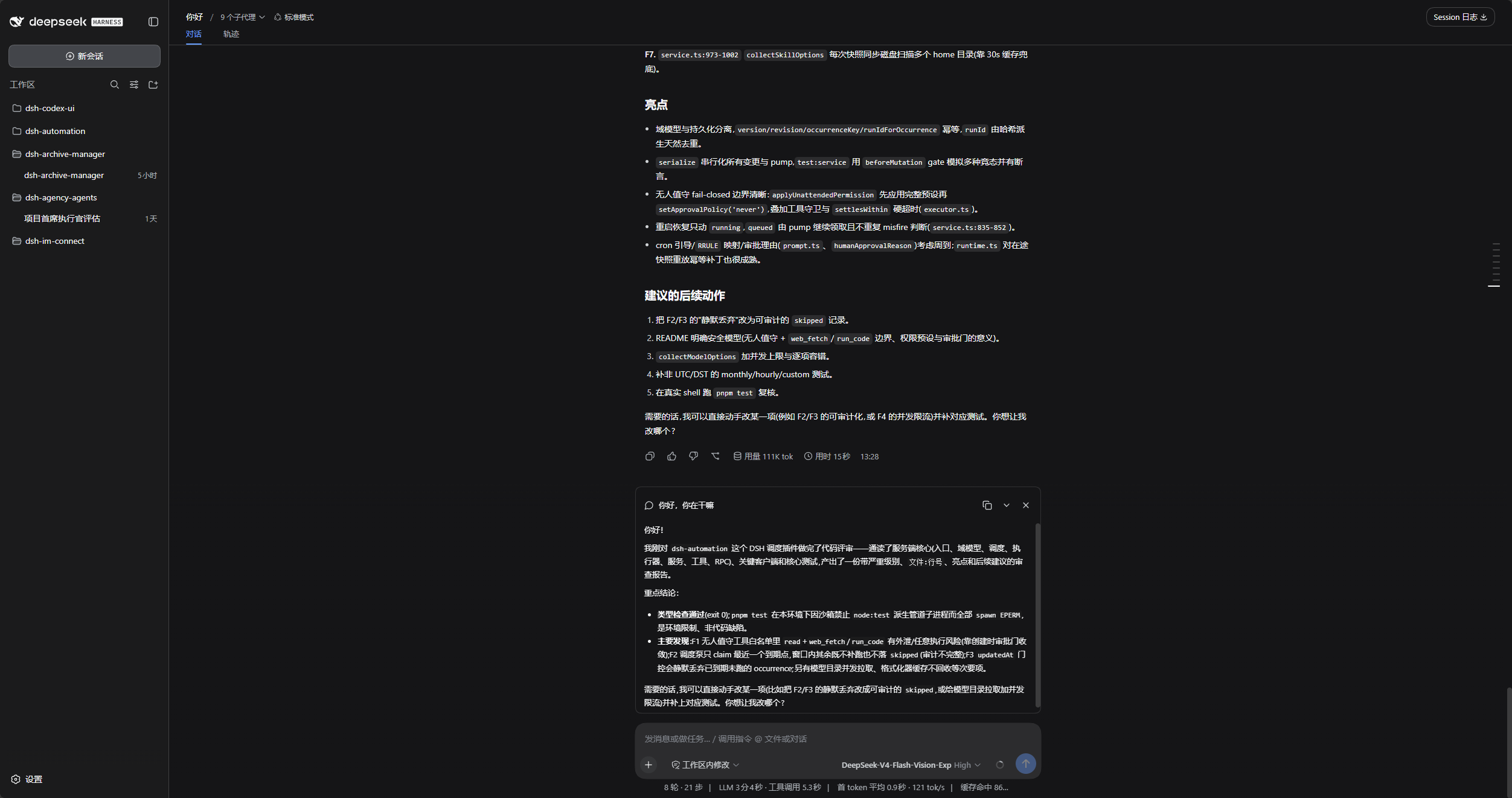
### Nebenfragen im Standard-DSH
|
|
36
|
+
|
|
37
|
+
Die Hauptkonversation bleibt an ihrem Platz, während die Nebenfrage-Antwort direkt über dem Eingabefeld erscheint.
|
|
38
|
+
|
|
39
|
+
|
|
40
|
+
|
|
41
|
+
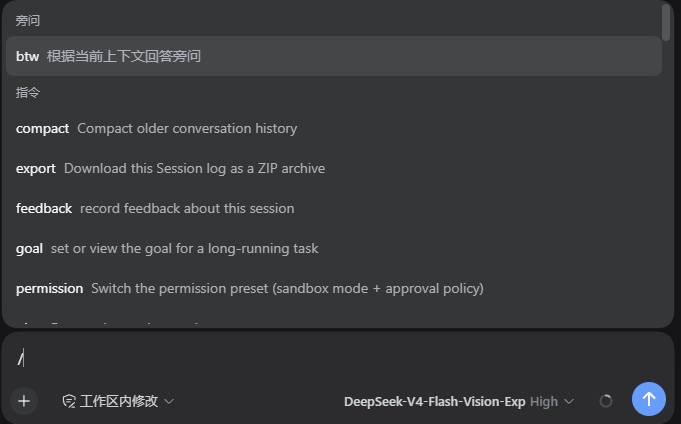
### Befehlsmenü
|
|
42
|
+
|
|
43
|
+
Geben Sie `/` ein und wählen Sie `btw` unter Befehle oder tippen Sie direkt `/btw Ihre Frage`.
|
|
44
|
+
|
|
45
|
+
|
|
46
|
+
|
|
47
|
+
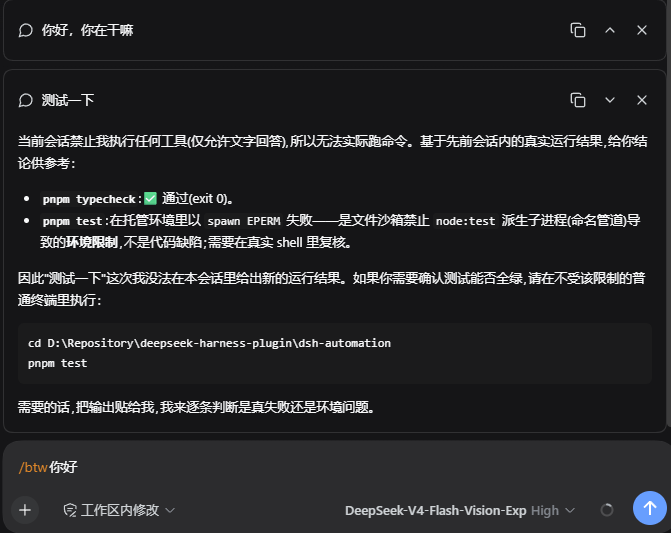
### Unabhängige Antwortblasen
|
|
48
|
+
|
|
49
|
+
Jede Nebenfrage besitzt eine eigene Blase mit Schaltflächen zum Kopieren, Einklappen/Ausklappen und Schließen in der oberen rechten Ecke.
|
|
50
|
+
|
|
51
|
+
|
|
52
|
+
|
|
53
|
+
### Einstellungen für Nebenfragen
|
|
54
|
+
|
|
55
|
+
Öffnen Sie **Plugins**, wählen Sie `@michengai/dsh-btw` aus und passen Sie Tool-Whitelist sowie Prompts direkt auf der Detailseite an.
|
|
56
|
+
|
|
57
|
+

|
|
58
|
+
|
|
59
|
+
### Diagramme in Nebenfragen zeichnen
|
|
60
|
+
|
|
61
|
+
Mit `pele_draw` auf der Whitelist kann eine Nebenfrage Diagramme generieren, ohne den Hauptchat zu verändern.
|
|
62
|
+
|
|
63
|
+

|
|
64
|
+
|
|
65
|
+
## DSH Produkt-Ökosystem
|
|
66
|
+
|
|
67
|
+
Für eine vollwertige Desktop-Workbench laden Sie [DSH Codex Desktop](https://github.com/MichengAI/dsh-codex-desktop/releases) herunter. In bestehenden [DeepSeek Harness](https://github.com/deepseek-ai/deepseek-harness)-Umgebungen können Plugins nach Bedarf installiert werden. Im Folgenden sind 11 eigens entwickelte Plugins aufgeführt; der tatsächliche Lieferumfang der Desktop-Version richtet sich nach den entsprechenden Versionshinweisen und dem integrierten Katalog.
|
|
68
|
+
|
|
69
|
+
| Plugin | Zweck |
|
|
70
|
+
| --- | --- |
|
|
71
|
+
| [Codex UI](https://github.com/MichengAI/dsh-codex-ui) | Projekte & Sitzungen organisieren, Aufgabensuche und Runden-Navigation |
|
|
72
|
+
| [Agency Agents](https://github.com/MichengAI/dsh-agency-agents) | Fachagenten je nach Aufgabe auswählen und aufrufen |
|
|
73
|
+
| [Skills Manager](https://github.com/MichengAI/dsh-skills-manager) | Lokale Skills finden, aktivieren, erstellen und importieren |
|
|
74
|
+
| [Archive Manager](https://github.com/MichengAI/dsh-archive-manager) | Archivierte Sitzungen durchsuchen, wiederherstellen oder bereinigen |
|
|
75
|
+
| [IM Connect](https://github.com/MichengAI/dsh-im-connect) | Aufgaben über Messenger-Plattformen zuweisen und Antworten erhalten |
|
|
76
|
+
| [Automation](https://github.com/MichengAI/dsh-automation) | Geplante Aufgaben ausführen und Ausführungsverläufe einsehen |
|
|
77
|
+
| [BTW](https://github.com/MichengAI/dsh-btw) | Spontane Nebenfragen im Kontext stellen, ohne die Hauptaufgabe zu stören |
|
|
78
|
+
| [Simplify](https://github.com/MichengAI/dsh-simplify) | Git-Änderungsbereiche mit `/simplify` aufräumen und optimieren |
|
|
79
|
+
| [PUA](https://github.com/MichengAI/dsh-pua) | Agenten bei Fehlern anleiten, Ansätze zu korrigieren und Ergebnisse zu prüfen |
|
|
80
|
+
| [Code Review](https://github.com/MichengAI/dsh-code-review) | Unabhängige Code-Reviews mit `/review` starten und Berichte im Chat erhalten |
|
|
81
|
+
| [Codex Pet](https://github.com/MichengAI/dsh-codex-pet) | Sitzungsbenachrichtigungen, Tool-Genehmigungen und Antworten via Desktop-Pet |
|
|
82
|
+
|
|
83
|
+
## Voraussetzungen
|
|
84
|
+
|
|
85
|
+
- DeepSeek Harness installiert.
|
|
86
|
+
- Host-Kompatibilitätsbereich: DeepSeek Harness `0.2.x`-Gesamtreihe (`>=0.2.0-rc.1 <0.3.0-0`), verifiziert mit `0.2.0-rc.1`, `0.2.0-rc.2`, `0.2.1-rc.1`〜`0.2.1-rc.5`, `0.2.2-rc.1`. Upgrades innerhalb derselben Generation erfordern keine neuen Plugin-Releases.
|
|
87
|
+
- Sprachunterstützung: Ab DeepSeek Harness `0.2.2-rc.1` sind alle 8 integrierten Sprachen nativ auswählbar. Auf `0.2.0`〜`0.2.1`-Hosts bleiben zusätzlich registrierte Sprachwörterbücher inaktiv und die Oberfläche fällt sicher auf Chinesisch und Englisch zurück.
|
|
88
|
+
- Ältere Hosts vor `0.2.0-rc.1` werden nicht mehr unterstützt. Destruktive Änderungen der `0.3.0`-Generation werden durch die Versionsschranke abgefangen. Benutzer von `0.1.x` sollten Version `0.1.24` installieren.
|
|
89
|
+
- Node.js 22+, Befehl `dsh` im Terminal verfügbar.
|
|
90
|
+
|
|
91
|
+
## Installation
|
|
92
|
+
|
|
93
|
+
Die folgenden Befehle verwenden das Profil `web`. Bitte an die tatsächliche Umgebung anpassen. Deaktivieren Sie vor der Installation andere Plugins, die den Befehl `/btw` bereitstellen.
|
|
94
|
+
|
|
95
|
+
### Installation durch Agenten (Empfohlen)
|
|
96
|
+
|
|
97
|
+
Senden Sie die folgende Anweisung an einen beliebigen Agenten mit Terminalzugriff:
|
|
98
|
+
|
|
99
|
+
```text
|
|
100
|
+
Bitte installieren Sie das DSH-Plugin @michengai/dsh-btw im lokalen Web-Profil mit: dsh plugin --profile web add @michengai/dsh-btw@latest --registry=https://registry.npmjs.org/. Führen Sie danach dsh --profile web --dump-config aus, um sicherzustellen, dass michengai-btw enthalten ist, und erklären Sie mir, wie ich DSH neu lade und verwende.
|
|
101
|
+
```
|
|
102
|
+
|
|
103
|
+
### Manuelle Installation via npm
|
|
104
|
+
|
|
105
|
+
```powershell
|
|
106
|
+
[Console]::OutputEncoding = [System.Text.Encoding]::UTF8
|
|
107
|
+
$OutputEncoding = [System.Text.Encoding]::UTF8
|
|
108
|
+
|
|
109
|
+
dsh plugin --profile web add @michengai/dsh-btw@latest --registry=https://registry.npmjs.org/
|
|
110
|
+
```
|
|
111
|
+
|
|
112
|
+
### Neu laden
|
|
113
|
+
|
|
114
|
+
Installieren oder aktualisieren Sie nach Abschluss laufender Aufgaben; Desktop-Anwendungen starten unter Umständen automatisch neu. Falls die Änderungen nicht wirksam werden, nutzen Sie die Neulade-Funktion der Desktop-App oder starten Sie den `dsh web`-Dienst neu. Das reine Neuladen im Browser genügt nicht.
|
|
115
|
+
|
|
116
|
+
Auf Hosts vor `0.2.0` sowie `0.2.1` alpha wird die Installation von `@latest` durch die Versionsschranke abgelehnt und das Plugin nicht ausgeführt. Für `0.1.x` installieren Sie bitte `0.1.24`. Bestehende Konfigurationen und Konversationsaufzeichnungen bleiben erhalten.
|
|
117
|
+
|
|
118
|
+
## Nutzung
|
|
119
|
+
|
|
120
|
+
### Ausgewählten Text befragen
|
|
121
|
+
|
|
122
|
+
Markieren Sie Text innerhalb einer Nachricht und wählen Sie in der Leiste darüber „Zu diesem Text fragen“. Geben Sie Ihre Frage ein und drücken Sie die Eingabetaste oder klicken Sie auf „Dies erklären“. Shift+Eingabe für einen Zeilenumbruch, Esc zum Abbrechen. Die Antwort erscheint in einer separaten BTW-Sprechblase; das Originalzitat kann ausgeklappt werden.
|
|
123
|
+
|
|
124
|
+
- Unterstützt Standardabsätze, Listen und Codeblöcke; bis zu 8.000 UTF-16-Codeeinheiten pro Zitat (inklusive Leerzeichen). Bei Überschreitung erfolgt ein Hinweis ohne Abschneiden des Textes.
|
|
125
|
+
- Das Zitat wird beim Markieren fixiert und ändert sich auch bei weiterer Textgenerierung nicht. Der restliche Kontext verwendet den beim Senden fertiggestellten Stand des Hauptchats.
|
|
126
|
+
- Verbraucht oder leert den Entwurf im Haupteingabefeld nicht; nachrichtenübergreifende Markierungen, Eingabefelder und Tool-Ausgaben bieten dieses Menü nicht an.
|
|
127
|
+
- Die Leiste bietet zudem „Zur Konversation hinzufügen“, womit das Zitat an den bestehenden Entwurf angehängt und das Eingabefeld fokussiert wird, ohne automatisch zu senden. Während des Sendens wird das Hinzufügen pausiert. Ein Rechtsklick behält das Browser-Standardmenü bei.
|
|
128
|
+
- Unterstützt Tastaturmarkierungen innerhalb von Textelementen; nach dem Loslassen von Shift wird die Leiste fokussiert. Browser ohne Popover-API-Unterstützung fallen auf ein fixiertes Overlay (fixed) zurück.
|
|
129
|
+
- Bereichstrennung zu `dsh-better-sidebar`: BTW verarbeitet ausschließlich den Chat-Körper; Dateivorschau und Editor behalten die ursprüngliche Option der Seitenleiste bei, wodurch doppelte Leisten vermieden werden.
|
|
130
|
+
- Neue Einstiegspunkte stützen sich auf Host-DOM-Markierungen. Bei nicht erkannten Layouts bleibt das reguläre Rechtsklick-Verhalten bestehen und `/btw` kann weiterhin genutzt werden.
|
|
131
|
+
|
|
132
|
+
### Befehlsbasierte Nebenfrage
|
|
133
|
+
|
|
134
|
+
In einer Sitzung mit bestehendem Kontext:
|
|
135
|
+
|
|
136
|
+
```text
|
|
137
|
+
/btw Fasse den vorherigen Lösungsansatz in einem einzigen Satz zusammen
|
|
138
|
+
```
|
|
139
|
+
|
|
140
|
+
| Ziel | Aktion |
|
|
141
|
+
| --- | --- |
|
|
142
|
+
| Nebenfrage stellen | `/btw Ihre Frage` eingeben und senden oder `btw` aus dem Menü `/` wählen |
|
|
143
|
+
| Antwort ansehen | Warten, bis die unabhängige Blase über dem Eingabefeld antwortet |
|
|
144
|
+
| Antwort kopieren | Kopiersymbol in der oberen rechten Ecke der Blase anklicken |
|
|
145
|
+
| Ein- oder ausklappen | Falt-Symbol in der oberen rechten Ecke anklicken |
|
|
146
|
+
| Nebenfrage abbrechen | Blase während der Generierung schließen (Hauptaufgabe läuft weiter) |
|
|
147
|
+
| Blase entfernen | Abgeschlossene Blasen schließen |
|
|
148
|
+
| Weiter fragen | Erneut `/btw Ihre Frage` eingeben; jede Nebenfrage ist vollkommen unabhängig |
|
|
149
|
+
|
|
150
|
+
Falls Befehle ausgeführt, Code geändert oder die Hauptaufgabe fortgesetzt werden soll, senden Sie dies über die reguläre Konversation. BTW antwortet ausschließlich auf Basis des bestehenden Kontexts.
|
|
151
|
+
|
|
152
|
+
BTW akzeptiert ausschließlich Text. Sind im Eingabefeld Bilder oder Dateien angehängt, wird die Nebenfrage abgewiesen und Text sowie Anhänge bleiben erhalten; entfernen Sie die Anhänge und versuchen Sie es erneut.
|
|
153
|
+
|
|
154
|
+
### Anwendungshinweise
|
|
155
|
+
|
|
156
|
+
- Jede Nebenfrage ist unabhängig und bezieht sich auf die beim Absenden abgeschlossenen Inhalte der Hauptsitzung; sie enthält keine gerade generierten Antworten oder vorherige Nebenfragen.
|
|
157
|
+
- Beim Aktualisieren der Seite bleiben die Sprechblasen nicht erhalten; kopieren Sie benötigte Antworten rechtzeitig.
|
|
158
|
+
|
|
159
|
+
## Konfiguration
|
|
160
|
+
|
|
161
|
+
Die folgenden zwei Optionen sind optional. Bleiben beide leer, gilt das Standardverhalten: reine Textantworten unter Verwendung des integrierten Prompts.
|
|
162
|
+
|
|
163
|
+
Öffnen Sie **Plugins**, suchen Sie `@michengai/dsh-btw` und klicken Sie auf **Konfiguration**. Die Seite befindet sich an derselben Stelle wie bei `dsh-subagent-default-model`.
|
|
164
|
+
|
|
165
|
+
| Option | Funktion |
|
|
166
|
+
| --- | --- |
|
|
167
|
+
| **Erlaubte Tools** | Namen von Tools, die die Nebenfrage neben `send_message` aufrufen darf, eines pro Zeile (z. B. `pele_draw`). Leer erlaubt nur Text (Standardwert). |
|
|
168
|
+
| **Benutzerdefinierter Prompt** | Ersetzt den integrierten Prompt. Das Feld ist mit dem Standardtext vorbefüllt, sodass Sie ihn direkt anpassen können; unverändertes Speichern stellt den Standard wieder her. |
|
|
169
|
+
|
|
170
|
+
Hinweise:
|
|
171
|
+
|
|
172
|
+
- Die Whitelist erweitert ausschließlich die Aufrufmöglichkeiten der Nebenfrage und schränkt die Hauptkonversation niemals ein; die Angabe nicht existierender Tools bewirkt nichts.
|
|
173
|
+
- `send_message` kann nicht in die Whitelist eingetragen werden. Das Zurücksenden an die Hauptkonversation ist stets nur an die übergeordnete Sitzung der Nebenfrage erlaubt und kann nicht auf beliebige Agenten umgeleitet werden.
|
|
174
|
+
- Der benutzerdefinierte Prompt ersetzt nur das Instruktionspräfix; Berechtigungshinweise und Rückkanalbeschreibungen werden stets am Ende angehängt, um Missverständnisse des Modells zu vermeiden.
|
|
175
|
+
- Änderungen greifen ab der nächsten Nebenfrage sofort, ohne dass das Plugin neu geladen werden muss.
|
|
176
|
+
- Da erlaubte Tools namentlich aufgeführt werden, verändert eine erweiterte Whitelist den Prompt der Nebenfrage. Da dies zur abschließenden Benutzernachricht gehört, bleiben Tool-Definitionen und System-Prompts bytegenau mit der Hauptsitzung identisch, sodass die Wiederverwendung des Prompt-Caches unberührt bleibt.
|
|
177
|
+
|
|
178
|
+
### Beispiel: Zeichnen in Nebenfragen
|
|
179
|
+
|
|
180
|
+
[`dsh-pele`](https://github.com/hesheng01/dsh-pele) stellt das Tool `pele_draw` bereit, um Mermaid-Quellcode als SVG-Diagrammkarten in der Sitzung zu rendern. Trägt man `pele_draw` in **Erlaubte Tools** ein, kann die Nebenfrage ebenfalls Diagramme erstellen.
|
|
181
|
+
|
|
182
|
+
> Hinweis: `dsh-pele` ist ein neues Plugin, das noch nicht auf npm veröffentlicht und nicht im Plugin-Marktplatz gelistet ist. Zur Installation klonen Sie das GitHub-Repository und fügen das Verzeichnis `plugin` Ihrem Profil hinzu:
|
|
183
|
+
>
|
|
184
|
+
> ```bash
|
|
185
|
+
> git clone https://github.com/hesheng01/dsh-pele.git
|
|
186
|
+
> dsh plugin --profile <profile> add <absoluter_pfad>/dsh-pele/plugin
|
|
187
|
+
> ```
|
|
188
|
+
>
|
|
189
|
+
> Beim ersten Einbinden ist ein Neustart des Hosts erforderlich.
|
|
190
|
+
|
|
191
|
+
## Deinstallation
|
|
192
|
+
|
|
193
|
+
```powershell
|
|
194
|
+
[Console]::OutputEncoding = [System.Text.Encoding]::UTF8
|
|
195
|
+
$OutputEncoding = [System.Text.Encoding]::UTF8
|
|
196
|
+
|
|
197
|
+
dsh plugin --profile web remove @michengai/dsh-btw
|
|
198
|
+
```
|
|
199
|
+
|
|
200
|
+
Wird nach dem Neuladen von DSH wirksam. Das Deaktivieren oder Aktualisieren löscht keine Daten der Hauptkonversation.
|
|
201
|
+
|
|
202
|
+
## Lokale Entwicklung
|
|
203
|
+
|
|
204
|
+
```powershell
|
|
205
|
+
[Console]::OutputEncoding = [System.Text.Encoding]::UTF8
|
|
206
|
+
$OutputEncoding = [System.Text.Encoding]::UTF8
|
|
207
|
+
npm ci --ignore-scripts
|
|
208
|
+
npm run check
|
|
209
|
+
```
|
|
210
|
+
|
|
211
|
+
`npm run check` führt Typprüfung, Tests und den Build aus.
|
|
212
|
+
|
|
213
|
+
Die Entwicklungs- und Build-Basislinie ist `0.2.2-rc.1`. `npm run test:compat` kompiliert mit dieser Basislinie und führt die Testsuite auf den isolierten Host-Versionen aus. DOM-Komponententests ersetzen keine manuelle Browserabnahme.
|
|
214
|
+
|
|
215
|
+
Sowohl GitHub als auch npm enthalten das ausführbare Verzeichnis `lib`; führen Sie nach Änderungen am Quellcode vor dem Commit `npm run build` aus.
|
|
216
|
+
|
|
217
|
+
Für die Installation aus dem Quellcode führen Sie im Projektverzeichnis `dsh plugin --profile web add . --ignore-scripts` aus und laden Sie DSH neu.
|
|
218
|
+
|
|
219
|
+
## Lizenz
|
|
220
|
+
|
|
221
|
+
[Apache-2.0](LICENSE) © 2026 MichengAI.
|
package/README.en.md
ADDED
|
@@ -0,0 +1,222 @@
|
|
|
1
|
+
<p align="center">
|
|
2
|
+
<img src="https://raw.githubusercontent.com/MichengAI/dsh-btw/2d8dd7752cec1b29dd705969eaa932635ba0bf4f/assets/branding/dsh-btw-banner.png" alt="DSH BTW" width="100%">
|
|
3
|
+
</p>
|
|
4
|
+
|
|
5
|
+
<div align="center">
|
|
6
|
+
|
|
7
|
+
# DSH BTW
|
|
8
|
+
|
|
9
|
+
**Ask a side question in DeepSeek Harness. Answers only, no tool execution.**
|
|
10
|
+
|
|
11
|
+
[简体中文](README.zh-CN.md) · [English](README.en.md) · [日本語](README.ja.md) · [Español](README.es.md) · [Français](README.fr.md) · [Deutsch](README.de.md) · [Русский](README.ru.md) · [Português](README.pt.md)
|
|
12
|
+
|
|
13
|
+
[Screenshots](#screenshots) · [Installation](#installation) · [Usage](#usage) · [Changelog](CHANGELOG.md) · [Apache-2.0](LICENSE)
|
|
14
|
+
|
|
15
|
+
[](LICENSE)
|
|
16
|
+
[](https://github.com/deepseek-ai/deepseek-harness)
|
|
17
|
+
[](https://nodejs.org/)
|
|
18
|
+
|
|
19
|
+
</div>
|
|
20
|
+
|
|
21
|
+
> DSH BTW is a community-maintained DeepSeek Harness plugin, not an official DeepSeek AI product. Type `/btw your question` in the current conversation to get a context-aware answer in an independent bubble without interrupting the main task. Supports DSH Web and desktop apps that include DSH Web. From `1.0.0`, hosts outside the supported list are rejected by the version gate and the plugin will not run; installed configuration and main-conversation records are kept.
|
|
22
|
+
|
|
23
|
+
## Features
|
|
24
|
+
|
|
25
|
+
- **Context-aware questions**: explain concepts, recap conclusions, or ask a quick question about the current conversation.
|
|
26
|
+
- **Answers only**: no reading new files, browsing the web, running commands, or editing code.
|
|
27
|
+
- **Independent answer bubbles**: render Markdown and formulas, copy answers, collapse, expand, and close individual bubbles. Multiple answers can stay visible.
|
|
28
|
+
- **Keep the main task going**: side questions are answered separately and by default do not add answers to the main conversation.
|
|
29
|
+
- **Return on request**: when you want the conclusion available to the main conversation, ask for it in the question ("send the answer back to the main conversation") and the side ask uses `send_message` to deliver a self-contained answer to the main session. It does not send anything when you did not ask.
|
|
30
|
+
- **Cancel anytime**: close a bubble while it is answering to cancel that question.
|
|
31
|
+
- **Full i18n & Themes**: follow DSH light and dark themes with complete native support for all 8 official DeepSeek Harness languages (English, Chinese, Japanese, Spanish, French, German, Russian, Portuguese) from host 0.2.2-rc.1 onwards; earlier 0.2.0–0.2.1 hosts safely fall back to Chinese and English.
|
|
32
|
+
|
|
33
|
+
## Screenshots
|
|
34
|
+
|
|
35
|
+
### Side questions in stock DSH
|
|
36
|
+
|
|
37
|
+
The main conversation stays in place, with the side answer above the composer.
|
|
38
|
+
|
|
39
|
+

|
|
40
|
+
|
|
41
|
+
### Command menu
|
|
42
|
+
|
|
43
|
+
Type `/` and select `btw` under Commands, or enter `/btw your question` directly.
|
|
44
|
+
|
|
45
|
+

|
|
46
|
+
|
|
47
|
+
### Independent answer bubbles
|
|
48
|
+
|
|
49
|
+
Each answer has its own copy, collapse or expand, and close controls in the upper right.
|
|
50
|
+
|
|
51
|
+

|
|
52
|
+
|
|
53
|
+
### Side-question settings
|
|
54
|
+
|
|
55
|
+
Open **Plugins**, pick `@michengai/dsh-btw`, and the settings form sits directly on the detail page — the whitelist and the prompt box, pre-filled with the built-in prompt so you can edit it in place.
|
|
56
|
+
|
|
57
|
+

|
|
58
|
+
|
|
59
|
+
### Drawing from a side question
|
|
60
|
+
|
|
61
|
+
With `pele_draw` on the whitelist, a side question can render a diagram. It shows up inside the side-question panel, and the main conversation is untouched.
|
|
62
|
+
|
|
63
|
+

|
|
64
|
+
|
|
65
|
+
## DSH product ecosystem
|
|
66
|
+
|
|
67
|
+
For a desktop workbench, download [DSH Codex Desktop](https://github.com/MichengAI/dsh-codex-desktop/releases). Existing [DeepSeek Harness](https://github.com/deepseek-ai/deepseek-harness) installations can add plugins as needed by following each project's README. Below are 11 first-party plugins; consult the corresponding desktop release notes and bundled catalog for what that version includes.
|
|
68
|
+
|
|
69
|
+
| Plugin | What you can do |
|
|
70
|
+
| --- | --- |
|
|
71
|
+
| [Codex UI](https://github.com/MichengAI/dsh-codex-ui) | Organize projects and conversations, search tasks, and navigate chat turns |
|
|
72
|
+
| [Agency Agents](https://github.com/MichengAI/dsh-agency-agents) | Choose and summon specialists for your task |
|
|
73
|
+
| [Skills Manager](https://github.com/MichengAI/dsh-skills-manager) | Find, enable, create, and import local skills |
|
|
74
|
+
| [Archive Manager](https://github.com/MichengAI/dsh-archive-manager) | Search, restore, or clean up archived conversations |
|
|
75
|
+
| [IM Connect](https://github.com/MichengAI/dsh-im-connect) | Send tasks and receive replies through messaging platforms |
|
|
76
|
+
| [Automation](https://github.com/MichengAI/dsh-automation) | Schedule tasks and review each run |
|
|
77
|
+
| [BTW](https://github.com/MichengAI/dsh-btw) | Ask side questions without interrupting the main task |
|
|
78
|
+
| [Simplify](https://github.com/MichengAI/dsh-simplify) | Use `/simplify` to improve code within your Git changes |
|
|
79
|
+
| [PUA](https://github.com/MichengAI/dsh-pua) | Guide the Agent to try new approaches after failures, investigate causes, and verify results before completion |
|
|
80
|
+
| [Code Review](https://github.com/MichengAI/dsh-code-review) | Use `/review` to request an independent Agent code review and receive the report in the current conversation |
|
|
81
|
+
| [Codex Pet](https://github.com/MichengAI/dsh-codex-pet) | View conversation notifications and respond to tool approvals and questions through a desktop pet |
|
|
82
|
+
|
|
83
|
+
## Prerequisites
|
|
84
|
+
|
|
85
|
+
- An installed copy of DeepSeek Harness.
|
|
86
|
+
- Host compatibility: Full DeepSeek Harness `0.2.x` line (`>=0.2.0-rc.1 <0.3.0-0`), verified with `0.2.0-rc.1`, `0.2.0-rc.2`, `0.2.1-rc.1`–`0.2.1-rc.5`, and `0.2.2-rc.1`, and forwards-compatible with subsequent `0.2.x` RC releases without requiring routine plugin version bumps.
|
|
87
|
+
- Language support: all 8 built-in languages are natively selectable from DeepSeek Harness `0.2.2-rc.1` onwards; on `0.2.0`–`0.2.1` hosts, extra registered locale dictionaries stay dormant and the UI safely falls back to English and Chinese.
|
|
88
|
+
- Legacy hosts prior to `0.2.0-rc.1` are no longer supported. The version gate cleanly intercepts breaking changes in the `0.3.0` generation. Users on `0.1.x` hosts should install `0.1.24`.
|
|
89
|
+
- Node.js 22+ and `dsh` available in your terminal.
|
|
90
|
+
|
|
91
|
+
## Installation
|
|
92
|
+
|
|
93
|
+
Examples use the `web` profile; replace it with your target profile. Disable other plugins that provide `/btw` before installing.
|
|
94
|
+
|
|
95
|
+
### Ask an agent to install it (recommended)
|
|
96
|
+
|
|
97
|
+
Send the prompt below to any agent that can run terminal commands on your computer. Replace `web` with your actual profile. Once installed, use the plugin in DSH.
|
|
98
|
+
|
|
99
|
+
```text
|
|
100
|
+
Install the DSH plugin @michengai/dsh-btw into my local web profile by running: dsh plugin --profile web add @michengai/dsh-btw@latest --registry=https://registry.npmjs.org/. Then run dsh --profile web --dump-config, confirm the configuration includes michengai-btw, and explain how to reload DSH and start using the plugin.
|
|
101
|
+
```
|
|
102
|
+
|
|
103
|
+
### Install manually from npm
|
|
104
|
+
|
|
105
|
+
```powershell
|
|
106
|
+
[Console]::OutputEncoding = [System.Text.Encoding]::UTF8
|
|
107
|
+
$OutputEncoding = [System.Text.Encoding]::UTF8
|
|
108
|
+
|
|
109
|
+
dsh plugin --profile web add @michengai/dsh-btw@latest --registry=https://registry.npmjs.org/
|
|
110
|
+
```
|
|
111
|
+
|
|
112
|
+
### Reloading
|
|
113
|
+
|
|
114
|
+
Install or update after current tasks finish, as desktop apps may reload automatically. If the change has not taken effect, use the desktop app's reload action or restart the `dsh web` service. Refreshing the browser alone is not enough.
|
|
115
|
+
|
|
116
|
+
Installing `@latest` on a host before `0.2.0`, or on a `0.2.1` alpha, is rejected by the version gate, and the plugin will not run. On `0.1.x`, install `0.1.24` instead. Rejection does not delete existing configuration or main-conversation records.
|
|
117
|
+
|
|
118
|
+
## Usage
|
|
119
|
+
|
|
120
|
+
### Ask about selected text
|
|
121
|
+
|
|
122
|
+
Select text within a single conversation message, choose **Ask BTW** from the compact selection toolbar, and enter a question or choose **Explain this**. Enter sends, Shift+Enter inserts a newline, and Esc cancels. Answers use the existing BTW bubbles with an expandable quote.
|
|
123
|
+
|
|
124
|
+
- Supports prose, lists, and code text; quotes are limited to 8,000 UTF-16 code units including whitespace and are never silently truncated.
|
|
125
|
+
- The quote is frozen when the menu opens. Other context comes from completed main-chat content at send time.
|
|
126
|
+
- Main-composer drafts are preserved. Cross-message selections, editable fields, and tool output do not show the menu.
|
|
127
|
+
- **Add to conversation** appends a quote to the existing draft without sending. After insertion, focus returns to the composer; insertion is blocked while a message is being submitted. Right-click keeps the browser's native menu.
|
|
128
|
+
- Keyboard selection is supported inside focused message elements: release Shift to focus the toolbar. Browsers without the Popover API use a fixed-position fallback, which may be clipped by the host layout.
|
|
129
|
+
- Coexists with `dsh-better-sidebar`: BTW handles conversation text only; file previews and editors retain the sidebar plugin's own **Add to conversation** action without a duplicate toolbar.
|
|
130
|
+
- This entry uses host DOM markers. Unrecognized layouts keep their normal context menu; `/btw` remains available.
|
|
131
|
+
|
|
132
|
+
### Command entry
|
|
133
|
+
|
|
134
|
+
In a conversation with existing context, enter:
|
|
135
|
+
|
|
136
|
+
```text
|
|
137
|
+
/btw Summarize the proposed plan in one sentence.
|
|
138
|
+
```
|
|
139
|
+
|
|
140
|
+
| Goal | Action |
|
|
141
|
+
| --- | --- |
|
|
142
|
+
| Ask a side question | Submit `/btw your question`, or choose `btw` from the `/` menu. |
|
|
143
|
+
| Read the answer | Wait for the answer in the independent bubble above the composer. |
|
|
144
|
+
| Copy an answer | Click the copy icon in the bubble's upper right. |
|
|
145
|
+
| Collapse or expand | Click the collapse or expand icon. |
|
|
146
|
+
| Cancel a question | Close its bubble while it is running. The main task is unaffected. |
|
|
147
|
+
| Dismiss an answer | Close the completed bubble. |
|
|
148
|
+
| Ask again | Submit another `/btw` question. Each question is independent. |
|
|
149
|
+
|
|
150
|
+
Use the regular conversation to run commands, edit code, or continue the main task. BTW can only answer using existing context.
|
|
151
|
+
|
|
152
|
+
BTW accepts text only. Side questions with images or files are rejected without clearing the draft or attachments; remove the attachments before retrying.
|
|
153
|
+
|
|
154
|
+
### Usage Notes
|
|
155
|
+
|
|
156
|
+
- Each question is independent and uses completed content from the main conversation at the time you ask. It does not include an answer still being generated or previous side questions.
|
|
157
|
+
- Bubbles are not restored after refreshing the page. Copy any answers you want to keep first.
|
|
158
|
+
|
|
159
|
+
## Settings
|
|
160
|
+
|
|
161
|
+
Both entries are optional. Leaving them empty keeps the built-in behaviour: text answers only, with the shipped prompt.
|
|
162
|
+
|
|
163
|
+
Open **Plugins**, find `@michengai/dsh-btw`, and open **Configure** on its row. The page sits in the same place as the configuration page of `dsh-subagent-default-model`.
|
|
164
|
+
|
|
165
|
+
| Field | Effect |
|
|
166
|
+
| --- | --- |
|
|
167
|
+
| **Allowed tools** | Tool names the side question may call in addition to `send_message`, one per line (for example `pele_draw`). Empty allows text answers only, which is the default. |
|
|
168
|
+
| **Custom prompt** | Instruction text that replaces the built-in side-question prompt. The box is pre-filled with the built-in prompt so you can edit it in place; saving it unchanged restores the default. |
|
|
169
|
+
|
|
170
|
+
Notes:
|
|
171
|
+
|
|
172
|
+
- The whitelist widens what the side question may call; the main conversation is never restricted by it. A name that does not exist simply allows nothing.
|
|
173
|
+
- `send_message` is not a whitelist entry. Delivering an answer back to the main conversation stays bound to the rule that it may only target the side question's own parent session, so a whitelist entry cannot turn it into "send to any agent".
|
|
174
|
+
- The custom prompt replaces the instruction prefix only. The tool-permission sentence and the reply-channel sentence are always appended, so the model never believes it can call everything.
|
|
175
|
+
- Changes apply to the next side question without reloading the plugin.
|
|
176
|
+
- The permission sentence names the allowed tools, so widening the whitelist changes the side-question prompt. That prompt is a trailing user message; the tool list and system prompt stay byte-identical to the main conversation, so parent prompt cache reuse is unaffected.
|
|
177
|
+
|
|
178
|
+
### Example: let a side question draw diagrams
|
|
179
|
+
|
|
180
|
+
[`dsh-pele`](https://github.com/hesheng01/dsh-pele) provides the `pele_draw` tool, which renders Mermaid source into an SVG card inside the conversation. Add `pele_draw` to **Allowed tools** and a side question can draw too.
|
|
181
|
+
|
|
182
|
+
> Note: `dsh-pele` is a recent plugin that is not published to npm and not in the plugin marketplace yet, so it cannot be installed by searching the marketplace. Clone the repository and install its `plugin` directory into your profile:
|
|
183
|
+
>
|
|
184
|
+
> ```bash
|
|
185
|
+
> git clone https://github.com/hesheng01/dsh-pele.git
|
|
186
|
+
> dsh plugin --profile <profile> add <absolute-path>/dsh-pele/plugin
|
|
187
|
+
> ```
|
|
188
|
+
>
|
|
189
|
+
> The first install needs a Host restart.
|
|
190
|
+
|
|
191
|
+
## Uninstallation
|
|
192
|
+
|
|
193
|
+
```powershell
|
|
194
|
+
[Console]::OutputEncoding = [System.Text.Encoding]::UTF8
|
|
195
|
+
$OutputEncoding = [System.Text.Encoding]::UTF8
|
|
196
|
+
|
|
197
|
+
dsh plugin --profile web remove @michengai/dsh-btw
|
|
198
|
+
```
|
|
199
|
+
|
|
200
|
+
Reload DSH afterward. Disabling or updating the plugin does not delete the main conversation's records.
|
|
201
|
+
|
|
202
|
+
## Development
|
|
203
|
+
|
|
204
|
+
```powershell
|
|
205
|
+
[Console]::OutputEncoding = [System.Text.Encoding]::UTF8
|
|
206
|
+
$OutputEncoding = [System.Text.Encoding]::UTF8
|
|
207
|
+
|
|
208
|
+
npm ci --ignore-scripts
|
|
209
|
+
npm run check
|
|
210
|
+
```
|
|
211
|
+
|
|
212
|
+
`npm run check` runs type checking, tests, and a build.
|
|
213
|
+
|
|
214
|
+
Development and builds target `0.2.2-rc.1`. `npm run test:compat` builds with that baseline and runs the test suite on each isolated host version, using a test model adapter. DOM component tests do not replace live-browser acceptance.
|
|
215
|
+
|
|
216
|
+
GitHub and npm both include a ready-to-run `lib`; after changing source, run `npm run build` before committing.
|
|
217
|
+
|
|
218
|
+
To install from source, run `dsh plugin --profile web add . --ignore-scripts` from the project directory, then reload DSH.
|
|
219
|
+
|
|
220
|
+
## License
|
|
221
|
+
|
|
222
|
+
[Apache-2.0](LICENSE). Copyright 2026 MichengAI.
|