@michengai/dsh-btw 1.2.0 → 1.3.1
This diff represents the content of publicly available package versions that have been released to one of the supported registries. The information contained in this diff is provided for informational purposes only and reflects changes between package versions as they appear in their respective public registries.
- package/CHANGELOG.md +15 -1
- package/CHANGELOG.zh-CN.md +15 -1
- package/README.md +44 -0
- package/README.zh-CN.md +44 -0
- package/lib/client.js +431 -49
- package/lib/index.js +108 -7
- package/lib/types/client/SettingsCard.d.ts +21 -0
- package/lib/types/client/official-quote.d.ts +13 -3
- package/lib/types/client/settings-scope.d.ts +67 -0
- package/lib/types/client/styles.d.ts +1 -1
- package/lib/types/client/user-quote-chip.d.ts +3 -0
- package/lib/types/index.d.ts +2 -1
- package/lib/types/limits.d.ts +7 -0
- package/lib/types/locales.d.ts +17 -0
- package/lib/types/server/settings.d.ts +51 -0
- package/lib/types/server/tool-guard.d.ts +8 -1
- package/package.json +12 -2
package/CHANGELOG.md
CHANGED
|
@@ -1,12 +1,26 @@
|
|
|
1
1
|
# Changelog
|
|
2
2
|
|
|
3
|
+
## [1.3.1] - 2026-11-01
|
|
4
|
+
|
|
5
|
+
- Isolate quote rule ID to prevent host crash: migrate blockquote matching rule ID and slot key to dedicated `dsh-btw-blockquote` namespace instead of borrowing the official `quote` identifier, and yield dynamically at render time and on registry change when `@deepseek-ai/dsh-message-quotes` is present. Fixes fatal `Failed to load plugins` crashes on newer hosts shipping the official quote package while preserving seamless blockquote styling on older hosts (#24).
|
|
6
|
+
- Prevent user prompt text swallowing in quote prompt parsing: refine quote prompt block delimiter boundary so that text following an excerpt is never swallowed into the quote chip even when submitted without an explicit heading separator (#23).
|
|
7
|
+
- Preserve leading code indentation and support EOF quote submission: constrain separator heading to a standalone line, preserve 4-space and Tab code block indentations on the subsequent user text line, and cleanly consume delimiter headings when sending quotes with an empty draft (#23).
|
|
8
|
+
- Isolate bubble DOM structure: replace semantic `<header>` with a dedicated `div` and use a plugin-private `data-btw-phase` attribute to prevent theme macro rules (such as Codex UI mica floating headers) from accidentally styling the side-ask header as a detached floating card.
|
|
9
|
+
|
|
10
|
+
## [1.3.0] - 2026-10-29
|
|
11
|
+
|
|
12
|
+
- Configurable tool whitelist: add a settings page on the plugin's row in **Plugins** (the same place as `dsh-subagent-default-model`'s configuration) where a comma-free, one-per-line list of tool names widens what a side question may call. The execution-time guard reads the whitelist on every call, so changes apply to the next side question without reloading the plugin. Empty keeps the previous text-only behaviour (#22).
|
|
13
|
+
- Configurable prompt: the same page can replace the built-in side-question prompt. The tool-permission sentence and the reply-channel sentence are always appended, so a custom prompt cannot talk the model past the guard, and `send_message` stays outside the whitelist so returning an answer is still bound to the parent session (#22).
|
|
14
|
+
- Keep parent prompt cache intact: the whitelist and custom prompt only change the trailing user message; tool definitions and system prompt stay byte-identical to the main conversation (#22).
|
|
15
|
+
- Pre-fill prompt box with built-in text: opening settings shows the actual prompt to edit in place instead of a blank box. Saving it unchanged restores the default rather than pinning a stale snapshot into configuration (#22).
|
|
16
|
+
|
|
3
17
|
## [1.2.0] - 2026-10-29
|
|
4
18
|
|
|
5
19
|
- Align with official message quotes specification: Pixel-perfect adoption of `@deepseek-ai/dsh-message-quotes` text selection interactions. Seamlessly integrate into the native `conversation.chat.text-interaction` slot on newer hosts while providing an exact floating fallback on older hosts.
|
|
6
20
|
- Deterministic selection toolbar ordering: Lock toolbar layout with "Quote text" on the left and "Ask BTW" on the right with a 6px gap, completely eliminating race-condition button jumping and capsule squeezing.
|
|
7
21
|
- Clean composer with rich-text quote link: Render quotes as inline rich-text link cards inside the input composer and completely eliminate obsolete floating pill bars above the composer.
|
|
8
22
|
- Bubble quote cards and HoverCard full-text preview: Elevate user bubble quotes to inline quote cards with native double-quote SVG markers and ellipsis overflow, accompanied by full-text HoverCard popovers on mouse hover.
|
|
9
|
-
- Compatibility matrix expansion: Broaden multi-host compatibility test suites to encompass the latest Release Candidate (`0.2.
|
|
23
|
+
- Compatibility matrix expansion: Broaden multi-host compatibility test suites to encompass the latest Release Candidate (`0.2.0-rc.2`) and latest Alpha release (`0.3.0-alpha.0`), ensuring 100% parity from `0.2.0-rc.1` through cutting-edge hosts.
|
|
10
24
|
|
|
11
25
|
## [1.1.1] - 2026-10-27
|
|
12
26
|
|
package/CHANGELOG.zh-CN.md
CHANGED
|
@@ -1,12 +1,26 @@
|
|
|
1
1
|
# 更新日志
|
|
2
2
|
|
|
3
|
+
## [1.3.1] - 2026-11-01
|
|
4
|
+
|
|
5
|
+
- 隔离引用规则 ID 彻底避免宿主崩溃:将块引用切分规则 ID 与插槽 key 迁入专用命名空间 `dsh-btw-blockquote`,彻底停止借用官方 `quote` 标识符,并在渲染期与注册表变更事件中检测到官方 `@deepseek-ai/dsh-message-quotes` 时动态让位。彻底解决新宿主因重复注册引发的 `Failed to load plugins` 崩溃,同时确保老版本宿主继续拥有完整的引用卡片呈现能力(#24)。
|
|
6
|
+
- 修复引用后发送的消息正文被引文卡片吞噬不显示的缺陷:收敛引用提示词块的切分边界,即便消息未携带显式分隔引导词,引文末尾后的所有用户正文均能完整交回宿主渲染,不再整段消失(#23)。
|
|
7
|
+
- 严格保护正文首行代码缩进与兼容纯引用发送:将分隔符标题严格约束为独占行,完好保留紧随其后的 4 空格与制表符代码缩进;并在用户仅发送引用不键入问题时于末尾完整吞噬空标题,不再向下泄露裸文本(#23)。
|
|
8
|
+
- 隔离气泡内部 DOM 结构:将气泡标题行由原生 `<header>` 改造为 `div.btw-header`,并将根节点属性调整为私有前缀 `data-btw-phase`,防止被全局主题(如 Codex UI 云母浮动模式)的会话顶栏宏选择器误伤为独立的悬浮毛玻璃胶囊。
|
|
9
|
+
|
|
10
|
+
## [1.3.0] - 2026-10-29
|
|
11
|
+
|
|
12
|
+
- 可配置的工具白名单:在 **插件** 页本插件行新增配置页(位置与 `dsh-subagent-default-model` 的配置页相同),按行填写除 `send_message` 之外允许旁问调用的工具名。执行期闸门每次调用都重读配置,改完对下一次旁问生效,不需要重新加载插件;留空保持原先的「只允许纯文字回答」(#22)。
|
|
13
|
+
- 可配置的提示词:同一配置页可替换内置旁问提示词。工具权限说明与回传通道说明始终追加在末尾,自定义提示词无法让模型绕过闸门;`send_message` 也不在名单内,答案回传仍然只允许发给自己的父会话(#22)。
|
|
14
|
+
- 保持主会话 prompt cache 不受影响:白名单与自定义提示词只改变末尾的用户消息,工具定义与系统提示词仍与主会话逐字节一致(#22)。
|
|
15
|
+
- 提示词输入框预填内置文案:打开配置即可在原提示词上直接修改,不用面对空白框猜内置写了什么;把文案改回内置原文再保存等于恢复默认,不会把一份过期快照钉进用户配置(#22)。
|
|
16
|
+
|
|
3
17
|
## [1.2.0] - 2026-10-29
|
|
4
18
|
|
|
5
19
|
- 接入官方选区引用规范:1:1 像素级复刻官方 `@deepseek-ai/dsh-message-quotes` 选区交互体验。在新版本宿主中自动接入原生 `conversation.chat.text-interaction` 插槽;在老版本宿主中通过高精度浮层降级承接。
|
|
6
20
|
- 选区工具栏顺序与间距锁死:锁定浮层为「引用文本」在左、「旁问」在右,间距固定 6px,彻底消除渲染竞争导致的前后跳变与胶囊挤压。
|
|
7
21
|
- 输入框引用富文本链接呈现:点击引用后在输入框内以富文本链接卡片样式呈现引文,彻底拔除输入框上方多余的悬浮药丸横条,保持输入区域干净整洁。
|
|
8
22
|
- 消息气泡引文与悬停预览升级:消息气泡内的引用升级为多行内联卡片(带原生双引号图标、无多余下划线、单行截断),并在鼠标悬停时通过 HoverCard 原生浮层展示完整引文全文。
|
|
9
|
-
- 兼容性矩阵扩展:官方兼容性测试矩阵全面覆盖最新版 RC(`0.2.
|
|
23
|
+
- 兼容性矩阵扩展:官方兼容性测试矩阵全面覆盖最新版 RC(`0.2.0-rc.2`)与最新版阿尔法宿主(`0.3.0-alpha.0`),实现从 `0.2.0-rc.1` 至最新宿主的双轨无缝运行与 1:1 体验一致性。
|
|
10
24
|
|
|
11
25
|
## [1.1.1] - 2026-10-27
|
|
12
26
|
|
package/README.md
CHANGED
|
@@ -48,6 +48,18 @@ Each answer has its own copy, collapse or expand, and close controls in the uppe
|
|
|
48
48
|
|
|
49
49
|
|
|
50
50
|
|
|
51
|
+
### Side-question settings
|
|
52
|
+
|
|
53
|
+
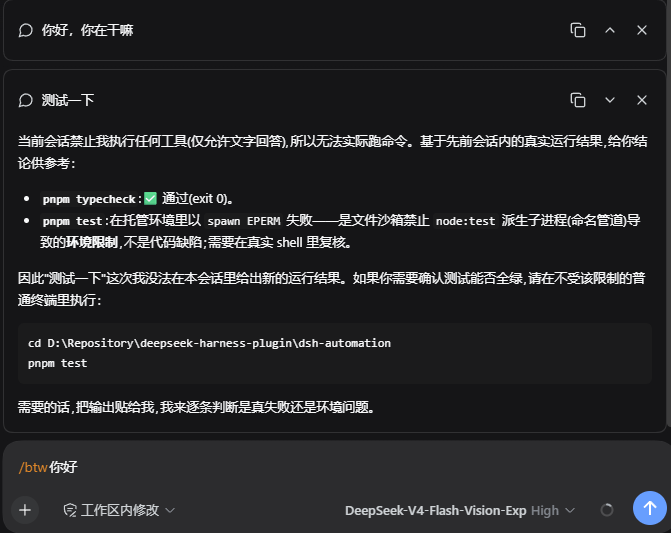
Open **Plugins**, pick `@michengai/dsh-btw`, and the settings form sits directly on the detail page — the whitelist and the prompt box, pre-filled with the built-in prompt so you can edit it in place.
|
|
54
|
+
|
|
55
|
+

|
|
56
|
+
|
|
57
|
+
### Drawing from a side question
|
|
58
|
+
|
|
59
|
+
With `pele_draw` on the whitelist, a side question can render a diagram. It shows up inside the side-question panel, and the main conversation is untouched.
|
|
60
|
+
|
|
61
|
+

|
|
62
|
+
|
|
51
63
|
## DSH product ecosystem
|
|
52
64
|
|
|
53
65
|
For a desktop workbench, download [DSH Codex Desktop](https://github.com/MichengAI/dsh-codex-desktop/releases). Existing [DeepSeek Harness](https://github.com/deepseek-ai/deepseek-harness) installations can add plugins as needed by following each project's README. Below are 11 first-party plugins; consult the corresponding desktop release notes and bundled catalog for what that version includes.
|
|
@@ -141,6 +153,38 @@ BTW accepts text only. Side questions with images or files are rejected without
|
|
|
141
153
|
- Each question is independent and uses completed content from the main conversation at the time you ask. It does not include an answer still being generated or previous side questions.
|
|
142
154
|
- Bubbles are not restored after refreshing the page. Copy any answers you want to keep first.
|
|
143
155
|
|
|
156
|
+
## Settings
|
|
157
|
+
|
|
158
|
+
Both entries are optional. Leaving them empty keeps the built-in behaviour: text answers only, with the shipped prompt.
|
|
159
|
+
|
|
160
|
+
Open **Plugins**, find `@michengai/dsh-btw`, and open **Configure** on its row. The page sits in the same place as the configuration page of `dsh-subagent-default-model`.
|
|
161
|
+
|
|
162
|
+
| Field | Effect |
|
|
163
|
+
| --- | --- |
|
|
164
|
+
| **Allowed tools** | Tool names the side question may call in addition to `send_message`, one per line (for example `pele_draw`). Empty allows text answers only, which is the default. |
|
|
165
|
+
| **Custom prompt** | Instruction text that replaces the built-in side-question prompt. The box is pre-filled with the built-in prompt so you can edit it in place; saving it unchanged restores the default. |
|
|
166
|
+
|
|
167
|
+
Notes:
|
|
168
|
+
|
|
169
|
+
- The whitelist widens what the side question may call; the main conversation is never restricted by it. A name that does not exist simply allows nothing.
|
|
170
|
+
- `send_message` is not a whitelist entry. Delivering an answer back to the main conversation stays bound to the rule that it may only target the side question's own parent session, so a whitelist entry cannot turn it into "send to any agent".
|
|
171
|
+
- The custom prompt replaces the instruction prefix only. The tool-permission sentence and the reply-channel sentence are always appended, so the model never believes it can call everything.
|
|
172
|
+
- Changes apply to the next side question without reloading the plugin.
|
|
173
|
+
- The permission sentence names the allowed tools, so widening the whitelist changes the side-question prompt. That prompt is a trailing user message; the tool list and system prompt stay byte-identical to the main conversation, so parent prompt cache reuse is unaffected.
|
|
174
|
+
|
|
175
|
+
### Example: let a side question draw diagrams
|
|
176
|
+
|
|
177
|
+
[`dsh-pele`](https://github.com/hesheng01/dsh-pele) provides the `pele_draw` tool, which renders Mermaid source into an SVG card inside the conversation. Add `pele_draw` to **Allowed tools** and a side question can draw too.
|
|
178
|
+
|
|
179
|
+
> Note: `dsh-pele` is a recent plugin that is not published to npm and not in the plugin marketplace yet, so it cannot be installed by searching the marketplace. Clone the repository and install its `plugin` directory into your profile:
|
|
180
|
+
>
|
|
181
|
+
> ```bash
|
|
182
|
+
> git clone https://github.com/hesheng01/dsh-pele.git
|
|
183
|
+
> dsh plugin --profile <profile> add <absolute-path>/dsh-pele/plugin
|
|
184
|
+
> ```
|
|
185
|
+
>
|
|
186
|
+
> The first install needs a Host restart.
|
|
187
|
+
|
|
144
188
|
## Uninstallation
|
|
145
189
|
|
|
146
190
|
```powershell
|
package/README.zh-CN.md
CHANGED
|
@@ -48,6 +48,18 @@
|
|
|
48
48
|
|
|
49
49
|

|
|
50
50
|
|
|
51
|
+
### 旁问配置
|
|
52
|
+
|
|
53
|
+
打开 **插件**,选中 `@michengai/dsh-btw`,配置表单就在详情页上——放行工具与提示词两个输入框,提示词框已预填内置文案,可以直接在上面改。
|
|
54
|
+
|
|
55
|
+

|
|
56
|
+
|
|
57
|
+
### 在旁问里画图
|
|
58
|
+
|
|
59
|
+
把 `pele_draw` 加进白名单后,旁问也能画图。图显示在旁问面板里,主对话不受影响。
|
|
60
|
+
|
|
61
|
+

|
|
62
|
+
|
|
51
63
|
## DSH 产品生态
|
|
52
64
|
|
|
53
65
|
想使用桌面工作台,可下载 [DSH Codex Desktop](https://github.com/MichengAI/dsh-codex-desktop/releases);已有 [DeepSeek Harness](https://github.com/deepseek-ai/deepseek-harness) 环境,可按各项目 README 按需安装。以下列出 11 个自研插件;桌面端实际随附范围以对应版本的发行说明和内置清单为准。
|
|
@@ -141,6 +153,38 @@ BTW 只接受文字。输入框中附带图片或普通文件时会拒绝旁问
|
|
|
141
153
|
- 每次旁问相互独立,参考的是提问时主会话已完成的内容,不包含正在生成的回答或之前的旁问。
|
|
142
154
|
- 刷新页面后气泡不会保留,需要保存的答案请先复制。
|
|
143
155
|
|
|
156
|
+
## 配置
|
|
157
|
+
|
|
158
|
+
下面两项都是可选的。两项都留空时保持出厂行为:只允许纯文字回答,使用内置提示词。
|
|
159
|
+
|
|
160
|
+
打开 **插件**,找到 `@michengai/dsh-btw`,点击该行的 **配置**。配置页位置与 `dsh-subagent-default-model` 的配置页相同。
|
|
161
|
+
|
|
162
|
+
| 配置项 | 作用 |
|
|
163
|
+
| --- | --- |
|
|
164
|
+
| **放行工具** | 除 `send_message` 之外,旁问还允许调用的工具名,每行一个(例如 `pele_draw`)。留空表示只允许纯文字回答,这也是默认值。 |
|
|
165
|
+
| **自定义提示词** | 替换内置的旁问提示词。输入框已预填内置文案,可直接在上面修改;原样保存即恢复默认。 |
|
|
166
|
+
|
|
167
|
+
说明:
|
|
168
|
+
|
|
169
|
+
- 白名单只放宽旁问能调用的范围,从不限制主对话;写了不存在的工具名,等于什么都没放行。
|
|
170
|
+
- `send_message` 不能写进白名单。把答案回传主对话仍然只允许发给旁问自己的父会话,白名单无法把它变成「发给任意 agent」。
|
|
171
|
+
- 自定义提示词只替换指令前缀;工具权限说明与回传通道说明始终追加在末尾,避免模型误以为可以随意调用工具。
|
|
172
|
+
- 改完对下一次旁问生效,不需要重新加载插件。
|
|
173
|
+
- 权限说明里会点名放行的工具,因此放宽白名单会改变旁问提示词。它属于末尾的用户消息,工具定义与系统提示词仍与主会话逐字节一致,不影响主会话的 prompt cache 复用。
|
|
174
|
+
|
|
175
|
+
### 示例:让旁问画图
|
|
176
|
+
|
|
177
|
+
[`dsh-pele`](https://github.com/hesheng01/dsh-pele) 提供 `pele_draw` 工具,把 Mermaid 源码渲染成会话里的 SVG 图表卡片。把 `pele_draw` 填进 **放行工具**,旁问也能画图。
|
|
178
|
+
|
|
179
|
+
> 注意:`dsh-pele` 是最近新出的插件,还没有发布到 npm,也暂时没上架插件市场,因此在插件市场里搜不到。安装方式是从 GitHub 克隆仓库,把其中的 `plugin` 目录装进 profile:
|
|
180
|
+
>
|
|
181
|
+
> ```bash
|
|
182
|
+
> git clone https://github.com/hesheng01/dsh-pele.git
|
|
183
|
+
> dsh plugin --profile <profile> add <绝对路径>/dsh-pele/plugin
|
|
184
|
+
> ```
|
|
185
|
+
>
|
|
186
|
+
> 首次接入需要重启 Host。
|
|
187
|
+
|
|
144
188
|
## 卸载
|
|
145
189
|
|
|
146
190
|
```powershell
|