@michengai/dsh-agency-agents 1.0.0 → 1.0.1
This diff represents the content of publicly available package versions that have been released to one of the supported registries. The information contained in this diff is provided for informational purposes only and reflects changes between package versions as they appear in their respective public registries.
- package/CHANGELOG.md +17 -1
- package/CHANGELOG.zh-CN.md +17 -1
- package/README.md +11 -7
- package/README.zh-CN.md +11 -7
- package/RELEASE_NOTES.md +22 -120
- package/assets/screenshots/agent-roster.png +0 -0
- package/assets/screenshots/agent-team-panel.png +0 -0
- package/assets/screenshots/expert-team-details.png +0 -0
- package/assets/screenshots/expert-teams.png +0 -0
- package/lib/client.js +356 -96452
- package/lib/{index-BPsOHdvN.d.ts → index-B_rK2BJM.d.ts} +1 -1
- package/lib/index.d.ts +1 -1
- package/lib/index.js +1 -1
- package/lib/remote.d.ts +1 -1
- package/lib/remote.js +2 -2
- package/lib/{src-DoNvSw95.js → src-CphYuHju.js} +113 -59
- package/package.json +3 -5
package/CHANGELOG.md
CHANGED
|
@@ -2,7 +2,23 @@
|
|
|
2
2
|
|
|
3
3
|
[简体中文](CHANGELOG.zh-CN.md)
|
|
4
4
|
|
|
5
|
-
This file records features and upgrade boundaries.
|
|
5
|
+
This file records features and upgrade boundaries. npm and GitHub Releases remain the publication source of truth.
|
|
6
|
+
|
|
7
|
+
## 1.0.1 - 2026-09-21
|
|
8
|
+
|
|
9
|
+
This patch is prepared for release; publication is confirmed only by npm and GitHub Releases.
|
|
10
|
+
|
|
11
|
+
- Replace translated-message comparisons with stable persona error codes. Fall back to the English persona only when the translated file is absent, not when reading it fails.
|
|
12
|
+
- Localize updater errors and request rejections, remove duplicate package file entries, and validate README version consistency before release.
|
|
13
|
+
- Verify language switching through the real DSH tool registry and model-facing prompt assembly, including the locally installed 0.1.6-alpha.2 runtime. This does not claim live model quality or historical-host matrix acceptance.
|
|
14
|
+
|
|
15
|
+
- Bundle only the referenced Tabler icons through the ESM entry and move the icon package to development dependencies. Add release checks for client size, accidental full-library bundling, and external icon imports.
|
|
16
|
+
- Preserve raw expert enablement records when saving or enabling a team, including temporarily conflicting or unavailable experts. Keep revision checks and atomic writes.
|
|
17
|
+
- Preserve separators while typing tags; validate tags and custom coordinator prompts with actionable field errors and focus. Keep unsaved tag input through language changes and conflict review.
|
|
18
|
+
- Localize team service, delegation guard, and expert prompt errors. Refresh registered team tool descriptions and parameter descriptions with the host language.
|
|
19
|
+
- Remove deleted task IDs from failed dispatch reports while retaining IDs when cleanup fails. Guard team mention registration on older remote services and restore expert conflict tooltips.
|
|
20
|
+
- Remove unused editor section parameters, unused styles, and duplicate team style injection. Strengthen asynchronous, member-limit, locale, and browser regression tests; exercise the real update dialog and derive fixture counts from the roster.
|
|
21
|
+
- Refresh both README screenshot galleries with the expert list, team list, team details, and native Agent Team panel.
|
|
6
22
|
|
|
7
23
|
## 1.0.0 - 2026-09-21
|
|
8
24
|
|
package/CHANGELOG.zh-CN.md
CHANGED
|
@@ -2,7 +2,23 @@
|
|
|
2
2
|
|
|
3
3
|
[English](CHANGELOG.md)
|
|
4
4
|
|
|
5
|
-
|
|
5
|
+
本文件记录版本功能与升级边界。正式发布状态以 npm 和 GitHub Releases 为准。
|
|
6
|
+
|
|
7
|
+
## 1.0.1 - 2026-09-21
|
|
8
|
+
|
|
9
|
+
本补丁已准备发行,实际发布状态以 npm 和 GitHub Releases 为准。
|
|
10
|
+
|
|
11
|
+
- 提示词回退改为稳定错误码,仅译文文件不存在时回退英文;读取失败不再被误判为缺少译文。
|
|
12
|
+
- 补齐更新器错误及请求拒绝的国际化,去重包文件清单,发布检查新增 README 版本一致性校验。
|
|
13
|
+
- 使用真实 DSH 工具注册器和面向模型的提示组装验证语言切换,并通过本机安装的 0.1.6-alpha.2 运行时验证;不代表真实模型质量或历史宿主矩阵验收。
|
|
14
|
+
|
|
15
|
+
- 图标改用 ESM 入口,仅打包实际引用的图标;图标包移至开发依赖。发布检查新增客户端体积、整库误打包及图标运行时外部引用护栏。
|
|
16
|
+
- 保存并启用或启用专家团时,保留原始专家启用记录,包括暂时冲突或不可用的专家;继续使用修订号校验与原子写入。
|
|
17
|
+
- 标签输入保留分隔符,保存时解析;标签和自定义主理人提示词超限时明确指出字段并聚焦。切换语言及冲突核对保留标签草稿。
|
|
18
|
+
- 补齐团队服务、递归委派门禁及专家提示词错误的国际化;已注册团队工具及参数说明跟随宿主语言变化。
|
|
19
|
+
- 失败委派报告移除已成功删除的任务编号,清理失败时保留编号供排查;旧版远程服务不注册不可用的团队候选源,恢复专家名称冲突悬停提示。
|
|
20
|
+
- 清理编辑分区死参数、无用样式及重复注入;完善异步、成员上限、国际化和浏览器回归测试,使用真实更新弹窗并从名册推导测试数量。
|
|
21
|
+
- 中英文 README 更新专家列表、专家团列表、团队详情及原生 Agent Team 面板截图。
|
|
6
22
|
|
|
7
23
|
## 1.0.0 - 2026-09-21
|
|
8
24
|
|
package/README.md
CHANGED
|
@@ -69,22 +69,26 @@ Retain `list_experts`, `summon_expert`, and `summon_experts`. Add `list_expert_t
|
|
|
69
69
|
- Team configuration lives in the host `agency-agents` settings namespace. Keep drafts on edit conflicts and review the latest configuration. Disabling or deleting teams does not disable experts or delete historical conversations.
|
|
70
70
|
- Experts cannot summon further experts or automatically add analysis rounds. Cancellation prevents queued starts; completed results and failures are reported separately.
|
|
71
71
|
|
|
72
|
-
> This README describes
|
|
72
|
+
> This README describes version 1.0.1; npm and GitHub Releases determine publication status. See the [changelog](CHANGELOG.md) for the full changes and [release notes](RELEASE_NOTES.md) for the bilingual release description. Upgrades retain expert settings. Back up settings before downgrading because older versions do not support teams.
|
|
73
73
|
## Screenshots
|
|
74
74
|
|
|
75
|
-
The
|
|
75
|
+
The screenshots below show the 1.0.0 interface in Chinese. Experts and expert teams share the same settings page.
|
|
76
76
|
|
|
77
77
|
Filter by category or search in **Settings → Experts**, then enable the experts you need:
|
|
78
78
|
|
|
79
79
|
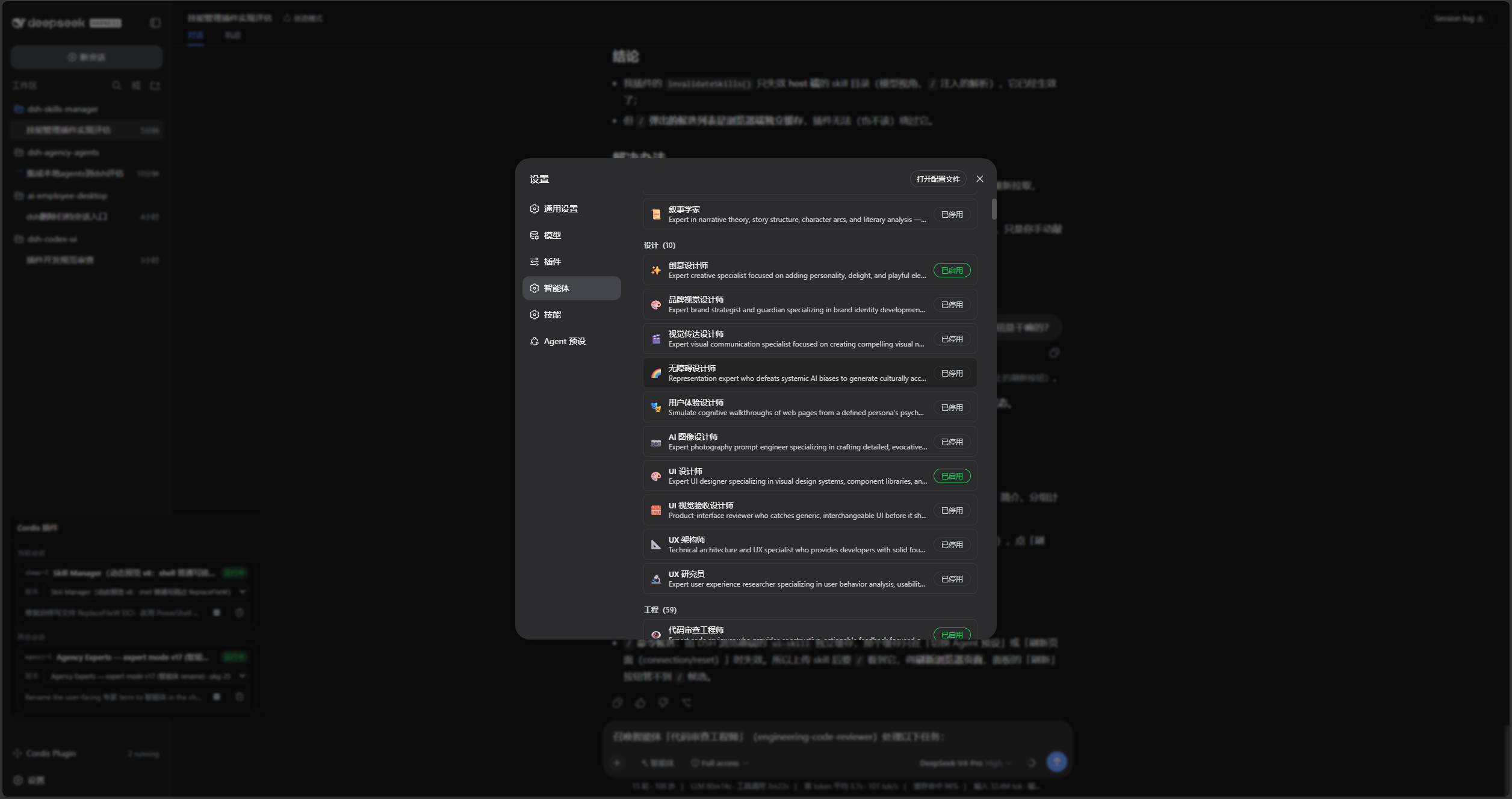
|
|
80
80
|
|
|
81
|
-
|
|
81
|
+
Switch to **Expert teams** to browse the five built-in teams, filter by status, or create a custom team:
|
|
82
82
|
|
|
83
|
-
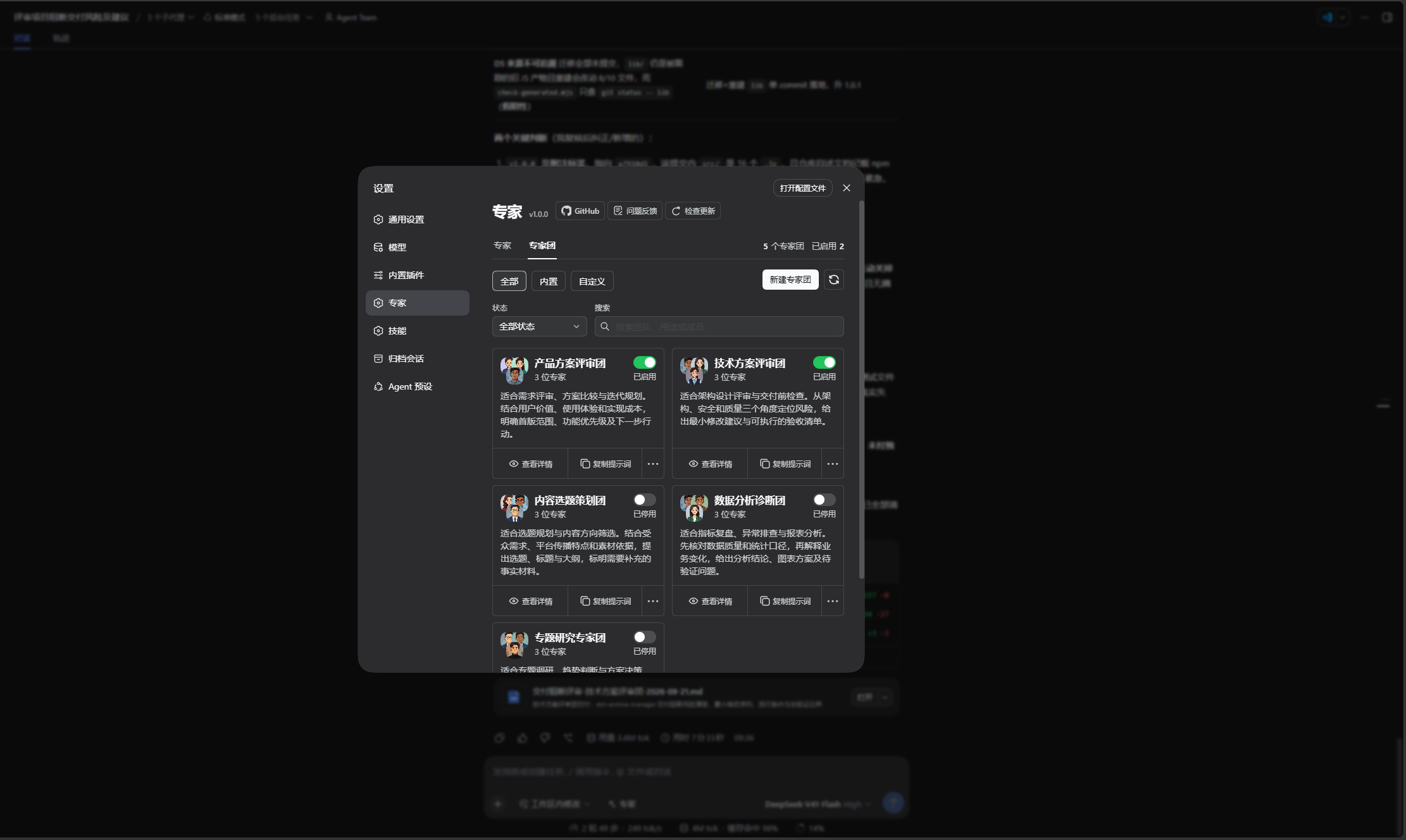
|
|
84
84
|
|
|
85
|
-
|
|
85
|
+
Open team details to review its purpose, example tasks, and member responsibilities, then summon it or copy it for customization:
|
|
86
86
|
|
|
87
|
-
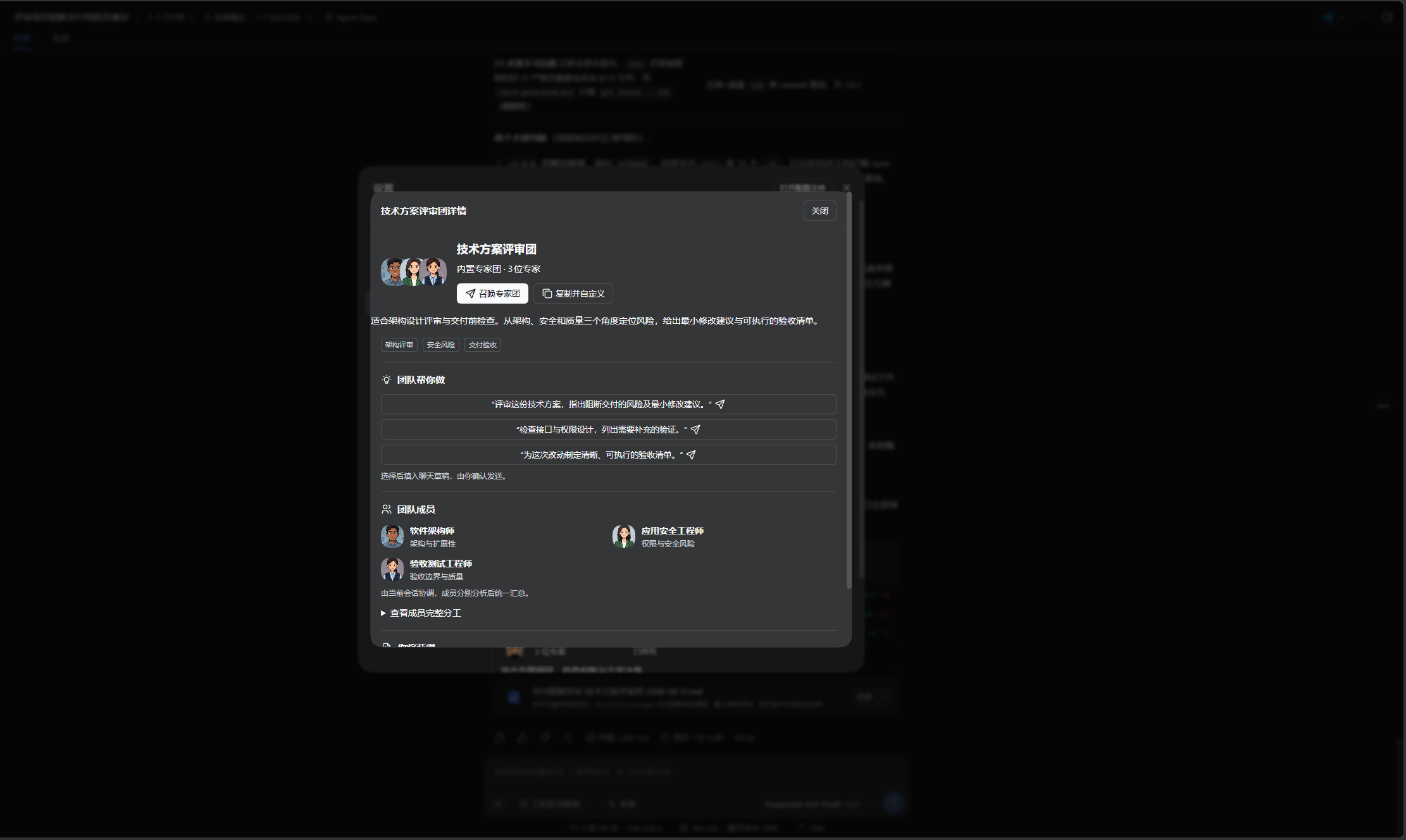
|
|
88
|
+
|
|
89
|
+
When the host supports Agent Team and the feature is enabled, view team members and shared tasks in the native panel:
|
|
90
|
+
|
|
91
|
+
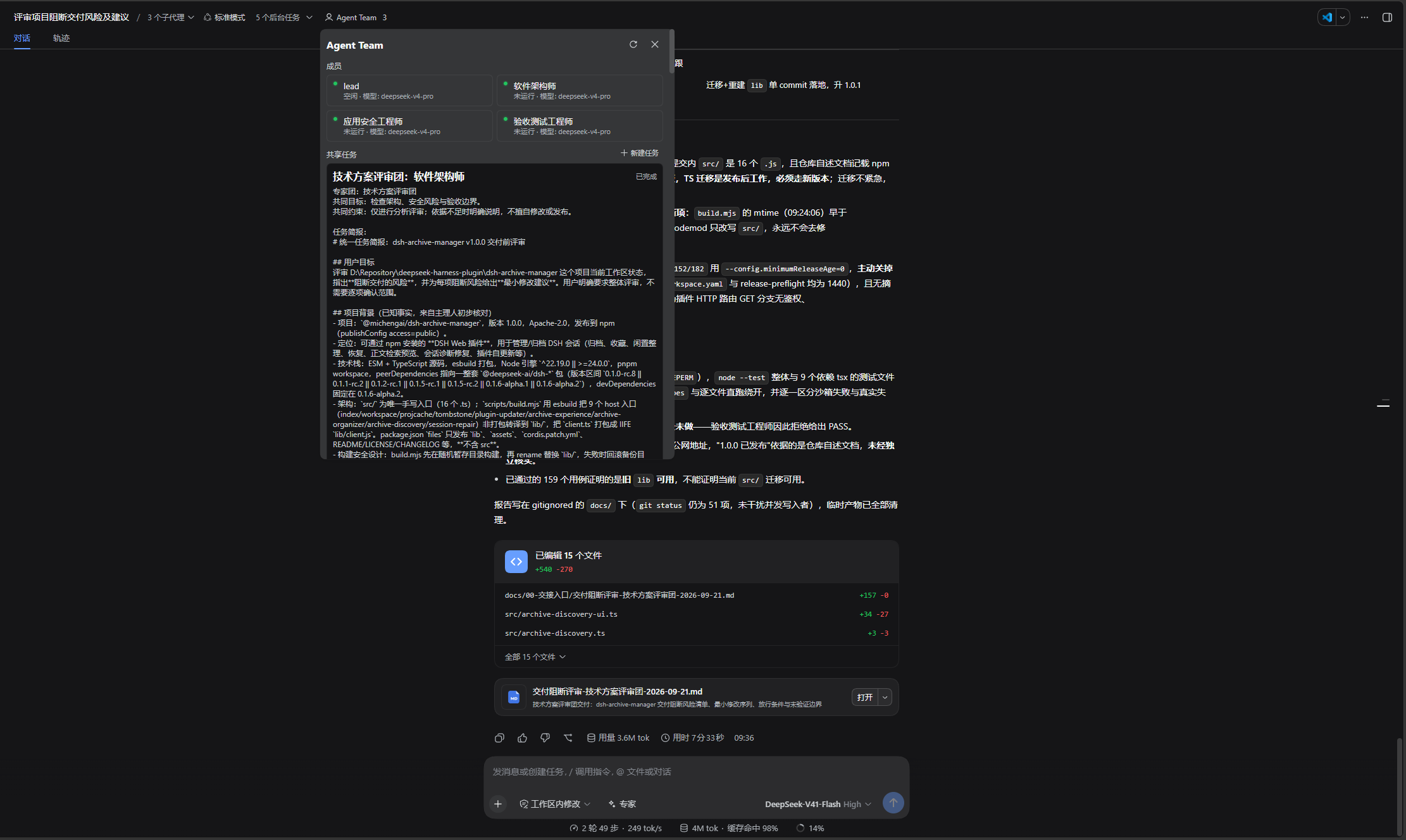
|
|
88
92
|
|
|
89
93
|
## DSH product ecosystem
|
|
90
94
|
|
|
@@ -139,7 +143,7 @@ dsh plugin --profile web add @michengai/dsh-agency-agents@latest --registry=http
|
|
|
139
143
|
dsh --profile web --dump-config
|
|
140
144
|
```
|
|
141
145
|
|
|
142
|
-
To pin a release, replace `@latest` with a version such as `@1.0.
|
|
146
|
+
To pin a release, replace `@latest` with a version such as `@1.0.1`.
|
|
143
147
|
|
|
144
148
|
The configuration output should contain `agency-agents` and `agency-agents-remote`. Restart DSH Web and hard-refresh the browser. Do not copy client files manually: the Settings page needs the mounted Remote service.
|
|
145
149
|
|
package/README.zh-CN.md
CHANGED
|
@@ -69,22 +69,26 @@
|
|
|
69
69
|
- 团队配置保存在宿主 `agency-agents` 命名空间。编辑冲突保留草稿并提示核对最新配置;停用或删除团队不会停用专家,也不会删除历史会话。
|
|
70
70
|
- 专家不得继续召唤专家或自动追加分析轮次。取消会停止未启动任务;已有结果和失败原因分别报告。
|
|
71
71
|
|
|
72
|
-
> 本 README 描述 1.0.
|
|
72
|
+
> 本 README 描述 1.0.1,正式发行以 npm 和 GitHub Releases 为准。完整改动见[更新日志](CHANGELOG.zh-CN.md),双语版本说明见[发行说明](RELEASE_NOTES.md)。升级保留已有专家配置;回退旧版前先备份设置,旧版不具备团队功能。
|
|
73
73
|
## 界面预览
|
|
74
74
|
|
|
75
|
-
|
|
75
|
+
以下为 1.0.0 中文界面截图,专家与专家团共用同一个设置页面。
|
|
76
76
|
|
|
77
77
|
在「设置 → 专家」中按分类筛选或搜索,再启用需要的专家:
|
|
78
78
|
|
|
79
79
|

|
|
80
80
|
|
|
81
|
-
|
|
81
|
+
切换到「专家团」,浏览五个内置专家团、按状态筛选,或新建自定义专家团:
|
|
82
82
|
|
|
83
|
-

|
|
84
84
|
|
|
85
|
-
|
|
85
|
+
打开团队详情,查看适用场景、任务示例和成员分工,再召唤团队或复制并自定义:
|
|
86
86
|
|
|
87
|
-

|
|
88
|
+
|
|
89
|
+
宿主支持且已启用 Agent Team 时,可在原生面板查看团队成员和共享任务:
|
|
90
|
+
|
|
91
|
+

|
|
88
92
|
|
|
89
93
|
## DSH 产品生态
|
|
90
94
|
|
|
@@ -139,7 +143,7 @@ dsh plugin --profile web add @michengai/dsh-agency-agents@latest --registry=http
|
|
|
139
143
|
dsh --profile web --dump-config
|
|
140
144
|
```
|
|
141
145
|
|
|
142
|
-
需要钉死某一版时,把 `@latest` 换成具体版本,例如 `@1.0.
|
|
146
|
+
需要钉死某一版时,把 `@latest` 换成具体版本,例如 `@1.0.1`。
|
|
143
147
|
|
|
144
148
|
配置输出中应包含 `agency-agents` 与 `agency-agents-remote`。安装后重启 DSH Web 并在浏览器硬刷新;请勿手工复制客户端文件,否则设置页所需的 Remote 服务不会被挂载。
|
|
145
149
|
|
package/RELEASE_NOTES.md
CHANGED
|
@@ -1,131 +1,33 @@
|
|
|
1
1
|
## 中文说明
|
|
2
2
|
|
|
3
|
-
|
|
3
|
+
本补丁已准备发行,实际发布状态以 npm 和 GitHub Releases 为准。
|
|
4
4
|
|
|
5
|
-
|
|
5
|
+
- 提示词回退改为稳定错误码,仅译文文件不存在时回退英文;读取失败不再被误判为缺少译文。
|
|
6
|
+
- 补齐更新器错误及请求拒绝的国际化,去重包文件清单,发布检查新增 README 版本一致性校验。
|
|
7
|
+
- 使用真实 DSH 工具注册器和面向模型的提示组装验证语言切换,并通过本机安装的 0.1.6-alpha.2 运行时验证;不代表真实模型质量或历史宿主矩阵验收。
|
|
6
8
|
|
|
7
|
-
-
|
|
8
|
-
-
|
|
9
|
-
-
|
|
10
|
-
-
|
|
11
|
-
|
|
12
|
-
|
|
13
|
-
-
|
|
14
|
-
- 支持创建自定义团、复制内置团后修改、查看详情、编辑、启用、停用和删除;每团 2~8 位不重复专家,最多 100 个自定义团。
|
|
15
|
-
- 可配置团队名称、简介、最多三个标签、成员分工与补充指令、共同目标、约束、交付要求和 1~3 条示例;主理人正文最多 12000 字符。
|
|
16
|
-
- 主理人可使用团队模板、自定义提示词或恢复模板;规则涵盖准备、分工、证据核验、分歧处理、异常说明与最终交付。主理人由当前主会话承担,不额外创建团长子代理。
|
|
17
|
-
- 启用团队时确认并同步启用所需专家;停用或删除团队不连带停用成员,也不删除历史会话。
|
|
18
|
-
|
|
19
|
-
### 专家与专家团统一管理
|
|
20
|
-
|
|
21
|
-
- 在原「设置 → 专家」内新增下划线「专家团」页签,共用标题、版本及链接;保留专家的全部/内置/自定义来源选项、分类、状态和搜索。
|
|
22
|
-
- 切换页签保留专家筛选状态;数量显示在页签右侧,来源选项与新建、刷新同行。团队支持相同的来源与状态筛选、搜索、空态、刷新和更多菜单。
|
|
23
|
-
- 复用卡片、编辑抽屉、保存底栏、提示词预览及确认弹窗;删除和未保存离开均需确认。多窗口修订冲突保留草稿,核对最新配置后再保存,已删除专家可作为新专家继续。
|
|
24
|
-
- 卡片去掉重复来源标识,扩充五团用途描述;团队简介按内容展开,避免英文截断,底部操作保持紧凑。
|
|
25
|
-
- 对照归档插件统一按钮、输入、下拉菜单和焦点状态:紧凑控件、统一圆角、官方主题背景与边框。启用开关为绿色,停用为灰色,保留文字状态,适配深浅主题与窄屏。
|
|
26
|
-
|
|
27
|
-
### 聊天选择、示例与草稿保护
|
|
28
|
-
|
|
29
|
-
- 聊天「专家」入口支持切换专家团,搜索、查看详情、启用并选择;@ 支持专家团原生引用,显示当前语言的简短名称。
|
|
30
|
-
- 选择团队或示例只更新草稿,不自动发送。原有正文、附件及引用受到保护;替换团队或追加示例通过主题弹窗确认。
|
|
31
|
-
- 异步确认后核对草稿修订;期间输入发生变化则停止插入并提示重新选择,避免覆盖新内容。
|
|
32
|
-
- 保留个人专家全名册搜索、未启用专家的启用选择、八位代表性专家的双语任务示例、冲突提示和失败重试行为。
|
|
33
|
-
|
|
34
|
-
### 普通子代理与原生 Agent Team
|
|
35
|
-
|
|
36
|
-
- 分别检测宿主是否支持 Agent Team、功能与当前 Agent 作用域工具是否可用;不修改用户的宿主配置。
|
|
37
|
-
- 不支持时使用普通子代理;支持但未启用时建议开启并继续普通调用;服务和工具就绪后使用原生 Agent Team。显式配置 maxDepth 时继续普通模式以维持深度约束。
|
|
38
|
-
- 普通模式一次并行分析,最多四位专家同时运行;执行前冻结团队、成员与任务配置,防止运行中编辑改变分工。
|
|
39
|
-
- 原生模式接入成员、共享任务板、任务领取、消息回传和异步等待;空闲或离线的同团同专家可复用,忙碌或失败成员不重复派发。
|
|
40
|
-
- 原生委派接受仅表示任务启动;主会话等待本次任务的真实成员结果后核验汇总,不把启动确认当作专家意见。中途失败不自动切换普通模式,避免重复执行。
|
|
41
|
-
- 两种模式的新子会话使用本地化专家名。原生成员卡片适配显示名,同时保留稳定技术标识、消息路由与队友复用;不改写旧普通会话标题或宿主模型标签。
|
|
42
|
-
|
|
43
|
-
### 协作质量与异常处理
|
|
44
|
-
|
|
45
|
-
- 五团分别使用任务简报、职责边界、结构化成员回报、主理人核验清单和交接规则,合并重复发现并呈现证据、分歧与待确认事项。
|
|
46
|
-
- 普通模式返回职责覆盖与成员成功/失败信息,部分失败保留已完成结果;身份读取异常单独报告,空白结果不视为成功,不自动追加模型轮次或重试。
|
|
47
|
-
- 取消后不启动排队任务,等待在途启动收敛并中断本次原生成员;清理失败明确反馈。
|
|
48
|
-
- 保留子会话工具隔离和递归门禁,专家不继续召唤专家或组建新一轮团队。
|
|
49
|
-
|
|
50
|
-
### 完整双语、文档与发布材料
|
|
51
|
-
|
|
52
|
-
- 补齐团队列表、详情、编辑、确认、错误、工具说明、运行提示,以及五团名称、简介、标签、成员职责、示例和主理人规则的中英文。
|
|
53
|
-
- 切换语言保留自定义内容与未保存草稿;仅系统预设参与本地化,内置团中英文名称均参与冲突校验,稳定 ID 不变。
|
|
54
|
-
- 重制中文与英文 3:1 WebP 横幅,不带版本号;移除 README 的 Node 徽章,改为 DSH 支持版本徽章。重写双语功能说明与升级边界。
|
|
55
|
-
- 版本基线提升至 1.0.0,双语发行说明由对应更新日志自动生成,避免功能清单不同步。
|
|
56
|
-
|
|
57
|
-
- 编译产物 `lib` 不再提交到 GitHub,由发布门禁构建并作为已验证产物交给 npm 发布任务;npm 包保留运行所需的 `lib`。
|
|
58
|
-
|
|
59
|
-
### 升级、兼容与验证边界
|
|
60
|
-
|
|
61
|
-
- 仍支持 DSH 0.1.0-rc.8、0.1.1-rc.2、0.1.2-rc.1、0.1.5-rc.1、0.1.5-rc.2、0.1.6-alpha.1 和 0.1.6-alpha.2;不表示其间所有版本或未来版本均已验证。原生 Team 还取决于实际安装与启用状态。
|
|
62
|
-
- 原有专家启用状态与自定义专家保存在宿主 agency-agents 设置命名空间;新团队配置使用同一命名空间,无需搬迁专家文件。回退旧插件前备份设置,旧版不具备团队功能,不能保证旧版写入保留团队字段。
|
|
63
|
-
- 工程回归基线为 199 项单元/宿主集成测试和 40 项浏览器测试通过,包含按需视觉验收;修正旧视觉夹具缺少主题却仍通过的问题。类型检查、构建与包验证通过。
|
|
64
|
-
- 浏览器使用真实组件与模拟 Remote,模型 provider 使用替身;不等于真实模型汇总质量或全部宿主版本的端到端验收。原生 Team 的模型标签由宿主提供,可能仍显示创建时的模型。
|
|
9
|
+
- 图标改用 ESM 入口,仅打包实际引用的图标;图标包移至开发依赖。发布检查新增客户端体积、整库误打包及图标运行时外部引用护栏。
|
|
10
|
+
- 保存并启用或启用专家团时,保留原始专家启用记录,包括暂时冲突或不可用的专家;继续使用修订号校验与原子写入。
|
|
11
|
+
- 标签输入保留分隔符,保存时解析;标签和自定义主理人提示词超限时明确指出字段并聚焦。切换语言及冲突核对保留标签草稿。
|
|
12
|
+
- 补齐团队服务、递归委派门禁及专家提示词错误的国际化;已注册团队工具及参数说明跟随宿主语言变化。
|
|
13
|
+
- 失败委派报告移除已成功删除的任务编号,清理失败时保留编号供排查;旧版远程服务不注册不可用的团队候选源,恢复专家名称冲突悬停提示。
|
|
14
|
+
- 清理编辑分区死参数、无用样式及重复注入;完善异步、成员上限、国际化和浏览器回归测试,使用真实更新弹窗并从名册推导测试数量。
|
|
15
|
+
- 中英文 README 更新专家列表、专家团列表、团队详情及原生 Agent Team 面板截图。
|
|
65
16
|
|
|
66
17
|
---
|
|
67
18
|
|
|
68
19
|
## English
|
|
69
20
|
|
|
70
|
-
|
|
71
|
-
|
|
72
|
-
### Retained individual-expert capabilities and tools
|
|
73
|
-
|
|
74
|
-
- Retain 321 bundled experts across 22 divisions, prompt viewing/copying, category/status/localized keyword filters, enablement, and selection through the composer or @.
|
|
75
|
-
- Retain up to 200 custom experts with creation, copying, avatars and summon emoji, editing, save-and-enable, disabling, and permanent deletion; preserve name-conflict and concurrent-revision checks.
|
|
76
|
-
- Keep list_experts, summon_expert, and summon_experts; add list_expert_teams, get_expert_team, and summon_expert_team for reading team rules before delegation and final synthesis.
|
|
77
|
-
- Preserve the settings version display, update checking/feedback, and trusted external root, provider, divisions, and maxDepth configuration. Do not add an External source tab.
|
|
78
|
-
### Five built-in teams and custom teams
|
|
79
|
-
|
|
80
|
-
- Add Product Review Team, Technical Review Team, Content Planning Team, Data Analysis Team, and Research Team. Each includes three independent expert roles, a shared goal, delivery requirements, task examples, and a dedicated coordinator template.
|
|
81
|
-
- Create custom teams, copy built-in teams, inspect details, edit, enable, disable, and delete. Each team contains 2–8 distinct experts; up to 100 custom teams are supported.
|
|
82
|
-
- Configure a name, description, up to three tags, member duties and instructions, shared goal, constraints, delivery requirements, and 1–3 examples. Custom coordinator prompts allow up to 12,000 characters.
|
|
83
|
-
- Use the team coordinator template, customize it, or restore it. Rules cover preparation, delegation, evidence checks, disagreements, failures, and final delivery. The existing main conversation coordinates; no extra leader subagent is created.
|
|
84
|
-
- Confirm and enable required experts when enabling a team. Disabling or deleting a team does not disable its members or delete historical conversations.
|
|
85
|
-
|
|
86
|
-
### Unified expert and team management
|
|
87
|
-
|
|
88
|
-
- Add an underlined Expert teams tab inside Settings → Experts, sharing the title, version, and links. Preserve individual experts' All/Built-in/Custom source filters, categories, status, and search.
|
|
89
|
-
- Preserve expert filters across tab switches. Place counts at the right of the tabs, with source filters and create/refresh actions on one row. Teams gain equivalent source/status filters, search, empty states, refresh, and more menus.
|
|
90
|
-
- Share cards, editor drawers, save footers, prompt previews, and confirmation dialogs. Confirm deletion and discarding unsaved changes. Retain drafts on revision conflicts, review current settings before saving, and allow deleted experts to continue as new experts.
|
|
91
|
-
- Remove redundant source badges and expand all five team descriptions. Team descriptions grow with their content to avoid truncating English, while card actions remain compact.
|
|
92
|
-
- Align buttons, inputs, dropdowns, and focus states with Archive Manager using compact sizing and official theme backgrounds/borders. Enabled switches are green, disabled switches gray, with text labels; support dark/light themes and narrow layouts.
|
|
93
|
-
|
|
94
|
-
### Chat selection, examples, and draft protection
|
|
95
|
-
|
|
96
|
-
- Switch to teams in the Experts composer picker, search, inspect details, enable, and select. The @ picker supports native team references with short localized names.
|
|
97
|
-
- Selecting a team or example updates the draft without sending it. Protect existing text, attachments, and references; confirm team replacement or example insertion in a themed dialog.
|
|
98
|
-
- Recheck the draft revision after asynchronous confirmation. If the draft changed meanwhile, stop insertion and ask the user to select again rather than overwriting new input.
|
|
99
|
-
- Preserve full-roster individual-expert search, enable-and-select, bilingual examples for eight representative specialists, conflict feedback, and retry behavior.
|
|
100
|
-
|
|
101
|
-
### Ordinary subagents and native Agent Team
|
|
102
|
-
|
|
103
|
-
- Check host capability separately from service enablement and tool availability in the current Agent scope, without modifying host settings.
|
|
104
|
-
- Use ordinary subagents when unsupported. Recommend enabling Team when supported but disabled, while allowing ordinary execution. Use native Agent Team when services and tools are ready. Explicit maxDepth continues through ordinary mode to enforce depth limits.
|
|
105
|
-
- Ordinary mode performs one parallel analysis with up to four concurrent experts. Freeze team, member, and task settings before execution so later edits cannot change the running assignment.
|
|
106
|
-
- Native mode integrates members, shared tasks, task claiming, result messages, and asynchronous waiting. Reuse idle or offline members for the same team/expert; do not redispatch busy or failed members.
|
|
107
|
-
- Accepted native dispatch means started, not completed. The main conversation waits for actual results for the current tasks before verifying and summarizing. Mid-dispatch failures do not automatically switch to ordinary mode and duplicate work.
|
|
108
|
-
- Localize new child-session expert names in both modes. Adapt native roster display names while retaining stable identities, message routing, and reuse. Do not rewrite old ordinary-session titles or host model labels.
|
|
109
|
-
|
|
110
|
-
### Collaboration quality and failure handling
|
|
111
|
-
|
|
112
|
-
- Provide team-specific briefs, role boundaries, structured member reports, coordinator checklists, and handoff rules. Consolidate duplicate findings while preserving evidence, disagreements, and open questions.
|
|
113
|
-
- Ordinary mode reports responsibility coverage and member success/failure, preserving completed results when others fail. Isolate persona-read failures, reject empty results, and do not automatically add model rounds or retries.
|
|
114
|
-
- Cancellation prevents queued work from starting, settles in-flight launches, and interrupts native members started by this invocation. Report cleanup failures explicitly.
|
|
115
|
-
- Preserve child-tool isolation and recursion guards; experts cannot summon more experts or start another team round.
|
|
116
|
-
|
|
117
|
-
### Complete localization, documentation, and release assets
|
|
118
|
-
|
|
119
|
-
- Complete Chinese/English UI, details, editors, confirmations, errors, tool descriptions, and runtime feedback, plus all five teams' names, descriptions, tags, duties, examples, and coordinator rules.
|
|
120
|
-
- Language changes preserve custom content and unsaved drafts. Only system presets are localized; both built-in Chinese and English names participate in collision checks, and stable IDs remain unchanged.
|
|
121
|
-
- Regenerate separate Chinese and English 3:1 WebP banners without version numbers. Replace the Node README badge with supported DSH versions, and refresh bilingual feature and upgrade documentation.
|
|
122
|
-
- Set the version baseline to 1.0.0. Generate bilingual release notes from the matching changelog entries to keep feature lists aligned.
|
|
123
|
-
|
|
124
|
-
- Stop tracking compiled `lib` in Git. The release gate builds and transfers verified artifacts to npm publishing; npm packages retain the runtime `lib` files.
|
|
21
|
+
This patch is prepared for release; publication is confirmed only by npm and GitHub Releases.
|
|
125
22
|
|
|
126
|
-
|
|
23
|
+
- Replace translated-message comparisons with stable persona error codes. Fall back to the English persona only when the translated file is absent, not when reading it fails.
|
|
24
|
+
- Localize updater errors and request rejections, remove duplicate package file entries, and validate README version consistency before release.
|
|
25
|
+
- Verify language switching through the real DSH tool registry and model-facing prompt assembly, including the locally installed 0.1.6-alpha.2 runtime. This does not claim live model quality or historical-host matrix acceptance.
|
|
127
26
|
|
|
128
|
-
-
|
|
129
|
-
-
|
|
130
|
-
-
|
|
131
|
-
-
|
|
27
|
+
- Bundle only the referenced Tabler icons through the ESM entry and move the icon package to development dependencies. Add release checks for client size, accidental full-library bundling, and external icon imports.
|
|
28
|
+
- Preserve raw expert enablement records when saving or enabling a team, including temporarily conflicting or unavailable experts. Keep revision checks and atomic writes.
|
|
29
|
+
- Preserve separators while typing tags; validate tags and custom coordinator prompts with actionable field errors and focus. Keep unsaved tag input through language changes and conflict review.
|
|
30
|
+
- Localize team service, delegation guard, and expert prompt errors. Refresh registered team tool descriptions and parameter descriptions with the host language.
|
|
31
|
+
- Remove deleted task IDs from failed dispatch reports while retaining IDs when cleanup fails. Guard team mention registration on older remote services and restore expert conflict tooltips.
|
|
32
|
+
- Remove unused editor section parameters, unused styles, and duplicate team style injection. Strengthen asynchronous, member-limit, locale, and browser regression tests; exercise the real update dialog and derive fixture counts from the roster.
|
|
33
|
+
- Refresh both README screenshot galleries with the expert list, team list, team details, and native Agent Team panel.
|
|
Binary file
|
|
Binary file
|
|
Binary file
|
|
Binary file
|