@michengai/dsh-agency-agents 0.1.7 → 0.1.9
This diff represents the content of publicly available package versions that have been released to one of the supported registries. The information contained in this diff is provided for informational purposes only and reflects changes between package versions as they appear in their respective public registries.
package/README.md
CHANGED
|
@@ -18,13 +18,27 @@
|
|
|
18
18
|
|
|
19
19
|
## Features
|
|
20
20
|
|
|
21
|
-
- Browse, enable, and disable bundled experts across 17 divisions in **Settings →
|
|
22
|
-
- Summon enabled experts by name or slug from the composer
|
|
21
|
+
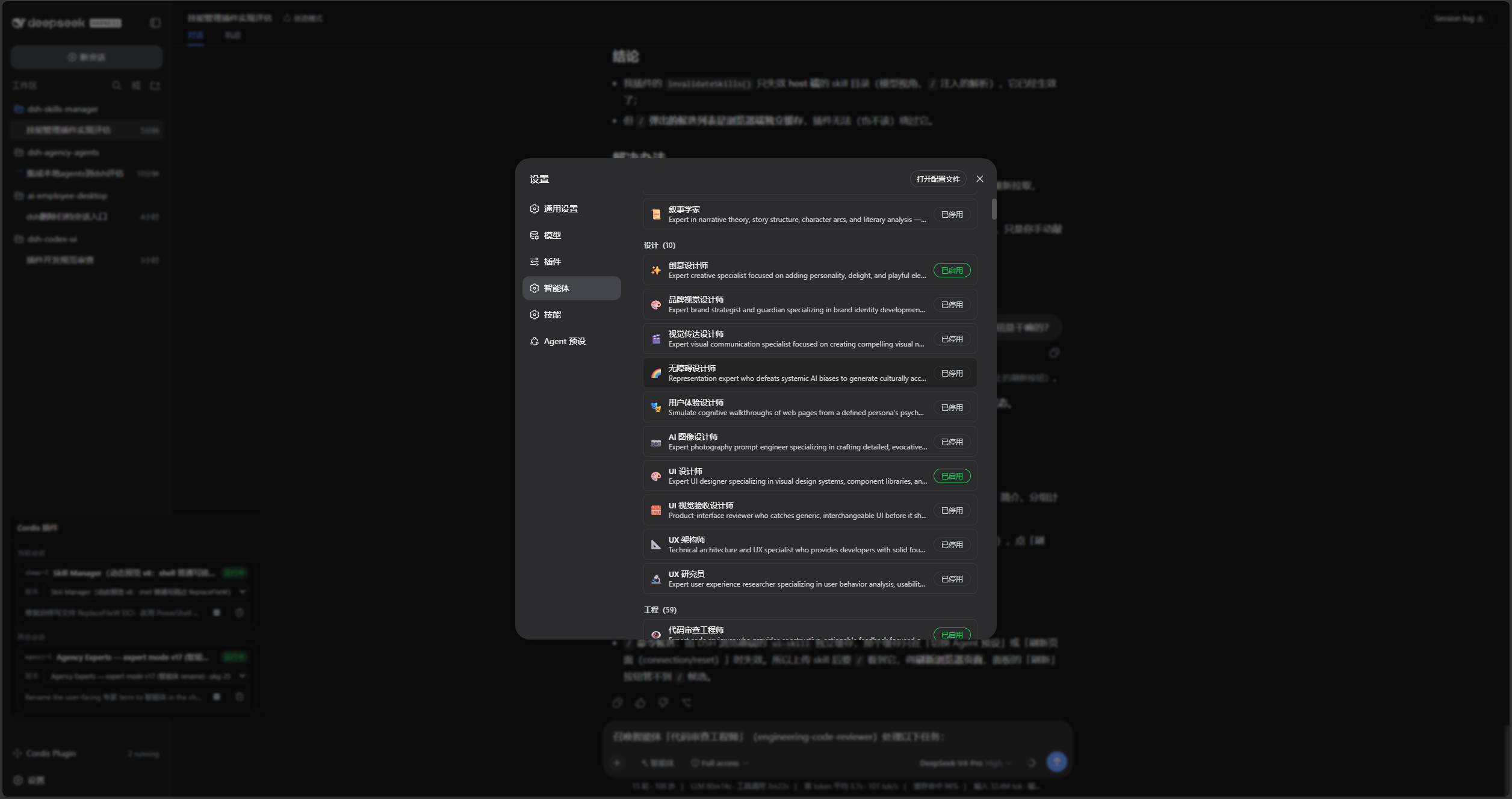
- Browse, enable, and disable bundled experts across 17 divisions in **Settings → Experts**.
|
|
22
|
+
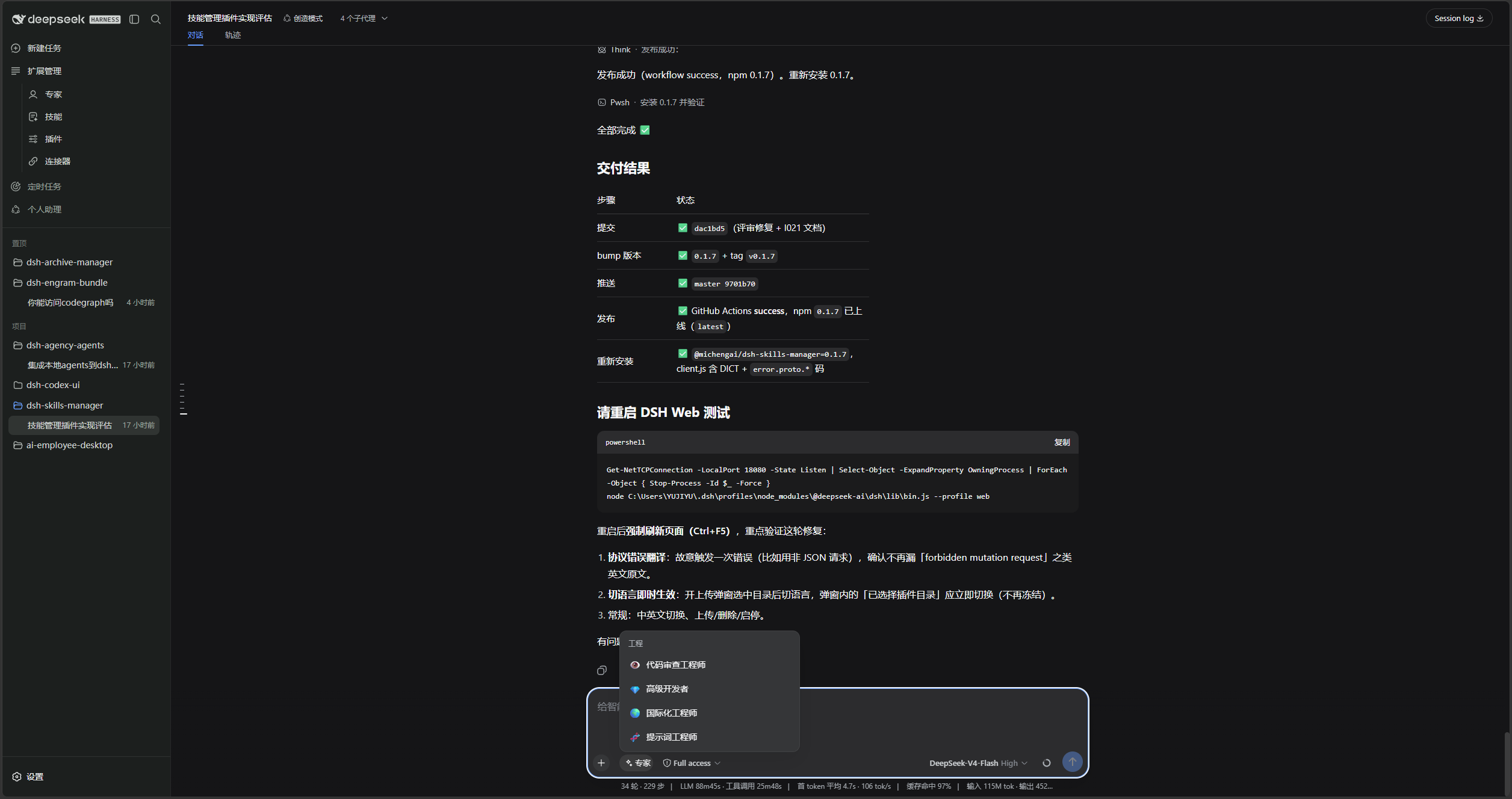
- Summon enabled experts by name or slug from the composer's **Experts** picker.
|
|
23
23
|
- Use `list_experts` to discover experts and `summon_expert` to start a one-shot specialist subagent.
|
|
24
24
|
- Use 271 bundled personas immediately, or connect a separately synchronized expert directory.
|
|
25
25
|
|
|
26
26
|
The parent session keeps task context, judgment, and the final answer. Expert children provide a specialist perspective only and cannot summon further experts.
|
|
27
27
|
|
|
28
|
+
## Screenshots
|
|
29
|
+
|
|
30
|
+
Enable the experts you need in **Settings → Experts**:
|
|
31
|
+
|
|
32
|
+
|
|
33
|
+
|
|
34
|
+
Open the composer's **Experts** picker and choose an enabled expert:
|
|
35
|
+
|
|
36
|
+
|
|
37
|
+
|
|
38
|
+
Then write the complete task with the expert name and slug:
|
|
39
|
+
|
|
40
|
+

|
|
41
|
+
|
|
28
42
|
## Prerequisites
|
|
29
43
|
|
|
30
44
|
- A working DeepSeek Harness Web installation with `dsh` available in PowerShell.
|
|
@@ -68,17 +82,16 @@ Restart DSH Web and hard-refresh the browser. `dsh plugin ... add .` reads the p
|
|
|
68
82
|
|
|
69
83
|
## Usage
|
|
70
84
|
|
|
71
|
-
1. Open **Settings →
|
|
72
|
-
2.
|
|
85
|
+
1. Open **Settings → Experts** and enable the needed experts.
|
|
86
|
+
2. Open the composer's **Experts** picker and choose an enabled expert.
|
|
73
87
|
3. Name the expert and slug, then provide the complete task.
|
|
74
88
|
|
|
75
89
|
```text
|
|
76
|
-
Summon the "Code Review Engineer"
|
|
90
|
+
Summon the "Code Review Engineer" expert (engineering-code-reviewer) for this task:
|
|
77
91
|
Review the changes in the current workspace and list reproducible issues by severity.
|
|
78
92
|
```
|
|
79
93
|
|
|
80
94
|
The parent session can also call `list_experts(division?)`, then delegate with `summon_expert(expert, task)`. Use a slug when a name is ambiguous.
|
|
81
|
-
|
|
82
95
|
## Configuration and limits
|
|
83
96
|
|
|
84
97
|
| Key | Default | Purpose |
|
package/README.zh-CN.md
CHANGED
|
@@ -18,13 +18,27 @@
|
|
|
18
18
|
|
|
19
19
|
## 功能概览
|
|
20
20
|
|
|
21
|
-
- 在「设置 →
|
|
22
|
-
-
|
|
21
|
+
- 在「设置 → 专家」中按 17 个分区浏览、启用或停用内置专家。
|
|
22
|
+
- 在输入框的「专家」中按名称或 slug 召唤已启用的专家处理完整任务。
|
|
23
23
|
- 提供 `list_experts` 与 `summon_expert` 工具,分别用于发现专家和启动一次性子代理。
|
|
24
24
|
- 内置 271 份 persona,无需额外下载;也可接入自行同步的专家目录。
|
|
25
25
|
|
|
26
26
|
主会话保留任务上下文、判断和最终交付;专家子代理只提供专业视角,不能继续召唤专家,避免递归委派。
|
|
27
27
|
|
|
28
|
+
## 界面预览
|
|
29
|
+
|
|
30
|
+
在「设置 → 专家」中启用需要的专家:
|
|
31
|
+
|
|
32
|
+

|
|
33
|
+
|
|
34
|
+
在输入框点击「专家」,选择已启用的专家:
|
|
35
|
+
|
|
36
|
+

|
|
37
|
+
|
|
38
|
+
再用名称和 slug 写出完整任务:
|
|
39
|
+
|
|
40
|
+

|
|
41
|
+
|
|
28
42
|
## 前置条件
|
|
29
43
|
|
|
30
44
|
- 已可正常运行 DeepSeek Harness Web,且可在 PowerShell 中使用 `dsh`。
|
|
@@ -68,17 +82,16 @@ dsh --profile web --dump-config
|
|
|
68
82
|
|
|
69
83
|
## 使用
|
|
70
84
|
|
|
71
|
-
1. 打开「设置 →
|
|
72
|
-
2.
|
|
85
|
+
1. 打开「设置 → 专家」,启用需要的专家。
|
|
86
|
+
2. 在对话输入框点击「专家」,选择已启用的专家。
|
|
73
87
|
3. 用名称和 slug 明确指定专家,并给出完整任务。例如:
|
|
74
88
|
|
|
75
89
|
```text
|
|
76
|
-
|
|
90
|
+
召唤专家「代码审查工程师」(engineering-code-reviewer)处理以下任务:
|
|
77
91
|
审查当前工作区的改动,按严重程度列出可复现的问题。
|
|
78
92
|
```
|
|
79
93
|
|
|
80
94
|
也可由主会话先调用 `list_experts(division?)` 查找专家,再使用 `summon_expert(expert, task)` 委派任务。名称不唯一时,请使用 slug。
|
|
81
|
-
|
|
82
95
|
## 配置与边界
|
|
83
96
|
|
|
84
97
|
| 配置项 | 默认值 | 作用 |
|
|
Binary file
|
|
Binary file
|
|
Binary file
|
package/package.json
CHANGED