@meursyphus/flitter 2.0.0-alpha.8 → 2.0.0
This diff represents the content of publicly available package versions that have been released to one of the supported registries. The information contained in this diff is provided for informational purposes only and reflects changes between package versions as they appear in their respective public registries.
- package/README.md +217 -22
- package/index.cjs +2759 -1986
- package/index.d.cts +111 -47
- package/index.d.ts +111 -47
- package/index.global.js +2884 -2114
- package/index.js +2761 -1988
- package/package.json +3 -3
package/README.md
CHANGED
|
@@ -1,46 +1,98 @@
|
|
|
1
1
|
# Flitter
|
|
2
2
|
|
|
3
|
-
Flitter is a framework
|
|
3
|
+
Flitter is a powerful framework inspired by Flutter, supporting both SVG and Canvas to create high-performance graphics and user interfaces. It is designed to easily implement complex data visualizations, interactive charts, diagrams, and graphic editors in web applications.
|
|
4
4
|
|
|
5
|
-
FlutterJs is a library inspired by Flutter, a cross-platform framework commonly used for mobile app development.
|
|
6
5
|
|
|
7
|
-
|
|
6
|
+
## Key Features
|
|
8
7
|
|
|
9
|
-
|
|
8
|
+
- **Render Object Tree**: Flitter uses a render object tree for efficient rendering, allowing easy management and manipulation of complex layouts.
|
|
10
9
|
|
|
11
|
-
|
|
10
|
+
- **Declarative Programming**: Following a declarative paradigm, the screen automatically updates when values change, simplifying application state management.
|
|
12
11
|
|
|
13
|
-
|
|
12
|
+
- **Optimized Rendering**: Re-rendering, painting, and layout recalculations are managed by the renderer pipeline, with optimizations applied to update only necessary parts.
|
|
13
|
+
|
|
14
|
+
- **Box Model Layout**: Users can easily compose layouts using the familiar Box model.
|
|
15
|
+
|
|
16
|
+
- **SVG and Canvas Support**: Supports both SVG and Canvas, meeting various graphic requirements. Developers can choose the appropriate renderer as needed.
|
|
17
|
+
|
|
18
|
+
- **Diverse Applications**: Can be utilized in various fields such as charts, diagrams, data visualization, and graphic editors.
|
|
19
|
+
|
|
20
|
+
# Showcase
|
|
21
|
+
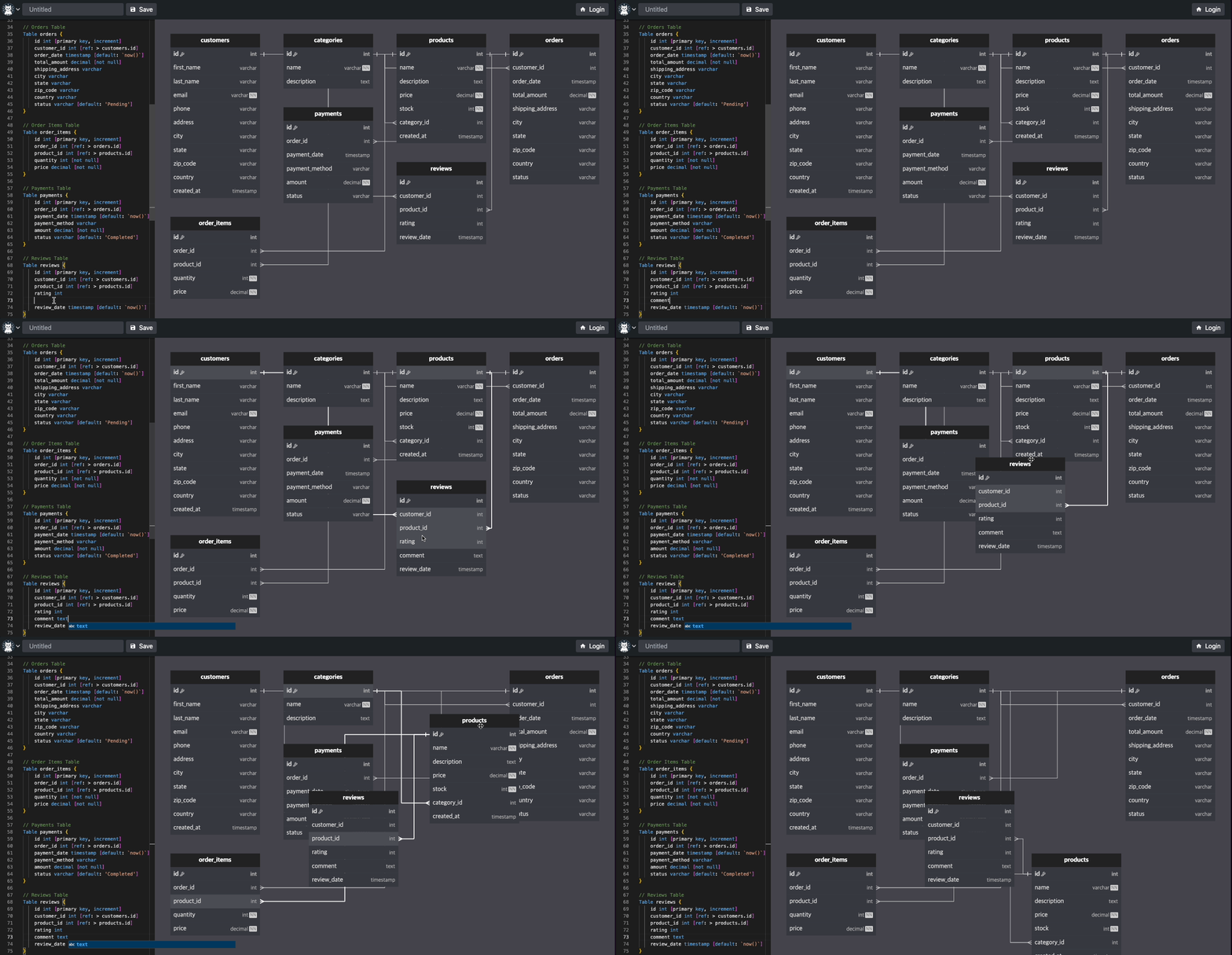
Here are some examples of what you can create with Flitter:
|
|
22
|
+
Interactive ERD (Entity-Relationship Diagram)[https://easyrd.dev]
|
|
23
|
+
|
|
24
|
+
|
|
25
|
+
|
|
26
|
+
This interactive ERD demonstrates Flitter's capability to create complex, interactive diagrams. Users can manipulate entities, add relationships, and visualize database structures in real-time. This showcase highlights Flitter's strengths in:
|
|
27
|
+
|
|
28
|
+
Creating responsive, draggable elements
|
|
29
|
+
Handling complex user interactions
|
|
30
|
+
Rendering intricate diagrams with ease
|
|
31
|
+
Real-time updates based on user input
|
|
32
|
+
## Installation Guide
|
|
33
|
+
|
|
34
|
+
Flitter can be used in various JavaScript environments. Here are installation and usage methods for major environments:
|
|
35
|
+
|
|
36
|
+
### Pure JavaScript
|
|
14
37
|
|
|
15
38
|
```bash
|
|
16
|
-
npm
|
|
39
|
+
npm install @meursyphus/flitter
|
|
17
40
|
```
|
|
18
41
|
|
|
19
|
-
Example of using Flitter widgets in a React component:
|
|
20
|
-
|
|
21
42
|
```javascript
|
|
43
|
+
import { Widget, Container, AppRunner } from '@meursyphus/flitter';
|
|
44
|
+
|
|
45
|
+
// Using SVG renderer
|
|
46
|
+
const svgElement = document.getElementById('mySvg');
|
|
47
|
+
const svgRunner = new AppRunner({ view: svgElement });
|
|
48
|
+
svgRunner.runApp(Container({ color: 'lightblue' }));
|
|
49
|
+
|
|
50
|
+
// Using Canvas renderer
|
|
51
|
+
const canvasElement = document.getElementById('myCanvas');
|
|
52
|
+
const canvasRunner = new AppRunner({ view: canvasElement });
|
|
53
|
+
canvasRunner.runApp(Container({ color: 'lightgreen' }));
|
|
54
|
+
```
|
|
55
|
+
|
|
56
|
+
### React
|
|
57
|
+
|
|
58
|
+
```bash
|
|
59
|
+
npm install @meursyphus/flitter @meursyphus/flitter-react
|
|
60
|
+
```
|
|
61
|
+
|
|
62
|
+
```jsx
|
|
22
63
|
import { Container, Alignment, Text, TextStyle } from '@meursyphus/flitter';
|
|
23
64
|
import Widget from '@meursyphus/flitter-react';
|
|
24
65
|
|
|
25
|
-
const App = () =>
|
|
26
|
-
|
|
66
|
+
const App = () => (
|
|
67
|
+
<>
|
|
27
68
|
<Widget
|
|
28
69
|
width="600px"
|
|
29
70
|
height="300px"
|
|
71
|
+
renderer="svg"
|
|
30
72
|
widget={Container({
|
|
31
73
|
alignment: Alignment.center,
|
|
32
74
|
color: 'lightblue',
|
|
33
|
-
child: Text("Hello, Flitter!", style: TextStyle({ fontSize: 30, weight: 'bold' }))
|
|
75
|
+
child: Text("Hello, Flitter SVG!", { style: TextStyle({ fontSize: 30, weight: 'bold' }) })
|
|
76
|
+
})}
|
|
77
|
+
/>
|
|
78
|
+
<Widget
|
|
79
|
+
width="600px"
|
|
80
|
+
height="300px"
|
|
81
|
+
renderer="canvas"
|
|
82
|
+
widget={Container({
|
|
83
|
+
alignment: Alignment.center,
|
|
84
|
+
color: 'lightgreen',
|
|
85
|
+
child: Text("Hello, Flitter Canvas!", { style: TextStyle({ fontSize: 30, weight: 'bold' }) })
|
|
34
86
|
})}
|
|
35
87
|
/>
|
|
36
|
-
|
|
37
|
-
|
|
88
|
+
</>
|
|
89
|
+
);
|
|
38
90
|
```
|
|
39
91
|
|
|
40
92
|
### Svelte
|
|
41
93
|
|
|
42
94
|
```bash
|
|
43
|
-
npm
|
|
95
|
+
npm install @meursyphus/flitter @meursyphus/flitter-svelte
|
|
44
96
|
```
|
|
45
97
|
|
|
46
98
|
```svelte
|
|
@@ -52,22 +104,165 @@ npm i @meursyphus/flitter @meursyphus/flitter-svelte
|
|
|
52
104
|
<Widget
|
|
53
105
|
width="600px"
|
|
54
106
|
height="300px"
|
|
107
|
+
renderer="svg"
|
|
55
108
|
widget={Container({
|
|
56
109
|
alignment: Alignment.center,
|
|
57
110
|
color: 'lightblue',
|
|
58
|
-
child: Text("Hello, Flitter!", style: TextStyle({ fontSize: 30, weight: 'bold' }))
|
|
111
|
+
child: Text("Hello, Flitter SVG!", { style: TextStyle({ fontSize: 30, weight: 'bold' }) })
|
|
59
112
|
})}
|
|
60
113
|
/>
|
|
114
|
+
|
|
115
|
+
<Widget
|
|
116
|
+
width="600px"
|
|
117
|
+
height="300px"
|
|
118
|
+
renderer="canvas"
|
|
119
|
+
widget={Container({
|
|
120
|
+
alignment: Alignment.center,
|
|
121
|
+
color: 'lightgreen',
|
|
122
|
+
child: Text("Hello, Flitter Canvas!", { style: TextStyle({ fontSize: 30, weight: 'bold' }) })
|
|
123
|
+
})}
|
|
124
|
+
/>
|
|
125
|
+
```
|
|
126
|
+
|
|
127
|
+
## Usage Example
|
|
128
|
+
|
|
129
|
+
Example of creating a simple chart using Flitter:
|
|
130
|
+
|
|
131
|
+
```javascript
|
|
132
|
+
import {
|
|
133
|
+
Container,
|
|
134
|
+
Animation,
|
|
135
|
+
Text,
|
|
136
|
+
TextStyle,
|
|
137
|
+
StatefulWidget,
|
|
138
|
+
State,
|
|
139
|
+
Alignment,
|
|
140
|
+
SizedBox,
|
|
141
|
+
Column,
|
|
142
|
+
MainAxisSize,
|
|
143
|
+
MainAxisAlignment,
|
|
144
|
+
Row,
|
|
145
|
+
CrossAxisAlignment,
|
|
146
|
+
FractionallySizedBox,
|
|
147
|
+
BoxDecoration,
|
|
148
|
+
BorderRadius,
|
|
149
|
+
Radius,
|
|
150
|
+
AnimationController,
|
|
151
|
+
Tween,
|
|
152
|
+
CurvedAnimation,
|
|
153
|
+
Curves
|
|
154
|
+
} from '@meursyphus/flitter';
|
|
155
|
+
|
|
156
|
+
export default function BarChart() {
|
|
157
|
+
return Container({
|
|
158
|
+
alignment: Alignment.center,
|
|
159
|
+
color: 'lightgrey',
|
|
160
|
+
child: Column({
|
|
161
|
+
mainAxisSize: MainAxisSize.min,
|
|
162
|
+
crossAxisAlignment: CrossAxisAlignment.center,
|
|
163
|
+
children: [
|
|
164
|
+
Text('BarChart', { style: new TextStyle({ fontFamily: 'Intent', fontWeight: '600' }) }),
|
|
165
|
+
SizedBox({
|
|
166
|
+
width: 200,
|
|
167
|
+
height: 150,
|
|
168
|
+
child: Row({
|
|
169
|
+
mainAxisAlignment: MainAxisAlignment.spaceBetween,
|
|
170
|
+
children: [
|
|
171
|
+
{ label: 'S', value: 60 },
|
|
172
|
+
{ label: 'M', value: 20 },
|
|
173
|
+
{ label: 'T', value: 30 },
|
|
174
|
+
{ label: 'W', value: 90 },
|
|
175
|
+
{ label: 'T', value: 70 },
|
|
176
|
+
{ label: 'F', value: 50 },
|
|
177
|
+
{ label: 'S', value: 40 }
|
|
178
|
+
].map(({ label, value }) => new Bar(label, value))
|
|
179
|
+
})
|
|
180
|
+
})
|
|
181
|
+
]
|
|
182
|
+
})
|
|
183
|
+
});
|
|
184
|
+
}
|
|
185
|
+
|
|
186
|
+
class Bar extends StatefulWidget {
|
|
187
|
+
constructor(public label: string, public value: number) {
|
|
188
|
+
super();
|
|
189
|
+
}
|
|
190
|
+
|
|
191
|
+
createState(): State<StatefulWidget> {
|
|
192
|
+
return new BarState();
|
|
193
|
+
}
|
|
194
|
+
}
|
|
195
|
+
|
|
196
|
+
class BarState extends State<Bar> {
|
|
197
|
+
animationController!: AnimationController;
|
|
198
|
+
tweenAnimation!: Animation<number>;
|
|
199
|
+
|
|
200
|
+
override initState(): void {
|
|
201
|
+
this.animationController = new AnimationController({
|
|
202
|
+
duration: 10000
|
|
203
|
+
});
|
|
204
|
+
this.animationController.addListener(() => {
|
|
205
|
+
this.setState();
|
|
206
|
+
});
|
|
207
|
+
const tween = new Tween({ begin: 0, end: this.widget.value });
|
|
208
|
+
this.tweenAnimation = tween.animated(
|
|
209
|
+
new CurvedAnimation({
|
|
210
|
+
parent: this.animationController,
|
|
211
|
+
curve: Curves.easeInOut
|
|
212
|
+
})
|
|
213
|
+
);
|
|
214
|
+
this.animationController.forward();
|
|
215
|
+
}
|
|
216
|
+
|
|
217
|
+
override build() {
|
|
218
|
+
return Column({
|
|
219
|
+
mainAxisAlignment: MainAxisAlignment.end,
|
|
220
|
+
children: [
|
|
221
|
+
FractionallySizedBox({
|
|
222
|
+
heightFactor: this.tweenAnimation.value / 100,
|
|
223
|
+
child: Column({
|
|
224
|
+
children: [
|
|
225
|
+
Container({
|
|
226
|
+
width: 20,
|
|
227
|
+
decoration: new BoxDecoration({
|
|
228
|
+
color: '#1a1a1a',
|
|
229
|
+
borderRadius: BorderRadius.only({
|
|
230
|
+
topLeft: Radius.circular(4),
|
|
231
|
+
topRight: Radius.circular(4)
|
|
232
|
+
})
|
|
233
|
+
})
|
|
234
|
+
}),
|
|
235
|
+
SizedBox({ height: 5 }),
|
|
236
|
+
Text(this.widget.label, { style: new TextStyle({ fontFamily: 'Intent' }) })
|
|
237
|
+
]
|
|
238
|
+
})
|
|
239
|
+
})
|
|
240
|
+
]
|
|
241
|
+
});
|
|
242
|
+
}
|
|
243
|
+
}
|
|
61
244
|
```
|
|
62
245
|
|
|
63
|
-
##
|
|
246
|
+
## Why Flitter?
|
|
247
|
+
|
|
248
|
+
1. **Easy Learning Curve**: Uses syntax similar to Flutter, allowing mobile developers to easily adapt to the web environment.
|
|
64
249
|
|
|
65
|
-
|
|
66
|
-
|
|
67
|
-
|
|
250
|
+
2. **High Performance**: Handles complex graphics smoothly with an optimized rendering pipeline.
|
|
251
|
+
|
|
252
|
+
3. **Flexibility**: Abstracts SVG and Canvas manipulation, allowing developers to focus on business logic.
|
|
253
|
+
|
|
254
|
+
4. **Renderer Selection**: Can choose between SVG and Canvas renderers as needed, meeting various graphic requirements.
|
|
255
|
+
|
|
256
|
+
5. **Reusability**: Increases code reusability through a component-based approach.
|
|
257
|
+
|
|
258
|
+
## Contributing
|
|
259
|
+
|
|
260
|
+
Flitter is an open-source project. We welcome all forms of contributions including bug reports, feature suggestions, and pull requests. For more details, please visit [Discord](https://discord.gg/kUZp4SaHzF)
|
|
68
261
|
|
|
69
262
|
## License
|
|
70
263
|
|
|
71
|
-
Flitter is
|
|
264
|
+
Flitter is provided under the MIT license.
|
|
265
|
+
|
|
266
|
+
## Learn More
|
|
72
267
|
|
|
73
|
-
For
|
|
268
|
+
For detailed documentation and examples, visit the [Flitter Official Documentation](https://flitter.pages.dev).
|