@mcpc-tech/unplugin-dev-inspector-mcp 0.1.3 → 0.1.5
This diff represents the content of publicly available package versions that have been released to one of the supported registries. The information contained in this diff is provided for informational purposes only and reflects changes between package versions as they appear in their respective public registries.
- package/README.md +20 -19
- package/client/dist/inspector.css +8 -0
- package/client/dist/inspector.js +88 -74
- package/dist/config-updater.cjs +2 -1
- package/dist/config-updater.js +2 -1
- package/dist/index.d.cts +4 -4
- package/package.json +1 -1
package/README.md
CHANGED
|
@@ -1,8 +1,4 @@
|
|
|
1
|
-
|
|
2
|
-
<img src="./assets/logo.svg" alt="DevInspector Logo" width="50" height="50" />
|
|
3
|
-
</p>
|
|
4
|
-
|
|
5
|
-
# @mcpc-tech/unplugin-dev-inspector-mcp
|
|
1
|
+
# dev-inspector-mcp
|
|
6
2
|
|
|
7
3
|
[](https://www.npmjs.com/package/@mcpc-tech/unplugin-dev-inspector-mcp)
|
|
8
4
|
[](https://www.npmjs.com/package/@mcpc-tech/unplugin-dev-inspector-mcp)
|
|
@@ -13,10 +9,10 @@ DevInspector connects your web app directly to your AI agent. Click any element
|
|
|
13
9
|
|
|
14
10
|
Works with any MCP-compatible AI client. Supports ACP agents: **Claude Code**, **Codex CLI**, **Gemini CLI**, **OpenCode**, and [more](https://agentclientprotocol.com/overview/agents).
|
|
15
11
|
|
|
16
|
-
##
|
|
12
|
+
## Table of Contents
|
|
17
13
|
|
|
18
|
-
- [Demo Video](
|
|
19
|
-
- [Social Media](
|
|
14
|
+
- [Demo Video](#demo-video)
|
|
15
|
+
- [Social Media](#social-media)
|
|
20
16
|
- [Key Features](#key-features)
|
|
21
17
|
- [Quick Start](#quick-start)
|
|
22
18
|
- [Installation](#installation)
|
|
@@ -34,29 +30,34 @@ Works with any MCP-compatible AI client. Supports ACP agents: **Claude Code**, *
|
|
|
34
30
|
- [MCP Prompts](#mcp-prompts)
|
|
35
31
|
- [Architecture](#architecture)
|
|
36
32
|
|
|
37
|
-
##
|
|
33
|
+
## Demo Video
|
|
38
34
|
|
|
39
|
-
|
|
35
|
+
**Watch the demo:** [https://www.youtube.com/shorts/TCt2oOtPS_k](https://www.youtube.com/shorts/TCt2oOtPS_k)
|
|
40
36
|
|
|
41
|
-
##
|
|
37
|
+
## Social Media
|
|
42
38
|
|
|
43
|
-
|
|
39
|
+
**Twittter/X Post:** [https://x.com/yaoandyan/status/1995082020431753600](https://x.com/yaoandyan/status/1995082020431753600?s=20)
|
|
44
40
|
|
|
45
41
|
|
|
46
42
|
|
|
47
43
|
## Key Features
|
|
48
44
|
|
|
49
|
-
###
|
|
45
|
+
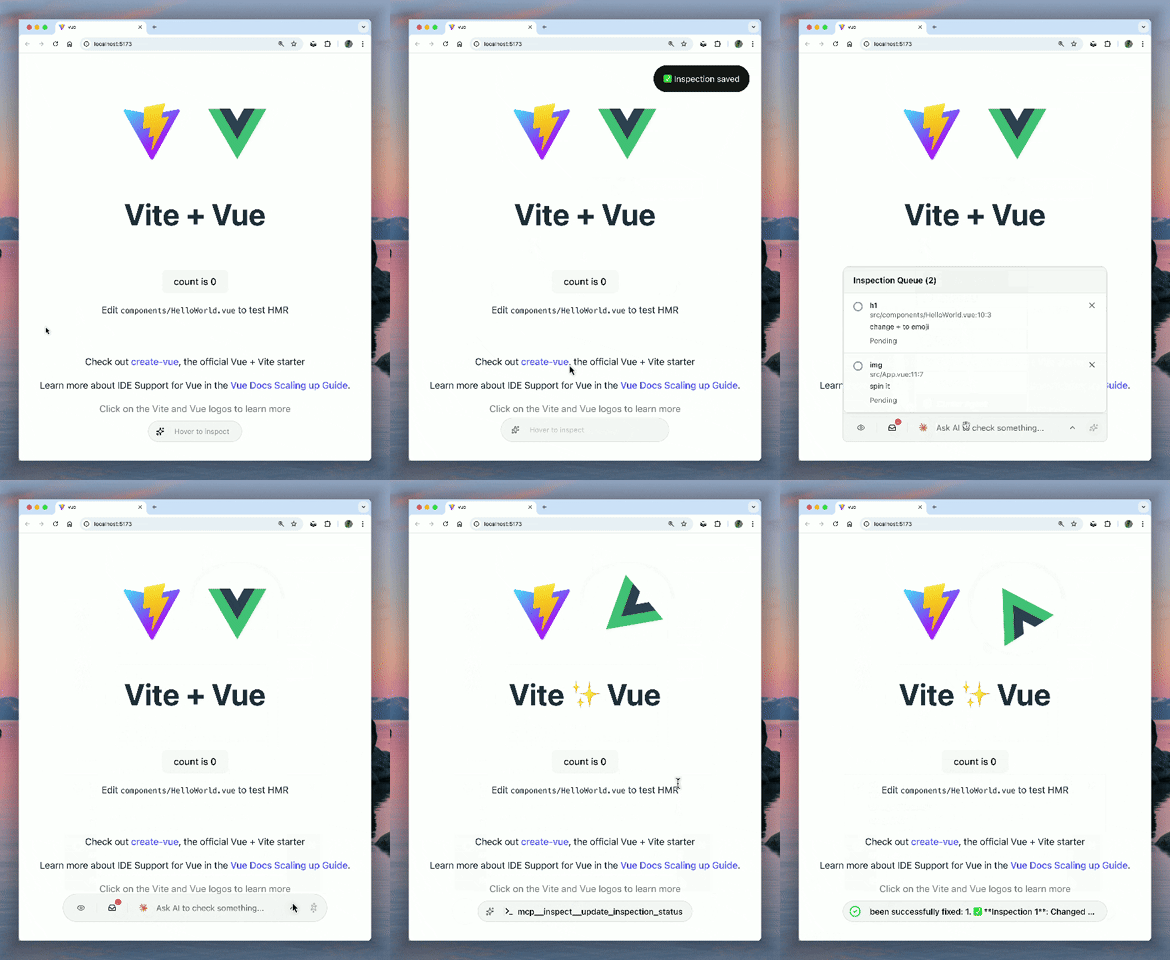
### Visual Context & Region Selection
|
|
46
|
+
|
|
47
|
+
Click any element to inspect it, or **drag to select a region**. AI gets the full context: source code location, computed styles, component hierarchy, IDs, classes, text content, and **automatically captures screenshots** for pixel-perfect visual understanding.
|
|
48
|
+
|
|
49
|
+
|
|
50
|
+
### Universal DevTools Access
|
|
50
51
|
|
|
51
|
-
|
|
52
|
+
AI can access Network and Console logs from **any browser** (via client-side interception) or full Chrome DevTools (via chrome devtools mcp). It sees what you see, regardless of your environment.
|
|
52
53
|
|
|
53
|
-
###
|
|
54
|
+
### Smart Select
|
|
54
55
|
|
|
55
|
-
AI
|
|
56
|
+
Let AI do the heavy lifting. "Smart Select" automatically analyzes recent console errors and failed network requests to construct the perfect context for your debugging session.
|
|
56
57
|
|
|
57
|
-
###
|
|
58
|
+
### Multi-Agent Workflow
|
|
58
59
|
|
|
59
|
-
Switch between agents (Claude Code,
|
|
60
|
+
Switch between agents (Claude Code, Codex, Gemini, Opencode...) and track their debugging progress visually with a **floating status bar**.
|
|
60
61
|
|
|
61
62
|
## Quick Start
|
|
62
63
|
|
|
@@ -80,7 +81,7 @@ yarn add -D @mcpc-tech/unplugin-dev-inspector-mcp
|
|
|
80
81
|
> yarn add -D @mcpc-tech/unplugin-dev-inspector-mcp --no-optional
|
|
81
82
|
> ```
|
|
82
83
|
|
|
83
|
-
###
|
|
84
|
+
### Automated Setup (Recommended)
|
|
84
85
|
|
|
85
86
|
Run the setup command to automatically configure your `vite.config.ts`, `webpack.config.js`, or `next.config.js`:
|
|
86
87
|
|
|
@@ -1088,6 +1088,10 @@
|
|
|
1088
1088
|
width: calc(var(--spacing) * 7);
|
|
1089
1089
|
}
|
|
1090
1090
|
|
|
1091
|
+
.w-8 {
|
|
1092
|
+
width: calc(var(--spacing) * 8);
|
|
1093
|
+
}
|
|
1094
|
+
|
|
1091
1095
|
.w-10 {
|
|
1092
1096
|
width: calc(var(--spacing) * 10);
|
|
1093
1097
|
}
|
|
@@ -1355,6 +1359,10 @@
|
|
|
1355
1359
|
grid-auto-rows: min-content;
|
|
1356
1360
|
}
|
|
1357
1361
|
|
|
1362
|
+
.grid-cols-2 {
|
|
1363
|
+
grid-template-columns: repeat(2, minmax(0, 1fr));
|
|
1364
|
+
}
|
|
1365
|
+
|
|
1358
1366
|
.grid-cols-\[0_1fr\] {
|
|
1359
1367
|
grid-template-columns: 0 1fr;
|
|
1360
1368
|
}
|