@mcp-b/chrome-devtools-mcp 1.2.0 → 1.3.1
This diff represents the content of publicly available package versions that have been released to one of the supported registries. The information contained in this diff is provided for informational purposes only and reflects changes between package versions as they appear in their respective public registries.
- package/README.md +71 -38
- package/build/src/McpContext.js +195 -7
- package/build/src/PageCollector.js +18 -8
- package/build/src/browser.js +123 -5
- package/build/src/cli.js +20 -1
- package/build/src/main.js +88 -8
- package/build/src/prompts/index.js +5 -5
- package/build/src/third_party/index.js +1 -1
- package/build/src/tools/WebMCPToolHub.js +372 -0
- package/build/src/tools/pages.js +8 -2
- package/build/src/tools/webmcp.js +54 -122
- package/build/src/transports/WebMCPClientTransport.js +161 -74
- package/package.json +2 -1
package/README.md
CHANGED
|
@@ -5,10 +5,10 @@
|
|
|
5
5
|
[](https://www.npmjs.com/package/@mcp-b/chrome-devtools-mcp)
|
|
6
6
|
[](https://www.npmjs.com/package/@mcp-b/chrome-devtools-mcp)
|
|
7
7
|
[](https://opensource.org/licenses/Apache-2.0)
|
|
8
|
-
[](./docs/tool-reference.md)
|
|
9
9
|
[](https://developer.chrome.com/docs/devtools/)
|
|
10
10
|
|
|
11
|
-
📖 **[WebMCP Documentation](https://docs.mcp-b.ai)** | 🚀 **[Quick Start](https://docs.mcp-b.ai/quickstart)** | 🔌 **[Connecting Agents](https://docs.mcp-b.ai/connecting-agents)**
|
|
11
|
+
📖 **[WebMCP Documentation](https://docs.mcp-b.ai)** | 🚀 **[Quick Start](https://docs.mcp-b.ai/quickstart)** | 🔌 **[Connecting Agents](https://docs.mcp-b.ai/connecting-agents)** | 🎯 **[Chrome DevTools Quickstart](https://github.com/WebMCP-org/chrome-devtools-quickstart)**
|
|
12
12
|
|
|
13
13
|
**@mcp-b/chrome-devtools-mcp** lets AI coding agents like Claude, Gemini, Cursor, and Copilot control and inspect a live Chrome browser via the Model Context Protocol (MCP). Get performance insights, debug network requests, take screenshots, and interact with website-specific MCP tools through WebMCP integration.
|
|
14
14
|
|
|
@@ -21,12 +21,27 @@
|
|
|
21
21
|
|
|
22
22
|
| Feature | Benefit |
|
|
23
23
|
|---------|---------|
|
|
24
|
-
| **
|
|
24
|
+
| **27 MCP Tools** | Comprehensive browser control - navigation, input, screenshots, performance, debugging |
|
|
25
25
|
| **WebMCP Integration** | Connect to website-specific AI tools via `@mcp-b/global` |
|
|
26
26
|
| **Performance Analysis** | Chrome DevTools-powered performance insights and trace recording |
|
|
27
27
|
| **Reliable Automation** | Puppeteer-based with automatic waiting for action results |
|
|
28
28
|
| **Works with All MCP Clients** | Claude, Cursor, Copilot, Gemini CLI, VS Code, Windsurf, and more |
|
|
29
29
|
|
|
30
|
+
### Token Efficiency
|
|
31
|
+
|
|
32
|
+
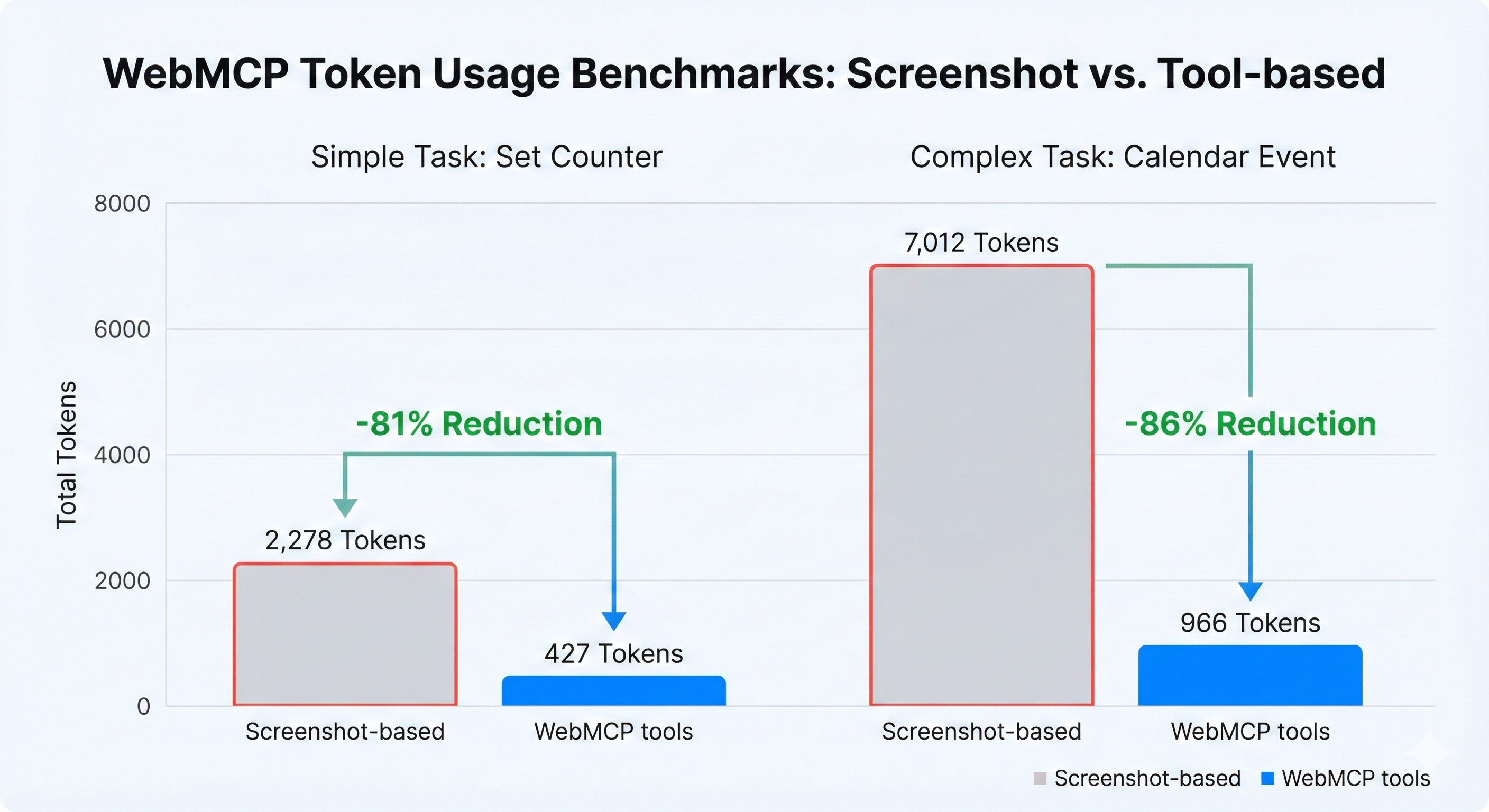
WebMCP tools are dramatically more efficient than screenshot-based workflows:
|
|
33
|
+
|
|
34
|
+
|
|
35
|
+
|
|
36
|
+
| Task | Screenshot-Based | WebMCP Tools | Savings |
|
|
37
|
+
|------|-----------------|--------------|---------|
|
|
38
|
+
| Simple task (set counter) | 3,801 tokens | 433 tokens | **89% fewer tokens** |
|
|
39
|
+
| Complex task (calendar event) | 11,390 tokens | 2,583 tokens | **77% fewer tokens** |
|
|
40
|
+
|
|
41
|
+
Screenshots are expensive (~2,000 tokens each). WebMCP tool responses are compact JSON (20-100 tokens typically).
|
|
42
|
+
|
|
43
|
+
> **Try it yourself:** Clone the [Chrome DevTools Quickstart](https://github.com/WebMCP-org/chrome-devtools-quickstart) and run the benchmarks.
|
|
44
|
+
|
|
30
45
|
## What's Different from Chrome DevTools MCP?
|
|
31
46
|
|
|
32
47
|
This fork adds **WebMCP integration** - the ability to call MCP tools that are registered directly on webpages. This unlocks a powerful new workflow:
|
|
@@ -41,34 +56,15 @@ This fork adds **WebMCP integration** - the ability to call MCP tools that are r
|
|
|
41
56
|
| **List website MCP tools** | ❌ | ✅ |
|
|
42
57
|
| **AI-driven tool development** | ❌ | ✅ |
|
|
43
58
|
|
|
44
|
-
The key addition is
|
|
59
|
+
The key addition is automatic WebMCP tool discovery and registration. When you visit a page with [@mcp-b/global](https://www.npmjs.com/package/@mcp-b/global), its tools are automatically registered as first-class MCP tools that your AI agent can call directly.
|
|
45
60
|
|
|
46
61
|
## AI-Driven Development Workflow
|
|
47
62
|
|
|
48
63
|
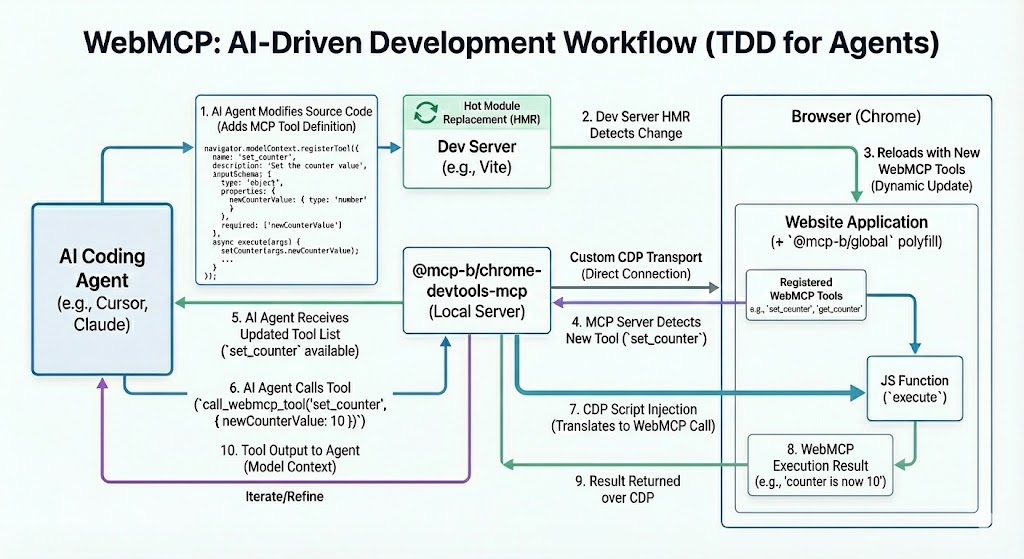
One of the most powerful use cases for this package is **AI-driven tool development** - essentially test-driven development for AI agents. Here's how it works:
|
|
49
64
|
|
|
50
|
-
|
|
51
|
-
|
|
52
|
-
|
|
53
|
-
├─────────────────────────────────────────────────────────────────────┤
|
|
54
|
-
│ │
|
|
55
|
-
│ 1. AI writes WebMCP tool code ──────────────────────────┐ │
|
|
56
|
-
│ │ │
|
|
57
|
-
│ 2. Dev server hot-reloads ◄─────────────────────────────┘ │
|
|
58
|
-
│ │
|
|
59
|
-
│ 3. AI opens browser via Chrome DevTools MCP │
|
|
60
|
-
│ │ │
|
|
61
|
-
│ ▼ │
|
|
62
|
-
│ 4. AI calls list_webmcp_tools to see the new tool │
|
|
63
|
-
│ │ │
|
|
64
|
-
│ ▼ │
|
|
65
|
-
│ 5. AI calls call_webmcp_tool to test it │
|
|
66
|
-
│ │ │
|
|
67
|
-
│ ▼ │
|
|
68
|
-
│ 6. AI sees results, iterates if needed ───────► Back to step 1 │
|
|
69
|
-
│ │
|
|
70
|
-
└─────────────────────────────────────────────────────────────────────┘
|
|
71
|
-
```
|
|
65
|
+
|
|
66
|
+
|
|
67
|
+
> **Want to try it yourself?** Check out the [Chrome DevTools Quickstart](https://github.com/WebMCP-org/chrome-devtools-quickstart) - a minimal example you can clone and run in 3 steps.
|
|
72
68
|
|
|
73
69
|
### Example: Building a Search Tool
|
|
74
70
|
|
|
@@ -127,13 +123,19 @@ The AI can see the actual response, fix any bugs, and repeat until it works perf
|
|
|
127
123
|
This creates a tight feedback loop where your AI assistant can:
|
|
128
124
|
- **Write** WebMCP tools in your codebase
|
|
129
125
|
- **Deploy** them automatically via hot-reload
|
|
130
|
-
- **Discover** them through `
|
|
131
|
-
- **Test** them
|
|
126
|
+
- **Discover** them through `diff_webmcp_tools`
|
|
127
|
+
- **Test** them by calling tools directly by their prefixed names (e.g., `webmcp_localhost_3000_page0_search_products`)
|
|
132
128
|
- **Debug** issues using console messages and snapshots
|
|
133
129
|
- **Iterate** until the tool works correctly
|
|
134
130
|
|
|
135
131
|
This is like **TDD for AI** - the AI can build and verify its own tools in real-time.
|
|
136
132
|
|
|
133
|
+
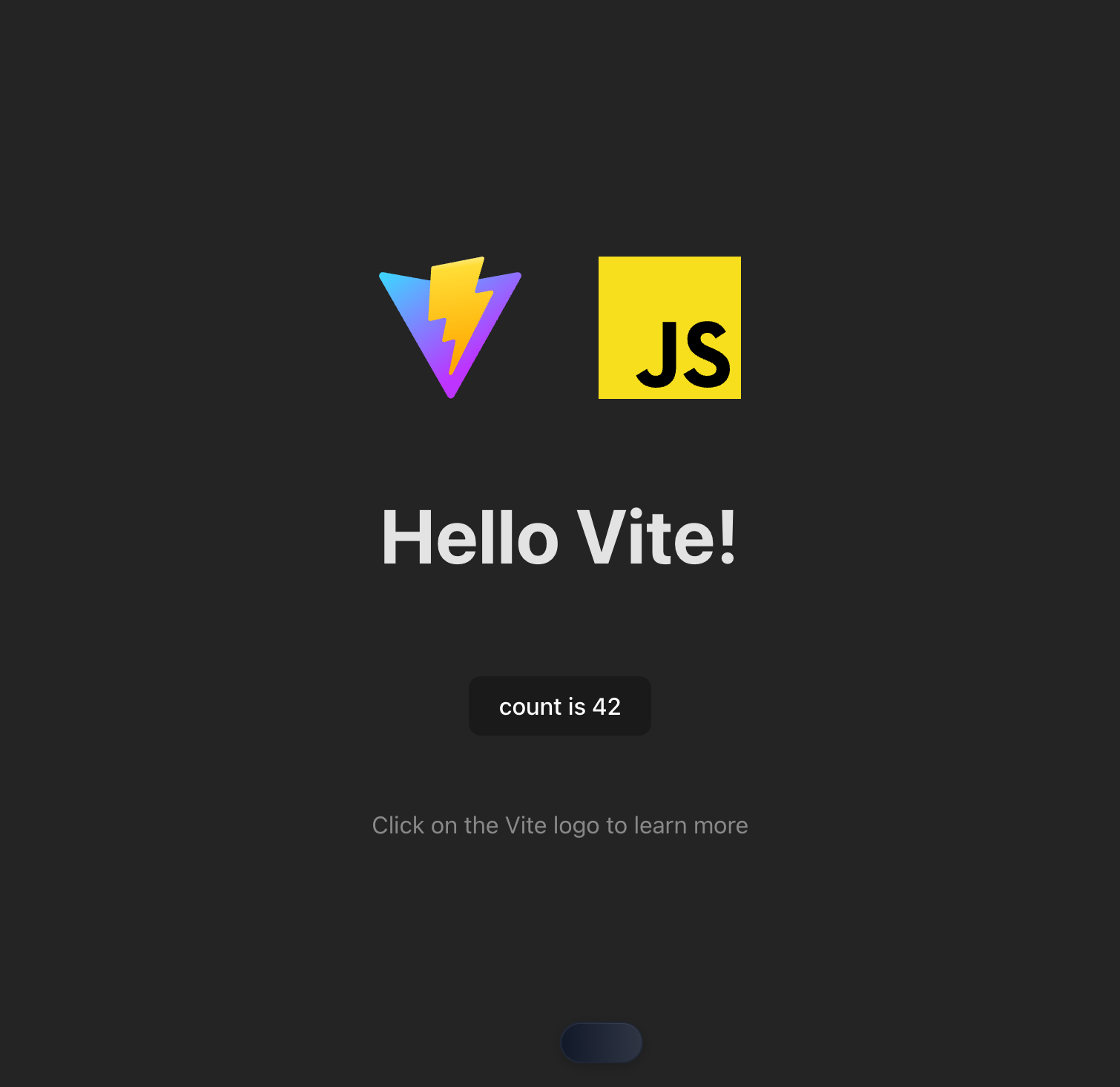
### Demo: Tool Execution Result
|
|
134
|
+
|
|
135
|
+
Here's what it looks like when an AI agent successfully discovers and calls WebMCP tools:
|
|
136
|
+
|
|
137
|
+
|
|
138
|
+
|
|
137
139
|
## [Tool reference](./docs/tool-reference.md) | [Changelog](./CHANGELOG.md) | [Contributing](./CONTRIBUTING.md) | [Troubleshooting](./docs/troubleshooting.md) | [Design Principles](./docs/design-principles.md)
|
|
138
140
|
|
|
139
141
|
## Key features
|
|
@@ -165,6 +167,8 @@ MCP clients.
|
|
|
165
167
|
|
|
166
168
|
## Getting started
|
|
167
169
|
|
|
170
|
+
> **New to WebMCP?** Try the [Chrome DevTools Quickstart](https://github.com/WebMCP-org/chrome-devtools-quickstart) - clone, run, and see AI-driven tool development in action in under 5 minutes.
|
|
171
|
+
|
|
168
172
|
Add the following config to your MCP client:
|
|
169
173
|
|
|
170
174
|
```json
|
|
@@ -471,9 +475,8 @@ If you run into any issues, checkout our [troubleshooting guide](./docs/troubles
|
|
|
471
475
|
- [`list_console_messages`](docs/tool-reference.md#list_console_messages)
|
|
472
476
|
- [`take_screenshot`](docs/tool-reference.md#take_screenshot)
|
|
473
477
|
- [`take_snapshot`](docs/tool-reference.md#take_snapshot)
|
|
474
|
-
- **Website MCP Tools** (
|
|
475
|
-
- [`
|
|
476
|
-
- [`call_webmcp_tool`](docs/tool-reference.md#call_webmcp_tool) - Call a website tool (auto-connects)
|
|
478
|
+
- **Website MCP Tools** (1 tool)
|
|
479
|
+
- [`diff_webmcp_tools`](docs/tool-reference.md#diff_webmcp_tools) - List available website tools across all pages (with diff)
|
|
477
480
|
|
|
478
481
|
<!-- END AUTO GENERATED TOOLS -->
|
|
479
482
|
|
|
@@ -670,6 +673,14 @@ all instances of `@mcp-b/chrome-devtools-mcp`. Set the `isolated` option to `tru
|
|
|
670
673
|
to use a temporary user data dir instead which will be cleared automatically after
|
|
671
674
|
the browser is closed.
|
|
672
675
|
|
|
676
|
+
> [!NOTE]
|
|
677
|
+
> When using a shared user data directory (non-isolated), the server launches
|
|
678
|
+
> Chrome with a local remote debugging port (`--remote-debugging-port=0` and
|
|
679
|
+
> `--remote-debugging-address=127.0.0.1`) so it can auto-connect on future runs.
|
|
680
|
+
> This means any local process can attach to that port. If you prefer pipe-only
|
|
681
|
+
> mode, pass `--chrome-arg=--remote-debugging-pipe` (auto-connect across runs
|
|
682
|
+
> will be disabled).
|
|
683
|
+
|
|
673
684
|
### Connecting to a running Chrome instance
|
|
674
685
|
|
|
675
686
|
You can connect to a running Chrome instance by using the `--browser-url` option. This is useful if you want to use your existing Chrome profile or if you are running the MCP server in a sandboxed environment that does not allow starting a new Chrome instance.
|
|
@@ -803,20 +814,42 @@ Navigate to https://example.com/app
|
|
|
803
814
|
What tools are available on this website?
|
|
804
815
|
```
|
|
805
816
|
|
|
806
|
-
The AI agent will use `
|
|
817
|
+
The AI agent will use `diff_webmcp_tools` to show you what functionality the
|
|
807
818
|
website exposes. This automatically connects to the page's WebMCP server.
|
|
808
819
|
|
|
809
|
-
**3. Use the tools**
|
|
820
|
+
**3. Use the tools directly**
|
|
810
821
|
|
|
811
822
|
```
|
|
812
823
|
Search for "wireless headphones" using the website's search tool
|
|
813
824
|
```
|
|
814
825
|
|
|
815
|
-
The AI agent will
|
|
826
|
+
The AI agent will call the tool directly by its prefixed name (e.g., `webmcp_example_com_page0_search_products`).
|
|
827
|
+
WebMCP tools are registered as first-class MCP tools, so they appear directly in your agent's tool list.
|
|
816
828
|
|
|
817
829
|
That's it! No explicit connect or disconnect steps needed - WebMCP tools
|
|
818
|
-
auto-connect when
|
|
819
|
-
|
|
830
|
+
auto-connect when detected and automatically update when you navigate.
|
|
831
|
+
|
|
832
|
+
### Dynamic Tool Registration
|
|
833
|
+
|
|
834
|
+
By default, WebMCP tools are automatically registered as first-class MCP tools when detected on a webpage. This means tools like `search_products` appear directly in your MCP client's tool list with prefixed names like `webmcp_localhost_3000_page0_search_products`.
|
|
835
|
+
|
|
836
|
+
**MCP Client Compatibility:**
|
|
837
|
+
|
|
838
|
+
| Client | Dynamic Tool Updates | Notes |
|
|
839
|
+
|--------|---------------------|-------|
|
|
840
|
+
| Claude Code | Yes | Full support for `tools/list_changed` |
|
|
841
|
+
| GitHub Copilot | Yes | Supports list changed notifications |
|
|
842
|
+
| Gemini CLI | Yes | Recently added support |
|
|
843
|
+
| Cursor | No | Use `diff_webmcp_tools` to poll manually |
|
|
844
|
+
| Cline | Partial | May need manual polling with `diff_webmcp_tools` |
|
|
845
|
+
| Continue | Unknown | Use `diff_webmcp_tools` if tools don't appear |
|
|
846
|
+
|
|
847
|
+
**For clients without dynamic tool support:**
|
|
848
|
+
|
|
849
|
+
If your MCP client doesn't support `tools/list_changed` notifications, use `diff_webmcp_tools` to manually see which tools are available, then call them directly by their prefixed names. The `diff_webmcp_tools` tool is diff-aware to reduce context pollution:
|
|
850
|
+
- First call returns the full tool list
|
|
851
|
+
- Subsequent calls return only added/removed tools
|
|
852
|
+
- Use `full: true` to force the complete list
|
|
820
853
|
|
|
821
854
|
### Example prompts
|
|
822
855
|
|
|
@@ -839,9 +872,9 @@ Call the website's form submission tool to fill out the contact form
|
|
|
839
872
|
- **"WebMCP not detected"**: The current webpage doesn't have `@mcp-b/global`
|
|
840
873
|
installed or no tools are registered. The page needs the WebMCP polyfill loaded.
|
|
841
874
|
- **Tool call fails**: Check the tool's input schema matches your parameters.
|
|
842
|
-
Use `
|
|
875
|
+
Use `diff_webmcp_tools` to see the expected input format.
|
|
843
876
|
- **Tools not appearing after navigation**: WebMCP auto-reconnects when you
|
|
844
|
-
navigate. If the new page has different tools, call `
|
|
877
|
+
navigate. If the new page has different tools, call `diff_webmcp_tools` again.
|
|
845
878
|
|
|
846
879
|
## Related Packages
|
|
847
880
|
|
package/build/src/McpContext.js
CHANGED
|
@@ -8,6 +8,7 @@ import os from 'node:os';
|
|
|
8
8
|
import path from 'node:path';
|
|
9
9
|
import { Client } from '@modelcontextprotocol/sdk/client/index.js';
|
|
10
10
|
import { extractUrlLikeFromDevToolsTitle, urlsEqual } from './DevtoolsUtils.js';
|
|
11
|
+
import { ToolListChangedNotificationSchema } from './third_party/index.js';
|
|
11
12
|
import { NetworkCollector, ConsoleCollector } from './PageCollector.js';
|
|
12
13
|
import { WEB_MCP_BRIDGE_SCRIPT, CHECK_WEBMCP_AVAILABLE_SCRIPT } from './transports/WebMCPBridgeScript.js';
|
|
13
14
|
import { WebMCPClientTransport } from './transports/WebMCPClientTransport.js';
|
|
@@ -16,8 +17,16 @@ import { listPages } from './tools/pages.js';
|
|
|
16
17
|
import { takeSnapshot } from './tools/snapshot.js';
|
|
17
18
|
import { CLOSE_PAGE_ERROR } from './tools/ToolDefinition.js';
|
|
18
19
|
import { WaitForHelper } from './WaitForHelper.js';
|
|
20
|
+
/** Default timeout for page operations in milliseconds. */
|
|
19
21
|
const DEFAULT_TIMEOUT = 5_000;
|
|
22
|
+
/** Default timeout for navigation operations in milliseconds. */
|
|
20
23
|
const NAVIGATION_TIMEOUT = 10_000;
|
|
24
|
+
/**
|
|
25
|
+
* Get the timeout multiplier for a given network condition.
|
|
26
|
+
*
|
|
27
|
+
* @param condition - The network condition name (e.g., "Fast 4G", "Slow 3G").
|
|
28
|
+
* @returns Multiplier to apply to timeouts (1 = no slowdown, 10 = max slowdown).
|
|
29
|
+
*/
|
|
21
30
|
function getNetworkMultiplierFromString(condition) {
|
|
22
31
|
const puppeteerCondition = condition;
|
|
23
32
|
switch (puppeteerCondition) {
|
|
@@ -32,6 +41,13 @@ function getNetworkMultiplierFromString(condition) {
|
|
|
32
41
|
}
|
|
33
42
|
return 1;
|
|
34
43
|
}
|
|
44
|
+
/**
|
|
45
|
+
* Get the file extension for a given MIME type.
|
|
46
|
+
*
|
|
47
|
+
* @param mimeType - The MIME type (e.g., "image/png").
|
|
48
|
+
* @returns The corresponding file extension without the dot.
|
|
49
|
+
* @throws Error if the MIME type is not supported.
|
|
50
|
+
*/
|
|
35
51
|
function getExtensionFromMimeType(mimeType) {
|
|
36
52
|
switch (mimeType) {
|
|
37
53
|
case 'image/png':
|
|
@@ -43,14 +59,23 @@ function getExtensionFromMimeType(mimeType) {
|
|
|
43
59
|
}
|
|
44
60
|
throw new Error(`No mapping for Mime type ${mimeType}.`);
|
|
45
61
|
}
|
|
62
|
+
/**
|
|
63
|
+
* Central context for MCP operations on a browser instance.
|
|
64
|
+
*
|
|
65
|
+
* Manages page state, accessibility snapshots, network/console collection,
|
|
66
|
+
* WebMCP connections, and tool registration. This class serves as the primary
|
|
67
|
+
* interface between MCP tools and the browser.
|
|
68
|
+
*/
|
|
46
69
|
export class McpContext {
|
|
47
70
|
browser;
|
|
48
71
|
logger;
|
|
49
|
-
|
|
72
|
+
/** Cached list of available pages (refreshed by createPagesSnapshot). */
|
|
50
73
|
#pages = [];
|
|
74
|
+
/** Mapping of content pages to their associated DevTools inspector pages. */
|
|
51
75
|
#pageToDevToolsPage = new Map();
|
|
76
|
+
/** Currently selected page for tool operations. */
|
|
52
77
|
#selectedPage;
|
|
53
|
-
|
|
78
|
+
/** Most recent accessibility snapshot of the selected page. */
|
|
54
79
|
#textSnapshot = null;
|
|
55
80
|
#networkCollector;
|
|
56
81
|
#consoleCollector;
|
|
@@ -64,6 +89,9 @@ export class McpContext {
|
|
|
64
89
|
#locatorClass;
|
|
65
90
|
#options;
|
|
66
91
|
#webMCPConnections = new WeakMap();
|
|
92
|
+
#toolHub;
|
|
93
|
+
/** Tracks pages that have WebMCP auto-detection listeners installed. */
|
|
94
|
+
#pagesWithWebMCPListeners = new WeakSet();
|
|
67
95
|
constructor(browser, logger, options, locatorClass) {
|
|
68
96
|
this.browser = browser;
|
|
69
97
|
this.logger = logger;
|
|
@@ -141,9 +169,122 @@ export class McpContext {
|
|
|
141
169
|
this.#networkCollector.dispose();
|
|
142
170
|
this.#consoleCollector.dispose();
|
|
143
171
|
}
|
|
144
|
-
|
|
145
|
-
|
|
146
|
-
|
|
172
|
+
/**
|
|
173
|
+
* Set the WebMCPToolHub for dynamic tool registration.
|
|
174
|
+
* This enables automatic registration of WebMCP tools as native MCP tools.
|
|
175
|
+
* Also sets up auto-detection for all existing pages.
|
|
176
|
+
*/
|
|
177
|
+
setToolHub(hub) {
|
|
178
|
+
this.#toolHub = hub;
|
|
179
|
+
// Trigger auto-detection for all existing pages asynchronously
|
|
180
|
+
this.#setupWebMCPAutoDetectionForAllPages().catch(err => {
|
|
181
|
+
this.logger('Error setting up WebMCP auto-detection:', err);
|
|
182
|
+
});
|
|
183
|
+
}
|
|
184
|
+
/**
|
|
185
|
+
* Get the WebMCPToolHub instance (for testing purposes)
|
|
186
|
+
*/
|
|
187
|
+
getToolHub() {
|
|
188
|
+
return this.#toolHub;
|
|
189
|
+
}
|
|
190
|
+
/**
|
|
191
|
+
* Set up automatic WebMCP detection for a page.
|
|
192
|
+
* This installs listeners that detect WebMCP after navigation and sync tools.
|
|
193
|
+
*/
|
|
194
|
+
#setupWebMCPAutoDetection(page) {
|
|
195
|
+
// Skip if listeners already installed
|
|
196
|
+
if (this.#pagesWithWebMCPListeners.has(page)) {
|
|
197
|
+
return;
|
|
198
|
+
}
|
|
199
|
+
// Skip chrome:// and devtools:// pages
|
|
200
|
+
const url = page.url();
|
|
201
|
+
if (url.startsWith('chrome://') ||
|
|
202
|
+
url.startsWith('chrome-extension://') ||
|
|
203
|
+
url.startsWith('devtools://')) {
|
|
204
|
+
return;
|
|
205
|
+
}
|
|
206
|
+
this.#pagesWithWebMCPListeners.add(page);
|
|
207
|
+
// Handler for frame navigation - detect WebMCP after main frame navigates
|
|
208
|
+
const onFrameNavigated = async (frame) => {
|
|
209
|
+
// Only handle main frame navigation
|
|
210
|
+
// @ts-expect-error Frame type not exported
|
|
211
|
+
if (frame.parentFrame?.() !== null) {
|
|
212
|
+
return;
|
|
213
|
+
}
|
|
214
|
+
// Skip internal pages
|
|
215
|
+
const newUrl = page.url();
|
|
216
|
+
if (newUrl.startsWith('chrome://') ||
|
|
217
|
+
newUrl.startsWith('chrome-extension://') ||
|
|
218
|
+
newUrl.startsWith('devtools://') ||
|
|
219
|
+
newUrl === 'about:blank') {
|
|
220
|
+
return;
|
|
221
|
+
}
|
|
222
|
+
// Wait a bit for the page to initialize WebMCP
|
|
223
|
+
// The bridge script runs on DOMContentLoaded, and WebMCP may initialize after that
|
|
224
|
+
await new Promise(resolve => setTimeout(resolve, 500));
|
|
225
|
+
// Proactively check for WebMCP and sync tools
|
|
226
|
+
await this.#proactivelyDetectWebMCP(page);
|
|
227
|
+
};
|
|
228
|
+
page.on('framenavigated', onFrameNavigated);
|
|
229
|
+
// Clean up listener when page closes
|
|
230
|
+
page.once('close', () => {
|
|
231
|
+
page.off('framenavigated', onFrameNavigated);
|
|
232
|
+
this.#pagesWithWebMCPListeners.delete(page);
|
|
233
|
+
});
|
|
234
|
+
this.logger(`WebMCP auto-detection listener installed for page: ${url}`);
|
|
235
|
+
}
|
|
236
|
+
/**
|
|
237
|
+
* Proactively detect WebMCP on a page and sync tools if available.
|
|
238
|
+
* This is called after page navigation to automatically discover WebMCP tools.
|
|
239
|
+
*/
|
|
240
|
+
async #proactivelyDetectWebMCP(page) {
|
|
241
|
+
// Skip if tool hub is not enabled
|
|
242
|
+
if (!this.#toolHub?.isEnabled()) {
|
|
243
|
+
return;
|
|
244
|
+
}
|
|
245
|
+
try {
|
|
246
|
+
// Check if WebMCP is available on the page
|
|
247
|
+
const hasWebMCP = await this.#checkWebMCPAvailable(page);
|
|
248
|
+
if (!hasWebMCP) {
|
|
249
|
+
this.logger(`No WebMCP detected on page: ${page.url()}`);
|
|
250
|
+
return;
|
|
251
|
+
}
|
|
252
|
+
this.logger(`WebMCP detected on page: ${page.url()}, connecting...`);
|
|
253
|
+
// Connect and sync tools - this handles everything including sending list_changed
|
|
254
|
+
const result = await this.getWebMCPClient(page);
|
|
255
|
+
if (result.connected) {
|
|
256
|
+
this.logger(`WebMCP tools synced for page: ${page.url()}`);
|
|
257
|
+
}
|
|
258
|
+
else {
|
|
259
|
+
this.logger(`Failed to connect to WebMCP: ${result.error}`);
|
|
260
|
+
}
|
|
261
|
+
}
|
|
262
|
+
catch (err) {
|
|
263
|
+
this.logger('Error during proactive WebMCP detection:', err);
|
|
264
|
+
}
|
|
265
|
+
}
|
|
266
|
+
/**
|
|
267
|
+
* Set up WebMCP auto-detection for all current pages.
|
|
268
|
+
* Called during initialization and when tool hub is set.
|
|
269
|
+
*/
|
|
270
|
+
async #setupWebMCPAutoDetectionForAllPages() {
|
|
271
|
+
for (const page of this.#pages) {
|
|
272
|
+
this.#setupWebMCPAutoDetection(page);
|
|
273
|
+
// Also do an initial check for existing pages
|
|
274
|
+
await this.#proactivelyDetectWebMCP(page);
|
|
275
|
+
}
|
|
276
|
+
}
|
|
277
|
+
/**
|
|
278
|
+
* Create a new McpContext instance.
|
|
279
|
+
*
|
|
280
|
+
* @param browser - Puppeteer browser instance to operate on.
|
|
281
|
+
* @param logger - Debug logger for internal operations.
|
|
282
|
+
* @param opts - Configuration options.
|
|
283
|
+
* @param locatorClass - Locator class to use (injectable for testing with
|
|
284
|
+
* unbundled Puppeteer to avoid class instance mismatch errors).
|
|
285
|
+
* @returns Initialized McpContext ready for use.
|
|
286
|
+
*/
|
|
287
|
+
static async from(browser, logger, opts, locatorClass = Locator) {
|
|
147
288
|
const context = new McpContext(browser, logger, opts, locatorClass);
|
|
148
289
|
await context.#init();
|
|
149
290
|
return context;
|
|
@@ -164,6 +305,14 @@ export class McpContext {
|
|
|
164
305
|
}
|
|
165
306
|
return this.#networkCollector.getIdForResource(request);
|
|
166
307
|
}
|
|
308
|
+
/**
|
|
309
|
+
* Resolve a CDP backend node ID to a snapshot element UID.
|
|
310
|
+
*
|
|
311
|
+
* @param cdpBackendNodeId - The CDP backend node ID from DevTools.
|
|
312
|
+
* @returns The corresponding snapshot UID, or undefined if not found.
|
|
313
|
+
*
|
|
314
|
+
* @todo Optimize with a backendNodeId index instead of tree traversal.
|
|
315
|
+
*/
|
|
167
316
|
resolveCdpElementId(cdpBackendNodeId) {
|
|
168
317
|
if (!cdpBackendNodeId) {
|
|
169
318
|
this.logger('no cdpBackendNodeId');
|
|
@@ -173,7 +322,6 @@ export class McpContext {
|
|
|
173
322
|
this.logger('no text snapshot');
|
|
174
323
|
return;
|
|
175
324
|
}
|
|
176
|
-
// TODO: index by backendNodeId instead.
|
|
177
325
|
const queue = [this.#textSnapshot.root];
|
|
178
326
|
while (queue.length) {
|
|
179
327
|
const current = queue.pop();
|
|
@@ -206,6 +354,8 @@ export class McpContext {
|
|
|
206
354
|
this.selectPage(page);
|
|
207
355
|
this.#networkCollector.addPage(page);
|
|
208
356
|
this.#consoleCollector.addPage(page);
|
|
357
|
+
// Set up WebMCP auto-detection for the new page
|
|
358
|
+
this.#setupWebMCPAutoDetection(page);
|
|
209
359
|
return page;
|
|
210
360
|
}
|
|
211
361
|
async closePage(pageIdx) {
|
|
@@ -352,8 +502,21 @@ export class McpContext {
|
|
|
352
502
|
this.selectPage(this.#pages[0]);
|
|
353
503
|
}
|
|
354
504
|
await this.detectOpenDevToolsWindows();
|
|
505
|
+
// Set up WebMCP auto-detection for any new pages
|
|
506
|
+
// (safe to call for existing pages - it checks if listeners are already installed)
|
|
507
|
+
for (const page of this.#pages) {
|
|
508
|
+
this.#setupWebMCPAutoDetection(page);
|
|
509
|
+
}
|
|
355
510
|
return this.#pages;
|
|
356
511
|
}
|
|
512
|
+
/**
|
|
513
|
+
* Detect and map open DevTools windows to their inspected pages.
|
|
514
|
+
*
|
|
515
|
+
* Iterates through all browser pages to find DevTools windows and
|
|
516
|
+
* associates them with the pages they're inspecting.
|
|
517
|
+
*
|
|
518
|
+
* @todo Optimize page lookup with a URL-indexed map instead of nested loops.
|
|
519
|
+
*/
|
|
357
520
|
async detectOpenDevToolsWindows() {
|
|
358
521
|
this.logger('Detecting open DevTools windows');
|
|
359
522
|
const pages = await this.browser.pages(this.#options.experimentalIncludeAllPages);
|
|
@@ -371,7 +534,6 @@ export class McpContext {
|
|
|
371
534
|
if (!urlLike) {
|
|
372
535
|
continue;
|
|
373
536
|
}
|
|
374
|
-
// TODO: lookup without a loop.
|
|
375
537
|
for (const page of this.#pages) {
|
|
376
538
|
if (urlsEqual(page.url(), urlLike)) {
|
|
377
539
|
this.#pageToDevToolsPage.set(page, devToolsPage);
|
|
@@ -574,10 +736,36 @@ export class McpContext {
|
|
|
574
736
|
if (currentConn?.client === client) {
|
|
575
737
|
this.#webMCPConnections.delete(targetPage);
|
|
576
738
|
}
|
|
739
|
+
// Remove tools for this page when transport closes
|
|
740
|
+
this.#toolHub?.removeToolsForPage(targetPage);
|
|
577
741
|
};
|
|
742
|
+
// Also listen for page close events to trigger cleanup
|
|
743
|
+
// This handles cases where the page is closed without navigation
|
|
744
|
+
const onPageClose = () => {
|
|
745
|
+
const currentConn = this.#webMCPConnections.get(targetPage);
|
|
746
|
+
if (currentConn?.client === client) {
|
|
747
|
+
this.#webMCPConnections.delete(targetPage);
|
|
748
|
+
}
|
|
749
|
+
this.#toolHub?.removeToolsForPage(targetPage);
|
|
750
|
+
// Clean up the listener
|
|
751
|
+
targetPage.off('close', onPageClose);
|
|
752
|
+
};
|
|
753
|
+
targetPage.on('close', onPageClose);
|
|
578
754
|
await client.connect(transport);
|
|
579
755
|
// Store connection for this page
|
|
580
756
|
this.#webMCPConnections.set(targetPage, { client, transport, page: targetPage });
|
|
757
|
+
// Subscribe to tool list changes if tool hub is enabled and server supports it
|
|
758
|
+
const serverCapabilities = client.getServerCapabilities();
|
|
759
|
+
if (serverCapabilities?.tools?.listChanged && this.#toolHub?.isEnabled()) {
|
|
760
|
+
client.setNotificationHandler(ToolListChangedNotificationSchema, async () => {
|
|
761
|
+
this.logger('WebMCP tools changed, re-syncing...');
|
|
762
|
+
await this.#toolHub?.syncToolsForPage(targetPage, client);
|
|
763
|
+
});
|
|
764
|
+
}
|
|
765
|
+
// Initial tool sync if tool hub is enabled
|
|
766
|
+
if (this.#toolHub?.isEnabled()) {
|
|
767
|
+
await this.#toolHub.syncToolsForPage(targetPage, client);
|
|
768
|
+
}
|
|
581
769
|
return { connected: true, client };
|
|
582
770
|
}
|
|
583
771
|
catch (err) {
|
|
@@ -43,18 +43,28 @@ export class PageCollector {
|
|
|
43
43
|
this.#browser.off('targetdestroyed', this.#onTargetDestroyed);
|
|
44
44
|
}
|
|
45
45
|
#onTargetCreated = async (target) => {
|
|
46
|
-
|
|
47
|
-
|
|
48
|
-
|
|
46
|
+
try {
|
|
47
|
+
const page = await target.page();
|
|
48
|
+
if (!page) {
|
|
49
|
+
return;
|
|
50
|
+
}
|
|
51
|
+
this.addPage(page);
|
|
52
|
+
}
|
|
53
|
+
catch (err) {
|
|
54
|
+
logger('Error getting a page for a target onTargetCreated', err);
|
|
49
55
|
}
|
|
50
|
-
this.addPage(page);
|
|
51
56
|
};
|
|
52
57
|
#onTargetDestroyed = async (target) => {
|
|
53
|
-
|
|
54
|
-
|
|
55
|
-
|
|
58
|
+
try {
|
|
59
|
+
const page = await target.page();
|
|
60
|
+
if (!page) {
|
|
61
|
+
return;
|
|
62
|
+
}
|
|
63
|
+
this.cleanupPageDestroyed(page);
|
|
64
|
+
}
|
|
65
|
+
catch (err) {
|
|
66
|
+
logger('Error getting a page for a target onTargetDestroyed', err);
|
|
56
67
|
}
|
|
57
|
-
this.cleanupPageDestroyed(page);
|
|
58
68
|
};
|
|
59
69
|
addPage(page) {
|
|
60
70
|
this.#initializePage(page);
|