@mcp-b/chrome-devtools-mcp 1.2.0 → 1.3.0
This diff represents the content of publicly available package versions that have been released to one of the supported registries. The information contained in this diff is provided for informational purposes only and reflects changes between package versions as they appear in their respective public registries.
- package/README.md +27 -23
- package/build/src/PageCollector.js +18 -8
- package/build/src/browser.js +48 -2
- package/build/src/cli.js +21 -1
- package/build/src/main.js +51 -6
- package/build/src/tools/pages.js +8 -2
- package/package.json +1 -1
package/README.md
CHANGED
|
@@ -8,7 +8,7 @@
|
|
|
8
8
|
[](./docs/tool-reference.md)
|
|
9
9
|
[](https://developer.chrome.com/docs/devtools/)
|
|
10
10
|
|
|
11
|
-
📖 **[WebMCP Documentation](https://docs.mcp-b.ai)** | 🚀 **[Quick Start](https://docs.mcp-b.ai/quickstart)** | 🔌 **[Connecting Agents](https://docs.mcp-b.ai/connecting-agents)**
|
|
11
|
+
📖 **[WebMCP Documentation](https://docs.mcp-b.ai)** | 🚀 **[Quick Start](https://docs.mcp-b.ai/quickstart)** | 🔌 **[Connecting Agents](https://docs.mcp-b.ai/connecting-agents)** | 🎯 **[Chrome DevTools Quickstart](https://github.com/WebMCP-org/chrome-devtools-quickstart)**
|
|
12
12
|
|
|
13
13
|
**@mcp-b/chrome-devtools-mcp** lets AI coding agents like Claude, Gemini, Cursor, and Copilot control and inspect a live Chrome browser via the Model Context Protocol (MCP). Get performance insights, debug network requests, take screenshots, and interact with website-specific MCP tools through WebMCP integration.
|
|
14
14
|
|
|
@@ -27,6 +27,21 @@
|
|
|
27
27
|
| **Reliable Automation** | Puppeteer-based with automatic waiting for action results |
|
|
28
28
|
| **Works with All MCP Clients** | Claude, Cursor, Copilot, Gemini CLI, VS Code, Windsurf, and more |
|
|
29
29
|
|
|
30
|
+
### Token Efficiency
|
|
31
|
+
|
|
32
|
+
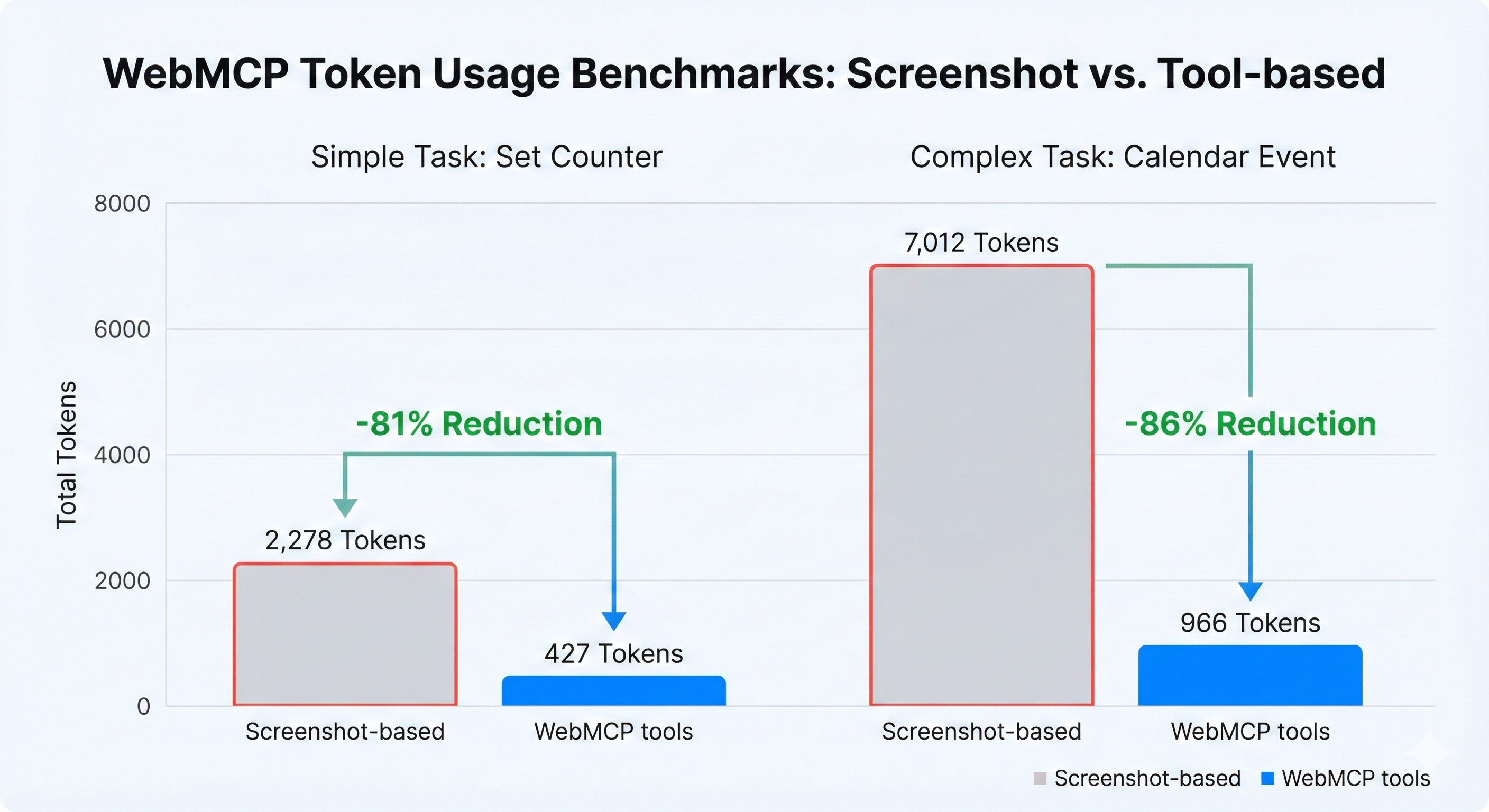
WebMCP tools are dramatically more efficient than screenshot-based workflows:
|
|
33
|
+
|
|
34
|
+
|
|
35
|
+
|
|
36
|
+
| Task | Screenshot-Based | WebMCP Tools | Savings |
|
|
37
|
+
|------|-----------------|--------------|---------|
|
|
38
|
+
| Simple task (set counter) | 3,801 tokens | 433 tokens | **89% fewer tokens** |
|
|
39
|
+
| Complex task (calendar event) | 11,390 tokens | 2,583 tokens | **77% fewer tokens** |
|
|
40
|
+
|
|
41
|
+
Screenshots are expensive (~2,000 tokens each). WebMCP tool responses are compact JSON (20-100 tokens typically).
|
|
42
|
+
|
|
43
|
+
> **Try it yourself:** Clone the [Chrome DevTools Quickstart](https://github.com/WebMCP-org/chrome-devtools-quickstart) and run the benchmarks.
|
|
44
|
+
|
|
30
45
|
## What's Different from Chrome DevTools MCP?
|
|
31
46
|
|
|
32
47
|
This fork adds **WebMCP integration** - the ability to call MCP tools that are registered directly on webpages. This unlocks a powerful new workflow:
|
|
@@ -47,28 +62,9 @@ The key addition is the `list_webmcp_tools` and `call_webmcp_tool` tools that le
|
|
|
47
62
|
|
|
48
63
|
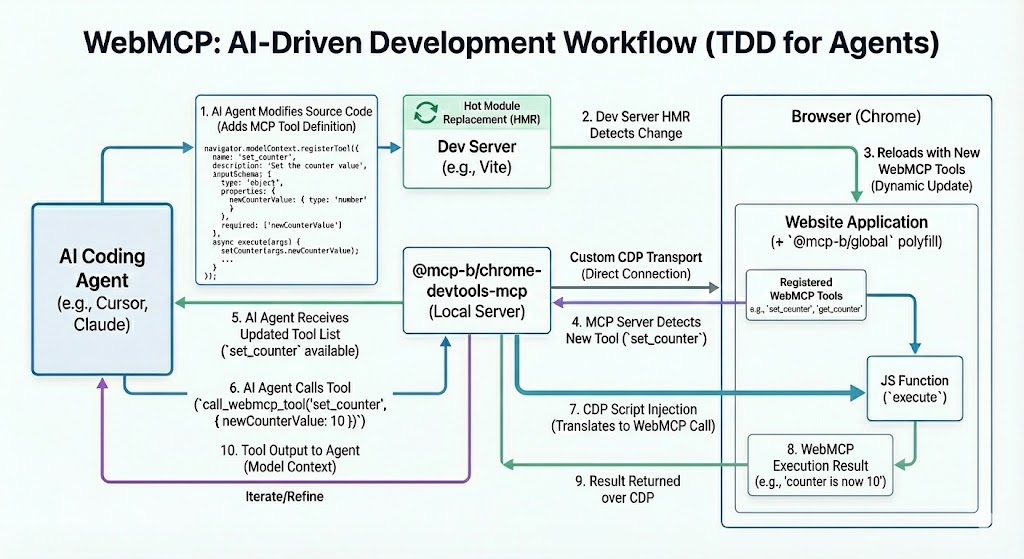
One of the most powerful use cases for this package is **AI-driven tool development** - essentially test-driven development for AI agents. Here's how it works:
|
|
49
64
|
|
|
50
|
-
|
|
51
|
-
|
|
52
|
-
|
|
53
|
-
├─────────────────────────────────────────────────────────────────────┤
|
|
54
|
-
│ │
|
|
55
|
-
│ 1. AI writes WebMCP tool code ──────────────────────────┐ │
|
|
56
|
-
│ │ │
|
|
57
|
-
│ 2. Dev server hot-reloads ◄─────────────────────────────┘ │
|
|
58
|
-
│ │
|
|
59
|
-
│ 3. AI opens browser via Chrome DevTools MCP │
|
|
60
|
-
│ │ │
|
|
61
|
-
│ ▼ │
|
|
62
|
-
│ 4. AI calls list_webmcp_tools to see the new tool │
|
|
63
|
-
│ │ │
|
|
64
|
-
│ ▼ │
|
|
65
|
-
│ 5. AI calls call_webmcp_tool to test it │
|
|
66
|
-
│ │ │
|
|
67
|
-
│ ▼ │
|
|
68
|
-
│ 6. AI sees results, iterates if needed ───────► Back to step 1 │
|
|
69
|
-
│ │
|
|
70
|
-
└─────────────────────────────────────────────────────────────────────┘
|
|
71
|
-
```
|
|
65
|
+
|
|
66
|
+
|
|
67
|
+
> **Want to try it yourself?** Check out the [Chrome DevTools Quickstart](https://github.com/WebMCP-org/chrome-devtools-quickstart) - a minimal example you can clone and run in 3 steps.
|
|
72
68
|
|
|
73
69
|
### Example: Building a Search Tool
|
|
74
70
|
|
|
@@ -134,6 +130,12 @@ This creates a tight feedback loop where your AI assistant can:
|
|
|
134
130
|
|
|
135
131
|
This is like **TDD for AI** - the AI can build and verify its own tools in real-time.
|
|
136
132
|
|
|
133
|
+
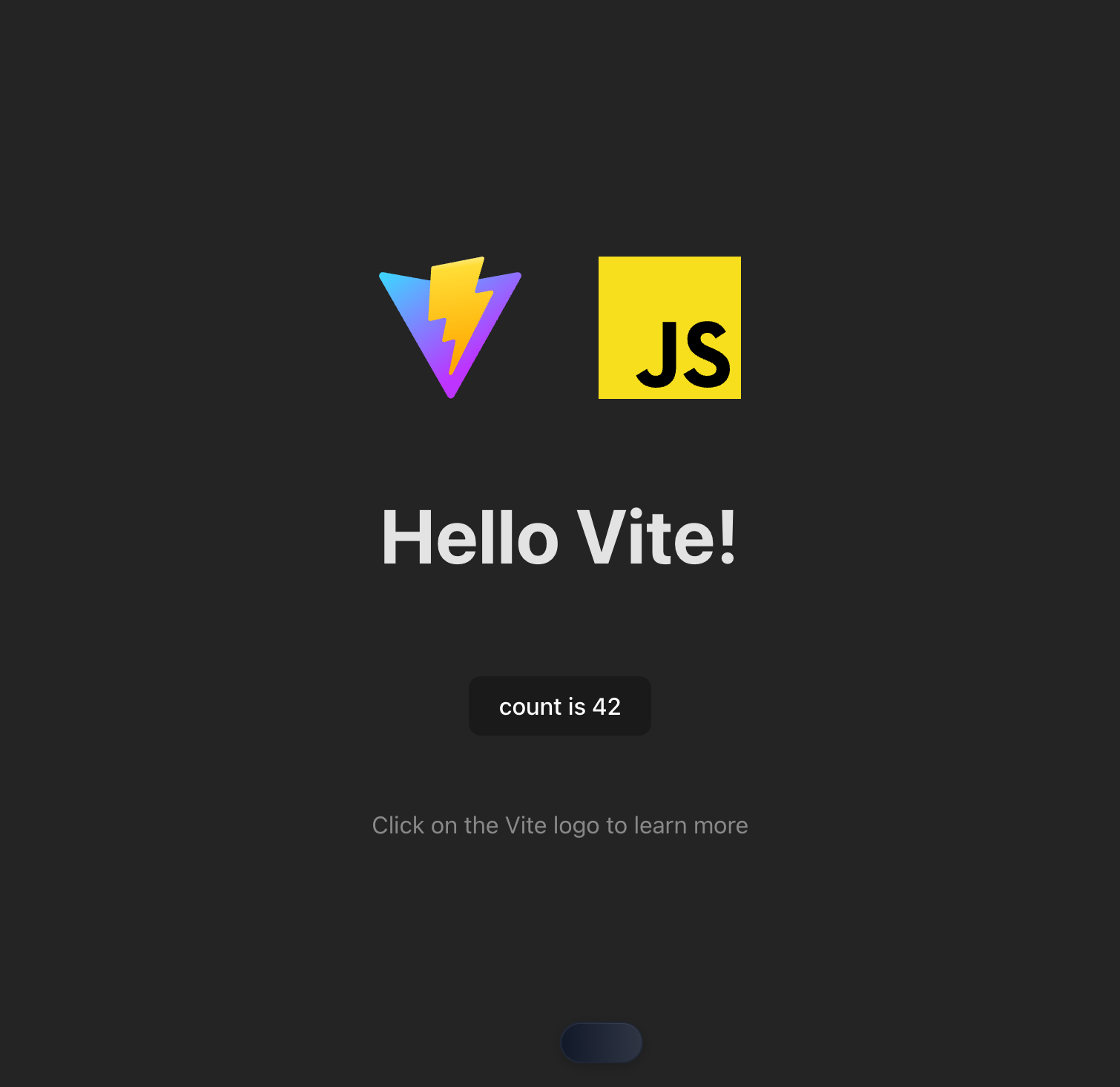
### Demo: Tool Execution Result
|
|
134
|
+
|
|
135
|
+
Here's what it looks like when an AI agent successfully discovers and calls WebMCP tools:
|
|
136
|
+
|
|
137
|
+
|
|
138
|
+
|
|
137
139
|
## [Tool reference](./docs/tool-reference.md) | [Changelog](./CHANGELOG.md) | [Contributing](./CONTRIBUTING.md) | [Troubleshooting](./docs/troubleshooting.md) | [Design Principles](./docs/design-principles.md)
|
|
138
140
|
|
|
139
141
|
## Key features
|
|
@@ -165,6 +167,8 @@ MCP clients.
|
|
|
165
167
|
|
|
166
168
|
## Getting started
|
|
167
169
|
|
|
170
|
+
> **New to WebMCP?** Try the [Chrome DevTools Quickstart](https://github.com/WebMCP-org/chrome-devtools-quickstart) - clone, run, and see AI-driven tool development in action in under 5 minutes.
|
|
171
|
+
|
|
168
172
|
Add the following config to your MCP client:
|
|
169
173
|
|
|
170
174
|
```json
|
|
@@ -43,18 +43,28 @@ export class PageCollector {
|
|
|
43
43
|
this.#browser.off('targetdestroyed', this.#onTargetDestroyed);
|
|
44
44
|
}
|
|
45
45
|
#onTargetCreated = async (target) => {
|
|
46
|
-
|
|
47
|
-
|
|
48
|
-
|
|
46
|
+
try {
|
|
47
|
+
const page = await target.page();
|
|
48
|
+
if (!page) {
|
|
49
|
+
return;
|
|
50
|
+
}
|
|
51
|
+
this.addPage(page);
|
|
52
|
+
}
|
|
53
|
+
catch (err) {
|
|
54
|
+
logger('Error getting a page for a target onTargetCreated', err);
|
|
49
55
|
}
|
|
50
|
-
this.addPage(page);
|
|
51
56
|
};
|
|
52
57
|
#onTargetDestroyed = async (target) => {
|
|
53
|
-
|
|
54
|
-
|
|
55
|
-
|
|
58
|
+
try {
|
|
59
|
+
const page = await target.page();
|
|
60
|
+
if (!page) {
|
|
61
|
+
return;
|
|
62
|
+
}
|
|
63
|
+
this.cleanupPageDestroyed(page);
|
|
64
|
+
}
|
|
65
|
+
catch (err) {
|
|
66
|
+
logger('Error getting a page for a target onTargetDestroyed', err);
|
|
56
67
|
}
|
|
57
|
-
this.cleanupPageDestroyed(page);
|
|
58
68
|
};
|
|
59
69
|
addPage(page) {
|
|
60
70
|
this.#initializePage(page);
|
package/build/src/browser.js
CHANGED
|
@@ -32,6 +32,7 @@ function makeTargetFilter() {
|
|
|
32
32
|
};
|
|
33
33
|
}
|
|
34
34
|
export async function ensureBrowserConnected(options) {
|
|
35
|
+
const { channel } = options;
|
|
35
36
|
if (browser?.connected) {
|
|
36
37
|
return browser;
|
|
37
38
|
}
|
|
@@ -49,11 +50,56 @@ export async function ensureBrowserConnected(options) {
|
|
|
49
50
|
else if (options.browserURL) {
|
|
50
51
|
connectOptions.browserURL = options.browserURL;
|
|
51
52
|
}
|
|
53
|
+
else if (channel || options.userDataDir) {
|
|
54
|
+
const userDataDir = options.userDataDir;
|
|
55
|
+
if (userDataDir) {
|
|
56
|
+
// TODO: re-expose this logic via Puppeteer.
|
|
57
|
+
const portPath = path.join(userDataDir, 'DevToolsActivePort');
|
|
58
|
+
try {
|
|
59
|
+
const fileContent = await fs.promises.readFile(portPath, 'utf8');
|
|
60
|
+
const [rawPort, rawPath] = fileContent
|
|
61
|
+
.split('\n')
|
|
62
|
+
.map(line => {
|
|
63
|
+
return line.trim();
|
|
64
|
+
})
|
|
65
|
+
.filter(line => {
|
|
66
|
+
return !!line;
|
|
67
|
+
});
|
|
68
|
+
if (!rawPort || !rawPath) {
|
|
69
|
+
throw new Error(`Invalid DevToolsActivePort '${fileContent}' found`);
|
|
70
|
+
}
|
|
71
|
+
const port = parseInt(rawPort, 10);
|
|
72
|
+
if (isNaN(port) || port <= 0 || port > 65535) {
|
|
73
|
+
throw new Error(`Invalid port '${rawPort}' found`);
|
|
74
|
+
}
|
|
75
|
+
const browserWSEndpoint = `ws://127.0.0.1:${port}${rawPath}`;
|
|
76
|
+
connectOptions.browserWSEndpoint = browserWSEndpoint;
|
|
77
|
+
}
|
|
78
|
+
catch (error) {
|
|
79
|
+
throw new Error(`Could not connect to Chrome in ${userDataDir}. Check if Chrome is running and remote debugging is enabled.`, {
|
|
80
|
+
cause: error,
|
|
81
|
+
});
|
|
82
|
+
}
|
|
83
|
+
}
|
|
84
|
+
else {
|
|
85
|
+
if (!channel) {
|
|
86
|
+
throw new Error('Channel must be provided if userDataDir is missing');
|
|
87
|
+
}
|
|
88
|
+
connectOptions.channel = (channel === 'stable' ? 'chrome' : `chrome-${channel}`);
|
|
89
|
+
}
|
|
90
|
+
}
|
|
52
91
|
else {
|
|
53
|
-
throw new Error('Either browserURL or
|
|
92
|
+
throw new Error('Either browserURL, wsEndpoint, channel or userDataDir must be provided');
|
|
54
93
|
}
|
|
55
94
|
logger('Connecting Puppeteer to ', JSON.stringify(connectOptions));
|
|
56
|
-
|
|
95
|
+
try {
|
|
96
|
+
browser = await puppeteer.connect(connectOptions);
|
|
97
|
+
}
|
|
98
|
+
catch (err) {
|
|
99
|
+
throw new Error('Could not connect to Chrome. Check if Chrome is running and remote debugging is enabled by going to chrome://inspect/#remote-debugging.', {
|
|
100
|
+
cause: err,
|
|
101
|
+
});
|
|
102
|
+
}
|
|
57
103
|
logger('Connected Puppeteer');
|
|
58
104
|
return browser;
|
|
59
105
|
}
|
package/build/src/cli.js
CHANGED
|
@@ -5,6 +5,18 @@
|
|
|
5
5
|
*/
|
|
6
6
|
import { yargs, hideBin } from './third_party/index.js';
|
|
7
7
|
export const cliOptions = {
|
|
8
|
+
autoConnect: {
|
|
9
|
+
type: 'boolean',
|
|
10
|
+
description: 'If specified, automatically connects to a browser (Chrome 145+) running in the user data directory identified by the channel param. Falls back to launching a new instance if no running browser is found.',
|
|
11
|
+
conflicts: ['isolated', 'executablePath'],
|
|
12
|
+
default: true,
|
|
13
|
+
coerce: (value) => {
|
|
14
|
+
if (value === false) {
|
|
15
|
+
return false;
|
|
16
|
+
}
|
|
17
|
+
return true;
|
|
18
|
+
},
|
|
19
|
+
},
|
|
8
20
|
browserUrl: {
|
|
9
21
|
type: 'string',
|
|
10
22
|
description: 'Connect to a running, debuggable Chrome instance (e.g. `http://127.0.0.1:9222`). For more details see: https://github.com/ChromeDevTools/chrome-devtools-mcp#connecting-to-a-running-chrome-instance.',
|
|
@@ -163,7 +175,7 @@ export function parseArguments(version, argv = process.argv) {
|
|
|
163
175
|
!args.browserUrl &&
|
|
164
176
|
!args.wsEndpoint &&
|
|
165
177
|
!args.executablePath) {
|
|
166
|
-
args.channel = '
|
|
178
|
+
args.channel = 'dev';
|
|
167
179
|
}
|
|
168
180
|
return true;
|
|
169
181
|
})
|
|
@@ -204,6 +216,14 @@ export function parseArguments(version, argv = process.argv) {
|
|
|
204
216
|
'$0 --user-data-dir=/tmp/user-data-dir',
|
|
205
217
|
'Use a custom user data directory',
|
|
206
218
|
],
|
|
219
|
+
[
|
|
220
|
+
'$0 --auto-connect',
|
|
221
|
+
'Connect to a stable Chrome instance (Chrome 145+) running instead of launching a new instance',
|
|
222
|
+
],
|
|
223
|
+
[
|
|
224
|
+
'$0 --auto-connect --channel=canary',
|
|
225
|
+
'Connect to a canary Chrome instance (Chrome 145+) running instead of launching a new instance',
|
|
226
|
+
],
|
|
207
227
|
]);
|
|
208
228
|
return yargsInstance
|
|
209
229
|
.wrap(Math.min(120, yargsInstance.terminalWidth()))
|
package/build/src/main.js
CHANGED
|
@@ -3,6 +3,7 @@
|
|
|
3
3
|
* Copyright 2025 Google LLC
|
|
4
4
|
* SPDX-License-Identifier: Apache-2.0
|
|
5
5
|
*/
|
|
6
|
+
import process from 'node:process';
|
|
6
7
|
import './polyfill.js';
|
|
7
8
|
import { ensureBrowserConnected, ensureBrowserLaunched } from './browser.js';
|
|
8
9
|
import { parseArguments } from './cli.js';
|
|
@@ -17,8 +18,11 @@ import { ToolCategory } from './tools/categories.js';
|
|
|
17
18
|
import { tools } from './tools/tools.js';
|
|
18
19
|
// If moved update release-please config
|
|
19
20
|
// x-release-please-start-version
|
|
20
|
-
const VERSION = '0.
|
|
21
|
+
const VERSION = '0.12.1';
|
|
21
22
|
// x-release-please-end
|
|
23
|
+
process.on('unhandledRejection', (reason, promise) => {
|
|
24
|
+
logger('Unhandled promise rejection', promise, reason);
|
|
25
|
+
});
|
|
22
26
|
export const args = parseArguments(VERSION);
|
|
23
27
|
const logFile = args.logFile ? saveLogsToFile(args.logFile) : undefined;
|
|
24
28
|
logger(`Starting Chrome DevTools MCP Server v${VERSION}`);
|
|
@@ -39,14 +43,51 @@ async function getContext() {
|
|
|
39
43
|
extraArgs.push(`--proxy-server=${args.proxyServer}`);
|
|
40
44
|
}
|
|
41
45
|
const devtools = args.experimentalDevtools ?? false;
|
|
42
|
-
|
|
43
|
-
|
|
46
|
+
let browser;
|
|
47
|
+
// If explicit browserUrl or wsEndpoint is provided, connect without fallback
|
|
48
|
+
if (args.browserUrl || args.wsEndpoint) {
|
|
49
|
+
browser = await ensureBrowserConnected({
|
|
44
50
|
browserURL: args.browserUrl,
|
|
45
51
|
wsEndpoint: args.wsEndpoint,
|
|
46
52
|
wsHeaders: args.wsHeaders,
|
|
47
53
|
devtools,
|
|
48
|
-
|
|
49
|
-
|
|
54
|
+
channel: undefined,
|
|
55
|
+
userDataDir: args.userDataDir,
|
|
56
|
+
});
|
|
57
|
+
}
|
|
58
|
+
// If autoConnect is true, try connecting first, then fall back to launching
|
|
59
|
+
else if (args.autoConnect) {
|
|
60
|
+
try {
|
|
61
|
+
logger('Attempting to connect to running browser instance...');
|
|
62
|
+
browser = await ensureBrowserConnected({
|
|
63
|
+
browserURL: undefined,
|
|
64
|
+
wsEndpoint: undefined,
|
|
65
|
+
wsHeaders: undefined,
|
|
66
|
+
devtools,
|
|
67
|
+
channel: args.channel,
|
|
68
|
+
userDataDir: args.userDataDir,
|
|
69
|
+
});
|
|
70
|
+
logger('Successfully connected to running browser instance');
|
|
71
|
+
}
|
|
72
|
+
catch (err) {
|
|
73
|
+
logger('Failed to connect to running browser, launching new instance...', err);
|
|
74
|
+
browser = await ensureBrowserLaunched({
|
|
75
|
+
headless: args.headless,
|
|
76
|
+
executablePath: args.executablePath,
|
|
77
|
+
channel: args.channel,
|
|
78
|
+
isolated: args.isolated ?? false,
|
|
79
|
+
userDataDir: args.userDataDir,
|
|
80
|
+
logFile,
|
|
81
|
+
viewport: args.viewport,
|
|
82
|
+
args: extraArgs,
|
|
83
|
+
acceptInsecureCerts: args.acceptInsecureCerts,
|
|
84
|
+
devtools,
|
|
85
|
+
});
|
|
86
|
+
}
|
|
87
|
+
}
|
|
88
|
+
// Otherwise, just launch a new browser
|
|
89
|
+
else {
|
|
90
|
+
browser = await ensureBrowserLaunched({
|
|
50
91
|
headless: args.headless,
|
|
51
92
|
executablePath: args.executablePath,
|
|
52
93
|
channel: args.channel,
|
|
@@ -58,6 +99,7 @@ async function getContext() {
|
|
|
58
99
|
acceptInsecureCerts: args.acceptInsecureCerts,
|
|
59
100
|
devtools,
|
|
60
101
|
});
|
|
102
|
+
}
|
|
61
103
|
if (context?.browser !== browser) {
|
|
62
104
|
context = await McpContext.from(browser, logger, {
|
|
63
105
|
experimentalDevToolsDebugging: devtools,
|
|
@@ -107,7 +149,10 @@ function registerTool(tool) {
|
|
|
107
149
|
}
|
|
108
150
|
catch (err) {
|
|
109
151
|
logger(`${tool.name} error:`, err, err?.stack);
|
|
110
|
-
|
|
152
|
+
let errorText = err && 'message' in err ? err.message : String(err);
|
|
153
|
+
if ('cause' in err && err.cause) {
|
|
154
|
+
errorText += `\nCause: ${err.cause.message}`;
|
|
155
|
+
}
|
|
111
156
|
return {
|
|
112
157
|
content: [
|
|
113
158
|
{
|
package/build/src/tools/pages.js
CHANGED
|
@@ -29,12 +29,18 @@ export const selectPage = defineTool({
|
|
|
29
29
|
schema: {
|
|
30
30
|
pageIdx: zod
|
|
31
31
|
.number()
|
|
32
|
-
.describe(
|
|
32
|
+
.describe(`The index of the page to select. Call ${listPages.name} to get available pages.`),
|
|
33
|
+
bringToFront: zod
|
|
34
|
+
.boolean()
|
|
35
|
+
.optional()
|
|
36
|
+
.describe('Whether to focus the page and bring it to the top.'),
|
|
33
37
|
},
|
|
34
38
|
handler: async (request, response, context) => {
|
|
35
39
|
const page = context.getPageByIdx(request.params.pageIdx);
|
|
36
|
-
await page.bringToFront();
|
|
37
40
|
context.selectPage(page);
|
|
41
|
+
if (request.params.bringToFront) {
|
|
42
|
+
await page.bringToFront();
|
|
43
|
+
}
|
|
38
44
|
response.setIncludePages(true);
|
|
39
45
|
},
|
|
40
46
|
});
|