@materialwebunofficial/antigravity-themes 0.0.0-stage → 1.0.4
This diff represents the content of publicly available package versions that have been released to one of the supported registries. The information contained in this diff is provided for informational purposes only and reflects changes between package versions as they appear in their respective public registries.
- package/LICENSE +201 -0
- package/NOTICE +30 -0
- package/README.md +294 -2
- package/bin/cli.mjs +324 -0
- package/lib/autostart.mjs +90 -0
- package/lib/bundle.mjs +73 -0
- package/lib/injector.mjs +176 -0
- package/lib/paths.mjs +35 -0
- package/package.json +40 -4
- package/src/code-tools.js +137 -0
- package/src/context-card.js +542 -0
- package/src/loading-indicator.js +74 -0
- package/src/progress-indicators.js +98 -0
- package/src/theme-host.js +904 -0
- package/src/turn-tokens.js +115 -0
- package/themes/index.json +27 -0
- package/themes/matte.css +588 -0
- package/themes/md3e-icons.css +244 -0
- package/themes/md3e-tokens.css +834 -0
- package/themes/md3e.css +1400 -0
- package/themes/nordic.css +370 -0
- package/themes/paper.css +414 -0
- package/vendor/md3e/LICENSE +176 -0
- package/vendor/md3e/NOTICE +686 -0
- package/vendor/md3e/Roboto-OFL.txt +93 -0
- package/vendor/md3e/SOURCE.txt +10 -0
- package/vendor/md3e/components.js +4682 -0
- package/vendor/md3e/roboto-variable.woff2 +0 -0
package/LICENSE
ADDED
|
@@ -0,0 +1,201 @@
|
|
|
1
|
+
Apache License
|
|
2
|
+
Version 2.0, January 2004
|
|
3
|
+
http://www.apache.org/licenses/
|
|
4
|
+
|
|
5
|
+
TERMS AND CONDITIONS FOR USE, REPRODUCTION, AND DISTRIBUTION
|
|
6
|
+
|
|
7
|
+
1. Definitions.
|
|
8
|
+
|
|
9
|
+
"License" shall mean the terms and conditions for use, reproduction,
|
|
10
|
+
and distribution as defined by Sections 1 through 9 of this document.
|
|
11
|
+
|
|
12
|
+
"Licensor" shall mean the copyright owner or entity authorized by
|
|
13
|
+
the copyright owner that is granting the License.
|
|
14
|
+
|
|
15
|
+
"Legal Entity" shall mean the union of the acting entity and all
|
|
16
|
+
other entities that control, are controlled by, or are under common
|
|
17
|
+
control with that entity. For the purposes of this definition,
|
|
18
|
+
"control" means (i) the power, direct or indirect, to cause the
|
|
19
|
+
direction or management of such entity, whether by contract or
|
|
20
|
+
otherwise, or (ii) ownership of fifty percent (50%) or more of the
|
|
21
|
+
outstanding shares, or (iii) beneficial ownership of such entity.
|
|
22
|
+
|
|
23
|
+
"You" (or "Your") shall mean an individual or Legal Entity
|
|
24
|
+
exercising permissions granted by this License.
|
|
25
|
+
|
|
26
|
+
"Source" form shall mean the preferred form for making modifications,
|
|
27
|
+
including but not limited to software source code, documentation
|
|
28
|
+
source, and configuration files.
|
|
29
|
+
|
|
30
|
+
"Object" form shall mean any form resulting from mechanical
|
|
31
|
+
transformation or translation of a Source form, including but
|
|
32
|
+
not limited to compiled object code, generated documentation,
|
|
33
|
+
and conversions to other media types.
|
|
34
|
+
|
|
35
|
+
"Work" shall mean the work of authorship, whether in Source or
|
|
36
|
+
Object form, made available under the License, as indicated by a
|
|
37
|
+
copyright notice that is included in or attached to the work
|
|
38
|
+
(an example is provided in the Appendix below).
|
|
39
|
+
|
|
40
|
+
"Derivative Works" shall mean any work, whether in Source or Object
|
|
41
|
+
form, that is based on (or derived from) the Work and for which the
|
|
42
|
+
editorial revisions, annotations, elaborations, or other modifications
|
|
43
|
+
represent, as a whole, an original work of authorship. For the purposes
|
|
44
|
+
of this License, Derivative Works shall not include works that remain
|
|
45
|
+
separable from, or merely link (or bind by name) to the interfaces of,
|
|
46
|
+
the Work and Derivative Works thereof.
|
|
47
|
+
|
|
48
|
+
"Contribution" shall mean any work of authorship, including
|
|
49
|
+
the original version of the Work and any modifications or additions
|
|
50
|
+
to that Work or Derivative Works thereof, that is intentionally
|
|
51
|
+
submitted to Licensor for inclusion in the Work by the copyright owner
|
|
52
|
+
or by an individual or Legal Entity authorized to submit on behalf of
|
|
53
|
+
the copyright owner. For the purposes of this definition, "submitted"
|
|
54
|
+
means any form of electronic, verbal, or written communication sent
|
|
55
|
+
to the Licensor or its representatives, including but not limited to
|
|
56
|
+
communication on electronic mailing lists, source code control systems,
|
|
57
|
+
and issue tracking systems that are managed by, or on behalf of, the
|
|
58
|
+
Licensor for the purpose of discussing and improving the Work, but
|
|
59
|
+
excluding communication that is conspicuously marked or otherwise
|
|
60
|
+
designated in writing by the copyright owner as "Not a Contribution."
|
|
61
|
+
|
|
62
|
+
"Contributor" shall mean Licensor and any individual or Legal Entity
|
|
63
|
+
on behalf of whom a Contribution has been received by Licensor and
|
|
64
|
+
subsequently incorporated within the Work.
|
|
65
|
+
|
|
66
|
+
2. Grant of Copyright License. Subject to the terms and conditions of
|
|
67
|
+
this License, each Contributor hereby grants to You a perpetual,
|
|
68
|
+
worldwide, non-exclusive, no-charge, royalty-free, irrevocable
|
|
69
|
+
copyright license to reproduce, prepare Derivative Works of,
|
|
70
|
+
publicly display, publicly perform, sublicense, and distribute the
|
|
71
|
+
Work and such Derivative Works in Source or Object form.
|
|
72
|
+
|
|
73
|
+
3. Grant of Patent License. Subject to the terms and conditions of
|
|
74
|
+
this License, each Contributor hereby grants to You a perpetual,
|
|
75
|
+
worldwide, non-exclusive, no-charge, royalty-free, irrevocable
|
|
76
|
+
(except as stated in this section) patent license to make, have made,
|
|
77
|
+
use, offer to sell, sell, import, and otherwise transfer the Work,
|
|
78
|
+
where such license applies only to those patent claims licensable
|
|
79
|
+
by such Contributor that are necessarily infringed by their
|
|
80
|
+
Contribution(s) alone or by combination of their Contribution(s)
|
|
81
|
+
with the Work to which such Contribution(s) was submitted. If You
|
|
82
|
+
institute patent litigation against any entity (including a
|
|
83
|
+
cross-claim or counterclaim in a lawsuit) alleging that the Work
|
|
84
|
+
or a Contribution incorporated within the Work constitutes direct
|
|
85
|
+
or contributory patent infringement, then any patent licenses
|
|
86
|
+
granted to You under this License for that Work shall terminate
|
|
87
|
+
as of the date such litigation is filed.
|
|
88
|
+
|
|
89
|
+
4. Redistribution. You may reproduce and distribute copies of the
|
|
90
|
+
Work or Derivative Works thereof in any medium, with or without
|
|
91
|
+
modifications, and in Source or Object form, provided that You
|
|
92
|
+
meet the following conditions:
|
|
93
|
+
|
|
94
|
+
(a) You must give any other recipients of the Work or
|
|
95
|
+
Derivative Works a copy of this License; and
|
|
96
|
+
|
|
97
|
+
(b) You must cause any modified files to carry prominent notices
|
|
98
|
+
stating that You changed the files; and
|
|
99
|
+
|
|
100
|
+
(c) You must retain, in the Source form of any Derivative Works
|
|
101
|
+
that You distribute, all copyright, patent, trademark, and
|
|
102
|
+
attribution notices from the Source form of the Work,
|
|
103
|
+
excluding those notices that do not pertain to any part of
|
|
104
|
+
the Derivative Works; and
|
|
105
|
+
|
|
106
|
+
(d) If the Work includes a "NOTICE" text file as part of its
|
|
107
|
+
distribution, then any Derivative Works that You distribute must
|
|
108
|
+
include a readable copy of the attribution notices contained
|
|
109
|
+
within such NOTICE file, excluding those notices that do not
|
|
110
|
+
pertain to any part of the Derivative Works, in at least one
|
|
111
|
+
of the following places: within a NOTICE text file distributed
|
|
112
|
+
as part of the Derivative Works; within the Source form or
|
|
113
|
+
documentation, if provided along with the Derivative Works; or,
|
|
114
|
+
within a display generated by the Derivative Works, if and
|
|
115
|
+
wherever such third-party notices normally appear. The contents
|
|
116
|
+
of the NOTICE file are for informational purposes only and
|
|
117
|
+
do not modify the License. You may add Your own attribution
|
|
118
|
+
notices within Derivative Works that You distribute, alongside
|
|
119
|
+
or as an addendum to the NOTICE text from the Work, provided
|
|
120
|
+
that such additional attribution notices cannot be construed
|
|
121
|
+
as modifying the License.
|
|
122
|
+
|
|
123
|
+
You may add Your own copyright statement to Your modifications and
|
|
124
|
+
may provide additional or different license terms and conditions
|
|
125
|
+
for use, reproduction, or distribution of Your modifications, or
|
|
126
|
+
for any such Derivative Works as a whole, provided Your use,
|
|
127
|
+
reproduction, and distribution of the Work otherwise complies with
|
|
128
|
+
the conditions stated in this License.
|
|
129
|
+
|
|
130
|
+
5. Submission of Contributions. Unless You explicitly state otherwise,
|
|
131
|
+
any Contribution intentionally submitted for inclusion in the Work
|
|
132
|
+
by You to the Licensor shall be under the terms and conditions of
|
|
133
|
+
this License, without any additional terms or conditions.
|
|
134
|
+
Notwithstanding the above, nothing herein shall supersede or modify
|
|
135
|
+
the terms of any separate license agreement you may have executed
|
|
136
|
+
with Licensor regarding such Contributions.
|
|
137
|
+
|
|
138
|
+
6. Trademarks. This License does not grant permission to use the trade
|
|
139
|
+
names, trademarks, service marks, or product names of the Licensor,
|
|
140
|
+
except as required for reasonable and customary use in describing the
|
|
141
|
+
origin of the Work and reproducing the content of the NOTICE file.
|
|
142
|
+
|
|
143
|
+
7. Disclaimer of Warranty. Unless required by applicable law or
|
|
144
|
+
agreed to in writing, Licensor provides the Work (and each
|
|
145
|
+
Contributor provides its Contributions) on an "AS IS" BASIS,
|
|
146
|
+
WITHOUT WARRANTIES OR CONDITIONS OF ANY KIND, either express or
|
|
147
|
+
implied, including, without limitation, any warranties or conditions
|
|
148
|
+
of TITLE, NON-INFRINGEMENT, MERCHANTABILITY, or FITNESS FOR A
|
|
149
|
+
PARTICULAR PURPOSE. You are solely responsible for determining the
|
|
150
|
+
appropriateness of using or redistributing the Work and assume any
|
|
151
|
+
risks associated with Your exercise of permissions under this License.
|
|
152
|
+
|
|
153
|
+
8. Limitation of Liability. In no event and under no legal theory,
|
|
154
|
+
whether in tort (including negligence), contract, or otherwise,
|
|
155
|
+
unless required by applicable law (such as deliberate and grossly
|
|
156
|
+
negligent acts) or agreed to in writing, shall any Contributor be
|
|
157
|
+
liable to You for damages, including any direct, indirect, special,
|
|
158
|
+
incidental, or consequential damages of any character arising as a
|
|
159
|
+
result of this License or out of the use or inability to use the
|
|
160
|
+
Work (including but not limited to damages for loss of goodwill,
|
|
161
|
+
work stoppage, computer failure or malfunction, or any and all
|
|
162
|
+
other commercial damages or losses), even if such Contributor
|
|
163
|
+
has been advised of the possibility of such damages.
|
|
164
|
+
|
|
165
|
+
9. Accepting Warranty or Additional Liability. While redistributing
|
|
166
|
+
the Work or Derivative Works thereof, You may choose to offer,
|
|
167
|
+
and charge a fee for, acceptance of support, warranty, indemnity,
|
|
168
|
+
or other liability obligations and/or rights consistent with this
|
|
169
|
+
License. However, in accepting such obligations, You may act only
|
|
170
|
+
on Your own behalf and on Your sole responsibility, not on behalf
|
|
171
|
+
of any other Contributor, and only if You agree to indemnify,
|
|
172
|
+
defend, and hold each Contributor harmless for any liability
|
|
173
|
+
incurred by, or claims asserted against, such Contributor by reason
|
|
174
|
+
of your accepting any such warranty or additional liability.
|
|
175
|
+
|
|
176
|
+
END OF TERMS AND CONDITIONS
|
|
177
|
+
|
|
178
|
+
APPENDIX: How to apply the Apache License to your work.
|
|
179
|
+
|
|
180
|
+
To apply the Apache License to your work, attach the following
|
|
181
|
+
boilerplate notice, with the fields enclosed by brackets "[]"
|
|
182
|
+
replaced with your own identifying information. (Don't include
|
|
183
|
+
the brackets!) The text should be enclosed in the appropriate
|
|
184
|
+
comment syntax for the file format. We also recommend that a
|
|
185
|
+
file or class name and description of purpose be included on the
|
|
186
|
+
same "printed page" as the copyright notice for easier
|
|
187
|
+
identification within third-party archives.
|
|
188
|
+
|
|
189
|
+
Copyright [yyyy] [name of copyright owner]
|
|
190
|
+
|
|
191
|
+
Licensed under the Apache License, Version 2.0 (the "License");
|
|
192
|
+
you may not use this file except in compliance with the License.
|
|
193
|
+
You may obtain a copy of the License at
|
|
194
|
+
|
|
195
|
+
http://www.apache.org/licenses/LICENSE-2.0
|
|
196
|
+
|
|
197
|
+
Unless required by applicable law or agreed to in writing, software
|
|
198
|
+
distributed under the License is distributed on an "AS IS" BASIS,
|
|
199
|
+
WITHOUT WARRANTIES OR CONDITIONS OF ANY KIND, either express or implied.
|
|
200
|
+
See the License for the specific language governing permissions and
|
|
201
|
+
limitations under the License.
|
package/NOTICE
ADDED
|
@@ -0,0 +1,30 @@
|
|
|
1
|
+
antigravity-themes
|
|
2
|
+
Copyright 2026 The antigravity-themes contributors
|
|
3
|
+
Licensed under the Apache License, Version 2.0 (see LICENSE).
|
|
4
|
+
|
|
5
|
+
An unofficial project. It is not affiliated with, endorsed by or sponsored by
|
|
6
|
+
Google LLC. "Antigravity" is a trademark of Google LLC.
|
|
7
|
+
|
|
8
|
+
This product includes third-party work:
|
|
9
|
+
|
|
10
|
+
1. md3e-web (@materialwebunofficial/md3e-web) 1.0.4 and 1.0.14
|
|
11
|
+
https://materialwebunofficial.github.io
|
|
12
|
+
Licensed under the Apache License, Version 2.0.
|
|
13
|
+
vendor/md3e/components.js is built from its md-loading-indicator,
|
|
14
|
+
md-progress-indicator and md-menu components and the modules they import
|
|
15
|
+
(1.0.14); themes/md3e-tokens.css is generated from its tokens and color
|
|
16
|
+
engine (1.0.4). See vendor/md3e/SOURCE.txt. Its own license and notice are
|
|
17
|
+
in vendor/md3e/LICENSE and vendor/md3e/NOTICE.
|
|
18
|
+
|
|
19
|
+
2. Roboto (variable font), vendor/md3e/roboto-variable.woff2
|
|
20
|
+
Copyright The Roboto Project Authors.
|
|
21
|
+
Licensed under the SIL Open Font License, Version 1.1 (vendor/md3e/Roboto-OFL.txt).
|
|
22
|
+
|
|
23
|
+
3. Material Symbols (glyph outlines in themes/md3e-icons.css and src/)
|
|
24
|
+
Copyright Google LLC.
|
|
25
|
+
Licensed under the Apache License, Version 2.0.
|
|
26
|
+
|
|
27
|
+
4. Material Color Utilities (the color schemes in themes/md3e-tokens.css were
|
|
28
|
+
generated with md3e-web's port of it)
|
|
29
|
+
Copyright Google LLC.
|
|
30
|
+
Licensed under the Apache License, Version 2.0.
|
package/README.md
CHANGED
|
@@ -1,3 +1,295 @@
|
|
|
1
|
-
#
|
|
1
|
+
# antigravity-themes
|
|
2
2
|
|
|
3
|
-
|
|
3
|
+
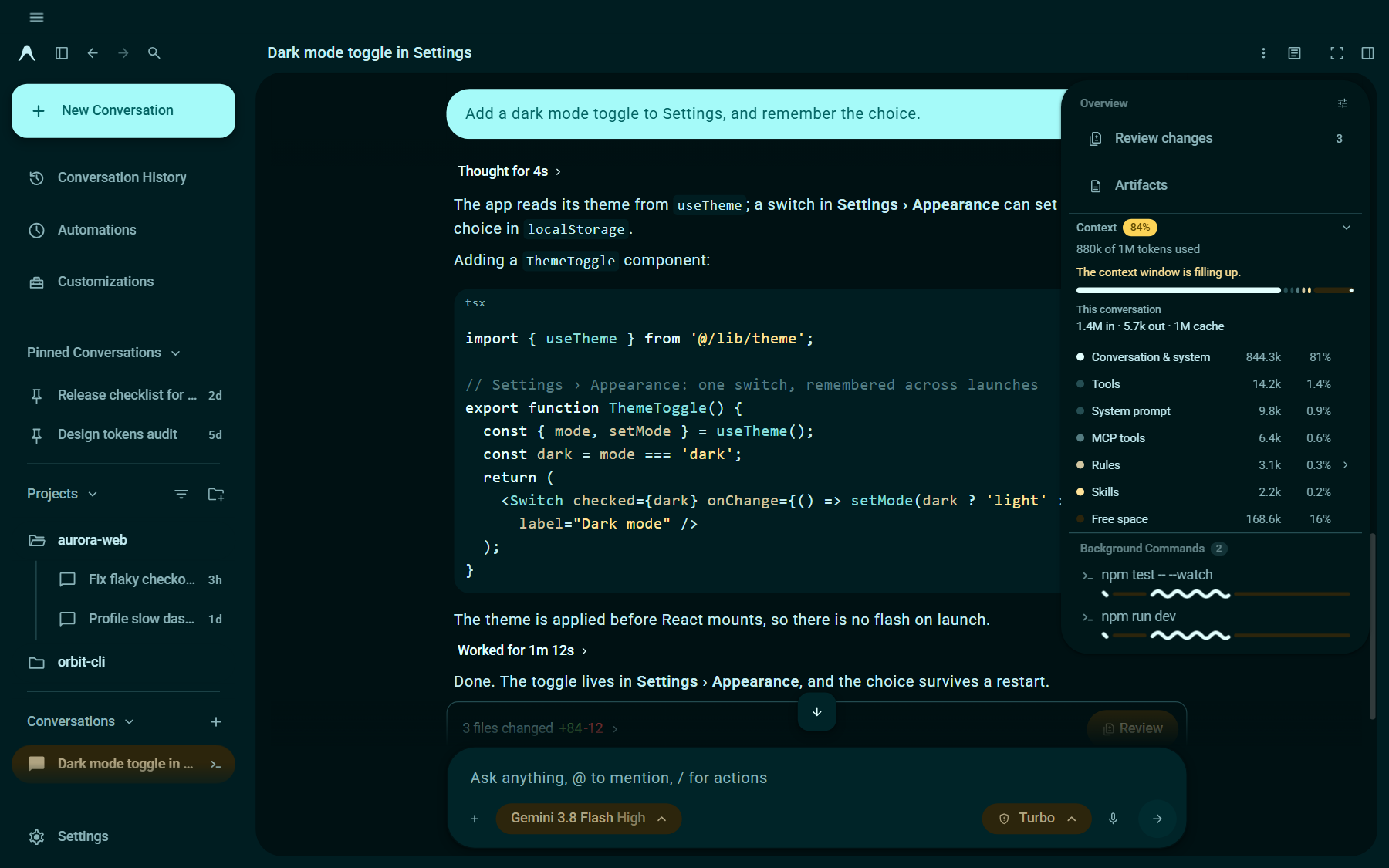
Two themes for Antigravity Desktop: **Matte** and **Material 3 Expressive**
|
|
4
|
+
(in five colors). They are applied to the running app; no app file is changed.
|
|
5
|
+
|
|
6
|
+
This is an unofficial project. It is not affiliated with, endorsed by or
|
|
7
|
+
sponsored by Google.
|
|
8
|
+
|
|
9
|
+
## Install
|
|
10
|
+
|
|
11
|
+
```sh
|
|
12
|
+
npx -y @materialwebunofficial/antigravity-themes install
|
|
13
|
+
```
|
|
14
|
+
|
|
15
|
+
That is all. It takes a few seconds, needs no administrator rights, and it is
|
|
16
|
+
permanent: the themes return at every logon and every Antigravity start, until
|
|
17
|
+
you uninstall them. It needs [Node.js](https://nodejs.org) 22 or newer.
|
|
18
|
+
|
|
19
|
+
On Windows, if PowerShell says running scripts is disabled, use `npx.cmd` in
|
|
20
|
+
place of `npx`.
|
|
21
|
+
|
|
22
|
+
### For AI agents
|
|
23
|
+
|
|
24
|
+
If you were asked to install these themes, this is the whole job:
|
|
25
|
+
|
|
26
|
+
1. Run the command above once, from any folder except a copy of this
|
|
27
|
+
repository. On Windows, use `npx.cmd`, which works in every shell.
|
|
28
|
+
2. Read the last line. `Done.` and exit code 0 mean the themes are installed,
|
|
29
|
+
applied and permanent. Otherwise the output says what is wrong and the exit
|
|
30
|
+
code is 1.
|
|
31
|
+
|
|
32
|
+
The command checks its own result, so nothing else is needed: do not clone this
|
|
33
|
+
repository, read further, restart Antigravity, change its settings or files, or
|
|
34
|
+
take screenshots to confirm. Do not use `on` or `start` in its place; they are
|
|
35
|
+
not permanent.
|
|
36
|
+
|
|
37
|
+
If Node.js is missing or too old, install it (`winget install OpenJS.NodeJS.LTS`
|
|
38
|
+
on Windows, `brew install node` on macOS), then run the command in a new shell.
|
|
39
|
+
|
|
40
|
+
To check later, run the same command with `status` in place of `install`: exit
|
|
41
|
+
code 0 means installed and permanent.
|
|
42
|
+
|
|
43
|
+
## Screenshots
|
|
44
|
+
|
|
45
|
+
|
|
46
|
+
|
|
47
|
+
|
|
48
|
+
|
|
49
|
+
[Watch the demo video (27 seconds)](https://github.com/materialwebunofficial/antigravity-themes/blob/main/docs/antigravity-themes.mp4)
|
|
50
|
+
|
|
51
|
+
## Requirements
|
|
52
|
+
|
|
53
|
+
- Antigravity Desktop. Tested with version 2.28 on Windows 11.
|
|
54
|
+
macOS and Linux are supported in the code but untested.
|
|
55
|
+
- [Node.js](https://nodejs.org) 22 or newer. Check with `node --version`.
|
|
56
|
+
|
|
57
|
+
## What install does
|
|
58
|
+
|
|
59
|
+
1. Copies this package to a folder in your user profile:
|
|
60
|
+
|
|
61
|
+
| System | Folder |
|
|
62
|
+
| ------- | ------ |
|
|
63
|
+
| Windows | `%LOCALAPPDATA%\antigravity-themes` |
|
|
64
|
+
| macOS | `~/Library/Application Support/antigravity-themes` |
|
|
65
|
+
| Linux | `$XDG_DATA_HOME/antigravity-themes` (default `~/.local/share/antigravity-themes`) |
|
|
66
|
+
|
|
67
|
+
2. Adds an entry that starts the themes when you log in, with no window:
|
|
68
|
+
|
|
69
|
+
| System | Entry |
|
|
70
|
+
| ------- | ----- |
|
|
71
|
+
| Windows | `antigravity-themes.vbs` in your Startup folder (`shell:startup`) |
|
|
72
|
+
| macOS | `~/Library/LaunchAgents/dev.antigravity-themes.plist` |
|
|
73
|
+
| Linux | `~/.config/autostart/antigravity-themes.desktop` |
|
|
74
|
+
|
|
75
|
+
The entry runs the Node.js you installed with, by its full path. If that
|
|
76
|
+
path changes (for example after switching versions with a version
|
|
77
|
+
manager), run `install` again.
|
|
78
|
+
|
|
79
|
+
To skip this, use `npx -y @materialwebunofficial/antigravity-themes install --no-autostart` and
|
|
80
|
+
run `npx -y @materialwebunofficial/antigravity-themes start` when you want the themes.
|
|
81
|
+
|
|
82
|
+
**Direct / Native Install (Zero background processes):**
|
|
83
|
+
Use `npx -y @materialwebunofficial/antigravity-themes install --native` to inject the themes directly into Antigravity's Electron resources. This runs with ZERO background processes, no listening ports, and no startup entries.
|
|
84
|
+
|
|
85
|
+
3. Starts a small background Node.js process. It applies the theme to every
|
|
86
|
+
Antigravity window, keeps it applied when a window reloads, and waits
|
|
87
|
+
quietly while Antigravity is closed.
|
|
88
|
+
|
|
89
|
+
4. Waits until the open windows have the theme and reports the result. If
|
|
90
|
+
Antigravity is closed, the theme appears when it starts.
|
|
91
|
+
|
|
92
|
+
## Choosing a theme
|
|
93
|
+
|
|
94
|
+
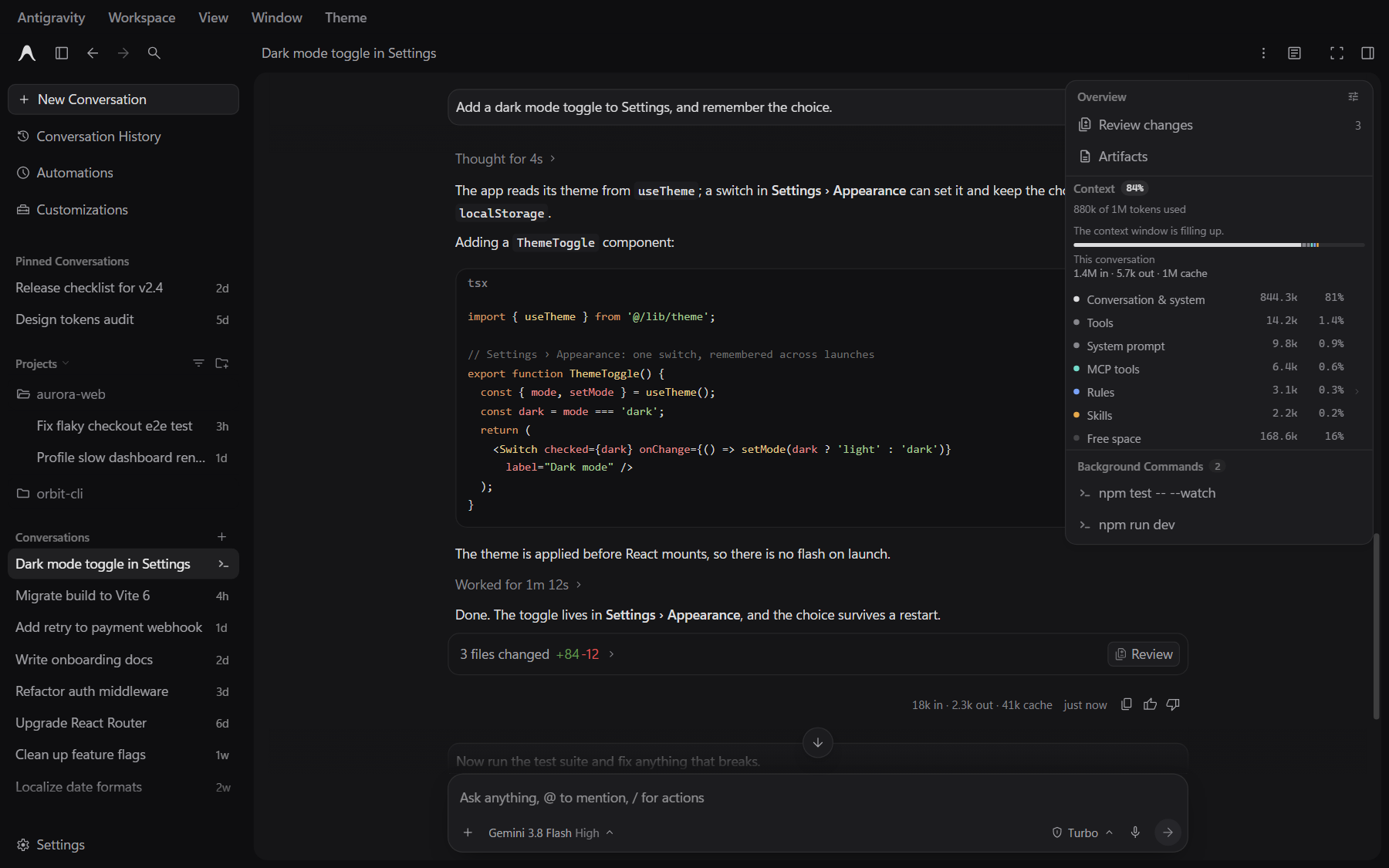
- **Matte**: open the **Theme** menu in the title bar.
|
|
95
|
+
- **Material 3 Expressive**: the title bar menus (Antigravity, Workspace,
|
|
96
|
+
View, Window, Theme) are gathered into one menu button at the top left.
|
|
97
|
+
Open it, then **Theme**.
|
|
98
|
+
- **Ctrl+Shift+F12** switches to the next theme (Control, not Command, on
|
|
99
|
+
macOS too).
|
|
100
|
+
- From a terminal: `npx -y @materialwebunofficial/antigravity-themes theme` lists the themes, and
|
|
101
|
+
`npx -y @materialwebunofficial/antigravity-themes theme md3e-ocean` switches every window to one.
|
|
102
|
+
|
|
103
|
+
| Key | Theme |
|
|
104
|
+
| ------------- | ----- |
|
|
105
|
+
| `matte` | Matte (the default) |
|
|
106
|
+
| `md3e-teal` | Material 3 Expressive, Teal |
|
|
107
|
+
| `md3e-ocean` | Material 3 Expressive, Ocean |
|
|
108
|
+
| `md3e-forest` | Material 3 Expressive, Forest |
|
|
109
|
+
| `md3e-amber` | Material 3 Expressive, Amber |
|
|
110
|
+
| `md3e-coral` | Material 3 Expressive, Coral |
|
|
111
|
+
|
|
112
|
+
Your choice is remembered. Light and dark follow Antigravity's own
|
|
113
|
+
appearance setting; both themes have a light and a dark version.
|
|
114
|
+
|
|
115
|
+
## What the themes change
|
|
116
|
+
|
|
117
|
+
**Matte** is quiet and fast: a near-black window holding one rounded panel,
|
|
118
|
+
small neutral steps between surfaces, 1px lines for structure, and no
|
|
119
|
+
gradients, blur, glow or looping animation.
|
|
120
|
+
|
|
121
|
+
**Material 3 Expressive** maps the Material 3 Expressive design system onto
|
|
122
|
+
the app: its color schemes, the Roboto type scale, shapes, state layers,
|
|
123
|
+
ripples and spring motion; Material Symbols Rounded icons; a navigation
|
|
124
|
+
drawer style sidebar; the app menu button; a shape-morphing loading
|
|
125
|
+
indicator while the agent works; and wavy progress bars for running
|
|
126
|
+
background commands and tasks. The menu and the indicators are the
|
|
127
|
+
[md3e-web](https://materialwebunofficial.github.io) components.
|
|
128
|
+
|
|
129
|
+
Both themes also add:
|
|
130
|
+
|
|
131
|
+
- **Context** at the top of the Overview panel: how full the conversation's
|
|
132
|
+
context window is and what takes it up (system prompt, tools, rules, MCP
|
|
133
|
+
tools, skills and so on), with a warning at 80% and at 95%. The app does
|
|
134
|
+
not report context window sizes, so they are assumed by model family:
|
|
135
|
+
Gemini 1M tokens, Claude 200k, GPT-OSS 128k.
|
|
136
|
+
- **Token counts** under each finished agent turn, for example
|
|
137
|
+
`2.5k in · 358 out · 142k cache`.
|
|
138
|
+
- **Wrap lines** and **Line numbers** buttons beside "Copy code" in chat
|
|
139
|
+
code blocks. Line numbers are not copied.
|
|
140
|
+
|
|
141
|
+
## Commands
|
|
142
|
+
|
|
143
|
+
Run each as `npx -y @materialwebunofficial/antigravity-themes <command>`.
|
|
144
|
+
|
|
145
|
+
| Command | What it does |
|
|
146
|
+
| ------- | ------------ |
|
|
147
|
+
| `install [--no-autostart]` | Install, add the logon entry, and start the background process (see above) |
|
|
148
|
+
| `uninstall` | Remove everything `install` added (see below) |
|
|
149
|
+
| `start` | Start the background process |
|
|
150
|
+
| `stop` | Stop it. Open windows keep the theme until they reload |
|
|
151
|
+
| `on` | Apply the themes to the open windows once, without the background process |
|
|
152
|
+
| `off` | Stop the background process and restore the app's own look in the open windows. The themes come back at the next logon unless you uninstall |
|
|
153
|
+
| `theme [key]` | List the themes, or switch every window to one |
|
|
154
|
+
| `status` | Show what is installed and running, and which windows are themed. Exit code 1 if not permanent |
|
|
155
|
+
| `run [--dev]` | Run the background process in this terminal |
|
|
156
|
+
| `help`, `--version` | Show the commands, or the version |
|
|
157
|
+
|
|
158
|
+
## Update
|
|
159
|
+
|
|
160
|
+
```sh
|
|
161
|
+
npx -y @materialwebunofficial/antigravity-themes@latest install
|
|
162
|
+
```
|
|
163
|
+
|
|
164
|
+
This replaces the installed copy and restarts the background process.
|
|
165
|
+
|
|
166
|
+
## Uninstall
|
|
167
|
+
|
|
168
|
+
```sh
|
|
169
|
+
npx -y @materialwebunofficial/antigravity-themes uninstall
|
|
170
|
+
```
|
|
171
|
+
|
|
172
|
+
This stops the background process, restores the app's own look in the open
|
|
173
|
+
windows, and deletes the logon entry and the install folder.
|
|
174
|
+
|
|
175
|
+
Three small cookies stay in Antigravity's own storage (see Privacy). They
|
|
176
|
+
have no effect without this tool.
|
|
177
|
+
|
|
178
|
+
## How it works
|
|
179
|
+
|
|
180
|
+
Antigravity starts with the Chrome DevTools Protocol enabled on a local
|
|
181
|
+
port, on every launch, and writes that port number to a file named
|
|
182
|
+
`DevToolsActivePort` in its user data folder (`%APPDATA%\Antigravity` on
|
|
183
|
+
Windows, `~/Library/Application Support/Antigravity` on macOS,
|
|
184
|
+
`~/.config/Antigravity` on Linux). This tool does not open that port or
|
|
185
|
+
change how the app starts.
|
|
186
|
+
|
|
187
|
+
The background process reads the port, connects to it on `127.0.0.1`, and in
|
|
188
|
+
each window:
|
|
189
|
+
|
|
190
|
+
- runs the theme script, which adds a style sheet and a few small elements
|
|
191
|
+
(the menu, the code block buttons, the indicators), and
|
|
192
|
+
- registers the same script to run again whenever the window reloads.
|
|
193
|
+
|
|
194
|
+
To find and stop the background process, the other commands talk to it on
|
|
195
|
+
`127.0.0.1` through a random port and a random token that it writes to
|
|
196
|
+
`run.json` in the install folder while it runs.
|
|
197
|
+
|
|
198
|
+
Things to know:
|
|
199
|
+
|
|
200
|
+
- If a future version of Antigravity stops opening that port, the themes
|
|
201
|
+
cannot be applied. The background process then waits, and `status` says
|
|
202
|
+
so.
|
|
203
|
+
- Any program running on your computer can connect to that port. That is
|
|
204
|
+
true with or without this tool; it is how Antigravity is built.
|
|
205
|
+
|
|
206
|
+
## Privacy
|
|
207
|
+
|
|
208
|
+
- No telemetry. The tool makes no network requests except to `127.0.0.1`
|
|
209
|
+
(npx itself downloads the package from npm).
|
|
210
|
+
- Inside the app, the context and token features read data the app already
|
|
211
|
+
holds, to show it: token usage from the app's own interface state, and the
|
|
212
|
+
breakdown of the context from the app's own `getTokenBase()` call, the same
|
|
213
|
+
call its Customizations screen makes. Nothing is sent anywhere.
|
|
214
|
+
- Stored in Antigravity's own storage, as cookies:
|
|
215
|
+
|
|
216
|
+
| Cookie | Holds |
|
|
217
|
+
| ------ | ----- |
|
|
218
|
+
| `agy-theme` | Your theme choice |
|
|
219
|
+
| `agy-code` | The Wrap lines and Line numbers settings |
|
|
220
|
+
| `agy-usage` | Running token totals for your last 20 conversations, by conversation id |
|
|
221
|
+
|
|
222
|
+
- Stored in the install folder: `run.json` (process id, control port, token
|
|
223
|
+
and version, while running), `run.log` (when windows were found and themed,
|
|
224
|
+
with their internal addresses; started anew when it reaches 512 KB) and, on
|
|
225
|
+
Windows, `start.vbs` (starts the background process with no window).
|
|
226
|
+
|
|
227
|
+
## Compatibility and known limits
|
|
228
|
+
|
|
229
|
+
- The themes are written against Antigravity 2.28's interface (its class
|
|
230
|
+
names, element ids and component data). An app update can break parts of
|
|
231
|
+
them until this package is updated. If that happens,
|
|
232
|
+
`npx -y @materialwebunofficial/antigravity-themes off` restores the app's own look at once.
|
|
233
|
+
- Windows 11 is tested. macOS and Linux follow the platforms' usual folders
|
|
234
|
+
and logon entries but have not been tested.
|
|
235
|
+
- The context window sizes are assumptions (see above).
|
|
236
|
+
- Only one background process runs at a time; `install` and `start` reuse
|
|
237
|
+
or replace it.
|
|
238
|
+
|
|
239
|
+
## Troubleshooting
|
|
240
|
+
|
|
241
|
+
- `npx -y @materialwebunofficial/antigravity-themes status` shows whether the themes are installed,
|
|
242
|
+
whether the background process runs, and which Antigravity windows are
|
|
243
|
+
themed.
|
|
244
|
+
- The log is `run.log` in the install folder.
|
|
245
|
+
- Antigravity looks wrong after an update: run `npx -y @materialwebunofficial/antigravity-themes off`
|
|
246
|
+
and [open an issue](https://github.com/materialwebunofficial/antigravity-themes/issues) with your Antigravity version.
|
|
247
|
+
|
|
248
|
+
## Development
|
|
249
|
+
|
|
250
|
+
```sh
|
|
251
|
+
git clone https://github.com/materialwebunofficial/antigravity-themes.git
|
|
252
|
+
cd antigravity-themes
|
|
253
|
+
node bin/cli.mjs stop
|
|
254
|
+
node bin/cli.mjs run --dev
|
|
255
|
+
```
|
|
256
|
+
|
|
257
|
+
With Antigravity open, `run --dev` applies the files from your checkout and
|
|
258
|
+
applies them again whenever something in `src/`, `themes/` or `vendor/`
|
|
259
|
+
changes. Stop an installed background process first, as above: only one runs
|
|
260
|
+
at a time.
|
|
261
|
+
|
|
262
|
+
| Path | Contents |
|
|
263
|
+
| ---- | -------- |
|
|
264
|
+
| `bin/cli.mjs` | The commands |
|
|
265
|
+
| `lib/` | Finding Antigravity, the DevTools connection, logon entries |
|
|
266
|
+
| `src/` | The scripts that run in the app: the theme host (menus, theme switching, ripples) and the context, token, code block and indicator features |
|
|
267
|
+
| `themes/` | `index.json` (the theme list) and the CSS of each theme |
|
|
268
|
+
| `vendor/md3e/` | The md3e-web components, the Roboto font, and their licenses |
|
|
269
|
+
| `tools/` | Generators for files in `themes/` and `vendor/` (below) |
|
|
270
|
+
|
|
271
|
+
The generated files are committed, so you need these only to rebuild them:
|
|
272
|
+
|
|
273
|
+
```sh
|
|
274
|
+
node tools/build-md3e.mjs <path to the md3e-web package> # themes/md3e-tokens.css
|
|
275
|
+
node tools/build-vendor.mjs <path to the md3e-web package> # vendor/md3e/components.js
|
|
276
|
+
python tools/build-icons.py <app main.js> <Material Symbols Rounded woff2> # themes/md3e-icons.css, needs fontTools
|
|
277
|
+
```
|
|
278
|
+
|
|
279
|
+
## Credits
|
|
280
|
+
|
|
281
|
+
- Made with [md3e-web](https://materialwebunofficial.github.io)
|
|
282
|
+
(`@materialwebunofficial/md3e-web`), Apache License 2.0: the components,
|
|
283
|
+
design tokens and color engine behind the Material 3 Expressive theme.
|
|
284
|
+
- [Roboto](https://fonts.google.com/specimen/Roboto), SIL Open Font License 1.1.
|
|
285
|
+
- [Material Symbols](https://github.com/google/material-design-icons),
|
|
286
|
+
Apache License 2.0.
|
|
287
|
+
- [Material Color Utilities](https://github.com/material-foundation/material-color-utilities),
|
|
288
|
+
Apache License 2.0.
|
|
289
|
+
|
|
290
|
+
## License
|
|
291
|
+
|
|
292
|
+
Apache License 2.0. See [LICENSE](https://github.com/materialwebunofficial/antigravity-themes/blob/main/LICENSE) and [NOTICE](https://github.com/materialwebunofficial/antigravity-themes/blob/main/NOTICE).
|
|
293
|
+
|
|
294
|
+
"Antigravity" is a trademark of Google LLC. This project is not affiliated
|
|
295
|
+
with, endorsed by or sponsored by Google.
|