@mastra/memory 1.0.0 → 1.0.1-alpha.0
This diff represents the content of publicly available package versions that have been released to one of the supported registries. The information contained in this diff is provided for informational purposes only and reflects changes between package versions as they appear in their respective public registries.
- package/CHANGELOG.md +22 -0
- package/dist/{chunk-SG3GRV3O.cjs → chunk-23EXJLET.cjs} +3 -3
- package/dist/chunk-23EXJLET.cjs.map +1 -0
- package/dist/{chunk-KMQS2YEC.js → chunk-BSDWQEU3.js} +3 -3
- package/dist/chunk-BSDWQEU3.js.map +1 -0
- package/dist/{chunk-WC4XBMZT.js → chunk-HJYHDIOC.js} +5 -5
- package/dist/chunk-HJYHDIOC.js.map +1 -0
- package/dist/{chunk-YMNW6DEN.cjs → chunk-LIBOSOHM.cjs} +14 -14
- package/dist/chunk-LIBOSOHM.cjs.map +1 -0
- package/dist/{chunk-ZUQPUTTO.cjs → chunk-O3CS4UGX.cjs} +3 -3
- package/dist/chunk-O3CS4UGX.cjs.map +1 -0
- package/dist/{chunk-QY6BZOPJ.js → chunk-WM6IIUQW.js} +5 -5
- package/dist/chunk-WM6IIUQW.js.map +1 -0
- package/dist/{chunk-MMUHFOCG.js → chunk-YF4R74L2.js} +3 -3
- package/dist/chunk-YF4R74L2.js.map +1 -0
- package/dist/{chunk-W72AYUIF.cjs → chunk-ZSBBXHNM.cjs} +14 -14
- package/dist/chunk-ZSBBXHNM.cjs.map +1 -0
- package/dist/docs/README.md +2 -2
- package/dist/docs/SKILL.md +2 -2
- package/dist/docs/SOURCE_MAP.json +1 -1
- package/dist/docs/agents/01-agent-memory.md +8 -8
- package/dist/docs/agents/02-networks.md +1 -1
- package/dist/docs/agents/03-agent-approval.md +2 -2
- package/dist/docs/agents/04-network-approval.md +2 -2
- package/dist/docs/core/01-reference.md +6 -6
- package/dist/docs/memory/01-overview.md +22 -53
- package/dist/docs/memory/02-storage.md +115 -87
- package/dist/docs/memory/03-message-history.md +249 -0
- package/dist/docs/memory/{03-working-memory.md → 04-working-memory.md} +22 -1
- package/dist/docs/memory/{04-semantic-recall.md → 05-semantic-recall.md} +45 -22
- package/dist/docs/memory/{05-memory-processors.md → 06-memory-processors.md} +4 -4
- package/dist/docs/memory/{06-reference.md → 07-reference.md} +33 -33
- package/dist/docs/processors/01-reference.md +1 -1
- package/dist/docs/storage/01-reference.md +114 -35
- package/dist/docs/vectors/01-reference.md +12 -12
- package/dist/index.cjs +56 -28
- package/dist/index.cjs.map +1 -1
- package/dist/index.d.ts +9 -0
- package/dist/index.d.ts.map +1 -1
- package/dist/index.js +44 -16
- package/dist/index.js.map +1 -1
- package/dist/{token-6GSAFR2W-JV3TZR4M.cjs → token-6GSAFR2W-2B4WM6AQ.cjs} +8 -8
- package/dist/token-6GSAFR2W-2B4WM6AQ.cjs.map +1 -0
- package/dist/{token-6GSAFR2W-VLY2XUPA.js → token-6GSAFR2W-ABXTQD64.js} +5 -5
- package/dist/token-6GSAFR2W-ABXTQD64.js.map +1 -0
- package/dist/{token-6GSAFR2W-YCB5SK2Z.cjs → token-6GSAFR2W-TW2P7HCS.cjs} +8 -8
- package/dist/token-6GSAFR2W-TW2P7HCS.cjs.map +1 -0
- package/dist/{token-6GSAFR2W-K2BTU23I.js → token-6GSAFR2W-WGTMOPEU.js} +5 -5
- package/dist/token-6GSAFR2W-WGTMOPEU.js.map +1 -0
- package/dist/token-util-NEHG7TUY-GYFEVMWP.cjs +10 -0
- package/dist/{token-util-NEHG7TUY-7IL6JUVY.cjs.map → token-util-NEHG7TUY-GYFEVMWP.cjs.map} +1 -1
- package/dist/token-util-NEHG7TUY-TV2H7N56.js +8 -0
- package/dist/{token-util-NEHG7TUY-KSXDO2NO.js.map → token-util-NEHG7TUY-TV2H7N56.js.map} +1 -1
- package/dist/token-util-NEHG7TUY-WJZIPNNX.cjs +10 -0
- package/dist/{token-util-NEHG7TUY-HF7KBP2H.cjs.map → token-util-NEHG7TUY-WJZIPNNX.cjs.map} +1 -1
- package/dist/token-util-NEHG7TUY-XQP3QSPX.js +8 -0
- package/dist/{token-util-NEHG7TUY-TIJ3LMSH.js.map → token-util-NEHG7TUY-XQP3QSPX.js.map} +1 -1
- package/dist/tools/working-memory.d.ts +2 -2
- package/dist/tools/working-memory.d.ts.map +1 -1
- package/package.json +9 -9
- package/dist/chunk-KMQS2YEC.js.map +0 -1
- package/dist/chunk-MMUHFOCG.js.map +0 -1
- package/dist/chunk-QY6BZOPJ.js.map +0 -1
- package/dist/chunk-SG3GRV3O.cjs.map +0 -1
- package/dist/chunk-W72AYUIF.cjs.map +0 -1
- package/dist/chunk-WC4XBMZT.js.map +0 -1
- package/dist/chunk-YMNW6DEN.cjs.map +0 -1
- package/dist/chunk-ZUQPUTTO.cjs.map +0 -1
- package/dist/token-6GSAFR2W-JV3TZR4M.cjs.map +0 -1
- package/dist/token-6GSAFR2W-K2BTU23I.js.map +0 -1
- package/dist/token-6GSAFR2W-VLY2XUPA.js.map +0 -1
- package/dist/token-6GSAFR2W-YCB5SK2Z.cjs.map +0 -1
- package/dist/token-util-NEHG7TUY-7IL6JUVY.cjs +0 -10
- package/dist/token-util-NEHG7TUY-HF7KBP2H.cjs +0 -10
- package/dist/token-util-NEHG7TUY-KSXDO2NO.js +0 -8
- package/dist/token-util-NEHG7TUY-TIJ3LMSH.js +0 -8
|
@@ -15,12 +15,12 @@ Use memory when your agent needs to maintain multi-turn conversations that refer
|
|
|
15
15
|
To enable memory in Mastra, install the `@mastra/memory` package along with a storage provider.
|
|
16
16
|
|
|
17
17
|
```bash npm2yarn
|
|
18
|
-
npm install @mastra/memory@
|
|
18
|
+
npm install @mastra/memory@latest @mastra/libsql@latest
|
|
19
19
|
```
|
|
20
20
|
|
|
21
21
|
## Storage providers
|
|
22
22
|
|
|
23
|
-
Memory requires a storage provider to persist message history, including user messages and agent responses. For more details on available providers and how storage works in Mastra, see the [Storage](https://mastra.ai/docs/
|
|
23
|
+
Memory requires a storage provider to persist message history, including user messages and agent responses. For more details on available providers and how storage works in Mastra, see the [Storage](https://mastra.ai/docs/memory/storage) documentation.
|
|
24
24
|
|
|
25
25
|
## Configuring memory
|
|
26
26
|
|
|
@@ -45,7 +45,7 @@ export const memoryAgent = new Agent({
|
|
|
45
45
|
|
|
46
46
|
> **Note:**
|
|
47
47
|
|
|
48
|
-
Visit [Memory Class](https://mastra.ai/reference/
|
|
48
|
+
Visit [Memory Class](https://mastra.ai/reference/memory/memory-class) for a full list of configuration options.
|
|
49
49
|
|
|
50
50
|
|
|
51
51
|
|
|
@@ -67,7 +67,7 @@ export const mastra = new Mastra({
|
|
|
67
67
|
|
|
68
68
|
> **Note:**
|
|
69
69
|
|
|
70
|
-
Visit [libSQL Storage](https://mastra.ai/reference/
|
|
70
|
+
Visit [libSQL Storage](https://mastra.ai/reference/storage/libsql) for a full list of configuration options.
|
|
71
71
|
|
|
72
72
|
|
|
73
73
|
|
|
@@ -91,7 +91,7 @@ export const memoryAgent = new Agent({
|
|
|
91
91
|
```
|
|
92
92
|
|
|
93
93
|
> **Mastra Cloud Store limitation**
|
|
94
|
-
Agent-level storage is not supported when using [Mastra Cloud Store](https://mastra.ai/docs/
|
|
94
|
+
Agent-level storage is not supported when using [Mastra Cloud Store](https://mastra.ai/docs/mastra-cloud/deployment#using-mastra-cloud-store). If you use Mastra Cloud Store, configure storage on the Mastra instance instead. This limitation does not apply if you bring your own database.
|
|
95
95
|
|
|
96
96
|
## Message history
|
|
97
97
|
|
|
@@ -132,7 +132,7 @@ To learn more about memory see the [Memory](../memory/overview) documentation.
|
|
|
132
132
|
|
|
133
133
|
## Using `RequestContext`
|
|
134
134
|
|
|
135
|
-
Use [RequestContext](https://mastra.ai/docs/
|
|
135
|
+
Use [RequestContext](https://mastra.ai/docs/server/request-context) to access request-specific values. This lets you conditionally select different memory or storage configurations based on the context of the request.
|
|
136
136
|
|
|
137
137
|
```typescript title="src/mastra/agents/memory-agent.ts"
|
|
138
138
|
export type UserTier = {
|
|
@@ -156,11 +156,11 @@ export const memoryAgent = new Agent({
|
|
|
156
156
|
|
|
157
157
|
> **Note:**
|
|
158
158
|
|
|
159
|
-
Visit [Request Context](https://mastra.ai/docs/
|
|
159
|
+
Visit [Request Context](https://mastra.ai/docs/server/request-context) for more information.
|
|
160
160
|
|
|
161
161
|
## Related
|
|
162
162
|
|
|
163
163
|
- [Working Memory](../memory/working-memory)
|
|
164
164
|
- [Semantic Recall](../memory/semantic-recall)
|
|
165
165
|
- [Storage](../memory/storage)
|
|
166
|
-
- [Request Context](https://mastra.ai/docs/
|
|
166
|
+
- [Request Context](https://mastra.ai/docs/server/request-context)
|
|
@@ -288,5 +288,5 @@ const final = await stream.object;
|
|
|
288
288
|
|
|
289
289
|
- [Agent Memory](./agent-memory)
|
|
290
290
|
- [Workflows Overview](../workflows/overview)
|
|
291
|
-
- [Request Context](https://mastra.ai/docs/
|
|
291
|
+
- [Request Context](https://mastra.ai/docs/server/request-context)
|
|
292
292
|
- [Supervisor example](https://github.com/mastra-ai/mastra/tree/main/examples/supervisor-agent)
|
|
@@ -2,7 +2,7 @@
|
|
|
2
2
|
|
|
3
3
|
# Agent Approval
|
|
4
4
|
|
|
5
|
-
Agents sometimes require the same [human-in-the-loop](https://mastra.ai/docs/
|
|
5
|
+
Agents sometimes require the same [human-in-the-loop](https://mastra.ai/docs/workflows/human-in-the-loop) oversight used in workflows when calling tools that handle sensitive operations, like deleting resources or performing running long processes. With agent approval you can suspend a tool call and provide feedback to the user, or approve or decline a tool call based on targeted application conditions.
|
|
6
6
|
|
|
7
7
|
## Tool call approval
|
|
8
8
|
|
|
@@ -374,4 +374,4 @@ Both approaches work with the same tool definitions. Automatic resumption trigge
|
|
|
374
374
|
- [Agent Overview](./overview)
|
|
375
375
|
- [Tools Overview](../mcp/overview)
|
|
376
376
|
- [Agent Memory](./agent-memory)
|
|
377
|
-
- [Request Context](https://mastra.ai/docs/
|
|
377
|
+
- [Request Context](https://mastra.ai/docs/server/request-context)
|
|
@@ -2,7 +2,7 @@
|
|
|
2
2
|
|
|
3
3
|
# Network Approval
|
|
4
4
|
|
|
5
|
-
Agent networks can require the same [human-in-the-loop](https://mastra.ai/docs/
|
|
5
|
+
Agent networks can require the same [human-in-the-loop](https://mastra.ai/docs/workflows/human-in-the-loop) oversight used in individual agents and workflows. When a tool, sub-agent, or workflow within a network requires approval or suspends execution, the network pauses and emits events that allow your application to collect user input before resuming.
|
|
6
6
|
|
|
7
7
|
## Storage
|
|
8
8
|
|
|
@@ -270,5 +270,5 @@ Both approaches work with the same tool definitions. Automatic resumption trigge
|
|
|
270
270
|
|
|
271
271
|
- [Agent Networks](./networks)
|
|
272
272
|
- [Agent Approval](./agent-approval)
|
|
273
|
-
- [Human-in-the-Loop](https://mastra.ai/docs/
|
|
273
|
+
- [Human-in-the-Loop](https://mastra.ai/docs/workflows/human-in-the-loop)
|
|
274
274
|
- [Agent Memory](./agent-memory)
|
|
@@ -50,9 +50,9 @@ const memory = mastra.getMemory("conversationMemory");
|
|
|
50
50
|
|
|
51
51
|
## Related
|
|
52
52
|
|
|
53
|
-
- [Mastra.listMemory()](https://mastra.ai/reference/
|
|
54
|
-
- [Memory overview](https://mastra.ai/docs/
|
|
55
|
-
- [Agent Memory](https://mastra.ai/docs/
|
|
53
|
+
- [Mastra.listMemory()](https://mastra.ai/reference/core/listMemory)
|
|
54
|
+
- [Memory overview](https://mastra.ai/docs/memory/overview)
|
|
55
|
+
- [Agent Memory](https://mastra.ai/docs/agents/agent-memory)
|
|
56
56
|
|
|
57
57
|
---
|
|
58
58
|
|
|
@@ -109,6 +109,6 @@ console.log(Object.keys(allMemory)); // ["conversationMemory", "analyticsMemory"
|
|
|
109
109
|
|
|
110
110
|
## Related
|
|
111
111
|
|
|
112
|
-
- [Mastra.getMemory()](https://mastra.ai/reference/
|
|
113
|
-
- [Memory overview](https://mastra.ai/docs/
|
|
114
|
-
- [Agent Memory](https://mastra.ai/docs/
|
|
112
|
+
- [Mastra.getMemory()](https://mastra.ai/reference/core/getMemory)
|
|
113
|
+
- [Memory overview](https://mastra.ai/docs/memory/overview)
|
|
114
|
+
- [Agent Memory](https://mastra.ai/docs/agents/agent-memory)
|
|
@@ -2,75 +2,44 @@
|
|
|
2
2
|
|
|
3
3
|
# Memory
|
|
4
4
|
|
|
5
|
-
Memory
|
|
5
|
+
Memory enables your agent to remember user messages, agent replies, and tool results across interactions, giving it the context it needs to stay consistent, maintain conversation flow, and produce better answers over time.
|
|
6
6
|
|
|
7
|
-
Mastra
|
|
7
|
+
Mastra supports three complementary memory types:
|
|
8
8
|
|
|
9
|
-
- [**Message history**](https://mastra.ai/docs/
|
|
10
|
-
- [**Working memory**](https://mastra.ai/docs/
|
|
11
|
-
- [**Semantic recall**](https://mastra.ai/docs/
|
|
9
|
+
- [**Message history**](https://mastra.ai/docs/memory/message-history) - keeps recent messages from the current conversation so they can be rendered in the UI and used to maintain short-term continuity within the exchange.
|
|
10
|
+
- [**Working memory**](https://mastra.ai/docs/memory/working-memory) - stores persistent, structured user data such as names, preferences, and goals.
|
|
11
|
+
- [**Semantic recall**](https://mastra.ai/docs/memory/semantic-recall) - retrieves relevant messages from older conversations based on semantic meaning rather than exact keywords, mirroring how humans recall information by association. Requires a [vector database](https://mastra.ai/docs/memory/semantic-recall#storage-configuration) and an [embedding model](https://mastra.ai/docs/memory/semantic-recall#embedder-configuration).
|
|
12
12
|
|
|
13
|
-
|
|
13
|
+
If the combined memory exceeds the model's context limit, [memory processors](https://mastra.ai/docs/memory/memory-processors) can filter, trim, or prioritize content so the most relevant information is preserved.
|
|
14
14
|
|
|
15
15
|
## Getting started
|
|
16
16
|
|
|
17
|
-
|
|
17
|
+
Choose a memory option to get started:
|
|
18
18
|
|
|
19
|
-
|
|
20
|
-
|
|
21
|
-
|
|
22
|
-
|
|
23
|
-
Add the storage adapter to the main Mastra instance:
|
|
24
|
-
|
|
25
|
-
```typescript title="src/mastra/index.ts"
|
|
26
|
-
import { Mastra } from "@mastra/core";
|
|
27
|
-
import { LibSQLStore } from "@mastra/libsql";
|
|
28
|
-
|
|
29
|
-
export const mastra = new Mastra({
|
|
30
|
-
storage: new LibSQLStore({
|
|
31
|
-
id: 'mastra-storage',
|
|
32
|
-
url: ":memory:",
|
|
33
|
-
}),
|
|
34
|
-
});
|
|
35
|
-
```
|
|
36
|
-
|
|
37
|
-
Enable memory by passing a `Memory` instance to your agent:
|
|
38
|
-
|
|
39
|
-
```typescript title="src/mastra/agents/test-agent.ts"
|
|
40
|
-
import { Memory } from "@mastra/memory";
|
|
41
|
-
import { Agent } from "@mastra/core/agent";
|
|
42
|
-
|
|
43
|
-
export const testAgent = new Agent({
|
|
44
|
-
id: "test-agent",
|
|
45
|
-
memory: new Memory({
|
|
46
|
-
options: {
|
|
47
|
-
lastMessages: 20,
|
|
48
|
-
},
|
|
49
|
-
}),
|
|
50
|
-
});
|
|
51
|
-
```
|
|
52
|
-
When you send a new message, the model can now "see" the previous 20 messages, which gives it better context for the conversation and leads to more coherent, accurate replies.
|
|
53
|
-
|
|
54
|
-
This example configures basic [message history](https://mastra.ai/docs/v1/memory/message-history). You can also enable [working memory](https://mastra.ai/docs/v1/memory/working-memory) and [semantic recall](https://mastra.ai/docs/v1/memory/semantic-recall) by passing additional options to `Memory`.
|
|
19
|
+
- [Message history](https://mastra.ai/docs/memory/message-history)
|
|
20
|
+
- [Working memory](https://mastra.ai/docs/memory/working-memory)
|
|
21
|
+
- [Semantic recall](https://mastra.ai/docs/memory/semantic-recall)
|
|
55
22
|
|
|
56
23
|
## Storage
|
|
57
24
|
|
|
58
|
-
Before enabling memory, you must first configure a storage adapter. Mastra supports
|
|
25
|
+
Before enabling memory, you must first configure a storage adapter. Mastra supports several databases including PostgreSQL, MongoDB, libSQL, and [more](https://mastra.ai/docs/memory/storage#supported-providers).
|
|
26
|
+
|
|
27
|
+
Storage can be configured at the [instance level](https://mastra.ai/docs/memory/storage#instance-level-storage) (shared across all agents) or at the [agent level](https://mastra.ai/docs/memory/storage#agent-level-storage) (dedicated per agent).
|
|
59
28
|
|
|
60
|
-
|
|
29
|
+
For semantic recall, you can use a separate vector database like Pinecone alongside your primary storage.
|
|
61
30
|
|
|
62
|
-
See the [Storage](https://mastra.ai/docs/
|
|
31
|
+
See the [Storage](https://mastra.ai/docs/memory/storage) documentation for configuration options, supported providers, and examples.
|
|
63
32
|
|
|
64
33
|
## Debugging memory
|
|
65
34
|
|
|
66
|
-
When tracing is enabled, you can inspect exactly which messages the agent uses for context in each request. The trace output shows all memory included in the agent's context window - both recent message history and messages recalled via semantic recall.
|
|
35
|
+
When [tracing](https://mastra.ai/docs/observability/tracing/overview) is enabled, you can inspect exactly which messages the agent uses for context in each request. The trace output shows all memory included in the agent's context window - both recent message history and messages recalled via semantic recall.
|
|
67
36
|
|
|
68
|
-
|
|
37
|
+
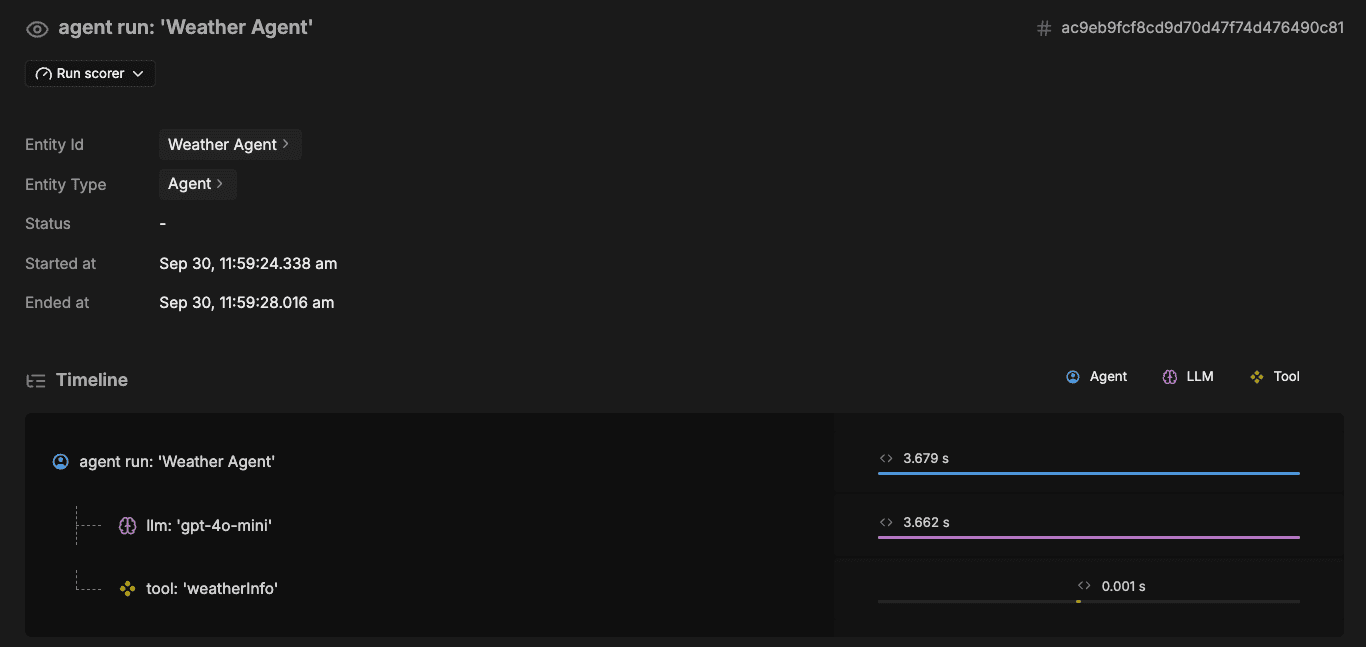
|
|
69
38
|
|
|
70
|
-
|
|
39
|
+
This visibility helps you understand why an agent made specific decisions and verify that memory retrieval is working as expected.
|
|
71
40
|
|
|
72
|
-
## Next
|
|
41
|
+
## Next steps
|
|
73
42
|
|
|
74
|
-
- Learn more about [Storage](https://mastra.ai/docs/
|
|
75
|
-
- Add [Message
|
|
76
|
-
- Visit [Memory configuration reference](https://mastra.ai/reference/
|
|
43
|
+
- Learn more about [Storage](https://mastra.ai/docs/memory/storage) providers and configuration options
|
|
44
|
+
- Add [Message history](https://mastra.ai/docs/memory/message-history), [Working memory](https://mastra.ai/docs/memory/working-memory), or [Semantic recall](https://mastra.ai/docs/memory/semantic-recall)
|
|
45
|
+
- Visit [Memory configuration reference](https://mastra.ai/reference/memory/memory-class) for all available options
|
|
@@ -2,7 +2,7 @@
|
|
|
2
2
|
|
|
3
3
|
# Storage
|
|
4
4
|
|
|
5
|
-
For
|
|
5
|
+
For agents to remember previous interactions, Mastra needs a database. Use a storage adapter for one of the [supported databases](#supported-providers) and pass it to your Mastra instance.
|
|
6
6
|
|
|
7
7
|
```typescript title="src/mastra/index.ts"
|
|
8
8
|
import { Mastra } from "@mastra/core";
|
|
@@ -15,35 +15,37 @@ export const mastra = new Mastra({
|
|
|
15
15
|
}),
|
|
16
16
|
});
|
|
17
17
|
```
|
|
18
|
-
|
|
18
|
+
This configures instance-level storage, which all agents share by default. You can also configure [agent-level storage](#agent-level-storage) for isolated data boundaries.
|
|
19
|
+
|
|
20
|
+
Mastra automatically creates the necessary tables on first interaction. See the [core schema](https://mastra.ai/reference/storage/overview#core-schema) for details on what gets created, including tables for messages, threads, resources, workflows, traces, and evaluation datasets.
|
|
19
21
|
|
|
20
22
|
## Supported providers
|
|
21
23
|
|
|
22
24
|
Each provider page includes installation instructions, configuration parameters, and usage examples:
|
|
23
25
|
|
|
24
|
-
- [libSQL
|
|
25
|
-
- [PostgreSQL
|
|
26
|
-
- [MongoDB
|
|
27
|
-
- [Upstash
|
|
28
|
-
- [Cloudflare D1](https://mastra.ai/reference/
|
|
29
|
-
- [Cloudflare Durable Objects](https://mastra.ai/reference/
|
|
30
|
-
- [Convex](https://mastra.ai/reference/
|
|
31
|
-
- [DynamoDB](https://mastra.ai/reference/
|
|
32
|
-
- [LanceDB](https://mastra.ai/reference/
|
|
33
|
-
- [Microsoft SQL Server](https://mastra.ai/reference/
|
|
26
|
+
- [libSQL](https://mastra.ai/reference/storage/libsql)
|
|
27
|
+
- [PostgreSQL](https://mastra.ai/reference/storage/postgresql)
|
|
28
|
+
- [MongoDB](https://mastra.ai/reference/storage/mongodb)
|
|
29
|
+
- [Upstash](https://mastra.ai/reference/storage/upstash)
|
|
30
|
+
- [Cloudflare D1](https://mastra.ai/reference/storage/cloudflare-d1)
|
|
31
|
+
- [Cloudflare Durable Objects](https://mastra.ai/reference/storage/cloudflare)
|
|
32
|
+
- [Convex](https://mastra.ai/reference/storage/convex)
|
|
33
|
+
- [DynamoDB](https://mastra.ai/reference/storage/dynamodb)
|
|
34
|
+
- [LanceDB](https://mastra.ai/reference/storage/lance)
|
|
35
|
+
- [Microsoft SQL Server](https://mastra.ai/reference/storage/mssql)
|
|
34
36
|
|
|
35
37
|
> **Note:**
|
|
36
|
-
libSQL is the easiest way to get started because it doesn’t require running a separate database server
|
|
38
|
+
libSQL is the easiest way to get started because it doesn’t require running a separate database server.
|
|
37
39
|
|
|
38
40
|
## Configuration scope
|
|
39
41
|
|
|
40
|
-
|
|
42
|
+
Storage can be configured at the instance level (shared by all agents) or at the agent level (isolated to a specific agent).
|
|
41
43
|
|
|
42
44
|
### Instance-level storage
|
|
43
45
|
|
|
44
46
|
Add storage to your Mastra instance so all agents, workflows, observability traces and scores share the same memory provider:
|
|
45
47
|
|
|
46
|
-
```typescript
|
|
48
|
+
```typescript title="src/mastra/index.ts"
|
|
47
49
|
import { Mastra } from "@mastra/core";
|
|
48
50
|
import { PostgresStore } from "@mastra/pg";
|
|
49
51
|
|
|
@@ -54,7 +56,7 @@ export const mastra = new Mastra({
|
|
|
54
56
|
}),
|
|
55
57
|
});
|
|
56
58
|
|
|
57
|
-
//
|
|
59
|
+
// Both agents inherit storage from the Mastra instance above
|
|
58
60
|
const agent1 = new Agent({ id: "agent-1", memory: new Memory() });
|
|
59
61
|
const agent2 = new Agent({ id: "agent-2", memory: new Memory() });
|
|
60
62
|
```
|
|
@@ -63,7 +65,7 @@ This is useful when all primitives share the same storage backend and have simil
|
|
|
63
65
|
|
|
64
66
|
#### Composite storage
|
|
65
67
|
|
|
66
|
-
|
|
68
|
+
[Composite storage](https://mastra.ai/reference/storage/composite) is an alternative way to configure instance-level storage. Use `MastraCompositeStore` to set the `memory` domain (and any other [domains](https://mastra.ai/reference/storage/composite#storage-domains) you need) to different storage providers.
|
|
67
69
|
|
|
68
70
|
```typescript title="src/mastra/index.ts"
|
|
69
71
|
import { Mastra } from "@mastra/core";
|
|
@@ -76,6 +78,7 @@ export const mastra = new Mastra({
|
|
|
76
78
|
storage: new MastraCompositeStore({
|
|
77
79
|
id: "composite",
|
|
78
80
|
domains: {
|
|
81
|
+
// highlight-next-line
|
|
79
82
|
memory: new MemoryLibSQL({ url: "file:./memory.db" }),
|
|
80
83
|
workflows: new WorkflowsPG({ connectionString: process.env.DATABASE_URL }),
|
|
81
84
|
observability: new ObservabilityStorageClickhouse({
|
|
@@ -90,14 +93,11 @@ export const mastra = new Mastra({
|
|
|
90
93
|
|
|
91
94
|
This is useful when different types of data have different performance or operational requirements, such as low-latency storage for memory, durable storage for workflows, and high-throughput storage for observability.
|
|
92
95
|
|
|
93
|
-
> **Note:**
|
|
94
|
-
See [Storage Domains](https://mastra.ai/reference/v1/storage/composite#storage-domains) for more information.
|
|
95
|
-
|
|
96
96
|
### Agent-level storage
|
|
97
97
|
|
|
98
|
-
Agent-level storage overrides storage configured at the instance
|
|
98
|
+
Agent-level storage overrides storage configured at the instance level. Add storage to a specific agent when you need data boundaries or compliance requirements:
|
|
99
99
|
|
|
100
|
-
```typescript title="src/mastra/agents/
|
|
100
|
+
```typescript title="src/mastra/agents/your-agent.ts"
|
|
101
101
|
import { Agent } from "@mastra/core/agent";
|
|
102
102
|
import { Memory } from "@mastra/memory";
|
|
103
103
|
import { PostgresStore } from "@mastra/pg";
|
|
@@ -113,56 +113,55 @@ export const agent = new Agent({
|
|
|
113
113
|
});
|
|
114
114
|
```
|
|
115
115
|
|
|
116
|
-
|
|
117
|
-
|
|
118
|
-
> **Mastra Cloud Store limitation**
|
|
119
|
-
Agent-level storage is not supported when using [Mastra Cloud Store](https://mastra.ai/docs/v1/mastra-cloud/deployment#using-mastra-cloud-store). If you use Mastra Cloud Store, configure storage on the Mastra instance instead. This limitation does not apply if you bring your own database.
|
|
116
|
+
> **Note:**
|
|
117
|
+
[Mastra Cloud Store](https://mastra.ai/docs/mastra-cloud/deployment#using-mastra-cloud-store) doesn't support agent-level storage.
|
|
120
118
|
|
|
121
119
|
## Threads and resources
|
|
122
120
|
|
|
123
|
-
Mastra organizes
|
|
121
|
+
Mastra organizes conversations using two identifiers:
|
|
122
|
+
|
|
123
|
+
- **Thread** - a conversation session containing a sequence of messages.
|
|
124
|
+
- **Resource** - the entity that owns the thread, such as a user, organization, project, or any other domain entity in your application.
|
|
124
125
|
|
|
125
|
-
|
|
126
|
-
- **Resource**: An identifier for the entity the thread belongs to, typically a user (e.g., `user_123`)
|
|
126
|
+
Both identifiers are required for agents to store information:
|
|
127
127
|
|
|
128
|
-
|
|
128
|
+
**generate:**
|
|
129
129
|
|
|
130
130
|
```typescript
|
|
131
|
-
const
|
|
131
|
+
const response = await agent.generate("hello", {
|
|
132
132
|
memory: {
|
|
133
|
-
thread: "
|
|
133
|
+
thread: "conversation-abc-123",
|
|
134
134
|
resource: "user_123",
|
|
135
135
|
},
|
|
136
136
|
});
|
|
137
137
|
```
|
|
138
138
|
|
|
139
|
-
|
|
140
|
-
|
|
141
|
-
|
|
142
|
-
### Thread and resource relationship
|
|
139
|
+
|
|
140
|
+
**stream:**
|
|
143
141
|
|
|
144
|
-
|
|
145
|
-
|
|
146
|
-
|
|
147
|
-
|
|
148
|
-
|
|
142
|
+
```typescript
|
|
143
|
+
const stream = await agent.stream("hello", {
|
|
144
|
+
memory: {
|
|
145
|
+
thread: "conversation-abc-123",
|
|
146
|
+
resource: "user_123",
|
|
147
|
+
},
|
|
148
|
+
});
|
|
149
149
|
```
|
|
150
150
|
|
|
151
|
-
|
|
152
|
-
|
|
153
|
-
**Security:** Memory is a storage layer, not an authorization layer. Your application must implement access control before calling memory APIs. The `resourceId` parameter controls both validation and filtering - provide it to validate ownership and filter messages, or omit it for server-side access without validation.
|
|
151
|
+
|
|
154
152
|
|
|
155
|
-
|
|
153
|
+
> **Note:**
|
|
154
|
+
[Studio](https://mastra.ai/docs/getting-started/studio) automatically generates a thread and resource ID for you. When calling `stream()` or `generate()` yourself, remember to provide these identifiers explicitly.
|
|
156
155
|
|
|
157
156
|
### Thread title generation
|
|
158
157
|
|
|
159
|
-
Mastra can automatically generate descriptive thread titles based on the user's first message.
|
|
158
|
+
Mastra can automatically generate descriptive thread titles based on the user's first message when `generateTitle` is enabled.
|
|
160
159
|
|
|
161
160
|
Use this option when implementing a ChatGPT-style chat interface to render a title alongside each thread in the conversation list (for example, in a sidebar) derived from the thread’s initial user message.
|
|
162
161
|
|
|
163
|
-
```typescript
|
|
164
|
-
export const
|
|
165
|
-
id: "
|
|
162
|
+
```typescript title="src/mastra/agents/my-agent.ts"
|
|
163
|
+
export const agent = new Agent({
|
|
164
|
+
id: "agent",
|
|
166
165
|
memory: new Memory({
|
|
167
166
|
options: {
|
|
168
167
|
generateTitle: true,
|
|
@@ -173,16 +172,16 @@ export const testAgent = new Agent({
|
|
|
173
172
|
|
|
174
173
|
Title generation runs asynchronously after the agent responds and does not affect response time.
|
|
175
174
|
|
|
176
|
-
To optimize cost or behavior, provide a smaller `model` and custom `instructions`:
|
|
175
|
+
To optimize cost or behavior, provide a smaller [`model`](/models) and custom `instructions`:
|
|
177
176
|
|
|
178
|
-
```typescript
|
|
179
|
-
export const
|
|
180
|
-
id: "
|
|
177
|
+
```typescript title="src/mastra/agents/my-agent.ts"
|
|
178
|
+
export const agent = new Agent({
|
|
179
|
+
id: "agent",
|
|
181
180
|
memory: new Memory({
|
|
182
181
|
options: {
|
|
183
182
|
generateTitle: {
|
|
184
183
|
model: "openai/gpt-4o-mini",
|
|
185
|
-
instructions: "Generate a
|
|
184
|
+
instructions: "Generate a 1 word title",
|
|
186
185
|
},
|
|
187
186
|
},
|
|
188
187
|
}),
|
|
@@ -191,43 +190,72 @@ export const testAgent = new Agent({
|
|
|
191
190
|
|
|
192
191
|
## Semantic recall
|
|
193
192
|
|
|
194
|
-
Semantic recall
|
|
193
|
+
Semantic recall has different storage requirements - it needs a vector database in addition to the standard storage adapter. See [Semantic recall](https://mastra.ai/docs/memory/semantic-recall) for setup and supported vector providers.
|
|
195
194
|
|
|
196
|
-
|
|
195
|
+
## Handling large attachments
|
|
197
196
|
|
|
198
|
-
|
|
199
|
-
import { Mastra } from "@mastra/core";
|
|
200
|
-
import { Agent } from "@mastra/core/agent";
|
|
201
|
-
import { Memory } from "@mastra/memory";
|
|
202
|
-
import { PostgresStore } from "@mastra/pg";
|
|
203
|
-
import { PineconeVector } from "@mastra/pinecone";
|
|
197
|
+
Some storage providers enforce record size limits that base64-encoded file attachments (such as images) can exceed:
|
|
204
198
|
|
|
205
|
-
|
|
206
|
-
|
|
207
|
-
|
|
208
|
-
|
|
209
|
-
|
|
210
|
-
}),
|
|
211
|
-
});
|
|
199
|
+
| Provider | Record size limit |
|
|
200
|
+
| -------- | ----------------- |
|
|
201
|
+
| [DynamoDB](https://mastra.ai/reference/storage/dynamodb) | 400 KB |
|
|
202
|
+
| [Convex](https://mastra.ai/reference/storage/convex) | 1 MiB |
|
|
203
|
+
| [Cloudflare D1](https://mastra.ai/reference/storage/cloudflare-d1) | 1 MiB |
|
|
212
204
|
|
|
213
|
-
|
|
214
|
-
|
|
215
|
-
|
|
216
|
-
|
|
217
|
-
|
|
218
|
-
|
|
219
|
-
|
|
220
|
-
|
|
221
|
-
|
|
222
|
-
|
|
223
|
-
|
|
224
|
-
|
|
225
|
-
|
|
226
|
-
|
|
227
|
-
|
|
228
|
-
|
|
205
|
+
PostgreSQL, MongoDB, and libSQL have higher limits and are generally unaffected.
|
|
206
|
+
|
|
207
|
+
To avoid this, use an input processor to upload attachments to external storage (S3, R2, GCS, [Convex file storage](https://docs.convex.dev/file-storage), etc.) and replace them with URL references before persistence.
|
|
208
|
+
|
|
209
|
+
```typescript title="src/mastra/processors/attachment-uploader.ts"
|
|
210
|
+
import type { Processor } from "@mastra/core/processors";
|
|
211
|
+
import type { MastraDBMessage } from "@mastra/core/memory";
|
|
212
|
+
|
|
213
|
+
export class AttachmentUploader implements Processor {
|
|
214
|
+
id = "attachment-uploader";
|
|
215
|
+
|
|
216
|
+
async processInput({ messages }: { messages: MastraDBMessage[] }) {
|
|
217
|
+
return Promise.all(messages.map((msg) => this.processMessage(msg)));
|
|
218
|
+
}
|
|
219
|
+
|
|
220
|
+
async processMessage(msg: MastraDBMessage) {
|
|
221
|
+
const attachments = msg.content.experimental_attachments;
|
|
222
|
+
if (!attachments?.length) return msg;
|
|
223
|
+
|
|
224
|
+
const uploaded = await Promise.all(
|
|
225
|
+
attachments.map(async (att) => {
|
|
226
|
+
// Skip if already a URL
|
|
227
|
+
if (!att.url?.startsWith("data:")) return att;
|
|
228
|
+
|
|
229
|
+
// Upload base64 data and replace with URL
|
|
230
|
+
const url = await this.upload(att.url, att.contentType);
|
|
231
|
+
return { ...att, url };
|
|
232
|
+
})
|
|
233
|
+
);
|
|
234
|
+
|
|
235
|
+
return { ...msg, content: { ...msg.content, experimental_attachments: uploaded } };
|
|
236
|
+
}
|
|
237
|
+
|
|
238
|
+
async upload(dataUri: string, contentType?: string): Promise<string> {
|
|
239
|
+
const base64 = dataUri.split(",")[1];
|
|
240
|
+
const buffer = Buffer.from(base64, "base64");
|
|
241
|
+
|
|
242
|
+
// Replace with your storage provider (S3, R2, GCS, Convex, etc.)
|
|
243
|
+
// return await s3.upload(buffer, contentType);
|
|
244
|
+
throw new Error("Implement upload() with your storage provider");
|
|
245
|
+
}
|
|
246
|
+
}
|
|
229
247
|
```
|
|
230
248
|
|
|
231
|
-
|
|
249
|
+
Use the processor with your agent:
|
|
232
250
|
|
|
233
|
-
|
|
251
|
+
```typescript
|
|
252
|
+
import { Agent } from "@mastra/core/agent";
|
|
253
|
+
import { Memory } from "@mastra/memory";
|
|
254
|
+
import { AttachmentUploader } from "./processors/attachment-uploader";
|
|
255
|
+
|
|
256
|
+
const agent = new Agent({
|
|
257
|
+
id: "my-agent",
|
|
258
|
+
memory: new Memory({ storage: yourStorage }),
|
|
259
|
+
inputProcessors: [new AttachmentUploader()],
|
|
260
|
+
});
|
|
261
|
+
```
|