@mastra/mcp-docs-server 0.13.32 → 0.13.33
This diff represents the content of publicly available package versions that have been released to one of the supported registries. The information contained in this diff is provided for informational purposes only and reflects changes between package versions as they appear in their respective public registries.
- package/.docs/organized/changelogs/%40internal%2Fchangeset-cli.md +2 -0
- package/.docs/organized/changelogs/%40internal%2Fexternal-types.md +2 -0
- package/.docs/organized/changelogs/%40internal%2Fstorage-test-utils.md +9 -9
- package/.docs/organized/changelogs/%40internal%2Ftypes-builder.md +2 -0
- package/.docs/organized/changelogs/%40mastra%2Fclient-js.md +15 -15
- package/.docs/organized/changelogs/%40mastra%2Fcore.md +5 -5
- package/.docs/organized/changelogs/%40mastra%2Fdeployer-cloud.md +17 -17
- package/.docs/organized/changelogs/%40mastra%2Fdeployer-cloudflare.md +17 -17
- package/.docs/organized/changelogs/%40mastra%2Fdeployer-netlify.md +17 -17
- package/.docs/organized/changelogs/%40mastra%2Fdeployer-vercel.md +17 -17
- package/.docs/organized/changelogs/%40mastra%2Fdeployer.md +21 -21
- package/.docs/organized/changelogs/%40mastra%2Fmcp-docs-server.md +15 -15
- package/.docs/organized/changelogs/%40mastra%2Fplayground-ui.md +27 -27
- package/.docs/organized/changelogs/%40mastra%2Freact.md +14 -0
- package/.docs/organized/changelogs/%40mastra%2Fserver.md +19 -19
- package/.docs/organized/changelogs/create-mastra.md +5 -5
- package/.docs/organized/changelogs/mastra.md +21 -21
- package/.docs/raw/deployment/cloud-providers/aws-lambda.mdx +1 -1
- package/.docs/raw/getting-started/project-structure.mdx +48 -45
- package/.docs/raw/getting-started/studio.mdx +158 -0
- package/.docs/raw/reference/workflows/step.mdx +1 -1
- package/.docs/raw/tools-mcp/overview.mdx +2 -2
- package/.docs/raw/workflows/agents-and-tools.mdx +131 -0
- package/.docs/raw/workflows/overview.mdx +15 -13
- package/CHANGELOG.md +14 -0
- package/package.json +5 -5
- package/.docs/organized/code-examples/agent.md +0 -1387
- package/.docs/raw/server-db/local-dev-playground.mdx +0 -233
- package/.docs/raw/workflows/using-with-agents-and-tools.mdx +0 -350
|
@@ -3,70 +3,73 @@ title: "Local Project Structure | Getting Started | Mastra Docs"
|
|
|
3
3
|
description: Guide on organizing folders and files in Mastra, including best practices and recommended structures.
|
|
4
4
|
---
|
|
5
5
|
|
|
6
|
-
import { FileTree } from "nextra/components";
|
|
6
|
+
import { FileTree, Callout } from "nextra/components";
|
|
7
7
|
|
|
8
8
|
# Project Structure
|
|
9
9
|
|
|
10
|
-
|
|
10
|
+
Your new Mastra project, created with the `create mastra` command, comes with a predefined set of files and folders to help you get started.
|
|
11
11
|
|
|
12
|
-
You could
|
|
12
|
+
Mastra is a framework, but it's **unopinionated** about how you organize or colocate your files. The CLI provides a sensible default structure that works well for most projects, but you're free to adapt it to your workflow or team conventions. You could even build your entire project in a single file if you wanted! Whatever structure you choose, keep it consistent to ensure your code stays maintainable and easy to navigate.
|
|
13
13
|
|
|
14
|
-
|
|
14
|
+
## Default project structure
|
|
15
15
|
|
|
16
|
-
|
|
17
|
-
|
|
18
|
-
A default project created with the CLI looks like this:
|
|
16
|
+
A project created with the `create mastra` command looks like this:
|
|
19
17
|
|
|
20
18
|
<FileTree>
|
|
21
19
|
<FileTree.Folder name="src" defaultOpen>
|
|
22
20
|
<FileTree.Folder name="mastra" defaultOpen>
|
|
23
21
|
<FileTree.Folder name="agents" defaultOpen>
|
|
24
|
-
<FileTree.File name="agent
|
|
22
|
+
<FileTree.File name="weather-agent.ts" />
|
|
25
23
|
</FileTree.Folder>
|
|
26
24
|
<FileTree.Folder name="tools" defaultOpen>
|
|
27
|
-
<FileTree.File name="tool
|
|
25
|
+
<FileTree.File name="weather-tool.ts" />
|
|
28
26
|
</FileTree.Folder>
|
|
29
27
|
<FileTree.Folder name="workflows" defaultOpen>
|
|
30
|
-
<FileTree.File name="workflow
|
|
28
|
+
<FileTree.File name="weather-workflow.ts" />
|
|
29
|
+
</FileTree.Folder>
|
|
30
|
+
<FileTree.Folder name="scorers" defaultOpen>
|
|
31
|
+
<FileTree.File name="weather-scorer.ts" />
|
|
31
32
|
</FileTree.Folder>
|
|
32
33
|
<FileTree.File name="index.ts" />
|
|
33
34
|
</FileTree.Folder>
|
|
34
35
|
</FileTree.Folder>
|
|
35
|
-
<FileTree.File name=".env" />
|
|
36
|
+
<FileTree.File name=".env.example" />
|
|
36
37
|
<FileTree.File name="package.json" />
|
|
37
38
|
<FileTree.File name="tsconfig.json" />
|
|
38
39
|
</FileTree>
|
|
39
|
-
|
|
40
|
-
|
|
41
|
-
|
|
42
|
-
|
|
43
|
-
|
|
44
|
-
|
|
45
|
-
|
|
46
|
-
|
|
47
|
-
|
|
48
|
-
|
|
49
|
-
|
|
50
|
-
|
|
51
|
-
|
|
52
|
-
|
|
53
|
-
|
|
54
|
-
|
|
55
|
-
|
|
56
|
-
|
|
57
|
-
|
|
58
|
-
|
|
59
|
-
|
|
60
|
-
|
|
61
|
-
|
|
62
|
-
|
|
|
63
|
-
|
|
|
64
|
-
|
|
65
|
-
|
|
66
|
-
|
|
67
|
-
|
|
|
68
|
-
|
|
69
|
-
|
|
70
|
-
|
|
71
|
-
|
|
72
|
-
|
|
40
|
+
|
|
41
|
+
<Callout type="info">
|
|
42
|
+
Tip - Use the predefined files as templates. Duplicate and adapt them to quickly create your own agents, tools, workflows, etc.
|
|
43
|
+
</Callout>
|
|
44
|
+
|
|
45
|
+
### Folders
|
|
46
|
+
|
|
47
|
+
Folders organize your agent's resources, like agents, tools, and workflows.
|
|
48
|
+
|
|
49
|
+
| Folder | Description |
|
|
50
|
+
| ---------------------- | ------------ |
|
|
51
|
+
| `src/mastra` | Entry point for all Mastra-related code and configuration.|
|
|
52
|
+
| `src/mastra/agents` | Define and configure your agents - their behavior, goals, and tools. |
|
|
53
|
+
| `src/mastra/workflows` | Define multi-step workflows that orchestrate agents and tools together. |
|
|
54
|
+
| `src/mastra/tools` | Create reusable tools that your agents can call |
|
|
55
|
+
| `src/mastra/mcp` | (Optional) Implement custom MCP servers to share your tools with external agents |
|
|
56
|
+
| `src/mastra/scorers` | (Optional) Define scorers for evaluating agent performance over time |
|
|
57
|
+
| `src/mastra/public` | (Optional) Contents are copied into the `.build/output` directory during the build process, making them available for serving at runtime |
|
|
58
|
+
|
|
59
|
+
### Top-level files
|
|
60
|
+
|
|
61
|
+
Top-level files define how your Mastra project is configured, built, and connected to its environment.
|
|
62
|
+
|
|
63
|
+
| File | Description |
|
|
64
|
+
| --------------------- | ------------ |
|
|
65
|
+
| `src/mastra/index.ts` | Central entry point where you configure and initialize Mastra. |
|
|
66
|
+
| `.env.example` | Template for environment variables — copy and rename to `.env` to add your secret [model provider](/models) keys. |
|
|
67
|
+
| `package.json` | Defines project metadata, dependencies, and available npm scripts. |
|
|
68
|
+
| `tsconfig.json` | Configures TypeScript options such as path aliases, compiler settings, and build output. |
|
|
69
|
+
|
|
70
|
+
## Next steps
|
|
71
|
+
|
|
72
|
+
- Read more about [Mastra's features](/docs#why-mastra).
|
|
73
|
+
- Integrate Mastra with your frontend framework: [Next.js](/docs/frameworks/web-frameworks/next-js), [React](/docs/frameworks/web-frameworks/vite-react), or [Astro](/docs/frameworks/web-frameworks/astro).
|
|
74
|
+
- Build an agent from scratch following one of our [guides](/guides).
|
|
75
|
+
- Watch conceptual guides on our [YouTube channel](https://www.youtube.com/@mastra-ai) and [subscribe](https://www.youtube.com/@mastra-ai?sub_confirmation=1)!
|
|
@@ -0,0 +1,158 @@
|
|
|
1
|
+
---
|
|
2
|
+
title: "Playground"
|
|
3
|
+
description: Guide on installing Mastra and setting up the necessary prerequisites for running it with various LLM providers.
|
|
4
|
+
---
|
|
5
|
+
|
|
6
|
+
import YouTube from "@/components/youtube";
|
|
7
|
+
import { Tabs, Tab } from "@/components/tabs";
|
|
8
|
+
import { VideoPlayer } from "@/components/video-player"
|
|
9
|
+
import { Callout } from "nextra/components";
|
|
10
|
+
|
|
11
|
+
# Playground
|
|
12
|
+
|
|
13
|
+
Playground helps you build agents quickly. It provides an interactive UI for testing your agents and workflows, along with a REST API that exposes your Mastra application as a local service. This lets you start building without having to integrate Mastra into your project right away.
|
|
14
|
+
|
|
15
|
+
As your project evolves, Playground enables you to iterate quickly. Features like Observability and Scorers give you visibility into performance at every stage of development.
|
|
16
|
+
|
|
17
|
+
To get started, run Playground locally using the instructions below, or [deploy to Mastra Cloud](/docs/mastra-cloud/setting-up) to access the Playground remotely and collaborate with your team.
|
|
18
|
+
|
|
19
|
+
<YouTube id="spGlcTEjuXY" startTime={126}/>
|
|
20
|
+
|
|
21
|
+
## Launch Playground
|
|
22
|
+
|
|
23
|
+
If you created your application with `create mastra`, start the local development server using the `dev` script. You can also run it directly with `mastra dev`.
|
|
24
|
+
|
|
25
|
+
<Tabs items={["npm", "pnpm", "yarn", "bun", "mastra"]}>
|
|
26
|
+
<Tab>
|
|
27
|
+
```bash copy
|
|
28
|
+
npm run dev
|
|
29
|
+
```
|
|
30
|
+
</Tab>
|
|
31
|
+
<Tab>
|
|
32
|
+
```bash copy
|
|
33
|
+
pnpm run dev
|
|
34
|
+
```
|
|
35
|
+
</Tab>
|
|
36
|
+
<Tab>
|
|
37
|
+
```bash copy
|
|
38
|
+
yarn run dev
|
|
39
|
+
```
|
|
40
|
+
</Tab>
|
|
41
|
+
<Tab>
|
|
42
|
+
```bash copy
|
|
43
|
+
bun run dev
|
|
44
|
+
```
|
|
45
|
+
</Tab>
|
|
46
|
+
<Tab>
|
|
47
|
+
```bash copy
|
|
48
|
+
mastra dev
|
|
49
|
+
```
|
|
50
|
+
</Tab>
|
|
51
|
+
</Tabs>
|
|
52
|
+
|
|
53
|
+
Once the server's running, you can:
|
|
54
|
+
|
|
55
|
+
- Open the Playground UI at http://localhost:4111/ to test your agent interactively.
|
|
56
|
+
- Visit http://localhost:4111/swagger-ui to discover and interact with the underlying REST API.
|
|
57
|
+
|
|
58
|
+
## Playground UI
|
|
59
|
+
|
|
60
|
+
The Playground UI provides an interactive development environment for you to test your agents, workflows, and tools, observe exactly what happens under the hood with each interaction, and tweak things as you go.
|
|
61
|
+
|
|
62
|
+
### Agents
|
|
63
|
+
|
|
64
|
+
|
|
65
|
+
Chat with your agent directly, dynamically switch [models](/models), and tweak settings like temperature and top-p to understand how they affect the output.
|
|
66
|
+
|
|
67
|
+
<VideoPlayer
|
|
68
|
+
src="https://res.cloudinary.com/mastra-assets/video/upload/v1751406022/local-dev-agents-playground_100_m3begx.mp4"
|
|
69
|
+
/>
|
|
70
|
+
|
|
71
|
+
When you interact with your agent, you can follow each step of its reasoning, view tool call outputs, and [observe](#observability) traces and logs to see how responses are generated. You can also attach [scorers](#scorers) to measure and compare response quality over time.
|
|
72
|
+
|
|
73
|
+
### Workflows
|
|
74
|
+
|
|
75
|
+
Visualize your workflow as a graph and run it step by step with a custom input. During execution, the interface updates in real time to show the active step and the path taken.
|
|
76
|
+
|
|
77
|
+
<VideoPlayer
|
|
78
|
+
src="https://res.cloudinary.com/mastra-assets/video/upload/v1751406027/local-dev-workflows-playground_100_rbc466.mp4"
|
|
79
|
+
/>
|
|
80
|
+
|
|
81
|
+
When running a workflow, you can also view detailed traces showing tool calls, raw JSON outputs, and any errors that might have occured along the way.
|
|
82
|
+
|
|
83
|
+
### Tools
|
|
84
|
+
|
|
85
|
+
Run tools in isolation to observe their behavior. Test them before assigning them to your agent, or isolate them to debug issues should something go wrong.
|
|
86
|
+
|
|
87
|
+
<VideoPlayer
|
|
88
|
+
src="https://res.cloudinary.com/mastra-assets/video/upload/v1751406316/local-dev-agents-tools_100_fe1jdt.mp4"
|
|
89
|
+
/>
|
|
90
|
+
### MCP
|
|
91
|
+
List the MCP servers attached to your Mastra instance and explore their available tools.
|
|
92
|
+
|
|
93
|
+

|
|
94
|
+
|
|
95
|
+
### Observability
|
|
96
|
+
|
|
97
|
+
|
|
98
|
+
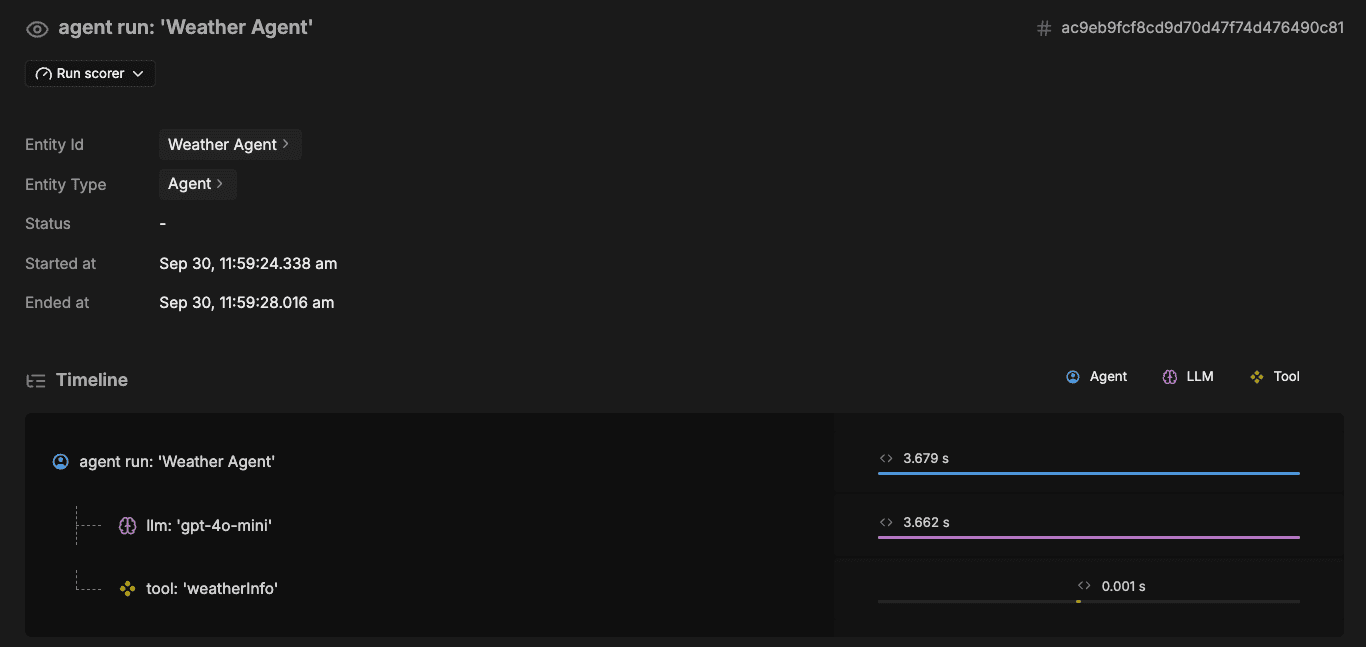
When you run an agent or workflow, the Observability tab displays traces that highlight the key AI operations such as model calls, tool executions, and workflow steps. Follow these traces to see how data moves, where time is spent, and what's happening under the hood.
|
|
99
|
+
|
|
100
|
+
|
|
101
|
+
|
|
102
|
+
AI Tracing filters out low-level framework details so your traces stay focused and readable.
|
|
103
|
+
|
|
104
|
+
|
|
105
|
+
### Scorers
|
|
106
|
+
|
|
107
|
+
The Scorers tab displays the results of your agent's scorers as they run. When messages pass through your agent, the defined scorers evaluate each output asynchronously and render their results here. This allows you to understand how your scorers respond to different interactions, compare performance across test cases, and identify areas for improvement.
|
|
108
|
+
|
|
109
|
+
## REST API
|
|
110
|
+
|
|
111
|
+
The local development server exposes a complete set of REST API routes, allowing you to programmatically interact with your agents, workflows, and tools during development. This is particularly helpful if you plan to deploy the Mastra server, since the local development server uses the exact same API routes as the [production server](/docs/server-db/production-server), allowing you to develop and test against it with full parity.
|
|
112
|
+
|
|
113
|
+
You can explore all available endpoints in the OpenAPI specification at http://localhost:4111/openapi.json, which details every endpoint and its request and response schemas.
|
|
114
|
+
|
|
115
|
+
To explore the API interactively, visit the Swagger UI at http://localhost:4111/swagger-ui. Here, you can discover endpoints and test them directly from your browser.
|
|
116
|
+
|
|
117
|
+
<Callout type="info">
|
|
118
|
+
The OpenAPI and Swagger endpoints are disabled in production by default. To enable them, set `server.build.openAPIDocs` and `server.build.swaggerUI` to `true` respectively.
|
|
119
|
+
</Callout>
|
|
120
|
+
|
|
121
|
+
## Configuration
|
|
122
|
+
|
|
123
|
+
### Port
|
|
124
|
+
|
|
125
|
+
By default, the development server runs at http://localhost:4111. You can change the `host` and `port` in the Mastra server configuration:
|
|
126
|
+
|
|
127
|
+
```typescript
|
|
128
|
+
import { Mastra } from "@mastra/core/mastra";
|
|
129
|
+
|
|
130
|
+
export const mastra = new Mastra({
|
|
131
|
+
server: {
|
|
132
|
+
port: 8080,
|
|
133
|
+
host: "0.0.0.0",
|
|
134
|
+
},
|
|
135
|
+
});
|
|
136
|
+
```
|
|
137
|
+
|
|
138
|
+
### Local HTTPS
|
|
139
|
+
|
|
140
|
+
Mastra supports local HTTPS development through the [`--https`](/reference/cli/mastra#--https) flag, which automatically creates and manages certificates for your project. When you run `mastra dev --https`, a private key and certificate are generated for localhost (or your configured host). For custom certificate management, you can provide your own key and certificate files through the server configuration:
|
|
141
|
+
|
|
142
|
+
```typescript
|
|
143
|
+
import { Mastra } from "@mastra/core/mastra";
|
|
144
|
+
import fs from 'node:fs';
|
|
145
|
+
|
|
146
|
+
export const mastra = new Mastra({
|
|
147
|
+
server: {
|
|
148
|
+
https: {
|
|
149
|
+
key: fs.readFileSync('path/to/key.pem'),
|
|
150
|
+
cert: fs.readFileSync('path/to/cert.pem')
|
|
151
|
+
}
|
|
152
|
+
},
|
|
153
|
+
});
|
|
154
|
+
```
|
|
155
|
+
## Next steps
|
|
156
|
+
|
|
157
|
+
- Learn more about Mastra's suggested [project structure](/docs/getting-started/project-structure).
|
|
158
|
+
- Integrate Mastra with your frontend framework of choice - [Next.js](/docs/frameworks/web-frameworks/next-js), [React](/docs/frameworks/web-frameworks/vite-react), or [Astro](/docs/frameworks/web-frameworks/astro).
|
|
@@ -152,4 +152,4 @@ const step1 = createStep({
|
|
|
152
152
|
## Related
|
|
153
153
|
|
|
154
154
|
- [Control flow](../../docs/workflows/control-flow.mdx)
|
|
155
|
-
- [Using agents and tools](../../docs/workflows/
|
|
155
|
+
- [Using agents and tools](../../docs/workflows/agents-and-tools.mdx)
|
|
@@ -1,11 +1,11 @@
|
|
|
1
1
|
---
|
|
2
|
-
title: "Tools
|
|
2
|
+
title: "Using Tools | Tools & MCP | Mastra Docs"
|
|
3
3
|
description: Understand what tools are in Mastra, how to add them to agents, and best practices for designing effective tools.
|
|
4
4
|
---
|
|
5
5
|
|
|
6
6
|
import { Steps } from "nextra/components";
|
|
7
7
|
|
|
8
|
-
# Tools
|
|
8
|
+
# Using Tools
|
|
9
9
|
|
|
10
10
|
Tools are functions that agents can execute to perform specific tasks or access external information. They extend an agent's capabilities beyond simple text generation, allowing interaction with APIs, databases, or other systems.
|
|
11
11
|
|
|
@@ -0,0 +1,131 @@
|
|
|
1
|
+
---
|
|
2
|
+
title: "Agents and Tools | Workflows | Mastra Docs"
|
|
3
|
+
description: "Learn how to call agents and tools from workflow steps and choose between execute functions and step composition."
|
|
4
|
+
---
|
|
5
|
+
|
|
6
|
+
# Agents and Tools
|
|
7
|
+
|
|
8
|
+
Workflow steps can call agents to leverage LLM reasoning or call tools for type-safe logic. You can either invoke them from within a step's `execute` function or compose them directly as steps using `createStep()`.
|
|
9
|
+
|
|
10
|
+
## Using agents in workflows
|
|
11
|
+
|
|
12
|
+
Use agents in workflow steps when you need reasoning, language generation, or other LLM-based tasks. Call from a step's `execute` function for more control over the agent call (e.g., track conversation history or return structured output). Compose agents as steps when you don't need to modify how the agent is invoked.
|
|
13
|
+
|
|
14
|
+
### Calling agents
|
|
15
|
+
|
|
16
|
+
Call agents inside a step's `execute` function using `.generate()` or `.stream()`. This lets you modify the agent call and handle the response before passing it to the next step.
|
|
17
|
+
|
|
18
|
+
```typescript {7-12} filename="src/mastra/workflows/test-workflow.ts" showLineNumbers copy
|
|
19
|
+
const step1 = createStep({
|
|
20
|
+
// ...
|
|
21
|
+
execute: async ({ inputData, mastra }) => {
|
|
22
|
+
const { message } = inputData;
|
|
23
|
+
|
|
24
|
+
const testAgent = mastra.getAgent("testAgent");
|
|
25
|
+
const response = await testAgent.generate(`Convert this message into bullet points: ${message}`, {
|
|
26
|
+
memory: {
|
|
27
|
+
thread: "user-123",
|
|
28
|
+
resource: "test-123"
|
|
29
|
+
}
|
|
30
|
+
});
|
|
31
|
+
|
|
32
|
+
return {
|
|
33
|
+
list: response.text
|
|
34
|
+
};
|
|
35
|
+
}
|
|
36
|
+
});
|
|
37
|
+
```
|
|
38
|
+
|
|
39
|
+
> See [Calling Agents](../../examples/agents/calling-agents.mdx) for more examples.
|
|
40
|
+
|
|
41
|
+
### Agents as steps
|
|
42
|
+
|
|
43
|
+
Compose an agent as a step using `createStep()` when you don't need to modify the agent call. Use `.map()` to transform the previous step's output into a `prompt` the agent can use.
|
|
44
|
+
|
|
45
|
+

|
|
46
|
+
|
|
47
|
+
```typescript {1,3,8-13} filename="src/mastra/workflows/test-workflow.ts" showLineNumbers copy
|
|
48
|
+
import { testAgent } from "../agents/test-agent";
|
|
49
|
+
|
|
50
|
+
const step1 = createStep(testAgent);
|
|
51
|
+
|
|
52
|
+
export const testWorkflow = createWorkflow({
|
|
53
|
+
// ...
|
|
54
|
+
})
|
|
55
|
+
.map(async ({ inputData }) => {
|
|
56
|
+
const { message } = inputData;
|
|
57
|
+
return {
|
|
58
|
+
prompt: `Convert this message into bullet points: ${message}`
|
|
59
|
+
};
|
|
60
|
+
})
|
|
61
|
+
.then(step1)
|
|
62
|
+
.then(step2)
|
|
63
|
+
.commit();
|
|
64
|
+
```
|
|
65
|
+
|
|
66
|
+
> See [Input Data Mapping](./input-data-mapping.mdx) for more information.
|
|
67
|
+
|
|
68
|
+
## Using tools in workflows
|
|
69
|
+
|
|
70
|
+
Use tools in workflow steps to leverage existing tool logic. Call from a step's `execute` function when you need to prepare context or process responses. Compose tools as steps when you don't need to modify how the tool is used.
|
|
71
|
+
|
|
72
|
+
### Calling tools
|
|
73
|
+
|
|
74
|
+
Call tools inside a step's `execute` function using `.execute()`. This gives you more control over the tool's input context, or process its response before passing it to the next step.
|
|
75
|
+
|
|
76
|
+
```typescript {8-13,16} filename="src/mastra/workflows/test-workflow.ts" showLineNumbers copy
|
|
77
|
+
import { testTool } from "../tools/test-tool";
|
|
78
|
+
|
|
79
|
+
const step2 = createStep({
|
|
80
|
+
// ...
|
|
81
|
+
execute: async ({ inputData, runtimeContext }) => {
|
|
82
|
+
const { formatted } = inputData;
|
|
83
|
+
|
|
84
|
+
const response = await testTool.execute({
|
|
85
|
+
context: {
|
|
86
|
+
text: formatted
|
|
87
|
+
},
|
|
88
|
+
runtimeContext
|
|
89
|
+
});
|
|
90
|
+
|
|
91
|
+
return {
|
|
92
|
+
emphasized: response.emphasized
|
|
93
|
+
};
|
|
94
|
+
}
|
|
95
|
+
});
|
|
96
|
+
```
|
|
97
|
+
|
|
98
|
+
> See [Calling Tools](../../examples/tools/calling-tools.mdx) for more examples.
|
|
99
|
+
|
|
100
|
+
### Tools as steps
|
|
101
|
+
|
|
102
|
+
Compose a tool as a step using `createStep()` when the previous step's output matches the tool's input context. You can use `.map()` to transform the previous step's output if they don't.
|
|
103
|
+
|
|
104
|
+

|
|
105
|
+
|
|
106
|
+
```typescript {1,3,9-14} filename="src/mastra/workflows/test-workflow.ts" showLineNumbers copy
|
|
107
|
+
import { testTool } from "../tools/test-tool";
|
|
108
|
+
|
|
109
|
+
const step2 = createStep(testTool);
|
|
110
|
+
|
|
111
|
+
export const testWorkflow = createWorkflow({
|
|
112
|
+
// ...
|
|
113
|
+
})
|
|
114
|
+
.then(step1)
|
|
115
|
+
.map(async ({ inputData }) => {
|
|
116
|
+
const { formatted } = inputData;
|
|
117
|
+
return {
|
|
118
|
+
text: formatted
|
|
119
|
+
};
|
|
120
|
+
})
|
|
121
|
+
.then(step2)
|
|
122
|
+
.commit();
|
|
123
|
+
```
|
|
124
|
+
|
|
125
|
+
> See [Input Data Mapping](./input-data-mapping.mdx) for more information.
|
|
126
|
+
|
|
127
|
+
## Related
|
|
128
|
+
|
|
129
|
+
- [Using Agents](../agents/overview.mdx)
|
|
130
|
+
- [Using Tools](../tools-mcp/overview.mdx)
|
|
131
|
+
|
|
@@ -31,7 +31,9 @@ Mastra workflows operate using these principles:
|
|
|
31
31
|
|
|
32
32
|
Steps are the building blocks of workflows. Create a step using `createStep()` with `inputSchema` and `outputSchema` to define the data it accepts and returns.
|
|
33
33
|
|
|
34
|
-
|
|
34
|
+
The `execute` function defines what the step does. Use it to call functions in your codebase, external APIs, agents, or tools.
|
|
35
|
+
|
|
36
|
+
```typescript {6,9,15} filename="src/mastra/workflows/test-workflow.ts" showLineNumbers copy
|
|
35
37
|
import { createStep } from "@mastra/core/workflows";
|
|
36
38
|
|
|
37
39
|
const step1 = createStep({
|
|
@@ -44,6 +46,7 @@ const step1 = createStep({
|
|
|
44
46
|
}),
|
|
45
47
|
execute: async ({ inputData }) => {
|
|
46
48
|
const { message } = inputData;
|
|
49
|
+
|
|
47
50
|
return {
|
|
48
51
|
formatted: message.toUpperCase()
|
|
49
52
|
};
|
|
@@ -53,6 +56,10 @@ const step1 = createStep({
|
|
|
53
56
|
|
|
54
57
|
> See the [Step Class](../../reference/workflows/step.mdx) for a full list of configuration options.
|
|
55
58
|
|
|
59
|
+
### Using agents and tools
|
|
60
|
+
|
|
61
|
+
Workflow steps can also call registered agents or import and execute tools directly, visit the [Agents and Tools](./agents-and-tools.mdx) page for more information.
|
|
62
|
+
|
|
56
63
|
## Creating a workflow
|
|
57
64
|
|
|
58
65
|
Create a workflow using `createWorkflow()` with `inputSchema` and `outputSchema` to define the data it accepts and returns. Add steps using `.then()` and complete the workflow with `.commit()`.
|
|
@@ -81,13 +88,11 @@ export const testWorkflow = createWorkflow({
|
|
|
81
88
|
|
|
82
89
|
### Understanding control flow
|
|
83
90
|
|
|
84
|
-
Workflows can be composed using a number of different methods. The method you choose determines how each step's schema should be structured.
|
|
91
|
+
Workflows can be composed using a number of different methods. The method you choose determines how each step's schema should be structured. Visit the [Control Flow](./control-flow.mdx) page for more information.
|
|
85
92
|
|
|
86
|
-
|
|
93
|
+
#### Composing workflow steps
|
|
87
94
|
|
|
88
|
-
|
|
89
|
-
|
|
90
|
-
When using `.then()`, steps run sequentially. The `inputSchema` of each step must match the `outputSchema` of the step before it. The final step’s `outputSchema` doesn’t need to match the workflow’s `outputSchema`, which can be defined independently.
|
|
95
|
+
When using `.then()`, steps run sequentially. Each step’s `inputSchema` must match the `outputSchema` of the previous step. The final step’s `outputSchema` should match the workflow’s `outputSchema` to ensure end-to-end type safety.
|
|
91
96
|
|
|
92
97
|
```typescript {4,7,14,17,24,27} filename="src/mastra/workflows/test-workflow.ts" showLineNumbers copy
|
|
93
98
|
const step1 = createStep({
|
|
@@ -116,7 +121,7 @@ export const testWorkflow = createWorkflow({
|
|
|
116
121
|
message: z.string()
|
|
117
122
|
}),
|
|
118
123
|
outputSchema: z.object({
|
|
119
|
-
|
|
124
|
+
emphasized: z.string()
|
|
120
125
|
})
|
|
121
126
|
})
|
|
122
127
|
.then(step1)
|
|
@@ -200,23 +205,21 @@ The workflow output includes the full execution lifecycle, showing the input and
|
|
|
200
205
|
{
|
|
201
206
|
"status": "success",
|
|
202
207
|
"steps": {
|
|
203
|
-
|
|
204
|
-
"message": "Hello world"
|
|
205
|
-
},
|
|
208
|
+
// ...
|
|
206
209
|
"step-1": {
|
|
210
|
+
"status": "success",
|
|
207
211
|
"payload": {
|
|
208
212
|
"message": "Hello world"
|
|
209
213
|
},
|
|
210
|
-
"status": "success",
|
|
211
214
|
"output": {
|
|
212
215
|
"formatted": "HELLO WORLD"
|
|
213
216
|
},
|
|
214
217
|
},
|
|
215
218
|
"step-2": {
|
|
219
|
+
"status": "success",
|
|
216
220
|
"payload": {
|
|
217
221
|
"formatted": "HELLO WORLD"
|
|
218
222
|
},
|
|
219
|
-
"status": "success",
|
|
220
223
|
"output": {
|
|
221
224
|
"emphasized": "HELLO WORLD!!!"
|
|
222
225
|
},
|
|
@@ -260,7 +263,6 @@ const step1 = createStep({
|
|
|
260
263
|
|
|
261
264
|
Use the Mastra [Playground](../server-db/local-dev-playground.mdx) to easily run workflows with different inputs, visualize the execution lifecycle, see the inputs and outputs for each step, and inspect each part of the workflow in more detail.
|
|
262
265
|
|
|
263
|
-
|
|
264
266
|
## Related
|
|
265
267
|
|
|
266
268
|
For a closer look at workflows, see our [Workflow Guide](../../guides/guide/ai-recruiter.mdx), which walks through the core concepts with a practical example.
|
package/CHANGELOG.md
CHANGED
|
@@ -1,5 +1,19 @@
|
|
|
1
1
|
# @mastra/mcp-docs-server
|
|
2
2
|
|
|
3
|
+
## 0.13.33
|
|
4
|
+
|
|
5
|
+
### Patch Changes
|
|
6
|
+
|
|
7
|
+
- Updated dependencies []:
|
|
8
|
+
- @mastra/core@0.22.1
|
|
9
|
+
|
|
10
|
+
## 0.13.33-alpha.0
|
|
11
|
+
|
|
12
|
+
### Patch Changes
|
|
13
|
+
|
|
14
|
+
- Updated dependencies []:
|
|
15
|
+
- @mastra/core@0.22.1-alpha.0
|
|
16
|
+
|
|
3
17
|
## 0.13.32
|
|
4
18
|
|
|
5
19
|
### Patch Changes
|
package/package.json
CHANGED
|
@@ -1,6 +1,6 @@
|
|
|
1
1
|
{
|
|
2
2
|
"name": "@mastra/mcp-docs-server",
|
|
3
|
-
"version": "0.13.
|
|
3
|
+
"version": "0.13.33",
|
|
4
4
|
"description": "MCP server for accessing Mastra.ai documentation, changelogs, and news.",
|
|
5
5
|
"type": "module",
|
|
6
6
|
"main": "dist/index.js",
|
|
@@ -33,8 +33,8 @@
|
|
|
33
33
|
"uuid": "^11.1.0",
|
|
34
34
|
"zod": "^3.25.76",
|
|
35
35
|
"zod-to-json-schema": "^3.24.6",
|
|
36
|
-
"@mastra/
|
|
37
|
-
"@mastra/
|
|
36
|
+
"@mastra/mcp": "^0.14.0",
|
|
37
|
+
"@mastra/core": "0.22.1"
|
|
38
38
|
},
|
|
39
39
|
"devDependencies": {
|
|
40
40
|
"@hono/node-server": "^1.19.5",
|
|
@@ -49,8 +49,8 @@
|
|
|
49
49
|
"tsx": "^4.19.4",
|
|
50
50
|
"typescript": "^5.8.3",
|
|
51
51
|
"vitest": "^3.2.4",
|
|
52
|
-
"@
|
|
53
|
-
"@
|
|
52
|
+
"@mastra/core": "0.22.1",
|
|
53
|
+
"@internal/lint": "0.0.52"
|
|
54
54
|
},
|
|
55
55
|
"homepage": "https://mastra.ai",
|
|
56
56
|
"repository": {
|