@markusylisiurunen/tau 0.3.49 → 0.3.50
This diff represents the content of publicly available package versions that have been released to one of the supported registries. The information contained in this diff is provided for informational purposes only and reflects changes between package versions as they appear in their respective public registries.
- package/README.md +22 -908
- package/dist/core/commands/registry.js +4 -4
- package/dist/core/commands/registry.js.map +1 -1
- package/dist/core/personas.js +19 -10
- package/dist/core/personas.js.map +1 -1
- package/dist/core/runtime/runtime_bootstrap.js +14 -9
- package/dist/core/runtime/runtime_bootstrap.js.map +1 -1
- package/dist/core/static/tau_docs/client-tools.md +228 -0
- package/dist/core/static/tau_docs/config-reference.md +422 -0
- package/dist/core/static/tau_docs/configuration.md +210 -0
- package/dist/core/static/tau_docs/credentials.md +200 -0
- package/dist/core/static/tau_docs/getting-started.md +140 -0
- package/dist/core/static/tau_docs/history.md +163 -0
- package/dist/core/static/tau_docs/index.md +40 -0
- package/dist/core/static/tau_docs/manifest.json +28 -0
- package/dist/core/static/tau_docs/models.md +198 -0
- package/dist/core/static/tau_docs/node-sdk.md +399 -0
- package/dist/core/static/tau_docs/nook.md +264 -0
- package/dist/core/static/tau_docs/ownership-and-scope.md +104 -0
- package/dist/core/static/tau_docs/personas.md +199 -0
- package/dist/core/static/tau_docs/prompts-and-project-context.md +181 -0
- package/dist/core/static/tau_docs/remote-sessions.md +274 -0
- package/dist/core/static/tau_docs/security.md +188 -0
- package/dist/core/static/tau_docs/session-protocol-methods.md +577 -0
- package/dist/core/static/tau_docs/session-protocol.md +265 -0
- package/dist/core/static/tau_docs/sessions.md +223 -0
- package/dist/core/static/tau_docs/skills.md +176 -0
- package/dist/core/static/tau_docs/subagents.md +203 -0
- package/dist/core/static/tau_docs/telegram.md +342 -0
- package/dist/core/static/tau_docs/tools.md +203 -0
- package/dist/core/static/tau_docs/troubleshooting.md +292 -0
- package/dist/core/static/tau_docs/tui.md +224 -0
- package/dist/core/telegram/session_manager.js +4 -3
- package/dist/core/telegram/session_manager.js.map +1 -1
- package/dist/core/tools/catalog.js +3 -1
- package/dist/core/tools/catalog.js.map +1 -1
- package/dist/core/tools/presentation.js +12 -1
- package/dist/core/tools/presentation.js.map +1 -1
- package/dist/core/tools/tau_docs.js +115 -0
- package/dist/core/tools/tau_docs.js.map +1 -0
- package/dist/core/tools/tool_names.js +8 -0
- package/dist/core/tools/tool_names.js.map +1 -1
- package/dist/core/utils/repository.js +19 -0
- package/dist/core/utils/repository.js.map +1 -1
- package/dist/core/version.js +1 -1
- package/dist/host/client_tool_broker.js +3 -18
- package/dist/host/client_tool_broker.js.map +1 -1
- package/dist/protocol/session_protocol.d.ts +1 -0
- package/dist/protocol/session_protocol.js +2 -1
- package/dist/protocol/session_protocol.js.map +1 -1
- package/dist/tui/session_chat_app.js +1 -0
- package/dist/tui/session_chat_app.js.map +1 -1
- package/dist/tui/session_chat_controller.js +13 -13
- package/dist/tui/session_chat_controller.js.map +1 -1
- package/dist/tui/session_creation_attributes.js +3 -3
- package/dist/tui/session_creation_attributes.js.map +1 -1
- package/package.json +2 -2
package/README.md
CHANGED
|
@@ -1,933 +1,47 @@
|
|
|
1
1
|
# tau
|
|
2
2
|
|
|
3
|
-
a terminal-based AI chat client for working with code.
|
|
3
|
+
Tau is a terminal-based AI chat client for working with code.
|
|
4
4
|
|
|
5
5
|
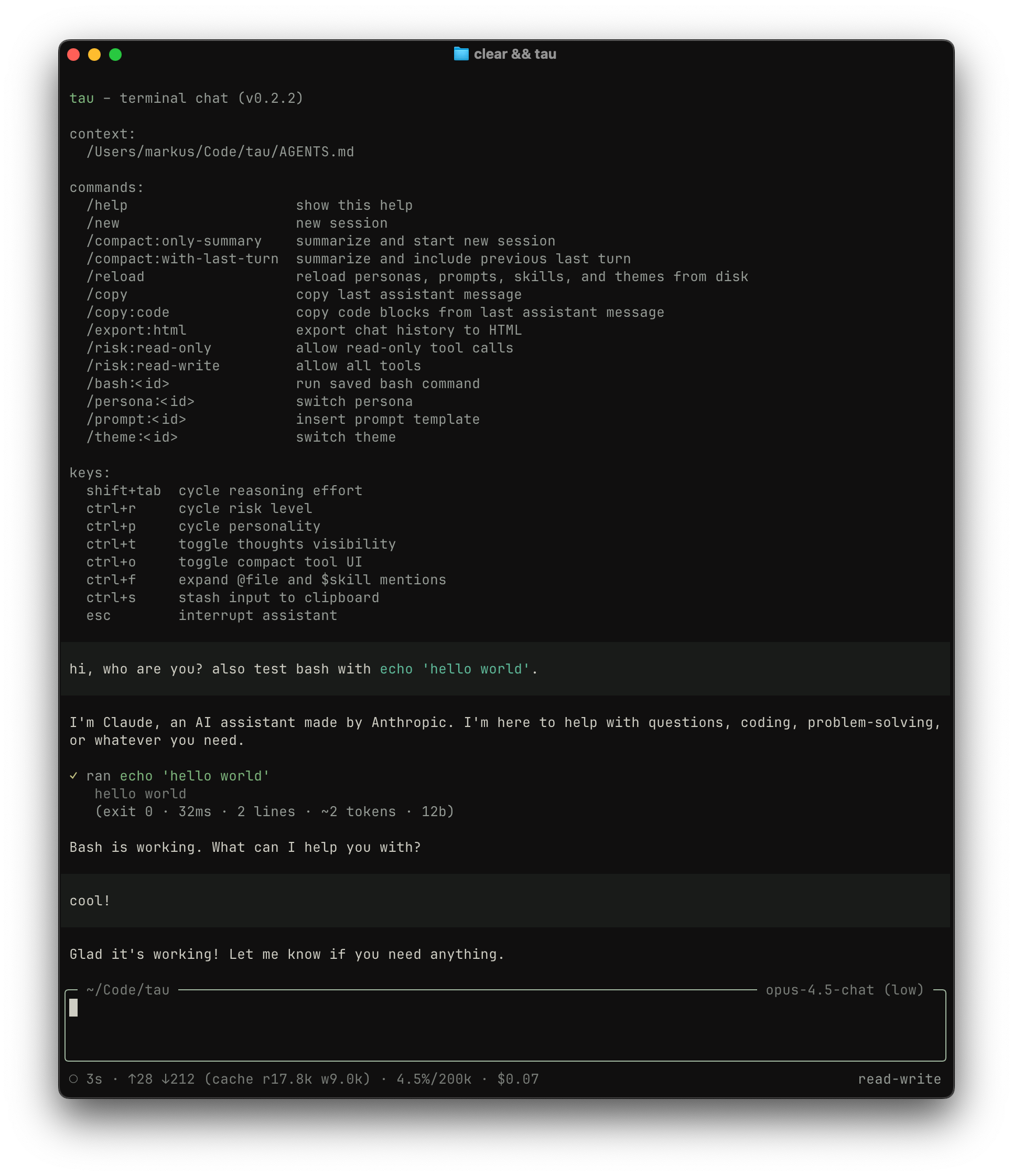
|
|
6
6
|
|
|
7
|
-
##
|
|
7
|
+
## Install
|
|
8
8
|
|
|
9
|
-
|
|
10
|
-
npm install -g @markusylisiurunen/tau@latest
|
|
11
|
-
```
|
|
12
|
-
|
|
13
|
-
you'll need an API key from at least one provider. set it via environment variable:
|
|
14
|
-
|
|
15
|
-
```sh
|
|
16
|
-
export ANTHROPIC_API_KEY=sk-ant-...
|
|
17
|
-
# or OPENAI_API_KEY, or GEMINI_API_KEY, or EXA_API_KEY, or MISTRAL_API_KEY (for /listen, Telegram audio, and tau tool pdf-unpack)
|
|
18
|
-
```
|
|
19
|
-
|
|
20
|
-
or store keys in `~/.config/tau/config.json`:
|
|
21
|
-
|
|
22
|
-
```json
|
|
23
|
-
{
|
|
24
|
-
"apiKeys": {
|
|
25
|
-
"anthropic": "sk-ant-...",
|
|
26
|
-
"openai": "sk-...",
|
|
27
|
-
"google": "...",
|
|
28
|
-
"exa": "...",
|
|
29
|
-
"mistral": "..."
|
|
30
|
-
}
|
|
31
|
-
}
|
|
32
|
-
```
|
|
33
|
-
|
|
34
|
-
for built-in providers and features, use these `apiKeys` entries: `anthropic`, `openai`, `google`, `exa`, and `mistral`. environment-variable precedence is described for each feature below.
|
|
35
|
-
|
|
36
|
-
`exa` is only needed for `web.search` and `web.fetch`; `web.discover` works without it. provide the key through `apiKeys.exa` or `EXA_API_KEY` (`EXA_API_KEY` takes precedence).
|
|
37
|
-
|
|
38
|
-
`/listen` and Telegram audio transcription use Mistral by default (`apiKeys.mistral` or `MISTRAL_API_KEY`, with `MISTRAL_API_KEY` taking precedence). set `speechToText.provider` to `gemini` to use Gemini 3.6 Flash instead (`apiKeys.google` or `GEMINI_API_KEY`). `/listen` also requires `ffmpeg` on your system and is currently supported only on macOS.
|
|
39
|
-
|
|
40
|
-
`tau tool pdf-unpack` uses Mistral OCR (`apiKeys.mistral` or `MISTRAL_API_KEY`) and requires `pdftoppm` from Poppler on your system.
|
|
41
|
-
|
|
42
|
-
`/speak` uses the Google provider (`apiKeys.google` or `GEMINI_API_KEY`) and is currently supported only on macOS.
|
|
43
|
-
|
|
44
|
-
### OpenAI Codex subscription (ChatGPT Plus/Pro)
|
|
45
|
-
|
|
46
|
-
to use the OpenAI Codex subscription provider (`openai-codex`), run:
|
|
47
|
-
|
|
48
|
-
```sh
|
|
49
|
-
tau auth login codex
|
|
50
|
-
```
|
|
51
|
-
|
|
52
|
-
this prompts you to choose browser or device-code login. browser login prints a URL and starts a local callback server on `127.0.0.1:1455`; if the callback fails, tau prompts you to paste the redirect URL/code. device-code login prints a verification URL and code instead. tau stores tokens in `~/.config/tau/auth.json`. if you see token refresh errors later, run the login command again to re-authenticate.
|
|
53
|
-
|
|
54
|
-
to list authenticated accounts and usage:
|
|
55
|
-
|
|
56
|
-
```sh
|
|
57
|
-
tau auth list
|
|
58
|
-
```
|
|
59
|
-
|
|
60
|
-
to keep an account authenticated while excluding it from agent sessions, disable it by email or account id. disabled accounts remain visible in `tau auth list` and continue to refresh credentials and usage:
|
|
61
|
-
|
|
62
|
-
```sh
|
|
63
|
-
tau auth disable codex --account <email-or-id>
|
|
64
|
-
tau auth enable codex --account <email-or-id>
|
|
65
|
-
```
|
|
66
|
-
|
|
67
|
-
to remove stored credentials:
|
|
68
|
-
|
|
69
|
-
```sh
|
|
70
|
-
tau auth logout codex --account <email-or-id>
|
|
71
|
-
```
|
|
72
|
-
|
|
73
|
-
to force a specific Codex account for this run, set `TAU_CODEX_ACCOUNT` to the account email or account id (same matching as `auth logout`). when set, tau will only use that account and will not fail over. forcing a disabled account fails until the account is enabled again.
|
|
74
|
-
|
|
75
|
-
`openai-codex` does **not** use `OPENAI_API_KEY` or `apiKeys.openai`; it relies on the OAuth tokens in `~/.config/tau/auth.json`.
|
|
76
|
-
|
|
77
|
-
## usage logging
|
|
78
|
-
|
|
79
|
-
tau writes JSONL usage logs to `~/.config/tau/logs/usage-YYYY-MM-DD.jsonl` for every assistant response (main and sub-agent). summarize usage with:
|
|
80
|
-
|
|
81
|
-
```sh
|
|
82
|
-
tau usage --since 2025-01-01 --persona gpt-5.6-sol-coder
|
|
83
|
-
```
|
|
84
|
-
|
|
85
|
-
filters: `--since`, `--persona`, `--provider`, `--model`.
|
|
86
|
-
|
|
87
|
-
## RPC mode (headless stdio)
|
|
88
|
-
|
|
89
|
-
tau can run without the TUI via NDJSON RPC over stdin/stdout:
|
|
90
|
-
|
|
91
|
-
```sh
|
|
92
|
-
tau rpc --persona gpt-5.6-sol-coder
|
|
93
|
-
```
|
|
94
|
-
|
|
95
|
-
RPC mode reuses the same startup config and persona loading as interactive mode. stdin/stdout are reserved for protocol traffic in this mode (piped stdin is **not** treated as an initial user message). `--caffeinated` is a macOS-only TUI flag and is rejected outside TUI mode.
|
|
96
|
-
|
|
97
|
-
for protocol details and examples, see [docs/rpc.md](docs/rpc.md).
|
|
98
|
-
|
|
99
|
-
## protocol TUI attach
|
|
100
|
-
|
|
101
|
-
tau can host sessions over WebSocket:
|
|
102
|
-
|
|
103
|
-
```sh
|
|
104
|
-
tau serve --host 0.0.0.0 --port 8787 --auth-token "$TAU_WS_AUTH_TOKEN"
|
|
105
|
-
```
|
|
106
|
-
|
|
107
|
-
WebSocket auth tokens authorize full session access. Prefer `wss://` behind a trusted TLS proxy on untrusted networks, avoid putting tokens in URLs or shell history, and treat any proxy/access logs that capture headers, query strings, or WebSocket handshake details as sensitive.
|
|
108
|
-
|
|
109
|
-
then attach the terminal UI from another machine:
|
|
110
|
-
|
|
111
|
-
```sh
|
|
112
|
-
tau attach --auth-token "$TAU_WS_AUTH_TOKEN" ws://vps:8787
|
|
113
|
-
```
|
|
114
|
-
|
|
115
|
-
Without `--session` or `--new`, attach lists hosted sessions and prompts for the session to open. Persisted session files are durable user data in a versioned storage format and remain openable by newer Tau versions. Recovery preserves the semantic session while allowing presentation-only or otherwise nonessential historical state to be normalized, regenerated, or shown in a simpler form. An upgrade must not require deleting an older session merely because an internal persisted shape changed. Use `--session <id>` to attach to an existing persisted session directly:
|
|
116
|
-
|
|
117
|
-
```sh
|
|
118
|
-
tau attach --session 0195d6e4-4cf9-7f44-a2d8-f8f7f49ee9d3 --auth-token "$TAU_WS_AUTH_TOKEN" ws://vps:8787
|
|
119
|
-
```
|
|
120
|
-
|
|
121
|
-
Use `--new --cwd <path>` to create and attach to a fresh hosted session in an already-provisioned directory on the host:
|
|
122
|
-
|
|
123
|
-
```sh
|
|
124
|
-
tau attach --new --cwd /srv/workspaces/repo --auth-token "$TAU_WS_AUTH_TOKEN" ws://vps:8787
|
|
125
|
-
```
|
|
126
|
-
|
|
127
|
-
For non-local execution environments, add the execution kind and provider ids:
|
|
128
|
-
|
|
129
|
-
```sh
|
|
130
|
-
tau attach --new --execution-kind cloudflare-sandbox --cloudflare-bridge default --cloudflare-sandbox sandbox-1 --cwd /workspace/repo ws://vps:8787
|
|
131
|
-
tau attach --new --execution-kind fly-sprite --fly-api default --fly-sprite sprite-1 --cwd /home/sprite/repo ws://vps:8787
|
|
132
|
-
```
|
|
133
|
-
|
|
134
|
-
tau can also run the terminal UI against any command that speaks the same session protocol on stdin/stdout:
|
|
135
|
-
|
|
136
|
-
```sh
|
|
137
|
-
tau attach -- ssh vps 'cd /path/to/repo && tau rpc'
|
|
138
|
-
```
|
|
139
|
-
|
|
140
|
-
For stdio attach, use `--session <id>` before `--`:
|
|
141
|
-
|
|
142
|
-
```sh
|
|
143
|
-
tau attach --session 0195d6e4-4cf9-7f44-a2d8-f8f7f49ee9d3 -- ssh vps 'cd /path/to/repo && tau rpc'
|
|
144
|
-
```
|
|
145
|
-
|
|
146
|
-
Session attach renders the authoritative session snapshot, streams recoverable `session.delta` updates plus independently revisioned, non-persisted pending-message replacements and per-agent subagent-activity updates, submits normal user input through `session.submit`, `session.queue`, and `session.steer`, supports steering/interruption, runs `!`/`!!` Bash commands in the session execution environment, records `/listen` from the local microphone, speaks `/speak` locally, reloads session content with `/reload`, switches session personas with `/persona:<id>` or `Ctrl+P`, inserts session prompt templates with `/prompt:<id>`, manages persistent autonomous goals with `/goal`, compacts the session with `/compact-all` or `/compact-keep-last`, creates a new session with `/new`, and exits with `/exit` or `Ctrl+C` twice.
|
|
147
|
-
|
|
148
|
-
The host owns the active transcript as one ordered timeline of messages, tool calls, notices, and maintenance operations. Durable items retain their exact position across reattach; ephemeral transcript notices use the same ordering while attached but are not recovered. Successful compaction starts a new numeric timeline epoch containing the summary and future activity, while rewind removes every item after its selected boundary.
|
|
149
|
-
|
|
150
|
-
The TUI advertises client tools for diff review, input prefill, and the effective command-backed tools selected from global definitions. The Telegram runner advertises the effective command-backed tools for each session workspace without exposing TUI-only tools. `prefill_input` fills only an empty editor and leaves existing draft text unchanged. Pass `--no-client-tools` to `tau` or `tau attach` to advertise no TUI client tools, for example when another TUI attached to the same session already owns them.
|
|
151
|
-
|
|
152
|
-
Model `bash` tool calls, `!`/`!!`, `session.exec`, and Tau-controlled command helpers each run in a fresh, non-interactive login Bash belonging to the session execution environment. Tau sets `HOME` to the execution environment home, so Bash reads `/etc/profile` and then the first available user login file (`~/.bash_profile`, `~/.bash_login`, or `~/.profile`). Bash also reads inherited `BASH_ENV` when set; otherwise `.bashrc` is loaded only when the login configuration sources it. Login startup files must be automation-safe: they must not write to stdout or stderr, read stdin, require a TTY, or terminate the shell unexpectedly. Tau does not filter or frame startup output. Commands start from the backend's target-side environment and apply explicit execution-environment overrides; the local backend filters sensitive variables inherited from the Tau host. Node, Git, and other helper executables resolve from the same login-configured `PATH` as model commands. Shell state such as `cd`, exports, aliases, functions, and `nvm use` does not persist between calls.
|
|
153
|
-
|
|
154
|
-
## Telegram runner
|
|
155
|
-
|
|
156
|
-
tau can run a Telegram bot adapter over local in-process SDK sessions:
|
|
9
|
+
Tau supports macOS and Linux and requires Node.js 24 or newer.
|
|
157
10
|
|
|
158
11
|
```sh
|
|
159
|
-
|
|
160
|
-
```
|
|
161
|
-
|
|
162
|
-
The Telegram command surface is intentionally small:
|
|
163
|
-
|
|
164
|
-
- `/use_<projectId>` selects the configured project used by future `/new` sessions without changing the active session.
|
|
165
|
-
- `/new` creates a session from the selected project, replacing the previous active session if one exists.
|
|
166
|
-
- `/status` reports the active project and session details, including active or blocked goal state without the goal objective, plus a different next-session project preference when selected.
|
|
167
|
-
- `/effort_low`, `/effort_medium`, `/effort_high`, and `/effort_xhigh` set the active session's reasoning effort.
|
|
168
|
-
- `/compact` summarizes older conversation context to reduce context usage.
|
|
169
|
-
- `/interrupt` interrupts the active run.
|
|
170
|
-
|
|
171
|
-
Programmatic Telegram replies and notifications use natural-language sentences, with project and session identifiers included in the prose rather than shown as metadata-style fields.
|
|
172
|
-
|
|
173
|
-
The runner keeps tool and lifecycle progress quiet: Telegram receives command acknowledgements/errors and assistant messages, including multiple assistant progress updates from a single active run. While work is active, it shows Telegram's typing indicator in DMs and groups. Assistant messages are sent as Telegram rich markdown. Outbound reply chunks use a 30-second attempt deadline and retry transient network and retryable Telegram API failures twice, after 1 second and 5 seconds, and session notifications remain ordered per chat while retrying. Exhausted deliveries are logged with recoverable session, chat, and assistant message identity; retries do not survive a runner restart.
|
|
174
|
-
|
|
175
|
-
Telegram DM input supports plain text, voice/audio transcription with the transcript echoed back for verification, and attachment queueing (`image/*`, PDF, `.txt`, `.md`, `.json`, `.csv`, `.yaml`, `.yml`). allowed groups are opt-in via `allowedChatIds`; non-triggering group text/captions, attachments, audio transcripts, and processing errors are buffered as sender-attributed context and the most recent 50 messages since the previous bot-triggering turn are included when a bot mention triggers a turn. group commands accept explicit bot mentions on or around the command, such as `/status@botusername`, `/status @botusername`, or `@botusername /status`.
|
|
176
|
-
|
|
177
|
-
Telegram config defines `bots`, `projects`, `workspaceRoot`, optional `systemMessage`, and optional `maxSessions`. Projects may describe one repository, reuse one existing persistent directory across sessions, or compose several repository projects under a generated multi-repo root. Persistent directories must already exist and are never created, provisioned, or removed by Tau. Repositories use persistent bare caches at `<workspaceRoot>-repo-cache/<projectId>.git`; active and failed session records and per-chat project preferences are persisted, workspaces survive runner restarts, and unreferenced managed workspace entries are removed on startup. Tau reconnects preserved active sessions to their corresponding snapshots and reconciles unresolved Telegram requests through the durable turn ledger. Accepted running turns remain interruptible after a lost response, while failed, blocked, or confirmed-unaccepted request notifications remain persisted until Telegram delivery succeeds. Terminal failed records retain the initiating submission diagnostic until the session is closed. When creating or reconstructing a repository workspace, Telegram starts an optional executable `.tau/scripts/provision` hook through the Tau session without blocking chat access; failures are reported while the session remains available. Preserved workspaces skip provisioning on restart. for config details, see [docs/telegram.md](docs/telegram.md).
|
|
178
|
-
|
|
179
|
-
## built-in tool commands
|
|
180
|
-
|
|
181
|
-
tau also ships a small `tau tool` command family for utility workflows outside the chat UI.
|
|
182
|
-
|
|
183
|
-
```sh
|
|
184
|
-
tau tool pdf-unpack ./docs/spec.pdf
|
|
185
|
-
```
|
|
186
|
-
|
|
187
|
-
`tau tool pdf-unpack` sends the original PDF to Mistral for OCR/Markdown, renders page image patches locally with `pdftoppm`, writes a persistent temp directory with `document.md`, `pages/`, and `images/`, and prints the output paths as plain text for follow-up model use.
|
|
188
|
-
|
|
189
|
-
## session history
|
|
190
|
-
|
|
191
|
-
Tau records every session to a machine-local SQLite history database independently of the resumable session snapshot. History retains committed user text (including leading `<system>` blocks), assistant preambles and responses, and completed tool calls with their full results. Rewind removes the superseded suffix, while compaction does not remove original transcript entries.
|
|
192
|
-
|
|
193
|
-
Built-in personas include the read-only `history` code-mode tool, and their subagents inherit it by default. Agents are instructed to invoke it only when the user or other active instructions directly ask them to reference historical transcripts. As with every code-mode tool, the agent must first use a documentation-only call to print and read `docs`, then use the progressively disclosed SDK in a later call rather than guessing its signatures. Code-mode programs have live clock access through standard `Date` APIs and random generation through `Math.random()`. Custom subagents can include or exclude `history` in their `tools` list like `bash` or `web`. Its `history.search()` and `history.read()` APIs provide global access to bounded transcript results across repositories and execution environments; ordinary JavaScript can further filter and project them. Attribute search supports exact strings and generic `{ "contains": "text" }` substring filters. Conventional client-supplied attributes include `source` and `repository`; repository values use `host/owner/repository`, with comma-delimited values for composite workspaces. Local TUI startup derives this value from the current Git repository or direct child repositories, `/new` preserves a known value, Telegram derives it from project configuration, attach-created sessions leave it absent, and SDK/raw clients include it only when their caller provides it. If local history initialization or projection fails, Tau keeps the session running, persists one warning notice in the session timeline, and makes history unavailable for that process.
|
|
194
|
-
|
|
195
|
-
A bundled single-owner Cloudflare service can combine histories from several Tau hosts and generate searchable session titles and summaries with Cloudflare AI using GPT-5.6 Luna at medium reasoning effort. Digest generation normally sends a compact role-delimited projection of the full transcript, omitting entry metadata and middle-truncating each tool result to roughly 512 estimated tokens. The final standalone digest is a high-recall semantic representation of the full user-agent session, including software development and other collaborative work, for future search and recognition rather than an outcome summary or conversation replay. It covers user intents, subjects, terminology, entities, investigated approaches, decisions, corrections, findings, and unresolved threads while grouping related material instead of narrating turns. The previous digest is supplied only as a continuity reference for stable titles, terminology, organization, and detail, while the current transcript remains the sole factual source; documented context-overflow errors trigger sequential recursive halving through at most three levels before final synthesis. A per-minute cron claims one global expiring D1 lease and processes up to three stale sessions that have been idle for ten minutes, with every model call running sequentially, so imports and ordinary transcript replication cannot create inference bursts. Sessions without a digest become eligible after that ten-minute idle period; existing digests become eligible after eight new transcript entries or a twelve-hour staleness deadline. Fair least-recently-attempted ordering and capped exponential failure backoff keep pathological sessions from blocking the queue. Per-session attempt, success, retry, failure-count, and bounded error fields are stored in D1, and failures are written to explicitly enabled structured Worker logs; there is no HTTP status or administration endpoint. `tau history setup` applies sequential Wrangler D1 migrations before every Worker deployment. It requires the **Workers Paid** plan so indefinite retention, FTS queries, replication batches, and digest processing use the paid D1/Worker limits rather than the free plan's 500 MB per-database, 50-query, and 10 ms CPU ceilings.
|
|
196
|
-
|
|
197
|
-
```sh
|
|
198
|
-
export CLOUDFLARE_API_TOKEN=...
|
|
199
|
-
tau history setup --domain history.example.com --zone-name example.com
|
|
200
|
-
export TAU_HISTORY_API_KEY=... # use the value printed by setup
|
|
201
|
-
```
|
|
202
|
-
|
|
203
|
-
Configure the endpoint only in global Tau config:
|
|
204
|
-
|
|
205
|
-
```json
|
|
206
|
-
{
|
|
207
|
-
"history": {
|
|
208
|
-
"endpoint": "https://history.example.com",
|
|
209
|
-
"apiKeyEnv": "TAU_HISTORY_API_KEY"
|
|
210
|
-
}
|
|
211
|
-
}
|
|
212
|
-
```
|
|
213
|
-
|
|
214
|
-
Without `history` config, capture and queries remain machine-local. With a remote target, Tau writes locally first and forwards ordered, idempotent append/truncate operations asynchronously; remote outages never block session execution. Local entries remain complete, while remote entries larger than 1 MiB middle-truncate oversized payload fields with an explicit marker, the Worker rejects oversized entry payloads at its boundary, and append operations stay below the replication byte budget. Operational data is available through Workers Logs, Cron Events, and D1 Query Insights. `tau history destroy --yes` removes the bundled Worker and D1 database.
|
|
215
|
-
|
|
216
|
-
## Nook static mini-apps
|
|
217
|
-
|
|
218
|
-
Nook is Tau's bundled Cloudflare-backed static mini-app platform. It deploys static directories to path-based site URLs and gives each site same-origin JSON KV through an injected `window.nook` browser SDK.
|
|
219
|
-
|
|
220
|
-
```sh
|
|
221
|
-
tau nook setup \
|
|
222
|
-
--domain nook.example.com \
|
|
223
|
-
--zone-name example.com \
|
|
224
|
-
--access-team-domain https://team.cloudflareaccess.com \
|
|
225
|
-
--access-aud <access-application-audience>
|
|
226
|
-
tau nook deploy ./dist --site demo
|
|
227
|
-
tau nook deploy ./dist --site demo --public
|
|
228
|
-
mkdir restored-demo && tau nook copy demo ./restored-demo
|
|
229
|
-
tau nook template save starter ./app
|
|
230
|
-
tau nook template copy starter ./next-app
|
|
231
|
-
tau nook kv put demo settings '{"theme":"dark"}'
|
|
232
|
-
```
|
|
233
|
-
|
|
234
|
-
Add a single configured target to Tau config after deploying the Worker and creating Cloudflare Access service-token credentials:
|
|
235
|
-
|
|
236
|
-
```json
|
|
237
|
-
{
|
|
238
|
-
"nook": {
|
|
239
|
-
"domain": "nook.example.com",
|
|
240
|
-
"accessClientId": "...",
|
|
241
|
-
"accessClientSecretEnv": "NOOK_ACCESS_CLIENT_SECRET"
|
|
242
|
-
}
|
|
243
|
-
}
|
|
244
|
-
```
|
|
245
|
-
|
|
246
|
-
Template copies require a destination directory that already exists and is empty. Configure Cloudflare Access only for `https://<nook-domain>/__nook/*`, disable the application's Cookie Path Attribute, and add the required user Allow and service-token Service Auth policies. Public site paths then reach the Worker anonymously, while private sites redirect browser navigation through the protected `/__nook/auth` endpoint and validate the resulting hostname-scoped Access cookie. Browser KV remains site-scoped and visibility-aware; Tau's CLI and model tool use the protected management API. The Worker validates Cloudflare Access JWTs against the Access JWKS with the configured issuer and audience. Tau sends service-token headers to Cloudflare Access for control-plane API calls, but the Worker does not treat those raw headers as authentication. When `nook` is configured and selected by the active persona, Tau exposes a code-mode model tool named `nook`. Generated JavaScript receives a bounded Nook management SDK, static SDK documentation through `docs`, and the deployment-served app-authoring guide through `nook.skill()`; authenticated HTTP and execution-environment file access remain host-owned. Agents must read `docs` in the initial documentation-only call. App authoring adds a second, separate documentation-only call for `nook.skill()`, whose result must be read before files are written or modified. Detailed setup, deploy, template, Worker, browser SDK, and V0 scope notes live in [src/nook/README.md](src/nook/README.md).
|
|
247
|
-
|
|
248
|
-
## SDK usage (Node)
|
|
249
|
-
|
|
250
|
-
tau also ships a Node SDK at `@markusylisiurunen/tau/sdk` that uses the same session protocol. By default it runs against an in-process Tau host; `tau serve` provides the same protocol over WebSocket.
|
|
251
|
-
|
|
252
|
-
```ts
|
|
253
|
-
import { createTauSdkClient } from "@markusylisiurunen/tau/sdk";
|
|
254
|
-
|
|
255
|
-
const client = await createTauSdkClient();
|
|
256
|
-
const session = await client.sessions.create({
|
|
257
|
-
executionEnvironment: {
|
|
258
|
-
kind: "local",
|
|
259
|
-
cwd: process.cwd(),
|
|
260
|
-
},
|
|
261
|
-
attributes: { source: "sdk", repository: "github.com/example/project" },
|
|
262
|
-
});
|
|
263
|
-
const unsubscribe = session.onDelta((delta) => {
|
|
264
|
-
// stream reconstructable session deltas
|
|
265
|
-
});
|
|
266
|
-
|
|
267
|
-
try {
|
|
268
|
-
const result = await session.submit("summarize this repo");
|
|
269
|
-
console.log(result.userHistoryEntryId, result.turn.status);
|
|
270
|
-
|
|
271
|
-
const sample = await session.sample({
|
|
272
|
-
context: {
|
|
273
|
-
systemPrompt: "Answer concisely.",
|
|
274
|
-
messages: [
|
|
275
|
-
{
|
|
276
|
-
role: "user",
|
|
277
|
-
content: [{ type: "text", text: "What model are you?" }],
|
|
278
|
-
timestamp: Date.now(),
|
|
279
|
-
},
|
|
280
|
-
],
|
|
281
|
-
},
|
|
282
|
-
options: {},
|
|
283
|
-
});
|
|
284
|
-
console.log(sample.message.model);
|
|
285
|
-
|
|
286
|
-
const snapshot = await session.snapshot();
|
|
287
|
-
console.log(snapshot.sessionId, snapshot.messages.length);
|
|
288
|
-
|
|
289
|
-
await session.unobserve();
|
|
290
|
-
} finally {
|
|
291
|
-
unsubscribe();
|
|
292
|
-
await client.close();
|
|
293
|
-
}
|
|
294
|
-
```
|
|
295
|
-
|
|
296
|
-
WebSocket clients can connect to a `tau serve` host:
|
|
297
|
-
|
|
298
|
-
```ts
|
|
299
|
-
import { createTauSdkWebSocketClient } from "@markusylisiurunen/tau/sdk";
|
|
300
|
-
|
|
301
|
-
const client = await createTauSdkWebSocketClient({
|
|
302
|
-
url: "wss://tau.example.com",
|
|
303
|
-
authToken: process.env.TAU_WS_AUTH_TOKEN,
|
|
304
|
-
});
|
|
305
|
-
```
|
|
306
|
-
|
|
307
|
-
for full API details (options, methods, events, and errors), see [docs/sdk.md](docs/sdk.md). `client.close()` closes the client transport; for the default in-process client, it also shuts down the owned host after persisting live session snapshots.
|
|
308
|
-
|
|
309
|
-
## install starter prompts and skills
|
|
310
|
-
|
|
311
|
-
tau ships starter prompt and skill templates as markdown content in this repository, including `guided-review` for focused diff walkthroughs and `approval-review` for decision-oriented approval without reading the implementation. install them with:
|
|
312
|
-
|
|
313
|
-
```sh
|
|
314
|
-
tau install
|
|
315
|
-
```
|
|
316
|
-
|
|
317
|
-
this writes prompts and skills into `.tau/` under your current working directory. use `--global` to install into `~/.config/tau/` instead, and `--force` to overwrite existing files/directories. use `--prompt <id>` or `--skill <name>` to install only one item (for targeted updates).
|
|
318
|
-
|
|
319
|
-
## security notice
|
|
320
|
-
|
|
321
|
-
- **full system access**: the model can access any file on your system that your user account can read or write, not just the current working directory. if you need stronger isolation, run Tau inside a VM or container.
|
|
322
|
-
- **no tty / non-interactive tools**: tool commands run with stdin ignored and no TTY. anything that prompts for input or opens an editor can hang or fail (for example `sudo`, `ssh` password prompts, `git` credential prompts). tau also forces git into non-interactive mode (no prompt/editor/pager, batch-mode ssh).
|
|
323
|
-
|
|
324
|
-
note that there is no confirmation step before tool execution. the model runs commands immediately, and you can only observe the results after the fact.
|
|
325
|
-
|
|
326
|
-
## getting started
|
|
327
|
-
|
|
328
|
-
tau requires Node.js 24.x and runs on macOS and Linux (Windows is unsupported).
|
|
329
|
-
|
|
330
|
-
for development from source:
|
|
331
|
-
|
|
332
|
-
```sh
|
|
333
|
-
npm install
|
|
334
|
-
(cd src/diff_tool/app && npm install)
|
|
335
|
-
npm run build
|
|
336
|
-
npm start
|
|
337
|
-
```
|
|
338
|
-
|
|
339
|
-
`npm start` launches the interactive TUI and expects a real terminal.
|
|
340
|
-
|
|
341
|
-
## themes
|
|
342
|
-
|
|
343
|
-
tau can load custom palette overrides from theme files. create a theme at:
|
|
344
|
-
|
|
345
|
-
- `.tau/themes/<id>.json` (project)
|
|
346
|
-
- `~/.config/tau/themes/<id>.json` (global)
|
|
347
|
-
|
|
348
|
-
then set `"defaultTheme": "<id>"` in config. any palette token not defined in the file renders as plain text. theme values accept `#rgb`, `#rrggbb`, `rgb(r, g, b)`, or `hsl(h, s%, l%)`. hex without `#` is ignored.
|
|
349
|
-
|
|
350
|
-
built-in themes are available by default with ids: `crimson`, `ember`, `gold`, `lime`, `grass`, `emerald`, `jade`, `teal`, `cyan`, `azure`, `cobalt`, `violet`, `purple`, `magenta`, `rose`. built-ins derive their runtime palettes from terminal foreground/background colors detected through OSC 10/11 at startup (best effort, dark fallback). set `defaultTheme` to one of these ids, or disable them with `disableBuiltinThemes`.
|
|
351
|
-
|
|
352
|
-
custom themes loaded from `.tau/themes` or `~/.config/tau/themes` are single-variant and use exactly the tokens you define.
|
|
353
|
-
|
|
354
|
-
available palette tokens (theme keys):
|
|
355
|
-
|
|
356
|
-
- core: `brandAccent`, `textMuted`, `textDim`, `linkText`, `thinkingText`, `codeInlineText`, `codeBlockText`
|
|
357
|
-
- editor: `editorBorder`, `editorSubagentBorder`, `editorBorderBash`, `editorBorderRecording`, `editorPlaceholder`, `autocompleteSelectedSurface`, `autocompleteSelectedText`
|
|
358
|
-
- feedback: `feedback`, `feedbackError`
|
|
359
|
-
- action: `actionRunning`, `actionSuccess`, `actionError`, `actionOutput`
|
|
360
|
-
- diff: `diffAdd`, `diffRemove`
|
|
361
|
-
- user: `userSurface`, `userText`, `userReviewSurface`, `userReviewText`, `userReviewTextMuted`, `userReviewTextDim`
|
|
362
|
-
|
|
363
|
-
example theme file (`.tau/themes/solarized.json`):
|
|
364
|
-
|
|
365
|
-
```json
|
|
366
|
-
{
|
|
367
|
-
"brandAccent": "#b58900",
|
|
368
|
-
"textMuted": "#586e75",
|
|
369
|
-
"textDim": "#657b83"
|
|
370
|
-
}
|
|
371
|
-
```
|
|
372
|
-
|
|
373
|
-
and in config (`.tau/config.json` or `~/.config/tau/config.json`):
|
|
374
|
-
|
|
375
|
-
```json
|
|
376
|
-
{ "defaultTheme": "solarized" }
|
|
377
|
-
```
|
|
378
|
-
|
|
379
|
-
## tool access
|
|
380
|
-
|
|
381
|
-
enabled tools execute directly. persona and sub-agent tool lists determine which tools are available. main sessions, background sub-agents, and ephemeral review threads all execute through the same stateful agent runtime, with identical streaming, retries, tool recovery, context accounting, steering boundaries, and automatic compaction. each context binds its tool dependencies before a turn starts; session persistence, child supervision, ephemeral thread forks, progress presentation, and usage attribution remain outside the runtime.
|
|
382
|
-
|
|
383
|
-
## power management (macOS)
|
|
384
|
-
|
|
385
|
-
start tau with `--caffeinated` to keep macOS awake while an assistant turn is running:
|
|
386
|
-
|
|
387
|
-
```sh
|
|
388
|
-
tau --caffeinated
|
|
389
|
-
```
|
|
390
|
-
|
|
391
|
-
tau uses `caffeinate -i` and only holds the sleep assertion during active assistant turns. it does not keep the display awake, and it does not apply to hosted modes. on Linux, `--caffeinated` is accepted in TUI mode but currently a no-op.
|
|
392
|
-
|
|
393
|
-
## personas
|
|
394
|
-
|
|
395
|
-
tau comes with several built-in personas across different models:
|
|
396
|
-
|
|
397
|
-
- **Claude Opus 5** (Anthropic): `opus-5-chat`, `opus-5-coder`
|
|
398
|
-
- **GPT-5.6 Sol**, **GPT-5.6 Terra**, and **GPT-5.6 Luna** (OpenAI): `gpt-5.6-sol-chat`, `gpt-5.6-sol-coder`, `gpt-5.6-terra-chat`, `gpt-5.6-terra-coder`, `gpt-5.6-luna-chat`, `gpt-5.6-luna-coder`
|
|
399
|
-
- **GPT-5.6 Sol (ChatGPT)**, **GPT-5.6 Terra (ChatGPT)**, and **GPT-5.6 Luna (ChatGPT)** (OpenAI Codex): `gpt-5.6-sol-chatgpt-chat`, `gpt-5.6-sol-chatgpt-coder`, `gpt-5.6-terra-chatgpt-chat`, `gpt-5.6-terra-chatgpt-coder`, `gpt-5.6-luna-chatgpt-chat`, `gpt-5.6-luna-chatgpt-coder`
|
|
400
|
-
- **GPT-5.6 Fast (ChatGPT)** (OpenAI Codex, priority tier): `gpt-5.6-sol-chatgpt-fast-chat`, `gpt-5.6-sol-chatgpt-fast-coder`, `gpt-5.6-terra-chatgpt-fast-chat`, `gpt-5.6-terra-chatgpt-fast-coder`, `gpt-5.6-luna-chatgpt-fast-chat`, `gpt-5.6-luna-chatgpt-fast-coder`
|
|
401
|
-
- **Gemini 3.6 Flash** (Google): `gemini-3.6-flash-chat`
|
|
402
|
-
|
|
403
|
-
chat variants are for general-purpose assistance; coder variants are optimized for software engineering. built-in personas include the `default` sub-agent for background tasks unless disabled.
|
|
404
|
-
|
|
405
|
-
switch personas at startup with `--persona` or mid-session with `/persona:<id>`:
|
|
406
|
-
|
|
407
|
-
persona id matching is exact/case-sensitive.
|
|
408
|
-
|
|
409
|
-
```sh
|
|
410
|
-
tau --persona opus-5-coder
|
|
411
|
-
```
|
|
412
|
-
|
|
413
|
-
## sub-agents
|
|
414
|
-
|
|
415
|
-
main-session models always receive `get_goal`, `create_goal`, and `update_goal` independently of persona tool allowlists. `create_goal` must only be used for explicit user, system, or developer goal requests, never inferred from ordinary work.
|
|
416
|
-
|
|
417
|
-
some personas can run isolated sub-agents via the `spawn_agent`, `send_input_to_agent`, `wait_for_agents`, `list_agents`, and `interrupt_agent` tools. `list_agents` reports each spawned thread's runtime, latest run, usage, context pressure, and response availability. `wait_for_agents` returns retained latest responses as soon as at least one requested agent finishes, and completed responses can be read repeatedly.
|
|
418
|
-
|
|
419
|
-
the built-in `default` sub-agent is available unless disabled. all sub-agents inherit the main persona's model and settings unless `spawn_agent` receives an explicit launch override. sub-agents inherit the main persona's eligible tool access by default, while custom definitions can select a narrower tool set. the default sub-agent also inherits the main system prompt, wrapped with default sub-agent-specific rules that take precedence on conflicts.
|
|
420
|
-
|
|
421
|
-
`spawn_agent` supports an optional launch override string (`model: "<provider>/<model>:<effort>"`) and an optional `workingDirectory`. launch overrides are allowlisted per subagent. custom subagents can define `launchModels` in persona frontmatter, and the built-in `default` sub-agent uses `subagents.defaultLaunchModels` from config. when `workingDirectory` resolves to another directory, the sub-agent runs there and rebuilds only its prompt context from that location: environment and repository metadata, AGENTS.md context (including target `agentContextFiles`), and target-discovered skills. the parent session remains the source of truth for the persona, subagent definition, model catalog, runtime config, and tools.
|
|
422
|
-
|
|
423
|
-
sub-agent progress appears in a sticky panel. use `alt+down` to cycle active subagents and `ctrl+g` to interrupt the selected one's current run. tau caps active subagents at 8.
|
|
424
|
-
|
|
425
|
-
`web.discover` works without an API key. to use `web.search` and `web.fetch`, set `apiKeys.exa` in `~/.config/tau/config.json` (see above) or export `EXA_API_KEY`. `web` is available to main agents and sub-agents, and runs one-shot JavaScript with bounded `web.discover`, `web.search`, and `web.fetch` APIs; search and fetch are backed by Exa. its minimal description limits use to requests that ask for or clearly imply web access and requires the first call for a task to print only `docs`. the agent must read those progressively disclosed SDK and output instructions before using `web` in a later call, without guessing signatures. for direct URLs, the docs instruct the model to run discovery first and retrieve content in the next turn. discovery runs ordinary bounded requests through the session execution environment and reports metadata for direct Markdown representations and `llms.txt` files at every path prefix without returning page content or parsing links. advertised Markdown and `llms.txt` resources must be retrieved with a later explicit Bash `curl` call and must not be passed to `web.fetch`; fetch is the fallback for ordinary pages when no suitable agent-friendly resource exists or extraction is preferable. search and fetch remain host-owned so Exa credentials stay outside the sandbox, default to highlights, cap provider responses at 16 MiB before parsing, and omit provider-specific details. generated code runs in a capability-limited SES compartment inside a host Worker.
|
|
426
|
-
|
|
427
|
-
## trigger sensitivity
|
|
428
|
-
|
|
429
|
-
sub-agents and skills define when they should be activated via trigger sensitivity levels:
|
|
430
|
-
|
|
431
|
-
- **eager**: use proactively whenever the capability would help, even if not explicitly requested. example: a dedicated codebase investigation sub-agent.
|
|
432
|
-
- **balanced**: use when the request clearly matches the capability. this is the default if not specified. good for skills that solve specific problems but shouldn't be assumed.
|
|
433
|
-
- **explicit**: use only when explicitly named. for skills and sub-agents, an exact `@@skill:<name>` reference or `@@agent:<name>` reference in the user request, active `AGENTS.md` instructions, or instructions of an already-active skill counts as explicit activation. skill references compose transitively, and each skill activates at most once per request so repeated or cyclic references terminate. generic language, keyword, or task overlap does not count.
|
|
434
|
-
|
|
435
|
-
when you write custom skills, you can specify trigger sensitivity in the skill description. if not specified, the default is balanced. the model respects these levels and won't trigger a skill or sub-agent inappropriately.
|
|
436
|
-
|
|
437
|
-
## reasoning
|
|
438
|
-
|
|
439
|
-
some models support extended thinking, where they reason through problems before responding. cycle through reasoning levels with `shift+tab`, or set one at startup:
|
|
440
|
-
|
|
441
|
-
```sh
|
|
442
|
-
tau --persona opus-5-chat:high
|
|
443
|
-
```
|
|
444
|
-
|
|
445
|
-
reasoning changes made while the assistant is working apply to the next independently submitted or queued turn. the active turn keeps the full execution spec it captured when it started, including tool-call subturns and steering continuations.
|
|
446
|
-
|
|
447
|
-
toggle visibility of the model's thinking with `ctrl+t`.
|
|
448
|
-
|
|
449
|
-
## working with files
|
|
450
|
-
|
|
451
|
-
reference files in your message with `@<path>` (for example, `@src/tui/session_chat_app.ts`). autocomplete helps you find the right path.
|
|
452
|
-
|
|
453
|
-
reference skills with `@@skill:<name>` (for example, `@@skill:skill-name`). autocomplete will suggest available skills. exact skill references in active `AGENTS.md` instructions and already-active skill instructions also activate the referenced skill, including skills with `Trigger: explicit`. these references compose transitively, and each skill activates at most once per request so repeated or cyclic references terminate.
|
|
454
|
-
|
|
455
|
-
reference sub-agents with `@@agent:<name>` (for example, `@@agent:default`). exact sub-agent references in active `AGENTS.md` instructions and already-active skill instructions also activate the referenced sub-agent, including sub-agents with `Trigger: explicit`.
|
|
456
|
-
|
|
457
|
-
you can also pipe content directly:
|
|
458
|
-
|
|
459
|
-
```sh
|
|
460
|
-
cat src/tui/session_chat_app.ts | tau --persona opus-5-chat
|
|
461
|
-
```
|
|
462
|
-
|
|
463
|
-
by default, tau injects your AGENTS.md into the system prompt. use `--no-agent-context-files` to disable this behavior. tau searches for AGENTS.md in the current directory and parent directories up to your home folder (or filesystem root if cwd is outside home). tau also includes a paths-only listing of `AGENTS.md` files in child directories under the current working directory, excluding any file already injected in full. this nested scan is breadth-first and stops after 8,192 directories or 16 levels. it skips standard VCS, dependency, build, virtual-environment, and cache directories at every level. when scanning directly from the execution home, it also skips direct tool-managed children such as `.cargo`, `.config`, `.local`, `.npm`, and platform data directories (`Library` on macOS and `snap` on Linux). project-local directories with the same tool-managed names remain visible. use `agentContextFiles` for important files that must be included independently of the nested scan.
|
|
464
|
-
|
|
465
|
-
you can also include additional `AGENTS.md` files via config (when that config is in scope for the current working directory):
|
|
466
|
-
|
|
467
|
-
```json
|
|
468
|
-
{ "agentContextFiles": ["packages/pkg1/AGENTS.md"] }
|
|
469
|
-
```
|
|
470
|
-
|
|
471
|
-
paths are resolved relative to the directory containing `.tau/` (or relative to home for the global config when it is in scope). entries are only included when their directory is an ancestor or descendant of the current working directory (sibling paths are ignored).
|
|
472
|
-
|
|
473
|
-
run `tau --help` to see all available options, or `tau --debug` to inspect loaded personas, prompts, skills, and the full system prompt for debugging configuration issues.
|
|
474
|
-
|
|
475
|
-
## commands
|
|
476
|
-
|
|
477
|
-
tau supports slash commands for common actions:
|
|
478
|
-
|
|
479
|
-
| command | description |
|
|
480
|
-
| --- | --- |
|
|
481
|
-
| `/help` | show available commands |
|
|
482
|
-
| `/new` | clear the session and start fresh |
|
|
483
|
-
| `/exit` | exit the TUI |
|
|
484
|
-
| `/rewind` | open a picker to rewind context from a selected user message |
|
|
485
|
-
| `/copy-text` | copy the last assistant message |
|
|
486
|
-
| `/copy-code` | copy just the code blocks |
|
|
487
|
-
| `/reload` | reload personas, model overrides, prompts, skills, and AGENTS.md |
|
|
488
|
-
| `/listen` | start microphone recording and transcribe into the editor (macOS only) |
|
|
489
|
-
| `/speak` | speak the last assistant message aloud (macOS only) |
|
|
490
|
-
| `/diff [git diff args...]` | open the local diff review tool for the current session; git snapshot and review-agent work run on the session host |
|
|
491
|
-
| `/goal [objective\|resume\|clear]` | show, start, resume, or clear a persistent autonomous goal |
|
|
492
|
-
| `/compact-all` | compress history into one synthetic user summary message |
|
|
493
|
-
| `/compact-keep-last` | compress history and include the last assistant message verbatim when present |
|
|
494
|
-
| `/persona:<id>` | switch to a different persona |
|
|
495
|
-
| `/prompt:<id>` | insert a saved prompt template |
|
|
496
|
-
| `/theme:<id>` | switch to a loaded theme |
|
|
497
|
-
| `!<cmd>` | run a login Bash command directly |
|
|
498
|
-
| `!!<cmd>` | run a login Bash command without adding output to the model context |
|
|
499
|
-
|
|
500
|
-
`/goal <objective>` starts a persisted autonomous goal. Tau keeps the full objective in the session snapshot, reinjects it after compaction, and starts another ordinary turn when the assistant returns while the goal remains active. The model can inspect, create, revise, complete, or block goals through `get_goal`, `create_goal`, and `update_goal`; `create_goal` is only for explicit user, system, or developer goal requests and never inferred from ordinary tasks. Completion clears the goal. Interruption, terminal failure, and process recovery leave it blocked until `/goal resume`; `/goal clear` removes it. Bare `/goal` and `/goal clear` remain available while work is active, while starting or resuming a goal requires an idle session. Steering received while Tau is preparing the next goal continuation is applied before autonomous work resumes. Goal-controlled turns cannot use empty-input retry because their persisted policy may no longer match the current goal; use `/goal resume` for a blocked goal. The footer shows `pursuing goal` beside the activity indicator while autonomous goal work is active.
|
|
501
|
-
|
|
502
|
-
tau automatically compacts long sessions when the latest successful provider-reported usage from the active model plus Tau's estimate of model-visible content added since that response approaches the model context limit. Tau checks before every model subturn, so one user turn can compact more than once. automatic compaction summarizes older context, retrying the summary call once on failure, asks the compaction model to select original user messages to append verbatim inside the summary by history id, retains a recent tail while middle-truncating individual textual tool and recovery results above roughly 8,192 estimated tokens, and inserts a hidden continuation note so the assistant continues without asking you to repeat context. before replacing history, Tau best-effort archives the pre-compaction conversation as ordered `.txt` and `.json` pairs in an agent-specific execution-environment temp directory. assistant thinking is omitted. the text file middle-truncates tool results for easier lookup, while JSON retains untruncated archived content. every archivable summarized record is labeled with its history entry id, so the compaction model may cite an id for bulky exact details and the continuing assistant can resolve it from the archive. the continuation note includes the temporary paths when archiving succeeds.
|
|
503
|
-
|
|
504
|
-
the compact commands are manual and useful when you want to force context replacement. they replace prior context with a single synthetic user summary message, including compaction-model-selected original user messages verbatim inside that summary, and do not retain a recent tail. compaction prompts middle-truncate each textual tool result to roughly 2,048 estimated tokens without changing live history. `/compact-keep-last` also includes the last assistant message verbatim when present.
|
|
505
|
-
|
|
506
|
-
`/listen` (or `ctrl+y`) starts microphone recording on macOS, including while the assistant is working. while recording, editor typing is disabled, and `ctrl+y` stops recording and starts transcription at the cursor using the configured speech-to-text provider. `esc` stops recording first without interrupting the assistant; press it again to interrupt active work. recording also auto-stops after 5 minutes. on Linux, `/listen` is currently unavailable and tau shows a warning.
|
|
507
|
-
|
|
508
|
-
`/speak` rewrites the last assistant message into naturally speakable text with Gemini 3.6 Flash, synthesizes audio with Gemini 3.1 Flash TTS, and starts playing on macOS at 1.4x speed as soon as the first speech chunk is ready.
|
|
509
|
-
|
|
510
|
-
`/rewind` opens a picker over prior user messages in the current context. it truncates history from the selected message onward (including the selected message) and prefills the editor with that message so you can retry from there.
|
|
511
|
-
|
|
512
|
-
`/diff` starts a TUI-local diff review. The diff tool process runs where the TUI runs, connects back to the TUI over the diff-review protocol, and the TUI captures git snapshots through session execution while driving generic ephemeral review agents over the session protocol. Returned review text is recorded into the session as a review-styled user message without auto-running the assistant. The TUI also advertises `diff_review` as a client-provided model tool, so the assistant can launch the same local diff-review flow when a capable TUI client is attached.
|
|
513
|
-
|
|
514
|
-
## keyboard shortcuts
|
|
515
|
-
|
|
516
|
-
| key | action |
|
|
517
|
-
| ------------ | ----------------------------------------- |
|
|
518
|
-
| `shift+tab` | cycle reasoning effort |
|
|
519
|
-
| `ctrl+p` | cycle personality |
|
|
520
|
-
| `ctrl+t` | toggle thinking visibility |
|
|
521
|
-
| `ctrl+s` | stash input to clipboard |
|
|
522
|
-
| `ctrl+y` | toggle voice recording (`/listen`) |
|
|
523
|
-
| `ctrl+g` | interrupt selected sub-agent |
|
|
524
|
-
| `ctrl+enter` | steer running assistant with editor input |
|
|
525
|
-
| `enter x2` | retry last response on empty input |
|
|
526
|
-
| `esc x2` | clear current prompt |
|
|
527
|
-
| `alt+up` | cancel pending messages into editor |
|
|
528
|
-
| `alt+down` | cycle active sub-agents |
|
|
529
|
-
| `esc` | interrupt active task |
|
|
530
|
-
| `ctrl+c` | press twice to exit |
|
|
531
|
-
|
|
532
|
-
## configuration
|
|
533
|
-
|
|
534
|
-
### global config
|
|
535
|
-
|
|
536
|
-
tau loads config from `~/.config/tau/config.json` only when the current working directory is inside your home directory. it also loads any `.tau/config.json` found by walking up from the current working directory to home (or to the filesystem root when cwd is outside home). settings merge from least-specific to most-specific.
|
|
537
|
-
|
|
538
|
-
model definitions can be extended and overridden through `~/.config/tau/models.json` and `.tau/models.json` with the same discovery and precedence rules as `config.json`. see [docs/models.md](docs/models.md).
|
|
539
|
-
|
|
540
|
-
```json
|
|
541
|
-
{
|
|
542
|
-
"apiKeys": {
|
|
543
|
-
"anthropic": "sk-ant-...",
|
|
544
|
-
"openai": "sk-...",
|
|
545
|
-
"google": "...",
|
|
546
|
-
"exa": "...",
|
|
547
|
-
"mistral": "..."
|
|
548
|
-
},
|
|
549
|
-
"defaultPersona": "gpt-5.6-sol-chat",
|
|
550
|
-
"disableBuiltinPersonas": false,
|
|
551
|
-
"disableBuiltinThemes": false,
|
|
552
|
-
"defaultTheme": "solarized",
|
|
553
|
-
"diffTool": {
|
|
554
|
-
"command": "./scripts/my-diff-tool",
|
|
555
|
-
"args": ["--browser"],
|
|
556
|
-
"env": { "TAU_DIFF_UI": "browser" }
|
|
557
|
-
},
|
|
558
|
-
"clientTools": [
|
|
559
|
-
{
|
|
560
|
-
"name": "notify",
|
|
561
|
-
"defaultEnabled": true,
|
|
562
|
-
"description": "Show a desktop notification on the owning client machine.",
|
|
563
|
-
"parameters": {
|
|
564
|
-
"type": "object",
|
|
565
|
-
"properties": { "message": { "type": "string" } },
|
|
566
|
-
"required": ["message"],
|
|
567
|
-
"additionalProperties": false
|
|
568
|
-
},
|
|
569
|
-
"command": "./tools/notify",
|
|
570
|
-
"executionTimeoutMs": 10000
|
|
571
|
-
}
|
|
572
|
-
],
|
|
573
|
-
"subagents": {
|
|
574
|
-
"defaultLaunchModels": [
|
|
575
|
-
"openai/gpt-5.6-sol:high",
|
|
576
|
-
"anthropic/claude-haiku-4-5:low"
|
|
577
|
-
]
|
|
578
|
-
},
|
|
579
|
-
"autoCompact": {
|
|
580
|
-
"enabled": true,
|
|
581
|
-
"reserveTokens": 16384,
|
|
582
|
-
"keepRecentTokens": 20000
|
|
583
|
-
},
|
|
584
|
-
"speechToText": {
|
|
585
|
-
"provider": "mistral"
|
|
586
|
-
},
|
|
587
|
-
"cloudflareSandbox": {
|
|
588
|
-
"bridges": {
|
|
589
|
-
"default": {
|
|
590
|
-
"url": "https://tau-sandbox-bridge.example.workers.dev",
|
|
591
|
-
"apiKeyEnv": "TAU_CLOUDFLARE_SANDBOX_API_KEY"
|
|
592
|
-
}
|
|
593
|
-
}
|
|
594
|
-
},
|
|
595
|
-
"flySprites": {
|
|
596
|
-
"apis": {
|
|
597
|
-
"default": {
|
|
598
|
-
"baseURL": "https://api.sprites.dev",
|
|
599
|
-
"tokenEnv": "SPRITES_TOKEN"
|
|
600
|
-
}
|
|
601
|
-
}
|
|
602
|
-
},
|
|
603
|
-
"nook": {
|
|
604
|
-
"domain": "nook.example.com",
|
|
605
|
-
"accessClientId": "...",
|
|
606
|
-
"accessClientSecretEnv": "NOOK_ACCESS_CLIENT_SECRET"
|
|
607
|
-
},
|
|
608
|
-
"history": {
|
|
609
|
-
"endpoint": "https://history.example.com",
|
|
610
|
-
"apiKeyEnv": "TAU_HISTORY_API_KEY"
|
|
611
|
-
},
|
|
612
|
-
"modelSystemNotices": {
|
|
613
|
-
"openai-codex/gpt-5.6-sol": "avoid apply_patch heredocs, use tau tools directly"
|
|
614
|
-
}
|
|
615
|
-
}
|
|
616
|
-
```
|
|
617
|
-
|
|
618
|
-
for built-in providers and features, the `apiKeys` field uses these keys: `anthropic`, `openai`, `google`, `exa`, and `mistral`. keys are merged across config levels by key name.
|
|
619
|
-
|
|
620
|
-
the `defaultPersona` field specifies which persona to use when starting the app. it accepts `<id>` or `<id>:<reasoning>`, and matching is exact/case-sensitive. the `--persona` flag overrides this setting.
|
|
621
|
-
|
|
622
|
-
the `defaultTheme` field sets the theme id to load at startup. it must be non-empty, and matching is exact/case-sensitive. if not specified, it defaults to `gold`.
|
|
623
|
-
|
|
624
|
-
`speechToText.provider` selects the `/listen` and Telegram audio transcription provider. supported values are `mistral` (default, uses Voxtral) and `gemini` (uses Gemini 3.6 Flash with minimal thinking).
|
|
625
|
-
|
|
626
|
-
`cloudflareSandbox.bridges` configures host-owned Cloudflare Sandbox bridge targets for hosted sessions. session requests refer to a bridge by id and a pre-existing sandbox id; Tau does not create sandboxes, clone repos, install dependencies, inject secrets, or run readiness checks during `session.create`. paths such as `cwd` are real paths inside the sandbox execution environment. Tau resolves session config/content from that execution environment cwd when creating the session and on `/reload`; bridge credentials stay on the host through either `apiKey` or `apiKeyEnv` and are not stored in session snapshots.
|
|
627
|
-
|
|
628
|
-
`flySprites.apis` configures host-owned Fly Sprites API targets for hosted sessions. session requests refer to an API by id and a pre-existing Sprite name; Tau does not create Sprites, clone repos, install dependencies, inject secrets, or run readiness checks during `session.create`. paths such as `cwd` are real paths inside the Sprite. Tau resolves session config/content from that execution environment cwd when creating the session and on `/reload`; API tokens stay on the host through either `token` or `tokenEnv` and are not stored in session snapshots.
|
|
629
|
-
|
|
630
|
-
`nook` configures one effective Nook target. `domain` is required. `accessClientId`, `accessClientSecret`, and `accessClientSecretEnv` are optional Cloudflare Access service-token fields; when the env var resolves, it wins over the inline secret. Access must protect only `https://<domain>/__nook/*`, with the Cookie Path Attribute disabled plus user Allow and service-token Service Auth policies. `tau nook setup` takes infrastructure route and Access validation inputs through `--zone-name`, `--access-team-domain`, and `--access-aud` or the `NOOK_ZONE_NAME`, `NOOK_ACCESS_TEAM_DOMAIN`, and `NOOK_ACCESS_AUD` env vars. `tau nook destroy` is an infrastructure flow that takes service-token cleanup credentials through flags or `NOOK_ACCESS_CLIENT_ID` and `NOOK_ACCESS_CLIENT_SECRET`.
|
|
631
|
-
|
|
632
|
-
`history` is accepted only in global config and selects the shared history service instead of machine-local queries. `endpoint` is required. The API key comes from `TAU_HISTORY_API_KEY`, `apiKeyEnv`, or `apiKey`, in that precedence order. The key stays in the host and is never exposed to generated code.
|
|
633
|
-
|
|
634
|
-
tau ships a built-in browser diff review tool as `tau diff-tool`. `/diff` launches the configured diff tool locally from the TUI process. `diffTool` overrides the built-in fallback; `command` is required when `diffTool` is present, `args` and `env` are optional, and relative `command` paths resolve from the config level root (directory containing `.tau`, or home for the global config). set `builtInDiffTool.codeTheme` to choose the built-in diff tool's initial code theme, for example `{ "builtInDiffTool": { "codeTheme": "github-dark-dimmed" } }`. the default is `github-dark-dimmed`.
|
|
635
|
-
|
|
636
|
-
supported built-in diff tool code themes are: `andromeeda`, `aurora-x`, `ayu-dark`, `ayu-mirage`, `catppuccin-frappe`, `catppuccin-macchiato`, `catppuccin-mocha`, `dark-plus`, `dracula`, `dracula-soft`, `everforest-dark`, `github-dark`, `github-dark-default`, `github-dark-dimmed`, `github-dark-high-contrast`, `gruvbox-dark-hard`, `gruvbox-dark-medium`, `gruvbox-dark-soft`, `horizon`, `horizon-bright`, `houston`, `kanagawa-dragon`, `kanagawa-wave`, `laserwave`, `material-theme`, `material-theme-darker`, `material-theme-ocean`, `material-theme-palenight`, `min-dark`, `monokai`, `night-owl`, `nord`, `one-dark-pro`, `plastic`, `poimandres`, `red`, `rose-pine`, `rose-pine-moon`, `slack-dark`, `solarized-dark`, `synthwave-84`, `tokyo-night`, `vesper`, `vitesse-black`, `vitesse-dark`.
|
|
637
|
-
|
|
638
|
-
`clientTools` defines command-backed model tools that execute on the owning client machine. Because these tools execute local commands when selected by the model, they are accepted only in `~/.config/tau/config.json`; project `.tau/config.json` files cannot define them. Each entry requires `name`, `defaultEnabled`, `description`, an object JSON Schema in `parameters`, and `command`, with optional `args` and positive `executionTimeoutMs`. Relative command paths resolve from home. When no project config selects tools, entries with `defaultEnabled: true` are advertised. A project `.tau/config.json` can set `enabledClientTools` to an exact allowlist of globally defined names; unknown names are ignored, an empty list disables all configured tools, and the most specific project value wins. Configured tools are available in local `tau`, `tau attach`, and Telegram sessions. `--no-client-tools` disables configured and built-in client tools for TUI clients; Telegram workspaces can disable configured tools with `enabledClientTools: []`.
|
|
639
|
-
|
|
640
|
-
the `subagents.defaultLaunchModels` field configures allowed `spawn_agent` launch overrides for the built-in `default` sub-agent. values must use `<provider>/<model>:<effort>`.
|
|
641
|
-
|
|
642
|
-
`autoCompact` controls automatic session compaction and merges field-by-field across config levels. it is enabled by default with `reserveTokens: 16384` and `keepRecentTokens: 20000`. before every model subturn, Tau compares the latest successful provider-reported assistant usage from the active model plus an estimated token count for model-visible messages appended since that response against the model context window minus the reserve. when the threshold is crossed, Tau summarizes older context with at most two summary attempts, asks the compaction model to select original user messages to append verbatim inside the summary by history id, retains recent messages while middle-truncating individual textual tool and recovery results above roughly 8,192 estimated tokens, and best-effort archives the untruncated pre-compaction conversation, excluding assistant thinking, in the execution environment's OS temp directory. archivable summarized records carry history entry ids that the compaction model may cite when bulky exact details are better retrieved from the archive than copied into the summary. manual `/compact-all` and `/compact-keep-last` commands remain summary-replacement commands and do not create these archives.
|
|
643
|
-
|
|
644
|
-
the `modelSystemNotices` field maps `<provider>/<model>` to a notice string. provider ids must be known and model ids are exact/case-sensitive against the merged configured model catalog (built-in + layered `models.json`). when Tau commits a main-session or sub-agent input, it prepends the notice for the active model as an ordinary `<system>...</system>` block. the persisted block is subsequently treated like any other system prefix, so compaction sees notices already present in the source history. tau does not prepend the current notice to the compaction prompt or to synthetic compaction messages, and the generated summary is not required to reproduce it. ephemeral agents never receive model system notices, and maintenance model calls do not resolve or add fresh notices.
|
|
645
|
-
|
|
646
|
-
session snapshots store a durable logical-turn ledger keyed by submitted user history entry ID, independently of messages and timeline presentation. accepted turns are recorded as running before model work and settled with their terminal outcome before the live response. session snapshots also store raw recoverable user message text. tau-internal metadata is persisted in that text but stripped before model calls and user display. leading exact `<system>...</system>\n` blocks in user messages are hidden from user-facing renderers but remain model-facing instructions.
|
|
647
|
-
|
|
648
|
-
if `disableBuiltinPersonas` is set to `true`, tau will not load built-in personas. if `disableBuiltinThemes` is set to `true`, tau will not load built-in themes. only entries from `~/.config/tau/` and `.tau/` will be available for those categories. you can also set these flags in any `.tau/config.json`; the most specific value wins.
|
|
649
|
-
|
|
650
|
-
Telegram runner settings are in a separate config file passed to:
|
|
651
|
-
|
|
652
|
-
```sh
|
|
653
|
-
tau telegram --config-file <path>
|
|
654
|
-
```
|
|
655
|
-
|
|
656
|
-
see [docs/telegram.md](docs/telegram.md) for the config schema, project selection commands, repository and composite project definitions, and GitHub cache requirements.
|
|
657
|
-
|
|
658
|
-
### command client tools
|
|
659
|
-
|
|
660
|
-
Command client tools extend Tau clients without modifying the session host. Define them only in `~/.config/tau/config.json`; Tau requires each parameter schema to be an object with root `type: "object"`, trusts the remaining schema contents, advertises the effective tools to the session host, and runs their commands on the owning TUI or Telegram runner machine. Every definition must set `defaultEnabled`. Without a workspace selection, only default-enabled tools are advertised.
|
|
661
|
-
|
|
662
|
-
A project or nested directory can select a different exact set without defining executable behavior:
|
|
663
|
-
|
|
664
|
-
```json
|
|
665
|
-
{
|
|
666
|
-
"enabledClientTools": ["notify", "deploy"]
|
|
667
|
-
}
|
|
668
|
-
```
|
|
669
|
-
|
|
670
|
-
The most specific `.tau/config.json` selection wins. Unknown names are skipped, and `enabledClientTools: []` disables every configured command client tool for that workspace.
|
|
671
|
-
|
|
672
|
-
For every call, Tau validates the arguments against the configured schema, starts the command directly without a shell, and speaks a version 3 newline-delimited JSON protocol over stdin and stdout. The initial stdin frame contains the invocation:
|
|
673
|
-
|
|
674
|
-
```json
|
|
675
|
-
{
|
|
676
|
-
"version": 3,
|
|
677
|
-
"type": "invoke",
|
|
678
|
-
"sessionId": "session-id",
|
|
679
|
-
"agentId": "agent-id",
|
|
680
|
-
"callId": "call-id",
|
|
681
|
-
"arguments": { "message": "Build finished" }
|
|
682
|
-
}
|
|
683
|
-
```
|
|
684
|
-
|
|
685
|
-
Commands may send `exec` frames to run commands in the session execution environment. Tau returns the ordinary `session.exec` result in a matching `exec.result` stdin frame. The command finishes with one stdout result frame:
|
|
686
|
-
|
|
687
|
-
```json
|
|
688
|
-
{ "version": 3, "type": "result", "content": "Notification shown." }
|
|
689
|
-
```
|
|
690
|
-
|
|
691
|
-
Use `runTauClientToolCommand()` from `@markusylisiurunen/tau/sdk` or `@markusylisiurunen/tau/code-mode` to handle this framing and receive the same `{ sessionId, agentId, callId, signal, executionEnvironment }` context as an in-process SDK client tool. The command itself runs on the owning TUI or Telegram runner machine; only `context.executionEnvironment.exec()` runs through `session.exec` in the session execution environment.
|
|
692
|
-
|
|
693
|
-
The result `content` becomes model-visible. A nonzero exit fails the tool using stderr. Tau runs the command from the owning client's current working directory with that client's process environment unchanged. Command stdout is decoded as a bounded NDJSON protocol stream with at most 512 frames and 192 MiB total per invocation; each frame is capped at 24 MiB, `exec` stdin retains the session protocol's 16 MiB decoded limit, and final result content plus stderr are each capped at 1 MiB. Tau allows at most eight execution requests to remain active while their responses are delivered with stdin backpressure, and terminates the command's process group on cancellation, terminal transport failure, timeout, or excess output. Closing protocol stdin aborts the command helper and its pending execution requests. Process-group termination escalates to `SIGKILL` after two seconds even if the command leader exits first. `executionTimeoutMs` defaults to 60 seconds.
|
|
694
|
-
|
|
695
|
-
```ts
|
|
696
|
-
#!/usr/bin/env node
|
|
697
|
-
import { runTauClientToolCommand } from "@markusylisiurunen/tau/sdk";
|
|
698
|
-
|
|
699
|
-
await runTauClientToolCommand(async (args, context) => {
|
|
700
|
-
const status = await context.executionEnvironment.exec("git status --short");
|
|
701
|
-
return { content: status.output || "working tree clean" };
|
|
702
|
-
});
|
|
703
|
-
```
|
|
704
|
-
|
|
705
|
-
Tau's `@markusylisiurunen/tau/code-mode` export implements this command framing plus the same isolated one-shot JavaScript runtime used by Tau's built-in code-mode tools. A code-mode command remains an ordinary configured client tool with the exact `{ code: string }` schema and a complete author-controlled description:
|
|
706
|
-
|
|
707
|
-
```json
|
|
708
|
-
{
|
|
709
|
-
"name": "linear",
|
|
710
|
-
"defaultEnabled": true,
|
|
711
|
-
"description": "Search Linear issues. When this tool is useful, your first call must be a documentation-only program that does nothing except print docs with console.log(docs). Read the returned documentation before writing a later tool call that uses linear. Do not guess API signatures.",
|
|
712
|
-
"parameters": {
|
|
713
|
-
"type": "object",
|
|
714
|
-
"properties": { "code": { "type": "string" } },
|
|
715
|
-
"required": ["code"],
|
|
716
|
-
"additionalProperties": false
|
|
717
|
-
},
|
|
718
|
-
"command": ".config/tau/tools/linear"
|
|
719
|
-
}
|
|
720
|
-
```
|
|
721
|
-
|
|
722
|
-
The executable owns authenticated clients and explicitly exposes trusted handlers. Handler arguments and results cross a JSON boundary; generated code receives the declared namespace, agent-scoped `files`, `docs`, `console`, `Date`, and `Math`:
|
|
723
|
-
|
|
724
|
-
```ts
|
|
725
|
-
#!/usr/bin/env node
|
|
726
|
-
import { runTauCodeModeCommand } from "@markusylisiurunen/tau/code-mode";
|
|
727
|
-
|
|
728
|
-
await runTauCodeModeCommand({
|
|
729
|
-
name: "linear",
|
|
730
|
-
documentation:
|
|
731
|
-
"# Linear API\n\nUse `linear.issues.get(id)` to read an issue.",
|
|
732
|
-
api: {
|
|
733
|
-
issues: {
|
|
734
|
-
get: async ([id], { signal }) => linearClient.issue(id, { signal }),
|
|
735
|
-
},
|
|
736
|
-
},
|
|
737
|
-
});
|
|
738
|
-
```
|
|
739
|
-
|
|
740
|
-
Trusted code-mode API handlers receive the command's execution-environment facade in their context and may intentionally expose narrower workspace operations through the declared API. Generated code does not receive an undeclared shell namespace. Its `files.read()`, `files.write()`, `files.list()`, and `files.remove()` methods operate on UTF-8 files in an agent-scoped execution-environment temporary directory. The files are shared across code-mode tools and later calls for that agent, and returned absolute paths are usable by Bash. Names are basenames rather than paths; `files.write()` rejects changes above 128 regular files or 64 MiB total, while Bash-created over-limit contents remain visible and removable. The execution environment's temporary filesystem controls the lifetime, and no scratch metadata enters the session snapshot. Tau prepends canonical runtime guidance to the executable's API documentation. The installed runtime therefore documents its actual capabilities, 60-second default timeout, 8,192-token output projection, 128-call total limit, and eight-call concurrency limit without duplicating those details in `config.json`. The optional `buildTauCodeModeToolDescription()` helper produces the recommended progressive-disclosure description, but descriptions are otherwise passed through unchanged.
|
|
741
|
-
|
|
742
|
-
Configured names must be unique and cannot replace host tools or built-ins advertised by the same client. Only one observing client may advertise a given name for a session. `--no-client-tools` disables command client tools together with `diff_review` and `prefill_input` for TUI clients; Telegram workspaces use `enabledClientTools: []` to disable configured tools.
|
|
743
|
-
|
|
744
|
-
### diff review tool
|
|
745
|
-
|
|
746
|
-
tau ships `tau diff-tool`, a built-in browser diff review tool and reference implementation of the diff-review tool protocol. Configure `builtInDiffTool.codeTheme` to choose the built-in tool's initial code theme; the default is `github-dark-dimmed`.
|
|
747
|
-
|
|
748
|
-
if you want a different launcher, configure `diffTool` in any in-scope config file. when present, it overrides the built-in fallback:
|
|
749
|
-
|
|
750
|
-
```json
|
|
751
|
-
{
|
|
752
|
-
"diffTool": {
|
|
753
|
-
"command": "./scripts/my-diff-tool",
|
|
754
|
-
"args": ["--browser"],
|
|
755
|
-
"env": { "TAU_DIFF_UI": "browser" }
|
|
756
|
-
}
|
|
757
|
-
}
|
|
758
|
-
```
|
|
759
|
-
|
|
760
|
-
`tau diff-tool --help` shows the built-in demo tool's standalone help text. Custom diff tools should follow the built-in tool and treat the explicit `session.close` shutdown request as the canonical way to stop.
|
|
761
|
-
|
|
762
|
-
### additional agents context
|
|
763
|
-
|
|
764
|
-
you can tell tau to always include extra `AGENTS.md` files by adding an `agentContextFiles` list to a config file in scope:
|
|
765
|
-
|
|
766
|
-
```json
|
|
767
|
-
{ "agentContextFiles": ["packages/pkg1/AGENTS.md"] }
|
|
768
|
-
```
|
|
769
|
-
|
|
770
|
-
paths are resolved relative to the directory containing `.tau/` (or relative to home for the global config when it is in scope). entries must point at `AGENTS.md`. entries are only included when their directory is an ancestor or descendant of the current working directory (sibling paths are ignored). child `AGENTS.md` files that are not injected in full are still listed by path in the project context.
|
|
771
|
-
|
|
772
|
-
### custom personas
|
|
773
|
-
|
|
774
|
-
create your own personas by adding markdown files to `~/.config/tau/personas/` (global, only when cwd is under home) or `.tau/personas/` (project). `.tau/` directories are discovered by walking up from the current working directory to home (or filesystem root if cwd is outside home):
|
|
775
|
-
|
|
776
|
-
```markdown
|
|
777
|
-
---
|
|
778
|
-
id: my-assistant
|
|
779
|
-
provider: anthropic
|
|
780
|
-
model: claude-opus-5
|
|
781
|
-
---
|
|
782
|
-
|
|
783
|
-
you are a helpful assistant specialized in my workflow. focus on clarity and efficiency.
|
|
784
|
-
```
|
|
785
|
-
|
|
786
|
-
the frontmatter defines the persona. required fields:
|
|
787
|
-
|
|
788
|
-
- `id`: unique id used by `--persona` and `/persona:<id>`
|
|
789
|
-
- `provider`: model provider id (for example `openai`, `anthropic`, `google`)
|
|
790
|
-
- `model`: model id for the provider (for example `gpt-5.4`, `claude-opus-5`)
|
|
791
|
-
|
|
792
|
-
custom personas and subagent launch allowlists can reference model ids that are not bundled yet, as long as the provider is known. built-in personas use the merged model catalog, so `models.json` can override bundled model definitions. see [docs/models.md](docs/models.md).
|
|
793
|
-
|
|
794
|
-
the persona file name (without the `.md` extension) must match the `id`.
|
|
795
|
-
|
|
796
|
-
optional frontmatter fields:
|
|
797
|
-
|
|
798
|
-
- `label`: display name shown in the ui (defaults to the base persona label if `extends` is used)
|
|
799
|
-
- `description`: human-readable description used in lists/autocomplete
|
|
800
|
-
- `extends`: inherit optional fields from a built-in persona id (for example `gpt-5.6-sol-coder`). `provider` and `model` are still required. if the markdown body is empty, the base persona's system prompt is used.
|
|
801
|
-
- `reasoning`: one of `none`, `minimal`, `low`, `medium`, `high`, `xhigh`, `max`
|
|
802
|
-
- `serviceTier`: `priority` or `flex` for providers that support service tiers (currently `openai` and `openai-codex`)
|
|
803
|
-
- `allowedReasoningLevels`: list of reasoning levels shown in the ui
|
|
804
|
-
- `skills`: list of enabled skill names (matched by `name` in skill frontmatter), or `"*"` to enable all discovered skills. if omitted, custom personas default to `"*"`. set `skills: []` to disable skills completely.
|
|
805
|
-
- `tools`: optional list of persona-selected host tools. `nook` additionally requires effective Nook configuration before it becomes available.
|
|
806
|
-
- `subagents`: optional map of subagent definitions. the built-in `default` sub-agent is implicit unless `default: false` is provided. custom subagents must include `systemPrompt` and may include `description`, `tools`, and `launchModels`. subagent `tools` accepts `bash`, `write`, `edit`, `view_image`, `web`, and `history`; when omitted, eligible main-persona tools are inherited. names must be lowercase with dashes (max 64 chars). all subagents inherit the active parent model and settings unless `spawn_agent` supplies an allowlisted `launchModels` entry in `<provider>/<model>:<effort>` format. example:
|
|
807
|
-
```yaml
|
|
808
|
-
subagents:
|
|
809
|
-
default: false
|
|
810
|
-
web-research:
|
|
811
|
-
systemPrompt: |
|
|
812
|
-
you are a focused web research sub-agent.
|
|
813
|
-
description: web research using Exa code mode.
|
|
814
|
-
tools: [web, bash]
|
|
815
|
-
launchModels:
|
|
816
|
-
- openai/gpt-5.6-sol:high
|
|
817
|
-
- anthropic/claude-haiku-4-5:medium
|
|
818
|
-
```
|
|
819
|
-
- `tools`: list of tool names to enable for this persona. allowed: `bash`, `write`, `edit`, `view_image`, `web`, `nook`, `history`, `spawn_agent`, `send_input_to_agent`, `wait_for_agents`, `list_agents`, `interrupt_agent`. if omitted, defaults to `bash`, `write`, `edit`, `view_image`, `web`, `nook`, `history` (and subagent tools when subagents are enabled). `nook` is available only when effective Nook configuration is also present.
|
|
820
|
-
|
|
821
|
-
the markdown body becomes the system prompt.
|
|
822
|
-
|
|
823
|
-
use it with `--persona my-assistant` or `/persona:my-assistant`. if a project persona id conflicts with a user or built-in persona, the project persona wins.
|
|
824
|
-
|
|
825
|
-
to clone a built-in persona but swap the provider/model, use `extends`:
|
|
826
|
-
|
|
827
|
-
```markdown
|
|
828
|
-
---
|
|
829
|
-
id: my-haiku-coder
|
|
830
|
-
extends: gpt-5.6-sol-coder
|
|
831
|
-
provider: anthropic
|
|
832
|
-
model: claude-haiku-4-5
|
|
833
|
-
---
|
|
834
|
-
```
|
|
835
|
-
|
|
836
|
-
when persona ids collide across levels, the most specific level wins (for example, a `.tau/personas/` entry overrides a global or built-in persona).
|
|
837
|
-
|
|
838
|
-
### custom prompts
|
|
839
|
-
|
|
840
|
-
tau does not include prompt templates by default. run `tau install` to bootstrap starter templates, or save your own in `~/.config/tau/prompts/` (global, only when cwd is under home) or `.tau/prompts/` (project). `.tau/` directories are discovered by walking up from the current working directory to home (or filesystem root if cwd is outside home):
|
|
841
|
-
|
|
842
|
-
```markdown
|
|
843
|
-
---
|
|
844
|
-
id: review
|
|
845
|
-
---
|
|
846
|
-
|
|
847
|
-
review this code for bugs, edge cases, and style issues. suggest specific improvements with code examples.
|
|
12
|
+
npm install -g @markusylisiurunen/tau@latest
|
|
848
13
|
```
|
|
849
14
|
|
|
850
|
-
|
|
851
|
-
|
|
852
|
-
the prompt file name (without the `.md` extension) must match the `id`.
|
|
853
|
-
|
|
854
|
-
### skills
|
|
855
|
-
|
|
856
|
-
skills are optional directories discovered at `~/.config/tau/skills/` and `~/.agents/skills/` (global, only when cwd is under home), plus `.tau/skills/` and `.agents/skills/` in the cwd ancestry (up to home, or filesystem root if cwd is outside home). each skill is a directory containing `SKILL.md`. tau follows the [agent skills spec](https://agentskills.io/home). when `.tau/skills/` and `.agents/skills/` both exist at the same level, `.agents/skills/` wins on name conflicts.
|
|
857
|
-
|
|
858
|
-
`SKILL.md` must start with yaml frontmatter:
|
|
859
|
-
|
|
860
|
-
- `name`: 1-64 chars, `a-z0-9-`, must match the directory name
|
|
861
|
-
- `description`: 1-1024 chars
|
|
862
|
-
|
|
863
|
-
optional fields: `license`, `compatibility` (<=500 chars), `metadata` (string map), `allowed-tools` (validated, currently ignored by tau).
|
|
864
|
-
|
|
865
|
-
enable skills per persona with the `skills` frontmatter field. you can list specific skill names (matched by `name` in skill frontmatter), use `"*"` to enable all discovered skills, or set `skills: []` to disable skills completely. built-in personas and custom personas with omitted `skills` default to `skills: "*"`. if a project skill conflicts with a user skill by name, the project skill wins. tau injects an index of enabled skills into the system prompt containing only each skill's `name`, `description`, and file path.
|
|
15
|
+
## First run
|
|
866
16
|
|
|
867
|
-
|
|
868
|
-
|
|
869
|
-
## how it works
|
|
870
|
-
|
|
871
|
-
tau connects your terminal to large language models, giving them tools to interact with your filesystem. when you ask the model to explore code or make changes, it decides which tools to use and executes them directly.
|
|
872
|
-
|
|
873
|
-
the model sees your messages, any file contents you've shared, and the results of tool calls. it doesn't have ambient access to your filesystem; it only sees what you show it or what it explicitly requests through tools.
|
|
874
|
-
|
|
875
|
-
tool calls are displayed as soon as the model identifies the tool, before its arguments finish streaming. every built-in and client-provided tool uses the same `preparing` → `queued` → `running` → terminal lifecycle and one compact card grammar with static single-column markers (`◌` preparing, `○` queued, `»` running); tools with clear action wording present those states naturally, such as `writing` and `wrote`, while code-mode tools pair generic lifecycle actions with an explicit `web`, `history`, or `nook` operation label. multiline subjects show at most eight lines (four from the start, an omission marker, and three from the end); bash, code-mode, and file-path subjects wrap at character boundaries while other subjects wrap at word boundaries. terminal output, write content, and edit diff details also wrap at character boundaries; natural-language details wrap at word boundaries. details default to at most seven lines (three from each end around an omission marker). direct `!` and `!!` command output instead shows up to thirty-three lines using sixteen lines from each end around an omission marker. write previews instead show up to sixteen detail lines using fifteen lines from the start plus an omission marker, spawn-agent and follow-up prompts plus each completed wait response show up to seventeen lines using eight lines from each end around an omission marker, list-agent previews preserve the complete formatted listing, interrupt-agent details preserve all model-facing result lines, create-goal and non-completing update-goal details preserve only the objective lines, and edit previews preserve the complete line diff. subjects and details allow at most 512 characters per line. metadata enriches the card without replacing that lifecycle. saved sessions with an older tool-presentation format remain openable: historical tools use a generic card built from their name, status, and up to seven stored textual result lines, without displaying stored tool arguments.
|
|
876
|
-
|
|
877
|
-
## tool output truncation
|
|
878
|
-
|
|
879
|
-
tool output is truncated using a `bytes / 6` token heuristic (shown as `…N tokens truncated…`).
|
|
880
|
-
|
|
881
|
-
- **bash (assistant)**: 8,192 token limit. if output exceeds this and `maxOutputTokens` is unset, output is middle-truncated to a 2,048-token gated preview. re-run with `maxOutputTokens` set to 8,192-16,384; if the user explicitly requests more, it may be set up to 65,536 (user requests are checked). bash captures the last 1MB of output.
|
|
882
|
-
- **bash (user `!`)**: 65,536 token limit.
|
|
883
|
-
- **web**: program stdout/stderr is middle-truncated to 8,192 tokens.
|
|
884
|
-
|
|
885
|
-
## creating a release
|
|
886
|
-
|
|
887
|
-
publishing to npm happens automatically via GitHub Actions when a GitHub release is published.
|
|
888
|
-
|
|
889
|
-
release steps:
|
|
890
|
-
|
|
891
|
-
- install dependencies for the root package and the built-in diff tool app:
|
|
892
|
-
|
|
893
|
-
```sh
|
|
894
|
-
npm ci
|
|
895
|
-
(cd src/diff_tool/app && npm ci)
|
|
896
|
-
```
|
|
897
|
-
|
|
898
|
-
- run checks and build:
|
|
17
|
+
Provide a credential for the model provider you want to use:
|
|
899
18
|
|
|
900
19
|
```sh
|
|
901
|
-
|
|
902
|
-
npm run build
|
|
903
|
-
npm test
|
|
20
|
+
export ANTHROPIC_API_KEY='sk-ant-...'
|
|
904
21
|
```
|
|
905
22
|
|
|
906
|
-
|
|
23
|
+
Then start Tau in a project:
|
|
907
24
|
|
|
908
25
|
```sh
|
|
909
|
-
|
|
26
|
+
cd ~/Code/my-project
|
|
27
|
+
tau
|
|
910
28
|
```
|
|
911
29
|
|
|
912
|
-
|
|
30
|
+
## Documentation
|
|
913
31
|
|
|
914
|
-
|
|
915
|
-
git push --follow-tags
|
|
916
|
-
```
|
|
32
|
+
The [Tau documentation](docs/index.md) is the canonical, version-matched product guide. The running host exposes the same files to agents through the intrinsic `tau_docs` tool, so people and agents work from the same contracts.
|
|
917
33
|
|
|
918
|
-
|
|
34
|
+
Once your first session is running, you can ask Tau itself what it can do:
|
|
919
35
|
|
|
920
|
-
```
|
|
921
|
-
|
|
36
|
+
```text
|
|
37
|
+
Using Tau's built-in documentation, briefly explain what Tau can do, covering its core features, built-in tools, optional services, and integrations.
|
|
922
38
|
```
|
|
923
39
|
|
|
924
|
-
|
|
40
|
+
Or go directly to:
|
|
925
41
|
|
|
926
|
-
|
|
927
|
-
|
|
928
|
-
|
|
929
|
-
|
|
930
|
-
|
|
931
|
-
|
|
932
|
-
gh release create v$(node -p "require('./package.json').version") --generate-notes --prerelease
|
|
933
|
-
```
|
|
42
|
+
- [Getting started](docs/getting-started.md)
|
|
43
|
+
- [Configuration](docs/configuration.md)
|
|
44
|
+
- [Session protocol](docs/session-protocol.md)
|
|
45
|
+
- [Node SDK](docs/node-sdk.md)
|
|
46
|
+
- [Remote sessions](docs/remote-sessions.md)
|
|
47
|
+
- [Security](docs/security.md)
|