@marco.colia/react-fast-scheduler 2.1.1 → 2.2.1
This diff represents the content of publicly available package versions that have been released to one of the supported registries. The information contained in this diff is provided for informational purposes only and reflects changes between package versions as they appear in their respective public registries.
- package/README.md +342 -156
- package/dist/index.cjs +902 -439
- package/dist/index.cjs.map +1 -1
- package/dist/index.d.cts +9 -3
- package/dist/index.d.ts +9 -3
- package/dist/index.js +902 -439
- package/dist/index.js.map +1 -1
- package/dist/styles.css +1 -1
- package/package.json +11 -4
package/README.md
CHANGED
|
@@ -1,22 +1,52 @@
|
|
|
1
1
|
# react-fast-scheduler
|
|
2
2
|
|
|
3
|
-
A lightweight React
|
|
3
|
+
A lightweight React day scheduler for resource-based booking UIs.
|
|
4
4
|
|
|
5
|
-
|
|
5
|
+
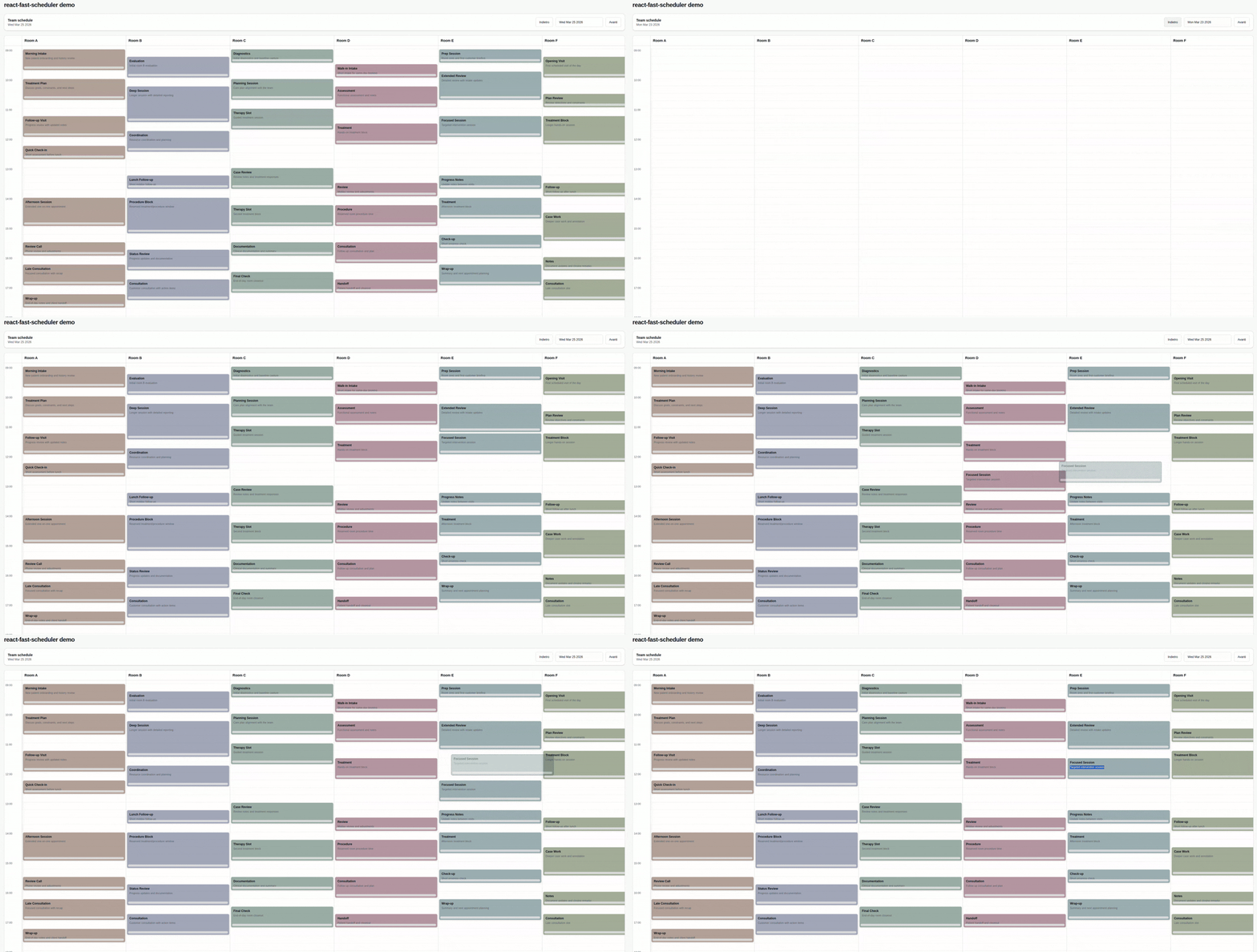
`react-fast-scheduler` gives you a controlled day view with:
|
|
6
|
+
|
|
7
|
+
- resource columns for staff, rooms, or assets
|
|
8
|
+
- drag and resize interactions
|
|
9
|
+
- date navigation with a built-in toolbar and date picker
|
|
10
|
+
- customizable appointment rendering
|
|
11
|
+
- a simple adapter layer for your backend data
|
|
12
|
+
|
|
13
|
+
|
|
6
14
|
|
|
7
15
|
## Install
|
|
8
16
|
|
|
9
17
|
```bash
|
|
10
|
-
npm
|
|
18
|
+
npm install @marco.colia/react-fast-scheduler
|
|
11
19
|
```
|
|
12
20
|
|
|
13
|
-
|
|
21
|
+
Peer dependencies:
|
|
22
|
+
|
|
23
|
+
- `react` `^18 || ^19`
|
|
24
|
+
- `react-dom` `^18 || ^19`
|
|
25
|
+
|
|
26
|
+
Import the packaged styles once in your app:
|
|
14
27
|
|
|
15
28
|
```tsx
|
|
16
|
-
import { useState } from "react";
|
|
17
|
-
import { Scheduler } from "@marco.colia/react-fast-scheduler";
|
|
18
29
|
import "@marco.colia/react-fast-scheduler/styles.css";
|
|
19
|
-
|
|
30
|
+
```
|
|
31
|
+
|
|
32
|
+
## Quick Start
|
|
33
|
+
|
|
34
|
+
The scheduler is a controlled component:
|
|
35
|
+
|
|
36
|
+
- your app owns `selectedDate`
|
|
37
|
+
- your app fetches appointments for that date
|
|
38
|
+
- the scheduler calls `onSelectedDateChange` when the user navigates
|
|
39
|
+
- your app updates `appointments` and passes the new data back in
|
|
40
|
+
|
|
41
|
+
```tsx
|
|
42
|
+
import { useEffect, useState } from "react";
|
|
43
|
+
import {
|
|
44
|
+
Scheduler,
|
|
45
|
+
applySchedulerAppointmentChange,
|
|
46
|
+
type BaseSchedulerResource,
|
|
47
|
+
type SchedulerAppointmentChangeArgs,
|
|
48
|
+
} from "@marco.colia/react-fast-scheduler";
|
|
49
|
+
import "@marco.colia/react-fast-scheduler/styles.css";
|
|
20
50
|
|
|
21
51
|
type Staff = BaseSchedulerResource<number> & {
|
|
22
52
|
firstName: string;
|
|
@@ -26,104 +56,251 @@ type Staff = BaseSchedulerResource<number> & {
|
|
|
26
56
|
type Appointment = {
|
|
27
57
|
id: number;
|
|
28
58
|
staffId: number;
|
|
29
|
-
description?: string;
|
|
30
59
|
customerName: string;
|
|
31
60
|
title: string;
|
|
32
|
-
|
|
33
|
-
|
|
61
|
+
description?: string;
|
|
62
|
+
start: string;
|
|
63
|
+
end: string;
|
|
64
|
+
};
|
|
65
|
+
|
|
66
|
+
const formatLocalDate = (date: Date) => {
|
|
67
|
+
const year = date.getFullYear();
|
|
68
|
+
const month = String(date.getMonth() + 1).padStart(2, "0");
|
|
69
|
+
const day = String(date.getDate()).padStart(2, "0");
|
|
70
|
+
return `${year}-${month}-${day}`;
|
|
34
71
|
};
|
|
35
72
|
|
|
36
|
-
const
|
|
37
|
-
|
|
38
|
-
|
|
39
|
-
];
|
|
40
|
-
|
|
41
|
-
const
|
|
42
|
-
|
|
43
|
-
|
|
44
|
-
|
|
45
|
-
|
|
46
|
-
|
|
47
|
-
|
|
48
|
-
|
|
49
|
-
|
|
50
|
-
|
|
51
|
-
|
|
52
|
-
|
|
53
|
-
|
|
54
|
-
|
|
55
|
-
|
|
73
|
+
export const SchedulerExample = () => {
|
|
74
|
+
const [staff, setStaff] = useState<Staff[]>([]);
|
|
75
|
+
const [appointments, setAppointments] = useState<Appointment[]>([]);
|
|
76
|
+
const [selectedDate, setSelectedDate] = useState(() => new Date());
|
|
77
|
+
|
|
78
|
+
const loadStaff = async () => {
|
|
79
|
+
const response = await fetch("/api/staff");
|
|
80
|
+
const data = (await response.json()) as Staff[];
|
|
81
|
+
setStaff(data);
|
|
82
|
+
};
|
|
83
|
+
|
|
84
|
+
const loadAppointments = async (date: Date) => {
|
|
85
|
+
const response = await fetch(`/api/appointments?date=${formatLocalDate(date)}`);
|
|
86
|
+
const data = (await response.json()) as Appointment[];
|
|
87
|
+
setAppointments(data);
|
|
88
|
+
};
|
|
89
|
+
|
|
90
|
+
const persistAppointment = async (
|
|
91
|
+
appointmentId: number,
|
|
92
|
+
nextAppointment: Appointment
|
|
93
|
+
) => {
|
|
94
|
+
await fetch(`/api/appointments/${appointmentId}`, {
|
|
95
|
+
method: "PATCH",
|
|
96
|
+
headers: { "Content-Type": "application/json" },
|
|
97
|
+
body: JSON.stringify(nextAppointment),
|
|
98
|
+
});
|
|
99
|
+
};
|
|
100
|
+
|
|
101
|
+
const handleAppointmentChange = async (
|
|
102
|
+
change: SchedulerAppointmentChangeArgs<Appointment, number>
|
|
103
|
+
) => {
|
|
104
|
+
const optimisticAppointments = applySchedulerAppointmentChange(appointments, change, {
|
|
105
|
+
getId: (item) => item.id,
|
|
106
|
+
setResourceId: (item, resourceId) => ({ ...item, staffId: resourceId }),
|
|
107
|
+
setStart: (item, start) => ({ ...item, start: start.toISOString() }),
|
|
108
|
+
setEnd: (item, end) => ({ ...item, end: end.toISOString() }),
|
|
109
|
+
});
|
|
110
|
+
|
|
111
|
+
setAppointments(optimisticAppointments);
|
|
112
|
+
|
|
113
|
+
const nextAppointment = optimisticAppointments.find(
|
|
114
|
+
(item) => item.id === change.appointment.id
|
|
115
|
+
);
|
|
116
|
+
|
|
117
|
+
if (!nextAppointment) {
|
|
118
|
+
return;
|
|
119
|
+
}
|
|
120
|
+
|
|
121
|
+
try {
|
|
122
|
+
await persistAppointment(change.appointment.id, nextAppointment);
|
|
123
|
+
} catch {
|
|
124
|
+
await loadAppointments(selectedDate);
|
|
125
|
+
}
|
|
126
|
+
};
|
|
127
|
+
|
|
128
|
+
useEffect(() => {
|
|
129
|
+
void loadStaff();
|
|
130
|
+
}, []);
|
|
131
|
+
|
|
132
|
+
useEffect(() => {
|
|
133
|
+
void loadAppointments(selectedDate);
|
|
134
|
+
}, [selectedDate]);
|
|
56
135
|
|
|
57
136
|
return (
|
|
58
137
|
<Scheduler<Appointment, Staff, number>
|
|
59
|
-
resources={
|
|
138
|
+
resources={staff}
|
|
60
139
|
appointments={appointments}
|
|
61
140
|
selectedDate={selectedDate}
|
|
62
141
|
onSelectedDateChange={setSelectedDate}
|
|
63
|
-
prevButtonLabel="Previous day"
|
|
64
|
-
nextButtonLabel="Next day"
|
|
65
142
|
adapter={{
|
|
66
|
-
getId: (
|
|
67
|
-
getResourceId: (
|
|
68
|
-
getStart: (
|
|
69
|
-
getEnd: (
|
|
70
|
-
getTitle: (
|
|
71
|
-
}}
|
|
72
|
-
onAppointmentChange={async ({ appointment, next }) => {
|
|
73
|
-
setAppointments((prev) =>
|
|
74
|
-
prev.map((a) =>
|
|
75
|
-
a.id === appointment.id
|
|
76
|
-
? { ...a, staffId: next.resourceId, start: next.start.toISOString(), end: next.end.toISOString() }
|
|
77
|
-
: a
|
|
78
|
-
)
|
|
79
|
-
);
|
|
80
|
-
}}
|
|
81
|
-
resourceAppointmentClassMap={{
|
|
82
|
-
"1": "bg-amber-100 dark:bg-amber-950/40",
|
|
83
|
-
"2": "bg-blue-100 dark:bg-blue-950/40"
|
|
143
|
+
getId: (item) => item.id,
|
|
144
|
+
getResourceId: (item) => item.staffId,
|
|
145
|
+
getStart: (item) => item.start,
|
|
146
|
+
getEnd: (item) => item.end,
|
|
147
|
+
getTitle: (item) => `${item.customerName} - ${item.title}`,
|
|
84
148
|
}}
|
|
149
|
+
onAppointmentChange={handleAppointmentChange}
|
|
85
150
|
dayStart="09:00"
|
|
86
151
|
dayEnd="18:00"
|
|
87
152
|
/>
|
|
88
153
|
);
|
|
154
|
+
};
|
|
155
|
+
```
|
|
156
|
+
|
|
157
|
+
## How Data Flow Works
|
|
158
|
+
|
|
159
|
+
When the user changes the day from the built-in toolbar or date picker:
|
|
160
|
+
|
|
161
|
+
1. the scheduler calls `onSelectedDateChange(nextDate)`
|
|
162
|
+
2. your state updates `selectedDate`
|
|
163
|
+
3. your `useEffect` runs again
|
|
164
|
+
4. your app fetches appointments for the new date
|
|
165
|
+
5. you pass the fetched appointments back into `appointments`
|
|
166
|
+
|
|
167
|
+
This is the intended integration pattern:
|
|
168
|
+
|
|
169
|
+
```tsx
|
|
170
|
+
useEffect(() => {
|
|
171
|
+
void loadAppointments(selectedDate);
|
|
172
|
+
}, [selectedDate]);
|
|
173
|
+
|
|
174
|
+
<Scheduler
|
|
175
|
+
selectedDate={selectedDate}
|
|
176
|
+
onSelectedDateChange={setSelectedDate}
|
|
177
|
+
appointments={appointments}
|
|
178
|
+
resources={resources}
|
|
179
|
+
adapter={adapter}
|
|
180
|
+
/>
|
|
181
|
+
```
|
|
182
|
+
|
|
183
|
+
## Core Concepts
|
|
184
|
+
|
|
185
|
+
### `resources`
|
|
186
|
+
|
|
187
|
+
Each column in the scheduler is a resource. A resource must have at least:
|
|
188
|
+
|
|
189
|
+
```ts
|
|
190
|
+
type BaseSchedulerResource<TId> = {
|
|
191
|
+
id: TId;
|
|
192
|
+
label: string;
|
|
193
|
+
};
|
|
194
|
+
```
|
|
195
|
+
|
|
196
|
+
Typical resources:
|
|
197
|
+
|
|
198
|
+
- staff members
|
|
199
|
+
- rooms
|
|
200
|
+
- desks
|
|
201
|
+
- service stations
|
|
202
|
+
|
|
203
|
+
### `appointments`
|
|
204
|
+
|
|
205
|
+
Appointments stay in your own shape. The scheduler reads them through the `adapter`.
|
|
206
|
+
|
|
207
|
+
### `adapter`
|
|
208
|
+
|
|
209
|
+
The adapter maps your appointment structure into scheduler fields:
|
|
210
|
+
|
|
211
|
+
```tsx
|
|
212
|
+
adapter={{
|
|
213
|
+
getId: (item) => item.id,
|
|
214
|
+
getResourceId: (item) => item.staffId,
|
|
215
|
+
getStart: (item) => item.start,
|
|
216
|
+
getEnd: (item) => item.end,
|
|
217
|
+
getTitle: (item) => item.title,
|
|
218
|
+
}}
|
|
219
|
+
```
|
|
220
|
+
|
|
221
|
+
`getStart` and `getEnd` can return either a `Date` or a date string.
|
|
222
|
+
|
|
223
|
+
## Drag, Resize, and Persistence
|
|
224
|
+
|
|
225
|
+
Use `onAppointmentChange` as the main integration point for move and resize operations.
|
|
226
|
+
|
|
227
|
+
It receives:
|
|
228
|
+
|
|
229
|
+
- `appointment`: the original raw appointment
|
|
230
|
+
- `previous`: the previous resource and time range
|
|
231
|
+
- `next`: the new resource and time range after drop
|
|
232
|
+
- `kind`: `"move"` or `"resize"`
|
|
233
|
+
|
|
234
|
+
Example:
|
|
235
|
+
|
|
236
|
+
```tsx
|
|
237
|
+
<Scheduler
|
|
238
|
+
// ...other props
|
|
239
|
+
onAppointmentChange={async ({ appointment, next }) => {
|
|
240
|
+
const nextAppointment = {
|
|
241
|
+
...appointment,
|
|
242
|
+
staffId: next.resourceId,
|
|
243
|
+
start: next.start.toISOString(),
|
|
244
|
+
end: next.end.toISOString(),
|
|
245
|
+
};
|
|
246
|
+
|
|
247
|
+
await fetch(`/api/appointments/${appointment.id}`, {
|
|
248
|
+
method: "PATCH",
|
|
249
|
+
headers: { "Content-Type": "application/json" },
|
|
250
|
+
body: JSON.stringify(nextAppointment),
|
|
251
|
+
});
|
|
252
|
+
}}
|
|
253
|
+
/>
|
|
254
|
+
```
|
|
255
|
+
|
|
256
|
+
If you want a small helper for optimistic local state updates, use `applySchedulerAppointmentChange`:
|
|
257
|
+
|
|
258
|
+
```tsx
|
|
259
|
+
const nextAppointments = applySchedulerAppointmentChange(appointments, change, {
|
|
260
|
+
getId: (item) => item.id,
|
|
261
|
+
setResourceId: (item, resourceId) => ({ ...item, staffId: resourceId }),
|
|
262
|
+
setStart: (item, start) => ({ ...item, start: start.toISOString() }),
|
|
263
|
+
setEnd: (item, end) => ({ ...item, end: end.toISOString() }),
|
|
264
|
+
});
|
|
265
|
+
```
|
|
266
|
+
|
|
267
|
+
`onPersistMoveResize` is still available as a legacy callback, but `onAppointmentChange` is the recommended API.
|
|
268
|
+
|
|
269
|
+
## Styling
|
|
270
|
+
|
|
271
|
+
The package ships precompiled CSS:
|
|
272
|
+
|
|
273
|
+
```tsx
|
|
274
|
+
import "@marco.colia/react-fast-scheduler/styles.css";
|
|
275
|
+
```
|
|
276
|
+
|
|
277
|
+
You can override the exposed CSS variables in your app:
|
|
278
|
+
|
|
279
|
+
```css
|
|
280
|
+
:root {
|
|
281
|
+
--rfs-bg: #f8fafc;
|
|
282
|
+
--rfs-surface: #ffffff;
|
|
283
|
+
--rfs-border: #e2e8f0;
|
|
284
|
+
--rfs-text: #0f172a;
|
|
285
|
+
--rfs-muted: #64748b;
|
|
89
286
|
}
|
|
90
287
|
```
|
|
91
288
|
|
|
92
|
-
|
|
93
|
-
|
|
94
|
-
|
|
95
|
-
`onAppointmentChange` is a simple callback: use it to update your state and run your own side effects.
|
|
96
|
-
|
|
97
|
-
Main props you need to pass:
|
|
98
|
-
- `resources`: your columns (staff, rooms, etc), each with at least `{ id, label }`.
|
|
99
|
-
- `appointments`: raw items from your backend.
|
|
100
|
-
- `adapter`: functions that map your raw appointment shape to scheduler fields.
|
|
101
|
-
- `onAppointmentChange`: optional generic callback fired after move/resize drop.
|
|
102
|
-
- `onPersistMoveResize`: optional legacy persistence callback (used if `onAppointmentChange` is not provided).
|
|
103
|
-
- `resourceAppointmentClassMap`: optional map of `resourceId -> className` for per-resource appointment colors/styles.
|
|
104
|
-
- `getResourceAppointmentColorToken`: optional function to provide a semantic color token per resource (for example `"amber"`).
|
|
105
|
-
- `appointmentColorTokenClassMap`: optional map to override token -> class resolution.
|
|
106
|
-
- `getResourceAppointmentAppearance`: optional low-level function to provide appointment `className` per resource.
|
|
107
|
-
- `getResourceAppointmentBackground`: legacy optional function to provide appointment background as a string.
|
|
108
|
-
- `renderToolbar`: optional render hook to replace the entire scheduler toolbar/header controls.
|
|
109
|
-
- `prevButtonLabel` and `nextButtonLabel`: custom labels for toolbar navigation buttons.
|
|
110
|
-
- `renderDatePicker`: optional render hook for the date picker slot used by the default toolbar.
|
|
111
|
-
- `renderResourceHeader`: optional render hook for resource column headers.
|
|
112
|
-
- `renderAppointment`: optional render hook to fully customize appointment cards.
|
|
113
|
-
|
|
114
|
-
### Resource classes by id (recommended)
|
|
289
|
+
### Resource-based colors
|
|
290
|
+
|
|
291
|
+
The simplest option is `resourceAppointmentClassMap`:
|
|
115
292
|
|
|
116
293
|
```tsx
|
|
117
294
|
<Scheduler
|
|
118
295
|
// ...other props
|
|
119
296
|
resourceAppointmentClassMap={{
|
|
120
|
-
"
|
|
121
|
-
"
|
|
297
|
+
"1": "bg-amber-100 dark:bg-amber-950/40",
|
|
298
|
+
"2": "bg-blue-100 dark:bg-blue-950/40",
|
|
122
299
|
}}
|
|
123
300
|
/>
|
|
124
301
|
```
|
|
125
302
|
|
|
126
|
-
|
|
303
|
+
If you want semantic mapping, use `getResourceAppointmentColorToken` plus `appointmentColorTokenClassMap`:
|
|
127
304
|
|
|
128
305
|
```tsx
|
|
129
306
|
<Scheduler
|
|
@@ -131,33 +308,72 @@ Main props you need to pass:
|
|
|
131
308
|
getResourceAppointmentColorToken={(resource) => resource.category}
|
|
132
309
|
appointmentColorTokenClassMap={{
|
|
133
310
|
vip: "bg-yellow-100 dark:bg-yellow-950/40",
|
|
134
|
-
urgent: "bg-rose-100 dark:bg-rose-950/40"
|
|
311
|
+
urgent: "bg-rose-100 dark:bg-rose-950/40",
|
|
135
312
|
}}
|
|
136
313
|
/>
|
|
137
314
|
```
|
|
138
315
|
|
|
139
|
-
|
|
316
|
+
For full control, use `getResourceAppointmentAppearance`.
|
|
317
|
+
|
|
318
|
+
## Custom Rendering
|
|
319
|
+
|
|
320
|
+
### Custom appointment card
|
|
321
|
+
|
|
322
|
+
`renderAppointment` lets you fully replace the built-in card.
|
|
323
|
+
|
|
324
|
+
The appointment passed to your renderer also includes:
|
|
325
|
+
|
|
326
|
+
- `visualState`: `"normal" | "ghost" | "dragging"`
|
|
327
|
+
- `renderKey`: an internal render key
|
|
328
|
+
|
|
329
|
+
The renderer also receives:
|
|
330
|
+
|
|
331
|
+
- `isDropInvalid`: `true` when the current drag position overlaps another appointment
|
|
332
|
+
- `onPointerDown`: attach this to your appointment root for move interactions
|
|
333
|
+
- `onResizePointerDown`: attach this to your resize handle
|
|
140
334
|
|
|
141
335
|
```tsx
|
|
142
336
|
<Scheduler
|
|
143
337
|
// ...other props
|
|
144
|
-
renderAppointment={({
|
|
338
|
+
renderAppointment={({
|
|
339
|
+
appointment,
|
|
340
|
+
isDropInvalid,
|
|
341
|
+
onPointerDown,
|
|
342
|
+
onResizePointerDown,
|
|
343
|
+
appointmentAppearance,
|
|
344
|
+
appointmentBackgroundColor,
|
|
345
|
+
}) => (
|
|
145
346
|
<div
|
|
146
347
|
onPointerDown={onPointerDown}
|
|
147
|
-
className={`relative h-full
|
|
148
|
-
|
|
348
|
+
className={`relative h-full overflow-hidden rounded-md border p-2 pb-5 ${
|
|
349
|
+
appointment.visualState === "ghost"
|
|
350
|
+
? "cursor-grab border-dashed opacity-55"
|
|
351
|
+
: appointment.visualState === "dragging"
|
|
352
|
+
? "cursor-grabbing opacity-55"
|
|
353
|
+
: "cursor-grab"
|
|
354
|
+
} ${
|
|
355
|
+
isDropInvalid
|
|
356
|
+
? "border-red-500 bg-red-100/80 text-red-950 ring-1 ring-red-500/60"
|
|
357
|
+
: `border-slate-300 ${
|
|
358
|
+
appointmentAppearance?.className ?? appointmentBackgroundColor ?? "bg-slate-100"
|
|
359
|
+
}`
|
|
149
360
|
}`}
|
|
150
361
|
>
|
|
151
362
|
<div className="text-xs font-semibold">{appointment.title}</div>
|
|
152
363
|
{appointment.raw.description ? (
|
|
153
|
-
<div className="mt-1 text-[10px] font-medium text-slate-500">
|
|
364
|
+
<div className="mt-1 text-[10px] font-medium text-slate-500">
|
|
365
|
+
{appointment.raw.description}
|
|
366
|
+
</div>
|
|
154
367
|
) : null}
|
|
155
368
|
<div
|
|
156
369
|
role="button"
|
|
157
370
|
aria-label="Resize appointment"
|
|
158
|
-
onPointerDown={(
|
|
159
|
-
|
|
160
|
-
|
|
371
|
+
onPointerDown={(event) => {
|
|
372
|
+
if (appointment.visualState === "ghost") {
|
|
373
|
+
return;
|
|
374
|
+
}
|
|
375
|
+
event.stopPropagation();
|
|
376
|
+
onResizePointerDown(event);
|
|
161
377
|
}}
|
|
162
378
|
className="absolute inset-x-1 bottom-1 h-2 cursor-ns-resize rounded-full bg-slate-300/90 hover:bg-slate-400"
|
|
163
379
|
/>
|
|
@@ -168,6 +384,10 @@ Main props you need to pass:
|
|
|
168
384
|
|
|
169
385
|
### Custom toolbar
|
|
170
386
|
|
|
387
|
+
If you omit `renderToolbar`, the scheduler renders a built-in toolbar with previous/next navigation and a date picker.
|
|
388
|
+
|
|
389
|
+
Use `renderToolbar` when you want to replace the whole header:
|
|
390
|
+
|
|
171
391
|
```tsx
|
|
172
392
|
<Scheduler
|
|
173
393
|
// ...other props
|
|
@@ -178,11 +398,11 @@ Main props you need to pass:
|
|
|
178
398
|
<div className="text-xs text-muted-foreground">Team schedule</div>
|
|
179
399
|
</div>
|
|
180
400
|
<div className="flex items-center gap-2">
|
|
181
|
-
<button className="rounded-md border px-3 py-2 text-sm"
|
|
401
|
+
<button type="button" className="rounded-md border px-3 py-2 text-sm" onClick={goToPreviousDay}>
|
|
182
402
|
Previous
|
|
183
403
|
</button>
|
|
184
404
|
{defaultDatePicker}
|
|
185
|
-
<button className="rounded-md border px-3 py-2 text-sm"
|
|
405
|
+
<button type="button" className="rounded-md border px-3 py-2 text-sm" onClick={goToNextDay}>
|
|
186
406
|
Next
|
|
187
407
|
</button>
|
|
188
408
|
</div>
|
|
@@ -193,87 +413,53 @@ Main props you need to pass:
|
|
|
193
413
|
|
|
194
414
|
### Custom date picker slot
|
|
195
415
|
|
|
196
|
-
|
|
197
|
-
import { Button } from "@/components/ui/button";
|
|
198
|
-
import { Calendar } from "@/components/ui/calendar";
|
|
199
|
-
import { Popover, PopoverContent, PopoverTrigger } from "@/components/ui/popover";
|
|
416
|
+
If you want to keep the default toolbar but swap the date picker UI, use `renderDatePicker`.
|
|
200
417
|
|
|
418
|
+
```tsx
|
|
201
419
|
<Scheduler
|
|
202
420
|
// ...other props
|
|
203
421
|
renderDatePicker={({ selectedDate, onSelectedDateChange }) => (
|
|
204
|
-
<
|
|
205
|
-
|
|
206
|
-
|
|
207
|
-
</PopoverTrigger>
|
|
208
|
-
<PopoverContent className="w-auto p-0">
|
|
209
|
-
<Calendar
|
|
210
|
-
mode="single"
|
|
211
|
-
selected={selectedDate}
|
|
212
|
-
onSelect={(date) => date && onSelectedDateChange(date)}
|
|
213
|
-
initialFocus
|
|
214
|
-
/>
|
|
215
|
-
</PopoverContent>
|
|
216
|
-
</Popover>
|
|
422
|
+
<button type="button" onClick={() => onSelectedDateChange(new Date())}>
|
|
423
|
+
{selectedDate.toDateString()}
|
|
424
|
+
</button>
|
|
217
425
|
)}
|
|
218
|
-
|
|
426
|
+
/>
|
|
219
427
|
```
|
|
220
428
|
|
|
221
|
-
##
|
|
429
|
+
## Props Reference
|
|
222
430
|
|
|
223
|
-
|
|
431
|
+
### Required props
|
|
224
432
|
|
|
225
|
-
|
|
226
|
-
|
|
227
|
-
|
|
433
|
+
- `resources`: array of resource objects
|
|
434
|
+
- `appointments`: array of raw appointment objects
|
|
435
|
+
- `selectedDate`: currently visible day
|
|
436
|
+
- `onSelectedDateChange`: controlled date change handler
|
|
437
|
+
- `adapter`: mapper between your appointment shape and scheduler fields
|
|
228
438
|
|
|
229
|
-
|
|
439
|
+
### Common optional props
|
|
230
440
|
|
|
231
|
-
|
|
232
|
-
|
|
233
|
-
|
|
234
|
-
|
|
235
|
-
|
|
441
|
+
- `onAppointmentChange`: async or sync handler for move and resize persistence
|
|
442
|
+
- `renderToolbar`: replace the full toolbar
|
|
443
|
+
- `renderDatePicker`: replace only the date picker slot used by the default toolbar
|
|
444
|
+
- `renderResourceHeader`: custom resource header renderer
|
|
445
|
+
- `renderAppointment`: custom appointment renderer
|
|
446
|
+
- `resourceAppointmentClassMap`: per-resource class names
|
|
447
|
+
- `getResourceAppointmentColorToken`: semantic color token selector
|
|
448
|
+
- `appointmentColorTokenClassMap`: token-to-class map
|
|
449
|
+
- `getResourceAppointmentAppearance`: low-level class name appearance mapping
|
|
450
|
+
- `getResourceAppointmentBackground`: legacy background string hook
|
|
451
|
+
- `prevButtonLabel`: custom previous button label
|
|
452
|
+
- `nextButtonLabel`: custom next button label
|
|
453
|
+
- `dayStart`: visible schedule start time, for example `"09:00"`
|
|
454
|
+
- `dayEnd`: visible schedule end time, for example `"18:00"`
|
|
236
455
|
|
|
237
|
-
|
|
238
|
-
```
|
|
239
|
-
|
|
240
|
-
If you work inside this library repo (local demo), import the Tailwind v4 source entry:
|
|
456
|
+
## Production Notes
|
|
241
457
|
|
|
242
|
-
|
|
243
|
-
|
|
244
|
-
|
|
245
|
-
|
|
246
|
-
You can override tokens in your app:
|
|
247
|
-
|
|
248
|
-
```css
|
|
249
|
-
:root {
|
|
250
|
-
--rfs-bg: #f8fafc;
|
|
251
|
-
--rfs-surface: #ffffff;
|
|
252
|
-
--rfs-border: #e2e8f0;
|
|
253
|
-
--rfs-text: #0f172a;
|
|
254
|
-
--rfs-muted: #64748b;
|
|
255
|
-
}
|
|
256
|
-
```
|
|
458
|
+
- Keep `selectedDate` in application state and fetch data when it changes.
|
|
459
|
+
- Prefer formatting dates in local time for day-based API queries. `toISOString().slice(0, 10)` can shift the day around midnight because it uses UTC.
|
|
460
|
+
- If persistence fails after a drag or resize, either roll back local state or refetch the visible day.
|
|
461
|
+
- Import the package CSS once at app startup.
|
|
257
462
|
|
|
258
463
|
## Development
|
|
259
464
|
|
|
260
|
-
|
|
261
|
-
npm install
|
|
262
|
-
npm run dev:demo
|
|
263
|
-
npm run lint
|
|
264
|
-
npm run test
|
|
265
|
-
npm run build
|
|
266
|
-
```
|
|
267
|
-
|
|
268
|
-
`dev/main.tsx` contains a minimal runnable scheduler demo used by `npm run dev:demo`.
|
|
269
|
-
Tailwind v4 source styles are in `src/global.css`, and the demo imports them from `dev/main.tsx`.
|
|
270
|
-
|
|
271
|
-
## Releasing
|
|
272
|
-
|
|
273
|
-
This repo uses [Changesets](https://github.com/changesets/changesets) and GitHub Actions.
|
|
274
|
-
|
|
275
|
-
1. Create a changeset: `npx changeset`
|
|
276
|
-
2. Merge to `main`
|
|
277
|
-
3. The `Release` workflow opens/updates a release PR
|
|
278
|
-
4. Merging that PR publishes to npm via npm Trusted Publishing and GitHub OIDC
|
|
279
|
-
4. Merging that PR publishes to npm via npm Trusted Publishing and GitHub OIDC
|
|
465
|
+
Repo-specific development notes, local demo usage, and release workflow are in [DEVELOPMENT.md](./DEVELOPMENT.md).
|