@maincode-ai/matilda-code 0.21.13 → 0.22.0-nightly.20261101.b0ad315a4
This diff represents the content of publicly available package versions that have been released to one of the supported registries. The information contained in this diff is provided for informational purposes only and reflects changes between package versions as they appear in their respective public registries.
- package/chunks/agent-IUINB66G.js +3 -0
- package/chunks/agent-headless-YA2RKYEZ.js +3 -0
- package/chunks/{askUserQuestion-BNSWGD26.js → askUserQuestion-RZYBOPLR.js} +3 -3
- package/chunks/ca-JKEHLTNL.js +23 -0
- package/chunks/chunk-225CZWD7.js +89 -0
- package/chunks/{chunk-MEV5XQI2.js → chunk-2XSB5XHX.js} +1 -1
- package/chunks/chunk-453BANK3.js +8 -0
- package/chunks/{chunk-6M5G5FBH.js → chunk-4UGPARBR.js} +1 -1
- package/chunks/{chunk-RNKDFE2S.js → chunk-5B2QERWR.js} +1 -1
- package/chunks/chunk-5ETLURI6.js +3 -0
- package/chunks/chunk-6NXVLJ3X.js +56 -0
- package/chunks/{chunk-QZI2ZGZY.js → chunk-7B65UIHB.js} +1 -1
- package/chunks/{chunk-27Q5KW3A.js → chunk-7E2YCGHS.js} +13 -13
- package/chunks/{chunk-DHDD5YJC.js → chunk-ARAB5QTM.js} +69 -69
- package/chunks/chunk-DUB7JMQV.js +13 -0
- package/chunks/chunk-G3F3ZCH2.js +9 -0
- package/chunks/chunk-GT6MSEK4.js +3 -0
- package/chunks/chunk-HEJO7OBH.js +3 -0
- package/chunks/{chunk-6T2GIM76.js → chunk-IHWAOFCQ.js} +1 -1
- package/chunks/chunk-ILHNCXBC.js +8 -0
- package/chunks/chunk-J3ZCE3TA.js +8 -0
- package/chunks/{chunk-AOOZREGV.js → chunk-LBQNFSZ2.js} +1 -1
- package/chunks/{chunk-5OHGYMKP.js → chunk-LM6OIN4B.js} +1 -1
- package/chunks/{chunk-EZDV7A76.js → chunk-LMZBADPW.js} +1 -1
- package/chunks/chunk-MGRXOZAG.js +8 -0
- package/chunks/chunk-NBLBE7PE.js +2609 -0
- package/chunks/chunk-POGNX7U3.js +31 -0
- package/chunks/chunk-PQZ6HKKW.js +80 -0
- package/chunks/chunk-QXSBPCBA.js +8 -0
- package/chunks/chunk-RHSUTILA.js +9 -0
- package/chunks/{chunk-P5TG5CON.js → chunk-RPXRN7E6.js} +1 -1
- package/chunks/chunk-TUKNB5CQ.js +33 -0
- package/chunks/chunk-UM6CLO7D.js +7 -0
- package/chunks/chunk-V2VUANFI.js +120 -0
- package/chunks/chunk-V4VILMIK.js +14 -0
- package/chunks/chunk-ZSGBDQXU.js +11 -0
- package/chunks/{computer-use-J4GAM4M6.js → computer-use-PBCWDTJR.js} +1 -1
- package/chunks/{cron-create-IDWSZENI.js → cron-create-PHQ43NYA.js} +1 -1
- package/chunks/cron-delete-7RCQIU2U.js +3 -0
- package/chunks/cron-list-KKNLLMNN.js +5 -0
- package/chunks/de-GMGNR5CZ.js +23 -0
- package/chunks/{devtools-XRQ4YJ5S.js → devtools-7YNCRYZV.js} +1 -1
- package/chunks/{chunk-OOEH6ZSV.js → dist-UWUWLWTO.js} +2 -2
- package/chunks/{edit-X2S2ZXRN.js → edit-ELHNQB5E.js} +1 -1
- package/chunks/en-3NQMLVKW.js +23 -0
- package/chunks/{enter-worktree-TUCGNCLO.js → enter-worktree-UZIBOBV3.js} +1 -1
- package/chunks/enterPlanMode-UHY3DZXE.js +18 -0
- package/chunks/{exit-worktree-7FLITFZI.js → exit-worktree-HLG4PDMX.js} +1 -1
- package/chunks/{exitPlanMode-O5UUJ3GM.js → exitPlanMode-V4HYNH3J.js} +2 -2
- package/chunks/fr-WS3EBB36.js +23 -0
- package/chunks/{getMachineId-bsd-ZYBNK2JG.js → getMachineId-bsd-ETKQTB6C.js} +1 -1
- package/chunks/{getMachineId-darwin-CM2MQGUI.js → getMachineId-darwin-AKNRWOWB.js} +1 -1
- package/chunks/{getMachineId-linux-SYE2KMCW.js → getMachineId-linux-2QSD7FTP.js} +1 -1
- package/chunks/{getMachineId-unsupported-6IHVG2XO.js → getMachineId-unsupported-UXSV7I24.js} +1 -1
- package/chunks/{getMachineId-win-S3J3JSUM.js → getMachineId-win-4MTFXGP3.js} +1 -1
- package/chunks/glob-C5CTWXLP.js +22 -0
- package/chunks/{goal-tools-YQOA6OKU.js → goal-tools-BGIWEJ3K.js} +3 -3
- package/chunks/{grep-VAB2VSXM.js → grep-BEFTGKHW.js} +1 -1
- package/chunks/ja-GBCDQ43R.js +23 -0
- package/chunks/keychain-token-storage-FEJZYJBB.js +3 -0
- package/chunks/ls-XH55NAD3.js +15 -0
- package/chunks/{lsp-NGLDRHZU.js → lsp-BKDCR37G.js} +1 -1
- package/chunks/mcp-client-GAQG7MCT.js +3 -0
- package/chunks/monitor-NSVUUKCM.js +32 -0
- package/chunks/{multipart-parser-JI75T2O5.js → multipart-parser-FKHYAVGR.js} +1 -1
- package/chunks/notebook-edit-AXKYC64C.js +17 -0
- package/chunks/openaiContentGenerator-66YY6CIM.js +47 -0
- package/chunks/pt-VID6J2CM.js +23 -0
- package/chunks/read-file-YFJMLS7V.js +3 -0
- package/chunks/ripGrep-BEHEB23R.js +3 -0
- package/chunks/ru-EB6V6EAN.js +23 -0
- package/chunks/scheduler-GKQOREMS.js +8 -0
- package/chunks/send-message-GJSEMAZB.js +8 -0
- package/chunks/shell-J5Q2UEXH.js +3 -0
- package/chunks/{skill-ETQM5NI3.js → skill-3RWNSUNE.js} +1 -1
- package/chunks/src-LZEU4AYF.js +5 -0
- package/chunks/symbol-search-4VM6J5Y4.js +19 -0
- package/chunks/{syntheticOutput-WZDPECYS.js → syntheticOutput-O7LEF3AM.js} +1 -1
- package/chunks/task-create-N4IRJBTF.js +3 -0
- package/chunks/{task-detach-TBAVUOTC.js → task-detach-RGNQUX3H.js} +1 -1
- package/chunks/task-list-Z7JUB4QK.js +9 -0
- package/chunks/{task-stop-HDSARSJ6.js → task-stop-L2OWK2PJ.js} +1 -1
- package/chunks/{task-update-MW2VT2XV.js → task-update-H5AXVXDS.js} +1 -1
- package/chunks/{team-create-VMYNLZCC.js → team-create-FWTIQ2FT.js} +2 -2
- package/chunks/team-delete-D45ALROH.js +8 -0
- package/chunks/todoWrite-LCQOQBI7.js +3 -0
- package/chunks/{tool-search-WX6FOE35.js → tool-search-X6UUCSPU.js} +1 -1
- package/chunks/{web-fetch-CKYBHGLF.js → web-fetch-244KUWSX.js} +17 -17
- package/chunks/web-search-YRZ3BZ3X.js +26 -0
- package/chunks/{workflow-WBSRQG3N.js → workflow-EP4AFR24.js} +2 -2
- package/chunks/write-file-EXWGRN4Q.js +15 -0
- package/cli.js +641 -678
- package/examples/starter/README.md +0 -3
- package/locales/ca.js +3 -87
- package/locales/de.js +3 -91
- package/locales/en.js +3 -91
- package/locales/fr.js +3 -88
- package/locales/ja.js +3 -92
- package/locales/pt.js +3 -92
- package/locales/ru.js +3 -91
- package/package.json +2 -2
- package/sandbox-macos-permissive-proxied.sb +1 -1
- package/sandbox-macos-restrictive-closed.sb +14 -1
- package/sandbox-macos-restrictive-open.sb +14 -1
- package/sandbox-macos-restrictive-proxied.sb +15 -2
- package/bundled/mainy/SKILL.md +0 -157
- package/bundled/mainy/docs/_meta.ts +0 -32
- package/bundled/mainy/docs/common-workflow.md +0 -571
- package/bundled/mainy/docs/configuration/_meta.ts +0 -7
- package/bundled/mainy/docs/configuration/auth.md +0 -82
- package/bundled/mainy/docs/configuration/matilda-ignore.md +0 -55
- package/bundled/mainy/docs/configuration/model-providers.md +0 -516
- package/bundled/mainy/docs/configuration/settings.md +0 -818
- package/bundled/mainy/docs/configuration/themes.md +0 -199
- package/bundled/mainy/docs/configuration/trusted-folders.md +0 -67
- package/bundled/mainy/docs/extension/_meta.ts +0 -9
- package/bundled/mainy/docs/extension/extension-releasing.md +0 -204
- package/bundled/mainy/docs/extension/getting-started-extensions.md +0 -299
- package/bundled/mainy/docs/extension/introduction.md +0 -338
- package/bundled/mainy/docs/features/_meta.ts +0 -27
- package/bundled/mainy/docs/features/approval-mode.md +0 -388
- package/bundled/mainy/docs/features/arena.md +0 -219
- package/bundled/mainy/docs/features/auto-mode.md +0 -308
- package/bundled/mainy/docs/features/channels/_meta.ts +0 -5
- package/bundled/mainy/docs/features/channels/overview.md +0 -328
- package/bundled/mainy/docs/features/channels/plugins.md +0 -87
- package/bundled/mainy/docs/features/channels/telegram.md +0 -120
- package/bundled/mainy/docs/features/code-review.md +0 -291
- package/bundled/mainy/docs/features/commands.md +0 -528
- package/bundled/mainy/docs/features/dual-output.md +0 -627
- package/bundled/mainy/docs/features/followup-suggestions.md +0 -109
- package/bundled/mainy/docs/features/headless.md +0 -448
- package/bundled/mainy/docs/features/hooks.md +0 -1308
- package/bundled/mainy/docs/features/language.md +0 -144
- package/bundled/mainy/docs/features/lsp.md +0 -496
- package/bundled/mainy/docs/features/markdown-rendering.md +0 -183
- package/bundled/mainy/docs/features/mcp.md +0 -423
- package/bundled/mainy/docs/features/memory.md +0 -185
- package/bundled/mainy/docs/features/sandbox.md +0 -249
- package/bundled/mainy/docs/features/scheduled-tasks.md +0 -139
- package/bundled/mainy/docs/features/skills.md +0 -347
- package/bundled/mainy/docs/features/status-line.md +0 -397
- package/bundled/mainy/docs/features/structured-output.md +0 -309
- package/bundled/mainy/docs/features/sub-agents.md +0 -737
- package/bundled/mainy/docs/features/tips.md +0 -54
- package/bundled/mainy/docs/features/token-caching.md +0 -29
- package/bundled/mainy/docs/features/tool-use-summaries.md +0 -178
- package/bundled/mainy/docs/features/worktree.md +0 -343
- package/bundled/mainy/docs/ide-integration/_meta.ts +0 -4
- package/bundled/mainy/docs/ide-integration/ide-companion-spec.md +0 -182
- package/bundled/mainy/docs/ide-integration/ide-integration.md +0 -144
- package/bundled/mainy/docs/integration-github-action.md +0 -241
- package/bundled/mainy/docs/integration-jetbrains.md +0 -81
- package/bundled/mainy/docs/integration-vscode.md +0 -39
- package/bundled/mainy/docs/integration-zed.md +0 -72
- package/bundled/mainy/docs/matilda-serve-deploy-local.md +0 -221
- package/bundled/mainy/docs/matilda-serve.md +0 -661
- package/bundled/mainy/docs/overview.md +0 -64
- package/bundled/mainy/docs/quickstart.md +0 -234
- package/bundled/mainy/docs/reference/_meta.ts +0 -3
- package/bundled/mainy/docs/reference/keyboard-shortcuts.md +0 -91
- package/bundled/mainy/docs/support/Uninstall.md +0 -65
- package/bundled/mainy/docs/support/_meta.ts +0 -6
- package/bundled/mainy/docs/support/tos-privacy.md +0 -94
- package/bundled/mainy/docs/support/troubleshooting.md +0 -127
- package/chunks/agent-SRAIVZEE.js +0 -3
- package/chunks/agent-headless-XRDOZESG.js +0 -3
- package/chunks/anthropicContentGenerator-LLDIKDMQ.js +0 -39
- package/chunks/ca-NPYL24ME.js +0 -25
- package/chunks/chunk-27HUYW23.js +0 -22
- package/chunks/chunk-2HTPVSGT.js +0 -3
- package/chunks/chunk-3B2HABK7.js +0 -30
- package/chunks/chunk-3MTZTNAU.js +0 -101
- package/chunks/chunk-3YLXGE6T.js +0 -8
- package/chunks/chunk-47XR7IMP.js +0 -8
- package/chunks/chunk-4F4DA5UI.js +0 -8
- package/chunks/chunk-4Q2SNBUH.js +0 -18
- package/chunks/chunk-6EQMZNIY.js +0 -8
- package/chunks/chunk-6I6VGTKD.js +0 -8
- package/chunks/chunk-DC7LAFZZ.js +0 -8
- package/chunks/chunk-DE3HKC2W.js +0 -9
- package/chunks/chunk-FWDMPRKU.js +0 -3
- package/chunks/chunk-G7R2XEEF.js +0 -7
- package/chunks/chunk-GOJCMVJJ.js +0 -8
- package/chunks/chunk-GTVCJCHR.js +0 -8
- package/chunks/chunk-IJEGHQ7Z.js +0 -32
- package/chunks/chunk-JCE3JAVC.js +0 -25
- package/chunks/chunk-KHHJYBR5.js +0 -9
- package/chunks/chunk-LUNDTQ3G.js +0 -8
- package/chunks/chunk-LWARA7JY.js +0 -37
- package/chunks/chunk-M53RP3YP.js +0 -31
- package/chunks/chunk-MTMU7JYZ.js +0 -11
- package/chunks/chunk-O44XK65C.js +0 -8
- package/chunks/chunk-OA56BXPD.js +0 -3
- package/chunks/chunk-PEKAUGYV.js +0 -2621
- package/chunks/chunk-PGUG43HG.js +0 -24
- package/chunks/chunk-PGXQZVLX.js +0 -8
- package/chunks/chunk-QKYGQLWC.js +0 -8
- package/chunks/chunk-QN6Y6NPA.js +0 -3
- package/chunks/chunk-RI54U73U.js +0 -56
- package/chunks/chunk-RPFSFS7Z.js +0 -39
- package/chunks/chunk-SDTWBD62.js +0 -8
- package/chunks/chunk-SOEIVSM5.js +0 -113
- package/chunks/chunk-SVSY6AWS.js +0 -59
- package/chunks/chunk-T2T2UEPY.js +0 -4
- package/chunks/chunk-TISQNFB5.js +0 -3
- package/chunks/chunk-TWJLOEAI.js +0 -31
- package/chunks/chunk-VI74YQQO.js +0 -8
- package/chunks/chunk-VYZOOSMP.js +0 -30
- package/chunks/chunk-W4QSMIWO.js +0 -9
- package/chunks/chunk-WC2VTVCE.js +0 -27
- package/chunks/chunk-YV3PUOBU.js +0 -65
- package/chunks/chunk-ZX34M2GF.js +0 -14
- package/chunks/contextCommand-5F5M7NA4.js +0 -3
- package/chunks/cron-delete-NQCDZDUI.js +0 -3
- package/chunks/cron-list-Z4XMC3TO.js +0 -5
- package/chunks/de-34YZHGC6.js +0 -25
- package/chunks/dist-7UYRLSLE.js +0 -3
- package/chunks/dist-PH6JW7XD.js +0 -42
- package/chunks/en-QLGMD6OS.js +0 -25
- package/chunks/enterPlanMode-SQEZAAIR.js +0 -18
- package/chunks/fileFromPath-7UCWPD4W.js +0 -3
- package/chunks/fr-EDNBQACJ.js +0 -25
- package/chunks/geminiContentGenerator-FIZFLPU3.js +0 -8
- package/chunks/glob-GSFTYAS2.js +0 -22
- package/chunks/ja-LV4RLM3M.js +0 -25
- package/chunks/keychain-token-storage-KQK6MNOJ.js +0 -3
- package/chunks/ls-IZJ3CKZY.js +0 -15
- package/chunks/matildaAgentContentGenerator-QQHPCFJ5.js +0 -8
- package/chunks/matildaContentGenerator-W7Z33ONU.js +0 -8
- package/chunks/matildaOAuth2-7COTQQR2.js +0 -3
- package/chunks/mcp-client-DXUNIEIB.js +0 -3
- package/chunks/monitor-4PFIGAGG.js +0 -32
- package/chunks/notebook-edit-MWJYAATJ.js +0 -17
- package/chunks/openaiContentGenerator-NDVJL6QL.js +0 -3
- package/chunks/pt-5SQ4DGL7.js +0 -25
- package/chunks/read-file-WPZKPXWA.js +0 -3
- package/chunks/ripGrep-7LZDZFTX.js +0 -3
- package/chunks/ru-7K24S53N.js +0 -25
- package/chunks/scheduler-DK2MVKXX.js +0 -8
- package/chunks/send-message-TCPX5UDU.js +0 -8
- package/chunks/serve-GSZPJI2O.js +0 -1026
- package/chunks/shell-PRS47PDP.js +0 -3
- package/chunks/src-UB7DZRYK.js +0 -3
- package/chunks/src-WZTRMETQ.js +0 -5
- package/chunks/symbol-search-HARHZ5AH.js +0 -19
- package/chunks/task-create-XRNIDT4T.js +0 -3
- package/chunks/task-list-Z6BDZZID.js +0 -9
- package/chunks/team-delete-F7QDC2TE.js +0 -8
- package/chunks/todoWrite-SCF5M24M.js +0 -3
- package/chunks/web-search-67DFNS5V.js +0 -26
- package/chunks/write-file-S5FAX4JJ.js +0 -15
|
@@ -1,54 +0,0 @@
|
|
|
1
|
-
# Contextual Tips
|
|
2
|
-
|
|
3
|
-
Matilda Code includes a contextual tips system that helps you discover features and stay aware of session state.
|
|
4
|
-
|
|
5
|
-
## Startup Tips
|
|
6
|
-
|
|
7
|
-
Each time you launch Matilda Code, a tip is shown in the header area. Tips are selected by priority first, then rotated across sessions using LRU (least-recently-used) scheduling among tips of the same priority, so you see a different tip each time.
|
|
8
|
-
|
|
9
|
-
New users see onboarding-focused tips during their first sessions:
|
|
10
|
-
|
|
11
|
-
| Sessions | Example tips |
|
|
12
|
-
| -------- | ------------------------------------------------------- |
|
|
13
|
-
| < 5 | Slash commands (`/`), Tab autocomplete |
|
|
14
|
-
| < 10 | `MATILDA.md` project context, `--continue` / `--resume` |
|
|
15
|
-
| < 15 | Shell commands with `!` prefix |
|
|
16
|
-
|
|
17
|
-
After that, tips rotate through general features like `/compress`, `/approval-mode`, `/insight`, `/btw`, and more.
|
|
18
|
-
|
|
19
|
-
## Post-Response Tips
|
|
20
|
-
|
|
21
|
-
During a conversation, Matilda Code monitors your context window usage and shows tips when action may be needed:
|
|
22
|
-
|
|
23
|
-
| Context usage | Condition | Tip |
|
|
24
|
-
| ------------- | ------------------------------ | ------------------------------------------------- |
|
|
25
|
-
| 50-80% | After a few prompts in session | Suggests `/compress` to free up context |
|
|
26
|
-
| 80-95% | — | Warns context is getting full |
|
|
27
|
-
| >= 95% | — | Urgent: run `/compress` now or `/new` to continue |
|
|
28
|
-
|
|
29
|
-
Post-response tips have per-tip cooldowns to avoid being repetitive.
|
|
30
|
-
|
|
31
|
-
## Tip History
|
|
32
|
-
|
|
33
|
-
Tip display history is persisted at `~/.matilda/tip_history.json`. This file tracks:
|
|
34
|
-
|
|
35
|
-
- Session count (used for new-user tip selection)
|
|
36
|
-
- Which tips have been shown and when (used for LRU rotation and cooldown)
|
|
37
|
-
|
|
38
|
-
You can safely delete this file to reset tip history.
|
|
39
|
-
|
|
40
|
-
## Disabling Tips
|
|
41
|
-
|
|
42
|
-
To hide all tips (both startup and post-response), set `ui.hideTips` to `true` in `~/.matilda/settings.json`:
|
|
43
|
-
|
|
44
|
-
```json
|
|
45
|
-
{
|
|
46
|
-
"ui": {
|
|
47
|
-
"hideTips": true
|
|
48
|
-
}
|
|
49
|
-
}
|
|
50
|
-
```
|
|
51
|
-
|
|
52
|
-
You can also toggle this in the settings dialog via the `/settings` command.
|
|
53
|
-
|
|
54
|
-
Tips are also automatically hidden when screen reader mode is enabled.
|
|
@@ -1,29 +0,0 @@
|
|
|
1
|
-
# Token Caching and Cost Optimization
|
|
2
|
-
|
|
3
|
-
Matilda Code automatically optimizes API costs through token caching when using API key authentication. This feature stores frequently used content like system instructions and conversation history to reduce the number of tokens processed in subsequent requests.
|
|
4
|
-
|
|
5
|
-
## How It Benefits You
|
|
6
|
-
|
|
7
|
-
- **Cost reduction**: Less tokens mean lower API costs
|
|
8
|
-
- **Faster responses**: Cached content is retrieved more quickly
|
|
9
|
-
- **Automatic optimization**: No configuration needed - it works behind the scenes
|
|
10
|
-
|
|
11
|
-
## Token caching is available for
|
|
12
|
-
|
|
13
|
-
- API key users (Matilda API key, OpenAI-compatible providers)
|
|
14
|
-
|
|
15
|
-
## Monitoring Your Savings
|
|
16
|
-
|
|
17
|
-
Use the `/stats` command to see your cached token savings:
|
|
18
|
-
|
|
19
|
-
- When active, the stats display shows how many tokens were served from cache
|
|
20
|
-
- You'll see both the absolute number and percentage of cached tokens
|
|
21
|
-
- Example: "10,500 (90.4%) of input tokens were served from the cache, reducing costs."
|
|
22
|
-
|
|
23
|
-
This information is only displayed when cached tokens are being used, which occurs with API key authentication but not with OAuth authentication.
|
|
24
|
-
|
|
25
|
-
## Example Stats Display
|
|
26
|
-
|
|
27
|
-
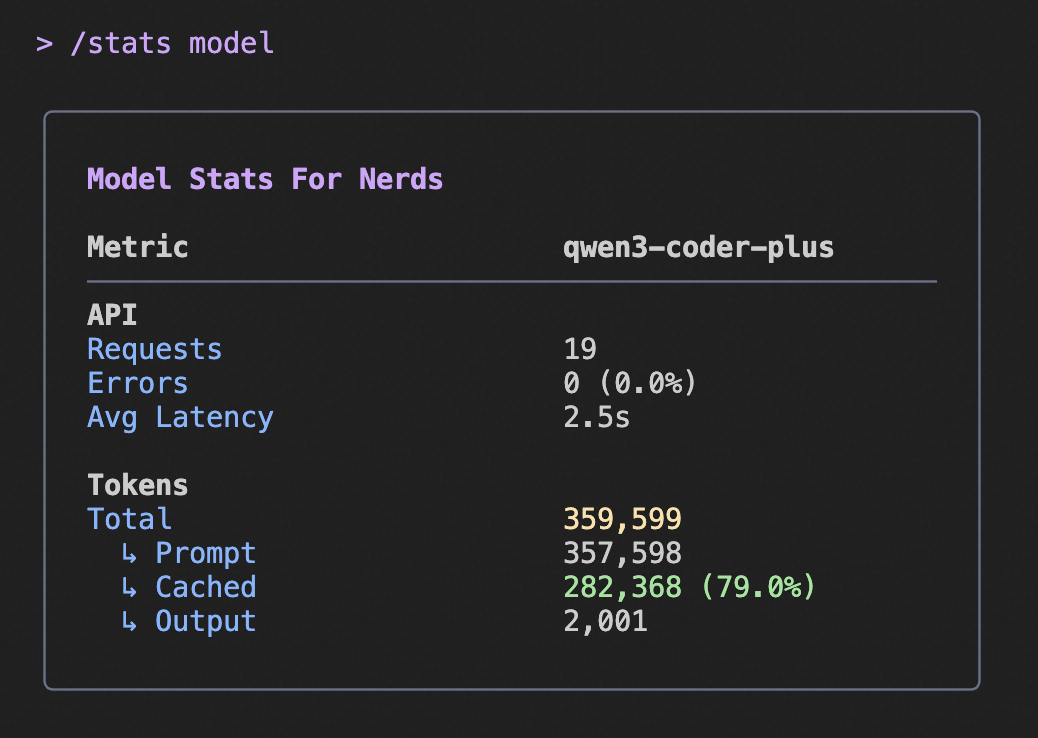
|
|
28
|
-
|
|
29
|
-
The above image shows an example of the `/stats` command output, highlighting the cached token savings information.
|
|
@@ -1,178 +0,0 @@
|
|
|
1
|
-
# Tool-Use Summaries
|
|
2
|
-
|
|
3
|
-
Matilda Code can generate a short, git-commit-subject-style label after each tool batch completes, summarizing what the batch accomplished. The label appears inline in the transcript and replaces the generic `Tool × N` header in compact mode.
|
|
4
|
-
|
|
5
|
-
This is a UX aid for parallel tool calls: when the model fans out into several `Read` + `Grep` + `Bash` calls at once, the summary tells you the intent at a glance instead of forcing you to scan the tool list.
|
|
6
|
-
|
|
7
|
-
The feature is enabled by default and runs silently in the background. It requires a configured [fast model](./followup-suggestions#fast-model).
|
|
8
|
-
|
|
9
|
-
## What You See
|
|
10
|
-
|
|
11
|
-
### Full mode (default)
|
|
12
|
-
|
|
13
|
-
The summary appears as a dim badge line directly below the tool group:
|
|
14
|
-
|
|
15
|
-
```
|
|
16
|
-
╭──────────────────────────────────────────────╮
|
|
17
|
-
│ ✓ ReadFile a.txt │
|
|
18
|
-
│ ✓ ReadFile b.txt │
|
|
19
|
-
│ ✓ ReadFile c.txt │
|
|
20
|
-
│ ✓ ReadFile d.txt │
|
|
21
|
-
╰──────────────────────────────────────────────╯
|
|
22
|
-
|
|
23
|
-
● Read 4 text files
|
|
24
|
-
```
|
|
25
|
-
|
|
26
|
-
### Compact mode (`Ctrl+O` or `ui.compactMode: true`)
|
|
27
|
-
|
|
28
|
-
The label replaces the generic `Tool × N` header in the compact one-liner:
|
|
29
|
-
|
|
30
|
-
```
|
|
31
|
-
╭──────────────────────────────────────────────╮
|
|
32
|
-
│✓ Read txt files · 4 tools │
|
|
33
|
-
│Press Ctrl+O to show full tool output │
|
|
34
|
-
╰──────────────────────────────────────────────╯
|
|
35
|
-
```
|
|
36
|
-
|
|
37
|
-
The individual tool calls are still a keystroke away (`Ctrl+O` to toggle to full mode).
|
|
38
|
-
|
|
39
|
-
## How It Works
|
|
40
|
-
|
|
41
|
-
After a tool batch finalizes, Matilda Code fires a fire-and-forget call to the configured fast model with:
|
|
42
|
-
|
|
43
|
-
- The tool names, truncated arguments, and truncated results (each capped at 300 characters).
|
|
44
|
-
- The assistant's most recent text output (first 200 characters) as an intent prefix.
|
|
45
|
-
- A system prompt instructing the model to return a past-tense, 30-character label in git-commit-subject style.
|
|
46
|
-
|
|
47
|
-
The call runs in parallel with the next turn's API streaming, so its ~1s latency is hidden behind the main model's response. When the label resolves, it is appended to the transcript as a `tool_use_summary` entry.
|
|
48
|
-
|
|
49
|
-
Example labels: `Searched in auth/`, `Fixed NPE in UserService`, `Created signup endpoint`, `Read config.json`, `Ran failing tests`.
|
|
50
|
-
|
|
51
|
-
## When It Appears
|
|
52
|
-
|
|
53
|
-
The summary is generated when **all** of the following are true:
|
|
54
|
-
|
|
55
|
-
- `experimental.emitToolUseSummaries` is `true` (default).
|
|
56
|
-
- A `fastModel` is configured (via settings or `/model --fast`).
|
|
57
|
-
- At least one tool completed in the batch.
|
|
58
|
-
- The turn was not aborted before tool completion.
|
|
59
|
-
- The fast model returned a non-empty, non-error response.
|
|
60
|
-
|
|
61
|
-
Subagent tool calls do not trigger summary generation — only the main session's tool batches do.
|
|
62
|
-
|
|
63
|
-
## When It Doesn't Appear
|
|
64
|
-
|
|
65
|
-
The summary is silently skipped (no error, no UI change) when:
|
|
66
|
-
|
|
67
|
-
- No fast model is configured.
|
|
68
|
-
- The fast model call fails, times out, or returns empty.
|
|
69
|
-
- The model returned an obvious error-message-like string (e.g., `Error: ...`, `I cannot ...`) — filtered out by the client so the UI does not show misleading labels.
|
|
70
|
-
- The turn was aborted (`Ctrl+C`) before the model finished.
|
|
71
|
-
|
|
72
|
-
In all these cases, the tool group renders as it always has.
|
|
73
|
-
|
|
74
|
-
## Fast Model
|
|
75
|
-
|
|
76
|
-
The label is generated using the [fast model](./followup-suggestions#fast-model) — the same model you configure for prompt suggestions and speculative execution. Configure it via:
|
|
77
|
-
|
|
78
|
-
### Via command
|
|
79
|
-
|
|
80
|
-
```
|
|
81
|
-
/model --fast matilda3-coder-flash
|
|
82
|
-
```
|
|
83
|
-
|
|
84
|
-
### Via `settings.json`
|
|
85
|
-
|
|
86
|
-
```json
|
|
87
|
-
{
|
|
88
|
-
"fastModel": "matilda3-coder-flash"
|
|
89
|
-
}
|
|
90
|
-
```
|
|
91
|
-
|
|
92
|
-
When no fast model is configured, summary generation is skipped entirely — the feature has no effect until you set one up.
|
|
93
|
-
|
|
94
|
-
## Configuration
|
|
95
|
-
|
|
96
|
-
These settings can be configured in `settings.json`:
|
|
97
|
-
|
|
98
|
-
| Setting | Type | Default | Description |
|
|
99
|
-
| ----------------------------------- | ------- | ------- | -------------------------------------------------------------------------------------------------- |
|
|
100
|
-
| `experimental.emitToolUseSummaries` | boolean | `true` | Master switch for summary generation. Turn off to disable the extra fast-model call. |
|
|
101
|
-
| `fastModel` | string | `""` | Fast model used for summary generation (shared with prompt suggestions). Required; no-op if empty. |
|
|
102
|
-
|
|
103
|
-
### Environment override
|
|
104
|
-
|
|
105
|
-
`MATILDA_CODE_EMIT_TOOL_USE_SUMMARIES` overrides the `experimental.emitToolUseSummaries` setting for the current session:
|
|
106
|
-
|
|
107
|
-
- `MATILDA_CODE_EMIT_TOOL_USE_SUMMARIES=0` or `=false` — force off.
|
|
108
|
-
- `MATILDA_CODE_EMIT_TOOL_USE_SUMMARIES=1` or `=true` — force on.
|
|
109
|
-
- Unset — use the `experimental.emitToolUseSummaries` setting.
|
|
110
|
-
|
|
111
|
-
### Example
|
|
112
|
-
|
|
113
|
-
```json
|
|
114
|
-
{
|
|
115
|
-
"fastModel": "matilda3-coder-flash",
|
|
116
|
-
"experimental": {
|
|
117
|
-
"emitToolUseSummaries": true
|
|
118
|
-
}
|
|
119
|
-
}
|
|
120
|
-
```
|
|
121
|
-
|
|
122
|
-
## Scope & lifecycle
|
|
123
|
-
|
|
124
|
-
Three points that tend to trip up a first read of this feature:
|
|
125
|
-
|
|
126
|
-
1. **One generation per batch, shared by both display modes.** The fast-model call happens exactly once in `handleCompletedTools` when a tool batch finalizes. Toggling `Ctrl+O` afterwards does **not** trigger a new call — both modes read from the same `tool_use_summary` history entry that was captured the first time. You can flip compact mode on and off freely without extra cost.
|
|
127
|
-
2. **No backfill on toggle or on session resume.** A `tool_group` that completed before the feature was enabled (or before you flipped the setting on, or in a resumed session — `ChatRecordingService` does not persist summary entries) will never get a label. There is no "sweep existing history" pass. If you turn this setting on mid-session, only _future_ batches will show a label; older groups keep the default rendering with no indicator that a label is missing.
|
|
128
|
-
3. **Main-agent batches only.** The trigger lives in the main session's turn loop (`useGeminiStream`), so:
|
|
129
|
-
- ✅ Shell, MCP, file operations, and the `Task` / subagent tool _call itself_ (as it appears in the main batch) are summarized.
|
|
130
|
-
- ❌ A subagent's **internal** tool batches (run through `packages/core/src/agents/runtime/`) are not summarized.
|
|
131
|
-
|
|
132
|
-
An outer batch that _contains_ a `Task` tool will still be labeled, but the fast model sees only the subagent tool call and its aggregated output — not the individual tool calls inside the subagent. Expect labels like `Ran research-agent` or `Delegated file search` rather than `Searched 14 files`. This is intentional — summarizing subagent internals would multiply the fast-model cost and surface noise that never shows up in the primary UI.
|
|
133
|
-
|
|
134
|
-
## Recommended pairing: enable compact mode
|
|
135
|
-
|
|
136
|
-
For batches of 3+ parallel tool calls, pairing this feature with `ui.compactMode: true` produces the cleanest transcript. The compact view folds the whole batch into a single labeled row (`✓ Read txt files · 4 tools`) instead of showing every tool line plus the trailing summary. Details remain one keystroke away via `Ctrl+O`.
|
|
137
|
-
|
|
138
|
-
```json
|
|
139
|
-
{
|
|
140
|
-
"fastModel": "matilda3-coder-flash",
|
|
141
|
-
"ui": {
|
|
142
|
-
"compactMode": true
|
|
143
|
-
},
|
|
144
|
-
"experimental": {
|
|
145
|
-
"emitToolUseSummaries": true
|
|
146
|
-
}
|
|
147
|
-
}
|
|
148
|
-
```
|
|
149
|
-
|
|
150
|
-
In full mode (the default), the summary renders as a trailing `● <label>` line below the tool group — useful for large or heterogeneous batches, but for small same-type batches (e.g. `Read × 3`) the label can read as a restatement of the visible tool lines. If that matches your usual workflow, either turn compact mode on as above, or turn the summary off entirely via `experimental.emitToolUseSummaries: false`.
|
|
151
|
-
|
|
152
|
-
## Monitoring
|
|
153
|
-
|
|
154
|
-
Summary model usage appears in `/stats` output under the fast-model token totals, with the `prompt_id` `tool_use_summary_generation` so it can be distinguished from prompt suggestions and other background tasks.
|
|
155
|
-
|
|
156
|
-
## Data flow & privacy
|
|
157
|
-
|
|
158
|
-
The summary call sends each successful tool's name, truncated `args`, and truncated result (each field capped at 300 characters) to the **fast model**, plus the first 200 characters of the assistant's most recent text as an intent prefix.
|
|
159
|
-
|
|
160
|
-
If your fast model is configured for the same provider/auth as your main session model, the data flows along the same boundary your main session already uses — no change in trust scope. If you have configured a fast model from a **different provider**, tool inputs and outputs (potentially including file contents read by `read_file`, command output from shell calls, or values surfaced through MCP tools) will be sent to that other provider as part of the summarization prompt. That is a strictly larger data-sharing scope than the main session alone.
|
|
161
|
-
|
|
162
|
-
If this matters for your workflow, you have two clean options:
|
|
163
|
-
|
|
164
|
-
- Configure `fastModel` to a model under the same provider as your main session, so the summary call doesn't cross any new auth/data boundary.
|
|
165
|
-
- Disable the feature entirely with `experimental.emitToolUseSummaries: false` (or `MATILDA_CODE_EMIT_TOOL_USE_SUMMARIES=0`).
|
|
166
|
-
|
|
167
|
-
The 300-character per-field cap limits exposure but does not eliminate it — secrets discovered in tool output during the cap window can still be sent. Treat the fast model's data boundary the same way you treat the main model's.
|
|
168
|
-
|
|
169
|
-
## Cost
|
|
170
|
-
|
|
171
|
-
One fast-model call per qualifying tool batch. Input is a small fixed system prompt plus the truncated tool inputs/outputs (each capped at 300 characters per field). Output is a single short line (capped at 100 characters, typically 20 tokens or fewer). On a typical fast model this is roughly $0.001 per batch.
|
|
172
|
-
|
|
173
|
-
If you do not want the extra cost, turn the feature off via `experimental.emitToolUseSummaries: false` or `MATILDA_CODE_EMIT_TOOL_USE_SUMMARIES=0`.
|
|
174
|
-
|
|
175
|
-
## Related
|
|
176
|
-
|
|
177
|
-
- [Compact Mode](../configuration/settings#ui.compactMode) — toggle with `Ctrl+O`; the summary replaces the generic tool-group header when compact mode is on.
|
|
178
|
-
- [Followup Suggestions](./followup-suggestions) — another fast-model-driven UX enhancement that shares the same `fastModel` setting.
|
|
@@ -1,343 +0,0 @@
|
|
|
1
|
-
# Worktrees
|
|
2
|
-
|
|
3
|
-
> Isolate experimental work in a temporary [git worktree](https://git-scm.com/docs/git-worktree) without leaving your current session. Useful when the model is about to make wide-ranging edits you want to keep separate from your main checkout, or when you want a subagent to work in a sandbox of its own.
|
|
4
|
-
|
|
5
|
-
## Quick Start
|
|
6
|
-
|
|
7
|
-
### Start the session inside a worktree (`--worktree` flag)
|
|
8
|
-
|
|
9
|
-
If you know up front that the entire session should run inside a worktree, pass `--worktree` at launch:
|
|
10
|
-
|
|
11
|
-
```bash
|
|
12
|
-
# Auto-generated slug (e.g. tender-jemison-037f0a)
|
|
13
|
-
matilda --worktree
|
|
14
|
-
|
|
15
|
-
# Explicit name
|
|
16
|
-
matilda --worktree my-feature
|
|
17
|
-
|
|
18
|
-
# `=` form (recommended when also passing a positional prompt — see tip below)
|
|
19
|
-
matilda --worktree=my-feature
|
|
20
|
-
|
|
21
|
-
# PR reference — fetches refs/pull/<N>/head from `origin`
|
|
22
|
-
matilda --worktree=#4174
|
|
23
|
-
matilda --worktree https://github.com/MaincodeHQ/matilda-code/pull/4174
|
|
24
|
-
|
|
25
|
-
# Continue a previous --worktree session — re-attaches to the existing dir
|
|
26
|
-
matilda --resume <session-id> --worktree=my-feature
|
|
27
|
-
```
|
|
28
|
-
|
|
29
|
-
> **Tip — bare `--worktree` followed by a positional prompt is ambiguous.** Because `--worktree` takes an optional value, `matilda --worktree "say hi"` makes yargs consume `"say hi"` as the slug (and reject it because of the space). Use one of:
|
|
30
|
-
>
|
|
31
|
-
> - `matilda --worktree=my-feature "say hi"` (always works — explicit slug via `=`)
|
|
32
|
-
> - `matilda "say hi" --worktree` (positional first, flag at the end → auto slug)
|
|
33
|
-
> - `matilda --worktree --approval-mode yolo "say hi"` (any flag between them anchors the bare form)
|
|
34
|
-
|
|
35
|
-
> **Tip — `matilda --resume --worktree foo` (no session ID) shows an empty picker on first use.** The picker scopes to the chosen worktree's session storage; sessions started outside that worktree are not listed. To resume a session that was started inside `foo`, use `matilda --resume <id> --worktree foo` directly — the CLI re-attaches to the existing `foo/` directory rather than re-creating it.
|
|
36
|
-
|
|
37
|
-
`process.cwd()` and the model's workspace are switched to the worktree before the first turn runs. Exit with `Ctrl+C` twice and the [Exit Dialog](#exit-dialog-ctrlc--ctrld) prompts to keep or remove the worktree.
|
|
38
|
-
|
|
39
|
-
The `--worktree` flag cannot be combined with `--acp`/`--experimental-acp` — for ACP hosts (like Zed), pass the worktree path as the `cwd` of the `loadSession`/`newSession` request instead.
|
|
40
|
-
|
|
41
|
-
### Or ask mid-session
|
|
42
|
-
|
|
43
|
-
Alternatively, ask Matilda Code in plain language to create a worktree from inside an existing session:
|
|
44
|
-
|
|
45
|
-
```text
|
|
46
|
-
> start a worktree called experiment-a
|
|
47
|
-
Worktree experiment-a created on branch worktree-experiment-a
|
|
48
|
-
.matilda/worktrees/experiment-a
|
|
49
|
-
```
|
|
50
|
-
|
|
51
|
-
From this point on, the model routes every file edit and shell command through `.matilda/worktrees/experiment-a/`. Your original working directory is untouched.
|
|
52
|
-
|
|
53
|
-
When you are done:
|
|
54
|
-
|
|
55
|
-
```text
|
|
56
|
-
> exit the worktree and remove it
|
|
57
|
-
Removed worktree experiment-a (branch worktree-experiment-a)
|
|
58
|
-
```
|
|
59
|
-
|
|
60
|
-
If you want to come back later, ask to exit with the worktree kept on disk instead:
|
|
61
|
-
|
|
62
|
-
```text
|
|
63
|
-
> exit the worktree but keep it
|
|
64
|
-
Kept worktree experiment-a at .matilda/worktrees/experiment-a
|
|
65
|
-
```
|
|
66
|
-
|
|
67
|
-
## When Worktrees Are Used
|
|
68
|
-
|
|
69
|
-
Worktrees are activated in four independent paths:
|
|
70
|
-
|
|
71
|
-
| Trigger | What happens |
|
|
72
|
-
| ----------------------------------------------- | ------------------------------------------------------------------------------------------------------------------------------ |
|
|
73
|
-
| You launch with `--worktree` | The CLI creates the worktree before any model turn runs and chdirs the session into it. PR forms (`#N`, full URL) fetch first. |
|
|
74
|
-
| You explicitly ask for a worktree mid-session | Model calls `enter_worktree`; subsequent file edits go inside it. |
|
|
75
|
-
| You explicitly ask to leave | Model calls `exit_worktree` with `keep` or `remove`. |
|
|
76
|
-
| Model spawns a sub-agent with isolation enabled | A throwaway worktree (`agent-<hex>`) is created automatically and cleaned up if the agent has no diffs. |
|
|
77
|
-
|
|
78
|
-
The two mid-session tools (`enter_worktree` / `exit_worktree`) are deliberately gated behind explicit phrasing — saying "fix this bug" or "create a branch" will **not** trigger them. You must say something like "use a worktree", "start a worktree", or "in a worktree". The `--worktree` CLI flag has no such guard; it always creates one when present.
|
|
79
|
-
|
|
80
|
-
## What Gets Created
|
|
81
|
-
|
|
82
|
-
Every Matilda-managed worktree is placed under your project's `.matilda` directory:
|
|
83
|
-
|
|
84
|
-
```
|
|
85
|
-
<repoRoot>/.matilda/worktrees/<slug>/ # Working directory
|
|
86
|
-
↳ branch worktree-<slug> # Created off your current branch
|
|
87
|
-
```
|
|
88
|
-
|
|
89
|
-
- **Slug** — letters, digits, dot, underscore, hyphen; max 64 chars. If you don't specify a name, an `<adjective>-<noun>-<6hex>` slug is auto-generated (e.g. `tender-jemison-037f0a`). PR references produce `pr-<N>`.
|
|
90
|
-
- **Branch** — always `worktree-<slug>`, branched from whichever branch you have checked out when you ask for the worktree (not necessarily the main working tree's `HEAD`). For PR worktrees the branch is `worktree-pr-<N>` and is based on `FETCH_HEAD` (the PR's tip on the GitHub side) rather than your local branch.
|
|
91
|
-
- **Hooks** — the worktree's `core.hooksPath` is automatically pointed at the main repo's `.husky/` (preferred) or `.git/hooks/` so commits inside the worktree still trigger your existing pre-commit / commit-msg hooks.
|
|
92
|
-
- **Optional symlinks** — directories listed in `worktree.symlinkDirectories` (see [Settings](#settings)) are symlinked from the main repo into the new worktree so heavy dirs like `node_modules` can be reused without reinstalling.
|
|
93
|
-
|
|
94
|
-
The general-purpose worktree path is **not configurable** — it must live under `<repoRoot>/.matilda/worktrees/` so the CLI can find it on restart and on stale-cleanup sweeps. (The unrelated `agents.arena.worktreeBaseDir` setting controls only [Agent Arena](./arena.md) worktrees, which use a separate path tree under `~/.matilda/arena/`.)
|
|
95
|
-
|
|
96
|
-
## Footer and Status Line
|
|
97
|
-
|
|
98
|
-
When a worktree is active, the Footer shows a dim indicator on its own row:
|
|
99
|
-
|
|
100
|
-
```
|
|
101
|
-
⎇ worktree-experiment-a (experiment-a)
|
|
102
|
-
```
|
|
103
|
-
|
|
104
|
-
If you use a [custom status line script](./status-line.md), it also receives a `worktree` object in the JSON payload piped to stdin:
|
|
105
|
-
|
|
106
|
-
```json
|
|
107
|
-
{
|
|
108
|
-
"worktree": {
|
|
109
|
-
"name": "experiment-a",
|
|
110
|
-
"path": "/path/to/repo/.matilda/worktrees/experiment-a",
|
|
111
|
-
"branch": "worktree-experiment-a",
|
|
112
|
-
"original_cwd": "/path/to/repo",
|
|
113
|
-
"original_branch": "main"
|
|
114
|
-
}
|
|
115
|
-
}
|
|
116
|
-
```
|
|
117
|
-
|
|
118
|
-
The payload field is present **only** when a worktree is active, so a `null`-check (`input.worktree?.name`) is enough.
|
|
119
|
-
|
|
120
|
-
If your custom status line already renders worktree info, you can hide the built-in Footer row to avoid duplication — see [Settings](#settings) below.
|
|
121
|
-
|
|
122
|
-
## Exit Dialog (Ctrl+C / Ctrl+D)
|
|
123
|
-
|
|
124
|
-
Pressing the quit shortcut twice while a worktree is active opens the **Worktree Exit Dialog** instead of closing the CLI:
|
|
125
|
-
|
|
126
|
-
```
|
|
127
|
-
⎇ Active worktree: "experiment-a" (worktree-experiment-a)
|
|
128
|
-
|
|
129
|
-
• 2 new commit(s) on worktree-experiment-a
|
|
130
|
-
• 3 uncommitted file(s)
|
|
131
|
-
Removing the worktree will discard everything above.
|
|
132
|
-
|
|
133
|
-
What would you like to do?
|
|
134
|
-
○ Keep worktree (exit without deleting)
|
|
135
|
-
○ Remove worktree and branch (discards 2 commit(s), 3 file(s))
|
|
136
|
-
○ Cancel (stay in session)
|
|
137
|
-
```
|
|
138
|
-
|
|
139
|
-
The dialog inspects the worktree on open (`git status --porcelain` + `git rev-list <baseHEAD>..HEAD`) and surfaces both counts so you know exactly what you'd be discarding. `ESC` cancels.
|
|
140
|
-
|
|
141
|
-
If `git status` itself fails (e.g. corrupt index, worktree directory was removed under the CLI), the dialog shows a `⚠ Could not measure worktree state` warning and the counts may be unreliable — choose **Keep** or **Cancel** until you've diagnosed the underlying repo problem.
|
|
142
|
-
|
|
143
|
-
## `--resume` Restore
|
|
144
|
-
|
|
145
|
-
The active worktree binding is persisted to a sidecar file alongside your session transcript:
|
|
146
|
-
|
|
147
|
-
```
|
|
148
|
-
<chatsDir>/<sessionId>.worktree.json
|
|
149
|
-
```
|
|
150
|
-
|
|
151
|
-
When you launch the CLI with `--resume <sessionId>` (or pick the session from `/resume`), three things happen consistently across **interactive TUI**, **headless `-p`**, and **ACP/Zed** modes:
|
|
152
|
-
|
|
153
|
-
1. The sidecar is loaded and the worktree directory is verified to still exist on disk.
|
|
154
|
-
2. If alive, the model receives a one-shot reminder on its very next prompt:
|
|
155
|
-
```
|
|
156
|
-
[Resumed] Active worktree: "<slug>" at <path> (branch: <branch>). Continue using this path for all file operations.
|
|
157
|
-
```
|
|
158
|
-
3. If the worktree directory was deleted between sessions, the stale sidecar is cleaned up automatically — no error, the resume just continues without worktree context.
|
|
159
|
-
|
|
160
|
-
Each mode chooses its own injection mechanism, but the user-visible behavior is identical:
|
|
161
|
-
|
|
162
|
-
| Mode | Mechanism |
|
|
163
|
-
| ----------------- | ------------------------------------------------------------------------------------------------------ |
|
|
164
|
-
| Interactive (TUI) | `INFO` history item + system-reminder prefix on the next user prompt. |
|
|
165
|
-
| Headless (`-p`) | `<system-reminder>` prefix on the prompt + `worktree_restored` JSON system event in the output stream. |
|
|
166
|
-
| ACP (e.g. Zed) | Pending notice attached to the next `prompt()` call. |
|
|
167
|
-
|
|
168
|
-
The model is **not** automatically `chdir`'d into the worktree — the reminder is what keeps it routing edits through the worktree path.
|
|
169
|
-
|
|
170
|
-
## Sub-Agent Isolation
|
|
171
|
-
|
|
172
|
-
The `agent` tool accepts an optional `isolation: "worktree"` parameter. When set, Matilda Code creates an ephemeral worktree at `<repoRoot>/.matilda/worktrees/agent-<7hex>/` before the sub-agent starts, and:
|
|
173
|
-
|
|
174
|
-
- **No changes** → the worktree is automatically removed when the agent finishes.
|
|
175
|
-
- **Has changes** → the worktree is preserved; its path and branch are appended to the agent's result, e.g.
|
|
176
|
-
```
|
|
177
|
-
…agent output…
|
|
178
|
-
[worktree preserved: /path/to/.matilda/worktrees/agent-3f2a1b9 (branch worktree-agent-3f2a1b9)]
|
|
179
|
-
```
|
|
180
|
-
Review the diff and merge or delete it manually.
|
|
181
|
-
|
|
182
|
-
Two constraints:
|
|
183
|
-
|
|
184
|
-
- `isolation: "worktree"` requires a `subagent_type` — forked sub-agents (no `subagent_type`) reuse the parent's full conversation context, so isolating them would split intent from working tree.
|
|
185
|
-
- Background agents (`run_in_background: true`) work fine with isolation; the cleanup runs when the agent reports completion.
|
|
186
|
-
|
|
187
|
-
### Automatic Stale Cleanup
|
|
188
|
-
|
|
189
|
-
Ephemeral agent worktrees that survived a crash or `--no-cleanup` shutdown are reaped on every CLI startup, with conservative fail-closed rules:
|
|
190
|
-
|
|
191
|
-
| Guard | Behavior |
|
|
192
|
-
| -------------------------------------- | ---------------------------------------------- |
|
|
193
|
-
| Slug must match `agent-<7hex>` pattern | Named worktrees you created are never touched. |
|
|
194
|
-
| Directory `mtime` > 30 days | Newer entries are skipped. |
|
|
195
|
-
| Any uncommitted tracked change | Skip the entry (don't delete). |
|
|
196
|
-
| Any commit not reachable from a remote | Skip the entry (don't delete). |
|
|
197
|
-
| Any error reading git state | Skip the entry (don't delete). |
|
|
198
|
-
|
|
199
|
-
Named user worktrees (`enter_worktree` slugs) are **never** auto-cleaned — you keep them around until you ask to remove them.
|
|
200
|
-
|
|
201
|
-
## Safety Guards on `exit_worktree action="remove"`
|
|
202
|
-
|
|
203
|
-
Three independent guards trigger before the directory and branch are deleted:
|
|
204
|
-
|
|
205
|
-
1. **Session ownership** — each worktree carries a sidecar marker with the session ID that created it. A different session trying to remove it is refused with a clear error pointing at `git worktree remove` for the manual escape hatch.
|
|
206
|
-
2. **Dirty working tree** — uncommitted tracked or untracked changes block removal. Pass `discard_changes: true` to override. (Bypass requires explicit user confirmation — `action: "remove"` is never auto-approved in AUTO_EDIT mode.)
|
|
207
|
-
3. **Unmerged commits** — commits on `worktree-<slug>` that no other local branch or remote ref points at block removal unconditionally; there is no "discard commits" flag because losing committed work is rarely what users mean. Merge, push, or rename the branch elsewhere first.
|
|
208
|
-
|
|
209
|
-
The same three guards apply to the `WorktreeExitDialog → Remove` button.
|
|
210
|
-
|
|
211
|
-
## Settings
|
|
212
|
-
|
|
213
|
-
Two settings shape the general-purpose worktree experience:
|
|
214
|
-
|
|
215
|
-
| Key | Type | Default | Effect |
|
|
216
|
-
| --------------------------------- | ---------- | ----------- | -------------------------------------------------------------------------------------------------------------------------------------------------------------------------------------------------------------------------------------------------------------------------- |
|
|
217
|
-
| `ui.hideBuiltinWorktreeIndicator` | boolean | `false` | Hides the built-in `⎇ worktree-… (…)` Footer row. The `worktree` field is still delivered to custom status line scripts. Set to `true` only if your status line already renders the worktree — otherwise you lose all UI affordance. |
|
|
218
|
-
| `worktree.symlinkDirectories` | `string[]` | `undefined` | Directories under the main repo to symlink into every general-purpose worktree on creation. Paths are relative to the repo root; absolute paths and any entry containing `..` are rejected. Missing sources and existing destinations are silently skipped (no overwrite). |
|
|
219
|
-
|
|
220
|
-
Example:
|
|
221
|
-
|
|
222
|
-
```jsonc
|
|
223
|
-
// ~/.matilda/settings.json or <repo>/.matilda/settings.json
|
|
224
|
-
{
|
|
225
|
-
"worktree": {
|
|
226
|
-
"symlinkDirectories": ["node_modules", ".turbo", "dist"],
|
|
227
|
-
},
|
|
228
|
-
}
|
|
229
|
-
```
|
|
230
|
-
|
|
231
|
-
Applies to ALL worktree-creation paths: `--worktree` flag, `enter_worktree` tool, and `agent isolation: "worktree"`.
|
|
232
|
-
|
|
233
|
-
Settings unrelated to general worktrees but worth knowing about:
|
|
234
|
-
|
|
235
|
-
- `agents.arena.worktreeBaseDir` — controls **Agent Arena** worktree placement (default `~/.matilda/arena`). Does not affect general-purpose worktrees, which always live under `<repoRoot>/.matilda/worktrees/`.
|
|
236
|
-
|
|
237
|
-
There is no schema for `worktree.sparsePaths` yet — that's a roadmap item (see [Limitations](#limitations)).
|
|
238
|
-
|
|
239
|
-
## Tool Reference
|
|
240
|
-
|
|
241
|
-
### `enter_worktree`
|
|
242
|
-
|
|
243
|
-
```json
|
|
244
|
-
{ "name": "experiment-a" }
|
|
245
|
-
```
|
|
246
|
-
|
|
247
|
-
| Field | Type | Required | Notes |
|
|
248
|
-
| ------ | ------ | -------- | ------------------------------------------------------------------------------------------ |
|
|
249
|
-
| `name` | string | no | Slug. Letters, digits, dot, underscore, hyphen; max 64 chars. Auto-generated when omitted. |
|
|
250
|
-
|
|
251
|
-
Refuses to run when:
|
|
252
|
-
|
|
253
|
-
- The CLI is not in a git repository.
|
|
254
|
-
- The current working directory is already inside `.matilda/worktrees/` (no nested worktrees).
|
|
255
|
-
|
|
256
|
-
### `exit_worktree`
|
|
257
|
-
|
|
258
|
-
```json
|
|
259
|
-
{ "name": "experiment-a", "action": "remove", "discard_changes": false }
|
|
260
|
-
```
|
|
261
|
-
|
|
262
|
-
| Field | Type | Required | Notes |
|
|
263
|
-
| ----------------- | ---------------------- | ------------------------------------- | ------------------------------------------------------------------ |
|
|
264
|
-
| `name` | string | yes | Must match the slug used in `enter_worktree`. |
|
|
265
|
-
| `action` | `"keep"` \| `"remove"` | yes | `keep` preserves dir + branch; `remove` deletes both. |
|
|
266
|
-
| `discard_changes` | boolean | only when `action="remove"` and dirty | Overrides the dirty-tree guard. Has no effect for `action="keep"`. |
|
|
267
|
-
|
|
268
|
-
`action: "remove"` always prompts for confirmation, including under `AUTO_EDIT` approval mode — it is treated as a destructive shell operation, not an info-only tool.
|
|
269
|
-
|
|
270
|
-
### `agent` — `isolation` parameter
|
|
271
|
-
|
|
272
|
-
```json
|
|
273
|
-
{
|
|
274
|
-
"subagent_type": "my-agent",
|
|
275
|
-
"description": "…",
|
|
276
|
-
"prompt": "…",
|
|
277
|
-
"isolation": "worktree"
|
|
278
|
-
}
|
|
279
|
-
```
|
|
280
|
-
|
|
281
|
-
| Field | Type | Required | Notes |
|
|
282
|
-
| ----------- | ------------ | -------- | ------------------------------------------------------------------------------------------------- |
|
|
283
|
-
| `isolation` | `"worktree"` | no | Runs the agent in a fresh `agent-<7hex>` worktree. Requires `subagent_type` to be set (no forks). |
|
|
284
|
-
|
|
285
|
-
See [Sub-Agents](./sub-agents.md) for the rest of the agent tool reference.
|
|
286
|
-
|
|
287
|
-
## CLI Reference
|
|
288
|
-
|
|
289
|
-
### `--worktree [name | #N | url]`
|
|
290
|
-
|
|
291
|
-
```bash
|
|
292
|
-
matilda --worktree # auto-generate slug
|
|
293
|
-
matilda --worktree my-feature # explicit slug
|
|
294
|
-
matilda --worktree=my-feature # = form
|
|
295
|
-
matilda --worktree=#123 # PR reference
|
|
296
|
-
matilda --worktree https://github.com/owner/repo/pull/123 # PR URL
|
|
297
|
-
```
|
|
298
|
-
|
|
299
|
-
| Input | Result |
|
|
300
|
-
| ----------------------------- | --------------------------------------------------------------------------------------------------------------------- |
|
|
301
|
-
| Bare flag (no value) | Auto slug `<adjective>-<noun>-<6hex>`, branch `worktree-<slug>`, base = current branch. |
|
|
302
|
-
| Plain slug | Branch `worktree-<slug>`, base = current branch. Slug validation: letters/digits/dot/underscore/hyphen, max 64 chars. |
|
|
303
|
-
| `#N` or `<github-url>/pull/N` | Slug `pr-<N>`, branch `worktree-pr-<N>`, base = `FETCH_HEAD` after `git fetch origin pull/<N>/head` (30s timeout). |
|
|
304
|
-
|
|
305
|
-
`--worktree` cannot be combined with `--acp` / `--experimental-acp`.
|
|
306
|
-
|
|
307
|
-
When `--worktree` is combined with `--resume <session-id>`, the worktree wins: the resumed session's saved worktree (if any) is overridden and a stderr line + first-prompt reminder report the override.
|
|
308
|
-
|
|
309
|
-
For interactive (TUI) and headless (`-p`) modes the worktree is automatically created and the session chdirs into it before the first turn.
|
|
310
|
-
|
|
311
|
-
PR-fetch failure modes (exit code != 0, no worktree created):
|
|
312
|
-
|
|
313
|
-
| Cause | Message excerpt |
|
|
314
|
-
| ----------------------------- | ---------------------------------------------------------- |
|
|
315
|
-
| Missing `origin` remote | `requires an "origin" remote that points at GitHub` |
|
|
316
|
-
| PR doesn't exist on origin | `Failed to fetch PR #<N>: the PR does not exist on origin` |
|
|
317
|
-
| 30s network timeout | `Failed to fetch PR #<N>: timed out after 30s` |
|
|
318
|
-
| PR number out of range / zero | `Invalid PR number` |
|
|
319
|
-
|
|
320
|
-
## Limitations
|
|
321
|
-
|
|
322
|
-
The following items are intentionally not implemented in the current phase:
|
|
323
|
-
|
|
324
|
-
- **No sparse checkout.** Large monorepos check out the full tree. (`worktree.sparsePaths` is a roadmap item.)
|
|
325
|
-
- **No tmux integration.** The CLI does not spawn worktree sessions in new tmux windows.
|
|
326
|
-
- **Worktrees are separate "projects" for session storage.** Sessions started with `--worktree foo` are saved under that worktree's chats dir; to resume them later you must pass `--worktree foo` again. Sessions started without `--worktree` are saved under the main checkout and won't appear in the worktree's resume picker.
|
|
327
|
-
- **No cross-slug session override.** `matilda --resume <sid> --worktree second` where `<sid>` was created with `--worktree first` will fail to find the session — sessions and worktrees are tightly bound by `projectHash(cwd)`. To switch worktrees on an existing session you must exit, then re-launch with the new `--worktree` and a fresh prompt. A future architectural change (anchoring storage at the repo root instead of `cwd`) would lift this constraint.
|
|
328
|
-
- **Mid-session `enter_worktree` does NOT switch `process.cwd()` or `Config.targetDir`.** That tool uses the model-context-only convention (see [Sub-Agents](./sub-agents.md)). Only the startup `--worktree` flag actually switches the process working directory.
|
|
329
|
-
- **Relative paths in other arg fields are resolved BEFORE the worktree chdir.** Path-taking flags (`--mcp-config`, `--openai-logging-dir`, `--json-file`, `--input-file`, `--telemetry-outfile`, `--include-directories`) are normalized to absolute paths against the launch cwd when `--worktree` is set. Other path-shaped argv fields not in this list still resolve against the worktree cwd — use absolute paths to be safe.
|
|
330
|
-
|
|
331
|
-
## Troubleshooting
|
|
332
|
-
|
|
333
|
-
**The Footer shows no worktree indicator even though I just created one.**
|
|
334
|
-
Check that `ui.hideBuiltinWorktreeIndicator` is not set to `true`. Also confirm the slug is non-empty in the tool's success message.
|
|
335
|
-
|
|
336
|
-
**`--resume` does not restore my worktree.**
|
|
337
|
-
Check `<chatsDir>/<sessionId>.worktree.json` exists. The CLI deletes the sidecar automatically when the worktree directory is gone, so a missing sidecar plus a missing directory is the normal "no worktree to restore" state — not a bug. Run with `--debug` and grep for `restoreWorktreeContext` to see the reason.
|
|
338
|
-
|
|
339
|
-
**`exit_worktree` says "created by a different session".**
|
|
340
|
-
This is the session-ownership guard. Resume the original session and exit from there, or run the suggested `git worktree remove …` command manually.
|
|
341
|
-
|
|
342
|
-
**Stale `agent-<hex>` worktrees keep piling up.**
|
|
343
|
-
The 30-day cutoff is conservative; sweep manually with `git worktree list && git worktree remove <path>`, or wait — the next CLI startup after the 30-day mark will reap them as long as they are clean and pushed.
|