@maincode-ai/matilda-code 0.21.12 → 0.21.13
This diff represents the content of publicly available package versions that have been released to one of the supported registries. The information contained in this diff is provided for informational purposes only and reflects changes between package versions as they appear in their respective public registries.
- package/bundled/mainy/docs/configuration/model-providers.md +0 -82
- package/bundled/mainy/docs/configuration/settings.md +30 -2
- package/bundled/mainy/docs/features/auto-mode.md +1 -1
- package/bundled/mainy/docs/features/channels/_meta.ts +0 -3
- package/bundled/mainy/docs/features/channels/overview.md +8 -16
- package/bundled/mainy/docs/features/commands.md +4 -4
- package/bundled/mainy/docs/features/hooks.md +9 -7
- package/bundled/mainy/docs/features/language.md +2 -29
- package/bundled/mainy/docs/features/worktree.md +0 -2
- package/bundled/mainy/docs/integration-github-action.md +3 -3
- package/bundled/mainy/docs/quickstart.md +2 -2
- package/bundled/mainy/docs/support/troubleshooting.md +1 -1
- package/chunks/agent-SRAIVZEE.js +3 -0
- package/chunks/agent-headless-XRDOZESG.js +3 -0
- package/chunks/{anthropicContentGenerator-VKFTAIU3.js → anthropicContentGenerator-LLDIKDMQ.js} +3 -3
- package/chunks/{askUserQuestion-2QI4NSFJ.js → askUserQuestion-BNSWGD26.js} +1 -1
- package/chunks/{ca-I2HEEIL7.js → ca-NPYL24ME.js} +2 -2
- package/chunks/{chunk-YJAKOETP.js → chunk-27HUYW23.js} +2 -2
- package/chunks/{chunk-EQGA7LH7.js → chunk-3B2HABK7.js} +1 -1
- package/chunks/{chunk-CSJTA7NE.js → chunk-3MTZTNAU.js} +18 -18
- package/chunks/{chunk-YRQP3SLC.js → chunk-5OHGYMKP.js} +1 -1
- package/chunks/chunk-6I6VGTKD.js +8 -0
- package/chunks/{chunk-MCQUPLRE.js → chunk-6M5G5FBH.js} +1 -1
- package/chunks/chunk-7ZODGQO6.js +4 -0
- package/chunks/chunk-AOOZREGV.js +9 -0
- package/chunks/chunk-DHDD5YJC.js +207 -0
- package/chunks/{chunk-WV3IUPZS.js → chunk-EZDV7A76.js} +1 -1
- package/chunks/{chunk-QVCGLQCI.js → chunk-IJEGHQ7Z.js} +3 -3
- package/chunks/{chunk-5C2RJ5RR.js → chunk-LWARA7JY.js} +1 -1
- package/chunks/{chunk-VTGICC67.js → chunk-MEV5XQI2.js} +1 -1
- package/chunks/{chunk-DOOFGSRV.js → chunk-P5TG5CON.js} +1 -1
- package/chunks/{chunk-JRECUFB3.js → chunk-PEKAUGYV.js} +552 -561
- package/chunks/chunk-PGUG43HG.js +24 -0
- package/chunks/{chunk-CZGZ3KK7.js → chunk-QZI2ZGZY.js} +1 -1
- package/chunks/chunk-RI54U73U.js +56 -0
- package/chunks/chunk-RPFSFS7Z.js +39 -0
- package/chunks/chunk-SOEIVSM5.js +113 -0
- package/chunks/{chunk-4J6DC24J.js → chunk-SVSY6AWS.js} +1 -1
- package/chunks/{chunk-6E766NPX.js → chunk-TWJLOEAI.js} +1 -1
- package/chunks/{chunk-HYVP4472.js → chunk-V6UPUMP3.js} +1 -1
- package/chunks/chunk-W4QSMIWO.js +9 -0
- package/chunks/chunk-ZX34M2GF.js +14 -0
- package/chunks/{computer-use-WKDNUTLD.js → computer-use-J4GAM4M6.js} +1 -1
- package/chunks/contextCommand-5F5M7NA4.js +3 -0
- package/chunks/{cron-create-F2LXM2OA.js → cron-create-IDWSZENI.js} +1 -1
- package/chunks/{cron-delete-DE6Q2S2L.js → cron-delete-NQCDZDUI.js} +1 -1
- package/chunks/{cron-list-IAQEJVV7.js → cron-list-Z4XMC3TO.js} +1 -1
- package/chunks/{de-AQXFJYZI.js → de-34YZHGC6.js} +2 -2
- package/chunks/{devtools-5JRKK3E7.js → devtools-XRQ4YJ5S.js} +1 -1
- package/chunks/{dist-P6SLWL5V.js → dist-PH6JW7XD.js} +1 -1
- package/chunks/{edit-QQNJZ55P.js → edit-X2S2ZXRN.js} +1 -1
- package/chunks/{en-EJLDYIBM.js → en-QLGMD6OS.js} +3 -3
- package/chunks/{enter-worktree-5X5SAMBJ.js → enter-worktree-TUCGNCLO.js} +1 -1
- package/chunks/{enterPlanMode-HP35SPLN.js → enterPlanMode-SQEZAAIR.js} +1 -1
- package/chunks/{exit-worktree-SRKZBEYF.js → exit-worktree-7FLITFZI.js} +1 -1
- package/chunks/{exitPlanMode-WSPTGGVN.js → exitPlanMode-O5UUJ3GM.js} +1 -1
- package/chunks/{fr-6TDHK7F2.js → fr-EDNBQACJ.js} +3 -3
- package/chunks/geminiContentGenerator-FIZFLPU3.js +8 -0
- package/chunks/glob-GSFTYAS2.js +22 -0
- package/chunks/{goal-tools-C6BSBHCF.js → goal-tools-YQOA6OKU.js} +1 -1
- package/chunks/{grep-MVCOBUYW.js → grep-VAB2VSXM.js} +1 -1
- package/chunks/{ja-GGNJR7AR.js → ja-LV4RLM3M.js} +2 -2
- package/chunks/{ls-JYJXFSXN.js → ls-IZJ3CKZY.js} +1 -1
- package/chunks/{lsp-DYDK6XCS.js → lsp-NGLDRHZU.js} +1 -1
- package/chunks/matildaAgentContentGenerator-QQHPCFJ5.js +8 -0
- package/chunks/matildaContentGenerator-W7Z33ONU.js +8 -0
- package/chunks/mcp-client-DXUNIEIB.js +3 -0
- package/chunks/monitor-4PFIGAGG.js +32 -0
- package/chunks/notebook-edit-MWJYAATJ.js +17 -0
- package/chunks/{openaiContentGenerator-2EALAM3U.js → openaiContentGenerator-NDVJL6QL.js} +1 -1
- package/chunks/{pt-D6L2QTDM.js → pt-5SQ4DGL7.js} +2 -2
- package/chunks/read-file-WPZKPXWA.js +3 -0
- package/chunks/ripGrep-7LZDZFTX.js +3 -0
- package/chunks/{ru-BNJCHDYO.js → ru-7K24S53N.js} +2 -2
- package/chunks/scheduler-DK2MVKXX.js +8 -0
- package/chunks/{send-message-P3SMWNEE.js → send-message-TCPX5UDU.js} +1 -1
- package/chunks/{serve-FXH6EBQ6.js → serve-GSZPJI2O.js} +59 -48
- package/chunks/shell-PRS47PDP.js +3 -0
- package/chunks/{skill-HZPFEAPF.js → skill-ETQM5NI3.js} +1 -1
- package/chunks/src-UB7DZRYK.js +3 -0
- package/chunks/{symbol-search-EAIZPWN7.js → symbol-search-HARHZ5AH.js} +1 -1
- package/chunks/{syntheticOutput-432LXITX.js → syntheticOutput-WZDPECYS.js} +1 -1
- package/chunks/task-create-XRNIDT4T.js +3 -0
- package/chunks/{task-detach-XMSJ3HBM.js → task-detach-TBAVUOTC.js} +1 -1
- package/chunks/task-list-Z6BDZZID.js +9 -0
- package/chunks/{task-stop-NTS62FLG.js → task-stop-HDSARSJ6.js} +1 -1
- package/chunks/{task-update-AR26UFYZ.js → task-update-MW2VT2XV.js} +1 -1
- package/chunks/{team-create-PYXFVIR5.js → team-create-VMYNLZCC.js} +1 -1
- package/chunks/team-delete-F7QDC2TE.js +8 -0
- package/chunks/{todoWrite-5NZ7CHTC.js → todoWrite-SCF5M24M.js} +1 -1
- package/chunks/{tool-search-RKZDSRYS.js → tool-search-WX6FOE35.js} +1 -1
- package/chunks/{web-fetch-VW3SVDQ6.js → web-fetch-CKYBHGLF.js} +1 -1
- package/chunks/{web-search-XQUIZARL.js → web-search-67DFNS5V.js} +1 -1
- package/chunks/{workflow-YXNXDRWZ.js → workflow-WBSRQG3N.js} +2 -2
- package/chunks/write-file-S5FAX4JJ.js +15 -0
- package/cli.js +436 -439
- package/locales/ca.js +0 -3
- package/locales/de.js +0 -3
- package/locales/en.js +0 -3
- package/locales/fr.js +0 -3
- package/locales/ja.js +0 -3
- package/locales/pt.js +0 -3
- package/locales/ru.js +0 -3
- package/package.json +2 -2
- package/sandbox-macos-permissive-closed.sb +0 -1
- package/sandbox-macos-permissive-open.sb +0 -1
- package/sandbox-macos-permissive-proxied.sb +0 -1
- package/sandbox-macos-restrictive-closed.sb +0 -1
- package/sandbox-macos-restrictive-open.sb +0 -1
- package/sandbox-macos-restrictive-proxied.sb +0 -1
- package/bundled/mainy/docs/features/channels/dingtalk.md +0 -134
- package/bundled/mainy/docs/features/channels/feishu.md +0 -186
- package/bundled/mainy/docs/features/channels/weixin.md +0 -106
- package/chunks/agent-WM63A6NK.js +0 -3
- package/chunks/agent-headless-QIUBDKPW.js +0 -3
- package/chunks/chunk-2MOGYHWM.js +0 -8
- package/chunks/chunk-3IRGBRSP.js +0 -113
- package/chunks/chunk-6GBNB5Z2.js +0 -3
- package/chunks/chunk-6Z2MV7ZY.js +0 -186
- package/chunks/chunk-BVOCFLC4.js +0 -56
- package/chunks/chunk-FPO57O66.js +0 -39
- package/chunks/chunk-LJR4RZZ2.js +0 -3
- package/chunks/chunk-MO2HXJG5.js +0 -9
- package/chunks/chunk-PA6532AY.js +0 -6
- package/chunks/chunk-S3CWEVTS.js +0 -15
- package/chunks/chunk-U347OO7S.js +0 -9
- package/chunks/chunk-UIRBHC5X.js +0 -3
- package/chunks/chunk-WVY2P6WH.js +0 -26
- package/chunks/chunk-WZ75OGYY.js +0 -14
- package/chunks/chunk-XMZIY7XX.js +0 -13
- package/chunks/contextCommand-DAB3HOHY.js +0 -3
- package/chunks/dist-ME6647DQ.js +0 -195
- package/chunks/dist-VG3ZDJ2A.js +0 -28
- package/chunks/dist-YTCHM57U.js +0 -23
- package/chunks/geminiContentGenerator-RJ73DQAP.js +0 -8
- package/chunks/glob-QQ6LGKDX.js +0 -22
- package/chunks/matildaAgentContentGenerator-YUYS4336.js +0 -8
- package/chunks/matildaContentGenerator-O4Z2QPCP.js +0 -8
- package/chunks/mcp-client-RXVQU5VI.js +0 -3
- package/chunks/monitor-77KXDXPR.js +0 -32
- package/chunks/notebook-edit-TKJD2EQZ.js +0 -17
- package/chunks/read-file-3KUAH6ND.js +0 -3
- package/chunks/ripGrep-U2PLKXMY.js +0 -3
- package/chunks/scheduler-J7VU2V5Y.js +0 -8
- package/chunks/shell-PXR2AXDD.js +0 -3
- package/chunks/src-RFAEPLY7.js +0 -3
- package/chunks/task-create-Z3QRCMX4.js +0 -3
- package/chunks/task-list-GXAJW3JP.js +0 -9
- package/chunks/team-delete-OMYVUAQU.js +0 -8
- package/chunks/write-file-XDDLTGSG.js +0 -15
package/locales/ca.js
CHANGED
|
@@ -891,7 +891,6 @@ export default {
|
|
|
891
891
|
'Set LLM output language': "Establir l'idioma de sortida del model",
|
|
892
892
|
'Usage: /language ui [{{options}}]': 'Ús: /language ui [{{options}}]',
|
|
893
893
|
'Usage: /language output <language>': 'Ús: /language output <idioma>',
|
|
894
|
-
'Example: /language output 中文': 'Exemple: /language output 中文',
|
|
895
894
|
'Example: /language output English': 'Exemple: /language output English',
|
|
896
895
|
'Example: /language output 日本語': 'Exemple: /language output 日本語',
|
|
897
896
|
'UI language changed to {{lang}}':
|
|
@@ -1937,8 +1936,6 @@ export default {
|
|
|
1937
1936
|
'Manage extension settings': 'Gestionar la configuració de les extensions',
|
|
1938
1937
|
'Desc:': 'Descripció:',
|
|
1939
1938
|
'Ref:': 'Referència:',
|
|
1940
|
-
'中国 (China)': 'Xina',
|
|
1941
|
-
'中国 (China) - 阿里云百炼': 'Xina - 阿里云百炼',
|
|
1942
1939
|
|
|
1943
1940
|
// Stats Dashboard — Category 2
|
|
1944
1941
|
'Activity Heatmap': "Mapa d'activitat",
|
package/locales/de.js
CHANGED
|
@@ -850,7 +850,6 @@ export default {
|
|
|
850
850
|
'Usage: /language ui [{{options}}]': 'Verwendung: /language ui [{{options}}]',
|
|
851
851
|
'Usage: /language output <language>':
|
|
852
852
|
'Verwendung: /language output <Sprache>',
|
|
853
|
-
'Example: /language output 中文': 'Beispiel: /language output Deutsch',
|
|
854
853
|
'Example: /language output English': 'Beispiel: /language output Englisch',
|
|
855
854
|
'Example: /language output 日本語': 'Beispiel: /language output Japanisch',
|
|
856
855
|
'UI language changed to {{lang}}': 'UI-Sprache geändert zu {{lang}}',
|
|
@@ -1981,8 +1980,6 @@ export default {
|
|
|
1981
1980
|
'Ref:': 'Referenz:',
|
|
1982
1981
|
'Skills:': 'Fähigkeiten:',
|
|
1983
1982
|
remote: 'entfernt',
|
|
1984
|
-
'中国 (China)': 'China',
|
|
1985
|
-
'中国 (China) - 阿里云百炼': 'China - 阿里云百炼',
|
|
1986
1983
|
|
|
1987
1984
|
// Stats Dashboard — Category 2
|
|
1988
1985
|
'Activity Heatmap': 'Aktivitäts-Heatmap',
|
package/locales/en.js
CHANGED
|
@@ -944,7 +944,6 @@ export default {
|
|
|
944
944
|
'Set LLM output language': 'Set LLM output language',
|
|
945
945
|
'Usage: /language ui [{{options}}]': 'Usage: /language ui [{{options}}]',
|
|
946
946
|
'Usage: /language output <language>': 'Usage: /language output <language>',
|
|
947
|
-
'Example: /language output 中文': 'Example: /language output 中文',
|
|
948
947
|
'Example: /language output English': 'Example: /language output English',
|
|
949
948
|
'Example: /language output 日本語': 'Example: /language output 日本語',
|
|
950
949
|
'UI language changed to {{lang}}': 'UI language changed to {{lang}}',
|
|
@@ -1787,7 +1786,6 @@ export default {
|
|
|
1787
1786
|
'Successfully authenticated with Matilda OAuth.',
|
|
1788
1787
|
'Failed to authenticate with Matilda OAuth: {{error}}':
|
|
1789
1788
|
'Failed to authenticate with Matilda OAuth: {{error}}',
|
|
1790
|
-
'中国 (China)': '中国 (China)',
|
|
1791
1789
|
Global: 'Global',
|
|
1792
1790
|
'Select authentication method:': 'Select authentication method:',
|
|
1793
1791
|
'\n=== Authentication Status ===\n': '\n=== Authentication Status ===\n',
|
|
@@ -1805,7 +1803,6 @@ export default {
|
|
|
1805
1803
|
' Type: Free tier (discontinued 2026-04-15)':
|
|
1806
1804
|
' Type: Free tier (discontinued 2026-04-15)',
|
|
1807
1805
|
' Limit: No longer available': ' Limit: No longer available',
|
|
1808
|
-
'中国 (China) - 阿里云百炼': '中国 (China) - 阿里云百炼',
|
|
1809
1806
|
' Region: {{region}}': ' Region: {{region}}',
|
|
1810
1807
|
' Current Model: {{model}}': ' Current Model: {{model}}',
|
|
1811
1808
|
' Config Version: {{version}}': ' Config Version: {{version}}',
|
package/locales/fr.js
CHANGED
|
@@ -915,7 +915,6 @@ export default {
|
|
|
915
915
|
'Utilisation : /language ui [{{options}}]',
|
|
916
916
|
'Usage: /language output <language>':
|
|
917
917
|
'Utilisation : /language output <langue>',
|
|
918
|
-
'Example: /language output 中文': 'Exemple : /language output 中文',
|
|
919
918
|
'Example: /language output English': 'Exemple : /language output English',
|
|
920
919
|
'Example: /language output 日本語': 'Exemple : /language output 日本語',
|
|
921
920
|
'UI language changed to {{lang}}':
|
|
@@ -1826,7 +1825,6 @@ export default {
|
|
|
1826
1825
|
' Type: Free tier (discontinued 2026-04-15)':
|
|
1827
1826
|
' Type : Niveau gratuit (abandonné 2026-04-15)',
|
|
1828
1827
|
' Limit: No longer available': ' Limite : Plus disponible',
|
|
1829
|
-
'中国 (China) - 阿里云百炼': '中国 (Chine) - 阿里云百炼',
|
|
1830
1828
|
' Region: {{region}}': ' Région : {{region}}',
|
|
1831
1829
|
' Current Model: {{model}}': ' Modèle actuel : {{model}}',
|
|
1832
1830
|
' Config Version: {{version}}': ' Version de config : {{version}}',
|
|
@@ -1979,7 +1977,6 @@ export default {
|
|
|
1979
1977
|
Auto: 'Automatique',
|
|
1980
1978
|
Tokens: 'Jetons',
|
|
1981
1979
|
tokens: 'jetons',
|
|
1982
|
-
'中国 (China)': 'Chine',
|
|
1983
1980
|
|
|
1984
1981
|
// Stats Dashboard — Category 2
|
|
1985
1982
|
'Activity Heatmap': "Carte d'activité",
|
package/locales/ja.js
CHANGED
|
@@ -623,7 +623,6 @@ export default {
|
|
|
623
623
|
'Set LLM output language': 'LLM出力言語を設定',
|
|
624
624
|
'Usage: /language ui [{{options}}]': '使い方: /language ui [{{options}}]',
|
|
625
625
|
'Usage: /language output <language>': '使い方: /language output <言語>',
|
|
626
|
-
'Example: /language output 中文': '例: /language output 中文',
|
|
627
626
|
'Example: /language output English': '例: /language output English',
|
|
628
627
|
'Example: /language output 日本語': '例: /language output 日本語',
|
|
629
628
|
'UI language changed to {{lang}}': 'UI言語を {{lang}} に変更しました',
|
|
@@ -1745,8 +1744,6 @@ export default {
|
|
|
1745
1744
|
// === Same-as-English optimization ===
|
|
1746
1745
|
' (not in model registry)': '(モデルレジストリにありません)',
|
|
1747
1746
|
'Attribution: commit': 'コミットの帰属表示',
|
|
1748
|
-
'中国 (China)': '中国',
|
|
1749
|
-
'中国 (China) - 阿里云百炼': '中国 - 阿里云百炼',
|
|
1750
1747
|
|
|
1751
1748
|
// Stats Dashboard — Category 2 (missing from ja)
|
|
1752
1749
|
'Activity Heatmap': 'アクティビティヒートマップ',
|
package/locales/pt.js
CHANGED
|
@@ -853,7 +853,6 @@ export default {
|
|
|
853
853
|
'Set LLM output language': 'Definir idioma de saída do LLM',
|
|
854
854
|
'Usage: /language ui [{{options}}]': 'Uso: /language ui [{{options}}]',
|
|
855
855
|
'Usage: /language output <language>': 'Uso: /language output <idioma>',
|
|
856
|
-
'Example: /language output 中文': 'Exemplo: /language output Português',
|
|
857
856
|
'Example: /language output English': 'Exemplo: /language output Inglês',
|
|
858
857
|
'Example: /language output 日本語': 'Exemplo: /language output Japonês',
|
|
859
858
|
'UI language changed to {{lang}}':
|
|
@@ -1968,8 +1967,6 @@ export default {
|
|
|
1968
1967
|
Status: 'Estado',
|
|
1969
1968
|
'Status:': 'Estado:',
|
|
1970
1969
|
Use: 'Uso',
|
|
1971
|
-
'中国 (China)': 'China',
|
|
1972
|
-
'中国 (China) - 阿里云百炼': 'China - 阿里云百炼',
|
|
1973
1970
|
|
|
1974
1971
|
// Stats Dashboard — Category 2
|
|
1975
1972
|
'Activity Heatmap': 'Mapa de Atividade',
|
package/locales/ru.js
CHANGED
|
@@ -862,7 +862,6 @@ export default {
|
|
|
862
862
|
'Использование: /language ui [{{options}}]',
|
|
863
863
|
'Usage: /language output <language>':
|
|
864
864
|
'Использование: /language output <language>',
|
|
865
|
-
'Example: /language output 中文': 'Пример: /language output 中文',
|
|
866
865
|
'Example: /language output English': 'Пример: /language output English',
|
|
867
866
|
'Example: /language output 日本語': 'Пример: /language output 日本語',
|
|
868
867
|
'UI language changed to {{lang}}': 'Язык интерфейса изменен на {{lang}}',
|
|
@@ -1956,8 +1955,6 @@ export default {
|
|
|
1956
1955
|
// === Same-as-English optimization ===
|
|
1957
1956
|
' (not in model registry)': ' (не в реестре моделей)',
|
|
1958
1957
|
'start server': 'запустить сервер',
|
|
1959
|
-
'中国 (China)': 'Китай',
|
|
1960
|
-
'中国 (China) - 阿里云百炼': 'Китай - 阿里云百炼',
|
|
1961
1958
|
|
|
1962
1959
|
// Stats Dashboard — Category 2
|
|
1963
1960
|
'Activity Heatmap': 'Карта активности',
|
package/package.json
CHANGED
|
@@ -1,6 +1,6 @@
|
|
|
1
1
|
{
|
|
2
2
|
"name": "@maincode-ai/matilda-code",
|
|
3
|
-
"version": "0.21.
|
|
3
|
+
"version": "0.21.13",
|
|
4
4
|
"description": "",
|
|
5
5
|
"type": "module",
|
|
6
6
|
"main": "cli.js",
|
|
@@ -26,7 +26,7 @@
|
|
|
26
26
|
"bundled"
|
|
27
27
|
],
|
|
28
28
|
"config": {
|
|
29
|
-
"sandboxImageUri": "ghcr.io/maincode/matilda-code:0.21.
|
|
29
|
+
"sandboxImageUri": "ghcr.io/maincode/matilda-code:0.21.13"
|
|
30
30
|
},
|
|
31
31
|
"dependencies": {},
|
|
32
32
|
"optionalDependencies": {
|
|
@@ -13,7 +13,6 @@
|
|
|
13
13
|
(subpath (param "RUNTIME_DIR"))
|
|
14
14
|
(subpath (string-append (param "HOME_DIR") "/.npm"))
|
|
15
15
|
(subpath (string-append (param "HOME_DIR") "/.cache"))
|
|
16
|
-
(subpath (string-append (param "HOME_DIR") "/.gitconfig"))
|
|
17
16
|
;; Allow writes to included directories from --include-directories
|
|
18
17
|
(subpath (param "INCLUDE_DIR_0"))
|
|
19
18
|
(subpath (param "INCLUDE_DIR_1"))
|
|
@@ -13,7 +13,6 @@
|
|
|
13
13
|
(subpath (param "RUNTIME_DIR"))
|
|
14
14
|
(subpath (string-append (param "HOME_DIR") "/.npm"))
|
|
15
15
|
(subpath (string-append (param "HOME_DIR") "/.cache"))
|
|
16
|
-
(subpath (string-append (param "HOME_DIR") "/.gitconfig"))
|
|
17
16
|
;; Allow writes to included directories from --include-directories
|
|
18
17
|
(subpath (param "INCLUDE_DIR_0"))
|
|
19
18
|
(subpath (param "INCLUDE_DIR_1"))
|
|
@@ -13,7 +13,6 @@
|
|
|
13
13
|
(subpath (param "RUNTIME_DIR"))
|
|
14
14
|
(subpath (string-append (param "HOME_DIR") "/.npm"))
|
|
15
15
|
(subpath (string-append (param "HOME_DIR") "/.cache"))
|
|
16
|
-
(subpath (string-append (param "HOME_DIR") "/.gitconfig"))
|
|
17
16
|
;; Allow writes to included directories from --include-directories
|
|
18
17
|
(subpath (param "INCLUDE_DIR_0"))
|
|
19
18
|
(subpath (param "INCLUDE_DIR_1"))
|
|
@@ -78,7 +78,6 @@
|
|
|
78
78
|
(subpath (param "RUNTIME_DIR"))
|
|
79
79
|
(subpath (string-append (param "HOME_DIR") "/.npm"))
|
|
80
80
|
(subpath (string-append (param "HOME_DIR") "/.cache"))
|
|
81
|
-
(subpath (string-append (param "HOME_DIR") "/.gitconfig"))
|
|
82
81
|
;; Allow writes to included directories from --include-directories
|
|
83
82
|
(subpath (param "INCLUDE_DIR_0"))
|
|
84
83
|
(subpath (param "INCLUDE_DIR_1"))
|
|
@@ -78,7 +78,6 @@
|
|
|
78
78
|
(subpath (param "RUNTIME_DIR"))
|
|
79
79
|
(subpath (string-append (param "HOME_DIR") "/.npm"))
|
|
80
80
|
(subpath (string-append (param "HOME_DIR") "/.cache"))
|
|
81
|
-
(subpath (string-append (param "HOME_DIR") "/.gitconfig"))
|
|
82
81
|
;; Allow writes to included directories from --include-directories
|
|
83
82
|
(subpath (param "INCLUDE_DIR_0"))
|
|
84
83
|
(subpath (param "INCLUDE_DIR_1"))
|
|
@@ -78,7 +78,6 @@
|
|
|
78
78
|
(subpath (param "RUNTIME_DIR"))
|
|
79
79
|
(subpath (string-append (param "HOME_DIR") "/.npm"))
|
|
80
80
|
(subpath (string-append (param "HOME_DIR") "/.cache"))
|
|
81
|
-
(subpath (string-append (param "HOME_DIR") "/.gitconfig"))
|
|
82
81
|
;; Allow writes to included directories from --include-directories
|
|
83
82
|
(subpath (param "INCLUDE_DIR_0"))
|
|
84
83
|
(subpath (param "INCLUDE_DIR_1"))
|
|
@@ -1,134 +0,0 @@
|
|
|
1
|
-
# DingTalk (Dingtalk)
|
|
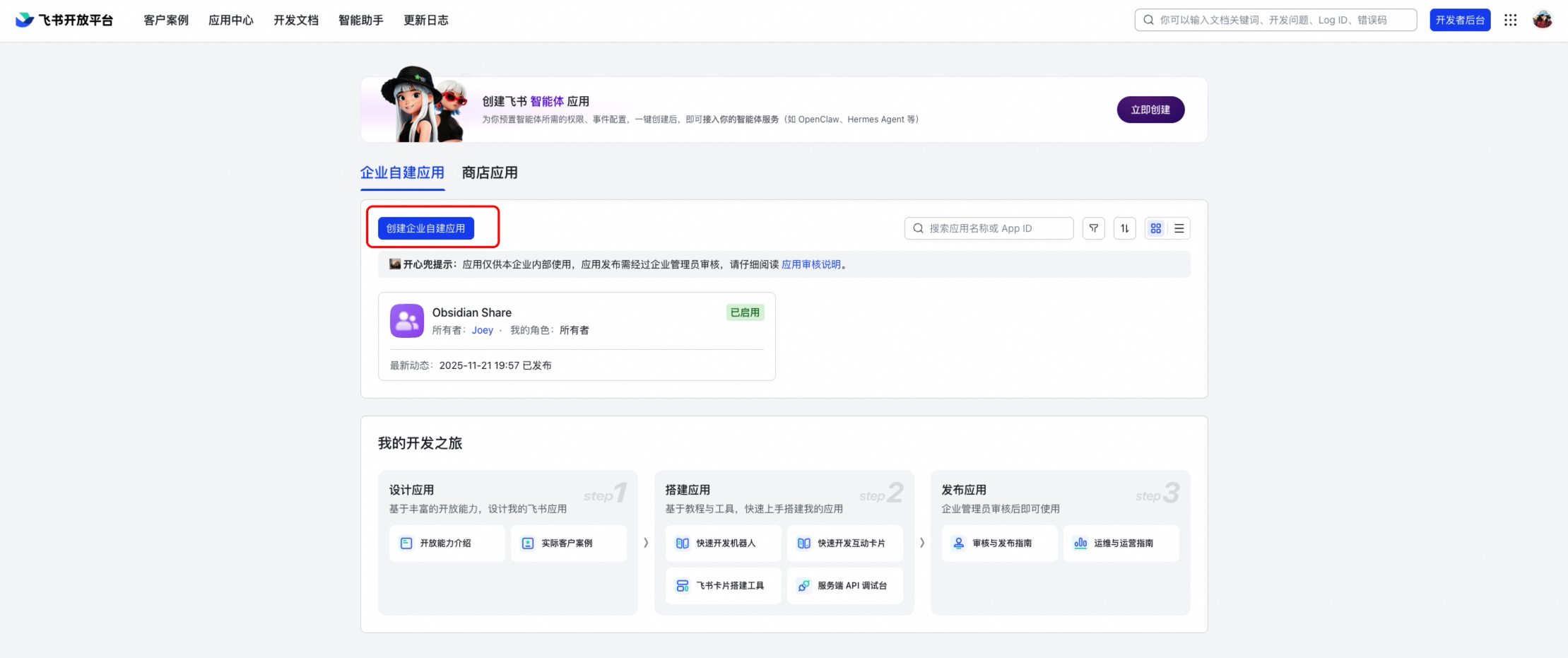
2
|
-
|
|
3
|
-
This guide covers setting up a Matilda Code channel on DingTalk (钉钉).
|
|
4
|
-
|
|
5
|
-
## Prerequisites
|
|
6
|
-
|
|
7
|
-
- A DingTalk organization account
|
|
8
|
-
- A DingTalk bot application with AppKey and AppSecret (see below)
|
|
9
|
-
|
|
10
|
-
## Creating a Bot
|
|
11
|
-
|
|
12
|
-
1. Go to the [DingTalk Developer Portal](https://open-dev.dingtalk.com)
|
|
13
|
-
2. Create a new application (or use an existing one)
|
|
14
|
-
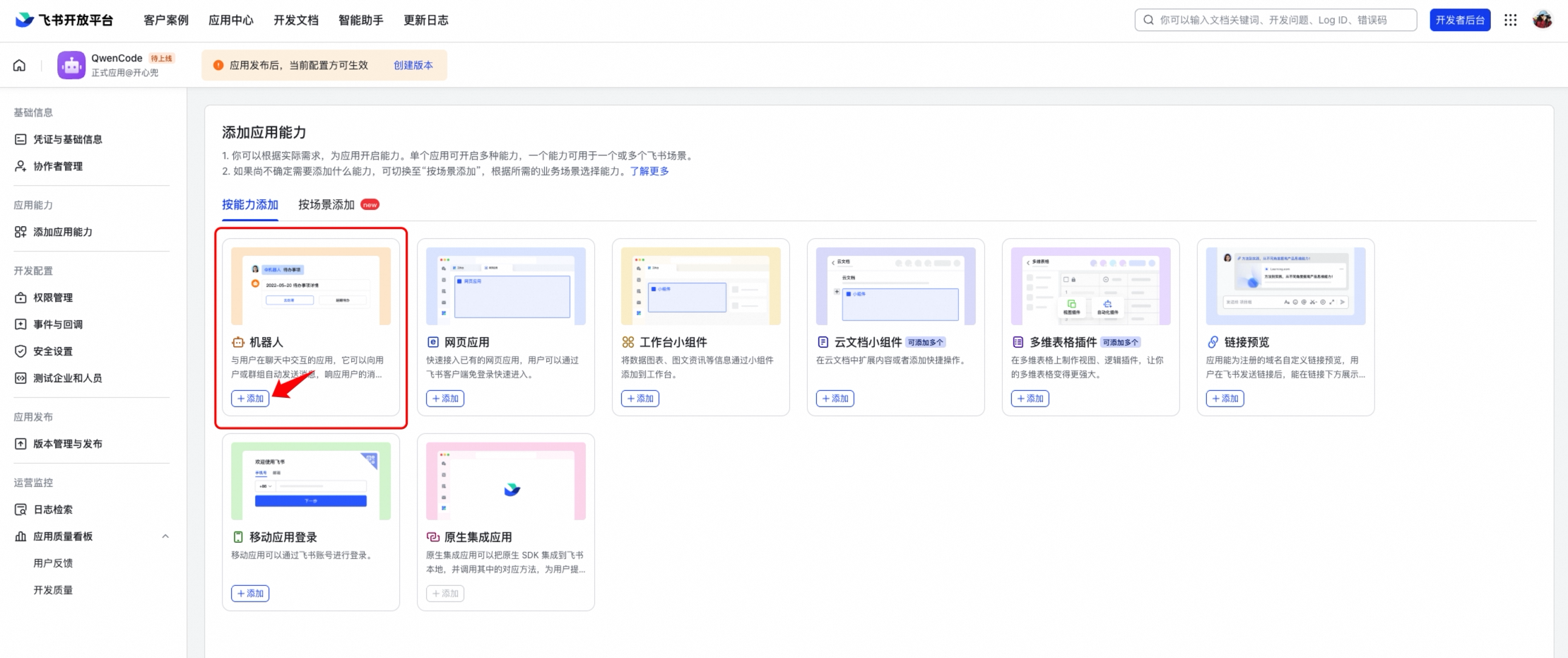
3. Under the application, enable the **Robot** capability
|
|
15
|
-
4. In Robot settings, enable **Stream Mode** (机器人协议 → Stream 模式)
|
|
16
|
-
5. Note the **AppKey** (Client ID) and **AppSecret** (Client Secret) from the application credentials page
|
|
17
|
-
|
|
18
|
-
### Stream Mode
|
|
19
|
-
|
|
20
|
-
DingTalk Stream mode uses an outbound WebSocket connection — no public URL or server is needed. The bot connects to DingTalk's servers, which push messages through the WebSocket. This is the simplest deployment model.
|
|
21
|
-
|
|
22
|
-
## Configuration
|
|
23
|
-
|
|
24
|
-
Add the channel to `~/.matilda/settings.json`:
|
|
25
|
-
|
|
26
|
-
```json
|
|
27
|
-
{
|
|
28
|
-
"channels": {
|
|
29
|
-
"my-dingtalk": {
|
|
30
|
-
"type": "dingtalk",
|
|
31
|
-
"clientId": "$DINGTALK_CLIENT_ID",
|
|
32
|
-
"clientSecret": "$DINGTALK_CLIENT_SECRET",
|
|
33
|
-
"senderPolicy": "open",
|
|
34
|
-
"sessionScope": "user",
|
|
35
|
-
"cwd": "/path/to/your/project",
|
|
36
|
-
"instructions": "You are a concise coding assistant responding via DingTalk.",
|
|
37
|
-
"groupPolicy": "open",
|
|
38
|
-
"groups": {
|
|
39
|
-
"*": { "requireMention": true }
|
|
40
|
-
}
|
|
41
|
-
}
|
|
42
|
-
}
|
|
43
|
-
}
|
|
44
|
-
```
|
|
45
|
-
|
|
46
|
-
Set the credentials as environment variables:
|
|
47
|
-
|
|
48
|
-
```bash
|
|
49
|
-
export DINGTALK_CLIENT_ID=<your-app-key>
|
|
50
|
-
export DINGTALK_CLIENT_SECRET=<your-app-secret>
|
|
51
|
-
```
|
|
52
|
-
|
|
53
|
-
Or define them in the `env` section of `settings.json`:
|
|
54
|
-
|
|
55
|
-
```json
|
|
56
|
-
{
|
|
57
|
-
"env": {
|
|
58
|
-
"DINGTALK_CLIENT_ID": "your-app-key",
|
|
59
|
-
"DINGTALK_CLIENT_SECRET": "your-app-secret"
|
|
60
|
-
}
|
|
61
|
-
}
|
|
62
|
-
```
|
|
63
|
-
|
|
64
|
-
## Running
|
|
65
|
-
|
|
66
|
-
```bash
|
|
67
|
-
# Start only the DingTalk channel
|
|
68
|
-
matilda channel start my-dingtalk
|
|
69
|
-
|
|
70
|
-
# Or start all configured channels together
|
|
71
|
-
matilda channel start
|
|
72
|
-
```
|
|
73
|
-
|
|
74
|
-
Open DingTalk and send a message to the bot. You should see a 👀 emoji reaction appear while the agent processes, followed by the response.
|
|
75
|
-
|
|
76
|
-
## Group Chats
|
|
77
|
-
|
|
78
|
-
DingTalk bots work in both DM and group conversations. To enable group support:
|
|
79
|
-
|
|
80
|
-
1. Set `groupPolicy` to `"allowlist"` or `"open"` in your channel config
|
|
81
|
-
2. Add the bot to a DingTalk group
|
|
82
|
-
3. @mention the bot in the group to trigger a response
|
|
83
|
-
|
|
84
|
-
By default, the bot requires an @mention in group chats (`requireMention: true`). Set `"requireMention": false` for a specific group to make it respond to all messages. See [Group Chats](./overview#group-chats) for full details.
|
|
85
|
-
|
|
86
|
-
### Finding a Group's Conversation ID
|
|
87
|
-
|
|
88
|
-
DingTalk uses `conversationId` to identify groups. You can find it in the channel service logs when someone sends a message in the group — look for the `conversationId` field in the log output.
|
|
89
|
-
|
|
90
|
-
## Images and Files
|
|
91
|
-
|
|
92
|
-
You can send photos and documents to the bot, not just text.
|
|
93
|
-
|
|
94
|
-
**Photos:** Send an image (screenshot, diagram, etc.) and the agent will analyze it using its vision capabilities. This requires a multimodal model — add `"model": "matilda3.5-plus"` (or another vision-capable model) to your channel config. DingTalk supports sending images directly or as part of rich text messages (mixed text + images).
|
|
95
|
-
|
|
96
|
-
**Files:** Send a PDF, code file, or any document. The bot downloads it from DingTalk's servers and saves it locally so the agent can read it with its file tools. Audio and video files are also supported. This works with any model.
|
|
97
|
-
|
|
98
|
-
## Key Differences from Telegram
|
|
99
|
-
|
|
100
|
-
- **Authentication:** AppKey + AppSecret instead of a static bot token. The SDK manages access token refresh automatically.
|
|
101
|
-
- **Connection:** WebSocket stream instead of polling — no public IP or webhook URL needed.
|
|
102
|
-
- **Formatting:** Responses use DingTalk's markdown dialect (a limited subset). Tables are automatically converted to plain text since DingTalk doesn't render them. Long messages are split into chunks at ~3800 characters.
|
|
103
|
-
- **Working indicator:** A 👀 emoji reaction is added to the user's message while processing, then removed when the response is sent.
|
|
104
|
-
- **Media download:** Two-step process — a `downloadCode` from the message is exchanged for a temporary download URL via DingTalk's API.
|
|
105
|
-
- **Groups:** DingTalk uses `isInAtList` for @mention detection instead of parsing message entities.
|
|
106
|
-
|
|
107
|
-
## Tips
|
|
108
|
-
|
|
109
|
-
- **Use DingTalk markdown-aware instructions** — DingTalk supports a limited markdown subset (headers, bold, links, code blocks, but not tables). Adding instructions like "Use DingTalk markdown. Avoid tables." helps the agent format responses correctly.
|
|
110
|
-
- **Restrict access** — In an organization context, `senderPolicy: "open"` may be acceptable. For tighter control, use `"allowlist"` or `"pairing"`. See [DM Pairing](./overview#dm-pairing) for details.
|
|
111
|
-
- **Referenced messages** — Quoting (replying to) a user message includes the quoted text as context for the agent. Quoting bot responses is not yet supported.
|
|
112
|
-
|
|
113
|
-
## Troubleshooting
|
|
114
|
-
|
|
115
|
-
### Bot doesn't connect
|
|
116
|
-
|
|
117
|
-
- Verify your AppKey and AppSecret are correct
|
|
118
|
-
- Check that the environment variables are set before running `matilda channel start`
|
|
119
|
-
- Make sure **Stream Mode** is enabled in the bot's settings on the DingTalk Developer Portal
|
|
120
|
-
- Check the terminal output for connection errors
|
|
121
|
-
|
|
122
|
-
### Bot doesn't respond in groups
|
|
123
|
-
|
|
124
|
-
- Check that `groupPolicy` is set to `"allowlist"` or `"open"` (default is `"disabled"`)
|
|
125
|
-
- Make sure you @mention the bot in the group message
|
|
126
|
-
- Verify the bot has been added to the group
|
|
127
|
-
|
|
128
|
-
### "No sessionWebhook in message"
|
|
129
|
-
|
|
130
|
-
This means DingTalk didn't include a reply endpoint in the message callback. This can happen if the bot's permissions are misconfigured. Check the bot's settings in the Developer Portal.
|
|
131
|
-
|
|
132
|
-
### "Sorry, something went wrong processing your message"
|
|
133
|
-
|
|
134
|
-
This usually means the agent encountered an error. Check the terminal output for details.
|
|
@@ -1,186 +0,0 @@
|
|
|
1
|
-
# Feishu (Lark)
|
|
2
|
-
|
|
3
|
-
This guide covers setting up a Matilda Code channel on Feishu (飞书) / Lark.
|
|
4
|
-
|
|
5
|
-
## Prerequisites
|
|
6
|
-
|
|
7
|
-
- A Feishu organization account
|
|
8
|
-
- A Feishu application with App ID and App Secret (see below)
|
|
9
|
-
|
|
10
|
-
## Creating an Application
|
|
11
|
-
|
|
12
|
-
1. Go to the [Feishu Open Platform](https://open.feishu.cn)
|
|
13
|
-
2. Create a new application (or use an existing one)
|
|
14
|
-
|
|
15
|
-
|
|
16
|
-
|
|
17
|
-
3. Under the application, enable the **Bot** capability (添加应用能力 → 机器人)
|
|
18
|
-
|
|
19
|
-
|
|
20
|
-
|
|
21
|
-
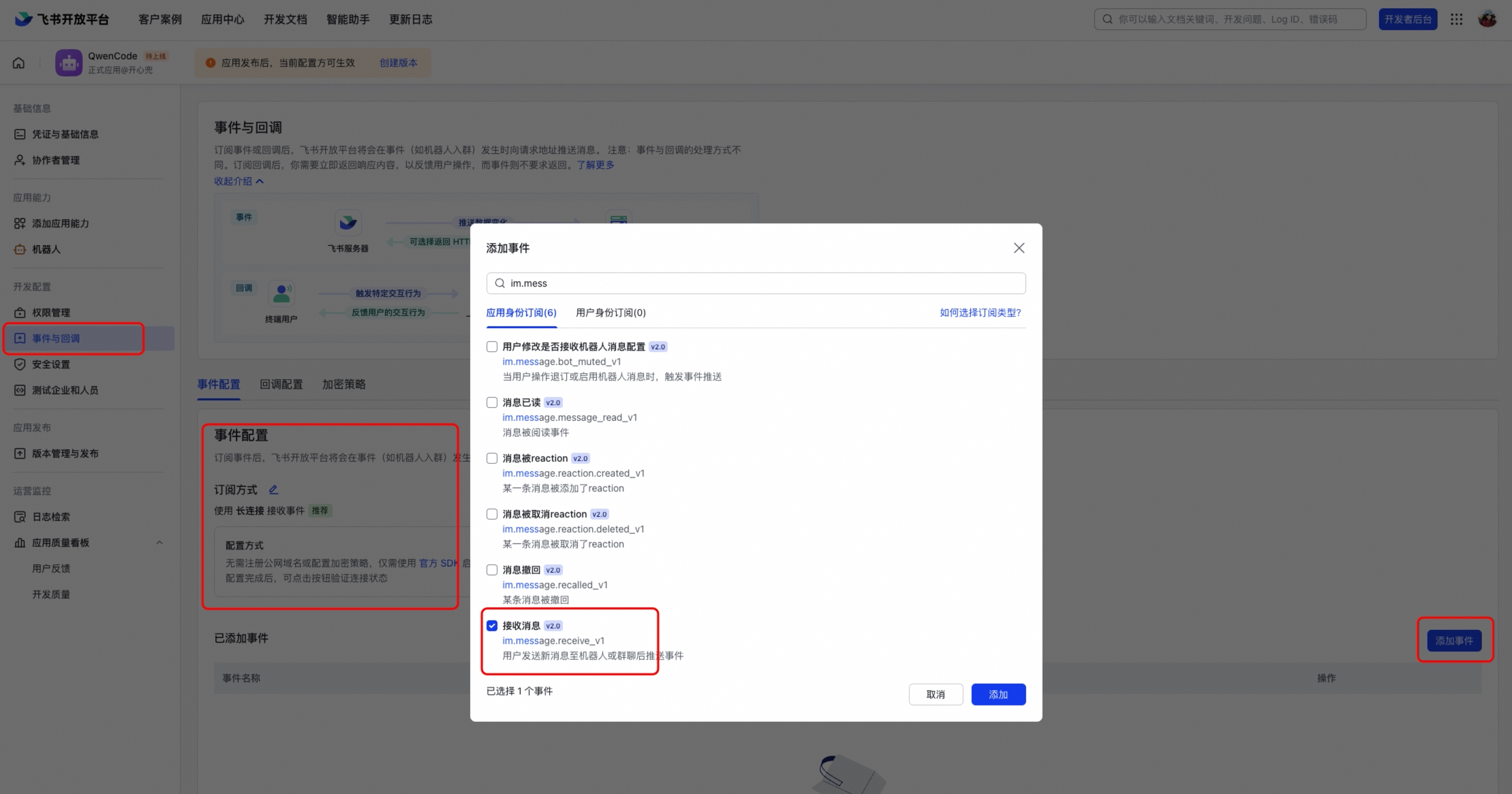
4. In **Event Subscriptions** (事件与回调), select **Long Connection** (使用长连接接收事件)
|
|
22
|
-
|
|
23
|
-
|
|
24
|
-
|
|
25
|
-
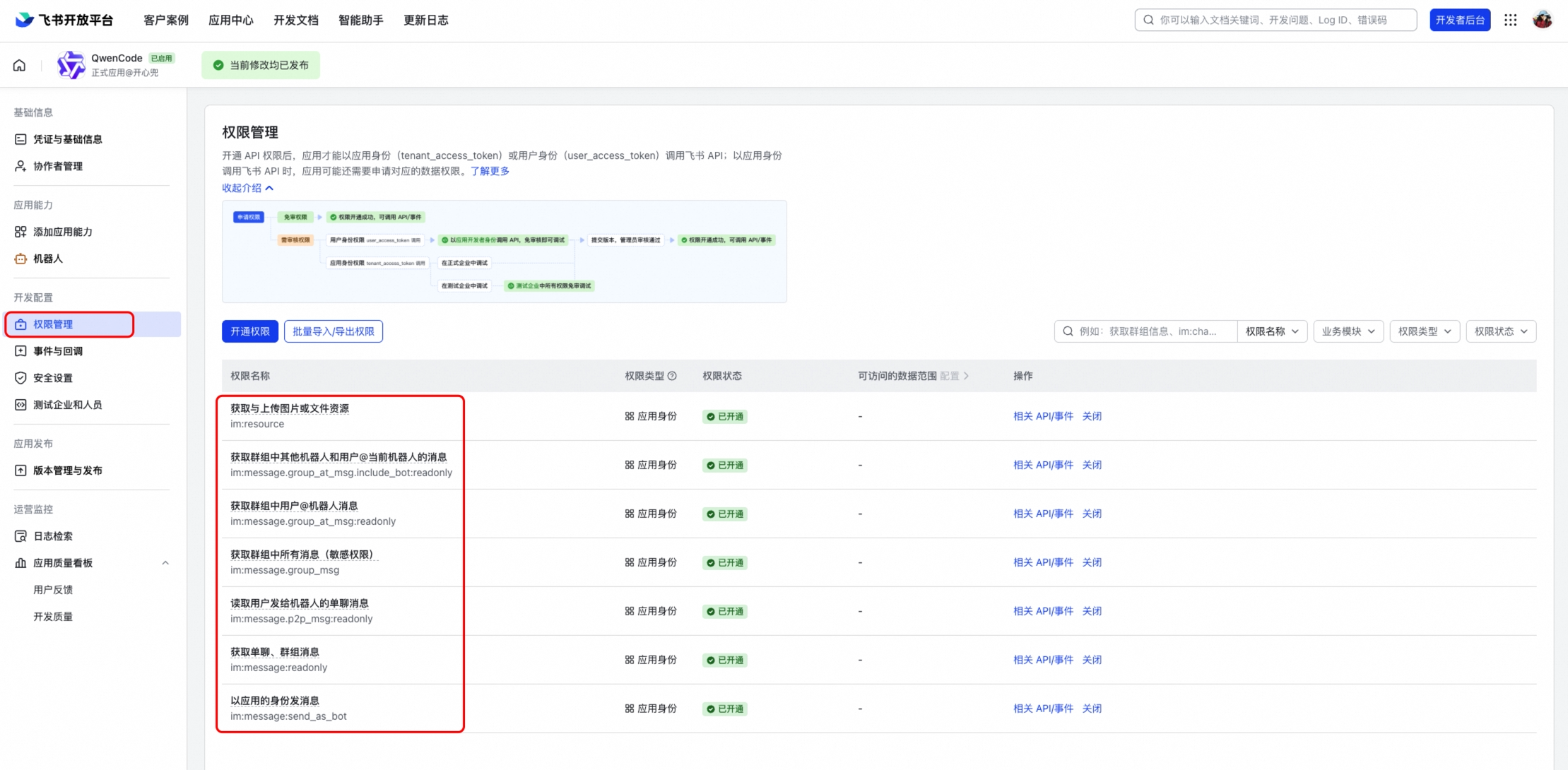
5. Add the event `im.message.receive_v1` (接收消息)
|
|
26
|
-
|
|
27
|
-
|
|
28
|
-
|
|
29
|
-
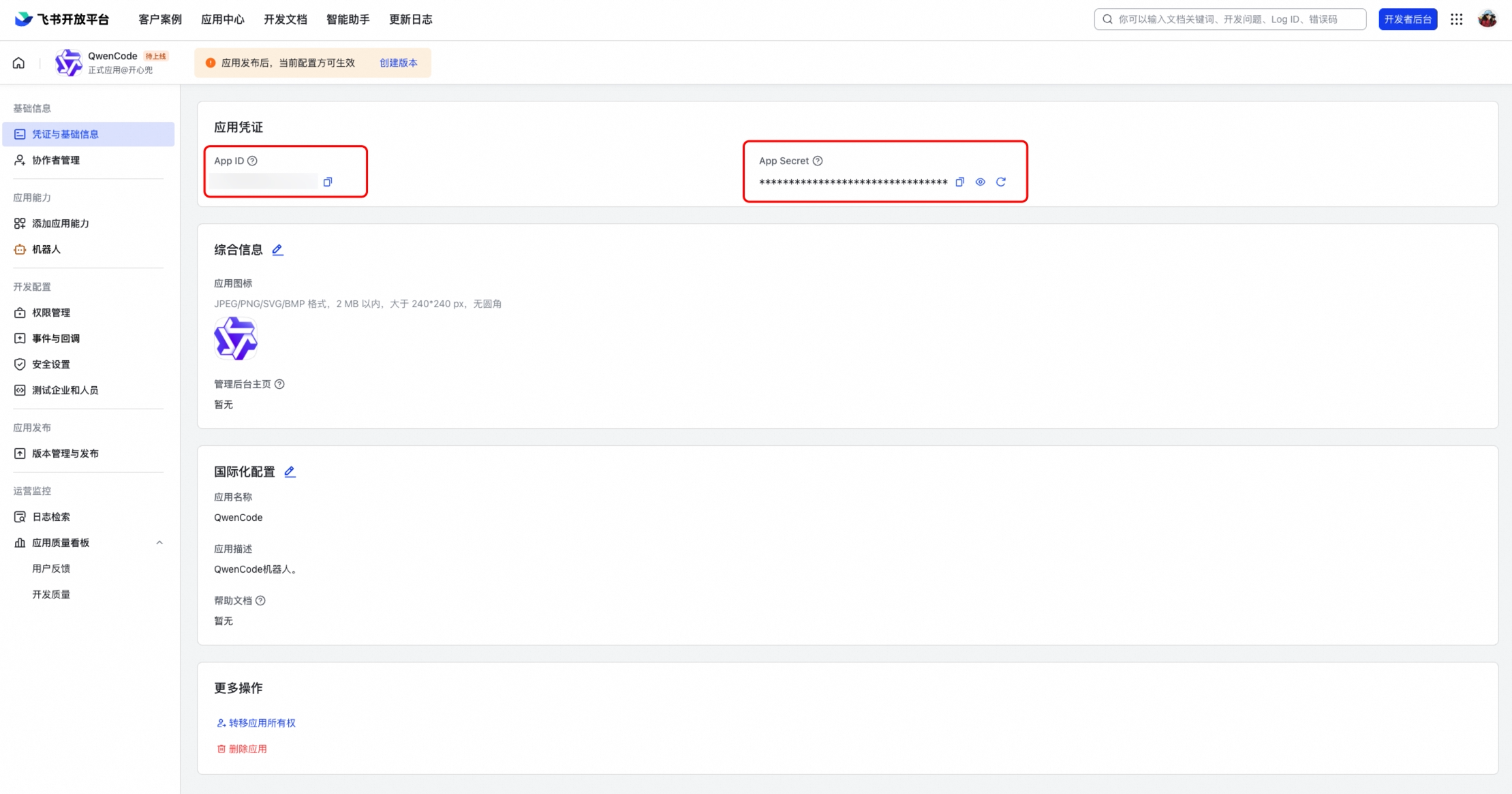
6. Note the **App ID** (Client ID) and **App Secret** (Client Secret) from the application credentials page
|
|
30
|
-
|
|
31
|
-
|
|
32
|
-
|
|
33
|
-
### Required Permissions
|
|
34
|
-
|
|
35
|
-
Enable the following permissions under **Permissions & Scopes** (权限管理):
|
|
36
|
-
|
|
37
|
-
- `im:message` — Read and send messages
|
|
38
|
-
- `im:message:send_as_bot` — Send messages as bot
|
|
39
|
-
- `im:resource` — Access message resources (images, files)
|
|
40
|
-
|
|
41
|
-
### Publish the Application
|
|
42
|
-
|
|
43
|
-
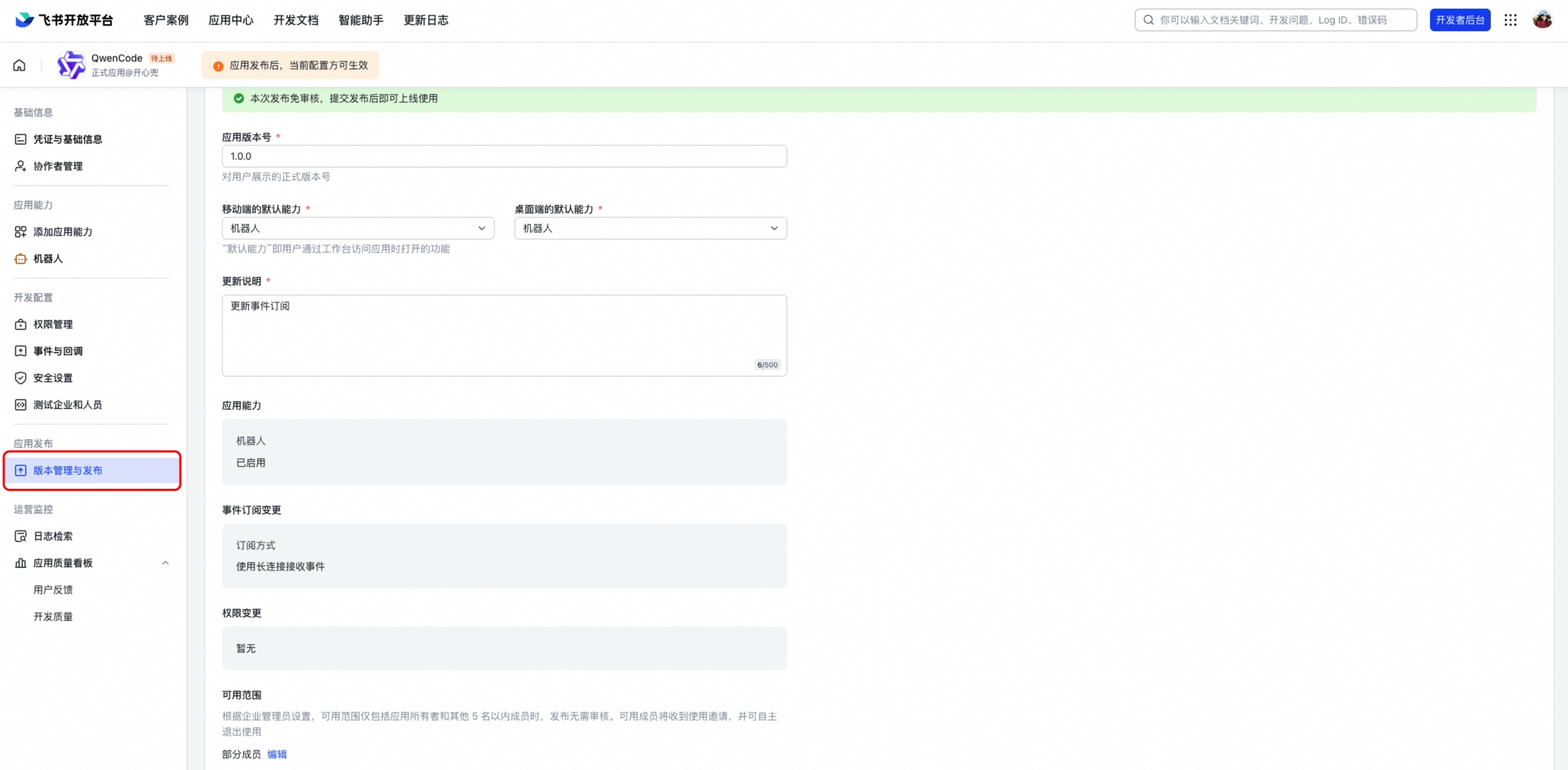
After configuring permissions and events, create a version and publish it. The bot won't work until the application is published and approved.
|
|
44
|
-
|
|
45
|
-
|
|
46
|
-
|
|
47
|
-
## Configuration
|
|
48
|
-
|
|
49
|
-
Add the channel to `~/.matilda/settings.json`:
|
|
50
|
-
|
|
51
|
-
```json
|
|
52
|
-
{
|
|
53
|
-
"channels": {
|
|
54
|
-
"my-feishu": {
|
|
55
|
-
"type": "feishu",
|
|
56
|
-
"clientId": "<your-app-id>",
|
|
57
|
-
"clientSecret": "<your-app-secret>",
|
|
58
|
-
"senderPolicy": "open",
|
|
59
|
-
"sessionScope": "user",
|
|
60
|
-
"cwd": "/path/to/your/project",
|
|
61
|
-
"groupPolicy": "open",
|
|
62
|
-
"collapsible": true,
|
|
63
|
-
"groups": {
|
|
64
|
-
"*": { "requireMention": true }
|
|
65
|
-
}
|
|
66
|
-
}
|
|
67
|
-
}
|
|
68
|
-
}
|
|
69
|
-
```
|
|
70
|
-
|
|
71
|
-
### Configuration Options
|
|
72
|
-
|
|
73
|
-
| Option | Description |
|
|
74
|
-
| ---------------------- | ------------------------------------------------------------------- |
|
|
75
|
-
| `clientId` | Feishu App ID |
|
|
76
|
-
| `clientSecret` | Feishu App Secret |
|
|
77
|
-
| `collapsible` | Collapse long responses into expandable sections (default: `false`) |
|
|
78
|
-
| `collapsibleThreshold` | Character threshold for collapsing (default: `500`) |
|
|
79
|
-
| `webhookPort` | If set, use HTTP webhook mode instead of WebSocket |
|
|
80
|
-
| `verificationToken` | Verification token for webhook mode |
|
|
81
|
-
| `encryptKey` | Encrypt key for webhook mode |
|
|
82
|
-
|
|
83
|
-
## Running
|
|
84
|
-
|
|
85
|
-
```bash
|
|
86
|
-
# Start only the Feishu channel
|
|
87
|
-
matilda channel start my-feishu
|
|
88
|
-
|
|
89
|
-
# Or start all configured channels together
|
|
90
|
-
matilda channel start
|
|
91
|
-
```
|
|
92
|
-
|
|
93
|
-
Open Feishu and send a message to the bot. You should see a streaming interactive card with the response.
|
|
94
|
-
|
|
95
|
-
## Connection Modes
|
|
96
|
-
|
|
97
|
-
### WebSocket (Default)
|
|
98
|
-
|
|
99
|
-
WebSocket mode uses an outbound long connection — no public URL or server is needed. This is the recommended mode for most deployments.
|
|
100
|
-
|
|
101
|
-
### Webhook
|
|
102
|
-
|
|
103
|
-
If you need webhook mode (e.g., for shared applications), set `webhookPort` in your config:
|
|
104
|
-
|
|
105
|
-
```json
|
|
106
|
-
{
|
|
107
|
-
"channels": {
|
|
108
|
-
"my-feishu": {
|
|
109
|
-
"type": "feishu",
|
|
110
|
-
"webhookPort": 9321,
|
|
111
|
-
"verificationToken": "<from-feishu-console>",
|
|
112
|
-
"encryptKey": "<from-feishu-console>"
|
|
113
|
-
}
|
|
114
|
-
}
|
|
115
|
-
}
|
|
116
|
-
```
|
|
117
|
-
|
|
118
|
-
Then set the request URL in Feishu Open Platform to `http://<your-server>:9321`.
|
|
119
|
-
|
|
120
|
-
## Group Chats
|
|
121
|
-
|
|
122
|
-
Feishu bots work in both DM and group conversations. To enable group support:
|
|
123
|
-
|
|
124
|
-
1. Set `groupPolicy` to `"allowlist"` or `"open"` in your channel config
|
|
125
|
-
2. Add the bot to a Feishu group
|
|
126
|
-
3. @mention the bot in the group to trigger a response
|
|
127
|
-
|
|
128
|
-
By default, the bot requires an @mention in group chats (`requireMention: true`). Set `"requireMention": false` for a specific group to make it respond to all messages.
|
|
129
|
-
|
|
130
|
-
## Features
|
|
131
|
-
|
|
132
|
-
### Interactive Card Streaming
|
|
133
|
-
|
|
134
|
-
Responses are rendered as Feishu interactive cards with real-time streaming updates. The card shows a "generating" indicator while the response is being produced, and a **Stop** button to cancel generation.
|
|
135
|
-
|
|
136
|
-
### Quote/Reply Context
|
|
137
|
-
|
|
138
|
-
When you reply to (quote) a message, the quoted content is automatically included as context for the agent. This works for:
|
|
139
|
-
|
|
140
|
-
- Text and rich-text messages
|
|
141
|
-
- Interactive cards (bot's previous responses)
|
|
142
|
-
|
|
143
|
-
### Images and Files
|
|
144
|
-
|
|
145
|
-
You can send photos and documents to the bot:
|
|
146
|
-
|
|
147
|
-
- **Images:** Analyzed using multimodal vision capabilities
|
|
148
|
-
- **Files:** Downloaded and saved locally for the agent to read
|
|
149
|
-
|
|
150
|
-
### Concurrent Messages
|
|
151
|
-
|
|
152
|
-
Multiple users can send messages simultaneously in the same group chat. Each message gets its own independent card and response — they don't interfere with each other.
|
|
153
|
-
|
|
154
|
-
## Key Differences from DingTalk
|
|
155
|
-
|
|
156
|
-
- **Response format:** Uses Feishu interactive cards (v2 schema) with native markdown rendering, including tables
|
|
157
|
-
- **Streaming:** Card content is updated in-place with throttled PATCH requests (1.5s interval)
|
|
158
|
-
- **Connection:** WebSocket via `@larksuiteoapi/node-sdk` — same outbound-only model, no public URL needed
|
|
159
|
-
- **Working indicator:** An "OnIt" emoji reaction is added while processing
|
|
160
|
-
- **Quote context:** Supports quoting both text messages and interactive cards
|
|
161
|
-
|
|
162
|
-
## Troubleshooting
|
|
163
|
-
|
|
164
|
-
### Bot doesn't connect
|
|
165
|
-
|
|
166
|
-
- Verify your App ID and App Secret are correct
|
|
167
|
-
- Make sure **Long Connection** is selected in Event Subscriptions
|
|
168
|
-
- Check that the `im.message.receive_v1` event is subscribed
|
|
169
|
-
- Check the terminal output for connection errors
|
|
170
|
-
|
|
171
|
-
### Bot doesn't respond in groups
|
|
172
|
-
|
|
173
|
-
- Check that `groupPolicy` is set to `"allowlist"` or `"open"` (default is `"disabled"`)
|
|
174
|
-
- Make sure you @mention the bot in the group message
|
|
175
|
-
- Verify the bot has been added to the group
|
|
176
|
-
|
|
177
|
-
### Card stays in "generating" state
|
|
178
|
-
|
|
179
|
-
- This usually indicates the response completed but the final card update failed
|
|
180
|
-
- Check terminal logs for API errors (rate limiting, card size limits)
|
|
181
|
-
- Very long responses with many tables may hit Feishu's card element limits
|
|
182
|
-
|
|
183
|
-
### Quote doesn't include card content
|
|
184
|
-
|
|
185
|
-
- The bot reads card content via the `card_msg_content_type=user_card_content` API parameter
|
|
186
|
-
- Ensure the bot has `im:message` permission to read messages
|
|
@@ -1,106 +0,0 @@
|
|
|
1
|
-
# WeChat (Weixin)
|
|
2
|
-
|
|
3
|
-
This guide covers setting up a Matilda Code channel on WeChat via the official iLink Bot API.
|
|
4
|
-
|
|
5
|
-
## Prerequisites
|
|
6
|
-
|
|
7
|
-
- A WeChat account that can scan QR codes (mobile app)
|
|
8
|
-
- Access to the iLink Bot platform (WeChat's official bot API)
|
|
9
|
-
|
|
10
|
-
## Setup
|
|
11
|
-
|
|
12
|
-
### 1. Log in via QR code
|
|
13
|
-
|
|
14
|
-
WeChat uses QR code authentication instead of a static bot token. Run the login command:
|
|
15
|
-
|
|
16
|
-
```bash
|
|
17
|
-
matilda channel configure-weixin
|
|
18
|
-
```
|
|
19
|
-
|
|
20
|
-
This will display a QR code URL. Scan it with your WeChat mobile app to authenticate. Your credentials are saved to `~/.matilda/channels/weixin/account.json`.
|
|
21
|
-
|
|
22
|
-
### 2. Configure the channel
|
|
23
|
-
|
|
24
|
-
Add the channel to `~/.matilda/settings.json`:
|
|
25
|
-
|
|
26
|
-
```json
|
|
27
|
-
{
|
|
28
|
-
"channels": {
|
|
29
|
-
"my-weixin": {
|
|
30
|
-
"type": "weixin",
|
|
31
|
-
"senderPolicy": "pairing",
|
|
32
|
-
"allowedUsers": [],
|
|
33
|
-
"sessionScope": "user",
|
|
34
|
-
"cwd": "/path/to/your/project",
|
|
35
|
-
"model": "matilda3.5-plus",
|
|
36
|
-
"instructions": "You are a concise coding assistant responding via WeChat. Keep responses under 500 characters. Use plain text only."
|
|
37
|
-
}
|
|
38
|
-
}
|
|
39
|
-
}
|
|
40
|
-
```
|
|
41
|
-
|
|
42
|
-
Note: WeChat channels do not use a `token` field — credentials come from the QR login step.
|
|
43
|
-
|
|
44
|
-
### 3. Start the channel
|
|
45
|
-
|
|
46
|
-
```bash
|
|
47
|
-
# Start only the WeChat channel
|
|
48
|
-
matilda channel start my-weixin
|
|
49
|
-
|
|
50
|
-
# Or start all configured channels together
|
|
51
|
-
matilda channel start
|
|
52
|
-
```
|
|
53
|
-
|
|
54
|
-
Open WeChat and send a message to the bot. You should see a typing indicator ("...") while the agent processes, followed by the response.
|
|
55
|
-
|
|
56
|
-
## Images and Files
|
|
57
|
-
|
|
58
|
-
You can send photos and documents to the bot, not just text.
|
|
59
|
-
|
|
60
|
-
**Photos:** Send an image (screenshot, photo, etc.) and the agent will analyze it using its vision capabilities. This requires a multimodal model — add `"model": "matilda3.5-plus"` (or another vision-capable model) to your channel config. A typing indicator shows while the image is being downloaded and processed.
|
|
61
|
-
|
|
62
|
-
**Files:** Send a PDF, code file, or any document. The bot downloads and decrypts it from WeChat's CDN, saves it locally, and the agent reads it with its file tools. This works with any model.
|
|
63
|
-
|
|
64
|
-
## Configuration Options
|
|
65
|
-
|
|
66
|
-
WeChat channels support all the standard channel options (see [Channel Overview](./overview#options)), plus:
|
|
67
|
-
|
|
68
|
-
| Option | Description |
|
|
69
|
-
| --------- | ------------------------------------------------------------------------------ |
|
|
70
|
-
| `baseUrl` | Override the iLink Bot API base URL (default: `https://ilinkai.weixin.qq.com`) |
|
|
71
|
-
|
|
72
|
-
## Key Differences from Telegram
|
|
73
|
-
|
|
74
|
-
- **Authentication:** QR code login instead of a static bot token. Sessions can expire — the channel will pause and log a message if this happens.
|
|
75
|
-
- **Formatting:** WeChat only supports plain text. Markdown in agent responses is automatically stripped.
|
|
76
|
-
- **Typing indicator:** WeChat has a native "..." typing indicator instead of a "Working..." text message.
|
|
77
|
-
- **Groups:** WeChat iLink Bot is DM-only — group chats are not supported.
|
|
78
|
-
- **Media encryption:** Images and files are encrypted on WeChat's CDN with AES-128-ECB. The channel handles decryption transparently.
|
|
79
|
-
|
|
80
|
-
## Tips
|
|
81
|
-
|
|
82
|
-
- **Use plain text instructions** — Since WeChat strips all markdown, add instructions like "Use plain text only" to avoid the agent producing formatted responses that look messy.
|
|
83
|
-
- **Keep responses short** — WeChat message bubbles work best with concise text. Adding a character limit to your instructions helps (e.g., "Keep responses under 500 characters").
|
|
84
|
-
- **Session expiry** — If you see "Session expired (errcode -14)" in the logs, your WeChat login has expired. Stop the channel and re-run `matilda channel configure-weixin` to log in again.
|
|
85
|
-
- **Restrict access** — Use `senderPolicy: "pairing"` or `"allowlist"` to control who can talk to the bot. See [DM Pairing](./overview#dm-pairing) for details.
|
|
86
|
-
|
|
87
|
-
## Troubleshooting
|
|
88
|
-
|
|
89
|
-
### "WeChat account not configured"
|
|
90
|
-
|
|
91
|
-
Run `matilda channel configure-weixin` to log in via QR code first.
|
|
92
|
-
|
|
93
|
-
### "Session expired (errcode -14)"
|
|
94
|
-
|
|
95
|
-
Your WeChat login session has expired. Stop the channel and run `matilda channel configure-weixin` again.
|
|
96
|
-
|
|
97
|
-
### Bot doesn't respond
|
|
98
|
-
|
|
99
|
-
- Check the terminal output for errors
|
|
100
|
-
- Verify the channel is running (`matilda channel start my-weixin`)
|
|
101
|
-
- If using `senderPolicy: "allowlist"`, make sure your WeChat user ID is in `allowedUsers`
|
|
102
|
-
|
|
103
|
-
### Images not working
|
|
104
|
-
|
|
105
|
-
- Make sure your channel config has a `model` that supports vision (e.g., `matilda3.5-plus`)
|
|
106
|
-
- Check the terminal for CDN download errors — these may indicate a network issue
|
package/chunks/agent-WM63A6NK.js
DELETED
|
@@ -1,3 +0,0 @@
|
|
|
1
|
-
// Force strict mode and setup for ESM
|
|
2
|
-
"use strict";
|
|
3
|
-
import{$g as e,Xg as a,Yg as b,Zg as c,_g as d,ah as f}from"./chunk-JRECUFB3.js";import"./chunk-M53RP3YP.js";import"./chunk-TXMXCR7D.js";import"./chunk-YULUB745.js";import"./chunk-2HTPVSGT.js";import"./chunk-MO2HXJG5.js";import"./chunk-2MOGYHWM.js";import"./chunk-S3CWEVTS.js";import"./chunk-TISQNFB5.js";import"./chunk-47XR7IMP.js";import"./chunk-MTMU7JYZ.js";import"./chunk-QKYGQLWC.js";import"./chunk-WV3IUPZS.js";import"./chunk-RNKDFE2S.js";import"./chunk-BVOCFLC4.js";import"./chunk-MCQUPLRE.js";import"./chunk-CZGZ3KK7.js";import"./chunk-HYVP4472.js";import"./chunk-WC2VTVCE.js";import"./chunk-KHHJYBR5.js";import"./chunk-6EQMZNIY.js";import"./chunk-DOOFGSRV.js";import"./chunk-DE3HKC2W.js";import"./chunk-GTVCJCHR.js";import"./chunk-QVCGLQCI.js";import"./chunk-VI74YQQO.js";import"./chunk-YV3PUOBU.js";import"./chunk-3IRGBRSP.js";import"./chunk-DC7LAFZZ.js";import"./chunk-4F4DA5UI.js";import"./chunk-3YLXGE6T.js";import"./chunk-JCE3JAVC.js";import"./chunk-4J6DC24J.js";import"./chunk-LJR4RZZ2.js";import"./chunk-U347OO7S.js";import"./chunk-SDTWBD62.js";import"./chunk-6Z2MV7ZY.js";import"./chunk-WVY2P6WH.js";import"./chunk-UIRBHC5X.js";import"./chunk-PGXQZVLX.js";import"./chunk-LUNDTQ3G.js";import"./chunk-YRQP3SLC.js";import"./chunk-6E766NPX.js";import"./chunk-27Q5KW3A.js";import"./chunk-G7R2XEEF.js";import"./chunk-OA56BXPD.js";import"./chunk-FWDMPRKU.js";import"./chunk-GZPNIYVZ.js";import"./chunk-OWGSC52X.js";export{f as AgentTool,b as TOOL_REGISTRY_REBUILT,e as createApprovalModeOverride,c as hasRebuiltToolRegistry,d as rebuildToolRegistryOnOverride,a as resolveSubagentApprovalMode};
|
|
@@ -1,3 +0,0 @@
|
|
|
1
|
-
// Force strict mode and setup for ESM
|
|
2
|
-
"use strict";
|
|
3
|
-
import{vg as a,wg as b,xg as c}from"./chunk-JRECUFB3.js";import"./chunk-M53RP3YP.js";import"./chunk-TXMXCR7D.js";import"./chunk-YULUB745.js";import"./chunk-2HTPVSGT.js";import"./chunk-MO2HXJG5.js";import"./chunk-2MOGYHWM.js";import"./chunk-S3CWEVTS.js";import"./chunk-TISQNFB5.js";import"./chunk-47XR7IMP.js";import"./chunk-MTMU7JYZ.js";import"./chunk-QKYGQLWC.js";import"./chunk-WV3IUPZS.js";import"./chunk-RNKDFE2S.js";import"./chunk-BVOCFLC4.js";import"./chunk-MCQUPLRE.js";import"./chunk-CZGZ3KK7.js";import"./chunk-HYVP4472.js";import"./chunk-WC2VTVCE.js";import"./chunk-KHHJYBR5.js";import"./chunk-6EQMZNIY.js";import"./chunk-DOOFGSRV.js";import"./chunk-DE3HKC2W.js";import"./chunk-GTVCJCHR.js";import"./chunk-QVCGLQCI.js";import"./chunk-VI74YQQO.js";import"./chunk-YV3PUOBU.js";import"./chunk-3IRGBRSP.js";import"./chunk-DC7LAFZZ.js";import"./chunk-4F4DA5UI.js";import"./chunk-3YLXGE6T.js";import"./chunk-JCE3JAVC.js";import"./chunk-4J6DC24J.js";import"./chunk-LJR4RZZ2.js";import"./chunk-U347OO7S.js";import"./chunk-SDTWBD62.js";import"./chunk-6Z2MV7ZY.js";import"./chunk-WVY2P6WH.js";import"./chunk-UIRBHC5X.js";import"./chunk-PGXQZVLX.js";import"./chunk-LUNDTQ3G.js";import"./chunk-YRQP3SLC.js";import"./chunk-6E766NPX.js";import"./chunk-27Q5KW3A.js";import"./chunk-G7R2XEEF.js";import"./chunk-OA56BXPD.js";import"./chunk-FWDMPRKU.js";import"./chunk-GZPNIYVZ.js";import"./chunk-OWGSC52X.js";export{c as AgentHeadless,a as ContextState,b as templateString};
|