@maincode-ai/matilda-code 0.21.12 → 0.21.13-nightly.20261026.e0eae1d8c
This diff represents the content of publicly available package versions that have been released to one of the supported registries. The information contained in this diff is provided for informational purposes only and reflects changes between package versions as they appear in their respective public registries.
- package/bundled/mainy/SKILL.md +0 -2
- package/bundled/mainy/docs/_meta.ts +0 -2
- package/bundled/mainy/docs/configuration/auth.md +5 -10
- package/bundled/mainy/docs/configuration/model-providers.md +31 -217
- package/bundled/mainy/docs/configuration/settings.md +32 -4
- package/bundled/mainy/docs/features/auto-mode.md +1 -1
- package/bundled/mainy/docs/features/channels/_meta.ts +0 -3
- package/bundled/mainy/docs/features/channels/overview.md +8 -16
- package/bundled/mainy/docs/features/commands.md +4 -4
- package/bundled/mainy/docs/features/hooks.md +9 -7
- package/bundled/mainy/docs/features/language.md +2 -29
- package/bundled/mainy/docs/features/sub-agents.md +1 -1
- package/bundled/mainy/docs/features/worktree.md +3 -5
- package/bundled/mainy/docs/integration-github-action.md +3 -3
- package/bundled/mainy/docs/matilda-serve.md +1 -1
- package/bundled/mainy/docs/quickstart.md +2 -2
- package/bundled/mainy/docs/support/troubleshooting.md +3 -10
- package/chunks/agent-4FTU3WN6.js +3 -0
- package/chunks/agent-headless-QJUVHPFC.js +3 -0
- package/chunks/{askUserQuestion-2QI4NSFJ.js → askUserQuestion-QKX4NEFX.js} +1 -1
- package/chunks/{ca-I2HEEIL7.js → ca-C2V7I65K.js} +6 -6
- package/chunks/{chunk-6E766NPX.js → chunk-2ONZZ46N.js} +2 -2
- package/chunks/chunk-36K4HBVM.js +7 -0
- package/chunks/{chunk-EQGA7LH7.js → chunk-3B2HABK7.js} +1 -1
- package/chunks/{chunk-MCQUPLRE.js → chunk-5NMK4Y7C.js} +1 -1
- package/chunks/chunk-5YT4GCK7.js +14 -0
- package/chunks/{chunk-27Q5KW3A.js → chunk-62AFAL4I.js} +10 -10
- package/chunks/chunk-75KP2FVD.js +81 -0
- package/chunks/chunk-7ZODGQO6.js +4 -0
- package/chunks/chunk-BZB7HYRC.js +37 -0
- package/chunks/{chunk-YRQP3SLC.js → chunk-EXNHJQCD.js} +1 -1
- package/chunks/chunk-FCGYRGV4.js +9 -0
- package/chunks/chunk-G4YMVWG4.js +8 -0
- package/chunks/{chunk-6T2GIM76.js → chunk-HDARIAVM.js} +1 -1
- package/chunks/{chunk-YJAKOETP.js → chunk-HM5LCKDB.js} +2 -2
- package/chunks/chunk-IIQ5YERM.js +120 -0
- package/chunks/{chunk-CSJTA7NE.js → chunk-JGJ7BVZN.js} +18 -18
- package/chunks/{chunk-GTVCJCHR.js → chunk-JIKQI4MZ.js} +1 -1
- package/chunks/{chunk-WV3IUPZS.js → chunk-LHDCAN7Z.js} +1 -1
- package/chunks/chunk-LZDHANXA.js +89 -0
- package/chunks/{chunk-PGXQZVLX.js → chunk-NOE4UNQN.js} +1 -1
- package/chunks/chunk-OEZS5R3S.js +207 -0
- package/chunks/{chunk-OOEH6ZSV.js → chunk-PTMCLADZ.js} +1 -1
- package/chunks/{chunk-2HTPVSGT.js → chunk-PYZNGIIR.js} +1 -1
- package/chunks/chunk-QJJTUDDA.js +56 -0
- package/chunks/{chunk-LUNDTQ3G.js → chunk-R34HYLL4.js} +1 -1
- package/chunks/{chunk-QVCGLQCI.js → chunk-RK4LPGBV.js} +3 -3
- package/chunks/{chunk-DE3HKC2W.js → chunk-RYHMPK5G.js} +1 -1
- package/chunks/chunk-SR7ARGUY.js +13 -0
- package/chunks/{chunk-JRECUFB3.js → chunk-SY6JRCN3.js} +636 -654
- package/chunks/chunk-TUKNB5CQ.js +33 -0
- package/chunks/{chunk-VTGICC67.js → chunk-TZ4FRU6B.js} +1 -1
- package/chunks/chunk-U7V7APDV.js +9 -0
- package/chunks/{chunk-CZGZ3KK7.js → chunk-UVWZ44ZW.js} +1 -1
- package/chunks/{chunk-HYVP4472.js → chunk-V6UPUMP3.js} +1 -1
- package/chunks/{chunk-DOOFGSRV.js → chunk-VLDZBRTL.js} +1 -1
- package/chunks/{computer-use-WKDNUTLD.js → computer-use-OXAMR75N.js} +1 -1
- package/chunks/contextCommand-ERLW5VWL.js +3 -0
- package/chunks/{cron-create-F2LXM2OA.js → cron-create-AUDQ6STP.js} +1 -1
- package/chunks/{cron-delete-DE6Q2S2L.js → cron-delete-P5HE3PDD.js} +1 -1
- package/chunks/{cron-list-IAQEJVV7.js → cron-list-NR5FZBK2.js} +1 -1
- package/chunks/{de-AQXFJYZI.js → de-KOUI2CEW.js} +5 -5
- package/chunks/{devtools-5JRKK3E7.js → devtools-G5DWLP2N.js} +1 -1
- package/chunks/dist-XXTQNTKQ.js +42 -0
- package/chunks/dist-ZFZZLIQU.js +3 -0
- package/chunks/{edit-QQNJZ55P.js → edit-REFR5ROS.js} +1 -1
- package/chunks/{en-EJLDYIBM.js → en-RMYRLXC2.js} +4 -4
- package/chunks/{enter-worktree-5X5SAMBJ.js → enter-worktree-WO3DT2G7.js} +1 -1
- package/chunks/{enterPlanMode-HP35SPLN.js → enterPlanMode-PLRHEU5A.js} +1 -1
- package/chunks/{exit-worktree-SRKZBEYF.js → exit-worktree-J5PW6DCV.js} +1 -1
- package/chunks/{exitPlanMode-WSPTGGVN.js → exitPlanMode-KXUPNLCJ.js} +2 -2
- package/chunks/{fr-6TDHK7F2.js → fr-R3QF3LA2.js} +5 -5
- package/chunks/glob-ZVTVRDQO.js +22 -0
- package/chunks/{goal-tools-C6BSBHCF.js → goal-tools-XVKQJL5I.js} +1 -1
- package/chunks/{grep-MVCOBUYW.js → grep-R7CWUNNE.js} +1 -1
- package/chunks/{ja-GGNJR7AR.js → ja-A5OQLXUZ.js} +5 -5
- package/chunks/{keychain-token-storage-KQK6MNOJ.js → keychain-token-storage-IM4UB4P4.js} +1 -1
- package/chunks/{ls-JYJXFSXN.js → ls-DEAFYDVV.js} +1 -1
- package/chunks/{lsp-DYDK6XCS.js → lsp-DL7W47VY.js} +1 -1
- package/chunks/matildaAgentContentGenerator-57EIU5XE.js +8 -0
- package/chunks/mcp-client-X7LEGSP3.js +3 -0
- package/chunks/monitor-KPWTMH3V.js +32 -0
- package/chunks/{multipart-parser-JI75T2O5.js → multipart-parser-FKHYAVGR.js} +1 -1
- package/chunks/notebook-edit-3ZH5M2TC.js +17 -0
- package/chunks/openaiContentGenerator-6PXSD3T7.js +37 -0
- package/chunks/{pt-D6L2QTDM.js → pt-RG3S3KA7.js} +5 -5
- package/chunks/read-file-JNS7WRUP.js +3 -0
- package/chunks/ripGrep-ICJDGIIV.js +3 -0
- package/chunks/{ru-BNJCHDYO.js → ru-5S5HLRT7.js} +5 -5
- package/chunks/scheduler-QC2PPMFP.js +8 -0
- package/chunks/{send-message-P3SMWNEE.js → send-message-V2WYLN5X.js} +1 -1
- package/chunks/{serve-FXH6EBQ6.js → serve-NUVQULZJ.js} +59 -48
- package/chunks/shell-5LNI7URE.js +3 -0
- package/chunks/{skill-HZPFEAPF.js → skill-QFATRHQW.js} +1 -1
- package/chunks/src-6UPZ7TVB.js +3 -0
- package/chunks/src-LZEU4AYF.js +5 -0
- package/chunks/{symbol-search-EAIZPWN7.js → symbol-search-WL6ZHUUN.js} +1 -1
- package/chunks/{syntheticOutput-432LXITX.js → syntheticOutput-3KW6SQAF.js} +1 -1
- package/chunks/task-create-PNW5SN27.js +3 -0
- package/chunks/{task-detach-XMSJ3HBM.js → task-detach-B7PDPFBA.js} +1 -1
- package/chunks/task-list-GGZATGK5.js +9 -0
- package/chunks/{task-stop-NTS62FLG.js → task-stop-UKBBE2KG.js} +1 -1
- package/chunks/{task-update-AR26UFYZ.js → task-update-4RHVUBUV.js} +1 -1
- package/chunks/{team-create-PYXFVIR5.js → team-create-2TJC3X57.js} +1 -1
- package/chunks/team-delete-4UJ7SU65.js +8 -0
- package/chunks/todoWrite-NEBVKOSG.js +3 -0
- package/chunks/{tool-search-RKZDSRYS.js → tool-search-R5GS64YR.js} +1 -1
- package/chunks/{web-fetch-VW3SVDQ6.js → web-fetch-H3XJMAEF.js} +17 -17
- package/chunks/{web-search-XQUIZARL.js → web-search-Q6RWPEIB.js} +1 -1
- package/chunks/{workflow-YXNXDRWZ.js → workflow-3A7KN3E3.js} +2 -2
- package/chunks/write-file-O7Q6SKZC.js +15 -0
- package/cli.js +502 -498
- package/locales/ca.js +1 -28
- package/locales/de.js +1 -28
- package/locales/en.js +1 -30
- package/locales/fr.js +1 -30
- package/locales/ja.js +1 -28
- package/locales/pt.js +1 -28
- package/locales/ru.js +1 -28
- package/package.json +2 -2
- package/sandbox-macos-permissive-closed.sb +0 -1
- package/sandbox-macos-permissive-open.sb +0 -1
- package/sandbox-macos-permissive-proxied.sb +0 -1
- package/sandbox-macos-restrictive-closed.sb +0 -1
- package/sandbox-macos-restrictive-open.sb +0 -1
- package/sandbox-macos-restrictive-proxied.sb +0 -1
- package/bundled/mainy/docs/features/channels/dingtalk.md +0 -134
- package/bundled/mainy/docs/features/channels/feishu.md +0 -186
- package/bundled/mainy/docs/features/channels/weixin.md +0 -106
- package/bundled/mainy/docs/integration-jetbrains.md +0 -81
- package/bundled/mainy/docs/integration-zed.md +0 -72
- package/chunks/agent-WM63A6NK.js +0 -3
- package/chunks/agent-headless-QIUBDKPW.js +0 -3
- package/chunks/anthropicContentGenerator-VKFTAIU3.js +0 -39
- package/chunks/chunk-2MOGYHWM.js +0 -8
- package/chunks/chunk-3IRGBRSP.js +0 -113
- package/chunks/chunk-3YLXGE6T.js +0 -8
- package/chunks/chunk-4F4DA5UI.js +0 -8
- package/chunks/chunk-4J6DC24J.js +0 -59
- package/chunks/chunk-4Q2SNBUH.js +0 -18
- package/chunks/chunk-5C2RJ5RR.js +0 -37
- package/chunks/chunk-6EQMZNIY.js +0 -8
- package/chunks/chunk-6GBNB5Z2.js +0 -3
- package/chunks/chunk-6Z2MV7ZY.js +0 -186
- package/chunks/chunk-BVOCFLC4.js +0 -56
- package/chunks/chunk-FPO57O66.js +0 -39
- package/chunks/chunk-G7R2XEEF.js +0 -7
- package/chunks/chunk-GOJCMVJJ.js +0 -8
- package/chunks/chunk-JCE3JAVC.js +0 -25
- package/chunks/chunk-KHHJYBR5.js +0 -9
- package/chunks/chunk-LJR4RZZ2.js +0 -3
- package/chunks/chunk-MO2HXJG5.js +0 -9
- package/chunks/chunk-O44XK65C.js +0 -8
- package/chunks/chunk-OA56BXPD.js +0 -3
- package/chunks/chunk-PA6532AY.js +0 -6
- package/chunks/chunk-QN6Y6NPA.js +0 -3
- package/chunks/chunk-S3CWEVTS.js +0 -15
- package/chunks/chunk-SDTWBD62.js +0 -8
- package/chunks/chunk-U347OO7S.js +0 -9
- package/chunks/chunk-UIRBHC5X.js +0 -3
- package/chunks/chunk-VI74YQQO.js +0 -8
- package/chunks/chunk-VYZOOSMP.js +0 -30
- package/chunks/chunk-WC2VTVCE.js +0 -27
- package/chunks/chunk-WVY2P6WH.js +0 -26
- package/chunks/chunk-WZ75OGYY.js +0 -14
- package/chunks/chunk-XMZIY7XX.js +0 -13
- package/chunks/chunk-YV3PUOBU.js +0 -65
- package/chunks/contextCommand-DAB3HOHY.js +0 -3
- package/chunks/dist-7UYRLSLE.js +0 -3
- package/chunks/dist-ME6647DQ.js +0 -195
- package/chunks/dist-P6SLWL5V.js +0 -42
- package/chunks/dist-VG3ZDJ2A.js +0 -28
- package/chunks/dist-YTCHM57U.js +0 -23
- package/chunks/fileFromPath-7UCWPD4W.js +0 -3
- package/chunks/geminiContentGenerator-RJ73DQAP.js +0 -8
- package/chunks/glob-QQ6LGKDX.js +0 -22
- package/chunks/matildaAgentContentGenerator-YUYS4336.js +0 -8
- package/chunks/matildaContentGenerator-O4Z2QPCP.js +0 -8
- package/chunks/matildaOAuth2-7COTQQR2.js +0 -3
- package/chunks/mcp-client-RXVQU5VI.js +0 -3
- package/chunks/monitor-77KXDXPR.js +0 -32
- package/chunks/notebook-edit-TKJD2EQZ.js +0 -17
- package/chunks/openaiContentGenerator-2EALAM3U.js +0 -3
- package/chunks/read-file-3KUAH6ND.js +0 -3
- package/chunks/ripGrep-U2PLKXMY.js +0 -3
- package/chunks/scheduler-J7VU2V5Y.js +0 -8
- package/chunks/shell-PXR2AXDD.js +0 -3
- package/chunks/src-RFAEPLY7.js +0 -3
- package/chunks/src-WZTRMETQ.js +0 -5
- package/chunks/task-create-Z3QRCMX4.js +0 -3
- package/chunks/task-list-GXAJW3JP.js +0 -9
- package/chunks/team-delete-OMYVUAQU.js +0 -8
- package/chunks/todoWrite-5NZ7CHTC.js +0 -3
- package/chunks/write-file-XDDLTGSG.js +0 -15
package/locales/ru.js
CHANGED
|
@@ -862,7 +862,6 @@ export default {
|
|
|
862
862
|
'Использование: /language ui [{{options}}]',
|
|
863
863
|
'Usage: /language output <language>':
|
|
864
864
|
'Использование: /language output <language>',
|
|
865
|
-
'Example: /language output 中文': 'Пример: /language output 中文',
|
|
866
865
|
'Example: /language output English': 'Пример: /language output English',
|
|
867
866
|
'Example: /language output 日本語': 'Пример: /language output 日本語',
|
|
868
867
|
'UI language changed to {{lang}}': 'Язык интерфейса изменен на {{lang}}',
|
|
@@ -1110,8 +1109,6 @@ export default {
|
|
|
1110
1109
|
'\n⚠ Matilda OAuth free tier was discontinued on 2026-04-15. Please select another option.\n':
|
|
1111
1110
|
'\n⚠ Бесплатный уровень Matilda OAuth прекращён 2026-04-15. Выберите другую опцию.\n',
|
|
1112
1111
|
'Bring your own API key': 'Используйте свой API Key',
|
|
1113
|
-
'Browser-based authentication with third-party providers (e.g. OpenRouter, ModelScope)':
|
|
1114
|
-
'Браузерная аутентификация с использованием сторонних провайдеров (например, OpenRouter, ModelScope)',
|
|
1115
1112
|
'Authentication is enforced to be {{enforcedType}}, but you are currently using {{currentType}}.':
|
|
1116
1113
|
'Авторизация должна быть {{enforcedType}}, но вы сейчас используете {{currentType}}.',
|
|
1117
1114
|
'Matilda OAuth Authentication': 'Авторизация Matilda OAuth',
|
|
@@ -1132,16 +1129,8 @@ export default {
|
|
|
1132
1129
|
'Ожидание авторизации... (Нажмите Esc или Ctrl+C для отмены)',
|
|
1133
1130
|
'Missing API key for OpenAI-compatible auth. Set settings.security.auth.apiKey, or set the {{envKeyHint}} environment variable.':
|
|
1134
1131
|
'Отсутствует API Key для аутентификации, совместимой с OpenAI. Укажите settings.security.auth.apiKey или переменную окружения {{envKeyHint}}.',
|
|
1135
|
-
'{{envKeyHint}} environment variable not found. Please set it in your .env file or environment variables.':
|
|
1136
|
-
'Переменная окружения {{envKeyHint}} не найдена. Укажите её в файле .env или среди системных переменных.',
|
|
1137
|
-
'{{envKeyHint}} environment variable not found (or set settings.security.auth.apiKey). Please set it in your .env file or environment variables.':
|
|
1138
|
-
'Переменная окружения {{envKeyHint}} не найдена (или установите settings.security.auth.apiKey). Укажите её в файле .env или среди системных переменных.',
|
|
1139
1132
|
'Missing API key for OpenAI-compatible auth. Set the {{envKeyHint}} environment variable.':
|
|
1140
1133
|
'Отсутствует API Key для аутентификации, совместимой с OpenAI. Установите переменную окружения {{envKeyHint}}.',
|
|
1141
|
-
'Anthropic provider missing required baseUrl in modelProviders[].baseUrl.':
|
|
1142
|
-
'У провайдера Anthropic отсутствует обязательный baseUrl в modelProviders[].baseUrl.',
|
|
1143
|
-
'ANTHROPIC_BASE_URL environment variable not found.':
|
|
1144
|
-
'Переменная окружения ANTHROPIC_BASE_URL не найдена.',
|
|
1145
1134
|
'Invalid auth method selected.': 'Выбран недопустимый метод авторизации.',
|
|
1146
1135
|
'Failed to authenticate. Message: {{message}}':
|
|
1147
1136
|
'Не удалось авторизоваться. Сообщение: {{message}}',
|
|
@@ -1650,7 +1639,7 @@ export default {
|
|
|
1650
1639
|
'Инструкции по настройке см. в документации',
|
|
1651
1640
|
|
|
1652
1641
|
// ============================================================================
|
|
1653
|
-
//
|
|
1642
|
+
// API Key Authentication
|
|
1654
1643
|
// ============================================================================
|
|
1655
1644
|
'API key cannot be empty.': 'API Key не может быть пустым.',
|
|
1656
1645
|
|
|
@@ -1662,13 +1651,6 @@ export default {
|
|
|
1662
1651
|
'Выберите в зависимости от места регистрации вашего аккаунта',
|
|
1663
1652
|
|
|
1664
1653
|
// ============================================================================
|
|
1665
|
-
// Coding Plan International Updates
|
|
1666
|
-
// ============================================================================
|
|
1667
|
-
'New model configurations are available for {{region}}. Update now?':
|
|
1668
|
-
'Доступны новые конфигурации моделей для {{region}}. Обновить сейчас?',
|
|
1669
|
-
'{{region}} configuration updated successfully. Model switched to "{{model}}".':
|
|
1670
|
-
'Конфигурация {{region}} успешно обновлена. Модель переключена на "{{model}}".',
|
|
1671
|
-
// ============================================================================
|
|
1672
1654
|
// Context Usage Component
|
|
1673
1655
|
// ============================================================================
|
|
1674
1656
|
'Context Usage': 'Использование контекста',
|
|
@@ -1752,10 +1734,6 @@ export default {
|
|
|
1752
1734
|
Parameters: 'Параметры',
|
|
1753
1735
|
'No tool selected': 'Инструмент не выбран',
|
|
1754
1736
|
Server: 'Сервер',
|
|
1755
|
-
'{{region}} configuration updated successfully.':
|
|
1756
|
-
'Конфигурация {{region}} успешно обновлена.',
|
|
1757
|
-
'Authenticated successfully with {{region}}. API key and model configs saved to settings.json.':
|
|
1758
|
-
'Успешная аутентификация с {{region}}. API Key и конфигурации моделей сохранены в settings.json.',
|
|
1759
1737
|
'Type something...': 'Введите что-то...',
|
|
1760
1738
|
Submit: 'Отправить',
|
|
1761
1739
|
'Submit answers': 'Отправить ответы',
|
|
@@ -1794,14 +1772,11 @@ export default {
|
|
|
1794
1772
|
' Type: Free tier (discontinued 2026-04-15)':
|
|
1795
1773
|
' Тип: Бесплатный уровень (прекращено 2026-04-15)',
|
|
1796
1774
|
' Limit: No longer available': ' Лимит: Больше не доступен',
|
|
1797
|
-
' Region: {{region}}': ' Регион: {{region}}',
|
|
1798
1775
|
' Current Model: {{model}}': ' Текущая модель: {{model}}',
|
|
1799
1776
|
' Config Version: {{version}}': ' Версия конфигурации: {{version}}',
|
|
1800
1777
|
' Status: API key configured\n': ' Статус: API Key настроен\n',
|
|
1801
1778
|
' Issue: API key not found in environment or settings\n':
|
|
1802
1779
|
' Проблема: API Key не найден в окружении или настройках\n',
|
|
1803
|
-
' Run `matilda auth coding-plan` to re-configure.\n':
|
|
1804
|
-
' Выполните `matilda auth coding-plan` для повторной настройки.\n',
|
|
1805
1780
|
'✓ Authentication Method: {{type}}': '✓ Метод аутентификации: {{type}}',
|
|
1806
1781
|
' Status: Configured\n': ' Статус: Настроено\n',
|
|
1807
1782
|
'Failed to check authentication status: {{error}}':
|
|
@@ -1956,8 +1931,6 @@ export default {
|
|
|
1956
1931
|
// === Same-as-English optimization ===
|
|
1957
1932
|
' (not in model registry)': ' (не в реестре моделей)',
|
|
1958
1933
|
'start server': 'запустить сервер',
|
|
1959
|
-
'中国 (China)': 'Китай',
|
|
1960
|
-
'中国 (China) - 阿里云百炼': 'Китай - 阿里云百炼',
|
|
1961
1934
|
|
|
1962
1935
|
// Stats Dashboard — Category 2
|
|
1963
1936
|
'Activity Heatmap': 'Карта активности',
|
package/package.json
CHANGED
|
@@ -1,6 +1,6 @@
|
|
|
1
1
|
{
|
|
2
2
|
"name": "@maincode-ai/matilda-code",
|
|
3
|
-
"version": "0.21.
|
|
3
|
+
"version": "0.21.13-nightly.20261026.e0eae1d8c",
|
|
4
4
|
"description": "",
|
|
5
5
|
"type": "module",
|
|
6
6
|
"main": "cli.js",
|
|
@@ -26,7 +26,7 @@
|
|
|
26
26
|
"bundled"
|
|
27
27
|
],
|
|
28
28
|
"config": {
|
|
29
|
-
"sandboxImageUri": "ghcr.io/maincode/matilda-code:0.21.
|
|
29
|
+
"sandboxImageUri": "ghcr.io/maincode/matilda-code:0.21.13-nightly.20261026.e0eae1d8c"
|
|
30
30
|
},
|
|
31
31
|
"dependencies": {},
|
|
32
32
|
"optionalDependencies": {
|
|
@@ -13,7 +13,6 @@
|
|
|
13
13
|
(subpath (param "RUNTIME_DIR"))
|
|
14
14
|
(subpath (string-append (param "HOME_DIR") "/.npm"))
|
|
15
15
|
(subpath (string-append (param "HOME_DIR") "/.cache"))
|
|
16
|
-
(subpath (string-append (param "HOME_DIR") "/.gitconfig"))
|
|
17
16
|
;; Allow writes to included directories from --include-directories
|
|
18
17
|
(subpath (param "INCLUDE_DIR_0"))
|
|
19
18
|
(subpath (param "INCLUDE_DIR_1"))
|
|
@@ -13,7 +13,6 @@
|
|
|
13
13
|
(subpath (param "RUNTIME_DIR"))
|
|
14
14
|
(subpath (string-append (param "HOME_DIR") "/.npm"))
|
|
15
15
|
(subpath (string-append (param "HOME_DIR") "/.cache"))
|
|
16
|
-
(subpath (string-append (param "HOME_DIR") "/.gitconfig"))
|
|
17
16
|
;; Allow writes to included directories from --include-directories
|
|
18
17
|
(subpath (param "INCLUDE_DIR_0"))
|
|
19
18
|
(subpath (param "INCLUDE_DIR_1"))
|
|
@@ -13,7 +13,6 @@
|
|
|
13
13
|
(subpath (param "RUNTIME_DIR"))
|
|
14
14
|
(subpath (string-append (param "HOME_DIR") "/.npm"))
|
|
15
15
|
(subpath (string-append (param "HOME_DIR") "/.cache"))
|
|
16
|
-
(subpath (string-append (param "HOME_DIR") "/.gitconfig"))
|
|
17
16
|
;; Allow writes to included directories from --include-directories
|
|
18
17
|
(subpath (param "INCLUDE_DIR_0"))
|
|
19
18
|
(subpath (param "INCLUDE_DIR_1"))
|
|
@@ -78,7 +78,6 @@
|
|
|
78
78
|
(subpath (param "RUNTIME_DIR"))
|
|
79
79
|
(subpath (string-append (param "HOME_DIR") "/.npm"))
|
|
80
80
|
(subpath (string-append (param "HOME_DIR") "/.cache"))
|
|
81
|
-
(subpath (string-append (param "HOME_DIR") "/.gitconfig"))
|
|
82
81
|
;; Allow writes to included directories from --include-directories
|
|
83
82
|
(subpath (param "INCLUDE_DIR_0"))
|
|
84
83
|
(subpath (param "INCLUDE_DIR_1"))
|
|
@@ -78,7 +78,6 @@
|
|
|
78
78
|
(subpath (param "RUNTIME_DIR"))
|
|
79
79
|
(subpath (string-append (param "HOME_DIR") "/.npm"))
|
|
80
80
|
(subpath (string-append (param "HOME_DIR") "/.cache"))
|
|
81
|
-
(subpath (string-append (param "HOME_DIR") "/.gitconfig"))
|
|
82
81
|
;; Allow writes to included directories from --include-directories
|
|
83
82
|
(subpath (param "INCLUDE_DIR_0"))
|
|
84
83
|
(subpath (param "INCLUDE_DIR_1"))
|
|
@@ -78,7 +78,6 @@
|
|
|
78
78
|
(subpath (param "RUNTIME_DIR"))
|
|
79
79
|
(subpath (string-append (param "HOME_DIR") "/.npm"))
|
|
80
80
|
(subpath (string-append (param "HOME_DIR") "/.cache"))
|
|
81
|
-
(subpath (string-append (param "HOME_DIR") "/.gitconfig"))
|
|
82
81
|
;; Allow writes to included directories from --include-directories
|
|
83
82
|
(subpath (param "INCLUDE_DIR_0"))
|
|
84
83
|
(subpath (param "INCLUDE_DIR_1"))
|
|
@@ -1,134 +0,0 @@
|
|
|
1
|
-
# DingTalk (Dingtalk)
|
|
2
|
-
|
|
3
|
-
This guide covers setting up a Matilda Code channel on DingTalk (钉钉).
|
|
4
|
-
|
|
5
|
-
## Prerequisites
|
|
6
|
-
|
|
7
|
-
- A DingTalk organization account
|
|
8
|
-
- A DingTalk bot application with AppKey and AppSecret (see below)
|
|
9
|
-
|
|
10
|
-
## Creating a Bot
|
|
11
|
-
|
|
12
|
-
1. Go to the [DingTalk Developer Portal](https://open-dev.dingtalk.com)
|
|
13
|
-
2. Create a new application (or use an existing one)
|
|
14
|
-
3. Under the application, enable the **Robot** capability
|
|
15
|
-
4. In Robot settings, enable **Stream Mode** (机器人协议 → Stream 模式)
|
|
16
|
-
5. Note the **AppKey** (Client ID) and **AppSecret** (Client Secret) from the application credentials page
|
|
17
|
-
|
|
18
|
-
### Stream Mode
|
|
19
|
-
|
|
20
|
-
DingTalk Stream mode uses an outbound WebSocket connection — no public URL or server is needed. The bot connects to DingTalk's servers, which push messages through the WebSocket. This is the simplest deployment model.
|
|
21
|
-
|
|
22
|
-
## Configuration
|
|
23
|
-
|
|
24
|
-
Add the channel to `~/.matilda/settings.json`:
|
|
25
|
-
|
|
26
|
-
```json
|
|
27
|
-
{
|
|
28
|
-
"channels": {
|
|
29
|
-
"my-dingtalk": {
|
|
30
|
-
"type": "dingtalk",
|
|
31
|
-
"clientId": "$DINGTALK_CLIENT_ID",
|
|
32
|
-
"clientSecret": "$DINGTALK_CLIENT_SECRET",
|
|
33
|
-
"senderPolicy": "open",
|
|
34
|
-
"sessionScope": "user",
|
|
35
|
-
"cwd": "/path/to/your/project",
|
|
36
|
-
"instructions": "You are a concise coding assistant responding via DingTalk.",
|
|
37
|
-
"groupPolicy": "open",
|
|
38
|
-
"groups": {
|
|
39
|
-
"*": { "requireMention": true }
|
|
40
|
-
}
|
|
41
|
-
}
|
|
42
|
-
}
|
|
43
|
-
}
|
|
44
|
-
```
|
|
45
|
-
|
|
46
|
-
Set the credentials as environment variables:
|
|
47
|
-
|
|
48
|
-
```bash
|
|
49
|
-
export DINGTALK_CLIENT_ID=<your-app-key>
|
|
50
|
-
export DINGTALK_CLIENT_SECRET=<your-app-secret>
|
|
51
|
-
```
|
|
52
|
-
|
|
53
|
-
Or define them in the `env` section of `settings.json`:
|
|
54
|
-
|
|
55
|
-
```json
|
|
56
|
-
{
|
|
57
|
-
"env": {
|
|
58
|
-
"DINGTALK_CLIENT_ID": "your-app-key",
|
|
59
|
-
"DINGTALK_CLIENT_SECRET": "your-app-secret"
|
|
60
|
-
}
|
|
61
|
-
}
|
|
62
|
-
```
|
|
63
|
-
|
|
64
|
-
## Running
|
|
65
|
-
|
|
66
|
-
```bash
|
|
67
|
-
# Start only the DingTalk channel
|
|
68
|
-
matilda channel start my-dingtalk
|
|
69
|
-
|
|
70
|
-
# Or start all configured channels together
|
|
71
|
-
matilda channel start
|
|
72
|
-
```
|
|
73
|
-
|
|
74
|
-
Open DingTalk and send a message to the bot. You should see a 👀 emoji reaction appear while the agent processes, followed by the response.
|
|
75
|
-
|
|
76
|
-
## Group Chats
|
|
77
|
-
|
|
78
|
-
DingTalk bots work in both DM and group conversations. To enable group support:
|
|
79
|
-
|
|
80
|
-
1. Set `groupPolicy` to `"allowlist"` or `"open"` in your channel config
|
|
81
|
-
2. Add the bot to a DingTalk group
|
|
82
|
-
3. @mention the bot in the group to trigger a response
|
|
83
|
-
|
|
84
|
-
By default, the bot requires an @mention in group chats (`requireMention: true`). Set `"requireMention": false` for a specific group to make it respond to all messages. See [Group Chats](./overview#group-chats) for full details.
|
|
85
|
-
|
|
86
|
-
### Finding a Group's Conversation ID
|
|
87
|
-
|
|
88
|
-
DingTalk uses `conversationId` to identify groups. You can find it in the channel service logs when someone sends a message in the group — look for the `conversationId` field in the log output.
|
|
89
|
-
|
|
90
|
-
## Images and Files
|
|
91
|
-
|
|
92
|
-
You can send photos and documents to the bot, not just text.
|
|
93
|
-
|
|
94
|
-
**Photos:** Send an image (screenshot, diagram, etc.) and the agent will analyze it using its vision capabilities. This requires a multimodal model — add `"model": "matilda3.5-plus"` (or another vision-capable model) to your channel config. DingTalk supports sending images directly or as part of rich text messages (mixed text + images).
|
|
95
|
-
|
|
96
|
-
**Files:** Send a PDF, code file, or any document. The bot downloads it from DingTalk's servers and saves it locally so the agent can read it with its file tools. Audio and video files are also supported. This works with any model.
|
|
97
|
-
|
|
98
|
-
## Key Differences from Telegram
|
|
99
|
-
|
|
100
|
-
- **Authentication:** AppKey + AppSecret instead of a static bot token. The SDK manages access token refresh automatically.
|
|
101
|
-
- **Connection:** WebSocket stream instead of polling — no public IP or webhook URL needed.
|
|
102
|
-
- **Formatting:** Responses use DingTalk's markdown dialect (a limited subset). Tables are automatically converted to plain text since DingTalk doesn't render them. Long messages are split into chunks at ~3800 characters.
|
|
103
|
-
- **Working indicator:** A 👀 emoji reaction is added to the user's message while processing, then removed when the response is sent.
|
|
104
|
-
- **Media download:** Two-step process — a `downloadCode` from the message is exchanged for a temporary download URL via DingTalk's API.
|
|
105
|
-
- **Groups:** DingTalk uses `isInAtList` for @mention detection instead of parsing message entities.
|
|
106
|
-
|
|
107
|
-
## Tips
|
|
108
|
-
|
|
109
|
-
- **Use DingTalk markdown-aware instructions** — DingTalk supports a limited markdown subset (headers, bold, links, code blocks, but not tables). Adding instructions like "Use DingTalk markdown. Avoid tables." helps the agent format responses correctly.
|
|
110
|
-
- **Restrict access** — In an organization context, `senderPolicy: "open"` may be acceptable. For tighter control, use `"allowlist"` or `"pairing"`. See [DM Pairing](./overview#dm-pairing) for details.
|
|
111
|
-
- **Referenced messages** — Quoting (replying to) a user message includes the quoted text as context for the agent. Quoting bot responses is not yet supported.
|
|
112
|
-
|
|
113
|
-
## Troubleshooting
|
|
114
|
-
|
|
115
|
-
### Bot doesn't connect
|
|
116
|
-
|
|
117
|
-
- Verify your AppKey and AppSecret are correct
|
|
118
|
-
- Check that the environment variables are set before running `matilda channel start`
|
|
119
|
-
- Make sure **Stream Mode** is enabled in the bot's settings on the DingTalk Developer Portal
|
|
120
|
-
- Check the terminal output for connection errors
|
|
121
|
-
|
|
122
|
-
### Bot doesn't respond in groups
|
|
123
|
-
|
|
124
|
-
- Check that `groupPolicy` is set to `"allowlist"` or `"open"` (default is `"disabled"`)
|
|
125
|
-
- Make sure you @mention the bot in the group message
|
|
126
|
-
- Verify the bot has been added to the group
|
|
127
|
-
|
|
128
|
-
### "No sessionWebhook in message"
|
|
129
|
-
|
|
130
|
-
This means DingTalk didn't include a reply endpoint in the message callback. This can happen if the bot's permissions are misconfigured. Check the bot's settings in the Developer Portal.
|
|
131
|
-
|
|
132
|
-
### "Sorry, something went wrong processing your message"
|
|
133
|
-
|
|
134
|
-
This usually means the agent encountered an error. Check the terminal output for details.
|
|
@@ -1,186 +0,0 @@
|
|
|
1
|
-
# Feishu (Lark)
|
|
2
|
-
|
|
3
|
-
This guide covers setting up a Matilda Code channel on Feishu (飞书) / Lark.
|
|
4
|
-
|
|
5
|
-
## Prerequisites
|
|
6
|
-
|
|
7
|
-
- A Feishu organization account
|
|
8
|
-
- A Feishu application with App ID and App Secret (see below)
|
|
9
|
-
|
|
10
|
-
## Creating an Application
|
|
11
|
-
|
|
12
|
-
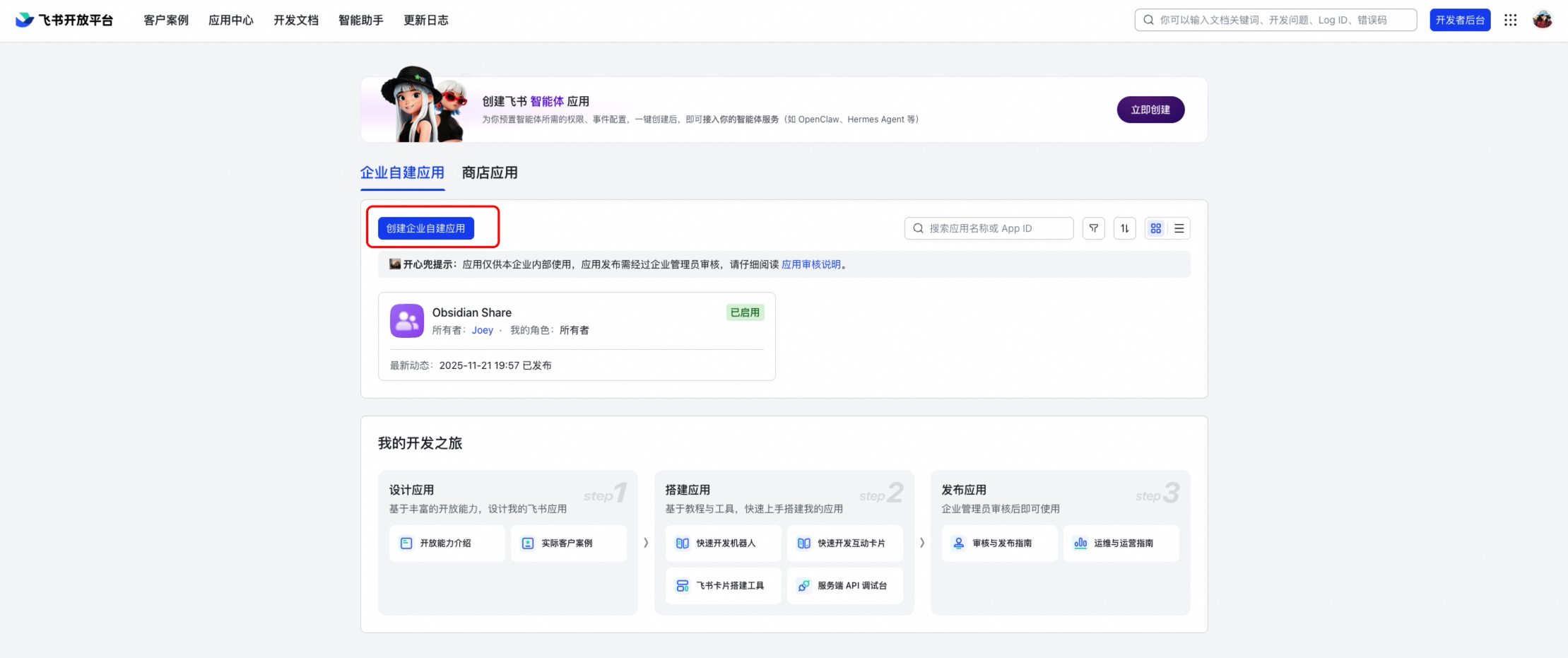
1. Go to the [Feishu Open Platform](https://open.feishu.cn)
|
|
13
|
-
2. Create a new application (or use an existing one)
|
|
14
|
-
|
|
15
|
-
|
|
16
|
-
|
|
17
|
-
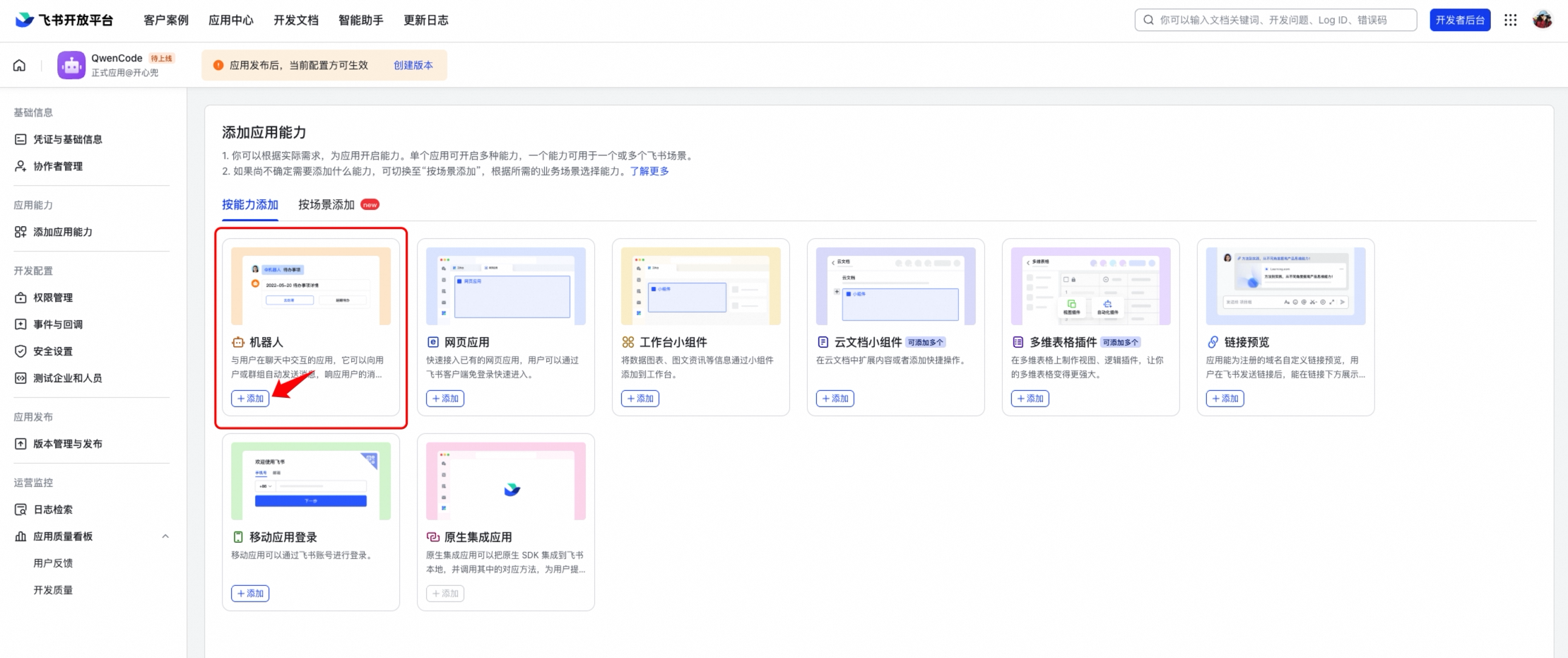
3. Under the application, enable the **Bot** capability (添加应用能力 → 机器人)
|
|
18
|
-
|
|
19
|
-
|
|
20
|
-
|
|
21
|
-
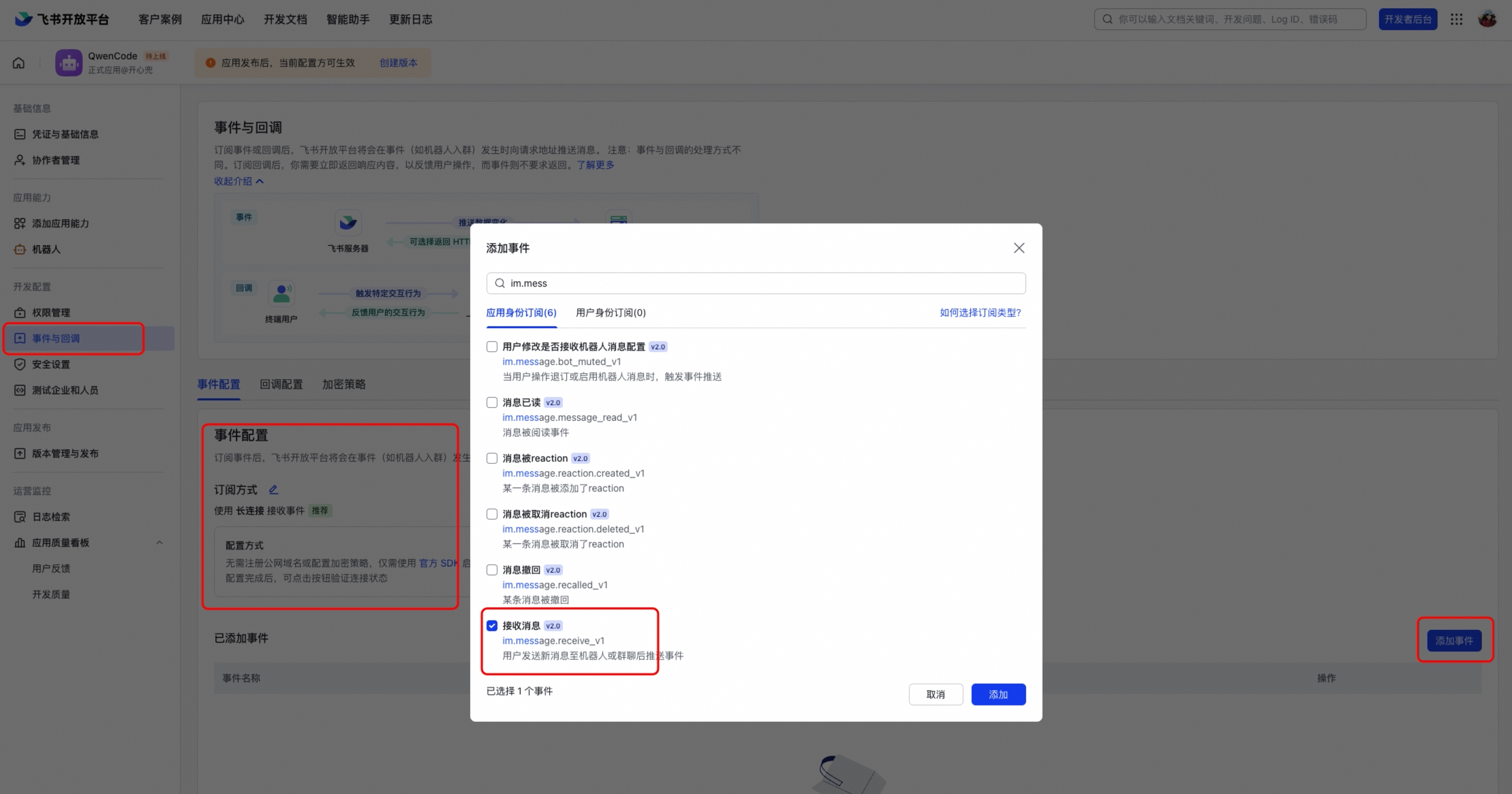
4. In **Event Subscriptions** (事件与回调), select **Long Connection** (使用长连接接收事件)
|
|
22
|
-
|
|
23
|
-
|
|
24
|
-
|
|
25
|
-
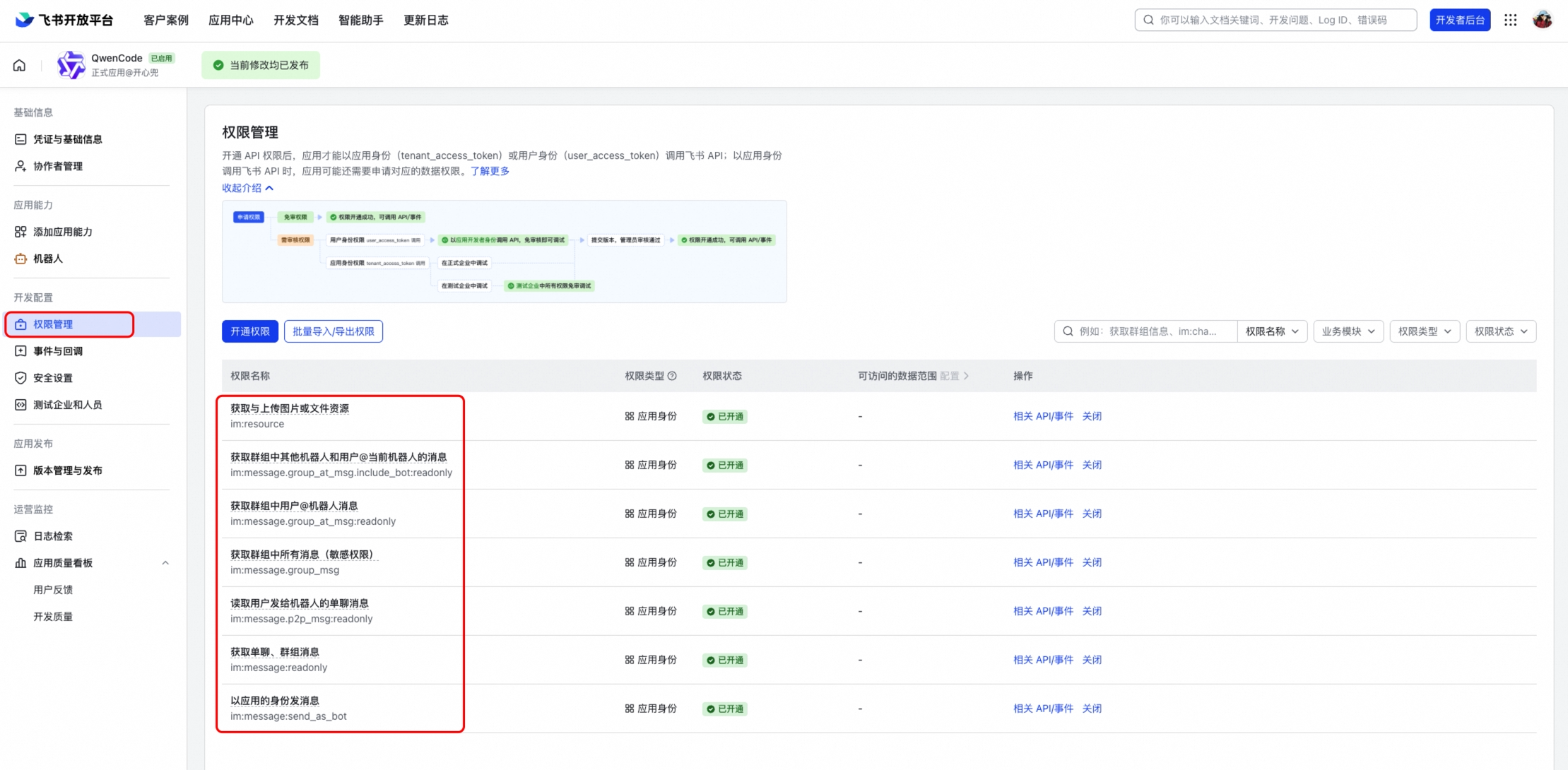
5. Add the event `im.message.receive_v1` (接收消息)
|
|
26
|
-
|
|
27
|
-
|
|
28
|
-
|
|
29
|
-
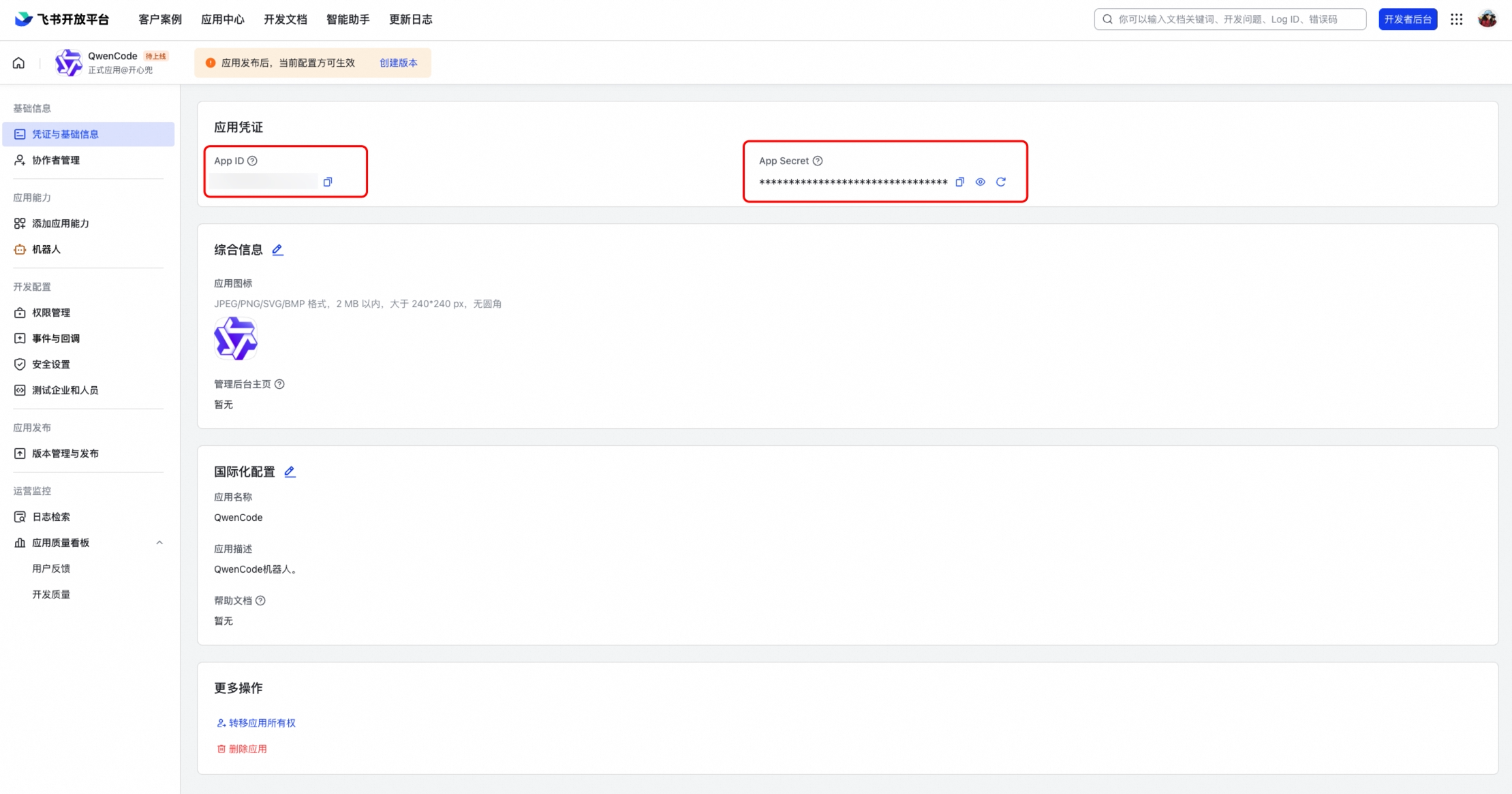
6. Note the **App ID** (Client ID) and **App Secret** (Client Secret) from the application credentials page
|
|
30
|
-
|
|
31
|
-
|
|
32
|
-
|
|
33
|
-
### Required Permissions
|
|
34
|
-
|
|
35
|
-
Enable the following permissions under **Permissions & Scopes** (权限管理):
|
|
36
|
-
|
|
37
|
-
- `im:message` — Read and send messages
|
|
38
|
-
- `im:message:send_as_bot` — Send messages as bot
|
|
39
|
-
- `im:resource` — Access message resources (images, files)
|
|
40
|
-
|
|
41
|
-
### Publish the Application
|
|
42
|
-
|
|
43
|
-
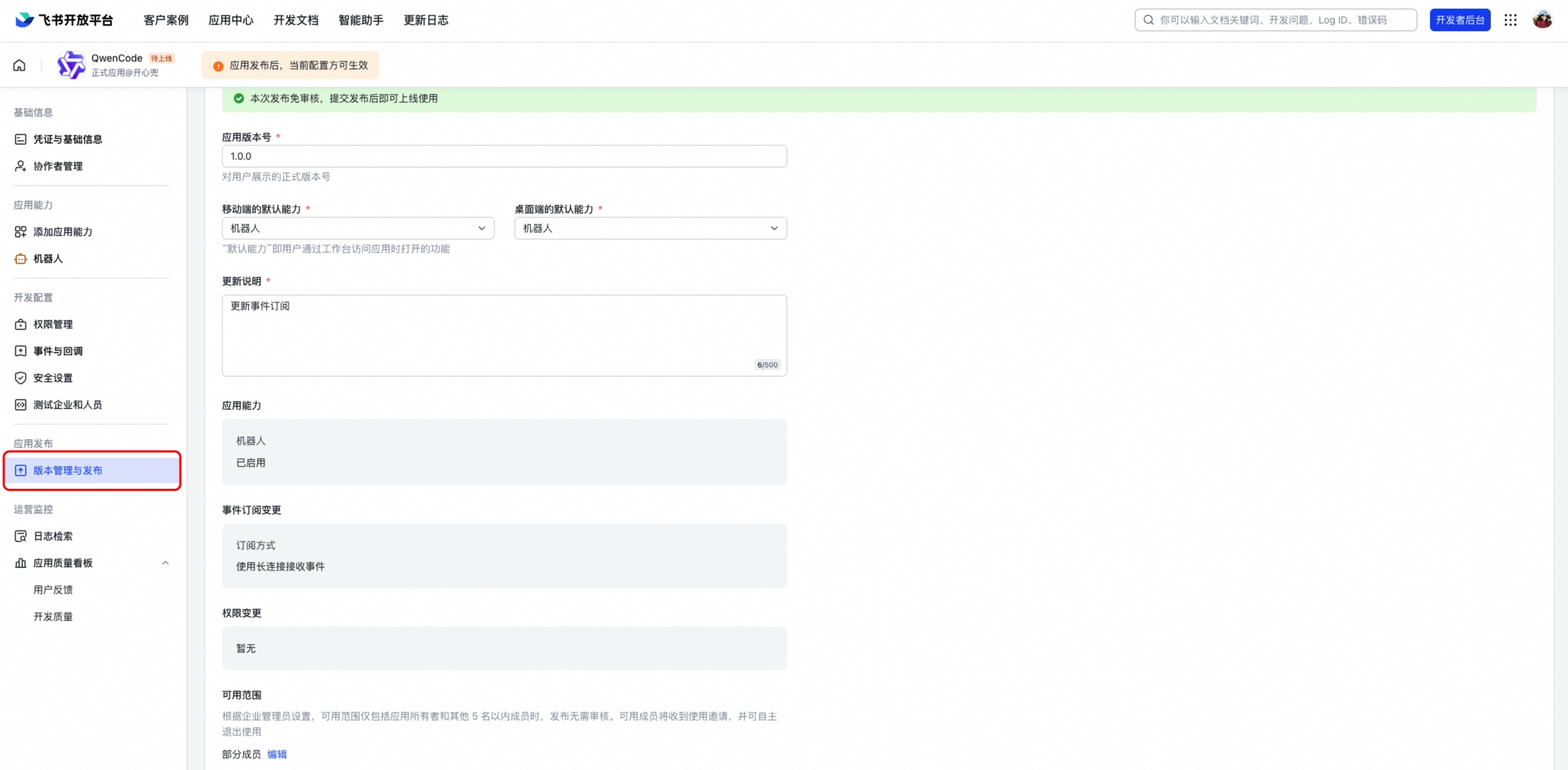
After configuring permissions and events, create a version and publish it. The bot won't work until the application is published and approved.
|
|
44
|
-
|
|
45
|
-
|
|
46
|
-
|
|
47
|
-
## Configuration
|
|
48
|
-
|
|
49
|
-
Add the channel to `~/.matilda/settings.json`:
|
|
50
|
-
|
|
51
|
-
```json
|
|
52
|
-
{
|
|
53
|
-
"channels": {
|
|
54
|
-
"my-feishu": {
|
|
55
|
-
"type": "feishu",
|
|
56
|
-
"clientId": "<your-app-id>",
|
|
57
|
-
"clientSecret": "<your-app-secret>",
|
|
58
|
-
"senderPolicy": "open",
|
|
59
|
-
"sessionScope": "user",
|
|
60
|
-
"cwd": "/path/to/your/project",
|
|
61
|
-
"groupPolicy": "open",
|
|
62
|
-
"collapsible": true,
|
|
63
|
-
"groups": {
|
|
64
|
-
"*": { "requireMention": true }
|
|
65
|
-
}
|
|
66
|
-
}
|
|
67
|
-
}
|
|
68
|
-
}
|
|
69
|
-
```
|
|
70
|
-
|
|
71
|
-
### Configuration Options
|
|
72
|
-
|
|
73
|
-
| Option | Description |
|
|
74
|
-
| ---------------------- | ------------------------------------------------------------------- |
|
|
75
|
-
| `clientId` | Feishu App ID |
|
|
76
|
-
| `clientSecret` | Feishu App Secret |
|
|
77
|
-
| `collapsible` | Collapse long responses into expandable sections (default: `false`) |
|
|
78
|
-
| `collapsibleThreshold` | Character threshold for collapsing (default: `500`) |
|
|
79
|
-
| `webhookPort` | If set, use HTTP webhook mode instead of WebSocket |
|
|
80
|
-
| `verificationToken` | Verification token for webhook mode |
|
|
81
|
-
| `encryptKey` | Encrypt key for webhook mode |
|
|
82
|
-
|
|
83
|
-
## Running
|
|
84
|
-
|
|
85
|
-
```bash
|
|
86
|
-
# Start only the Feishu channel
|
|
87
|
-
matilda channel start my-feishu
|
|
88
|
-
|
|
89
|
-
# Or start all configured channels together
|
|
90
|
-
matilda channel start
|
|
91
|
-
```
|
|
92
|
-
|
|
93
|
-
Open Feishu and send a message to the bot. You should see a streaming interactive card with the response.
|
|
94
|
-
|
|
95
|
-
## Connection Modes
|
|
96
|
-
|
|
97
|
-
### WebSocket (Default)
|
|
98
|
-
|
|
99
|
-
WebSocket mode uses an outbound long connection — no public URL or server is needed. This is the recommended mode for most deployments.
|
|
100
|
-
|
|
101
|
-
### Webhook
|
|
102
|
-
|
|
103
|
-
If you need webhook mode (e.g., for shared applications), set `webhookPort` in your config:
|
|
104
|
-
|
|
105
|
-
```json
|
|
106
|
-
{
|
|
107
|
-
"channels": {
|
|
108
|
-
"my-feishu": {
|
|
109
|
-
"type": "feishu",
|
|
110
|
-
"webhookPort": 9321,
|
|
111
|
-
"verificationToken": "<from-feishu-console>",
|
|
112
|
-
"encryptKey": "<from-feishu-console>"
|
|
113
|
-
}
|
|
114
|
-
}
|
|
115
|
-
}
|
|
116
|
-
```
|
|
117
|
-
|
|
118
|
-
Then set the request URL in Feishu Open Platform to `http://<your-server>:9321`.
|
|
119
|
-
|
|
120
|
-
## Group Chats
|
|
121
|
-
|
|
122
|
-
Feishu bots work in both DM and group conversations. To enable group support:
|
|
123
|
-
|
|
124
|
-
1. Set `groupPolicy` to `"allowlist"` or `"open"` in your channel config
|
|
125
|
-
2. Add the bot to a Feishu group
|
|
126
|
-
3. @mention the bot in the group to trigger a response
|
|
127
|
-
|
|
128
|
-
By default, the bot requires an @mention in group chats (`requireMention: true`). Set `"requireMention": false` for a specific group to make it respond to all messages.
|
|
129
|
-
|
|
130
|
-
## Features
|
|
131
|
-
|
|
132
|
-
### Interactive Card Streaming
|
|
133
|
-
|
|
134
|
-
Responses are rendered as Feishu interactive cards with real-time streaming updates. The card shows a "generating" indicator while the response is being produced, and a **Stop** button to cancel generation.
|
|
135
|
-
|
|
136
|
-
### Quote/Reply Context
|
|
137
|
-
|
|
138
|
-
When you reply to (quote) a message, the quoted content is automatically included as context for the agent. This works for:
|
|
139
|
-
|
|
140
|
-
- Text and rich-text messages
|
|
141
|
-
- Interactive cards (bot's previous responses)
|
|
142
|
-
|
|
143
|
-
### Images and Files
|
|
144
|
-
|
|
145
|
-
You can send photos and documents to the bot:
|
|
146
|
-
|
|
147
|
-
- **Images:** Analyzed using multimodal vision capabilities
|
|
148
|
-
- **Files:** Downloaded and saved locally for the agent to read
|
|
149
|
-
|
|
150
|
-
### Concurrent Messages
|
|
151
|
-
|
|
152
|
-
Multiple users can send messages simultaneously in the same group chat. Each message gets its own independent card and response — they don't interfere with each other.
|
|
153
|
-
|
|
154
|
-
## Key Differences from DingTalk
|
|
155
|
-
|
|
156
|
-
- **Response format:** Uses Feishu interactive cards (v2 schema) with native markdown rendering, including tables
|
|
157
|
-
- **Streaming:** Card content is updated in-place with throttled PATCH requests (1.5s interval)
|
|
158
|
-
- **Connection:** WebSocket via `@larksuiteoapi/node-sdk` — same outbound-only model, no public URL needed
|
|
159
|
-
- **Working indicator:** An "OnIt" emoji reaction is added while processing
|
|
160
|
-
- **Quote context:** Supports quoting both text messages and interactive cards
|
|
161
|
-
|
|
162
|
-
## Troubleshooting
|
|
163
|
-
|
|
164
|
-
### Bot doesn't connect
|
|
165
|
-
|
|
166
|
-
- Verify your App ID and App Secret are correct
|
|
167
|
-
- Make sure **Long Connection** is selected in Event Subscriptions
|
|
168
|
-
- Check that the `im.message.receive_v1` event is subscribed
|
|
169
|
-
- Check the terminal output for connection errors
|
|
170
|
-
|
|
171
|
-
### Bot doesn't respond in groups
|
|
172
|
-
|
|
173
|
-
- Check that `groupPolicy` is set to `"allowlist"` or `"open"` (default is `"disabled"`)
|
|
174
|
-
- Make sure you @mention the bot in the group message
|
|
175
|
-
- Verify the bot has been added to the group
|
|
176
|
-
|
|
177
|
-
### Card stays in "generating" state
|
|
178
|
-
|
|
179
|
-
- This usually indicates the response completed but the final card update failed
|
|
180
|
-
- Check terminal logs for API errors (rate limiting, card size limits)
|
|
181
|
-
- Very long responses with many tables may hit Feishu's card element limits
|
|
182
|
-
|
|
183
|
-
### Quote doesn't include card content
|
|
184
|
-
|
|
185
|
-
- The bot reads card content via the `card_msg_content_type=user_card_content` API parameter
|
|
186
|
-
- Ensure the bot has `im:message` permission to read messages
|
|
@@ -1,106 +0,0 @@
|
|
|
1
|
-
# WeChat (Weixin)
|
|
2
|
-
|
|
3
|
-
This guide covers setting up a Matilda Code channel on WeChat via the official iLink Bot API.
|
|
4
|
-
|
|
5
|
-
## Prerequisites
|
|
6
|
-
|
|
7
|
-
- A WeChat account that can scan QR codes (mobile app)
|
|
8
|
-
- Access to the iLink Bot platform (WeChat's official bot API)
|
|
9
|
-
|
|
10
|
-
## Setup
|
|
11
|
-
|
|
12
|
-
### 1. Log in via QR code
|
|
13
|
-
|
|
14
|
-
WeChat uses QR code authentication instead of a static bot token. Run the login command:
|
|
15
|
-
|
|
16
|
-
```bash
|
|
17
|
-
matilda channel configure-weixin
|
|
18
|
-
```
|
|
19
|
-
|
|
20
|
-
This will display a QR code URL. Scan it with your WeChat mobile app to authenticate. Your credentials are saved to `~/.matilda/channels/weixin/account.json`.
|
|
21
|
-
|
|
22
|
-
### 2. Configure the channel
|
|
23
|
-
|
|
24
|
-
Add the channel to `~/.matilda/settings.json`:
|
|
25
|
-
|
|
26
|
-
```json
|
|
27
|
-
{
|
|
28
|
-
"channels": {
|
|
29
|
-
"my-weixin": {
|
|
30
|
-
"type": "weixin",
|
|
31
|
-
"senderPolicy": "pairing",
|
|
32
|
-
"allowedUsers": [],
|
|
33
|
-
"sessionScope": "user",
|
|
34
|
-
"cwd": "/path/to/your/project",
|
|
35
|
-
"model": "matilda3.5-plus",
|
|
36
|
-
"instructions": "You are a concise coding assistant responding via WeChat. Keep responses under 500 characters. Use plain text only."
|
|
37
|
-
}
|
|
38
|
-
}
|
|
39
|
-
}
|
|
40
|
-
```
|
|
41
|
-
|
|
42
|
-
Note: WeChat channels do not use a `token` field — credentials come from the QR login step.
|
|
43
|
-
|
|
44
|
-
### 3. Start the channel
|
|
45
|
-
|
|
46
|
-
```bash
|
|
47
|
-
# Start only the WeChat channel
|
|
48
|
-
matilda channel start my-weixin
|
|
49
|
-
|
|
50
|
-
# Or start all configured channels together
|
|
51
|
-
matilda channel start
|
|
52
|
-
```
|
|
53
|
-
|
|
54
|
-
Open WeChat and send a message to the bot. You should see a typing indicator ("...") while the agent processes, followed by the response.
|
|
55
|
-
|
|
56
|
-
## Images and Files
|
|
57
|
-
|
|
58
|
-
You can send photos and documents to the bot, not just text.
|
|
59
|
-
|
|
60
|
-
**Photos:** Send an image (screenshot, photo, etc.) and the agent will analyze it using its vision capabilities. This requires a multimodal model — add `"model": "matilda3.5-plus"` (or another vision-capable model) to your channel config. A typing indicator shows while the image is being downloaded and processed.
|
|
61
|
-
|
|
62
|
-
**Files:** Send a PDF, code file, or any document. The bot downloads and decrypts it from WeChat's CDN, saves it locally, and the agent reads it with its file tools. This works with any model.
|
|
63
|
-
|
|
64
|
-
## Configuration Options
|
|
65
|
-
|
|
66
|
-
WeChat channels support all the standard channel options (see [Channel Overview](./overview#options)), plus:
|
|
67
|
-
|
|
68
|
-
| Option | Description |
|
|
69
|
-
| --------- | ------------------------------------------------------------------------------ |
|
|
70
|
-
| `baseUrl` | Override the iLink Bot API base URL (default: `https://ilinkai.weixin.qq.com`) |
|
|
71
|
-
|
|
72
|
-
## Key Differences from Telegram
|
|
73
|
-
|
|
74
|
-
- **Authentication:** QR code login instead of a static bot token. Sessions can expire — the channel will pause and log a message if this happens.
|
|
75
|
-
- **Formatting:** WeChat only supports plain text. Markdown in agent responses is automatically stripped.
|
|
76
|
-
- **Typing indicator:** WeChat has a native "..." typing indicator instead of a "Working..." text message.
|
|
77
|
-
- **Groups:** WeChat iLink Bot is DM-only — group chats are not supported.
|
|
78
|
-
- **Media encryption:** Images and files are encrypted on WeChat's CDN with AES-128-ECB. The channel handles decryption transparently.
|
|
79
|
-
|
|
80
|
-
## Tips
|
|
81
|
-
|
|
82
|
-
- **Use plain text instructions** — Since WeChat strips all markdown, add instructions like "Use plain text only" to avoid the agent producing formatted responses that look messy.
|
|
83
|
-
- **Keep responses short** — WeChat message bubbles work best with concise text. Adding a character limit to your instructions helps (e.g., "Keep responses under 500 characters").
|
|
84
|
-
- **Session expiry** — If you see "Session expired (errcode -14)" in the logs, your WeChat login has expired. Stop the channel and re-run `matilda channel configure-weixin` to log in again.
|
|
85
|
-
- **Restrict access** — Use `senderPolicy: "pairing"` or `"allowlist"` to control who can talk to the bot. See [DM Pairing](./overview#dm-pairing) for details.
|
|
86
|
-
|
|
87
|
-
## Troubleshooting
|
|
88
|
-
|
|
89
|
-
### "WeChat account not configured"
|
|
90
|
-
|
|
91
|
-
Run `matilda channel configure-weixin` to log in via QR code first.
|
|
92
|
-
|
|
93
|
-
### "Session expired (errcode -14)"
|
|
94
|
-
|
|
95
|
-
Your WeChat login session has expired. Stop the channel and run `matilda channel configure-weixin` again.
|
|
96
|
-
|
|
97
|
-
### Bot doesn't respond
|
|
98
|
-
|
|
99
|
-
- Check the terminal output for errors
|
|
100
|
-
- Verify the channel is running (`matilda channel start my-weixin`)
|
|
101
|
-
- If using `senderPolicy: "allowlist"`, make sure your WeChat user ID is in `allowedUsers`
|
|
102
|
-
|
|
103
|
-
### Images not working
|
|
104
|
-
|
|
105
|
-
- Make sure your channel config has a `model` that supports vision (e.g., `matilda3.5-plus`)
|
|
106
|
-
- Check the terminal for CDN download errors — these may indicate a network issue
|
|
@@ -1,81 +0,0 @@
|
|
|
1
|
-
# JetBrains IDEs
|
|
2
|
-
|
|
3
|
-
> JetBrains IDEs provide native support for AI coding assistants through the Agent Client Protocol (ACP). This integration allows you to use Matilda Code directly within your JetBrains IDE with real-time code suggestions.
|
|
4
|
-
|
|
5
|
-
### Features
|
|
6
|
-
|
|
7
|
-
- **Native agent experience**: Integrated AI assistant panel within your JetBrains IDE
|
|
8
|
-
- **Agent Client Protocol**: Full support for ACP enabling advanced IDE interactions
|
|
9
|
-
- **Symbol management**: #-mention files to add them to the conversation context
|
|
10
|
-
- **Conversation history**: Access to past conversations within the IDE
|
|
11
|
-
|
|
12
|
-
### Requirements
|
|
13
|
-
|
|
14
|
-
- JetBrains IDE with ACP support (IntelliJ IDEA, WebStorm, PyCharm, etc.)
|
|
15
|
-
- Matilda Code CLI installed
|
|
16
|
-
|
|
17
|
-
### Installation
|
|
18
|
-
|
|
19
|
-
#### Install from ACP Registry (Recommend)
|
|
20
|
-
|
|
21
|
-
1. Install Matilda Code CLI:
|
|
22
|
-
|
|
23
|
-
```bash
|
|
24
|
-
npm install -g @maincode-ai/matilda-code
|
|
25
|
-
```
|
|
26
|
-
|
|
27
|
-
2. Open your JetBrains IDE and navigate to AI Chat tool window.
|
|
28
|
-
|
|
29
|
-
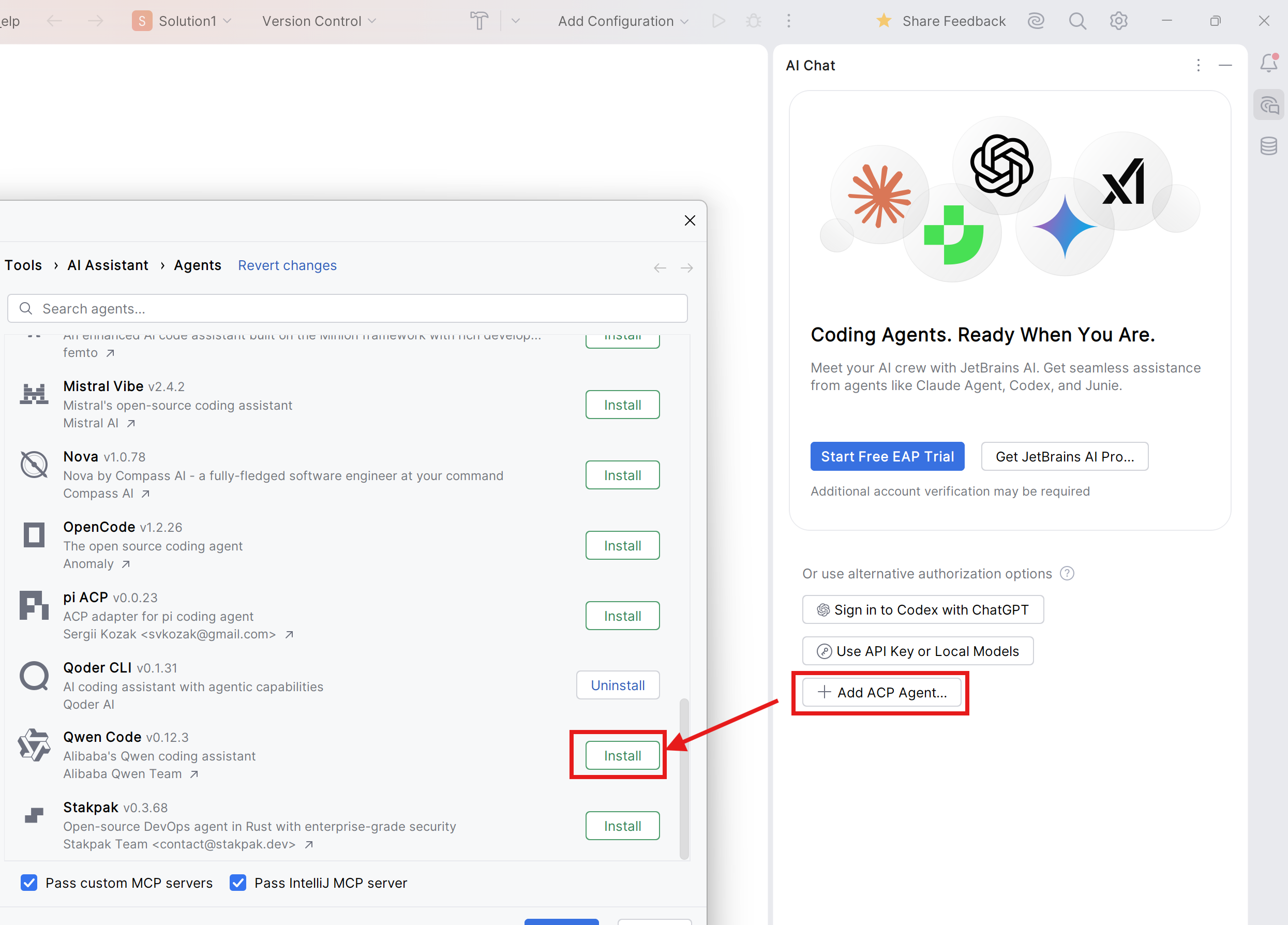
3. Click **Add ACP Agent**, then click **Install**.
|
|
30
|
-
|
|
31
|
-
|
|
32
|
-
|
|
33
|
-
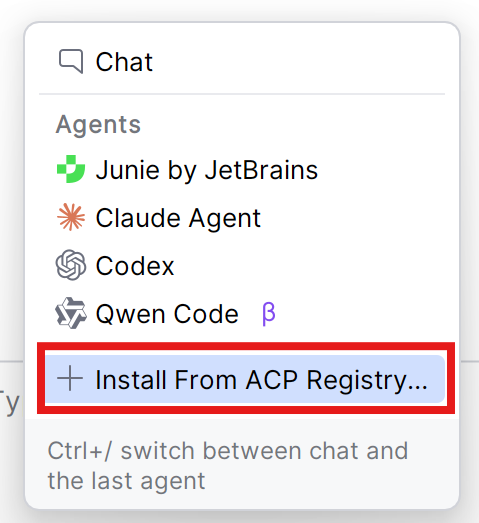
For users using JetBrains AI Assistant and/or other ACP agents, click **Install From ACP Registry** in Agents List, then install Matilda Code ACP.
|
|
34
|
-
|
|
35
|
-
|
|
36
|
-
|
|
37
|
-
4. The Matilda Code agent should now be available in the AI Assistant panel.
|
|
38
|
-
|
|
39
|
-
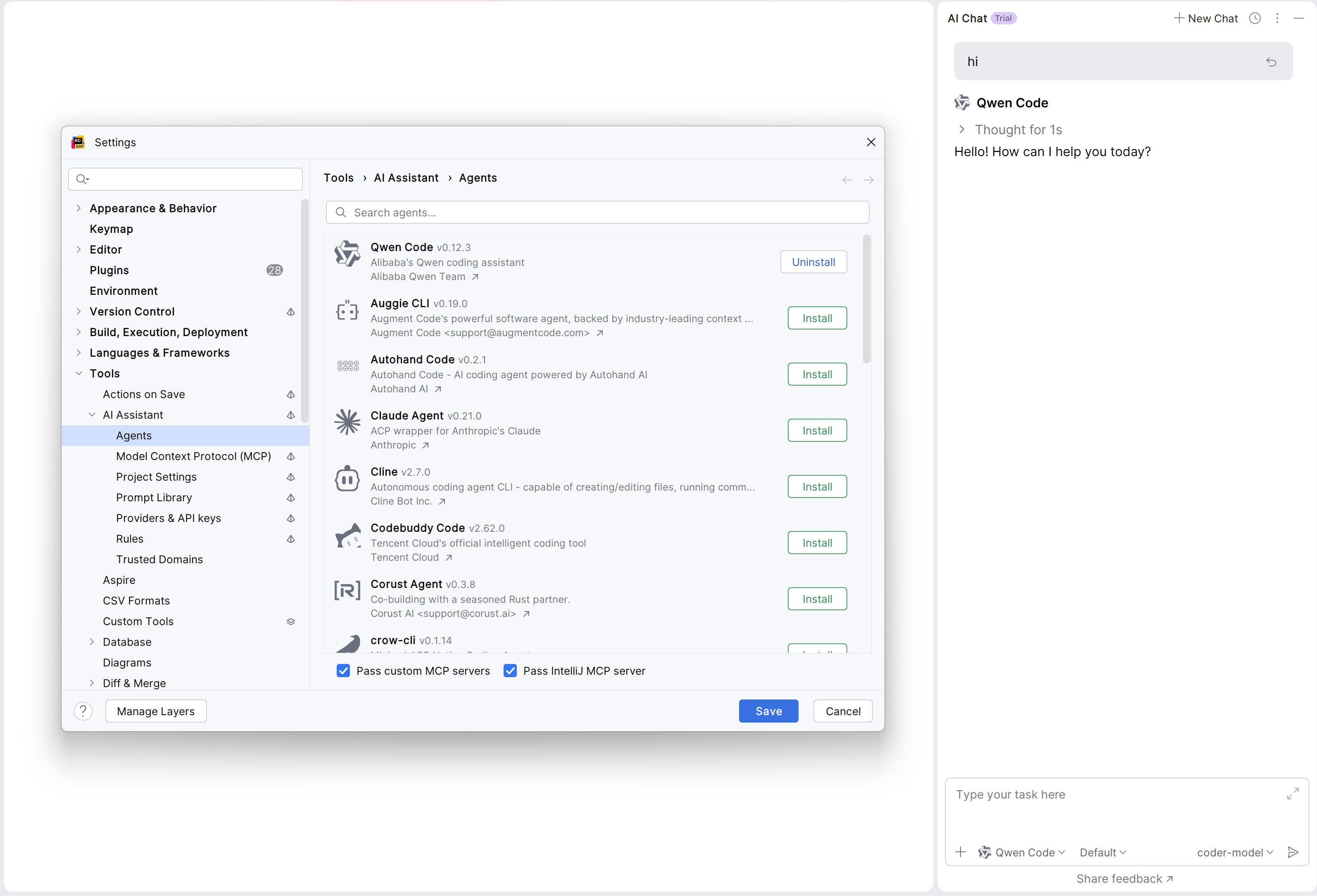
|
|
40
|
-
|
|
41
|
-
#### Manual Install (for older version of JetBrains IDEs)
|
|
42
|
-
|
|
43
|
-
1. Install Matilda Code CLI:
|
|
44
|
-
|
|
45
|
-
```bash
|
|
46
|
-
npm install -g @maincode-ai/matilda-code
|
|
47
|
-
```
|
|
48
|
-
|
|
49
|
-
2. Open your JetBrains IDE and navigate to AI Chat tool window.
|
|
50
|
-
|
|
51
|
-
3. Click the 3-dot menu in the upper-right corner and select **Configure ACP Agent** and configure Matilda Code with the following settings:
|
|
52
|
-
|
|
53
|
-
```json
|
|
54
|
-
{
|
|
55
|
-
"agent_servers": {
|
|
56
|
-
"matilda": {
|
|
57
|
-
"command": "/path/to/matilda",
|
|
58
|
-
"args": ["--acp"],
|
|
59
|
-
"env": {}
|
|
60
|
-
}
|
|
61
|
-
}
|
|
62
|
-
}
|
|
63
|
-
```
|
|
64
|
-
|
|
65
|
-
4. The Matilda Code agent should now be available in the AI Assistant panel
|
|
66
|
-
|
|
67
|
-
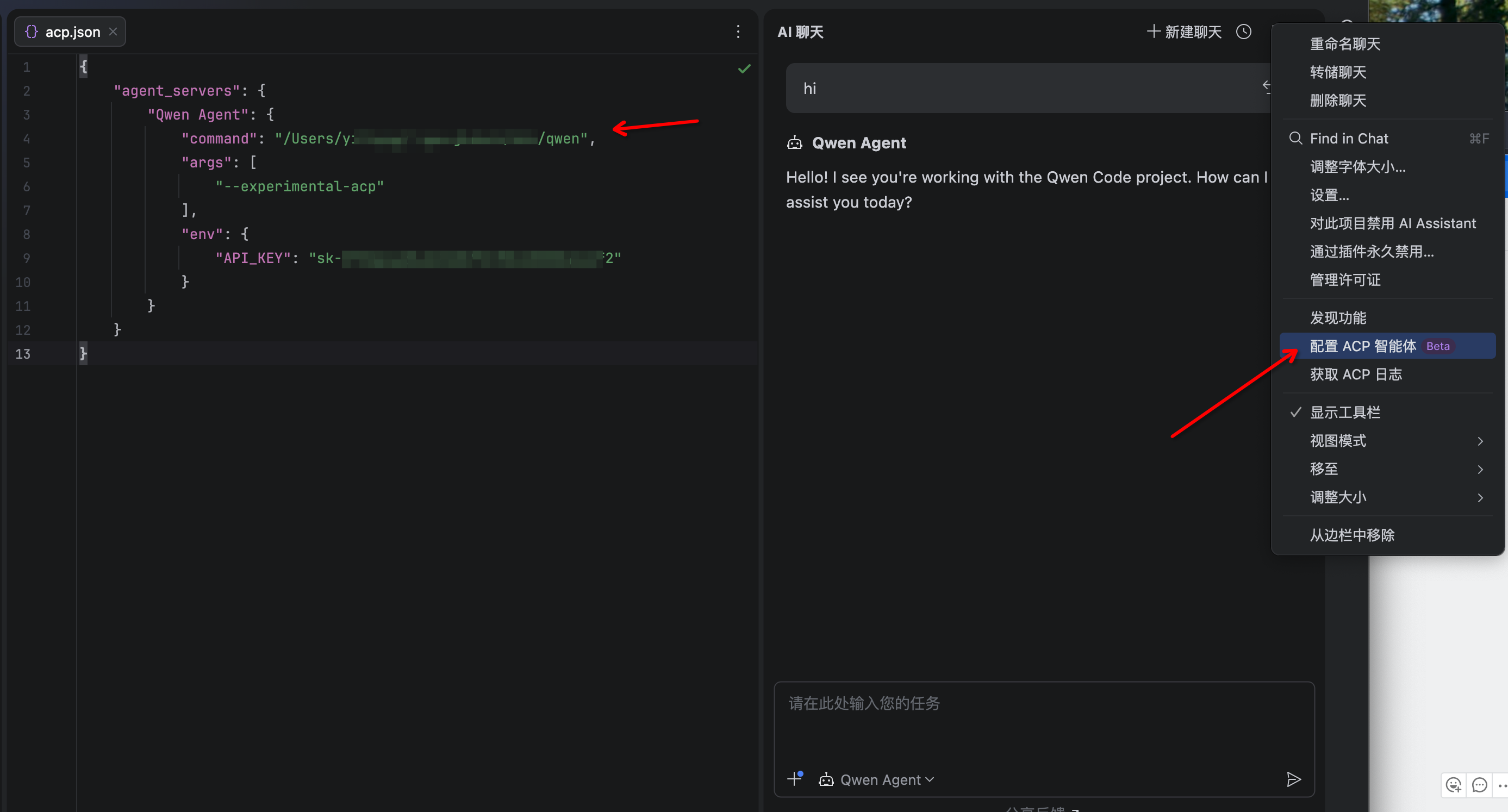
|
|
68
|
-
|
|
69
|
-
## Troubleshooting
|
|
70
|
-
|
|
71
|
-
### Agent not appearing
|
|
72
|
-
|
|
73
|
-
- Run `matilda --version` in terminal to verify installation
|
|
74
|
-
- Ensure your JetBrains IDE version supports ACP
|
|
75
|
-
- Restart your JetBrains IDE
|
|
76
|
-
|
|
77
|
-
### Matilda Code not responding
|
|
78
|
-
|
|
79
|
-
- Check your internet connection
|
|
80
|
-
- Verify CLI works by running `matilda` in terminal
|
|
81
|
-
- [File an issue on GitHub](https://github.com/MaincodeHQ/matilda-code/issues) if the problem persists
|