@magicpages/ghost-typesense-search-ui 1.1.0 → 1.1.1
This diff represents the content of publicly available package versions that have been released to one of the supported registries. The information contained in this diff is provided for informational purposes only and reflects changes between package versions as they appear in their respective public registries.
- package/README.md +28 -115
- package/dist/search.min.js +1 -1
- package/package.json +1 -1
package/README.md
CHANGED
|
@@ -1,104 +1,66 @@
|
|
|
1
1
|
# @magicpages/ghost-typesense-search-ui
|
|
2
2
|
|
|
3
|
-
A beautiful, accessible
|
|
3
|
+
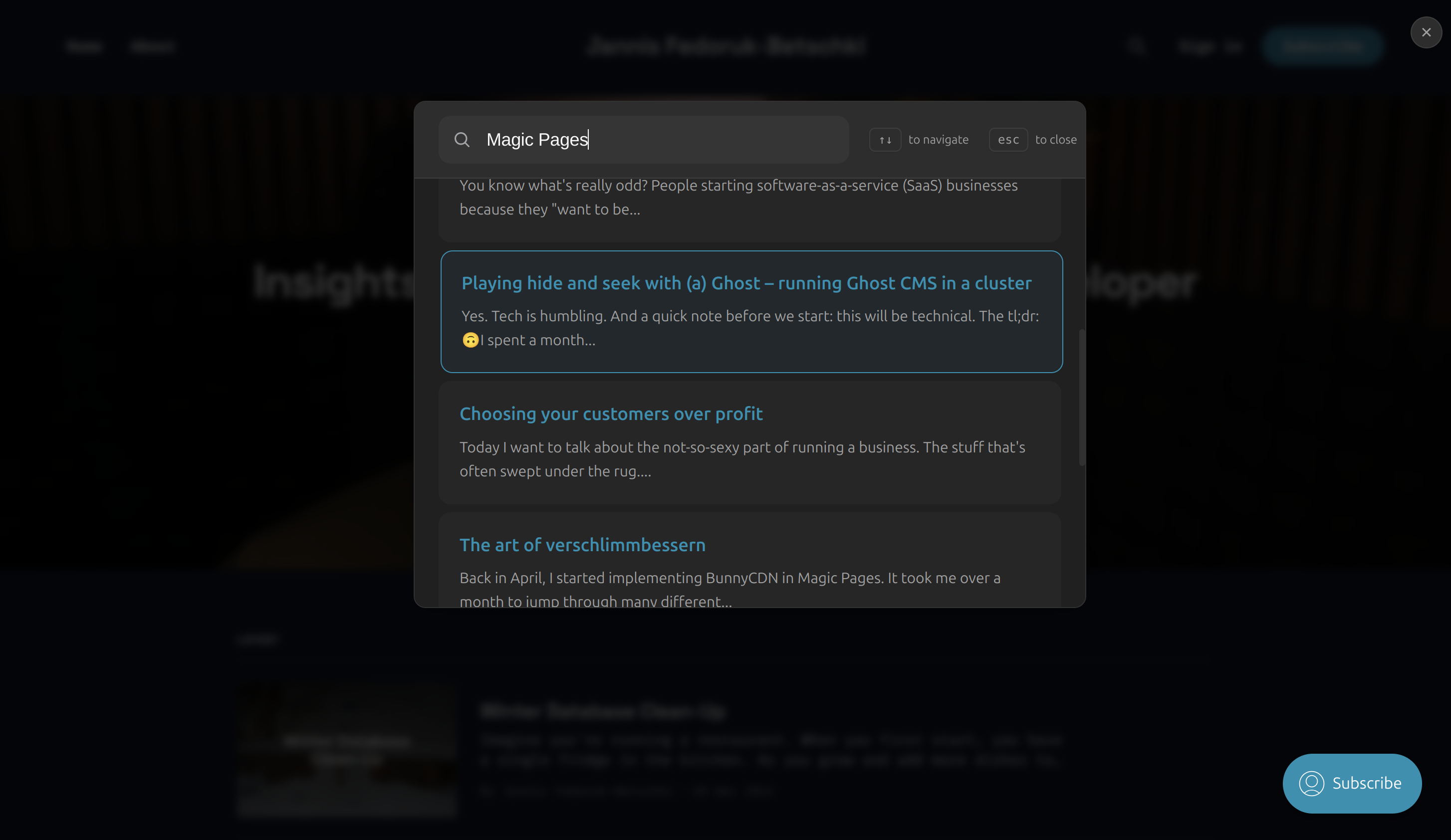
A beautiful, accessible search interface for Ghost blogs using Typesense. Built with vanilla JavaScript.
|
|
4
4
|
|
|
5
5
|
|
|
6
6
|
|
|
7
7
|
## Features
|
|
8
8
|
|
|
9
9
|
- 🔍 Real-time search with Typesense
|
|
10
|
-
- 🎨
|
|
11
|
-
- 🌓 Automatic dark mode
|
|
10
|
+
- 🎨 Beautiful, accessible interface
|
|
11
|
+
- 🌓 Automatic dark mode
|
|
12
12
|
- ⌨️ Full keyboard navigation
|
|
13
13
|
- 📱 Responsive design
|
|
14
|
-
- ♿ WCAG accessible
|
|
15
14
|
- 🎯 Common searches support
|
|
16
|
-
- 💅 Customizable styling
|
|
17
15
|
|
|
18
16
|
## Installation
|
|
19
17
|
|
|
20
|
-
Ghost's
|
|
18
|
+
### Option 1: Replace Ghost's `sodoSearch` (Recommended if you can edit your config)
|
|
21
19
|
|
|
22
|
-
|
|
23
|
-
|
|
24
|
-
```
|
|
20
|
+
Add to your `config.[environment].json`:
|
|
21
|
+
```json
|
|
25
22
|
"sodoSearch": {
|
|
26
|
-
"url": "[link to
|
|
23
|
+
"url": "[link to search.min.js]"
|
|
27
24
|
}
|
|
28
25
|
```
|
|
29
|
-
As an alternative, you can set the following environment variable:
|
|
30
|
-
|
|
31
|
-
```
|
|
32
|
-
sodoSearch__url=[link to your search.min.js file]
|
|
33
|
-
```
|
|
34
26
|
|
|
35
|
-
|
|
27
|
+
Or set environment variable:
|
|
36
28
|
```bash
|
|
37
|
-
|
|
29
|
+
sodoSearch__url=[link to search.min.js]
|
|
38
30
|
```
|
|
39
31
|
|
|
40
|
-
|
|
41
|
-
|
|
42
|
-
```
|
|
43
|
-
"sodoSearch": {
|
|
44
|
-
"url": false
|
|
45
|
-
},
|
|
46
|
-
```
|
|
32
|
+
### Option 2: Direct Installation (Works if you can't edit your config, e.g. on Ghost(Pro))
|
|
47
33
|
|
|
48
|
-
|
|
34
|
+
Add to your site's code injection:
|
|
49
35
|
|
|
50
36
|
```html
|
|
51
|
-
<script src="https://unpkg.com/@magicpages/ghost-typesense-search-ui/dist/search.min.js"></script>
|
|
52
|
-
```
|
|
53
|
-
|
|
54
|
-
## Usage
|
|
55
37
|
|
|
56
|
-
1. Add the script to your Ghost theme:
|
|
57
|
-
|
|
58
|
-
```html
|
|
59
|
-
<!-- In default.hbs or post.hbs -->
|
|
60
|
-
<script>
|
|
61
|
-
window.__MP_SEARCH_CONFIG__ = {
|
|
62
|
-
typesenseNodes: [{
|
|
63
|
-
host: 'your-typesense-host',
|
|
64
|
-
port: '443',
|
|
65
|
-
protocol: 'https'
|
|
66
|
-
}],
|
|
67
|
-
typesenseApiKey: 'your-search-only-api-key',
|
|
68
|
-
collectionName: 'posts',
|
|
69
|
-
theme: 'system', // 'light', 'dark', or 'system'
|
|
70
|
-
commonSearches: ['Getting Started', 'FAQ', 'Features'] // optional
|
|
71
|
-
};
|
|
72
|
-
</script>
|
|
73
38
|
<script src="https://unpkg.com/@magicpages/ghost-typesense-search-ui/dist/search.min.js"></script>
|
|
74
39
|
```
|
|
75
40
|
|
|
76
|
-
|
|
77
|
-
|
|
78
|
-
```html
|
|
79
|
-
<button onclick="window.location.hash = '#/search'">
|
|
80
|
-
Search
|
|
81
|
-
</button>
|
|
82
|
-
```
|
|
83
|
-
|
|
84
|
-
The search modal will automatically open when the URL hash is `#/search`.
|
|
41
|
+
The script automatically takes over Ghost's native search and works with the `/#/search` URL trigger.
|
|
85
42
|
|
|
86
43
|
## Configuration
|
|
87
44
|
|
|
88
45
|
| Option | Type | Required | Description |
|
|
89
46
|
|--------|------|----------|-------------|
|
|
90
|
-
| `typesenseNodes` | `Array` | Yes |
|
|
91
|
-
| `typesenseApiKey` | `String` | Yes | Search-only API key
|
|
92
|
-
| `collectionName` | `String` | Yes |
|
|
93
|
-
| `theme` | `String` | No |
|
|
94
|
-
| `commonSearches` | `Array` | No |
|
|
95
|
-
| `searchFields` | `Object` | No |
|
|
47
|
+
| `typesenseNodes` | `Array` | Yes | Typesense node configurations |
|
|
48
|
+
| `typesenseApiKey` | `String` | Yes | Search-only API key |
|
|
49
|
+
| `collectionName` | `String` | Yes | Collection name |
|
|
50
|
+
| `theme` | `String` | No | 'light', 'dark', or 'system' |
|
|
51
|
+
| `commonSearches` | `Array` | No | Common search terms |
|
|
52
|
+
| `searchFields` | `Object` | No | Field weights and highlighting |
|
|
96
53
|
|
|
97
|
-
##
|
|
54
|
+
## Keyboard Shortcuts
|
|
98
55
|
|
|
99
|
-
|
|
56
|
+
- `/`: Open search
|
|
57
|
+
- `↑/↓`: Navigate results
|
|
58
|
+
- `Enter`: Select result
|
|
59
|
+
- `Esc`: Close search
|
|
100
60
|
|
|
101
|
-
|
|
61
|
+
## Customization
|
|
62
|
+
|
|
63
|
+
The UI uses CSS variables for styling:
|
|
102
64
|
|
|
103
65
|
```css
|
|
104
66
|
#mp-search-wrapper {
|
|
@@ -111,7 +73,7 @@ The search UI uses CSS variables for easy customization:
|
|
|
111
73
|
--accent-color: var(--ghost-accent-color, #1c1c1c);
|
|
112
74
|
}
|
|
113
75
|
|
|
114
|
-
/* Dark mode
|
|
76
|
+
/* Dark mode */
|
|
115
77
|
#mp-search-wrapper.dark {
|
|
116
78
|
--modal-bg: #1c1c1c;
|
|
117
79
|
--text-primary: #fff;
|
|
@@ -121,55 +83,6 @@ The search UI uses CSS variables for easy customization:
|
|
|
121
83
|
}
|
|
122
84
|
```
|
|
123
85
|
|
|
124
|
-
### Search Fields
|
|
125
|
-
|
|
126
|
-
Customize search field weights and highlighting:
|
|
127
|
-
|
|
128
|
-
```javascript
|
|
129
|
-
window.__MP_SEARCH_CONFIG__ = {
|
|
130
|
-
// ... other config
|
|
131
|
-
searchFields: {
|
|
132
|
-
title: { weight: 4, highlight: true },
|
|
133
|
-
excerpt: { weight: 2, highlight: true },
|
|
134
|
-
html: { weight: 1, highlight: true }
|
|
135
|
-
}
|
|
136
|
-
};
|
|
137
|
-
```
|
|
138
|
-
|
|
139
|
-
## Keyboard Navigation
|
|
140
|
-
|
|
141
|
-
- `Ctrl/Cmd + K`: Open search
|
|
142
|
-
- `Esc`: Close search
|
|
143
|
-
- `↑/↓`: Navigate results
|
|
144
|
-
- `Enter`: Select result
|
|
145
|
-
- `Tab`: Navigate UI elements
|
|
146
|
-
|
|
147
|
-
## Browser Support
|
|
148
|
-
|
|
149
|
-
- Chrome/Edge (latest)
|
|
150
|
-
- Firefox (latest)
|
|
151
|
-
- Safari (latest)
|
|
152
|
-
- Safari iOS (latest)
|
|
153
|
-
- Chrome Android (latest)
|
|
154
|
-
|
|
155
|
-
## Development
|
|
156
|
-
|
|
157
|
-
1. Clone the repository:
|
|
158
|
-
```bash
|
|
159
|
-
git clone https://github.com/magicpages/ghost-typesense.git
|
|
160
|
-
cd ghost-typesense
|
|
161
|
-
```
|
|
162
|
-
|
|
163
|
-
2. Install dependencies:
|
|
164
|
-
```bash
|
|
165
|
-
npm install
|
|
166
|
-
```
|
|
167
|
-
|
|
168
|
-
3. Start development server:
|
|
169
|
-
```bash
|
|
170
|
-
npm run dev -w packages/search-ui
|
|
171
|
-
```
|
|
172
|
-
|
|
173
86
|
## License
|
|
174
87
|
|
|
175
|
-
MIT © [MagicPages](https://
|
|
88
|
+
MIT © [MagicPages](https://www.magicpages.co)
|