@magicpages/ghost-typesense-search-ui 1.1.0
This diff represents the content of publicly available package versions that have been released to one of the supported registries. The information contained in this diff is provided for informational purposes only and reflects changes between package versions as they appear in their respective public registries.
- package/README.md +175 -0
- package/dist/search.min.js +1 -0
- package/package.json +51 -0
package/README.md
ADDED
|
@@ -0,0 +1,175 @@
|
|
|
1
|
+
# @magicpages/ghost-typesense-search-ui
|
|
2
|
+
|
|
3
|
+
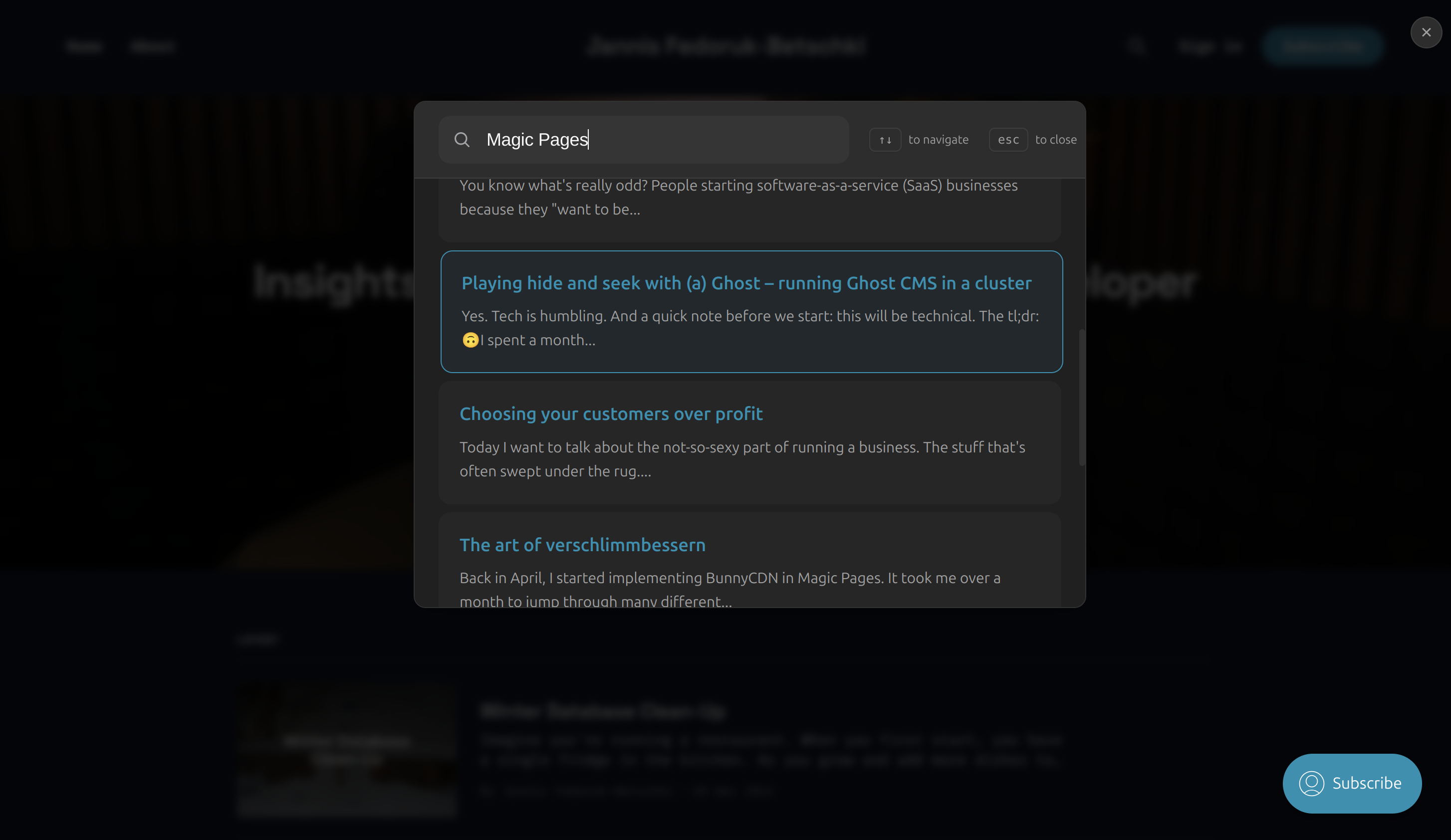
A beautiful, accessible, and customizable search interface for Ghost blogs using Typesense. Built with vanilla JavaScript for maximum compatibility and minimal overhead.
|
|
4
|
+
|
|
5
|
+
|
|
6
|
+
|
|
7
|
+
## Features
|
|
8
|
+
|
|
9
|
+
- 🔍 Real-time search with Typesense
|
|
10
|
+
- 🎨 Replaces the default search modal with a beautiful, accessible, and customizable search interface
|
|
11
|
+
- 🌓 Automatic dark mode support
|
|
12
|
+
- ⌨️ Full keyboard navigation
|
|
13
|
+
- 📱 Responsive design
|
|
14
|
+
- ♿ WCAG accessible
|
|
15
|
+
- 🎯 Common searches support
|
|
16
|
+
- 💅 Customizable styling
|
|
17
|
+
|
|
18
|
+
## Installation
|
|
19
|
+
|
|
20
|
+
Ghost's configuration allows you to replace the default search script: https://ghost.org/docs/config/#search
|
|
21
|
+
|
|
22
|
+
The most comprehensive way to use this package is to upload the `dist/search.min.js` file to your Ghost theme and replace the default search script by adding the following configuration to your config.[environment].json file:
|
|
23
|
+
|
|
24
|
+
```
|
|
25
|
+
"sodoSearch": {
|
|
26
|
+
"url": "[link to your search.min.js file]"
|
|
27
|
+
}
|
|
28
|
+
```
|
|
29
|
+
As an alternative, you can set the following environment variable:
|
|
30
|
+
|
|
31
|
+
```
|
|
32
|
+
sodoSearch__url=[link to your search.min.js file]
|
|
33
|
+
```
|
|
34
|
+
|
|
35
|
+
A second approach is to install the package directly as a dependency in your theme.
|
|
36
|
+
```bash
|
|
37
|
+
npm install @magicpages/ghost-typesense-search-ui
|
|
38
|
+
```
|
|
39
|
+
|
|
40
|
+
If you do this, you might want to disable the default search script in your config.[environment].json file:
|
|
41
|
+
|
|
42
|
+
```
|
|
43
|
+
"sodoSearch": {
|
|
44
|
+
"url": false
|
|
45
|
+
},
|
|
46
|
+
```
|
|
47
|
+
|
|
48
|
+
Or include it directly in your Ghost theme:
|
|
49
|
+
|
|
50
|
+
```html
|
|
51
|
+
<script src="https://unpkg.com/@magicpages/ghost-typesense-search-ui/dist/search.min.js"></script>
|
|
52
|
+
```
|
|
53
|
+
|
|
54
|
+
## Usage
|
|
55
|
+
|
|
56
|
+
1. Add the script to your Ghost theme:
|
|
57
|
+
|
|
58
|
+
```html
|
|
59
|
+
<!-- In default.hbs or post.hbs -->
|
|
60
|
+
<script>
|
|
61
|
+
window.__MP_SEARCH_CONFIG__ = {
|
|
62
|
+
typesenseNodes: [{
|
|
63
|
+
host: 'your-typesense-host',
|
|
64
|
+
port: '443',
|
|
65
|
+
protocol: 'https'
|
|
66
|
+
}],
|
|
67
|
+
typesenseApiKey: 'your-search-only-api-key',
|
|
68
|
+
collectionName: 'posts',
|
|
69
|
+
theme: 'system', // 'light', 'dark', or 'system'
|
|
70
|
+
commonSearches: ['Getting Started', 'FAQ', 'Features'] // optional
|
|
71
|
+
};
|
|
72
|
+
</script>
|
|
73
|
+
<script src="https://unpkg.com/@magicpages/ghost-typesense-search-ui/dist/search.min.js"></script>
|
|
74
|
+
```
|
|
75
|
+
|
|
76
|
+
2. Add a search trigger button:
|
|
77
|
+
|
|
78
|
+
```html
|
|
79
|
+
<button onclick="window.location.hash = '#/search'">
|
|
80
|
+
Search
|
|
81
|
+
</button>
|
|
82
|
+
```
|
|
83
|
+
|
|
84
|
+
The search modal will automatically open when the URL hash is `#/search`.
|
|
85
|
+
|
|
86
|
+
## Configuration
|
|
87
|
+
|
|
88
|
+
| Option | Type | Required | Description |
|
|
89
|
+
|--------|------|----------|-------------|
|
|
90
|
+
| `typesenseNodes` | `Array` | Yes | Array of Typesense node configurations |
|
|
91
|
+
| `typesenseApiKey` | `String` | Yes | Search-only API key from Typesense |
|
|
92
|
+
| `collectionName` | `String` | Yes | Name of your Typesense collection |
|
|
93
|
+
| `theme` | `String` | No | Color theme ('light', 'dark', or 'system') |
|
|
94
|
+
| `commonSearches` | `Array` | No | List of common search terms to show |
|
|
95
|
+
| `searchFields` | `Object` | No | Custom search field weights and highlighting |
|
|
96
|
+
|
|
97
|
+
## Customization
|
|
98
|
+
|
|
99
|
+
### Styling
|
|
100
|
+
|
|
101
|
+
The search UI uses CSS variables for easy customization:
|
|
102
|
+
|
|
103
|
+
```css
|
|
104
|
+
#mp-search-wrapper {
|
|
105
|
+
--modal-bg: #fff;
|
|
106
|
+
--text-primary: #333;
|
|
107
|
+
--text-secondary: #666;
|
|
108
|
+
--border-color: rgba(0, 0, 0, 0.1);
|
|
109
|
+
--hover-bg: rgba(0, 0, 0, 0.05);
|
|
110
|
+
--backdrop-color: rgba(0, 0, 0, 0.5);
|
|
111
|
+
--accent-color: var(--ghost-accent-color, #1c1c1c);
|
|
112
|
+
}
|
|
113
|
+
|
|
114
|
+
/* Dark mode overrides */
|
|
115
|
+
#mp-search-wrapper.dark {
|
|
116
|
+
--modal-bg: #1c1c1c;
|
|
117
|
+
--text-primary: #fff;
|
|
118
|
+
--text-secondary: #999;
|
|
119
|
+
--border-color: rgba(255, 255, 255, 0.1);
|
|
120
|
+
--hover-bg: rgba(255, 255, 255, 0.05);
|
|
121
|
+
}
|
|
122
|
+
```
|
|
123
|
+
|
|
124
|
+
### Search Fields
|
|
125
|
+
|
|
126
|
+
Customize search field weights and highlighting:
|
|
127
|
+
|
|
128
|
+
```javascript
|
|
129
|
+
window.__MP_SEARCH_CONFIG__ = {
|
|
130
|
+
// ... other config
|
|
131
|
+
searchFields: {
|
|
132
|
+
title: { weight: 4, highlight: true },
|
|
133
|
+
excerpt: { weight: 2, highlight: true },
|
|
134
|
+
html: { weight: 1, highlight: true }
|
|
135
|
+
}
|
|
136
|
+
};
|
|
137
|
+
```
|
|
138
|
+
|
|
139
|
+
## Keyboard Navigation
|
|
140
|
+
|
|
141
|
+
- `Ctrl/Cmd + K`: Open search
|
|
142
|
+
- `Esc`: Close search
|
|
143
|
+
- `↑/↓`: Navigate results
|
|
144
|
+
- `Enter`: Select result
|
|
145
|
+
- `Tab`: Navigate UI elements
|
|
146
|
+
|
|
147
|
+
## Browser Support
|
|
148
|
+
|
|
149
|
+
- Chrome/Edge (latest)
|
|
150
|
+
- Firefox (latest)
|
|
151
|
+
- Safari (latest)
|
|
152
|
+
- Safari iOS (latest)
|
|
153
|
+
- Chrome Android (latest)
|
|
154
|
+
|
|
155
|
+
## Development
|
|
156
|
+
|
|
157
|
+
1. Clone the repository:
|
|
158
|
+
```bash
|
|
159
|
+
git clone https://github.com/magicpages/ghost-typesense.git
|
|
160
|
+
cd ghost-typesense
|
|
161
|
+
```
|
|
162
|
+
|
|
163
|
+
2. Install dependencies:
|
|
164
|
+
```bash
|
|
165
|
+
npm install
|
|
166
|
+
```
|
|
167
|
+
|
|
168
|
+
3. Start development server:
|
|
169
|
+
```bash
|
|
170
|
+
npm run dev -w packages/search-ui
|
|
171
|
+
```
|
|
172
|
+
|
|
173
|
+
## License
|
|
174
|
+
|
|
175
|
+
MIT © [MagicPages](https://github.com/magicpages)
|