@maccesar/titools 5.2.5 → 5.4.0
This diff represents the content of publicly available package versions that have been released to one of the supported registries. The information contained in this diff is provided for informational purposes only and reflects changes between package versions as they appear in their respective public registries.
- package/CONTRIBUTING.md +1 -1
- package/README.md +58 -97
- package/agents/ti-pro.md +4 -2
- package/commands/ti-audit.md +7 -5
- package/docs/examples.md +24 -13
- package/docs/knowledge-index.md +2 -1
- package/lib/config.js +1 -0
- package/package.json +1 -1
- package/skills/alloy-guides/SKILL.md +18 -179
- package/skills/alloy-guides/references/CLI_TASKS.md +17 -216
- package/skills/alloy-guides/references/CONCEPTS.md +27 -162
- package/skills/alloy-guides/references/CONTROLLERS.md +38 -236
- package/skills/alloy-guides/references/MODELS.md +47 -723
- package/skills/alloy-guides/references/MODELS_ADVANCED.md +21 -482
- package/skills/alloy-guides/references/VIEWS_DYNAMIC.md +12 -222
- package/skills/alloy-guides/references/VIEWS_STYLES.md +39 -358
- package/skills/alloy-guides/references/VIEWS_XML.md +36 -552
- package/skills/alloy-guides/references/WIDGETS.md +49 -127
- package/skills/alloy-howtos/SKILL.md +14 -169
- package/skills/alloy-howtos/references/best_practices.md +9 -113
- package/skills/alloy-howtos/references/cli_reference.md +18 -223
- package/skills/alloy-howtos/references/config_files.md +50 -133
- package/skills/alloy-howtos/references/debugging_troubleshooting.md +19 -63
- package/skills/alloy-howtos/references/samples.md +21 -138
- package/skills/ti-api/SKILL.md +10 -2
- package/skills/ti-api/references/api-android.md +36 -2
- package/skills/ti-api/references/api-app-platform.md +39 -3
- package/skills/ti-api/references/api-core.md +50 -18
- package/skills/ti-api/references/api-data-network.md +49 -35
- package/skills/ti-api/references/api-media.md +45 -27
- package/skills/ti-api/references/api-services.md +39 -9
- package/skills/ti-api/references/api-ui-android.md +33 -13
- package/skills/ti-api/references/api-ui-extras.md +41 -15
- package/skills/ti-api/references/api-ui-ios-animator.md +42 -26
- package/skills/ti-api/references/api-ui-ios.md +74 -2
- package/skills/ti-api/references/api-ui-lists.md +32 -16
- package/skills/ti-api/references/api-ui-text-input.md +34 -17
- package/skills/ti-api/references/api-ui-views.md +27 -1
- package/skills/ti-api/references/api-ui-windows-navigation.md +32 -18
- package/skills/ti-api/references/api-xml-global.md +66 -16
- package/skills/ti-create-release/SKILL.md +98 -0
- package/skills/ti-create-release/references/module-discovery.md +69 -0
- package/skills/ti-expert/references/adaptive-layouts.md +1 -1
- package/skills/ti-guides/SKILL.md +37 -76
- package/skills/ti-guides/references/advanced-data-and-images.md +122 -126
- package/skills/ti-guides/references/android-manifest.md +24 -83
- package/skills/ti-guides/references/app-distribution.md +31 -377
- package/skills/ti-guides/references/application-frameworks.md +127 -335
- package/skills/ti-guides/references/cli-reference.md +184 -633
- package/skills/ti-guides/references/commonjs-advanced.md +81 -231
- package/skills/ti-guides/references/compatibility-matrix.md +36 -75
- package/skills/ti-guides/references/hello-world.md +95 -70
- package/skills/ti-guides/references/hyperloop-native-access.md +52 -448
- package/skills/ti-guides/references/resources.md +174 -142
- package/skills/ti-guides/references/sdk-release-notes.md +28 -71
- package/skills/ti-guides/references/tiapp-config.md +222 -598
- package/skills/ti-howtos/SKILL.md +23 -123
- package/skills/ti-howtos/references/cross-platform-development.md +119 -324
- package/skills/ti-howtos/references/debugging-profiling.md +77 -445
- package/skills/ti-howtos/references/extending-titanium.md +199 -673
- package/skills/ti-howtos/references/local-data-sources.md +87 -300
- package/skills/ti-howtos/references/location-and-maps.md +86 -213
- package/skills/ti-howtos/references/media-apis.md +103 -223
- package/skills/ti-howtos/references/notification-services.md +86 -506
- package/skills/ti-howtos/references/remote-data-sources.md +97 -316
- package/skills/ti-howtos/references/using-modules.md +77 -133
- package/skills/ti-synthengine/SKILL.md +62 -111
- package/skills/ti-synthengine/assets/example/README.md +50 -59
- package/skills/ti-synthengine/assets/example/app.js +67 -65
- package/skills/ti-synthengine/assets/example/lib/sequenceOwner.js +39 -40
- package/skills/ti-synthengine/assets/example/lib/soundPreset.js +34 -0
- package/skills/ti-synthengine/assets/index.d.ts +122 -2
- package/skills/ti-synthengine/references/advanced-examples.md +4 -4
- package/skills/ti-synthengine/references/api.md +40 -18
- package/skills/ti-synthengine/references/audio-engine.md +15 -57
- package/skills/ti-synthengine/references/examples.md +63 -6
- package/skills/ti-synthengine/references/guide.md +61 -57
- package/skills/ti-synthengine/references/instruments-and-effects.md +15 -15
- package/skills/ti-synthengine/references/native-variation.md +53 -14
- package/skills/ti-synthengine/references/recipes-interaction.md +25 -20
- package/skills/ti-synthengine/references/recipes.md +19 -16
- package/skills/ti-synthengine/references/recommendations.md +12 -12
- package/skills/ti-synthengine/references/sound-api.md +197 -0
- package/skills/ti-synthengine/references/sound-design.md +7 -7
- package/skills/ti-synthengine/references/source-notes.md +62 -172
- package/skills/ti-synthengine/references/troubleshooting.md +17 -19
- package/skills/ti-synthengine/references/upgrade-2.0.0.md +40 -0
- package/skills/ti-ui/SKILL.md +28 -143
- package/skills/ti-ui/references/icons-and-splash-screens.md +74 -403
- package/skills/ti-ui/references/layouts-and-positioning.md +175 -402
- package/skills/ti-ui/references/listviews-and-performance.md +100 -703
- package/skills/ti-ui/references/platform-conventions.md +180 -0
- package/skills/ti-ui/references/user-interface.md +43 -0
- package/skills/alloy-guides/references/VIEWS_WITHOUT_CONTROLLERS.md +0 -102
- package/skills/alloy-howtos/references/custom_tags.md +0 -148
- package/skills/ti-guides/references/coding-best-practices.md +0 -149
- package/skills/ti-guides/references/javascript-primer.md +0 -414
- package/skills/ti-guides/references/reserved-words.md +0 -36
- package/skills/ti-guides/references/style-and-conventions.md +0 -103
- package/skills/ti-howtos/references/android-platform-deep-dives.md +0 -624
- package/skills/ti-howtos/references/automation-fastlane-appium.md +0 -96
- package/skills/ti-howtos/references/buffer-codec-streams.md +0 -162
- package/skills/ti-howtos/references/google-maps-v2.md +0 -172
- package/skills/ti-howtos/references/ios-map-kit.md +0 -149
- package/skills/ti-howtos/references/ios-platform-deep-dives.md +0 -611
- package/skills/ti-howtos/references/tutorials.md +0 -565
- package/skills/ti-howtos/references/web-content-integration.md +0 -287
- package/skills/ti-howtos/references/webpack-build-pipeline.md +0 -124
- package/skills/ti-synthengine/references/android-sim80-correction-evidence.zip +0 -0
- package/skills/ti-synthengine/references/android-sim80-correction.json +0 -162
- package/skills/ti-synthengine/references/audio-pipeline-validation.md +0 -19
- package/skills/ti-synthengine/references/bypass-physical-recheck-evidence.zip +0 -0
- package/skills/ti-synthengine/references/frontier-android-evidence.zip +0 -0
- package/skills/ti-synthengine/references/frontier-ipad-evidence.zip +0 -0
- package/skills/ti-synthengine/references/frontier-physical-validation.json +0 -1918
- package/skills/ti-synthengine/references/native-tone-repetition-validation.md +0 -59
- package/skills/ti-synthengine/references/native-variation-proposal.md +0 -182
- package/skills/ti-synthengine/references/native-variation-validation.md +0 -63
- package/skills/ti-synthengine/references/performance-review-evidence.zip +0 -0
- package/skills/ti-synthengine/references/performance-review.json +0 -1146
- package/skills/ti-synthengine/references/physical-validation.json +0 -1457
- package/skills/ti-synthengine/references/source-snapshot.json +0 -542
- package/skills/ti-synthengine/references/stats-performance.json +0 -2992
- package/skills/ti-synthengine/references/stats-performance.md +0 -82
- package/skills/ti-synthengine/references/studio-validation.json +0 -6202
- package/skills/ti-synthengine/references/unified-bypass-performance.json +0 -22425
- package/skills/ti-synthengine/references/unified-validation.json +0 -314
- package/skills/ti-ui/references/accessibility-deep-dive.md +0 -288
- package/skills/ti-ui/references/animation-and-matrices.md +0 -569
- package/skills/ti-ui/references/application-structures.md +0 -626
- package/skills/ti-ui/references/custom-fonts-styling.md +0 -549
- package/skills/ti-ui/references/event-handling.md +0 -401
- package/skills/ti-ui/references/gestures.md +0 -448
- package/skills/ti-ui/references/orientation.md +0 -374
- package/skills/ti-ui/references/platform-ui-android.md +0 -727
- package/skills/ti-ui/references/platform-ui-ios.md +0 -576
- package/skills/ti-ui/references/scrolling-views.md +0 -288
- package/skills/ti-ui/references/tableviews.md +0 -542
|
@@ -1,131 +1,31 @@
|
|
|
1
1
|
---
|
|
2
2
|
name: ti-howtos
|
|
3
|
-
description: 'Use when implementing Titanium SDK
|
|
3
|
+
description: 'Use when implementing Titanium SDK device integrations, location and ti.map, local or push notifications, camera/gallery/audio/video, SQLite and files, HTTPClient, platform conventions, native modules, Hyperloop, CLI plugins, or debugging. Triggers include tiapp.xml and calls to Ti.Geolocation, Ti.Media, Ti.Database, Ti.Network or third-party modules.'
|
|
4
4
|
---
|
|
5
5
|
|
|
6
6
|
# ti-howtos
|
|
7
7
|
|
|
8
|
-
|
|
8
|
+
Practical guidance from the current official Titanium website. Load the matching reference before implementing a feature. Release API/compiler contracts resolve mistakes in guide examples; do not assume an unreleased SDK feature is available.
|
|
9
9
|
|
|
10
|
-
|
|
11
|
-
|
|
12
|
-
## When to use
|
|
13
|
-
|
|
14
|
-
Use this skill when:
|
|
15
|
-
|
|
16
|
-
- The project contains `tiapp.xml`
|
|
17
|
-
- Implementing device features: GPS, camera, push notifications, sensors
|
|
18
|
-
- Adding maps: Google Maps v2 on Android or Map Kit on iOS
|
|
19
|
-
- Working with media: audio, video, image gallery, density assets
|
|
20
|
-
- Persisting data: SQLite, Properties, Filesystem, encrypted storage
|
|
21
|
-
- Networking: HTTPClient, sockets, SOAP, SSL/TLS, file uploads/downloads
|
|
22
|
-
- Embedding web content: WKWebView, local HTML, JS bridges
|
|
23
|
-
- Platform-specific work: Android Intents, iOS 17 privacy, Spotlight, iCloud, Core Motion, WatchKit, Siri
|
|
24
|
-
- Extending Titanium: Hyperloop, native modules, AndroidX migration
|
|
25
|
-
- CI/CD: Fastlane lanes, Appium UI tests, store deployment
|
|
26
|
-
|
|
27
|
-
Do NOT use for:
|
|
28
|
-
|
|
29
|
-
- Alloy MVC concepts, controllers, models, data binding (use `alloy-guides`)
|
|
30
|
-
- Alloy CLI, conditional views, custom XML tags, build hooks (use `alloy-howtos`)
|
|
31
|
-
- Titanium SDK fundamentals, `tiapp.xml` config basics, app distribution overview (use `ti-guides`)
|
|
32
|
-
- Looking up specific Titanium API signatures (use `ti-api`)
|
|
33
|
-
- Native module dependency updates (use `ti-module-update`)
|
|
34
|
-
|
|
35
|
-
## Quick reference
|
|
36
|
-
|
|
37
|
-
| Topic | Reference |
|
|
38
|
-
|---|---|
|
|
39
|
-
| GPS, distance filter, accuracy, geofencing | [location-and-maps.md](references/location-and-maps.md) |
|
|
40
|
-
| Google Maps v2 on Android: API keys, Play Services | [google-maps-v2.md](references/google-maps-v2.md) |
|
|
41
|
-
| iOS Map Kit: 3D camera, system buttons, callouts | [ios-map-kit.md](references/ios-map-kit.md) |
|
|
42
|
-
| Push notifications (APNs / FCM), local alerts, interactive notifications | [notification-services.md](references/notification-services.md) |
|
|
43
|
-
| HTTPClient lifecycle, JSON/XML, uploads, sockets, SOAP, SSL | [remote-data-sources.md](references/remote-data-sources.md) |
|
|
44
|
-
| Filesystem, SQLite, Properties, persistence strategy | [local-data-sources.md](references/local-data-sources.md) |
|
|
45
|
-
| Binary data with `Ti.Buffer`, `Ti.Codec`, streams | [buffer-codec-streams.md](references/buffer-codec-streams.md) |
|
|
46
|
-
| Audio playback/recording, video, camera, gallery, density assets | [media-apis.md](references/media-apis.md) |
|
|
47
|
-
| WKWebView, local/remote content, JS bridge | [web-content-integration.md](references/web-content-integration.md) |
|
|
48
|
-
| Webpack build pipeline (Ti 9.1.0+), npm integration, `@` alias | [webpack-build-pipeline.md](references/webpack-build-pipeline.md) |
|
|
49
|
-
| Android Intents, broadcast permissions, background services | [android-platform-deep-dives.md](references/android-platform-deep-dives.md) |
|
|
50
|
-
| iOS 17 privacy, silent push, Spotlight, Handoff, iCloud, Core Motion, WatchKit, Siri | [ios-platform-deep-dives.md](references/ios-platform-deep-dives.md) |
|
|
51
|
-
| Hyperloop, native Proxy/View modules, AndroidX migration | [extending-titanium.md](references/extending-titanium.md) |
|
|
52
|
-
| Memory management, leak detection, native debugging tools | [debugging-profiling.md](references/debugging-profiling.md) |
|
|
53
|
-
| Fastlane lanes, Appium UI testing, store deployment | [automation-fastlane-appium.md](references/automation-fastlane-appium.md) |
|
|
54
|
-
| Cross-platform strategy: shared vs platform-specific code | [cross-platform-development.md](references/cross-platform-development.md) |
|
|
55
|
-
| End-to-end tutorials: REST APIs, camera, geolocation, controller chaining, Fastlane | [tutorials.md](references/tutorials.md) |
|
|
56
|
-
| Obtaining, installing, and configuring native modules | [using-modules.md](references/using-modules.md) |
|
|
57
|
-
|
|
58
|
-
## Key practices
|
|
59
|
-
|
|
60
|
-
### iOS permissions
|
|
61
|
-
|
|
62
|
-
Required `tiapp.xml` keys for common features:
|
|
63
|
-
|
|
64
|
-
- Location: `NSLocationWhenInUseUsageDescription` or `NSLocationAlwaysAndWhenInUseUsageDescription`
|
|
65
|
-
- Motion activity: `NSMotionUsageDescription`
|
|
66
|
-
- Camera: `NSCameraUsageDescription`
|
|
67
|
-
- Photo library: `NSPhotoLibraryUsageDescription` (read) and `NSPhotoLibraryAddUsageDescription` (write)
|
|
68
|
-
- Microphone: `NSMicrophoneUsageDescription`
|
|
69
|
-
- iOS 17+: `PrivacyInfo.xcprivacy` for UserDefaults and File Timestamps (see [ios-platform-deep-dives.md](references/ios-platform-deep-dives.md))
|
|
70
|
-
|
|
71
|
-
### Android resource management
|
|
72
|
-
|
|
73
|
-
- Stop background services explicitly when no longer needed
|
|
74
|
-
- Use `distanceFilter` and FusedLocationProvider (requires `ti.playservices`) for battery-efficient location
|
|
75
|
-
- Intent filters: copy the root activity to `tiapp.xml`, then add action / data / category
|
|
76
|
-
|
|
77
|
-
### Data and networking
|
|
78
|
-
|
|
79
|
-
- HTTPClient: handle both `onload` and `onerror` — never just one
|
|
80
|
-
- SQLite: close both `db` and `resultSet` to avoid locks
|
|
81
|
-
- Filesystem: check `isExternalStoragePresent()` before using SD card storage
|
|
82
|
-
- Binary data: use `Ti.Buffer` and `Ti.Codec` for byte-level work; `BufferStream` / `FileStream` / `BlobStream` for chunked I/O
|
|
83
|
-
|
|
84
|
-
### Media and memory
|
|
85
|
-
|
|
86
|
-
- Camera / gallery: use `imageAsResized` to reduce memory pressure
|
|
87
|
-
- Audio: handle `pause` / `resume` for streaming interruptions
|
|
88
|
-
- WebView: avoid embedding inside TableView; set `touchEnabled=false` if needed
|
|
89
|
-
- Video: Android requires fullscreen; iOS supports embedded players
|
|
90
|
-
|
|
91
|
-
### Platform-specific properties need modifiers
|
|
92
|
-
|
|
93
|
-
Using `Ti.UI.iOS.*` or `Ti.UI.Android.*` without platform modifiers can break cross-platform builds.
|
|
94
|
-
|
|
95
|
-
```javascript
|
|
96
|
-
// Wrong — adds Ti.UI.iOS to Android build
|
|
97
|
-
const win = Ti.UI.createWindow({
|
|
98
|
-
statusBarStyle: Ti.UI.iOS.StatusBar.LIGHT_CONTENT
|
|
99
|
-
});
|
|
100
|
-
```
|
|
101
|
-
|
|
102
|
-
TSS modifier (Alloy):
|
|
103
|
-
|
|
104
|
-
```tss
|
|
105
|
-
"#mainWindow[platform=ios]": {
|
|
106
|
-
statusBarStyle: Ti.UI.iOS.StatusBar.LIGHT_CONTENT
|
|
107
|
-
}
|
|
108
|
-
```
|
|
109
|
-
|
|
110
|
-
Conditional code:
|
|
111
|
-
|
|
112
|
-
```javascript
|
|
113
|
-
if (OS_IOS) {
|
|
114
|
-
$.mainWindow.statusBarStyle = Ti.UI.iOS.StatusBar.LIGHT_CONTENT;
|
|
115
|
-
}
|
|
116
|
-
```
|
|
117
|
-
|
|
118
|
-
Common offenders:
|
|
119
|
-
|
|
120
|
-
- iOS: `statusBarStyle`, `modalStyle`, `modalTransitionStyle`, any `Ti.UI.iOS.*` constant
|
|
121
|
-
- Android: `actionBar` config, any `Ti.UI.Android.*` constant
|
|
122
|
-
|
|
123
|
-
## Related skills
|
|
124
|
-
|
|
125
|
-
| Task | Use this skill |
|
|
10
|
+
| Task | Reference |
|
|
126
11
|
|---|---|
|
|
127
|
-
|
|
|
128
|
-
|
|
|
129
|
-
|
|
|
130
|
-
|
|
|
131
|
-
|
|
|
12
|
+
| Location permission, one position, tracking, geocoding, ti.map | [location-and-maps.md](references/location-and-maps.md) |
|
|
13
|
+
| Local notifications, Android channels, APNs/FCM boundaries | [notification-services.md](references/notification-services.md) |
|
|
14
|
+
| HTTPClient, JSON, forms, files, progress, connection and TLS | [remote-data-sources.md](references/remote-data-sources.md) |
|
|
15
|
+
| Properties, files, SQLite, seed databases and migrations | [local-data-sources.md](references/local-data-sources.md) |
|
|
16
|
+
| Camera/gallery permissions, audio, video and cleanup | [media-apis.md](references/media-apis.md) |
|
|
17
|
+
| Install/declare/require native modules and npm dependencies | [using-modules.md](references/using-modules.md) |
|
|
18
|
+
| Logs, breakpoints, LiveView, build failures and profiling | [debugging-profiling.md](references/debugging-profiling.md) |
|
|
19
|
+
| Navigation, Android Back, title bars, tabs and safe areas | [cross-platform-development.md](references/cross-platform-development.md) |
|
|
20
|
+
| Native module development, Hyperloop and CLI build plugins | [extending-titanium.md](references/extending-titanium.md) |
|
|
21
|
+
|
|
22
|
+
Use `ti-api` for exact signatures, `ti-guides` for project/toolchain/distribution configuration, and `alloy-guides` / `alloy-howtos` for Alloy MVC and CLI tasks. For details not published in current guides, consult their linked current reference; do not infer a complete recipe from a historical example.
|
|
23
|
+
|
|
24
|
+
## Essential checks
|
|
25
|
+
|
|
26
|
+
- Request the feature's permission and supply the matching iOS usage descriptions before using it. Handle denial and cancellation.
|
|
27
|
+
- Remove global/location listeners and release owned media resources when the feature closes.
|
|
28
|
+
- Handle both HTTP success and failure, malformed JSON, timeouts and server status; register callbacks before `open()`.
|
|
29
|
+
- Bind SQL values and close result sets/databases after the operation completes.
|
|
30
|
+
- Android notification permission and FCM token registration are separate operations; `ti.playservices` alone is not an FCM integration.
|
|
31
|
+
- Native configuration/module changes require a real build; LiveView is for JavaScript iteration.
|
|
@@ -1,374 +1,169 @@
|
|
|
1
|
-
#
|
|
2
|
-
|
|
3
|
-
Strategies for building Titanium apps that run on iOS and Android from a single codebase.
|
|
4
|
-
|
|
5
|
-
<!-- TOC-START -->
|
|
6
|
-
## Contents
|
|
7
|
-
|
|
8
|
-
- [Philosophy](#philosophy)
|
|
9
|
-
- [Platform identification](#platform-identification)
|
|
10
|
-
- [Coding strategies](#coding-strategies)
|
|
11
|
-
- [Platform-specific resources](#platform-specific-resources)
|
|
12
|
-
- [5. Webpack build pipeline (TiSDK 9.1.0+)](#5-webpack-build-pipeline-tisdk-910)
|
|
13
|
-
- [6. Internationalization (i18n)](#6-internationalization-i18n)
|
|
14
|
-
- [Platform-specific APIs](#platform-specific-apis)
|
|
15
|
-
- [Common cross-platform patterns](#common-cross-platform-patterns)
|
|
16
|
-
- [Best practices](#best-practices)
|
|
17
|
-
- [Resources](#resources)
|
|
18
|
-
|
|
19
|
-
<!-- TOC-END -->
|
|
20
|
-
|
|
21
|
-
## Philosophy
|
|
22
|
-
|
|
23
|
-
### "Write once, adapt everywhere"
|
|
24
|
-
Titanium is not "write once, run anywhere." It is "write once, adapt everywhere."
|
|
25
|
-
|
|
26
|
-
Shared (90-100%):
|
|
27
|
-
- Business logic
|
|
28
|
-
- Networking code
|
|
29
|
-
- Database operations
|
|
30
|
-
- Event handling
|
|
31
|
-
- Data models
|
|
32
|
-
|
|
33
|
-
Different:
|
|
34
|
-
- UI conventions (tab position, navigation)
|
|
35
|
-
- Platform-specific features
|
|
36
|
-
- Hardware capabilities
|
|
37
|
-
- User expectations
|
|
38
|
-
|
|
39
|
-
### Embrace the platform
|
|
40
|
-
Good apps feel native on each platform:
|
|
41
|
-
|
|
42
|
-
- iOS: bottom tabs, left navigation buttons, iOS-specific controls
|
|
43
|
-
- Android: top tabs, Menu button (legacy), Action Bar, Material Design
|
|
44
|
-
|
|
45
|
-
Develop for both platforms from day one. It is much easier than porting later.
|
|
46
|
-
|
|
47
|
-
### Android platform key concepts
|
|
48
|
-
- Screen sizes: small, normal, large, xlarge (measured in dp). Use density-independent resources.
|
|
49
|
-
- Screen densities: ldpi (~120 dpi), mdpi (~160 dpi), hdpi (~240 dpi), xhdpi (~320 dpi), xxhdpi (~480 dpi), xxxhdpi (~640 dpi)
|
|
50
|
-
- Activities: each heavyweight Window maps to an Android Activity. Titanium manages the Activity lifecycle.
|
|
51
|
-
- Intents: for inter-app and intra-app communication. See `android-platform-deep-dives.md`.
|
|
52
|
-
- Back button: hardware/software back closes the current Window by default. Override with `window.addEventListener('androidback', ...)`.
|
|
53
|
-
|
|
54
|
-
### iOS platform key concepts
|
|
55
|
-
- Human Interface Guidelines: Apple enforces design standards through App Store review. Follow iOS conventions for navigation, tab bars, and gestures.
|
|
56
|
-
- One-button design: no hardware back or menu buttons. All navigation must be in the UI (NavigationWindow, back buttons).
|
|
57
|
-
- Frameworks: Titanium wraps UIKit, Foundation, MapKit, and other Cocoa Touch frameworks. Use Hyperloop for additional frameworks.
|
|
58
|
-
- Developer account: requires a paid Apple Developer Program membership for device testing and App Store distribution.
|
|
59
|
-
|
|
60
|
-
## Platform identification
|
|
61
|
-
|
|
62
|
-
### Platform properties
|
|
63
|
-
|
|
64
|
-
```javascript
|
|
65
|
-
// Platform name
|
|
66
|
-
Ti.Platform.name // "iPhone OS", "android", "mobileweb"
|
|
67
|
-
Ti.Platform.osname // "iphone", "ipad", "android", "mobileweb"
|
|
68
|
-
Ti.Platform.model // "iPhone 15", "Pixel 8", etc.
|
|
69
|
-
```
|
|
70
|
-
|
|
71
|
-
### Best practice: cache platform checks
|
|
72
|
-
|
|
73
|
-
```javascript
|
|
74
|
-
// Create aliases - query once, use many times
|
|
75
|
-
const osname = Ti.Platform.osname;
|
|
76
|
-
const isAndroid = (osname === 'android');
|
|
77
|
-
const isIOS = (osname === 'iphone' || osname === 'ipad');
|
|
78
|
-
const isMobileWeb = (osname === 'mobileweb');
|
|
79
|
-
```
|
|
80
|
-
|
|
81
|
-
### Anti-pattern: do not assume binary
|
|
82
|
-
|
|
83
|
-
```javascript
|
|
84
|
-
// BAD: Assumes if not Android, then iOS
|
|
85
|
-
if (osname !== 'android') {
|
|
86
|
-
// Wrong! Could be mobile web or future platform
|
|
87
|
-
}
|
|
88
|
-
|
|
89
|
-
// GOOD: Explicit checks
|
|
90
|
-
if (isAndroid) {
|
|
91
|
-
// Android code
|
|
92
|
-
} else if (isIOS) {
|
|
93
|
-
// iOS code
|
|
94
|
-
}
|
|
95
|
-
```
|
|
1
|
+
# Platform conventions
|
|
96
2
|
|
|
97
|
-
|
|
3
|
+
Based on the [current official guide](https://titaniumsdk.com/docs/build/ui/platform-conventions.md). Examples target released SDK 13.4.1; verify the selected SDK before adopting version-specific behavior.
|
|
98
4
|
|
|
99
|
-
|
|
100
|
-
|
|
5
|
+
Titanium gives you one layout system and one API, and most of a screen is the
|
|
6
|
+
same on both platforms. This page is for the places where that stops being
|
|
7
|
+
true - where the platforms differ in *approach* rather than in a property name,
|
|
8
|
+
and where writing one behaviour for both produces an app that feels wrong on
|
|
9
|
+
one of them.
|
|
101
10
|
|
|
102
|
-
|
|
103
|
-
|
|
104
|
-
|
|
105
|
-
const win = Ti.UI.createWindow({
|
|
106
|
-
backgroundColor: 'white',
|
|
107
|
-
// Platform-specific property
|
|
108
|
-
softInputMode: isAndroid ? Ti.UI.Android.SOFT_INPUT_ADJUST_PAN : null
|
|
109
|
-
});
|
|
110
|
-
```
|
|
11
|
+
Small differences are noted on the page they belong to. These are the
|
|
12
|
+
structural ones.
|
|
111
13
|
|
|
112
|
-
|
|
113
|
-
- Cache platform checks to avoid repeated bridge crossings
|
|
114
|
-
- Group as much code as possible within branches
|
|
115
|
-
- Defer loading to reduce performance impact
|
|
14
|
+
## Navigating between screens
|
|
116
15
|
|
|
117
|
-
|
|
118
|
-
|
|
16
|
+
**iOS stacks windows.** A `NavigationWindow` owns a stack, pushes a window on
|
|
17
|
+
with `openWindow` and pops it with `closeWindow`, and draws a back button in
|
|
18
|
+
the bar automatically.
|
|
119
19
|
|
|
120
|
-
|
|
121
|
-
|
|
122
|
-
|
|
123
|
-
├── ui.js // Common code (optional)
|
|
124
|
-
├── android/
|
|
125
|
-
│ └── ui.js // Android-specific (overrides)
|
|
126
|
-
└── iphone/
|
|
127
|
-
└── ui.js // iOS-specific (overrides)
|
|
128
|
-
```
|
|
20
|
+
**Android stacks activities.** Opening a window starts an activity, the
|
|
21
|
+
hardware or gesture back closes it, and there is no navigation container to
|
|
22
|
+
create.
|
|
129
23
|
|
|
130
|
-
|
|
131
|
-
|
|
132
|
-
// Will automatically include the specific version
|
|
133
|
-
const ui = require('ui');
|
|
134
|
-
// Loads: /android/ui.js on Android, /iphone/ui.js on iOS
|
|
135
|
-
```
|
|
24
|
+
```js
|
|
25
|
+
const android = Ti.Platform.osname === 'android';
|
|
136
26
|
|
|
137
|
-
|
|
138
|
-
|
|
27
|
+
const root = Ti.UI.createWindow({ title: 'List', backgroundColor: 'white' });
|
|
28
|
+
const nav = android ? null : Ti.UI.createNavigationWindow({ window: root });
|
|
139
29
|
|
|
140
|
-
|
|
141
|
-
|
|
142
|
-
|
|
143
|
-
|
|
144
|
-
|
|
145
|
-
|
|
146
|
-
|
|
147
|
-
|
|
148
|
-
Ti.UI.createWindow({
|
|
149
|
-
url: 'window.js' // DO NOT DO THIS
|
|
150
|
-
}).open();
|
|
151
|
-
```
|
|
152
|
-
|
|
153
|
-
Use instead:
|
|
154
|
-
```javascript
|
|
155
|
-
// Same context - all variables available
|
|
156
|
-
const win = Ti.UI.createWindow({});
|
|
157
|
-
require('window')(win);
|
|
158
|
-
win.open();
|
|
159
|
-
```
|
|
160
|
-
|
|
161
|
-
## Platform-specific resources
|
|
162
|
-
|
|
163
|
-
### Resource overrides system
|
|
30
|
+
/** Opens a screen the way the platform expects. The one place that branches. */
|
|
31
|
+
function push(win) {
|
|
32
|
+
if (nav) {
|
|
33
|
+
nav.openWindow(win);
|
|
34
|
+
} else {
|
|
35
|
+
win.open();
|
|
36
|
+
}
|
|
37
|
+
}
|
|
164
38
|
|
|
165
|
-
|
|
166
|
-
|
|
167
|
-
|
|
168
|
-
image: '/images/logo.png' // Will choose the correct file
|
|
39
|
+
const open = Ti.UI.createButton({ title: 'Open detail' });
|
|
40
|
+
open.addEventListener('click', () => {
|
|
41
|
+
push(Ti.UI.createWindow({ title: 'Detail', backgroundColor: 'white' }));
|
|
169
42
|
});
|
|
170
|
-
|
|
171
|
-
|
|
172
|
-
### Assets (Alloy)
|
|
173
|
-
|
|
174
|
-
```
|
|
175
|
-
app/
|
|
176
|
-
├── assets/
|
|
177
|
-
│ └── images/
|
|
178
|
-
│ └── logo.png // Default
|
|
179
|
-
├── assets/
|
|
180
|
-
│ └── android/
|
|
181
|
-
│ └── images/
|
|
182
|
-
│ └── logo.png // Android
|
|
183
|
-
└── assets/
|
|
184
|
-
└── iphone/
|
|
185
|
-
└── images/
|
|
186
|
-
└── logo.png // iOS
|
|
187
|
-
```
|
|
188
|
-
|
|
189
|
-
## 5. Webpack build pipeline (TiSDK 9.1.0+)
|
|
43
|
+
root.add(open);
|
|
190
44
|
|
|
191
|
-
|
|
192
|
-
|
|
193
|
-
### `@` alias
|
|
194
|
-
Use `@` to reference your code root regardless of the current folder depth.
|
|
195
|
-
|
|
196
|
-
```javascript
|
|
197
|
-
import MyModule from '@/utils/myModule'; // Points to app/lib or src
|
|
45
|
+
(nav ?? root).open();
|
|
198
46
|
```
|
|
199
47
|
|
|
200
|
-
|
|
201
|
-
Install any npm package in the project root and use it directly with `import`.
|
|
202
|
-
|
|
203
|
-
For more details on optimization, diagnostics, and the build web UI, see `webpack-build-pipeline.md`.
|
|
204
|
-
|
|
205
|
-
## 6. Internationalization (i18n)
|
|
48
|
+
One `push` rather than a platform check at every call site.
|
|
206
49
|
|
|
207
|
-
|
|
208
|
-
|
|
209
|
-
|
|
210
|
-
|
|
211
|
-
│ ├── strings.xml <!-- Default language -->
|
|
212
|
-
│ └── app.xml <!-- App name localization (Android) -->
|
|
213
|
-
├── es/
|
|
214
|
-
│ ├── strings.xml
|
|
215
|
-
│ └── app.xml
|
|
216
|
-
└── ja/
|
|
217
|
-
└── strings.xml
|
|
218
|
-
```
|
|
50
|
+
> [!IMPORTANT]
|
|
51
|
+
> `NavigationWindow` exists on Android too, but using it there gives you an
|
|
52
|
+
> iOS-shaped navigation inside an activity, and the system back button then
|
|
53
|
+
> does not do what a user expects. Let Android use its own stack.
|
|
219
54
|
|
|
220
|
-
|
|
55
|
+
## The back button
|
|
221
56
|
|
|
222
|
-
|
|
223
|
-
|
|
224
|
-
<?xml version="1.0" encoding="UTF-8"?>
|
|
225
|
-
<resources>
|
|
226
|
-
<string name="welcome_message">Welcome to my app</string>
|
|
227
|
-
<string name="login_button">Log In</string>
|
|
228
|
-
</resources>
|
|
229
|
-
```
|
|
57
|
+
Android has one and iOS does not. That is a real difference in what a user can
|
|
58
|
+
do, not a styling choice.
|
|
230
59
|
|
|
231
|
-
|
|
60
|
+
```js
|
|
61
|
+
const win = Ti.UI.createWindow({ backgroundColor: 'white' });
|
|
62
|
+
let unsaved = true;
|
|
232
63
|
|
|
233
|
-
|
|
234
|
-
|
|
235
|
-
|
|
236
|
-
|
|
237
|
-
|
|
64
|
+
win.addEventListener('androidback', () => {
|
|
65
|
+
if (!unsaved) {
|
|
66
|
+
win.close();
|
|
67
|
+
return;
|
|
68
|
+
}
|
|
69
|
+
const ask = Ti.UI.createAlertDialog({
|
|
70
|
+
message: 'Discard changes?',
|
|
71
|
+
buttonNames: ['Cancel', 'Discard'],
|
|
72
|
+
cancel: 0
|
|
73
|
+
});
|
|
74
|
+
ask.addEventListener('click', (e) => {
|
|
75
|
+
if (e.index === 1) {
|
|
76
|
+
unsaved = false;
|
|
77
|
+
win.close();
|
|
78
|
+
}
|
|
79
|
+
});
|
|
80
|
+
ask.show();
|
|
81
|
+
});
|
|
238
82
|
|
|
239
|
-
|
|
240
|
-
const withDefault = L('missing_key', 'Default text');
|
|
83
|
+
win.open();
|
|
241
84
|
```
|
|
242
85
|
|
|
243
|
-
|
|
244
|
-
|
|
245
|
-
|
|
246
|
-
|
|
247
|
-
```
|
|
86
|
+
Adding an `androidback` listener replaces the default behaviour, so the window
|
|
87
|
+
no longer closes unless you close it. That is the point of the event, and it is
|
|
88
|
+
also the way to leave a user trapped on a screen if you forget the other
|
|
89
|
+
branch.
|
|
248
90
|
|
|
249
|
-
|
|
250
|
-
|
|
251
|
-
// Simple replacement
|
|
252
|
-
const formatted = String.format(L('format_test'), 'Kevin');
|
|
253
|
-
// Result: "Your name is Kevin"
|
|
91
|
+
The last window closing exits the app on Android. `exitOnClose` on the root
|
|
92
|
+
window controls that.
|
|
254
93
|
|
|
255
|
-
|
|
256
|
-
const formatted = String.format(L('ordered'), 'Jeff', 'Kevin');
|
|
257
|
-
// Result: "Hi Jeff, my name is Kevin"
|
|
258
|
-
```
|
|
94
|
+
## Title bars
|
|
259
95
|
|
|
260
|
-
|
|
96
|
+
iOS has a navigation bar owned by the stack; Android has an action bar owned by
|
|
97
|
+
the activity. They take different properties.
|
|
261
98
|
|
|
262
|
-
|
|
99
|
+
| | iOS | Android |
|
|
100
|
+
| --- | --- | --- |
|
|
101
|
+
| Title | `Window.title` | `Window.title` |
|
|
102
|
+
| Custom view | `Window.titleControl` | `ActionBar.customView` |
|
|
103
|
+
| Hide it | `Window.navBarHidden` | `ActionBar.hide()` |
|
|
104
|
+
| Back affordance | Automatic | `ActionBar.displayHomeAsUp` |
|
|
263
105
|
|
|
264
|
-
|
|
106
|
+
`Window.title` is the one that works on both, which is why it is worth
|
|
107
|
+
building screens that need nothing more.
|
|
265
108
|
|
|
266
|
-
|
|
109
|
+
## Tabs
|
|
267
110
|
|
|
268
|
-
|
|
269
|
-
|
|
270
|
-
|
|
111
|
+
`TabGroup` is the same object on both platforms and lands in different places:
|
|
112
|
+
a bottom tab bar on iOS, and tabs the platform places according to its own
|
|
113
|
+
version on Android. Both are correct for their platform.
|
|
271
114
|
|
|
272
|
-
|
|
115
|
+
Use the tab behavior appropriate to the product and platform; do not treat a preferred tab position as an API restriction.
|
|
273
116
|
|
|
274
|
-
|
|
275
|
-
// Date formatting
|
|
276
|
-
const today = new Date();
|
|
277
|
-
const dateStr = String.formatDate(today, 'long');
|
|
278
|
-
const timeStr = String.formatTime(today, 'short');
|
|
117
|
+
Three to five tabs. Both platforms handle more badly, in different ways.
|
|
279
118
|
|
|
280
|
-
|
|
281
|
-
const price = String.formatCurrency(1234.56);
|
|
119
|
+
## Menus and actions
|
|
282
120
|
|
|
283
|
-
|
|
284
|
-
|
|
285
|
-
```
|
|
121
|
+
iOS puts secondary actions in the navigation bar or a toolbar. Android has an
|
|
122
|
+
options menu in the action bar's overflow.
|
|
286
123
|
|
|
287
|
-
|
|
124
|
+
There is no shared abstraction over the two. Either put the action somewhere
|
|
125
|
+
that exists on both - a button in the content - or write the platform-specific
|
|
126
|
+
version of each and pick with a check.
|
|
288
127
|
|
|
289
|
-
|
|
128
|
+
## Safe areas and system bars
|
|
290
129
|
|
|
291
|
-
iOS
|
|
292
|
-
|
|
293
|
-
2. Change iPhone Language
|
|
294
|
-
3. Confirm and restart device
|
|
130
|
+
iOS content runs under the notch and the home indicator unless told otherwise.
|
|
131
|
+
`extendSafeArea` on the window controls it, and is a creation property. In SDK 13.4.1 its default is `true` on iOS (content extends under system/physical obstructions) and `false` on Android; choose and verify the required safe-area behavior explicitly.
|
|
295
132
|
|
|
296
|
-
Android
|
|
297
|
-
|
|
298
|
-
2. Select Language
|
|
133
|
+
Android draws behind the status bar in some themes and not others. Set
|
|
134
|
+
`theme` on the window to choose.
|
|
299
135
|
|
|
300
|
-
|
|
136
|
+
Test both on hardware with a notch or a cutout. A simulator in the default
|
|
137
|
+
device rarely shows the problem.
|
|
301
138
|
|
|
302
|
-
|
|
139
|
+
## Which platform am I on
|
|
303
140
|
|
|
304
|
-
```
|
|
305
|
-
|
|
306
|
-
// iOS-specific
|
|
307
|
-
barColor: isIOS ? '#007AFF' : null,
|
|
308
|
-
titlePrompt: isIOS ? 'Title' : null,
|
|
309
|
-
|
|
310
|
-
// Android-specific
|
|
311
|
-
softInputMode: isAndroid ? Ti.UI.Android.SOFT_INPUT_ADJUST_PAN : null,
|
|
312
|
-
exitOnClose: isAndroid ? true : false
|
|
313
|
-
});
|
|
141
|
+
```js
|
|
142
|
+
if (Ti.Platform.osname === 'android') { /* ... */ }
|
|
314
143
|
```
|
|
315
144
|
|
|
316
|
-
|
|
317
|
-
|
|
318
|
-
|
|
319
|
-
|
|
320
|
-
```javascript
|
|
321
|
-
const tabGroup = Ti.UI.createTabGroup();
|
|
322
|
-
|
|
323
|
-
const tab1 = Ti.UI.createTab({
|
|
324
|
-
title: 'Tab 1',
|
|
325
|
-
icon: isIOS ? 'tab1.png' : null, // iOS uses icons
|
|
326
|
-
window: win1
|
|
327
|
-
});
|
|
328
|
-
|
|
329
|
-
tabGroup.addTab(tab1);
|
|
330
|
-
tabGroup.open();
|
|
331
|
-
```
|
|
145
|
+
`Ti.Platform.osname` is `'android'`, `'iphone'` or `'ipad'` - so a test for iOS
|
|
146
|
+
has to accept two values. In Alloy, `OS_IOS` and `OS_ANDROID` are compile-time
|
|
147
|
+
constants and the branch not taken is removed from the build rather than
|
|
148
|
+
evaluated at runtime.
|
|
332
149
|
|
|
333
|
-
|
|
150
|
+
In TSS and XML, a platform attribute does the same:
|
|
334
151
|
|
|
335
|
-
```
|
|
336
|
-
|
|
337
|
-
|
|
338
|
-
|
|
339
|
-
|
|
340
|
-
|
|
341
|
-
nav.open();
|
|
342
|
-
} else if (isAndroid) {
|
|
343
|
-
// Android: open window, use physical button
|
|
344
|
-
win.open();
|
|
345
|
-
}
|
|
152
|
+
```xml
|
|
153
|
+
<Alloy>
|
|
154
|
+
<Window>
|
|
155
|
+
<Button platform="android" title="Android only" />
|
|
156
|
+
</Window>
|
|
157
|
+
</Alloy>
|
|
346
158
|
```
|
|
347
159
|
|
|
348
|
-
|
|
349
|
-
|
|
350
|
-
```javascript
|
|
351
|
-
if (isAndroid) {
|
|
352
|
-
// Android: handle physical Back button
|
|
353
|
-
win.addEventListener('androidback', (e) => {
|
|
354
|
-
// Custom behavior
|
|
355
|
-
alert('Back pressed!');
|
|
356
|
-
});
|
|
357
|
-
}
|
|
358
|
-
```
|
|
160
|
+
Prefer those to a runtime check when the difference is layout rather than
|
|
161
|
+
behaviour: the code for the other platform never ships.
|
|
359
162
|
|
|
360
|
-
|
|
163
|
+
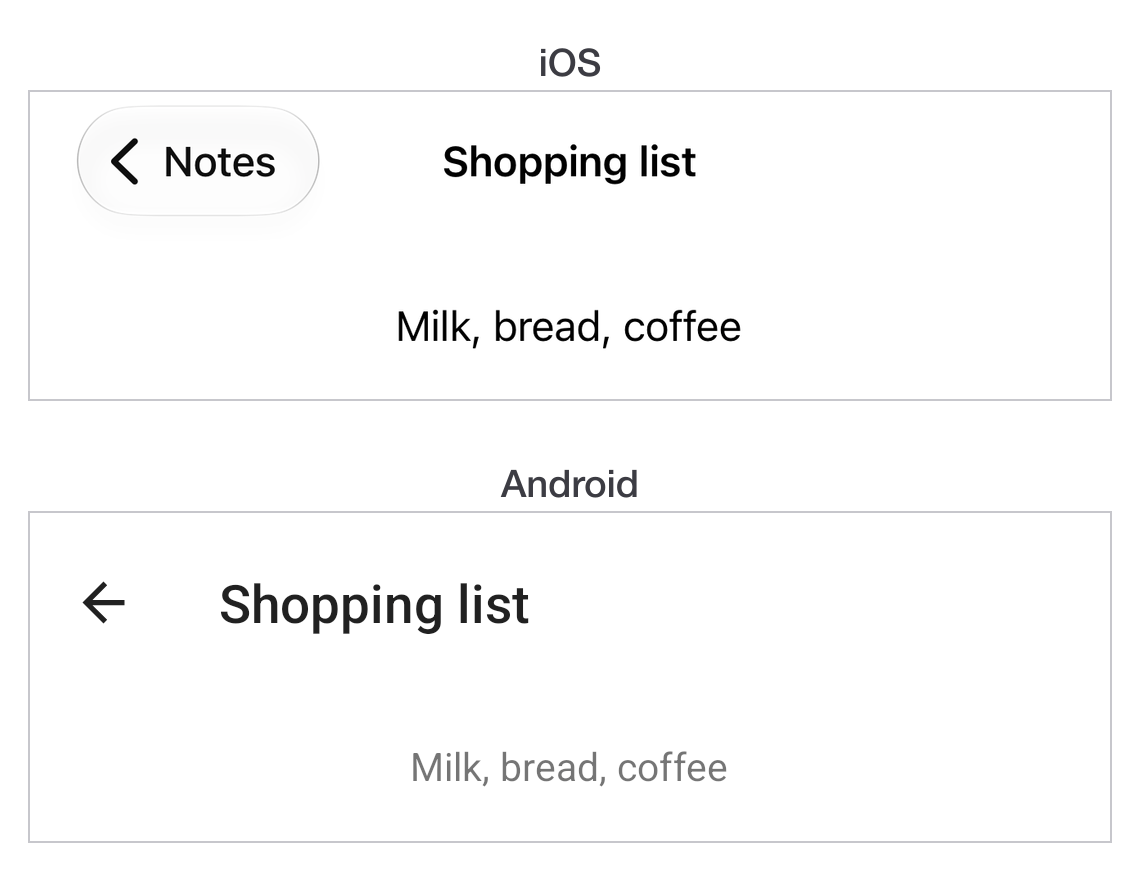
|
|
361
164
|
|
|
362
|
-
|
|
363
|
-
2. Use Alloy. It provides MVC structure and platform abstraction.
|
|
364
|
-
3. Follow platform conventions. iOS apps should feel like iOS, Android like Android.
|
|
365
|
-
4. Cache platform checks. Store in variables, do not call `Ti.Platform.osname` repeatedly.
|
|
366
|
-
5. Use CommonJS modules. Better code organization and reuse.
|
|
367
|
-
6. Leverage resource overrides. Avoid conditional code for images and assets.
|
|
368
|
-
7. Think cross-platform from the design phase. UI should adapt gracefully.
|
|
165
|
+
## Next
|
|
369
166
|
|
|
370
|
-
|
|
167
|
+
[Working with data](https://titaniumsdk.com/docs/build/data.md) covers storing things between launches.
|
|
371
168
|
|
|
372
|
-
|
|
373
|
-
- CommonJS Modules - module specification (see coding strategies above)
|
|
374
|
-
- Platform API deep dives - iOS and Android platform-specific features
|
|
169
|
+
Contract correction: [released Window safe-area defaults](https://github.com/tidev/titanium-sdk/blob/13_4_1_GA/apidoc/Titanium/UI/Window.yml).
|