@lolannn/dsh-effort-slider 0.2.5 → 0.2.6
This diff represents the content of publicly available package versions that have been released to one of the supported registries. The information contained in this diff is provided for informational purposes only and reflects changes between package versions as they appear in their respective public registries.
- package/README.md +19 -0
- package/client.js +2363 -2244
- package/package.json +1 -1
package/README.md
CHANGED
|
@@ -12,6 +12,17 @@ dsh plugin add @lolannn/dsh-effort-slider # from npm
|
|
|
12
12
|
dsh plugin add git+https://github.com/suyunxing/dsh-effort-slider # from source
|
|
13
13
|
```
|
|
14
14
|
|
|
15
|
+
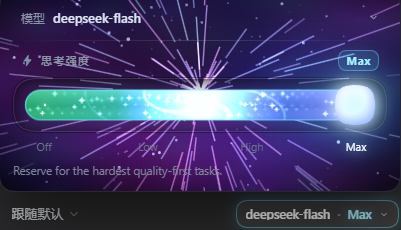
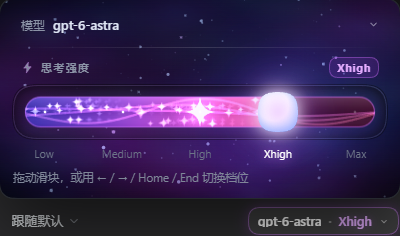
## Screenshots
|
|
16
|
+
|
|
17
|
+
|
|
18
|
+
|
|
19
|
+
|
|
20
|
+
|
|
21
|
+
The rail is drawn from the model's own `reasoning.efforts`, so the tick labels
|
|
22
|
+
change with the model — `off / low / high / max` on one, `low / medium / high /
|
|
23
|
+
xhigh / max` on another — and the knob lands on the level the session is
|
|
24
|
+
actually using.
|
|
25
|
+
|
|
15
26
|
## What it does
|
|
16
27
|
|
|
17
28
|
- Takes over `conversation.input.model` (a single slot, so this shadows the
|
|
@@ -54,6 +65,11 @@ would clip a `position: fixed` child.
|
|
|
54
65
|
|
|
55
66
|
- Click the trigger, then drag the rail or press `←` `→` `↑` `↓` `Home` `End`.
|
|
56
67
|
- The rail snaps to the nearest level on release (elastic overshoot).
|
|
68
|
+
- Reaching **high** turns the starfield into warp: the stars stream, the rail
|
|
69
|
+
becomes a slow galaxy swirl, and it stays lit for as long as the dial is at
|
|
70
|
+
high or above — so `xhigh` and `max` keep the look instead of only the top.
|
|
71
|
+
Dropping back below high switches it off. The top level still adds the full
|
|
72
|
+
celebration (flash, quake, caption).
|
|
57
73
|
- The level names under the rail are buttons too — same edge math as the thumb,
|
|
58
74
|
so each label sits exactly under its stop.
|
|
59
75
|
- Click the 模型 row to expand the model list; picking a model carries the current
|
|
@@ -76,6 +92,9 @@ would clip a `position: fixed` child.
|
|
|
76
92
|
- Only transforms, `opacity` and canvas are animated; no layout thrash.
|
|
77
93
|
- The canvas is sized from the card (`getBoundingClientRect` + `ResizeObserver`),
|
|
78
94
|
not from the viewport.
|
|
95
|
+
- The warp gate is the level named `high`; a model that declares no `high`
|
|
96
|
+
warps from the last level at or below it on the shared ladder, and a model
|
|
97
|
+
with one level never warps.
|
|
79
98
|
- Opening the popup while already on the top level arms the burst guard instead of
|
|
80
99
|
firing it, so the celebration only plays when you actually move into the top
|
|
81
100
|
level.
|