@logicflow/core 1.2.0-alpha.8 → 1.2.0-next.0
This diff represents the content of publicly available package versions that have been released to one of the supported registries. The information contained in this diff is provided for informational purposes only and reflects changes between package versions as they appear in their respective public registries.
- package/README.md +35 -81
- package/dist/logic-flow.js +512 -254
- package/dist/logic-flow.min.js +1 -1
- package/dist/style/index.css +8 -1
- package/package.json +6 -3
- package/types/LogicFlow.d.ts +4 -10
- package/types/constant/constant.d.ts +1 -0
- package/types/model/BaseModel.d.ts +7 -0
- package/types/model/EditConfigModel.d.ts +2 -2
- package/types/model/GraphModel.d.ts +7 -2
- package/types/model/edge/BaseEdgeModel.d.ts +2 -0
- package/types/model/node/BaseNodeModel.d.ts +5 -1
- package/types/options.d.ts +22 -0
- package/types/type/index.d.ts +3 -0
- package/types/util/edge.d.ts +6 -0
- package/types/util/vector.d.ts +4 -0
- package/types/view/edge/Arrow.d.ts +2 -0
- package/types/view/edge/BaseEdge.d.ts +5 -1
- package/types/view/edge/PolylineEdge.d.ts +1 -1
package/README.md
CHANGED
|
@@ -37,82 +37,15 @@ LogicFlow 是一款流程图编辑框架,提供了一系列流程图交互、
|
|
|
37
37
|
|
|
38
38
|
专注于业务流程图编辑的框架
|
|
39
39
|
|
|
40
|
-
##
|
|
41
|
-
|
|
42
|
-
|
|
43
|
-
|
|
44
|
-
|
|
45
|
-
|
|
46
|
-
|
|
47
|
-
|
|
48
|
-
|
|
49
|
-
# yarn
|
|
50
|
-
$ yarn add @logicflow/core
|
|
51
|
-
```
|
|
52
|
-
|
|
53
|
-
### 代码示例
|
|
54
|
-
|
|
55
|
-
```js
|
|
56
|
-
// 创建容器
|
|
57
|
-
<div id="container"></div>;
|
|
58
|
-
|
|
59
|
-
// 准备数据
|
|
60
|
-
const data = {
|
|
61
|
-
// 节点
|
|
62
|
-
nodes: [
|
|
63
|
-
{
|
|
64
|
-
id: 21,
|
|
65
|
-
type: 'rect',
|
|
66
|
-
x: 100,
|
|
67
|
-
y: 200,
|
|
68
|
-
text: {
|
|
69
|
-
value: '矩形节点',
|
|
70
|
-
x: 100,
|
|
71
|
-
y: 200,
|
|
72
|
-
},
|
|
73
|
-
},
|
|
74
|
-
{
|
|
75
|
-
id: 50,
|
|
76
|
-
type: 'circle',
|
|
77
|
-
x: 300,
|
|
78
|
-
y: 400,
|
|
79
|
-
text: {
|
|
80
|
-
value: '圆形节点',
|
|
81
|
-
x: 300,
|
|
82
|
-
y: 400,
|
|
83
|
-
},
|
|
84
|
-
},
|
|
85
|
-
],
|
|
86
|
-
// 边
|
|
87
|
-
edges: [
|
|
88
|
-
{
|
|
89
|
-
type: 'polyline',
|
|
90
|
-
sourceNodeId: 50,
|
|
91
|
-
targetNodeId: 21,
|
|
92
|
-
},
|
|
93
|
-
],
|
|
94
|
-
};
|
|
95
|
-
// 渲染画布
|
|
96
|
-
const lf = new LogicFlow({
|
|
97
|
-
container: document.querySelector('#container'),
|
|
98
|
-
width: 700,
|
|
99
|
-
height: 600,
|
|
100
|
-
});
|
|
101
|
-
|
|
102
|
-
lf.render(data);
|
|
103
|
-
```
|
|
104
|
-
|
|
105
|
-
## 文档
|
|
106
|
-
|
|
107
|
-
[官方文档](http://logic-flow.org)
|
|
108
|
-
|
|
109
|
-
- [快速上手](http://logic-flow.org/guide/start.html#安装)
|
|
110
|
-
- [基础教程](http://logic-flow.org/guide/basic/logic-flow.html)
|
|
111
|
-
- [进阶指南](http://logic-flow.org/guide/advance/theme.html)
|
|
112
|
-
- [拓展](http://logic-flow.org/guide/extension/extension-components.html)
|
|
113
|
-
- [示例](http://logic-flow.org/usage/bpmn.html)
|
|
114
|
-
|
|
115
|
-
## 核心能力
|
|
40
|
+
## 官方文档
|
|
41
|
+
|
|
42
|
+
http://logic-flow.org
|
|
43
|
+
|
|
44
|
+
## GITHUB
|
|
45
|
+
|
|
46
|
+
https://github.com/didi/LogicFlow
|
|
47
|
+
|
|
48
|
+
## 演示示例
|
|
116
49
|
|
|
117
50
|
### 流程图编辑器快速搭建
|
|
118
51
|
|
|
@@ -141,24 +74,45 @@ lf.render(data);
|
|
|
141
74
|
|
|
142
75
|
基于上述拓展的能力,前端研发能够根据实际业务场景的需求,灵活的开发出所需的节点、组件等。下面有两个基于 LogicFlow 拓展能力做出的流程图:
|
|
143
76
|
|
|
144
|
-
|
|
77
|
+
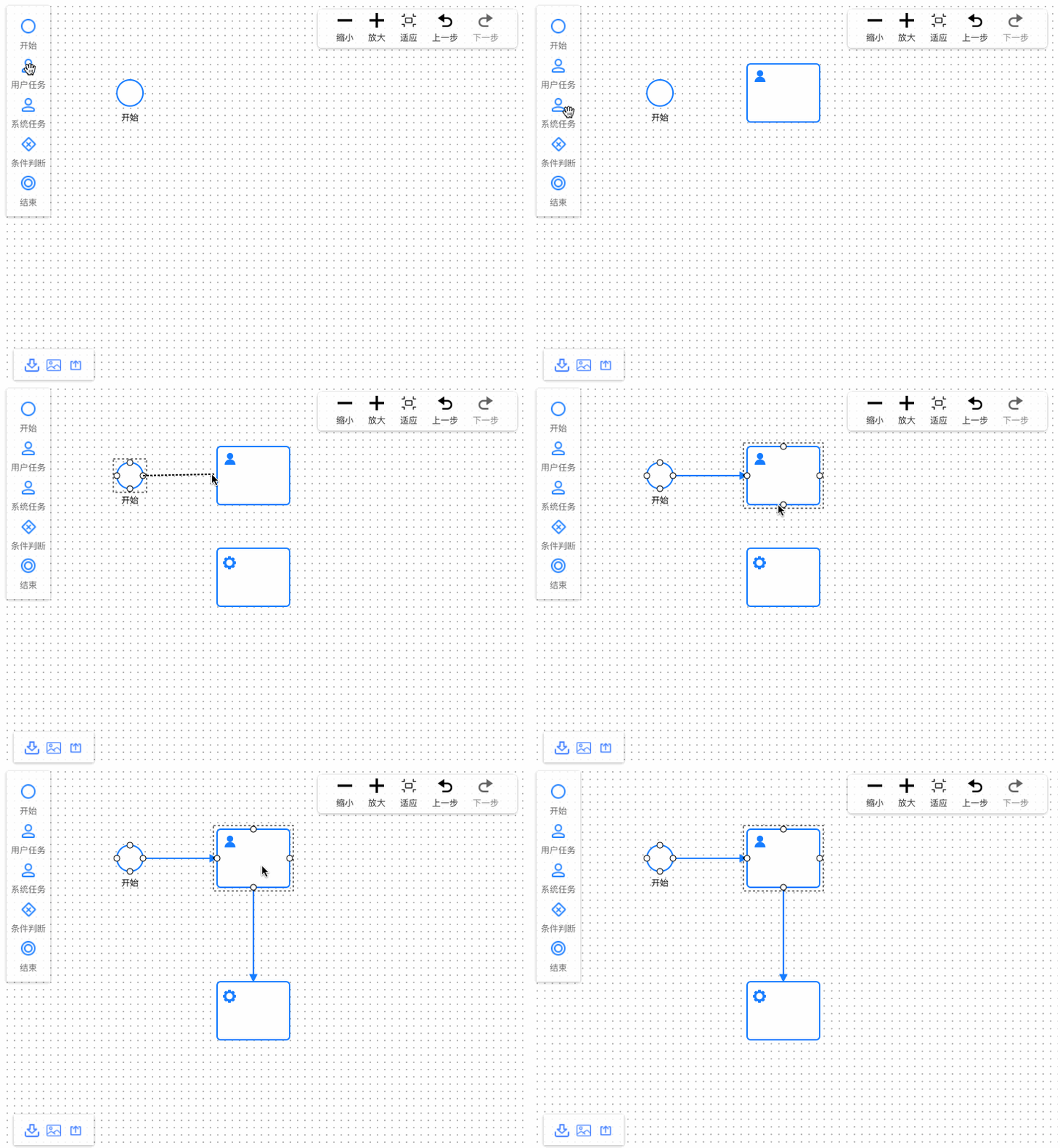
### BPMN应用demo
|
|
78
|
+
|
|
79
|
+
示例地址:http://logic-flow.org/examples/#/extension/bpmn
|
|
80
|
+
|
|
81
|
+
源码地址:https://github.com/didi/LogicFlow/tree/master/examples/src/pages/usage/bpmn
|
|
145
82
|
|
|
146
83
|
|
|
147
84
|
|
|
148
|
-
|
|
85
|
+
|
|
86
|
+
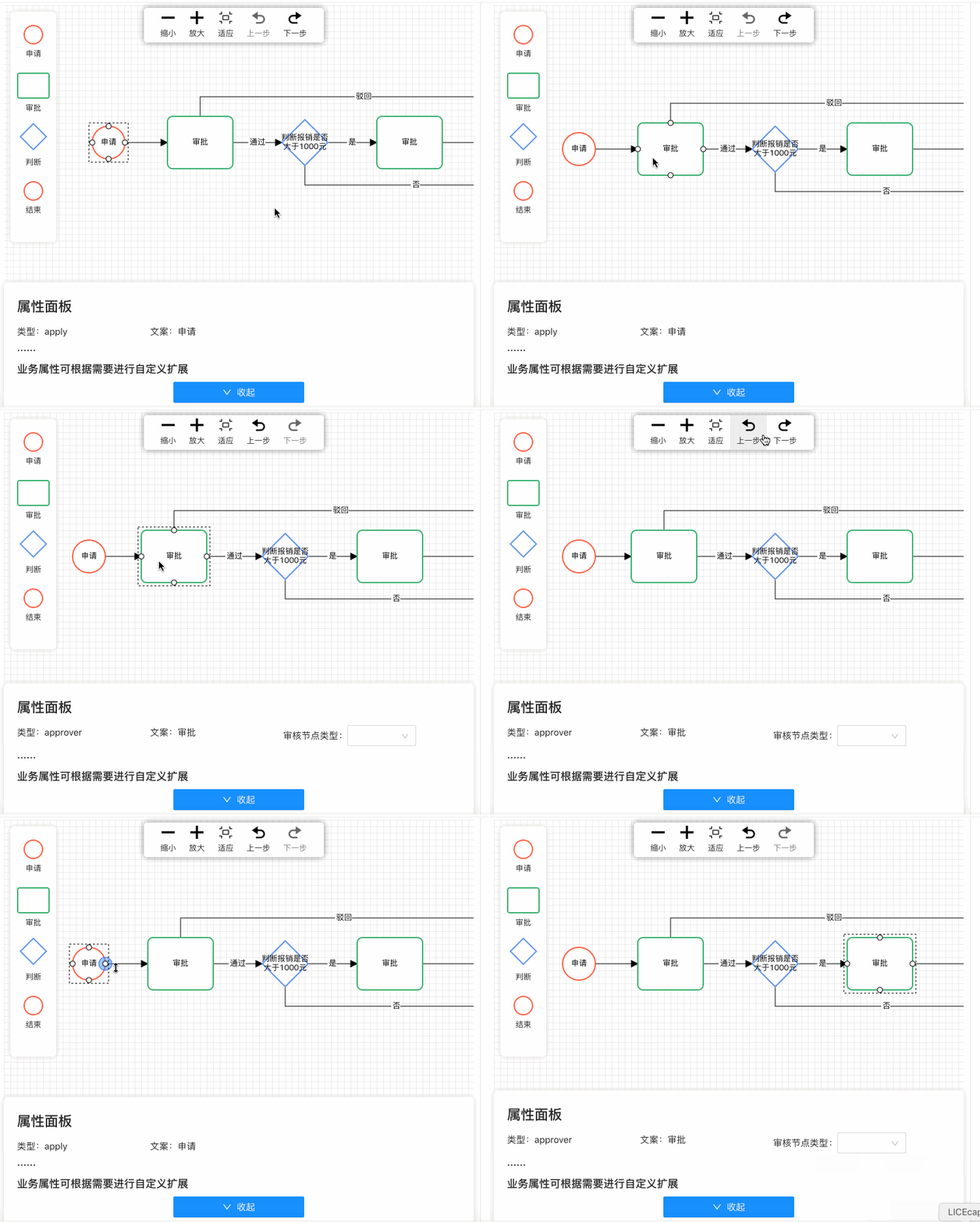
#### 审批流应用demo
|
|
87
|
+
|
|
88
|
+
示例地址:http://logic-flow.org/examples/#/usage/approve
|
|
89
|
+
|
|
90
|
+
源码地址:https://github.com/didi/LogicFlow/tree/master/examples/src/pages/usage/approve
|
|
149
91
|
|
|
150
92
|
|
|
151
93
|
|
|
152
94
|
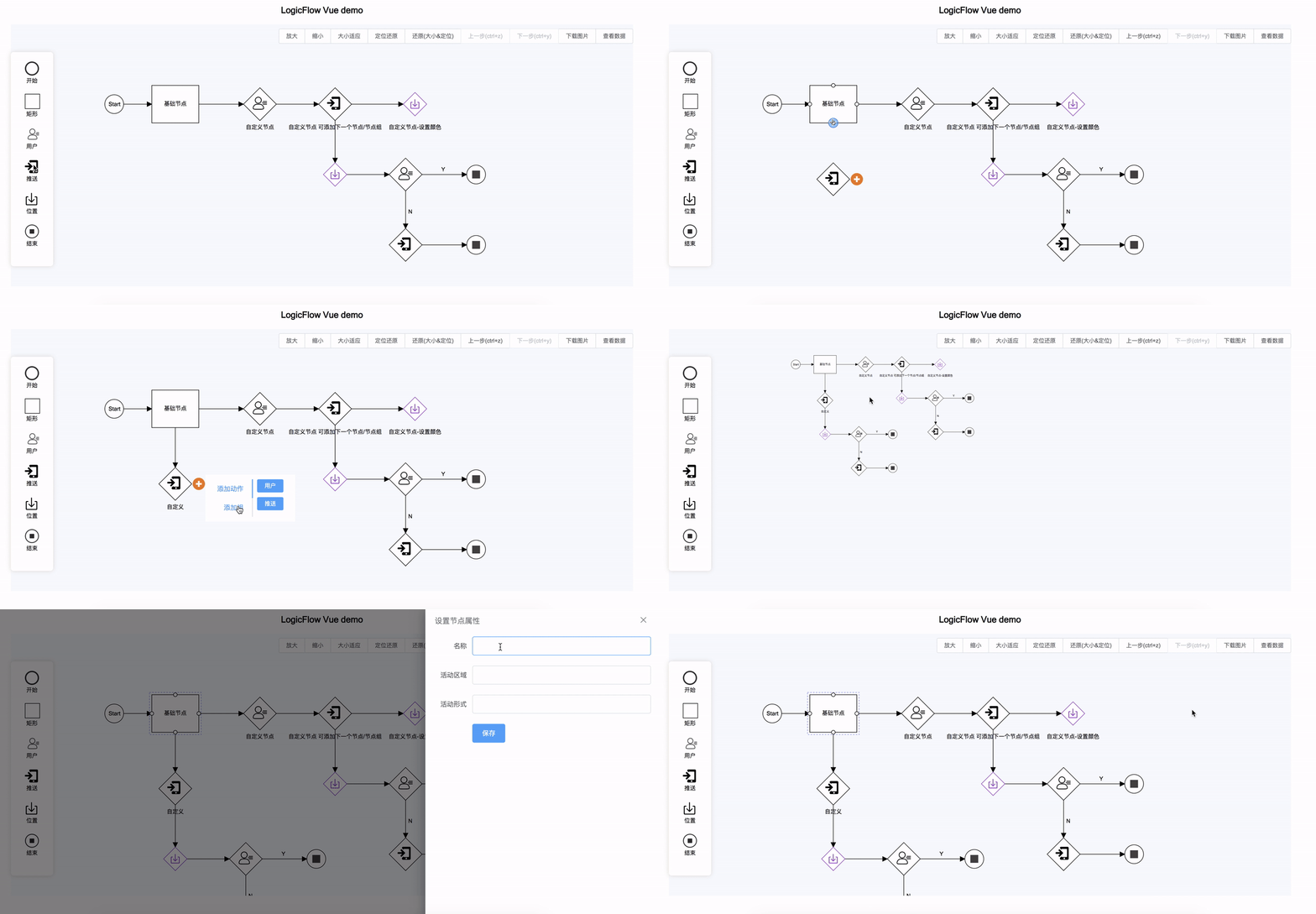
#### vue 应用 demo
|
|
153
95
|
|
|
154
|
-
[
|
|
96
|
+
源码地址 [https://github.com/xinxin93/logicflow_vue_demo](https://github.com/xinxin93/logicflow_vue_demo)
|
|
97
|
+
|
|
98
|
+
|
|
99
|
+
|
|
100
|
+
|
|
101
|
+
#### 作图工具示例
|
|
102
|
+
|
|
103
|
+
LogicFlow不仅支持开发类似bpmn.js这种固定整体样式、更偏向生成数据在流程引擎可执行的流程图工具。也支持实现类似ProcessOn这种自由控制样式的作图工具。
|
|
104
|
+
|
|
105
|
+
示例地址:[http://logic-flow.org/mvp/index.html](http://logic-flow.org/mvp/index.html)
|
|
106
|
+
|
|
107
|
+
源码地址:[https://github.com/didi/LogicFlow/tree/master/site/mvp](https://github.com/didi/LogicFlow/tree/master/site/mvp)
|
|
155
108
|
|
|
156
|
-
|
|
109
|
+
示例图如下:
|
|
110
|
+

|
|
157
111
|
|
|
158
112
|
|
|
159
113
|
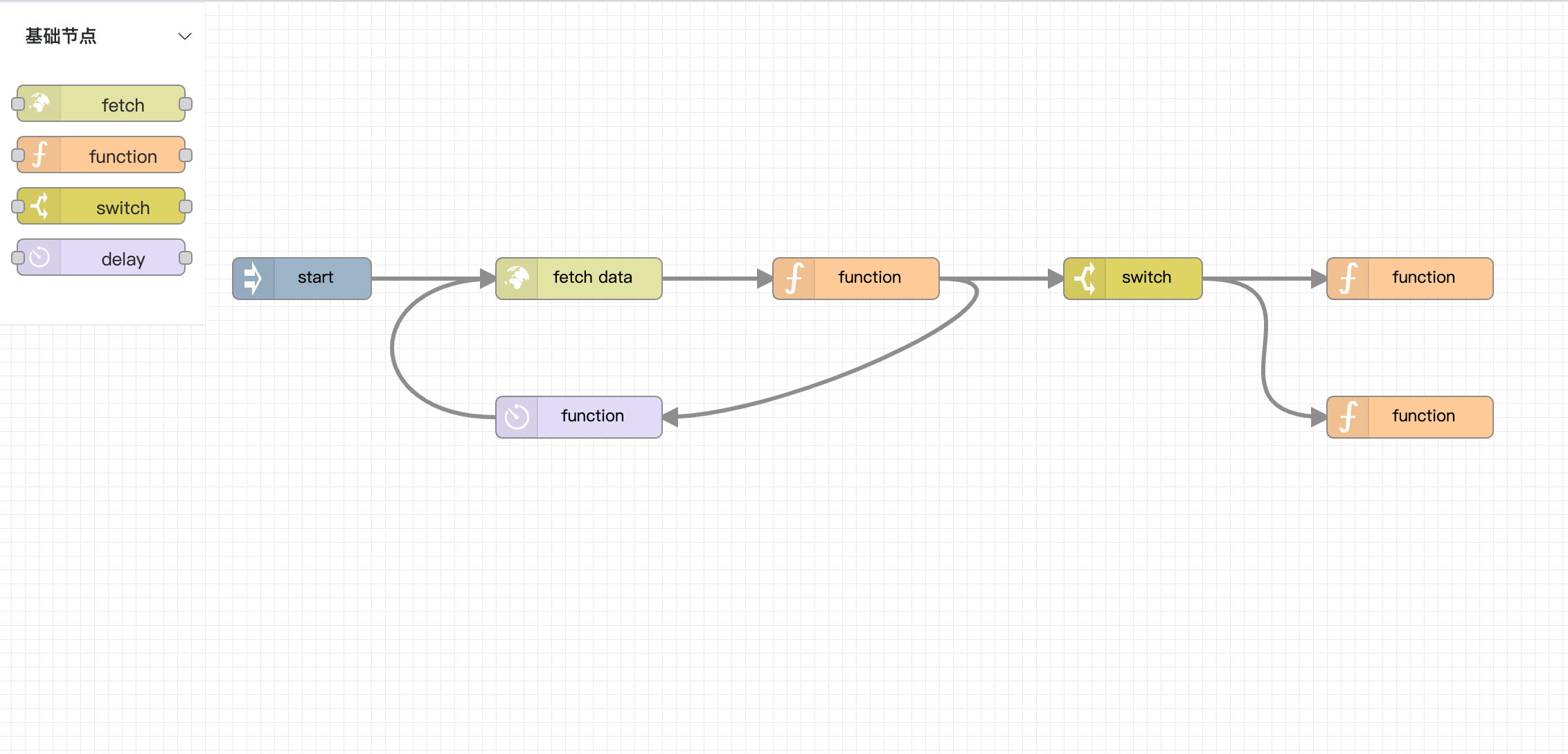
#### vue3 node-red风格示例
|
|
160
114
|
|
|
161
|
-
[Logic-Flow/logicflow-node-red-vue3](https://github.com/Logic-Flow/logicflow-node-red-vue3)
|
|
115
|
+
源码地址: [https://github.com/Logic-Flow/logicflow-node-red-vue3](https://github.com/Logic-Flow/logicflow-node-red-vue3)
|
|
162
116
|
|
|
163
117
|
|
|
164
118
|
|