@locofy/mcp 1.1.11 → 1.1.14
This diff represents the content of publicly available package versions that have been released to one of the supported registries. The information contained in this diff is provided for informational purposes only and reflects changes between package versions as they appear in their respective public registries.
- package/README.md +181 -69
- package/build/constants.js +1 -1
- package/build/index.js +1 -1
- package/build/prompts/prompts.js +1 -0
- package/build/tools/convertDesignToCode.js +1 -0
- package/build/utils/analytics.js +1 -1
- package/package.json +6 -4
package/README.md
CHANGED
|
@@ -1,90 +1,202 @@
|
|
|
1
1
|
# Locofy MCP Server
|
|
2
2
|
|
|
3
|
-
Locofy MCP (Model Context Protocol)
|
|
3
|
+
Locofy MCP (Model Context Protocol) connects AI code editors directly to your Locofy project. Convert Figma designs to code, pull generated components, and sync files — all from your editor's chat.
|
|
4
4
|
|
|
5
|
-
|
|
6
|
-
|
|
7
|
-
1. `getLatestComponentAndDependencyCode`
|
|
8
|
-
- Scans directories to retrieve components and dependencies, comparing with current IDE code to offer intelligent updates. Prompts for user confirmation when code changes are detected.
|
|
9
|
-
- Inputs:
|
|
10
|
-
- `componentNames` (array of string): The list of component or screen names to be retrieved
|
|
11
|
-
- `workspacePath` (string): The full path to the workspace
|
|
12
|
-
- Returns: JSON object containing component code, dependencies, and change status indicating which files need updates
|
|
13
|
-
|
|
14
|
-
2. `getLatestFileCode`
|
|
15
|
-
- Retrieves individual file contents without component dependency management. Focuses on specific files by name rather than handling components as complete units with dependencies.
|
|
16
|
-
- Inputs:
|
|
17
|
-
- `fileNames` (array of string): List of specific file names to retrieve
|
|
18
|
-
- `workspacePath` (string): The full path to the workspace
|
|
19
|
-
- Returns:
|
|
20
|
-
- JSON object containing file code and change status indicating which files need updates
|
|
21
|
-
|
|
22
|
-
## Getting Started with Locofy MCP
|
|
23
|
-
To get started with Locofy MCP, follow these steps:
|
|
24
|
-
1. Open the Locofy plugin in Figma and create a project, if not created already.
|
|
25
|
-
2. Convert your designs to code using Locofy. Make sure you have [optimised your Figma designs correctly](https://www.locofy.ai/docs/getting-started/optimise-design/) beforehand for high quality code.
|
|
26
|
-
3. Sync your designs to Locofy Builder.
|
|
27
|
-
4. Finally, generate your MCP tokens & start using it in your IDE.
|
|
5
|
+
> **Important:** The MCP configuration must be set up **per project**, not globally. The `mcp.json` downloaded from the Locofy dashboard contains your project-specific credentials and must be placed in your project's editor config folder (e.g. `.cursor/mcp.json`). A global install is not recommended.
|
|
28
6
|
|
|
29
|
-
|
|
7
|
+
## Requirements
|
|
30
8
|
|
|
9
|
+
- **Node.js 20.0.0 or higher**
|
|
10
|
+
- A [Locofy account](https://locofy.ai/dashboard) with a project created
|
|
11
|
+
- An MCP-compatible editor: Cursor, Windsurf, VS Code (GitHub Copilot), Claude Code, or Gemini CLI
|
|
31
12
|
|
|
32
|
-
|
|
33
|
-
To configure MCP for your project, follow these steps:
|
|
13
|
+
---
|
|
34
14
|
|
|
35
|
-
|
|
36
|
-
2. Next, click on the gear icon to go to the project settings.
|
|
37
|
-
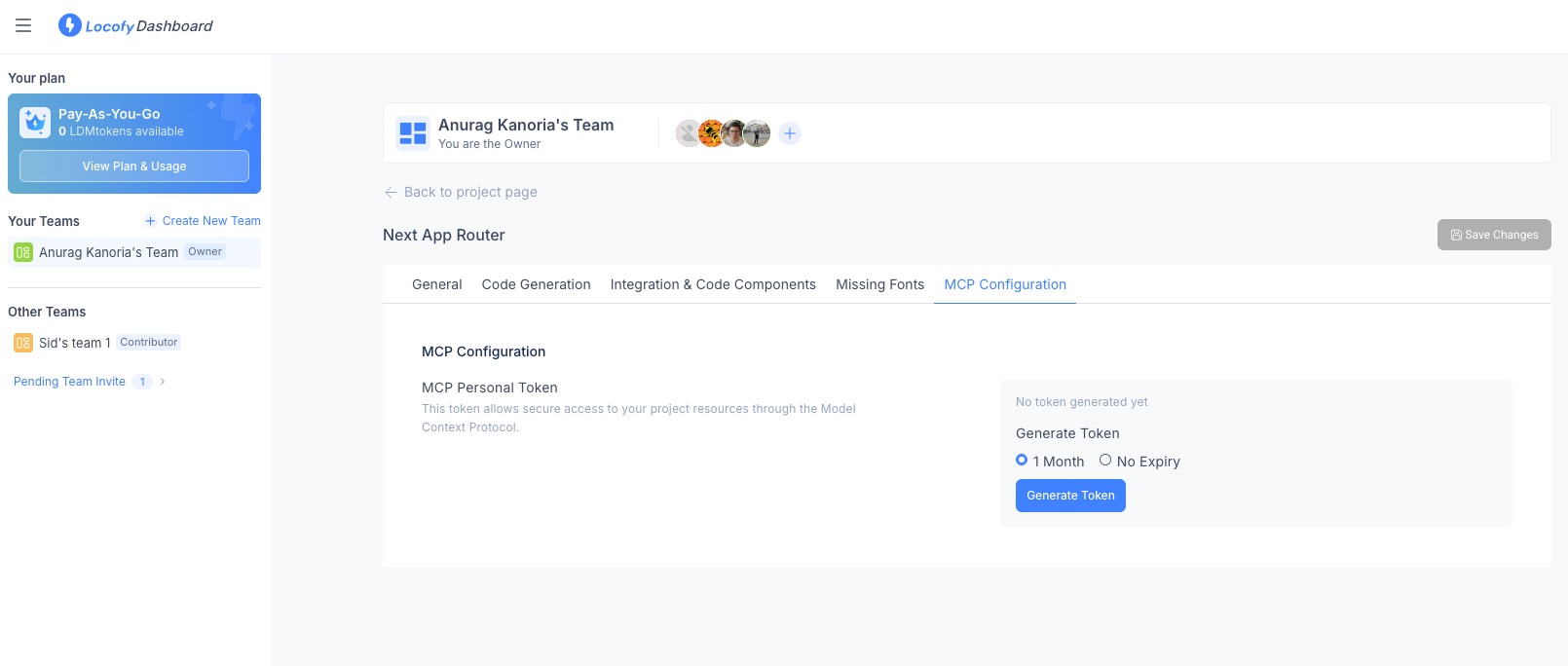
3. Locate the **MCP Configuration** tab.
|
|
38
|
-
|
|
39
|
-
|
|
15
|
+
## Tools
|
|
40
16
|
|
|
41
|
-
|
|
42
|
-
|
|
43
|
-
- **No Expiry**
|
|
17
|
+
### `convertDesignToCode` ✨
|
|
18
|
+
Convert a Figma design into production-ready code. Paste a Figma URL and the tool generates code for your project's framework, applies enhancement steps, and guides the AI through merging it cleanly into your workspace.
|
|
44
19
|
|
|
45
|
-
|
|
20
|
+
- **Inputs:**
|
|
21
|
+
- `figmaUrls` (string[]): One or more Figma design URLs
|
|
22
|
+
- `workspacePath` (string): Absolute path to the workspace root
|
|
23
|
+
- **Notes:**
|
|
24
|
+
- A Figma URL must be present to trigger this tool
|
|
25
|
+
- Conversion takes a couple of minutes — the tool waits for it automatically
|
|
26
|
+
- Your instructions always take priority (e.g. "use shadcn", "put files in src/screens", "use tokens from src/tokens.ts")
|
|
27
|
+
- For empty workspaces, all generated files including boilerplate are copied; for existing projects, files are merged selectively
|
|
28
|
+
- If anything is unclear, the AI will ask before making decisions
|
|
46
29
|
|
|
47
|
-
|
|
30
|
+
### `getLatestComponentAndDependencyCode`
|
|
31
|
+
Pull one or more components and their dependencies from your Locofy project and merge them into your workspace.
|
|
48
32
|
|
|
33
|
+
- **Inputs:**
|
|
34
|
+
- `componentNames` (string[]): Component or screen names, e.g. `["HomePage", "NavBar"]`
|
|
35
|
+
- `workspacePath` (string): Absolute path to the workspace root
|
|
49
36
|
|
|
50
|
-
|
|
51
|
-
|
|
37
|
+
### `getLatestFileCode`
|
|
38
|
+
Pull specific files from your Locofy project by name, without fetching their full dependency tree.
|
|
52
39
|
|
|
53
|
-
|
|
54
|
-
|
|
55
|
-
|
|
56
|
-
3. Next, go to Cursor settings and click on MCP tab.
|
|
40
|
+
- **Inputs:**
|
|
41
|
+
- `fileNames` (string[]): File names, e.g. `["Button.tsx", "tokens.css"]`
|
|
42
|
+
- `workspacePath` (string): Absolute path to the workspace root
|
|
57
43
|
|
|
58
|
-
|
|
44
|
+
---
|
|
59
45
|
|
|
60
|
-
|
|
61
|
-
5. Click "Disabled" to enable the server. It can take a few seconds to start the server.
|
|
46
|
+
## Getting Started
|
|
62
47
|
|
|
63
|
-
|
|
48
|
+
### Step 1: Create Your Locofy Project
|
|
64
49
|
|
|
65
|
-
|
|
66
|
-
|
|
67
|
-
|
|
68
|
-
3. You can now directly pull code from Locofy using natural language. You can also customise the code using the power of LLMs. For example:
|
|
69
|
-
- "Fetch the NavigationBar component from Locofy."
|
|
70
|
-
- "Pull Homepage from Locofy & replace the navbar with the one present in this project."
|
|
71
|
-
- "Get ListingCard component from Locofy & merge it with my code."
|
|
72
|
-
4. Locofy will provide you with two tools to pull the code. Click on "Run tool" to execute the function required by the LLM to process your prompt.
|
|
73
|
-
- getLatestComponentAndDependencyCode: Retrieve code along with their dependencies, including any required components, styling files such as CSS, and other related assets to ensure seamless integration.
|
|
74
|
-
- getLatestFileCode: Retrieves specific files by name without their dependencies, making it useful when you need only a particular file's content.
|
|
50
|
+
1. Open the [Locofy Dashboard](https://locofy.ai/dashboard) and create a project.
|
|
51
|
+
2. For `getLatestComponentAndDependencyCode` / `getLatestFileCode`: open the Locofy Figma plugin, convert your designs, and sync them to Locofy Builder before pulling.
|
|
52
|
+
3. For `convertDesignToCode`: no sync needed — just have your Figma URL ready.
|
|
75
53
|
|
|
54
|
+
### Step 2: Get Your MCP Configuration
|
|
76
55
|
|
|
77
|
-
|
|
78
|
-
|
|
79
|
-
1. Go to the Locofy [Dashboard](https://locofy.ai/dashboard?_gl=1*vazw3g*_gcl_au*MTI3NjAwNDI1LjE3NDE1OTg1NzY.*_ga*MTk4MTYxMTgyMi4xNjc3NTcxMjk4*_ga_9EZZJCG6XV*MTc0MzA1MDA3OC40NjMuMC4xNzQzMDUwMDc4LjYwLjAuMA..) and select the project for which you need to regenerate the MCP token.
|
|
80
|
-
2. Click on the geanr icon to access **Project Settings.**
|
|
81
|
-
3. Navigate to the **MCP Configuration** tab.
|
|
82
|
-
4. Click the **Regenerate Token** button to invalidate the previous token and create a new one.
|
|
83
|
-
5. A popup will open where you can choose the desired token expiry option of your new tokens and confirm the decision to revoke existing one.
|
|
84
|
-
6. Click **Regenerate Token** and download the updated `mcp.json` file.
|
|
85
|
-
7. Replace the old `mcp.json` file in your project with the newly generated one.
|
|
56
|
+
1. In the [Locofy Dashboard](https://locofy.ai/dashboard), select your project.
|
|
57
|
+
2. Click the gear icon → **Project Settings → MCP Configuration**.
|
|
86
58
|
|
|
87
|
-
|
|
59
|
+

|
|
88
60
|
|
|
89
|
-
|
|
90
|
-
|
|
61
|
+
3. Choose a token expiry (**1 Month** or **No Expiry**) and click **Generate Token**.
|
|
62
|
+
4. Download the `mcp.json` file — it contains your `PROJECT_ID` and `PERSONAL_ACCESS_TOKEN`.
|
|
63
|
+
|
|
64
|
+
### Step 3: Configure Your Editor
|
|
65
|
+
|
|
66
|
+
Copy the contents of the downloaded `mcp.json` into your editor's MCP config file for this project. Set `IDE_SOURCE` to match your editor.
|
|
67
|
+
|
|
68
|
+
#### Cursor
|
|
69
|
+
|
|
70
|
+
Create `.cursor/mcp.json` in your **project root**:
|
|
71
|
+
|
|
72
|
+
```json
|
|
73
|
+
{
|
|
74
|
+
"mcpServers": {
|
|
75
|
+
"Locofy": {
|
|
76
|
+
"command": "npx",
|
|
77
|
+
"args": ["-y", "@locofy/mcp@latest"],
|
|
78
|
+
"env": {
|
|
79
|
+
"PERSONAL_ACCESS_TOKEN": "your-token-here",
|
|
80
|
+
"PROJECT_ID": "your-project-id",
|
|
81
|
+
"IDE_SOURCE": "cursor"
|
|
82
|
+
}
|
|
83
|
+
}
|
|
84
|
+
}
|
|
85
|
+
}
|
|
86
|
+
```
|
|
87
|
+
|
|
88
|
+
Go to **Cursor Settings → Features → Model Context Protocol** and enable the Locofy server. Hit the refresh icon if it doesn't appear as enabled after a few seconds.
|
|
89
|
+
|
|
90
|
+
#### Windsurf
|
|
91
|
+
|
|
92
|
+
Create `.windsurf/mcp.json` in your **project root**:
|
|
93
|
+
|
|
94
|
+
```json
|
|
95
|
+
{
|
|
96
|
+
"mcpServers": {
|
|
97
|
+
"Locofy": {
|
|
98
|
+
"command": "npx",
|
|
99
|
+
"args": ["-y", "@locofy/mcp@latest"],
|
|
100
|
+
"env": {
|
|
101
|
+
"PERSONAL_ACCESS_TOKEN": "your-token-here",
|
|
102
|
+
"PROJECT_ID": "your-project-id",
|
|
103
|
+
"IDE_SOURCE": "windsurf"
|
|
104
|
+
}
|
|
105
|
+
}
|
|
106
|
+
}
|
|
107
|
+
}
|
|
108
|
+
```
|
|
109
|
+
|
|
110
|
+
Go to **Windsurf Settings → Cascade → Manage MCP Servers** and click refresh.
|
|
111
|
+
|
|
112
|
+
#### VS Code (GitHub Copilot)
|
|
113
|
+
|
|
114
|
+
Create `.vscode/mcp.json` in your **project root**:
|
|
115
|
+
|
|
116
|
+
```json
|
|
117
|
+
{
|
|
118
|
+
"servers": {
|
|
119
|
+
"Locofy": {
|
|
120
|
+
"command": "npx",
|
|
121
|
+
"args": ["-y", "@locofy/mcp@latest"],
|
|
122
|
+
"env": {
|
|
123
|
+
"PERSONAL_ACCESS_TOKEN": "your-token-here",
|
|
124
|
+
"PROJECT_ID": "your-project-id",
|
|
125
|
+
"IDE_SOURCE": "vscode"
|
|
126
|
+
}
|
|
127
|
+
}
|
|
128
|
+
}
|
|
129
|
+
}
|
|
130
|
+
```
|
|
131
|
+
|
|
132
|
+
VS Code detects the file automatically and shows a **Start** button above the server entry. Click it to launch.
|
|
133
|
+
|
|
134
|
+
#### Claude Code
|
|
135
|
+
|
|
136
|
+
```bash
|
|
137
|
+
claude mcp add Locofy \
|
|
138
|
+
--env PERSONAL_ACCESS_TOKEN=your-token-here \
|
|
139
|
+
--env PROJECT_ID=your-project-id \
|
|
140
|
+
--env IDE_SOURCE=claude \
|
|
141
|
+
-- npx -y @locofy/mcp@latest
|
|
142
|
+
```
|
|
143
|
+
|
|
144
|
+
To verify: `claude mcp get Locofy`
|
|
145
|
+
|
|
146
|
+
#### Gemini CLI
|
|
147
|
+
|
|
148
|
+
Add to `~/.gemini/settings.json`:
|
|
149
|
+
|
|
150
|
+
```json
|
|
151
|
+
{
|
|
152
|
+
"mcpServers": {
|
|
153
|
+
"Locofy": {
|
|
154
|
+
"command": "npx",
|
|
155
|
+
"args": ["-y", "@locofy/mcp@latest"],
|
|
156
|
+
"env": {
|
|
157
|
+
"PERSONAL_ACCESS_TOKEN": "your-token-here",
|
|
158
|
+
"PROJECT_ID": "your-project-id",
|
|
159
|
+
"IDE_SOURCE": "gemini"
|
|
160
|
+
}
|
|
161
|
+
}
|
|
162
|
+
}
|
|
163
|
+
}
|
|
164
|
+
```
|
|
165
|
+
|
|
166
|
+
---
|
|
167
|
+
|
|
168
|
+
## Configuration Reference
|
|
169
|
+
|
|
170
|
+
| Environment Variable | Required | Description |
|
|
171
|
+
|-------------------------|----------|-------------|
|
|
172
|
+
| `PERSONAL_ACCESS_TOKEN` | Yes | Your Locofy personal access token, from Project Settings → MCP Configuration |
|
|
173
|
+
| `PROJECT_ID` | Yes | Your Locofy project ID, included in the downloaded `mcp.json` |
|
|
174
|
+
| `IDE_SOURCE` | No | Editor identifier: `cursor`, `windsurf`, `vscode`, `claude`, `gemini`. Defaults to `other` |
|
|
175
|
+
|
|
176
|
+
---
|
|
177
|
+
|
|
178
|
+
## Usage Examples
|
|
179
|
+
|
|
180
|
+
Open your editor's agent chat and try:
|
|
181
|
+
|
|
182
|
+
- `"Convert this Figma design to code: https://figma.com/design/... and use the shadcn components from src/components"`
|
|
183
|
+
- `"Fetch the NavigationBar component from Locofy."`
|
|
184
|
+
- `"Pull Homepage from Locofy and replace the existing navbar with the one already in this project."`
|
|
185
|
+
- `"Get the ListingCard from Locofy and merge it with my existing card component."`
|
|
186
|
+
|
|
187
|
+
---
|
|
188
|
+
|
|
189
|
+
## Regenerating Your Token
|
|
190
|
+
|
|
191
|
+
1. Go to the [Locofy Dashboard](https://locofy.ai/dashboard) and select your project.
|
|
192
|
+
2. Click the gear icon → **Project Settings → MCP Configuration**.
|
|
193
|
+
3. Click **Regenerate Token**, choose an expiry, and confirm. The previous token is immediately invalidated.
|
|
194
|
+
4. Download the new `mcp.json` and update the `PERSONAL_ACCESS_TOKEN` value in your editor config.
|
|
195
|
+
|
|
196
|
+
---
|
|
197
|
+
|
|
198
|
+
## More Resources
|
|
199
|
+
|
|
200
|
+
- [Official Locofy MCP Documentation](https://www.locofy.ai/docs/export-and-deployment/locofy-mcp/)
|
|
201
|
+
- [Optimising Figma Designs for Locofy](https://www.locofy.ai/docs/getting-started/optimise-design/)
|
|
202
|
+
- [Locofy Dashboard](https://locofy.ai/dashboard)
|
package/build/constants.js
CHANGED
|
@@ -1 +1 @@
|
|
|
1
|
-
const isDev="true"===process.env.IS_DEV;export const MIXPANEL_PROJECT_TOKEN=isDev?"77d8775b23ede44f6f58a6a0c677e881":"6ba4b43a52dcbc80ee759b59f2dc8c5f";export const MIXPANEL_PROXY_DOMAIN=isDev?"https://event-tracking.locofy.dev/events/mixpanel":"https://events.locofy.ai/events/mixpanel";const locofyMode=(process.env.LOCOFY_MODE||"visual").toLowerCase();export const CODEGEN_API_BASE_URL=process.env.CODEGEN_API_BASE_URL||(isDev?"https://codegen-api.locofy.dev":"agent"===locofyMode?"https://ai-services.locofy.ai/codegen-api":"https://codegen-api.locofy.ai");export const IDENTITY_API_BASE_URL=isDev?"https://identity.locofy.dev":"https://identity.locofy.ai";
|
|
1
|
+
const isDev="true"===process.env.IS_DEV;export const MIXPANEL_PROJECT_TOKEN=isDev?"77d8775b23ede44f6f58a6a0c677e881":"6ba4b43a52dcbc80ee759b59f2dc8c5f";export const MIXPANEL_PROXY_DOMAIN=isDev?"https://event-tracking.locofy.dev/events/mixpanel":"https://events.locofy.ai/events/mixpanel";const locofyMode=(process.env.LOCOFY_MODE||"visual").toLowerCase();export const CODEGEN_API_BASE_URL=process.env.CODEGEN_API_BASE_URL||(isDev?"https://codegen-api.locofy.dev":"agent"===locofyMode?"https://ai-services.locofy.ai/codegen-api":"https://codegen-api.locofy.ai");export const IDENTITY_API_BASE_URL=isDev?"https://identity.locofy.dev":"https://identity.locofy.ai";export const ML_TASK_API_URL=isDev?"https://ai-task.locofy.dev":"https://ai-services.locofy.ai";
|
package/build/index.js
CHANGED
|
@@ -1,2 +1,2 @@
|
|
|
1
1
|
#!/usr/bin/env node
|
|
2
|
-
import{Server}from"@modelcontextprotocol/sdk/server/index.js";import{StdioServerTransport}from"@modelcontextprotocol/sdk/server/stdio.js";import{CallToolRequestSchema,ListToolsRequestSchema}from"@modelcontextprotocol/sdk/types.js";import{pullComponentsToolName,pullComponentsToolDescription,PullComponentsToolSchema,runPullComponentsTool}from"./tools/pullComponents.js";import{pullFilesToolName,pullFilesToolDescription,PullFilesToolSchema,runPullFilesTool}from"./tools/pullFiles.js";import{
|
|
2
|
+
import{Server}from"@modelcontextprotocol/sdk/server/index.js";import{StdioServerTransport}from"@modelcontextprotocol/sdk/server/stdio.js";import{CallToolRequestSchema,ListToolsRequestSchema}from"@modelcontextprotocol/sdk/types.js";import axios from"axios";import*as fs from"fs";import*as path from"path";if("true"===process.env.DEBUG_HTTP){const logFile=path.join(process.cwd(),"locofy-mcp-http.log"),stamp=()=>(new Date).toISOString(),append=text=>{try{fs.appendFileSync(logFile,text+"\n")}catch{}};append(`\n${"=".repeat(80)}\nServer started at ${stamp()}\n${"=".repeat(80)}\n`),axios.interceptors.request.use((config=>{const lines=[`\n── REQUEST ${stamp()} ──────────────────────────────────────`,`${config.method?.toUpperCase()} ${config.url}`,`Headers: ${JSON.stringify(config.headers,null,2)}`];if(void 0!==config.data){const body="string"==typeof config.data?config.data:JSON.stringify(config.data,null,2);lines.push(`Body: ${body}`)}return append(lines.join("\n")),config})),axios.interceptors.response.use((response=>{const lines=[`── RESPONSE ${stamp()} ──────────────────────────────────────`,`${response.status} ${response.statusText} ← ${response.config.method?.toUpperCase()} ${response.config.url}`,`Headers: ${JSON.stringify(response.headers,null,2)}`,`Body: ${JSON.stringify(response.data,null,2)}`];return append(lines.join("\n")),response}),(error=>{const res=error.response,lines=[`── ERROR ${stamp()} ──────────────────────────────────────`,`${res?.status??"N/A"} ← ${error.config?.method?.toUpperCase()} ${error.config?.url}`,`Message: ${error.message}`];return res&&lines.push(`Response body: ${JSON.stringify(res.data,null,2)}`),append(lines.join("\n")),Promise.reject(error)}))}import{pullComponentsToolName,pullComponentsToolDescription,PullComponentsToolSchema,runPullComponentsTool}from"./tools/pullComponents.js";import{pullFilesToolName,pullFilesToolDescription,PullFilesToolSchema,runPullFilesTool}from"./tools/pullFiles.js";import{convertDesignToCodeToolName,convertDesignToCodeToolDescription,ConvertDesignToCodeToolSchema,runConvertDesignToCodeTool}from"./tools/convertDesignToCode.js";import"./api.js";const server=new Server({name:"locofy-mcp",version:"1.1.12"},{capabilities:{tools:{}}});async function main(){const transport=new StdioServerTransport;await server.connect(transport),process.env.DEBUG_MODE}server.setRequestHandler(ListToolsRequestSchema,(async()=>({tools:[{name:pullComponentsToolName,description:pullComponentsToolDescription,inputSchema:{type:"object",properties:{componentNames:{type:"array",items:{type:"string"},description:'The list of component or screen names to be retrieved. Do not send a single string for this parameter. The values must be provided as a valid JSON array, with each string value enclosed in double quotes (e.g., ["Homepage", "DetailPage"]).'},workspacePath:{type:"string",description:"The full path to the workspace."}},required:["componentNames","workspacePath"]}},{name:pullFilesToolName,description:pullFilesToolDescription,inputSchema:{type:"object",properties:{fileNames:{type:"array",items:{type:"string"},description:'The list of specific file names to be retrieved, without resolving their component dependencies. Do not send a single string for this parameter. The values must be provided as a valid JSON array, with each string value enclosed in double quotes (e.g., ["Homepage.tsx", "DetailPage.tsx"]).'},workspacePath:{type:"string",description:"The full path to the workspace."}},required:["fileNames","workspacePath"]}},{name:convertDesignToCodeToolName,description:convertDesignToCodeToolDescription,inputSchema:{type:"object",properties:{figmaUrls:{type:"array",items:{type:"string"},description:'One or more Figma design URLs to convert to code. Example: ["https://www.figma.com/design/abc123/..."]'},workspacePath:{type:"string",description:"The full path to the workspace."}},required:["figmaUrls","workspacePath"]}}]}))),server.setRequestHandler(CallToolRequestSchema,(async request=>{const{name:name,arguments:args}=request.params,progressToken=request.params._meta?.progressToken,sendProgress=void 0!==progressToken?(progress,total,message)=>server.notification({method:"notifications/progress",params:{progressToken:progressToken,progress:progress,total:total,message:message}}):void 0;switch(name){case pullComponentsToolName:{const validated=PullComponentsToolSchema.parse(args);return await runPullComponentsTool(validated)}case pullFilesToolName:{const validated=PullFilesToolSchema.parse(args);return await runPullFilesTool(validated)}case convertDesignToCodeToolName:{const validated=ConvertDesignToCodeToolSchema.parse(args);return await runConvertDesignToCodeTool(validated,sendProgress)}default:throw new Error(`Unknown tool: ${name}`)}})),main().catch((error=>{process.exit(1)}));
|
|
@@ -0,0 +1 @@
|
|
|
1
|
+
const WEB_STEPS='You MUST follow these steps exactly. Do not skip. At the end, output a SELF-CHECKLIST confirming each step.\nFormat strictly like this:\nSTEP 1: [✓] Done — created necessary files in correct directories\nSTEP 2: [✓] Done — all assets paths verified\nSTEP 3: [✓] Done — all import paths resolved correctly\nSTEP 4: [✓] Done — all CSS variables copied, pixel-perfect\nSTEP 5: [✓] Done — improved CSS class names and structure\n...\nSTEP 8: [✓] ACKNOWLEDGED — all steps followed.\n\nSteps to follow:\n1. ✅ Create all necessary files in the correct directories.\n - Place related files together.\n - Ensure file naming is meaningful, consistent and logical.\n\n2. ✅ Ensure asset paths are correct in the code.\n - Verify all image/asset paths are correct and case-sensitive.\n\n3. ✅ Ensure all import paths are correctly resolved.\n\n4. ✅ Copy ALL CSS variables.\n - Preserve every variable.\n - The result MUST remain pixel-perfect.\n\n5. ✅ Improve CSS class names and structure.\n - Names MUST be meaningful and contextually accurate.\n - Must follow conventions of existing codebase.\n - Avoid generic names (e.g., `box1`, `style2`).\n\n6. ✅ Refactor into reusable components only if needed [Not applicable to html-css only projects]\n - Improve component names, prop names and structure where incorrect.\n - Keep code modular and clean.\n - Do not duplicate styles unnecessarily. Also Remove unnecessary "Style props" from components.\n\n7. ✅ Add clear comments throughout the code.\n - Explain key sections, purpose of variables, and component usage.\n\n8. ✅ Add accessibility and basic functionality to the code.\n - Use correct semantic HTML tags.\n - Ensure ARIA attributes are used where appropriate.\n - Add form validations, state variables, and other basic functionality where needed.\n\n9. ✅ FINAL CHECK:\n - Confirm you have followed **ALL steps 1–8**.';export const FRAMEWORK_INSTRUCTIONS={react:WEB_STEPS,nextjs:WEB_STEPS,gatsby:WEB_STEPS,vue:WEB_STEPS,angular:WEB_STEPS,html:WEB_STEPS,"html-css":WEB_STEPS,svelte:WEB_STEPS.replace(" - Place related files together."," - Place related files together.\n - Convert given React code to Svelte components to match current code structure."),"react-native":"You MUST follow these steps exactly. Do not skip. At the end, output a SELF-CHECKLIST confirming each step.\nFormat strictly like this:\nSTEP 1: [✓] Done — created necessary files in correct directories.\nSTEP 2: [✓] Done — all assets paths verified.\nSTEP 3: [✓] Done — all StyleSheet properties converted correctly.\nSTEP 4: [✓] Done — improved component names and structure.\n...\nSTEP 8: [✓] ACKNOWLEDGED — all steps followed.\n\nSteps to follow:\n1. ✅ Create all necessary files in the correct directories.\n - Place related files together.\n - Ensure file naming follows React Native conventions.\n - IMPORTANT: Discard and do not include any status bar, home button/indicator, or other system UI elements that may appear in the design mockup. These are automatically handled by iOS/Android and should not be part of your React Native code.\n\n2. ✅ Ensure asset paths are correct in the code.\n - Use require() for local images.\n - Verify all image/asset paths are correct and case-sensitive.\n\n3. ✅ Copy all style constants carefully (figma tokens, colors, fills etc).\n - Transform CSS properties to React Native equivalents.\n - The result MUST remain pixel-perfect within React Native constraints.\n\n4. ✅ Improve component names, prop names and structure.\n - Names MUST be meaningful and contextually accurate.\n - Avoid generic names like 'Component1', 'Prop2', etc.\n\n5. ✅ Add basic functionality.\n - Use proper React Native components (View, Text, Image, ScrollView, etc.)\n - Understand the context from the screenshot and add necessary logic with state variables.\n - Add proper touch handling with TouchableOpacity, Pressable, etc.\n\n6. ✅ Refactor into reusable components only if needed.\n - Keep code modular and clean.\n - Remove duplicated code and styles. Also Remove unnecessary \"Style props\" from components.\n - Follow React Native component patterns and existing codebase conventions.\n\n7. ✅ Add clear comments throughout the code.\n - Explain key sections, purpose of styles, and component usage.\n\n8. ✅ FINAL CHECK:\n - Confirm you have followed **ALL steps 1–8**.",flutter:"You MUST follow these steps exactly. Do not skip. At the end, output a SELF-CHECKLIST confirming each step. \nFormat strictly like this:\nSTEP 1: [✓] Done — created necessary files in correct directories. \nSTEP 2: [✓] Done — all assets paths verified. \nSTEP 3: [✓] Done — all styling converted to Flutter widgets. \nSTEP 4: [✓] Done — improved widget names and structure. \n... \nSTEP 8: [✓] ACKNOWLEDGED — all steps followed.\n\nSteps to follow:\n1. ✅ Create all necessary files in the correct directories. \n - Place related files together.\n - Ensure file naming follows Flutter/Dart conventions (snake_case for files).\n - IMPORTANT: Discard and do not include any status bar, home button/indicator, or other system UI elements that may appear in the design mockup. These are automatically handled by iOS/Android and should not be part of your Flutter code.\n\n2. ✅ Ensure asset paths are correct in the code.\n - Use AssetImage() or Image.asset() for local images\n - Verify all image/asset paths are correct and case-sensitive\n\n3. ✅ Copy all style constants carefully (figma tokens, colors, fills etc).\n - Transform CSS properties to Flutter widget properties\n - The result MUST remain pixel-perfect within Flutter constraints.\n\n4. ✅ Improve widget names, parameter names and structure.\n - Names MUST be meaningful and contextually accurate.\n - Avoid generic names like 'Widget1', 'Param2', etc.\n\n5. ✅ Add basic functionality.\n - Use proper Flutter widgets (Container, Column, Row, Stack, ListView, etc.)\n - Understand the context from the screenshot and add necessary logic with state variables\n - Add proper touch handling with GestureDetector, InkWell, etc.\n\n6. ✅ Refactor into reusable widgets only if needed.\n - Keep code modular and clean.\n - Remove duplicated code and styles. Also Remove unnecessary parameters from widgets.\n - Follow Flutter widget patterns and existing codebase conventions.\n\n7. ✅ Add clear comments throughout the code.\n - Explain key sections, purpose of styles, and widget usage.\n\n8. ✅ FINAL CHECK:\n - Confirm you have followed **ALL steps 1–8**.",swiftui:"You MUST follow these steps exactly. Do not skip. \nAt the end, output a SELF-CHECKLIST confirming each step. \nFormat strictly like this:\nSTEP 1: [✓] Done — created necessary SwiftUI files in correct directories. \nSTEP 2: [✓] Done — all assets paths verified.\nSTEP 3: [✓] Done — all styling preserved/improved with SwiftUI modifiers. \nSTEP 4: [✓] Done — improved view names and structure. \n... \nSTEP 8: [✓] ACKNOWLEDGED — all steps followed.\n\nSteps to follow:\n1. ✅ Create all necessary SwiftUI files in the correct directories. \n - Place related files together.\n - Use proper control views (Button, Toggle, Slider, Picker, TextField, SecureField, Stepper etc), layout views (VStack, HStack, ZStack, LazyVGrid, ScrollView, List etc) and AttributedString.\n - Use proper Swift naming conventions.\n - Organize views logically.\n - IMPORTANT: Discard and do not include any status bar, home button/indicator, or other system UI elements that may appear in the design mockup. These are automatically handled by iOS and should not be part of your SwiftUI code.\n\n2. ✅ Ensure asset paths are correct in the code.\n - Use proper Image() initialization\n - Reference assets from bundle correctly\n\n3. ✅ Copy all style constants carefully (figma tokens, colors, fills etc).\n - Preserve all SwiftUI modifiers for styling (.background, .foregroundColor, etc.)\n - Maintain proper layout with VStack, HStack, ZStack\n - The result MUST remain pixel-perfect within SwiftUI constraints.\n\n4. ✅ Improve view names, property names and structure.\n - Names MUST be meaningful and contextually accurate.\n - Avoid generic names and ending with numbers (e.g. 'View1', 'Button2').\n\n5. ✅ Add basic functionality.\n - Implement proper state management with @State, @Binding, etc.\n - Understand the context from the screenshot and add necessary logic with state variables\n - Add proper gesture handling.\n\n6. ✅ Refactor into reusable components only if needed.\n - Create custom Views for reusable components.\n - Keep code modular and clean.\n - Remove duplicated code and styles. Also Remove unnecessary properties from views.\n - Follow SwiftUI composition patterns and existing codebase conventions.\n\n7. ✅ Add clear comments throughout the code.\n - Explain key sections, purpose of views, and functionality.\n\n8. ✅ FINAL CHECK:\n - Confirm you have followed **ALL steps 1–8**.","jetpack-compose":"You MUST follow these steps exactly. Do not skip. \nAt the end, output a SELF-CHECKLIST confirming each step. \nFormat strictly like this:\nSTEP 1: [✓] Done — created necessary Compose files in correct directories. \nSTEP 2: [✓] Done — all assets/images paths verified. \nSTEP 3: [✓] Done — all styling converted to Compose modifiers. \nSTEP 4: [✓] Done — improved composable names and structure. \n... \nSTEP 8: [✓] ACKNOWLEDGED — all steps followed.\n\nSteps to follow:\n1. ✅ Create all necessary Compose files in the correct directories. \n - Update code to use proper Scaffold (e.g. topBar, bottomBar), views (Column, Row, Box, etc) and Spannable Text.\n - Use proper Kotlin naming conventions.\n - Organize composables logically.\n - IMPORTANT: Discard and do not include any status bar, home button/indicator, or other system UI elements that may appear in the design mockup. These are automatically handled by Android and should not be part of your Compose code.\n\n2. ✅ Ensure asset/images paths are correct in the code.\n - Rename drawables to more meaningful and contextual names if needed\n - Use proper resource references (painterResource, stringResource)\n - Reference drawable resources correctly\n\n3. ✅ Convert styling to Compose modifiers.\n - Use Modifier for styling and layout\n - Implement proper layout with Column, Row, Box, etc.\n - The result MUST remain pixel-perfect within Compose constraints.\n\n4. ✅ Add basic functionality.\n - Implement proper state management with remember, mutableStateOf\n - Add proper click handling and interactions.\n\n5. ✅ Improve composable names and structure.\n - Names MUST be meaningful and follow Compose conventions.\n - Use proper composable composition patterns.\n - Avoid generic names and ending with numbers (e.g. 'Component1', 'Button2').\n\n6. ✅ Refactor into reusable components only if needed.\n - Create custom Composables for reusable components.\n - Follow Compose composition patterns.\n\n7. ✅ Add clear comments throughout the code.\n - Explain key sections, purpose of composables, and functionality.\n\n8. ✅ FINAL CHECK:\n - Confirm you have followed **ALL steps 1–8**."};export function getFrameworkInstructions(framework){return framework&&FRAMEWORK_INSTRUCTIONS[framework.toLowerCase()]?FRAMEWORK_INSTRUCTIONS[framework.toLowerCase()]:WEB_STEPS}
|
|
@@ -0,0 +1 @@
|
|
|
1
|
+
import{z}from"zod";import*as fs from"fs";import*as path from"path";import axios from"axios";import AdmZip from"adm-zip";import{getProjectID}from"../helpers/helpers.js";import{getFrameworkInstructions}from"../prompts/prompts.js";import{track,getPluginMode,EXPORT_CODE_EVENT,EXPORT_CODE_STARTED_EVENT,EXPORT_CODE_COMPLETED_EVENT,EXPORT_CODE_FAILURE_EVENT,MCP_DESIGN_ACCESS_ERROR_EVENT,MCP_PROJECT_MISSING_EVENT}from"../utils/analytics.js";import{resolveUserId,setCachedUserId}from"../utils/auth.js";import{ML_TASK_API_URL}from"../constants.js";const POLL_INTERVAL_MS=3e3,POLL_TIMEOUT_MS=9e5;export const convertDesignToCodeToolName="convertDesignToCode";export const convertDesignToCodeToolDescription='\nConverts one or more Figma designs into production-ready code using Locofy\'s AI engine.\n\nUse this tool whenever the user provides one or more Figma URLs and wants to generate or convert designs into code. A Figma URL must be present in the user\'s message to trigger this tool.\n\nExample trigger phrases:\n- "convert this design to code" + Figma URL\n- "generate code from this design"\n- "convert Figma to code"\n- "convert this page / screen / frame to code"\n- "turn this design into code"\n- "build this from the Figma link"\n- "export code from Figma"\n\nImportant:\n- A Figma URL is required — do not invoke this tool without one.\n- Design conversion may take a couple of minutes. Inform the user and ask them to be patient while it runs.\n- After the tool returns, read the generated files from the extracted path and merge them into the workspace according to the user\'s instructions.\n';export const ConvertDesignToCodeToolSchema=z.object({figmaUrls:z.array(z.string().url("Each entry must be a valid URL.")).min(1,"At least one Figma URL is required.").describe('One or more Figma design URLs to convert to code. Example: ["https://www.figma.com/design/abc123/..."]'),workspacePath:z.string().describe("The full path to the workspace.")});class DesignAccessError extends Error{isDesignAccessError=!0;constructor(message){super(message),this.name="DesignAccessError"}}async function fetchProjectInfo(projectId,pat){const url=`${ML_TASK_API_URL}/projects/${projectId}`,response=await axios.get(url,{headers:{Authorization:`Bearer ${pat}`}}),project=response.data?.data?.project;if(!project)throw new Error("Failed to fetch project info: empty response from API.");return{team_id:project.team_id,framework:project.framework||"react",project_name:project.project_name}}async function createConversionJob(params,pat){const url=`${ML_TASK_API_URL}/cli-lightning-jobs`,response=await axios.post(url,params,{headers:{Authorization:`Bearer ${pat}`,"Content-Type":"application/json"}}),jobId=response.data?.data?.id;if(!jobId)throw new Error(response.data?.message||"Failed to create conversion job: no job ID returned.");return{id:jobId}}export async function getCliLightningJobCost(jobId,pat){const url=`${ML_TASK_API_URL}/cli-lightning-jobs/${jobId}/cost`,response=await axios.get(url,{headers:{Authorization:`Bearer ${pat}`}}),data=response?.data?.data;return data}async function reportConversionCost(jobId,pat){try{const cost=await getCliLightningJobCost(jobId,pat),tokens=cost?.total_token;if(tokens)return` [${tokens.toLocaleString()} LDMtokens]`}catch(err){}return""}async function pollUntilDone(jobId,pat,sendProgress){const url=`${ML_TASK_API_URL}/cli-lightning-jobs/${jobId}`,deadline=Date.now()+9e5;for(;Date.now()<deadline;){const response=await axios.get(url,{headers:{Authorization:`Bearer ${pat}`}}),job=response.data?.data;if(!job)throw new Error("Invalid polling response: no job data returned.");if(job.generated_code_url)return sendProgress?.(97,100,"Downloading generated code…"),job;const currentStatus=job.current_status,error=currentStatus?.error_user_message||currentStatus?.error;if(error)throw new DesignAccessError(error);const status=(job.status||"").toLowerCase();if(["failed","error","failure","cancelled","canceled"].includes(status)){const step=job.current_status?.step||job.current_step||"";throw new Error(`Conversion job failed${step?` at step "${step}"`:""}.`)}if(sendProgress){const percent=job.current_status?.percent??0,step=job.current_status?.step||job.current_step||"Connecting to figma…";sendProgress(3+Math.round(.94*percent),100,step)}await sleep(3e3)}throw new Error("Conversion job timed out. Please try again later.")}async function downloadAndExtract(zipUrl,workspacePath){const extractDir=path.join(workspacePath,".locofy","exported");fs.existsSync(extractDir)&&fs.rmSync(extractDir,{recursive:!0,force:!0}),fs.mkdirSync(extractDir,{recursive:!0});const response=await axios.get(zipUrl,{responseType:"arraybuffer"}),buffer=Buffer.from(response.data);return new AdmZip(buffer).extractAllTo(extractDir,!0),extractDir}function walkFiles(dir,base=dir){const entries=fs.readdirSync(dir,{withFileTypes:!0}),files=[];for(const entry of entries){const fullPath=path.join(dir,entry.name);entry.isDirectory()?files.push(...walkFiles(fullPath,base)):files.push(path.relative(base,fullPath))}return files.sort()}function sleep(ms){return new Promise((resolve=>setTimeout(resolve,ms)))}export async function runConvertDesignToCodeTool(args,sendProgress){const{figmaUrls:figmaUrls,workspacePath:workspacePath}=args,decodedWorkspacePath=decodeURIComponent(workspacePath),source=(process.env.IDE_SOURCE||"other").toLowerCase(),pluginMode=getPluginMode(source),personalAccessToken=process.env.PERSONAL_ACCESS_TOKEN,designLink=figmaUrls.join(", "),projectId=await getProjectID(decodedWorkspacePath);if(!projectId||0===projectId.length){const userId=personalAccessToken?await resolveUserId(personalAccessToken):void 0;throw track(MCP_PROJECT_MISSING_EVENT,{export_type:"mcp",plugin_mode:pluginMode,tool_name:"convertDesignToCode",source:source,user_id:userId,design_link:designLink}),new Error("PROJECT_ID is not set. Please visit https://locofy.ai/dashboard, create or select a project, then go to Project Settings → MCP Configuration to get your MCP setup.")}if(!personalAccessToken)throw new Error("PERSONAL_ACCESS_TOKEN is not set. Please add your Locofy PAT to the MCP configuration. You can generate one at https://locofy.ai/dashboard → Project Settings → MCP Configuration.");const preCallUserId=await resolveUserId(personalAccessToken);let teamId;const baseAnalyticsProps={export_type:"mcp",plugin_mode:pluginMode,tool_name:"convertDesignToCode",project_id:projectId,source:source};track(EXPORT_CODE_EVENT,{...baseAnalyticsProps,user_id:preCallUserId}),track(EXPORT_CODE_STARTED_EVENT,{...baseAnalyticsProps,user_id:preCallUserId});try{sendProgress?.(1,100,"Fetching project info…");const projectInfo=await fetchProjectInfo(projectId,personalAccessToken);teamId=projectInfo.team_id,sendProgress?.(2,100,"Submitting conversion job…");const job=await createConversionJob({flow:"mcp",project_id:projectId,team_id:projectInfo.team_id,framework:projectInfo.framework,...1===figmaUrls.length?{design_url:figmaUrls[0]}:{design_urls:figmaUrls},repo_name:projectInfo.project_name},personalAccessToken);sendProgress?.(3,100,"Submitted conversion job…");const completedJob=await pollUntilDone(job.id,personalAccessToken,sendProgress),cost=await reportConversionCost(job.id,personalAccessToken),userId=completedJob.user_id||preCallUserId;userId&&setCachedUserId(personalAccessToken,userId),sendProgress?.(98,100,"Extracting generated code…");const extractedPath=await downloadAndExtract(completedJob.generated_code_url,decodedWorkspacePath);sendProgress?.(100,100,`Done!${cost}`);const files=walkFiles(extractedPath).filter((f=>!f.startsWith("screenshots"+path.sep)&&!f.startsWith("screenshots/"))),screenshotsDir=path.join(extractedPath,"screenshots"),hasScreenshots=fs.existsSync(screenshotsDir);track("mcp_execute_tool_e",{tool_name:"convertDesignToCode",project_id:projectId,user_id:userId,source:source}),track(EXPORT_CODE_COMPLETED_EVENT,{...baseAnalyticsProps,user_id:userId});const frameworkInstructions=getFrameworkInstructions(projectInfo.framework),screenshotsNote=hasScreenshots?`\nScreenshots directory: ${screenshotsDir}\nIMPORTANT: Before planning the merge, read the screenshot files in that directory.\nUse them to understand the visual intent of each screen and verify the generated code matches the design. Pay attention to every single detail, margin, paddings, spacing, and alignment.\n`:"";return{content:[{type:"text",text:`⚠️ PRIORITY ORDER — follow strictly:\n 1. The user's original instructions (what they typed before calling this tool) take absolute precedence.\n 2. The enhancement steps below apply where they do not conflict with the user's instructions and update them based on additional user instructions.\n 3. If anything is ambiguous or unclear (e.g. where to place a file, which existing component to reuse, which token to apply), STOP and ask the user to clarify before proceeding.\n\nGenerated code extracted to: ${extractedPath}\nFramework: ${projectInfo.framework}\nAdd .locofy folder to .gitignore if not already present.\n`+screenshotsNote+`\nFiles (paths relative to extractedPath):\n${files.map((f=>` - ${f}`)).join("\n")}\n\nMerge strategy:\n - Read the generated files above AND the screenshots before deciding how to merge.\n - If the target workspace is empty or has no existing source files, copy ALL files including boilerplate (config, entry points, package.json, etc.) from the extracted directory.\n - If the workspace already has files, merge selectively: integrate new screens/components without overwriting existing structure unless the user explicitly asked for it.\n\n─── Enhancement Steps ───\n`+frameworkInstructions}]}}catch(error){const errorMessage=error instanceof Error?error.message:String(error);return error instanceof DesignAccessError&&track(MCP_DESIGN_ACCESS_ERROR_EVENT,{...baseAnalyticsProps,user_id:preCallUserId,team_id:teamId,design_link:designLink,error_message:errorMessage}),track(EXPORT_CODE_FAILURE_EVENT,{...baseAnalyticsProps,user_id:preCallUserId,error_message:errorMessage}),{content:[{type:"text",text:JSON.stringify({error:errorMessage},null,2)}]}}}
|
package/build/utils/analytics.js
CHANGED
|
@@ -1 +1 @@
|
|
|
1
|
-
import{MIXPANEL_PROJECT_TOKEN,MIXPANEL_PROXY_DOMAIN}from"../constants.js";export const EXPORT_CODE_EVENT="pl_export_code_e";export const EXPORT_CODE_STARTED_EVENT="pl_export_code_started_e";export const EXPORT_CODE_COMPLETED_EVENT="pl_export_code_completed_e";export const EXPORT_CODE_FAILURE_EVENT="pl_export_code_failure_e";export function getPluginMode(ideSource){switch((ideSource||"").toLowerCase()){case"cursor":return"mcp_cursor";case"vscode":return"mcp_vscode";default:return"mcp_other"}}export function track(event,props={}){if("test"!==process.env.NODE_ENV&&"true"!==process.env.IS_TEST&&MIXPANEL_PROJECT_TOKEN&&MIXPANEL_PROXY_DOMAIN)try{const eventObject={event:event,properties:{...props,token:MIXPANEL_PROJECT_TOKEN,time:Math.floor(Date.now()/1e3),distinct_id:props.user_id||"anonymous"}},encodedData=Buffer.from(JSON.stringify([eventObject])).toString("base64");fetch(MIXPANEL_PROXY_DOMAIN+"/track/?data="+encodedData,{method:"GET",headers:{Accept:"text/plain"}}).then((response=>{response.ok&&process.env.IS_DEV})).catch((error=>{}))}catch(error){}}
|
|
1
|
+
import{MIXPANEL_PROJECT_TOKEN,MIXPANEL_PROXY_DOMAIN}from"../constants.js";export const EXPORT_CODE_EVENT="pl_export_code_e";export const EXPORT_CODE_STARTED_EVENT="pl_export_code_started_e";export const EXPORT_CODE_COMPLETED_EVENT="pl_export_code_completed_e";export const EXPORT_CODE_FAILURE_EVENT="pl_export_code_failure_e";export const MCP_DESIGN_ACCESS_ERROR_EVENT="mcp_design_access_error_e";export const MCP_PROJECT_MISSING_EVENT="mcp_project_missing_e";export function getPluginMode(ideSource){switch((ideSource||"").toLowerCase()){case"cursor":return"mcp_cursor";case"vscode":return"mcp_vscode";default:return"mcp_other"}}export function track(event,props={}){if("test"!==process.env.NODE_ENV&&"true"!==process.env.IS_TEST&&MIXPANEL_PROJECT_TOKEN&&MIXPANEL_PROXY_DOMAIN)try{const eventObject={event:event,properties:{...props,token:MIXPANEL_PROJECT_TOKEN,time:Math.floor(Date.now()/1e3),distinct_id:props.user_id||"anonymous"}},encodedData=Buffer.from(JSON.stringify([eventObject])).toString("base64");fetch(MIXPANEL_PROXY_DOMAIN+"/track/?data="+encodedData,{method:"GET",headers:{Accept:"text/plain"}}).then((response=>{response.ok&&process.env.IS_DEV})).catch((error=>{}))}catch(error){}}
|
package/package.json
CHANGED
|
@@ -1,7 +1,7 @@
|
|
|
1
1
|
{
|
|
2
2
|
"name": "@locofy/mcp",
|
|
3
|
-
"version": "1.1.
|
|
4
|
-
"description": "Locofy MCP Server
|
|
3
|
+
"version": "1.1.14",
|
|
4
|
+
"description": "Locofy MCP Server",
|
|
5
5
|
"keywords": [
|
|
6
6
|
"figma",
|
|
7
7
|
"locofy",
|
|
@@ -32,13 +32,15 @@
|
|
|
32
32
|
"build"
|
|
33
33
|
],
|
|
34
34
|
"dependencies": {
|
|
35
|
-
"@modelcontextprotocol/sdk": "^1.
|
|
35
|
+
"@modelcontextprotocol/sdk": "^1.29.0",
|
|
36
|
+
"adm-zip": "^0.5.17",
|
|
36
37
|
"axios": "^1.8.3",
|
|
37
38
|
"express": "^4.21.2",
|
|
38
39
|
"zod": "^3.24.1"
|
|
39
40
|
},
|
|
40
41
|
"devDependencies": {
|
|
41
42
|
"@jest/globals": "^29.7.0",
|
|
43
|
+
"@types/adm-zip": "^0.5.8",
|
|
42
44
|
"@types/express": "^5.0.1",
|
|
43
45
|
"@types/jest": "^29.5.14",
|
|
44
46
|
"@types/node": "^22.13.0",
|
|
@@ -46,8 +48,8 @@
|
|
|
46
48
|
"@typescript-eslint/parser": "^6.7.0",
|
|
47
49
|
"eslint": "^8.49.0",
|
|
48
50
|
"eslint-config-prettier": "^9.0.0",
|
|
49
|
-
"terser": "^5.39.0",
|
|
50
51
|
"jest": "^29.7.0",
|
|
52
|
+
"terser": "^5.39.0",
|
|
51
53
|
"ts-jest": "^29.3.0",
|
|
52
54
|
"typescript": "^5.7.3"
|
|
53
55
|
}
|