@lobehub/lobehub 2.1.10 → 2.1.12
This diff represents the content of publicly available package versions that have been released to one of the supported registries. The information contained in this diff is provided for informational purposes only and reflects changes between package versions as they appear in their respective public registries.
- package/.github/actions/desktop-build-setup/action.yml +11 -0
- package/.github/workflows/claude-migration-support.yml +4 -4
- package/.github/workflows/pr-build-desktop.yml +11 -0
- package/CHANGELOG.md +50 -0
- package/changelog/v2.json +14 -0
- package/docker-compose/local/zitadel/.env.example +1 -1
- package/docker-compose/local/zitadel/.env.zh-CN.example +1 -1
- package/docker-compose/production/logto/.env.example +1 -1
- package/docker-compose/production/logto/.env.zh-CN.example +1 -1
- package/docker-compose/production/zitadel/.env.example +1 -1
- package/docker-compose/production/zitadel/.env.zh-CN.example +1 -1
- package/docs/changelog/index.json +1 -1
- package/docs/development/basic/add-new-authentication-providers.mdx +1 -1
- package/docs/development/basic/add-new-authentication-providers.zh-CN.mdx +1 -1
- package/docs/development/basic/setup-development.mdx +175 -13
- package/docs/development/basic/setup-development.zh-CN.mdx +176 -13
- package/docs/self-hosting/auth/legacy.mdx +15 -15
- package/docs/self-hosting/auth/legacy.zh-CN.mdx +14 -14
- package/docs/self-hosting/auth.mdx +18 -18
- package/docs/self-hosting/auth.zh-CN.mdx +18 -18
- package/docs/self-hosting/migration/v2/auth/clerk-to-betterauth.mdx +6 -6
- package/docs/self-hosting/migration/v2/auth/clerk-to-betterauth.zh-CN.mdx +6 -6
- package/docs/self-hosting/migration/v2/auth/migration-internals.mdx +4 -4
- package/docs/self-hosting/migration/v2/auth/migration-internals.zh-CN.mdx +4 -4
- package/docs/self-hosting/migration/v2/auth/nextauth-to-betterauth.mdx +7 -7
- package/docs/self-hosting/migration/v2/auth/nextauth-to-betterauth.zh-CN.mdx +7 -7
- package/docs/self-hosting/migration/v2/breaking-changes.mdx +2 -2
- package/docs/self-hosting/migration/v2/breaking-changes.zh-CN.mdx +2 -2
- package/docs/self-hosting/platform/docker-compose.mdx +2 -2
- package/docs/self-hosting/platform/docker-compose.zh-CN.mdx +2 -2
- package/docs/self-hosting/platform/dokploy.mdx +1 -1
- package/docs/self-hosting/platform/dokploy.zh-CN.mdx +1 -1
- package/docs/self-hosting/platform/vercel.mdx +1 -1
- package/docs/self-hosting/platform/vercel.zh-CN.mdx +1 -1
- package/docs/self-hosting/platform/zeabur.mdx +1 -1
- package/docs/self-hosting/platform/zeabur.zh-CN.mdx +1 -1
- package/package.json +1 -1
- package/scripts/_shared/checkDeprecatedAuth.js +1 -1
- package/src/app/[variants]/(auth)/reset-password/layout.tsx +14 -0
- package/src/app/[variants]/(main)/settings/profile/index.tsx +2 -1
- package/src/libs/better-auth/define-config.ts +1 -0
- package/src/server/utils/tempFileManager.ts +11 -11
- package/commit-message.md +0 -50
- package/docs/development/basic/work-with-server-side-database.mdx +0 -195
- package/docs/development/basic/work-with-server-side-database.zh-CN.mdx +0 -195
|
@@ -24,6 +24,17 @@ runs:
|
|
|
24
24
|
shell: bash
|
|
25
25
|
run: pnpm install --node-linker=hoisted
|
|
26
26
|
|
|
27
|
+
# 移除国内 electron 镜像配置,GitHub Actions 使用官方源更快
|
|
28
|
+
- name: Remove China electron mirror from .npmrc
|
|
29
|
+
shell: bash
|
|
30
|
+
run: |
|
|
31
|
+
NPMRC_FILE="./apps/desktop/.npmrc"
|
|
32
|
+
if [ -f "$NPMRC_FILE" ]; then
|
|
33
|
+
sed -i.bak '/^electron_mirror=/d; /^electron_builder_binaries_mirror=/d' "$NPMRC_FILE"
|
|
34
|
+
rm -f "${NPMRC_FILE}.bak"
|
|
35
|
+
echo "✅ Removed electron mirror config from .npmrc"
|
|
36
|
+
fi
|
|
37
|
+
|
|
27
38
|
- name: Install deps on Desktop
|
|
28
39
|
shell: bash
|
|
29
40
|
run: npm run install-isolated --prefix=./apps/desktop
|
|
@@ -70,12 +70,12 @@ jobs:
|
|
|
70
70
|
```
|
|
71
71
|
|
|
72
72
|
2. Read the latest migration documentation based on the issue:
|
|
73
|
-
- If issue #11757 (NextAuth): `cat docs/self-hosting/
|
|
74
|
-
- If issue #11707 (Clerk): `cat docs/self-hosting/
|
|
73
|
+
- If issue #11757 (NextAuth): `cat docs/self-hosting/migration/v2/auth/nextauth-to-betterauth.mdx`
|
|
74
|
+
- If issue #11707 (Clerk): `cat docs/self-hosting/migration/v2/auth/clerk-to-betterauth.mdx`
|
|
75
75
|
|
|
76
76
|
3. Read additional reference files:
|
|
77
|
-
- Main auth documentation: `cat docs/self-hosting/
|
|
78
|
-
- Migration internals: `cat docs/self-hosting/
|
|
77
|
+
- Main auth documentation: `cat docs/self-hosting/auth.mdx`
|
|
78
|
+
- Migration internals: `cat docs/self-hosting/migration/v2/auth/migration-internals.mdx`
|
|
79
79
|
- Deprecated env vars checker: `cat scripts/_shared/checkDeprecatedAuth.js`
|
|
80
80
|
|
|
81
81
|
4. Analyze the user's comment and determine:
|
|
@@ -109,6 +109,17 @@ jobs:
|
|
|
109
109
|
- name: Install dependencies
|
|
110
110
|
run: pnpm install --node-linker=hoisted
|
|
111
111
|
|
|
112
|
+
# 移除国内 electron 镜像配置,GitHub Actions 使用官方源更快
|
|
113
|
+
- name: Remove China electron mirror from .npmrc
|
|
114
|
+
shell: bash
|
|
115
|
+
run: |
|
|
116
|
+
NPMRC_FILE="./apps/desktop/.npmrc"
|
|
117
|
+
if [ -f "$NPMRC_FILE" ]; then
|
|
118
|
+
sed -i.bak '/^electron_mirror=/d; /^electron_builder_binaries_mirror=/d' "$NPMRC_FILE"
|
|
119
|
+
rm -f "${NPMRC_FILE}.bak"
|
|
120
|
+
echo "✅ Removed electron mirror config from .npmrc"
|
|
121
|
+
fi
|
|
122
|
+
|
|
112
123
|
- name: Install deps on Desktop
|
|
113
124
|
run: npm run install-isolated --prefix=./apps/desktop
|
|
114
125
|
|
package/CHANGELOG.md
CHANGED
|
@@ -2,6 +2,56 @@
|
|
|
2
2
|
|
|
3
3
|
# Changelog
|
|
4
4
|
|
|
5
|
+
### [Version 2.1.12](https://github.com/lobehub/lobe-chat/compare/v2.1.11...v2.1.12)
|
|
6
|
+
|
|
7
|
+
<sup>Released on **2026-02-03**</sup>
|
|
8
|
+
|
|
9
|
+
#### 🐛 Bug Fixes
|
|
10
|
+
|
|
11
|
+
- **changelog**: Normalize versionRange to valid semver.
|
|
12
|
+
|
|
13
|
+
<br/>
|
|
14
|
+
|
|
15
|
+
<details>
|
|
16
|
+
<summary><kbd>Improvements and Fixes</kbd></summary>
|
|
17
|
+
|
|
18
|
+
#### What's fixed
|
|
19
|
+
|
|
20
|
+
- **changelog**: Normalize versionRange to valid semver, closes [#12049](https://github.com/lobehub/lobe-chat/issues/12049) ([74b9bd0](https://github.com/lobehub/lobe-chat/commit/74b9bd0))
|
|
21
|
+
|
|
22
|
+
</details>
|
|
23
|
+
|
|
24
|
+
<div align="right">
|
|
25
|
+
|
|
26
|
+
[](#readme-top)
|
|
27
|
+
|
|
28
|
+
</div>
|
|
29
|
+
|
|
30
|
+
### [Version 2.1.11](https://github.com/lobehub/lobe-chat/compare/v2.1.10...v2.1.11)
|
|
31
|
+
|
|
32
|
+
<sup>Released on **2026-02-02**</sup>
|
|
33
|
+
|
|
34
|
+
#### 🐛 Bug Fixes
|
|
35
|
+
|
|
36
|
+
- **misc**: Hide password features when AUTH_DISABLE_EMAIL_PASSWORD is set.
|
|
37
|
+
|
|
38
|
+
<br/>
|
|
39
|
+
|
|
40
|
+
<details>
|
|
41
|
+
<summary><kbd>Improvements and Fixes</kbd></summary>
|
|
42
|
+
|
|
43
|
+
#### What's fixed
|
|
44
|
+
|
|
45
|
+
- **misc**: Hide password features when AUTH_DISABLE_EMAIL_PASSWORD is set, closes [#12023](https://github.com/lobehub/lobe-chat/issues/12023) ([e2fd28e](https://github.com/lobehub/lobe-chat/commit/e2fd28e))
|
|
46
|
+
|
|
47
|
+
</details>
|
|
48
|
+
|
|
49
|
+
<div align="right">
|
|
50
|
+
|
|
51
|
+
[](#readme-top)
|
|
52
|
+
|
|
53
|
+
</div>
|
|
54
|
+
|
|
5
55
|
### [Version 2.1.10](https://github.com/lobehub/lobe-chat/compare/v2.1.9...v2.1.10)
|
|
6
56
|
|
|
7
57
|
<sup>Released on **2026-02-02**</sup>
|
package/changelog/v2.json
CHANGED
|
@@ -1,4 +1,18 @@
|
|
|
1
1
|
[
|
|
2
|
+
{
|
|
3
|
+
"children": {},
|
|
4
|
+
"date": "2026-02-03",
|
|
5
|
+
"version": "2.1.12"
|
|
6
|
+
},
|
|
7
|
+
{
|
|
8
|
+
"children": {
|
|
9
|
+
"fixes": [
|
|
10
|
+
"Hide password features when AUTH_DISABLE_EMAIL_PASSWORD is set."
|
|
11
|
+
]
|
|
12
|
+
},
|
|
13
|
+
"date": "2026-02-02",
|
|
14
|
+
"version": "2.1.11"
|
|
15
|
+
},
|
|
2
16
|
{
|
|
3
17
|
"children": {},
|
|
4
18
|
"date": "2026-02-02",
|
|
@@ -12,7 +12,7 @@ DATABASE_URL=postgresql://postgres:uWNZugjBqixf8dxC@postgresql:5432/lobechat
|
|
|
12
12
|
AUTH_SECRET=NX2kaPE923dt6BL2U8e9oSre5RfoT7hg
|
|
13
13
|
AUTH_SSO_PROVIDERS=zitadel
|
|
14
14
|
# ZiTADEL provider configuration
|
|
15
|
-
# Please refer to
|
|
15
|
+
# Please refer to: https://lobehub.com/docs/self-hosting/auth/providers/zitadel
|
|
16
16
|
AUTH_ZITADEL_ID=285945938244075523
|
|
17
17
|
AUTH_ZITADEL_SECRET=hkbtzHLaCEIeHeFThym14UcydpmQiEB5JtAX08HSqSoJxhAlVVkyovTuNUZ5TNrT
|
|
18
18
|
AUTH_ZITADEL_ISSUER=http://localhost:8080
|
|
@@ -11,7 +11,7 @@ DATABASE_URL=postgresql://postgres:uWNZugjBqixf8dxC@postgresql:5432/lobechat
|
|
|
11
11
|
AUTH_SECRET=NX2kaPE923dt6BL2U8e9oSre5RfoT7hg
|
|
12
12
|
AUTH_SSO_PROVIDERS=zitadel
|
|
13
13
|
# ZiTADEL 鉴权服务提供商部分
|
|
14
|
-
# 请参考:https://lobehub.com/zh/docs/self-hosting/
|
|
14
|
+
# 请参考:https://lobehub.com/zh/docs/self-hosting/auth/providers/zitadel
|
|
15
15
|
AUTH_ZITADEL_ID=285945938244075523
|
|
16
16
|
AUTH_ZITADEL_SECRET=hkbtzHLaCEIeHeFThym14UcydpmQiEB5JtAX08HSqSoJxhAlVVkyovTuNUZ5TNrT
|
|
17
17
|
AUTH_ZITADEL_ISSUER=http://localhost:8080
|
|
@@ -12,7 +12,7 @@ DATABASE_URL=postgresql://postgres:uWNZugjBqixf8dxC@postgresql:5432/lobe
|
|
|
12
12
|
|
|
13
13
|
# Authentication related environment variables
|
|
14
14
|
# Supports Auth0, Azure AD, GitHub, Authentik, Zitadel, Logto, etc.
|
|
15
|
-
# For supported providers, see: https://lobehub.com/docs/self-hosting/
|
|
15
|
+
# For supported providers, see: https://lobehub.com/docs/self-hosting/auth
|
|
16
16
|
# If you have ACCESS_CODE, please remove it. We use Better Auth as the sole authentication source
|
|
17
17
|
# Required: Auth secret key. Generate with: openssl rand -base64 32
|
|
18
18
|
AUTH_SECRET=NX2kaPE923dt6BL2U8e9oSre5RfoT7hg
|
|
@@ -11,7 +11,7 @@ DATABASE_URL=postgresql://postgres:uWNZugjBqixf8dxC@postgresql:5432/lobe
|
|
|
11
11
|
|
|
12
12
|
# 鉴权服务必需的环境变量
|
|
13
13
|
# 可以使用 Auth0、Azure AD、GitHub、Authentik、Zitadel、Logto 等,如有其他接入诉求欢迎提 PR
|
|
14
|
-
# 目前支持的鉴权服务提供商请参考:https://lobehub.com/zh/docs/self-hosting/
|
|
14
|
+
# 目前支持的鉴权服务提供商请参考:https://lobehub.com/zh/docs/self-hosting/auth
|
|
15
15
|
# 如果你有 ACCESS_CODE,请务必清空,我们以 Better Auth 作为唯一鉴权来源
|
|
16
16
|
# 必填,用于鉴权的密钥,可以使用 openssl rand -base64 32 生成
|
|
17
17
|
AUTH_SECRET=NX2kaPE923dt6BL2U8e9oSre5RfoT7hg
|
|
@@ -17,7 +17,7 @@ AUTH_SECRET=NX2kaPE923dt6BL2U8e9oSre5RfoT7hg
|
|
|
17
17
|
AUTH_SSO_PROVIDERS=zitadel
|
|
18
18
|
|
|
19
19
|
# ZiTADEL provider configuration
|
|
20
|
-
# Please refer to
|
|
20
|
+
# Please refer to: https://lobehub.com/docs/self-hosting/auth/providers/zitadel
|
|
21
21
|
AUTH_ZITADEL_ID=285934220675723622
|
|
22
22
|
AUTH_ZITADEL_SECRET=pe7Nh3lopXkZkfqh5YEDYI2xsbIz08eZKqInOUZxssd3refRia518Apbv3DZ
|
|
23
23
|
AUTH_ZITADEL_ISSUER=https://zitadel.example.com
|
|
@@ -16,7 +16,7 @@ AUTH_SECRET=NX2kaPE923dt6BL2U8e9oSre5RfoT7hg
|
|
|
16
16
|
AUTH_SSO_PROVIDERS=zitadel
|
|
17
17
|
|
|
18
18
|
# ZiTADEL 鉴权服务提供商部分
|
|
19
|
-
# 请参考:https://lobehub.com/zh/docs/self-hosting/
|
|
19
|
+
# 请参考:https://lobehub.com/zh/docs/self-hosting/auth/providers/zitadel
|
|
20
20
|
AUTH_ZITADEL_ID=285934220675723622
|
|
21
21
|
AUTH_ZITADEL_SECRET=pe7Nh3lopXkZkfqh5YEDYI2xsbIz08eZKqInOUZxssd3refRia518Apbv3DZ
|
|
22
22
|
AUTH_ZITADEL_ISSUER=https://zitadel.example.com
|
|
@@ -6,7 +6,7 @@
|
|
|
6
6
|
"image": "/blog/assets7f3b38c1d76cceb91edb29d6b1eb60db.webp",
|
|
7
7
|
"id": "2025-12-20-mcp",
|
|
8
8
|
"date": "2025-12-20",
|
|
9
|
-
"versionRange": ["1.142.8", "1.143"]
|
|
9
|
+
"versionRange": ["1.142.8", "1.143.0"]
|
|
10
10
|
},
|
|
11
11
|
{
|
|
12
12
|
"image": "/blog/assets3a7f0b29839603336e39e923b423409b.webp",
|
|
@@ -114,7 +114,7 @@ AUTH_OKTA_ISSUER: process.env.AUTH_OKTA_ISSUER,
|
|
|
114
114
|
|
|
115
115
|
### Step 4: Update Documentation (Optional)
|
|
116
116
|
|
|
117
|
-
Add provider documentation in `docs/self-hosting/
|
|
117
|
+
Add provider documentation in `docs/self-hosting/auth.mdx` and `docs/self-hosting/auth.zh-CN.mdx`.
|
|
118
118
|
|
|
119
119
|
## Adding a Built-in Provider
|
|
120
120
|
|
|
@@ -115,7 +115,7 @@ AUTH_OKTA_ISSUER: process.env.AUTH_OKTA_ISSUER,
|
|
|
115
115
|
|
|
116
116
|
### 步骤 4: 更新文档(可选)
|
|
117
117
|
|
|
118
|
-
在 `docs/self-hosting/
|
|
118
|
+
在 `docs/self-hosting/auth.mdx` 和 `docs/self-hosting/auth.zh-CN.mdx` 中添加提供商文档。
|
|
119
119
|
|
|
120
120
|
## 添加内置提供商
|
|
121
121
|
|
|
@@ -10,7 +10,8 @@ tags:
|
|
|
10
10
|
- PNPM
|
|
11
11
|
- Bun
|
|
12
12
|
- Git
|
|
13
|
-
-
|
|
13
|
+
- Docker
|
|
14
|
+
- PostgreSQL
|
|
14
15
|
---
|
|
15
16
|
|
|
16
17
|
# Environment Setup Guide
|
|
@@ -35,6 +36,7 @@ First, you need to install the following software:
|
|
|
35
36
|
- PNPM: We use PNPM as the preferred package manager. You can download and install it from the [PNPM official website](https://pnpm.io/installation).
|
|
36
37
|
- Bun: We use Bun as the npm scripts runner. You can download and install it from the [Bun official website](https://bun.com/docs/installation).
|
|
37
38
|
- Git: We use Git for version control. You can download and install it from the Git official website.
|
|
39
|
+
- Docker: Required for running PostgreSQL, MinIO, and other services. You can download and install it from the [Docker official website](https://www.docker.com/get-started).
|
|
38
40
|
- IDE: You can choose your preferred integrated development environment (IDE). We recommend using WebStorm/VSCode.
|
|
39
41
|
|
|
40
42
|
### VSCode Users
|
|
@@ -45,20 +47,72 @@ We recommend installing the extensions listed in [.vscode/extensions.json](https
|
|
|
45
47
|
|
|
46
48
|
After installing the above software, you can start setting up the LobeHub project.
|
|
47
49
|
|
|
48
|
-
1.
|
|
50
|
+
#### 1. Get the Code
|
|
51
|
+
|
|
52
|
+
First, you need to clone the LobeHub codebase from GitHub. Run the following command in the terminal:
|
|
49
53
|
|
|
50
54
|
```bash
|
|
51
55
|
git clone https://github.com/lobehub/lobehub.git
|
|
56
|
+
cd lobehub
|
|
52
57
|
```
|
|
53
58
|
|
|
54
|
-
2.
|
|
59
|
+
#### 2. Install Dependencies
|
|
60
|
+
|
|
61
|
+
Use PNPM to install the project's dependencies:
|
|
55
62
|
|
|
56
63
|
```bash
|
|
57
|
-
cd lobehub
|
|
58
64
|
pnpm i
|
|
59
65
|
```
|
|
60
66
|
|
|
61
|
-
3.
|
|
67
|
+
#### 3. Configure Environment
|
|
68
|
+
|
|
69
|
+
Copy the example environment file to create your Docker Compose configuration:
|
|
70
|
+
|
|
71
|
+
```bash
|
|
72
|
+
cp docker-compose/local/.env.example docker-compose/local/.env
|
|
73
|
+
```
|
|
74
|
+
|
|
75
|
+
Edit `docker-compose/local/.env` as needed for your development setup. This file contains all necessary environment variables for the Docker services and configures:
|
|
76
|
+
|
|
77
|
+
- **Database**: PostgreSQL with connection string
|
|
78
|
+
- **Authentication**: Better Auth with Casdoor SSO
|
|
79
|
+
- **Storage**: MinIO S3-compatible storage
|
|
80
|
+
- **Search**: SearXNG search engine
|
|
81
|
+
|
|
82
|
+
#### 4. Start Docker Services
|
|
83
|
+
|
|
84
|
+
Start all required services using Docker Compose:
|
|
85
|
+
|
|
86
|
+
```bash
|
|
87
|
+
docker-compose -f docker-compose.development.yml up -d
|
|
88
|
+
```
|
|
89
|
+
|
|
90
|
+
This will start the following services:
|
|
91
|
+
|
|
92
|
+
- PostgreSQL database (port 5432)
|
|
93
|
+
- MinIO storage (port 9000)
|
|
94
|
+
- Casdoor authentication (port 8000)
|
|
95
|
+
- SearXNG search (port 8080)
|
|
96
|
+
|
|
97
|
+
You can check all Docker services are running by running:
|
|
98
|
+
|
|
99
|
+
```bash
|
|
100
|
+
docker-compose -f docker-compose.development.yml ps
|
|
101
|
+
```
|
|
102
|
+
|
|
103
|
+
#### 5. Run Database Migrations
|
|
104
|
+
|
|
105
|
+
Execute the database migration script to create all necessary tables:
|
|
106
|
+
|
|
107
|
+
```bash
|
|
108
|
+
pnpm db:migrate
|
|
109
|
+
```
|
|
110
|
+
|
|
111
|
+
You should see: `✅ database migration pass.`
|
|
112
|
+
|
|
113
|
+
#### 6. Start Development Server
|
|
114
|
+
|
|
115
|
+
Launch the LobeHub development server:
|
|
62
116
|
|
|
63
117
|
```bash
|
|
64
118
|
bun run dev
|
|
@@ -68,17 +122,125 @@ Now, you can open `http://localhost:3010` in your browser, and you should see th
|
|
|
68
122
|
|
|
69
123
|

|
|
70
124
|
|
|
71
|
-
##
|
|
125
|
+
## Image Generation Development
|
|
126
|
+
|
|
127
|
+
When working with image generation features (text-to-image, image-to-image), the Docker Compose setup already includes all necessary storage services for handling generated images and user uploads.
|
|
128
|
+
|
|
129
|
+
### Image Generation Configuration
|
|
130
|
+
|
|
131
|
+
The existing Docker Compose configuration already includes MinIO storage service and all necessary environment variables in `docker-compose/local/.env.example`. No additional setup is required.
|
|
132
|
+
|
|
133
|
+
### Image Generation Architecture
|
|
72
134
|
|
|
73
|
-
The
|
|
135
|
+
The image generation feature requires:
|
|
74
136
|
|
|
75
|
-
-
|
|
76
|
-
-
|
|
77
|
-
- Image generation
|
|
78
|
-
- Multi-user authentication
|
|
79
|
-
- Advanced server-side integrations
|
|
137
|
+
- **PostgreSQL**: Stores metadata about generated images
|
|
138
|
+
- **MinIO/S3**: Stores the actual image files
|
|
80
139
|
|
|
81
|
-
|
|
140
|
+
### Storage Configuration
|
|
141
|
+
|
|
142
|
+
The `docker-compose/local/.env.example` file includes all necessary S3 environment variables:
|
|
143
|
+
|
|
144
|
+
```bash
|
|
145
|
+
# S3 Storage Configuration (MinIO for local development)
|
|
146
|
+
S3_ACCESS_KEY_ID=${MINIO_ROOT_USER}
|
|
147
|
+
S3_SECRET_ACCESS_KEY=${MINIO_ROOT_PASSWORD}
|
|
148
|
+
S3_ENDPOINT=http://localhost:${MINIO_PORT}
|
|
149
|
+
S3_BUCKET=${MINIO_LOBE_BUCKET}
|
|
150
|
+
S3_ENABLE_PATH_STYLE=1 # Required for MinIO
|
|
151
|
+
S3_SET_ACL=0 # MinIO compatibility
|
|
152
|
+
```
|
|
153
|
+
|
|
154
|
+
### File Storage Structure
|
|
155
|
+
|
|
156
|
+
Generated images and user uploads are organized in the MinIO bucket:
|
|
157
|
+
|
|
158
|
+
```
|
|
159
|
+
lobe/ # S3 Bucket (MINIO_LOBE_BUCKET)
|
|
160
|
+
├── generated/ # Generated images
|
|
161
|
+
│ └── {userId}/
|
|
162
|
+
│ └── {sessionId}/
|
|
163
|
+
│ └── {imageId}.png
|
|
164
|
+
└── uploads/ # User uploads for image-to-image
|
|
165
|
+
└── {userId}/
|
|
166
|
+
└── {fileId}.{ext}
|
|
167
|
+
```
|
|
168
|
+
|
|
169
|
+
### Development Workflow for Images
|
|
170
|
+
|
|
171
|
+
When developing image generation features, generated images will be:
|
|
172
|
+
|
|
173
|
+
1. Created by the AI model
|
|
174
|
+
2. Uploaded to S3/MinIO via presigned URLs
|
|
175
|
+
3. Metadata stored in PostgreSQL
|
|
176
|
+
4. Served via the public S3 URL
|
|
177
|
+
|
|
178
|
+
Example code for testing image upload:
|
|
179
|
+
|
|
180
|
+
```typescript
|
|
181
|
+
// Example: Upload generated image
|
|
182
|
+
const uploadUrl = await trpc.upload.createPresignedUrl.mutate({
|
|
183
|
+
filename: 'generated-image.png',
|
|
184
|
+
contentType: 'image/png',
|
|
185
|
+
});
|
|
186
|
+
|
|
187
|
+
// Upload to S3
|
|
188
|
+
await fetch(uploadUrl, {
|
|
189
|
+
method: 'PUT',
|
|
190
|
+
body: imageBlob,
|
|
191
|
+
headers: { 'Content-Type': 'image/png' },
|
|
192
|
+
});
|
|
193
|
+
```
|
|
194
|
+
|
|
195
|
+
### Service URLs
|
|
196
|
+
|
|
197
|
+
When running with Docker Compose development setup:
|
|
198
|
+
|
|
199
|
+
- **PostgreSQL**: `postgres://postgres@localhost:5432/LobeHub`
|
|
200
|
+
- **MinIO API**: `http://localhost:9000`
|
|
201
|
+
- **MinIO Console**: `http://localhost:9001` (admin/CHANGE\_THIS\_PASSWORD\_IN\_PRODUCTION)
|
|
202
|
+
- **Application**: `http://localhost:3010`
|
|
203
|
+
|
|
204
|
+
## Troubleshooting
|
|
205
|
+
|
|
206
|
+
### Reset Services
|
|
207
|
+
|
|
208
|
+
If you encounter issues, you can reset the entire stack:
|
|
209
|
+
|
|
210
|
+
```bash
|
|
211
|
+
# Stop and remove all containers
|
|
212
|
+
docker-compose -f docker-compose.development.yml down
|
|
213
|
+
|
|
214
|
+
# Remove volumes (this will delete all data)
|
|
215
|
+
docker-compose -f docker-compose.development.yml down -v
|
|
216
|
+
|
|
217
|
+
# Start fresh
|
|
218
|
+
docker-compose -f docker-compose.development.yml up -d
|
|
219
|
+
pnpm db:migrate
|
|
220
|
+
```
|
|
221
|
+
|
|
222
|
+
### Port Conflicts
|
|
223
|
+
|
|
224
|
+
If ports are already in use:
|
|
225
|
+
|
|
226
|
+
```bash
|
|
227
|
+
# Check what's using the ports
|
|
228
|
+
lsof -i :5432 # PostgreSQL
|
|
229
|
+
lsof -i :9000 # MinIO API
|
|
230
|
+
lsof -i :9001 # MinIO Console
|
|
231
|
+
```
|
|
232
|
+
|
|
233
|
+
### Database Migrations
|
|
234
|
+
|
|
235
|
+
The setup script runs migrations automatically. If you need to run them manually:
|
|
236
|
+
|
|
237
|
+
```bash
|
|
238
|
+
pnpm db:migrate
|
|
239
|
+
```
|
|
240
|
+
|
|
241
|
+
Note: In development mode with `pnpm dev:desktop`, migrations also run automatically on startup.
|
|
242
|
+
|
|
243
|
+
---
|
|
82
244
|
|
|
83
245
|
During the development process, if you encounter any issues with environment setup or have any questions about LobeHub development, feel free to ask us at any time. We look forward to seeing your contributions!
|
|
84
246
|
|
|
@@ -7,6 +7,8 @@ tags:
|
|
|
7
7
|
- Node.js
|
|
8
8
|
- PNPM
|
|
9
9
|
- Git
|
|
10
|
+
- Docker
|
|
11
|
+
- PostgreSQL
|
|
10
12
|
---
|
|
11
13
|
|
|
12
14
|
# 环境设置指南
|
|
@@ -29,8 +31,9 @@ tags:
|
|
|
29
31
|
|
|
30
32
|
- Node.js:LobeHub 是基于 Node.js 构建的,因此你需要安装 Node.js。我们建议安装最新的稳定版。
|
|
31
33
|
- PNPM:我们使用 PNPM 作为管理器。你可以从 [pnpm 的官方网站](https://pnpm.io/installation) 上下载并安装。
|
|
32
|
-
- Bun:我们使用 Bun 作为 npm scripts runner
|
|
34
|
+
- Bun:我们使用 Bun 作为 npm scripts runner,你可以从 [Bun 的官方网站](https://bun.com/docs/installation) 上下载并安装。
|
|
33
35
|
- Git:我们使用 Git 进行版本控制。你可以从 Git 的官方网站上下载并安装。
|
|
36
|
+
- Docker:用于运行 PostgreSQL、MinIO 等服务。你可以从 [Docker 官方网站](https://www.docker.com/get-started) 下载并安装。
|
|
34
37
|
- IDE:你可以选择你喜欢的集成开发环境(IDE),我们推荐使用 WebStorm/VSCode。
|
|
35
38
|
|
|
36
39
|
### VSCode 用户
|
|
@@ -41,20 +44,72 @@ tags:
|
|
|
41
44
|
|
|
42
45
|
完成上述软件的安装后,你可以开始设置 LobeHub 项目了。
|
|
43
46
|
|
|
44
|
-
1.
|
|
47
|
+
#### 1. 获取代码
|
|
48
|
+
|
|
49
|
+
首先,你需要从 GitHub 上克隆 LobeHub 的代码库。在终端中运行以下命令:
|
|
45
50
|
|
|
46
51
|
```bash
|
|
47
52
|
git clone https://github.com/lobehub/lobehub.git
|
|
53
|
+
cd lobehub
|
|
48
54
|
```
|
|
49
55
|
|
|
50
|
-
2.
|
|
56
|
+
#### 2. 安装依赖
|
|
57
|
+
|
|
58
|
+
使用 PNPM 安装项目的依赖包:
|
|
51
59
|
|
|
52
60
|
```bash
|
|
53
|
-
cd lobehub
|
|
54
61
|
pnpm i
|
|
55
62
|
```
|
|
56
63
|
|
|
57
|
-
3.
|
|
64
|
+
#### 3. 配置环境
|
|
65
|
+
|
|
66
|
+
复制示例环境文件来创建你的 Docker Compose 配置:
|
|
67
|
+
|
|
68
|
+
```bash
|
|
69
|
+
cp docker-compose/local/.env.example docker-compose/local/.env
|
|
70
|
+
```
|
|
71
|
+
|
|
72
|
+
根据需要编辑 `docker-compose/local/.env` 文件以适应你的开发设置。此文件包含 Docker 服务所需的所有环境变量,配置了:
|
|
73
|
+
|
|
74
|
+
- **数据库**:带连接字符串的 PostgreSQL
|
|
75
|
+
- **身份验证**:带 Casdoor SSO 的 Better Auth
|
|
76
|
+
- **存储**:MinIO S3 兼容存储
|
|
77
|
+
- **搜索**:SearXNG 搜索引擎
|
|
78
|
+
|
|
79
|
+
#### 4. 启动 Docker 服务
|
|
80
|
+
|
|
81
|
+
使用 Docker Compose 启动所有必需的服务:
|
|
82
|
+
|
|
83
|
+
```bash
|
|
84
|
+
docker-compose -f docker-compose.development.yml up -d
|
|
85
|
+
```
|
|
86
|
+
|
|
87
|
+
这将启动以下服务:
|
|
88
|
+
|
|
89
|
+
- PostgreSQL 数据库(端口 5432)
|
|
90
|
+
- MinIO 存储(端口 9000)
|
|
91
|
+
- Casdoor 身份验证(端口 8000)
|
|
92
|
+
- SearXNG 搜索(端口 8080)
|
|
93
|
+
|
|
94
|
+
可以通过运行以下命令检查所有 Docker 服务运行状态:
|
|
95
|
+
|
|
96
|
+
```bash
|
|
97
|
+
docker-compose -f docker-compose.development.yml ps
|
|
98
|
+
```
|
|
99
|
+
|
|
100
|
+
#### 5. 运行数据库迁移
|
|
101
|
+
|
|
102
|
+
执行数据库迁移脚本以创建所有必要的表:
|
|
103
|
+
|
|
104
|
+
```bash
|
|
105
|
+
pnpm db:migrate
|
|
106
|
+
```
|
|
107
|
+
|
|
108
|
+
预期输出:`✅ database migration pass.`
|
|
109
|
+
|
|
110
|
+
#### 6. 启动开发服务器
|
|
111
|
+
|
|
112
|
+
启动 LobeHub 开发服务器:
|
|
58
113
|
|
|
59
114
|
```bash
|
|
60
115
|
bun run dev
|
|
@@ -64,17 +119,125 @@ bun run dev
|
|
|
64
119
|
|
|
65
120
|
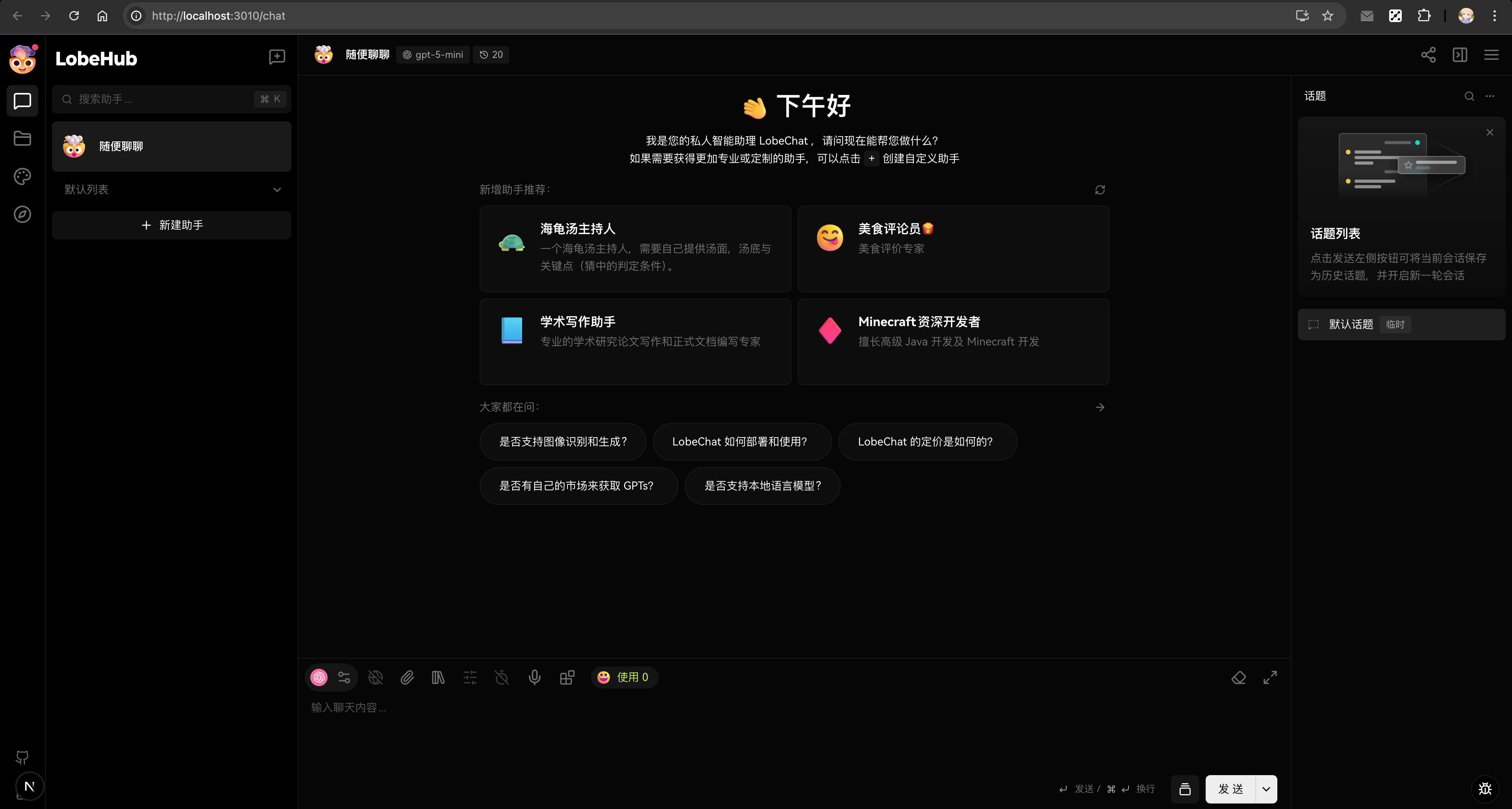
|
|
66
121
|
|
|
67
|
-
##
|
|
122
|
+
## 图像生成开发
|
|
123
|
+
|
|
124
|
+
在开发图像生成功能(文生图、图生图)时,Docker Compose 配置已经包含了处理生成图像和用户上传所需的所有存储服务。
|
|
125
|
+
|
|
126
|
+
### 图像生成配置
|
|
127
|
+
|
|
128
|
+
现有的 Docker Compose 配置已经包含了 MinIO 存储服务以及 `docker-compose/local/.env.example` 中的所有必要环境变量。无需额外配置。
|
|
129
|
+
|
|
130
|
+
### 图像生成架构
|
|
68
131
|
|
|
69
|
-
|
|
132
|
+
图像生成功能需要:
|
|
70
133
|
|
|
71
|
-
-
|
|
72
|
-
-
|
|
73
|
-
- 图像生成
|
|
74
|
-
- 多用户身份验证
|
|
75
|
-
- 高级服务端集成
|
|
134
|
+
- **PostgreSQL**:存储生成图像的元数据
|
|
135
|
+
- **MinIO/S3**:存储实际的图像文件
|
|
76
136
|
|
|
77
|
-
|
|
137
|
+
### 存储配置
|
|
138
|
+
|
|
139
|
+
`docker-compose/local/.env.example` 文件包含所有必要的 S3 环境变量:
|
|
140
|
+
|
|
141
|
+
```bash
|
|
142
|
+
# S3 存储配置(本地开发使用 MinIO)
|
|
143
|
+
S3_ACCESS_KEY_ID=${MINIO_ROOT_USER}
|
|
144
|
+
S3_SECRET_ACCESS_KEY=${MINIO_ROOT_PASSWORD}
|
|
145
|
+
S3_ENDPOINT=http://localhost:${MINIO_PORT}
|
|
146
|
+
S3_BUCKET=${MINIO_LOBE_BUCKET}
|
|
147
|
+
S3_ENABLE_PATH_STYLE=1 # MinIO 必需
|
|
148
|
+
S3_SET_ACL=0 # MinIO 兼容性
|
|
149
|
+
```
|
|
150
|
+
|
|
151
|
+
### 文件存储结构
|
|
152
|
+
|
|
153
|
+
生成的图像和用户上传在 MinIO 存储桶中按以下方式组织:
|
|
154
|
+
|
|
155
|
+
```
|
|
156
|
+
lobe/ # S3 存储桶 (MINIO_LOBE_BUCKET)
|
|
157
|
+
├── generated/ # 生成的图像
|
|
158
|
+
│ └── {userId}/
|
|
159
|
+
│ └── {sessionId}/
|
|
160
|
+
│ └── {imageId}.png
|
|
161
|
+
└── uploads/ # 用户上传的图像处理文件
|
|
162
|
+
└── {userId}/
|
|
163
|
+
└── {fileId}.{ext}
|
|
164
|
+
```
|
|
165
|
+
|
|
166
|
+
### 图像开发工作流
|
|
167
|
+
|
|
168
|
+
在开发图像生成功能时,生成的图像将:
|
|
169
|
+
|
|
170
|
+
1. 由 AI 模型创建
|
|
171
|
+
2. 通过预签名 URL 上传到 S3/MinIO
|
|
172
|
+
3. 元数据存储在 PostgreSQL 中
|
|
173
|
+
4. 通过公共 S3 URL 提供服务
|
|
174
|
+
|
|
175
|
+
测试图像上传的示例代码:
|
|
176
|
+
|
|
177
|
+
```typescript
|
|
178
|
+
// 示例:上传生成的图像
|
|
179
|
+
const uploadUrl = await trpc.upload.createPresignedUrl.mutate({
|
|
180
|
+
filename: 'generated-image.png',
|
|
181
|
+
contentType: 'image/png',
|
|
182
|
+
});
|
|
183
|
+
|
|
184
|
+
// 上传到 S3
|
|
185
|
+
await fetch(uploadUrl, {
|
|
186
|
+
method: 'PUT',
|
|
187
|
+
body: imageBlob,
|
|
188
|
+
headers: { 'Content-Type': 'image/png' },
|
|
189
|
+
});
|
|
190
|
+
```
|
|
191
|
+
|
|
192
|
+
### 服务地址
|
|
193
|
+
|
|
194
|
+
运行 Docker Compose 开发环境时:
|
|
195
|
+
|
|
196
|
+
- **PostgreSQL**:`postgres://postgres@localhost:5432/LobeHub`
|
|
197
|
+
- **MinIO API**:`http://localhost:9000`
|
|
198
|
+
- **MinIO 控制台**:`http://localhost:9001` (admin/CHANGE\_THIS\_PASSWORD\_IN\_PRODUCTION)
|
|
199
|
+
- **应用程序**:`http://localhost:3010`
|
|
200
|
+
|
|
201
|
+
## 故障排除
|
|
202
|
+
|
|
203
|
+
### 重置服务
|
|
204
|
+
|
|
205
|
+
如遇到问题,可以重置整个服务堆栈:
|
|
206
|
+
|
|
207
|
+
```bash
|
|
208
|
+
# 停止并删除所有容器
|
|
209
|
+
docker-compose -f docker-compose.development.yml down
|
|
210
|
+
|
|
211
|
+
# 删除卷(这将删除所有数据)
|
|
212
|
+
docker-compose -f docker-compose.development.yml down -v
|
|
213
|
+
|
|
214
|
+
# 重新启动
|
|
215
|
+
docker-compose -f docker-compose.development.yml up -d
|
|
216
|
+
pnpm db:migrate
|
|
217
|
+
```
|
|
218
|
+
|
|
219
|
+
### 端口冲突
|
|
220
|
+
|
|
221
|
+
如果端口已被占用:
|
|
222
|
+
|
|
223
|
+
```bash
|
|
224
|
+
# 检查端口使用情况
|
|
225
|
+
lsof -i :5432 # PostgreSQL
|
|
226
|
+
lsof -i :9000 # MinIO API
|
|
227
|
+
lsof -i :9001 # MinIO 控制台
|
|
228
|
+
```
|
|
229
|
+
|
|
230
|
+
### 数据库迁移
|
|
231
|
+
|
|
232
|
+
配置脚本会自动运行迁移。如需手动运行:
|
|
233
|
+
|
|
234
|
+
```bash
|
|
235
|
+
pnpm db:migrate
|
|
236
|
+
```
|
|
237
|
+
|
|
238
|
+
注意:在使用 `pnpm dev:desktop` 的开发模式下,迁移也会在启动时自动运行。
|
|
239
|
+
|
|
240
|
+
---
|
|
78
241
|
|
|
79
242
|
在开发过程中,如果你在环境设置上遇到任何问题,或者有任何关于 LobeHub 开发的问题,欢迎随时向我们提问。我们期待看到你的贡献!
|
|
80
243
|
|