@lobehub/lobehub 2.1.1 → 2.1.2
This diff represents the content of publicly available package versions that have been released to one of the supported registries. The information contained in this diff is provided for informational purposes only and reflects changes between package versions as they appear in their respective public registries.
- package/CHANGELOG.md +25 -0
- package/README.md +1 -1
- package/README.zh-CN.md +1 -1
- package/apps/desktop/src/main/controllers/McpInstallCtr.ts +10 -10
- package/apps/desktop/src/main/controllers/NetworkProxyCtr.ts +6 -6
- package/apps/desktop/src/main/controllers/RemoteServerSyncCtr.ts +2 -2
- package/changelog/v2.json +9 -0
- package/docs/changelog/2025-03-02-new-models.mdx +1 -1
- package/docs/changelog/2025-03-02-new-models.zh-CN.mdx +1 -1
- package/docs/changelog/2025-04-06-exports.mdx +1 -1
- package/docs/changelog/2025-04-06-exports.zh-CN.mdx +1 -1
- package/docs/changelog/2025-05-08-desktop-app.mdx +2 -2
- package/docs/changelog/2025-05-08-desktop-app.zh-CN.mdx +2 -2
- package/docs/changelog/2025-06-08-claude-4.mdx +1 -1
- package/docs/changelog/2025-06-08-claude-4.zh-CN.mdx +1 -1
- package/docs/changelog/2025-07-08-mcp-market.mdx +1 -1
- package/docs/changelog/2025-07-08-mcp-market.zh-CN.mdx +1 -1
- package/docs/changelog/2025-08-08-image-generation.mdx +1 -1
- package/docs/changelog/2025-08-08-image-generation.zh-CN.mdx +1 -1
- package/docs/changelog/2025-09-08-gemini.mdx +1 -1
- package/docs/changelog/2025-09-08-gemini.zh-CN.mdx +1 -1
- package/docs/changelog/2025-10-08-python.mdx +1 -1
- package/docs/changelog/2025-10-08-python.zh-CN.mdx +1 -1
- package/docs/changelog/2025-11-08-comfy-ui.mdx +1 -1
- package/docs/changelog/2025-11-08-comfy-ui.zh-CN.mdx +1 -1
- package/docs/changelog/2025-12-20-mcp.mdx +1 -1
- package/docs/changelog/2025-12-20-mcp.zh-CN.mdx +1 -1
- package/docs/development/basic/add-new-authentication-providers.zh-CN.mdx +1 -1
- package/docs/development/basic/add-new-image-model.mdx +3 -3
- package/docs/development/basic/add-new-image-model.zh-CN.mdx +3 -3
- package/docs/development/basic/chat-api.mdx +10 -10
- package/docs/development/basic/chat-api.zh-CN.mdx +10 -10
- package/docs/development/basic/feature-development.mdx +4 -4
- package/docs/development/basic/feature-development.zh-CN.mdx +4 -4
- package/docs/development/basic/setup-development.mdx +4 -4
- package/docs/development/basic/setup-development.zh-CN.mdx +4 -4
- package/docs/development/internationalization/add-new-locale.mdx +1 -1
- package/docs/development/internationalization/add-new-locale.zh-CN.mdx +1 -1
- package/docs/development/internationalization/internationalization-implementation.mdx +5 -5
- package/docs/development/internationalization/internationalization-implementation.zh-CN.mdx +5 -5
- package/docs/development/others/lighthouse.mdx +8 -8
- package/docs/development/others/lighthouse.zh-CN.mdx +8 -8
- package/docs/development/start.mdx +3 -3
- package/docs/development/start.zh-CN.mdx +3 -3
- package/docs/self-hosting/advanced/feature-flags.mdx +1 -1
- package/docs/self-hosting/advanced/feature-flags.zh-CN.mdx +1 -1
- package/docs/self-hosting/advanced/knowledge-base.mdx +2 -2
- package/docs/self-hosting/advanced/knowledge-base.zh-CN.mdx +2 -2
- package/docs/self-hosting/advanced/online-search.mdx +1 -1
- package/docs/self-hosting/advanced/online-search.zh-CN.mdx +1 -1
- package/docs/self-hosting/advanced/redis/upstash.mdx +3 -3
- package/docs/self-hosting/advanced/redis/upstash.zh-CN.mdx +3 -3
- package/docs/self-hosting/advanced/redis.mdx +6 -6
- package/docs/self-hosting/advanced/redis.zh-CN.mdx +6 -6
- package/docs/self-hosting/advanced/s3/rustfs.mdx +116 -116
- package/docs/self-hosting/advanced/s3/rustfs.zh-CN.mdx +116 -117
- package/docs/self-hosting/advanced/upstream-sync.zh-CN.mdx +5 -5
- package/docs/self-hosting/auth/email.mdx +70 -0
- package/docs/self-hosting/auth/email.zh-CN.mdx +70 -0
- package/docs/self-hosting/{advanced/auth → auth}/legacy.mdx +10 -10
- package/docs/self-hosting/{advanced/auth → auth}/legacy.zh-CN.mdx +5 -5
- package/docs/self-hosting/{advanced/auth → auth}/next-auth/casdoor.zh-CN.mdx +3 -3
- package/docs/self-hosting/{advanced/auth → auth}/next-auth/keycloak.zh-CN.mdx +2 -2
- package/docs/self-hosting/{advanced/auth → auth}/next-auth/logto.zh-CN.mdx +2 -2
- package/docs/self-hosting/{advanced/auth → auth}/providers/apple.mdx +6 -6
- package/docs/self-hosting/{advanced/auth → auth}/providers/apple.zh-CN.mdx +6 -6
- package/docs/self-hosting/{advanced/auth → auth}/providers/auth0.mdx +12 -12
- package/docs/self-hosting/{advanced/auth → auth}/providers/auth0.zh-CN.mdx +12 -12
- package/docs/self-hosting/{advanced/auth → auth}/providers/authelia.mdx +13 -13
- package/docs/self-hosting/{advanced/auth → auth}/providers/authelia.zh-CN.mdx +13 -13
- package/docs/self-hosting/{advanced/auth → auth}/providers/authentik.mdx +13 -13
- package/docs/self-hosting/{advanced/auth → auth}/providers/authentik.zh-CN.mdx +13 -13
- package/docs/self-hosting/{advanced/auth → auth}/providers/casdoor.mdx +8 -8
- package/docs/self-hosting/{advanced/auth → auth}/providers/casdoor.zh-CN.mdx +7 -7
- package/docs/self-hosting/{advanced/auth → auth}/providers/cloudflare-zero-trust.mdx +7 -7
- package/docs/self-hosting/{advanced/auth → auth}/providers/cloudflare-zero-trust.zh-CN.mdx +6 -6
- package/docs/self-hosting/{advanced/auth → auth}/providers/cognito.mdx +13 -13
- package/docs/self-hosting/{advanced/auth → auth}/providers/cognito.zh-CN.mdx +13 -13
- package/docs/self-hosting/{advanced/auth → auth}/providers/feishu.mdx +10 -10
- package/docs/self-hosting/{advanced/auth → auth}/providers/feishu.zh-CN.mdx +10 -10
- package/docs/self-hosting/{advanced/auth → auth}/providers/generic-oidc.mdx +12 -12
- package/docs/self-hosting/{advanced/auth → auth}/providers/generic-oidc.zh-CN.mdx +12 -12
- package/docs/self-hosting/{advanced/auth → auth}/providers/github.mdx +10 -10
- package/docs/self-hosting/{advanced/auth → auth}/providers/github.zh-CN.mdx +10 -10
- package/docs/self-hosting/{advanced/auth → auth}/providers/google.mdx +10 -10
- package/docs/self-hosting/{advanced/auth → auth}/providers/google.zh-CN.mdx +10 -10
- package/docs/self-hosting/{advanced/auth → auth}/providers/keycloak.mdx +11 -11
- package/docs/self-hosting/{advanced/auth → auth}/providers/keycloak.zh-CN.mdx +11 -11
- package/docs/self-hosting/{advanced/auth → auth}/providers/logto.mdx +8 -8
- package/docs/self-hosting/{advanced/auth → auth}/providers/logto.zh-CN.mdx +7 -7
- package/docs/self-hosting/{advanced/auth → auth}/providers/microsoft.mdx +11 -11
- package/docs/self-hosting/{advanced/auth → auth}/providers/microsoft.zh-CN.mdx +11 -11
- package/docs/self-hosting/{advanced/auth → auth}/providers/okta.mdx +13 -13
- package/docs/self-hosting/{advanced/auth → auth}/providers/okta.zh-CN.mdx +13 -13
- package/docs/self-hosting/{advanced/auth → auth}/providers/wechat.mdx +10 -10
- package/docs/self-hosting/{advanced/auth → auth}/providers/wechat.zh-CN.mdx +10 -10
- package/docs/self-hosting/{advanced/auth → auth}/providers/zitadel.mdx +13 -13
- package/docs/self-hosting/{advanced/auth → auth}/providers/zitadel.zh-CN.mdx +13 -13
- package/docs/self-hosting/{advanced/auth.mdx → auth.mdx} +12 -81
- package/docs/self-hosting/{advanced/auth.zh-CN.mdx → auth.zh-CN.mdx} +11 -80
- package/docs/self-hosting/environment-variables/redis.mdx +1 -1
- package/docs/self-hosting/environment-variables/redis.zh-CN.mdx +1 -1
- package/docs/self-hosting/environment-variables.mdx +1 -1
- package/docs/self-hosting/faq/no-v1-suffix.mdx +3 -3
- package/docs/self-hosting/faq/no-v1-suffix.zh-CN.mdx +3 -3
- package/docs/self-hosting/{advanced → migration/v2}/auth/clerk-to-betterauth.mdx +7 -7
- package/docs/self-hosting/{advanced → migration/v2}/auth/clerk-to-betterauth.zh-CN.mdx +7 -7
- package/docs/self-hosting/{advanced → migration/v2}/auth/migration-internals.mdx +2 -2
- package/docs/self-hosting/{advanced → migration/v2}/auth/migration-internals.zh-CN.mdx +2 -2
- package/docs/self-hosting/{advanced → migration/v2}/auth/nextauth-to-betterauth.mdx +11 -11
- package/docs/self-hosting/{advanced → migration/v2}/auth/nextauth-to-betterauth.zh-CN.mdx +11 -11
- package/docs/self-hosting/migration/v2/breaking-changes.mdx +1 -1
- package/docs/self-hosting/migration/v2/breaking-changes.zh-CN.mdx +1 -1
- package/docs/self-hosting/platform/docker-compose.zh-CN.mdx +4 -4
- package/docs/self-hosting/platform/docker.mdx +5 -5
- package/docs/self-hosting/platform/docker.zh-CN.mdx +10 -10
- package/docs/self-hosting/platform/dokploy.mdx +1 -1
- package/docs/self-hosting/platform/dokploy.zh-CN.mdx +5 -5
- package/docs/self-hosting/platform/sealos.mdx +12 -12
- package/docs/self-hosting/platform/sealos.zh-CN.mdx +17 -17
- package/docs/self-hosting/platform/vercel.zh-CN.mdx +4 -4
- package/docs/self-hosting/start.mdx +3 -3
- package/docs/self-hosting/start.zh-CN.mdx +4 -4
- package/locales/en-US/auth.json +1 -1
- package/locales/en-US/authError.json +1 -0
- package/locales/en-US/metadata.json +1 -1
- package/locales/zh-CN/authError.json +1 -0
- package/package.json +1 -1
- package/src/app/[variants]/(auth)/auth-error/page.tsx +4 -2
- package/src/app/[variants]/(auth)/signin/SignInEmailStep.tsx +1 -1
- package/src/app/[variants]/(auth)/signin/SignInPasswordStep.tsx +1 -1
- package/src/libs/better-auth/sso/providers/feishu.ts +15 -14
- package/src/libs/better-auth/sso/providers/wechat.ts +6 -3
- package/src/libs/next/proxy/define-config.ts +1 -0
- package/src/locales/default/auth.ts +1 -1
- package/src/locales/default/authError.ts +2 -0
- package/src/locales/default/metadata.ts +1 -1
- package/src/server/ld.ts +1 -1
- /package/docs/self-hosting/{advanced/auth → auth}/clerk.mdx +0 -0
- /package/docs/self-hosting/{advanced/auth → auth}/clerk.zh-CN.mdx +0 -0
- /package/docs/self-hosting/{advanced/auth → auth}/next-auth/auth0.mdx +0 -0
- /package/docs/self-hosting/{advanced/auth → auth}/next-auth/auth0.zh-CN.mdx +0 -0
- /package/docs/self-hosting/{advanced/auth → auth}/next-auth/authelia.mdx +0 -0
- /package/docs/self-hosting/{advanced/auth → auth}/next-auth/authelia.zh-CN.mdx +0 -0
- /package/docs/self-hosting/{advanced/auth → auth}/next-auth/authentik.mdx +0 -0
- /package/docs/self-hosting/{advanced/auth → auth}/next-auth/authentik.zh-CN.mdx +0 -0
- /package/docs/self-hosting/{advanced/auth → auth}/next-auth/casdoor.mdx +0 -0
- /package/docs/self-hosting/{advanced/auth → auth}/next-auth/cloudflare-zero-trust.mdx +0 -0
- /package/docs/self-hosting/{advanced/auth → auth}/next-auth/cloudflare-zero-trust.zh-CN.mdx +0 -0
- /package/docs/self-hosting/{advanced/auth → auth}/next-auth/github.mdx +0 -0
- /package/docs/self-hosting/{advanced/auth → auth}/next-auth/github.zh-CN.mdx +0 -0
- /package/docs/self-hosting/{advanced/auth → auth}/next-auth/google.mdx +0 -0
- /package/docs/self-hosting/{advanced/auth → auth}/next-auth/google.zh-CN.mdx +0 -0
- /package/docs/self-hosting/{advanced/auth → auth}/next-auth/keycloak.mdx +0 -0
- /package/docs/self-hosting/{advanced/auth → auth}/next-auth/logto.mdx +0 -0
- /package/docs/self-hosting/{advanced/auth → auth}/next-auth/microsoft-entra-id.mdx +0 -0
- /package/docs/self-hosting/{advanced/auth → auth}/next-auth/microsoft-entra-id.zh-CN.mdx +0 -0
- /package/docs/self-hosting/{advanced/auth → auth}/next-auth/okta.mdx +0 -0
- /package/docs/self-hosting/{advanced/auth → auth}/next-auth/okta.zh-CN.mdx +0 -0
- /package/docs/self-hosting/{advanced/auth → auth}/next-auth/wechat.mdx +0 -0
- /package/docs/self-hosting/{advanced/auth → auth}/next-auth/wechat.zh-CN.mdx +0 -0
- /package/docs/self-hosting/{advanced/auth → auth}/next-auth/zitadel.mdx +0 -0
- /package/docs/self-hosting/{advanced/auth → auth}/next-auth/zitadel.zh-CN.mdx +0 -0
|
@@ -78,4 +78,4 @@ LobeHub 2.0 recommends using **PostgreSQL 17** or higher.
|
|
|
78
78
|
|
|
79
79
|
This is because LobeHub 2.0 uses the [pg\_search](https://github.com/paradedb/paradedb/tree/main/pg_search) extension for full-text search capabilities. If you use Serverless Postgres services like Neon, the pg\_search extension is only available on PostgreSQL 17.
|
|
80
80
|
|
|
81
|
-
If you self-host your database with Docker, we recommend using the `
|
|
81
|
+
If you self-host your database with Docker, we recommend using the `paradedb/paradedb:latest-pg17` image.
|
|
@@ -76,4 +76,4 @@ LobeHub 2.0 推荐使用 **PostgreSQL 17** 及以上版本。
|
|
|
76
76
|
|
|
77
77
|
这是因为 LobeHub 2.0 使用了 [pg\_search](https://github.com/paradedb/paradedb/tree/main/pg_search) 插件来提供全文搜索能力。如果您使用 Neon 等 Serverless Postgres 服务,pg\_search 插件仅在 PostgreSQL 17 上可用。
|
|
78
78
|
|
|
79
|
-
如果您使用 Docker 自建数据库,推荐使用 `
|
|
79
|
+
如果您使用 Docker 自建数据库,推荐使用 `paradedb/paradedb:latest-pg17` 镜像。
|
|
@@ -8,7 +8,7 @@ tags:
|
|
|
8
8
|
- 部署指引
|
|
9
9
|
---
|
|
10
10
|
|
|
11
|
-
# 使用 Docker Compose 部署 LobeHub
|
|
11
|
+
# 使用 Docker Compose 部署 LobeHub
|
|
12
12
|
|
|
13
13
|
<div style={{display:"flex", gap: 4}}>
|
|
14
14
|
[![][docker-release-shield]][docker-release-link]
|
|
@@ -254,13 +254,13 @@ mv .env.zh-CN.example .env
|
|
|
254
254
|
|
|
255
255
|
### 预备知识
|
|
256
256
|
|
|
257
|
-
一般来讲,想要完整的运行 LobeHub
|
|
257
|
+
一般来讲,想要完整的运行 LobeHub,你需要至少拥有如下三个服务:
|
|
258
258
|
|
|
259
|
-
- LobeHub
|
|
259
|
+
- LobeHub 自身
|
|
260
260
|
- 带有 PGVector 插件的 PostgreSQL 数据库
|
|
261
261
|
- 支持 S3 协议的对象存储服务
|
|
262
262
|
|
|
263
|
-
这些服务可以通过自建或者在线云服务组合搭配,以满足不同层次的部署需求。本文中,我们提供了完全基于开源自建服务的 Docker Compose 配置,你可以直接使用这份配置文件来启动 LobeHub
|
|
263
|
+
这些服务可以通过自建或者在线云服务组合搭配,以满足不同层次的部署需求。本文中,我们提供了完全基于开源自建服务的 Docker Compose 配置,你可以直接使用这份配置文件来启动 LobeHub,也可以对之进行修改以适应你的需求。
|
|
264
264
|
|
|
265
265
|
我们默认使用 [RustFS](https://github.com/rustfs/rustfs) 作为本地 S3 对象存储服务。如需配置 SSO 登录鉴权服务,请参考 [身份验证服务](/zh/docs/self-hosting/advanced/auth) 文档。
|
|
266
266
|
|
|
@@ -35,19 +35,19 @@ Here is the process for deploying the LobeHub server database version on a Linux
|
|
|
35
35
|
<Steps>
|
|
36
36
|
### Create a Postgres Database Instance
|
|
37
37
|
|
|
38
|
-
Please create a Postgres database instance
|
|
38
|
+
Please create a Postgres database instance according to your needs, for example:
|
|
39
39
|
|
|
40
40
|
```sh
|
|
41
41
|
docker network create pg
|
|
42
42
|
|
|
43
|
-
docker run --name my-postgres --network pg -e POSTGRES_PASSWORD=mysecretpassword -p 5432:5432 -d
|
|
43
|
+
docker run --name my-postgres --network pg -e POSTGRES_PASSWORD=mysecretpassword -p 5432:5432 -d paradedb/paradedb:latest-pg17
|
|
44
44
|
```
|
|
45
45
|
|
|
46
|
-
The above command will create a PG instance named `my-postgres` on the network `pg`, where `
|
|
46
|
+
The above command will create a PG instance named `my-postgres` on the network `pg`, where `paradedb/paradedb:latest-pg17` is a Postgres 17 image with pgvector and pg\_search plugins installed by default.
|
|
47
47
|
|
|
48
48
|
<Callout type="info">
|
|
49
|
-
The
|
|
50
|
-
|
|
49
|
+
The ParadeDB image includes pgvector (vector search) and pg\_search (full-text search) plugins, which are important
|
|
50
|
+
components for LobeHub to implement RAG and knowledge base search.
|
|
51
51
|
</Callout>
|
|
52
52
|
|
|
53
53
|
<Callout type="warning">
|
|
@@ -8,7 +8,7 @@ tags:
|
|
|
8
8
|
- Postgres
|
|
9
9
|
---
|
|
10
10
|
|
|
11
|
-
# 使用 Docker
|
|
11
|
+
# 使用 Docker 部署 LobeHub
|
|
12
12
|
|
|
13
13
|
<div style={{display:"flex", gap: 4}}>
|
|
14
14
|
[![][docker-release-shield]][docker-release-link]
|
|
@@ -19,32 +19,32 @@ tags:
|
|
|
19
19
|
</div>
|
|
20
20
|
|
|
21
21
|
<Callout type="info">
|
|
22
|
-
本文已经假定你了解了 LobeHub
|
|
23
|
-
|
|
24
|
-
|
|
22
|
+
本文已经假定你了解了 LobeHub
|
|
23
|
+
的部署基本原理和流程,因此只包含核心环境变量配置的内容。如果你还不了解 LobeHub
|
|
24
|
+
的部署原理,请先查阅 [使用服务端数据库部署](/zh/docs/self-hosting/server-database) 。
|
|
25
25
|
此外,针对国内的腾讯云储存桶用户,可查询[配置腾讯云 COS
|
|
26
26
|
存储服务](/zh/docs/self-hosting/advanced/s3/tencent-cloud)。
|
|
27
27
|
</Callout>
|
|
28
28
|
|
|
29
29
|
## 在 Linux 服务器上部署
|
|
30
30
|
|
|
31
|
-
以下是在 Linux 服务器上部署 LobeHub
|
|
31
|
+
以下是在 Linux 服务器上部署 LobeHub 的流程:
|
|
32
32
|
|
|
33
33
|
<Steps>
|
|
34
34
|
### 创建 Postgres 数据库实例
|
|
35
35
|
|
|
36
|
-
|
|
36
|
+
请按照你自己的诉求创建一个 Postgres 数据库实例,例如:
|
|
37
37
|
|
|
38
38
|
```sh
|
|
39
39
|
docker network create pg
|
|
40
40
|
|
|
41
|
-
docker run --name my-postgres --network pg -e POSTGRES_PASSWORD=mysecretpassword -p 5432:5432 -d
|
|
41
|
+
docker run --name my-postgres --network pg -e POSTGRES_PASSWORD=mysecretpassword -p 5432:5432 -d paradedb/paradedb:latest-pg17
|
|
42
42
|
```
|
|
43
43
|
|
|
44
|
-
上述指令会创建一个名为 `my-postgres`,并且网络为 `pg` 的 PG 实例,其中 `
|
|
44
|
+
上述指令会创建一个名为 `my-postgres`,并且网络为 `pg` 的 PG 实例,其中 `paradedb/paradedb:latest-pg17` 是一个 Postgres 17 的镜像,且默认安装了 pgvector 和 pg\_search 插件。
|
|
45
45
|
|
|
46
46
|
<Callout type="info">
|
|
47
|
-
|
|
47
|
+
ParadeDB 镜像包含了 pgvector(向量搜索)和 pg\_search(全文搜索)插件,是 LobeHub 实现 RAG 和知识库搜索的重要构件。
|
|
48
48
|
</Callout>
|
|
49
49
|
|
|
50
50
|
<Callout type="warning">
|
|
@@ -125,7 +125,7 @@ tags:
|
|
|
125
125
|
|
|
126
126
|
## 在本地(Mac / Windows) 上使用
|
|
127
127
|
|
|
128
|
-
LobeHub
|
|
128
|
+
LobeHub 也支持直接在本地的 Mac/Windows 本地使用。
|
|
129
129
|
|
|
130
130
|
在此我们已假设你的本地有一个 5432 端口可用,账号为 `postgres` ,密码是 `mysecretpassword` 的 pg 实例,它在 `localhost:5432` 可用。
|
|
131
131
|
|
|
@@ -67,7 +67,7 @@ You also need to configure the `JWKS_KEY` environment variable for signing and v
|
|
|
67
67
|
|
|
68
68
|
## 2. Deploying the database on Dokploy
|
|
69
69
|
|
|
70
|
-
Enter the previously created Project, click on Create Service, and select Database. In the Database interface, choose PostgreSQL, then set the database name, user, and password. In the Docker image field, enter `
|
|
70
|
+
Enter the previously created Project, click on Create Service, and select Database. In the Database interface, choose PostgreSQL, then set the database name, user, and password. In the Docker image field, enter `paradedb/paradedb:latest-pg17`, and finally click Create to create the database.
|
|
71
71
|
|
|
72
72
|

|
|
73
73
|
|
|
@@ -1,6 +1,6 @@
|
|
|
1
1
|
---
|
|
2
|
-
title: 在 Dokploy 上部署 LobeHub
|
|
3
|
-
description: 本文详细介绍如何在 Dokploy
|
|
2
|
+
title: 在 Dokploy 上部署 LobeHub
|
|
3
|
+
description: 本文详细介绍如何在 Dokploy 中部署 LobeHub,包括数据库配置、身份验证服务配置的设置步骤。
|
|
4
4
|
tags:
|
|
5
5
|
- 服务端数据库
|
|
6
6
|
- Postgres
|
|
@@ -11,9 +11,9 @@ tags:
|
|
|
11
11
|
- 环境变量配置
|
|
12
12
|
---
|
|
13
13
|
|
|
14
|
-
# 在 Dokploy
|
|
14
|
+
# 在 Dokploy 上部署 LobeHub
|
|
15
15
|
|
|
16
|
-
本文将详细介绍如何在 Dokploy
|
|
16
|
+
本文将详细介绍如何在 Dokploy 中部署 LobeHub。
|
|
17
17
|
|
|
18
18
|
## 一、准备工作
|
|
19
19
|
|
|
@@ -68,7 +68,7 @@ S3_ENABLE_PATH_STYLE=
|
|
|
68
68
|
|
|
69
69
|
## 二、在 Dokploy 上部署数据库
|
|
70
70
|
|
|
71
|
-
进入前面创建的 Project,点击 Create Service 选择 Database,在 Database 界面选择 PostgreSQL ,然后设置数据库名、用户、密码,在 Docker image 中填入 `
|
|
71
|
+
进入前面创建的 Project,点击 Create Service 选择 Database,在 Database 界面选择 PostgreSQL ,然后设置数据库名、用户、密码,在 Docker image 中填入 `paradedb/paradedb:latest-pg17` 最后点击 Create 创建数据库。
|
|
72
72
|
|
|
73
73
|

|
|
74
74
|
|
|
@@ -1,5 +1,5 @@
|
|
|
1
1
|
---
|
|
2
|
-
title: Deploy
|
|
2
|
+
title: Deploy LobeHub Database Version on Sealos
|
|
3
3
|
description: >-
|
|
4
4
|
Learn how to deploy LobeHub on Sealos with ease. Follow the provided steps to
|
|
5
5
|
set up LobeHub and start using it efficiently.
|
|
@@ -10,7 +10,7 @@ tags:
|
|
|
10
10
|
- Custom Domain Binding
|
|
11
11
|
---
|
|
12
12
|
|
|
13
|
-
# Deploying
|
|
13
|
+
# Deploying LobeHub Database Version on Sealos
|
|
14
14
|
|
|
15
15
|
<Callout type="info">
|
|
16
16
|
This article assumes that you are familiar with the basic principles and processes of deploying
|
|
@@ -25,9 +25,9 @@ The application on Sealos includes 4 services:
|
|
|
25
25
|
- Logto for authrization(need to deploy separately).
|
|
26
26
|
- PostgreSQL with Vector plugin for data storage and indexing.
|
|
27
27
|
- One object storage Bucket.
|
|
28
|
-
-
|
|
28
|
+
- LobeHub database version.
|
|
29
29
|
|
|
30
|
-
Here is the process for deploying the
|
|
30
|
+
Here is the process for deploying the LobeHub server database version on Sealos:
|
|
31
31
|
|
|
32
32
|
## Pre-Deployment Setup
|
|
33
33
|
|
|
@@ -53,17 +53,17 @@ Select `Next.js (App Router)` as the framework, then click the `Start building`
|
|
|
53
53
|
|
|
54
54
|
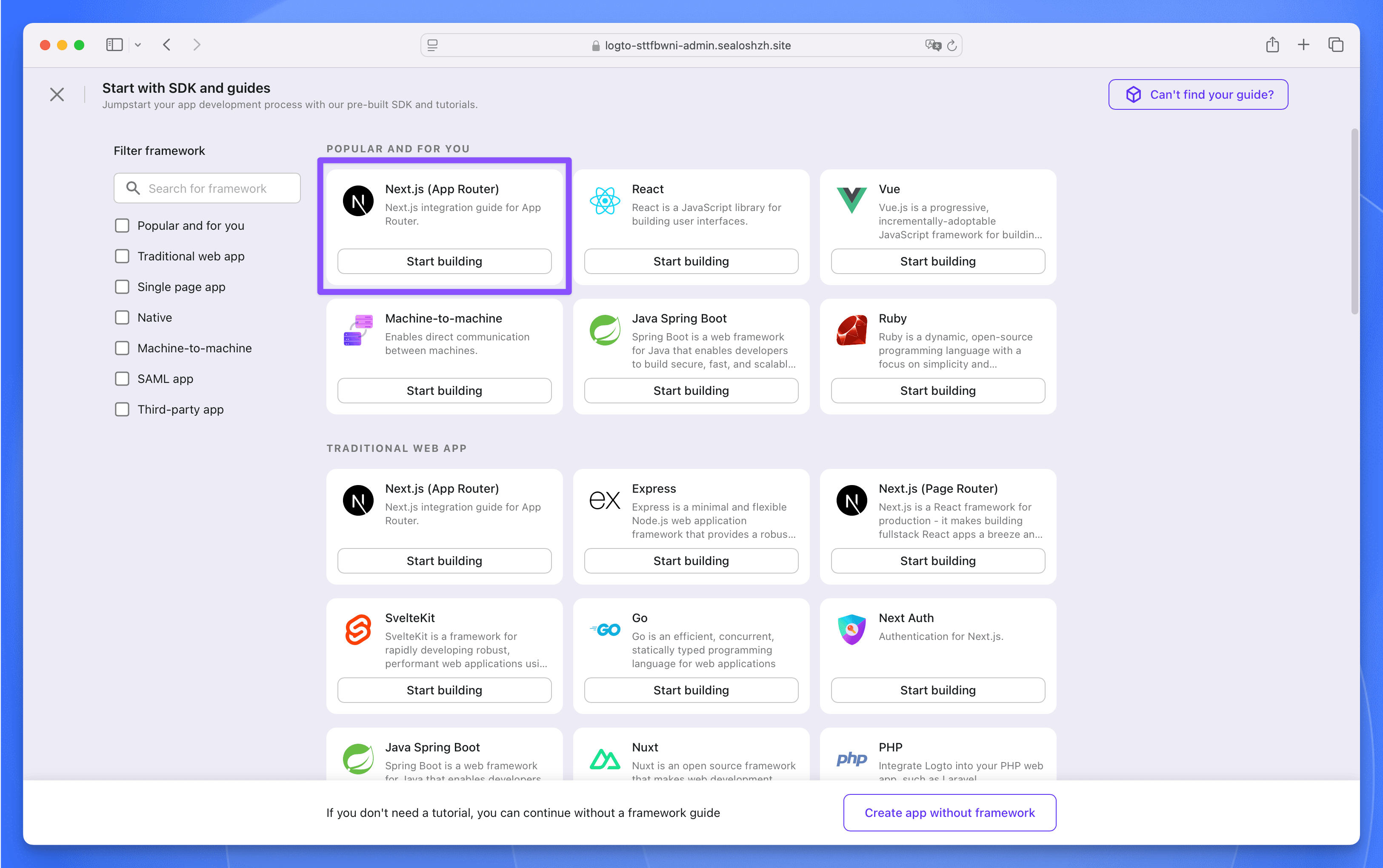
|
|
55
55
|
|
|
56
|
-
**Step 4**:In the pop-up window, fill in the application name as `
|
|
56
|
+
**Step 4**:In the pop-up window, fill in the application name as `LobeHub`, then click the `Create application` button. Next, do not fill in anything, just click the bottom `Finish and done` button to create it.
|
|
57
57
|
|
|
58
58
|
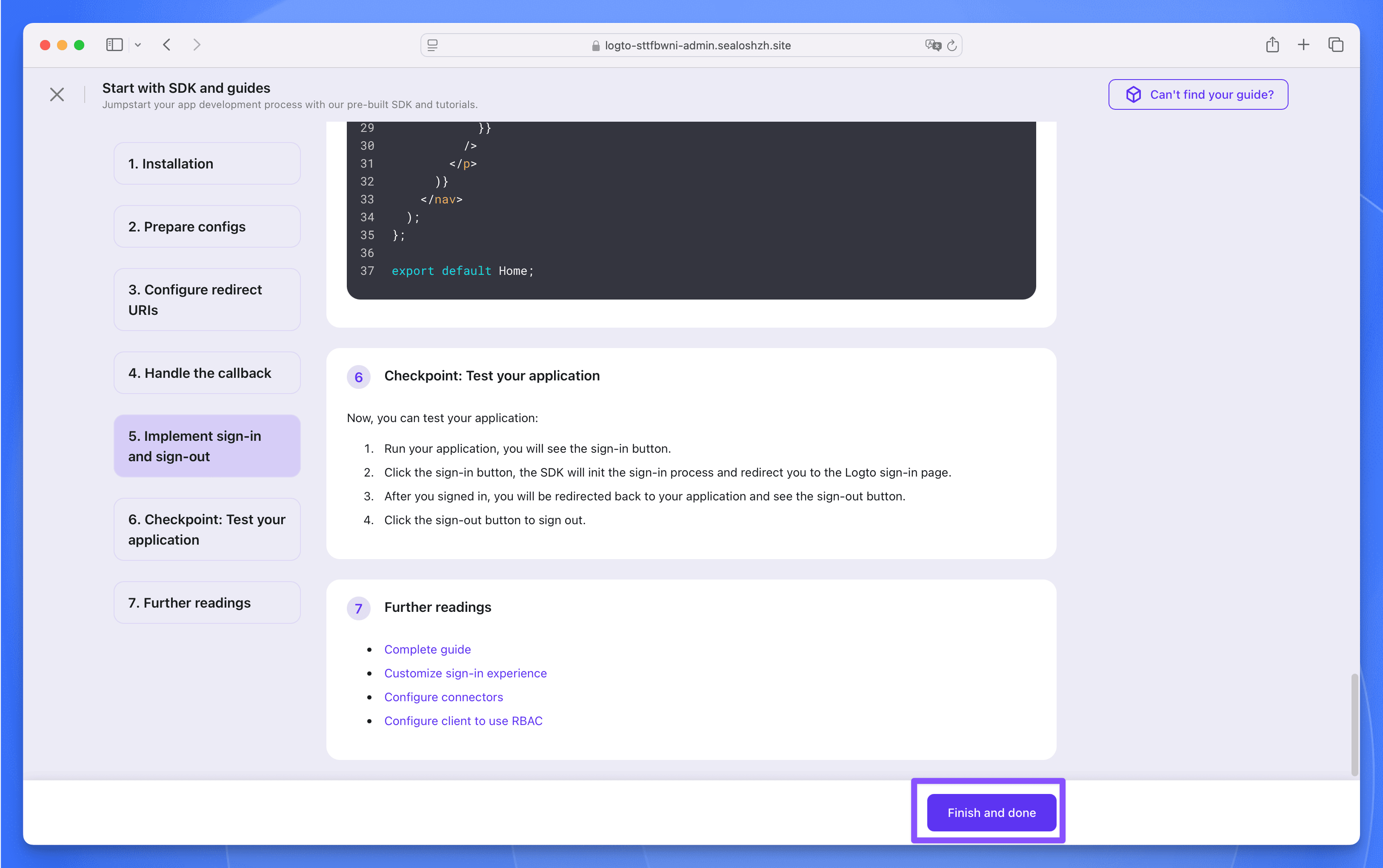
|
|
59
59
|
|
|
60
|
-
**Step 5**:In the `
|
|
60
|
+
**Step 5**:In the `LobeHub` application, find the following three parameters, which will be used later when deploying the LobeHub database version.
|
|
61
61
|
|
|
62
62
|
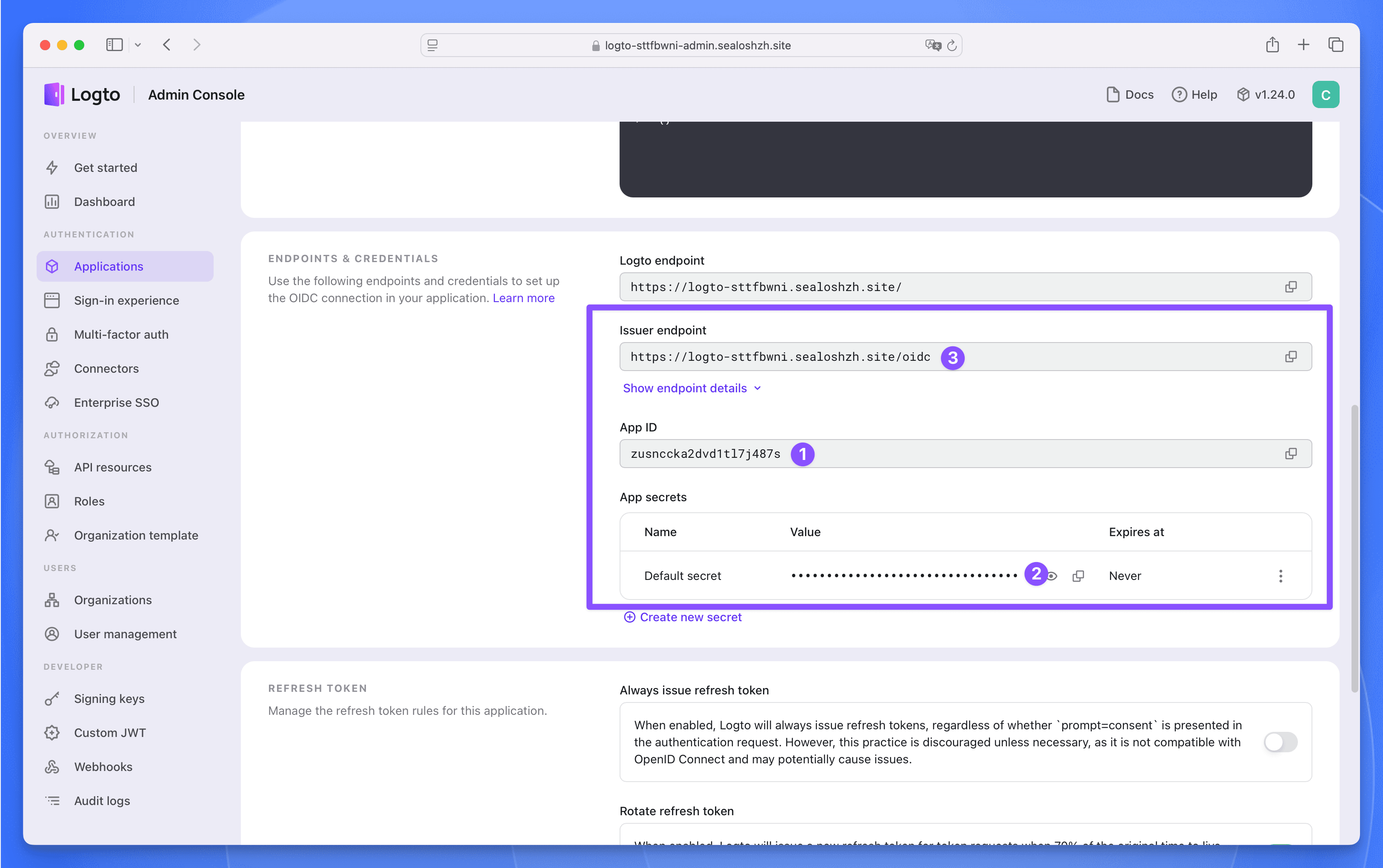
|
|
63
63
|
|
|
64
|
-
## Deploy
|
|
64
|
+
## Deploy LobeHub Database Version
|
|
65
65
|
|
|
66
|
-
**Step 1**:Click the button below to visit the
|
|
66
|
+
**Step 1**:Click the button below to visit the LobeHub database version application deployment page:
|
|
67
67
|
|
|
68
68
|
[](https://template.usw.sealos.io/deploy?templateName=lobe-chat-db)
|
|
69
69
|
|
|
@@ -75,13 +75,13 @@ Fill in the following three required parameters:
|
|
|
75
75
|
|
|
76
76
|
**Step 2**:Click the `Deploy App` button, after the deployment is complete, wait for all the components of the application to be in the "Running" state, click the application's "Details" button to enter the application details page.
|
|
77
77
|
|
|
78
|
-
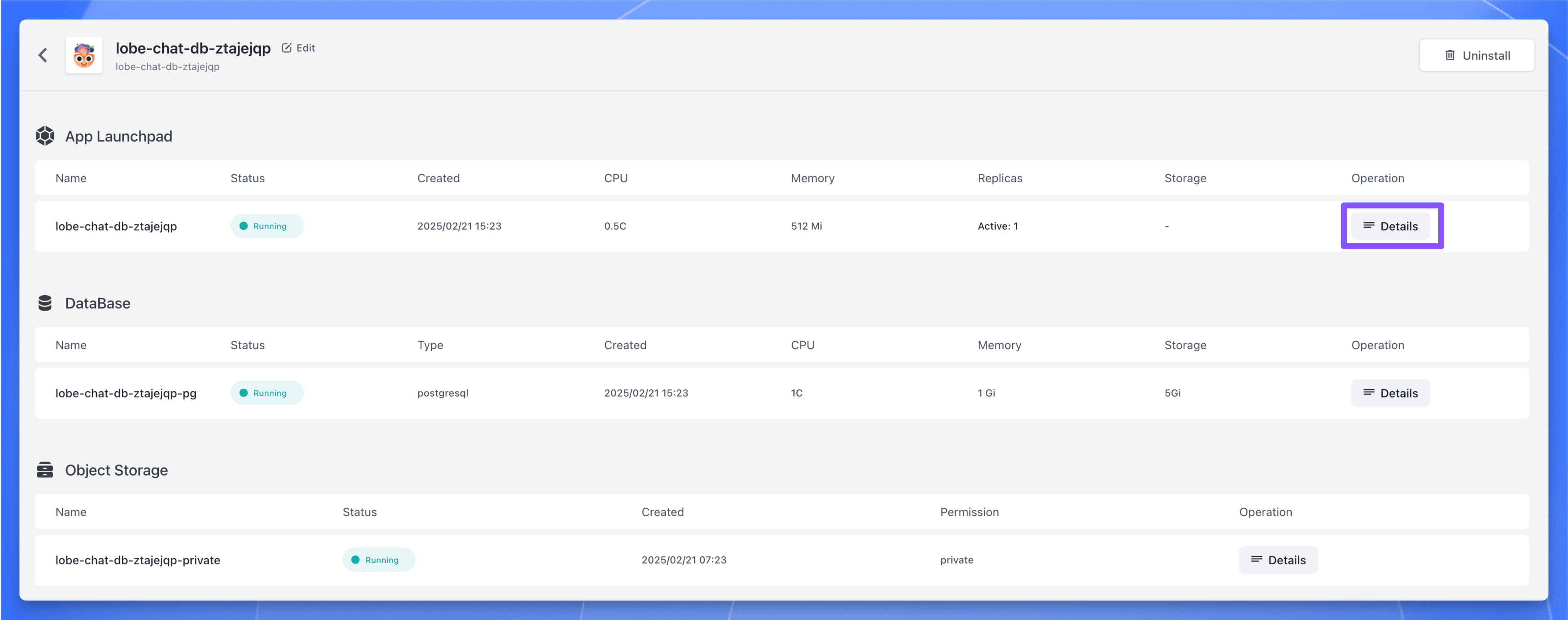
|
|
79
79
|
|
|
80
80
|
**Step 3**:Find the public address, copy it, and use it later.
|
|
81
81
|
|
|
82
82
|
## Post-Deployment Configuration
|
|
83
83
|
|
|
84
|
-
**Step 1**:Enter the `Applications` page of Logto, find the `
|
|
84
|
+
**Step 1**:Enter the `Applications` page of Logto, find the `LobeHub` application, click to enter the application details page.
|
|
85
85
|
|
|
86
86
|
**Step 2**:In the `Settings` page, find the `Redirect URI` and `Post sign-out redirect URI` parameters, fill in the following values:
|
|
87
87
|
|
|
@@ -90,8 +90,8 @@ Fill in the following three required parameters:
|
|
|
90
90
|
|
|
91
91
|
**Step 3**:Click the `Save changes` button to save the configuration.
|
|
92
92
|
|
|
93
|
-
**Step 4**:Now, access the
|
|
93
|
+
**Step 4**:Now, access the LobeHub database version through `https://<lobe-chat-db-public-address>`, click the avatar in the upper left corner, and then click the \[Log in / Sign up] button.
|
|
94
94
|
|
|
95
95
|
**Step 5**:Next, you will be redirected to the Logto login page, click the \[Create account] button to register an account.
|
|
96
96
|
|
|
97
|
-
**Step 6**:After registration, you can use Logto to login to the
|
|
97
|
+
**Step 6**:After registration, you can use Logto to login to the LobeHub database version.
|
|
@@ -12,19 +12,19 @@ tags:
|
|
|
12
12
|
# 使用 Sealos 部署 LobeHub 数据库版
|
|
13
13
|
|
|
14
14
|
<Callout type="info">
|
|
15
|
-
本文假设你已经熟悉
|
|
16
|
-
服务器数据库版的部署基本原理和流程,因此只包含与核心环境变量配置相关的内容。如果你对
|
|
15
|
+
本文假设你已经熟悉 LobeHub
|
|
16
|
+
服务器数据库版的部署基本原理和流程,因此只包含与核心环境变量配置相关的内容。如果你对 LobeHub
|
|
17
17
|
服务器数据库版的部署原理不熟悉,请先参考[部署服务器数据库](/zh/docs/self-hosting/server-database)。
|
|
18
18
|
</Callout>
|
|
19
19
|
|
|
20
|
-
在 Sealos 的
|
|
20
|
+
在 Sealos 的 LobeHub 数据库版应用中总共包含有以下四个服务:
|
|
21
21
|
|
|
22
22
|
- Logto 提供身份校验(需额外部署)
|
|
23
23
|
- 带有 Vector 插件的 PostgreSQL 来做数据存储和向量化
|
|
24
24
|
- 一个对象存储 Bucket
|
|
25
25
|
- LobeHub Database 的实例
|
|
26
26
|
|
|
27
|
-
这里是在 Sealos 上部署
|
|
27
|
+
这里是在 Sealos 上部署 LobeHub 服务器数据库版的流程:
|
|
28
28
|
|
|
29
29
|
## 预部署配置
|
|
30
30
|
|
|
@@ -57,18 +57,18 @@ tags:
|
|
|
57
57
|
|
|
58
58
|

|
|
59
59
|
|
|
60
|
-
在弹窗中填写应用的名称为 `
|
|
60
|
+
在弹窗中填写应用的名称为 `LobeHub`,然后点击 `Create application` 按钮。接下来啥也不用填,直接点击底部的 `Finish and done` 按钮就创建完成了。
|
|
61
61
|
|
|
62
62
|

|
|
63
63
|
|
|
64
|
-
在 `
|
|
64
|
+
在 `LobeHub` 应用中找到以下三个参数,后面部署 LobeHub 数据库版时需要用到。
|
|
65
65
|
|
|
66
66
|

|
|
67
67
|
</Steps>
|
|
68
68
|
|
|
69
|
-
## 部署
|
|
69
|
+
## 部署 LobeHub 数据库版
|
|
70
70
|
|
|
71
|
-
点击下方按钮访问
|
|
71
|
+
点击下方按钮访问 LobeHub 数据库版应用部署页面:
|
|
72
72
|
|
|
73
73
|
[](https://template.hzh.sealos.run/deploy?templateName=lobe-chat-db)
|
|
74
74
|
|
|
@@ -80,33 +80,33 @@ tags:
|
|
|
80
80
|
|
|
81
81
|
点击【部署】按钮,部署完成后,等待应用的所有组件状态都变成 “运行中”,点击应用的【详情】按钮,进入应用详情页面。
|
|
82
82
|
|
|
83
|
-
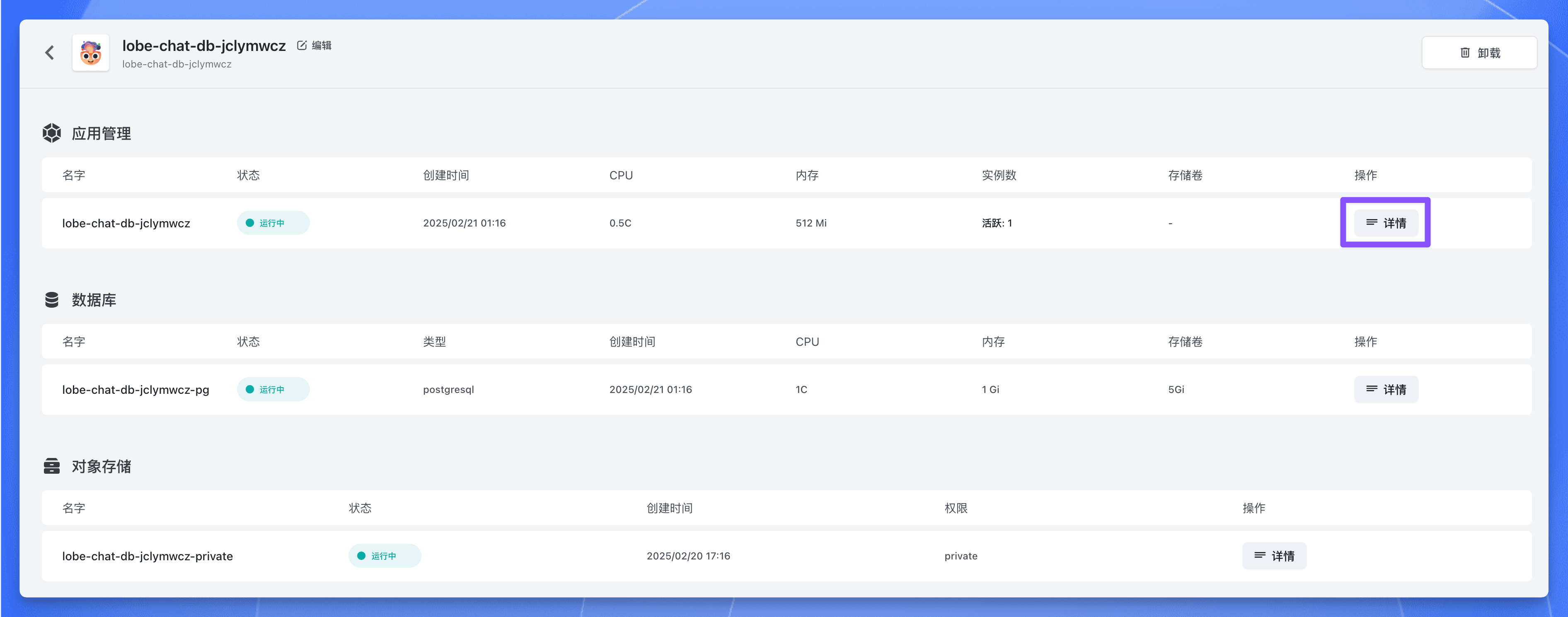
|
|
84
84
|
|
|
85
85
|
找到公网地址,复制下来,后面需要用到。
|
|
86
86
|
|
|
87
|
-
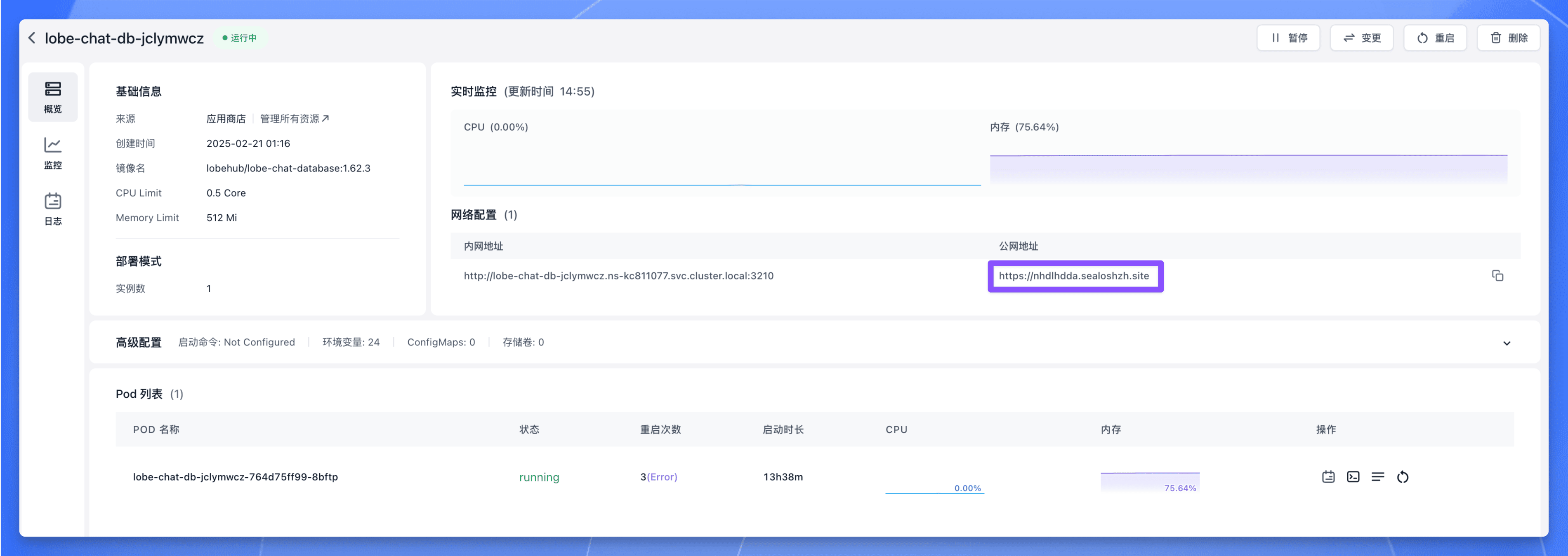
|
|
88
88
|
|
|
89
89
|
## 部署后配置
|
|
90
90
|
|
|
91
|
-
进入 Logto 的 `Applications` 页面,找到 `
|
|
91
|
+
进入 Logto 的 `Applications` 页面,找到 `LobeHub` 应用,点击进入应用详情页面。
|
|
92
92
|
|
|
93
93
|
在 `Settings` 页面中找到 “Redirect URI” 和 “Post sign-out redirect URI” 这两个参数,填入以下值:
|
|
94
94
|
|
|
95
95
|
- Redirect URI:`https://<lobe-chat-db-public-address>/api/auth/callback/logto`
|
|
96
96
|
- Post sign-out redirect URI:`https://<lobe-chat-db-public-address>`
|
|
97
97
|
|
|
98
|
-
其中 `https://<lobe-chat-db-public-address>` 为
|
|
98
|
+
其中 `https://<lobe-chat-db-public-address>` 为 LobeHub 数据库版的公网地址。
|
|
99
99
|
|
|
100
100
|
填完之后点击 `Save changes` 按钮保存配置。
|
|
101
101
|
|
|
102
|
-
现在通过 `https://<lobe-chat-db-public-address>` 访问
|
|
102
|
+
现在通过 `https://<lobe-chat-db-public-address>` 访问 LobeHub 数据库版,点击左上角的头像,然后点击【登录 / 注册】按钮:
|
|
103
103
|
|
|
104
|
-
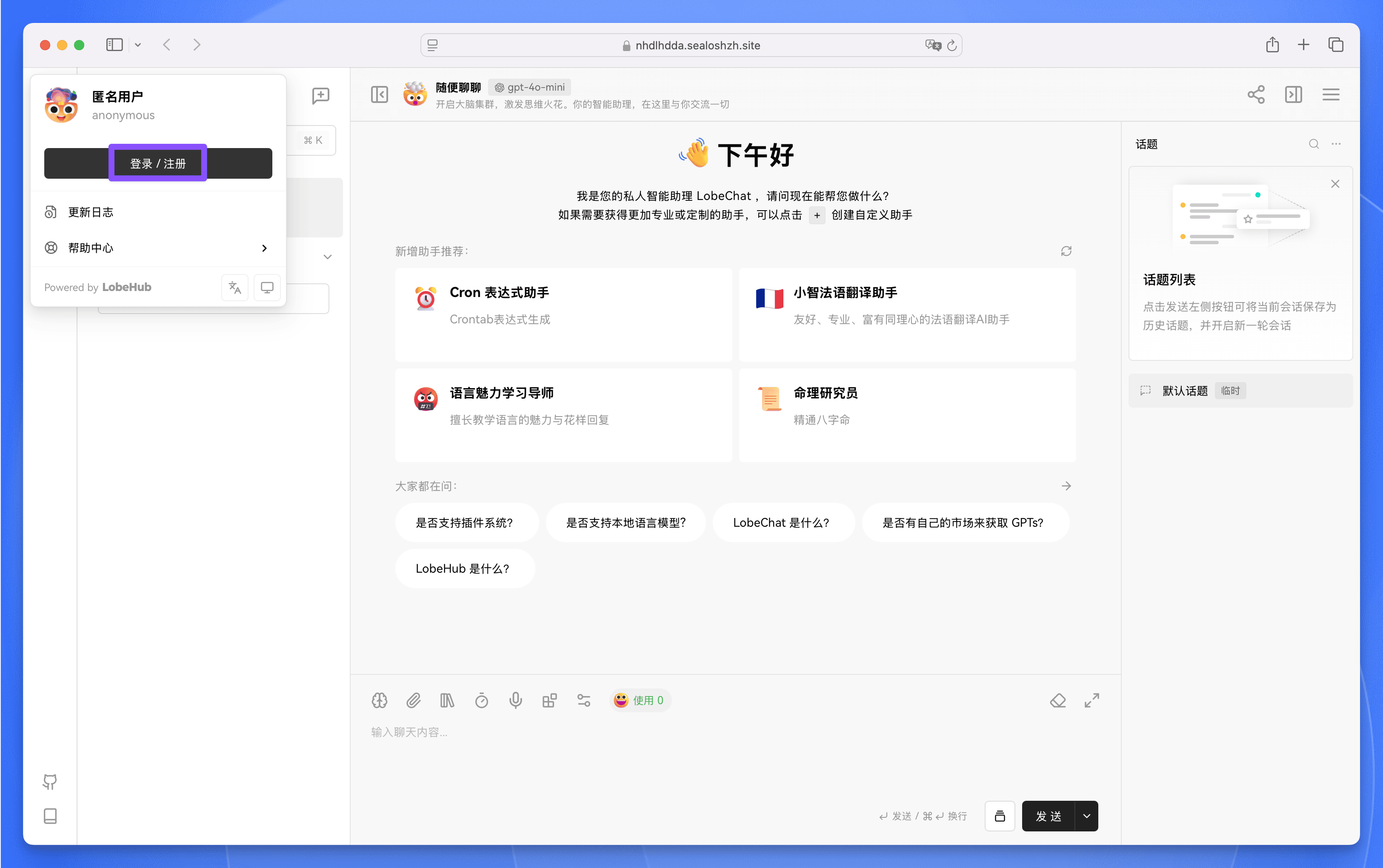
|
|
105
105
|
|
|
106
106
|
接下来会跳转到 Logto 的登录页面,点击【注册】注册一个账号。
|
|
107
107
|
|
|
108
|
-
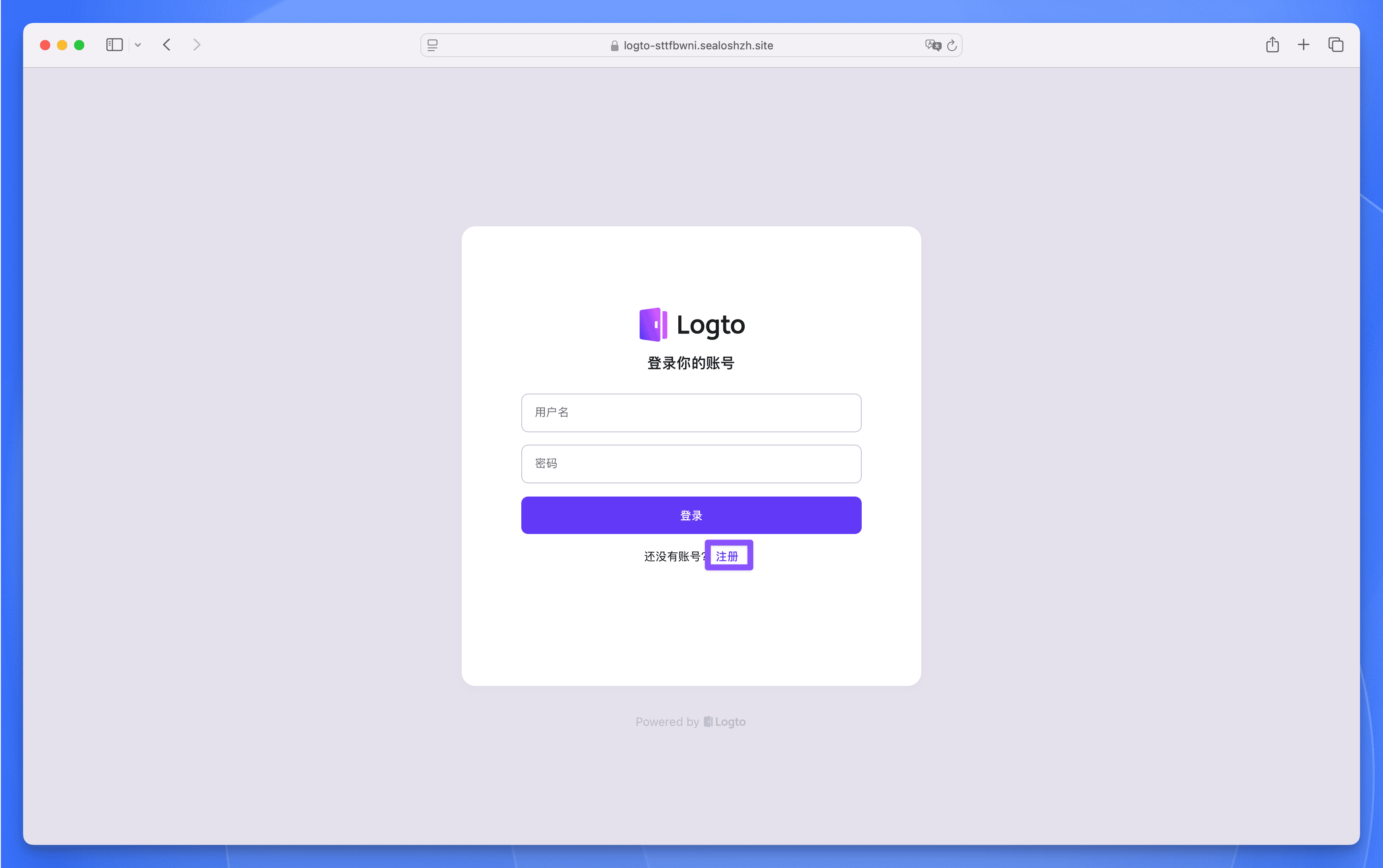
|
|
109
109
|
|
|
110
|
-
注册完成后,即可使用 Logto 登录
|
|
110
|
+
注册完成后,即可使用 Logto 登录 LobeHub 数据库版。
|
|
111
111
|
|
|
112
|
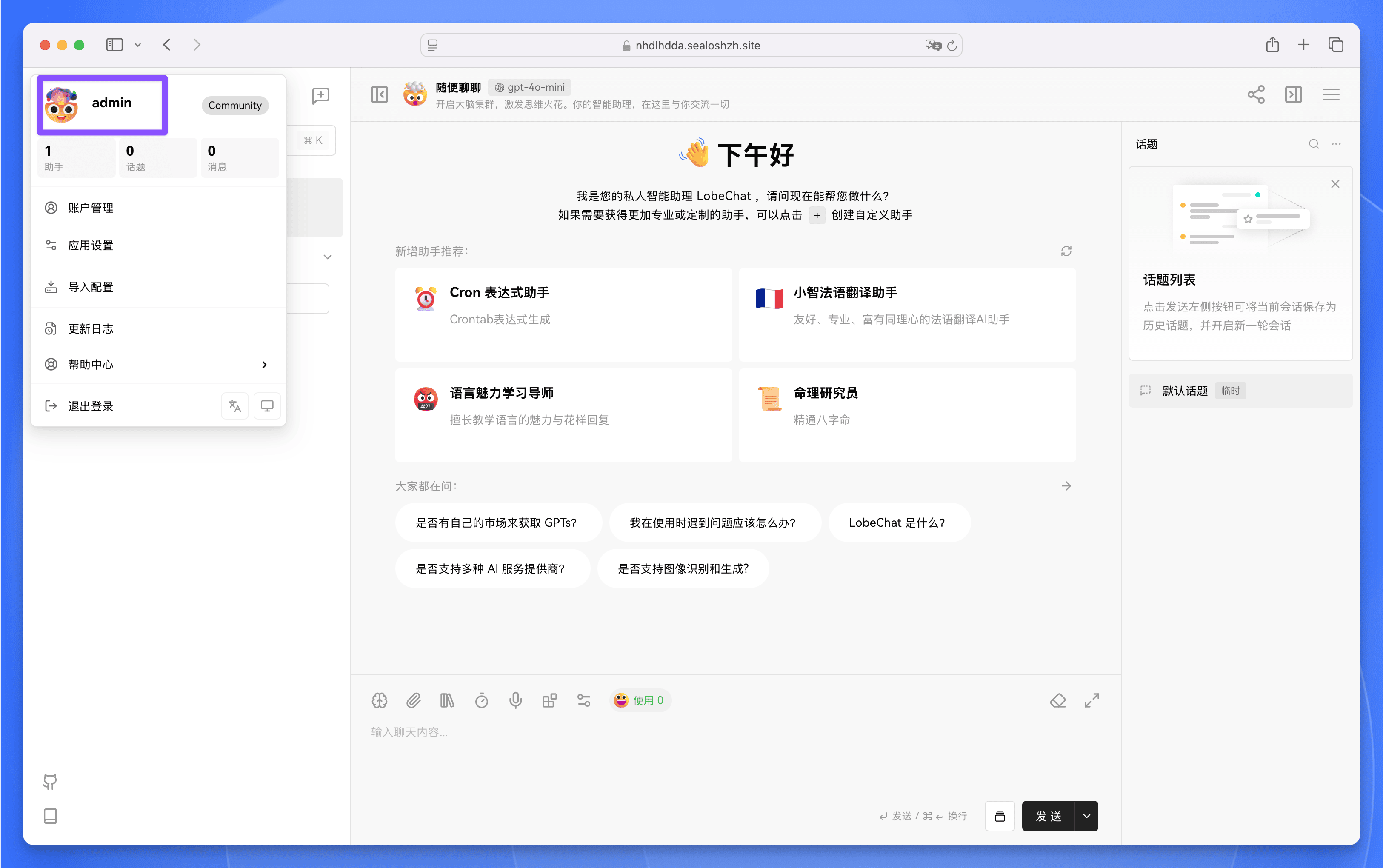
-
|
|
@@ -1,6 +1,6 @@
|
|
|
1
1
|
---
|
|
2
|
-
title: 在 Vercel 上部署 LobeHub
|
|
3
|
-
description: 本文详细介绍如何在 Vercel
|
|
2
|
+
title: 在 Vercel 上部署 LobeHub
|
|
3
|
+
description: 本文详细介绍如何在 Vercel 中部署 LobeHub,包括数据库配置、身份验证服务配置和 S3 存储服务的设置步骤。
|
|
4
4
|
tags:
|
|
5
5
|
- 服务端数据库
|
|
6
6
|
- Postgres
|
|
@@ -12,9 +12,9 @@ tags:
|
|
|
12
12
|
- 环境变量配置
|
|
13
13
|
---
|
|
14
14
|
|
|
15
|
-
# 在 Vercel
|
|
15
|
+
# 在 Vercel 上部署 LobeHub
|
|
16
16
|
|
|
17
|
-
本文将详细介绍如何在 Vercel
|
|
17
|
+
本文将详细介绍如何在 Vercel 中部署 LobeHub,包括: 1)数据库配置;2)身份验证服务配置;3) S3 存储服务的设置步骤。
|
|
18
18
|
|
|
19
19
|
<Callout type={'warning'}>
|
|
20
20
|
进行后续操作前,请务必确认以下事项:
|
|
@@ -4,7 +4,7 @@ description: >-
|
|
|
4
4
|
Explore multiple deployment platforms like Vercel, Docker, Docker Compose, and
|
|
5
5
|
more to deploy LobeHub. Choose the platform that best suits your needs.
|
|
6
6
|
tags:
|
|
7
|
-
-
|
|
7
|
+
- LobeHub
|
|
8
8
|
- Deployment Platform
|
|
9
9
|
- Vercel
|
|
10
10
|
- Docker
|
|
@@ -12,8 +12,8 @@ tags:
|
|
|
12
12
|
- Alibaba Cloud
|
|
13
13
|
---
|
|
14
14
|
|
|
15
|
-
# Build Your Own
|
|
15
|
+
# Build Your Own LobeHub
|
|
16
16
|
|
|
17
|
-
LobeHub supports various deployment platforms, including Vercel, Docker, and Docker Compose. You can choose a deployment platform that suits you to build your own
|
|
17
|
+
LobeHub supports various deployment platforms, including Vercel, Docker, and Docker Compose. You can choose a deployment platform that suits you to build your own LobeHub.
|
|
18
18
|
|
|
19
19
|
<PlatformCards urlPrefix={'platform'} />
|
|
@@ -1,10 +1,10 @@
|
|
|
1
1
|
---
|
|
2
2
|
title: 构建属于自己的 LobeHub - 自选部署平台
|
|
3
3
|
description: >-
|
|
4
|
-
选择适合自己的部署平台,构建个性化的
|
|
4
|
+
选择适合自己的部署平台,构建个性化的 LobeHub。支持 Docker、Docker
|
|
5
5
|
Compose、Netlify、Railway、Repocloud、Sealos、Vercel 和 Zeabur 部署。
|
|
6
6
|
tags:
|
|
7
|
-
-
|
|
7
|
+
- LobeHub
|
|
8
8
|
- 部署平台
|
|
9
9
|
- Docker
|
|
10
10
|
- Netlify
|
|
@@ -16,8 +16,8 @@ tags:
|
|
|
16
16
|
- 腾讯轻量云
|
|
17
17
|
---
|
|
18
18
|
|
|
19
|
-
# 构建属于自己的
|
|
19
|
+
# 构建属于自己的 LobeHub
|
|
20
20
|
|
|
21
|
-
LobeHub 支持多种部署平台,包括 Vercel、Docker、 Docker Compose 、阿里云计算巢 和腾讯轻量云 等,你可以选择适合自己的部署平台进行部署,构建属于自己的
|
|
21
|
+
LobeHub 支持多种部署平台,包括 Vercel、Docker、 Docker Compose 、阿里云计算巢 和腾讯轻量云 等,你可以选择适合自己的部署平台进行部署,构建属于自己的 LobeHub。
|
|
22
22
|
|
|
23
23
|
<PlatformCards urlPrefix={'platform'} />
|
package/locales/en-US/auth.json
CHANGED
|
@@ -192,7 +192,7 @@
|
|
|
192
192
|
"profile.usernameRule": "Username can only contain letters, numbers, or underscores",
|
|
193
193
|
"profile.usernameUpdateFailed": "Failed to update username, please try again later",
|
|
194
194
|
"signin.subtitle": "Sign up or log in to your {{appName}} account",
|
|
195
|
-
"signin.title": "Agent
|
|
195
|
+
"signin.title": "Agent teammates that grow with you",
|
|
196
196
|
"signout": "Log Out",
|
|
197
197
|
"signup": "Sign Up",
|
|
198
198
|
"stats.aiheatmaps": "Activity Index",
|
|
@@ -8,6 +8,7 @@
|
|
|
8
8
|
"codes.DELETED_ACCOUNT_EMAIL": "This email has been associated with a deleted account and cannot be used for registration",
|
|
9
9
|
"codes.EMAIL_CAN_NOT_BE_UPDATED": "Email cannot be updated for this account",
|
|
10
10
|
"codes.EMAIL_NOT_ALLOWED": "Email not allowed for registration",
|
|
11
|
+
"codes.EMAIL_NOT_FOUND": "No email associated with this account. Please check if your account has an email bound.",
|
|
11
12
|
"codes.EMAIL_NOT_VERIFIED": "Please verify your email first",
|
|
12
13
|
"codes.FAILED_TO_CREATE_SESSION": "Failed to create session",
|
|
13
14
|
"codes.FAILED_TO_CREATE_USER": "Failed to create user",
|
|
@@ -2,7 +2,7 @@
|
|
|
2
2
|
"changelog.description": "Stay updated on the new features and improvements of {{appName}}",
|
|
3
3
|
"changelog.title": "Changelog",
|
|
4
4
|
"chat.description": "{{appName}} is a work-and-lifestyle space to find, build, and collaborate with agent teams that grow with you.",
|
|
5
|
-
"chat.title": "{{appName}} · Agent
|
|
5
|
+
"chat.title": "{{appName}} · Agent teammates that grow with you",
|
|
6
6
|
"discover.assistants.description": "Content, Q&A, images, video, voice, workflows—browse and add Agents from the Community.",
|
|
7
7
|
"discover.assistants.title": "Agent Community",
|
|
8
8
|
"discover.description": "Explore Agents, Skills, Providers, models, and MCP Servers.",
|
|
@@ -8,6 +8,7 @@
|
|
|
8
8
|
"codes.DELETED_ACCOUNT_EMAIL": "该邮箱已关联至已删除的账户,无法用于注册",
|
|
9
9
|
"codes.EMAIL_CAN_NOT_BE_UPDATED": "当前邮箱无法修改,如需更换,请联系支持",
|
|
10
10
|
"codes.EMAIL_NOT_ALLOWED": "该邮箱不允许用于注册",
|
|
11
|
+
"codes.EMAIL_NOT_FOUND": "登录账号未关联邮箱,请检查账号是否已绑定邮箱",
|
|
11
12
|
"codes.EMAIL_NOT_VERIFIED": "邮箱还未验证,请先查收验证邮件完成验证",
|
|
12
13
|
"codes.FAILED_TO_CREATE_SESSION": "会话创建遇到了问题。你可以先重试;如仍失败,请检查网络或稍后再试",
|
|
13
14
|
"codes.FAILED_TO_CREATE_USER": "创建用户遇到了问题。你可以稍后再试",
|
package/package.json
CHANGED
|
@@ -1,6 +1,6 @@
|
|
|
1
1
|
{
|
|
2
2
|
"name": "@lobehub/lobehub",
|
|
3
|
-
"version": "2.1.
|
|
3
|
+
"version": "2.1.2",
|
|
4
4
|
"description": "LobeHub - an open-source,comprehensive AI Agent framework that supports speech synthesis, multimodal, and extensible Function Call plugin system. Supports one-click free deployment of your private ChatGPT/LLM web application.",
|
|
5
5
|
"keywords": [
|
|
6
6
|
"framework",
|
|
@@ -2,7 +2,7 @@
|
|
|
2
2
|
|
|
3
3
|
import { SiDiscord } from '@icons-pack/react-simple-icons';
|
|
4
4
|
import { SOCIAL_URL } from '@lobechat/business-const';
|
|
5
|
-
import {
|
|
5
|
+
import { Button, Flexbox, Icon, Text } from '@lobehub/ui';
|
|
6
6
|
import { cssVar } from 'antd-style';
|
|
7
7
|
import { parseAsString, useQueryState } from 'nuqs';
|
|
8
8
|
import { memo } from 'react';
|
|
@@ -45,7 +45,9 @@ const AuthErrorPage = memo(() => {
|
|
|
45
45
|
subtitle={description}
|
|
46
46
|
title={t('title')}
|
|
47
47
|
>
|
|
48
|
-
<
|
|
48
|
+
<Text style={{ fontFamily: cssVar.fontFamilyCode }} type={'secondary'}>
|
|
49
|
+
ErrorCode: {error || 'UNKNOWN'}
|
|
50
|
+
</Text>
|
|
49
51
|
</AuthCard>
|
|
50
52
|
);
|
|
51
53
|
});
|
|
@@ -101,7 +101,7 @@ export const SignInEmailStep = ({
|
|
|
101
101
|
<AuthCard
|
|
102
102
|
footer={footer}
|
|
103
103
|
subtitle={t('signin.subtitle', { appName: BRANDING_NAME })}
|
|
104
|
-
title={'Agent
|
|
104
|
+
title={'Agent teammates that grow with you'}
|
|
105
105
|
>
|
|
106
106
|
{!serverConfigInit && (
|
|
107
107
|
<Flexbox gap={12}>
|
|
@@ -69,7 +69,7 @@ const provider: GenericProviderDefinition<{
|
|
|
69
69
|
authorizationUrlParams: {
|
|
70
70
|
app_id: clientId,
|
|
71
71
|
response_type: 'code',
|
|
72
|
-
scope: '',
|
|
72
|
+
scope: 'contact:user.base:readonly contact:user.email:readonly',
|
|
73
73
|
},
|
|
74
74
|
clientId,
|
|
75
75
|
clientSecret,
|
|
@@ -79,8 +79,8 @@ const provider: GenericProviderDefinition<{
|
|
|
79
79
|
getToken: async ({ code, redirectURI }) => {
|
|
80
80
|
const tokenResponse = await fetch(FEISHU_TOKEN_URL, {
|
|
81
81
|
body: JSON.stringify({
|
|
82
|
-
|
|
83
|
-
|
|
82
|
+
client_id: clientId,
|
|
83
|
+
client_secret: clientSecret,
|
|
84
84
|
code,
|
|
85
85
|
grant_type: 'authorization_code',
|
|
86
86
|
redirect_uri: redirectURI,
|
|
@@ -124,16 +124,12 @@ const provider: GenericProviderDefinition<{
|
|
|
124
124
|
},
|
|
125
125
|
});
|
|
126
126
|
|
|
127
|
-
if (!response.ok)
|
|
128
|
-
return null;
|
|
129
|
-
}
|
|
127
|
+
if (!response.ok) return null;
|
|
130
128
|
|
|
131
129
|
const payload = (await response.json()) as unknown;
|
|
132
130
|
const profileResponse = payload as FeishuUserInfoResponse;
|
|
133
131
|
|
|
134
|
-
if (profileResponse.code && profileResponse.code !== 0)
|
|
135
|
-
return null;
|
|
136
|
-
}
|
|
132
|
+
if (profileResponse.code && profileResponse.code !== 0) return null;
|
|
137
133
|
|
|
138
134
|
const profile: FeishuUserProfile | undefined =
|
|
139
135
|
profileResponse.data ?? (isFeishuProfile(payload) ? payload : undefined);
|
|
@@ -143,11 +139,16 @@ const provider: GenericProviderDefinition<{
|
|
|
143
139
|
const unionId = profile.union_id ?? profile.open_id;
|
|
144
140
|
if (!unionId) return null;
|
|
145
141
|
|
|
146
|
-
|
|
147
|
-
|
|
142
|
+
// Always use union_id to construct email for consistency
|
|
143
|
+
// This avoids issues when:
|
|
144
|
+
// 1. Admin hasn't enabled "Allow OpenAPI to access email field" in Feishu admin console
|
|
145
|
+
// 2. User hasn't bound an email in Feishu
|
|
146
|
+
// 3. User's email changes later (which would cause account mismatch)
|
|
147
|
+
const email = profile.email || profile.enterprise_email || `${unionId}@feishu.sso`;
|
|
148
148
|
|
|
149
149
|
return {
|
|
150
|
-
|
|
150
|
+
...profile,
|
|
151
|
+
email,
|
|
151
152
|
emailVerified: false,
|
|
152
153
|
id: unionId,
|
|
153
154
|
image:
|
|
@@ -156,13 +157,13 @@ const provider: GenericProviderDefinition<{
|
|
|
156
157
|
profile.avatar_middle ??
|
|
157
158
|
profile.avatar_big,
|
|
158
159
|
name: profile.name ?? profile.en_name ?? unionId,
|
|
159
|
-
...profile,
|
|
160
160
|
};
|
|
161
161
|
},
|
|
162
162
|
pkce: false,
|
|
163
163
|
providerId: 'feishu',
|
|
164
164
|
responseMode: 'query',
|
|
165
|
-
scopes: [],
|
|
165
|
+
scopes: ['contact:user.base:readonly', 'contact:user.email:readonly'],
|
|
166
|
+
tokenUrl: FEISHU_TOKEN_URL,
|
|
166
167
|
};
|
|
167
168
|
},
|
|
168
169
|
|
|
@@ -43,7 +43,7 @@ const provider: GenericProviderDefinition<{
|
|
|
43
43
|
* and returns openid/unionid alongside tokens, so we exchange the code
|
|
44
44
|
* manually instead of proxying through a custom API route.
|
|
45
45
|
*/
|
|
46
|
-
|
|
46
|
+
getToken: async ({ code }) => {
|
|
47
47
|
const tokenUrl = new URL(WECHAT_TOKEN_URL);
|
|
48
48
|
tokenUrl.searchParams.set('appid', clientId);
|
|
49
49
|
tokenUrl.searchParams.set('secret', clientSecret);
|
|
@@ -74,10 +74,11 @@ const provider: GenericProviderDefinition<{
|
|
|
74
74
|
tokenType: data.token_type ?? 'Bearer',
|
|
75
75
|
};
|
|
76
76
|
},
|
|
77
|
+
|
|
77
78
|
/**
|
|
78
79
|
* Use openid/unionid returned in the token response; no custom scope encoding needed.
|
|
79
80
|
*/
|
|
80
|
-
|
|
81
|
+
getUserInfo: async (tokens) => {
|
|
81
82
|
const accessToken = tokens.accessToken;
|
|
82
83
|
const openId = (tokens as { raw?: WeChatTokenResponse }).raw?.openid;
|
|
83
84
|
const unionId = (tokens as { raw?: WeChatTokenResponse }).raw?.unionid;
|
|
@@ -114,7 +115,7 @@ const provider: GenericProviderDefinition<{
|
|
|
114
115
|
...profile,
|
|
115
116
|
};
|
|
116
117
|
},
|
|
117
|
-
|
|
118
|
+
|
|
118
119
|
pkce: false,
|
|
119
120
|
|
|
120
121
|
providerId: 'wechat',
|
|
@@ -122,6 +123,8 @@ const provider: GenericProviderDefinition<{
|
|
|
122
123
|
responseMode: 'query',
|
|
123
124
|
|
|
124
125
|
scopes: ['snsapi_login'],
|
|
126
|
+
|
|
127
|
+
tokenUrl: WECHAT_TOKEN_URL,
|
|
125
128
|
};
|
|
126
129
|
},
|
|
127
130
|
|
|
@@ -201,7 +201,7 @@ export default {
|
|
|
201
201
|
'profile.usernameRule': 'Username can only contain letters, numbers, or underscores',
|
|
202
202
|
'profile.usernameUpdateFailed': 'Failed to update username, please try again later',
|
|
203
203
|
'signin.subtitle': 'Sign up or log in to your {{appName}} account',
|
|
204
|
-
'signin.title': 'Agent
|
|
204
|
+
'signin.title': 'Agent teammates that grow with you',
|
|
205
205
|
'signout': 'Log Out',
|
|
206
206
|
'signup': 'Sign Up',
|
|
207
207
|
'stats.aiheatmaps': 'Activity Index',
|