@lobehub/lobehub 2.0.0-next.364 → 2.0.0-next.367
This diff represents the content of publicly available package versions that have been released to one of the supported registries. The information contained in this diff is provided for informational purposes only and reflects changes between package versions as they appear in their respective public registries.
- package/.github/workflows/claude-migration-support.yml +121 -0
- package/CHANGELOG.md +78 -0
- package/changelog/v1.json +27 -0
- package/docs/development/database-schema.dbml +1 -0
- package/docs/self-hosting/advanced/auth/clerk-to-betterauth.mdx +15 -3
- package/docs/self-hosting/advanced/auth/clerk-to-betterauth.zh-CN.mdx +15 -3
- package/docs/self-hosting/advanced/auth/migration-internals.mdx +201 -0
- package/docs/self-hosting/advanced/auth/migration-internals.zh-CN.mdx +200 -0
- package/docs/self-hosting/advanced/auth/nextauth-to-betterauth.mdx +59 -19
- package/docs/self-hosting/advanced/auth/nextauth-to-betterauth.zh-CN.mdx +42 -4
- package/docs/self-hosting/advanced/auth/providers/casdoor.mdx +24 -7
- package/docs/self-hosting/advanced/auth/providers/casdoor.zh-CN.mdx +24 -7
- package/docs/self-hosting/advanced/auth/providers/logto.mdx +20 -7
- package/docs/self-hosting/advanced/auth/providers/logto.zh-CN.mdx +20 -7
- package/docs/self-hosting/advanced/auth.mdx +12 -12
- package/docs/self-hosting/advanced/auth.zh-CN.mdx +12 -12
- package/locales/ar/common.json +9 -0
- package/locales/bg-BG/common.json +9 -0
- package/locales/de-DE/common.json +9 -0
- package/locales/en-US/common.json +3 -0
- package/locales/es-ES/common.json +9 -0
- package/locales/fa-IR/common.json +9 -0
- package/locales/fr-FR/common.json +9 -0
- package/locales/it-IT/common.json +9 -0
- package/locales/ja-JP/common.json +9 -0
- package/locales/ko-KR/common.json +9 -0
- package/locales/nl-NL/common.json +9 -0
- package/locales/pl-PL/common.json +9 -0
- package/locales/pt-BR/common.json +9 -0
- package/locales/ru-RU/common.json +9 -0
- package/locales/tr-TR/common.json +9 -0
- package/locales/vi-VN/common.json +9 -0
- package/locales/zh-CN/common.json +3 -0
- package/locales/zh-TW/common.json +9 -0
- package/next.config.ts +13 -0
- package/package.json +58 -58
- package/packages/agent-runtime/src/agents/GeneralChatAgent.ts +13 -1
- package/packages/agent-runtime/src/agents/__tests__/GeneralChatAgent.test.ts +16 -2
- package/packages/database/migrations/0072_add_market_identifier_chat_group.sql +1 -0
- package/packages/database/migrations/meta/0072_snapshot.json +10726 -0
- package/packages/database/migrations/meta/_journal.json +7 -0
- package/packages/database/src/schemas/chatGroup.ts +1 -0
- package/scripts/_shared/checkDeprecatedAuth.js +134 -22
- package/scripts/prebuild.mts +1 -1
- package/src/app/[variants]/(main)/agent/cron/[cronId]/features/CronJobHeader.tsx +7 -2
- package/src/app/[variants]/(main)/agent/cron/[cronId]/index.tsx +16 -2
- package/src/app/[variants]/(main)/agent/profile/features/ProfileEditor/AgentHeader.tsx +0 -1
- package/src/app/[variants]/(main)/community/(detail)/agent/features/Details/Overview/index.tsx +0 -2
- package/src/app/[variants]/(main)/community/(detail)/agent/features/Sidebar/ActionButton/AddAgent.tsx +1 -3
- package/src/app/[variants]/(main)/community/(detail)/user/features/FollowStats.tsx +0 -2
- package/src/app/[variants]/(main)/community/(list)/features/SortButton/index.tsx +1 -1
- package/src/app/[variants]/(main)/community/features/UserAvatar/index.tsx +0 -2
- package/src/app/[variants]/(main)/group/profile/features/Header/AgentPublishButton/PublishResultModal.tsx +0 -1
- package/src/app/[variants]/(main)/group/profile/features/MemberProfile/AgentHeader.tsx +0 -1
- package/src/app/[variants]/(main)/home/_layout/Footer/index.tsx +73 -3
- package/src/app/[variants]/(main)/settings/hotkey/features/Desktop.tsx +0 -1
- package/src/app/[variants]/(main)/settings/provider/features/ModelList/SearchResult.tsx +1 -1
- package/src/app/[variants]/(main)/settings/stats/features/usage/UsageCards/ActiveModels/ModelTable.tsx +0 -2
- package/src/components/HighlightNotification/index.tsx +97 -0
- package/src/envs/auth.ts +5 -59
- package/src/envs/redis.ts +2 -1
- package/src/features/ChatInput/Desktop/ContextContainer/ContextList.tsx +1 -1
- package/src/features/ChatInput/Mobile/FilePreview/FileItem/index.tsx +0 -2
- package/src/features/Conversation/Messages/Tasks/TaskItem/ClientTaskItem.tsx +83 -34
- package/src/features/DevPanel/features/Table/TableCell.tsx +2 -2
- package/src/features/Electron/titlebar/RecentlyViewed.tsx +1 -0
- package/src/features/Portal/Plugins/Body/index.tsx +0 -1
- package/src/features/ProtocolUrlHandler/InstallPlugin/CustomPluginInstallModal.tsx +0 -1
- package/src/libs/better-auth/define-config.ts +2 -2
- package/src/libs/better-auth/sso/helpers.ts +0 -11
- package/src/libs/better-auth/sso/providers/microsoft.ts +8 -43
- package/src/libs/better-auth/sso/providers/zitadel.ts +10 -28
- package/src/libs/next/config/define-config.ts +5 -13
- package/src/libs/trpc/middleware/userAuth.ts +0 -1
- package/src/locales/default/common.ts +3 -0
- package/src/server/globalConfig/index.ts +1 -1
- package/src/server/routers/lambda/file.ts +0 -2
- package/src/server/services/email/impls/nodemailer/index.ts +5 -4
- package/src/server/services/email/impls/resend/index.ts +4 -2
- package/src/services/import/index.ts +1 -2
- package/src/store/chat/agents/createAgentExecutors.ts +2 -0
- package/src/store/chat/slices/plugin/actions/pluginTypes.ts +2 -2
- package/src/store/file/slices/chat/action.ts +1 -1
- package/src/store/global/initialState.ts +2 -0
- package/src/store/global/selectors/systemStatus.ts +8 -0
- package/src/store/session/slices/session/action.ts +2 -0
|
@@ -0,0 +1,200 @@
|
|
|
1
|
+
---
|
|
2
|
+
title: 认证迁移原理 - 技术深入解析
|
|
3
|
+
description: >-
|
|
4
|
+
LobeChat 认证迁移的技术原理解析,包括数据库 Schema、迁移原理和问题排查指南。
|
|
5
|
+
tags:
|
|
6
|
+
- 认证
|
|
7
|
+
- 迁移
|
|
8
|
+
- 数据库
|
|
9
|
+
- 问题排查
|
|
10
|
+
---
|
|
11
|
+
|
|
12
|
+
# 认证迁移原理
|
|
13
|
+
|
|
14
|
+
本文档解释 LobeChat 认证迁移的技术原理,适合有数据库和开发经验的用户,帮助理解迁移的底层逻辑。
|
|
15
|
+
|
|
16
|
+
<Callout type={'info'}>
|
|
17
|
+
如需分步迁移指南,请参阅 [NextAuth 迁移](/docs/self-hosting/advanced/auth/nextauth-to-betterauth) 或 [Clerk 迁移](/docs/self-hosting/advanced/auth/clerk-to-betterauth)。
|
|
18
|
+
</Callout>
|
|
19
|
+
|
|
20
|
+
## 核心数据库 Schema
|
|
21
|
+
|
|
22
|
+
理解数据库 Schema 是排查迁移问题的关键。
|
|
23
|
+
|
|
24
|
+
### Users 表
|
|
25
|
+
|
|
26
|
+
`users` 表是**认证框架无关**的通用用户表,适用于任何认证系统。每条记录代表一个唯一的用户身份及其关联的个人信息。
|
|
27
|
+
|
|
28
|
+
关键字段:
|
|
29
|
+
|
|
30
|
+
| 字段 | 说明 |
|
|
31
|
+
| --------------------------------- | ---------- |
|
|
32
|
+
| `id` | 用户唯一标识(主键) |
|
|
33
|
+
| `email` | 用户邮箱地址(唯一) |
|
|
34
|
+
| `avatar`, `firstName`, `lastName` | 个人资料信息 |
|
|
35
|
+
|
|
36
|
+
### Accounts 表
|
|
37
|
+
|
|
38
|
+
`accounts` 表存储认证提供商连接。不同的 SSO 提供商和邮箱密码认证都被视为独立的「账号」,关联到同一个用户。
|
|
39
|
+
|
|
40
|
+
账号示例:
|
|
41
|
+
|
|
42
|
+
- Google SSO 登录
|
|
43
|
+
- GitHub SSO 登录
|
|
44
|
+
- 邮箱密码凭证
|
|
45
|
+
- Auth0(即使通过 Auth0 使用 Google 登录,也与直接使用 Google SSO 是不同的账号)
|
|
46
|
+
|
|
47
|
+
**关系**:一个用户可以有多个账号(1:N 关系)。
|
|
48
|
+
|
|
49
|
+
```
|
|
50
|
+
┌─────────────────┐ ┌─────────────────┐
|
|
51
|
+
│ users │ │ accounts │
|
|
52
|
+
├─────────────────┤ ├─────────────────┤
|
|
53
|
+
│ id (PK) │◄───────┤│ user_id (FK) │
|
|
54
|
+
│ email (unique) │ │ provider │
|
|
55
|
+
│ avatar │ │ provider_id │
|
|
56
|
+
│ ... │ │ ... │
|
|
57
|
+
└─────────────────┘ └─────────────────┘
|
|
58
|
+
│
|
|
59
|
+
┌───────┴───────┐
|
|
60
|
+
│ │
|
|
61
|
+
┌───────▼──┐ ┌──────▼───┐
|
|
62
|
+
│ Google │ │ GitHub │
|
|
63
|
+
│ Account │ │ Account │
|
|
64
|
+
└──────────┘ └──────────┘
|
|
65
|
+
```
|
|
66
|
+
|
|
67
|
+
## 迁移原理
|
|
68
|
+
|
|
69
|
+
<Callout type={'warning'}>
|
|
70
|
+
迁移不会保留登录会话。用户在迁移后必须重新登录。
|
|
71
|
+
</Callout>
|
|
72
|
+
|
|
73
|
+
### 简单迁移
|
|
74
|
+
|
|
75
|
+
简单迁移**只**迁移 `users` 表,忽略 `accounts` 表。
|
|
76
|
+
|
|
77
|
+
**工作原理:**
|
|
78
|
+
|
|
79
|
+
1. 迁移后用户使用邮箱密码或 SSO 登录
|
|
80
|
+
2. Better Auth 检查该邮箱是否存在于 `users` 表中
|
|
81
|
+
3. 如果找到,用户将关联到其现有数据
|
|
82
|
+
4. 在 `accounts` 表中创建新的账号记录
|
|
83
|
+
|
|
84
|
+
**为什么有效:**
|
|
85
|
+
|
|
86
|
+
当你重置密码或使用 SSO 登录时,如果提供商返回的邮箱与 `users` 表中的现有邮箱匹配,系统会将你关联到该现有用户。
|
|
87
|
+
|
|
88
|
+
**局限性:**
|
|
89
|
+
|
|
90
|
+
由于没有迁移 `accounts` 表,系统不知道之前关联的账号信息。
|
|
91
|
+
|
|
92
|
+
**示例场景:**
|
|
93
|
+
|
|
94
|
+
- 迁移前:用户将 Google(`a@gmail.com`)和 Microsoft(`b@outlook.com`)关联到同一个用户
|
|
95
|
+
- `users` 表存储主邮箱:`a@gmail.com`
|
|
96
|
+
- 简单迁移后:
|
|
97
|
+
- 使用 `a@gmail.com` 登录 → ✅ 关联到现有用户
|
|
98
|
+
- 使用 `b@outlook.com` 登录 → ❌ 创建**新用户**(没有账号记录将 `b@outlook.com` 关联到原用户)
|
|
99
|
+
|
|
100
|
+
### 完整迁移
|
|
101
|
+
|
|
102
|
+
完整迁移将账号数据从之前的认证系统迁移到 Better Auth 的 `accounts` 表。
|
|
103
|
+
|
|
104
|
+
**迁移的数据:**
|
|
105
|
+
|
|
106
|
+
- NextAuth:`nextauth_accounts` 表 → Better Auth `accounts` 表
|
|
107
|
+
- Clerk:Clerk API 中的 externalAccounts → Better Auth `accounts` 表
|
|
108
|
+
|
|
109
|
+
**结果:**
|
|
110
|
+
|
|
111
|
+
所有之前关联的账号继续有效。使用 `b@outlook.com` 登录将正确关联到现有用户。
|
|
112
|
+
|
|
113
|
+
## 问题排查
|
|
114
|
+
|
|
115
|
+
### 问题:登录创建了新用户而不是关联到现有数据
|
|
116
|
+
|
|
117
|
+
这通常发生在简单迁移后使用副邮箱登录时。
|
|
118
|
+
|
|
119
|
+
**诊断步骤:**
|
|
120
|
+
|
|
121
|
+
1. **找到你的原始用户记录**
|
|
122
|
+
|
|
123
|
+
通过主邮箱查询 `users` 表:
|
|
124
|
+
|
|
125
|
+
```sql
|
|
126
|
+
SELECT id, email FROM users WHERE email = 'your-primary-email@example.com';
|
|
127
|
+
```
|
|
128
|
+
|
|
129
|
+
记下 `id` 值。
|
|
130
|
+
|
|
131
|
+
2. **检查关联到该用户的账号**
|
|
132
|
+
|
|
133
|
+
使用用户 ID 查询 `accounts` 表:
|
|
134
|
+
|
|
135
|
+
```sql
|
|
136
|
+
SELECT * FROM accounts WHERE user_id = 'your-user-id';
|
|
137
|
+
```
|
|
138
|
+
|
|
139
|
+
3. **找到错误创建的账号**
|
|
140
|
+
|
|
141
|
+
如果你使用副邮箱登录并创建了新用户,找到该账号:
|
|
142
|
+
|
|
143
|
+
```sql
|
|
144
|
+
SELECT * FROM accounts WHERE provider_account_id = 'secondary-email@example.com';
|
|
145
|
+
-- 或者对于 SSO 提供商,按提供商的用户 ID 搜索
|
|
146
|
+
```
|
|
147
|
+
|
|
148
|
+
**修复方法:**
|
|
149
|
+
|
|
150
|
+
1. 删除错误创建的账号记录:
|
|
151
|
+
|
|
152
|
+
```sql
|
|
153
|
+
DELETE FROM accounts WHERE id = 'incorrect-account-id';
|
|
154
|
+
```
|
|
155
|
+
|
|
156
|
+
2. 如果创建了新用户,可能还需要删除它:
|
|
157
|
+
|
|
158
|
+
```sql
|
|
159
|
+
DELETE FROM users WHERE id = 'new-user-id';
|
|
160
|
+
```
|
|
161
|
+
|
|
162
|
+
3. 使用你的**主邮箱**(存储在 `users` 表中的邮箱)登录
|
|
163
|
+
|
|
164
|
+
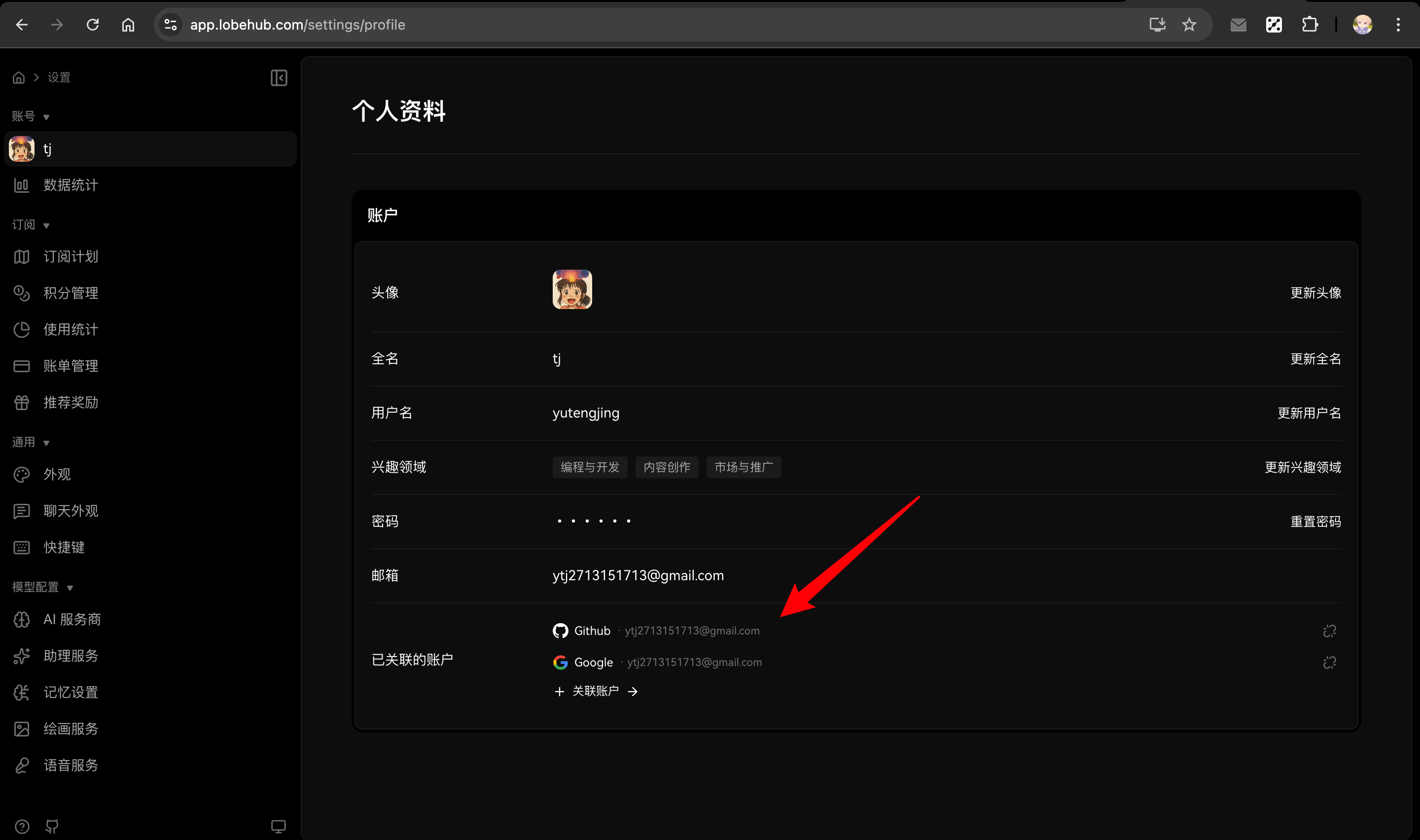
4. 登录后,进入 **设置 → 个人资料 → 关联账号** 重新关联你的副账号
|
|
165
|
+
|
|
166
|
+
|
|
167
|
+
|
|
168
|
+
### 问题:迁移后 SSO 登录不工作
|
|
169
|
+
|
|
170
|
+
**检查:**
|
|
171
|
+
|
|
172
|
+
1. 确保 SSO 提供商已在 `AUTH_SSO_PROVIDERS` 中配置
|
|
173
|
+
2. 验证提供商凭证(`AUTH_<PROVIDER>_ID`、`AUTH_<PROVIDER>_SECRET`)
|
|
174
|
+
3. 对于完整迁移,验证账号记录是否正确创建:
|
|
175
|
+
|
|
176
|
+
```sql
|
|
177
|
+
SELECT * FROM accounts WHERE provider = 'google'; -- 或你的提供商
|
|
178
|
+
```
|
|
179
|
+
|
|
180
|
+
### 问题:找不到原始用户数据
|
|
181
|
+
|
|
182
|
+
**检查:**
|
|
183
|
+
|
|
184
|
+
1. 验证你使用的邮箱与 `users` 表中的邮箱匹配
|
|
185
|
+
2. 检查你最初是否使用了不同的邮箱或 SSO 提供商
|
|
186
|
+
3. 直接查询数据库查找符合条件的用户:
|
|
187
|
+
|
|
188
|
+
```sql
|
|
189
|
+
SELECT * FROM users WHERE email LIKE '%your-domain.com';
|
|
190
|
+
```
|
|
191
|
+
|
|
192
|
+
## 相关阅读
|
|
193
|
+
|
|
194
|
+
<Cards>
|
|
195
|
+
<Card href={'/docs/self-hosting/advanced/auth/nextauth-to-betterauth'} title={'NextAuth 迁移指南'} />
|
|
196
|
+
|
|
197
|
+
<Card href={'/docs/self-hosting/advanced/auth/clerk-to-betterauth'} title={'Clerk 迁移指南'} />
|
|
198
|
+
|
|
199
|
+
<Card href={'/docs/self-hosting/advanced/auth'} title={'认证服务配置'} />
|
|
200
|
+
</Cards>
|
|
@@ -54,21 +54,23 @@ This guide helps you migrate your existing NextAuth-based LobeChat deployment to
|
|
|
54
54
|
|
|
55
55
|
SSO provider environment variables follow the same format: `AUTH_<PROVIDER>_ID` and `AUTH_<PROVIDER>_SECRET`.
|
|
56
56
|
|
|
57
|
-
| NextAuth (Old)
|
|
58
|
-
|
|
|
59
|
-
| `AUTH_GITHUB_ID`
|
|
60
|
-
| `AUTH_GITHUB_SECRET`
|
|
61
|
-
| `AUTH_GOOGLE_ID`
|
|
62
|
-
| `AUTH_GOOGLE_SECRET`
|
|
63
|
-
| `AUTH_AUTH0_ID`
|
|
64
|
-
| `AUTH_AUTH0_SECRET`
|
|
65
|
-
| `AUTH_AUTH0_ISSUER`
|
|
66
|
-
| `AUTH_AUTHENTIK_ID`
|
|
67
|
-
| `AUTH_AUTHENTIK_SECRET`
|
|
68
|
-
| `AUTH_AUTHENTIK_ISSUER`
|
|
69
|
-
| `microsoft-entra-id`
|
|
70
|
-
| `AUTH_MICROSOFT_ENTRA_ID_ID`
|
|
71
|
-
| `AUTH_MICROSOFT_ENTRA_ID_SECRET`
|
|
57
|
+
| NextAuth (Old) | Better Auth (New) | Notes |
|
|
58
|
+
| ----------------------------------- | ----------------------- | ------------------- |
|
|
59
|
+
| `AUTH_GITHUB_ID` | `AUTH_GITHUB_ID` | ✅ Unchanged |
|
|
60
|
+
| `AUTH_GITHUB_SECRET` | `AUTH_GITHUB_SECRET` | ✅ Unchanged |
|
|
61
|
+
| `AUTH_GOOGLE_ID` | `AUTH_GOOGLE_ID` | ✅ Unchanged |
|
|
62
|
+
| `AUTH_GOOGLE_SECRET` | `AUTH_GOOGLE_SECRET` | ✅ Unchanged |
|
|
63
|
+
| `AUTH_AUTH0_ID` | `AUTH_AUTH0_ID` | ✅ Unchanged |
|
|
64
|
+
| `AUTH_AUTH0_SECRET` | `AUTH_AUTH0_SECRET` | ✅ Unchanged |
|
|
65
|
+
| `AUTH_AUTH0_ISSUER` | `AUTH_AUTH0_ISSUER` | ✅ Unchanged |
|
|
66
|
+
| `AUTH_AUTHENTIK_ID` | `AUTH_AUTHENTIK_ID` | ✅ Unchanged |
|
|
67
|
+
| `AUTH_AUTHENTIK_SECRET` | `AUTH_AUTHENTIK_SECRET` | ✅ Unchanged |
|
|
68
|
+
| `AUTH_AUTHENTIK_ISSUER` | `AUTH_AUTHENTIK_ISSUER` | ✅ Unchanged |
|
|
69
|
+
| `microsoft-entra-id` | `microsoft` | ⚠️ Provider renamed |
|
|
70
|
+
| `AUTH_MICROSOFT_ENTRA_ID_ID` | `AUTH_MICROSOFT_ID` | ⚠️ Variable renamed |
|
|
71
|
+
| `AUTH_MICROSOFT_ENTRA_ID_SECRET` | `AUTH_MICROSOFT_SECRET` | ⚠️ Variable renamed |
|
|
72
|
+
| `AUTH_MICROSOFT_ENTRA_ID_TENANT_ID` | - | ❌ No longer needed |
|
|
73
|
+
| `AUTH_MICROSOFT_ENTRA_ID_BASE_URL` | - | ❌ No longer needed |
|
|
72
74
|
|
|
73
75
|
<Callout type={'warning'}>
|
|
74
76
|
**Note**: Microsoft Entra ID provider name changed from `microsoft-entra-id` to `microsoft`, and the environment variable prefix changed from `AUTH_MICROSOFT_ENTRA_ID_` to `AUTH_MICROSOFT_`.
|
|
@@ -82,7 +84,7 @@ Better Auth supports additional features with these new environment variables:
|
|
|
82
84
|
| ------------------------- | ----------------------------------------- |
|
|
83
85
|
| `AUTH_ALLOWED_EMAILS` | Email whitelist (restrict registration) |
|
|
84
86
|
| `AUTH_EMAIL_VERIFICATION` | Enable email verification (set to `1`) |
|
|
85
|
-
| `
|
|
87
|
+
| `AUTH_ENABLE_MAGIC_LINK` | Enable magic link login (set to `1`) |
|
|
86
88
|
| `EMAIL_SERVICE_PROVIDER` | Email provider (`nodemailer` or `resend`) |
|
|
87
89
|
|
|
88
90
|
## Simple Migration
|
|
@@ -96,10 +98,10 @@ For small self-hosted deployments, the simplest approach is to let users re-logi
|
|
|
96
98
|
|
|
97
99
|
**Example scenario**: If your previous account had two SSO accounts linked:
|
|
98
100
|
|
|
99
|
-
- Primary email (Google): `
|
|
100
|
-
- Secondary email (Microsoft): `
|
|
101
|
+
- Primary email (Google): `a@google.com`
|
|
102
|
+
- Secondary email (Microsoft): `b@outlook.com`
|
|
101
103
|
|
|
102
|
-
After migrating, logging in with `
|
|
104
|
+
After migrating, logging in with `b@outlook.com` will create a **new user** instead of linking to your existing account.
|
|
103
105
|
</Callout>
|
|
104
106
|
|
|
105
107
|
### Steps
|
|
@@ -294,6 +296,16 @@ After migration is complete, follow [Simple Migration - Step 1](#steps) to confi
|
|
|
294
296
|
|
|
295
297
|
## Troubleshooting
|
|
296
298
|
|
|
299
|
+
### Clear browser data before accessing
|
|
300
|
+
|
|
301
|
+
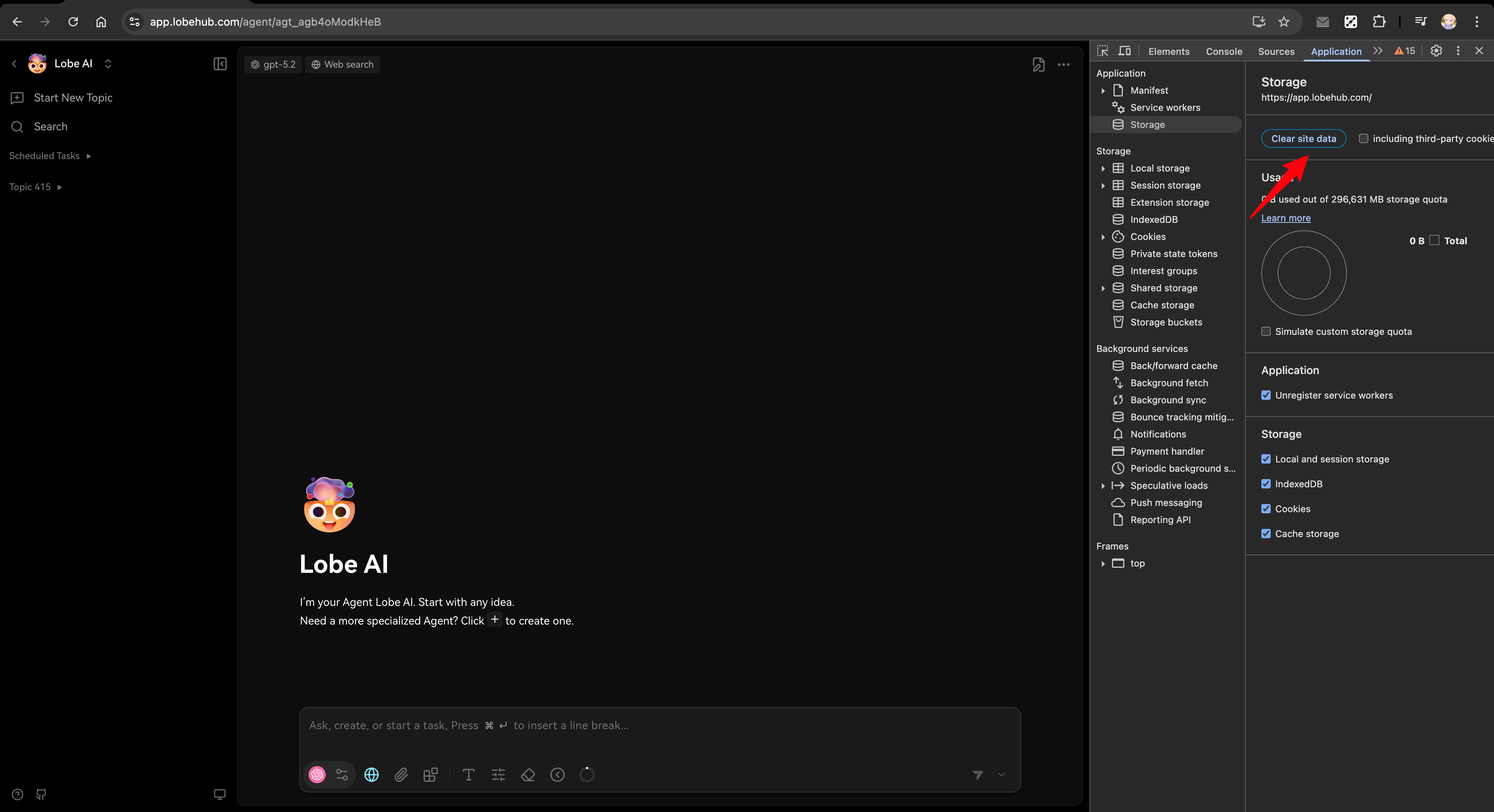
After migration, if you encounter login issues, try clearing your browser's site data first:
|
|
302
|
+
|
|
303
|
+
1. Open browser DevTools (F12 or right-click → Inspect)
|
|
304
|
+
2. Go to Application tab → Storage → Clear site data
|
|
305
|
+
3. Refresh the page and try again
|
|
306
|
+
|
|
307
|
+
|
|
308
|
+
|
|
297
309
|
### Users can't log in after migration
|
|
298
310
|
|
|
299
311
|
- Check that `AUTH_SECRET` is set correctly
|
|
@@ -315,9 +327,37 @@ After migration is complete, follow [Simple Migration - Step 1](#steps) to confi
|
|
|
315
327
|
|
|
316
328
|
This error occurs because the database schema is outdated. Run `pnpm db:migrate` to update the database structure before running the migration script.
|
|
317
329
|
|
|
330
|
+
### email\_not\_found error
|
|
331
|
+
|
|
332
|
+
If you see a redirect to `signin?callbackUrl=...&error=email_not_found`, it means LobeChat cannot get the user's email.
|
|
333
|
+
|
|
334
|
+
<Callout type={'warning'}>
|
|
335
|
+
**Important**: Better Auth currently **requires user email** for authentication. All SSO providers must be configured to return email information, otherwise users cannot log in.
|
|
336
|
+
</Callout>
|
|
337
|
+
|
|
338
|
+
Common causes:
|
|
339
|
+
|
|
340
|
+
**Cause 1: SSO connection not requesting email permission**
|
|
341
|
+
|
|
342
|
+
When configuring SSO connections (e.g., GitHub in Auth0), make sure to enable **Email Address** permission in the Attributes section. LobeChat requires user email for authentication.
|
|
343
|
+
|
|
344
|
+
**Cause 2: User email not configured in identity provider**
|
|
345
|
+
|
|
346
|
+
For identity providers like Casdoor or Logto, users may not have an email configured.
|
|
347
|
+
|
|
348
|
+
Solution:
|
|
349
|
+
|
|
350
|
+
1. First configure the Webhook in LobeChat to sync user data from the identity provider:
|
|
351
|
+
- [Casdoor Webhook Configuration](/docs/self-hosting/advanced/auth/providers/casdoor)
|
|
352
|
+
- [Logto Webhook Configuration](/docs/self-hosting/advanced/auth/providers/logto)
|
|
353
|
+
2. Then configure the user's email in the identity provider's admin console
|
|
354
|
+
3. The user data will be synced to LobeChat via Webhook, and the user can then log in
|
|
355
|
+
|
|
318
356
|
## Related Reading
|
|
319
357
|
|
|
320
358
|
<Cards>
|
|
359
|
+
<Card href={'/docs/self-hosting/advanced/auth/migration-internals'} title={'Migration Technical Deep Dive'} />
|
|
360
|
+
|
|
321
361
|
<Card href={'/docs/self-hosting/advanced/auth'} title={'Authentication Service Configuration'} />
|
|
322
362
|
|
|
323
363
|
<Card href={'/docs/self-hosting/environment-variables/auth'} title={'Auth Environment Variables'} />
|
|
@@ -80,7 +80,7 @@ Better Auth 支持更多功能,以下是新增的环境变量:
|
|
|
80
80
|
| ------------------------- | -------------------------------- |
|
|
81
81
|
| `AUTH_ALLOWED_EMAILS` | 邮箱白名单(限制注册) |
|
|
82
82
|
| `AUTH_EMAIL_VERIFICATION` | 启用邮箱验证(设为 `1`) |
|
|
83
|
-
| `
|
|
83
|
+
| `AUTH_ENABLE_MAGIC_LINK` | 启用魔法链接登录(设为 `1`) |
|
|
84
84
|
| `EMAIL_SERVICE_PROVIDER` | 邮件服务提供商(`nodemailer` 或 `resend`) |
|
|
85
85
|
|
|
86
86
|
## 简单迁移
|
|
@@ -94,10 +94,10 @@ Better Auth 支持更多功能,以下是新增的环境变量:
|
|
|
94
94
|
|
|
95
95
|
**示例场景**:假设你之前的账户绑定了两个 SSO 账户:
|
|
96
96
|
|
|
97
|
-
- 主邮箱(Google):`
|
|
98
|
-
- 副邮箱(Microsoft):`
|
|
97
|
+
- 主邮箱(Google):`a@google.com`
|
|
98
|
+
- 副邮箱(Microsoft):`b@outlook.com`
|
|
99
99
|
|
|
100
|
-
迁移后使用 `
|
|
100
|
+
迁移后使用 `b@outlook.com` 登录将会**创建新用户**,而非关联到原有账户。
|
|
101
101
|
</Callout>
|
|
102
102
|
|
|
103
103
|
### 步骤
|
|
@@ -291,6 +291,16 @@ npx tsx scripts/nextauth-to-betterauth/verify.ts
|
|
|
291
291
|
|
|
292
292
|
## 常见问题
|
|
293
293
|
|
|
294
|
+
### 访问前清除浏览器数据
|
|
295
|
+
|
|
296
|
+
迁移完成后,如果遇到登录问题,请先尝试清除浏览器的站点数据:
|
|
297
|
+
|
|
298
|
+
1. 打开浏览器开发者工具(F12 或右键 → 检查)
|
|
299
|
+
2. 进入 Application 标签页 → Storage → Clear site data
|
|
300
|
+
3. 刷新页面后重试
|
|
301
|
+
|
|
302
|
+

|
|
303
|
+
|
|
294
304
|
### 迁移后用户无法登录
|
|
295
305
|
|
|
296
306
|
- 检查 `AUTH_SECRET` 是否正确设置
|
|
@@ -312,9 +322,37 @@ npx tsx scripts/nextauth-to-betterauth/verify.ts
|
|
|
312
322
|
|
|
313
323
|
这是因为数据库 schema 未更新。请先运行 `pnpm db:migrate` 更新数据库结构,然后再执行迁移脚本。
|
|
314
324
|
|
|
325
|
+
### email\_not\_found 错误
|
|
326
|
+
|
|
327
|
+
如果登录时跳转到 `signin?callbackUrl=...&error=email_not_found`,说明 LobeChat 无法获取用户邮箱。
|
|
328
|
+
|
|
329
|
+
<Callout type={'warning'}>
|
|
330
|
+
**重要提示**:Better Auth 目前**强依赖用户邮箱**进行身份认证。所有 SSO 提供商必须配置为返回邮箱信息,否则用户无法登录。
|
|
331
|
+
</Callout>
|
|
332
|
+
|
|
333
|
+
常见原因:
|
|
334
|
+
|
|
335
|
+
**原因 1:SSO 连接未请求邮箱权限**
|
|
336
|
+
|
|
337
|
+
配置 SSO 连接时(如 Auth0 中的 GitHub 连接),务必在 **Attributes** 部分勾选 **Email Address** 权限。LobeChat 需要用户邮箱进行身份认证。
|
|
338
|
+
|
|
339
|
+
**原因 2:用户在身份提供商中未配置邮箱**
|
|
340
|
+
|
|
341
|
+
对于 Casdoor、Logto 等身份提供商,用户可能没有配置邮箱。
|
|
342
|
+
|
|
343
|
+
解决方案:
|
|
344
|
+
|
|
345
|
+
1. 先在 LobeChat 中配置身份提供商的 Webhook 以同步用户数据:
|
|
346
|
+
- [Casdoor Webhook 配置](/zh/docs/self-hosting/advanced/auth/providers/casdoor)
|
|
347
|
+
- [Logto Webhook 配置](/zh/docs/self-hosting/advanced/auth/providers/logto)
|
|
348
|
+
2. 然后在身份提供商的管理后台为用户配置邮箱
|
|
349
|
+
3. 用户数据通过 Webhook 同步到 LobeChat 后即可正常登录
|
|
350
|
+
|
|
315
351
|
## 相关阅读
|
|
316
352
|
|
|
317
353
|
<Cards>
|
|
354
|
+
<Card href={'/zh/docs/self-hosting/advanced/auth/migration-internals'} title={'迁移技术原理'} />
|
|
355
|
+
|
|
318
356
|
<Card href={'/zh/docs/self-hosting/advanced/auth'} title={'身份验证服务配置'} />
|
|
319
357
|
|
|
320
358
|
<Card href={'/zh/docs/self-hosting/environment-variables/auth'} title={'认证相关环境变量'} />
|
|
@@ -39,17 +39,34 @@ tags:
|
|
|
39
39
|
|
|
40
40
|
When deploying LobeChat, you need to configure the following environment variables:
|
|
41
41
|
|
|
42
|
-
| Environment Variable
|
|
43
|
-
|
|
|
44
|
-
| `AUTH_SECRET`
|
|
45
|
-
| `AUTH_SSO_PROVIDERS`
|
|
46
|
-
| `AUTH_CASDOOR_ID`
|
|
47
|
-
| `AUTH_CASDOOR_SECRET`
|
|
48
|
-
| `AUTH_CASDOOR_ISSUER`
|
|
42
|
+
| Environment Variable | Type | Description |
|
|
43
|
+
| ------------------------ | -------- | ----------------------------------------------------------------------------- |
|
|
44
|
+
| `AUTH_SECRET` | Required | Key used to encrypt session tokens. Generate using: `openssl rand -base64 32` |
|
|
45
|
+
| `AUTH_SSO_PROVIDERS` | Required | SSO provider for LobeChat. Use `casdoor` for Casdoor |
|
|
46
|
+
| `AUTH_CASDOOR_ID` | Required | Client ID from Casdoor application |
|
|
47
|
+
| `AUTH_CASDOOR_SECRET` | Required | Client Secret from Casdoor application |
|
|
48
|
+
| `AUTH_CASDOOR_ISSUER` | Required | Casdoor server URL (e.g., `https://your-casdoor-domain`) |
|
|
49
|
+
| `CASDOOR_WEBHOOK_SECRET` | Optional | Secret key for validating Webhook requests from Casdoor |
|
|
49
50
|
|
|
50
51
|
<Callout type={'tip'}>
|
|
51
52
|
Go to [📘 Environment Variables](/docs/self-hosting/environment-variables/auth#casdoor) for detailed information on these variables.
|
|
52
53
|
</Callout>
|
|
54
|
+
|
|
55
|
+
### Configure Webhook (Optional)
|
|
56
|
+
|
|
57
|
+
> Available in Casdoor `>=1.843.0`.
|
|
58
|
+
|
|
59
|
+
Configure Casdoor Webhook to sync user data updates to LobeChat.
|
|
60
|
+
|
|
61
|
+
1. Go to **Admin Tools** -> **Webhooks** and create a Webhook
|
|
62
|
+
2. Fill in the following fields:
|
|
63
|
+
- URL: `https://your-domain.com/api/webhooks/casdoor`
|
|
64
|
+
- Method: `POST`
|
|
65
|
+
- Content Type: `application/json`
|
|
66
|
+
- Headers: `casdoor-secret`: `your-webhook-secret`
|
|
67
|
+
- Events: `update-user`
|
|
68
|
+
3. Generate a secret at [generate-secret.vercel.app/10](https://generate-secret.vercel.app/10)
|
|
69
|
+
4. Set the secret in the `CASDOOR_WEBHOOK_SECRET` environment variable
|
|
53
70
|
</Steps>
|
|
54
71
|
|
|
55
72
|
<Callout type={'info'}>
|
|
@@ -37,17 +37,34 @@ tags:
|
|
|
37
37
|
|
|
38
38
|
在部署 LobeChat 时,你需要配置以下环境变量:
|
|
39
39
|
|
|
40
|
-
| 环境变量
|
|
41
|
-
|
|
|
42
|
-
| `AUTH_SECRET`
|
|
43
|
-
| `AUTH_SSO_PROVIDERS`
|
|
44
|
-
| `AUTH_CASDOOR_ID`
|
|
45
|
-
| `AUTH_CASDOOR_SECRET`
|
|
46
|
-
| `AUTH_CASDOOR_ISSUER`
|
|
40
|
+
| 环境变量 | 类型 | 描述 |
|
|
41
|
+
| ------------------------ | -- | ------------------------------------------------- |
|
|
42
|
+
| `AUTH_SECRET` | 必选 | 用于加密会话令牌的密钥。使用以下命令生成:`openssl rand -base64 32` |
|
|
43
|
+
| `AUTH_SSO_PROVIDERS` | 必选 | SSO 提供商。使用 Casdoor 请填写 `casdoor` |
|
|
44
|
+
| `AUTH_CASDOOR_ID` | 必选 | Casdoor 应用的 Client ID |
|
|
45
|
+
| `AUTH_CASDOOR_SECRET` | 必选 | Casdoor 应用的 Client Secret |
|
|
46
|
+
| `AUTH_CASDOOR_ISSUER` | 必选 | Casdoor 服务器 URL(例如 `https://your-casdoor-domain`) |
|
|
47
|
+
| `CASDOOR_WEBHOOK_SECRET` | 可选 | 用于验证 Casdoor 发送的 Webhook 请求是否合法的密钥 |
|
|
47
48
|
|
|
48
49
|
<Callout type={'tip'}>
|
|
49
50
|
前往 [📘 环境变量](/zh/docs/self-hosting/environment-variables/auth#casdoor) 可查阅相关变量详情。
|
|
50
51
|
</Callout>
|
|
52
|
+
|
|
53
|
+
### 配置 Webhook(可选)
|
|
54
|
+
|
|
55
|
+
> 在 Casdoor `>=1.843.0` 上可用。
|
|
56
|
+
|
|
57
|
+
配置 Casdoor 的 Webhook 以便在用户信息更新时同步到 LobeChat。
|
|
58
|
+
|
|
59
|
+
1. 前往 `管理工具` -> `Webhooks`,创建一个 Webhook
|
|
60
|
+
2. 填写以下字段:
|
|
61
|
+
- 链接:`https://your-domain.com/api/webhooks/casdoor`
|
|
62
|
+
- 方法:`POST`
|
|
63
|
+
- 内容类型:`application/json`
|
|
64
|
+
- 协议头:`casdoor-secret`: `你的Webhook密钥`
|
|
65
|
+
- 事件:`update-user`
|
|
66
|
+
3. 密钥可前往 [generate-secret.vercel.app/10](https://generate-secret.vercel.app/10) 生成
|
|
67
|
+
4. 将密钥填写到环境变量 `CASDOOR_WEBHOOK_SECRET`
|
|
51
68
|
</Steps>
|
|
52
69
|
|
|
53
70
|
<Callout type={'info'}>部署成功后,用户将可以通过 Casdoor 身份认证并使用 LobeChat。</Callout>
|
|
@@ -41,17 +41,30 @@ tags:
|
|
|
41
41
|
|
|
42
42
|
When deploying LobeChat, you need to configure the following environment variables:
|
|
43
43
|
|
|
44
|
-
| Environment Variable
|
|
45
|
-
|
|
|
46
|
-
| `AUTH_SECRET`
|
|
47
|
-
| `AUTH_SSO_PROVIDERS`
|
|
48
|
-
| `AUTH_LOGTO_ID`
|
|
49
|
-
| `AUTH_LOGTO_SECRET`
|
|
50
|
-
| `AUTH_LOGTO_ISSUER`
|
|
44
|
+
| Environment Variable | Type | Description |
|
|
45
|
+
| --------------------------- | -------- | ----------------------------------------------------------------------------- |
|
|
46
|
+
| `AUTH_SECRET` | Required | Key used to encrypt session tokens. Generate using: `openssl rand -base64 32` |
|
|
47
|
+
| `AUTH_SSO_PROVIDERS` | Required | SSO provider for LobeChat. Use `logto` for Logto |
|
|
48
|
+
| `AUTH_LOGTO_ID` | Required | App ID from Logto application |
|
|
49
|
+
| `AUTH_LOGTO_SECRET` | Required | App Secret from Logto application |
|
|
50
|
+
| `AUTH_LOGTO_ISSUER` | Required | Logto issuer URL (e.g., `https://your-tenant.logto.app/oidc`) |
|
|
51
|
+
| `LOGTO_WEBHOOK_SIGNING_KEY` | Optional | Secret key for validating Webhook requests from Logto |
|
|
51
52
|
|
|
52
53
|
<Callout type={'tip'}>
|
|
53
54
|
Go to [📘 Environment Variables](/docs/self-hosting/environment-variables/auth#logto) for detailed information on these variables.
|
|
54
55
|
</Callout>
|
|
56
|
+
|
|
57
|
+
### Configure Webhook (Optional)
|
|
58
|
+
|
|
59
|
+
Configure Logto Webhook to sync user data updates to LobeChat.
|
|
60
|
+
|
|
61
|
+
1. Go to **Webhooks** in Logto Console and create a Webhook
|
|
62
|
+
2. Fill in the following fields:
|
|
63
|
+
- Endpoint URL: `https://your-domain.com/api/webhooks/logto`
|
|
64
|
+
- Events:
|
|
65
|
+
- `User.Data.Updated`: Sync user profile updates
|
|
66
|
+
- `User.SuspensionStatus.Updated`: Sync user suspension status
|
|
67
|
+
3. After creation, copy the `Signing Key` and set it in the `LOGTO_WEBHOOK_SIGNING_KEY` environment variable
|
|
55
68
|
</Steps>
|
|
56
69
|
|
|
57
70
|
<Callout type={'info'}>
|
|
@@ -39,17 +39,30 @@ tags:
|
|
|
39
39
|
|
|
40
40
|
在部署 LobeChat 时,你需要配置以下环境变量:
|
|
41
41
|
|
|
42
|
-
| 环境变量
|
|
43
|
-
|
|
|
44
|
-
| `AUTH_SECRET`
|
|
45
|
-
| `AUTH_SSO_PROVIDERS`
|
|
46
|
-
| `AUTH_LOGTO_ID`
|
|
47
|
-
| `AUTH_LOGTO_SECRET`
|
|
48
|
-
| `AUTH_LOGTO_ISSUER`
|
|
42
|
+
| 环境变量 | 类型 | 描述 |
|
|
43
|
+
| --------------------------- | -- | --------------------------------------------------------- |
|
|
44
|
+
| `AUTH_SECRET` | 必选 | 用于加密会话令牌的密钥。使用以下命令生成:`openssl rand -base64 32` |
|
|
45
|
+
| `AUTH_SSO_PROVIDERS` | 必选 | SSO 提供商。使用 Logto 请填写 `logto` |
|
|
46
|
+
| `AUTH_LOGTO_ID` | 必选 | Logto 应用的 App ID |
|
|
47
|
+
| `AUTH_LOGTO_SECRET` | 必选 | Logto 应用的 App Secret |
|
|
48
|
+
| `AUTH_LOGTO_ISSUER` | 必选 | Logto Issuer URL(例如 `https://your-tenant.logto.app/oidc`) |
|
|
49
|
+
| `LOGTO_WEBHOOK_SIGNING_KEY` | 可选 | 用于验证 Logto 发送的 Webhook 请求是否合法的密钥 |
|
|
49
50
|
|
|
50
51
|
<Callout type={'tip'}>
|
|
51
52
|
前往 [📘 环境变量](/zh/docs/self-hosting/environment-variables/auth#logto) 可查阅相关变量详情。
|
|
52
53
|
</Callout>
|
|
54
|
+
|
|
55
|
+
### 配置 Webhook(可选)
|
|
56
|
+
|
|
57
|
+
配置 Logto 的 Webhook,以便在用户信息更新时 LobeChat 可以接收到通知并同步数据。
|
|
58
|
+
|
|
59
|
+
1. 前往 Logto 控制台的 `Webhooks`,创建一个 Webhook
|
|
60
|
+
2. 填写以下字段:
|
|
61
|
+
- 端点 URL:`https://your-domain.com/api/webhooks/logto`
|
|
62
|
+
- 事件:
|
|
63
|
+
- `User.Data.Updated`:同步用户资料信息的更新
|
|
64
|
+
- `User.SuspensionStatus.Updated`:同步用户暂停状态
|
|
65
|
+
3. 创建后,复制 `签名密钥` 填写到环境变量 `LOGTO_WEBHOOK_SIGNING_KEY`
|
|
53
66
|
</Steps>
|
|
54
67
|
|
|
55
68
|
<Callout type={'info'}>部署成功后,用户将可以通过 Logto 身份认证并使用 LobeChat。</Callout>
|
|
@@ -110,15 +110,15 @@ Used by email verification, password reset, and magic-link delivery. Two provide
|
|
|
110
110
|
|
|
111
111
|
Send emails via SMTP protocol, suitable for users with existing email services. See [Nodemailer SMTP docs](https://nodemailer.com/smtp/).
|
|
112
112
|
|
|
113
|
-
| Environment Variable | Type | Description
|
|
114
|
-
| ------------------------ | -------- |
|
|
115
|
-
| `EMAIL_SERVICE_PROVIDER` | Optional | Set to `nodemailer` (default)
|
|
116
|
-
| `SMTP_HOST` | Required | SMTP server hostname
|
|
117
|
-
| `SMTP_PORT` | Required | SMTP server port (`587` for TLS, `465` for SSL)
|
|
118
|
-
| `SMTP_SECURE` | Optional | `true` for SSL (port 465), `false` for TLS (port 587)
|
|
119
|
-
| `SMTP_USER` | Required | SMTP auth username
|
|
120
|
-
| `SMTP_PASS` | Required | SMTP auth password
|
|
121
|
-
| `SMTP_FROM` | Optional | Sender address (required for AWS SES), defaults to `SMTP_USER`
|
|
113
|
+
| Environment Variable | Type | Description | Example |
|
|
114
|
+
| ------------------------ | -------- | -------------------------------------------------------------- | --------------------- |
|
|
115
|
+
| `EMAIL_SERVICE_PROVIDER` | Optional | Set to `nodemailer` (default) | `nodemailer` |
|
|
116
|
+
| `SMTP_HOST` | Required | SMTP server hostname | `smtp.gmail.com` |
|
|
117
|
+
| `SMTP_PORT` | Required | SMTP server port (`587` for TLS, `465` for SSL) | `587` |
|
|
118
|
+
| `SMTP_SECURE` | Optional | `true` for SSL (port 465), `false` for TLS (port 587) | `false` |
|
|
119
|
+
| `SMTP_USER` | Required | SMTP auth username | `user@gmail.com` |
|
|
120
|
+
| `SMTP_PASS` | Required | SMTP auth password | `your-app-password` |
|
|
121
|
+
| `SMTP_FROM` | Optional | Sender address (required for AWS SES), defaults to `SMTP_USER` | `noreply@example.com` |
|
|
122
122
|
|
|
123
123
|
<Callout type={'warning'}>
|
|
124
124
|
When using Gmail, you must use an App Password instead of your account password. Generate one at [Google App Passwords](https://myaccount.google.com/apppasswords).
|
|
@@ -148,9 +148,9 @@ Send emails via SMTP protocol, suitable for users with existing email services.
|
|
|
148
148
|
|
|
149
149
|
Enable magic-link login (depends on a working email provider above, off by default):
|
|
150
150
|
|
|
151
|
-
| Environment Variable
|
|
152
|
-
|
|
|
153
|
-
| `
|
|
151
|
+
| Environment Variable | Type | Description |
|
|
152
|
+
| ------------------------ | -------- | ------------------------------------------------------------------- |
|
|
153
|
+
| `AUTH_ENABLE_MAGIC_LINK` | Optional | Set to `1` to enable passwordless magic-link login (off by default) |
|
|
154
154
|
|
|
155
155
|
<Callout type={'tip'}>
|
|
156
156
|
Go to [Environment Variables](/docs/self-hosting/environment-variables/auth#better-auth) for detailed information on all Better Auth variables.
|
|
@@ -107,15 +107,15 @@ LobeChat 使用 [Better Auth](https://www.better-auth.com) 作为身份验证解
|
|
|
107
107
|
|
|
108
108
|
使用 SMTP 协议发送邮件,适合已有邮箱服务的用户。参考 [Nodemailer SMTP 文档](https://nodemailer.com/smtp/)。
|
|
109
109
|
|
|
110
|
-
| 环境变量 | 类型 | 描述 | 示例
|
|
111
|
-
| ------------------------ | -- | ---------------------------------------------- |
|
|
112
|
-
| `EMAIL_SERVICE_PROVIDER` | 可选 | 设置为 `nodemailer`(默认值) | `nodemailer`
|
|
113
|
-
| `SMTP_HOST` | 必选 | SMTP 服务器主机名 | `smtp.gmail.com`
|
|
114
|
-
| `SMTP_PORT` | 必选 | SMTP 服务器端口(TLS 通常为 `587`,SSL 为 `465`) | `587`
|
|
115
|
-
| `SMTP_SECURE` | 可选 | SSL 设置为 `true`(端口 465),TLS 设置为 `false`(端口 587) | `false`
|
|
116
|
-
| `SMTP_USER` | 必选 | SMTP 认证用户名 | `user@gmail.com`
|
|
117
|
-
| `SMTP_PASS` | 必选 | SMTP 认证密码 | `your-app-password`
|
|
118
|
-
| `SMTP_FROM` | 可选 | 发件人地址(AWS SES 必填),默认为 `SMTP_USER`
|
|
110
|
+
| 环境变量 | 类型 | 描述 | 示例 |
|
|
111
|
+
| ------------------------ | -- | ---------------------------------------------- | --------------------- |
|
|
112
|
+
| `EMAIL_SERVICE_PROVIDER` | 可选 | 设置为 `nodemailer`(默认值) | `nodemailer` |
|
|
113
|
+
| `SMTP_HOST` | 必选 | SMTP 服务器主机名 | `smtp.gmail.com` |
|
|
114
|
+
| `SMTP_PORT` | 必选 | SMTP 服务器端口(TLS 通常为 `587`,SSL 为 `465`) | `587` |
|
|
115
|
+
| `SMTP_SECURE` | 可选 | SSL 设置为 `true`(端口 465),TLS 设置为 `false`(端口 587) | `false` |
|
|
116
|
+
| `SMTP_USER` | 必选 | SMTP 认证用户名 | `user@gmail.com` |
|
|
117
|
+
| `SMTP_PASS` | 必选 | SMTP 认证密码 | `your-app-password` |
|
|
118
|
+
| `SMTP_FROM` | 可选 | 发件人地址(AWS SES 必填),默认为 `SMTP_USER` | `noreply@example.com` |
|
|
119
119
|
|
|
120
120
|
<Callout type={'warning'}>
|
|
121
121
|
使用 Gmail 时,需使用应用专用密码而非账户密码。前往 [Google 应用专用密码](https://myaccount.google.com/apppasswords) 生成。
|
|
@@ -145,9 +145,9 @@ LobeChat 使用 [Better Auth](https://www.better-auth.com) 作为身份验证解
|
|
|
145
145
|
|
|
146
146
|
启用魔法链接登录(依赖上方已配置好的邮件服务,默认关闭):
|
|
147
147
|
|
|
148
|
-
| 环境变量
|
|
149
|
-
|
|
|
150
|
-
| `
|
|
148
|
+
| 环境变量 | 类型 | 描述 |
|
|
149
|
+
| ------------------------ | -- | ----------------------- |
|
|
150
|
+
| `AUTH_ENABLE_MAGIC_LINK` | 可选 | 设置为 `1` 以启用魔法链接登录(默认关闭) |
|
|
151
151
|
|
|
152
152
|
<Callout type={'tip'}>
|
|
153
153
|
前往 [环境变量](/zh/docs/self-hosting/environment-variables/auth#better-auth) 可查阅所有 Better Auth 相关变量详情。
|