@lobehub/lobehub 2.0.0-next.339 → 2.0.0-next.340
This diff represents the content of publicly available package versions that have been released to one of the supported registries. The information contained in this diff is provided for informational purposes only and reflects changes between package versions as they appear in their respective public registries.
- package/CHANGELOG.md +25 -0
- package/changelog/v1.json +9 -0
- package/docs/self-hosting/advanced/auth/clerk-to-betterauth.mdx +366 -0
- package/docs/self-hosting/advanced/auth/clerk-to-betterauth.zh-CN.mdx +360 -0
- package/docs/self-hosting/advanced/auth/legacy.mdx +4 -0
- package/docs/self-hosting/advanced/auth/legacy.zh-CN.mdx +4 -0
- package/docs/self-hosting/advanced/auth.mdx +55 -30
- package/docs/self-hosting/advanced/auth.zh-CN.mdx +55 -30
- package/locales/ar/auth.json +1 -1
- package/locales/ar/desktop-onboarding.json +1 -0
- package/locales/ar/metadata.json +2 -2
- package/locales/ar/models.json +23 -5
- package/locales/ar/providers.json +0 -1
- package/locales/ar/setting.json +19 -0
- package/locales/bg-BG/auth.json +1 -1
- package/locales/bg-BG/desktop-onboarding.json +1 -0
- package/locales/bg-BG/metadata.json +2 -2
- package/locales/bg-BG/models.json +5 -5
- package/locales/bg-BG/providers.json +0 -1
- package/locales/bg-BG/setting.json +19 -0
- package/locales/de-DE/auth.json +1 -1
- package/locales/de-DE/desktop-onboarding.json +1 -0
- package/locales/de-DE/metadata.json +2 -2
- package/locales/de-DE/models.json +31 -10
- package/locales/de-DE/providers.json +0 -1
- package/locales/de-DE/setting.json +19 -0
- package/locales/en-US/auth.json +3 -2
- package/locales/en-US/metadata.json +2 -2
- package/locales/en-US/models.json +10 -11
- package/locales/en-US/providers.json +0 -1
- package/locales/es-ES/auth.json +1 -1
- package/locales/es-ES/desktop-onboarding.json +1 -0
- package/locales/es-ES/metadata.json +2 -2
- package/locales/es-ES/models.json +32 -5
- package/locales/es-ES/providers.json +0 -1
- package/locales/es-ES/setting.json +19 -0
- package/locales/fa-IR/auth.json +1 -1
- package/locales/fa-IR/desktop-onboarding.json +1 -0
- package/locales/fa-IR/metadata.json +2 -2
- package/locales/fa-IR/models.json +35 -5
- package/locales/fa-IR/providers.json +0 -1
- package/locales/fa-IR/setting.json +19 -0
- package/locales/fr-FR/auth.json +1 -1
- package/locales/fr-FR/desktop-onboarding.json +1 -0
- package/locales/fr-FR/metadata.json +2 -2
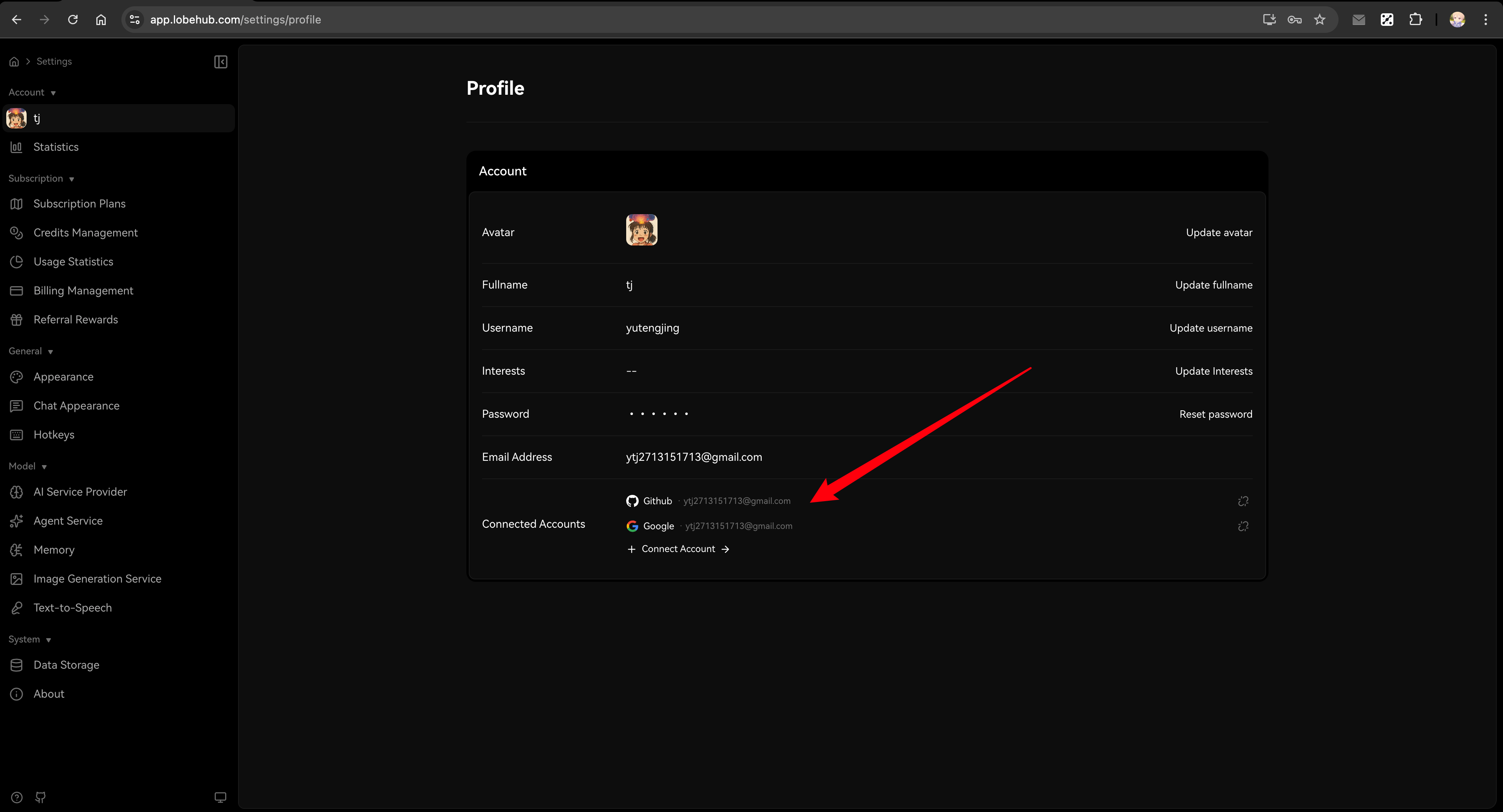
- package/locales/fr-FR/models.json +33 -5
- package/locales/fr-FR/providers.json +0 -1
- package/locales/fr-FR/setting.json +19 -0
- package/locales/it-IT/auth.json +1 -1
- package/locales/it-IT/desktop-onboarding.json +1 -0
- package/locales/it-IT/metadata.json +2 -2
- package/locales/it-IT/models.json +3 -8
- package/locales/it-IT/providers.json +0 -1
- package/locales/it-IT/setting.json +19 -0
- package/locales/ja-JP/auth.json +1 -1
- package/locales/ja-JP/desktop-onboarding.json +1 -0
- package/locales/ja-JP/metadata.json +2 -2
- package/locales/ja-JP/models.json +32 -5
- package/locales/ja-JP/providers.json +0 -1
- package/locales/ja-JP/setting.json +19 -0
- package/locales/ko-KR/auth.json +1 -1
- package/locales/ko-KR/desktop-onboarding.json +1 -0
- package/locales/ko-KR/metadata.json +2 -2
- package/locales/ko-KR/models.json +3 -8
- package/locales/ko-KR/providers.json +0 -1
- package/locales/ko-KR/setting.json +19 -0
- package/locales/nl-NL/auth.json +1 -1
- package/locales/nl-NL/desktop-onboarding.json +1 -0
- package/locales/nl-NL/metadata.json +2 -2
- package/locales/nl-NL/models.json +45 -4
- package/locales/nl-NL/providers.json +0 -1
- package/locales/nl-NL/setting.json +19 -0
- package/locales/pl-PL/auth.json +1 -1
- package/locales/pl-PL/desktop-onboarding.json +1 -0
- package/locales/pl-PL/metadata.json +2 -2
- package/locales/pl-PL/models.json +37 -5
- package/locales/pl-PL/providers.json +0 -1
- package/locales/pl-PL/setting.json +19 -0
- package/locales/pt-BR/auth.json +1 -1
- package/locales/pt-BR/desktop-onboarding.json +1 -0
- package/locales/pt-BR/metadata.json +2 -2
- package/locales/pt-BR/models.json +28 -4
- package/locales/pt-BR/providers.json +0 -1
- package/locales/pt-BR/setting.json +19 -0
- package/locales/ru-RU/auth.json +1 -1
- package/locales/ru-RU/desktop-onboarding.json +1 -0
- package/locales/ru-RU/metadata.json +2 -2
- package/locales/ru-RU/models.json +3 -8
- package/locales/ru-RU/providers.json +0 -1
- package/locales/ru-RU/setting.json +19 -0
- package/locales/tr-TR/auth.json +1 -1
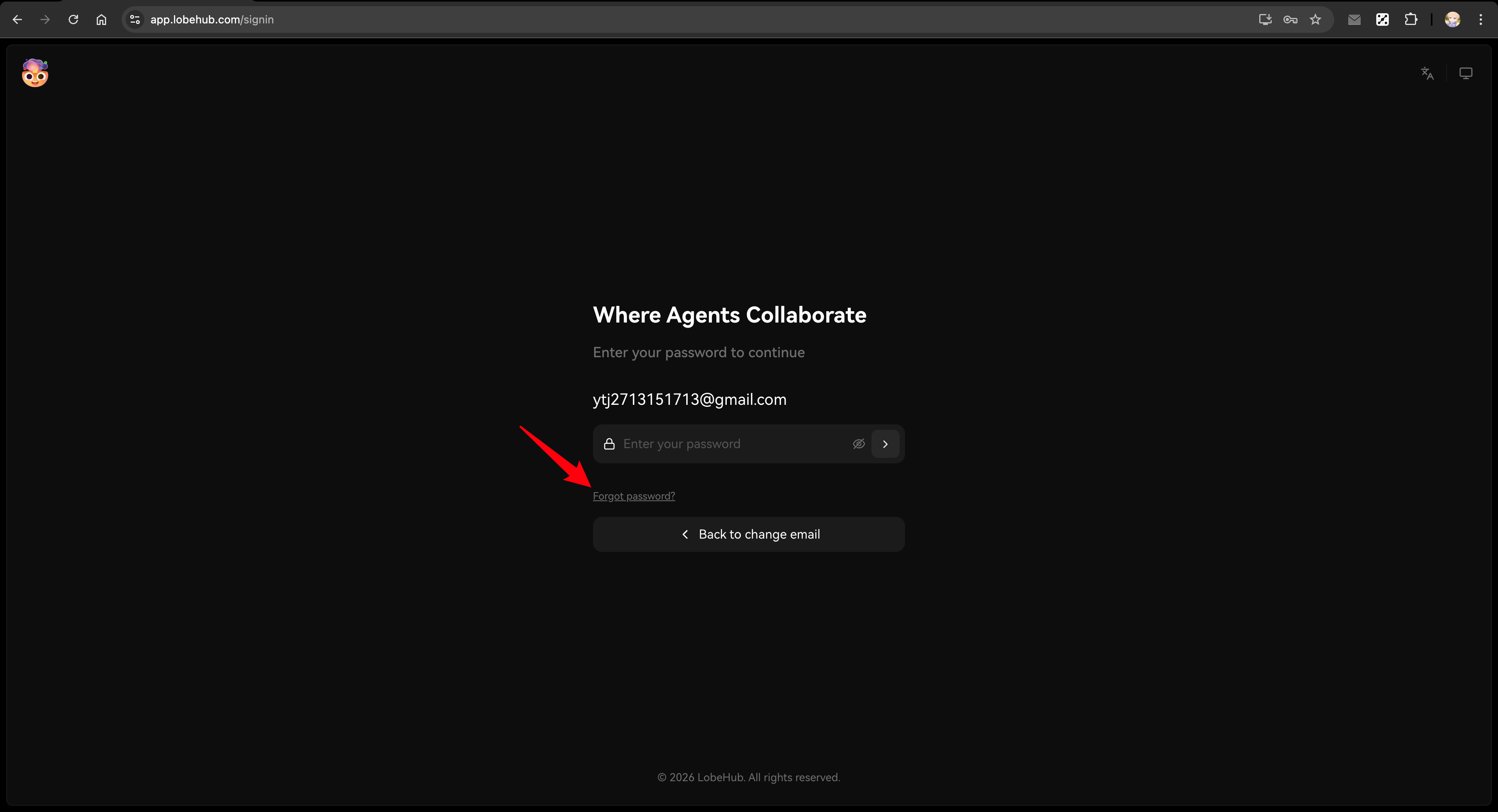
- package/locales/tr-TR/desktop-onboarding.json +1 -0
- package/locales/tr-TR/metadata.json +2 -2
- package/locales/tr-TR/models.json +26 -7
- package/locales/tr-TR/providers.json +0 -1
- package/locales/tr-TR/setting.json +19 -0
- package/locales/vi-VN/auth.json +1 -1
- package/locales/vi-VN/desktop-onboarding.json +1 -0
- package/locales/vi-VN/metadata.json +2 -2
- package/locales/vi-VN/models.json +3 -5
- package/locales/vi-VN/providers.json +0 -1
- package/locales/vi-VN/setting.json +19 -0
- package/locales/zh-CN/auth.json +3 -3
- package/locales/zh-CN/metadata.json +2 -2
- package/locales/zh-CN/models.json +46 -6
- package/locales/zh-CN/providers.json +0 -1
- package/locales/zh-TW/auth.json +1 -1
- package/locales/zh-TW/desktop-onboarding.json +1 -0
- package/locales/zh-TW/metadata.json +2 -2
- package/locales/zh-TW/models.json +39 -6
- package/locales/zh-TW/providers.json +0 -1
- package/locales/zh-TW/setting.json +19 -0
- package/package.json +1 -1
- package/packages/const/src/url.ts +1 -1
- package/public/og/agent-og.webp +0 -0
- package/public/og/mcp-og.webp +0 -0
- package/public/og/og.webp +0 -0
- package/scripts/clerk-to-betterauth/__tests__/parseCsvLine.test.ts +21 -0
- package/scripts/clerk-to-betterauth/_internal/config.ts +55 -0
- package/scripts/clerk-to-betterauth/_internal/db.ts +32 -0
- package/scripts/clerk-to-betterauth/_internal/env.ts +6 -0
- package/scripts/clerk-to-betterauth/_internal/load-data-from-files.ts +74 -0
- package/scripts/clerk-to-betterauth/_internal/types.ts +45 -0
- package/scripts/clerk-to-betterauth/_internal/utils.ts +36 -0
- package/scripts/clerk-to-betterauth/export-clerk-users-with-api.ts +211 -0
- package/scripts/clerk-to-betterauth/index.ts +314 -0
- package/scripts/clerk-to-betterauth/prod/put_clerk_exported_users_csv_here.txt +0 -0
- package/scripts/clerk-to-betterauth/test/put_clerk_exported_users_csv_here.txt +0 -0
- package/scripts/clerk-to-betterauth/verify.ts +275 -0
- package/src/app/[variants]/(auth)/signin/SignInEmailStep.tsx +30 -2
- package/src/app/[variants]/(auth)/signin/SignInPasswordStep.tsx +1 -1
- package/src/app/[variants]/(auth)/signin/page.tsx +3 -0
- package/src/app/[variants]/(auth)/signin/useSignIn.ts +6 -2
- package/src/app/[variants]/(main)/home/features/RecentResource/Item.tsx +2 -2
- package/src/app/[variants]/(main)/home/features/index.tsx +1 -2
- package/src/app/[variants]/(main)/settings/provider/features/ProviderConfig/index.tsx +0 -2
- package/src/app/[variants]/(main)/settings/skill/features/Actions.tsx +8 -7
- package/src/app/[variants]/(main)/settings/skill/features/McpSkillItem.tsx +9 -11
- package/src/app/manifest.ts +4 -4
- package/src/features/AuthCard/index.tsx +1 -1
- package/src/features/SkillStore/CommunityList/Item.tsx +3 -2
- package/src/features/SkillStore/Search/index.tsx +0 -1
- package/src/locales/default/auth.ts +3 -2
- package/src/locales/default/metadata.ts +2 -2
- package/src/server/ld.ts +4 -3
- package/src/styles/global.ts +0 -6
- /package/docs/self-hosting/advanced/auth/{better-auth → providers}/apple.mdx +0 -0
- /package/docs/self-hosting/advanced/auth/{better-auth → providers}/apple.zh-CN.mdx +0 -0
- /package/docs/self-hosting/advanced/auth/{better-auth → providers}/auth0.mdx +0 -0
- /package/docs/self-hosting/advanced/auth/{better-auth → providers}/auth0.zh-CN.mdx +0 -0
- /package/docs/self-hosting/advanced/auth/{better-auth → providers}/authelia.mdx +0 -0
- /package/docs/self-hosting/advanced/auth/{better-auth → providers}/authelia.zh-CN.mdx +0 -0
- /package/docs/self-hosting/advanced/auth/{better-auth → providers}/authentik.mdx +0 -0
- /package/docs/self-hosting/advanced/auth/{better-auth → providers}/authentik.zh-CN.mdx +0 -0
- /package/docs/self-hosting/advanced/auth/{better-auth → providers}/casdoor.mdx +0 -0
- /package/docs/self-hosting/advanced/auth/{better-auth → providers}/casdoor.zh-CN.mdx +0 -0
- /package/docs/self-hosting/advanced/auth/{better-auth → providers}/cloudflare-zero-trust.mdx +0 -0
- /package/docs/self-hosting/advanced/auth/{better-auth → providers}/cloudflare-zero-trust.zh-CN.mdx +0 -0
- /package/docs/self-hosting/advanced/auth/{better-auth → providers}/cognito.mdx +0 -0
- /package/docs/self-hosting/advanced/auth/{better-auth → providers}/cognito.zh-CN.mdx +0 -0
- /package/docs/self-hosting/advanced/auth/{better-auth → providers}/feishu.mdx +0 -0
- /package/docs/self-hosting/advanced/auth/{better-auth → providers}/feishu.zh-CN.mdx +0 -0
- /package/docs/self-hosting/advanced/auth/{better-auth → providers}/generic-oidc.mdx +0 -0
- /package/docs/self-hosting/advanced/auth/{better-auth → providers}/generic-oidc.zh-CN.mdx +0 -0
- /package/docs/self-hosting/advanced/auth/{better-auth → providers}/github.mdx +0 -0
- /package/docs/self-hosting/advanced/auth/{better-auth → providers}/github.zh-CN.mdx +0 -0
- /package/docs/self-hosting/advanced/auth/{better-auth → providers}/google.mdx +0 -0
- /package/docs/self-hosting/advanced/auth/{better-auth → providers}/google.zh-CN.mdx +0 -0
- /package/docs/self-hosting/advanced/auth/{better-auth → providers}/keycloak.mdx +0 -0
- /package/docs/self-hosting/advanced/auth/{better-auth → providers}/keycloak.zh-CN.mdx +0 -0
- /package/docs/self-hosting/advanced/auth/{better-auth → providers}/logto.mdx +0 -0
- /package/docs/self-hosting/advanced/auth/{better-auth → providers}/logto.zh-CN.mdx +0 -0
- /package/docs/self-hosting/advanced/auth/{better-auth → providers}/microsoft.mdx +0 -0
- /package/docs/self-hosting/advanced/auth/{better-auth → providers}/microsoft.zh-CN.mdx +0 -0
- /package/docs/self-hosting/advanced/auth/{better-auth → providers}/okta.mdx +0 -0
- /package/docs/self-hosting/advanced/auth/{better-auth → providers}/okta.zh-CN.mdx +0 -0
- /package/docs/self-hosting/advanced/auth/{better-auth → providers}/wechat.mdx +0 -0
- /package/docs/self-hosting/advanced/auth/{better-auth → providers}/wechat.zh-CN.mdx +0 -0
- /package/docs/self-hosting/advanced/auth/{better-auth → providers}/zitadel.mdx +0 -0
- /package/docs/self-hosting/advanced/auth/{better-auth → providers}/zitadel.zh-CN.mdx +0 -0
|
@@ -0,0 +1,360 @@
|
|
|
1
|
+
---
|
|
2
|
+
title: 从 Clerk 迁移到 Better Auth
|
|
3
|
+
description: 将 LobeChat 部署从 Clerk 身份验证迁移到 Better Auth 的指南,包括简单迁移和完整迁移选项。
|
|
4
|
+
tags:
|
|
5
|
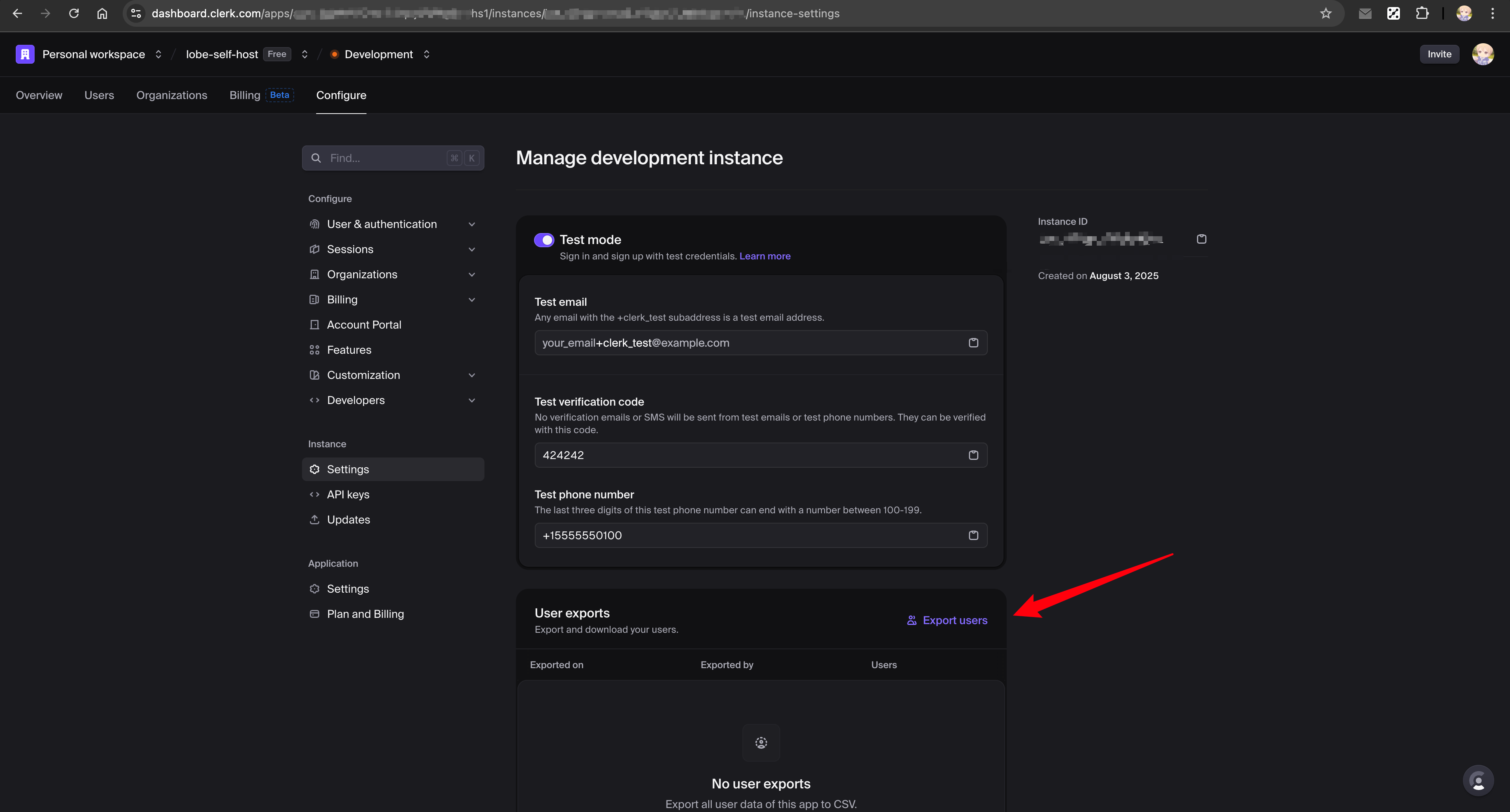
+
- 身份验证服务
|
|
6
|
+
- Better Auth
|
|
7
|
+
- Clerk
|
|
8
|
+
- 迁移
|
|
9
|
+
---
|
|
10
|
+
|
|
11
|
+
# 从 Clerk 迁移到 Better Auth
|
|
12
|
+
|
|
13
|
+
本指南帮助您将现有的基于 Clerk 的 LobeChat 部署迁移到 Better Auth。
|
|
14
|
+
|
|
15
|
+
<Callout type={'info'}>
|
|
16
|
+
Better Auth 是 LobeChat 推荐的身份验证解决方案。它提供更简单的配置、更多的 SSO 提供商支持,以及更好的自托管体验。
|
|
17
|
+
</Callout>
|
|
18
|
+
|
|
19
|
+
<Callout type={'error'}>
|
|
20
|
+
**重要提醒**:
|
|
21
|
+
|
|
22
|
+
- **务必先备份数据库**!如使用 Neon,可通过 [Fork 分支](https://neon.tech/docs/manage/branches#create-a-branch) 创建备份
|
|
23
|
+
- 迁移过程中可能出现的任何数据丢失或问题,LobeChat 概不负责
|
|
24
|
+
- 本指南适合有一定开发背景的用户,不建议无技术经验的用户自行操作
|
|
25
|
+
- 如有任何疑问,欢迎到 [Discord](https://discord.com/invite/AYFPHvv2jT) 社区提问
|
|
26
|
+
</Callout>
|
|
27
|
+
|
|
28
|
+
## 选择迁移方式
|
|
29
|
+
|
|
30
|
+
| 方式 | 适用场景 | 用户影响 | 数据保留 |
|
|
31
|
+
| ------------- | --------------- | ------- | -------- |
|
|
32
|
+
| [简单迁移](#简单迁移) | 小型部署(\< 100 用户) | 用户需重置密码 | 聊天记录、设置 |
|
|
33
|
+
| [完整迁移](#完整迁移) | 大型部署 | 对用户无感知 | 全部数据包括密码 |
|
|
34
|
+
|
|
35
|
+
## 简单迁移
|
|
36
|
+
|
|
37
|
+
对于小型自托管部署,最简单的方法是让用户重置密码。
|
|
38
|
+
|
|
39
|
+
<Callout type={'warning'}>
|
|
40
|
+
**限制**:此方法会丢失 SSO 连接数据。如需保留 SSO 连接,请使用 [完整迁移](#完整迁移)。
|
|
41
|
+
|
|
42
|
+
**示例场景**:假设你之前的账户绑定了两个 SSO 账户:
|
|
43
|
+
|
|
44
|
+
- 主邮箱(Google):`mail1@google.com`
|
|
45
|
+
- 副邮箱(Microsoft):`mail2@outlook.com`
|
|
46
|
+
|
|
47
|
+
迁移后使用 `mail1@google.com` 重置密码,之后再用 `mail2@outlook.com` 登录将会**创建新用户**,而非关联到原有账户。
|
|
48
|
+
</Callout>
|
|
49
|
+
|
|
50
|
+
|
|
51
|
+
|
|
52
|
+
### 步骤
|
|
53
|
+
|
|
54
|
+
1. **配置邮件服务**
|
|
55
|
+
|
|
56
|
+
设置邮件服务以支持密码重置功能。参阅 [邮件服务配置](/zh/docs/self-hosting/advanced/auth#邮件服务配置)。
|
|
57
|
+
|
|
58
|
+
2. **更新环境变量**
|
|
59
|
+
|
|
60
|
+
移除 Clerk 变量并添加 Better Auth 变量:
|
|
61
|
+
|
|
62
|
+
```bash
|
|
63
|
+
# 移除这些
|
|
64
|
+
# NEXT_PUBLIC_CLERK_PUBLISHABLE_KEY=xxx
|
|
65
|
+
# CLERK_SECRET_KEY=xxx
|
|
66
|
+
|
|
67
|
+
# 添加这些
|
|
68
|
+
AUTH_SECRET=your-secret-key # openssl rand -base64 32
|
|
69
|
+
|
|
70
|
+
# 可选:启用 Google SSO(示例)
|
|
71
|
+
AUTH_SSO_PROVIDERS=google
|
|
72
|
+
AUTH_GOOGLE_ID=your-google-client-id
|
|
73
|
+
AUTH_GOOGLE_SECRET=your-google-client-secret
|
|
74
|
+
```
|
|
75
|
+
|
|
76
|
+
<Callout type={'tip'}>
|
|
77
|
+
查阅 [身份验证服务配置](/zh/docs/self-hosting/advanced/auth) 了解完整的环境变量和 SSO 提供商配置。
|
|
78
|
+
</Callout>
|
|
79
|
+
|
|
80
|
+
3. **重新部署 LobeChat**
|
|
81
|
+
|
|
82
|
+
部署启用 Better Auth 的新版本。
|
|
83
|
+
|
|
84
|
+
4. **通知用户**
|
|
85
|
+
|
|
86
|
+
告知用户按以下步骤登录(聊天记录和设置将被保留):
|
|
87
|
+
|
|
88
|
+
1. 访问登录页(如 `https://your-domain.com/signin`)
|
|
89
|
+
2. 输入之前使用的邮箱,回车
|
|
90
|
+
|
|
91
|
+
如果启用了 Magic Link:系统会自动发送登录链接邮件,用户点击邮件中的链接即可直接登录。
|
|
92
|
+
|
|
93
|
+
如果未启用 Magic Link:页面会显示提示信息,用户可以选择:
|
|
94
|
+
|
|
95
|
+
- 使用之前关联的社交账号(如 Google、GitHub)登录
|
|
96
|
+
- 点击「设置密码」链接,通过邮件设置新密码后登录
|
|
97
|
+
|
|
98
|
+
|
|
99
|
+
|
|
100
|
+
3. (可选)登录后可在个人资料页进行以下操作:
|
|
101
|
+
- 已关联账号:手动关联其他社交账号
|
|
102
|
+
- 密码:随时设置或更新密码
|
|
103
|
+
|
|
104
|
+
<Callout type={'tip'}>
|
|
105
|
+
这种方法快速且配置简单。用户可通过 Magic Link、社交账号或设置新密码登录,所有数据完整保留。
|
|
106
|
+
登录后可随时在 [个人资料页](/settings/profile) 管理密码和关联账号。
|
|
107
|
+
</Callout>
|
|
108
|
+
|
|
109
|
+
## 完整迁移
|
|
110
|
+
|
|
111
|
+
对于大型部署或需要保留用户密码和 SSO 连接的情况,请使用迁移脚本。
|
|
112
|
+
|
|
113
|
+
<Callout type={'error'}>
|
|
114
|
+
**重要说明**:
|
|
115
|
+
|
|
116
|
+
- 迁移脚本需要 **clone 仓库后在本地运行**,不是在部署环境中执行
|
|
117
|
+
- 由于迁移涉及用户数据,风险较高,**官方不提供部署时自动迁移功能**
|
|
118
|
+
- 请务必在测试环境验证后再操作生产数据库
|
|
119
|
+
</Callout>
|
|
120
|
+
|
|
121
|
+
<Callout type={'warning'}>
|
|
122
|
+
**迁移前准备**:
|
|
123
|
+
|
|
124
|
+
- 使用 [Neon Fork 分支](https://neon.tech/docs/manage/branches#create-a-branch) 创建测试数据库
|
|
125
|
+
- 使用 Clerk Development 环境的 API 密钥
|
|
126
|
+
- 先在 test 模式下验证,确认成功后再切换到 prod 模式
|
|
127
|
+
</Callout>
|
|
128
|
+
|
|
129
|
+
### 前置条件
|
|
130
|
+
|
|
131
|
+
**环境要求:**
|
|
132
|
+
|
|
133
|
+
- Node.js 18+
|
|
134
|
+
- Git(用于 clone 仓库)
|
|
135
|
+
- pnpm(用于安装依赖)
|
|
136
|
+
|
|
137
|
+
**准备工作:**
|
|
138
|
+
|
|
139
|
+
1. Clone LobeChat 仓库并安装依赖:
|
|
140
|
+
|
|
141
|
+
```bash
|
|
142
|
+
git clone https://github.com/lobehub/lobe-chat.git
|
|
143
|
+
cd lobe-chat
|
|
144
|
+
pnpm install
|
|
145
|
+
```
|
|
146
|
+
|
|
147
|
+
2. 准备以下信息:
|
|
148
|
+
- Clerk 控制台访问权限(用于 CSV 导出)
|
|
149
|
+
- Clerk API 密钥(用于 API 导出)
|
|
150
|
+
- 数据库连接字符串
|
|
151
|
+
|
|
152
|
+
3. 确保数据库 schema 为最新版本
|
|
153
|
+
|
|
154
|
+
<Callout type={'info'}>
|
|
155
|
+
如果你长期停留在旧版本(如 1.x),数据库 schema 可能不是最新的。请在 clone 的仓库中运行:
|
|
156
|
+
|
|
157
|
+
```bash
|
|
158
|
+
DATABASE_URL=your-database-url pnpm db:migrate
|
|
159
|
+
```
|
|
160
|
+
</Callout>
|
|
161
|
+
|
|
162
|
+
### 步骤 1:配置迁移脚本环境变量
|
|
163
|
+
|
|
164
|
+
在项目根目录创建 `.env` 文件(脚本会自动加载),配置所有环境变量:
|
|
165
|
+
|
|
166
|
+
```bash
|
|
167
|
+
# ============================================
|
|
168
|
+
# 迁移模式:test 或 prod
|
|
169
|
+
# 建议先用 test 模式在测试数据库验证,确认无误后再切换到 prod
|
|
170
|
+
# ============================================
|
|
171
|
+
CLERK_TO_BETTERAUTH_MODE=test
|
|
172
|
+
|
|
173
|
+
# ============================================
|
|
174
|
+
# 数据库连接(根据模式使用对应的环境变量)
|
|
175
|
+
# TEST_ 前缀用于测试环境,PROD_ 前缀用于生产环境
|
|
176
|
+
# ============================================
|
|
177
|
+
TEST_CLERK_TO_BETTERAUTH_DATABASE_URL=postgresql://user:pass@test-host:5432/testdb
|
|
178
|
+
PROD_CLERK_TO_BETTERAUTH_DATABASE_URL=postgresql://user:pass@prod-host:5432/proddb
|
|
179
|
+
|
|
180
|
+
# ============================================
|
|
181
|
+
# Clerk API 密钥(用于通过 API 导出用户数据)
|
|
182
|
+
# 从 Clerk 控制台获取:Configure → Developers → API Keys
|
|
183
|
+
# ============================================
|
|
184
|
+
TEST_CLERK_TO_BETTERAUTH_CLERK_SECRET_KEY=sk_test_xxx
|
|
185
|
+
PROD_CLERK_TO_BETTERAUTH_CLERK_SECRET_KEY=sk_live_xxx
|
|
186
|
+
|
|
187
|
+
# ============================================
|
|
188
|
+
# 数据库驱动(可选)
|
|
189
|
+
# neon: Neon serverless 驱动(默认)
|
|
190
|
+
# node: node-postgres 驱动
|
|
191
|
+
# ============================================
|
|
192
|
+
CLERK_TO_BETTERAUTH_DATABASE_DRIVER=neon
|
|
193
|
+
|
|
194
|
+
# ============================================
|
|
195
|
+
# Dry Run 模式(可选)
|
|
196
|
+
# 设为 1 时只打印日志,不实际修改数据库
|
|
197
|
+
# 建议首次运行时启用,验证无误后再关闭
|
|
198
|
+
# ============================================
|
|
199
|
+
CLERK_TO_BETTERAUTH_DRY_RUN=1
|
|
200
|
+
```
|
|
201
|
+
|
|
202
|
+
### 步骤 2:导出 Clerk 数据
|
|
203
|
+
|
|
204
|
+
#### 停止新用户注册
|
|
205
|
+
|
|
206
|
+
在导出数据前,先禁止新用户注册,确保迁移期间数据不变:
|
|
207
|
+
|
|
208
|
+
1. 前往 [Clerk 控制台](https://dashboard.clerk.com) → Configure → Restrictions
|
|
209
|
+
2. 启用「Restricted」模式
|
|
210
|
+
|
|
211
|
+
#### 从 Clerk 控制台导出 CSV
|
|
212
|
+
|
|
213
|
+
1. 前往 [Clerk 控制台](https://dashboard.clerk.com) → Configure → Settings → User exports
|
|
214
|
+
2. 点击「Export users」下载 CSV 文件
|
|
215
|
+
3. 保存到 `scripts/clerk-to-betterauth/test/clerk_exported_users.csv`
|
|
216
|
+
|
|
217
|
+
详见 [Clerk 官方文档](https://clerk.com/docs/guides/development/migrating/overview#export-your-users-data-from-the-clerk-dashboard)。
|
|
218
|
+
|
|
219
|
+
|
|
220
|
+
|
|
221
|
+
#### 通过 API 导出 JSON
|
|
222
|
+
|
|
223
|
+
```bash
|
|
224
|
+
# 运行导出脚本(会根据 CLERK_TO_BETTERAUTH_MODE 自动选择密钥和输出路径)
|
|
225
|
+
npx tsx scripts/clerk-to-betterauth/export-clerk-users-with-api.ts
|
|
226
|
+
```
|
|
227
|
+
|
|
228
|
+
这将自动创建 `scripts/clerk-to-betterauth/test/clerk_users.json`,包含额外的用户数据。
|
|
229
|
+
|
|
230
|
+
### 步骤 3:Dry-Run 验证(测试环境)
|
|
231
|
+
|
|
232
|
+
```bash
|
|
233
|
+
# 运行迁移(CLERK_TO_BETTERAUTH_DRY_RUN=1,只打印日志不修改数据库)
|
|
234
|
+
npx tsx scripts/clerk-to-betterauth/index.ts
|
|
235
|
+
```
|
|
236
|
+
|
|
237
|
+
检查输出日志,确认无异常后继续下一步。
|
|
238
|
+
|
|
239
|
+
### 步骤 4:执行迁移并验证(测试环境)
|
|
240
|
+
|
|
241
|
+
修改 `.env` 将 `CLERK_TO_BETTERAUTH_DRY_RUN` 改为 `0`,然后执行:
|
|
242
|
+
|
|
243
|
+
```bash
|
|
244
|
+
# 执行迁移
|
|
245
|
+
npx tsx scripts/clerk-to-betterauth/index.ts
|
|
246
|
+
|
|
247
|
+
# 验证迁移结果
|
|
248
|
+
npx tsx scripts/clerk-to-betterauth/verify.ts
|
|
249
|
+
```
|
|
250
|
+
|
|
251
|
+
验证测试环境迁移结果无误后,继续下一步。
|
|
252
|
+
|
|
253
|
+
### 步骤 5:Dry-Run 验证(生产环境)
|
|
254
|
+
|
|
255
|
+
1. 将 CSV 文件复制到 prod 目录:`scripts/clerk-to-betterauth/prod/clerk_exported_users.csv`
|
|
256
|
+
2. 修改 `.env` 文件:
|
|
257
|
+
- 将 `CLERK_TO_BETTERAUTH_MODE` 改为 `prod`
|
|
258
|
+
- 将 `CLERK_TO_BETTERAUTH_DRY_RUN` 改回 `1`
|
|
259
|
+
3. 运行脚本:
|
|
260
|
+
|
|
261
|
+
```bash
|
|
262
|
+
# 导出生产环境用户数据
|
|
263
|
+
npx tsx scripts/clerk-to-betterauth/export-clerk-users-with-api.ts
|
|
264
|
+
|
|
265
|
+
# 运行迁移(dry-run 模式验证)
|
|
266
|
+
npx tsx scripts/clerk-to-betterauth/index.ts
|
|
267
|
+
```
|
|
268
|
+
|
|
269
|
+
检查输出日志,确认无异常后继续下一步。
|
|
270
|
+
|
|
271
|
+
### 步骤 6:执行迁移并验证(生产环境)
|
|
272
|
+
|
|
273
|
+
修改 `.env` 将 `CLERK_TO_BETTERAUTH_DRY_RUN` 改为 `0`,然后执行:
|
|
274
|
+
|
|
275
|
+
```bash
|
|
276
|
+
# 执行迁移
|
|
277
|
+
npx tsx scripts/clerk-to-betterauth/index.ts
|
|
278
|
+
|
|
279
|
+
# 验证迁移结果
|
|
280
|
+
npx tsx scripts/clerk-to-betterauth/verify.ts
|
|
281
|
+
```
|
|
282
|
+
|
|
283
|
+
### 步骤 7:配置 Better Auth 并重新部署
|
|
284
|
+
|
|
285
|
+
迁移完成后,需要配置 Better Auth 环境变量并重新部署:
|
|
286
|
+
|
|
287
|
+
1. **移除 Clerk 环境变量**:
|
|
288
|
+
|
|
289
|
+
```bash
|
|
290
|
+
# 移除这些
|
|
291
|
+
# NEXT_PUBLIC_CLERK_PUBLISHABLE_KEY=xxx
|
|
292
|
+
# CLERK_SECRET_KEY=xxx
|
|
293
|
+
```
|
|
294
|
+
|
|
295
|
+
2. **添加 Better Auth 环境变量**:
|
|
296
|
+
|
|
297
|
+
```bash
|
|
298
|
+
# 必需
|
|
299
|
+
AUTH_SECRET=your-secret-key # openssl rand -base64 32
|
|
300
|
+
|
|
301
|
+
# 可选:配置 SSO 提供商(示例)
|
|
302
|
+
AUTH_SSO_PROVIDERS=google,github
|
|
303
|
+
AUTH_GOOGLE_ID=your-google-client-id
|
|
304
|
+
AUTH_GOOGLE_SECRET=your-google-client-secret
|
|
305
|
+
AUTH_GITHUB_ID=your-github-client-id
|
|
306
|
+
AUTH_GITHUB_SECRET=your-github-client-secret
|
|
307
|
+
|
|
308
|
+
# 可选:配置邮件服务(用于密码重置、邮箱验证等)
|
|
309
|
+
# 参阅身份验证服务配置文档了解详情
|
|
310
|
+
```
|
|
311
|
+
|
|
312
|
+
3. **重新部署 LobeChat**
|
|
313
|
+
|
|
314
|
+
<Callout type={'tip'}>
|
|
315
|
+
完整的 Better Auth 配置请参阅 [身份验证服务配置](/zh/docs/self-hosting/advanced/auth),包括所有支持的 SSO 提供商和邮件服务配置。
|
|
316
|
+
</Callout>
|
|
317
|
+
|
|
318
|
+
## 迁移内容对比
|
|
319
|
+
|
|
320
|
+
| 数据 | 简单迁移 | 完整迁移 |
|
|
321
|
+
| ----------------------- | --------- | ---- |
|
|
322
|
+
| 用户账户 | ✅(通过密码重置) | ✅ |
|
|
323
|
+
| 密码哈希 | ❌ | ✅ |
|
|
324
|
+
| SSO 连接(Google、GitHub 等) | ❌ | ✅ |
|
|
325
|
+
| 双因素认证 | ❌ | ✅ |
|
|
326
|
+
| 聊天记录 | ✅ | ✅ |
|
|
327
|
+
| 用户设置 | ✅ | ✅ |
|
|
328
|
+
|
|
329
|
+
## 常见问题
|
|
330
|
+
|
|
331
|
+
### 迁移后用户无法登录
|
|
332
|
+
|
|
333
|
+
- 确保邮件服务已配置用于密码重置
|
|
334
|
+
- 检查 `AUTH_SECRET` 是否正确设置
|
|
335
|
+
- 验证数据库连接是否正常
|
|
336
|
+
|
|
337
|
+
### SSO 用户无法连接
|
|
338
|
+
|
|
339
|
+
- 简单迁移:用户需要在重置密码后重新关联 SSO 账户
|
|
340
|
+
- 完整迁移:验证 SSO 提供商已在 `AUTH_SSO_PROVIDERS` 中配置
|
|
341
|
+
|
|
342
|
+
### 迁移脚本失败
|
|
343
|
+
|
|
344
|
+
- 检查数据库连接字符串
|
|
345
|
+
- 确保 CSV 和 JSON 文件位于正确位置
|
|
346
|
+
- 查看脚本日志了解具体错误
|
|
347
|
+
|
|
348
|
+
### column "xxx" of relation "users" does not exist
|
|
349
|
+
|
|
350
|
+
这是因为数据库 schema 未更新。请先运行 `pnpm db:migrate` 更新数据库结构,然后再执行迁移脚本。
|
|
351
|
+
|
|
352
|
+
## 相关阅读
|
|
353
|
+
|
|
354
|
+
<Cards>
|
|
355
|
+
<Card href={'/zh/docs/self-hosting/advanced/auth'} title={'身份验证服务配置'} />
|
|
356
|
+
|
|
357
|
+
<Card href={'/zh/docs/self-hosting/environment-variables/auth'} title={'认证相关环境变量'} />
|
|
358
|
+
|
|
359
|
+
<Card href={'/zh/docs/self-hosting/advanced/auth/legacy'} title={'旧版身份验证(NextAuth 和 Clerk)'} />
|
|
360
|
+
</Cards>
|
|
@@ -30,6 +30,10 @@ By setting the environment variables `NEXT_PUBLIC_CLERK_PUBLISHABLE_KEY` and `CL
|
|
|
30
30
|
For detailed Clerk configuration, see [Clerk Configuration Guide](/docs/self-hosting/advanced/auth/clerk).
|
|
31
31
|
</Callout>
|
|
32
32
|
|
|
33
|
+
<Callout type={'tip'}>
|
|
34
|
+
To migrate from Clerk to Better Auth, see the [Clerk Migration Guide](/docs/self-hosting/advanced/auth/clerk-to-betterauth).
|
|
35
|
+
</Callout>
|
|
36
|
+
|
|
33
37
|
## Next Auth
|
|
34
38
|
|
|
35
39
|
Before using NextAuth, please set the following variables in LobeChat's environment variables:
|
|
@@ -28,6 +28,10 @@ LobeChat 与 Clerk 做了深度集成,能够为用户提供安全、便捷的
|
|
|
28
28
|
详细的 Clerk 配置请参阅 [Clerk 配置指南](/zh/docs/self-hosting/advanced/auth/clerk)。
|
|
29
29
|
</Callout>
|
|
30
30
|
|
|
31
|
+
<Callout type={'tip'}>
|
|
32
|
+
如需从 Clerk 迁移到 Better Auth,请参阅 [Clerk 迁移指南](/zh/docs/self-hosting/advanced/auth/clerk-to-betterauth)。
|
|
33
|
+
</Callout>
|
|
34
|
+
|
|
31
35
|
## Next Auth
|
|
32
36
|
|
|
33
37
|
在使用 NextAuth 之前,请先在 LobeChat 的环境变量中设置以下变量:
|
|
@@ -60,39 +60,39 @@ To enable Better Auth in LobeChat, set the following environment variables:
|
|
|
60
60
|
Click on a provider below for detailed configuration guides:
|
|
61
61
|
|
|
62
62
|
<Cards>
|
|
63
|
-
<Card href={'/docs/self-hosting/advanced/auth/
|
|
63
|
+
<Card href={'/docs/self-hosting/advanced/auth/providers/github'} title={'GitHub'} />
|
|
64
64
|
|
|
65
|
-
<Card href={'/docs/self-hosting/advanced/auth/
|
|
65
|
+
<Card href={'/docs/self-hosting/advanced/auth/providers/google'} title={'Google'} />
|
|
66
66
|
|
|
67
|
-
<Card href={'/docs/self-hosting/advanced/auth/
|
|
67
|
+
<Card href={'/docs/self-hosting/advanced/auth/providers/microsoft'} title={'Microsoft'} />
|
|
68
68
|
|
|
69
|
-
<Card href={'/docs/self-hosting/advanced/auth/
|
|
69
|
+
<Card href={'/docs/self-hosting/advanced/auth/providers/apple'} title={'Apple'} />
|
|
70
70
|
|
|
71
|
-
<Card href={'/docs/self-hosting/advanced/auth/
|
|
71
|
+
<Card href={'/docs/self-hosting/advanced/auth/providers/cognito'} title={'AWS Cognito'} />
|
|
72
72
|
|
|
73
|
-
<Card href={'/docs/self-hosting/advanced/auth/
|
|
73
|
+
<Card href={'/docs/self-hosting/advanced/auth/providers/auth0'} title={'Auth0'} />
|
|
74
74
|
|
|
75
|
-
<Card href={'/docs/self-hosting/advanced/auth/
|
|
75
|
+
<Card href={'/docs/self-hosting/advanced/auth/providers/authelia'} title={'Authelia'} />
|
|
76
76
|
|
|
77
|
-
<Card href={'/docs/self-hosting/advanced/auth/
|
|
77
|
+
<Card href={'/docs/self-hosting/advanced/auth/providers/authentik'} title={'Authentik'} />
|
|
78
78
|
|
|
79
|
-
<Card href={'/docs/self-hosting/advanced/auth/
|
|
79
|
+
<Card href={'/docs/self-hosting/advanced/auth/providers/casdoor'} title={'Casdoor'} />
|
|
80
80
|
|
|
81
|
-
<Card href={'/docs/self-hosting/advanced/auth/
|
|
81
|
+
<Card href={'/docs/self-hosting/advanced/auth/providers/cloudflare-zero-trust'} title={'Cloudflare Zero Trust'} />
|
|
82
82
|
|
|
83
|
-
<Card href={'/docs/self-hosting/advanced/auth/
|
|
83
|
+
<Card href={'/docs/self-hosting/advanced/auth/providers/keycloak'} title={'Keycloak'} />
|
|
84
84
|
|
|
85
|
-
<Card href={'/docs/self-hosting/advanced/auth/
|
|
85
|
+
<Card href={'/docs/self-hosting/advanced/auth/providers/logto'} title={'Logto'} />
|
|
86
86
|
|
|
87
|
-
<Card href={'/docs/self-hosting/advanced/auth/
|
|
87
|
+
<Card href={'/docs/self-hosting/advanced/auth/providers/okta'} title={'Okta'} />
|
|
88
88
|
|
|
89
|
-
<Card href={'/docs/self-hosting/advanced/auth/
|
|
89
|
+
<Card href={'/docs/self-hosting/advanced/auth/providers/zitadel'} title={'ZITADEL'} />
|
|
90
90
|
|
|
91
|
-
<Card href={'/docs/self-hosting/advanced/auth/
|
|
91
|
+
<Card href={'/docs/self-hosting/advanced/auth/providers/generic-oidc'} title={'Generic OIDC'} />
|
|
92
92
|
|
|
93
|
-
<Card href={'/docs/self-hosting/advanced/auth/
|
|
93
|
+
<Card href={'/docs/self-hosting/advanced/auth/providers/feishu'} title={'Feishu'} />
|
|
94
94
|
|
|
95
|
-
<Card href={'/docs/self-hosting/advanced/auth/
|
|
95
|
+
<Card href={'/docs/self-hosting/advanced/auth/providers/wechat'} title={'WeChat'} />
|
|
96
96
|
</Cards>
|
|
97
97
|
|
|
98
98
|
## Callback URL Format
|
|
@@ -104,19 +104,44 @@ When configuring OAuth providers, use the following callback URL format:
|
|
|
104
104
|
|
|
105
105
|
## Email Service Configuration
|
|
106
106
|
|
|
107
|
-
Used by email verification, password reset, and magic-link delivery.
|
|
108
|
-
|
|
109
|
-
|
|
110
|
-
|
|
111
|
-
|
|
112
|
-
|
|
113
|
-
|
|
|
114
|
-
|
|
|
115
|
-
| `
|
|
116
|
-
| `
|
|
117
|
-
| `
|
|
118
|
-
| `
|
|
119
|
-
| `
|
|
107
|
+
Used by email verification, password reset, and magic-link delivery. Two providers are supported:
|
|
108
|
+
|
|
109
|
+
### Option 1: Nodemailer (SMTP)
|
|
110
|
+
|
|
111
|
+
Send emails via SMTP protocol, suitable for users with existing email services. See [Nodemailer SMTP docs](https://nodemailer.com/smtp/).
|
|
112
|
+
|
|
113
|
+
| Environment Variable | Type | Description | Example |
|
|
114
|
+
| ------------------------ | -------- | ------------------------------------------------------- | ------------------- |
|
|
115
|
+
| `EMAIL_SERVICE_PROVIDER` | Optional | Set to `nodemailer` (default) | `nodemailer` |
|
|
116
|
+
| `SMTP_HOST` | Required | SMTP server hostname | `smtp.gmail.com` |
|
|
117
|
+
| `SMTP_PORT` | Required | SMTP server port (`587` for TLS, `465` for SSL) | `587` |
|
|
118
|
+
| `SMTP_SECURE` | Optional | `true` for SSL (port 465), `false` for TLS (port 587) | `false` |
|
|
119
|
+
| `SMTP_USER` | Required | SMTP auth username | `user@gmail.com` |
|
|
120
|
+
| `SMTP_PASS` | Required | SMTP auth password | `your-app-password` |
|
|
121
|
+
|
|
122
|
+
<Callout type={'warning'}>
|
|
123
|
+
When using Gmail, you must use an App Password instead of your account password. Generate one at [Google App Passwords](https://myaccount.google.com/apppasswords).
|
|
124
|
+
</Callout>
|
|
125
|
+
|
|
126
|
+
### Option 2: Resend
|
|
127
|
+
|
|
128
|
+
[Resend](https://resend.com/) is a modern email API service with simple setup, recommended for new users.
|
|
129
|
+
|
|
130
|
+
| Environment Variable | Type | Description | Example |
|
|
131
|
+
| ------------------------ | ----------- | ---------------------------------------- | --------------------------- |
|
|
132
|
+
| `EMAIL_SERVICE_PROVIDER` | Required | Set to `resend` | `resend` |
|
|
133
|
+
| `RESEND_API_KEY` | Required | Resend API Key | `re_xxxxxxxxxxxxxxxxxxxxxx` |
|
|
134
|
+
| `RESEND_FROM` | Recommended | Sender address, must be a verified domain| `noreply@your-domain.com` |
|
|
135
|
+
|
|
136
|
+
<Callout type={'info'}>
|
|
137
|
+
Before using Resend, you need to [verify your sending domain](https://resend.com/docs/dashboard/domains/introduction), otherwise emails can only be sent to your own address.
|
|
138
|
+
</Callout>
|
|
139
|
+
|
|
140
|
+
### Common Configuration
|
|
141
|
+
|
|
142
|
+
| Environment Variable | Type | Description | Example |
|
|
143
|
+
| ------------------------- | -------- | -------------------------------------------------------- | ------- |
|
|
144
|
+
| `AUTH_EMAIL_VERIFICATION` | Optional | Set to `1` to require email verification (off by default)| `1` |
|
|
120
145
|
|
|
121
146
|
## Magic Link (Passwordless) Login
|
|
122
147
|
|
|
@@ -57,39 +57,39 @@ LobeChat 使用 [Better Auth](https://www.better-auth.com) 作为身份验证解
|
|
|
57
57
|
点击下方提供商查看详细配置指南:
|
|
58
58
|
|
|
59
59
|
<Cards>
|
|
60
|
-
<Card href={'/zh/docs/self-hosting/advanced/auth/
|
|
60
|
+
<Card href={'/zh/docs/self-hosting/advanced/auth/providers/github'} title={'GitHub'} />
|
|
61
61
|
|
|
62
|
-
<Card href={'/zh/docs/self-hosting/advanced/auth/
|
|
62
|
+
<Card href={'/zh/docs/self-hosting/advanced/auth/providers/google'} title={'Google'} />
|
|
63
63
|
|
|
64
|
-
<Card href={'/zh/docs/self-hosting/advanced/auth/
|
|
64
|
+
<Card href={'/zh/docs/self-hosting/advanced/auth/providers/microsoft'} title={'Microsoft'} />
|
|
65
65
|
|
|
66
|
-
<Card href={'/zh/docs/self-hosting/advanced/auth/
|
|
66
|
+
<Card href={'/zh/docs/self-hosting/advanced/auth/providers/apple'} title={'Apple'} />
|
|
67
67
|
|
|
68
|
-
<Card href={'/zh/docs/self-hosting/advanced/auth/
|
|
68
|
+
<Card href={'/zh/docs/self-hosting/advanced/auth/providers/cognito'} title={'AWS Cognito'} />
|
|
69
69
|
|
|
70
|
-
<Card href={'/zh/docs/self-hosting/advanced/auth/
|
|
70
|
+
<Card href={'/zh/docs/self-hosting/advanced/auth/providers/auth0'} title={'Auth0'} />
|
|
71
71
|
|
|
72
|
-
<Card href={'/zh/docs/self-hosting/advanced/auth/
|
|
72
|
+
<Card href={'/zh/docs/self-hosting/advanced/auth/providers/authelia'} title={'Authelia'} />
|
|
73
73
|
|
|
74
|
-
<Card href={'/zh/docs/self-hosting/advanced/auth/
|
|
74
|
+
<Card href={'/zh/docs/self-hosting/advanced/auth/providers/authentik'} title={'Authentik'} />
|
|
75
75
|
|
|
76
|
-
<Card href={'/zh/docs/self-hosting/advanced/auth/
|
|
76
|
+
<Card href={'/zh/docs/self-hosting/advanced/auth/providers/casdoor'} title={'Casdoor'} />
|
|
77
77
|
|
|
78
|
-
<Card href={'/zh/docs/self-hosting/advanced/auth/
|
|
78
|
+
<Card href={'/zh/docs/self-hosting/advanced/auth/providers/cloudflare-zero-trust'} title={'Cloudflare Zero Trust'} />
|
|
79
79
|
|
|
80
|
-
<Card href={'/zh/docs/self-hosting/advanced/auth/
|
|
80
|
+
<Card href={'/zh/docs/self-hosting/advanced/auth/providers/keycloak'} title={'Keycloak'} />
|
|
81
81
|
|
|
82
|
-
<Card href={'/zh/docs/self-hosting/advanced/auth/
|
|
82
|
+
<Card href={'/zh/docs/self-hosting/advanced/auth/providers/logto'} title={'Logto'} />
|
|
83
83
|
|
|
84
|
-
<Card href={'/zh/docs/self-hosting/advanced/auth/
|
|
84
|
+
<Card href={'/zh/docs/self-hosting/advanced/auth/providers/okta'} title={'Okta'} />
|
|
85
85
|
|
|
86
|
-
<Card href={'/zh/docs/self-hosting/advanced/auth/
|
|
86
|
+
<Card href={'/zh/docs/self-hosting/advanced/auth/providers/zitadel'} title={'ZITADEL'} />
|
|
87
87
|
|
|
88
|
-
<Card href={'/zh/docs/self-hosting/advanced/auth/
|
|
88
|
+
<Card href={'/zh/docs/self-hosting/advanced/auth/providers/generic-oidc'} title={'Generic OIDC'} />
|
|
89
89
|
|
|
90
|
-
<Card href={'/zh/docs/self-hosting/advanced/auth/
|
|
90
|
+
<Card href={'/zh/docs/self-hosting/advanced/auth/providers/feishu'} title={'飞书'} />
|
|
91
91
|
|
|
92
|
-
<Card href={'/zh/docs/self-hosting/advanced/auth/
|
|
92
|
+
<Card href={'/zh/docs/self-hosting/advanced/auth/providers/wechat'} title={'微信'} />
|
|
93
93
|
</Cards>
|
|
94
94
|
|
|
95
95
|
## 回调 URL 格式
|
|
@@ -101,19 +101,44 @@ LobeChat 使用 [Better Auth](https://www.better-auth.com) 作为身份验证解
|
|
|
101
101
|
|
|
102
102
|
## 邮件服务配置
|
|
103
103
|
|
|
104
|
-
|
|
105
|
-
|
|
106
|
-
|
|
107
|
-
|
|
108
|
-
|
|
109
|
-
|
|
110
|
-
|
|
|
111
|
-
|
|
|
112
|
-
| `
|
|
113
|
-
| `
|
|
114
|
-
| `
|
|
115
|
-
| `
|
|
116
|
-
| `
|
|
104
|
+
用于邮箱验证、密码重置和魔法链接发送。支持两种邮件服务:
|
|
105
|
+
|
|
106
|
+
### 方式一:Nodemailer(SMTP)
|
|
107
|
+
|
|
108
|
+
使用 SMTP 协议发送邮件,适合已有邮箱服务的用户。参考 [Nodemailer SMTP 文档](https://nodemailer.com/smtp/)。
|
|
109
|
+
|
|
110
|
+
| 环境变量 | 类型 | 描述 | 示例 |
|
|
111
|
+
| ------------------------- | -- | ----------------------------------------------- | ------------------ |
|
|
112
|
+
| `EMAIL_SERVICE_PROVIDER` | 可选 | 设置为 `nodemailer`(默认值) | `nodemailer` |
|
|
113
|
+
| `SMTP_HOST` | 必选 | SMTP 服务器主机名 | `smtp.gmail.com` |
|
|
114
|
+
| `SMTP_PORT` | 必选 | SMTP 服务器端口(TLS 通常为 `587`,SSL 为 `465`) | `587` |
|
|
115
|
+
| `SMTP_SECURE` | 可选 | SSL 设置为 `true`(端口 465),TLS 设置为 `false`(端口 587) | `false` |
|
|
116
|
+
| `SMTP_USER` | 必选 | SMTP 认证用户名 | `user@gmail.com` |
|
|
117
|
+
| `SMTP_PASS` | 必选 | SMTP 认证密码 | `your-app-password`|
|
|
118
|
+
|
|
119
|
+
<Callout type={'warning'}>
|
|
120
|
+
使用 Gmail 时,需使用应用专用密码而非账户密码。前往 [Google 应用专用密码](https://myaccount.google.com/apppasswords) 生成。
|
|
121
|
+
</Callout>
|
|
122
|
+
|
|
123
|
+
### 方式二:Resend
|
|
124
|
+
|
|
125
|
+
[Resend](https://resend.com/) 是一个现代邮件 API 服务,配置简单,推荐新用户使用。
|
|
126
|
+
|
|
127
|
+
| 环境变量 | 类型 | 描述 | 示例 |
|
|
128
|
+
| ------------------------- | -- | ---------------------------------- | --------------------------- |
|
|
129
|
+
| `EMAIL_SERVICE_PROVIDER` | 必选 | 设置为 `resend` | `resend` |
|
|
130
|
+
| `RESEND_API_KEY` | 必选 | Resend API Key | `re_xxxxxxxxxxxxxxxxxxxxxx` |
|
|
131
|
+
| `RESEND_FROM` | 推荐 | 发件人地址,需为 Resend 已验证域名下的邮箱 | `noreply@your-domain.com` |
|
|
132
|
+
|
|
133
|
+
<Callout type={'info'}>
|
|
134
|
+
使用 Resend 前需先 [验证发件域名](https://resend.com/docs/dashboard/domains/introduction),否则只能发送到自己的邮箱。
|
|
135
|
+
</Callout>
|
|
136
|
+
|
|
137
|
+
### 通用配置
|
|
138
|
+
|
|
139
|
+
| 环境变量 | 类型 | 描述 | 示例 |
|
|
140
|
+
| ------------------------- | -- | ---------------------------- | -- |
|
|
141
|
+
| `AUTH_EMAIL_VERIFICATION` | 可选 | 设置为 `1` 以要求用户在登录前验证邮箱(默认关闭) | `1`|
|
|
117
142
|
|
|
118
143
|
## 魔法链接(免密)登录
|
|
119
144
|
|
package/locales/ar/auth.json
CHANGED
|
@@ -191,7 +191,7 @@
|
|
|
191
191
|
"profile.usernameRule": "يمكن أن يحتوي اسم المستخدم على أحرف أو أرقام أو شرطة سفلية فقط",
|
|
192
192
|
"profile.usernameUpdateFailed": "فشل في تحديث اسم المستخدم، يرجى المحاولة لاحقًا",
|
|
193
193
|
"signin.subtitle": "سجّل أو قم بتسجيل الدخول إلى حساب {{appName}} الخاص بك",
|
|
194
|
-
"signin.title": "
|
|
194
|
+
"signin.title": "فرق الوكلاء التي تنمو معك",
|
|
195
195
|
"signout": "تسجيل الخروج",
|
|
196
196
|
"signup": "إنشاء حساب",
|
|
197
197
|
"stats.aiheatmaps": "مؤشر النشاط",
|
|
@@ -73,6 +73,7 @@
|
|
|
73
73
|
"screen5.badge": "تسجيل الدخول",
|
|
74
74
|
"screen5.description": "سجّل الدخول لمزامنة الوكلاء والمجموعات والإعدادات والسياق عبر جميع الأجهزة.",
|
|
75
75
|
"screen5.errors.desktopOnlyOidc": "تفويض OIDC متاح فقط في تطبيق سطح المكتب.",
|
|
76
|
+
"screen5.legacyLocalDb.link": "ترحيل قاعدة البيانات المحلية القديمة",
|
|
76
77
|
"screen5.methods.cloud.description": "سجّل الدخول باستخدام حساب LobeHub Cloud الخاص بك لمزامنة كل شيء بسلاسة",
|
|
77
78
|
"screen5.methods.cloud.name": "LobeHub Cloud",
|
|
78
79
|
"screen5.methods.selfhost.description": "اتصل بنسختك الخاصة من خادم LobeHub",
|