@lobehub/chat 0.133.1 → 0.133.2
This diff represents the content of publicly available package versions that have been released to one of the supported registries. The information contained in this diff is provided for informational purposes only and reflects changes between package versions as they appear in their respective public registries.
- package/.eslintrc.js +16 -0
- package/CHANGELOG.md +1362 -2235
- package/README.md +3 -3
- package/README.zh-CN.md +2 -2
- package/contributing/Home.md +20 -28
- package/contributing/_Sidebar.md +1 -9
- package/docs/self-hosting/advanced/analytics.zh-CN.mdx +4 -2
- package/docs/self-hosting/advanced/authentication.mdx +32 -33
- package/docs/self-hosting/advanced/authentication.zh-CN.mdx +31 -34
- package/docs/self-hosting/advanced/upstream-sync.mdx +23 -26
- package/docs/self-hosting/advanced/upstream-sync.zh-CN.mdx +23 -26
- package/docs/self-hosting/environment-variables/basic.mdx +12 -14
- package/docs/self-hosting/environment-variables/basic.zh-CN.mdx +13 -15
- package/docs/self-hosting/environment-variables/model-provider.mdx +6 -2
- package/docs/self-hosting/environment-variables/model-provider.zh-CN.mdx +8 -5
- package/docs/self-hosting/environment-variables.mdx +11 -0
- package/docs/self-hosting/environment-variables.zh-CN.mdx +10 -0
- package/docs/self-hosting/examples/azure-openai.mdx +7 -7
- package/docs/self-hosting/examples/azure-openai.zh-CN.mdx +7 -7
- package/docs/self-hosting/faq/no-v1-suffix.mdx +0 -1
- package/docs/self-hosting/faq/proxy-with-unable-to-verify-leaf-signature.mdx +0 -1
- package/docs/self-hosting/platform/docker-compose.mdx +73 -79
- package/docs/self-hosting/platform/docker-compose.zh-CN.mdx +80 -86
- package/docs/self-hosting/platform/docker.mdx +96 -101
- package/docs/self-hosting/platform/docker.zh-CN.mdx +102 -107
- package/docs/self-hosting/platform/netlify.mdx +66 -145
- package/docs/self-hosting/platform/netlify.zh-CN.mdx +64 -143
- package/docs/self-hosting/platform/repocloud.mdx +7 -9
- package/docs/self-hosting/platform/repocloud.zh-CN.mdx +10 -12
- package/docs/self-hosting/platform/sealos.mdx +7 -9
- package/docs/self-hosting/platform/sealos.zh-CN.mdx +10 -12
- package/docs/self-hosting/platform/vercel.mdx +13 -15
- package/docs/self-hosting/platform/vercel.zh-CN.mdx +12 -15
- package/docs/self-hosting/platform/zeabur.mdx +7 -9
- package/docs/self-hosting/platform/zeabur.zh-CN.mdx +10 -12
- package/docs/self-hosting/start.mdx +17 -0
- package/docs/self-hosting/start.zh-CN.mdx +17 -0
- package/docs/usage/agents/concepts.mdx +0 -1
- package/docs/usage/agents/custom-agent.mdx +5 -7
- package/docs/usage/agents/custom-agent.zh-CN.mdx +3 -3
- package/docs/usage/agents/model.mdx +9 -4
- package/docs/usage/agents/model.zh-CN.mdx +5 -5
- package/docs/usage/agents/prompt.mdx +8 -9
- package/docs/usage/agents/prompt.zh-CN.mdx +7 -8
- package/docs/usage/agents/topics.mdx +1 -1
- package/docs/usage/features/agent-market.mdx +13 -11
- package/docs/usage/features/agent-market.zh-CN.mdx +7 -8
- package/docs/usage/features/local-llm.mdx +6 -5
- package/docs/usage/features/local-llm.zh-CN.mdx +8 -5
- package/docs/usage/features/mobile.mdx +5 -5
- package/docs/usage/features/mobile.zh-CN.mdx +1 -5
- package/docs/usage/features/multi-ai-providers.mdx +6 -6
- package/docs/usage/features/multi-ai-providers.zh-CN.mdx +3 -7
- package/docs/usage/features/plugin-system.mdx +20 -18
- package/docs/usage/features/plugin-system.zh-CN.mdx +20 -22
- package/docs/usage/features/pwa.mdx +9 -11
- package/docs/usage/features/pwa.zh-CN.mdx +5 -11
- package/docs/usage/features/text-to-image.mdx +5 -1
- package/docs/usage/features/text-to-image.zh-CN.mdx +1 -1
- package/docs/usage/features/theme.mdx +5 -5
- package/docs/usage/features/theme.zh-CN.mdx +1 -5
- package/docs/usage/features/tts.mdx +6 -1
- package/docs/usage/features/tts.zh-CN.mdx +1 -1
- package/docs/usage/features/vision.mdx +7 -3
- package/docs/usage/features/vision.zh-CN.mdx +1 -1
- package/docs/usage/plugins/basic-usage.mdx +2 -2
- package/docs/usage/plugins/custom-plugin.mdx +2 -2
- package/docs/usage/plugins/custom-plugin.zh-CN.mdx +2 -2
- package/docs/usage/plugins/{plugin-development.mdx → development.mdx} +7 -7
- package/docs/usage/plugins/{plugin-development.zh-CN.mdx → development.zh-CN.mdx} +7 -7
- package/docs/usage/plugins/{plugin-store.mdx → store.mdx} +0 -1
- package/docs/usage/plugins/store.zh-CN.mdx +9 -0
- package/docs/usage/providers/ollama/gemma.mdx +22 -33
- package/docs/usage/providers/ollama/gemma.zh-CN.mdx +20 -32
- package/docs/usage/providers/ollama.mdx +34 -43
- package/docs/usage/providers/ollama.zh-CN.mdx +18 -29
- package/docs/usage/start.mdx +34 -0
- package/docs/usage/start.zh-CN.mdx +28 -0
- package/package.json +24 -19
- package/src/app/settings/llm/Anthropic/index.tsx +2 -2
- package/src/app/settings/llm/index.tsx +4 -4
- package/src/config/modelProviders/ollama.ts +4 -4
- package/src/libs/agent-runtime/anthropic/index.test.ts +6 -10
- package/docs/usage/plugins/plugin-store.zh-CN.mdx +0 -9
|
@@ -1,13 +1,13 @@
|
|
|
1
|
+
---
|
|
2
|
+
title: 使用 Google Gemma 模型
|
|
3
|
+
image: https://github.com/lobehub/lobe-chat/assets/28616219/817f5655-4f9e-414b-af9f-9ccc5410a06d
|
|
4
|
+
---
|
|
5
|
+
|
|
1
6
|
import { Callout, Steps } from 'nextra/components';
|
|
2
7
|
|
|
3
8
|
# 使用 Google Gemma 模型
|
|
4
9
|
|
|
5
|
-
<Image
|
|
6
|
-
alt={'在 LobeChat 中使用 Gemma'}
|
|
7
|
-
src={'https://github.com/lobehub/lobe-chat/assets/28616219/e636cb41-5b7f-4949-a236-1cc1633bd223'}
|
|
8
|
-
cover
|
|
9
|
-
rounded
|
|
10
|
-
/>
|
|
10
|
+
<Image alt={'在 LobeChat 中使用 Gemma'} cover rounded src={'https://github.com/lobehub/lobe-chat/assets/28616219/e636cb41-5b7f-4949-a236-1cc1633bd223'} />
|
|
11
11
|
|
|
12
12
|
[Gemma](https://blog.google/technology/developers/gemma-open-models/) 是 Google 开源的一款大语言模型(LLM),旨在提供一个更加通用、灵活的模型用于各种自然语言处理任务。现在,通过 LobeChat 与 [Ollama](https://ollama.com/) 的集成,你可以轻松地在 LobeChat 中使用 Google Gemma。
|
|
13
13
|
|
|
@@ -16,40 +16,28 @@ import { Callout, Steps } from 'nextra/components';
|
|
|
16
16
|
<Steps>
|
|
17
17
|
### 本地安装 Ollama
|
|
18
18
|
|
|
19
|
-
首先,你需要安装 Ollama,安装过程请查阅 [Ollama 使用文件](/zh/usage/providers/ollama)。
|
|
20
|
-
|
|
21
|
-
### 用 Ollama 拉取 Google Gemma 模型到本地
|
|
19
|
+
首先,你需要安装 Ollama,安装过程请查阅 [Ollama 使用文件](/zh/usage/providers/ollama)。
|
|
22
20
|
|
|
23
|
-
|
|
21
|
+
### 用 Ollama 拉取 Google Gemma 模型到本地
|
|
24
22
|
|
|
25
|
-
|
|
26
|
-
ollama pull gemma
|
|
27
|
-
```
|
|
23
|
+
在安装完成 Ollama 后,你可以通过以下命令安装 Google Gemma 模型,以 7b 模型为例:
|
|
28
24
|
|
|
29
|
-
|
|
30
|
-
|
|
31
|
-
|
|
32
|
-
width={791}
|
|
33
|
-
height={473}
|
|
34
|
-
/>
|
|
25
|
+
```bash
|
|
26
|
+
ollama pull gemma
|
|
27
|
+
```
|
|
35
28
|
|
|
36
|
-
|
|
29
|
+
<Image alt={'使用 Ollama 拉取 Gemma 模型'} height={473} src={'https://github.com/lobehub/lobe-chat/assets/28616219/7049a811-a08b-45d3-8491-970f579c2ebd'} width={791} />
|
|
37
30
|
|
|
38
|
-
|
|
31
|
+
### 选择 Gemma 模型
|
|
39
32
|
|
|
40
|
-
|
|
41
|
-
alt={'模型选择面板中选择 Gemma 模型'}
|
|
42
|
-
src={'https://github.com/lobehub/lobe-chat/assets/28616219/69414c79-642e-4323-9641-bfa43a74fcc8'}
|
|
43
|
-
width={791}
|
|
44
|
-
bordered
|
|
45
|
-
height={629}
|
|
46
|
-
/>
|
|
33
|
+
在会话页面中,选择模型面板打开,然后选择 Gemma 模型。
|
|
47
34
|
|
|
48
|
-
<
|
|
49
|
-
如果你没有在模型选择面板中看到 Ollama 服务商,请查阅 [与 Ollama
|
|
50
|
-
集成](/zh/self-hosting/examples/ollama) 了解如何在 LobeChat 中开启 Ollama 服务商。
|
|
51
|
-
</Callout>
|
|
35
|
+
<Image alt={'模型选择面板中选择 Gemma 模型'} bordered height={629} src={'https://github.com/lobehub/lobe-chat/assets/28616219/69414c79-642e-4323-9641-bfa43a74fcc8'} width={791} />
|
|
52
36
|
|
|
37
|
+
<Callout type={'info'}>
|
|
38
|
+
如果你没有在模型选择面板中看到 Ollama 服务商,请查阅 [与 Ollama
|
|
39
|
+
集成](/zh/self-hosting/examples/ollama) 了解如何在 LobeChat 中开启 Ollama 服务商。
|
|
40
|
+
</Callout>
|
|
53
41
|
</Steps>
|
|
54
42
|
|
|
55
43
|
接下来,你就可以使用 LobeChat 与本地 Gemma 模型对话了。
|
|
@@ -1,12 +1,14 @@
|
|
|
1
|
+
---
|
|
2
|
+
title: Using Ollama in LobeChat
|
|
3
|
+
image: https://github.com/lobehub/lobe-chat/assets/28616219/bb5b3611-3aa8-4ec7-a6dc-f35a13b34d81
|
|
4
|
+
---
|
|
5
|
+
|
|
6
|
+
|
|
1
7
|
import { Callout, Steps, Tabs } from 'nextra/components';
|
|
2
8
|
|
|
3
9
|
# Using Ollama in LobeChat
|
|
4
10
|
|
|
5
|
-
<Image
|
|
6
|
-
alt={'Using Ollama in LobeChat'}
|
|
7
|
-
src={'https://github.com/lobehub/lobe-chat/assets/28616219/a2a091b8-ac45-4679-b5e0-21d711e17fef'}
|
|
8
|
-
cover
|
|
9
|
-
/>
|
|
11
|
+
<Image alt={'Using Ollama in LobeChat'} cover src={'https://github.com/lobehub/lobe-chat/assets/28616219/a2a091b8-ac45-4679-b5e0-21d711e17fef'} />
|
|
10
12
|
|
|
11
13
|
Ollama is a powerful framework for running large language models (LLMs) locally, supporting various language models including Llama 2, Mistral, and more. Now, LobeChat supports integration with Ollama, meaning you can easily use the language models provided by Ollama to enhance your application within LobeChat.
|
|
12
14
|
|
|
@@ -15,53 +17,47 @@ This document will guide you on how to use Ollama in LobeChat:
|
|
|
15
17
|
<Steps>
|
|
16
18
|
### Local Installation of Ollama
|
|
17
19
|
|
|
18
|
-
First, you need to install Ollama, which supports macOS, Windows, and Linux systems. Depending on your operating system, choose one of the following installation methods:
|
|
19
|
-
|
|
20
|
-
<Tabs items={['macOS', 'Linux', 'Windows (Preview)', 'Docker']}>
|
|
21
|
-
<Tabs.Tab>[Download Ollama for macOS](https://ollama.com/download) and unzip it.</Tabs.Tab>
|
|
22
|
-
<Tabs.Tab>
|
|
20
|
+
First, you need to install Ollama, which supports macOS, Windows, and Linux systems. Depending on your operating system, choose one of the following installation methods:
|
|
23
21
|
|
|
24
|
-
|
|
25
|
-
|
|
22
|
+
<Tabs items={['macOS', 'Linux', 'Windows (Preview)', 'Docker']}>
|
|
23
|
+
<Tabs.Tab>[Download Ollama for macOS](https://ollama.com/download) and unzip it.</Tabs.Tab>
|
|
26
24
|
|
|
27
|
-
|
|
28
|
-
|
|
29
|
-
|
|
30
|
-
|
|
31
|
-
Alternatively, you can refer to the [Linux manual installation guide](https://github.com/jmorganca/ollama/blob/main/docs/linux.md).
|
|
25
|
+
<Tabs.Tab>
|
|
26
|
+
````bash
|
|
27
|
+
Install using the following command:
|
|
32
28
|
|
|
33
|
-
|
|
34
|
-
|
|
35
|
-
|
|
29
|
+
```bash
|
|
30
|
+
curl -fsSL https://ollama.com/install.sh | sh
|
|
31
|
+
````
|
|
36
32
|
|
|
37
|
-
|
|
33
|
+
Alternatively, you can refer to the [Linux manual installation guide](https://github.com/jmorganca/ollama/blob/main/docs/linux.md).
|
|
34
|
+
</Tabs.Tab>
|
|
38
35
|
|
|
39
|
-
|
|
40
|
-
docker pull ollama/ollama
|
|
41
|
-
```
|
|
36
|
+
<Tabs.Tab>[Download Ollama for Windows](https://ollama.com/download) and install it.</Tabs.Tab>
|
|
42
37
|
|
|
43
|
-
|
|
44
|
-
|
|
38
|
+
<Tabs.Tab>
|
|
39
|
+
If you prefer using Docker, Ollama also provides an official Docker image, which you can pull using the following command:
|
|
45
40
|
|
|
46
|
-
|
|
41
|
+
```bash
|
|
42
|
+
docker pull ollama/ollama
|
|
43
|
+
```
|
|
44
|
+
</Tabs.Tab>
|
|
45
|
+
</Tabs>
|
|
47
46
|
|
|
48
|
-
|
|
47
|
+
### Pulling Models to Local with Ollama
|
|
49
48
|
|
|
50
|
-
|
|
51
|
-
ollama pull llama2
|
|
52
|
-
```
|
|
49
|
+
After installing Ollama, you can install models locally, for example, llama2:
|
|
53
50
|
|
|
54
|
-
|
|
51
|
+
```bash
|
|
52
|
+
ollama pull llama2
|
|
53
|
+
```
|
|
55
54
|
|
|
55
|
+
Ollama supports various models, and you can view the available model list in the [Ollama Library](https://ollama.com/library) and choose the appropriate model based on your needs.
|
|
56
56
|
</Steps>
|
|
57
57
|
|
|
58
58
|
Next, you can start conversing with the local LLM using LobeChat.
|
|
59
59
|
|
|
60
|
-
<Video
|
|
61
|
-
width={832}
|
|
62
|
-
height={468}
|
|
63
|
-
src="https://github.com/lobehub/lobe-chat/assets/28616219/063788c8-9fef-4c6b-b837-96668ad6bc41"
|
|
64
|
-
/>
|
|
60
|
+
<Video height={468} src="https://github.com/lobehub/lobe-chat/assets/28616219/063788c8-9fef-4c6b-b837-96668ad6bc41" width={832} />
|
|
65
61
|
|
|
66
62
|
<Callout type={'info'}>
|
|
67
63
|
You can visit [Integrating with Ollama](/en/self-hosting/examples/ollama) to learn how to deploy
|
|
@@ -72,9 +68,4 @@ Next, you can start conversing with the local LLM using LobeChat.
|
|
|
72
68
|
|
|
73
69
|
You can find Ollama's configuration options in `Settings` -> `Language Model`, where you can configure Ollama's proxy, model name, and more.
|
|
74
70
|
|
|
75
|
-
<Image
|
|
76
|
-
alt={'Ollama Service Provider Settings'}
|
|
77
|
-
src={'https://github.com/lobehub/lobe-chat/assets/28616219/da0db930-78ce-4262-b648-2b9e43c565c3'}
|
|
78
|
-
width={832}
|
|
79
|
-
height={274}
|
|
80
|
-
/>
|
|
71
|
+
<Image alt={'Ollama Service Provider Settings'} height={274} src={'https://github.com/lobehub/lobe-chat/assets/28616219/da0db930-78ce-4262-b648-2b9e43c565c3'} width={832} />
|
|
@@ -1,12 +1,13 @@
|
|
|
1
|
+
---
|
|
2
|
+
title: 在 LobeChat 中使用 Ollama
|
|
3
|
+
image: https://github.com/lobehub/lobe-chat/assets/28616219/bb5b3611-3aa8-4ec7-a6dc-f35a13b34d81
|
|
4
|
+
---
|
|
5
|
+
|
|
1
6
|
import { Callout, Steps, Tabs } from 'nextra/components';
|
|
2
7
|
|
|
3
8
|
# 在 LobeChat 中使用 Ollama
|
|
4
9
|
|
|
5
|
-
<Image
|
|
6
|
-
alt={'在 LobeChat 中使用 Ollama'}
|
|
7
|
-
src={'https://github.com/lobehub/lobe-chat/assets/28616219/a2a091b8-ac45-4679-b5e0-21d711e17fef'}
|
|
8
|
-
cover
|
|
9
|
-
/>
|
|
10
|
+
<Image alt={'在 LobeChat 中使用 Ollama'} cover src={'https://github.com/lobehub/lobe-chat/assets/28616219/a2a091b8-ac45-4679-b5e0-21d711e17fef'} />
|
|
10
11
|
|
|
11
12
|
Ollama 是一款强大的本地运行大型语言模型(LLM)的框架,支持多种语言模型,包括 Llama 2, Mistral 等。现在,LobeChat 已经支持与 Ollama 的集成,这意味着你可以在 LobeChat 中轻松使用 Ollama 提供的语言模型来增强你的应用。
|
|
12
13
|
|
|
@@ -15,12 +16,12 @@ Ollama 是一款强大的本地运行大型语言模型(LLM)的框架,支
|
|
|
15
16
|
<Steps>
|
|
16
17
|
### 本地安装 Ollama
|
|
17
18
|
|
|
18
|
-
首先,你需要安装 Ollama,Ollama 支持 macOS、Windows 和 Linux 系统。 根据你的操作系统,选择以下安装方式之一:
|
|
19
|
+
首先,你需要安装 Ollama,Ollama 支持 macOS、Windows 和 Linux 系统。 根据你的操作系统,选择以下安装方式之一:
|
|
19
20
|
|
|
20
21
|
<Tabs items={['macOS', 'Linux','Windows (预览版)','Docker']}>
|
|
21
22
|
<Tabs.Tab>[下载 Ollama for macOS](https://ollama.com/download) 并解压。</Tabs.Tab>
|
|
22
|
-
<Tabs.Tab>
|
|
23
23
|
|
|
24
|
+
<Tabs.Tab>
|
|
24
25
|
通过以下命令安装:
|
|
25
26
|
|
|
26
27
|
```bash
|
|
@@ -28,40 +29,33 @@ Ollama 是一款强大的本地运行大型语言模型(LLM)的框架,支
|
|
|
28
29
|
```
|
|
29
30
|
|
|
30
31
|
或者,你也可以参考 [Linux 手动安装指南](https://github.com/ollama/ollama/blob/main/docs/linux.md)。
|
|
31
|
-
|
|
32
32
|
</Tabs.Tab>
|
|
33
|
+
|
|
33
34
|
<Tabs.Tab>[下载 Ollama for Windows](https://ollama.com/download) 并安装。</Tabs.Tab>
|
|
34
|
-
<Tabs.Tab>
|
|
35
35
|
|
|
36
|
+
<Tabs.Tab>
|
|
36
37
|
如果你更倾向于使用 Docker,Ollama 也提供了官方 Docker 镜像,你可以通过以下命令拉取:
|
|
37
38
|
|
|
38
39
|
```bash
|
|
39
40
|
docker pull ollama/ollama
|
|
40
41
|
```
|
|
41
|
-
|
|
42
42
|
</Tabs.Tab>
|
|
43
|
-
|
|
44
43
|
</Tabs>
|
|
45
44
|
|
|
46
|
-
### 用 Ollama 拉取模型到本地
|
|
47
|
-
|
|
48
|
-
在安装完成 Ollama 后,你可以通过以下命安装模型,以 llama2 为例:
|
|
45
|
+
### 用 Ollama 拉取模型到本地
|
|
49
46
|
|
|
50
|
-
|
|
51
|
-
ollama pull llama2
|
|
52
|
-
```
|
|
47
|
+
在安装完成 Ollama 后,你可以通过以下命安装模型,以 llama2 为例:
|
|
53
48
|
|
|
54
|
-
|
|
49
|
+
```bash
|
|
50
|
+
ollama pull llama2
|
|
51
|
+
```
|
|
55
52
|
|
|
53
|
+
Ollama 支持多种模型,你可以在 [Ollama Library](https://ollama.com/library) 中查看可用的模型列表,并根据需求选择合适的模型。
|
|
56
54
|
</Steps>
|
|
57
55
|
|
|
58
56
|
接下来,你就可以使用 LobeChat 与本地 LLM 对话了。
|
|
59
57
|
|
|
60
|
-
<Video
|
|
61
|
-
width={832}
|
|
62
|
-
height={468}
|
|
63
|
-
src="https://github.com/lobehub/lobe-chat/assets/28616219/95828c11-0ae5-4dfa-84ed-854124e927a6"
|
|
64
|
-
/>
|
|
58
|
+
<Video height={468} src="https://github.com/lobehub/lobe-chat/assets/28616219/95828c11-0ae5-4dfa-84ed-854124e927a6" width={832} />
|
|
65
59
|
|
|
66
60
|
<Callout type={'info'}>
|
|
67
61
|
你可以前往 [与 Ollama 集成](/zh/self-hosting/examples/ollama) 了解如何部署 LobeChat ,以满足与
|
|
@@ -72,9 +66,4 @@ Ollama 支持多种模型,你可以在 [Ollama Library](https://ollama.com/lib
|
|
|
72
66
|
|
|
73
67
|
你可以在 `设置` -> `语言模型` 中找到 Ollama 的配置选项,你可以在这里配置 Ollama 的代理、模型名称等。
|
|
74
68
|
|
|
75
|
-
<Image
|
|
76
|
-
alt={'Ollama 服务商设置'}
|
|
77
|
-
src={'https://github.com/lobehub/lobe-chat/assets/28616219/da0db930-78ce-4262-b648-2b9e43c565c3'}
|
|
78
|
-
width={832}
|
|
79
|
-
height={274}
|
|
80
|
-
/>
|
|
69
|
+
<Image alt={'Ollama 服务商设置'} height={274} src={'https://github.com/lobehub/lobe-chat/assets/28616219/da0db930-78ce-4262-b648-2b9e43c565c3'} width={832} />
|
|
@@ -0,0 +1,34 @@
|
|
|
1
|
+
---
|
|
2
|
+
title: Get Start
|
|
3
|
+
image: https://github.com/lobehub/lobe-chat/assets/28616219/9be1a584-8b66-4bc4-ac96-14c4f94dc499
|
|
4
|
+
---
|
|
5
|
+
|
|
6
|
+
# ✨ Feature Overview
|
|
7
|
+
|
|
8
|
+
<Image
|
|
9
|
+
alt={
|
|
10
|
+
'Vision Model / TTS & STT / Local LLMs / Multi AI Providers / Agent Market / Plugin System / Personal'
|
|
11
|
+
}
|
|
12
|
+
height={426}
|
|
13
|
+
margin={12}
|
|
14
|
+
src={'https://github.com/lobehub/lobe-chat/assets/28616219/8b04c3c9-3d71-4fb4-bd9b-a4f415c5876d'}
|
|
15
|
+
width={832}
|
|
16
|
+
/>
|
|
17
|
+
|
|
18
|
+
<FeatureCards
|
|
19
|
+
agentMarket={'Assistant Market'}
|
|
20
|
+
localLLM={'Local LLM'}
|
|
21
|
+
pluginSystem={'Plugin System'}
|
|
22
|
+
providers="Multi AI Providers"
|
|
23
|
+
textToImage={'Text-to-Image'}
|
|
24
|
+
tts={'TTS & STT'}
|
|
25
|
+
vision={'Visual Recognition'}
|
|
26
|
+
/>
|
|
27
|
+
|
|
28
|
+
## Experience Features
|
|
29
|
+
|
|
30
|
+
<ExperienceCards
|
|
31
|
+
mobile={'Mobile Device Adaptation'}
|
|
32
|
+
theme={'Custom Themes'}
|
|
33
|
+
pwa={'Progressive Web App'}
|
|
34
|
+
/>
|
|
@@ -0,0 +1,28 @@
|
|
|
1
|
+
---
|
|
2
|
+
title: 开始使用
|
|
3
|
+
image: https://github.com/lobehub/lobe-chat/assets/28616219/9be1a584-8b66-4bc4-ac96-14c4f94dc499
|
|
4
|
+
---
|
|
5
|
+
|
|
6
|
+
# ✨ LobeChat 功能特性一览
|
|
7
|
+
|
|
8
|
+
<Image
|
|
9
|
+
alt={'视觉感知 / 语音会话 / 多 AI 服务商 / 本地LLM / 助手市场 / 插件系统 / 私人定制'}
|
|
10
|
+
height={426}
|
|
11
|
+
margin={12}
|
|
12
|
+
src={'https://github.com/lobehub/lobe-chat/assets/28616219/8b04c3c9-3d71-4fb4-bd9b-a4f415c5876d'}
|
|
13
|
+
width={832}
|
|
14
|
+
/>
|
|
15
|
+
|
|
16
|
+
<FeatureCards
|
|
17
|
+
agentMarket={'助手市场'}
|
|
18
|
+
localLLM={'本地大语言模型'}
|
|
19
|
+
pluginSystem={'插件系统'}
|
|
20
|
+
providers="多模型服务商"
|
|
21
|
+
textToImage={'文生图'}
|
|
22
|
+
tts={'TTS & STT'}
|
|
23
|
+
vision={'视觉识别'}
|
|
24
|
+
/>
|
|
25
|
+
|
|
26
|
+
## 体验特性
|
|
27
|
+
|
|
28
|
+
<ExperienceCards mobile={'移动设备适配'} theme={'自定义主题'} pwa={'渐进式 Web 应用(PWA)'} />
|
package/package.json
CHANGED
|
@@ -1,6 +1,6 @@
|
|
|
1
1
|
{
|
|
2
2
|
"name": "@lobehub/chat",
|
|
3
|
-
"version": "0.133.
|
|
3
|
+
"version": "0.133.2",
|
|
4
4
|
"description": "Lobe Chat - an open-source, high-performance chatbot framework that supports speech synthesis, multimodal, and extensible Function Call plugin system. Supports one-click free deployment of your private ChatGPT/LLM web application.",
|
|
5
5
|
"keywords": [
|
|
6
6
|
"framework",
|
|
@@ -37,6 +37,7 @@
|
|
|
37
37
|
"lint": "npm run lint:ts && npm run lint:style && npm run type-check && npm run lint:circular",
|
|
38
38
|
"lint:circular": "dpdm src/**/*.ts --warning false --tree false --exit-code circular:1 -T true",
|
|
39
39
|
"lint:md": "remark . --quiet --frail --output",
|
|
40
|
+
"lint:mdx": "eslint \"{contributing,docs}/**/*.mdx\" --fix",
|
|
40
41
|
"lint:style": "stylelint \"{src,tests}/**/*.{js,jsx,ts,tsx}\" --fix",
|
|
41
42
|
"lint:ts": "eslint \"{src,tests}/**/*.{js,jsx,ts,tsx}\" --fix",
|
|
42
43
|
"prepare": "husky",
|
|
@@ -58,6 +59,9 @@
|
|
|
58
59
|
"remark --quiet --output --",
|
|
59
60
|
"prettier --write --no-error-on-unmatched-pattern"
|
|
60
61
|
],
|
|
62
|
+
"*.mdx": [
|
|
63
|
+
"eslint --fix --quiet"
|
|
64
|
+
],
|
|
61
65
|
"*.json": [
|
|
62
66
|
"prettier --write --no-error-on-unmatched-pattern"
|
|
63
67
|
],
|
|
@@ -95,7 +99,7 @@
|
|
|
95
99
|
"chroma-js": "^2",
|
|
96
100
|
"dayjs": "^1",
|
|
97
101
|
"dexie": "^3",
|
|
98
|
-
"diff": "^5
|
|
102
|
+
"diff": "^5",
|
|
99
103
|
"fast-deep-equal": "^3",
|
|
100
104
|
"gpt-tokenizer": "^2",
|
|
101
105
|
"i18next": "^23",
|
|
@@ -103,36 +107,36 @@
|
|
|
103
107
|
"i18next-resources-to-backend": "^1",
|
|
104
108
|
"idb-keyval": "^6",
|
|
105
109
|
"immer": "^10",
|
|
106
|
-
"jose": "^5
|
|
107
|
-
"langfuse": "^3
|
|
108
|
-
"langfuse-core": "^3
|
|
110
|
+
"jose": "^5",
|
|
111
|
+
"langfuse": "^3",
|
|
112
|
+
"langfuse-core": "^3",
|
|
109
113
|
"lodash-es": "^4",
|
|
110
114
|
"lucide-react": "latest",
|
|
111
115
|
"modern-screenshot": "^4",
|
|
112
116
|
"nanoid": "^5",
|
|
113
117
|
"next": "^14.1",
|
|
114
118
|
"next-auth": "beta",
|
|
115
|
-
"next-sitemap": "^4
|
|
116
|
-
"numeral": "^2
|
|
117
|
-
"nuqs": "^1
|
|
119
|
+
"next-sitemap": "^4",
|
|
120
|
+
"numeral": "^2",
|
|
121
|
+
"nuqs": "^1",
|
|
118
122
|
"openai": "^4.22",
|
|
119
123
|
"polished": "^4",
|
|
120
124
|
"posthog-js": "^1",
|
|
121
|
-
"query-string": "^9
|
|
125
|
+
"query-string": "^9",
|
|
122
126
|
"react": "^18",
|
|
123
127
|
"react-dom": "^18",
|
|
124
128
|
"react-hotkeys-hook": "^4",
|
|
125
129
|
"react-i18next": "^14",
|
|
126
130
|
"react-layout-kit": "^1",
|
|
127
131
|
"react-lazy-load": "^4",
|
|
128
|
-
"react-virtuoso": "^4
|
|
132
|
+
"react-virtuoso": "^4",
|
|
129
133
|
"react-wrap-balancer": "^1",
|
|
130
134
|
"remark": "^14",
|
|
131
135
|
"remark-gfm": "^3",
|
|
132
136
|
"remark-html": "^15",
|
|
133
137
|
"rtl-detect": "^1",
|
|
134
138
|
"semver": "^7",
|
|
135
|
-
"sharp": "^0.33
|
|
139
|
+
"sharp": "^0.33",
|
|
136
140
|
"swr": "^2",
|
|
137
141
|
"systemjs": "^6",
|
|
138
142
|
"ts-md5": "^1",
|
|
@@ -147,23 +151,23 @@
|
|
|
147
151
|
"zustand-utils": "^1.3.2"
|
|
148
152
|
},
|
|
149
153
|
"devDependencies": {
|
|
150
|
-
"@commitlint/cli": "^19
|
|
154
|
+
"@commitlint/cli": "^19",
|
|
151
155
|
"@ducanh2912/next-pwa": "^10",
|
|
152
|
-
"@edge-runtime/vm": "^3
|
|
156
|
+
"@edge-runtime/vm": "^3",
|
|
153
157
|
"@lobehub/i18n-cli": "latest",
|
|
154
158
|
"@lobehub/lint": "latest",
|
|
155
159
|
"@next/bundle-analyzer": "^14",
|
|
156
160
|
"@next/eslint-plugin-next": "^14",
|
|
157
|
-
"@peculiar/webcrypto": "^1
|
|
161
|
+
"@peculiar/webcrypto": "^1",
|
|
158
162
|
"@testing-library/jest-dom": "^6",
|
|
159
163
|
"@testing-library/react": "^14",
|
|
160
164
|
"@types/chroma-js": "^2",
|
|
161
|
-
"@types/diff": "^5
|
|
165
|
+
"@types/diff": "^5",
|
|
162
166
|
"@types/json-schema": "^7",
|
|
163
167
|
"@types/lodash": "^4",
|
|
164
168
|
"@types/lodash-es": "^4",
|
|
165
169
|
"@types/node": "^20",
|
|
166
|
-
"@types/numeral": "^2
|
|
170
|
+
"@types/numeral": "^2",
|
|
167
171
|
"@types/react": "^18",
|
|
168
172
|
"@types/react-dom": "^18",
|
|
169
173
|
"@types/rtl-detect": "^1",
|
|
@@ -173,11 +177,12 @@
|
|
|
173
177
|
"@types/uuid": "^9",
|
|
174
178
|
"@umijs/lint": "^4",
|
|
175
179
|
"@vitest/coverage-v8": "~1.2.2",
|
|
176
|
-
"ajv-keywords": "^5
|
|
177
|
-
"commitlint": "^19
|
|
180
|
+
"ajv-keywords": "^5",
|
|
181
|
+
"commitlint": "^19",
|
|
178
182
|
"consola": "^3",
|
|
179
183
|
"dpdm": "^3",
|
|
180
184
|
"eslint": "^8",
|
|
185
|
+
"eslint-plugin-mdx": "^2",
|
|
181
186
|
"fake-indexeddb": "^5",
|
|
182
187
|
"glob": "^10",
|
|
183
188
|
"husky": "^9",
|
|
@@ -197,7 +202,7 @@
|
|
|
197
202
|
"typescript": "^5",
|
|
198
203
|
"unified": "^11",
|
|
199
204
|
"unist-util-visit": "^5",
|
|
200
|
-
"vite": "5.1.
|
|
205
|
+
"vite": "5.1.5",
|
|
201
206
|
"vitest": "~1.2.2",
|
|
202
207
|
"vitest-canvas-mock": "^0.3"
|
|
203
208
|
},
|
|
@@ -1,4 +1,4 @@
|
|
|
1
|
-
import { Anthropic } from '@lobehub/icons';
|
|
1
|
+
import { Anthropic, Claude } from '@lobehub/icons';
|
|
2
2
|
import { Input } from 'antd';
|
|
3
3
|
import { useTheme } from 'antd-style';
|
|
4
4
|
import { memo } from 'react';
|
|
@@ -41,7 +41,7 @@ const AnthropicProvider = memo(() => {
|
|
|
41
41
|
provider={providerKey}
|
|
42
42
|
title={
|
|
43
43
|
<Anthropic.Text
|
|
44
|
-
color={theme.isDarkMode ? theme.colorText :
|
|
44
|
+
color={theme.isDarkMode ? theme.colorText : Claude.colorPrimary}
|
|
45
45
|
size={18}
|
|
46
46
|
/>
|
|
47
47
|
}
|
|
@@ -26,14 +26,14 @@ export default memo<{ showOllama: boolean }>(({ showOllama }) => {
|
|
|
26
26
|
<PageTitle title={t('tab.llm')} />
|
|
27
27
|
<OpenAI />
|
|
28
28
|
{/*<AzureOpenAI />*/}
|
|
29
|
-
<
|
|
30
|
-
<
|
|
29
|
+
{showOllama && <Ollama />}
|
|
30
|
+
<Anthropic />
|
|
31
31
|
<Google />
|
|
32
32
|
<Bedrock />
|
|
33
33
|
<Perplexity />
|
|
34
|
-
<Anthropic />
|
|
35
34
|
<Mistral />
|
|
36
|
-
|
|
35
|
+
<Moonshot />
|
|
36
|
+
<Zhipu />
|
|
37
37
|
<Footer>
|
|
38
38
|
<Trans i18nKey="llm.waitingForMore" ns={'setting'}>
|
|
39
39
|
更多模型正在
|
|
@@ -88,7 +88,7 @@ const Ollama: ModelProviderCard = {
|
|
|
88
88
|
{
|
|
89
89
|
displayName: 'Qwen Chat 7B',
|
|
90
90
|
functionCall: false,
|
|
91
|
-
id: 'qwen:7b
|
|
91
|
+
id: 'qwen:7b',
|
|
92
92
|
tokens: 32_768,
|
|
93
93
|
vision: false,
|
|
94
94
|
},
|
|
@@ -96,15 +96,15 @@ const Ollama: ModelProviderCard = {
|
|
|
96
96
|
displayName: 'Qwen Chat 14B',
|
|
97
97
|
functionCall: false,
|
|
98
98
|
hidden: true,
|
|
99
|
-
id: 'qwen:14b
|
|
99
|
+
id: 'qwen:14b',
|
|
100
100
|
tokens: 32_768,
|
|
101
101
|
vision: false,
|
|
102
102
|
},
|
|
103
103
|
{
|
|
104
|
-
displayName: 'Qwen Chat
|
|
104
|
+
displayName: 'Qwen Chat 72B',
|
|
105
105
|
functionCall: false,
|
|
106
106
|
hidden: true,
|
|
107
|
-
id: 'qwen:
|
|
107
|
+
id: 'qwen:72b',
|
|
108
108
|
tokens: 32_768,
|
|
109
109
|
vision: false,
|
|
110
110
|
},
|
|
@@ -59,20 +59,18 @@ describe('LobeAnthropicAI', () => {
|
|
|
59
59
|
messages: [{ content: 'Hello', role: 'user' }],
|
|
60
60
|
model: 'claude-instant-1.2',
|
|
61
61
|
temperature: 0,
|
|
62
|
-
top_p: 1
|
|
62
|
+
top_p: 1,
|
|
63
63
|
});
|
|
64
64
|
|
|
65
65
|
// Assert
|
|
66
66
|
expect(instance['client'].messages.create).toHaveBeenCalledWith({
|
|
67
67
|
max_tokens: 1024,
|
|
68
|
-
messages: [
|
|
69
|
-
{ content: 'Hello', role: 'user' },
|
|
70
|
-
],
|
|
68
|
+
messages: [{ content: 'Hello', role: 'user' }],
|
|
71
69
|
model: 'claude-instant-1.2',
|
|
72
70
|
stream: true,
|
|
73
71
|
temperature: 0,
|
|
74
|
-
top_p: 1
|
|
75
|
-
})
|
|
72
|
+
top_p: 1,
|
|
73
|
+
});
|
|
76
74
|
expect(result).toBeInstanceOf(Response);
|
|
77
75
|
});
|
|
78
76
|
|
|
@@ -100,14 +98,12 @@ describe('LobeAnthropicAI', () => {
|
|
|
100
98
|
// Assert
|
|
101
99
|
expect(instance['client'].messages.create).toHaveBeenCalledWith({
|
|
102
100
|
max_tokens: 1024,
|
|
103
|
-
messages: [
|
|
104
|
-
{ content: 'Hello', role: 'user' },
|
|
105
|
-
],
|
|
101
|
+
messages: [{ content: 'Hello', role: 'user' }],
|
|
106
102
|
model: 'claude-instant-1.2',
|
|
107
103
|
stream: true,
|
|
108
104
|
system: 'You are an awesome greeter',
|
|
109
105
|
temperature: 0,
|
|
110
|
-
})
|
|
106
|
+
});
|
|
111
107
|
expect(result).toBeInstanceOf(Response);
|
|
112
108
|
});
|
|
113
109
|
|
|
@@ -1,9 +0,0 @@
|
|
|
1
|
-
# 插件商店
|
|
2
|
-
|
|
3
|
-
你可以在会话工具条中的 「扩展工具」 -> 「插件商店」,进入插件商店。
|
|
4
|
-
|
|
5
|
-
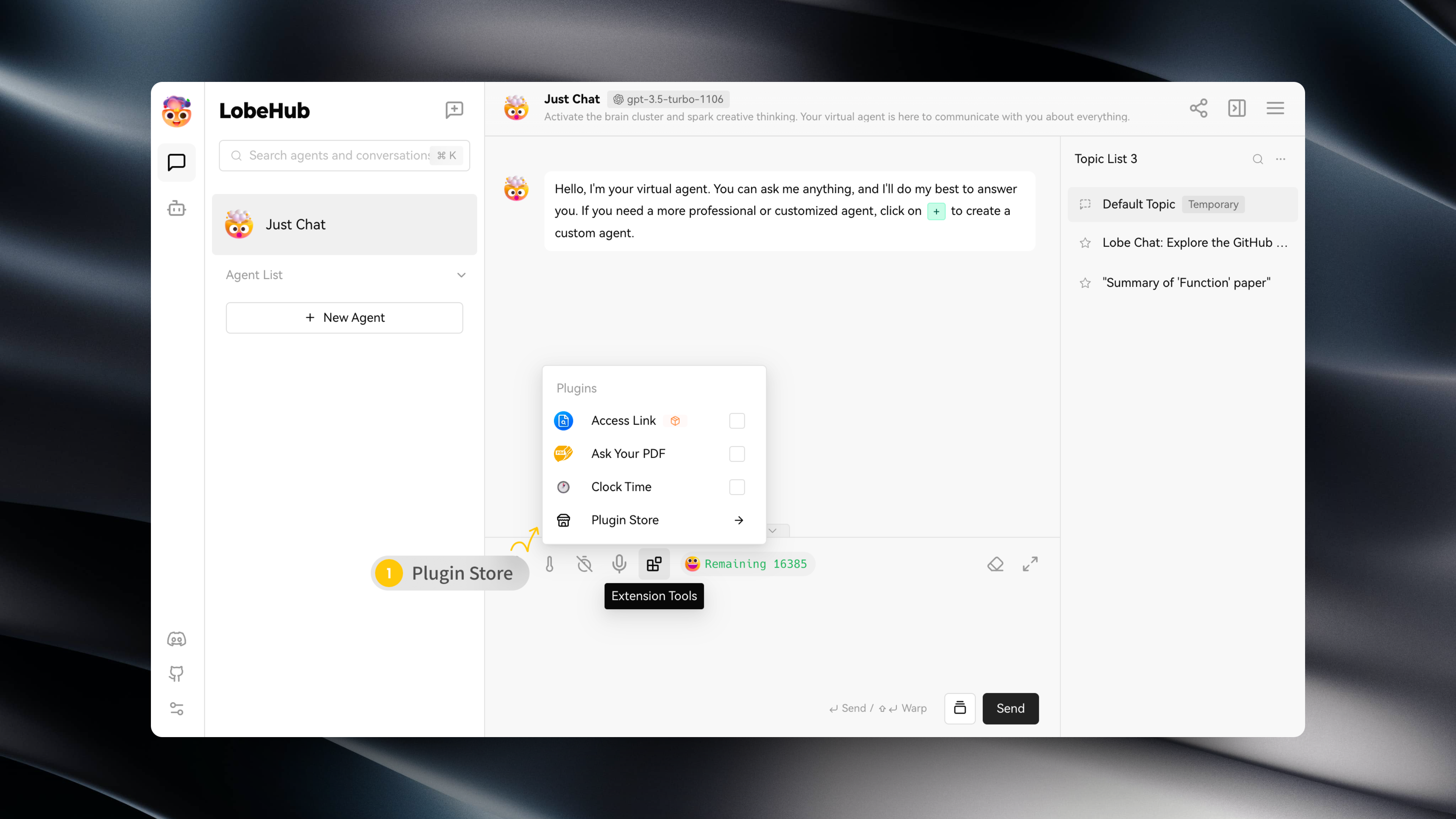
|
|
6
|
-
|
|
7
|
-
插件商店中会在 LobeChat 中可以直接安装并使用的插件。
|
|
8
|
-
|
|
9
|
-
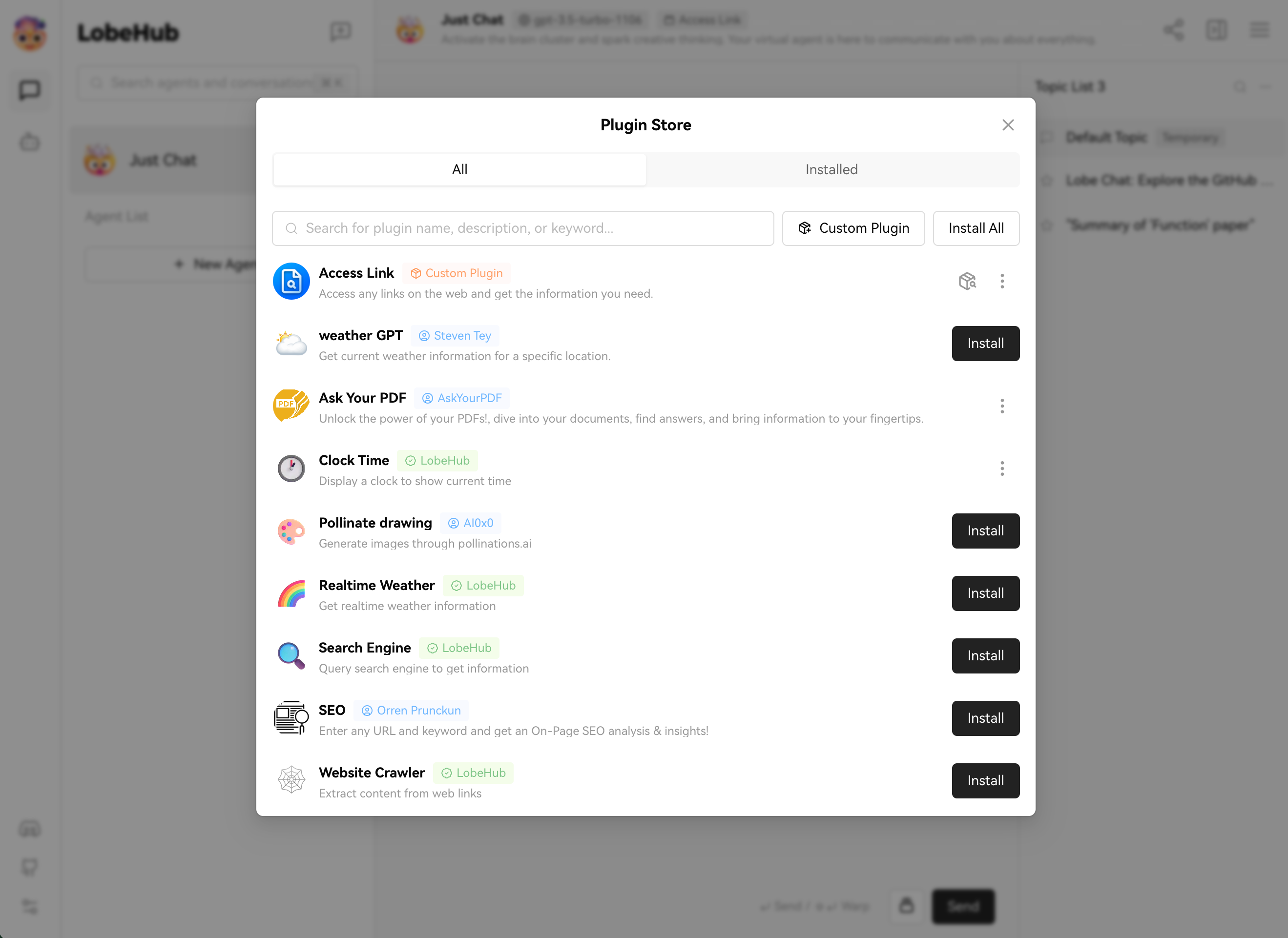
|