@lobehub/chat 0.129.1 → 0.129.3
This diff represents the content of publicly available package versions that have been released to one of the supported registries. The information contained in this diff is provided for informational purposes only and reflects changes between package versions as they appear in their respective public registries.
- package/CHANGELOG.md +50 -0
- package/README.md +154 -85
- package/README.zh-CN.md +155 -80
- package/contributing/Basic/Add-New-Authentication-Providers.md +108 -0
- package/contributing/Basic/Add-New-Authentication-Providers.zh-CN.md +109 -0
- package/docs/self-hosting/examples/ollama.mdx +21 -0
- package/docs/self-hosting/examples/ollama.zh-CN.mdx +21 -0
- package/docs/usage/features/agent-market.mdx +9 -3
- package/docs/usage/features/agent-market.zh-CN.mdx +7 -1
- package/docs/usage/features/local-llm.mdx +5 -1
- package/docs/usage/features/local-llm.zh-CN.mdx +5 -1
- package/docs/usage/features/mobile.mdx +5 -1
- package/docs/usage/features/mobile.zh-CN.mdx +5 -1
- package/docs/usage/features/multi-ai-providers.mdx +5 -1
- package/docs/usage/features/multi-ai-providers.zh-CN.mdx +5 -1
- package/docs/usage/features/plugin-system.mdx +8 -7
- package/docs/usage/features/plugin-system.zh-CN.mdx +8 -7
- package/docs/usage/features/pwa.mdx +5 -1
- package/docs/usage/features/pwa.zh-CN.mdx +5 -1
- package/docs/usage/features/text-to-image.mdx +7 -1
- package/docs/usage/features/text-to-image.zh-CN.mdx +7 -1
- package/docs/usage/features/theme.mdx +5 -1
- package/docs/usage/features/theme.zh-CN.mdx +5 -1
- package/docs/usage/features/tts.mdx +7 -1
- package/docs/usage/features/tts.zh-CN.mdx +7 -1
- package/docs/usage/features/vision.mdx +7 -1
- package/docs/usage/features/vision.zh-CN.mdx +7 -1
- package/docs/usage/plugins/basic-usage.mdx +3 -10
- package/docs/usage/plugins/basic-usage.zh-CN.mdx +1 -7
- package/docs/usage/plugins/custom-plugin.mdx +2 -9
- package/docs/usage/plugins/custom-plugin.zh-CN.mdx +1 -7
- package/docs/usage/providers/ollama.mdx +80 -0
- package/docs/usage/providers/ollama.zh-CN.mdx +80 -0
- package/package.json +4 -4
- package/src/app/api/auth/next-auth.ts +28 -0
- package/src/components/ModelIcon/index.tsx +2 -0
- package/src/components/ModelTag/ModelIcon.tsx +2 -0
- package/src/config/modelProviders/ollama.ts +22 -0
|
@@ -10,6 +10,7 @@ LobeChat 使用 [Auth.js v5](https://authjs.dev/) 作为外部身份验证服务
|
|
|
10
10
|
- [步骤 2: 更新服务端配置代码](#步骤-2-更新服务端配置代码)
|
|
11
11
|
- [步骤 3: 修改前端页面](#步骤-3-修改前端页面)
|
|
12
12
|
- [步骤 4: 配置环境变量](#步骤-4-配置环境变量)
|
|
13
|
+
- [步骤 5: 修改服务端用户信息处理逻辑](#步骤-5-修改服务端用户信息处理逻辑)
|
|
13
14
|
|
|
14
15
|
## 添加新的身份验证提供者
|
|
15
16
|
|
|
@@ -81,3 +82,111 @@ export const getAppConfig = () => {
|
|
|
81
82
|
### 步骤 4: 配置环境变量
|
|
82
83
|
|
|
83
84
|
在部署时新增 Okta 相关的环境变量 `OKTA_CLIENT_ID`、`OKTA_CLIENT_SECRET`、`OKTA_ISSUER`,并填入相应的值,即可使用
|
|
85
|
+
|
|
86
|
+
### 步骤 5: 修改服务端用户信息处理逻辑
|
|
87
|
+
|
|
88
|
+
#### 在前端获取用户信息
|
|
89
|
+
|
|
90
|
+
在前端页面中使用 `useOAuthSession()` 方法获取后端返回的用户信息 `user`:
|
|
91
|
+
|
|
92
|
+
```ts
|
|
93
|
+
import { useOAuthSession } from '@/hooks/useOAuthSession';
|
|
94
|
+
|
|
95
|
+
const { user, isOAuthLoggedIn } = useOAuthSession();
|
|
96
|
+
```
|
|
97
|
+
|
|
98
|
+
默认的 `user` 类型为 `User`,类型定义为:
|
|
99
|
+
|
|
100
|
+
```ts
|
|
101
|
+
interface User {
|
|
102
|
+
id?: string;
|
|
103
|
+
name?: string | null;
|
|
104
|
+
email?: string | null;
|
|
105
|
+
image?: string | null;
|
|
106
|
+
}
|
|
107
|
+
```
|
|
108
|
+
|
|
109
|
+
#### 修改用户 `id` 处理逻辑
|
|
110
|
+
|
|
111
|
+
`user.id` 用于标识用户。当引入新身份 OAuth 提供者后,您需要在 `src/app/api/auth/next-auth.ts` 中处理 OAuth 回调所携带的信息。您需要从中选取用户的 `id`。在此之前,我们需要了解 `Auth.js` 的数据处理顺序:
|
|
112
|
+
|
|
113
|
+
```txt
|
|
114
|
+
authorize --> jwt --> session
|
|
115
|
+
```
|
|
116
|
+
|
|
117
|
+
默认情况下,在 `jwt --> session` 过程中,`Auth.js` 会[自动根据登陆类型](https://authjs.dev/reference/core/types#provideraccountid)将用户 `id` 赋值到 `account.providerAccountId` 中。 如果您需要选取其他值作为用户 `id` ,您需要实现以下处理逻辑。
|
|
118
|
+
|
|
119
|
+
```ts
|
|
120
|
+
callbacks: {
|
|
121
|
+
async jwt({ token, account, profile }) {
|
|
122
|
+
if (account) {
|
|
123
|
+
// 您可以从 `account` 或 `profile` 中选取其他值
|
|
124
|
+
token.userId = account.providerAccountId;
|
|
125
|
+
}
|
|
126
|
+
return token;
|
|
127
|
+
},
|
|
128
|
+
},
|
|
129
|
+
```
|
|
130
|
+
|
|
131
|
+
#### 自定义 `session` 返回
|
|
132
|
+
|
|
133
|
+
如果您想在 `session` 中携带更多关于 `profile` 及 `account` 的信息,根据上面提到的 `Auth.js` 数据处理顺序,那必须先将该信息复制到 `token` 上。
|
|
134
|
+
示例:把用户头像 URL:`profile.picture` 添加到`session` 中:
|
|
135
|
+
|
|
136
|
+
```diff
|
|
137
|
+
callbacks: {
|
|
138
|
+
async jwt({ token, profile, account }) {
|
|
139
|
+
if (profile && account) {
|
|
140
|
+
token.userId = account.providerAccountId;
|
|
141
|
+
+ token.avatar = profile.picture;
|
|
142
|
+
}
|
|
143
|
+
return token;
|
|
144
|
+
},
|
|
145
|
+
async session({ session, token }) {
|
|
146
|
+
if (session.user) {
|
|
147
|
+
session.user.id = token.userId ?? session.user.id;
|
|
148
|
+
+ session.user.avatar = token.avatar;
|
|
149
|
+
}
|
|
150
|
+
return session;
|
|
151
|
+
},
|
|
152
|
+
},
|
|
153
|
+
```
|
|
154
|
+
|
|
155
|
+
然后补充对新增参数的类型定义:
|
|
156
|
+
|
|
157
|
+
```ts
|
|
158
|
+
declare module '@auth/core/jwt' {
|
|
159
|
+
interface JWT {
|
|
160
|
+
// ...
|
|
161
|
+
avatar?: string;
|
|
162
|
+
}
|
|
163
|
+
}
|
|
164
|
+
|
|
165
|
+
declare module 'next-auth' {
|
|
166
|
+
interface User {
|
|
167
|
+
avatar?: string;
|
|
168
|
+
}
|
|
169
|
+
}
|
|
170
|
+
```
|
|
171
|
+
|
|
172
|
+
> [更多`Auth.js`内置类型拓展](https://authjs.dev/getting-started/typescript#module-augmentation)
|
|
173
|
+
|
|
174
|
+
#### 在处理逻辑中区分多个身份验证提供者
|
|
175
|
+
|
|
176
|
+
如果您配置了多个身份验证提供者,并且他们的 `userId` 映射各不相同,可以在 `jwt` 方法中的 `account.provider` 参数获取身份提供者的默认 id ,从而进入不同的处理逻辑。
|
|
177
|
+
|
|
178
|
+
```ts
|
|
179
|
+
callbacks: {
|
|
180
|
+
async jwt({ token, profile, account }) {
|
|
181
|
+
if (profile && account) {
|
|
182
|
+
if (account.provider === 'Authing')
|
|
183
|
+
token.userId = account.providerAccountId ?? token.sub;
|
|
184
|
+
else if (acount.provider === 'Okta')
|
|
185
|
+
token.userId = profile.sub ?? token.sub;
|
|
186
|
+
else
|
|
187
|
+
// other providers
|
|
188
|
+
}
|
|
189
|
+
return token;
|
|
190
|
+
},
|
|
191
|
+
}
|
|
192
|
+
```
|
|
@@ -0,0 +1,21 @@
|
|
|
1
|
+
# Integrating with Ollama
|
|
2
|
+
|
|
3
|
+
Ollama is a powerful framework for running large language models (LLMs) locally, supporting various language models including Llama 2, Mistral, and more. Now, LobeChat supports integration with Ollama, meaning you can easily use the language models provided by Ollama to enhance your application within LobeChat.
|
|
4
|
+
|
|
5
|
+
This document will guide you on how to configure and deploy LobeChat to use Ollama:
|
|
6
|
+
|
|
7
|
+
## Running Ollama Locally
|
|
8
|
+
|
|
9
|
+
First, you need to install Ollama. For detailed steps on installing and configuring Ollama, please refer to the [Ollama Website](https://ollama.com).
|
|
10
|
+
|
|
11
|
+
## Running LobeChat Locally
|
|
12
|
+
|
|
13
|
+
Assuming you have already started the Ollama service locally on port `11434`. Run the following Docker command to start LobeChat locally:
|
|
14
|
+
|
|
15
|
+
```bash
|
|
16
|
+
docker run -d -p 3210:3210 -e OLLAMA_PROXY_URL=http://host.docker.internal:11434/v1 lobehub/lobe-chat
|
|
17
|
+
```
|
|
18
|
+
|
|
19
|
+
Now, you can use LobeChat to converse with the local LLM.
|
|
20
|
+
|
|
21
|
+
For more information on using Ollama in LobeChat, please refer to [Ollama Usage](/en/usage/providers/ollama).
|
|
@@ -0,0 +1,21 @@
|
|
|
1
|
+
# 与 Ollama 集成
|
|
2
|
+
|
|
3
|
+
Ollama 是一款强大的本地运行大型语言模型(LLM)的框架,支持多种语言模型,包括 Llama 2, Mistral 等。现在,LobeChat 已经支持与 Ollama 的集成,这意味着你可以在 LobeChat 中轻松使用 Ollama 提供的语言模型来增强你的应用。
|
|
4
|
+
|
|
5
|
+
本文档将指导你如何配置与部署 LobeChat 来使用 Ollama:
|
|
6
|
+
|
|
7
|
+
## 本地启动 Ollama
|
|
8
|
+
|
|
9
|
+
首先,你需要安装 Ollama,安装与配置 Ollama 的详细步骤可以参考 [Ollama 官方站点](https://ollama.com)。
|
|
10
|
+
|
|
11
|
+
## 本地运行 LobeChat
|
|
12
|
+
|
|
13
|
+
假设你已经在本地 `11434` 端口启动了 Ollama 服务。运行以下 Docker 命令行,在本地启动 LobeChat:
|
|
14
|
+
|
|
15
|
+
```bash
|
|
16
|
+
docker run -d -p 3210:3210 -e OLLAMA_PROXY_URL=http://host.docker.internal:11434/v1 lobehub/lobe-chat
|
|
17
|
+
```
|
|
18
|
+
|
|
19
|
+
接下来,你就可以使用 LobeChat 与本地 LLM 对话了。
|
|
20
|
+
|
|
21
|
+
关于在 LobeChat 中使用 Ollama 的更多信息,请查阅 [Ollama 使用](/zh/usage/providers/ollama)。
|
|
@@ -1,8 +1,14 @@
|
|
|
1
1
|
import { Callout } from 'nextra/components';
|
|
2
2
|
|
|
3
|
-
#
|
|
4
|
-
|
|
5
|
-
|
|
3
|
+
# Agent Market
|
|
4
|
+
|
|
5
|
+
<Image
|
|
6
|
+
alt={'Agent Market'}
|
|
7
|
+
src={
|
|
8
|
+
'https://github-production-user-asset-6210df.s3.amazonaws.com/17870709/268670869-f1ffbf66-42b6-42cf-a937-9ce1f8328514.png'
|
|
9
|
+
}
|
|
10
|
+
cover
|
|
11
|
+
/>
|
|
6
12
|
|
|
7
13
|
In LobeChat's Assistant Market, creators can discover a vibrant and innovative community that brings together numerous carefully designed assistants. These assistants not only play a crucial role in work scenarios but also provide great convenience in the learning process. Our market is not just a showcase platform, but also a collaborative space. Here, everyone can contribute their wisdom and share their personally developed assistants.
|
|
8
14
|
|
|
@@ -2,7 +2,13 @@ import { Callout } from 'nextra/components';
|
|
|
2
2
|
|
|
3
3
|
# 助手市场
|
|
4
4
|
|
|
5
|
-
|
|
5
|
+
<Image
|
|
6
|
+
alt={'助手市场'}
|
|
7
|
+
src={
|
|
8
|
+
'https://github-production-user-asset-6210df.s3.amazonaws.com/17870709/268670869-f1ffbf66-42b6-42cf-a937-9ce1f8328514.png'
|
|
9
|
+
}
|
|
10
|
+
cover
|
|
11
|
+
/>
|
|
6
12
|
|
|
7
13
|
在 LobeChat 的助手市场中,创作者们可以发现一个充满活力和创新的社区,它汇聚了众多精心设计的助手,这些助手不仅在工作场景中发挥着重要作用,也在学习过程中提供了极大的便利。我们的市场不仅是一个展示平台,更是一个协作的空间。在这里,每个人都可以贡献自己的智慧,分享个人开发的助手。
|
|
8
14
|
|
|
@@ -2,7 +2,11 @@ import { Callout } from 'nextra/components';
|
|
|
2
2
|
|
|
3
3
|
# Local Large Language Model (LLM) Support
|
|
4
4
|
|
|
5
|
-
|
|
5
|
+
<Image
|
|
6
|
+
alt={'Ollama Local Large Language Model (LLM) Support'}
|
|
7
|
+
src={'https://github.com/lobehub/lobe-chat/assets/28616219/ca9a21bc-ea6c-4c90-bf4a-fa53b4fb2b5c'}
|
|
8
|
+
cover
|
|
9
|
+
/>
|
|
6
10
|
|
|
7
11
|
<Callout>Available in >=0.127.0, currently only supports Docker deployment</Callout>
|
|
8
12
|
|
|
@@ -2,7 +2,11 @@ import { Callout } from 'nextra/components';
|
|
|
2
2
|
|
|
3
3
|
# 支持本地大语言模型(LLM)
|
|
4
4
|
|
|
5
|
-
|
|
5
|
+
<Image
|
|
6
|
+
alt={'Ollama 支持本地大语言模型'}
|
|
7
|
+
src={'https://github.com/lobehub/lobe-chat/assets/28616219/ca9a21bc-ea6c-4c90-bf4a-fa53b4fb2b5c'}
|
|
8
|
+
cover
|
|
9
|
+
/>
|
|
6
10
|
|
|
7
11
|
<Callout>在 >=v0.127.0 版本中可用,目前仅支持 Docker 部署</Callout>
|
|
8
12
|
|
|
@@ -1,6 +1,10 @@
|
|
|
1
1
|
# Mobile Device Adaptation
|
|
2
2
|
|
|
3
|
-
|
|
3
|
+
<Image
|
|
4
|
+
alt={'Mobile Device Adaptation'}
|
|
5
|
+
src={'https://github.com/lobehub/lobe-chat/assets/28616219/11110732-8d5a-4049-b556-c2561cb66182'}
|
|
6
|
+
cover
|
|
7
|
+
/>
|
|
4
8
|
|
|
5
9
|
LobeChat has undergone a series of optimized designs for mobile devices to enhance the user's mobile experience.
|
|
6
10
|
|
|
@@ -1,6 +1,10 @@
|
|
|
1
1
|
# 移动设备适配
|
|
2
2
|
|
|
3
|
-
|
|
3
|
+
<Image
|
|
4
|
+
alt={'移动端设备适配'}
|
|
5
|
+
src={'https://github.com/lobehub/lobe-chat/assets/28616219/11110732-8d5a-4049-b556-c2561cb66182'}
|
|
6
|
+
cover
|
|
7
|
+
/>
|
|
4
8
|
|
|
5
9
|
LobeChat 针对移动设备进行了一系列的优化设计,以提升用户的移动体验。
|
|
6
10
|
|
|
@@ -2,7 +2,11 @@ import { Callout } from 'nextra/components';
|
|
|
2
2
|
|
|
3
3
|
# Multi-Model Service Provider Support
|
|
4
4
|
|
|
5
|
-
|
|
5
|
+
<Image
|
|
6
|
+
alt={'Multi-Model Service Provider Support'}
|
|
7
|
+
src={'https://github.com/lobehub/lobe-chat/assets/28616219/b164bc54-8ba2-4c1e-b2f2-f4d7f7e7a551'}
|
|
8
|
+
cover
|
|
9
|
+
/>
|
|
6
10
|
|
|
7
11
|
<Callout>Available in version 0.123.0 and later</Callout>
|
|
8
12
|
|
|
@@ -2,7 +2,11 @@ import { Callout } from 'nextra/components';
|
|
|
2
2
|
|
|
3
3
|
# 多模型服务商支持
|
|
4
4
|
|
|
5
|
-
|
|
5
|
+
<Image
|
|
6
|
+
alt={'多模型服务商支持'}
|
|
7
|
+
src={'https://github.com/lobehub/lobe-chat/assets/28616219/b164bc54-8ba2-4c1e-b2f2-f4d7f7e7a551'}
|
|
8
|
+
cover
|
|
9
|
+
/>
|
|
6
10
|
|
|
7
11
|
<Callout>在 0.123.0 及以后版本中可用</Callout>
|
|
8
12
|
|
|
@@ -2,16 +2,17 @@ import { Callout, Steps } from 'nextra/components';
|
|
|
2
2
|
|
|
3
3
|
# Plugin System
|
|
4
4
|
|
|
5
|
-
|
|
5
|
+
<Image
|
|
6
|
+
alt={'Plugin System'}
|
|
7
|
+
src={
|
|
8
|
+
'https://github-production-user-asset-6210df.s3.amazonaws.com/17870709/268670883-33c43a5c-a512-467e-855c-fa299548cce5.png'
|
|
9
|
+
}
|
|
10
|
+
cover
|
|
11
|
+
/>
|
|
6
12
|
|
|
7
13
|
The plugin ecosystem of LobeChat is an important extension of its core functionality, greatly enhancing the practicality and flexibility of the LobeChat assistant.
|
|
8
14
|
|
|
9
|
-
<
|
|
10
|
-
controls
|
|
11
|
-
src="https://github.com/lobehub/lobe-chat/assets/28616219/f29475a3-f346-4196-a435-41a6373ab9e2"
|
|
12
|
-
muted
|
|
13
|
-
loop
|
|
14
|
-
></video>
|
|
15
|
+
<Video src="https://github.com/lobehub/lobe-chat/assets/28616219/f29475a3-f346-4196-a435-41a6373ab9e2" />
|
|
15
16
|
|
|
16
17
|
By utilizing plugins, LobeChat assistants can obtain and process real-time information, such as searching for web information and providing users with instant and relevant news.
|
|
17
18
|
|
|
@@ -2,16 +2,17 @@ import { Callout, Steps } from 'nextra/components';
|
|
|
2
2
|
|
|
3
3
|
# 插件系统
|
|
4
4
|
|
|
5
|
-
|
|
5
|
+
<Image
|
|
6
|
+
alt={'插件系统'}
|
|
7
|
+
src={
|
|
8
|
+
'https://github-production-user-asset-6210df.s3.amazonaws.com/17870709/268670883-33c43a5c-a512-467e-855c-fa299548cce5.png'
|
|
9
|
+
}
|
|
10
|
+
cover
|
|
11
|
+
/>
|
|
6
12
|
|
|
7
13
|
LobeChat 的插件生态系统是其核心功能的重要扩展,它极大地增强了 LobeChat 助手的实用性和灵活性。
|
|
8
14
|
|
|
9
|
-
<
|
|
10
|
-
controls
|
|
11
|
-
src="https://github.com/lobehub/lobe-chat/assets/28616219/f29475a3-f346-4196-a435-41a6373ab9e2"
|
|
12
|
-
muted
|
|
13
|
-
loop
|
|
14
|
-
></video>
|
|
15
|
+
<Video src="https://github.com/lobehub/lobe-chat/assets/28616219/f29475a3-f346-4196-a435-41a6373ab9e2" />
|
|
15
16
|
|
|
16
17
|
通过利用插件,LobeChat 的助手们能够实现实时信息的获取和处理,例如搜索网络信息,为用户提供即时且相关的资讯。
|
|
17
18
|
|
|
@@ -2,7 +2,11 @@ import { Steps } from 'nextra/components';
|
|
|
2
2
|
|
|
3
3
|
# Progressive Web App (PWA)
|
|
4
4
|
|
|
5
|
-
|
|
5
|
+
<Image
|
|
6
|
+
alt={'Progressive Web App (PWA)'}
|
|
7
|
+
src={'https://github.com/lobehub/lobe-chat/assets/28616219/ecc8364a-cfc4-4a3d-b6fd-68b2d9bc5f0d'}
|
|
8
|
+
cover
|
|
9
|
+
/>
|
|
6
10
|
|
|
7
11
|
We understand the importance of providing a seamless experience for users in today's multi-device environment. To achieve this, we have adopted Progressive Web App [PWA](https://support.google.com/chrome/answer/9658361) technology, which is a modern web technology that elevates web applications to a near-native app experience. Through PWA, LobeChat is able to provide a highly optimized user experience on both desktop and mobile devices, while maintaining lightweight and high performance characteristics. Visually and perceptually, we have also carefully designed it to ensure that its interface is indistinguishable from a native app, providing smooth animations, responsive layouts, and adaptation to different screen resolutions of various devices.
|
|
8
12
|
|
|
@@ -2,7 +2,11 @@ import { Steps } from 'nextra/components';
|
|
|
2
2
|
|
|
3
3
|
# 渐进式 Web 应用(PWA)
|
|
4
4
|
|
|
5
|
-
|
|
5
|
+
<Image
|
|
6
|
+
alt={'渐进式 Web 应用(PWA)'}
|
|
7
|
+
src={'https://github.com/lobehub/lobe-chat/assets/28616219/ecc8364a-cfc4-4a3d-b6fd-68b2d9bc5f0d'}
|
|
8
|
+
cover
|
|
9
|
+
/>
|
|
6
10
|
|
|
7
11
|
我们利深知在当今多设备环境下为用户提供无缝体验的重要性。为此,我们采用了渐进式 Web 应用 [PWA](https://support.google.com/chrome/answer/9658361) 技术,这是一种能够将网页应用提升至接近原生应用体验的现代 Web 技术。通过 PWA,LobeChat 能够在桌面和移动设备上提供高度优化的用户体验,同时保持轻量级和高性能的特点。在视觉和感觉上,我们也经过精心设计,以确保它的界面与原生应用无差别,提供流畅的动画、响应式布局和适配不同设备的屏幕分辨率。
|
|
8
12
|
|
|
@@ -1,5 +1,11 @@
|
|
|
1
1
|
# Text to Image Generation
|
|
2
2
|
|
|
3
|
-
|
|
3
|
+
<Image
|
|
4
|
+
alt={'Text to Image Generation'}
|
|
5
|
+
src={
|
|
6
|
+
'https://github-production-user-asset-6210df.s3.amazonaws.com/17870709/297746445-0ff762b9-aa08-4337-afb7-12f932b6efbb.png'
|
|
7
|
+
}
|
|
8
|
+
cover
|
|
9
|
+
/>
|
|
4
10
|
|
|
5
11
|
Supporting the latest text-to-image generation technology, LobeChat now enables users to directly utilize the Text to Image tool during conversations with the assistant. By harnessing the capabilities of AI tools such as [DALL-E 3](https://openai.com/dall-e-3), [MidJourney](https://www.midjourney.com/), and [Pollinations](https://pollinations.ai/), assistants can now transform your ideas into images. This allows for a more private and immersive creative process.
|
|
@@ -1,5 +1,11 @@
|
|
|
1
1
|
# Text to Image 文生图
|
|
2
2
|
|
|
3
|
-
|
|
3
|
+
<Image
|
|
4
|
+
alt={'Text to Image 文生图'}
|
|
5
|
+
src={
|
|
6
|
+
'https://github-production-user-asset-6210df.s3.amazonaws.com/17870709/297746445-0ff762b9-aa08-4337-afb7-12f932b6efbb.png'
|
|
7
|
+
}
|
|
8
|
+
cover
|
|
9
|
+
/>
|
|
4
10
|
|
|
5
11
|
支持最新的文本到图片生成技术,LobeChat 现在能够让用户在与助手对话中直接调用文成图工具进行创作。通过利用 [`DALL-E 3`](https://openai.com/dall-e-3)、[`MidJourney`](https://www.midjourney.com/) 和 [`Pollinations`](https://pollinations.ai/) 等 AI 工具的能力, 助手们现在可以将你的想法转化为图像。同时可以更私密和沉浸式的完成你的创造过程。
|
|
@@ -2,7 +2,11 @@ import { Callout } from 'nextra/components';
|
|
|
2
2
|
|
|
3
3
|
# Custom Themes
|
|
4
4
|
|
|
5
|
-
|
|
5
|
+
<Image
|
|
6
|
+
alt={'Custom Themes'}
|
|
7
|
+
src={'https://github.com/lobehub/lobe-chat/assets/28616219/9eca103c-9335-4a4c-8192-271a0b857b26'}
|
|
8
|
+
cover
|
|
9
|
+
/>
|
|
6
10
|
|
|
7
11
|
LobeChat places a strong emphasis on personalized user experiences in its interface design, and thus introduces flexible and diverse theme modes, including a light mode for daytime and a dark mode for nighttime.
|
|
8
12
|
|
|
@@ -2,7 +2,11 @@ import { Callout } from 'nextra/components';
|
|
|
2
2
|
|
|
3
3
|
# 自定义主题
|
|
4
4
|
|
|
5
|
-
|
|
5
|
+
<Image
|
|
6
|
+
alt={'自定义主题'}
|
|
7
|
+
src={'https://github.com/lobehub/lobe-chat/assets/28616219/9eca103c-9335-4a4c-8192-271a0b857b26'}
|
|
8
|
+
cover
|
|
9
|
+
/>
|
|
6
10
|
|
|
7
11
|
LobeChat 在界面设计上十分考虑用户的个性化体验,因此引入了灵活多变的主题模式,其中包括日间的亮色模式和夜间的深色模式。
|
|
8
12
|
|
|
@@ -2,7 +2,13 @@ import { Callout } from 'nextra/components';
|
|
|
2
2
|
|
|
3
3
|
# TTS & STT Voice Conversation
|
|
4
4
|
|
|
5
|
-
|
|
5
|
+
<Image
|
|
6
|
+
alt={'TTS & STT Voice Conversation'}
|
|
7
|
+
src={
|
|
8
|
+
'https://github-production-user-asset-6210df.s3.amazonaws.com/17870709/284072124-c9853d8d-f1b5-44a8-a305-45ebc0f6d19a.png'
|
|
9
|
+
}
|
|
10
|
+
cover
|
|
11
|
+
/>
|
|
6
12
|
|
|
7
13
|
LobeChat supports Text-to-Speech (TTS) and Speech-to-Text (STT) technologies. Our application can convert text information into clear voice output, allowing users to interact with our conversational agents as if they were talking to a real person. Users can choose from a variety of voices and pair the appropriate audio with the assistant. Additionally, for users who prefer auditory learning or need to obtain information while busy, TTS provides an excellent solution.
|
|
8
14
|
|
|
@@ -2,7 +2,13 @@ import { Callout } from 'nextra/components';
|
|
|
2
2
|
|
|
3
3
|
# TTS & STT 语音会话
|
|
4
4
|
|
|
5
|
-
|
|
5
|
+
<Image
|
|
6
|
+
alt={'TTS & STT 语音会话'}
|
|
7
|
+
src={
|
|
8
|
+
'https://github-production-user-asset-6210df.s3.amazonaws.com/17870709/284072124-c9853d8d-f1b5-44a8-a305-45ebc0f6d19a.png'
|
|
9
|
+
}
|
|
10
|
+
cover
|
|
11
|
+
/>
|
|
6
12
|
|
|
7
13
|
LobeChat 支持文字转语音(Text-to-Speech,TTS)和语音转文字(Speech-to-Text,STT)技术,我们的应用能够将文本信息转化为清晰的语音输出,用户可以像与真人交谈一样与我们的对话代理进行交流。用户可以从多种声音中选择,给助手搭配合适的音源。 同时,对于那些倾向于听觉学习或者想要在忙碌中获取信息的用户来说,TTS 提供了一个极佳的解决方案。
|
|
8
14
|
|
|
@@ -1,6 +1,12 @@
|
|
|
1
1
|
# Model Visual Recognition
|
|
2
2
|
|
|
3
|
-
|
|
3
|
+
<Image
|
|
4
|
+
alt={'Model Visual Recognition'}
|
|
5
|
+
src={
|
|
6
|
+
'https://github-production-user-asset-6210df.s3.amazonaws.com/17870709/284072129-382bdf30-e3d6-4411-b5a0-249710b8ba08.png'
|
|
7
|
+
}
|
|
8
|
+
cover
|
|
9
|
+
/>
|
|
4
10
|
|
|
5
11
|
LobeChat now supports large language models with visual recognition capabilities such as OpenAI's [`gpt-4-vision`](https://platform.openai.com/docs/guides/vision), Google Gemini Pro vision, and Zhipu GLM-4 Vision, enabling LobeChat to have multimodal interaction capabilities. Users can easily upload or drag and drop images into the chat box, and the assistant will be able to recognize the content of the images and engage in intelligent conversations based on them, creating more intelligent and diverse chat scenarios.
|
|
6
12
|
|
|
@@ -1,6 +1,12 @@
|
|
|
1
1
|
# 模型视觉识别
|
|
2
2
|
|
|
3
|
-
|
|
3
|
+
<Image
|
|
4
|
+
alt={'模型视觉识别'}
|
|
5
|
+
src={
|
|
6
|
+
'https://github-production-user-asset-6210df.s3.amazonaws.com/17870709/284072129-382bdf30-e3d6-4411-b5a0-249710b8ba08.png'
|
|
7
|
+
}
|
|
8
|
+
cover
|
|
9
|
+
/>
|
|
4
10
|
|
|
5
11
|
LobeChat 已经支持 OpenAI 的 [`gpt-4-vision`](https://platform.openai.com/docs/guides/vision) 、Google Gemini Pro vision、智谱 GLM-4 Vision 等具有视觉识别能力的大语言模型,这使得 LobeChat 具备了多模态交互的能力。用户可以轻松上传图片或者拖拽图片到对话框中,助手将能够识别图片内容,并在此基础上进行智能对话,构建更智能、更多元化的聊天场景。
|
|
6
12
|
|
|
@@ -4,19 +4,13 @@ The plugin system is a key element in expanding the capabilities of assistants i
|
|
|
4
4
|
|
|
5
5
|
Watch the following video to quickly get started with using LobeChat plugins:
|
|
6
6
|
|
|
7
|
-
<
|
|
8
|
-
muted
|
|
9
|
-
controls
|
|
10
|
-
loop
|
|
11
|
-
autoPlay
|
|
12
|
-
src="https://github.com/lobehub/lobe-chat/assets/28616219/94d4c312-1699-4e24-8782-138883678c9e">
|
|
13
|
-
</video>
|
|
7
|
+
<Video src="https://github.com/lobehub/lobe-chat/assets/28616219/94d4c312-1699-4e24-8782-138883678c9e" />
|
|
14
8
|
|
|
15
9
|
## Plugin Store
|
|
16
10
|
|
|
17
11
|
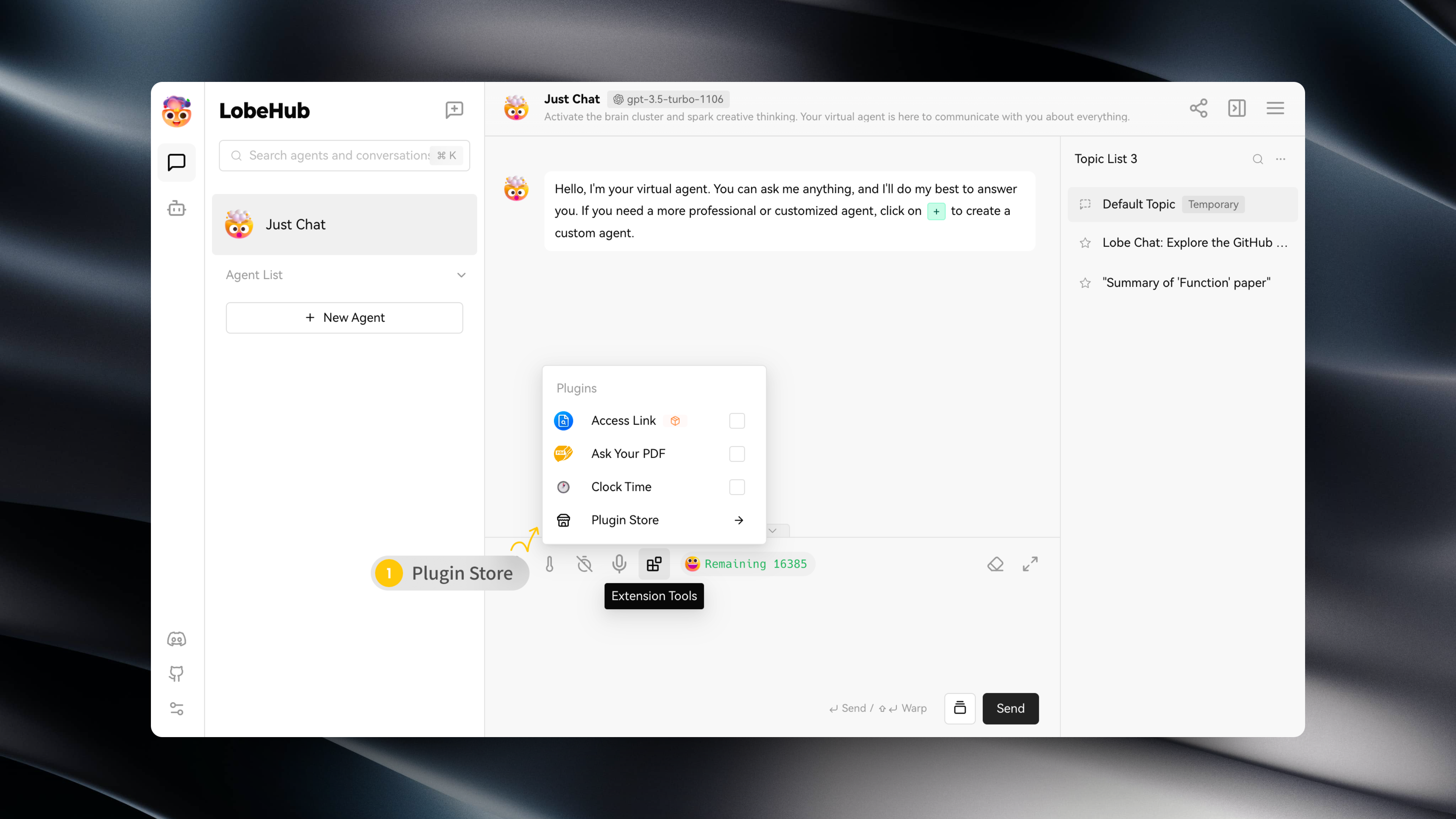
You can access the Plugin Store by navigating to "Extension Tools" -> "Plugin Store" in the session toolbar.
|
|
18
12
|
|
|
19
|
-
|
|
20
14
|
|
|
21
15
|
The Plugin Store allows you to directly install and use plugins within LobeChat.
|
|
22
16
|
|
|
@@ -26,7 +20,7 @@ The Plugin Store allows you to directly install and use plugins within LobeChat.
|
|
|
26
20
|
|
|
27
21
|
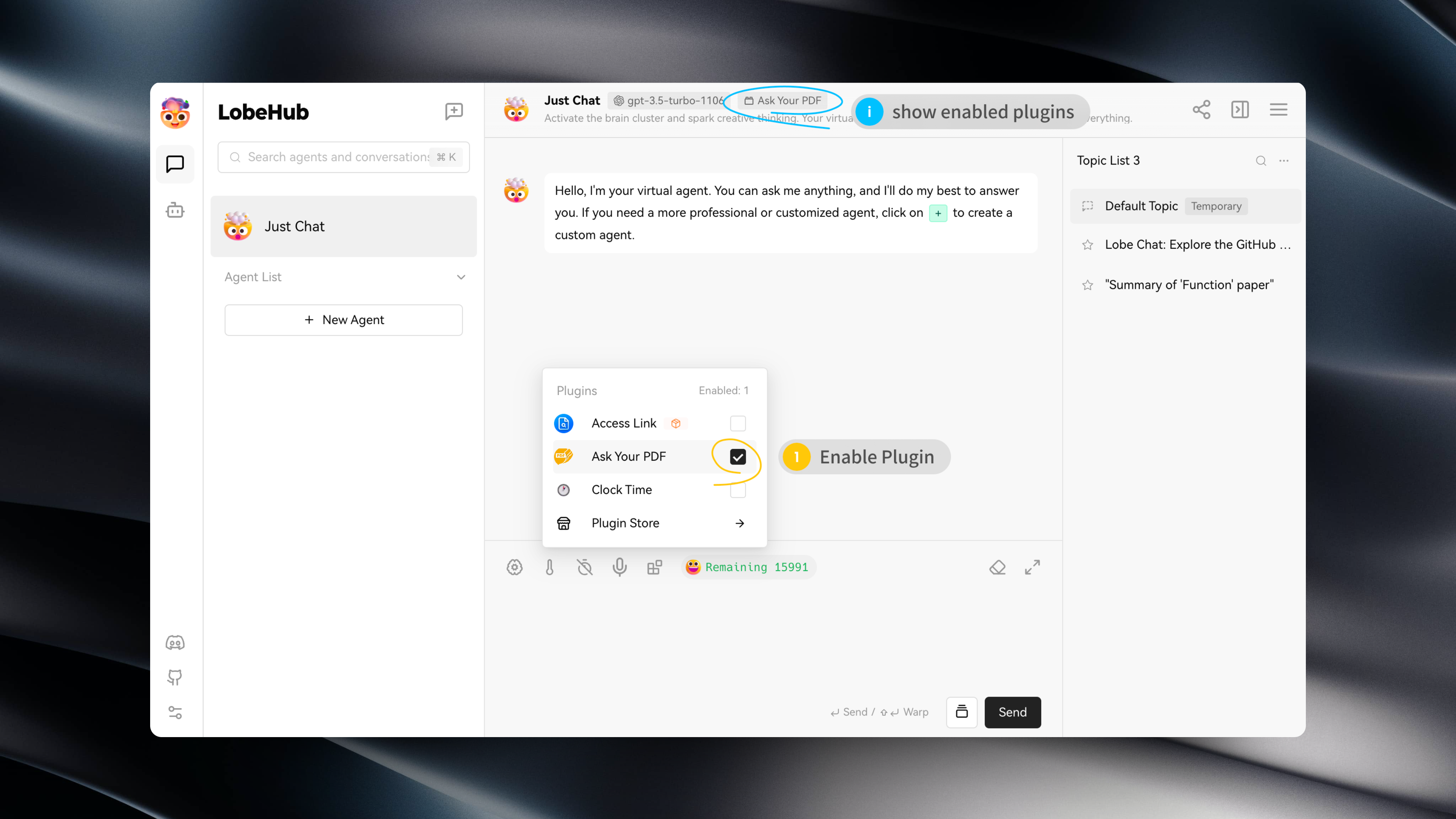
After installing a plugin, simply enable it under the current assistant to use it.
|
|
28
22
|
|
|
29
|
-
|
|
30
24
|
|
|
31
25
|
## Plugin Configuration
|
|
32
26
|
|
|
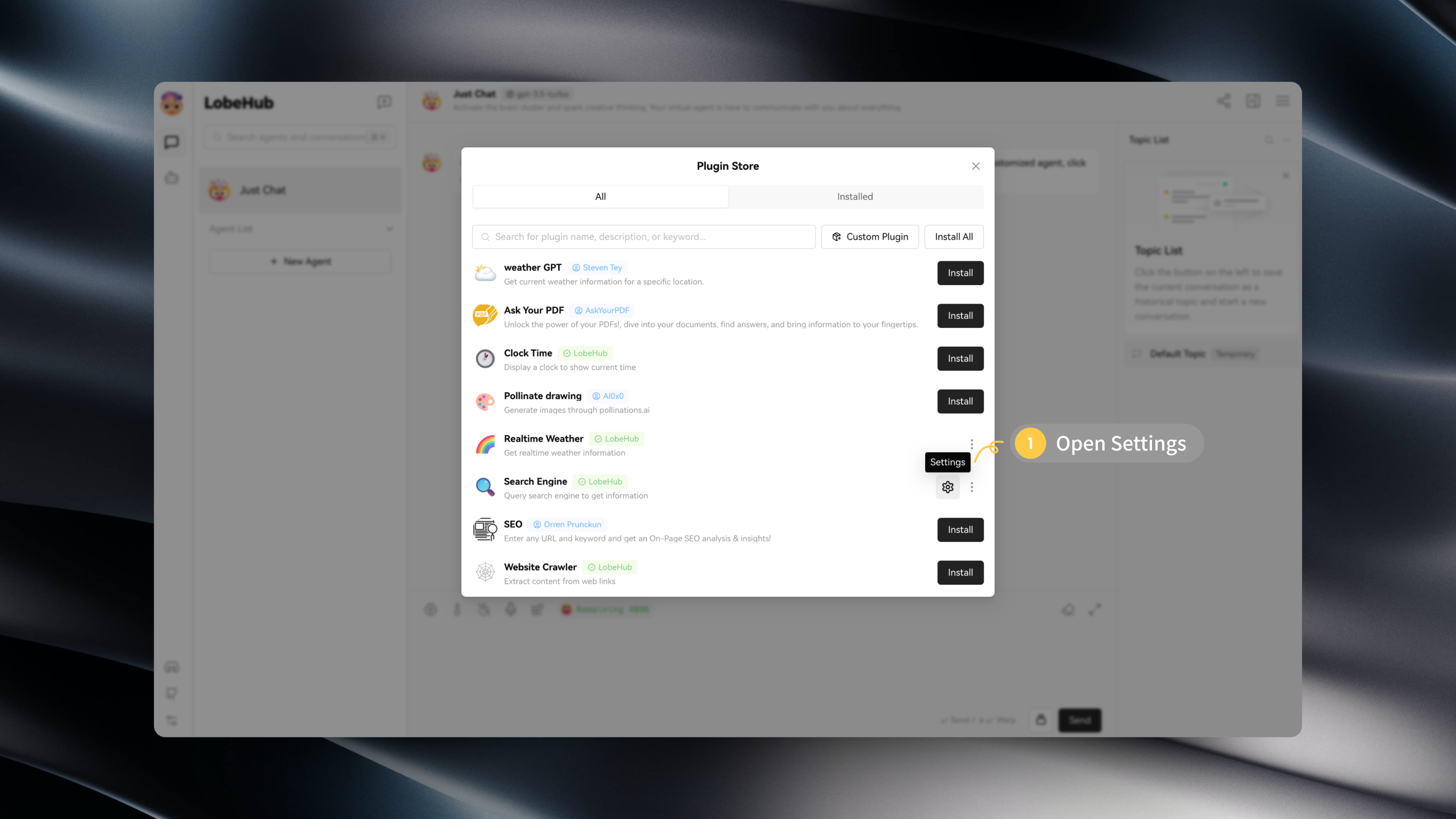
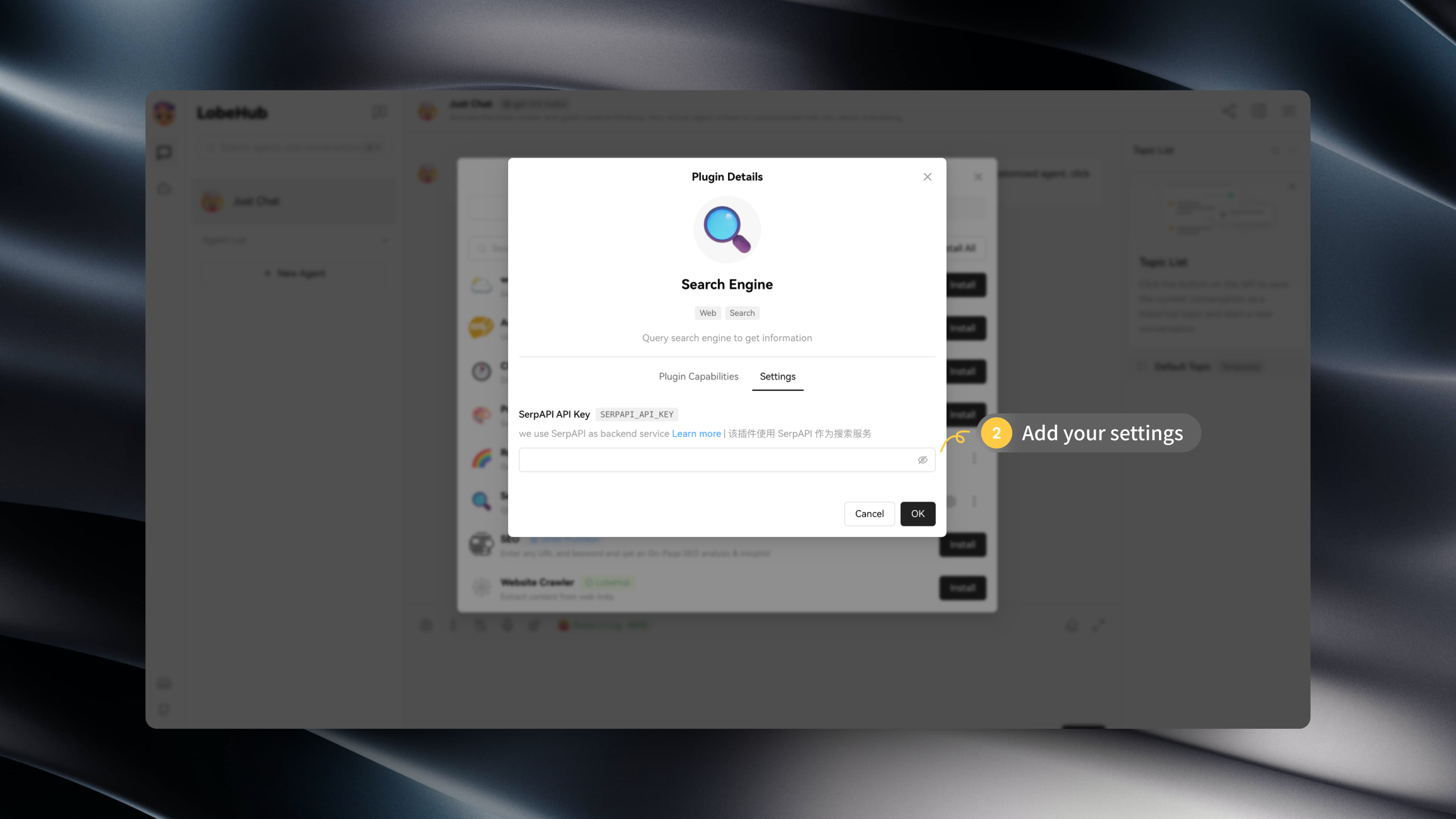
@@ -37,4 +31,3 @@ After installing a plugin, you can click on "Settings" to enter the plugin's set
|
|
|
37
31
|
|
|
38
32
|
|
|
39
33
|
|
|
40
|
-
|
|
@@ -4,13 +4,7 @@
|
|
|
4
4
|
|
|
5
5
|
查看以下视频,快速上手使用 LobeChat 插件:
|
|
6
6
|
|
|
7
|
-
<
|
|
8
|
-
muted
|
|
9
|
-
controls
|
|
10
|
-
loop
|
|
11
|
-
autoPlay
|
|
12
|
-
src="https://github.com/lobehub/lobe-chat/assets/28616219/94d4c312-1699-4e24-8782-138883678c9e"
|
|
13
|
-
></video>
|
|
7
|
+
<Video src="https://github.com/lobehub/lobe-chat/assets/28616219/94d4c312-1699-4e24-8782-138883678c9e" />
|
|
14
8
|
|
|
15
9
|
## 插件商店
|
|
16
10
|
|
|
@@ -4,13 +4,7 @@
|
|
|
4
4
|
|
|
5
5
|
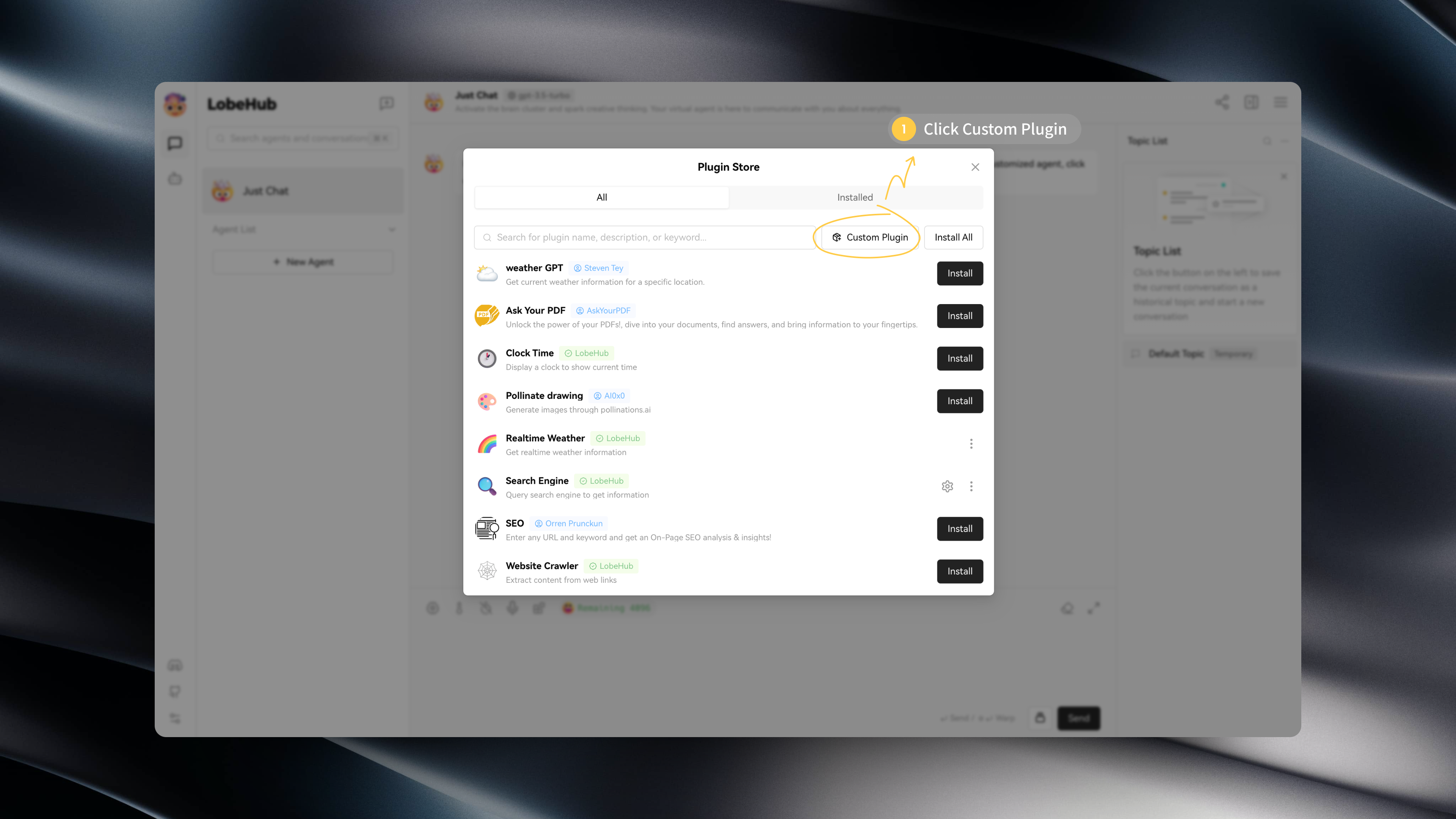
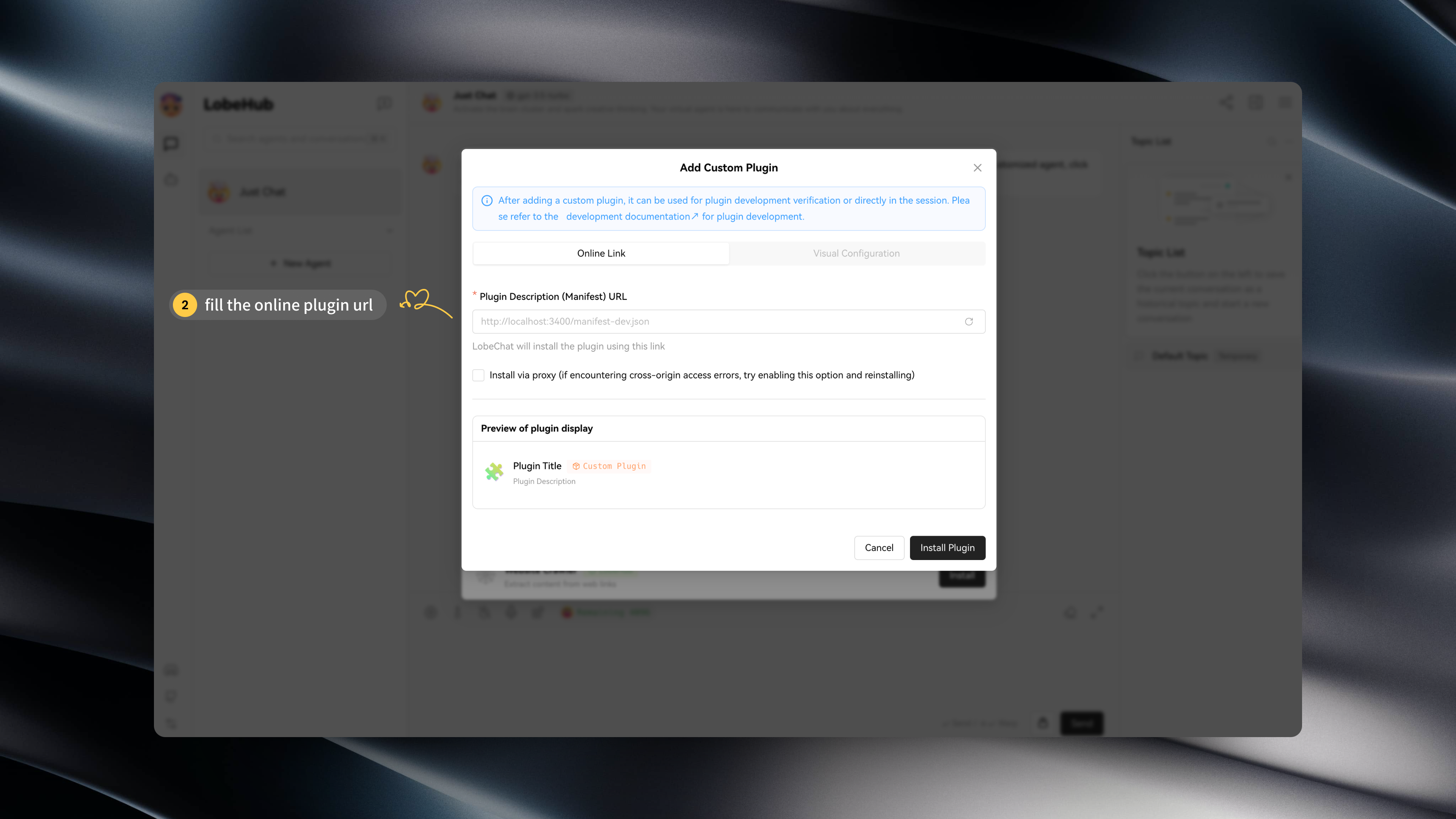
If you wish to install a plugin that is not available in the LobeChat plugin store, such as a custom-developed LobeChat plugin, you can click on "Custom Plugins" to install it:
|
|
6
6
|
|
|
7
|
-
<
|
|
8
|
-
muted
|
|
9
|
-
controls
|
|
10
|
-
loop
|
|
11
|
-
autoPlay
|
|
12
|
-
src="https://github.com/lobehub/lobe-chat/assets/28616219/034a328c-8465-4499-8f93-fdcdb03343cd"
|
|
13
|
-
></video>
|
|
7
|
+
<Video src="https://github.com/lobehub/lobe-chat/assets/28616219/034a328c-8465-4499-8f93-fdcdb03343cd" />
|
|
14
8
|
|
|
15
9
|
In addition, LobeChat's plugin mechanism is compatible with ChatGPT plugins, so you can easily install corresponding ChatGPT plugins.
|
|
16
10
|
|
|
@@ -19,8 +13,7 @@ If you want to try installing custom plugins on your own, you can use the follow
|
|
|
19
13
|
- `Custom Lobe Plugin` Mock Credit Card: https://lobe-plugin-mock-credit-card.vercel.app/manifest.json
|
|
20
14
|
- `ChatGPT Plugin` Access Links: https://www.accesslinks.ai/.well-known/ai-plugin.json
|
|
21
15
|
|
|
22
|
-
|
|
23
|
-
|
|
16
|
+
 
|
|
24
17
|
|
|
25
18
|
## Developing Custom Plugins
|
|
26
19
|
|
|
@@ -4,13 +4,7 @@
|
|
|
4
4
|
|
|
5
5
|
如果你希望安装一个不在 LobeChat 插件商店中的插件,例如自己开发的 LobeChat,你可以点击「自定义插件」进行安装:
|
|
6
6
|
|
|
7
|
-
<
|
|
8
|
-
muted
|
|
9
|
-
controls
|
|
10
|
-
loop
|
|
11
|
-
autoPlay
|
|
12
|
-
src="https://github.com/lobehub/lobe-chat/assets/28616219/034a328c-8465-4499-8f93-fdcdb03343cd"
|
|
13
|
-
></video>
|
|
7
|
+
<Video src="https://github.com/lobehub/lobe-chat/assets/28616219/034a328c-8465-4499-8f93-fdcdb03343cd" />
|
|
14
8
|
|
|
15
9
|
此外,LobeChat 的插件机制兼容了 ChatGPT 的插件,因此你可以一键安装相应的 ChatGPT 插件。
|
|
16
10
|
|