@lobehub/chat 0.129.0 → 0.129.2
This diff represents the content of publicly available package versions that have been released to one of the supported registries. The information contained in this diff is provided for informational purposes only and reflects changes between package versions as they appear in their respective public registries.
- package/CHANGELOG.md +42 -0
- package/contributing/Basic/Add-New-Authentication-Providers.md +108 -0
- package/contributing/Basic/Add-New-Authentication-Providers.zh-CN.md +109 -0
- package/docs/self-hosting/examples/ollama.mdx +21 -0
- package/docs/self-hosting/examples/ollama.zh-CN.mdx +21 -0
- package/docs/usage/features/agent-market.mdx +9 -3
- package/docs/usage/features/agent-market.zh-CN.mdx +7 -1
- package/docs/usage/features/local-llm.mdx +5 -1
- package/docs/usage/features/local-llm.zh-CN.mdx +5 -1
- package/docs/usage/features/mobile.mdx +5 -1
- package/docs/usage/features/mobile.zh-CN.mdx +5 -1
- package/docs/usage/features/multi-ai-providers.mdx +5 -1
- package/docs/usage/features/multi-ai-providers.zh-CN.mdx +5 -1
- package/docs/usage/features/plugin-system.mdx +8 -7
- package/docs/usage/features/plugin-system.zh-CN.mdx +8 -7
- package/docs/usage/features/pwa.mdx +5 -1
- package/docs/usage/features/pwa.zh-CN.mdx +5 -1
- package/docs/usage/features/text-to-image.mdx +7 -1
- package/docs/usage/features/text-to-image.zh-CN.mdx +7 -1
- package/docs/usage/features/theme.mdx +5 -1
- package/docs/usage/features/theme.zh-CN.mdx +5 -1
- package/docs/usage/features/tts.mdx +7 -1
- package/docs/usage/features/tts.zh-CN.mdx +7 -1
- package/docs/usage/features/vision.mdx +7 -1
- package/docs/usage/features/vision.zh-CN.mdx +7 -1
- package/docs/usage/plugins/basic-usage.mdx +3 -10
- package/docs/usage/plugins/basic-usage.zh-CN.mdx +1 -7
- package/docs/usage/plugins/custom-plugin.mdx +2 -9
- package/docs/usage/plugins/custom-plugin.zh-CN.mdx +1 -7
- package/docs/usage/providers/ollama.mdx +80 -0
- package/docs/usage/providers/ollama.zh-CN.mdx +80 -0
- package/locales/ar/chat.json +1 -0
- package/locales/de-DE/chat.json +1 -0
- package/locales/en-US/chat.json +1 -0
- package/locales/es-ES/chat.json +1 -0
- package/locales/fr-FR/chat.json +1 -0
- package/locales/it-IT/chat.json +1 -0
- package/locales/ja-JP/chat.json +1 -0
- package/locales/ko-KR/chat.json +1 -0
- package/locales/nl-NL/chat.json +1 -0
- package/locales/pl-PL/chat.json +1 -0
- package/locales/pt-BR/chat.json +1 -0
- package/locales/ru-RU/chat.json +1 -0
- package/locales/tr-TR/chat.json +1 -0
- package/locales/vi-VN/chat.json +1 -0
- package/locales/zh-CN/chat.json +1 -0
- package/locales/zh-TW/chat.json +1 -0
- package/package.json +5 -5
- package/public/images/logo.png +0 -0
- package/src/app/api/auth/next-auth.ts +28 -0
- package/src/app/chat/(desktop)/features/ChatInput/Footer/index.tsx +1 -0
- package/src/app/layout.tsx +18 -12
- package/src/app/settings/tts/page.tsx +1 -1
- package/src/features/AvatarWithUpload/index.tsx +7 -6
- package/src/features/SideBar/BottomActions.tsx +5 -8
- package/src/features/SideBar/TopActions.tsx +2 -1
- package/src/locales/default/chat.ts +1 -0
|
@@ -4,19 +4,13 @@ The plugin system is a key element in expanding the capabilities of assistants i
|
|
|
4
4
|
|
|
5
5
|
Watch the following video to quickly get started with using LobeChat plugins:
|
|
6
6
|
|
|
7
|
-
<
|
|
8
|
-
muted
|
|
9
|
-
controls
|
|
10
|
-
loop
|
|
11
|
-
autoPlay
|
|
12
|
-
src="https://github.com/lobehub/lobe-chat/assets/28616219/94d4c312-1699-4e24-8782-138883678c9e">
|
|
13
|
-
</video>
|
|
7
|
+
<Video src="https://github.com/lobehub/lobe-chat/assets/28616219/94d4c312-1699-4e24-8782-138883678c9e" />
|
|
14
8
|
|
|
15
9
|
## Plugin Store
|
|
16
10
|
|
|
17
11
|
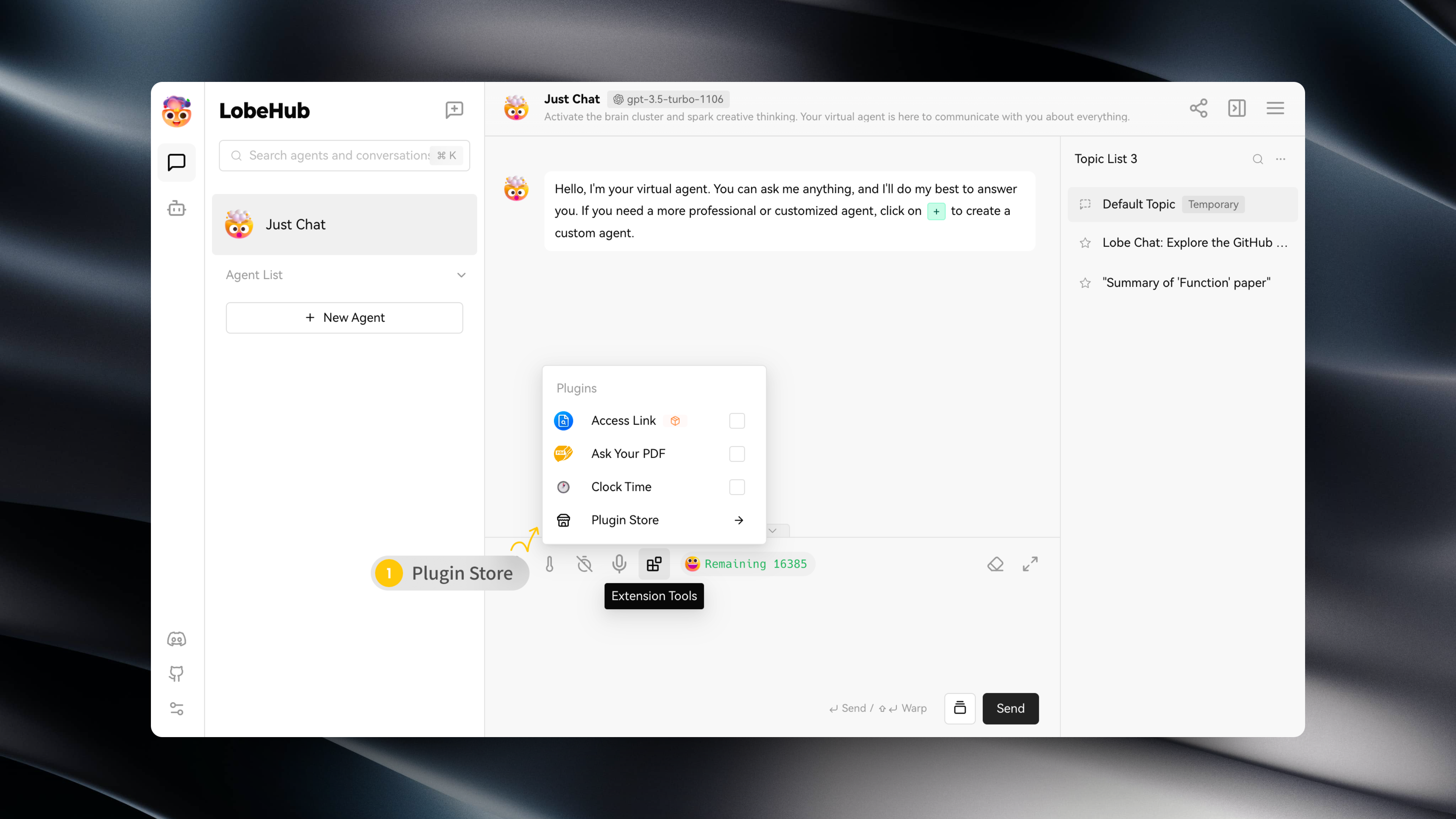
You can access the Plugin Store by navigating to "Extension Tools" -> "Plugin Store" in the session toolbar.
|
|
18
12
|
|
|
19
|
-
|
|
20
14
|
|
|
21
15
|
The Plugin Store allows you to directly install and use plugins within LobeChat.
|
|
22
16
|
|
|
@@ -26,7 +20,7 @@ The Plugin Store allows you to directly install and use plugins within LobeChat.
|
|
|
26
20
|
|
|
27
21
|
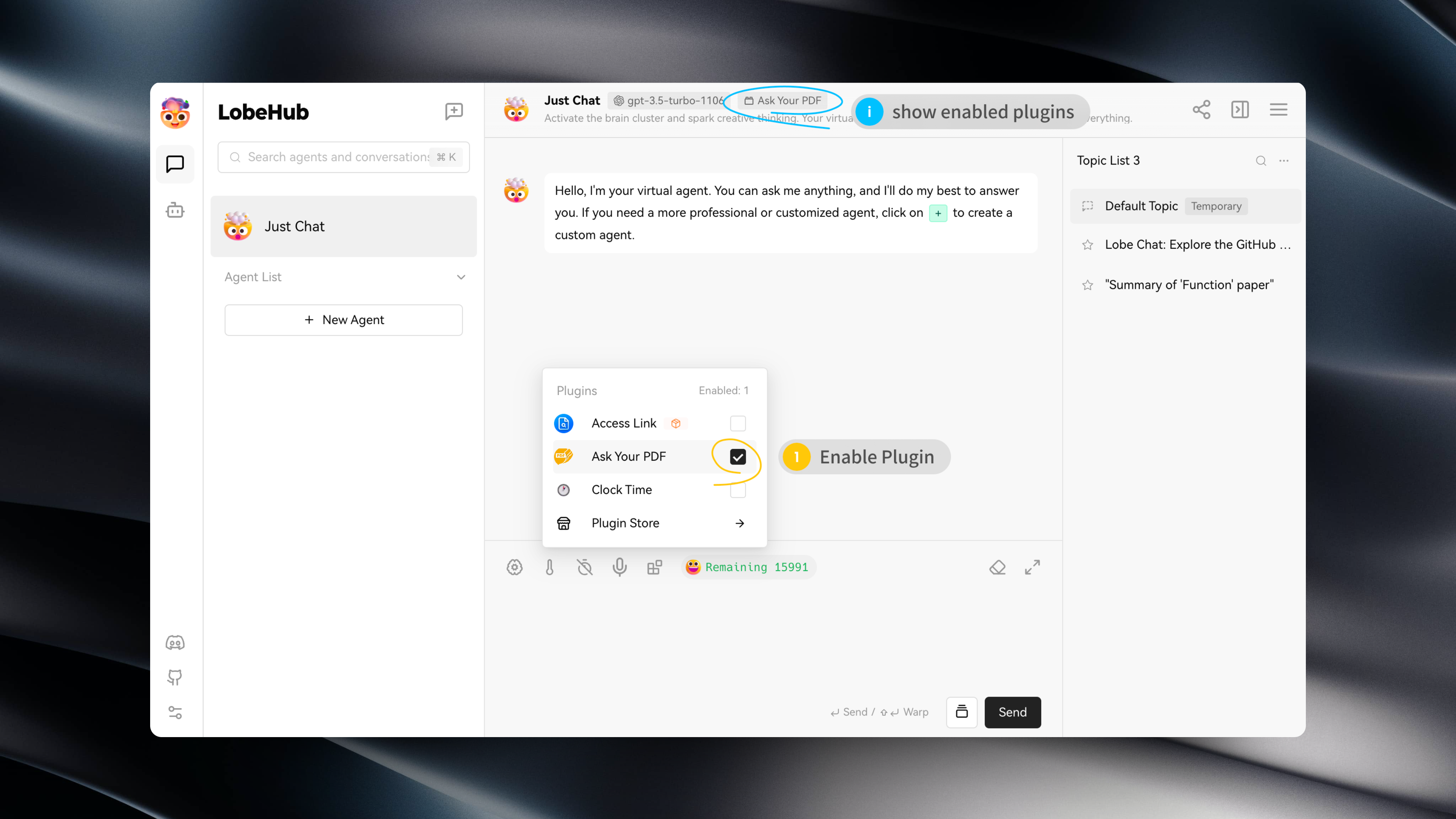
After installing a plugin, simply enable it under the current assistant to use it.
|
|
28
22
|
|
|
29
|
-
|
|
30
24
|
|
|
31
25
|
## Plugin Configuration
|
|
32
26
|
|
|
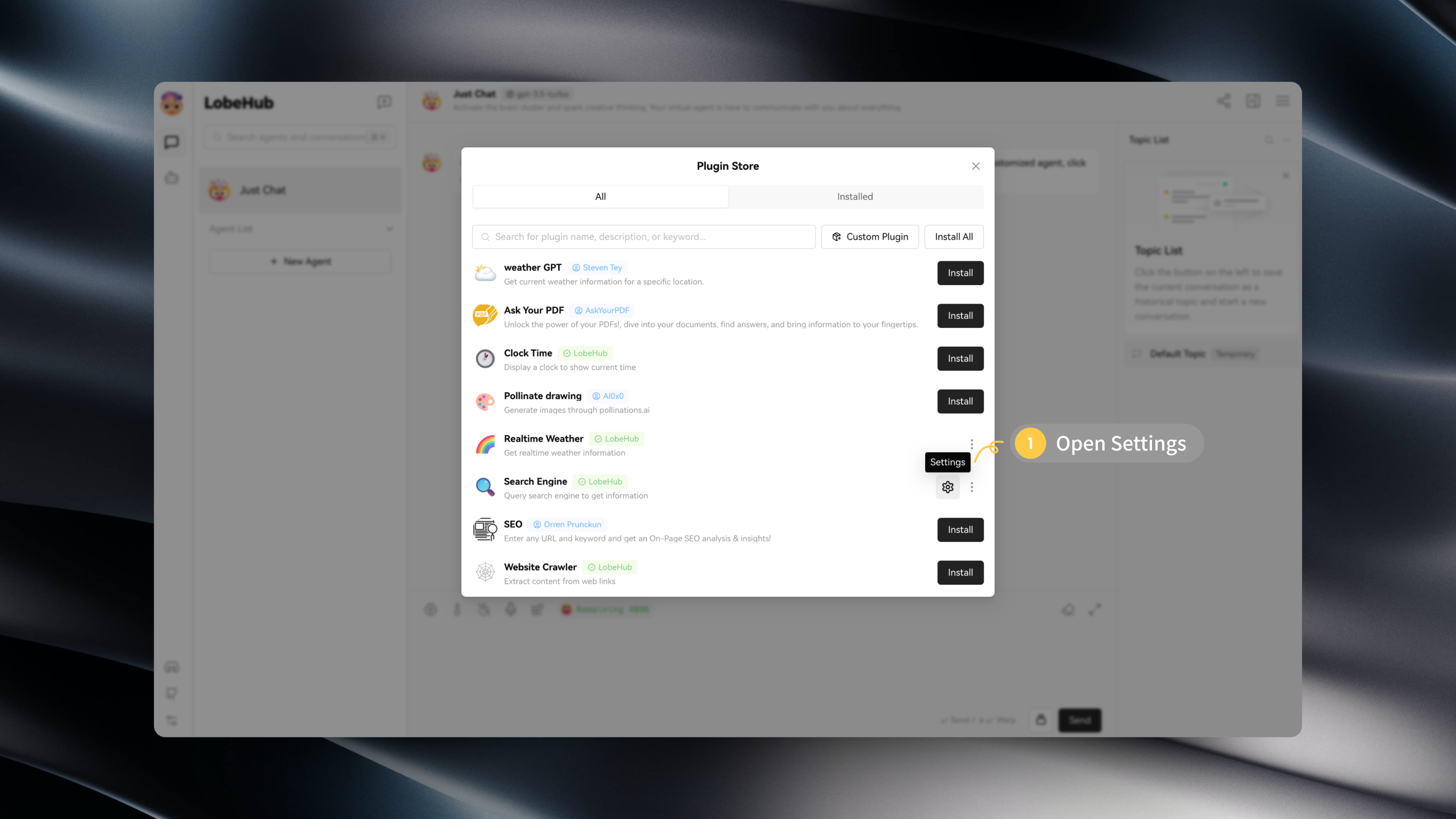
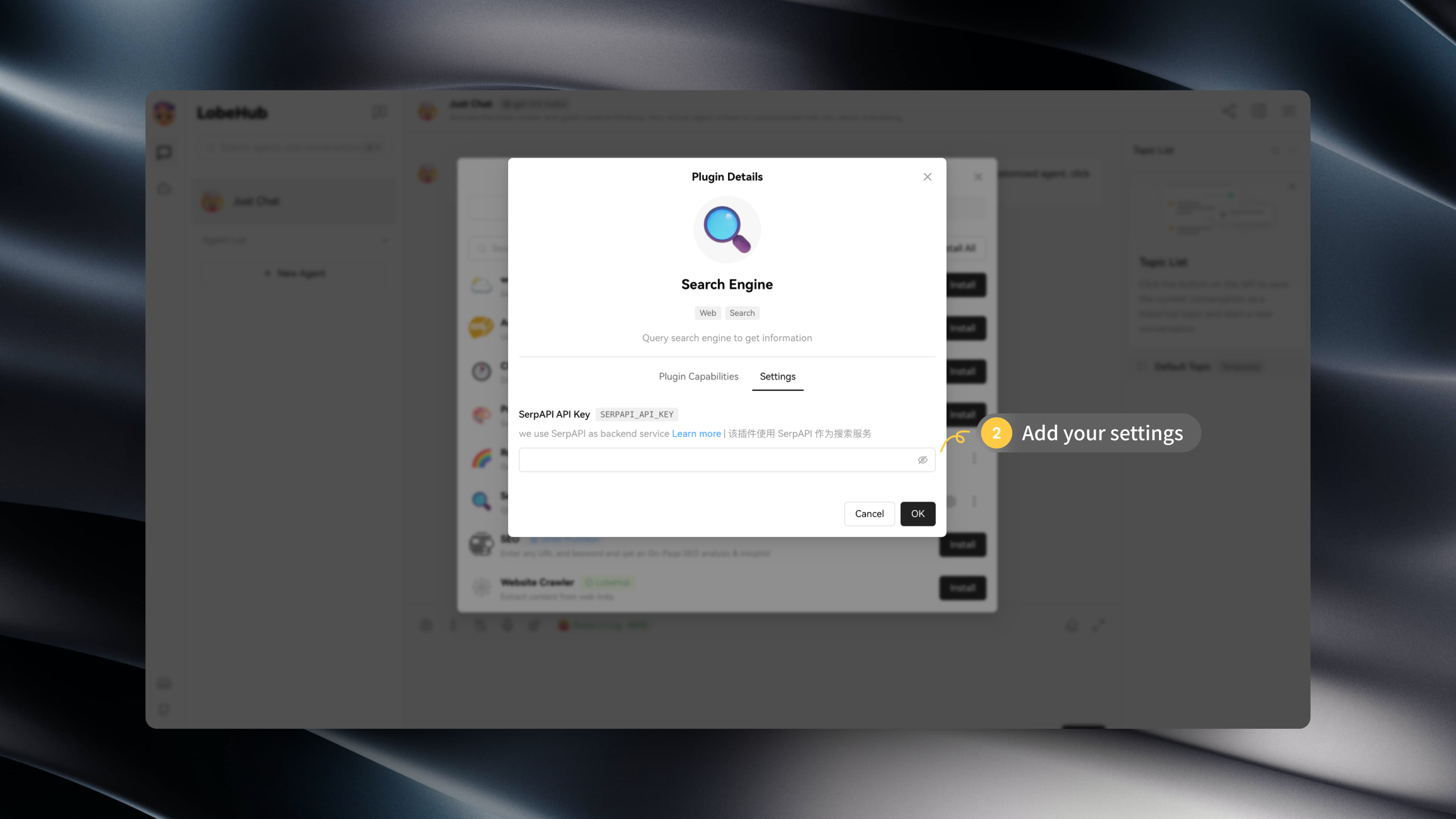
@@ -37,4 +31,3 @@ After installing a plugin, you can click on "Settings" to enter the plugin's set
|
|
|
37
31
|
|
|
38
32
|
|
|
39
33
|
|
|
40
|
-
|
|
@@ -4,13 +4,7 @@
|
|
|
4
4
|
|
|
5
5
|
查看以下视频,快速上手使用 LobeChat 插件:
|
|
6
6
|
|
|
7
|
-
<
|
|
8
|
-
muted
|
|
9
|
-
controls
|
|
10
|
-
loop
|
|
11
|
-
autoPlay
|
|
12
|
-
src="https://github.com/lobehub/lobe-chat/assets/28616219/94d4c312-1699-4e24-8782-138883678c9e"
|
|
13
|
-
></video>
|
|
7
|
+
<Video src="https://github.com/lobehub/lobe-chat/assets/28616219/94d4c312-1699-4e24-8782-138883678c9e" />
|
|
14
8
|
|
|
15
9
|
## 插件商店
|
|
16
10
|
|
|
@@ -4,13 +4,7 @@
|
|
|
4
4
|
|
|
5
5
|
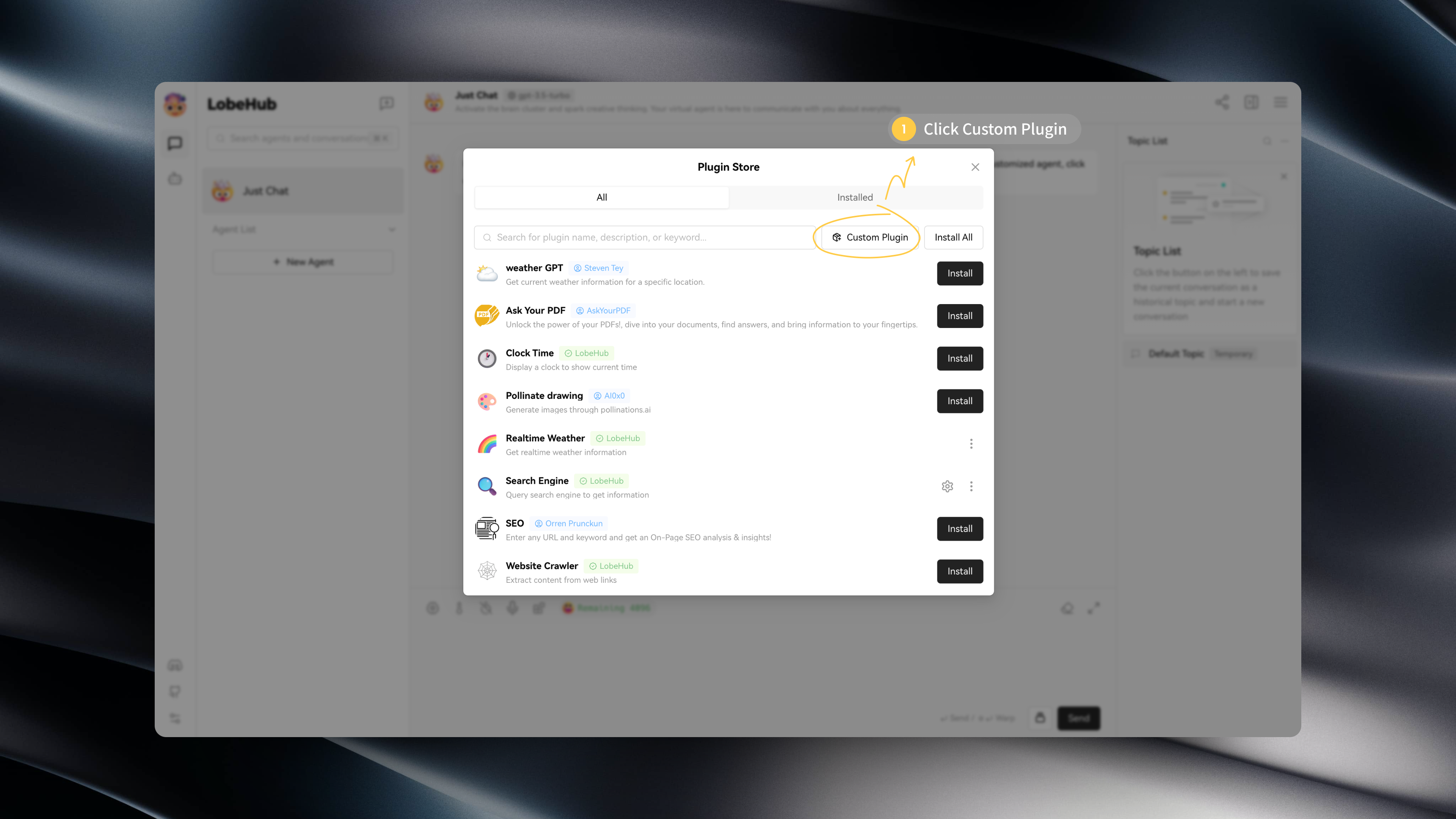
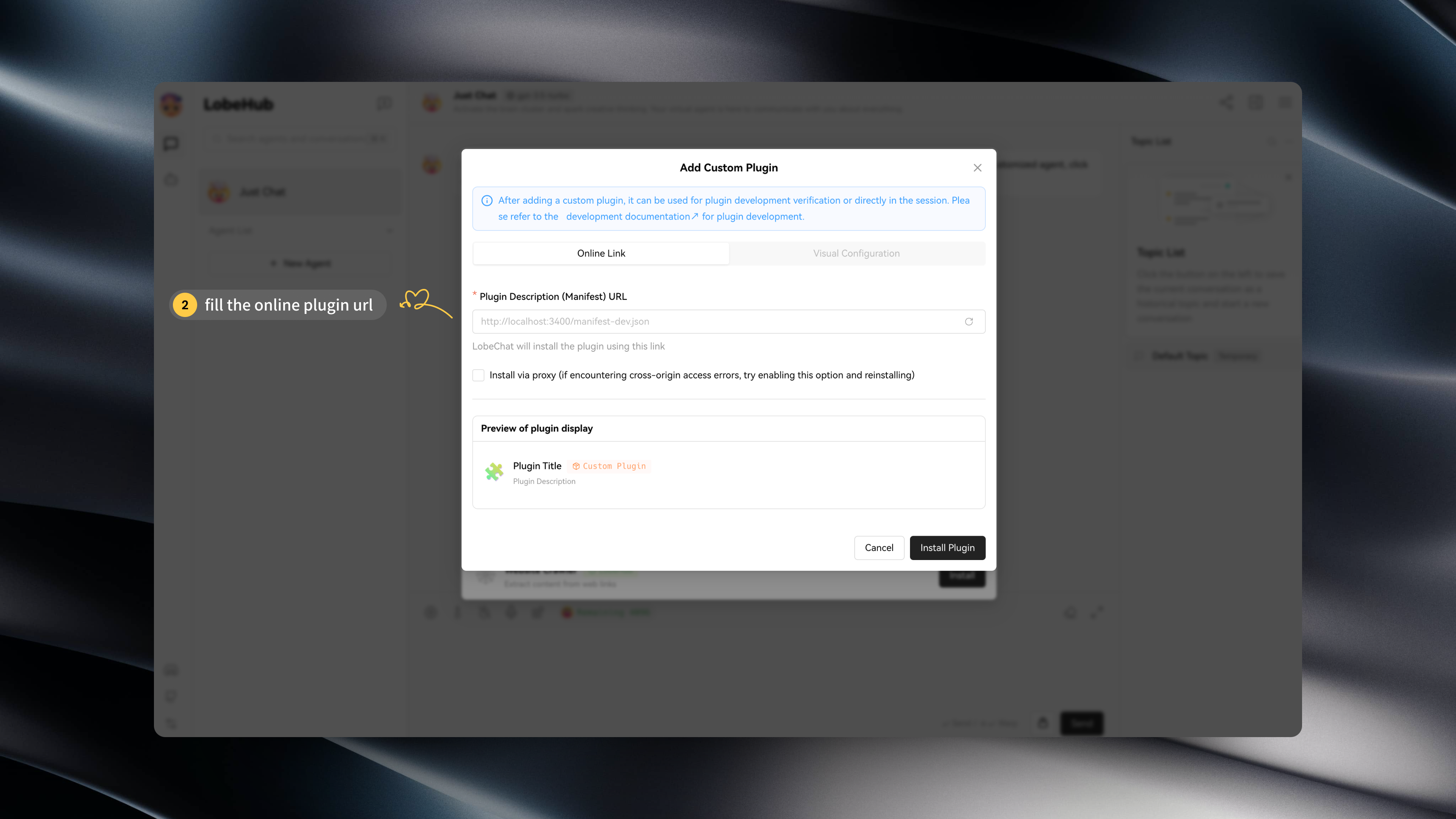
If you wish to install a plugin that is not available in the LobeChat plugin store, such as a custom-developed LobeChat plugin, you can click on "Custom Plugins" to install it:
|
|
6
6
|
|
|
7
|
-
<
|
|
8
|
-
muted
|
|
9
|
-
controls
|
|
10
|
-
loop
|
|
11
|
-
autoPlay
|
|
12
|
-
src="https://github.com/lobehub/lobe-chat/assets/28616219/034a328c-8465-4499-8f93-fdcdb03343cd"
|
|
13
|
-
></video>
|
|
7
|
+
<Video src="https://github.com/lobehub/lobe-chat/assets/28616219/034a328c-8465-4499-8f93-fdcdb03343cd" />
|
|
14
8
|
|
|
15
9
|
In addition, LobeChat's plugin mechanism is compatible with ChatGPT plugins, so you can easily install corresponding ChatGPT plugins.
|
|
16
10
|
|
|
@@ -19,8 +13,7 @@ If you want to try installing custom plugins on your own, you can use the follow
|
|
|
19
13
|
- `Custom Lobe Plugin` Mock Credit Card: https://lobe-plugin-mock-credit-card.vercel.app/manifest.json
|
|
20
14
|
- `ChatGPT Plugin` Access Links: https://www.accesslinks.ai/.well-known/ai-plugin.json
|
|
21
15
|
|
|
22
|
-
|
|
23
|
-
|
|
16
|
+
 
|
|
24
17
|
|
|
25
18
|
## Developing Custom Plugins
|
|
26
19
|
|
|
@@ -4,13 +4,7 @@
|
|
|
4
4
|
|
|
5
5
|
如果你希望安装一个不在 LobeChat 插件商店中的插件,例如自己开发的 LobeChat,你可以点击「自定义插件」进行安装:
|
|
6
6
|
|
|
7
|
-
<
|
|
8
|
-
muted
|
|
9
|
-
controls
|
|
10
|
-
loop
|
|
11
|
-
autoPlay
|
|
12
|
-
src="https://github.com/lobehub/lobe-chat/assets/28616219/034a328c-8465-4499-8f93-fdcdb03343cd"
|
|
13
|
-
></video>
|
|
7
|
+
<Video src="https://github.com/lobehub/lobe-chat/assets/28616219/034a328c-8465-4499-8f93-fdcdb03343cd" />
|
|
14
8
|
|
|
15
9
|
此外,LobeChat 的插件机制兼容了 ChatGPT 的插件,因此你可以一键安装相应的 ChatGPT 插件。
|
|
16
10
|
|
|
@@ -0,0 +1,80 @@
|
|
|
1
|
+
import { Callout, Steps, Tabs } from 'nextra/components';
|
|
2
|
+
|
|
3
|
+
# Using Ollama in LobeChat
|
|
4
|
+
|
|
5
|
+
<Image
|
|
6
|
+
alt={'Using Ollama in LobeChat'}
|
|
7
|
+
src={'https://github.com/lobehub/lobe-chat/assets/28616219/a2a091b8-ac45-4679-b5e0-21d711e17fef'}
|
|
8
|
+
cover
|
|
9
|
+
/>
|
|
10
|
+
|
|
11
|
+
Ollama is a powerful framework for running large language models (LLMs) locally, supporting various language models including Llama 2, Mistral, and more. Now, LobeChat supports integration with Ollama, meaning you can easily use the language models provided by Ollama to enhance your application within LobeChat.
|
|
12
|
+
|
|
13
|
+
This document will guide you on how to use Ollama in LobeChat:
|
|
14
|
+
|
|
15
|
+
<Steps>
|
|
16
|
+
### Local Installation of Ollama
|
|
17
|
+
|
|
18
|
+
First, you need to install Ollama, which supports macOS, Windows, and Linux systems. Depending on your operating system, choose one of the following installation methods:
|
|
19
|
+
|
|
20
|
+
<Tabs items={['macOS', 'Linux', 'Windows (Preview)', 'Docker']}>
|
|
21
|
+
<Tabs.Tab>[Download Ollama for macOS](https://ollama.com/download) and unzip it.</Tabs.Tab>
|
|
22
|
+
<Tabs.Tab>
|
|
23
|
+
|
|
24
|
+
````bash
|
|
25
|
+
Install using the following command:
|
|
26
|
+
|
|
27
|
+
```bash
|
|
28
|
+
curl -fsSL https://ollama.com/install.sh | sh
|
|
29
|
+
````
|
|
30
|
+
|
|
31
|
+
Alternatively, you can refer to the [Linux manual installation guide](https://github.com/jmorganca/ollama/blob/main/docs/linux.md).
|
|
32
|
+
|
|
33
|
+
</Tabs.Tab>
|
|
34
|
+
<Tabs.Tab>[Download Ollama for Windows](https://ollama.com/download) and install it.</Tabs.Tab>
|
|
35
|
+
<Tabs.Tab>
|
|
36
|
+
|
|
37
|
+
If you prefer using Docker, Ollama also provides an official Docker image, which you can pull using the following command:
|
|
38
|
+
|
|
39
|
+
```bash
|
|
40
|
+
docker pull ollama/ollama
|
|
41
|
+
```
|
|
42
|
+
|
|
43
|
+
</Tabs.Tab>
|
|
44
|
+
</Tabs>
|
|
45
|
+
|
|
46
|
+
### Pulling Models to Local with Ollama
|
|
47
|
+
|
|
48
|
+
After installing Ollama, you can install models locally, for example, llama2:
|
|
49
|
+
|
|
50
|
+
```bash
|
|
51
|
+
ollama pull llama2
|
|
52
|
+
```
|
|
53
|
+
|
|
54
|
+
Ollama supports various models, and you can view the available model list in the [Ollama Library](https://ollama.com/library) and choose the appropriate model based on your needs.
|
|
55
|
+
|
|
56
|
+
</Steps>
|
|
57
|
+
|
|
58
|
+
Next, you can start conversing with the local LLM using LobeChat.
|
|
59
|
+
|
|
60
|
+
<Video
|
|
61
|
+
width={832}
|
|
62
|
+
height={468}
|
|
63
|
+
src="https://github.com/lobehub/lobe-chat/assets/28616219/063788c8-9fef-4c6b-b837-96668ad6bc41"
|
|
64
|
+
/>
|
|
65
|
+
|
|
66
|
+
<Callout type={'info'}>
|
|
67
|
+
You can visit [Integrating with Ollama](/en/self-hosting/examples/ollama) to learn how to deploy
|
|
68
|
+
LobeChat to meet the integration requirements with Ollama.
|
|
69
|
+
</Callout>
|
|
70
|
+
|
|
71
|
+
## Custom Configuration
|
|
72
|
+
|
|
73
|
+
You can find Ollama's configuration options in `Settings` -> `Language Model`, where you can configure Ollama's proxy, model name, and more.
|
|
74
|
+
|
|
75
|
+
<Image
|
|
76
|
+
alt={'Ollama Service Provider Settings'}
|
|
77
|
+
src={'https://github.com/lobehub/lobe-chat/assets/28616219/da0db930-78ce-4262-b648-2b9e43c565c3'}
|
|
78
|
+
width={832}
|
|
79
|
+
height={274}
|
|
80
|
+
/>
|
|
@@ -0,0 +1,80 @@
|
|
|
1
|
+
import { Callout, Steps, Tabs } from 'nextra/components';
|
|
2
|
+
|
|
3
|
+
# 在 LobeChat 中使用 Ollama
|
|
4
|
+
|
|
5
|
+
<Image
|
|
6
|
+
alt={'在 LobeChat 中使用 Ollama'}
|
|
7
|
+
src={'https://github.com/lobehub/lobe-chat/assets/28616219/a2a091b8-ac45-4679-b5e0-21d711e17fef'}
|
|
8
|
+
cover
|
|
9
|
+
/>
|
|
10
|
+
|
|
11
|
+
Ollama 是一款强大的本地运行大型语言模型(LLM)的框架,支持多种语言模型,包括 Llama 2, Mistral 等。现在,LobeChat 已经支持与 Ollama 的集成,这意味着你可以在 LobeChat 中轻松使用 Ollama 提供的语言模型来增强你的应用。
|
|
12
|
+
|
|
13
|
+
本文档将指导你如何在 LobeChat 中使用 Ollama:
|
|
14
|
+
|
|
15
|
+
<Steps>
|
|
16
|
+
### 本地安装 Ollama
|
|
17
|
+
|
|
18
|
+
首先,你需要安装 Ollama,Ollama 支持 macOS、Windows 和 Linux 系统。 根据你的操作系统,选择以下安装方式之一:
|
|
19
|
+
|
|
20
|
+
<Tabs items={['macOS', 'Linux','Windows (预览版)','Docker']}>
|
|
21
|
+
<Tabs.Tab>[下载 Ollama for macOS](https://ollama.com/download) 并解压。</Tabs.Tab>
|
|
22
|
+
<Tabs.Tab>
|
|
23
|
+
|
|
24
|
+
通过以下命令安装:
|
|
25
|
+
|
|
26
|
+
```bash
|
|
27
|
+
curl -fsSL https://ollama.com/install.sh | sh
|
|
28
|
+
```
|
|
29
|
+
|
|
30
|
+
或者,你也可以参考 [Linux 手动安装指南](https://github.com/ollama/ollama/blob/main/docs/linux.md)。
|
|
31
|
+
|
|
32
|
+
</Tabs.Tab>
|
|
33
|
+
<Tabs.Tab>[下载 Ollama for Windows](https://ollama.com/download) 并安装。</Tabs.Tab>
|
|
34
|
+
<Tabs.Tab>
|
|
35
|
+
|
|
36
|
+
如果你更倾向于使用 Docker,Ollama 也提供了官方 Docker 镜像,你可以通过以下命令拉取:
|
|
37
|
+
|
|
38
|
+
```bash
|
|
39
|
+
docker pull ollama/ollama
|
|
40
|
+
```
|
|
41
|
+
|
|
42
|
+
</Tabs.Tab>
|
|
43
|
+
|
|
44
|
+
</Tabs>
|
|
45
|
+
|
|
46
|
+
### 用 Ollama 拉取模型到本地
|
|
47
|
+
|
|
48
|
+
在安装完成 Ollama 后,你可以通过以下命安装模型,以 llama2 为例:
|
|
49
|
+
|
|
50
|
+
```bash
|
|
51
|
+
ollama pull llama2
|
|
52
|
+
```
|
|
53
|
+
|
|
54
|
+
Ollama 支持多种模型,你可以在 [Ollama Library](https://ollama.com/library) 中查看可用的模型列表,并根据需求选择合适的模型。
|
|
55
|
+
|
|
56
|
+
</Steps>
|
|
57
|
+
|
|
58
|
+
接下来,你就可以使用 LobeChat 与本地 LLM 对话了。
|
|
59
|
+
|
|
60
|
+
<Video
|
|
61
|
+
width={832}
|
|
62
|
+
height={468}
|
|
63
|
+
src="https://github.com/lobehub/lobe-chat/assets/28616219/95828c11-0ae5-4dfa-84ed-854124e927a6"
|
|
64
|
+
/>
|
|
65
|
+
|
|
66
|
+
<Callout type={'info'}>
|
|
67
|
+
你可以前往 [与 Ollama 集成](/zh/self-hosting/examples/ollama) 了解如何部署 LobeChat ,以满足与
|
|
68
|
+
Ollama 的集成需求。
|
|
69
|
+
</Callout>
|
|
70
|
+
|
|
71
|
+
## 自定义配置
|
|
72
|
+
|
|
73
|
+
你可以在 `设置` -> `语言模型` 中找到 Ollama 的配置选项,你可以在这里配置 Ollama 的代理、模型名称等。
|
|
74
|
+
|
|
75
|
+
<Image
|
|
76
|
+
alt={'Ollama 服务商设置'}
|
|
77
|
+
src={'https://github.com/lobehub/lobe-chat/assets/28616219/da0db930-78ce-4262-b648-2b9e43c565c3'}
|
|
78
|
+
width={832}
|
|
79
|
+
height={274}
|
|
80
|
+
/>
|
package/locales/ar/chat.json
CHANGED
package/locales/de-DE/chat.json
CHANGED
package/locales/en-US/chat.json
CHANGED
package/locales/es-ES/chat.json
CHANGED
package/locales/fr-FR/chat.json
CHANGED
package/locales/it-IT/chat.json
CHANGED
package/locales/ja-JP/chat.json
CHANGED
package/locales/ko-KR/chat.json
CHANGED
package/locales/nl-NL/chat.json
CHANGED
package/locales/pl-PL/chat.json
CHANGED
package/locales/pt-BR/chat.json
CHANGED
package/locales/ru-RU/chat.json
CHANGED
package/locales/tr-TR/chat.json
CHANGED
package/locales/vi-VN/chat.json
CHANGED
package/locales/zh-CN/chat.json
CHANGED
package/locales/zh-TW/chat.json
CHANGED
package/package.json
CHANGED
|
@@ -1,6 +1,6 @@
|
|
|
1
1
|
{
|
|
2
2
|
"name": "@lobehub/chat",
|
|
3
|
-
"version": "0.129.
|
|
3
|
+
"version": "0.129.2",
|
|
4
4
|
"description": "Lobe Chat - an open-source, high-performance chatbot framework that supports speech synthesis, multimodal, and extensible Function Call plugin system. Supports one-click free deployment of your private ChatGPT/LLM web application.",
|
|
5
5
|
"keywords": [
|
|
6
6
|
"framework",
|
|
@@ -74,7 +74,7 @@
|
|
|
74
74
|
},
|
|
75
75
|
"dependencies": {
|
|
76
76
|
"@ant-design/icons": "^5",
|
|
77
|
-
"@auth/core": "^0.
|
|
77
|
+
"@auth/core": "^0.27.0",
|
|
78
78
|
"@aws-sdk/client-bedrock-runtime": "^3.503.1",
|
|
79
79
|
"@azure/openai": "^1.0.0-beta.11",
|
|
80
80
|
"@cfworker/json-schema": "^1",
|
|
@@ -82,9 +82,9 @@
|
|
|
82
82
|
"@icons-pack/react-simple-icons": "^9",
|
|
83
83
|
"@lobehub/chat-plugin-sdk": "latest",
|
|
84
84
|
"@lobehub/chat-plugins-gateway": "latest",
|
|
85
|
-
"@lobehub/icons": "^1.
|
|
85
|
+
"@lobehub/icons": "^1.11.1",
|
|
86
86
|
"@lobehub/tts": "latest",
|
|
87
|
-
"@lobehub/ui": "
|
|
87
|
+
"@lobehub/ui": "^1.129.2",
|
|
88
88
|
"@vercel/analytics": "^1",
|
|
89
89
|
"ahooks": "^3",
|
|
90
90
|
"ai": "^2",
|
|
@@ -107,7 +107,7 @@
|
|
|
107
107
|
"modern-screenshot": "^4",
|
|
108
108
|
"nanoid": "^5",
|
|
109
109
|
"next": "^14.1",
|
|
110
|
-
"next-auth": "
|
|
110
|
+
"next-auth": "beta",
|
|
111
111
|
"next-sitemap": "^4.2.3",
|
|
112
112
|
"numeral": "^2.0.6",
|
|
113
113
|
"nuqs": "^1.15.4",
|
|
Binary file
|
|
@@ -6,10 +6,38 @@ import { getServerConfig } from '@/config/server';
|
|
|
6
6
|
const { AUTH0_CLIENT_ID, ENABLE_OAUTH_SSO, AUTH0_CLIENT_SECRET, AUTH0_ISSUER, NEXTAUTH_SECRET } =
|
|
7
7
|
getServerConfig();
|
|
8
8
|
|
|
9
|
+
declare module '@auth/core/jwt' {
|
|
10
|
+
// Returned by the `jwt` callback and `auth`, when using JWT sessions
|
|
11
|
+
interface JWT {
|
|
12
|
+
userId?: string;
|
|
13
|
+
}
|
|
14
|
+
}
|
|
15
|
+
|
|
9
16
|
const nextAuth = NextAuth({
|
|
17
|
+
callbacks: {
|
|
18
|
+
// Note: Data processing order of callback: authorize --> jwt --> session
|
|
19
|
+
async jwt({ token, account }) {
|
|
20
|
+
// Auth.js will process the `providerAccountId` automatically
|
|
21
|
+
// ref: https://authjs.dev/reference/core/types#provideraccountid
|
|
22
|
+
if (account) {
|
|
23
|
+
token.userId = account.providerAccountId;
|
|
24
|
+
}
|
|
25
|
+
return token;
|
|
26
|
+
},
|
|
27
|
+
async session({ session, token }) {
|
|
28
|
+
// Pick userid from token
|
|
29
|
+
if (session.user) {
|
|
30
|
+
session.user.id = token.userId ?? session.user.id;
|
|
31
|
+
}
|
|
32
|
+
return session;
|
|
33
|
+
},
|
|
34
|
+
},
|
|
10
35
|
providers: ENABLE_OAUTH_SSO
|
|
11
36
|
? [
|
|
12
37
|
Auth0({
|
|
38
|
+
// Specify auth scope, at least include 'openid email'
|
|
39
|
+
// all scopes in Auth0 ref: https://auth0.com/docs/get-started/apis/scopes/openid-connect-scopes#standard-claims
|
|
40
|
+
authorization: { params: { scope: 'openid email profile' } },
|
|
13
41
|
clientId: AUTH0_CLIENT_ID,
|
|
14
42
|
clientSecret: AUTH0_CLIENT_SECRET,
|
|
15
43
|
issuer: AUTH0_ISSUER,
|
package/src/app/layout.tsx
CHANGED
|
@@ -1,4 +1,4 @@
|
|
|
1
|
-
import {
|
|
1
|
+
import { ResolvingViewport } from 'next';
|
|
2
2
|
import { cookies } from 'next/headers';
|
|
3
3
|
import { PropsWithChildren } from 'react';
|
|
4
4
|
import { isRtlLang } from 'rtl-detect';
|
|
@@ -12,6 +12,7 @@ import {
|
|
|
12
12
|
LOBE_THEME_PRIMARY_COLOR,
|
|
13
13
|
} from '@/const/theme';
|
|
14
14
|
import Layout from '@/layout/GlobalLayout';
|
|
15
|
+
import { isMobileDevice } from '@/utils/responsive';
|
|
15
16
|
|
|
16
17
|
import StyleRegistry from './StyleRegistry';
|
|
17
18
|
|
|
@@ -50,15 +51,20 @@ export default RootLayout;
|
|
|
50
51
|
|
|
51
52
|
export { default as metadata } from './metadata';
|
|
52
53
|
|
|
53
|
-
export const
|
|
54
|
-
|
|
55
|
-
|
|
56
|
-
|
|
57
|
-
|
|
58
|
-
|
|
59
|
-
|
|
60
|
-
|
|
61
|
-
|
|
62
|
-
|
|
63
|
-
|
|
54
|
+
export const generateViewport = async (): ResolvingViewport => {
|
|
55
|
+
const isMobile = isMobileDevice();
|
|
56
|
+
|
|
57
|
+
const dynamicScale = isMobile ? { maximumScale: 1, userScalable: false } : {};
|
|
58
|
+
|
|
59
|
+
return {
|
|
60
|
+
...dynamicScale,
|
|
61
|
+
initialScale: 1,
|
|
62
|
+
minimumScale: 1,
|
|
63
|
+
themeColor: [
|
|
64
|
+
{ color: '#f8f8f8', media: '(prefers-color-scheme: light)' },
|
|
65
|
+
{ color: '#000', media: '(prefers-color-scheme: dark)' },
|
|
66
|
+
],
|
|
67
|
+
viewportFit: 'cover',
|
|
68
|
+
width: 'device-width',
|
|
69
|
+
};
|
|
64
70
|
};
|
|
@@ -1,9 +1,9 @@
|
|
|
1
|
-
import { Logo } from '@lobehub/ui';
|
|
2
1
|
import { Upload } from 'antd';
|
|
3
2
|
import { createStyles } from 'antd-style';
|
|
4
3
|
import Avatar from 'next/image';
|
|
5
4
|
import { CSSProperties, memo } from 'react';
|
|
6
5
|
|
|
6
|
+
import { imageUrl } from '@/const/url';
|
|
7
7
|
import { useGlobalStore } from '@/store/global';
|
|
8
8
|
import { commonSelectors } from '@/store/global/selectors';
|
|
9
9
|
import { imageToBase64 } from '@/utils/imageToBase64';
|
|
@@ -55,11 +55,12 @@ const AvatarWithUpload = memo<AvatarWithUploadProps>(
|
|
|
55
55
|
return (
|
|
56
56
|
<div className={styles} id={id} style={{ maxHeight: size, maxWidth: size, ...style }}>
|
|
57
57
|
<Upload beforeUpload={handleUploadAvatar} itemRender={() => void 0} maxCount={1}>
|
|
58
|
-
|
|
59
|
-
|
|
60
|
-
|
|
61
|
-
|
|
62
|
-
|
|
58
|
+
<Avatar
|
|
59
|
+
alt={avatar ? 'userAvatar' : 'LobeChat'}
|
|
60
|
+
height={size}
|
|
61
|
+
src={!!avatar ? avatar : imageUrl('logo.png')}
|
|
62
|
+
width={size}
|
|
63
|
+
/>
|
|
63
64
|
</Upload>
|
|
64
65
|
</div>
|
|
65
66
|
);
|
|
@@ -17,7 +17,7 @@ import { memo } from 'react';
|
|
|
17
17
|
import { useTranslation } from 'react-i18next';
|
|
18
18
|
import { Flexbox } from 'react-layout-kit';
|
|
19
19
|
|
|
20
|
-
import { ABOUT, CHANGELOG, DISCORD, DOCUMENTS, FEEDBACK
|
|
20
|
+
import { ABOUT, CHANGELOG, DISCORD, DOCUMENTS, FEEDBACK } from '@/const/url';
|
|
21
21
|
import DataImporter from '@/features/DataImporter';
|
|
22
22
|
import { configService } from '@/services/config';
|
|
23
23
|
import { GlobalStore, useGlobalStore } from '@/store/global';
|
|
@@ -120,13 +120,10 @@ const BottomActions = memo<BottomActionProps>(({ tab }) => {
|
|
|
120
120
|
|
|
121
121
|
return (
|
|
122
122
|
<>
|
|
123
|
-
<
|
|
124
|
-
icon={Github}
|
|
125
|
-
|
|
126
|
-
|
|
127
|
-
title={'GitHub'}
|
|
128
|
-
/>
|
|
129
|
-
<Link href={DOCUMENTS} target={'_blank'}>
|
|
123
|
+
<Link aria-label={'GitHub'} href={DOCUMENTS} target={'_blank'}>
|
|
124
|
+
<ActionIcon icon={Github} placement={'right'} title={'GitHub'} />
|
|
125
|
+
</Link>
|
|
126
|
+
<Link aria-label={t('document')} href={DOCUMENTS} target={'_blank'}>
|
|
130
127
|
<ActionIcon icon={Book} placement={'right'} title={t('document')} />
|
|
131
128
|
</Link>
|
|
132
129
|
<Dropdown arrow={false} menu={{ items }} trigger={['click']}>
|
|
@@ -19,6 +19,7 @@ const TopActions = memo<TopActionProps>(({ tab }) => {
|
|
|
19
19
|
return (
|
|
20
20
|
<>
|
|
21
21
|
<Link
|
|
22
|
+
aria-label={t('tab.chat')}
|
|
22
23
|
href={'/chat'}
|
|
23
24
|
onClick={(e) => {
|
|
24
25
|
e.preventDefault();
|
|
@@ -33,7 +34,7 @@ const TopActions = memo<TopActionProps>(({ tab }) => {
|
|
|
33
34
|
title={t('tab.chat')}
|
|
34
35
|
/>
|
|
35
36
|
</Link>
|
|
36
|
-
<Link href={'/market'}>
|
|
37
|
+
<Link aria-label={t('tab.market')} href={'/market'}>
|
|
37
38
|
<ActionIcon
|
|
38
39
|
active={tab === SidebarTabKey.Market}
|
|
39
40
|
icon={Compass}
|