@lobehub/chat 0.128.1 → 0.128.3
This diff represents the content of publicly available package versions that have been released to one of the supported registries. The information contained in this diff is provided for informational purposes only and reflects changes between package versions as they appear in their respective public registries.
- package/.github/workflows/issue-close-require.yml +3 -3
- package/.github/workflows/issues-translate.yml +3 -3
- package/.github/workflows/wiki-sync.yml +2 -2
- package/.i18nrc.js +2 -2
- package/CHANGELOG.md +50 -0
- package/README.md +3 -3
- package/README.zh-CN.md +3 -3
- package/contributing/Basic/Feature-Development.md +713 -0
- package/{docs/Development → contributing/Basic}/Feature-Development.zh-CN.md +2 -2
- package/{docs/Development → contributing/Basic}/Intro.zh-CN.md +5 -5
- package/{docs → contributing}/Home.md +20 -29
- package/{docs/Development → contributing/Internationalization}/Internationalization-Implementation.zh-CN.md +1 -1
- package/{docs → contributing}/_Sidebar.md +18 -29
- package/docs/agents/concepts.mdx +18 -0
- package/docs/agents/concepts.zh-CN.mdx +17 -0
- package/docs/agents/custom-agent.mdx +34 -0
- package/docs/agents/custom-agent.zh-CN.mdx +31 -0
- package/docs/agents/model.mdx +68 -0
- package/docs/agents/model.zh-CN.mdx +64 -0
- package/docs/agents/prompt.mdx +96 -0
- package/docs/agents/prompt.zh-CN.mdx +97 -0
- package/docs/agents/topics.mdx +7 -0
- package/docs/agents/topics.zh-CN.mdx +6 -0
- package/docs/common-errors/no-v1-suffix.mdx +18 -0
- package/docs/common-errors/no-v1-suffix.zh-CN.mdx +17 -0
- package/docs/common-errors/proxy-with-unable-to-verify-leaf-signature.mdx +70 -0
- package/docs/{Deployment/Common-Error.zh-CN.md → common-errors/proxy-with-unable-to-verify-leaf-signature.zh-CN.mdx} +8 -26
- package/docs/environment-variables/common.mdx +215 -0
- package/docs/environment-variables/common.zh-CN.mdx +214 -0
- package/docs/environment-variables/model-provider.mdx +135 -0
- package/docs/environment-variables/model-provider.zh-CN.mdx +133 -0
- package/docs/package.json +5 -0
- package/docs/plugins/basic-usage.mdx +40 -0
- package/docs/{Usage/Plugins.zh-CN.md → plugins/basic-usage.zh-CN.mdx} +7 -21
- package/docs/plugins/custom-plugin.mdx +27 -0
- package/docs/plugins/custom-plugin.zh-CN.mdx +26 -0
- package/docs/plugins/plugin-development.mdx +262 -0
- package/docs/{Plugins/Plugin-Development.zh-CN.md → plugins/plugin-development.zh-CN.mdx} +9 -33
- package/docs/plugins/plugin-store.mdx +10 -0
- package/docs/plugins/plugin-store.zh-CN.mdx +9 -0
- package/docs/self-hosting/analytics.mdx +20 -0
- package/docs/{Deployment/Analytics.zh-CN.md → self-hosting/analytics.zh-CN.mdx} +5 -8
- package/docs/self-hosting/authentication.mdx +94 -0
- package/docs/self-hosting/authentication.zh-CN.mdx +90 -0
- package/docs/self-hosting/deploy-with-azure-openai.mdx +48 -0
- package/docs/{Deployment/Deploy-with-Azure-OpenAI.zh-CN.md → self-hosting/deploy-with-azure-openai.zh-CN.mdx} +16 -21
- package/docs/self-hosting/docker-compose.mdx +121 -0
- package/docs/self-hosting/docker-compose.zh-CN.mdx +121 -0
- package/docs/self-hosting/docker.mdx +152 -0
- package/docs/self-hosting/docker.zh-CN.mdx +149 -0
- package/docs/self-hosting/environment-variable.mdx +340 -0
- package/docs/{Deployment/Environment-Variable.zh-CN.md → self-hosting/environment-variable.zh-CN.mdx} +43 -57
- package/docs/self-hosting/upstream-sync.mdx +66 -0
- package/docs/{Deployment/Upstream-Sync.zh-CN.md → self-hosting/upstream-sync.zh-CN.mdx} +23 -21
- package/docs/self-hosting/vercel.mdx +39 -0
- package/docs/self-hosting/vercel.zh-CN.mdx +39 -0
- package/docs/usage/agent-market.mdx +35 -0
- package/docs/usage/agent-market.zh-CN.mdx +32 -0
- package/docs/usage/mobile.mdx +8 -0
- package/docs/usage/mobile.zh-CN.mdx +7 -0
- package/docs/usage/more.mdx +21 -0
- package/docs/usage/more.zh-CN.mdx +19 -0
- package/docs/usage/plugin-system.mdx +84 -0
- package/docs/usage/plugin-system.zh-CN.mdx +77 -0
- package/docs/usage/pwa.mdx +21 -0
- package/docs/usage/pwa.zh-CN.mdx +21 -0
- package/docs/usage/text-to-image.mdx +5 -0
- package/docs/usage/text-to-image.zh-CN.mdx +6 -0
- package/docs/usage/theme.mdx +17 -0
- package/docs/usage/theme.zh-CN.mdx +15 -0
- package/docs/usage/tts.mdx +26 -0
- package/docs/usage/tts.zh-CN.mdx +24 -0
- package/docs/usage/vision.mdx +8 -0
- package/docs/usage/vision.zh-CN.mdx +7 -0
- package/next.config.mjs +5 -0
- package/package.json +4 -3
- package/scripts/docsWorkflow/const.ts +1 -1
- package/scripts/docsWorkflow/toc.ts +6 -6
- package/src/app/chat/(desktop)/features/ChatHeader.tsx +1 -1
- package/src/app/chat/(desktop)/features/SideBar/SystemRole/index.tsx +1 -1
- package/src/app/chat/settings/(mobile)/features/Header.tsx +1 -1
- package/src/app/welcome/(desktop)/features/Footer.tsx +5 -3
- package/src/config/client.ts +6 -0
- package/src/const/url.ts +10 -1
- package/src/features/Conversation/Messages/index.ts +1 -1
- package/src/features/SideBar/BottomActions.tsx +11 -10
- package/src/locales/default/common.ts +1 -0
- package/docs/Deployment/Analytics.md +0 -20
- package/docs/Deployment/Authentication.md +0 -80
- package/docs/Deployment/Authentication.zh-CN.md +0 -80
- package/docs/Deployment/Common-Error.md +0 -87
- package/docs/Deployment/Deploy-with-Azure-OpenAI.md +0 -54
- package/docs/Deployment/Docker-Deployment.md +0 -219
- package/docs/Deployment/Docker-Deployment.zh-CN.md +0 -217
- package/docs/Deployment/Environment-Variable.md +0 -362
- package/docs/Deployment/Upstream-Sync.md +0 -62
- package/docs/Plugins/Plugin-Development.md +0 -287
- package/docs/Usage/Plugins.md +0 -53
- package/docs/Usage/Usage-Agents.md +0 -201
- package/docs/Usage/Usage-Agents.zh-CN.md +0 -202
- package/docs/Usage/Usage-Topics.md +0 -31
- package/docs/Usage/Usage-Topics.zh-CN.md +0 -31
- /package/{docs/Development → contributing/Basic}/Add-New-Authentication-Providers.md +0 -0
- /package/{docs/Development → contributing/Basic}/Add-New-Authentication-Providers.zh-CN.md +0 -0
- /package/{docs/Development → contributing/Basic}/Architecture.md +0 -0
- /package/{docs/Development → contributing/Basic}/Architecture.zh-CN.md +0 -0
- /package/{docs/Development → contributing/Basic}/Chat-API.md +0 -0
- /package/{docs/Development → contributing/Basic}/Chat-API.zh-CN.md +0 -0
- /package/{docs/Development → contributing/Basic}/Contributing-Guidelines.md +0 -0
- /package/{docs/Development → contributing/Basic}/Contributing-Guidelines.zh-CN.md +0 -0
- /package/{docs/Development → contributing/Basic}/Feature-Development-Frontend.md +0 -0
- /package/{docs/Development → contributing/Basic}/Feature-Development-Frontend.zh-CN.md +0 -0
- /package/{docs/Development → contributing/Basic}/Folder-Structure.md +0 -0
- /package/{docs/Development → contributing/Basic}/Folder-Structure.zh-CN.md +0 -0
- /package/{docs/Development → contributing/Basic}/Intro.md +0 -0
- /package/{docs/Development → contributing/Basic}/Resources.md +0 -0
- /package/{docs/Development → contributing/Basic}/Resources.zh-CN.md +0 -0
- /package/{docs/Development → contributing/Basic}/Setup-Development.md +0 -0
- /package/{docs/Development → contributing/Basic}/Setup-Development.zh-CN.md +0 -0
- /package/{docs/Development → contributing/Basic}/Test.md +0 -0
- /package/{docs/Development → contributing/Basic}/Test.zh-CN.md +0 -0
- /package/{docs/Development → contributing/Internationalization}/Add-New-Locale.md +0 -0
- /package/{docs/Development → contributing/Internationalization}/Add-New-Locale.zh-CN.md +0 -0
- /package/{docs/Development → contributing/Internationalization}/Internationalization-Implementation.md +0 -0
- /package/{docs → contributing}/Others/Lighthouse.md +0 -0
- /package/{docs → contributing}/Others/Lighthouse.zh-CN.md +0 -0
- /package/{docs/Development → contributing/State-Management}/State-Management-Intro.md +0 -0
- /package/{docs/Development → contributing/State-Management}/State-Management-Intro.zh-CN.md +0 -0
- /package/{docs/Development → contributing/State-Management}/State-Management-Selectors.md +0 -0
- /package/{docs/Development → contributing/State-Management}/State-Management-Selectors.zh-CN.md +0 -0
- /package/{docs → contributing}/_Footer.md +0 -0
|
@@ -0,0 +1,340 @@
|
|
|
1
|
+
```markdown
|
|
2
|
+
import { Callout } from 'nextra/components';
|
|
3
|
+
|
|
4
|
+
# Environment Variables
|
|
5
|
+
|
|
6
|
+
LobeChat provides some additional configuration options during deployment, which can be customized using environment variables.
|
|
7
|
+
|
|
8
|
+
## Common Variables
|
|
9
|
+
|
|
10
|
+
### `ACCESS_CODE`
|
|
11
|
+
|
|
12
|
+
- Type: Optional
|
|
13
|
+
- Description: Add a password to access the LobeChat service. You can set a long password to prevent brute force attacks.
|
|
14
|
+
- Default: -
|
|
15
|
+
- Example: `awCTe)re_r74` or `rtrt_ewee3@09!`
|
|
16
|
+
|
|
17
|
+
### `ENABLE_OAUTH_SSO`
|
|
18
|
+
|
|
19
|
+
- Type: Optional
|
|
20
|
+
- Description: Enable Single Sign-On (SSO) for LobeChat. Set to `1` to enable SSO. For more information, see [Authentication Services](#authentication-services).
|
|
21
|
+
- Default: -
|
|
22
|
+
- Example: `1`
|
|
23
|
+
|
|
24
|
+
### `NEXT_PUBLIC_BASE_PATH`
|
|
25
|
+
|
|
26
|
+
- Type: Optional
|
|
27
|
+
- Description: Add a `basePath` for LobeChat.
|
|
28
|
+
- Default: -
|
|
29
|
+
- Example: `/test`
|
|
30
|
+
|
|
31
|
+
### `DEFAULT_AGENT_CONFIG`
|
|
32
|
+
|
|
33
|
+
- Type: Optional
|
|
34
|
+
- Description: Used to configure the default settings for the LobeChat default assistant. It supports various data types and structures, including key-value pairs, nested fields, array values, etc.
|
|
35
|
+
- Default: -
|
|
36
|
+
- Example: `'model=gpt-4-1106-preview;params.max_tokens=300;plugins=search-engine,lobe-image-designer`
|
|
37
|
+
|
|
38
|
+
`DEFAULT_AGENT_CONFIG` is used to configure the default settings for the LobeChat default assistant. It supports various data types and structures, including key-value pairs, nested fields, array values, etc. The table below provides detailed information on the configuration options, examples, and corresponding explanations for the `DEFAULT_AGENT_CONFIG` environment variable:
|
|
39
|
+
|
|
40
|
+
| Configuration Type | Example | Explanation |
|
|
41
|
+
| ------------------- | -------------------------------------------- | -------------------------------------------------------- |
|
|
42
|
+
| Basic Key-Value Pair| `model=gpt-4` | Set the model to `gpt-4`. |
|
|
43
|
+
| Nested Field | `tts.sttLocale=en-US` | Set the language locale for the text-to-speech service to `en-US`. |
|
|
44
|
+
| Array | `plugins=search-engine,lobe-image-designer` | Enable the `search-engine` and `lobe-image-designer` plugins. |
|
|
45
|
+
| Chinese Comma | `plugins=search-engine,lobe-image-designer` | Same as above, demonstrating support for Chinese comma separation. |
|
|
46
|
+
| Multiple Configurations | `model=glm-4;provider=zhipu` | Set the model to `glm-4` and the model provider to `zhipu`. |
|
|
47
|
+
| Numeric Value | `params.max_tokens=300` | Set the maximum tokens to `300`. |
|
|
48
|
+
| Boolean Value | `enableAutoCreateTopic=true` | Enable automatic topic creation. |
|
|
49
|
+
| Special Characters | `inputTemplate="Hello; I am a bot;"` | Set the input template to `Hello; I am a bot;`. |
|
|
50
|
+
| Error Handling | `model=gpt-4;maxToken` | Ignore invalid entry `maxToken` and only parse `model=gpt-4`. |
|
|
51
|
+
| Value Override | `model=gpt-4;model=gpt-4-1106-preview` | If the key is repeated, use the value that appears last, in this case, the value of `model` is `gpt-4-1106-preview`. |
|
|
52
|
+
|
|
53
|
+
Further Reading:
|
|
54
|
+
|
|
55
|
+
- [\[RFC\] 022 - Environment Variable Configuration for Default Assistant Parameters](https://github.com/lobehub/lobe-chat/discussions/913)
|
|
56
|
+
```
|
|
57
|
+
|
|
58
|
+
## Identity Verification Service
|
|
59
|
+
|
|
60
|
+
### General Settings
|
|
61
|
+
|
|
62
|
+
#### `ENABLE_OAUTH_SSO`
|
|
63
|
+
|
|
64
|
+
- Type: Required
|
|
65
|
+
- Description: Enable Single Sign-On (SSO) for LobeChat. Set to `1` to enable single sign-on.
|
|
66
|
+
- Default: `-`
|
|
67
|
+
- Example: `1`
|
|
68
|
+
|
|
69
|
+
#### `NEXTAUTH_SECRET`
|
|
70
|
+
|
|
71
|
+
- Type: Required
|
|
72
|
+
- Description: Key used to encrypt the session tokens in Auth.js. You can generate the key using the following command: `openssl rand -base64 32`.
|
|
73
|
+
- Default: `-`
|
|
74
|
+
- Example: `Tfhi2t2pelSMEA8eaV61KaqPNEndFFdMIxDaJnS1CUI=`
|
|
75
|
+
|
|
76
|
+
### Auth0
|
|
77
|
+
|
|
78
|
+
<Callout>
|
|
79
|
+
Currently, we only support the Auth0 identity verification service provider. If you need to use another identity verification service provider, you can submit a [feature request](https://github.com/lobehub/lobe-chat/issues/new/choose) or a pull request.
|
|
80
|
+
</Callout>
|
|
81
|
+
|
|
82
|
+
#### `AUTH0_CLIENT_ID`
|
|
83
|
+
|
|
84
|
+
- Type: Required
|
|
85
|
+
- Description: Client ID of the Auth0 application. You can access it [here][auth0-client-page] and navigate to the application settings to view.
|
|
86
|
+
- Default: `-`
|
|
87
|
+
- Example: `evCnOJP1UX8FMnXR9Xkj5t0NyFn5p70P`
|
|
88
|
+
|
|
89
|
+
#### `AUTH0_CLIENT_SECRET`
|
|
90
|
+
|
|
91
|
+
- Type: Required
|
|
92
|
+
- Description: Client Secret of the Auth0 application.
|
|
93
|
+
- Default: `-`
|
|
94
|
+
- Example: `wnX7UbZg85ZUzF6ioxPLnJVEQa1Elbs7aqBUSF16xleBS5AdkVfASS49-fQIC8Rm`
|
|
95
|
+
|
|
96
|
+
#### `AUTH0_ISSUER`
|
|
97
|
+
|
|
98
|
+
- Type: Required
|
|
99
|
+
- Description: Issuer/domain of the Auth0 application.
|
|
100
|
+
- Default: `-`
|
|
101
|
+
- Example: `https://example.auth0.com`
|
|
102
|
+
|
|
103
|
+
## Model Service Provider
|
|
104
|
+
|
|
105
|
+
### OpenAI
|
|
106
|
+
|
|
107
|
+
#### `OPENAI_API_KEY`
|
|
108
|
+
|
|
109
|
+
- Type: Required
|
|
110
|
+
- Description: This is the API key you applied for on the OpenAI account page, you can go to [here][openai-api-page] to view
|
|
111
|
+
- Default: -
|
|
112
|
+
- Example: `sk-xxxxxx...xxxxxx`
|
|
113
|
+
|
|
114
|
+
#### `OPENAI_PROXY_URL`
|
|
115
|
+
|
|
116
|
+
- Type: Optional
|
|
117
|
+
- Description: If you manually configure the OpenAI interface proxy, you can use this configuration item to override the default OpenAI API request base URL
|
|
118
|
+
- Default: `https://api.openai.com/v1`
|
|
119
|
+
- Example: `https://api.chatanywhere.cn` or `https://aihubmix.com/v1`
|
|
120
|
+
|
|
121
|
+
\<Callout type={'warning'}>
|
|
122
|
+
Please check the request suffix of your proxy service provider. Some proxy service providers may add `/v1` to the request suffix, while others may not. If you find that the AI returns an empty message during testing, try adding the `/v1` suffix and retry. </Callout>
|
|
123
|
+
|
|
124
|
+
\<Callout type={'info'}>
|
|
125
|
+
Whether to fill in `/v1` is closely related to the model service provider. For example, the default address of openai is `api.openai.com/v1`. If your proxy forwards the `/v1` interface, you can simply fill in `proxy.com`. However, if the model service provider directly forwards the `api.openai.com` domain, then you need to add `/v1` to the URL yourself. </Callout>
|
|
126
|
+
|
|
127
|
+
Related discussions:
|
|
128
|
+
|
|
129
|
+
- [Why is the return value blank after installing Docker, configuring the environment variables?](https://github.com/lobehub/lobe-chat/discussions/623)
|
|
130
|
+
- [Reasons for errors using third-party interfaces](https://github.com/lobehub/lobe-chat/discussions/734)
|
|
131
|
+
- [No response when the proxy server address is filled in for chatting](https://github.com/lobehub/lobe-chat/discussions/1065)
|
|
132
|
+
|
|
133
|
+
#### `CUSTOM_MODELS`
|
|
134
|
+
|
|
135
|
+
- Type: Optional
|
|
136
|
+
- Description: Used to control the model list, use `+` to add a model, use `-` to hide a model, use `model name=display name` to customize the display name of a model, separated by English commas.
|
|
137
|
+
- Default: `-`
|
|
138
|
+
- Example: `+qwen-7b-chat,+glm-6b,-gpt-3.5-turbo,gpt-4-0125-preview=gpt-4-turbo`
|
|
139
|
+
|
|
140
|
+
The above example adds `qwen-7b-chat` and `glm-6b` to the model list, removes `gpt-3.5-turbo` from the list, and displays the model name of `gpt-4-0125-preview` as `gpt-4-turbo`. If you want to disable all models first and then enable specific models, you can use `-all,+gpt-3.5-turbo`, which means only `gpt-3.5-turbo` is enabled.
|
|
141
|
+
|
|
142
|
+
You can find all current model names in [modelProviders](https://github.com/lobehub/lobe-chat/tree/main/src/config/modelProviders).
|
|
143
|
+
|
|
144
|
+
### Azure OpenAI
|
|
145
|
+
|
|
146
|
+
If you need to use Azure OpenAI to provide model services, you can refer to the [Deploying with Azure OpenAI](../Deployment/Deploy-with-Azure-OpenAI.en-US.md) section for detailed steps. Here, we will list the environment variables related to Azure OpenAI.
|
|
147
|
+
|
|
148
|
+
#### `USE_AZURE_OPENAI`
|
|
149
|
+
|
|
150
|
+
- Type: Optional
|
|
151
|
+
- Description: Set this value to `1` to enable Azure OpenAI configuration
|
|
152
|
+
- Default: -
|
|
153
|
+
- Example: `1`
|
|
154
|
+
|
|
155
|
+
#### `AZURE_API_KEY`
|
|
156
|
+
|
|
157
|
+
- Type: Optional
|
|
158
|
+
- Description: This is the API key you applied for on the Azure OpenAI account page
|
|
159
|
+
- Default: -
|
|
160
|
+
- Example: `c55168be3874490ef0565d9779ecd5a6`
|
|
161
|
+
|
|
162
|
+
#### `AZURE_API_VERSION`
|
|
163
|
+
|
|
164
|
+
- Type: Optional
|
|
165
|
+
- Description: The API version of Azure, following the format YYYY-MM-DD
|
|
166
|
+
- Default: `2023-08-01-preview`
|
|
167
|
+
- Example: `2023-05-15`, refer to the [latest version][azure-api-verion-url]
|
|
168
|
+
|
|
169
|
+
### ZHIPU AI
|
|
170
|
+
|
|
171
|
+
#### `ZHIPU_API_KEY`
|
|
172
|
+
|
|
173
|
+
- Type: Required
|
|
174
|
+
- Description: This is the API key you applied for in the ZHIPU AI service
|
|
175
|
+
- Default: -
|
|
176
|
+
- Example: `4582d332441a313f5c2ed9824d1798ca.rC8EcTAhgbOuAuVT`
|
|
177
|
+
|
|
178
|
+
### Moonshot AI
|
|
179
|
+
|
|
180
|
+
#### `MOONSHOT_API_KEY`
|
|
181
|
+
|
|
182
|
+
- Type: Required
|
|
183
|
+
- Description: This is the API key you applied for in the Moonshot AI service
|
|
184
|
+
- Default: -
|
|
185
|
+
- Example: `Y2xpdGhpMzNhZXNoYjVtdnZjMWc6bXNrLWIxQlk3aDNPaXpBWnc0V1RaMDhSRmRFVlpZUWY=`
|
|
186
|
+
|
|
187
|
+
### Google AI
|
|
188
|
+
|
|
189
|
+
#### `GOOGLE_API_KEY`
|
|
190
|
+
|
|
191
|
+
- Type: Required
|
|
192
|
+
- Description: This is the API key you applied for in the Google AI Platform to access Google AI services
|
|
193
|
+
- Default: -
|
|
194
|
+
- Example: `AIraDyDwcw254kwJaGjI9wwaHcdDCS__Vt3xQE`
|
|
195
|
+
|
|
196
|
+
### AWS Bedrock
|
|
197
|
+
|
|
198
|
+
#### `AWS_ACCESS_KEY_ID`
|
|
199
|
+
|
|
200
|
+
- Type: Required
|
|
201
|
+
- Description: Access key ID for AWS service authentication
|
|
202
|
+
- Default: -
|
|
203
|
+
- Example: `AKIA5STVRLFSB4S9HWBR`
|
|
204
|
+
|
|
205
|
+
#### `AWS_SECRET_ACCESS_KEY`
|
|
206
|
+
|
|
207
|
+
- Type: Required
|
|
208
|
+
- Description: Secret key for AWS service authentication
|
|
209
|
+
- Default: -
|
|
210
|
+
- Example: `Th3vXxLYpuKcv2BARktPSTPxx+jbSiFT6/0w7oEC`
|
|
211
|
+
|
|
212
|
+
#### `AWS_REGION`
|
|
213
|
+
|
|
214
|
+
- Type: Optional
|
|
215
|
+
- Description: Region setting for AWS services
|
|
216
|
+
- Default: `us-east-1`
|
|
217
|
+
- Example: `us-east-1`
|
|
218
|
+
|
|
219
|
+
### Ollama
|
|
220
|
+
|
|
221
|
+
#### `OLLAMA_PROXY_URL`
|
|
222
|
+
|
|
223
|
+
- Type: Optional
|
|
224
|
+
- Description: Used to enable the Ollama service, setting this will display optional open-source language models in the language model list and can also specify custom language models
|
|
225
|
+
- Default: -
|
|
226
|
+
- Example: `http://127.0.0.1:11434/v1`
|
|
227
|
+
|
|
228
|
+
## Plugin Service
|
|
229
|
+
|
|
230
|
+
### `PLUGINS_INDEX_URL`
|
|
231
|
+
|
|
232
|
+
- Type: Optional
|
|
233
|
+
- Description: The index address of the LobeChat plugin market. If you have deployed the plugin market service on your own, you can use this variable to override the default plugin market address.
|
|
234
|
+
- Default Value: `https://chat-plugins.lobehub.com`
|
|
235
|
+
|
|
236
|
+
### `PLUGIN_SETTINGS`
|
|
237
|
+
|
|
238
|
+
- Type: Optional
|
|
239
|
+
- Description: Used to configure plugin settings. Use the format `plugin_name:setting_field=setting_value` to configure the plugin settings. Multiple setting fields are separated by an English semicolon `;`, and multiple plugin settings are separated by an English comma `,`.
|
|
240
|
+
- Default Value: `-`
|
|
241
|
+
- Example: `search-engine:SERPAPI_API_KEY=xxxxx,plugin-2:key1=value1;key2=value2`
|
|
242
|
+
|
|
243
|
+
The above example sets the `SERPAPI_API_KEY` of the `search-engine` plugin to `xxxxx`, and sets `key1` of `plugin-2` to `value1`, and `key2` to `value2`. The generated plugin settings configuration is as follows:
|
|
244
|
+
|
|
245
|
+
```json
|
|
246
|
+
{
|
|
247
|
+
"plugin-2": {
|
|
248
|
+
"key1": "value1",
|
|
249
|
+
"key2": "value2"
|
|
250
|
+
},
|
|
251
|
+
"search-engine": {
|
|
252
|
+
"SERPAPI_API_KEY": "xxxxx"
|
|
253
|
+
}
|
|
254
|
+
}
|
|
255
|
+
```
|
|
256
|
+
|
|
257
|
+
## Assistant Market
|
|
258
|
+
|
|
259
|
+
### `AGENTS_INDEX_URL`
|
|
260
|
+
|
|
261
|
+
- Type: Optional
|
|
262
|
+
- Description: The index address of the LobeChat assistant market. If you have deployed the assistant market service on your own, you can use this variable to override the default market address.
|
|
263
|
+
- Default Value: `https://chat-agents.lobehub.com`
|
|
264
|
+
|
|
265
|
+
## Data Analytics
|
|
266
|
+
|
|
267
|
+
### Vercel Analytics
|
|
268
|
+
|
|
269
|
+
#### `NEXT_PUBLIC_ANALYTICS_VERCEL`
|
|
270
|
+
|
|
271
|
+
- Type: Optional
|
|
272
|
+
- Description: Used to configure the environment variables for Vercel Analytics. Set to `1` to enable Vercel Analytics.
|
|
273
|
+
- Default Value: `-`
|
|
274
|
+
- Example: `1`
|
|
275
|
+
|
|
276
|
+
#### `NEXT_PUBLIC_VERCEL_DEBUG`
|
|
277
|
+
|
|
278
|
+
- Type: Optional
|
|
279
|
+
- Description: Used to enable the debug mode for Vercel Analytics.
|
|
280
|
+
- Default Value: `-`
|
|
281
|
+
- Example: `1`
|
|
282
|
+
|
|
283
|
+
### Posthog Analytics
|
|
284
|
+
|
|
285
|
+
#### `NEXT_PUBLIC_ANALYTICS_POSTHOG`
|
|
286
|
+
|
|
287
|
+
- Type: Optional
|
|
288
|
+
- Description: Used to enable the environment variables for [PostHog Analytics][posthog-analytics-url]. Set to `1` to enable PostHog Analytics.
|
|
289
|
+
- Default Value: `-`
|
|
290
|
+
- Example: `1`
|
|
291
|
+
|
|
292
|
+
#### `NEXT_PUBLIC_POSTHOG_KEY`
|
|
293
|
+
|
|
294
|
+
- Type: Optional
|
|
295
|
+
- Description: Set the PostHog project key.
|
|
296
|
+
- Default Value: `-`
|
|
297
|
+
- Example: `phc_xxxxxxxx`
|
|
298
|
+
|
|
299
|
+
#### `NEXT_PUBLIC_POSTHOG_HOST`
|
|
300
|
+
|
|
301
|
+
- Type: Optional
|
|
302
|
+
- Description: Set the deployment address of the PostHog service, defaulting to the official SAAS address.
|
|
303
|
+
- Default Value: `https://app.posthog.com`
|
|
304
|
+
- Example: `https://example.com`
|
|
305
|
+
|
|
306
|
+
#### `NEXT_PUBLIC_POSTHOG_DEBUG`
|
|
307
|
+
|
|
308
|
+
- Type: Optional
|
|
309
|
+
- Description: Enable the debug mode for PostHog.
|
|
310
|
+
- Default Value: `-`
|
|
311
|
+
- Example: `1`
|
|
312
|
+
|
|
313
|
+
### Umami Analytics
|
|
314
|
+
|
|
315
|
+
#### `NEXT_PUBLIC_ANALYTICS_UMAMI`
|
|
316
|
+
|
|
317
|
+
- Type: Optional
|
|
318
|
+
- Description: Used to enable the environment variables for [Umami Analytics][umami-analytics-url]. Set to `1` to enable Umami Analytics.
|
|
319
|
+
- Default Value: `-`
|
|
320
|
+
- Example: `1`
|
|
321
|
+
|
|
322
|
+
#### `NEXT_PUBLIC_UMAMI_SCRIPT_URL`
|
|
323
|
+
|
|
324
|
+
- Type: Optional
|
|
325
|
+
- Description: The URL of the Umami script, defaulting to the script URL provided by Umami Cloud.
|
|
326
|
+
- Default Value: `https://analytics.umami.is/script.js`
|
|
327
|
+
- Example: `https://umami.your-site.com/script.js`
|
|
328
|
+
|
|
329
|
+
#### `NEXT_PUBLIC_UMAMI_WEBSITE_ID`
|
|
330
|
+
|
|
331
|
+
- Type: Required
|
|
332
|
+
- Description: Your Umami Website ID.
|
|
333
|
+
- Default Value: `-`
|
|
334
|
+
- Example: `E738D82A-EE9E-4806-A81F-0CA3CAE57F65`
|
|
335
|
+
|
|
336
|
+
[auth0-client-page]: https://manage.auth0.com/dashboard
|
|
337
|
+
[azure-api-verion-url]: https://docs.microsoft.com/zh-cn/azure/developer/javascript/api-reference/es-modules/azure-sdk/ai-translation/translationconfiguration?view=azure-node-latest#api-version
|
|
338
|
+
[openai-api-page]: https://platform.openai.com/account/api-keys
|
|
339
|
+
[posthog-analytics-url]: https://posthog.com
|
|
340
|
+
[umami-analytics-url]: https://umami.is
|
|
@@ -1,33 +1,8 @@
|
|
|
1
|
+
import { Callout } from 'nextra/components';
|
|
2
|
+
|
|
1
3
|
# 环境变量
|
|
2
4
|
|
|
3
|
-
LobeChat
|
|
4
|
-
|
|
5
|
-
#### TOC
|
|
6
|
-
|
|
7
|
-
- [通用变量](#通用变量)
|
|
8
|
-
- [`ACCESS_CODE`](#access_code)
|
|
9
|
-
- [`ENABLE_OAUTH_SSO`](#enable_oauth_sso)
|
|
10
|
-
- [`NEXT_PUBLIC_BASE_PATH`](#next_public_base_path)
|
|
11
|
-
- [身份验证服务](#身份验证服务)
|
|
12
|
-
- [通用设置](#通用设置)
|
|
13
|
-
- [Auth0](#auth0)
|
|
14
|
-
- [模型服务商](#模型服务商)
|
|
15
|
-
- [OpenAI](#openai)
|
|
16
|
-
- [Azure OpenAI](#azure-openai)
|
|
17
|
-
- [智谱 AI](#智谱-ai)
|
|
18
|
-
- [Moonshot AI](#moonshot-ai)
|
|
19
|
-
- [Google AI](#google-ai)
|
|
20
|
-
- [AWS Bedrock](#aws-bedrock)
|
|
21
|
-
- [Ollama](#ollama)
|
|
22
|
-
- [插件服务](#插件服务)
|
|
23
|
-
- [`PLUGINS_INDEX_URL`](#plugins_index_url)
|
|
24
|
-
- [`PLUGIN_SETTINGS`](#plugin_settings)
|
|
25
|
-
- [角色服务](#角色服务)
|
|
26
|
-
- [`AGENTS_INDEX_URL`](#agents_index_url)
|
|
27
|
-
- [数据统计](#数据统计)
|
|
28
|
-
- [Vercel Analytics](#vercel-analytics)
|
|
29
|
-
- [Posthog Analytics](#posthog-analytics)
|
|
30
|
-
- [Umami Analytics](#umami-analytics)
|
|
5
|
+
LobeChat 在部署时提供了一些额外的配置项,你可以使用环境变量进行自定义设置。
|
|
31
6
|
|
|
32
7
|
## 通用变量
|
|
33
8
|
|
|
@@ -61,18 +36,18 @@ LobeChat 在部署时提供了一些额外的配置项,使用环境变量进
|
|
|
61
36
|
|
|
62
37
|
`DEFAULT_AGENT_CONFIG` 用于配置 LobeChat 默认助理的默认配置。它支持多种数据类型和结构,包括键值对、嵌套字段、数组值等。下表详细说明了 `DEFAULT_AGENT_CONFIG` 环境变量的配置项、示例以及相应解释:
|
|
63
38
|
|
|
64
|
-
| 配置项类型 | 示例
|
|
65
|
-
|
|
|
66
|
-
| 基本键值对 | `model=gpt-4`
|
|
67
|
-
| 嵌套字段
|
|
68
|
-
| 数组
|
|
69
|
-
| 中文逗号
|
|
70
|
-
| 多个配置项 | `model=glm-4;provider=zhipu`
|
|
71
|
-
| 数字值
|
|
72
|
-
| 布尔值
|
|
73
|
-
| 特殊字符
|
|
74
|
-
| 错误处理
|
|
75
|
-
| 值覆盖
|
|
39
|
+
| 配置项类型 | 示例 | 解释 |
|
|
40
|
+
| --- | --- | --- |
|
|
41
|
+
| 基本键值对 | `model=gpt-4` | 设置模型为 `gpt-4`。 |
|
|
42
|
+
| 嵌套字段 | `tts.sttLocale=en-US` | 设置文本到语音服务的语言区域为 `en-US`。 |
|
|
43
|
+
| 数组 | `plugins=search-engine,lobe-image-designer` | 启用 `search-engine` 和 `lobe-image-designer` 插件。 |
|
|
44
|
+
| 中文逗号 | `plugins=search-engine,lobe-image-designer` | 同上,演示支持中文逗号分隔。 |
|
|
45
|
+
| 多个配置项 | `model=glm-4;provider=zhipu` | 设置模型为 `glm-4` 且模型服务商为 `zhipu`。 |
|
|
46
|
+
| 数字值 | `params.max_tokens=300` | 设置最大令牌数为 `300`。 |
|
|
47
|
+
| 布尔值 | `enableAutoCreateTopic=true` | 启用自动创建主题。 |
|
|
48
|
+
| 特殊字符 | `inputTemplate="Hello; I am a bot;"` | 设置输入模板为 `Hello; I am a bot;`。 |
|
|
49
|
+
| 错误处理 | `model=gpt-4;maxToken` | 忽略无效条目 `maxToken`,仅解析出 `model=gpt-4`。 |
|
|
50
|
+
| 值覆盖 | `model=gpt-4;model=gpt-4-1106-preview` | 如果键重复,使用最后一次出现的值,此处 `model` 的值为 `gpt-4-1106-preview`。 |
|
|
76
51
|
|
|
77
52
|
相关阅读:
|
|
78
53
|
|
|
@@ -82,36 +57,44 @@ LobeChat 在部署时提供了一些额外的配置项,使用环境变量进
|
|
|
82
57
|
|
|
83
58
|
### 通用设置
|
|
84
59
|
|
|
60
|
+
#### `ENABLE_OAUTH_SSO`
|
|
61
|
+
|
|
62
|
+
- 类型:必选
|
|
63
|
+
- 描述:为 LobeChat 启用单点登录 (SSO)。设置为 `1` 以启用单点登录。
|
|
64
|
+
- 默认值: `-`
|
|
65
|
+
- 示例: `1`
|
|
66
|
+
|
|
85
67
|
#### `NEXTAUTH_SECRET`
|
|
86
68
|
|
|
87
|
-
-
|
|
69
|
+
- 类型:必选
|
|
88
70
|
- 描述:用于加密 Auth.js 会话令牌的密钥。您可以使用以下命令生成秘钥: `openssl rand -base64 32`.
|
|
89
71
|
- 默认值: `-`
|
|
90
72
|
- 示例: `Tfhi2t2pelSMEA8eaV61KaqPNEndFFdMIxDaJnS1CUI=`
|
|
91
73
|
|
|
92
74
|
### Auth0
|
|
93
75
|
|
|
94
|
-
>
|
|
95
|
-
|
|
96
|
-
|
|
76
|
+
<Callout>
|
|
77
|
+
目前我们只支持 Auth0 身份验证服务提供商。如果您需要使用其他身份验证服务提供商,可以提交
|
|
78
|
+
[功能请求](https://github.com/lobehub/lobe-chat/issues/new/choose) 或 Pull Request。
|
|
79
|
+
</Callout>
|
|
97
80
|
|
|
98
81
|
#### `AUTH0_CLIENT_ID`
|
|
99
82
|
|
|
100
|
-
-
|
|
83
|
+
- 类型:必选
|
|
101
84
|
- 描述: Auth0 应用程序的 Client ID,您可以访问[这里][auth0-client-page]并导航至应用程序设置来查看
|
|
102
85
|
- 默认值: `-`
|
|
103
86
|
- 示例: `evCnOJP1UX8FMnXR9Xkj5t0NyFn5p70P`
|
|
104
87
|
|
|
105
88
|
#### `AUTH0_CLIENT_SECRET`
|
|
106
89
|
|
|
107
|
-
-
|
|
90
|
+
- 类型:必选
|
|
108
91
|
- 描述: Auth0 应用程序的 Client Secret
|
|
109
92
|
- 默认值: `-`
|
|
110
93
|
- 示例: `wnX7UbZg85ZUzF6ioxPLnJVEQa1Elbs7aqBUSF16xleBS5AdkVfASS49-fQIC8Rm`
|
|
111
94
|
|
|
112
95
|
#### `AUTH0_ISSUER`
|
|
113
96
|
|
|
114
|
-
-
|
|
97
|
+
- 类型:必选
|
|
115
98
|
- 描述: Auth0 应用程序的签发人 / 域
|
|
116
99
|
- 默认值: `-`
|
|
117
100
|
- 示例: `https://example.auth0.com`
|
|
@@ -134,12 +117,16 @@ LobeChat 在部署时提供了一些额外的配置项,使用环境变量进
|
|
|
134
117
|
- 默认值:`https://api.openai.com/v1`
|
|
135
118
|
- 示例:`https://api.chatanywhere.cn` 或 `https://aihubmix.com/v1`
|
|
136
119
|
|
|
137
|
-
>
|
|
138
|
-
|
|
139
|
-
|
|
140
|
-
>
|
|
120
|
+
<Callout type={'warning'}>
|
|
121
|
+
请检查你的代理服务商的请求后缀,有的代理服务商会在请求后缀添加
|
|
122
|
+
`/v1`,有的则不会。如果你在测试时发现 AI 返回的消息为空,请尝试添加 `/v1` 后缀后重试。
|
|
123
|
+
</Callout>
|
|
141
124
|
|
|
142
|
-
|
|
125
|
+
<Callout type={'info'}>
|
|
126
|
+
是否填写 `/v1` 跟模型服务商有很大关系,比如 openai 的默认地址是 `api.openai.com/v1`
|
|
127
|
+
。如果你的代理商转发了 `/v1` 这个接口,那么直接填 `proxy.com` 即可。
|
|
128
|
+
但如果模型服务商是直接转发了 `api.openai.com` 域名,那么你就要自己加上 `/v1` 这个 url。
|
|
129
|
+
</Callout>
|
|
143
130
|
|
|
144
131
|
相关讨论:
|
|
145
132
|
|
|
@@ -160,7 +147,7 @@ LobeChat 在部署时提供了一些额外的配置项,使用环境变量进
|
|
|
160
147
|
|
|
161
148
|
### Azure OpenAI
|
|
162
149
|
|
|
163
|
-
如果你需要使用 Azure OpenAI 来提供模型服务,可以查阅 [使用 Azure OpenAI 部署](Deploy-with-Azure-OpenAI.zh-CN.md) 章节查看详细步骤,这里将列举和 Azure OpenAI 相关的环境变量。
|
|
150
|
+
如果你需要使用 Azure OpenAI 来提供模型服务,可以查阅 [使用 Azure OpenAI 部署](../Deployment/Deploy-with-Azure-OpenAI.zh-CN.md) 章节查看详细步骤,这里将列举和 Azure OpenAI 相关的环境变量。
|
|
164
151
|
|
|
165
152
|
#### `USE_AZURE_OPENAI`
|
|
166
153
|
|
|
@@ -271,12 +258,12 @@ LobeChat 在部署时提供了一些额外的配置项,使用环境变量进
|
|
|
271
258
|
}
|
|
272
259
|
```
|
|
273
260
|
|
|
274
|
-
##
|
|
261
|
+
## 助手市场
|
|
275
262
|
|
|
276
263
|
### `AGENTS_INDEX_URL`
|
|
277
264
|
|
|
278
265
|
- 类型:可选
|
|
279
|
-
- 描述:LobeChat
|
|
266
|
+
- 描述:LobeChat 助手市场的索引地址,如果你自行部署了助手市场的服务,可以使用该变量来覆盖默认的市场地址
|
|
280
267
|
- 默认值:`https://chat-agents.lobehub.com`
|
|
281
268
|
|
|
282
269
|
## 数据统计
|
|
@@ -332,8 +319,7 @@ LobeChat 在部署时提供了一些额外的配置项,使用环境变量进
|
|
|
332
319
|
#### `NEXT_PUBLIC_ANALYTICS_UMAMI`
|
|
333
320
|
|
|
334
321
|
- 类型:可选
|
|
335
|
-
- 描述:用于开启 [Umami Analytics][umami-analytics-url] 的环境变量,设为 `1`
|
|
336
|
-
时开启 Umami Analytics
|
|
322
|
+
- 描述:用于开启 [Umami Analytics][umami-analytics-url] 的环境变量,设为 `1` 时开启 Umami Analytics
|
|
337
323
|
- 默认值: `-`
|
|
338
324
|
- 示例:`1`
|
|
339
325
|
|
|
@@ -0,0 +1,66 @@
|
|
|
1
|
+
import { Callout, Steps } from 'nextra/components';
|
|
2
|
+
|
|
3
|
+
## `A` Vercel / Zeabur Deployment
|
|
4
|
+
|
|
5
|
+
If you deployed your project according to the one-click deployment steps in the README, you may have noticed that you are always prompted with "updates available." This is because Vercel defaults to creating a new project for you instead of forking the original project, which prevents accurate update detection. We recommend following these steps to redeploy:
|
|
6
|
+
|
|
7
|
+
- Delete the original repository;
|
|
8
|
+
- Use the <kbd>Fork</kbd> button in the top right corner of the page to fork the original project;
|
|
9
|
+
- Redeploy on `Vercel`.
|
|
10
|
+
|
|
11
|
+
### Enable Automatic Updates
|
|
12
|
+
|
|
13
|
+
<Callout>
|
|
14
|
+
If you encounter an error when executing `Upstream Sync`, please try executing it manually again
|
|
15
|
+
</Callout>
|
|
16
|
+
|
|
17
|
+
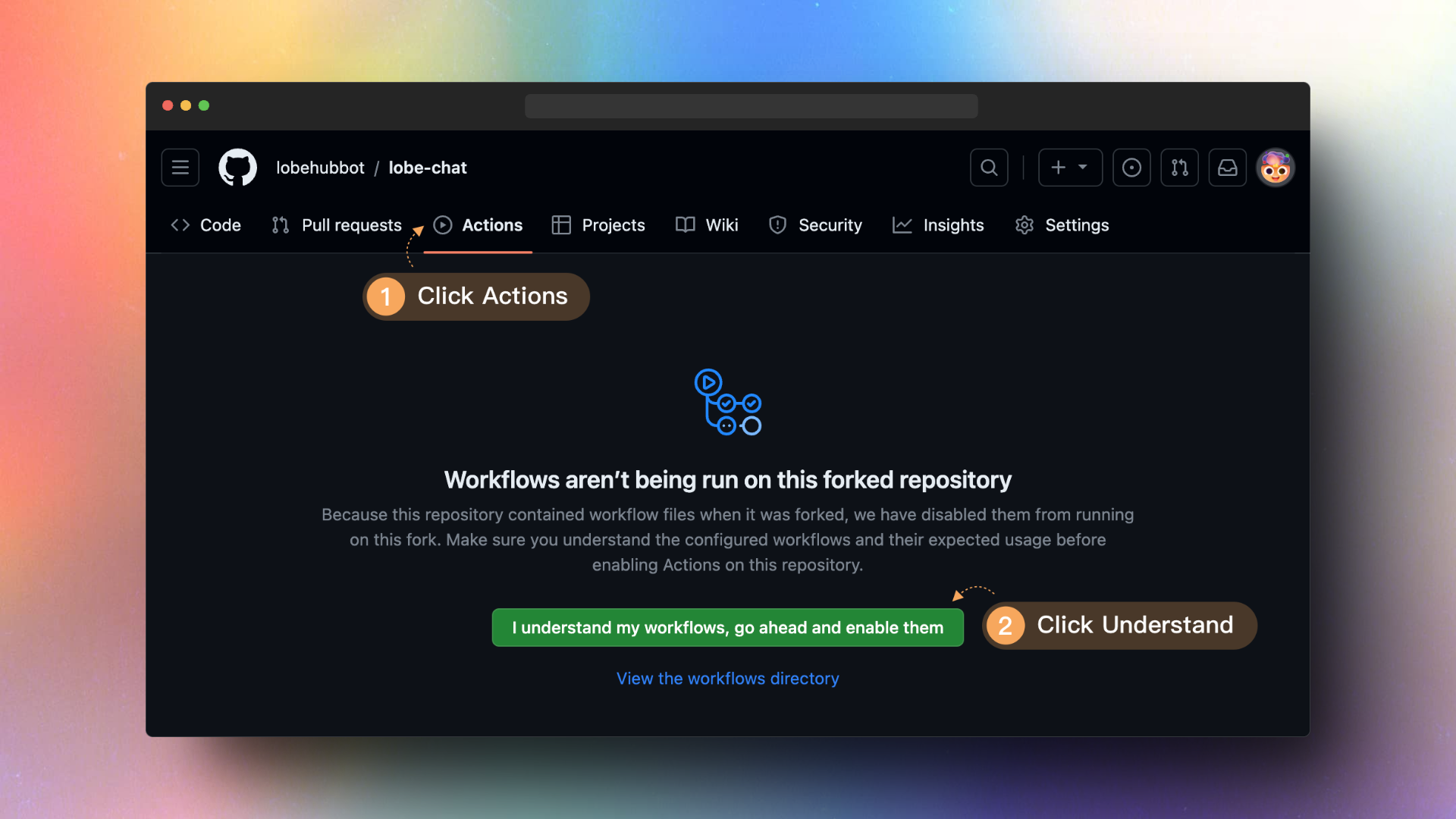
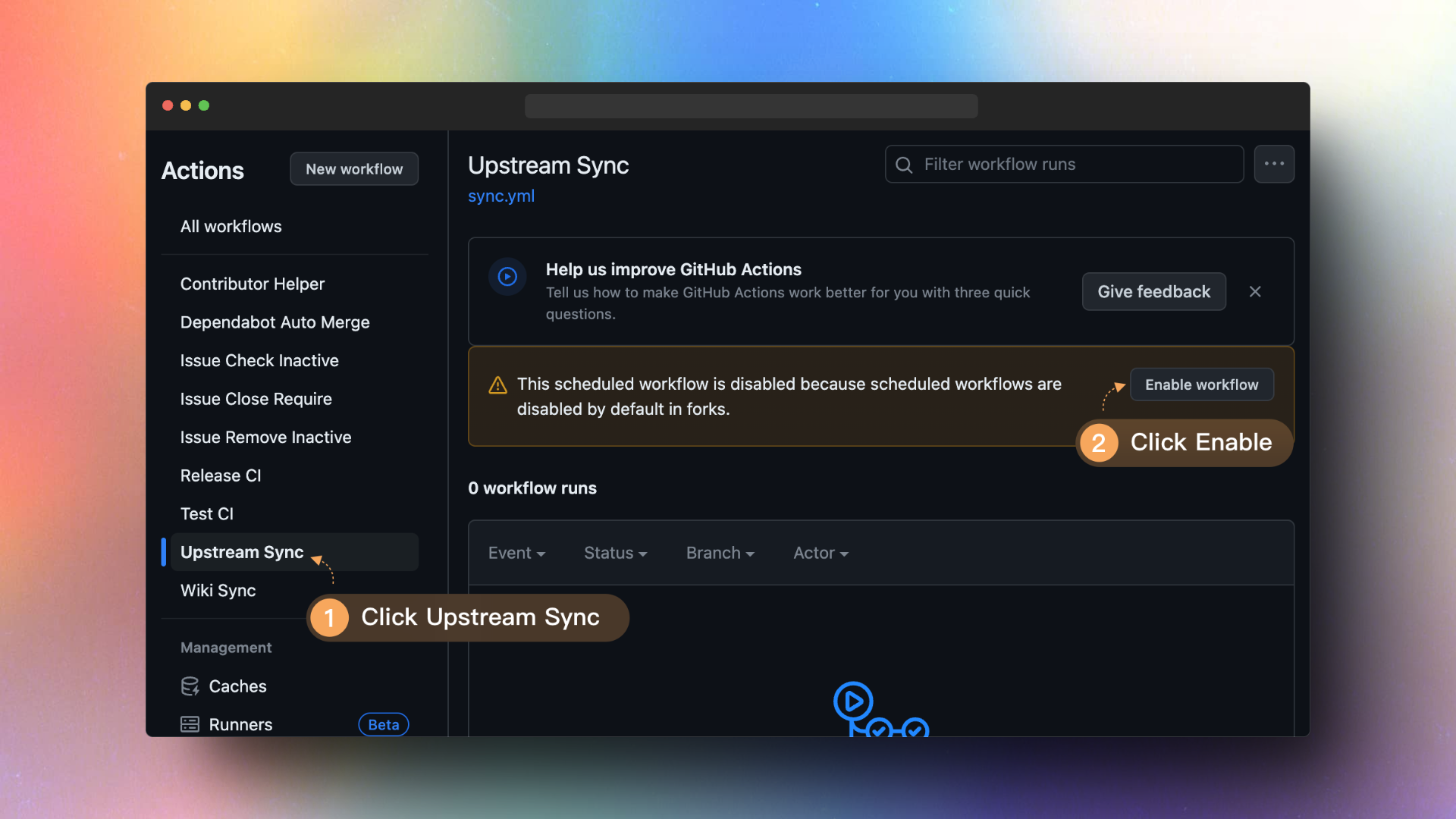
After forking the project, due to Github's limitations, you need to manually enable Workflows on the Actions page of your forked project and start the Upstream Sync Action. Once enabled, you can set up automatic updates to occur every hour.
|
|
18
|
+
|
|
19
|
+
|
|
20
|
+
|
|
21
|
+
## `B` Docker Deployment
|
|
22
|
+
|
|
23
|
+
Upgrading the Docker deployment version is very simple, you just need to redeploy the latest LobeChat image. Here are the commands required to perform these steps:
|
|
24
|
+
|
|
25
|
+
<Steps>
|
|
26
|
+
### Stop and Remove the Current Running LobeChat Container
|
|
27
|
+
|
|
28
|
+
Assuming the LobeChat container is named `lobe-chat`, use the following commands to stop and remove the currently running LobeChat container:
|
|
29
|
+
|
|
30
|
+
```fish
|
|
31
|
+
docker stop lobe-chat
|
|
32
|
+
docker rm lobe-chat
|
|
33
|
+
```
|
|
34
|
+
|
|
35
|
+
### Pull the Latest LobeChat Image
|
|
36
|
+
|
|
37
|
+
Use the following command to pull the latest Docker image for LobeChat:
|
|
38
|
+
|
|
39
|
+
```fish
|
|
40
|
+
docker pull lobehub/lobe-chat
|
|
41
|
+
```
|
|
42
|
+
|
|
43
|
+
### Restart the Docker Container
|
|
44
|
+
|
|
45
|
+
Redeploy the LobeChat container using the newly pulled image:
|
|
46
|
+
|
|
47
|
+
```fish
|
|
48
|
+
docker run -d -p 3210:3210 \
|
|
49
|
+
-e OPENAI_API_KEY=sk-xxxx \
|
|
50
|
+
-e OPENAI_PROXY_URL=https://api-proxy.com/v1 \
|
|
51
|
+
-e ACCESS_CODE=lobe66 \
|
|
52
|
+
--name lobe-chat \
|
|
53
|
+
lobehub/lobe-chat
|
|
54
|
+
```
|
|
55
|
+
|
|
56
|
+
</Steps>
|
|
57
|
+
|
|
58
|
+
Ensure that you have sufficient permissions to stop and remove the container before executing these commands, and that Docker has sufficient permissions to pull the new image.
|
|
59
|
+
|
|
60
|
+
<Callout type={'info'}>
|
|
61
|
+
|
|
62
|
+
**If I redeploy, will I lose my local chat records?**
|
|
63
|
+
|
|
64
|
+
No need to worry, you won't. All of LobeChat's chat records are stored in your local browser. Therefore, when redeploying LobeChat using Docker, your chat records will not be lost.
|
|
65
|
+
|
|
66
|
+
</Callout>
|
|
@@ -1,12 +1,6 @@
|
|
|
1
|
-
|
|
1
|
+
import { Callout, Steps } from 'nextra/components';
|
|
2
2
|
|
|
3
|
-
##
|
|
4
|
-
|
|
5
|
-
- [`A` Vercel\`\` / Zeabur 部署](#a-vercel--zeabur-部署)
|
|
6
|
-
- [启动自动更新](#启动自动更新)
|
|
7
|
-
- [`B` Docker 部署](#b-docker-部署)
|
|
8
|
-
|
|
9
|
-
## `A` Vercel\`\` / Zeabur 部署
|
|
3
|
+
## `A` Vercel / Zeabur 部署
|
|
10
4
|
|
|
11
5
|
如果你根据 README 中的一键部署步骤部署了自己的项目,你可能会发现总是被提示 “有可用更新”。这是因为 Vercel 默认为你创建新项目而非 fork 本项目,这将导致无法准确检测更新。我们建议按照以下步骤重新部署:
|
|
12
6
|
|
|
@@ -16,33 +10,37 @@
|
|
|
16
10
|
|
|
17
11
|
### 启动自动更新
|
|
18
12
|
|
|
19
|
-
>
|
|
20
|
-
>
|
|
21
|
-
> 如果你在执行 `Upstream Sync` 时遇到错误,请手动执再行一次
|
|
13
|
+
<Callout>如果你在执行 `Upstream Sync` 时遇到错误,请尝试手动执再行一次</Callout>
|
|
22
14
|
|
|
23
15
|
当你 Fork 了项目后,由于 Github 的限制,你需要手动在你 Fork 的项目的 Actions 页面启用 Workflows,并启动 Upstream Sync Action。启用后,你可以设置每小时进行一次自动更新。
|
|
24
16
|
|
|
25
|
-

|
|
26
|
-

|
|
17
|
+
 
|
|
27
18
|
|
|
28
19
|
## `B` Docker 部署
|
|
29
20
|
|
|
30
21
|
Docker 部署版本的升级非常简单,只需要重新部署 LobeChat 的最新镜像即可。 以下是执行这些步骤所需的指令:
|
|
31
22
|
|
|
32
|
-
|
|
23
|
+
<Steps>
|
|
24
|
+
### 停止并删除当前运行的 LobeChat 容器
|
|
25
|
+
|
|
26
|
+
假设 LobeChat 容器的名称是 `lobe-chat`,使用以下指令停止并删除当前运行的 LobeChat 容器:
|
|
33
27
|
|
|
34
28
|
```fish
|
|
35
29
|
docker stop lobe-chat
|
|
36
30
|
docker rm lobe-chat
|
|
37
31
|
```
|
|
38
32
|
|
|
39
|
-
|
|
33
|
+
### 拉取最新的 LobeChat 镜像
|
|
34
|
+
|
|
35
|
+
使用以下命令拉取 LobeChat 的最新 Docker 镜像:
|
|
40
36
|
|
|
41
37
|
```fish
|
|
42
38
|
docker pull lobehub/lobe-chat
|
|
43
39
|
```
|
|
44
40
|
|
|
45
|
-
|
|
41
|
+
### 重新启动 Docker 容器
|
|
42
|
+
|
|
43
|
+
使用新拉取的镜像重新部署 LobeChat 容器:
|
|
46
44
|
|
|
47
45
|
```fish
|
|
48
46
|
docker run -d -p 3210:3210 \
|
|
@@ -53,10 +51,14 @@ docker run -d -p 3210:3210 \
|
|
|
53
51
|
lobehub/lobe-chat
|
|
54
52
|
```
|
|
55
53
|
|
|
54
|
+
</Steps>
|
|
55
|
+
|
|
56
56
|
确保在执行这些命令之前,您有足够的权限来停止和删除容器,并且 Docker 有足够的权限来拉取新的镜像。
|
|
57
57
|
|
|
58
|
-
>
|
|
59
|
-
|
|
60
|
-
|
|
61
|
-
|
|
62
|
-
|
|
58
|
+
<Callout type={'info'}>
|
|
59
|
+
|
|
60
|
+
**重新部署的话,我本地的聊天记录会丢失吗?**
|
|
61
|
+
|
|
62
|
+
放心,不会的。LobeChat 的聊天记录全部都存储在你的本地浏览器中。因此使用 Docker 重新部署 LobeChat 时,你的聊天记录并不会丢失。
|
|
63
|
+
|
|
64
|
+
</Callout>
|